Amazon Bedrock AgentCore Harness - The Managed Agent Loop and the Export-to-Code Boundary
First Published:
Last Updated:
Every agent has an orchestration layer: a loop that calls the model, picks tools, passes results
back, manages context, and handles failures.
If you've ever operated an agent yourself, you'll quickly understand what that single sentence means. It involves calling a model, interpreting tool selection from the returned output, executing those tools, returning the results to the conversation, and trimming the context so it does not overflow. If something fails, you need to recover from that point. For anyone who has written one, these actions come to mind in the shape of code.
The AgentCore harness replaces this layer with a configuration. The same page describes it in a single sentence.
The managed agent harness in AgentCore turns that work into configuration.This article explores the extent of that replacement. What is reflected in the configuration, and what decisions are being made by someone, without being reflected in the configuration? Furthermore, when you go out through the exit that writes the agent back as code, is what comes back the same shape as what you gave up?
Scope. This article is a description of the structure of a single resource, the harness, and is not a tutorial on how to build agents. It will not provide step-by-step console instructions or present a series of code examples. It will not discuss pricing. While the documentation does describe the billing structure of the harness, the specific costs and billing units are outside the scope of this article. It also does not address session isolation boundaries. While Section 5 briefly mentions that the harness runs each session within an independent microVM, the selection of those units, and what those units do not stop, are the primary topics covered in the existing Agent Sandboxing and Blast-Radius Isolation on AWS. OWASP Top 10 for Agentic Applications Mapped to AWS Controls works out the lifetime of a session and the boundary between agents on one instance. Strands Agents Multi-Agent Pattern Selection Guide covers the design of multi-agent systems after you go out to code, and Amazon Bedrock AgentCore Production Operations Guide covers the design for production. A comprehensive overview of the entire AgentCore ecosystem can be found in Amazon Bedrock AgentCore Master Index.
Terminology. The term harness is the most important to understand in this article. In the world of implementation this word names at least three different things. One relates to the design of an environment for local coding agents, another refers to evaluation tools used to measure quality. However, in this article, harness refers specifically to a resource name within Amazon Bedrock AgentCore. It refers to a single, concrete object created by the
CreateHarness API and invoked by the InvokeHarness API. Unless otherwise specified, whenever harness is used in this article, it refers to this specific meaning. Another term requiring attention is AgentCore Runtime. That is the name of the service the harness runs on, not the common noun for the time at which something runs. This article never uses the word in that common-noun sense.Verification Date. Everything this article says about availability, default values, and the composition of fields was verified against primary source materials as of September 14, 2026. As of that same date, the AgentCore Control API reference carried a publication date of September 11, 2026. The list of Regions will grow and more fields will arrive. Where numerical values are mentioned, it is clearly indicated whether the value represents a default value or a specific number documented in the source material.
1. What You Are Actually Writing When You Write an Agent Loop
To see what was folded in, it helps to look at the folded side first.When you write an agent loop yourself, what you actually write is not the model call. The model call itself can be handled in a single line of code. The real complexity lies in the surrounding infrastructure. This includes processing to format tool definitions and pass them to the model, validating the arguments returned from the tool call, handling the execution of the tool and returning the result (even if it fails, without raising an exception), and processing to trim or summarize the conversation history to prevent it from exceeding the context window. It also includes counting the number of iterations and determining when to stop the loop. Crucially, it includes the logic to ensure that these processes do not interfere with each other when used concurrently by multiple users.
AWS refers to this layer as an agent harness and specifically names the components it includes.
Running it in production takes real infrastructure underneath: compute, a sandbox, secure tool
connections, filesystem, memory, identity, and observability. Together, they form the agent
harness, the system that lets an agent actually run.
The term harness does not just refer to the loop itself. It names the loop together with everything underneath that the loop needs in production. That whole range is what AgentCore folded in.
1.1 The Same Thing Is Counted Three Ways
One thing has to be said in advance. The breakdown of what was folded in varies in number depending on which AWS document you read.The developer guide divides them into five categories: calling the model, selecting tools, returning results, managing context, and handling failures. The GA (Generally Available) announcement breaks them down into six.
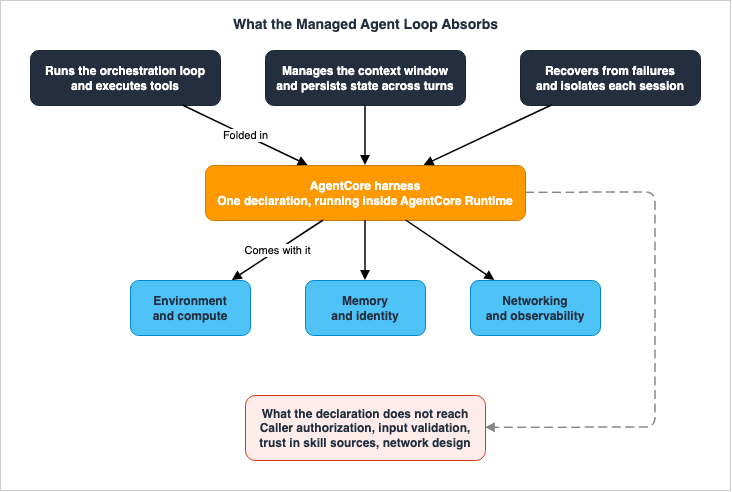
It runs the orchestration loop, executes tools, manages the context window, persists state across
turns, recovers from failures, and isolates each session.
The service overview page provides a broader categorization, grouping them into four: orchestration, tool execution, memory management, and response generation.
While all three categorize the same underlying elements, they do so at different levels of granularity. This article will not assert a specific number of categories. Readers should primarily focus on the most detailed breakdown presented in the GA announcement, using the other two as supplementary information. This article takes the GA announcement as its axis because it alone lists state persistence and session separation as separate items. These two are the most expensive to write yourself, and understanding them will also be relevant in Section 7, where this article returns to the code to see what remains.
1.2 The Loop Was Never the Hard Part
AWS articles explaining GA directly address this point.But the loop was never the hard part. The hard part was everything around it.Anyone who has written their own solution will likely agree. The core loop itself can be written in just a few dozen lines of code. The high cost comes from setting up the sandbox, determining a secure location for sensitive information, connecting to the network, ensuring dependencies are placed in the correct containers, and managing concurrency, isolation, and state - all of which become critical when a single user expands to multiple users.
That observation says precisely what the harness is selling. It is not selling the loop implementation itself. Instead, it is selling the whole set of surrounding pieces needed to run the loop in production, assembled by a single declaration.
2. The Harness Is Not the Simplified Version
One premise has to be cleared up first.When you hear that agents can be created simply through configuration, it is tempting to assume this is a basic entry point, a trial version that you'll eventually transition away from and replace with your own custom code. However, AWS explicitly refutes this interpretation, as stated in the GA announcement.
This is not a starter tool teams outgrow: the configuration they start with is what they operate at
scale, and when custom orchestration is needed, the harness exports to code on the same platform
without rebuilding anything.
The same announcement reiterates this point at the end, using different wording to convey the same message.
The agent declared on day one is the agent that runs at the thousandth, on the same foundation
throughout.
This is a statement from the vendor, not a discussion of verified performance. However, the statement itself is specific and can be validated. It can be reduced to two key facts: the scope of what can be configured, and the existence of somewhere to go when configuration runs out. Sections 3 through 7 of this article will systematically examine these two points.
2.1 The Harness Runs Inside AgentCore Runtime
There's one more point to understand to avoid misunderstanding the structure. The harness is not a separate service standing alongside AgentCore Runtime. It is a managed abstraction that sits on top of the Runtime. A page explicitly states this.The harness is a managed abstraction that runs inside Runtime - CloudTrail records harness
operations under AWS::BedrockAgentCore::Runtime.That same page outlines two key differences, one line each. Regarding the Runtime:
AgentCore Runtime is a serverless hosting environment. You bring agent code - written in any
framework or no framework - wrap it with the AgentCore SDK's BedrockAgentCoreApp entrypoint,
package it into an ARM64 container, push it to Amazon ECR, and deploy. The orchestration loop is
yours.
Regarding the harness:
AgentCore harness is a managed agent harness - the orchestration loop itself is provided, powered
by Strands Agents.
Therefore, the difference between the harness and Runtime is not the platform underneath. It is about who writes the loop. The underlying platform is the same; the difference lies in whether AWS-written loops are placed on it, or whether you place your own loops. This distinction matters again in Section 7, where the destination of an export is read.
The loop inside the harness is written by Strands Agents. This is an open-source agent framework published by AWS, and the developer guide does not obscure that relationship.
The harness is powered by Strands Agents, the open-source agent framework from AWS.3. What Goes Into the Declaration
The claim that a harness is a declaration can be checked against the request body ofCreateHarness. According to the AgentCore Control API reference, this request accepts 18 fields. This article uses the number 18, drawing it from the AgentCore Control API reference rather than the language-specific SDK pages. The language-specific SDK pages convert field names into that language's naming convention, which makes them unusable for checking names.3.1 The Smallest Harness Is a Name and a Role
Of the 18 fields, only two are required, and they are a name and a role:harnessName and executionRoleArn. That is the smallest harness you can declare.This is easy to read past, but it carries a crucial fact:
model is not required. Neither is systemPrompt, tools, skills, or memory. In other words, based on the API definition, you can create a harness without specifying a single character that defines the agent's behavior.However, a harness created in this way is not necessarily inert. Leave a field unset and a default takes its place. The model becomes the one AWS chose, every built-in tool turns on, and a memory resource appears. It is at this point that the question this article addresses arises: what happens to the elements that were not explicitly declared? They have not disappeared; instead, someone else is deciding them. However, the declaration itself does not reveal who is making those decisions.
The remaining 16 optional fields are as follows:
allowedTools, authorizerConfiguration, clientToken, environment, environmentArtifact, environmentVariables, maxIterations, maxTokens, memory, model, skills, systemPrompt, tags, timeoutSeconds, tools, and truncation.The list mixes three groups of different character. One group determines what the agent will do, another determines where the agent will run, and the third determines when the agent will stop.
3.2 Nine Fields Move Per Call, and Everything Else Makes a New Version
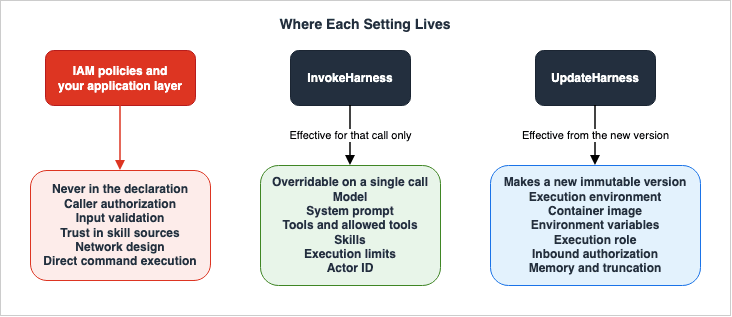
There's another layer to harness configuration. TheInvokeHarness request accepts some of the same fields, and they apply to that one invocation. The developer guide explains this two-tiered structure as a core design principle.This is the core of the config-based model: defaults at creation time, overrides at invocation
time. You can test N model/prompt/tool combinations in the time it would take to redeploy once.You can override 9 settings during an invocation:
model, systemPrompt, tools, skills, allowedTools, maxIterations, maxTokens, timeoutSeconds, and actorId. The last one, actorId, is only available to the caller and is not part of the CreateHarness function. The flags that the AgentCore CLI's invoke command can override are exactly these 9, so the CLI does not diverge from the API.What did not make those nine is the true outline of the harness. This includes the execution environment, the container image you provide, environment variables, the execution role, the inbound authorization settings, memory, and the truncation strategy. These cannot be modified on a per-invocation basis. To change them, you must call
UpdateHarness, which creates a new version.The versioning system is straightforward. A version labeled
V1 is automatically created upon initial creation. Each update generates a new version, which holds the complete configuration as it stood at that point. Once it exists, a version never changes.Endpoints are names that refer to specific versions. The endpoint named
DEFAULT always points to the latest version and automatically updates to reflect changes. Endpoints with custom names do not automatically update. A GA explainer article succinctly describes this distinction in a single sentence.The DEFAULT endpoint auto-advances on every update. Named endpoints (PROD, STAGING) stay pinned
until you explicitly promote.A harness declaration therefore holds two meanings at once. One is a temporary declaration, specifying how a particular invocation should behave. The other is a permanent declaration, defining the characteristics of a specific version. The first category includes 9 settings; the second encompasses everything else. This distinction serves as the initial benchmark when interpreting the harness configuration.
3.3 Three Values Decide Where It Stops
Three fields determine when the agent stops.maxIterations sets the maximum number of loop iterations, timeoutSeconds sets the maximum execution time of the loop, and maxTokens sets the maximum number of generated tokens. All three are optional and can be overridden on a per-call basis.Previously, when writing loops manually, these three values were the conditions in your own
while loop. After the move to configuration, deciding the values is still yours. What was folded in is not the values themselves but the code that reads them and stops.One point about these three values could not be confirmed in the primary documentation. The API reference lacks any mention of a
Valid Range for these values, and neither the default values nor the maximum limits are explicitly stated. In the range of sources this article consulted, no document stated what applies when you leave these unset, nor what the largest value you can set is.3.4 maxTokens Has Two Definitions
Going one step further, of these three it ismaxTokens alone whose meaning differs between documents.The API reference for
CreateHarness defines it as follows:The maximum total number of output tokens the agent can generate across all model calls within a
single invocation.The API reference for
InvokeHarness defines it as follows:The maximum number of tokens the agent can generate per iteration. If specified, overrides the
harness default.The former refers to the cumulative total for an entire call, while the latter refers to the limit per iteration. The field, despite having the same name, is described differently in each context: as a cumulative maximum in one case, and as a maximum per iteration in the other. If you configure a loop to run 10 times, the values would differ by a factor of 10.
This is not a matter of inconsistent terminology, but rather a difference in when the specified value takes effect. This article will not favor one definition over the other. Section 9 takes up this discrepancy.
4. Three Doors, Three Different Minimums
Up to this pointCreateHarness has been read as the authoritative source. But there is more than one door into a harness, and the door you come in through decides the minimum you have to write.4.1 Coming In Through the Service API
As you've already seen, the mandatory parameters areharnessName and executionRoleArn. The developer guide also clearly explains the behavior when memory is omitted.When you create a harness directly with the service API and omit the memory configuration, the
service provisions managed memory.Omission does not mean deactivation. Omitting it results in one memory resource being created in your own account. The GA article details this default behavior, specifying that two strategies - semantic extraction and summarization - are enabled, the event retention period is set to 30 days, encryption uses AWS-owned keys, and the namespace template uses
actorId as the key to provide isolation.The same article also delves into the nature of this created memory resource.
The managed memory is automatic but not opaque. It's a real, addressable AWS resource you can
query, attach to a different agent, audit, or hand to an analytics pipeline.
The automatically created resource exists as a single resource that you can access, rather than a hidden internal state. However, be mindful of the default deletion behavior. The developer guide states that
DeleteHarness will, by default, delete this memory resource as well. If you wish to preserve it, you must explicitly specify that it should not be deleted during the deletion process.4.2 Coming In Through the AgentCore CLI
Here, a sentence continues from the previous section on the same page.The AgentCore CLI uses a different default: new CLI harnesses have memory disabled unless you
select managed memory or an existing memory resource.This refers to the same service and the same resource. When creating it via the API, omitting this parameter means enabling memory; when creating it via the CLI, omitting it means disabling memory.
This is not a matter of interpretation of the configuration; rather, the default behavior is simply reversed. You cannot determine whether an agent remembers conversations just by reading its definition. It depends on which door it came in through, the API or the CLI.
4.3 Coming In Through Terraform
As a third entry point, there's the AWS provider published by HashiCorp. A resource calledaws_bedrockagentcore_harness exists, and the provider's documentation describes this resource as follows:Manages an AWS Bedrock AgentCore Harness. A Harness is a managed agent loop that wraps model
configuration, tools, skills, memory, and compute environment into a single deployable unit.Furthermore, it lists four required arguments:
harness_name, execution_role_arn, model, and system_prompt.In the AWS API, both
model and systemPrompt were optional. However, when attempting to create the same resource using Terraform, these two become mandatory. The provider is imposing stricter constraints than the API.This is not necessarily a flaw in the provider itself, but rather a characteristic of declarative tools. Terraform manages state, and it is more stable to have you state these values explicitly rather than allowing the service to implicitly apply default settings, which would then be incorporated into the state. Nevertheless, the fact remains that the minimum requirements for the same harness differ depending on the entry point.
In addition, CloudFormation also includes two resource types:
AWS::BedrockAgentCore::Harness and AWS::BedrockAgentCore::HarnessEndpoint, which represent a fourth entry point.4.4 What This Means for a Reader of the Configuration
Treating the harness as configuration means assuming that understanding the configuration file will reveal how the agent behaves. The difference between the three entry points above shows that this assumption is conditional.While the settings defined in the configuration file will indeed function as written, the meaning of what the configuration leaves undefined varies with how that configuration was applied. The same harness definition can land on opposite sides of the memory default depending on whether it came through an AgentCore CLI project file or a direct API call.
This characteristic becomes particularly relevant in organizations that reach the harness through more than one entry point. For example, when developers create agents using the CLI while production environments use Terraform, the minimum requirements and default settings between the two may not align.
5. What Comes With the Declaration
This article has covered what goes into the declaration. The other half of the harness is what comes with the declaration without being declared, and the developer guide lists that range.You declare what your agent does (model, tools, skills, instructions); AgentCore handles the
environment, compute, memory, identity, networking, and observability that turn the config into a
running agent.5.1 The Session and Its Filesystem
One sentence sets out what a session is.Every harness session is stateful by default and runs in a secure, isolated microVM per session
(backed by AgentCore runtime).The security documentation provides a more detailed explanation, mentioning Firecracker. As the choice of this isolation unit and what it does not stop are already covered in the existing Agent Sandboxing and Blast-Radius Isolation on AWS, this article will not delve further into those details. The lifetime of a session and the handling of idle time are deferred in the same way.
Each session includes the agent's own file system and shell. Three places hold data that has to outlive a session. Service-managed session storage does not require a VPC. Both Amazon EFS access points and Amazon S3 Files access points require a VPC. In every case the mount path sits under
/mnt.When Amazon S3 Files is mounted, any files written to it are synchronized bidirectionally with the bucket. The rules that synchronization runs by are the subject of How Amazon S3 Files Keeps a Bucket and a File System in Sync. For the harness, all of that is folded into one mount setting.
You can also bring your own container image. Keep one behavior in mind.
The harness overrides your container's ENTRYPOINT and CMD to keep it running as an environment.
Your installed software, filesystem, and environment variables are available to the agent; your
container's startup command is not executed.
What is brought in is the environment, not the process. Startup commands written to the container will not be executed. The image has to be built for the
linux/arm64 platform.5.2 Tools Are Declarative, and Two Are There From the Start
The developer guide states the nature of tools up front.Tools are declarative. You list what the agent can call; AgentCore handles invocation, credentials,
and results. The harness supports five tool types, plus the built-in filesystem and shell tools.The five types are a remote MCP server, AgentCore Gateway, AgentCore Browser, AgentCore Code Interpreter, and inline functions. Only the last one has a different nature; it does not run inside the harness. When the agent calls this tool, the harness stops, and the call returns to the calling code. This provides a pathway for human approval and for processing that you want to handle directly.
The two built-in tools are
shell and file_operations. These are available in all sessions without needing to be declared. If you do not want to allow them, you can restrict them using allowedTools. One default applies here.The allowedTools parameter controls which tools the agent can use. If omitted, all tools are
allowed.Therefore, regarding tools, not declaring them does not imply a limitation. If you do not declare any, everything is open.
The two built-in tools also have significant side effects.
Together, the default shell and file_operations definitions add approximately 900 input tokens to
each model request. The exact count varies by model and can change as tool definitions evolve.
As mentioned, these are approximate figures, and they may vary depending on the model and may change in the future. The structure is more important than the values themselves. Tool definitions ride along in the model's input even when the tool never runs. Furthermore, a single call can trigger the model to be called multiple times, and this occurs repeatedly within that single call. Even if unused, these elements continue to occupy a portion of the context.
5.3 Skills Have Four Sources
Skills bundle knowledge the agent reaches for only when a task calls for it. The GA explainer article describes how that knowledge is loaded.The harness loads skill metadata and pulls full content into context only when the task actually
calls for it.Skills come from four sources. One option activates a bundled package provided by AWS. Another retrieves them from a Git repository. A third option retrieves them from your own S3 bucket. Finally, you can specify a path within a container that you have already imported. These four options are mutually exclusive; you must select only one for each skill.
The same shape can be written on
InvokeHarness, so skills can be layered for each invocation. The harness materializes each skill onto the session filesystem at session start, or on a new invocation once the configuration changes.5.4 Memory, Identity, Networking, and Observability
Of the six areas AWS has outlined, environment and compute have already been covered. The remaining four - memory, identity, networking, and observability - are connected to separate functionalities within AgentCore.Memory consists of layers that manage conversation state, divided into a short-term side that holds raw events within a session, and a long-term side that stores knowledge extracted according to defined strategies. The developer guide lists four such strategies in a table:
SEMANTIC (factual knowledge), SUMMARIZATION (running summaries), USER_PREFERENCE (preferences and settings), and EPISODIC (significant events as discrete episodes). The text on the same page also mentions additional strategies, so this article will not claim to list every possible strategy. If even one strategy is active, the long-term memory search will automatically configure itself, with a default topK of 10 and a relevanceScore of 0.2. If you provide your own custom memory, explicitly configuring the search will prevent automatic configuration.Three truncation strategies apply once the context outgrows the window. The default,
sliding_window, keeps the most recent N messages. summarization compresses the older ones, and none does nothing.For identity, a caller authenticates in one of two ways. One uses IAM signatures, while the other uses JWTs issued by an authorization server. The security documentation clearly outlines the differences between these two methods.
SigV4 and per-user identity. When callers authenticate with SigV4 (AWS IAM), the harness does not
propagate per-user identity into downstream tool calls.
The same page also says that support for this is planned for a future release. At design time this turns into one judgment: if you want downstream APIs called with per-user credentials, take the JWT path.
Networking carries a default as well.
By default, harness sessions run on the public network.For access within a VPC, additional requirements apply. Since the harness retrieves managed container images from a private ECR repository at the start of each session, a VPC endpoint is required for this purpose. The developer guide also details the symptoms that occur when these components are not in place.
Without the required endpoints, sessions fail to start due to image pull timeouts.As for observability, every action is traced automatically. However, the design for production observability and disaster recovery is the primary focus of the existing Amazon Bedrock AgentCore Production Operations Guide, so this article records only that it comes with the declaration.
6. What the Declaration Does Not Reach
From here on, the material bears directly on whether you take the harness at all. What follows is the part of the machine the declaration does not reach.Saying that a given capability cannot be expressed in the declaration is a strong claim. The fact that something was not found does not prove that it does not exist. Therefore, this article will refrain from providing its own list of examples. It will only cite the negative statements made by AWS itself.
6.1 The Rows AWS Marks Not Supported
The page comparing the harness and AgentCore Runtime includes a table detailing feature support. This table uses a four-level legend. The four descriptions read as follows. The source places a marker glyph in front of each line; the glyphs are dropped here and only the sentences are quoted.Supported with no custom code required.
Supported, but you must maintain your own implementation.
Configuration enables it, but code is required to fully use it.
Not supported.As of October 3, 2026, the last marker appears on three rows in the harness column. These are: agent framework selection, bidirectional streaming, and non-agent loop patterns. The notation for the third line is as follows:
Non-agent-loop patterns (graph, workflow style)For all three lines, the AgentCore Runtime column displays the second marker. This indicates that while support exists, implementation requires self-maintenance. When this article was first verified on September 14, 2026, the table marked a fourth row, hooks, as not supported. That row now reads Lifecycle hooks and carries the third marker (configuration enables it, but code is required to fully use it), and the harness documentation has a lifecycle hooks page. The CreateHarness request in the API reference, as read on October 3, 2026, also has a
hooks field, which is not among the 18 fields counted in Section 3 on September 14, 2026.For the row on non-agent-loop patterns, a separate document says the same thing in different words. An AWS article on migrating to AgentCore states the constraint on the shape of the harness in one sentence.
It hosts a single model-driven loop, not a graph, so a graph-shaped agent reaches it by becoming
that loop first.
Two independent sources state the same constraint, so this point is corroborated. Agents with graph-like structures will need to be refactored into a single loop before migrating to the harness.
6.2 Another Document Says the Same Thing Differently
The migration guide for Bedrock Agents Classic also contains descriptions of the limitations of the harness. Rather than listing items, these limitations are presented as conditions for making decisions.Use the harness unless you have a specific reason to own the loop yourself (for example, an
existing agent codebase to migrate, or advanced orchestration the harness does not yet express).This is an AWS recommendation. This article presents it as a direct quote, and does not rephrase it as the author's recommendation. When reading, it is best not to drop the
yet at the end. The text states that certain functionalities are currently not expressible, not that they are fundamentally impossible.The corresponding table on the same page provides more specific details for individual items. It states that stage-specific prompt overrides are not directly replicated. Collaboration between multiple agents is possible if the agents are exposed as tools, but routing-mode multi-agent is not straightforward today. Regarding custom orchestrators, the text indicates that these are supported by AgentCore Runtime but not available through the harness.
6.3 A Path That Bypasses the Loop
One more fact bears on design, though the feature grid does not carry it. A harness session has an API that runs a command directly, without going through the loop.Not everything needs to go through the agent loop. InvokeAgentRuntimeCommand gives you direct
shell access to the harness microVM: deterministic command execution with no model reasoning, no
token cost, no ambiguity.This functionality is useful for tasks such as inserting specific processing steps before and after a call, retrieving repositories and adding dependencies, retrieving artifacts created by the agent, and inspecting content during development. It is a rational approach, as it allows you to avoid sending operations that do not require the model's consideration.
One caveat here bears directly on how you draw the boundary.
allowedTools scopes LLM tool selection during InvokeHarness only. It does not affect
InvokeAgentRuntimeCommand, which is a separate API with its own IAM action
(bedrock-agentcore:InvokeAgentRuntimeCommand) that executes commands directly without passing
through the LLM.
Even if you disable
shell in the allowedTools list, it does not prevent the shell from being executed. Disabling a tool restricts the model's ability to select it as an option; it does not block the ability to directly access it through the API. The developer guide explicitly addresses this.To prevent direct command execution, do not grant bedrock-agentcore:InvokeAgentRuntimeCommand in
your IAM policies.There's a distinction between what can be restricted through declarations and what can be restricted through IAM. If you only examine the configuration file, you may overlook the second of these.
6.4 The Abstraction Leaks Into IAM
The same pattern shows up in how permissions work.Harness APIs require permissions on both the harness resource and the underlying AgentCore Runtime
resource. For example, calling InvokeHarness requires both bedrock-agentcore:InvokeHarness and
bedrock-agentcore:InvokeAgentRuntime permissions on the harness ARN.The same rules apply to operations on the control side as well. Updating requires
UpdateAgentRuntime, and deleting requires DeleteAgentRuntime.The harness sits above the Runtime, but seen from IAM that abstraction shows through. Design permissions from the harness alone and the policy covers half the actions you need.
6.5 The Nine Items That Stay on Your Side
The security page outlines the division of responsibilities using two bulleted lists. AWS is responsible for six items, while nine are yours. The nine on your side are: ensuring the security of agent code and dependencies, implementing IAM access control and resource policies, ensuring the security of commands executed within a session, enforcing the mapping between sessions and users, validating inputs and preventing prompt injection, validating model configurations, ensuring the sources of skills and instructions are trusted, updating container images, and configuring the network.The same page also states that this division of responsibilities is not specific to the harness.
The harness is built on AgentCore Runtime and the security boundary is the same: IAM or JWT
authentication combined with microVM isolation. Any principal that passes that gate reaches the
tools and capabilities configured on the harness, which makes caller authorization and input
validation a customer responsibility.
Regarding input validation in particular, the page clarifies the extent to which the harness handles this.
The harness validates the structure of the request it accepts, but it does not inspect the meaning
of prompts, screen content, or enforce behavioral constraints on the agent.
While the harness examines the structure, it does not interpret the meaning. That line is the premise for reading Section 7, which works out what changes once you go out to code.
Similar caveats apply to model configuration validation. The model specification includes a field for additional parameters that go straight through to the provider.
These parameters are passed through to the underlying model provider unchanged. The harness does
not validate, filter, or restrict these parameters.
The same page lists four things a caller who can write that field can do. They are directing requests to any endpoint, overriding the sending headers, attempting to assume a different IAM role, and changing the target model or Region. If you design the system so that caller input is passed straight to
InvokeHarness, this field goes through with it.The same structure applies to skills.
The harness treats all skill content as trusted input. It does not validate, sanitize, or inspect
the content or source of skills before providing them to the agent.
Skills are one of nine items that can be overridden on a per-invocation basis. The ability to override means that the caller can specify any source.
Where the same line falls for Claude Managed Agents, the OpenAI Agents API, Amazon Bedrock Managed Agents, and GKE Agent Substrate - what each provider runs and what stays with you - is set out side by side in Managed Agent Runtimes.
7. The Exit Back to Code, and What Changes After You Take It
The harness comes with an exit for the point where configuration is no longer enough. The developer guide calls it Export harness to code, and the command isagentcore export harness. A single CLI command generates an agent that behaves as the harness configuration did, as editable Python source.Export harness to code takes a managed harness configuration and generates the equivalent agent as
editable Python source code using the Strands framework.7.1 What Carries Over
What carries over into the generated agent is stated explicitly.The generated agent mirrors the harness's model, tools, skills, memory, execution limits, and
filesystem mounts.The same page provides a detailed list, adding the conversation truncation setting and the inbound authorization setting. It also lists the tools that carry over: remote MCP tools, Gateway, inline functions, Browser, Code Interpreter, and the two built-in tools.
The scope of support is limited. The framework is Strands; the guide lists other frameworks as future plans. Only Python is supported. The build comes in two shapes: the default packages the Python source into a zip, and the other builds a Docker image.
One file also has to be read right after generation.
After every export, EXPORT_NOTES.md is written listing items requiring manual follow-up.The same page also writes
Always read EXPORT_NOTES.md before deploying. Code generated from a configuration is not always complete on its own.7.2 There Is More Than One Destination
This is likely the section most prone to misunderstanding in this article.One sentence describes what the export produces:
The generated agent is a normal AgentCore runtime agent: you own the code, can modify it freely,
and deploy it like any other agent.
Read on its own, that sentence suggests export is a change of form inside AgentCore rather than an operation that leaves it. The sentence from the GA announcement quoted in Section 2 also says the harness exports to code on the same platform, which reinforces that reading.
However, on the same page of the developer guide, there's a section listing deployment options, which outlines a second possible destination.
AgentCore Runtime (managed) - Use agentcore deploy to host in the AgentCore Runtime, which manages
infrastructure, scaling, and credential provisioning automatically.
Self-hosted - Deploy the generated Python agent anywhere that supports Python 3.12+:
  AWS services: Lambda, ECS/Fargate, EC2
  Kubernetes clusters
  On-premise servers
  Any containerized environment
An AWS article explaining GA also states the same thing in a single line.
One CLI command exports the harness as Strands-based code that can host on AgentCore Runtime or
anywhere else
Therefore, the accurate phrasing is this: The default destination for export is the AgentCore Runtime, and as long as it remains there, the compute path, the observability, and the identity are unchanged. But what it generates is ordinary code that runs on Python 3.12 or later, and the developer guide also spells out a path for taking it outside AgentCore. The exit is not closed.
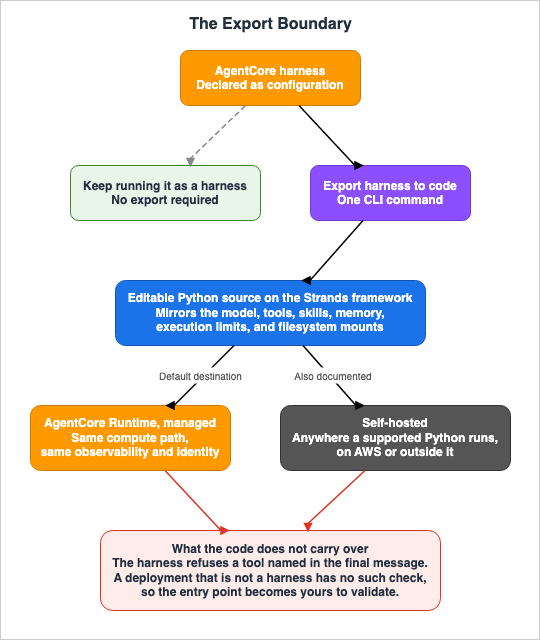
If the harness configuration already does everything you need, you don't have to export - keep
running it as a harness.
7.3 Going Out Adds an Obligation
Reading the security page makes it clear that export is not a symmetrical operation.The harness includes mechanisms to prevent the caller from explicitly invoking tools.
The harness does not accept a toolUse block in the final message of an InvokeHarness request, so a
caller cannot name a tool and have it dispatched directly.
The same paragraph continues, describing scenarios where the harness is not involved.
For AgentCore Runtime deployments (non-harness), AgentCore Runtime provides no server-side
protection. Your agent entrypoint must validate that the prompt field is a string and reject or
strip toolUse content blocks before passing input to the agent framework.
That validation is one of the things the harness had folded in. Once you export and the result becomes an AgentCore Runtime agent, that validation turns into an obligation of yours, to be written at your own entry point. The generated code carries the items the harness configuration held. However, the validation that the harness performed earlier, as a service, is not included in the generated code.
This is not a flaw in the export process. Both sides sit in the same sources, and neither is hidden. However, by examining only the code generated from the configuration, you will not see the missing element. What's lost is not a specific item listed in the configuration; it is the premise the configuration never wrote down.
7.4 What Does Not Carry Over
For the same reason, a few things do not carry over on export.The execution role and its permissions are part of the harness configuration, but the rule that demands permissions on both the harness and the Runtime belonged to how a harness is called. Change the deployment target and the actions you need change with it.
The two-tier scheme of per-call overrides does not carry over either. The nine overrides in Section 3.2 are a characteristic of the
InvokeHarness API, not a characteristic of the generated Python code. Once the code is created, if you want to perform the same action, you'll need to explicitly write that logic yourself.The same applies to the versioning and endpoint mechanisms. In the harness, every update created a new immutable version, and a named endpoint pointed at one. AgentCore Runtime also has versioning and endpoint mechanisms, but that relates back to how you manage your deployments.
One point remains unconfirmed. In the range of sources consulted, no description turned up of a path from the generated code back to the harness configuration. The absence of documentation does not necessarily prove that such an operation does not exist. However, as of now, there's no mention of a round-trip capability.
8. Two Roads Out of Bedrock Agents Classic
Bedrock Agents Classic is the other road into the harness, and it is worth walking down before closing.8.1 Where the Migration Source Sits in Its Lifecycle
Amazon Bedrock Agents now goes by Amazon Bedrock Agents Classic, and it sits in maintenance mode. The user guide states:Amazon Bedrock Agents (launched November 2023) is now Amazon Bedrock Agents Classic and will no
longer be open to new customers starting on July 30, 2026.According to the FAQ on the same page, the restriction covers only two APIs, both of them tied to creating new agents. Accounts with usage in the past 12 months are unaffected. Existing workloads will continue to function as normal, and no end-of-life date has been set.
There is no migration deadline. Bedrock Agents Classic remains available to existing customers in
maintenance mode with no planned end-of-life date.
No new features arrive, though, and the list of available models freezes on the date new customers stop being accepted.
8.2 There Are Two Destinations
Two destinations sit side by side on the page: one is the harness, and the other is an agent defined by code. The page credits the latter with five capabilities: prompt overrides at each stage of orchestration, multi-agent collaboration and supervisor patterns, custom orchestration logic, broader OpenAI-compatible endpoints, and support for any framework.These two options are the same distinction this article has followed throughout: the difference between the harness and AgentCore Runtime. It boils down to who is writing the loop.
8.3 Six of Ten, Documented Rather Than Measured
Another AWS article, dealing with migration, puts a number on what moves when you choose the harness. That article breaks the operational burden into ten items and follows how many of them move at each stage. What it writes about the stage that hands the loop to the harness is this:The figure marks that column documented rather than measured. Six of the ten burdens move there,
against five at stage 2, and dependency updates is the only one that moves here, because the agent
stops being your code. Secrets rotation isn't among them. Identity refreshes tokens rather than
rotating the secrets behind them, so that burden stays yours at stage 3 too.As the excerpt indicates, the article itself explicitly states that these numbers are not a measurement. It is correct to acknowledge this disclaimer. Nevertheless, this breakdown holds value as a reference. Documentation describes what moves; few documents name what does not. The same article also lists items that remain regardless of the stage.
AWS Identity and Access Management (IAM) policies, VPC configuration, web application firewall
(WAF) rules, and secrets rotation stay yours at every stage.
Even when you hand the loop over, rotating secrets stays on your side. What the identity capability does is refresh tokens, not replace the secrets behind them.
9. Where the Primary Sources Disagree
While this article assembled its arguments, seven places turned up where primary sources contradict each other. Six of those discrepancies are between different AWS documents; the remaining one sits between AWS documentation and the HashiCorp provider documentation. This article gives both sides and settles on neither.Number of API Calls. An article explaining GA states that the harness definition and execution involve two API calls. However, the product's FAQ page states
in as few as three API calls. This article does not specify a particular number.Availability Status. The GA announcement and developer guide list the harness as generally available (GA). In contrast, the same product's FAQ page, as of the verification date, states
The managed harness (preview). This article considers the harness to be GA. The discrepancy is raised here because readers who consult the FAQ first may misinterpret the availability status; this is not an attempt to determine which source is correct.Definition of
maxTokens. As seen in Section 3.4, CreateHarness defines it as a cumulative total across one invocation, while InvokeHarness defines it per iteration. This is the discrepancy that bears most directly on designing the boundary values.Override of Truncation Settings. The developer guide's text suggests that truncation settings can be applied to the harness or overridden on a per-call basis. However, the
InvokeHarness request does not include a corresponding field. This article prioritizes the API reference.Options for the export Command. An article explaining GA includes a command with an option to specify the output destination, but this option is not listed in the developer guide's options list. This article prioritizes the options list from the developer guide.
Framework Name. The names of the frameworks listed as potential export destinations vary between pages, using singular and plural forms inconsistently: one page writes
Claude Agent SDK and another writes Claude Agents SDK. Anthropic's official usage employs the singular form.Number of Required Fields. As seen in Section 4.3, the AWS API marks two fields as required, while the Terraform provider marks four.
These seven points divide into four groups. The number of API calls, the availability status, and the options on the export command can be explained as differences in granularity between dedicated feature pages and overview pages. The framework name is a plain variation in how two AWS pages spell it. The number of required fields is a difference between documents from different publishers. The remaining two - the definition of
maxTokens and the ability to override truncation settings - cannot be explained by any of those. Two AWS references state different things about the same named field. These two are the ones that bear most on design.10. What Stays on Your Side
What follows puts the preceding material back into the shape of decisions, which is another way of saying what stays on your side.You are the one who determines the boundaries. The iteration count, the time limit, and the token count are values the harness reads, not values the harness decides. Furthermore, default values are not explicitly stated in the primary documentation. Leave them unset and you run the harness without knowing what value applies.
Not declaring a tool opens it rather than closes it. Omit
allowedTools and every tool is permitted. This includes the built-in shell and file_operations. Narrowing the tools with allowedTools still leaves InvokeAgentRuntimeCommand open; IAM controls that one.You are the one who decides what to have the caller write. Additional parameters for the model configuration, as well as the source of the skills, can be overridden on a per-call basis. Being overridable means that a design which forwards caller input untouched forwards those fields with it.
You are the one who decides which entry point to consider authoritative. Even for the same harness, the defaults and the requirements differ between the service API, the AgentCore CLI, and Terraform. Use one entry point for development and another for production, and the mismatch stays with you as a difference between environments.
Whether or not it has memory is not determined by omission. Because the meaning of omission can vary depending on the entry point, it is impossible to determine, even by reading the definition, whether a harness that has not been explicitly configured has memory.
And you are the one who decides whether to design on the assumption that you can go back. The exit exists. What you come back to has two destinations. However, returning introduces additional obligations. If you build on the assumption that you can go back, look first at what those added obligations are.
This article does not state whether or not you should take the harness. As mentioned in Section 6.2, AWS's own recommendation is, as stated, a recommendation from AWS's perspective. The work of this article is to set out what the configuration holds, what it does not, and how much you can take back, whether or not you follow that recommendation.
11. Frequently Asked Questions
Q. Is the harness a simplified version for testing purposes?A. AWS explicitly states that it is not. The GA announcement writes
This is not a starter tool teams outgrow and asserts that the configuration you write first is the configuration you operate at scale. This is a claim made by the provider, but it is verifiable. Section 3 works out the scope of what you can configure, and Section 7 covers the exit for the point where configuration runs out.Q. Are the harness and AgentCore Runtime separate services?
A. No, they are not separate services. The harness is a managed abstraction built on top of the AgentCore Runtime. CloudTrail logs the harness's operations under the Runtime's resource types. The difference is who writes the loop, not the foundation it runs on.
Q. What is required to create a harness?
A. The service API requires two things only: a name and an execution role. A model is not mandatory, and neither is a system prompt. The Terraform provider requires both of those as well, so the minimum depends on the door you come in through.
Q. How much can be changed on a per-invocation basis?
A. Nine settings move: the model, the system prompt, tools, skills, the list of allowed tools, the iteration limit, the token limit, the timeout, and the actor ID that scopes memory. Change anything else and you get a new version.
Q. Is memory enabled by default?
A. It depends on the entry point used to create it. Create it through the service API and omitting the setting provisions managed memory. Create it through the AgentCore CLI and memory starts off. The defaults are therefore reversed.
Q. If you restrict the tools with
allowedTools, will the shell no longer be executable?A. No.
allowedTools only narrows the set of tools the model can choose from inside an InvokeHarness call. InvokeAgentRuntimeCommand is a separate API with a different IAM action. If you want to prevent direct command execution, do not grant that IAM action.Q. What can the harness not express?
A. As of October 3, 2026, AWS marks three rows as not supported. These are: agent framework selection, bidirectional streaming, and patterns that are not agent loops. Hooks, a fourth row on September 14, 2026, now reads Lifecycle hooks and is marked as enabled by configuration with code required. Additionally, the migration guide notes that stage-specific prompt overrides are not directly replicated, routing-mode multi-agent is not straightforward today, and a custom orchestrator is not available through the harness.
Q. Can you export and detach from AgentCore?
A. Yes, and the developer guide documents the path. The generated code runs on Python 3.12 and later, and the deployment targets it lists are AgentCore Runtime, Lambda, ECS with Fargate, EC2, Kubernetes clusters, on-premises servers, and any containerized environment. However, the default destination is AgentCore Runtime, and as long as you deploy there, the compute path, the observability, and the identity are unchanged.
Q. Do you lose anything when you export?
A. The items you wrote in the configuration carry over. What does not is the validation the harness was performing as a service. The harness refuses a request whose final message names a tool, and an AgentCore Runtime deployment that is not a harness has no such server-side protection. Validation at the entry point becomes your responsibility.
Q. Can you revert the exported code back to the harness configuration?
A. Not as far as this article could confirm. In the range of sources it consulted, no description of that pathway turned up. The absence of documentation does not necessarily prove that such an operation does not exist.
Q. Will Bedrock Agents Classic become unusable?
A. No. Existing users can keep using it. It stopped being open to new customers on July 30, 2026, and the restriction applies only to two APIs related to creating new agents. No end-of-life date has been announced, but no new features arrive and the list of available models has frozen.
Q. Which model should you choose?
A. This article does not cover model selection. What can be stated structurally is that the available options include Amazon Bedrock, OpenAI, Google Gemini, and LiteLLM, that a default applies if you name none, and that you can switch between models during a session without losing context.
12. Summary
What the harness folded in is the orchestration layer you used to write yourself. It runs the loop, executes tools, manages the context window, persists state across turns, recovers from failures, and isolates each session. Those six became configuration.What went into the configuration can be written out. The create request accepts 18 fields, two of them required. Nine settings move per call, and changing anything else produces one immutable version. Three values determine the stopping point, one of which is defined differently in two documents.
What is not reflected in the configuration has not disappeared. Leave the tool list undeclared and every tool is open.
allowedTools does not close the API that bypasses the loop, and a policy has to name both the harness and the Runtime. And the customer side of the shared responsibility model lists nine items.The meaning of the word declaration is also not as straightforward as it seems. Even for the same harness, the minimum you have to declare and the defaults that apply do not line up across the service API, the AgentCore CLI, and Terraform. Reading the configuration file tells you how the agent behaves only if you also know which entry point applied it.
And then the exit. The feature the developer guide calls Export harness to code generates Python that behaves as the configuration did. The destination is not limited to just the AgentCore Runtime; it can run anywhere that supports Python 3.12 or later. The exit is not closed. However, it is not symmetrical. The input validation the harness was doing in front does not carry over, and at the destination it becomes the job of your own entry point. Only the items explicitly written in the configuration can be recovered; not the underlying assumptions.
Two other articles address the same question, but at different layers. AWS Interconnect takes the case where what was folded in is physical wiring, while How Amazon S3 Files Keeps a Bucket and a File System in Sync takes the case where what was folded in is the behavior of synchronization. Of the three, this one can take back the most. The wiring offers no path back, and with synchronization only one side is left standing. For the control flow, one command is provided. Taking back the most, though, is not the same as taking it back most easily.
13. References
- AgentCore harness - Amazon Bedrock AgentCore Developer Guide
- Export harness to code - Amazon Bedrock AgentCore Developer Guide
- AgentCore harness vs. Runtime - Amazon Bedrock AgentCore Developer Guide
- Models and instructions - Amazon Bedrock AgentCore Developer Guide
- Tools - Amazon Bedrock AgentCore Developer Guide
- Skills - Amazon Bedrock AgentCore Developer Guide
- Memory - Amazon Bedrock AgentCore Developer Guide
- Environment and filesystem - Amazon Bedrock AgentCore Developer Guide
- AgentCore harness versioning and endpoints - Amazon Bedrock AgentCore Developer Guide
- Security and access controls - Amazon Bedrock AgentCore Developer Guide
- Overview - Amazon Bedrock AgentCore Developer Guide
- CreateHarness - Amazon Bedrock AgentCore Control API Reference
- HarnessSkill - Amazon Bedrock AgentCore Control API Reference
- InvokeHarness - Amazon Bedrock AgentCore API Reference
- Amazon Bedrock Agents Classic maintenance mode - Amazon Bedrock User Guide
- AgentCore harness is now generally available
- Amazon Bedrock AgentCore harness is now generally available - AWS Machine Learning Blog
- Migrate agentic workloads to Amazon Bedrock AgentCore - AWS Machine Learning Blog
- Amazon Bedrock AgentCore FAQs
- AWS::BedrockAgentCore::Harness - AWS CloudFormation Template Reference
- Agent Loop - Strands Agents Documentation
- aws_bedrockagentcore_harness - Terraform Registry
- Claude Agent SDK - Anthropic Documentation
Related Articles
The map of the AgentCore articles as a whole, and the decision patterns that pick between the capabilities. The present article covers one resource inside that map.
The unit of the isolation boundary, and what that unit does not stop. It holds the compute types of AgentCore Runtime; the present article states the isolation unit in a single sentence and defers the rest.
Session lifetimes, persistent volumes, and the boundary that does not exist between agents on one instance. The specifications the present article does not restate.
Design on the far side of the export. The present article stops at the boundary; the multi-agent patterns you reach for afterward are the subject of that one.
Operating what comes with the declaration. The present article records that observability arrives without wiring; the design of it belongs here.
The entry point for readers meeting AgentCore for the first time. The present article assumes an agent loop you already run.
The dated record of Bedrock, the harness included. It is the article that holds the dates.
The same question applied to a behavior. What a harness mounts in one line of configuration is the whole subject of that article.
The same question applied to physical wiring. The end of the range where nothing can be taken back.
References:
Tech Blog with curated related content
Written by Hidekazu Konishi