AWS Interconnect - What One Managed Object Replaces in Multicloud and Last Mile Connectivity
First Published:
Last Updated:
AWS and the provider will quickly provision and configure your requested capacity on redundant
network devices. They present it to you as a single object called an interconnect.
If you have ever ordered a private connection, you can guess what that sentence folds in: arranging cross-connects, assigning VLANs, configuring BGP sessions, and designing for redundancy. A single object now holds all of it. This article works out what that object holds and what it leaves outside.
Scope. This is a structural account, not a console walkthrough, so there are no click sequences here. Prices and billing units are also out of scope; bandwidth can be raised and lowered, and this article describes that structure without putting numbers on it. What the AWS global network guarantees, and what it does not, belongs to The Boundaries of the AWS Global Network, so guarantees are left alone here. Choosing a connection method in the first place belongs to AWS VPC Connectivity Decision Guide.
Terminology. The word
interconnect needs the most care in this article. Within AWS documentation, this term has four different meanings. First, it refers to the service itself: AWS Interconnect. Second, it names the object the service creates, the interconnect resource. Third, it names a partner-only resource that AWS Direct Connect has carried for over ten years, also called an interconnect. Fourth, it is the ordinary noun for interconnection between autonomous systems, usually written as interconnection. Section 2 takes up the third meaning directly. Readers who have operated AWS Direct Connect have the most room for confusion here.Verification Date. All information in this article regarding the availability of features is based on primary sources verified as of September 13, 2026. Availability varies by cloud provider and partner, and changes rapidly. Section 8 collects the status together with the verification date.
1. What a Private Connection Used to Require
To see what AWS Interconnect replaced, it helps to look at the replaced side first. The mechanisms themselves are not re-explained here: AWS Hybrid Connectivity Decision Guide already covers what a virtual interface is, how VLAN tags get assigned, how BGP path selection behaves, and which resiliency models exist, all from the private-line side. What this article needs is not the mechanism but the list of chores.AWS itself provides a list of these tasks. The AWS Interconnect FAQ, in explaining the differences from traditional hosted connections, outlines the steps you previously performed manually.
Hosted connections require you to manually identify a partner, procure a last-mile circuit, accept
the hosted connection, create a VIF, and configure BGP sessions. They are not resilient by default
and are not covered under Direct Connect SLAs.
The list consists of five tasks and two caveats. The tasks are finding a partner, procuring the circuit, accepting the hosted connection, creating a virtual interface, and configuring BGP sessions. The caveats are that it is not redundant by default, and it is not covered by the Direct Connect SLA.
The opening of the user guide names which of those chores left your hands.
With AWS Interconnect, you no longer need to configure physical or virtual routers, order
cross-connects, or manage BGP peering. Through a simplified process you select your AWS region,
your required network capacity, and your preferred provider.
That passage rewards a slow read. It describes the work on the AWS side. How far the claim about BGP peering extends is not settled by this one sentence, and what the cloud provider on the far end requires is a separate question. Section 4 returns to it.
Pay close attention to the three choices that remain: the Region, the bandwidth, and the provider. The more that is folded in, the more weight each remaining choice carries. Later sections keep coming back to these three.
2. AWS Interconnect Is a Family, Not a Product
One premise has to be settled first. Read AWS Interconnect as a multicloud connectivity feature and the second half of this article stops making sense. The user guide defines the term this way:AWS Interconnect is a family of managed private connectivity services that enables you to create
high-speed connections from your locations to AWS and between cloud environments.The word is
family. Two offerings follow.AWS Interconnect includes two offerings:
- Interconnect – multicloud: Connect your AWS VPCs directly to VPCs in other public clouds.
- Interconnect – last mile: Connect your branch offices, data centers, and remote locations to AWS
through qualified delivery partners' existing last-mile networks.In essence, AWS Interconnect is an umbrella term encompassing two different services, not a single service name. When the far end is another cloud, the offering is multicloud. When it is your own site, the offering is last mile.
The symbol that separates the offering names varies across AWS pages. The user guide and the partners page use an en dash; the product page and the body of the setup pages use a hyphen. This article reproduces direct quotes from the original sources using their respective symbols, and uses the hyphen when it writes the offering names itself.
2.1 What the Two Offerings Share and Where They Differ
This article repeatedly revisits the core question: to what extent are these two offerings the same?* You can sort the table by clicking on the column name.
| Item | Interconnect - multicloud | Interconnect - last mile |
|---|---|---|
| Destination | Other public cloud VPCs | Branch offices, data centers, remote locations |
| AWS-side attach point | Direct Connect gateway | Direct Connect gateway |
| Remote-side attach point | Cloud provider router | Partner-side network identifier |
| Identifier required on the remote side | Google Cloud requires a project ID; Oracle Cloud Infrastructure requires a Tenancy OCID | Partner account ID |
| Redundancy | Four-connection model with ECMP | Four-connection model with ECMP |
| MACsec | Enabled by default | Enabled by default |
| Bandwidth | Varies depending on the provider and availability | 1, 2, 5, 10, 25, 50, 100 Gbps |
| Create and Accept | Can be initiated from either side | Can be initiated from either side |
The two offerings share more similarities than differences. The attach points, redundancy configuration, encryption, and the creation process (involving both parties) are all the same. What differs is who sits on the remote side, and the kind of identifier that follows from it.
2.2 A Different Object With the Same Name
This is likely the most confusing section of this article. The AWS Direct Connect API reference includes an operation calledCreateInterconnect. Reading its description quickly reveals that it refers to something entirely different.Creates an interconnect between an Direct Connect Partner's network and a specific Direct Connect
location. An interconnect is a connection that is capable of hosting other connections. The
Direct Connect Partner can use an interconnect to provide Direct Connect hosted connections to
customers through their own network services.And on the same page, there's a note that limits the intended audience.
Intended for use by Direct Connect Partners only.This interconnect is a foundation for Direct Connect partners to establish hosted connections for their own customers. It is not something an ordinary customer creates. While they share the same name, their functions are different.
What's interesting is the difference in the attributes exposed by the two interconnects. The response from Direct Connect's
CreateInterconnect includes macSecKeys, encryptionMode, lagId, and awsDeviceV2. Encryption keys, link aggregation groups, and the terminating device are all visible to the caller. The encryptionMode values are no_encrypt, should_encrypt, and must_encrypt, allowing the caller to determine whether encryption is required.The interconnect created by AWS Interconnect exposes none of this. Encryption is on by default, and the API offers no switch for it. Devices and link aggregation groups are also hidden.
The same term is used with opposite design philosophies. One name exists to expose the machinery; the other exists to hide it. Readers who have operated Direct Connect need to keep the two meanings apart.
3. What the Single Object Folds In
With the list from Section 1 and the structure from Section 2 in hand, the folded-in items can be counted.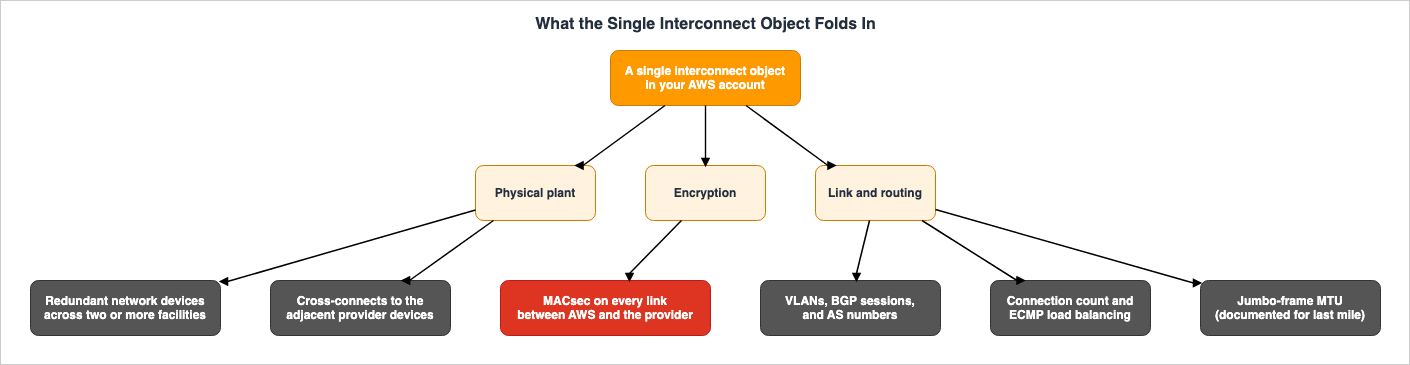
3.1 The Physical Plant
The user guide describes the pre-existing infrastructure as follows:To achieve these design goals, AWS and its partners have pre-provisioned capacity in each of the
supported regions and locations. This capacity spans multiple network devices distributed across at
least two physical buildings. These buildings have independent power and networking.It covers multiple devices, at least two buildings, and independent power and networking. The plant is in place before your request arrives.
Descriptions regarding redundancy should be read carefully, paying close attention to the specific limitations.
Every Interconnect is provisioned across redundant network devices spanning at least two physically
distinct facilities with independent power and networking. This architecture eliminates single
points of failure at the device, cross-connect, and facility level. Multicloud and last mile
connections use a four-connection model with Equal-Cost Multi-Path (ECMP) load balancing, ensuring
at least one link remains operational during planned maintenance.
The phrase
eliminates single points of failure is followed by at the device, cross-connect, and facility level. The claim is limited to those three layers: the device, the cross-connect, and the facility. It cannot be generalized to state that an interconnect has no single point of failure anywhere. For example, even with redundant infrastructure, a mistake in the route advertisement design attached to a Direct Connect gateway can still leave the far end unreachable. The redundancy applies to the infrastructure itself, not to the correctness of the configuration.The claim that at least one link stays up during planned maintenance also rests on a specific mechanism: the four-connection model and ECMP. You do not choose the number four.
3.2 Encryption
MACsec is enabled by default, not an optional setting.All connections between the AWS network devices and the adjacent partner devices are encrypted by
default. The encryption uses industry standard IEEE 802.1AE MAC Security (MACsec). The devices are
configured to transmit customer traffic only if the encryption session is active.The third sentence is key. The devices are configured to carry customer traffic only while the encryption session is active. There is no option to disable encryption and continue communication. The contrast with the partner-facing
CreateInterconnect in Direct Connect is sharp: as Section 2 showed, that API lets the caller choose no_encrypt for encryptionMode.It's also important to consider the scope. This statement applies specifically to the network devices of AWS and their directly connected partner devices. It says nothing about what happens further on, inside the partner's own network or inside the remote cloud.
3.3 Link and Routing
The last mile setup page lists what happens automatically once a request is submitted.Automatic provisioning begins: The service automatically provisions four connections between four
router-pairs across two distinct Interconnect - last mile sites.
Network configuration: BGP peering, VLANs, and ASN assignments are configured automatically.
MACsec encryption: 256-bit MACsec encryption is enabled by default on all connections.The service automates three things: BGP peering, VLAN configuration, and AS number assignment. The same page also clearly outlines the level of abstraction involved.
Last mile Interconnects use Border Gateway Protocol (BGP) for dynamic routing between your network
and AWS. The service automatically establishes BGP sessions, configures AS numbers, and handles
route advertisements. All BGP details are abstracted from you.
The MTU (Maximum Transmission Unit) is also defined.
The MTU for last mile Interconnects is set automatically to 8500 (Jumbo Frames enabled by default).Readers familiar with the challenges of designing dedicated lines will understand the significance of this single line. When the MTU differs along a path, BGP comes up but large transfers stall. That negotiation is gone.
Every quotation in this section comes from the last mile setup page. The multicloud setup page carries no section that enumerates the automated items at this level of detail. What this section says about AS number assignment and the MTU value applies to last mile.
3.4 An Inventory of What Was Folded In
| What Was Folded In | What You Used to Do |
|---|---|
| Network devices | Selecting the devices and designing their redundancy |
| Cross-connects | Arranging the physical cabling in a colocation facility |
| Facilities | Designing the spread across two or more locations |
| VLANs | Assigning and managing the tags |
| BGP sessions | Configuring peers, advertising routes, and testing failover |
| AS numbers | Choosing a number and avoiding collisions |
| MACsec keys | Generating, distributing, and rotating the keys |
| Connection count | Deciding how many to run, and ordering them |
| Load balancing | Configuring ECMP |
| MTU | Agreeing on it end to end and clamping MSS |
4. What Stays on Your Side of the Object
What was left outside the object stays in your design. And if the design of what remains is flawed, that complexity, which should have been folded away, will return in another form.4.1 The Attach Point
Among the concepts introduced by AWS Interconnect, the most important is the attach point.A logical identifier that anchors the Interconnect on each side of the connection. On AWS, the
attach point is always the Direct Connect Gateway. On the remote side, the attach point varies by
offering: a CSP router (Multicloud) or a partner-side network identifier (last mile).On the AWS side, this is always a Direct Connect gateway. The user guide writes
always. On the remote side it varies by offering: a cloud service provider's router for multicloud, a partner-side network identifier for last mile.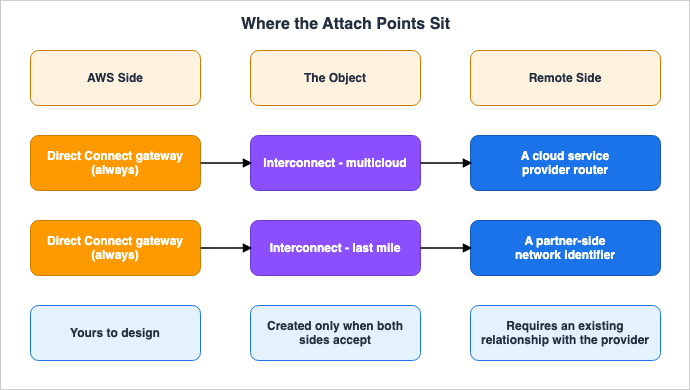
4.2 The AWS Side Is Fixed; What Surrounds It Is Not
The Direct Connect user guide, not the AWS Interconnect user guide, defines a Direct Connect gateway.A Direct Connect gateway is a globally available resource. You can connect to any Region globally
using a Direct Connect gateway. This includes AWS GovCloud (US), but it does not include the AWS
China Regions.Regarding its internal workings, it states:
A Direct Connect gateway is a virtual component of Direct Connect designed to act as a distributed
set of BGP route reflectors. Because it operates outside the data traffic path, it avoids creating a
single point of failure or introducing dependencies on specific AWS Regions.
It acts as a route reflector and sits outside the data path. This is where the design decisions live. You decide which Direct Connect gateway the Interconnect attaches to, what else is associated with that gateway, and which prefixes it advertises. AWS Interconnect automates only the connection between the Interconnect and the attach point; it does not handle anything beyond that point.
The last mile setup page is explicit about coexistence as well. A last mile Interconnect can attach to a Direct Connect gateway that already carries private virtual interfaces or transit virtual interfaces. Nothing has to be replaced; the old and the new sit on the same attach point.
The AWS Networking & Content Delivery blog post that walks through the official reference architectures names the work that stays with you.
Coordinate IP address management between your Amazon VPC CIDR blocks and Google Cloud VPC subnet
ranges to prevent overlapping address spaces, which would cause routing conflicts.
Overlapping address space is outside the automation. The connection can come up and the routing still be broken if the two address plans collide. The same article also identifies configuring the prefixes advertised by the Direct Connect gateway and setting up the VPC route tables as tasks for you.
4.3 The Remote Attach Point Differs by Provider
The multicloud setup page states that the request needs an identifier from the remote side. For Google Cloud, this is the project ID. For Oracle Cloud Infrastructure, it's a Tenancy OCID in the formatocid1.tenancy.oc1..<unique_ID>. For last mile connections, it's the partner's account ID, and for Lumen, it may be an email address.This identifier is what tells the remote side who you are. In other words, you need the contractual relationship with that cloud provider or partner before you create an Interconnect. The last mile setup instructions clearly state this as a prerequisite.
An existing relationship with an Interconnect — last mile partner.
Customer Premises Equipment (CPE) at your remote site connected to the partner's connectivity
fabric.
The equipment at your site, and its connection into the partner's fabric, are conditions you meet.
4.4 The Boundary of Responsibility and Support
Returning to the point deferred in Section 1, this concerns the scope of the statement that you no longer need to manage BGP peering. The AWS Service Terms are explicit about the relationship with the provider.You are responsible for your relationship with other cloud or last mile service providers, including
your agreements with them, complying with their policies and procedures and paying them any
applicable fees. AWS has no responsibility or liability for any services provided by other cloud or
last mile service providers.The FAQ adds that support runs through two separate channels.
Customers engage with two separate support channels. AWS handles support for the AWS Direct Connect
side, and partners handle support for their side of the network. On the AWS side, there is an
escalation path from AWS Support to DX-Ops.
Therefore, the statement that you no longer need to manage BGP peering describes the configuration on the AWS side and does not describe the connection as a whole. What the remote side requires is in that provider's own documentation.
The Service Terms carry one more clause worth knowing.
AWS will provide other cloud and last mile service providers with information necessary to enable
them to establish and support your connection, including your network configuration, activity
information, and troubleshooting data.
To bring the connection up and keep it supported, AWS hands the provider your network configuration, activity information, and troubleshooting data. Since the object is created by two parties, both parties need to have access to the same information. That exchange is a condition of the automation, not a side effect of it.
4.5 Quotas on How Many You Can Have
The number of objects carries default quotas. These stay on the design side.| Quota | Default Value |
|---|---|
| Maximum number of Interconnects per account | 10 |
Number of requests that can be maintained in the requested state | 4 |
| Number of multicloud Interconnects per provider | 2 |
| Number of last mile Interconnects per provider | 2 |
The limit of two per provider bears directly on redundancy design. The four-connection model describes what happens inside one Interconnect. It is a different number from how many Interconnects you can hold.
The Quotas page generally states that some items can have their limits increased, while others cannot. Which of the four above fall into which group is not stated in the sources this article consulted. Checking the Service Quotas console before the design settles is the reliable route.
Pay attention to the scope. The introductory text on the same page states that, unless otherwise specified, quotas are Region-specific. However, the descriptions for the four items listed above all state that they are account-specific. Since the introductory text and the individual descriptions do not consistently refer to the same granularity, it is advisable to confirm the actual values in the console when designing solutions that span multiple Regions.
5. Where an Interconnect Can Be Reached From
Once an Interconnect is attached to a Direct Connect gateway, what can reach it depends on what else is attached to that gateway. This is the part of the article that feeds directly into a design.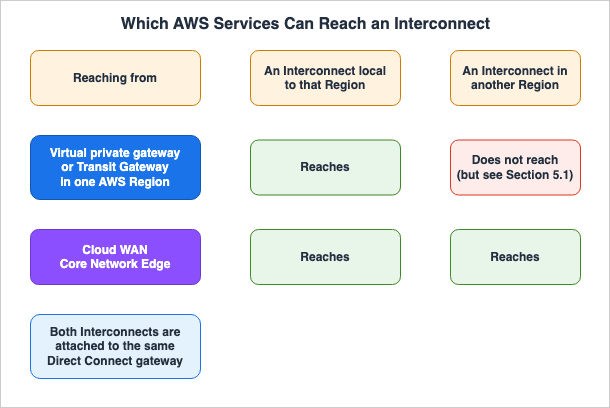
Virtual gateways or Transit Gateways in a specific AWS Region, through a Direct Connect gateway, can
only reach an Interconnect that is local to that Region.
When using Cloud WAN you define the AWS Regions where your global network will have a Core Network
Edge (CNE). Using the native Direct Connect attachment, any Cloud WAN CNE can reach any Interconnect
globally that is attached to the same Direct Connect gateway.A virtual private gateway or a Transit Gateway is scoped to one Region, and it can reach only an Interconnect that is local to that Region. A Cloud WAN Core Network Edge reaches any Interconnect globally, provided that Interconnect is attached to the same Direct Connect gateway.
The AWS Networking & Content Delivery blog also outlines this distinction.
VGWs or TGWs in a specific AWS Region can only reach multicloud Interconnects in the local Region,
so if you need to connect to Google Cloud resources from multiple regions, you will need to provision
separate multicloud Interconnects in each region pair and configure appropriate routing for your
TGWs.
Do not read this as a statement about the Direct Connect gateway, which is itself a global resource. As mentioned in Section 4, a Direct Connect gateway can connect to any Region. However, the reachability of an Interconnect is not determined by the gateway's global nature. The limitations are not imposed by the gateway itself, but by the services associated with it.
5.1 Where the Primary Sources Disagree
On this one point, the AWS documentation this article consulted states two different things. The last mile FAQ puts it this way:Once the Interconnect is attached to a Direct Connect gateway, you can reach VPCs in any associated
AWS Region globally through a Virtual Private Gateway, Transit Gateway, or Cloud WAN.Read plainly, that sentence gives a virtual private gateway and a Transit Gateway global reach. It does not agree with the user guide or the blog.
This article cannot settle which one is the operational constraint. Two things help in reading them. The first is the count. The statement that a Region-scoped gateway reaches only a local Interconnect appears once in the user guide and twice in the AWS Networking & Content Delivery blog, three places in all. The statement about global reach appears once, in the last mile FAQ. The second is what each passage is for. The relevant section in the user guide describes limitations on supported configurations, while the FAQ section addresses a different point: that your workload does not need to be located in us-east-1. A passage written to state a constraint usually states the constraint more precisely.
For design purposes, the safer assumption is the Region-scoped one. Building on the looser assumption means rebuilding the attach point if the reach turns out not to be there.
6. Creation Takes Two Parties
An interconnect cannot be established with only one side. Two concepts carry that property: the Activation Key and the Create/Accept flow.A token generated during the connection creation process. It is shared between parties (AWS and
provider) to authorize and complete the provisioning of a new Interconnect, ensuring that both sides
validate the request before resources are committed.The phrase
before resources are committed is a key design element. Resources are not finalized until both parties have validated the request. The process itself is also defined symmetrically.The process to create a new Interconnect has two main actions: one party initiates a Create action,
generating an Activation Key. The other party uses that key to perform the Accept action, triggering
automated provisioning on both sides.The initiating party is not fixed. You can create the request in the AWS console and have the other party accept it, or accept in the AWS console a request the other side created. The user guide provides separate instructions for both directions.
The design places the automation on top of an agreement between two parties. What was removed from the initial list was the effort involved in provisioning, not the other party's consent. Consent stays in the process, in the form of a key.
The user guide notes that for cloud providers currently in preview, command-line tools may be required for the approval process. The level of automation varies depending on the provider's current status.
7. What Comes With It, and What Does Not
When evaluating managed services, what can be observed is just as important as the design itself. AWS Interconnect ships observation tools, and their scope has edges.7.1 What Comes With It
All Interconnects include a single CloudWatch Network Synthetic Monitor at no extra cost. You can
use this active synthetic probe to produce round trip latency and packet loss metrics.
Each Interconnect includes one active synthetic probe. It yields round-trip latency and packet loss. The probe rides with the Interconnect; it does not come with Direct Connect connections generally.
Utilization metrics are also available. The user guide lists four metrics, while the table on the same page lists six. Counting the table gives six: utilization, bit rate, and packet rate, each in both directions.
| Metric | Description |
|---|---|
ConnectionUtilizationEgress | Transmit utilization, as a percentage of the configured bandwidth. |
ConnectionUtilizationIngress | Receive utilization, as a percentage of the configured bandwidth. |
ConnectionBpsEgress | Transmit bit rate. |
ConnectionBpsIngress | Receive bit rate. |
ConnectionPpsEgress | Transmit packet rate. |
ConnectionPpsIngress | Receive packet rate. |
The default aggregation period is 5 minutes, with a minimum of 1 minute. CloudWatch keeps the statistics for 15 months. Utilization is automatically calculated as a percentage of the configured bandwidth, so you do not need to create custom CloudWatch Math expressions.
What makes these metrics useful in practice is that the bandwidth itself can be changed. The user guide states that you can increase or decrease bandwidth through the console after deployment, without needing to recreate connections or contact support. What previously required a new order is now a simple attribute change.
When adjusting bandwidth, be aware that the utilization display changes incrementally. For example, if you have a 500 Mbps transmit rate on a 1 Gbps connection, the utilization will display as 50%. However, if you increase the bandwidth to 2 Gbps with the same traffic volume, the display will show 25%. Alarm thresholds have to move whenever the bandwidth does.
7.2 What Does Not
The user guide explicitly states that one feature of the synthetic monitor is not supported:Note that the Network Health Indicator feature is not yet supported with Interconnects. Latency and
packet loss metrics are fully supported.While it fully supports latency and packet loss monitoring, it does not include the Network Health Indicator. That limitation is worth knowing before an observability design leans on the single bundled monitor.
The Service Level Agreement (SLA) also has limitations. The 99.99% availability figure in the last mile FAQ applies only
up to the Direct Connect port. Beyond the port, within your own VPC or within your partner's network, this figure does not apply.Furthermore, the responsibility for monitoring usage rests with you. The AWS Service Terms state:
You are responsible for monitoring the utilization of your AWS Interconnect connections and managing
capacity changes in a timely manner.
The tooling for observation comes with the object. The obligation to observe does not.
8. Availability Is Per Provider, Not Per Service
AWS Interconnect carries its status per provider, not per service. Calling the whole family generally available is the easiest mistake to make here. The status moves per offering, per cloud provider, and per partner.This article will not provide a comprehensive table. The list of supported providers and Regions keeps moving, so this section gives the axes to judge by and a few representative examples. The current list lives in the official AWS documentation.
8.1 How to Read a Provider's Status
Three questions settle it:- What offering is it? The availability status for multicloud and last mile services operates independently.
- Who is the provider? For multicloud, it varies by cloud provider. For last mile, it varies by partner.
- Are there any limitations on the preview? The user guide caps preview connections at 1 Gbps and allows one per customer per supported Region. It also warns that AWS removes preview connections from the account as a provider approaches general availability.
8.2 Representative Examples as of September 13, 2026
Regarding multicloud, the product page lists supported providers as follows:AWS Interconnect - multicloud is a new capability that simplifies multicloud connectivity between
AWS and other cloud service providers, including Microsoft Azure (Preview), Google Cloud, and
Oracle Cloud Infrastructure.Only Microsoft Azure carries the Preview tag. General availability with Google Cloud was announced on April 14, 2026, and general availability with Oracle Cloud Infrastructure was announced in July 2026. Regarding Azure, the AWS Networking & Content Delivery blog stated on August 31, 2026, that it is in public preview.
For last mile, the partners page states the two cases separately.
AWS Interconnect – last mile initially launched with Lumen in US East (N. Virginia). You can create
a last mile connection from the NJ sites in US East (N. Virginia) to any AWS region globally, and
connect from anywhere in the continental United States via the Lumen connectivity fabric. For AT&T,
you can sign up for Gated Preview.
Lumen is generally available, while AT&T is in a gated preview. The table on the same page shows that Lumen connects from the New York metropolitan area to US East (N. Virginia), and AT&T connects from Seattle to US West (Oregon).
So there is no single sentence that says AWS Interconnect is generally available. What can be said is which offering, with which counterpart, was in which state on which date.
8.3 The Specification Is Public
The status moves provider by provider partly because the provider implements the far side of the connection. AWS publishes the API specification used for that coordination. The repository sits atgithub.com/aws/Interconnect under Apache 2.0. The repository describes itself as the OpenAPI 3.0 specification of a symmetric API for coordinating managed L3 connectivity.The word
symmetric corresponds to the Create/Accept pattern in Section 6. The procedures that can be initiated from either side are symmetric in the specification as well.9. What You Cannot Take Back
The preceding sections covered what was folded in and what was left out. One point about the folded-in side remains: you cannot take it back. No operation for opening an Interconnect and reassembling its parts appears in the documentation this article consulted. You can still order a traditional Direct Connect connection alongside it, but that builds a second connection rather than taking the first one apart.Choose Interconnect and certain options are no longer available. This is not a discussion of good versus bad, but rather a list of what you can no longer select.
| What You Can No Longer Choose | Where You Used to Decide It |
|---|---|
| The number and placement of connections | Choosing a resiliency model and ordering it |
| The devices and facilities that terminate it | Choosing Direct Connect locations |
| Whether MACsec is on, and who holds the keys | Port-level settings and key rotation |
| Link aggregation | LAG design |
| Fine-grained BGP control | Steering routes with local preference and communities |
| VLAN tag assignment | Designing it per virtual interface |
| AS number selection | Your own numbering plan |
| MTU negotiation | Agreeing on a value end to end |
The last two rows are worth pausing on. An AS number used to come out of your own numbering plan, and an MTU used to be agreed end to end across your own path. Both now sit with the provider.
The reduction in route control flexibility has practical implications. The techniques covered in AWS Hybrid Connectivity Decision Guide — building active/standby with BGP communities, pinning a path by prefix length — do not apply inside an Interconnect. If these techniques are required for your design, a traditional Direct Connect connection is a better fit. Where they are not needed, the folding pays off plainly.
As Section 4 showed, what remains is the design of the attach point. You need to determine what to associate with the Direct Connect gateway, which prefixes to advertise, and whether there are any overlapping address spaces. A mistake there leaves the far end unreachable no matter how redundant the plant underneath is. The complexity has not disappeared; it has simply shifted to the weight of the remaining choices.
10. Frequently Asked Questions
Q. Is AWS Interconnect a replacement for Direct Connect?A. No. AWS Interconnect utilizes the Direct Connect gateway as an attach point within AWS, so it sits on top of the Direct Connect structure. The user guide states,
On AWS, the attach point is always the Direct Connect Gateway. Furthermore, the last mile setup page indicates that you can connect a last mile Interconnect to an existing Direct Connect gateway that already has private virtual interfaces or transit virtual interfaces, and it can coexist with existing connections.Q. Is AWS Interconnect generally available?
A. It depends on the offering and on the counterpart. Multicloud is generally available for Google Cloud and Oracle Cloud Infrastructure, while Microsoft Azure is currently in preview. Last mile is generally available through Lumen, while AT&T is in a gated preview. This information is current as of September 13, 2026. The AWS product pages and the partners page carry the current state.
Q. Does any BGP configuration remain?
A. No configuration is required on the AWS side. The user guide states,
you no longer need to ... manage BGP peering, and the last mile setup page states, All BGP details are abstracted from you. However, this refers to the AWS side only. You should consult the documentation of the cloud provider or partner you are working with to determine their requirements. The AWS Service Terms also clearly state that the relationship between you and the provider is your responsibility.Q. Does a Transit Gateway reach an Interconnect in another Region?
A. The user guide states that it does not. A virtual private gateway or a Transit Gateway reaches only an Interconnect in the same Region. To achieve global reach, you should use the Cloud WAN Core Network Edge and attach it to the same Direct Connect gateway. The last mile FAQ words this differently. Section 5.1 quotes both.
Q. Can encryption be disabled?
A. No setting to disable encryption was found within the sources this article consulted. The user guide states that MACsec is on by default and that the devices carry traffic only while an encryption session is active. This differs from the
CreateInterconnect function for partners, which allows you to select no_encrypt in the encryptionMode setting.Q. Does an Interconnect have any single point of failure?
A. The user guide's claims are limited to three layers. It states that the architecture eliminates single points of failure at the device, cross-connect, and facility levels. This does not necessarily mean that there are no single points of failure across the entire connection. The design of the connection beyond the attach point — for example, the services associated with the Direct Connect gateway or the prefixes being advertised — remains your responsibility and is not covered by redundancy measures.
Q. How many Interconnects are allowed per account?
A. By default, you can create 10 Interconnects per account. Additionally, there are default quotas: 4 pending requests, 2 multicloud connections per provider, and 2 last mile connections per provider. The four-connection model describes what is inside one Interconnect, so that number is unrelated to these quotas.
Q. What bandwidth options are available?
A. For last mile connections, you can choose from 7 options: 1, 2, 5, 10, 25, 50, and 100 Gbps. For multicloud connections, the options vary depending on the provider and the service offering. The user guide states that connections with providers in public preview are limited to 1 Gbps. You can increase or decrease bandwidth through the console without needing to recreate the connection.
11. Summary
What AWS Interconnect folds in is the machinery you used to assemble yourself when ordering a private connection. This includes devices, cross-connects, distribution across facilities, VLANs, BGP sessions, AS numbers, MACsec keys, connection counts, ECMP, and MTU. All of it now sits inside a single interconnect object. AWS describes this as,They present it to you as a single object called an interconnect.What was not folded in is the design of the attach point. AWS fixes the AWS side to the Direct Connect gateway; you decide what else is associated with it, which prefixes it advertises, and whether the two address plans overlap. The attach point on the opposite side varies depending on the offering, and the contractual relationship with the provider has to exist before you create the Interconnect.
The attach point determines the reach. A virtual private gateway and a Transit Gateway stay inside one Region; a Cloud WAN Core Network Edge reaches any Interconnect on the same Direct Connect gateway, anywhere. The primary sources word this point two ways, so Section 5.1 quotes both.
Three limitations are worth carrying with you rather than dropping. The elimination of single points of failure is limited to the device, cross-connect, and facility levels. The synthetic monitor is included; the Network Health Indicator is not. The SLA applies only to the Direct Connect port.
And the status moves per provider, not per service. No single sentence can say that AWS Interconnect is generally available. What can be said is which offering, with which counterpart, was in which state on which date.
No operation for unfolding what was folded in appears in the documentation this article consulted. Designs requiring complex routing techniques are better suited to traditional Direct Connect. Where those techniques are not needed, the folding pays off plainly. The information presented in this article, outlining what is inside and outside the Interconnect, should serve as the basis for your decision-making process.
Two other articles put the same question to a different layer. How Amazon S3 Files Keeps a Bucket and a File System in Sync covers the case where the folded-in thing is a behavior rather than a cable, and Amazon Bedrock AgentCore Harness covers the case where it is the control flow itself. How much can be taken back differs across the three.
12. References
- What is AWS Interconnect? - AWS Interconnect User Guide
- Getting started with AWS Interconnect - multicloud - AWS Interconnect User Guide
- Getting started with AWS Interconnect - last mile - AWS Interconnect User Guide
- Regional Availability - AWS Interconnect User Guide
- Monitoring AWS Interconnect API calls using AWS CloudWatch - AWS Interconnect User Guide
- Quotas for AWS Interconnect - AWS Interconnect User Guide
- Security in AWS Interconnect - AWS Interconnect User Guide
- Direct Connect gateways - AWS Direct Connect User Guide
- CreateInterconnect - AWS Direct Connect API Reference
- AWS Interconnect - multicloud
- AWS Interconnect - last mile Partners
- Interconnect FAQs
- AWS announces general availability of AWS Interconnect - multicloud
- AWS announces general availability of AWS Interconnect - last mile
- AWS announces AWS Interconnect - multicloud connectivity with Oracle Cloud Infrastructure in GA
- AWS announces AWS Interconnect - last mile new partner with AT&T in gated preview
- AWS Interconnect is now generally available, with a new option to simplify last-mile connectivity - AWS News Blog
- Build resilient and scalable multicloud connectivity architectures with AWS Interconnect - multicloud - AWS Networking and Content Delivery Blog
- AWS and Microsoft Azure collaborate to expand multicloud networking - AWS Networking and Content Delivery Blog
- aws/Interconnect - open specification on GitHub
- AWS Service Terms
Related Articles
The private-line side in full, and the article this one delegates the mechanisms to — virtual interfaces, BGP path selection, and the resiliency models that an interconnect folds away.
What a private path does and does not guarantee. This article leaves guarantees to that one and stays on the structure of the object.
Choosing a connection method in the first place, and how the AWS side is put together once an Interconnect is attached.
Private reachability at the level of a single service, a different layer from the network-level connection an interconnect carries.
When the Regional hub gained its association with a Direct Connect gateway, which is the attach point this article turns on.
- AWS Networking Glossary - VPC, Transit Gateway, PrivateLink, and VPC Lattice Explained
- AWS History and Timeline regarding AWS Direct Connect - Overview, Functions, Features, Summary of Updates, and Introduction
Definitions for the terms this article uses without redefining them.
References:
Tech Blog with curated related content
Written by Hidekazu Konishi