Strands Agents Multi-Agent Pattern Selection Guide - Agents-as-Tools, Swarm, Graph, and Workflow
First Published:
Last Updated:
This guide is that answer. It explains how each multi-agent primitive in Strands Agents works at the API level, what control structure and failure modes each one implies, and — most importantly — provides a selection framework that maps the shape of your task onto the right primitive. It closes with deployment considerations for running multi-agent Strands applications on Amazon Bedrock AgentCore Runtime, a catalog of common pitfalls, and an FAQ.
A note on scope before we start. This article covers the Python SDK, the original and most widely adopted implementation of Strands Agents. It deliberately avoids cross-framework comparisons, and it does not repeat single-agent basics — the official Getting Started documentation covers those well. All API signatures, class names, parameter names, and default values in this article were verified against the official Strands Agents documentation, the GitHub repositories, and PyPI as of this writing in June 2026. Multi-agent terminology used here (orchestrator, handoff, supervisor, and related concepts) is defined in my AI Agent Engineering Glossary.
Quick Reference Index
- 1. Introduction — The New Design Decision
- 2. Strands Agents in the AWS Agent Stack
- 3. When a Single Agent Stops Scaling
- 4. The Multi-Agent Primitives at a Glance
- 5. Agents-as-Tools
- 6. Swarm
- 7. Graph
- 8. Workflow
- 9. The Pattern Selection Framework
- 10. Running Multi-Agent Strands on Amazon Bedrock AgentCore
- 11. Common Pitfalls
- 12. Frequently Asked Questions
- 13. Summary
- 14. References
1. Introduction — The New Design Decision
For most of the short history of agent frameworks, the design decision that consumed teams was "which framework do we pick?" That decision has largely settled for teams building on AWS: Strands Agents is the SDK that AWS itself uses internally, recommends for Amazon Bedrock AgentCore, and ships production support for. The decision that has replaced it is quieter but just as consequential: once your agent application grows beyond a single agent, which coordination primitive do you build on?This is a genuinely new kind of architectural decision. It resembles choosing between a message queue and an RPC call, or between an orchestrated saga and event choreography — but with one destabilizing twist: in two of the four patterns, the "router" making control-flow decisions at runtime is itself a large language model. Choosing a primitive is therefore not just choosing a topology; it is choosing how much control flow you delegate to model judgment versus how much you pin down in code.
Get the choice right and the pattern disappears into the background: the system is debuggable, its costs are predictable, and each agent stays small enough to prompt well. Get it wrong and you inherit a specific, recognizable kind of pain — a Swarm that ping-pongs between two agents until it hits its handoff limit, a Graph whose rigid topology fights a task that needed exploration, an orchestrator whose context fills up with specialist output it never needed to see.
The good news is that the choice is much more systematic than the tutorials suggest. The four primitives differ along a small number of dimensions — chiefly who decides the next step (your code, a central agent, or the peers themselves) and whether the execution path is known in advance. The official Strands documentation states the core criterion directly: the main difference to consider among the patterns is how the path of execution is determined. This guide expands that single sentence into a full decision framework, grounded in the actual APIs.
2. Strands Agents in the AWS Agent Stack
2.1 What Strands Agents Is
Strands Agents is an open source AI agent SDK published by AWS. Its defining characteristic is a model-driven approach: instead of asking developers to hard-code chains, state machines, or workflow definitions for every behavior, Strands gives the model a system prompt and a set of tools and lets the model plan, select tools, and iterate in an agentic loop. A minimal agent is genuinely a few lines:from strands import Agent
agent = Agent(system_prompt="You are a helpful assistant.")
result = agent("Summarize the key trade-offs between SQL and NoSQL databases.")
The SDK is model-provider agnostic — Amazon Bedrock is the default provider, with support for Anthropic, OpenAI, and other providers — and it scales from local development to production deployment targets including Amazon Bedrock AgentCore Runtime, AWS Lambda, and containers.
2.2 Maturity and Release History
Three milestones matter for anyone evaluating Strands for production multi-agent work:- May 2025 — AWS open-sourced Strands Agents as a preview, announcing that internal teams including Amazon Q Developer and AWS Glue were already using it in production.
- July 2025 — Strands Agents 1.0 shipped as the production-ready release. The 1.0 announcement is the founding document for this article's subject: it introduced multi-agent primitives (agents-as-tools, handoffs, swarms, and graphs), support for the Agent2Agent (A2A) protocol, durable session management with persistence to storage backends such as Amazon S3, and full async support.
- 2026 — The SDK has continued shipping at a fast cadence. As of this writing in June 2026, the Python SDK is at version 1.42.x, requires Python 3.10 or later, and is classified as Production/Stable on PyPI. AWS Transform for .NET uses Strands Agents to power multi-agent application modernization, and AWS has additionally launched Strands Labs as a home for experimental agentic capabilities outside the stable SDK.
Two practical consequences follow. First, the multi-agent primitives discussed here are not preview features — they have been GA for about a year and have accumulated production hardening (timeouts, loop protection, repetitive-handoff detection) that early tutorials rarely mention. Second, the API surface still evolves between minor versions, so treat the official documentation as the source of truth for signatures and pin your dependency versions in production.
One 1.0-era capability deserves special mention in a multi-agent context: durable session management, which allows agent state to be persisted to and restored from a storage backend such as Amazon S3. Multi-agent runs are longer and more expensive than single-agent turns, so the ability to persist state across process boundaries matters more here, not less — particularly for the long-running Swarm and Graph executions we will meet in Section 10.
2.3 The Multi-Agent Surface and Its Layers
The current official documentation groups the multi-agent surface into these areas: Agents as Tools, Swarm, Graph, Workflow, and the Agent2Agent (A2A) protocol. One nuance is worth making explicit, because it confuses almost everyone who arrives from the tutorials — these five things do not all live at the same layer of the SDK:- Swarm and Graph are SDK orchestrator classes, imported from
strands.multiagent. They are first-class multi-agent systems with their own execution engines, timeouts, and result objects. - Agents-as-Tools is a design pattern, not a class. You build it with the ordinary
@tooldecorator from the core SDK, wrapping one agent inside a tool that another agent can call. - Workflow is a tool —
workflowfrom the separatestrands-agents-toolspackage — that an agent loads and drives through tool calls to create, start, and monitor task pipelines. - A2A is an interoperability protocol, not an orchestration pattern: it lets a Strands agent be exposed as a network-accessible service (
A2AServer) or consume remote agents (A2AAgent) across platform and organizational boundaries. A2A composes with all four patterns rather than competing with them, and it is out of scope for this guide beyond this positioning note.
A historical footnote that resolves another common confusion: the 1.0 announcement described "four new primitives" as agents-as-tools, handoffs, swarms, and graphs — where handoffs referred to agents explicitly passing responsibility to humans (human-in-the-loop), a separate capability from the agent-to-agent handoffs inside a Swarm. Workflow, by contrast, is the tool-based orchestrator that the documentation presents alongside the others. This article follows the current documentation's framing — Agents-as-Tools, Swarm, Graph, and Workflow — because that is the set you actually choose among when designing a multi-agent system today.
2.4 Relationship to Amazon Bedrock AgentCore
Amazon Bedrock AgentCore is the AWS managed platform for running agents in production — a secure, serverless runtime plus surrounding services (Gateway, Memory, Identity, Observability). AgentCore is framework-agnostic, but Strands Agents is the SDK AWS features most prominently in AgentCore documentation and samples, and the deployment path from a Strands agent to AgentCore Runtime is a documented first-class flow (covered in Section 10). If you are new to AgentCore itself, my Amazon Bedrock AgentCore Master Index maps the whole platform and its article series. AgentCore also has a managed harness that declares an agent in configuration and exports to Strands-based Python when custom orchestration is needed; where that boundary sits is the subject of Amazon Bedrock AgentCore Harness - The Managed Agent Loop and the Export-to-Code Boundary.3. When a Single Agent Stops Scaling
Before choosing among four multi-agent patterns, it is worth asking whether you need multi-agent at all. Multi-agent architectures are sometimes adopted for their novelty rather than their necessity, and every agent boundary you introduce has a cost. This section gives you honest criteria for both directions.3.1 Signals That Argue for Multi-Agent
- Tool selection accuracy degrades. A single agent with a large, heterogeneous tool list has to discriminate among many similar-looking options on every step. When you observe the model calling the wrong tool, or burning turns deciding, grouping related tools under specialist agents restores a small, sharp decision space at each level.
- The system prompt accumulates contradictory personas. "You are a meticulous code reviewer" and "You are a creative marketing copywriter" do not coexist well in one prompt. When instructions for one responsibility start degrading another, the prompt is telling you it wants to be two agents.
- One context window must hold everything. Long documents, long tool outputs, and long conversations compete for the same context budget. Specialists each carry only the context their subtask needs.
- Different steps need different operating envelopes. A triage step might need a fast model and a tight timeout, while a deep-analysis step needs a stronger model with room to think. Per-agent model and configuration choices require agent boundaries.
- Independent subtasks could run in parallel. If three documents can be analyzed independently before a merge step, a single sequential agent is leaving wall-clock time on the table.
- Team ownership boundaries. When different teams own different capabilities, agents are a natural unit of ownership, testing, and release — the same logic that justified microservices, with the same caveats.
3.2 When You Should Not Split
The costs of multi-agent are concrete, and they compound:- Every agent boundary is a serialization point. Each delegated step is at least one more model invocation, with its own latency and its own token consumption. A Swarm additionally spends tokens on the reasoning that decides each handoff.
- Context fragmentation. A specialist sees only what was handed to it. If the orchestrator's summary of the task drops a constraint the specialist needed, the specialist fails in ways that are hard to trace. This failure mode is discussed in depth in Section 11.
- Debugging gets harder. A wrong answer from a single agent has one transcript to read. A wrong answer from a five-agent system has five, plus the routing decisions between them.
- Nondeterministic patterns resist testing. A Swarm may legitimately solve the same task through different agent sequences on different runs. Your test strategy has to assert on outcomes, not paths.
The discipline I recommend: exhaust single-agent remedies first. Tighten tool descriptions (they are the model's only routing signal), remove overlapping tools, restructure the system prompt, and consider whether retrieval or context management solves the context pressure. Move to multi-agent when a specific signal from Section 3.1 persists after that — not before. Readers who use Claude Code will recognize this entire decision as the same one its subagent feature poses; I cover that angle in Claude Code Subagents and Orchestration Guide, and the conceptual parallels (context isolation, delegation cost, orchestration overhead) carry over to Strands almost unchanged.
4. The Multi-Agent Primitives at a Glance
Figure 1 shows the four primitives side by side as control-flow structures: a hierarchy routed by a central agent, a peer team routed by handoffs, a developer-defined graph, and a dependency-ordered task list.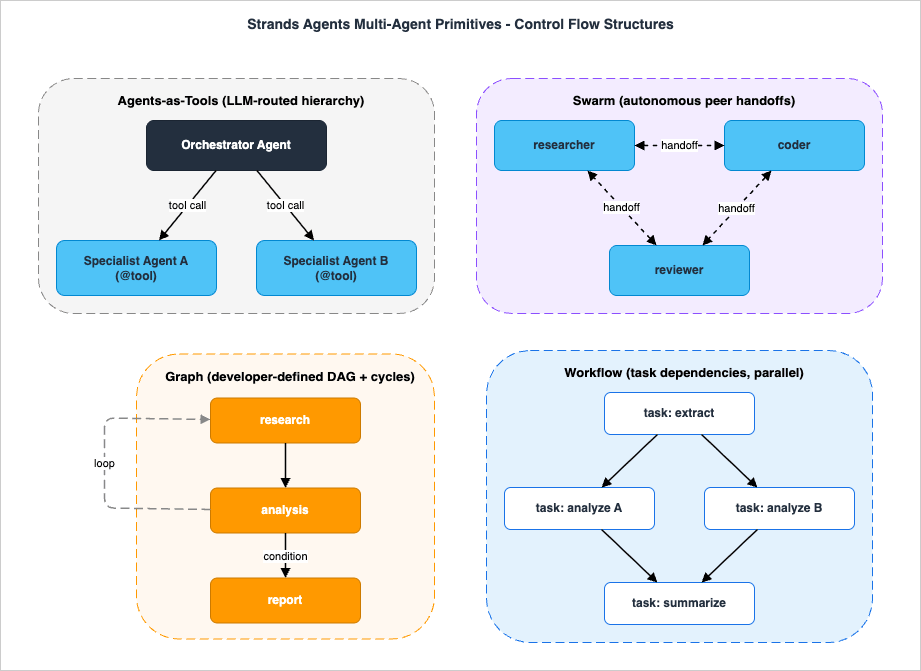
The table below is the reference card for the rest of the article. The single most important row is the second one — who decides the next step — because it determines everything else: determinism, auditability, token behavior, and how the system fails.
| Agents-as-Tools | Swarm | Graph | Workflow | |
|---|---|---|---|---|
| Implementation form | Design pattern using the @tool decorator | SDK class strands.multiagent.Swarm | SDK classes GraphBuilder / Graph in strands.multiagent | workflow tool from strands-agents-tools |
| Who decides the next step | Orchestrator agent (LLM), one routing decision per call | The agents themselves, via handoffs (LLM) | Developer-defined edges and condition functions (code) | Developer-defined task dependencies (code) |
| Control structure | Hierarchy: orchestrator over specialists | Flat peer team with shared context | Directed graph: DAG plus optional cycles | Dependency-ordered task list |
| Execution path determinism | Topology fixed; routing decided by the model per request | Low — the order of agents is emergent | High — topology and branch conditions live in code | High — dependency resolution is mechanical |
| State and context sharing | Orchestrator holds the conversation; a specialist sees only its tool input | Shared working context travels with handoffs | Node outputs propagate along edges to dependents | Task outputs flow to dependent tasks |
| Parallelism | Orchestrator may invoke multiple tools in a turn | One active agent at a time | Independent branches execute | Independent tasks run in parallel automatically |
| Typical task shape | Routing and delegation: triage, Q&A dispatch, hierarchical decomposition | Open-ended collaboration across disciplines | Staged processes with quality gates, branches, and bounded loops | Repeatable pipelines with fan-out and fan-in |
| Built-in safety rails | Per-tool error handling you write yourself | max_handoffs, max_iterations, execution and node timeouts, repetitive-handoff detection | Execution and node timeouts, set_max_node_executions, reset_on_revisit | Task status tracking; state persisted by workflow ID across runs |
Read the table once now and again after Sections 5–8; the rows will mean considerably more once you have seen each pattern's code.
A brief word on cost intuition, since the table's determinism row quietly encodes it. Every step that an LLM routes — an orchestrator choosing a tool, a swarm member reasoning about a handoff — is itself a model invocation spending tokens on the routing decision, on top of the tokens spent doing the work. Deterministic structures (Graph edges, Workflow dependencies) make those control-flow decisions in ordinary code at effectively zero marginal cost, and they cap the total number of model invocations by construction. This is not a reason to avoid the LLM-routed patterns — routing judgment is precisely what you are buying — but it explains why a Swarm given a procedural task is the most expensive possible way to execute it, and why Section 9's framework asks about path determinism first.
5. Agents-as-Tools
5.1 How It Works
Agents-as-Tools is the multi-agent pattern that requires learning nothing new: it reuses the single most fundamental mechanism in Strands — tool calling. You wrap a specialist agent inside a function decorated with@tool, and you give that tool to an orchestrator agent. When the orchestrator's model decides the current request calls for the specialist, it invokes the tool; the tool function constructs (or reuses) the specialist agent, runs it on the extracted query, and returns the specialist's response as the tool result. To the orchestrator, a whole agent is indistinguishable from a weather API.The result is a hierarchy. The orchestrator owns the user conversation and the overall goal; specialists are stateless subordinates that each see only the query passed into their tool call. Control always returns to the orchestrator after every delegation, which is what makes this the most predictable of the LLM-routed patterns.
5.2 Code: An Orchestrator with a Wrapped Specialist
The following is the canonical shape from the official documentation, lightly adapted:from strands import Agent, tool
RESEARCH_ASSISTANT_PROMPT = (
"You are a specialized research assistant. Provide thorough, factual "
"answers and cite the sources you used."
)
@tool
def research_assistant(query: str) -> str:
"""Process and respond to research-related queries.
Args:
query: A research question requiring factual information.
Returns:
A detailed research answer.
"""
try:
research_agent = Agent(system_prompt=RESEARCH_ASSISTANT_PROMPT)
response = research_agent(query)
return str(response)
except Exception as e:
return f"Error in research assistant: {e}"
orchestrator = Agent(
system_prompt=(
"Route each query to the most appropriate specialized tool: "
"use research_assistant for research questions; answer simple "
"questions directly without delegation."
),
tools=[research_assistant],
)
result = orchestrator("What runtime options exist for deploying AI agents on AWS?")
Three details in this small example carry most of the pattern's engineering weight:
- The docstring is the routing rule. The orchestrator's model reads each tool's name and description to decide where a request goes. A vague docstring ("handles research stuff") produces vague routing; a precise one ("Process and respond to research-related queries…") is, in effect, your routing table. Treat specialist docstrings with the care you would give an API contract.
- Specialist lifetime is a real decision. Constructing the
Agentinside the function (as above) gives you a fresh, stateless specialist per call — clean and concurrency-friendly, but with no memory across calls. Hoisting the specialist to module level gives it persistent conversation history across delegations — useful for iterative work, but now the specialist's context grows for the life of the process and concurrent calls share state. - Error handling stays inside the tool. Returning an error string (rather than raising) lets the orchestrator's model see the failure and adapt — retry differently, pick another tool, or tell the user — instead of crashing the loop.
5.3 When It Fits
- Routing and triage front doors: a support assistant that dispatches billing questions, technical questions, and account questions to different specialists, while answering trivia itself.
- Hierarchical decomposition with a single accountable owner: the orchestrator carries the user relationship and composes specialist outputs into one answer.
- Incremental migration: an existing single agent can grow into this pattern one wrapped specialist at a time, with no new orchestration machinery.
5.4 Failure Modes and Limits
- Orchestrator context bloat. Every specialist response lands in the orchestrator's context as a tool result. Verbose specialists fill the orchestrator's window with detail it only needed summarized. Have specialists return tight, structured answers, and keep "show your work" inside the specialist.
- The model can misroute. The topology is fixed, but each routing decision is still model judgment. Overlapping specialist descriptions produce inconsistent routing the same way overlapping tools do in a single agent — the problem just moved up a level.
- Depth multiplies latency. Nothing stops a specialist from wrapping its own sub-specialists, but each level adds a full agent loop. Two levels is almost always the practical ceiling.
- No lateral collaboration. Specialists cannot talk to each other; everything flows through the orchestrator. If your task wants specialists building directly on each other's work, that is the Swarm's territory — which is exactly where we go next.
6. Swarm
6.1 How It Works
A Swarm is a flat team of peer agents that coordinate themselves. There is no orchestrator: you hand the team a task, one agent starts (theentry_point), and whenever the active agent concludes that another teammate is better placed to continue, it transfers control with an explicit handoff. The SDK injects a handoff_to_agent tool into every member automatically, so handing off is a tool call any agent can make:handoff_to_agent(
agent_name="reviewer",
message="Implementation is complete; please review for defects.",
context={"files_changed": ["dedupe.py"]},
)
Alongside the handoff mechanism, swarm members operate over shared working context — each agent can see the task, the history of which agents have already worked, and the knowledge accumulated so far. The execution order is therefore emergent: it is decided at runtime by the agents' own judgment, not by your code. That autonomy is the Swarm's entire value proposition and its entire risk profile.
6.2 Code: A Three-Specialist Team
from strands import Agent
from strands.multiagent import Swarm

researcher = Agent(name="researcher", system_prompt=(
    "You are a research specialist. Gather the facts needed for the task. "
    "Hand off to the coder when implementation should begin."))
coder = Agent(name="coder", system_prompt=(
    "You write clean Python code based on the researcher's findings. "
    "Hand off to the reviewer when the implementation is complete."))
reviewer = Agent(name="reviewer", system_prompt=(
    "You review code for defects and completeness. Hand back to the coder "
    "if changes are required."))

swarm = Swarm(
    [researcher, coder, reviewer],
    entry_point=researcher,
    max_handoffs=20,
    max_iterations=20,
    execution_timeout=900.0,
    node_timeout=300.0,
)

result = swarm("Build a Python CLI tool that deduplicates files in a directory")
print(result.status)
print([node.node_id for node in result.node_history])
Note the
name= on each agent: in a Swarm, names are addresses — they are how teammates target a handoff. Give them meaningful, distinct values.The constructor's safety parameters are not optional decoration; they are the difference between an autonomous team and an unbounded loop:
| Parameter | Default | What it bounds |
|---|---|---|
entry_point | First agent in the list | Which agent receives the task first |
max_handoffs | 20 | Total control transfers before the run is stopped |
max_iterations | 20 | Total agent iterations across the team |
execution_timeout | 900.0 seconds | Wall-clock budget for the whole run |
node_timeout | 300.0 seconds | Wall-clock budget for any single agent's turn |
repetitive_handoff_detection_window | 0 (disabled) | How many recent handoffs to inspect for ping-pong behavior |
repetitive_handoff_min_unique_agents | 0 (disabled) | Minimum distinct agents that must appear in that window |
The last two deserve emphasis because they are off by default: enabling repetitive-handoff detection makes the Swarm fail fast when two agents start bouncing the task back and forth ("you fix it" → "no, you fix it") instead of burning the full handoff budget. For any Swarm headed to production, turn them on.
The result object tells you what the team actually did:
result.status for the outcome, and result.node_history for the sequence of agents that worked — your primary observability signal for understanding emergent behavior. Swarms also accept multi-modal input, so a team can work over images alongside text.Prompt engineering carries unusual weight in this pattern, because the prompts are the coordination mechanism. Notice that each system prompt above does two jobs: it defines the specialty and it teaches the handoff etiquette ("hand off to the coder when implementation should begin"). Without that second half, agents tend either to hoard the task — doing a teammate's job badly rather than handing off — or to hand off prematurely to escape work they were equipped for. The
entry_point choice matters for the same reason: start with the agent whose specialty matches how tasks naturally begin (here, research), so the first handoff decision is an easy one.6.3 When It Fits
- The division of labor cannot be scripted in advance. Multidisciplinary incident response is the canonical case: whether the database specialist or the networking specialist should act second depends entirely on what the first responder finds.
- Exploratory and creative work where you want specialists building on each other's intermediate findings rather than reporting independently to a coordinator.
- Peer review dynamics: write → review → revise loops where the reviewers themselves decide when the work is done.
6.4 Failure Modes and Limits
- Ping-pong handoffs. Two agents with overlapping mandates can hand the task back and forth indefinitely. Mitigate with sharply differentiated system prompts, explicit handoff guidance in each prompt, and the repetitive-handoff detection parameters.
- Nondeterminism resists testing. The same input can produce different (equally valid) agent sequences. Assert on outcomes and invariants, not on paths; use
node_historyfor diagnostics rather than assertions. - No parallel speedup. A Swarm has one active agent at a time; handoffs are sequential. If your motivation is wall-clock parallelism, you want Graph branches or Workflow tasks, not a Swarm.
- Token costs scale with autonomy. Every handoff decision is model reasoning, and shared context travels with the task. A Swarm given a procedural task pays this overhead without earning anything for it — the most common selection mistake in practice (see Section 11).
7. Graph
7.1 How It Works
A Graph inverts the Swarm's premise: the execution path is yours, not the agents'. You declare nodes (each node is an agent — or, as we will see, an entire nested multi-agent system) and directed edges between them. Output from a node propagates along its outgoing edges to dependent nodes; entry points receive the original task. Edges can carry an optional condition function — plain Python that inspects the accumulatedGraphState and returns True or False — which is how branching, quality gates, and loops are expressed in code rather than in model judgment.Determinism is the headline property. Which agents can run, in what order, and under what conditions is fully specified by the topology; only the content each agent produces is model-generated. That makes Graphs the most auditable and the most testable of the four patterns — you can unit-test condition functions without any model in the loop.
7.2 Code: A Pipeline with a Quality Gate
from strands import Agent
from strands.multiagent import GraphBuilder

researcher = Agent(name="researcher", system_prompt=(
    "You are a research specialist. Gather relevant facts for the task."))
analyst = Agent(name="analyst", system_prompt=(
    "You analyze research findings. End your response with the word "
    "'complete' when the analysis is sufficient."))
reporter = Agent(name="reporter", system_prompt=(
    "You write the final report from the analysis."))

def analysis_complete(state):
    analysis = state.results.get("analysis")
    return analysis is not None and "complete" in str(analysis.result).lower()

builder = GraphBuilder()
builder.add_node(researcher, "research")
builder.add_node(analyst, "analysis")
builder.add_node(reporter, "report")
builder.add_edge("research", "analysis")
builder.add_edge("analysis", "report", condition=analysis_complete)
builder.set_entry_point("research")
graph = builder.build()

result = graph("Research current approaches to AI agent memory and analyze the trade-offs")
print(result.status)
print([node.node_id for node in result.execution_order])
The builder API is small and explicit:
| Method | Purpose |
|---|---|
add_node(agent, node_id) | Register an agent — or a nested multi-agent system — as a node |
add_edge(source, target, condition=None) | Create a dependency; the optional condition gates traversal at runtime |
set_entry_point(node_id) | Declare where execution starts (auto-detected if omitted) |
set_execution_timeout(seconds) | Wall-clock budget for the whole graph |
set_node_timeout(seconds) | Budget for any single node |
set_max_node_executions(count) | Cap on total node executions — essential for cyclic graphs |
reset_on_revisit(bool) | Whether a node's state resets when a cycle revisits it |
build() | Validate the topology and return the executable Graph |
7.3 Cycles: Bounded Feedback Loops
Strands Graphs are not restricted to DAGs — cycles are supported, which turns "reviewer sends the draft back to the writer" from an awkward workaround into a first-class structure. The discipline is that every cycle must be bounded:def needs_revision(state):
review = state.results.get("review")
return review is not None and "revise" in str(review.result).lower()
builder.set_max_node_executions(10) # hard cap across the whole graph
builder.set_execution_timeout(300) # wall-clock ceiling in seconds
builder.reset_on_revisit(True) # each revisit starts the node fresh
builder.add_edge("review", "draft", condition=needs_revision)
This is the deterministic alternative to a write-review Swarm: the same iterative refinement, but with the loop's existence, exit condition, and maximum trip count all visible in code review.
7.4 Runtime Context, Composition, Async, and Results
Graphs also accept invocation state — request-scoped context passed at call time, as ingraph("Apply the configuration change", invocation_state={"role": "admin"}) — which is forwarded to the agents inside the topology. One caveat from verifying this against the released SDK: the official documentation additionally describes an extended condition-function signature that receives this invocation state directly (so one topology could route differently per caller), but as of strands-agents 1.42.x the released implementation invokes condition functions with the GraphState argument only. Until that lands in a release, keep per-caller routing logic out of condition functions and branch on state.results, as in the examples above.Because
add_node accepts a multi-agent system as well as a single agent, the Graph is also the composition skeleton for everything else in this guide: a node can be a Swarm that explores, embedded inside a topology that gates and audits. Graphs additionally support asynchronous invocation with await graph.invoke_async(task) and real-time event streaming with async for event in graph.stream_async(task).The result object is correspondingly rich:
status, execution_order (which nodes actually ran, in order), results (per-node outputs), execution_time, and accumulated_usage (aggregated token usage) — everything an audit trail or a cost dashboard needs.7.5 When It Fits, and How It Fails
Choose a Graph when the process is known and the stakes justify explicitness: staged document processing with validation gates, triage flows with conditional escalation, generate-evaluate-refine loops with bounded retries, and any pipeline where "which agent ran, and why" must be answerable after the fact.Its failure modes are the mirror image of its strengths. A condition function that silently returns
False (because an upstream node phrased its output differently than the condition expects) does not raise an error — downstream nodes simply never run, which presents as a mysteriously truncated result. Keep conditions robust to phrasing (or better, have upstream agents emit explicit markers, as analysis_complete expects above). A cycle without set_max_node_executions is an infinite loop waiting for the right input. And a Graph whose topology encodes what was really prompt-level logic ("if the user seems frustrated, apologize first") fights the model instead of using it — topology is for process structure, prompts are for behavior.8. Workflow
8.1 How It Works
Workflow approaches multi-agent coordination from a different angle than the other three: instead of orchestrating agents, it orchestrates tasks. You define a set of tasks, each with its own description, its ownsystem_prompt (so each task is executed by what is effectively a purpose-built agent), an optional priority, and a list of dependencies on other tasks. The workflow engine resolves the dependency order, runs independent tasks in parallel, passes each task's output to the tasks that depend on it, and tracks status throughout.Mechanically, Workflow is a tool, not an SDK orchestrator class: it ships in the
strands-agents-tools package, an agent loads it like any other tool, and you drive it through tool actions — create to define the pipeline, start to run it, status to inspect progress. That packaging is not a cosmetic detail; it means a pipeline definition is itself something an agent can create and manage, and it means the lifecycle is managed by the tool rather than by your process structure: workflow state is persisted to disk by workflow_id, so an interrupted run can be resumed by calling start again. (Dedicated pause and resume actions are documented in the tool as future capabilities and are not implemented at the time of writing — calling them returns an error.)8.2 Code: A Fan-Out Report Pipeline
pip install strands-agents strands-agents-tools
from strands import Agent
from strands_tools import workflow

agent = Agent(tools=[workflow])

agent.tool.workflow(
    action="create",
    workflow_id="report_pipeline",
    tasks=[
        {
            "task_id": "data_extraction",
            "description": "Extract key figures from the annual report",
            "system_prompt": "You extract and structure numerical data.",
            "priority": 5,
        },
        {
            "task_id": "trend_analysis",
            "dependencies": ["data_extraction"],
            "description": "Analyze year-over-year trends in the extracted data",
            "system_prompt": "You identify trends in structured data.",
            "priority": 3,
        },
        {
            "task_id": "summary",
            "dependencies": ["trend_analysis"],
            "description": "Write an executive summary of the findings",
            "system_prompt": "You write clear, concise summaries.",
            "priority": 2,
        },
    ],
)

agent.tool.workflow(action="start", workflow_id="report_pipeline")
status = agent.tool.workflow(action="status", workflow_id="report_pipeline")
This example is sequential for clarity, but the engine's value shows when the task list fans out: give three analysis tasks the same single dependency and no dependencies on each other, and they run in parallel, with a final merge task depending on all three. The dependency list is the entire parallelism model — no thread management, no async plumbing in your code.
8.3 Workflow versus Graph — the Comparison Everyone Asks For
These two patterns are both deterministic and both developer-defined, so the boundary between them is the most common point of confusion in the whole topic. The distinction:| Workflow | Graph | |
|---|---|---|
| Unit of composition | Task (description + system prompt) | Agent (or nested multi-agent system) |
| Packaging | Tool in strands-agents-tools, driven by tool calls | Orchestrator class in the core SDK |
| Branching logic | None — dependencies only | Conditional edges, runtime invocation state |
| Loops | No | Yes, with execution caps |
| Parallelism | Automatic from the dependency graph | Independent branches execute |
| Lifecycle | Create / start / status / list / delete by ID; state persists across runs | Build once, invoke per request (sync, async, streaming) |
The rule of thumb: if every step can be phrased as "a task that needs the output of these other tasks," use Workflow; the moment you need "run this step only if…" or "go back and redo that step," you have outgrown it and want Graph. If you need each node to be a full, separately configured agent — its own tools, its own model settings — that also points to Graph.
8.4 When It Fits, and How It Fails
Workflow shines on repeatable pipelines: recurring multi-document analysis, batch content generation, ETL-shaped jobs where the structure never changes between runs and parallel fan-out is the main win. Its failure modes are mostly misapplications — trying to express conditional routing through artificial task chains, or treating tasks as conversational agents that need multi-turn interaction (a task gets one shot at its input; there is no dialogue between tasks). When you feel either urge, the design is asking for Graph or for a Swarm.9. The Pattern Selection Framework
9.1 The Decision Path
Everything in Sections 5–8 compresses into a short sequence of questions. Figure 2 shows the flowchart; the prose version follows.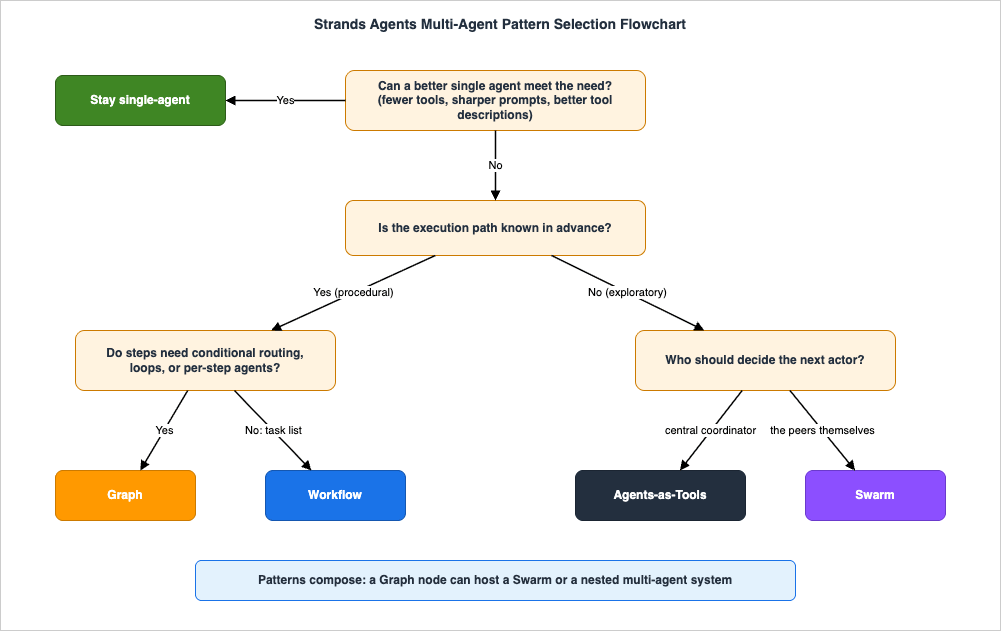
Question 1: Can a better single agent meet the need? Sharper tool descriptions, fewer overlapping tools, a restructured system prompt. If yes — and early in a system's life it usually is — stay single-agent. Multi-agent machinery you do not need is pure overhead (Section 3).
Question 2: Is the execution path known in advance? This is the official criterion — how the path of execution is determined — and it splits the remaining space cleanly in two. A path is "known" when you could draw the steps on a whiteboard before seeing any specific input: extract, then analyze, then summarize. It is "discovered" when the next step depends on what the previous step finds: an investigation, a negotiation between perspectives, an open-ended build.
If the path is known (procedural) — Question 3: do steps need conditional routing, loops, or per-step agent identity?
- Yes → Graph. Conditional edges for quality gates and branching, bounded cycles for refinement loops, full per-node agent configuration, and the strongest audit story (
execution_order, per-node results, accumulated usage). - No → Workflow. If the process is purely "tasks with dependencies, some of them parallel," the workflow tool gives you dependency resolution, automatic parallelism, and a managed, persistent task lifecycle without writing orchestration code.
If the path is discovered (exploratory) — Question 4: who should decide the next actor?
- A central coordinator → Agents-as-Tools. One agent owns the conversation and the goal, delegating to specialists per request and composing their outputs. Control returns to the hierarchy after every delegation, which keeps the system legible.
- The peers themselves → Swarm. When even the coordinator cannot know who should act next — because the answer emerges from the work itself — give the team shared context and handoffs, plus the safety rails from Section 6.2.
9.2 Secondary Dimensions
When the primary path leaves you torn between two patterns, these tiebreakers usually settle it:| If you need… | Favor | Because |
|---|---|---|
| Wall-clock parallelism | Workflow, then Graph | Workflow parallelizes independent tasks automatically; Graph executes independent branches; Swarm is strictly one-agent-at-a-time; Agents-as-Tools parallelism is limited to multi-tool turns |
| Auditability and compliance review | Graph | Topology, branch conditions, and loop bounds are reviewable code; the result object records exactly what ran |
| Predictable token and latency budgets | Graph or Workflow | Deterministic structure caps the number of model invocations; LLM-routed patterns spend extra reasoning on routing decisions |
| Tolerance for surprising-but-good solutions | Swarm | Emergent order is the point; the team can take routes you did not anticipate |
| Simple testing story | Graph or Workflow | Condition functions and task definitions are unit-testable without a model; Swarm tests must assert on outcomes, not paths |
| A single user-facing conversation owner | Agents-as-Tools | The orchestrator holds the conversational thread across delegations |
| Human-in-the-loop checkpoints | Graph | A gate is a node plus a condition — the natural seam for approval steps |
9.3 Worked Examples
- Customer support front door. Requests arrive in unpredictable categories; each category has a clear owner; one assistant must own the conversation. Path discovered per request, central routing → Agents-as-Tools.
- Production incident response. The first finding determines everything that follows; database, networking, and application specialists must build on each other's discoveries. Path discovered, peer judgment → Swarm (with repetitive-handoff detection enabled).
- Contract intake processing. Extract clauses → validate against policy → if validation fails, route to a revision step, at most twice → produce a summary for legal review. Known path, conditional gate, bounded loop, audit requirement → Graph.
- Weekly multi-document report. Ingest several sources independently, analyze each, merge into one summary — identical structure every week, sources analyzable in parallel → Workflow.
9.4 Composing Patterns
The selection is not exclusive, and the composition rule is simple because the SDK makes it structural:GraphBuilder.add_node accepts a multi-agent system, so Graph is the outer skeleton and the other patterns nest inside it. The canonical composition is a deterministic Graph whose well-understood stages are single agents, with one genuinely exploratory stage implemented as a Swarm node — bounded exploration inside an auditable process. Similarly, any Graph node or Swarm member can itself be an orchestrator with tool-wrapped specialists. Compose from the outside in: determinism at the boundary, autonomy in the interior, never the reverse — an outer Swarm that invokes inner Graphs gives you emergent control over deterministic fragments, which audits as poorly as it sounds.9.5 A Checklist Before You Commit
Before the design review ends, answer these in writing; each one catches a selection mistake that is cheap now and expensive later:- Which Section 3.1 signal forced multi-agent? If you cannot name one, you are choosing architecture for its own sake.
- Could you draw the execution path on a whiteboard before seeing an input? Yes → Graph or Workflow. No → Agents-as-Tools or Swarm.
- What bounds the worst-case run? Name the specific limits: handoff and iteration caps for a Swarm,
set_max_node_executionsfor a cyclic Graph, timeouts everywhere. - What will you read when a run goes wrong? Decide now where
node_historyorexecution_orderand per-node results will be stored. - How will tests pass reliably? Outcome assertions for emergent patterns; unit-tested condition functions and task definitions for deterministic ones.
- What is the upgrade path? The cheapest evolution is single agent → Agents-as-Tools → Graph-with-nested-patterns; designs that start at maximum autonomy rarely climb back down gracefully.
10. Running Multi-Agent Strands on Amazon Bedrock AgentCore
10.1 The Deployment Model
Amazon Bedrock AgentCore Runtime is a secure, serverless runtime purpose-built for deploying and scaling dynamic AI agents, and it is the natural production target for Strands applications on AWS. The essential property for this article: the runtime neither knows nor cares which multi-agent pattern you chose. You wrap your application — whether it is one agent, an orchestrator with tool-wrapped specialists, a Swarm, a Graph, or an agent driving a workflow — behind a single HTTP entrypoint, and AgentCore runs it in an isolated, session-scoped environment.The official integration uses the
bedrock-agentcore Python package (note: the documentation flags the earlier separate starter toolkit as deprecated — uninstall it if present to avoid conflicts):pip install bedrock-agentcore
from bedrock_agentcore.runtime import BedrockAgentCoreApp
from strands import Agent
from strands.multiagent import GraphBuilder

app = BedrockAgentCoreApp()

# Build the multi-agent system once, at module load - not per request.
researcher = Agent(name="researcher", system_prompt="You are a research specialist.")
analyst = Agent(name="analyst", system_prompt="You analyze research findings.")

builder = GraphBuilder()
builder.add_node(researcher, "research")
builder.add_node(analyst, "analysis")
builder.add_edge("research", "analysis")
builder.set_entry_point("research")
graph = builder.build()

@app.entrypoint
def invoke(payload):
    result = graph(payload.get("prompt", ""))
    return {"status": str(result.status)}

if __name__ == "__main__":
    app.run()
The AgentCore CLI then carries the application from laptop to cloud:
agentcore create scaffolds a project, agentcore dev runs it locally, agentcore deploy ships it to AWS, and agentcore invoke tests the deployed agent. The full deployment walkthrough — containers, IAM, and the surrounding AgentCore services — is beyond this article's scope; the official Strands deployment guide covers the current procedure, and my Amazon Bedrock AgentCore Implementation Guide Part 4 - Multi-Agent covers AgentCore-side multi-agent architecture in depth.10.2 Pattern-Specific Production Considerations
- Budget the pattern, not just the request. A Swarm with default settings can legitimately run many model invocations and up to fifteen minutes of wall clock (
execution_timeout=900.0). Align the pattern's own timeouts with your invocation path's expectations, and prefer streaming (stream_async) or asynchronous designs for long-running Graphs and Swarms rather than a single blocking call. - Surface the pattern's trace.
node_history(Swarm) andexecution_orderplusaccumulated_usage(Graph) are your per-run explanation of what happened; emit them to your observability pipeline rather than discarding them with the response. - Authorization and evaluation move up a level. In a multi-agent system, "which tools may this agent call, on whose behalf" and "did the system as a whole do a good job" become per-agent and per-pattern questions. On the AgentCore side these concerns are addressed by AgentCore's policy and evaluation capabilities, which I cover in dedicated companion articles in this series.
Amazon Bedrock AgentCore Policy Implementation Guide - Cedar-Based Agent Authorization and Default-Deny Design
Amazon Bedrock AgentCore Evaluations Practical Guide - Built-In Evaluators and CI/CD Regression Testing for AI Agents
11. Common Pitfalls
- 1. Over-decomposition. The most expensive mistake is splitting one good agent into five mediocre ones. Each boundary adds a model invocation, a serialization point, and a place for context to leak. If you cannot name the specific Section 3.1 signal that forced each split, merge agents back together.
- 2. Context fragmentation. Specialists see only what crosses the boundary — a tool-call argument, a handoff message, a node input. When an agent fails mysteriously, the first question is "what did it actually receive?" Make boundary payloads explicit and generous: in Swarm handoffs, use the
messageandcontextarguments deliberately rather than assuming the next agent will infer the situation. - 3. Unbounded autonomy. Shipping a Swarm without enabling
repetitive_handoff_detection_window/repetitive_handoff_min_unique_agents, or a cyclic Graph withoutset_max_node_executions, is shipping an unbounded loop with a billing meter attached. The limits exist; set them on day one. - 4. Using a Swarm for a procedural task. If you can describe the process as numbered steps, agents will rediscover those steps at runtime — paying handoff-reasoning tokens to reproduce a sequence you could have written as Graph edges. Emergent coordination is for problems where the sequence is genuinely unknown.
- 5. Encoding behavior in topology (the inverse mistake). A Graph with nodes like "apologize_if_frustrated" is prompt logic wearing an architecture costume. Topology is for process structure; behavior belongs in system prompts.
- 6. Fragile condition functions. A Graph condition that string-matches a phrase the upstream agent merely tends to produce will eventually return
Falseforever, silently skipping the rest of the pipeline. Have upstream agents emit explicit markers, and treat "downstream nodes never ran" as the signature of this bug. - 7. Vague specialist docstrings in Agents-as-Tools. The orchestrator routes on descriptions alone. Overlapping or generic docstrings ("handles data tasks") produce inconsistent routing that no amount of orchestrator prompting fixes.
- 8. Testing emergent systems like deterministic ones. Asserting that a Swarm visits agents in a fixed order makes tests flaky by design. Assert outcomes and invariants ("the final code passes the test suite"; "status is completed; handoffs under N"), and keep
node_historyfor diagnostics.
12. Frequently Asked Questions
Q. Agents-as-Tools and Swarm both let the model route - what is the real difference?A. Where control returns. In Agents-as-Tools, control comes back to the orchestrator after every delegation: it is a hierarchy with one accountable owner of the conversation, and specialists never interact directly. In a Swarm, control moves laterally between peers via handoffs and may never revisit the first agent; the team shares working context and decides collectively when it is done. Choose by asking who should own the next decision: one coordinator (Agents-as-Tools) or whichever specialist currently holds the work (Swarm).
Q. Do I need multi-agent at all?
A. Often not. The signals that justify it are specific (Section 3.1): degrading tool selection, contradictory personas in one prompt, context-window pressure, per-step model or timeout needs, exploitable parallelism, or team ownership boundaries. If none of those is present, a better single agent — sharper tool descriptions, fewer tools, a cleaner prompt — beats a multi-agent system on cost, latency, and debuggability.
Q. Can I mix patterns in one application?
A. Yes, and the SDK makes the composition structural:
GraphBuilder.add_node accepts a nested multi-agent system, so a Graph node can be a Swarm, and any agent anywhere can carry tool-wrapped specialist agents. The working rule from Section 9.4: keep determinism on the outside (Graph as the skeleton) and autonomy on the inside (a Swarm as one bounded stage), not the other way around.Q. Graph and Workflow are both deterministic - when is Workflow the better choice?
A. When the entire process is expressible as tasks with dependencies and no branching: Workflow then gives you dependency resolution, automatic parallel execution of independent tasks, and a create/start/status lifecycle with state persisted by workflow ID, all without orchestration code. The moment you need a conditional edge, a loop, or per-node agent configuration, move to Graph. Remember the packaging difference too: Workflow is a tool from
strands-agents-tools; Graph is a core SDK orchestrator class.Q. Where does the A2A protocol fit in this selection?
A. Orthogonal to it. A2A (Agent2Agent) is an open protocol for agents to discover and communicate with each other across platforms and organizations — in Strands,
A2AServer exposes a local agent as a network service and A2AAgent consumes remote ones. You still choose one of the four coordination patterns; A2A determines whether a participant happens to live outside your process. Treat it as the integration layer for cross-team and cross-vendor agents, not as a fifth coordination pattern.Q. Does my pattern choice change how I deploy to AgentCore Runtime?
A. Structurally, no — every pattern sits behind the same
@app.entrypoint and deploys identically (Section 10). Operationally, yes: LLM-routed patterns need their timeout and handoff budgets aligned with the invocation path, long runs favor streaming or async invocation, and you should ship the pattern's trace (node_history, execution_order, accumulated_usage) to observability.Q. Can different agents in one system use different models?
A. Yes — and this is one of the quiet advantages of agent boundaries. Each
Agent is configured independently, so a Graph can run a fast, inexpensive model for a triage node and a stronger model for a deep-analysis node, an orchestrator can be lighter than its specialists, and a Swarm can mix model strengths across members. Amazon Bedrock is the default model provider, with other providers supported per agent. Matching model capability to step difficulty is often where a multi-agent design pays for its own overhead.Q. How do I test a Swarm if its execution path changes between runs?
A. Test it like a nondeterministic system, because it is one. Assert on outcomes (the artifact is correct, the status is completed) and on invariants (handoff count below the limit, required agent participated at least once), not on the exact sequence. Unit-test each member agent in isolation with fixed inputs, and reserve
node_history for debugging runs that fail the outcome assertions. If you find yourself needing path-level assertions to trust the system, that is evidence the task wanted a Graph.13. Summary
Strands Agents gives you four ways to coordinate multiple agents, and the choice among them reduces to two questions asked in order. Is the execution path known in advance? If yes, put it in code: a Graph when you need conditional routing, bounded loops, per-node agents, and an audit trail; the Workflow tool when the process is purely tasks-with-dependencies and parallel fan-out. If the path must be discovered at runtime, decide who routes: a central orchestrator that owns the conversation (Agents-as-Tools, built from the ordinary@tool decorator) or the peer specialists themselves (Swarm, with shared context, handoff_to_agent, and safety rails you should always configure).Around that core: do not go multi-agent without a specific forcing signal; compose with determinism outside and autonomy inside (a Graph node can host a Swarm); and remember that deployment to Amazon Bedrock AgentCore Runtime is pattern-agnostic — one entrypoint, whatever coordination lives behind it. The patterns are about a year old as production features and still evolving, so verify signatures against the official documentation in the References when you build.
This article is part of my AI agent engineering series; the Amazon Bedrock AgentCore Master Index connects the AgentCore-side articles, and the AI Agent Engineering Glossary defines the terminology used throughout.
14. References
- Strands Agents - Official Site and Documentation
- Strands Agents Documentation - Multi-agent Patterns
- Strands Agents Documentation - Agents as Tools
- Strands Agents Documentation - Swarm
- Strands Agents Documentation - Graph
- Strands Agents Documentation - Workflow
- Strands Agents Documentation - Agent-to-Agent (A2A) Protocol
- Strands Agents Documentation - Deploying to Amazon Bedrock AgentCore
- GitHub - strands-agents/sdk-python
- GitHub - strands-agents/tools
- PyPI - strands-agents
- AWS Open Source Blog - Introducing Strands Agents, an Open Source AI Agents SDK
- AWS Open Source Blog - Introducing Strands Agents 1.0: Production-Ready Multi-Agent Orchestration Made Simple
- AWS Machine Learning Blog - Multi-Agent Collaboration Patterns with Strands Agents and Amazon Nova
- Amazon Bedrock AgentCore - Official Page
Related Articles in This Series
- Amazon Bedrock AgentCore Master Index
The hub for the AgentCore article series, mapping the platform's services and the deep-dive articles. - Amazon Bedrock AgentCore Implementation Guide Part 4 - Multi-Agent
AgentCore-side multi-agent architecture: runtime composition, inter-agent communication, and deployment details. - AI Agent Engineering Glossary
Definitions for the orchestration, handoff, and agent-architecture terminology used in this article. - Claude Code Subagents and Orchestration Guide
The same delegation and orchestration concepts viewed from the Claude Code side, for readers comparing approaches.
References:
Tech Blog with curated related content
Written by Hidekazu Konishi