Amazon Bedrock AgentCore Evaluations Practical Guide - Built-In Evaluators and CI/CD Regression Testing for AI Agents
First Published:
Last Updated:
Amazon Bedrock AgentCore Evaluations is AWS's managed answer to this problem. Announced in preview at re:Invent in December 2025 and generally available since March 2026, it scores agent behavior — sessions, individual responses, and individual tool calls — using built-in and custom evaluators, either continuously against sampled production traffic or on demand against the exact interactions you choose. Because the same evaluators run in development, in CI/CD, and in production monitoring, the quality bar you test against before deployment is the same one you monitor after deployment.
Plenty of articles compare agent-evaluation vendors. Very few walk through what it actually takes to stand up evaluations against a running agent and wire the scores into a deployment gate. This guide is the implementation walkthrough: what AgentCore Evaluations measures and how, every built-in evaluator and where each applies, the three execution modes (online, on-demand, and batch), custom LLM-as-a-judge and Lambda-based code evaluators, and — the part this guide treats as the destination rather than a footnote — how to turn evaluations into CI/CD regression tests with ground truth datasets and score thresholds.
This article answers three questions:
- What does AgentCore Evaluations measure, and how? The evaluation model — sessions, traces, and tool calls scored by LLM judges or programmatic matchers over OpenTelemetry spans.
- Which built-in evaluator do I use for what? A complete, categorized catalog of the built-in evaluators with their levels, score scales, and appropriate use cases.
- How do I wire evaluations into CI/CD as a regression gate? Datasets with ground truth, the on-demand and batch dataset runners, and threshold-based pass/fail gating in a pipeline.
This article belongs to my Amazon Bedrock AgentCore series. The Amazon Bedrock AgentCore Master Index maps the whole series, and the Amazon Bedrock AgentCore Production Guide covers the operational foundation — Runtime, Observability, deployment — that this article builds on. The companion article on AgentCore Policy, which addresses the authorization half of trustworthy agents, is referenced in Section 9.
Note: AgentCore Evaluations is a 2026-released capability and its details change quickly. Everything in this article — evaluator names, API operations, parameters, and Regions — was verified against the official AWS documentation and announcements as of June 2026. Always check the official documentation linked in References for the current state.
Quick Reference Index
- 1. Introduction — Why Agent Quality Degrades Silently
- 2. What AgentCore Evaluations Is
- 3. Built-In Evaluators Overview
- 4. Evaluation Types — Online, On-Demand, and Batch
- 5. Setting Up Your First Evaluation
- 6. Custom Evaluators
- 7. Wiring Evaluations into CI/CD
- 8. Interpreting Results and Iterating
- 9. Evaluations and Policy — Quality and Authorization as a Pair
- 10. Common Pitfalls
- 11. Frequently Asked Questions
- 12. Summary
- 13. References
1. Introduction — Why Agent Quality Degrades Silently
Traditional software has a fixed mapping from input to output, so a passing test stays passing until someone changes the code. Agents break that assumption three ways.First, the model is a dependency you do not control byte-for-byte. Model upgrades, inference-parameter changes, and even provider-side improvements shift behavior. A prompt that reliably produced a tool call in one model version may produce a clarifying question in the next.
Second, agent behavior is emergent across turns. An agent is not one completion; it is a loop of reasoning, tool selection, tool execution, and response synthesis. A small regression in tool selection — calling
search_orders where it used to call get_order — produces answers that are subtly wrong rather than visibly broken. String-match assertions cannot test this, because correct behavior has many valid surface forms.Third, the failure signal is not an error. The agent responds fluently either way. Latency, error rate, and throughput — the metrics conventional observability watches — all stay green while answer quality drops.
The consequence is that agent quality needs its own measurement layer: one that reads the full interaction record (what the user asked, what the agent thought, which tools it called with which parameters, what it answered) and scores it against quality dimensions — helpfulness, correctness, goal completion, tool-selection accuracy, safety. And because the inputs are non-deterministic, that measurement cannot be a one-time activity; it has to run continuously in production and as a regression gate before every change ships.
That measurement layer is exactly what AgentCore Evaluations provides. The rest of this guide builds it up from the bottom: the data it consumes (Section 2), the evaluators that score it (Sections 3 and 6), the execution modes (Section 4), hands-on setup (Section 5), and the CI/CD regression workflow (Section 7) that is, for most teams, the reason to adopt it.
2. What AgentCore Evaluations Is
Amazon Bedrock AgentCore is AWS's platform for deploying and operating AI agents, composed of modular services — Runtime (serverless agent hosting), Gateway (tool access), Memory, Identity, Observability, Policy, and Evaluations among them — that can be used together or individually. Within that family, Evaluations is the quality measurement service: it consumes the telemetry that agents emit and turns it into evaluator scores you can dashboard, alert on, and gate deployments with.2.1 Position in the AgentCore architecture — evaluations ride on observability
The single most important architectural fact about AgentCore Evaluations is that it evaluates telemetry, not live request/response payloads. Agents instrumented for AgentCore Observability emit OpenTelemetry (OTel) spans describing every step of every interaction: user prompts, model invocations, tool calls with their parameters, tool results, and final responses. Those spans land in Amazon CloudWatch. Evaluations reads spans from CloudWatch — or receives them directly in an API call — reconstructs the interaction, and scores it.This design has three practical consequences:
- Framework independence. Anything that emits spans in the supported format can be evaluated. As of this writing the documentation lists Strands Agents and LangGraph (instrumented with
opentelemetry-instrumentation-langchainoropeninference-instrumentation-langchain) as supported frameworks, with agents hosted on AgentCore Runtime instrumented automatically. The evaluator never imports your agent framework; it reads spans. - Production and test parity. The same span format flows from production traffic and from test invocations, so the same evaluators score both. There is no separate "test harness format" to maintain.
- Observability is a prerequisite. If spans are not flowing — Observability not configured, Transaction Search not enabled in CloudWatch, the OTel distro missing from the agent's dependencies — there is nothing to evaluate. Section 5 covers the prerequisites concretely.
The evaluation hierarchy mirrors the telemetry hierarchy. A session is a full conversation (one or more user turns). A trace is one turn: a user prompt and everything the agent did to answer it. A span is one operation within a trace — most relevantly, one tool call. AgentCore Evaluations defines evaluators at three corresponding levels: session-level (did the conversation achieve the user's goals?), trace-level (was this response helpful, correct, faithful?), and tool-call-level (was this the right tool, with the right parameters?). Terms like trace, span, LLM-as-a-judge, and trajectory are covered in depth in my AI Agent Engineering Glossary if you want the broader conceptual map.
2.2 Availability and Regions
AgentCore Evaluations was announced in preview on December 2, 2025 at AWS re:Invent — alongside AgentCore Policy, the authorization-side counterpart discussed in Section 9 — and reached general availability in March 2026. At GA, availability expanded from the four preview Regions to nine: US East (N. Virginia), US East (Ohio), US West (Oregon), Asia Pacific (Mumbai), Asia Pacific (Singapore), Asia Pacific (Sydney), Asia Pacific (Tokyo), Europe (Frankfurt), and Europe (Ireland). Check the official documentation for the current Region list before planning a deployment, as coverage continues to expand.GA also added capabilities that this guide leans on heavily: ground truth support (reference answers, behavioral assertions, and expected tool trajectories — Section 7) and custom code-based evaluators hosted in AWS Lambda (Section 6). After GA, AWS has continued shipping adjacent capabilities in preview: batch evaluation (Section 4) is in public preview as of this writing, and recommendations and A/B testing — shipped under the banner of agent optimization — are out of scope here beyond a brief note in Section 8.
2.3 The two API planes
Evaluations follows the AgentCore split between control plane and data plane, which matters when you write code against it:- Control plane (
bedrock-agentcore-controlin the AWS SDKs): manages evaluator and configuration resources —CreateEvaluator,ListEvaluators,UpdateEvaluator,DeleteEvaluator,CreateOnlineEvaluationConfig, and related operations. - Data plane (
bedrock-agentcore): runs evaluations — the synchronousEvaluateAPI for on-demand scoring, andStartBatchEvaluation/GetBatchEvaluationfor asynchronous batch jobs.
On top of the raw SDK, AWS ships two higher-level developer surfaces that appear throughout this guide: the AgentCore CLI (
agentcore), which wraps common evaluation workflows in commands like agentcore run eval and discovers sessions from CloudWatch for you, and the AgentCore Python SDK (the bedrock-agentcore and bedrock-agentcore-starter-toolkit packages), which provides the EvaluationClient, Evaluation, and the dataset runners used in Section 7.3. Built-In Evaluators Overview
Built-in evaluators are pre-configured, fully managed evaluators that you reference by ID in the formBuiltin.EvaluatorName — for example Builtin.Helpfulness. Their judge models, prompt templates, and scoring criteria are maintained by AWS and cannot be modified, which is the point: they give every team a consistent, zero-setup quality baseline, and AWS improves them and adds new ones over time.A note on the count, because it illustrates how fast this service moves: the launch announcements cited 13 built-in evaluators. As of this writing (June 2026), the developer guide documents the seventeen evaluator IDs listed below — fourteen LLM-as-a-judge evaluators plus three programmatic trajectory matchers added with ground truth support at GA. Treat the names below as a snapshot and the official documentation as the source of truth.
Built-in evaluators fall into two mechanically different groups.
3.1 LLM-as-a-judge evaluators
These evaluators send the reconstructed interaction (conversation context, the response or tool call under evaluation, and the available tool definitions) to a judge foundation model with a fixed prompt template, and parse a structured verdict: a categorical label, a normalized numeric score, and a reasoning explanation. The full prompt template for every built-in evaluator is published in the developer guide — worth reading, because knowing exactly what the judge is asked is how you decide whether an evaluator matches your intent.Session level (scores the whole conversation):
| Evaluator ID | What it measures | Score labels |
|---|---|---|
Builtin.GoalSuccessRate | Whether all user goals in the session were achieved, reasoning over the full conversation and available tools. With ground truth, validates your explicit assertions instead of inferred goals. | Yes / No |
Trace level (scores one agent response in its conversation context):
| Evaluator ID | What it measures | Score labels |
|---|---|---|
Builtin.Helpfulness | Whether the response moves the user toward their goal, judged from the user's perspective. | 7-point scale, Not Helpful At All to Above And Beyond |
Builtin.Correctness | Factual accuracy of the response to the task. With ground truth, compares against your expected response. | Incorrect / Partially Correct / Perfectly Correct |
Builtin.Faithfulness | Whether the response is consistent with the conversation history (including tool outputs) rather than contradicting or inventing. | 5-point scale, Not At All to Completely Yes |
Builtin.Coherence | Logical consistency of the reasoning — contradictions, gaps, false conclusions. | 5-point scale, Not At All to Completely Yes |
Builtin.InstructionFollowing | Whether the response satisfies all explicit instructions in the input, independent of overall quality. | Yes / No |
Builtin.ResponseRelevance | How focused the response is on the question asked. | 5-point scale, Not At All to Completely Yes |
Builtin.ContextRelevance | Whether retrieved context/passages contain the information needed to answer the question (the RAG-retrieval quality signal). | Not Relevant / Partially Relevant / Perfectly Relevant |
Builtin.Conciseness | Whether the response delivers what was asked without unnecessary content. | Not Concise / Partially Concise / Perfectly Concise |
Builtin.Refusal | Whether the response declines the user's request (useful both for catching over-refusal and confirming intended refusals). | Yes / No |
Builtin.Harmfulness | Whether the response contains harmful content — insults, hate, violence, inappropriate sexual content. | Harmful / Not Harmful |
Builtin.Stereotyping | Whether the response contains biased or stereotypical content about groups of people. | Stereotyping / Not Stereotyping |
Tool-call level (scores one tool invocation):
| Evaluator ID | What it measures | Score labels |
|---|---|---|
Builtin.ToolSelectionAccuracy | Whether calling this tool at this point in the conversation is justified by the user's intent. | Yes / No |
Builtin.ToolParameterAccuracy | Whether the tool-call parameters are faithfully derived from the conversation context rather than hallucinated. | Yes / No |
3.2 Programmatic trajectory evaluators
The three trajectory evaluators are different animals: they compare the agent's actual sequence of tool calls against an expected trajectory you supply as ground truth, using deterministic programmatic matching — no LLM call, no judge variance, and zero judge-token usage. All three are session-level and require theexpectedTrajectory ground truth field (Section 7).| Evaluator ID | Matching rule | Example with expected [calculator, weather] |
|---|---|---|
Builtin.TrajectoryExactOrderMatch | Actual sequence must match exactly — same tools, same order, no extras. | Actual [calculator, weather] passes; [calculator, weather, calculator] fails. |
Builtin.TrajectoryInOrderMatch | Expected tools must appear in order; extra tools between them are allowed. | Actual [calculator, some_tool, weather] passes. |
Builtin.TrajectoryAnyOrderMatch | All expected tools must be present, in any order; extras allowed. | Actual [weather, calculator] passes. |
3.3 Choosing evaluators — a practical decomposition
Figure 1 maps the built-in evaluators onto the evaluation hierarchy. A practical starter set for most agents:- Outcome:
Builtin.GoalSuccessRate(session) — the closest thing to a single "did it work" number. - Response quality:
Builtin.HelpfulnessandBuiltin.Correctness(trace) — user-perceived value and factual accuracy. - Tool behavior:
Builtin.ToolSelectionAccuracyandBuiltin.ToolParameterAccuracy(tool call) — the dimensions where agent regressions most often hide, because tool misuse is invisible in the final response text. - Safety:
Builtin.Harmfulness, plusBuiltin.Refusalif your agent must decline out-of-scope requests. - Regression determinism: the trajectory matchers, once you have a ground truth dataset — they are the only built-ins whose scores never flake, which makes them ideal hard gates in CI (Section 7).
Add
Builtin.Faithfulness and Builtin.ContextRelevance when the agent is RAG-backed, and Builtin.InstructionFollowing and Builtin.Conciseness when output format and length are contractual.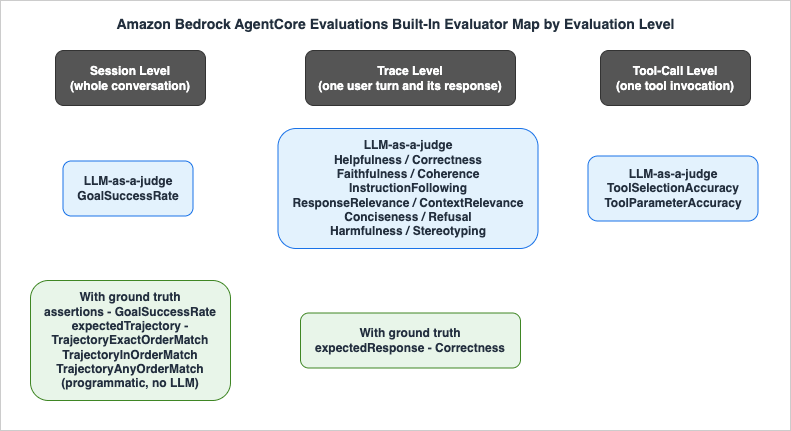
4. Evaluation Types — Online, On-Demand, and Batch
AgentCore Evaluations offers three execution modes. They share evaluators and span formats; they differ in who selects the data, who collects the spans, and when results come back. Choosing among them is the first design decision of an evaluation rollout.4.1 Online evaluation — continuous production monitoring
Online evaluation continuously scores live production traffic. You create an online evaluation configuration that names a data source (an AgentCore Runtime agent endpoint, or up to five CloudWatch log groups plus the agent's OTel service name), a list of up to ten evaluators, an IAM execution role, optional session filters (up to five), and a sampling percentage (0.01% to 100%; the console default is 10%). Once enabled, the service samples completed sessions, runs the configured evaluators, and publishes scores to dashboards in the CloudWatch GenAI Observability experience, where you can track trends, alert on drops, and drill into low-scoring sessions.Two operational details worth knowing up front. First, configurations have an explicit execution status —
ENABLED or DISABLED — so you can pause and resume monitoring (agentcore pause online-eval / agentcore resume online-eval) without deleting the configuration. Second, evaluator locking: while an enabled configuration references a custom evaluator, that evaluator is locked against modification and deletion; you clone it if you need to change it. This protects the integrity of a running monitor but surprises teams who try to iterate on an evaluator in place (Section 10).Use online evaluation for: drift detection after launch, alerting on quality drops, and accumulating the production evidence that tells you what belongs in your regression dataset.
4.2 On-demand evaluation — targeted, synchronous scoring
On-demand evaluation is the synchronousEvaluate API: you supply the spans of one session (and optionally target specific trace IDs or span IDs within it), name one evaluator, and get scored results back in the response. You collect the spans yourself — from CloudWatch via the documented log-group queries, or from wherever you stored them.Because you choose exactly what gets evaluated and the results return immediately, on-demand is the mode for development iteration ("score the session I just ran"), debugging specific production incidents ("score session X that the customer complained about"), validating fixes, and — composed into a loop over a test dataset — CI/CD regression testing. The official documentation explicitly positions it for build-time testing and early development-lifecycle use.
4.3 Batch evaluation — service-side scoring at scale
Batch evaluation (StartBatchEvaluation / GetBatchEvaluation) inverts the labor: you submit an asynchronous job naming the CloudWatch log location, the agent's service name, the session IDs or time window, the evaluators, and optional ground truth; the service discovers sessions, collects spans, runs evaluators, and returns aggregate results — per-evaluator average scores and session counts — with per-session detail written to CloudWatch Logs.One status note before you build on it: batch evaluation is in public preview as of this writing — features and APIs may change before general availability — and the preview does not yet support AWS CloudTrail, so batch evaluation API calls do not appear in your CloudTrail event history. Avoid it for workloads that require a CloudTrail audit trail until support is added, and re-check the official documentation for the current status.
Use batch evaluation for baseline measurement before a change, pre/post comparison after prompt or model updates, regression testing across large curated session sets, and periodic quality audits over a production time window. The trade-off versus on-demand: far less client-side orchestration, but asynchronous results and aggregate-first reporting.
4.4 Choosing a mode
| Online | On-demand | Batch (preview) | |
|---|---|---|---|
| Data selection | Service samples live traffic per your rules | You specify exact spans / trace IDs / span IDs | Service discovers sessions from CloudWatch per job spec |
| Span collection | Service | You (CLI/SDK can automate) | Service |
| Latency | Continuous, near-real-time dashboards | Synchronous response | Asynchronous job, poll for completion |
| Ground truth | Not supported (live traffic has no ground truth) | Supported via evaluationReferenceInputs | Supported via session metadata / job inputs |
| Primary use | Production monitoring and alerting | Dev iteration, incident analysis, CI gates on small suites | Baselines, pre/post comparison, large regression suites, audits |
A mature setup typically uses all three: online for production, on-demand for the inner development loop, and batch for the nightly or pre-release regression sweep. Section 7 shows the SDK's dataset runners, which package the on-demand and batch paths for exactly that CI/CD use.
5. Setting Up Your First Evaluation
This section walks the shortest path from a running agent to evaluation results, using the official tutorial flow. The examples use Python and assume an agent on AgentCore Runtime; for self-hosted agents on a supported framework, the flow is identical once spans reach CloudWatch.5.1 Prerequisites
- An AWS account with IAM permissions for
bedrock-agentcore,bedrock-agentcore-control, and CloudWatch Logs, in one of the supported Regions (Section 2.2). - Amazon Bedrock access with model invocation permissions — the LLM-as-a-judge evaluators invoke Bedrock judge models on your behalf.
- Transaction Search enabled in CloudWatch. This is the prerequisite teams most often miss; without it, span queries return nothing.
- An agent emitting OTel spans: AgentCore Runtime handles this when observability is enabled; otherwise include the AWS Distro for OpenTelemetry (
aws-opentelemetry-distro) and a supported instrumentation (Strands Agents natively, or LangGraph withopentelemetry-instrumentation-langchain/openinference-instrumentation-langchain). - Python 3.10 or later for the SDK examples.
5.2 Generate evaluable traffic
Invoke the agent a few times so there are sessions to score. With a Runtime-hosted agent:import boto3
import json
region = "us-west-2"
agent_arn = "arn:aws:bedrock-agentcore:us-west-2:123456789012:runtime/my-agent-id"
client = boto3.client("bedrock-agentcore", region_name=region)
session_id = "eval-demo-session-0001-0001-0001-000000000001"
response = client.invoke_agent_runtime(
agentRuntimeArn=agent_arn,
runtimeSessionId=session_id,
payload=json.dumps({"prompt": "What is 15 + 27?"}),
qualifier="DEFAULT",
)
print(json.loads(response["response"].read()))
Spans take a couple of minutes to land in CloudWatch after invocation — budget for that delay in everything that follows (the dataset runners in Section 7 default to a 180-second ingestion wait for this reason).
5.3 The fastest path — AgentCore CLI
From inside an AgentCore project directory, the CLI collects spans from CloudWatch and orchestrates theEvaluate calls for you:agentcore run eval \
--runtime "your_runtime_name" \
--session-id "$SESSION_ID" \
--evaluator "Builtin.Helpfulness" \
--evaluator "Builtin.GoalSuccessRate"
Results are saved locally and browsable later with
agentcore evals history. In interactive mode the CLI discovers recent sessions from CloudWatch, so you do not need to track session IDs by hand.The equivalent through the starter-toolkit SDK:
from bedrock_agentcore_starter_toolkit import Evaluation

eval_client = Evaluation()

results = eval_client.run(
    agent_id="YOUR_AGENT_ID",
    session_id="YOUR_SESSION_ID",
    evaluators=["Builtin.Helpfulness", "Builtin.GoalSuccessRate"],
)

for r in results.get_successful_results():
    print(f"{r.evaluator_name}: score={r.value:.2f} label={r.label}")
    print(f"  {r.explanation[:150]}...")
5.4 The transparent path — spans plus the Evaluate API
To see what the CLI is doing — and to build your own harness — collect the spans and callEvaluate directly. Spans for a Runtime-hosted agent live in two log groups: the structural spans in aws/spans and the conversation content in the agent's runtime log group /aws/bedrock-agentcore/runtimes/<agent-id>-<endpoint>. The developer guide ships a CloudWatch Logs Insights helper that filters both by attributes.session.id and merges the JSON messages; the result is a flat list of span objects.With spans in hand, evaluation is one call per evaluator:
import boto3

client = boto3.client("bedrock-agentcore", region_name=region)

response = client.evaluate(
    evaluatorId="Builtin.Helpfulness",
    evaluationInput={"sessionSpans": session_span_logs},
)

print(response["evaluationResults"])
To score only specific turns or tool calls within the session, add
evaluationTarget:# Trace-level evaluator, specific turns only
response = client.evaluate(
evaluatorId="Builtin.Helpfulness",
evaluationInput={"sessionSpans": session_span_logs},
evaluationTarget={"traceIds": ["trace-id-1", "trace-id-2"]},
)
# Tool-call-level evaluator, specific tool spans only
response = client.evaluate(
evaluatorId="Builtin.ToolSelectionAccuracy",
evaluationInput={"sessionSpans": session_span_logs},
evaluationTarget={"spanIds": ["span-id-1", "span-id-2"]},
)
5.5 Reading the results
Evaluate returns a list under evaluationResults — one entry per evaluated entity, so a session with several traces yields several entries for a trace-level evaluator (capped at 10 results per call; by default the API returns the last 10, which carry the most evaluation-relevant context). A successful entry looks like this:{
"evaluatorArn": "arn:aws:bedrock-agentcore:::evaluator/Builtin.Helpfulness",
"evaluatorId": "Builtin.Helpfulness",
"evaluatorName": "Builtin.Helpfulness",
"explanation": "...the judge model's reasoning...",
"context": {
"spanContext": {
"sessionId": "eval-demo-session-...",
"traceId": "..."
}
},
"value": 0.83,
"label": "Very Helpful",
"tokenUsage": {
"inputTokens": 958,
"outputTokens": 211,
"totalTokens": 1169
}
}
The fields to build automation on:
value (normalized numeric score), label (the categorical verdict from the evaluator's scale), explanation (judge reasoning — your debugging input), context.spanContext (which session/trace/span this scores), and tokenUsage (judge-model consumption, useful for tracking evaluation overhead). A call can partially fail — throttling, parse errors, judge timeouts — in which case failed entries carry errorCode and errorMessage alongside the successful ones; treat them as "unknown", not "bad" (Section 8).5.6 Setting up continuous monitoring
Once on-demand scoring works, production monitoring is one configuration away. Through the control plane:import boto3
client = boto3.client("bedrock-agentcore-control")
response = client.create_online_evaluation_config(
onlineEvaluationConfigName="my_agent_quality_monitor",
description="Continuous quality monitoring for my agent",
rule={"samplingConfig": {"samplingPercentage": 10.0}},
dataSourceConfig={
"cloudWatchLogs": {
"logGroupNames": ["/aws/bedrock-agentcore/runtimes/my-agent-id-DEFAULT"],
"serviceNames": ["my-agent-id.DEFAULT"],
}
},
evaluators=[
{"evaluatorId": "Builtin.GoalSuccessRate"},
{"evaluatorId": "Builtin.Helpfulness"},
{"evaluatorId": "Builtin.ToolSelectionAccuracy"},
],
evaluationExecutionRoleArn="arn:aws:iam::123456789012:role/AgentCoreEvaluationRole",
enableOnCreate=True,
)
The same configuration is available via
agentcore add online-eval followed by agentcore deploy, and via the console (which can also auto-create the IAM role). Scores flow into the GenAI Observability dashboards where you set alarms on aggregates — the "satisfaction dropped 10% over eight hours" alert from AWS's launch narrative is exactly this mechanism. Start with a low sampling percentage and a small evaluator set on high-traffic agents; judge-model invocations are billed to your account, so sampling rate times evaluator count is your cost lever (see the official Amazon Bedrock AgentCore pricing page for current rates — this guide deliberately quotes no prices).6. Custom Evaluators
Built-in evaluators cover generic quality dimensions. The moment your bar is domain-specific — "responses must cite a policy document", "never recommend a competitor", "the JSON output must validate against our schema" — you need custom evaluators. AgentCore Evaluations supports two kinds, both created through the control-planeCreateEvaluator API and both usable everywhere built-ins are (online, on-demand, and batch), referenced by their Amazon Resource Name (ARN) in the form arn:aws:bedrock-agentcore:region:account:evaluator/evaluator-id.6.1 Custom LLM-as-a-judge evaluators
A custom LLM-as-a-judge evaluator is three things you define: a judge model (a Bedrock foundation model with inference parameters), instructions (your evaluation prompt), and a rating scale (numerical levels with values, or categorical labels, each with a definition — up to 20 definitions). You also pick the level (SESSION, TRACE, or TOOL_CALL), which fixes the placeholders your instructions may use:- Session level:
{context}(full conversation),{available_tools} - Trace level:
{context},{assistant_turn}(the response under evaluation) - Tool-call level:
{context},{available_tools},{tool_turn}(the tool call under evaluation)
Plus ground truth placeholders —
{expected_response} at trace level; {assertions}, {expected_tool_trajectory}, and {actual_tool_trajectory} at session level — populated from the reference inputs you pass at evaluation time (Section 7). The service substitutes placeholders with actual trace data before invoking the judge.A trace-level example that enforces an agent's scope alongside response quality (abridged from the official sample):
{
  "llmAsAJudge": {
    "modelConfig": {
      "bedrockEvaluatorModelConfig": {
        "modelId": "global.anthropic.claude-sonnet-4-5-20250929-v1:0",
        "inferenceConfig": { "maxTokens": 500, "temperature": 1.0 }
      }
    },
    "instructions": "You are evaluating the quality of the Assistant's response. ... A response quality can only be high if the agent remains in its original scope to answer questions about the weather and mathematical queries only. Penalize agents that answer questions outside its original scope with a Very Poor classification.\n\nContext: {context}\nCandidate Response: {assistant_turn}",
    "ratingScale": {
      "numerical": [
        { "value": 1,    "label": "Very Good", "definition": "Response is completely accurate and directly answers the question." },
        { "value": 0.75, "label": "Good",      "definition": "Mostly accurate with minor issues." },
        { "value": 0.5,  "label": "OK",        "definition": "Partially correct with notable errors." },
        { "value": 0.25, "label": "Poor",      "definition": "Significant errors or misconceptions." },
        { "value": 0,    "label": "Very Poor", "definition": "Completely incorrect, irrelevant, or out of scope." }
      ]
    }
  }
}
Create it with the CLI of your choice:
aws bedrock-agentcore-control create-evaluator \
    --evaluator-name 'response_quality_scoped' \
    --level TRACE \
    --evaluator-config file://custom_evaluator_config.json
The same operation exists as
agentcore add evaluator (project-local configuration applied by agentcore deploy), as Evaluation().create_evaluator(...) in the starter toolkit, as boto3.client('bedrock-agentcore-control').create_evaluator(...), and as a guided console flow that lets you start from any built-in evaluator's template. Evaluators support the full lifecycle — list, get, update, delete — with one constraint: an evaluator referenced by an enabled online evaluation configuration is locked (no update, no delete) until that configuration is disabled.The documentation's prompt-engineering guidance for evaluator instructions is worth internalizing: define a clear judge role; keep each evaluator's scope MECE (mutually exclusive, collectively exhaustive) rather than building one mega-evaluator; include one to three worked examples; prefer a binary scale when unsure (more reliable than fine-grained scales); and do not add output-format instructions — the service appends a standardized output prompt that enforces reasoning-before-score automatically.
6.2 Custom code-based evaluators
Code-based evaluators replace the LLM judge with your own AWS Lambda function — full programmatic control for deterministic checks: schema validation, regex and exact-match rules, external API lookups, business-rule enforcement, custom metrics. No judge variance, no judge tokens.The contract is simple. AgentCore Evaluations invokes your Lambda (same Region) with a structured event:
{
  "schemaVersion": "1.0",
  "evaluatorId": "my-evaluator-abc1234567",
  "evaluatorName": "MyCodeEvaluator",
  "evaluationLevel": "TRACE",
  "evaluationInput": { "sessionSpans": ["..."] },
  "evaluationReferenceInputs": [],
  "evaluationTarget": { "traceIds": ["trace123"], "spanIds": ["span123"] }
}
Your function reads the spans (and ground truth reference inputs, filtered to its level), applies its logic, and returns either a success result —
label required, value and explanation optional — or an error object with errorCode and errorMessage:{ "label": "PASS", "value": 1.0, "explanation": "All validation checks passed." }
Limits to design around: a 300-second maximum Lambda timeout (configurable per evaluator, default 60 seconds) and a 6 MB input payload — long sessions may arrive truncated, so put the decisive signal early or evaluate at trace level. The evaluation execution role needs
lambda:InvokeFunction and lambda:GetFunction on your function. The AgentCore Python SDK ships a @code_based_evaluator() decorator with typed EvaluatorInput / EvaluatorOutput models that handles event parsing inside the Lambda — the documentation's example walks spans to check that the agent's response contains valid JSON, which is precisely the kind of deterministic contract an LLM judge is wrong for.Registering the function as an evaluator is the same
CreateEvaluator call with a codeBased configuration:aws bedrock-agentcore-control create-evaluator \
--evaluator-name 'MyCodeEvaluator' \
--level TRACE \
--evaluator-config '{
"codeBased": {
"lambdaConfig": {
"lambdaArn": "arn:aws:lambda:us-east-1:123456789012:function:my-eval-function",
"lambdaTimeoutInSeconds": 120
}
}
}'
6.3 Choosing between judge and code
A useful division of labor: code-based for contracts, LLM-as-a-judge for qualities. If a human reviewer would check it with a checklist and never disagree (schema validity, mandatory disclaimer present, no PII pattern in output, response under N characters), write code — it is faster, deterministic, and free of judge tokens. If reasonable humans need judgment (is this empathetic? is this medically appropriate? does this resolve the complaint?), use a judge with a carefully defined scale. Most production evaluator suites end up with both, plus the built-ins.7. Wiring Evaluations into CI/CD
Everything so far evaluates traffic that already happened. Regression testing inverts the flow: a fixed dataset of scenarios with known-good expectations is replayed against the candidate agent build, scored, and compared against thresholds — and the deployment proceeds only if the scores hold. This section assembles that pipeline from parts AgentCore Evaluations ships. Figure 2 shows the full flow.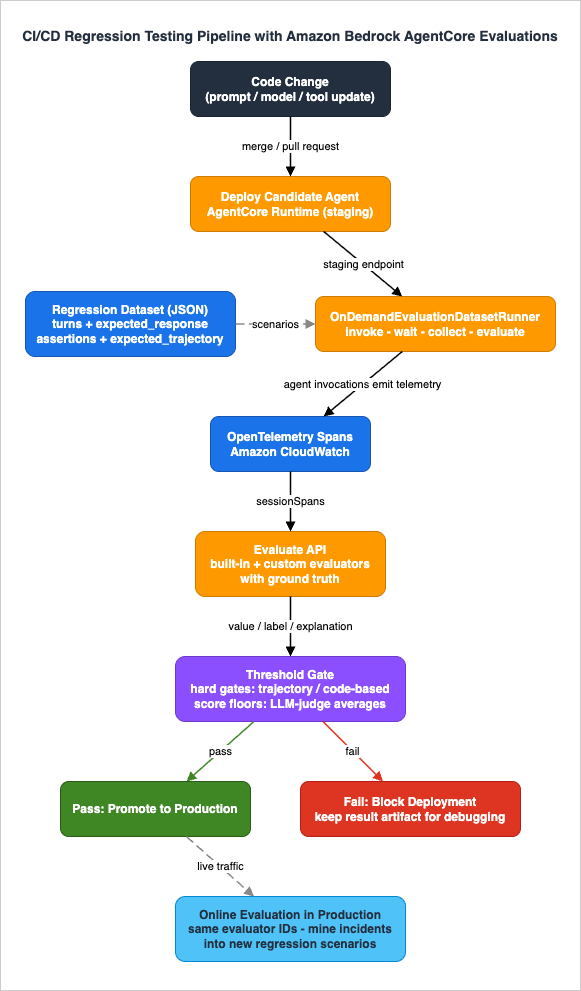
7.1 Ground truth — turning subjective scoring into regression detection
Without ground truth, evaluators score against general quality notions — useful for monitoring, weak for regression detection, because "Helpfulness dropped 0.05" is hard to attribute. Ground truth pins evaluators to your expectations. TheEvaluate API accepts evaluationReferenceInputs alongside the spans; three fields are supported, each consumed by specific evaluators:| Ground truth field | Scope | Consumed by | What it asserts |
|---|---|---|---|
expectedResponse | Trace (scoped by traceId) | Builtin.Correctness (and custom evaluators via {expected_response}) | The reference answer for a turn; the judge scores semantic agreement, not string equality. |
assertions | Session | Builtin.GoalSuccessRate (and custom via {assertions}) | Natural-language statements that must hold across the session — tool usage, content, ordering, tone, business rules. |
expectedTrajectory | Session | The three Builtin.Trajectory*Match evaluators (and custom via {expected_tool_trajectory}) | The expected sequence of tool names, matched programmatically. |
Three behaviors make ground truth pleasant to operate. All fields are optional — evaluators without their field fall back to ground-truth-free mode (
Builtin.Correctness still works without expectedResponse). You can pass all fields in one request and run many evaluators against it; each takes what it uses and reports the rest in ignoredReferenceInputFields (informational, not an error). And you do not need expectedResponse for every trace — uncovered traces are scored ground-truth-free.One constraint to plan around: custom evaluators that use ground truth placeholders cannot be attached to online evaluation configurations, because live traffic has no ground truth. Ground truth is a test-time construct by design.
7.2 The dataset — your regression suite as data
The AgentCore SDK defines a JSON dataset format shared by both dataset runners. A dataset is a list of scenarios; each scenario is one conversation with turns and ground truth:{
"scenarios": [
{
"scenario_id": "math-question",
"turns": [
{ "input": "What is 15 + 27?", "expected_response": "15 + 27 = 42" }
],
"expected_trajectory": ["calculator"],
"assertions": ["Agent used the calculator tool to compute the result"]
},
{
"scenario_id": "math-then-weather",
"turns": [
{ "input": "What is 15 + 27?", "expected_response": "15 + 27 = 42" },
{ "input": "What's the weather?", "expected_response": "The weather is sunny" }
],
"expected_trajectory": ["calculator", "weather"],
"assertions": [
"Agent used the calculator tool for the math question",
"Agent used the weather tool when asked about weather"
]
}
]
}
Multi-turn scenarios execute turns sequentially in one session, preserving conversation context; per-turn
expected_response maps positionally to traces (turn 0 to trace 0), while assertions and expected_trajectory apply session-wide. The format also supports simulated scenarios — instead of fixed turns you define an actor_profile (context, goal, traits) and a starting input, and an LLM-backed simulated user drives the conversation up to max_turns; ground truth is then expressed through assertions only, since the exact flow is not known in advance. Simulated scenarios are how you regression-test conversational robustness rather than fixed scripts.Version this file in the agent's repository, next to the code and prompts it tests. A regression suite that lives outside the repo drifts from the agent it is supposed to protect (Section 10).
7.3 The on-demand dataset runner — the CI workhorse
TheOnDemandEvaluationDatasetRunner (from the bedrock-agentcore SDK's evaluation module) packages the whole loop — invoke the agent for every scenario, wait once for CloudWatch ingestion, collect spans, build level-aware Evaluate requests with the ground truth mapped automatically — into a single run() call. The official documentation positions it explicitly for dev-time iteration and CI/CD pipelines.You supply an agent invoker — a callable that sends one turn to your agent. This is the framework-agnostic seam: boto3
invoke_agent_runtime, an HTTP call, or a direct function call all work.import json
import boto3
from bedrock_agentcore.evaluation import (
AgentInvokerInput,
AgentInvokerOutput,
OnDemandEvaluationDatasetRunner,
EvaluationRunConfig,
EvaluatorConfig,
FileDatasetProvider,
CloudWatchAgentSpanCollector,
)
REGION = "us-west-2"
AGENT_ARN = "arn:aws:bedrock-agentcore:us-west-2:123456789012:runtime/my-agent-id"
LOG_GROUP = "/aws/bedrock-agentcore/runtimes/my-agent-id-DEFAULT"
agentcore_client = boto3.client("bedrock-agentcore", region_name=REGION)
def agent_invoker(invoker_input: AgentInvokerInput) -> AgentInvokerOutput:
payload = invoker_input.payload
if isinstance(payload, str):
payload = json.dumps({"prompt": payload}).encode()
response = agentcore_client.invoke_agent_runtime(
agentRuntimeArn=AGENT_ARN,
runtimeSessionId=invoker_input.session_id,
payload=payload,
)
return AgentInvokerOutput(agent_output=json.loads(response["response"].read()))
dataset = FileDatasetProvider("regression_dataset.json").get_dataset()
runner = OnDemandEvaluationDatasetRunner(region=REGION)
result = runner.run(
agent_invoker=agent_invoker,
dataset=dataset,
span_collector=CloudWatchAgentSpanCollector(log_group_name=LOG_GROUP, region=REGION),
config=EvaluationRunConfig(
evaluator_config=EvaluatorConfig(
evaluator_ids=[
"Builtin.GoalSuccessRate",
"Builtin.TrajectoryExactOrderMatch",
"Builtin.Correctness",
"Builtin.Helpfulness",
],
),
evaluation_delay_seconds=180,
max_concurrent_scenarios=5,
),
)
Scenarios run concurrently (thread pool,
max_concurrent_scenarios); the 180-second ingestion delay is paid once, not per scenario. The result object nests scenario_results (scenario ID, session ID, status, error) containing evaluator_results (evaluator ID and raw Evaluate responses with value, label, explanation).7.4 The gate — thresholds that fail the build
The runner reports scores; the gate is yours to define. The pattern that works in practice is two-tiered:- Hard gates on deterministic evaluators.
Builtin.TrajectoryExactOrderMatch(or the looser InOrder/AnyOrder variants) and your code-based contract evaluators either pass or fail with zero variance. Any failure fails the build, like a unit test. - Threshold gates on judge-scored evaluators. LLM judges have variance (Section 8), so gate on aggregates — average score across the suite, or pass-rate at a per-scenario floor — rather than single-scenario absolutes.
A compact gate over the runner result — this glue is application code, not an SDK feature:
import sys
from collections import defaultdict

HARD_GATE = {"Builtin.TrajectoryExactOrderMatch"}          # any failure blocks
THRESHOLDS = {                                             # suite-average floors
    "Builtin.GoalSuccessRate": 0.90,
    "Builtin.Correctness": 0.80,
    "Builtin.Helpfulness": 0.70,
}

scores = defaultdict(list)
failed = []

for scenario in result.scenario_results:
    if scenario.status != "COMPLETED":
        failed.append(f"{scenario.scenario_id}: {scenario.error}")
        continue
    for ev in scenario.evaluator_results:
        for r in ev.results:
            if "errorCode" in r:
                failed.append(f"{scenario.scenario_id}/{ev.evaluator_id}: {r['errorCode']}")
                continue
            value = r.get("value")
            if value is None:
                continue
            scores[ev.evaluator_id].append(value)
            if ev.evaluator_id in HARD_GATE and value < 1.0:
                failed.append(f"{scenario.scenario_id}: trajectory mismatch")

for evaluator_id, floor in THRESHOLDS.items():
    values = scores.get(evaluator_id, [])
    avg = sum(values) / len(values) if values else 0.0
    print(f"{evaluator_id}: avg={avg:.3f} (floor {floor})")
    if avg < floor:
        failed.append(f"{evaluator_id} average {avg:.3f} below floor {floor}")

if failed:
    print("EVALUATION GATE FAILED:")
    for f in failed:
        print(f"  - {f}")
    sys.exit(1)
print("Evaluation gate passed.")
Note the treatment of evaluator errors as gate failures rather than silently skipped scores: a gate that quietly passes because the judge was throttled is not a gate.
7.5 Placing the gate in a pipeline
The gate script slots into any CI system as a stage between "deploy candidate to a staging endpoint" and "promote". A GitHub Actions sketch:evaluation-gate:
runs-on: ubuntu-latest
needs: deploy-staging
steps:
- uses: actions/checkout@v4
- uses: aws-actions/configure-aws-credentials@v4
with:
role-to-assume: ${{ vars.EVAL_ROLE_ARN }}
aws-region: us-west-2
- run: pip install bedrock-agentcore boto3
- name: Run evaluation suite against staging agent
run: python ci/run_eval_gate.py # Sections 7.3 + 7.4
Three pipeline-design points carry over directly from my Claude Code in CI/CD and Headless Automation guide, where the unattended "agent in a pipeline" problem is examined from the executor side: authenticate with a short-lived OIDC role scoped to exactly the evaluation APIs (never long-lived keys in CI); make every run leave an artifact (persist the runner's result JSON —
result.model_dump_json() — as a build artifact so a failed gate is debuggable without re-running); and budget wall-clock realistically — the ingestion delay plus judge latency means an evaluation stage takes minutes, which argues for running the full suite on merges and nightly rather than on every push.For larger suites, swap the on-demand runner for the
BatchEvaluationRunner (built on batch evaluation, which is in public preview — Section 4.3): same dataset format and same invoker, but it submits a StartBatchEvaluation job (CloudWatch log location, session IDs, evaluators, ground truth) and polls GetBatchEvaluation until completion, returning per-evaluator aggregate statistics (evaluator_summaries with average scores, evaluated/failed counts) with per-session detail written to CloudWatch Logs. Gate on the aggregates the same way. Batch is also the natural shape for the scheduled nightly regression sweep and pre/post comparisons around a prompt or model change.7.6 Consistency across the lifecycle
The quiet superpower of this design: the evaluator IDs in the CI gate are the same IDs in the online configuration monitoring production. When the nightly suite and the production dashboard both speakBuiltin.GoalSuccessRate, a production drop can be reproduced in CI by adding the offending scenario to the dataset, and a CI improvement can be verified in production by watching the same metric. What you test is what you monitor.8. Interpreting Results and Iterating
Standing up evaluations is mechanical; operating them well is judgment. This section covers the recurring questions.8.1 Reading scores — labels first, values second
Every LLM-judged result carries a categoricallabel from the evaluator's published scale and a normalized value. The label is the judge's actual verdict; the value is its numeric projection. When you investigate, read the label and the explanation — the explanation tells you what the judge saw, which is how you distinguish "the agent regressed" from "the judge misread the trace". When you aggregate and gate, use the value. And before trusting any evaluator on your domain, run it over a handful of sessions you have human-labeled yourself: if the judge disagrees with your humans, fix the evaluator choice or write a custom one before automating decisions on it.8.2 Judge variance and flakes
LLM judges are themselves non-deterministic. The same session can score "Very Helpful" on one run and "Somewhat Helpful" on the next, particularly near category boundaries. Mitigations, in order of leverage:- Prefer deterministic evaluators for gating. Trajectory matchers and code-based evaluators never flake. Reserve judge evaluators for thresholds on aggregates.
- Aggregate before comparing. A suite-average across 20 scenarios is far more stable than any single score. Gate on averages and pass-rates, not single-scenario values.
- Use coarse scales. Binary judges (Yes/No evaluators like
Builtin.GoalSuccessRateandBuiltin.InstructionFollowing) are markedly more repeatable than 7-point scales. The official custom-evaluator guidance says the same: when unsure, start binary. - Set thresholds with margin. If your baseline average is 0.88, a floor of 0.85 absorbs judge noise; a floor of 0.875 will page you for nothing.
- Treat evaluator errors separately. Throttles, timeouts, and parse failures land as
errorCodeentries, not low scores. Count them as "unknown" and re-run; never let them average into quality metrics.
8.3 Baselines and the dataset lifecycle
A regression gate is only as good as its baseline and its dataset, and both decay.- Establish the baseline empirically. Before gating, run the suite several times against the current production build and record the score distribution; thresholds come from that distribution, not from aspiration.
- Re-baseline on intentional change. A prompt overhaul or model upgrade legitimately shifts scores. Re-run the baseline procedure and update thresholds deliberately — in the same pull request as the change, so the diff documents the new expectation.
- Grow the dataset from production. The online evaluation dashboard is a scenario mine: every low-scoring production session is a candidate regression scenario. Reproduce it as a dataset entry with corrected ground truth, and yesterday's incident becomes tomorrow's test. This loop — monitor, mine, encode, gate — is the compounding value of running online and on-demand evaluation together.
- Prune as the agent's scope evolves. Scenarios asserting behavior you have deliberately changed (a removed tool, a re-scoped agent) must be updated with the change, or the gate trains the team to ignore red builds.
After GA, AWS also shipped (in preview, as of this writing) optimization features that build on evaluation results — automated recommendations and A/B validation between agent variants. They extend exactly this iterate loop, but being preview features, verify their current state in the documentation before depending on them.
9. Evaluations and Policy — Quality and Authorization as a Pair
AgentCore Evaluations was announced together with AgentCore Policy, and the pairing is conceptual, not just calendrical. They are the two halves of the production-trust problem, on opposite sides of a line:- Policy is the authorization gate — it constrains what an agent is allowed to do, evaluating tool calls and Gateway actions against Cedar policies before execution, deny-by-default. It is preventive: a violating action never happens.
- Evaluations is the quality gate — it measures what the agent actually did and how well, scoring sessions after the fact. It is detective: degradation is caught, attributed, and fed back into development.
Neither substitutes for the other. Policy cannot tell you the agent's answers became unhelpful — unhelpful answers are perfectly authorized. Evaluations cannot stop a destructive tool call in the moment — its verdict arrives after execution. An agent with evaluations but no policy can do real damage politely and measurably; an agent with policy but no evaluations stays safely inside its permissions while quietly becoming useless. Production agents need both: deny-by-default authorization at the action boundary, and continuous quality measurement plus CI regression gates around the behavior inside that boundary.
There is also a practical interplay:
Builtin.ToolSelectionAccuracy failures and Policy denial logs illuminate each other. A spike in policy denials with healthy tool-selection scores suggests your policies are too tight; degrading tool-selection scores with no denials suggests the agent drifted within its (too-broad) permissions — a signal to tighten policy. Reading the two surfaces together is how the authorization boundary and the quality bar co-evolve.The companion article, Amazon Bedrock AgentCore Policy Implementation Guide - Cedar-Based Agent Authorization and Default-Deny Design, covers the authorization half in the same implementation-first style as this guide.
10. Common Pitfalls
Failure modes that recur in real adoptions, roughly in the order teams meet them.- No spans, no evaluations. The most common day-one failure: Transaction Search not enabled in CloudWatch, observability not configured on the agent, or the ADOT dependency missing — and every evaluation returns empty. Verify spans are visible in the GenAI Observability dashboard before debugging anything else.
- Evaluating immediately after invoking. Span ingestion takes minutes. Scripts that invoke and instantly evaluate see partial or empty sessions and produce misleading scores. Respect the ingestion delay (the dataset runners' 180-second default exists for a reason).
- Gating on single judge scores. One scenario, one judge call, hard threshold — guaranteed flaky builds and, soon after, a team that ignores the gate. Aggregate, use margins, and put hard gates only on deterministic evaluators (Section 8.2).
- A mega-evaluator instead of a suite. One custom judge prompt that checks correctness and tone and safety and format produces scores you cannot act on. Keep evaluators MECE — one dimension each — and compose them.
- Forgetting evaluation costs scale with traffic times evaluators. Every LLM-judged evaluation invokes a judge model, and online evaluation multiplies that by sampling rate and evaluator count, continuously. Choose sampling rates deliberately, prefer code-based evaluators for deterministic checks, and review the official pricing page rather than discovering the bill empirically.
- Stale regression datasets. The dataset asserts last quarter's expected behavior; the agent evolved; the gate is red weekly for intended changes — so it gets ignored or deleted. Update scenarios in the same change that updates behavior, and re-baseline thresholds with the same discipline (Section 8.3).
- Test environment that does not match production. Evaluating a staging agent with different tools, model, or knowledge sources than production validates the wrong thing. The deploy-then-evaluate pattern in Section 7.5 exists so the gate scores the artifact you are about to promote, not a lookalike.
- Tripping over evaluator locks. Enabled online configurations lock their custom evaluators; updates and deletes fail until the configuration is disabled. Plan evaluator iteration around clone-modify-swap rather than edit-in-place.
- Ground truth in online configurations. Custom evaluators with ground truth placeholders are rejected in online configs by design — live traffic has no expected answers. Keep ground-truth evaluators in your on-demand/batch test suites, and assertion-free variants in monitoring.
11. Frequently Asked Questions
How is this different from model benchmarks?
Model benchmarks (MMLU and friends) score a foundation model on standardized tasks, in isolation, before you build anything. AgentCore Evaluations scores your agent — your prompts, your tools, your orchestration, your data — on your actual or replayed traffic. A model that benchmarks brilliantly can still power an agent that picks wrong tools or violates your scope; agent evaluation is the layer where that shows up. The history of those model benchmarks — who proposed each one, who declared it saturated, and what replaced it — is covered in LLM Benchmark History and Timeline - Who Built Each Yardstick, Who Declared It Saturated, and What Replaced It. The harness settings behind a single benchmark number, such as the prompt format, few-shot examples, and answer extraction, are covered in LLM Evaluation Harness Settings Behind a Benchmark Score - Prompt Format, Few-Shot Examples, Answer Extraction, Agent Sandboxes, and What to Disclose Alongside the Number.Can I run evaluations in CI?
Yes — that is arguably the headline use case. The synchronousEvaluate API, the OnDemandEvaluationDatasetRunner, and StartBatchEvaluation are all callable from any CI runner with AWS credentials, and ground truth datasets plus threshold gates turn the scores into pass/fail signals. Section 7 is a complete walkthrough. The official documentation explicitly positions on-demand evaluation for build-time testing and batch evaluation for regression testing across curated session sets.Do built-in evaluators work with any agent framework?
They work with any agent whose telemetry reaches CloudWatch in the supported OTel span format. As of this writing, the documentation lists agents on AgentCore Runtime (instrumented automatically when observability is enabled), Strands Agents, and LangGraph with the OpenTelemetry or OpenInference LangChain instrumentation. The evaluator operates on spans, not on framework objects, so support is a question of instrumentation rather than SDK integration — check the documentation for the current framework list.Do I have to host my agent on AgentCore Runtime?
No. The data sources for evaluation are CloudWatch log groups containing spans; an online configuration can name log groups and a service name directly, and on-demand evaluation takes spans you collected yourself. Runtime hosting just automates the instrumentation and log-group wiring.Can evaluators see my data, and where does judging happen?
Evaluations runs within your AWS account boundary: spans live in your CloudWatch, LLM judging invokes Amazon Bedrock models under your account and execution role, and code-based evaluators run in your own Lambda functions. Custom evaluator instructions and rating scales can additionally be encrypted with a customer managed AWS KMS key. Review the service's data-protection documentation for specifics.How many evaluators can I attach, and what are the key limits?
The limits most relevant to design, as of this writing: up to 10 evaluators per online evaluation configuration; up to 5 CloudWatch log groups per data source and 5 session filters; sampling from 0.01% to 100%; 10 results returned perEvaluate call; rating scales up to 20 definitions; code-based evaluators capped at 300 seconds and 6 MB of input. Service quotas evolve — confirm current values in the official documentation.What does AgentCore Evaluations cost?
This guide deliberately quotes no prices. Directionally: LLM-judged evaluations consume judge-model invocations (thetokenUsage field in every result shows exactly how much), programmatic trajectory evaluators and your own Lambda logic do not involve a judge, and online evaluation cost scales with sampling rate times evaluator count times traffic. See the official Amazon Bedrock AgentCore pricing page for current rates.12. Summary
Agent quality fails silently: no stack traces, no 5xx spikes — just a fluent agent that gradually stops doing the right thing. Amazon Bedrock AgentCore Evaluations gives that failure mode a measurement layer. It scores OpenTelemetry-instrumented agent interactions at three levels — sessions, traces, and tool calls — using built-in LLM-as-a-judge evaluators across outcome, response-quality, safety, and tool-use dimensions, deterministic trajectory matchers against expected tool sequences, and custom evaluators of both kinds (your judge prompts and models, or your Lambda code).The same evaluators run three ways: online against sampled production traffic for continuous monitoring and alerting; on-demand against exactly the spans you choose for development iteration and incident analysis; and batch for service-side scoring of large session sets. Ground truth — expected responses, behavioral assertions, expected trajectories — pins evaluators to your expectations, and the SDK's dataset runners package invoke-wait-collect-evaluate into a single call, which makes the CI/CD regression gate (Section 7) a few dozen lines of glue: a versioned scenario dataset, hard gates on deterministic evaluators, threshold gates on judge aggregates, and artifacts for every run. Because CI and production speak the same evaluator IDs, what you test is what you monitor — and every production incident can be mined into a regression scenario.
Paired with AgentCore Policy on the authorization side, this completes the two-gate model for production agents: Policy bounds what the agent may do; Evaluations measures how well it does it. If you operate an agent that matters, run both.
For the rest of the AgentCore series — Runtime, Gateway, Memory, Identity, Observability, and production operations — start from the Amazon Bedrock AgentCore Master Index.
13. References
- Evaluate agent performance with Amazon Bedrock AgentCore Evaluations (Developer Guide)
- Evaluation types - Amazon Bedrock AgentCore
- Evaluators - Amazon Bedrock AgentCore
- Built-in evaluator prompt templates - Amazon Bedrock AgentCore
- Getting started with on-demand evaluation - Amazon Bedrock AgentCore
- Create online evaluation - Amazon Bedrock AgentCore
- Ground truth evaluations - Amazon Bedrock AgentCore
- Dataset schema - Amazon Bedrock AgentCore
- On-demand dataset runner - Amazon Bedrock AgentCore
- Batch dataset runner - Amazon Bedrock AgentCore
- Create evaluator (custom evaluators) - Amazon Bedrock AgentCore
- Custom code-based evaluator - Amazon Bedrock AgentCore
- Amazon Bedrock AgentCore Evaluations is now generally available (AWS What's New)
- Amazon Bedrock AgentCore now includes Policy (preview), Evaluations (preview) and more (AWS What's New)
- Amazon Bedrock AgentCore adds quality evaluations and policy controls for deploying trusted AI agents (AWS News Blog)
- Build reliable AI agents with Amazon Bedrock AgentCore Evaluations (AWS Machine Learning Blog)
- Build custom code-based evaluators in Amazon Bedrock AgentCore (AWS Machine Learning Blog)
- Amazon Bedrock AgentCore samples (GitHub)
- Amazon Bedrock AgentCore pricing
Related Articles in This Series
- Amazon Bedrock AgentCore Master Index
The hub page for the whole AgentCore series, mapping every article by capability. - Amazon Bedrock AgentCore Production Guide
The operational foundation this article builds on: Runtime, Observability, deployment, and day-2 operations. - Amazon Bedrock AgentCore Policy Implementation Guide - Cedar-Based Agent Authorization and Default-Deny Design
The companion article: the authorization gate to this article's quality gate. - Claude Code in CI/CD and Headless Automation - Running the Agent Unattended in Pipelines
The executor-side view of agents in pipelines: authentication, guardrails, artifacts, and scheduling patterns reused in Section 7. - AI Agent Engineering Glossary
Definitions and context for the trace, span, trajectory, and LLM-as-a-judge concepts used throughout this guide.
References:
Tech Blog with curated related content
Written by Hidekazu Konishi