Amazon Bedrock AgentCore Policy Implementation Guide - Cedar-Based Agent Authorization and Default-Deny Design
First Published:
Last Updated:
1. Introduction
AI agents do not execute a fixed code path. They decide, at inference time, which tools to call and with what arguments, based on a model's interpretation of the conversation. That single property is what makes agents useful — and it is also what makes traditional access control insufficient. An IAM role can answer the question "is this workload allowed to invoke this Lambda function?", but it cannot answer "is this specific user, acting through this agent, allowed to callprocess_refund with an amount of $2,000 right now?". The unit of control that production agent platforms need is not the identity, it is the action: a single tool call, with its caller identity and its input parameters, evaluated at the moment of invocation.Policy in Amazon Bedrock AgentCore (commonly referred to as AgentCore Policy) is AWS's answer to exactly this gap. Announced at AWS re:Invent and made generally available on March 3, 2026, it lets you define deterministic authorization rules in the Cedar policy language, store them in a policy engine, and attach that engine to an Amazon Bedrock AgentCore Gateway. The Gateway then intercepts every agent-to-tool request and evaluates it against your policies — outside the agent's code, outside the model's reasoning, and immune to prompt injection — before the tool is ever invoked.
This guide is a single implementation entry point for Policy in AgentCore. It answers three questions:
- What does Policy in AgentCore control, and where does it sit? The architectural position of the policy engine, the Gateway interception point, and the entity model that maps agents, users, tools, and gateways into Cedar.
- How do you write default-deny authorization for agents? The evaluation semantics (default deny, forbid overrides permit), the design principles that follow from them, and a catalog of reusable Cedar policy patterns for common agent scenarios.
- How do you operate it safely? Validation and automated reasoning before deployment, LOG_ONLY rollout, CloudWatch auditing, IAM permissions that make enforcement work, and the pitfalls that bite first-time adopters.
Everything in this article is based on the official AWS documentation and announcements current as of this writing (June 2026), with the relevant primary sources listed in the References section. Cedar language details beyond what agents need are deliberately kept brief — for a full treatment of Cedar itself and Amazon Verified Permissions, see AWS Verified Permissions and Cedar Policy Language Complete Guide. For the broader AgentCore security architecture that Policy slots into, see Amazon Bedrock AgentCore Implementation Guide Part 2: Multi-Layer Security with Identity, Gateway, and Policy.
2. What Policy in Amazon Bedrock AgentCore Is
2.1 The Problem: Identity-Level Control Is Not Action-Level Control
Before Policy in AgentCore, teams had three imperfect places to put agent authorization logic:- The system prompt. Instructions like "never issue refunds above $1,000" are suggestions to a probabilistic model, not controls. They can be bypassed by prompt injection, model drift, or simple misinterpretation.
- The agent code. Hard-coded checks work, but they are scattered across agent implementations, invisible to security teams, and rewritten every time an agent changes frameworks.
- IAM. IAM controls which AWS principals can call which AWS APIs. It is essential — but its grain is the workload identity, not the individual tool call. The Gateway's execution role either can invoke the refund Lambda or it cannot; IAM has no native view of the end user behind the agent session or of the
amountargument inside the MCP tool call.
Policy in AgentCore introduces a fourth place that is purpose-built for the job: a deterministic authorization boundary between the agent and its tools, governed by declarative policies that security and compliance teams can author, validate, audit, and change without touching agent code.
2.2 Position in the AgentCore Architecture
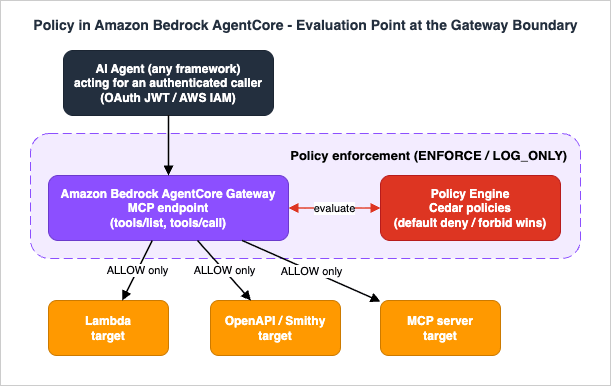
Amazon Bedrock AgentCore is a set of composable services for running agents in production: Runtime (serverless agent execution), Gateway (turns APIs, Lambda functions, and MCP servers into MCP-compatible tools behind one endpoint), Identity (inbound/outbound auth and token vault), Memory, Observability, Evaluations, and Policy. Policy in AgentCore attaches to exactly one of these: the Gateway.The mechanics, as defined in the official documentation:
- A policy engine is a collection of Cedar policies. You create it as a first-class resource (the
bedrock-agentcore-controlcontrol plane), add policies to it, and associate it with one or more Gateways. - The Gateway intercepts all agent traffic — every
tools/listand everytools/callMCP request — and evaluates it against the policies in the associated engine before allowing tool access. - Evaluation is deterministic: identical requests always produce identical decisions. The decision logic lives entirely outside the agent's code and outside the model, so it holds regardless of how the agent is implemented or how creatively a prompt tries to subvert it.
- Decisions are made with default-deny and forbid-wins semantics enforced automatically by the engine (covered in depth in Section 4).
2.3 General Availability, Regions, and Pricing
Policy in Amazon Bedrock AgentCore became generally available on March 3, 2026. At GA, it is available in thirteen AWS Regions: US East (N. Virginia), US East (Ohio), US West (Oregon), Asia Pacific (Mumbai), Asia Pacific (Seoul), Asia Pacific (Singapore), Asia Pacific (Sydney), Asia Pacific (Tokyo), Europe (Frankfurt), Europe (Ireland), Europe (London), Europe (Paris), and Europe (Stockholm). Region coverage expands over time, so check the official documentation for the current list before committing to a deployment Region.For pricing, refer to the official Amazon Bedrock AgentCore pricing page — this article intentionally does not reproduce pricing figures, since they change independently of the mechanics described here.
2.4 What You Author, What AWS Generates
A Policy in AgentCore deployment involves three artifacts, and it is worth being precise about who produces each:| Artifact | Produced by | Role |
|---|---|---|
| Cedar policies | You (directly in Cedar, or via natural language generation) | The authorization rules: who can do what, on which gateway, under what conditions |
| Cedar schema | Generated automatically by the policy engine from the Gateway's tool definitions | Defines valid actions (one per tool), input parameter types, and context structure; used to validate policies at creation time |
| Authorization request | Constructed by the Gateway at runtime from the caller's identity and the MCP tool call | The principal/action/resource/context tuple that policies are evaluated against |
Because the schema is derived from your Gateway targets' actual tool definitions, policy validation can catch references to nonexistent tools, wrong parameter names, and type mismatches before a policy is ever deployed — a property that distinguishes this from free-form policy stores.
3. Cedar Fundamentals for Agent Authorization
3.1 The Minimum Cedar You Need
Cedar is an open-source authorization policy language developed by AWS; the Cloud Native Computing Foundation (CNCF) accepted it as a Sandbox project on October 8, 2025. It is deliberately not a general-purpose programming language: it has no loops, no state, and no side effects, which is what makes policies analyzable by automated reasoning. A Cedar policy has three parts:permit | forbid ( // 1. Effect
principal ..., // 2. Scope: who
action ..., // Scope: what
resource ... // Scope: where
)
when { ... } // 3. Conditions (optional)
unless { ... }; // Conditions (optional)
- Effect:
permitallows,forbiddenies. - Scope: constrains the principal (the entity making the request), the action (the operation), and the resource (the target).
- Conditions:
whenclauses must evaluate to true for the policy to apply;unlessclauses specify exceptions under which the policy does not apply.
That is genuinely most of the syntax this article needs. The full language — entity hierarchies, sets, schemas, the
is/in/like operators, and how Cedar powers Amazon Verified Permissions — is covered in AWS Verified Permissions and Cedar Policy Language Complete Guide, and the authoritative reference is the official Cedar documentation.3.2 The AgentCore Entity Model: Mapping Agents to Cedar
The interesting part for agent builders is how Policy in AgentCore maps the moving parts of an agent platform onto Cedar's principal/action/resource/context model. The official mapping:Principal — the authenticated caller behind the request. Policy in AgentCore supports two principal types, determined by how the Gateway's inbound authorization is configured:
AgentCore::OAuthUser— when the Gateway uses OAuth/JWT authorization. The principal entity is created from the JWT'ssubclaim, and the remaining JWT claims (username, scope, role, department, and any custom claims) are attached to the entity as tags, queryable in conditions viaprincipal.hasTag("...")andprincipal.getTag("...").AgentCore::IamEntity— when the Gateway uses AWS_IAM authorization. The principal'sidattribute contains the caller's IAM ARN; for assumed roles it takes the formarn:aws:sts::<account>:assumed-role/<role-name>, which deliberately omits the session name so thatprincipal ==matching is stable across sessions.
Note what the principal is not: it is not "the agent" as an abstract concept, and it is not the model. It is the authenticated identity presented to the Gateway — an end user flowing through the agent via OAuth, or the IAM role an agent workload runs as. This is what enables per-user and per-agent authorization with the same mechanism.
Action — the specific tool operation. Each tool exposed by a Gateway target becomes one Cedar action, named with the convention
<TargetName>___<tool_name> (three underscores):action == AgentCore::Action::"RefundTool___process_refund"
Resource — the Gateway itself. Policies are scoped to a specific Gateway by its ARN:
resource == AgentCore::Gateway::"arn:aws:bedrock-agentcore:us-west-2:123456789012:gateway/refund-gateway"
Context — the tool call's input parameters. The arguments of the MCP
tools/call request are exposed as context.input, so conditions can reason about what the agent is actually trying to do:when { context.input.amount < 500 }
3.3 From JWT and MCP Request to Authorization Decision
The official documentation walks through exactly how a runtime request becomes a Cedar authorization request. Suppose a Gateway configured with JWT authorization receives this tool call from an agent acting for an authenticated user:{
"jsonrpc": "2.0",
"id": 1,
"method": "tools/call",
"params": {
"name": "RefundTool___process_refund",
"arguments": {
"orderId": "12345",
"amount": 450,
"reason": "Defective product"
}
}
}
The Gateway combines this with the caller's JWT (containing, say,
sub, username: "refund-agent", scope, role, and department claims) and constructs:{
"principal": "AgentCore::OAuthUser::\"12345678-1234-1234-1234-123456789012\"",
"action": "AgentCore::Action::\"RefundTool___process_refund\"",
"resource": "AgentCore::Gateway::\"arn:aws:bedrock-agentcore:us-west-2:123456789012:gateway/refund-gateway\"",
"context": {
"input": {
"orderId": "12345",
"amount": 450,
"reason": "Defective product"
}
}
}
The JWT claims become tags on the principal entity. A policy like the following then permits the call only for the right user under the right input conditions:
permit(
  principal is AgentCore::OAuthUser,
  action == AgentCore::Action::"RefundTool___process_refund",
  resource == AgentCore::Gateway::"arn:aws:bedrock-agentcore:us-west-2:123456789012:gateway/refund-gateway"
)
when {
  principal.hasTag("username") &&
  principal.getTag("username") == "refund-agent" &&
  context.input.amount < 500
};
With
amount: 450 and the matching username, every check passes and the decision is ALLOW. Change the amount to 2,000 — or remove the policy entirely — and the decision is DENY, because nothing else permits the action. That brings us to the semantics that make this safe by construction.3.4 The Condition Toolbox
The expressions you will reach for inwhen and unless clauses form a small, learnable toolbox. All of the following appear in the official examples and are validated against the auto-generated schema:| Goal | Expression | Example |
|---|---|---|
| Read a JWT claim safely | principal.hasTag(...) with principal.getTag(...) | principal.getTag("role") == "manager" |
| Match an IAM caller | principal == or principal.id like | principal.id like "*:111122223333:*" |
| Compare a numeric input | <, <=, >, >=, == on context.input | context.input.amount < 500 |
| Check an optional field exists | context.input has <field> | context.input has description |
| Match a string exactly | == | context.input.claimType == "health" |
| Match a string by pattern | like with * wildcards | principal.getTag("scope") like "*insurance:claim*" |
| Combine requirements | && (and), || (or), parentheses | (a || b) && c |
Two habits prevent most condition-level bugs. First, always pair
hasTag with getTag and has with field access: referencing a tag or an optional field that is absent from the request would otherwise make the policy fail to apply in ways that are hard to debug. Second, remember the type limits from the official limitations list — Cedar has no floating-point type (use Decimal, limited to four decimal places) and no regular expressions (only like with * wildcards) — and design tool input schemas with that in mind.4. Default-Deny Design Principles
4.1 The Evaluation Algorithm
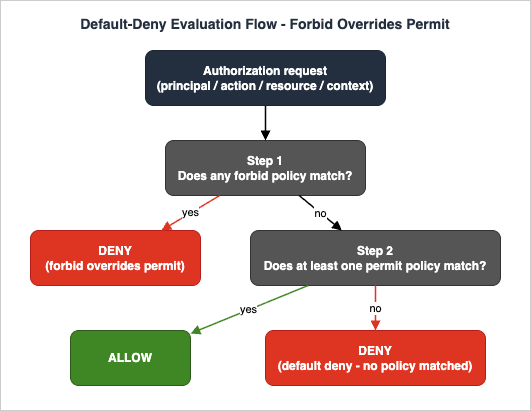
Policy in AgentCore inherits Cedar's evaluation model and enforces it automatically. The official documentation states the algorithm in three steps:- If any
forbidpolicy matches the request, the decision is DENY. - If no
forbidpolicy matches and at least onepermitpolicy matches, the decision is ALLOW. - If neither
forbidnorpermitpolicies match, the decision is DENY (default deny).
- Default deny. An empty policy engine denies everything. You build capability up from zero by enumerating permits — you never claw capability back from an implicit "allow all".
- Forbid always wins. A
forbidcan never be overridden by any number ofpermitpolicies. This is what makes forbid policies suitable for non-negotiable guardrails: compliance restrictions, emergency shutoffs, and exceptions carved out of broader permits. - Policy independence. Each policy evaluates independently against the request; policies do not reference each other. The decision is a pure function of the policy set and the request — which is what makes the whole system analyzable.
A subtlety the documentation calls out explicitly, because it trips people up: the
unless clause on a forbid policy specifies when that forbid does not apply. It does not grant permission. A request that escapes a forbid via unless still needs a matching permit to be allowed.4.2 Why Write Forbid Policies at All?
If everything is denied by default, why haveforbid? Because permits accumulate. Six months from now, someone will write a broader permit than you intended — perhaps generated from a hasty natural language prompt — and default deny will no longer protect the actions that the new permit covers. A forbid policy is insurance against future permits. The official example is instructive:// Broad permit - allows all users to view model results
permit(
principal is AgentCore::OAuthUser,
action == AgentCore::Action::"ModelAPI___view_results",
resource == AgentCore::Gateway::"arn:aws:bedrock-agentcore:us-west-2:123456789012:gateway/model"
);
// Forbid - blocks high-sensitivity results, regardless of any permit
forbid(
principal is AgentCore::OAuthUser,
action == AgentCore::Action::"ModelAPI___view_results",
resource == AgentCore::Gateway::"arn:aws:bedrock-agentcore:us-west-2:123456789012:gateway/model"
)
when {
context.input.sensitivity == "high"
};
Users can view low- and medium-sensitivity results; high-sensitivity results are blocked even though a permit matches. Use forbid for explicit security restrictions that must never be overridden, compliance requirements, emergency shutdowns, and exceptions to broader permits.
4.3 Design Principles for Agent Least Privilege
Combining the evaluation semantics with the entity model yields a small set of design principles. These are the agent-authorization equivalent of IAM least-privilege practice:- Start from the tool allowlist, not the tool universe. The first policy set for any agent should be an enumeration of the specific actions it needs — typically one multi-action permit per agent role (Section 6.1). Everything else stays denied by default.
- Scope every permit to a principal, an action, and a resource. A permit with a bare
principaland no conditions is an "anyone can do this" rule. Sometimes that is correct (genuinely public read-only tools); usually it is a finding waiting to be flagged. The automated analysis described in Section 7 will mark such policies as overly permissive — listen to it. - Push business constraints into
context.inputconditions. Amount ceilings, category restrictions, required fields: if the rule depends on what the agent is asking to do, encode it on the input parameters rather than trusting the agent to self-limit. - Reserve forbid for invariants. Permits express "this role may do this work". Forbids express "this must never happen, no matter what permits exist". Keeping the two roles distinct keeps policy sets readable and auditable.
- Separate environments with separate engines. Policy engines are account- and Region-scoped resources; gateways in different environments (development, staging, production) should reference different engines so that a permissive development policy can never leak into production enforcement. Keeping Cedar files in version control and promoting them through environments — a practice the official documentation explicitly recommends — makes the policy set reviewable like any other code.
- Let policies layer. Because forbid wins and permits accumulate, you can express "who may act" (a permit on the role), "what they may touch" (a permit conditioned on inputs), and "what is never acceptable" (a forbid) as three separate policies. A request succeeds only if it threads all three. The official insurance example in Section 6 demonstrates this layering.
4.4 Partial Evaluation: Tool Lists the Model Never Sees
Policy in AgentCore applies policies not only totools/call but also to tools/list — and the listing behavior is one of the most interesting parts of the design. Tool listing is treated as a meta action: when an agent asks the Gateway what tools are available, the policy engine uses Cedar's partial evaluation to determine which actions would be denied under all circumstances for this principal, and omits them from the response.The semantics are precise and worth quoting in paraphrase from the official documentation: a principal sees a tool in the listing if there exists any set of circumstances under which a call to that tool would be permitted. Because input parameters are not known at listing time, a tool's presence in the list does not guarantee that a specific call will be allowed — the actual invocation is evaluated separately with full context.
The security value of this is subtle but real: a tool that the agent's LLM never sees is a tool it cannot be prompt-injected into attempting. Filtering the tool list shrinks the attack surface presented to the model itself, before any call-time enforcement happens. The AWS Security Blog post on the Cedar design highlights exactly this property — the agent "can't attempt to invoke a tool it doesn't know exists."
Two practical corollaries:
- Do not treat list filtering as the authorization mechanism. It is a hardening layer on top of call-time evaluation, not a replacement for it.
- When debugging "my agent can't see its tool", check the policy set before checking the Gateway target: a missing permit hides the tool from
tools/listentirely.
Partial evaluation is a property of Cedar, not something policy engines have in general. Policy Engines Compared sets it against what IAM, Rego, and Kyverno can and cannot say about a request before the request arrives.
5. Implementation Walkthrough
This section walks through the full lifecycle — create a policy engine, author policies, validate them, attach the engine to a Gateway, and verify enforcement — using the officially documented paths: the AgentCore CLI for project-style setup, and thebedrock-agentcore-control API (AWS CLI / SDK) for direct control-plane management. The AgentCore console offers the same operations interactively, including a natural-language policy authoring experience.5.1 Prerequisites and IAM Permissions
Beyond an AWS account in a supported Region and a Gateway with at least one target, the single most important prerequisite — and the most commonly missed one — is the Gateway execution role permissions. The Gateway evaluates policies by calling Policy in AgentCore on your behalf, and its execution role must be allowed to do so. The official documentation is explicit that three actions are required:{
"Effect": "Allow",
"Action": [
"bedrock-agentcore:AuthorizeAction",
"bedrock-agentcore:PartiallyAuthorizeActions",
"bedrock-agentcore:GetPolicyEngine"
],
"Resource": [
"arn:aws:bedrock-agentcore:us-east-1:123456789012:policy-engine/*",
"arn:aws:bedrock-agentcore:us-east-1:123456789012:gateway/*"
]
}
bedrock-agentcore:AuthorizeAction— evaluates Cedar policies fortools/callauthorization decisionsbedrock-agentcore:PartiallyAuthorizeActions— computes the filteredtools/listresponsebedrock-agentcore:GetPolicyEngine— retrieves the policy engine configuration
Without these, attaching a policy engine to an existing Gateway fails with
InternalServerException, and tool invocations are denied even when permit policies exist. In production, scope the Resource entries to specific policy-engine and gateway ARNs rather than wildcards.On the administration side, the management identity needs the policy lifecycle actions (
bedrock-agentcore:CreatePolicyEngine, CreatePolicy, UpdatePolicy, StartPolicyGeneration, and related read/list/delete operations). Two permission-only gates deserve a special mention because they control what kinds of Cedar policies an administrator may create: bedrock-agentcore:ManageResourceScopedPolicy permits creating policies that target specific gateway ARNs, while bedrock-agentcore:ManageAdminPolicy permits creating wildcard-scoped policies. Granting only the former to application teams while reserving the latter for platform administrators is a clean way to delegate policy authoring without delegating blanket authority.5.2 Path A: Project Setup with the AgentCore CLI
The AgentCore CLI (npm install -g @aws/agentcore, requires Node.js 20+) manages gateways, targets, policy engines, and policies as project resources. The official getting-started tutorial builds a refund-processing example in four commands:# Create a project (default Python Strands agent)
agentcore create --name PolicyDemo --defaults
cd PolicyDemo
# Add a gateway (tutorial uses no inbound auth; use IAM or JWT in production)
agentcore add gateway --name PolicyGateway --authorizer-type NONE --runtimes PolicyDemo
# Register a Lambda function as a tool target
agentcore add gateway-target --name RefundTarget --type lambda-function-arn \
--lambda-arn <YOUR_LAMBDA_ARN> \
--tool-schema-file refund_tools.json \
--gateway PolicyGateway
# Create a policy engine attached to the gateway in ENFORCE mode
agentcore add policy-engine --name RefundPolicyEngine \
--attach-to-gateways PolicyGateway \
--attach-mode ENFORCE
Policies can be added either from a Cedar source file or generated from natural language:
# From a Cedar file
agentcore add policy --name RefundLimit \
  --engine RefundPolicyEngine \
  --source refund_policy.cedar

# Or generated from natural language (requires the gateway to be deployed first)
agentcore add policy --name RefundLimit \
  --engine RefundPolicyEngine \
  --generate "Only allow refunds under 1000 dollars" \
  --gateway PolicyGateway
Then deploy and verify:
agentcore deploy
agentcore status
One sequencing constraint matters here: Cedar policies must reference a specific gateway ARN in the
resource field — wildcard resources in policy statements are rejected. If you author Cedar files by hand before the gateway exists, you need a two-phase deployment: deploy once to create the gateway, read its ARN from agentcore status, fill it into the Cedar file, add the policy, and redeploy. The --generate path avoids this entirely because the service resolves the gateway ARN for you — which is why the tutorial calls it the simplest path.Also note from the IAM section above: the execution role that the AgentCore CLI provisions does not include the three policy-evaluation permissions; you must add them manually.
A test of the deployed example demonstrates enforcement end to end. A $500 refund passes the
context.input.amount < 1000 condition; a $2,000 refund is denied:curl -X POST <GATEWAY_URL> \
-H "Content-Type: application/json" \
-d '{"jsonrpc":"2.0","id":1,"method":"tools/call","params":{"name":"RefundTarget___process_refund","arguments":{"amount":2000}}}'
5.3 Path B: Direct Control-Plane Management (AWS CLI / SDK)
For infrastructure pipelines and existing gateways, thebedrock-agentcore-control API exposes the full lifecycle. Create the engine:aws bedrock-agentcore-control create-policy-engine \
--name my_policy_engine \
--description "My Policy Engine"
The response includes a
policyEngineId and policyEngineArn; the ARN is what you use for policy creation and gateway association. The same operation in Python:import boto3
client = boto3.client('bedrock-agentcore-control')
response = client.create_policy_engine(
name='my_policy_engine',
description='My Policy Engine'
)
print(f"Policy Engine ID: {response['policyEngineId']}")
print(f"Policy Engine ARN: {response['policyEngineArn']}")
Add a Cedar policy to the engine. The
validation-mode parameter controls semantic validation behavior (Section 7.1):aws bedrock-agentcore-control create-policy \
--policy-engine-id my-policy-engine-id \
--name my_policy \
--validation-mode FAIL_ON_ANY_FINDINGS \
--description "My Policy" \
--definition '{
"cedar": {
"statement": "permit(principal is AgentCore::OAuthUser, action == AgentCore::Action::\"RefundTool___process_refund\", resource == AgentCore::Gateway::\"arn:aws:bedrock-agentcore:us-west-2:123456789012:gateway/refund-gateway\") when { context.input.amount < 500 };"
}
}'
Associate the engine with an existing Gateway via
update-gateway. The policy attachment is the policyEngineConfiguration block, which carries the engine ARN and the enforcement mode:import boto3
gateway_client = boto3.client('bedrock-agentcore-control')
response = gateway_client.update_gateway(
name='my-gateway-name',
gatewayId='my-gateway-id',
protocolType='MCP',
authorizerType='CUSTOM_JWT',
authorizerConfiguration={
'customJWTAuthorizer': {
'allowedClients': ['clientId'],
'discoveryUrl': 'https://cognito-idp.us-west-2.amazonaws.com/some-user-pool/.well-known/openid-configuration'
}
},
roleArn='arn:aws:iam::123456789012:role/my-gateway-service-role',
policyEngineConfiguration={
'mode': 'ENFORCE',
'arn': 'arn:aws:bedrock-agentcore:us-west-2:123456789012:policy-engine/my_policy_engine'
}
)
print(f"GATEWAY URL: {response['gatewayUrl']}")
The
mode field accepts two values, and the distinction is the backbone of safe rollout (Section 7.2):LOG_ONLY— the engine evaluates every request and logs the would-be decision, but does not enforce itENFORCE— the engine evaluates and enforces, allowing or denying agent operations
Day-two management uses the operations you would expect —
list-policy-engines, get-policy-engine, list-policies, get-policy, update-policy, delete-policy, delete-policy-engine — with two deletion guards: an engine cannot be deleted while attached to a gateway (detach via update-gateway first), and it cannot be deleted while it still contains policies. The Python SDK additionally provides waiters (policy_active, policy_deleted) for synchronizing on policy state transitions in automation.5.4 Natural Language Policy Authoring (NL2Cedar)
The policy authoring service converts natural language requirements into validated Cedar. It requires a deployed Gateway and policy engine, because generation works against the gateway's auto-generated schema. The asynchronous API flow has three steps:# 1. Start generation
aws bedrock-agentcore-control start-policy-generation \
--policy-engine-id MyEngine-abc123 \
--name RefundPolicy \
--content '{
"rawText": "Allow customer service agents to process refunds up to 500 dollars for orders placed within the last 30 days"
}' \
--resource '{
"arn": "arn:aws:bedrock-agentcore:us-east-1:123456789012:gateway/MyGateway-xyz789"
}'
# 2. Poll status until GENERATED
aws bedrock-agentcore-control get-policy-generation \
--policy-engine-id MyEngine-abc123 \
--policy-generation-id RefundPolicy-def456
# 3. Retrieve generated policies and their validation findings
aws bedrock-agentcore-control list-policy-generation-assets \
--policy-engine-id MyEngine-abc123 \
--policy-generation-id RefundPolicy-def456
Each generated asset carries the Cedar statement, the fragment of your natural language it was derived from, and a
findings array from validation and automated reasoning. The generation pipeline interprets intent, produces candidate Cedar, validates it against the tool schema, and runs analysis to flag policies that are overly permissive, overly restrictive, or internally contradictory — before anything is enforced.The quality of generated policies tracks the precision of your input. The official guidance reduces to: always name the who (a username, role, scope — not "users"), the what (a specific tool operation — not "access data"), and the when (testable conditions with concrete values — "less than $10,000", not "reasonable"). Vague principals, subjective conditions, and ambiguous and/or grouping are the documented failure modes;
NOT_TRANSLATABLE findings usually mean the request referenced data that is not in the schema (note that custom JWT claims must be mentioned explicitly in the prompt to be usable). Treat generated Cedar exactly as you would treat generated code: read it before you ship it.The same authoring capability is also exposed as a Model Context Protocol (MCP) server, so you can author and validate policies from AI-assisted development environments — a nice piece of symmetry: the policy layer that governs MCP tool calls is itself manageable as an MCP tool.
5.5 The Console Experience
Everything above is also available interactively. In the AgentCore console you create a policy engine, associate it with gateways, and choose between enforcement and logging-only mode from the same configuration surface. The natural language authoring interface is built into the policy creation flow: it interprets the intent of your description, generates candidate Cedar policies, validates them against the tool schema of the selected gateway, and flags rules that are overly permissive, overly restrictive, or logically impossible before you save anything. For teams where the policy owners are security or compliance staff rather than the agent developers — which is precisely the separation of duties this feature exists to enable — the console plus natural language authoring is a realistic day-to-day workflow, with the API paths above reserved for automation and CI/CD.One caveat from the official troubleshooting guidance applies to console workflows specifically: attaching a policy engine to an existing Gateway through the console may not automatically update the Gateway's execution role with the three policy-evaluation permissions from Section 5.1. If enforcement misbehaves right after a console attachment, check the role first.
6. Policy Patterns for Common Agent Scenarios
This section is a pattern catalog, adapted from the official example set (an insurance-domain Gateway withget_policy, file_claim, update_coverage, get_claim_status, and calculate_premium tools) plus the documented IAM-principal examples. Every pattern composes with the others under default-deny and forbid-wins semantics. Replace the gateway ARNs and tool names with your own.6.1 Tool Allowlist (the Baseline for Every Agent)
Grant exactly the actions an agent needs with a multi-action permit using thein operator — one policy per role or agent, listing its tools:permit(
principal is AgentCore::OAuthUser,
action in [
AgentCore::Action::"InsuranceAPI___get_policy",
AgentCore::Action::"InsuranceAPI___get_claim_status"
],
resource == AgentCore::Gateway::"arn:aws:bedrock-agentcore:us-west-2:123456789012:gateway/insurance"
);
Everything not listed remains denied by default. Combined with partial evaluation, the agent's
tools/list shows only these two tools, so the model is never even tempted by the rest.6.2 Read-Only Agent
For agents that must observe but never mutate, layer a forbid over the read allowlist so that no future permit can accidentally re-enable writes. The official multi-agent example uses exactly this shape for an IAM-authenticated read-only role:forbid(
principal == AgentCore::IamEntity::"arn:aws:sts::111122223333:assumed-role/ReadOnlyAgentRole",
action in [
AgentCore::Action::"OrderAPI___process_order",
AgentCore::Action::"OrderAPI___cancel_order"
],
resource == AgentCore::Gateway::"arn:aws:bedrock-agentcore:us-west-2:123456789012:gateway/order-gateway"
);
6.3 Input Parameter Constraints
Conditions oncontext.input enforce business rules on what the agent may actually submit — value ceilings, category allowlists, and required fields. Use the has operator before accessing optional fields:permit(
principal is AgentCore::OAuthUser,
action == AgentCore::Action::"InsuranceAPI___file_claim",
resource == AgentCore::Gateway::"arn:aws:bedrock-agentcore:us-west-2:123456789012:gateway/insurance"
)
when {
context.input has claimType &&
(context.input.claimType == "health" ||
context.input.claimType == "property" ||
context.input.claimType == "auto")
};
A forbid-unless variant turns an optional schema field into a mandatory one — useful for forcing the agent to supply auditable justifications:
forbid(
  principal is AgentCore::OAuthUser,
  action == AgentCore::Action::"InsuranceAPI___file_claim",
  resource == AgentCore::Gateway::"arn:aws:bedrock-agentcore:us-west-2:123456789012:gateway/insurance"
)
unless {
  context.input has description
};
6.4 Role- and Scope-Based Authorization (OAuth Tags)
JWT claims arrive as principal tags, so OAuth-era authorization constructs map directly. Scope matching useslike with wildcards to tolerate composite scope strings:permit(
principal is AgentCore::OAuthUser,
action == AgentCore::Action::"InsuranceAPI___file_claim",
resource == AgentCore::Gateway::"arn:aws:bedrock-agentcore:us-west-2:123456789012:gateway/insurance"
)
when {
principal.hasTag("scope") &&
principal.getTag("scope") like "*insurance:claim*"
};
Role gates work well as forbid-unless — a restriction with named exceptions:
forbid(
  principal is AgentCore::OAuthUser,
  action == AgentCore::Action::"InsuranceAPI___update_coverage",
  resource == AgentCore::Gateway::"arn:aws:bedrock-agentcore:us-west-2:123456789012:gateway/insurance"
)
unless {
  principal.hasTag("role") &&
  (principal.getTag("role") == "senior-adjuster" || principal.getTag("role") == "manager")
};
Remember from Section 4: this forbid carves the exception but grants nothing. A senior adjuster still needs a matching permit (such as 6.1 or 6.3) for the request to be allowed. The official documentation demonstrates this layering across three policies — who may update (a username permit), who is not blocked (the role forbid above), and what may be updated (an input-condition permit) — all of which must be satisfied simultaneously.
6.5 Tenant and Account Boundaries (IAM Principals)
When gateways are shared across agents, teams, or accounts, IAM-principal patterns define the boundary. Exact role matching pins a tool to one agent identity:permit(
principal == AgentCore::IamEntity::"arn:aws:sts::111122223333:assumed-role/AgentA-Role",
action == AgentCore::Action::"OrderAPI___get_order",
resource == AgentCore::Gateway::"arn:aws:bedrock-agentcore:us-west-2:123456789012:gateway/order-gateway"
);
Pattern matching on
principal.id widens the boundary to any role in an account (principal.id like "arn:aws:sts::111122223333:assumed-role/*") or constrains by account ID (principal.id like "*:111122223333:*"). The inverse — blocking a third-party account from sensitive operations — is a forbid:forbid(
principal is AgentCore::IamEntity,
action == AgentCore::Action::"AdminAPI___delete_resource",
resource == AgentCore::Gateway::"arn:aws:bedrock-agentcore:us-west-2:123456789012:gateway/admin-gateway"
)
when {
principal.id like "*:444455556666:*"
};
In multi-agent architectures, giving each agent its own IAM role and a per-role permit (as in 6.1 and 6.2) yields the property that each agent's
tools/list contains exactly its authorized tools — per-agent least privilege enforced at the platform layer, not in the agent framework.6.6 Environment Separation
Policies, engines, and gateways are all Region- and account-scoped resources, which makes environment separation straightforward to enforce structurally rather than by convention. The pattern: one policy engine per environment (at minimum, one for production and one for everything else), each attached only to that environment's gateways, with the Cedar sources stored in version control and promoted through environments the same way application code is. Development engines can run with looser permits andLOG_ONLY attachments for fast iteration; the production engine runs the reviewed policy set in ENFORCE mode with FAIL_ON_ANY_FINDINGS validation. Because Cedar policies must name specific gateway ARNs in their resource field, a development policy file literally cannot apply to a production gateway without being edited — a useful structural backstop, and one more reason the ARN-specificity constraint (Section 5.2) is a feature rather than an annoyance. At larger scale, the 400 KB schema budget per engine (Section 7.5) gives a second reason to partition engines by gateway domain even within one environment.6.7 Human Approval Boundaries
Policy in AgentCore makes binary allow/deny decisions at call time; it does not pause a request to wait for a human. The way to combine it with human-in-the-loop workflows is to use forbids to define the boundary beyond which the agent must hand off. For example, permit autonomous refunds below a threshold (the 6.3 pattern), and forbid the agent's principal from the high-value path entirely — routing those cases to a separate tool whose action only a human-facing approval system's principal is permitted to call. The agent receives a structured policy denial (Section 7.3) on the forbidden path, which agent code can catch and convert into an escalation rather than a failure. The deterministic boundary is what makes the escalation trustworthy: no amount of prompt manipulation moves the threshold.7. Testing, Auditing, and Observability
7.1 Validation and Automated Reasoning Before Deployment
Every policy passes through two analysis layers before it takes effect:- Schema checks (always run, cannot be disabled): the policy must reference actions that exist on the associated gateways, use correct data types, and access only context fields defined in the auto-generated schema. This eliminates the classic policy-store failure of rules referencing renamed or deleted tools.
- Semantic validation (automated reasoning): Cedar's analyzability allows the service to prove properties about a policy — not test it on samples, but verify it across all possible requests. The documented findings: a policy that allows every request for its principal/action/resource combination (overly permissive), one that denies everything (overly restrictive), and one that is non-determining — a permit that can never allow or a forbid that can never deny, typically due to contradictory conditions.
The
validationMode parameter on create-policy and update-policy controls how semantic findings are handled:FAIL_ON_ANY_FINDINGS(default) — both layers run; any finding rejects the policyIGNORE_ALL_FINDINGS— only schema checks gate acceptance; semantic findings are not enforced
Keep the default in production.
IGNORE_ALL_FINDINGS exists for iteration, but it discards exactly the analysis that catches security and logic errors schema checks cannot see.For natural language generation, validation happens per generated policy, and the findings come back typed in the generation assets:
VALID, INVALID (syntax or schema violations), NOT_TRANSLATABLE (the request relies on unsupported data), and the warning findings ALLOW_ALL, ALLOW_NONE, DENY_ALL, DENY_NONE. The warnings deserve attention even though they do not always indicate bugs — an intentional emergency-stop policy legitimately triggers DENY_ALL — because they are precisely the shapes that turn into incidents when unintentional.7.2 LOG_ONLY First: the Safe Rollout Path
The enforcement mode on the gateway association is the rollout lever. The pattern the official documentation recommends:- Attach in
LOG_ONLYmode. The engine evaluates every live request and logs the would-be decision without blocking anything. Production traffic is unaffected. - Observe. Compare logged decisions against expectations: are the denials the ones you intended? Is any legitimate agent workflow producing would-be denials you did not anticipate?
- Fix policies, not symptoms. Iterate on the policy set (with validation catching regressions) until the logged decision stream matches intent.
- Switch to
ENFORCE. Flip thepolicyEngineConfiguration.modeviaupdate-gateway— no agent or tool changes required.
One sharp edge documented under IAM troubleshooting: if the Gateway execution role lacks
bedrock-agentcore:GetPolicyEngine, LOG_ONLY mode can fail silently — everything appears fine until you switch to ENFORCE and discover the engine was never evaluating properly. Verify all three policy-evaluation permissions during the LOG_ONLY phase, not after.7.3 What a Denial Looks Like to the Agent
Policy decisions surface to the calling agent as structured MCP results, which means agent code can handle them deliberately. A deniedtools/call returns an error result rather than a protocol failure:{
"jsonrpc": "2.0",
"id": 2,
"result": {
"content": [
{
"type": "text",
"text": "AuthorizeActionException - Tool Execution Denied: Tool call not allowed due to policy enforcement [No policy applies to the request (denied by default).]"
}
],
"isError": true
}
}
Note the bracketed reason — in this case the default-deny path. Well-built agents treat this as a signal to re-plan or escalate (Section 6.7), not as a transient failure to retry: the decision is deterministic, and retrying the identical request yields the identical denial.
7.4 Audit Trail: CloudWatch and X-Ray
Every enforcement decision is logged through Amazon CloudWatch metrics and logs, giving security and compliance teams a continuous audit trail of policy evaluations — what was requested, by which principal, and what the decision was. The documented operational practices: enable detailed CloudWatch logging on the Gateway to capture policy evaluation details, and use AWS X-Ray traces to localize where in the request path an authorization check failed. The LOG_ONLY decision stream and the ENFORCE audit trail flow through the same telemetry, so the dashboards you build during rollout keep serving in steady state.Round out the operational posture with the documented best practices: keep Cedar policies in version control alongside infrastructure code, tag policy resources for ownership, audit the policy set and its IAM permissions periodically, and — if your compliance requirements call for it — encrypt the policy engine with a customer-managed KMS key, which the service supports as an advanced configuration.
7.5 Quotas and Limitations to Design Around
The documented limits that shape policy architecture:| Limit | Value |
|---|---|
| Maximum size per individual policy | 10 KB |
| Maximum combined policy size per resource within an engine | 200 KB |
| Maximum Cedar schema size (all tools across all gateways on the engine) | 400 KB |
| Maximum policies per engine | 1,000 |
| Maximum policy engines per account | 1,000 |
Two Cedar language constraints also matter for authoring: no floating-point numbers (use Cedar's Decimal type, limited to four decimal places) and no regular expressions (pattern matching is the
like operator with * wildcards). The schema limit is the one that surprises teams at scale: it is driven by the number of tools and the complexity of their input schemas across all gateways associated with the engine. If you approach it, split gateways across separate policy engines or retire unused tools.8. Position in a Defense-in-Depth Architecture
8.1 One Layer, Not the Whole Defense
No single control secures an agent platform. In the layered model described in AI Agent Defense in Depth Model (AIDDM) - WAF, Guardrails, Reasoning Sandbox, and Output Filter, Policy in AgentCore is the action-authorization control in the reasoning layer: it constrains what the agent's decisions are allowed to become in the world, sitting between the model's intent and the tool's execution. What makes it special among the layers is its adversarial robustness — content filters and prompt hardening degrade under sufficiently creative injection, while a deterministic policy boundary outside the model does not. That is also the argument the AWS Security Blog makes for placing authorization at the tool invocation boundary rather than relying on training-time alignment or system prompts.A practical division of responsibilities across the stack:
| Layer | Control | Question it answers |
|---|---|---|
| Edge | AWS WAF, rate limiting | Should this traffic reach the application at all? |
| Input/Output | Amazon Bedrock Guardrails, content filters | Is this content acceptable to process or emit? |
| Identity | AgentCore Identity, Amazon Cognito, OAuth | Who is this caller, and is the token valid? |
| Action authorization | Policy in AgentCore (Cedar) | May this principal perform this tool call with these inputs? |
| Infrastructure | IAM, VPC, KMS | May this workload reach this AWS resource at all? |
Read bottom-up, IAM and Policy in AgentCore are complements, not alternatives. IAM authorizes the Gateway's execution role to invoke the Lambda function at all; Policy authorizes a specific principal's specific tool call through the Gateway. Remove either and a layer of the defense disappears.
Neither of them decides how much a call may spend. Cedar decides which tool calls a principal may make; the amount is a separate lever, evaluated on the payment session outside the agent's execution environment rather than at the tool invocation boundary. Agentic Payments on AWS covers where that limit is enforced and what it does not stop.
8.2 Relationship to Amazon Verified Permissions
Policy in AgentCore and Amazon Verified Permissions share the Cedar language but serve different jobs. Verified Permissions is a general-purpose authorization service for your own applications: you design the entity schema, call the authorization API from your code, and own the enforcement points. Policy in AgentCore is purpose-built for one enforcement point — the AgentCore Gateway — with the schema auto-generated from tool definitions, enforcement wired into the MCP request path, and agent-specific features like partial-evaluation tool filtering and natural language authoring built in. If you already operate Verified Permissions, your Cedar skills transfer directly; what changes is that the integration work you would normally do yourself comes managed. For the Cedar-side details of both, see AWS Verified Permissions and Cedar Policy Language Complete Guide.8.3 The Companion Control: AgentCore Evaluations
Policy answers "is this action allowed?"; it says nothing about whether the agent is doing its job well. Amazon Bedrock AgentCore Evaluations — which reached general availability on March 31, 2026 — covers that other half: continuous quality assessment with built-in evaluators for properties like correctness, tool selection accuracy, and goal success. The two are deliberately complementary: Policy is the preventive control that blocks unauthorized actions before they happen, Evaluations is the detective control that surfaces quality degradation after the fact. A production agent platform wants both. Evaluations is covered in depth in the companion article Amazon Bedrock AgentCore Evaluations Practical Guide - Built-In Evaluators and CI/CD Regression Testing for AI Agents.For the operational context around both — observability, capacity, and runbooks for AgentCore in production — see Amazon Bedrock AgentCore Production Operations Guide - Observability, Cost Optimization, and Disaster Recovery, and for the full article series, the Amazon Bedrock AgentCore Master Index - A Hub for AgentCore Articles and Decision Patterns.
9. Common Pitfalls
A field guide to the failure modes most likely to cost you an afternoon — or an audit finding.- Permits without conditions.
permit(principal, action == ..., resource == ...)with nowhenclause allows every caller. Sometimes intended for public read tools; usually an accident. TheALLOW_ALLanalysis finding exists to catch exactly this — do not run production engines withIGNORE_ALL_FINDINGS. - Expecting
forbid ... unlessto grant access. Theunlessclause only exempts the request from that forbid. Without a matching permit, the exempted request still falls through to default deny. If "managers can update coverage" stops working, check whether a permit for managers exists at all. - Missing execution-role permissions. The Gateway execution role needs
AuthorizeAction,PartiallyAuthorizeActions, andGetPolicyEngine. Missing permissions produce anInternalServerExceptionwhen attaching the engine, blanket denials despite permit policies, or — worst — silent non-evaluation in LOG_ONLY mode. The AgentCore CLI does not add these to the roles it creates; console attachment to an existing gateway may not update the role either. - Wildcard resources in hand-written Cedar. Policy statements must name a specific gateway ARN;
permit(principal, action, resource);is rejected at validation. Hand-authored Cedar therefore needs the gateway deployed first (two-phase deployment), while natural language generation resolves ARNs for you. Note the asymmetry with administration: creating wildcard-scoped policies is gated behind the separateManageAdminPolicyIAM permission. - Treating the filtered tool list as authorization. A tool appears in
tools/listif any circumstances would permit calling it; the actual call is evaluated separately with full input context. Listing is a hardening and UX feature, not the enforcement point — and conversely, a tool missing from the list means your policy set denies it under all circumstances, which is the first thing to check when an agent "lost" a tool. - Flipping straight to ENFORCE. Attaching a new engine in ENFORCE mode against live traffic converts every policy gap into an outage. LOG_ONLY exists to make rollout boring; use it (Section 7.2).
- Confusing IAM's job with Policy's job. Putting per-user logic into IAM role proliferation, or assuming Policy substitutes for IAM on the execution role, both end badly. IAM governs workload-to-AWS access; Policy governs principal-to-tool calls. You need both, scoped tightly (Section 8.1).
- Forgetting Cedar's type limits in tool schemas. No floats (use Decimal, four decimal places) and no regex (only
likewith*). If a tool's input schema leans on fractional values or pattern-heavy strings, design the policy conditions — or the schema — accordingly before writing policies that cannot express the rule. - One engine for everything, forever. All tools across all gateways on an engine share the 400 KB schema budget, and dev/prod sharing one engine invites cross-environment leakage. Partition engines by environment and, at scale, by gateway domain.
- Region assumptions. Policy in AgentCore launched GA in thirteen Regions; your agents, gateways, and policy engines need to live where the feature exists. Verify Region support before architecting, and re-verify — coverage grows.
10. Frequently Asked Questions
10.1 Do I still need IAM if I use Policy in AgentCore?
Yes — they operate at different layers and are explicitly designed to work together. IAM controls which AWS principals can invoke AWS APIs and resources (including whether the Gateway's execution role may call your Lambda targets, and whether it may call the policy engine itself). Policy in AgentCore controls which authenticated end users or agent identities may perform which tool calls, with which inputs, through the Gateway. Removing IAM scoping because "Policy handles authorization now" removes the infrastructure layer of your defense; see Section 8.1.10.2 How is this different from Amazon Verified Permissions?
Same language, different integration model. Amazon Verified Permissions is a general-purpose Cedar authorization service for applications you build — you define the schema, call the authorization APIs, and implement enforcement yourself. Policy in AgentCore is a managed application of Cedar to one specific enforcement point: the AgentCore Gateway. The schema is generated from your tool definitions, enforcement is built into the MCP request path, and capabilities like partial-evaluation tool filtering and natural language authoring are included. Cedar knowledge transfers between the two completely.10.3 Can I test policies before enforcing them?
Yes, at two stages. Before deployment, every policy passes schema checks and (by default) semantic validation backed by automated reasoning, which flags overly permissive, overly restrictive, and non-determining policies at creation time. After deployment, attach the engine inLOG_ONLY mode to evaluate real traffic and log would-be decisions without blocking anything, then switch to ENFORCE once the logged decisions match intent. The recommended rollout always passes through LOG_ONLY.10.4 What does the agent see when a call is denied?
A structured MCP error result withisError: true and an AuthorizeActionException message that includes the reason (for example, "No policy applies to the request (denied by default)"). The MCP session continues; the agent can handle the denial programmatically — re-plan, choose another tool, or escalate to a human. Denials are deterministic, so retrying the identical request is pointless by design.10.5 Does natural language policy authoring require anything special?
A deployed AgentCore Gateway and policy engine, because generation validates candidate policies against the gateway's auto-generated tool schema. Generation is asynchronous (start-policy-generation → get-policy-generation → list-policy-generation-assets), returns the Cedar with per-policy findings, and requires precise natural language: explicit principals, specific tools, and testable conditions. Custom JWT claims must be mentioned explicitly in the prompt to be used in conditions. Inference for the authoring service is processed within your geography (EU requests in the EU, US in the US, APAC in APAC), with data stored only in the originating Region.10.6 Does Policy in AgentCore protect tool calls that do not go through a Gateway?
No. The enforcement point is the AgentCore Gateway: the policy engine evaluates the MCP traffic that the Gateway intercepts. Tool or API calls an agent makes directly from its own code never cross the policy boundary. The practical implication is architectural — route agent tool access through Gateways to bring it under policy governance, and treat direct SDK calls from agent code as part of your IAM threat model instead.10.7 How many policies and engines can I operate, and how big can they be?
The documented limits: 10 KB per policy, 200 KB combined policy size per resource within an engine, 400 KB for the auto-generated Cedar schema across all tools on all gateways associated with an engine, 1,000 policies per engine, and 1,000 policy engines per account. The schema limit is the strategic one — it ties an engine's capacity to the number and complexity of tools behind its gateways (Section 7.5).10.8 What does Policy in AgentCore cost?
Pricing is published on the official Amazon Bedrock AgentCore pricing page; this guide deliberately avoids quoting figures that change independently of the mechanics. Architecturally, the cost-relevant levers are the same as the design levers: how many gateways route through engines and how much traffic they evaluate.11. Summary
Policy in Amazon Bedrock AgentCore, generally available since March 3, 2026, gives agent platforms the control that IAM alone cannot: deterministic, action-level authorization of every agent-to-tool call, enforced at the AgentCore Gateway boundary, outside the reach of agent code and prompt manipulation. Its building blocks are deliberately few — Cedar policies in a policy engine, attached to a Gateway in LOG_ONLY or ENFORCE mode, evaluated with default-deny and forbid-wins semantics against a principal/action/resource/context tuple constructed from the caller's identity and the MCP request.The design discipline this article distilled: build up from a tool allowlist per agent role; push business constraints into
context.input conditions; reserve forbid for invariants that no future permit may override; keep environments on separate engines with policies in version control; let automated reasoning veto overly permissive policies before they deploy; and always roll out through LOG_ONLY with CloudWatch as your witness. Wire the Gateway execution role's three policy-evaluation permissions before anything else, and respect the boundary of the guarantee — Policy governs what crosses the Gateway, IAM governs what the workload touches, guardrails govern content, and Evaluations watches quality. Each layer does one job; together they make autonomous agents deployable with confidence.If you are building on AgentCore, the natural next steps are the companion quality-side guide, Amazon Bedrock AgentCore Evaluations Practical Guide - Built-In Evaluators and CI/CD Regression Testing for AI Agents, the security architecture context in Amazon Bedrock AgentCore Implementation Guide Part 2: Multi-Layer Security with Identity, Gateway, and Policy, and the full series at the Amazon Bedrock AgentCore Master Index - A Hub for AgentCore Articles and Decision Patterns.
12. References
Official documentation- Policy in Amazon Bedrock AgentCore: Control Agent-to-Tool Interactions
- Getting started with Policy in AgentCore
- Policy in AgentCore - Core concepts
- Understanding Cedar policies
- Policy in AgentCore - Authorization flow
- Writing policies in natural language
- Policy validation and analysis overview
- Example policies
- AgentCore Gateway and Policy in AgentCore IAM Permissions
- Policy enforcement modes
- Use an AgentCore Gateway with Policy in AgentCore
- Policy in AgentCore - Limitations
AWS announcements and blogs
- Policy in Amazon Bedrock AgentCore is now generally available (AWS What's New)
- Amazon Bedrock AgentCore adds quality evaluations and policy controls for deploying trusted AI agents (AWS News Blog)
- Why Policy in Amazon Bedrock AgentCore chose Cedar for securing agentic workflows (AWS Security Blog)
- Amazon Bedrock AgentCore pricing
Cedar
Related Articles on This Site
- AWS Verified Permissions and Cedar Policy Language Complete Guide
The Cedar language itself - entity model, syntax, schema, and Amazon Verified Permissions patterns that this article builds on. - Amazon Bedrock AgentCore Implementation Guide Part 2: Multi-Layer Security with Identity, Gateway, and Policy
The AgentCore security architecture around Policy - Cognito JWT authentication, Token Vault, and the MCP Gateway. - Amazon Bedrock AgentCore Master Index - A Hub for AgentCore Articles and Decision Patterns
The hub for the full AgentCore article series and its deployment-ladder decision patterns. - AI Agent Defense in Depth Model (AIDDM) - WAF, Guardrails, Reasoning Sandbox, and Output Filter
The layered defense model that positions policy-based action authorization among the other controls. - Amazon Bedrock AgentCore Production Operations Guide - Observability, Cost Optimization, and Disaster Recovery
Production operations for AgentCore - observability, capacity, and runbooks that complement policy governance. - Amazon Bedrock AgentCore Evaluations Practical Guide - Built-In Evaluators and CI/CD Regression Testing for AI Agents
The companion quality-side control - built-in evaluators and CI/CD regression testing for agents.
References:
Tech Blog with curated related content
Written by Hidekazu Konishi