Claude Code in CI/CD and Headless Automation - Running the Agent Unattended in Pipelines
First Published:
Last Updated:
This guide is about that second mode: running Claude Code unattended in pipelines. It covers print (headless) mode and the
claude -p entry point, parsing structured output, authenticating in CI across the three providers, the official GitHub Action, the guardrails that keep an unattended run from doing something you cannot undo, how to scope a task so it is safe to automate, how to control cost and concurrency, observability and audit, and scheduling. It closes with a FAQ and a curated References list of the official documentation.A note on scope before we start. This article is the companion to the Claude Code Operator's Handbook, which introduces the CLI surface, and to the Claude Code Harness and Environment Engineering Guide, which goes deep on permissions, hooks, and OS-level boundaries. Where those topics matter here, I summarize and link rather than repeat. This article is also deliberately distinct from the Agent SDK: if you want to embed an agent loop inside your own application as a library, that is the SDK's job and a separate article; here we run the CLI itself unattended.
Quick Reference Index
- 1. Introduction — Why Run Claude Code Unattended
- 2. Print / Headless Mode
- 3. Parsing Structured Output
- 4. Authentication in CI
- 5. The Official GitHub Action and CI Integrations
- 6. Guardrails for Unattended Runs
- 7. Scoping the Task
- 8. Cost and Concurrency Control
- 9. Observability and Audit
- 10. Scheduling and Recurring Jobs
- 11. Common Pitfalls
- 12. Frequently Asked Questions
- 13. Summary
- 14. References
1. Introduction — Why Run Claude Code Unattended
The interactive REPL assumes a person is present to read the agent's reasoning, answer permission prompts, and decide when to stop. Headless automation removes that person. Everything the human did implicitly — granting permission, judging when the work is "done," noticing a runaway loop, reading the diff — now has to be encoded into configuration, flags, and the surrounding pipeline. That shift is the entire subject of this guide.There are good reasons to make the shift. A pull-request reviewer that posts comments the moment a PR opens; a labeler that triages new issues; a routine refactor that runs the same mechanical change across a fleet of repositories on a schedule; a documentation updater that runs nightly. These are tasks where the value is in not needing a human to babysit them, and where the work is well-specified enough that an agent can complete it without interactive steering.
But unattended execution concentrates three risks that an interactive session diffuses across a human's attention. Keep all three in view for the rest of this guide.
- Permission. Interactively, a risky action pauses for your approval. Unattended, there is nobody to approve. The agent either runs the action automatically or is blocked — and you have to decide, in advance, which. Get this wrong in the permissive direction and an automated run can push to a branch, delete files, or call an external API you did not intend.
- Cost. Unattended runs are billed pay-as-you-go (this is covered in depth in the billing article). A loop that never terminates, or a fleet of parallel jobs each taking more turns than expected, spends real money with nobody watching. You cap it with turn limits, model selection, timeouts, and concurrency control — not with a human who notices the session is taking too long.
- Audit. When something goes wrong interactively, you saw it happen. Unattended, the only record is whatever you captured: the structured output, the logs, the diff, the telemetry. If you did not capture it, it did not happen as far as your incident review is concerned.
Figure 1 shows the shape of a well-formed unattended run. A trigger fires; the job authenticates to a provider; Claude Code runs in headless mode inside a guardrail (restricted tools, a non-interactive permission mode, deterministic hooks); the pipeline parses the structured output; and only then does it act — posting a comment, committing, or opening a pull request.
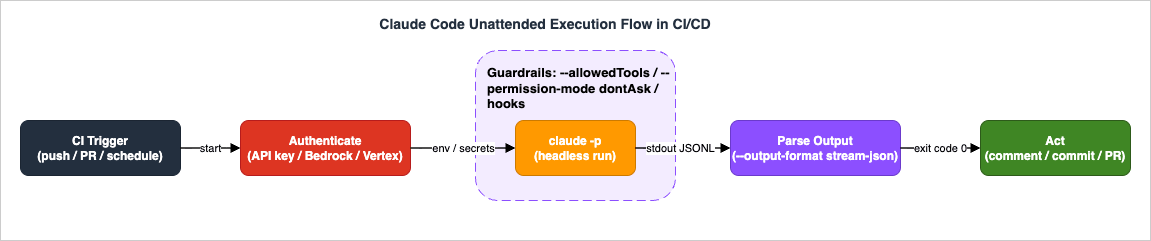
The rest of this guide walks that flow left to right, then circles back to the cross-cutting concerns — scoping, cost, audit, scheduling — that determine whether the whole thing is safe to leave running.
2. Print / Headless Mode
2.1 The -p entry point
Headless mode is requested with the -p flag (long form --print). Instead of opening the interactive REPL, Claude Code reads the prompt, runs to completion, prints the response, and exits. The prompt can be a positional argument:claude -p "Summarize the changes in the last commit and flag any obvious regressions."or piped on standard input, which is the natural shape inside a pipeline where the prompt is assembled from other commands:
cat build-error.txt | claude -p "Explain the root cause of this build failure and suggest a fix."Piped input has a size cap; very large inputs are rejected rather than silently truncated, so assemble the prompt deliberately rather than streaming an unbounded log into it.
The key mental shift is that
-p is a batch invocation. There is no follow-up turn from a human. Whatever the agent needs to know has to be in the prompt, in the files it can read, or in the tools it is allowed to call. An interactive prompt that ends with "let me know if you want me to also update the tests" is a bug in headless mode — there is nobody to answer, and the run either stops short or, worse, repeatedly tries to ask and aborts.2.2 Output formats
The shape of what-p prints is controlled by --output-format, which takes three values.| Value | Shape | Use when |
|---|---|---|
text (default) | Plain text, exactly what you would read in the terminal | A human reads the log; no machine decision depends on it |
json | One structured JSON object: the final result text, a session_id, and run metadata including cost | The pipeline runs the agent, waits, then makes one decision on the outcome |
stream-json | Newline-delimited JSON (JSONL): one object per line, emitted as the run progresses | You react to events in real time — stream to a UI, watch tool calls, tee to a log |
# One structured object at the end - easiest to consume.
claude -p "List the public functions in src/." --output-format json

# A live stream of events - one JSON object per line.
claude -p "Refactor the logging module." --output-format stream-json --verbose
stream-json requires --verbose to emit the full turn-by-turn stream, and if you want partial (token-level) message events you additionally pass --include-partial-messages:claude -p "Explain recursion." \
--output-format stream-json --verbose --include-partial-messagesThere is a matching
--input-format that accepts text (the default) or stream-json. Streaming input lets you feed a sequence of messages into a single run rather than one static prompt; when you combine --input-format stream-json with --output-format stream-json, add --replay-user-messages so the user messages you send on stdin are echoed back on stdout and your consumer sees a complete, ordered transcript.2.3 Faster, cleaner scripted invocations with --bare
Interactive Claude Code auto-discovers a lot of context on startup: hooks, skills, plugins, MCP servers, automatic memory, and CLAUDE.md files up the directory tree. In a pipeline you often want none of that ambient discovery — it slows the start and it can pull in configuration you did not intend for an automated run. --bare skips all of it:claude -p --bare "Run the unit tests and report only failures."Because bare mode also skips OAuth and keychain reads, it requires an explicit credential —
ANTHROPIC_API_KEY or an apiKeyHelper — which is exactly what you have in CI anyway. The official docs note that --bare is the recommended mode for scripted and SDK-style calls and is slated to become the default for -p in a future release, so adopting it now is future-proofing rather than a workaround.2.4 Session continuation
A single-p run is stateless from the caller's perspective, but Claude Code can continue a prior conversation when you want a multi-step automated workflow to share context.--continue(-c) resumes the most recent conversation in the current directory. If there is none, it reports that and exits rather than starting a fresh one silently.--resume(-r) resumes a specific session by ID (or name), so a later pipeline stage can pick up exactly where an earlier one left off.--session-id <UUID>runs under a session ID you choose. Supplying your own UUID makes the run addressable and idempotent-friendly: the same ID identifies the same logical job across retries and stages.--fork-session, used with--resume/--continue, branches a new session ID from an existing conversation instead of mutating the original — useful when you want to try a follow-up without disturbing the canonical transcript.
A common two-stage pattern captures the session ID from the first run's JSON output and resumes it in a later step:
session_id=$(claude -p "Start a review of the auth module." \
  --output-format json | jq -r '.session_id')

claude -p "Now write the missing tests for what you found." \
  --resume "$session_id"
2.5 Turn limits and model selection
Two flags belong in nearly every unattended invocation, because they are your first line of defense against runaway cost (Section 8 returns to this).--max-turns Ncaps the number of agentic turns. It is print-mode-specific, and when the limit is reached the run exits with an error rather than continuing indefinitely. Treat that error as a signal, not a failure to paper over.--modelselects the model for the run, taking either an alias (opus,sonnet) or a full model name. It overrides themodelsetting and theANTHROPIC_MODELenvironment variable.
claude -p "Apply the lint autofixes and stop." \
  --max-turns 8 --model sonnet --output-format json
When you pin a full model name rather than an alias, use the exact current identifier (for example
claude-opus-4-8 or claude-sonnet-4-6) and avoid appending date suffixes from memory — aliases are the safer default in scripts because they track the latest model without edits.2.6 Exit codes
In a pipeline, the exit code is how the surrounding shell or CI step knows whether to proceed. A successful run exits cleanly; error conditions — such as exceeding--max-turns, or repeatedly hitting an auto-mode block with no human to prompt — exit non-zero so the step fails loudly. The official docs document specific cases (for example, a --max-turns overflow exiting with an error, and claude auth status exiting 0 when logged in and 1 when not), but a complete, enumerated exit-code table for every -p outcome is not published, so do not hard-code assumptions about specific non-zero values — branch on "zero versus non-zero," and read the structured output (Section 3) for the precise reason.3. Parsing Structured Output
Headless mode is only useful in a pipeline if your code can reliably understand what happened. That is what--output-format json and --output-format stream-json are for. This section is about consuming them robustly.3.1 The shape of the stream
Withstream-json, every line is a self-contained JSON object describing one event. The stream begins with a system event whose subtype is init, reporting the run's metadata — the session ID, the model, the available tools, the MCP servers, and which plugins loaded (and which failed). As the run proceeds you see assistant events (the model's text and tool-use blocks), and — if you asked for partial messages — stream_event objects wrapping token-level deltas. There are also operational system subtypes such as api_retry, emitted before the client retries a transient API error, which carry the attempt number, the retry delay, and a classified error string.Schematically, a short run's stream looks like the following — one JSON object per line, abbreviated here for illustration. Treat the exact field set as documentation-defined rather than as a contract to hard-code against, and read only the fields your step actually needs:
{"type":"system","subtype":"init","session_id":"...","model":"...","tools":["Read","Grep"]}
{"type":"assistant","message":{"content":[{"type":"text","text":"Reviewing the diff..."}]}}
{"type":"result","result":"No regressions found.","session_id":"..."}
The first line tells you what the run is (model, tools, session); the middle lines are the work as it happens; the last line is the outcome you usually branch on. Because each line is independently valid JSON, a consumer can process the stream incrementally without waiting for the whole run to finish — which is exactly what makes
stream-json the right choice for live UIs and long jobs.Figure 2 shows the shape: a run emits a sequence of JSONL events on stdout, your consumer pipes them through a filter such as
jq to pull out the fields it cares about, and the extracted values feed the next pipeline step — a cost gate, a comment, a downstream job.
3.2 Extracting the result, usage, and cost
For most pipelines, the single-object--output-format json form is easier to consume than the stream, because you wait for the run to finish and then read one object. It carries the final result text, a session ID, and run metadata that includes the cost (the cost value is omitted here, in line with this site's policy of not quoting price figures):{
"result": "No regressions found in the billing module.",
"session_id": "550e8400-e29b-41d4-a716-446655440000"
}The fields you will reach for most — the result text, the session ID, and the run's total cost — are extracted with
jq:response=$(claude -p "Summarize the open PRs that touch the billing module." \
--output-format json)
result=$(echo "$response" | jq -r '.result')
session=$(echo "$response" | jq -r '.session_id')
cost=$(echo "$response" | jq -r '.total_cost_usd')
echo "session=$session cost=$cost"
echo "$result"The
result, session_id, and total_cost_usd fields are stable and documented. Some additional fields you may see on the terminal result event of a stream — for example an is_error flag, a turn count, or a duration — are useful when present, but a complete field-by-field schema for the terminal result event in stream-json is not fully enumerated in the official docs, so guard your parser: read the fields you need with jq, default missing ones, and never assume a field exists.When you do consume the stream live,
jq filters select the lines you care about. For example, to print only the streamed text deltas:claude -p "Draft the release notes." \
--output-format stream-json --verbose --include-partial-messages \
| jq -r 'select(.type == "stream_event"
and .event.delta.type? == "text_delta")
| .event.delta.text'3.3 Schema-validated structured output
When the next pipeline step needs structured data — not prose — constrain the result to a JSON Schema with--json-schema. The run's response then includes schema-validated output you can consume directly:claude -p "Extract the names of every exported function in src/." \
--output-format json \
--json-schema '{
"type": "object",
"properties": {
"functions": { "type": "array", "items": { "type": "string" } }
},
"required": ["functions"]
}' \
| jq '.structured_output'This is the difference between a brittle pipeline that greps prose for function names and a robust one that reads a typed array. Whenever a downstream step branches on the agent's output, prefer a schema over parsing free text.
3.4 Two rules for robust parsing
Two habits keep output-parsing from becoming the flaky part of your pipeline.- Parse JSON as JSON. Use
jq(or your language's JSON parser) on the structured formats. Nevergrep/sedthe human-readabletextoutput to extract a value — that output is for people and will change wording without notice. - Tee the raw stream to a log before you parse it. If a parse fails, you want the original bytes to debug against. Section 9 makes this part of the audit story; here it is simply good defensive practice:
claude ... --output-format stream-json | tee run.jsonl | jq ....
4. Authentication in CI
An unattended run has no/login browser flow and no human to paste a token. Credentials arrive entirely through the environment, and which environment variables you set depends on which of the three providers you route through. The provider-specific billing and setup details live in the billing article; this section is the CI-shaped summary.4.1 Direct Anthropic API
The simplest path is a Claude API key, supplied asANTHROPIC_API_KEY. In non-interactive (-p) mode, when this variable is present it is always used in preference to any subscription credential, which is exactly the determinism you want in CI:export ANTHROPIC_API_KEY="$CI_SECRET_ANTHROPIC_KEY"
claude -p "Run the smoke tests and report failures." --output-format jsonTwo related variables are worth knowing.
ANTHROPIC_AUTH_TOKEN supplies a value for the Authorization header (prefixed with Bearer ) when you front the API with a gateway. And CLAUDE_CODE_OAUTH_TOKEN provides an OAuth access token for automated environments as an alternative to interactive /login; you generate one with claude setup-token, which requires a Claude subscription rather than the pay-as-you-go API key this guide otherwise assumes. Pick exactly one credential path — mixing them invites confusing precedence bugs.4.2 Amazon Bedrock
To route through Amazon Bedrock, setCLAUDE_CODE_USE_BEDROCK=1 and provide AWS credentials and a region. Claude Code reads the region from AWS_REGION (it does not infer it from your .aws config for this purpose), and credentials come through the standard AWS chain — access keys, a profile, or, best of all in CI, a short-lived role assumed via OIDC:# GitHub Actions: assume an AWS role via OIDC, then run Claude Code on Bedrock.
permissions:
id-token: write # required for OIDC
contents: read
steps:
- uses: aws-actions/configure-aws-credentials@v4
with:
role-to-assume: arn:aws:iam::123456789012:role/claude-code-ci
aws-region: us-east-1
- run: |
export CLAUDE_CODE_USE_BEDROCK=1
export AWS_REGION=us-east-1
claude -p "Audit the IAM policy changes in this PR." --output-format jsonOIDC is the right pattern because it avoids storing a long-lived AWS secret in your CI provider at all — the job mints a short-lived credential scoped to a role you control. The IAM permissions, inference-profile, and model-access specifics are in the billing article. Hardening the workflow that carries that credential — the
permissions block above, the trigger that starts the run, and pinning each action to a commit SHA — is a separate question, worked through in Hardening GitHub Actions for AWS Deployments.4.3 Google Cloud Vertex AI
To route through Vertex AI, setCLAUDE_CODE_USE_VERTEX=1, the project via ANTHROPIC_VERTEX_PROJECT_ID, and the region via CLOUD_ML_REGION. Credentials come from Application Default Credentials, which in CI you obtain via Workload Identity Federation rather than a downloaded service-account key:# GitHub Actions: federate into GCP via WIF, then run Claude Code on Vertex AI.
permissions:
id-token: write
contents: read
steps:
- uses: google-github-actions/auth@v2
with:
workload_identity_provider: projects/123/locations/global/workloadIdentityPools/ci/providers/gh
service_account: claude-code-ci@my-project.iam.gserviceaccount.com
- run: |
export CLAUDE_CODE_USE_VERTEX=1
export ANTHROPIC_VERTEX_PROJECT_ID=my-project
export CLOUD_ML_REGION=us-east5
claude -p "Review the Terraform plan for drift." --output-format jsonAs with Bedrock, the goal is no static secret on disk: the job federates an identity and receives short-lived credentials.
4.4 Secret management
Whichever provider you use, the credential is a secret and belongs in your CI provider's secret store (GitHub Actions secrets, GitLab CI/CD variables, and so on), injected as an environment variable for exactly the steps that need it. Two refinements raise the bar further. First, prefer OIDC/WIF over stored keys wherever the provider supports it, so there is no long-lived secret to leak. Second, when you must hold a key, anapiKeyHelper lets Claude Code fetch it from a secrets manager at runtime instead of reading it from a plain environment variable; the harness article covers that pattern. The cardinal rule, echoed in Section 11, is that a secret must never end up in the prompt, the transcript, or the committed diff.5. The Official GitHub Action and CI Integrations
5.1 The official action
For GitHub specifically there is an official action,anthropics/claude-code-action@v1, that wraps the headless run, wires up the GitHub context, and handles the comment/commit/PR plumbing for you. Its repository is github.com/anthropics/claude-code-action. The inputs you will use most are:prompt— the instructions for Claude (plain text, or the name of a skill to invoke). Optional: when omitted on an issue or PR comment, the action responds to the trigger phrase instead.claude_args— CLI arguments passed straight through to Claude Code, which is how you reach the flags from Sections 2, 6, and 8 (--max-turns,--model,--allowedTools, and so on).anthropic_api_key— the Claude API key (required for the direct API; not needed for Bedrock/Vertex, which authenticate via the cloud provider).github_token— the token used for GitHub API access.trigger_phrase— the phrase that activates the action in comments; the default is@claude.use_bedrock/use_vertex— set to"true"to route through the respective cloud provider instead of the direct API.plugins/plugin_marketplaces— install plugins before the run (for example a code-review plugin).
In
v1, the action auto-detects whether to behave interactively (responding to @claude mentions) or as an automation (running immediately with a prompt); there is no longer a separate mode input to set.5.2 A minimal interactive workflow
The smallest useful configuration responds to@claude mentions in issue and PR comments:name: Claude Code
on:
issue_comment:
types: [created]
pull_request_review_comment:
types: [created]
jobs:
claude:
runs-on: ubuntu-latest
steps:
- uses: anthropics/claude-code-action@v1
with:
anthropic_api_key: ${{ secrets.ANTHROPIC_API_KEY }}
# No prompt: responds to @claude mentions in the comment.5.3 An automation workflow with guardrails
For a true automation — run the same task on every PR without anyone typing@claude — supply a prompt and pass guardrail flags through claude_args. Grant only the GitHub permissions the task needs:name: PR Review
on:
pull_request:
types: [opened, synchronize]
permissions:
contents: read
pull-requests: write
jobs:
review:
runs-on: ubuntu-latest
steps:
- uses: actions/checkout@v4
- uses: anthropics/claude-code-action@v1
with:
anthropic_api_key: ${{ secrets.ANTHROPIC_API_KEY }}
prompt: |
Review this pull request for correctness and security issues.
Comment on specific lines. Do not modify files.
claude_args: |
--max-turns 12
--model sonnet
--allowedTools "Read,Grep,Glob"Two things make this safe to leave running. The
permissions: block grants pull-requests: write (to comment) but only contents: read (so it cannot push). And claude_args restricts the agent to read-only tools, caps the turns, and pins a model. The action is the trigger-and-plumbing layer; the safety still comes from the same flags you would use with a bare claude -p.If you route through a cloud provider, add the OIDC permission and the provider toggle, and drop the API key:
permissions:
  contents: read
  pull-requests: write
  id-token: write          # OIDC for Bedrock/Vertex
steps:
  - uses: aws-actions/configure-aws-credentials@v4
    with:
      role-to-assume: arn:aws:iam::123456789012:role/claude-code-ci
      aws-region: us-east-1
  - uses: anthropics/claude-code-action@v1
    with:
      use_bedrock: "true"
      prompt: "Triage this issue and apply the right labels."
      claude_args: "--max-turns 6 --model sonnet"
5.4 Other CI systems
There is nothing GitHub-specific about headless Claude Code itself — the official action is convenience, not a requirement. On GitLab CI, Jenkins, CircleCI, or any runner that can execute a shell command, you invokeclaude -p directly, inject the provider credential as a secret variable, and parse the JSON output. A GitLab job is representative:claude_review:
image: node:22
variables:
ANTHROPIC_API_KEY: $ANTHROPIC_API_KEY # from masked CI/CD variables
script:
- curl -fsSL https://claude.ai/install.sh | bash
- |
claude -p "Review the changes in this merge request." \
--max-turns 10 --model sonnet \
--allowedTools "Read,Grep,Glob" \
--output-format json > review.json
- jq -r '.result' review.json
rules:
- if: $CI_PIPELINE_SOURCE == "merge_request_event"On Jenkins the structure is the same, expressed as a declarative pipeline: bind the credential into the environment, install the CLI, and run the guardrailed
claude -p inside an sh step:pipeline {
agent any
environment { ANTHROPIC_API_KEY = credentials('anthropic-api-key') }
stages {
stage('Review') {
when { changeRequest() }
steps {
sh '''
curl -fsSL https://claude.ai/install.sh | bash
claude -p "Review this change for bugs. Do not modify files." \
--max-turns 10 --model sonnet \
--allowedTools "Read,Grep,Glob" \
--output-format json > review.json
'''
sh 'jq -r .result review.json'
}
}
}
}The pattern is identical everywhere: a trigger, an injected credential, a guardrailed
claude -p, and a parse step. Only the YAML or Groovy dialect changes.6. Guardrails for Unattended Runs
This is the section that decides whether automating Claude Code is responsible or reckless. Interactively, the permission prompt is the guardrail — the agent stops and asks before doing anything risky. Unattended, there is no prompt, so you replace the human's judgment with three layers of deterministic control: which tools the agent may use, which permission mode governs un-allowed actions, and which hooks can veto a specific call. The harness article covers all of this in depth; here is what you need for CI, and the permission-model nuances are in the hooks article.6.1 Restrict the tool surface
The first and most important guardrail is to give the agent the smallest set of tools the task needs.--allowedTools lists the tools that may run without prompting; --disallowedTools removes or scopes-out tools. Both accept rule syntax that can match whole tools or specific invocations:# A read-only reviewer: it can read and search, nothing else.
claude -p "Review this diff for bugs." \
--allowedTools "Read,Grep,Glob"
# Allow git inspection but never let bash delete things.
claude -p "Summarize recent history." \
--allowedTools "Bash(git log *)" "Bash(git diff *)" "Read" \
--disallowedTools "Bash(rm *)"A bare tool name in
--disallowedTools removes the tool from the model's context entirely; a scoped rule such as Bash(rm *) leaves the tool available but denies the matching calls. The space before * matters: it is what makes the rule a prefix match rather than a literal string. For a reviewer, the cleanest posture is an allow-list of read-only tools and nothing else — if the task is "comment, don't change," do not grant Edit, Write, or write-capable Bash.6.2 Choose the right permission mode
--permission-mode decides what happens to an action that is not on the allow-list. The values are default, acceptEdits, plan, auto, dontAsk, and bypassPermissions. For unattended runs, two matter most:dontAskis the CI-shaped mode. It is fully non-interactive: any tool call that would otherwise prompt is auto-denied. Only the tools you pre-approved (inpermissions.allowor--allowedTools) and read-only commands can execute. Nothing hangs waiting for an approval that will never come.planlets the agent analyze and propose changes without making them — ideal when you want the output of a run (a plan, a review, a report) but no file mutations at all.
The two modes you should reach for deliberately, and rarely, are
bypassPermissions and its shorthand --dangerously-skip-permissions, which disable permission prompts and safety checks entirely — every tool call executes immediately. They refuse to run as root on Linux and macOS, which tells you how much trust they assume. Use them only inside a disposable, sandboxed environment where there is nothing valuable to damage (the harness article's "sandboxed full-auto" pattern), never against a checkout that can push to your real repository.Figure 3 shows how these layers compose for a single tool call. The call passes through the deterministic hook first; if the hook does not block it, the allow-list and permission mode decide; and the run either executes the tool or auto-denies it with no prompt — which, unattended, is the safe default.
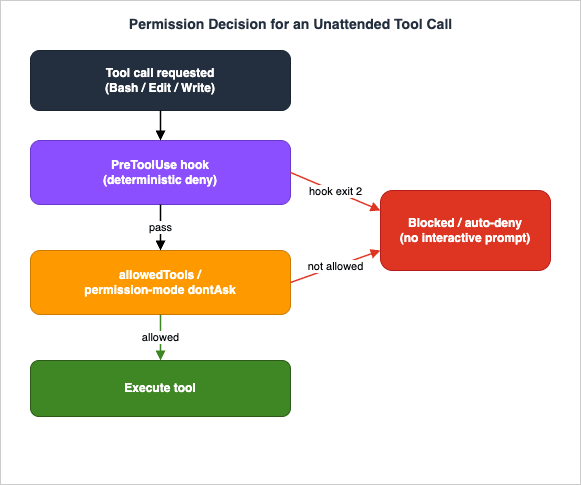
6.3 Hooks as the deterministic veto
Flags decide policy; hooks enforce it in code. APreToolUse hook is a shell command that runs before a tool executes and can block it by exiting non-zero — a deterministic veto that does not depend on the model's judgment at all. This is where you encode the rules that must never be violated regardless of how the prompt is worded: no writes outside the workspace, no git push, no deletes of protected paths. Because a hook is just a script, it sees the proposed action and decides yes or no with full programmatic control. The mechanics, exit-code semantics, and event lifecycle are the subject of the hooks article; the point for CI is that hooks are the layer that holds even if the prompt is adversarial or the model misbehaves.6.4 Draw the write/commit/push boundary explicitly
Decide, per job, exactly how far the agent's authority extends, and enforce it at the narrowest layer that works.- Read-only (review, triage, report). Allow-list read tools only. The agent cannot change anything; the worst case is a wrong comment.
- Write-to-working-tree (refactor, fix). Allow editing files, but keep
git pushand external network calls out of the agent's reach. Let the pipeline — not the agent — decide whether to open a PR from the resulting branch, so a human or a required check sits between the change and the default branch. - Full auto (sandboxed only). Reserve
bypassPermissionsfor throwaway environments where a mistake costs nothing.
The general principle: the more an action resembles something you cannot undo — a push, a deploy, a delete, an external API call — the more it belongs behind a dedicated hook or outside the agent's tool surface entirely, with the pipeline mediating the irreversible step.
6.5 Two more flags worth knowing in CI
Two further flags occasionally matter for unattended runs.--add-dir grants the agent read and edit access to additional working directories beyond the current one — useful when a CI job checks out several repositories side by side and the task legitimately spans them. Pass it once per directory, and keep the set as small as the task requires, since each directory you add is more surface the agent can touch. --permission-prompt-tool points Claude Code at an MCP tool that answers permission prompts programmatically, so a decision that would otherwise need a human can be delegated to a policy you control in code. It is the advanced alternative to a blanket dontAsk: where dontAsk auto-denies everything not pre-approved, a permission-prompt tool lets an automated policy approve or reject specific un-allow-listed actions on its own terms. Reach for it only when a simple allow-list plus dontAsk is genuinely too coarse; for the large majority of jobs, the allow-list is the right and simplest tool.7. Scoping the Task
Guardrails keep a run from doing damage; scoping decides whether the run can succeed unattended at all. The difference between a task that automates well and one that does not is mostly about how it is shaped.7.1 What automates well
Three properties make a task safe to run with no human present.- Idempotent. Running it twice produces the same end state, not double the effect. A labeler that sets labels is idempotent; a script that appends a comment every run is not. Idempotency is what makes retries safe, and retries are unavoidable in CI.
- Limited in scope. The task touches a bounded set of files or resources, and you can state that bound in the prompt and enforce it with tools and hooks. "Fix the failing test in
tests/auth/" is scoped; "improve the codebase" is not. - Verifiable. There is a deterministic check — tests pass, the linter is clean, the schema validates, the diff is non-empty and touches only expected paths — that tells the pipeline whether the run succeeded. If you cannot write the check, you cannot safely automate the task, because there is nobody to eyeball the result.
The strongest unattended jobs pair the agent with that verifier: let Claude Code make the change, then let
npm test or the linter or a schema validator be the judge, and gate the next step (the commit, the PR, the merge) on the verifier passing. The agent proposes; the deterministic check disposes.As a concrete example, a "fix the failing test" job is well shaped: the prompt names the failing test, the tool surface is limited to reading and editing the relevant directory, the verifier is the test suite itself, and the pipeline opens a PR only if the suite goes green. If the agent's change does not make the test pass, the verifier fails, no PR is opened, and the run is a no-op you can safely retry — the worst outcome is wasted compute, not a broken branch. That is the template every unattended code-changing job should aspire to: bounded input, a restricted tool surface, a deterministic judge, and the irreversible step gated behind it.
7.2 What to keep a human in the loop for
By the same logic, some tasks should not run fully unattended.- Anything that touches production directly — a deploy, a migration, a destructive data operation. Let the agent prepare the change; require human approval to apply it.
- Anything irreversible without a verifier — if you cannot check the result automatically and the action cannot be undone, do not automate the action; automate the proposal and have a person approve.
- Anything under-specified — if the task needs judgment the prompt cannot capture, an unattended run will either guess (and sometimes guess wrong with nobody watching) or stall. Tighten the spec until it is checkable, or keep it interactive.
The honest test is: if this runs at 3 a.m. and does exactly what the prompt literally says, am I comfortable with the result with no review? If yes, automate it. If no, automate only the part that is, and gate the rest.
8. Cost and Concurrency Control
Unattended runs are billed pay-as-you-go — the mechanics are the billing article's subject, and token-level efficiency is the token-efficiency article's. This section is the operational layer: the knobs that bound spend when nobody is watching. Per site policy, no figures appear here; the point is the controls, not the numbers.8.1 The five knobs
--max-turns. The hard cap on agentic turns, and the single most important cost control for an unattended run. A job that should take a handful of turns but loops should fail, not spend. Set it tight and treat the resulting error as a signal that the task was mis-scoped.--max-budget-usd. A hard ceiling on what a single print-mode run may spend on API calls before it stops — the most direct cost cap there is. Where--max-turnsbounds iterations, this bounds spend regardless of how the turns play out, so a job that would overrun your budget halts on its own rather than running up an unbounded bill. It is print-mode-specific, which is exactly the unattended case.--model. Model choice is a cost lever. Route the bulk of routine automation — triage, labeling, mechanical fixes — to a faster, cheaper model, and reserve the most capable model for jobs that genuinely need it. In scripts, thesonnet/opusaliases let you change this policy without editing model strings.- Concurrency. A fleet of parallel jobs multiplies spend by the number of jobs. Bound how many unattended runs execute at once with your CI's concurrency controls (a job concurrency group, a matrix limit, a queue) so a flood of triggers cannot fan out into a flood of billed runs.
- Timeouts. Wrap each run in a wall-clock timeout at the pipeline level so a hung process cannot bill indefinitely. A
timeoutaround the command, or the CI step's own time limit, turns "runs forever" into "fails after N minutes," which is the behavior you want.
# A bounded run: capped turns, a cheaper model, and a hard wall-clock timeout.
timeout 600 claude -p "Apply the codemod and stop." \
  --max-turns 10 --model sonnet --output-format json
Beyond these run-time knobs, the cheapest token is the one you do not resend. Prompt caching reuses a stable prefix across requests so repeated context is not re-billed at full rate every time — especially valuable for a recurring job whose system prompt and project context barely change between ticks. The token-level mechanics are the subject of the token-efficiency article; the operational takeaway here is that a well-structured unattended job, one that keeps its stable context stable, costs materially less than a naive one doing the same work.
8.2 Watch the spend with telemetry
You cannot manage what you cannot see. Two complementary signals expose unattended cost. Per-run,--output-format json reports total_cost_usd for that invocation, which you can log, sum, and alert on. Fleet-wide, Claude Code exports OpenTelemetry (OTel) metrics when you set CLAUDE_CODE_ENABLE_TELEMETRY=1, emitting usage, token, and cost data to your collector via the standard OTEL_* configuration. Section 9 treats telemetry as part of the audit story; for cost specifically, it is how you notice that a job's spend is drifting before the invoice does.9. Observability and Audit
When a run happens with nobody watching, your only knowledge of it afterward is what you captured while it ran. Observability for unattended Claude Code has three layers: the per-run record, the fleet-wide telemetry, and the artifact (the diff or output) the run produced.9.1 Capture the per-run record
Make every unattended run leave a durable trace. Tee the structured stream to a file before you parse it, so a parse failure still leaves the raw bytes to debug:claude -p "Refactor the config loader." \
--output-format stream-json --verbose \
| tee "logs/run-$(date +%s).jsonl" \
| jq -r 'select(.type=="result") | .result'From that JSONL you can later reconstruct what the agent did: the
init event records the model and tool surface, the assistant events record the reasoning and tool calls, and the terminal result records the outcome and cost. Retain these logs the way you retain any CI artifact, and redact them if prompts or tool details could contain anything sensitive (the telemetry content-logging variables below are off by default for exactly this reason).At minimum, retain three things per run: the session ID (so you can resume it or correlate it with other systems), the structured result (so you know what it decided), and the diff or artifact it produced (so you can review what it changed). With those three captured, a failed overnight run becomes a five-minute investigation instead of a mystery, and a successful one leaves an auditable trail you can point to later.
9.2 Telemetry for the fleet
Per-run logs answer "what did this job do"; telemetry answers "what is the fleet doing." WithCLAUDE_CODE_ENABLE_TELEMETRY=1 and the OTLP exporter configured, Claude Code emits metrics (usage, cost, tool activity) and structured event logs to your observability stack:export CLAUDE_CODE_ENABLE_TELEMETRY=1
export OTEL_METRICS_EXPORTER=otlp
export OTEL_LOGS_EXPORTER=otlp
export OTEL_EXPORTER_OTLP_PROTOCOL=grpc
export OTEL_EXPORTER_OTLP_ENDPOINT=http://collector.internal:4317
claude -p "Nightly dependency audit." --output-format jsonContent logging — the user prompt text, tool inputs, raw API bodies — is gated behind separate opt-in variables (
OTEL_LOG_USER_PROMPTS, OTEL_LOG_TOOL_DETAILS, and so on) and is off by default, which is the right default for unattended jobs that might see sensitive input. There is also W3C trace-context propagation, part of Claude Code's distributed-tracing support — a beta you turn on with CLAUDE_CODE_ENHANCED_TELEMETRY_BETA=1 and a traces exporter on top of CLAUDE_CODE_ENABLE_TELEMETRY=1: in -p mode Claude Code reads TRACEPARENT/TRACESTATE from its environment, so an agent run can appear as a span nested under the CI job that launched it, and you can see the whole pipeline as one trace.9.3 Review the artifact, then recover or re-run
The final audit layer is the thing the run produced. For a code-changing job, that is the diff: have the pipeline surface it (open a PR, attach it as an artifact, post it as a comment) and gate the irreversible step on a human or a required check reviewing it — never let an unattended run be both author and merger of its own change. For a reporting job, the artifact is the structured output you captured.Recovery follows from idempotency (Section 7). Because a well-scoped job is safe to retry, the failure path is usually "re-run it" — and because each run carries a
session_id, you can either start fresh or --resume the prior session to continue from where it stopped. Capture the session ID in your logs so that when a run fails, you have the handle you need to investigate or resume it rather than starting blind. For the narrower failure of the chosen model being overloaded or unavailable, --fallback-model lets a print-mode run switch to a named backup model instead of failing outright — a cheap way to keep an overnight job alive through a transient capacity problem.10. Scheduling and Recurring Jobs
Some of the best unattended work is periodic: a nightly documentation refresh, a weekly dependency triage, a scheduled sweep that applies a mechanical change across many repositories. Scheduling adds one problem the on-demand triggers do not have — overlap — and you solve it with locking and idempotency.10.1 Triggering on a schedule
On GitHub, a scheduled workflow is aschedule trigger with a cron expression driving the same action-or-claude -p step you would run on demand:name: Nightly Docs Refresh
on:
schedule:
- cron: "0 3 * * *" # 03:00 UTC daily
jobs:
refresh:
runs-on: ubuntu-latest
steps:
- uses: actions/checkout@v4
- uses: anthropics/claude-code-action@v1
with:
anthropic_api_key: ${{ secrets.ANTHROPIC_API_KEY }}
prompt: "Update the API reference docs to match the current code. Open a PR."
claude_args: "--max-turns 20 --model sonnet"Outside GitHub, the same job is a cron entry (or a scheduled CI pipeline) that runs
claude -p with the credential injected from the environment. The shape is unchanged; only the scheduler differs.10.2 Prevent overlapping runs
The failure mode unique to scheduling is a slow run still going when the next tick fires, so two instances operate on the same repository at once and race. Two defenses, used together.First, a lock. Wrap the job in a mutual-exclusion lock so a second invocation refuses to start while the first holds it. On a single host,
flock is the standard tool; in CI, a concurrency group that cancels or queues overlapping runs does the same job:# Refuse to start if another instance already holds the lock.
flock -n /tmp/claude-nightly.lock -c '
claude -p "Nightly refactor sweep." --max-turns 15 --model sonnet --output-format json
' || echo "previous run still in progress; skipping this tick"# GitHub: cancel an in-flight scheduled run when a new one starts.
concurrency:
group: nightly-docs
cancel-in-progress: trueSecond, a stable session ID. Giving a recurring job a deterministic
--session-id (or a deterministic naming scheme) makes its runs addressable, so a retry or a resumed run is recognizably the same logical job rather than a new one — which, combined with an idempotent task, makes overlap a non-event even if a lock is briefly contended.The combination of a lock (no two at once) and idempotency (running twice is harmless) is what makes scheduled agent jobs safe to leave on a timer indefinitely.
11. Common Pitfalls
The failures that bite unattended Claude Code are predictable, and almost all of them trace back to forgetting that there is no human in the loop. The ones to internalize:- Feeding an interactive prompt to a headless run. A prompt that asks a question, waits for confirmation, or says "let me know if..." has nobody to answer it. The run stalls or aborts. Write headless prompts as complete, self-contained instructions with the success criterion stated up front.
- Over-broad permissions. Running with
bypassPermissions(or a too-generous allow-list) against a real checkout because it was easier than scoping the tools. Unattended, an over-permissioned agent can push, delete, or call out to the network with nobody to stop it. Start from the smallest tool surface and--permission-mode dontAsk; widen only with a reason. - Leaking secrets. Putting a credential in the prompt, or letting one land in the transcript or the committed diff. Logs and transcripts are durable; a secret written there is a secret disclosed. Keep credentials in the environment/secret store, off by default in telemetry content logging, and never let the agent echo them.
- Misreading the exit code. Treating any non-zero exit as success-with-noise, or assuming a specific non-zero value means a specific thing. Branch on zero-versus-non-zero, read the structured output for the reason, and let a
--max-turnsoverflow fail the step rather than swallowing it. - Long-running hangs. A run with no turn cap and no wall-clock timeout can spin until it exhausts the CI step's own limit — billing the whole time. Always pair
--max-turnswith a pipeline-leveltimeout. - Brittle output parsing. Grepping the human-readable
textoutput for a value that moves the next time the model phrases it differently. Use--output-format json/stream-json, parse withjq, and constrain to a--json-schemawhenever a downstream step branches on the result.
Every one of these is cheap to prevent at design time and expensive to debug after a 3 a.m. run did the wrong thing quietly.
12. Frequently Asked Questions
How do I run Claude Code non-interactively?
Use print mode:claude -p "your prompt". It reads the prompt (as an argument or piped on stdin), runs to completion without opening the REPL, prints the response, and exits with a status code your pipeline can branch on. Add --output-format json for a machine-readable result, --max-turns to cap the work, and tool/permission flags to keep the run safe (Sections 2 and 6).What does claude -p do?
-p (short for --print) switches Claude Code from the interactive REPL into a single batch invocation: one prompt in, one result out, then exit. It is the foundation of every headless use — CI steps, cron jobs, the GitHub Action — and it pairs with --output-format, --max-turns, --model, --allowedTools, and the session-continuation flags to make the run controllable and parseable.Can I use it in GitHub Actions?
Yes. The official actionanthropics/claude-code-action@v1 wraps a headless run and handles the GitHub plumbing; you pass instructions via prompt, CLI flags via claude_args, and a credential via anthropic_api_key (or use_bedrock/use_vertex). It auto-detects interactive (@claude mention) versus automation (prompt) behavior. You can also just run claude -p directly in a workflow step on any CI system (Section 5).How do I authenticate in CI?
Through environment variables, not an interactive login. For the direct API, setANTHROPIC_API_KEY. For Amazon Bedrock, set CLAUDE_CODE_USE_BEDROCK=1, AWS_REGION, and AWS credentials (ideally a short-lived role via OIDC). For Google Vertex AI, set CLAUDE_CODE_USE_VERTEX=1, ANTHROPIC_VERTEX_PROJECT_ID, CLOUD_ML_REGION, and Application Default Credentials via Workload Identity Federation. Keep the secret in your CI secret store, and prefer OIDC/WIF so there is no long-lived key to leak (Section 4).How do I cap cost for unattended runs?
With five knobs and one habit. Cap--max-turns so a loop fails instead of spending; set a hard --max-budget-usd ceiling so a run stops when its spend hits your cap; pick a cheaper --model (the sonnet alias) for routine work; bound concurrency so a flood of triggers cannot fan out into a flood of billed runs; and wrap each run in a wall-clock timeout. The habit: log total_cost_usd from the JSON output per run and export OTel cost metrics fleet-wide, so you see drift before the invoice does. Token-level efficiency is covered in the token-efficiency article, and the billing mechanics in the billing article.13. Summary
Running Claude Code unattended is the same agent you use interactively, with the human's three implicit jobs — granting permission, judging completion, and watching for trouble — moved into configuration. Print mode (claude -p) is the entry point; --output-format json/stream-json makes the result machine-readable; environment-based authentication (API key, Bedrock, or Vertex, ideally via OIDC/WIF) replaces interactive login; the official GitHub Action or a bare claude -p step provides the trigger-and-plumbing; and guardrails — a minimal tool surface, --permission-mode dontAsk, and deterministic hooks — replace the permission prompt that no longer has anyone to answer it. Scope tasks to be idempotent, bounded, and verifiable; cap cost with turn limits, a dollar budget, model choice, concurrency, and timeouts; capture every run for audit; and lock scheduled jobs against overlap. Do those things and you can leave the agent running on a timer with the same confidence you would extend to any other piece of automation.For the topics this guide deliberately delegated:
- Provider environment variables and pay-as-you-go billing mechanics are in Claude Code on Pay-As-You-Go API Billing.
- Hooks — the deterministic enforcement layer referenced throughout Section 6 — are in the Claude Code Hooks Complete Guide.
- Embedding an agent loop as a library (the SDK path, distinct from running the CLI) is in the Claude Agent SDK Complete Guide.
- Token efficiency and prompt caching for cost control are in Anthropic Claude API Prompt Caching and Token Efficiency.
- The CLI surface and the harness/environment foundations are in the Claude Code Operator's Handbook and the Claude Code Harness and Environment Engineering Guide.
- The lineage of the CI systems this guide runs inside — how the machine that runs the build moved from a self-run server to a runner that ships with the code host — is in CI/CD Tools History and Timeline.
14. References
Official Claude Code documentation
- Claude Code — Headless mode
- Claude Code — CLI reference
- Claude Code — Permission modes
- Claude Code — GitHub Actions
- Claude Code — Amazon Bedrock
- Claude Code — Google Vertex AI
- Claude Code — Monitoring usage and OpenTelemetry
- Claude Code — Environment variables
- Claude Code — Agent SDK overview
- anthropics/claude-code-action — the official GitHub Action repository
Related Articles in This Series
- Claude Code Operator's Handbook
The CLI surface this guide builds on, including the interactive loop and the non-interactive flags. - Claude Code Harness and Environment Engineering Guide
The deep treatment of permissions, hooks, sandboxes, and OS-level boundaries that the guardrails section summarizes. - Claude Code on Pay-As-You-Go API Billing - Anthropic API, Amazon Bedrock, and Google Cloud Vertex AI
Provider environment variables and how metered billing applies to unattended runs. - Claude Code Hooks Complete Guide
The hook lifecycle and exit-code semantics behind the deterministic veto used as a CI guardrail. - Claude Agent SDK Complete Guide
The library path for embedding an agent loop in your own application, distinct from running the CLI unattended. - Anthropic Claude API Prompt Caching and Token Efficiency
Token-level techniques that reduce the cost of every unattended run.
References:
Tech Blog with curated related content
Written by Hidekazu Konishi