Claude Code Harness and Environment Engineering: Designing the Frontline Where Local AI Agents Actually Live
First Published:
Last Updated:
settings.json files, real hook scripts, OS-level boundaries, and three reference patterns that take the same Claude Code from "a slightly handier chat" to "an autonomous worker that runs unattended overnight."If you have not yet installed Claude Code or run it on your own files, please start with the entry-point article Claude Code Getting Started — Why Knowing About Local AI Agents Changes Everything first. This piece assumes you have already had a few sessions in front of you, have a working CLI or VS Code extension installation, and are ready to think about how to run Claude Code more safely, more autonomously, or both.
1. Introduction — Same Tool, Different Ceilings
1.1 A Recap from the Parent Article
The parent article framed the differentiating skill of the AI era as moving through stages, with the latest stage resolving into two parallel sub-disciplines once local AI agents arrived.| Period | Skill in the spotlight | Core question |
|---|---|---|
| Through 2024 | Prompt Engineering | How do you write the instruction? |
| 2024–2025 | Context Engineering | How do you feed background information (RAG, etc.)? |
| Now and going forward (parallel pair) | Harness Engineering | How do you configure the agent runtime — permissions, hooks, MCP, the tool surface — inside the process? |
| Environment Engineering | How do you bound the world the agent acts in — OS user, sandbox, network — outside the process? |
The pivot is small to read but large in practice. In prompt engineering, the engineer tells the model what to do in the moment. In context engineering, the engineer assembles the materials the model needs to do it well. In the local-AI era this final stage resolves into two parallel sub-disciplines because the surface area is genuinely two-layered: harness engineering shapes the agent runtime itself — which tool calls are allowed, which hooks fire, which MCP servers load, which advisories
CLAUDE.md carries — while environment engineering shapes the world that runtime reaches into: which OS user it runs as, which directories are mounted, which network destinations are reachable, what happens when the agent tries to do something destructive. The engineer is no longer giving step-by-step instructions; they are tuning a harness and setting up a workshop, then trusting the agent to work in both.1.2 Why It Matters Most for Local AI Agents
The parent article also made a second claim, which is the entire reason this article exists.| Prompt | Context | Harness | Environment | |
|---|---|---|---|---|
| Online AI | High | High (RAG) | Limited | Limited |
| Local AI | High | High | High (battlefield) | High (battlefield) |
An online assistant works inside a screen its provider has bounded; the harness and the environment are both fixed for you, and only prompt and context are real levers. A local agent walks into your file system, and the harness and the environment are both yours to design. The quality of those two designs together directly determines the ceiling of what a local agent can do for you — and, just as importantly, the floor of what it can break. If you do nothing, the floor and the ceiling are both the same: whatever your operating-system user can do, your agent can do too.
1.3 The Real Stakes — Three Ceilings From One Tool
Here is the practical observation that motivates this entire article: two engineers running the same Claude Code, on the same hardware, on the same codebase, can have radically different experiences, and the difference is almost entirely how much harness and environment work each has done.- The first engineer, having done nothing beyond
npm install, has a tool that asks for permission on almost every step, occasionally writes to the wrong file, and is mostly useful for reading code. Output per hour is modest. Risk is low because the human is in the loop on every action. Harness work: none. Environment work: none. - The second engineer has built a curated allow-list, a couple of
PreToolUsehooks that block destructive operations, and a saneCLAUDE.mddescribing project conventions. Their Claude Code runs much faster — most edits and tests proceed without prompts — and recovers cleanly from mistakes because the deny rules and the hook backstop catch the worst cases. Harness work: substantial. Environment work: still none. - The third engineer has gone further. Claude Code runs in a Docker container, as a non-privileged user, with credentials it cannot read, against a domain whitelist on the network, with every tool call logged to JSONL. They run long, autonomous tasks unattended — refactoring, migration, batch fixups — and inspect the audit log in the morning. Harness work: substantial. Environment work: substantial.
This article is structured to take you through that climb. Sections 2 through 8 build the vocabulary: what each configuration surface does, what it can enforce, and — critically — what it cannot. Each section is tagged with which layer it primarily lives in: [Harness] for in-process configuration of the agent runtime, [Environment] for out-of-process boundaries on the world it acts in. Section 9 presents three reference patterns matched to three ceilings: Approval-First, Curated Allow-list, and Sandboxed Full-Auto. Section 10 gives you copy-pasteable configuration for each. The remaining sections cover audit, recovery, anti-patterns, and a graduation path between the three.
2. The Vocabulary of Claude Code Harness and Environment
Before we touch any settings file, we need to fix the vocabulary, because the most expensive mistakes in this space come from confusing what advises with what enforces, and from confusing what enforces inside the process (the harness) with what enforces outside the process (the environment).2.1 The Misconception Worth Killing First
There is a very common belief, especially among readers who have skimmed a Claude Code "tips" thread, that you can put a list of "do not do this" rules into aCLAUDE.md file and the agent will obey them. You cannot. CLAUDE.md is text that becomes part of the model's context. The model reads it, weights it like any other instruction, and most of the time will respect it. But it has no enforcement layer behind it. A sufficiently confident hallucination, an ambiguous instruction, or a single context-window truncation can override a CLAUDE.md rule, and there is no daemon waiting to slap the agent's hand when that happens.The corollary is a three-way separation of concerns. Advise with
CLAUDE.md; enforce inside the process with the harness (settings.json permissions, hooks, MCP gates); enforce outside the process with the environment (OS user, sandbox, network filter):- Things that advise the agent (
CLAUDE.md, project memory, the prompts you write): these shape what the agent intends to do. - Things that enforce on the agent inside the process — the harness (
settings.jsonpermissions, hooks, MCP scope rules): these shape what tool calls the agent is allowed to dispatch from inside Claude Code itself. - Things that enforce on the agent outside the process — the environment (OS user privileges, file ACLs, containers, sandboxes, network filters): these shape what the agent can actually carry out on your system once a tool call has been spawned.
2.2 The Responsibility Map — Harness vs Environment
The full landscape, top-to-bottom, looks like this. Each row is tagged with which class it belongs to. The order matters: each lower layer can backstop the one above it, but no upper layer can compensate for a missing lower one.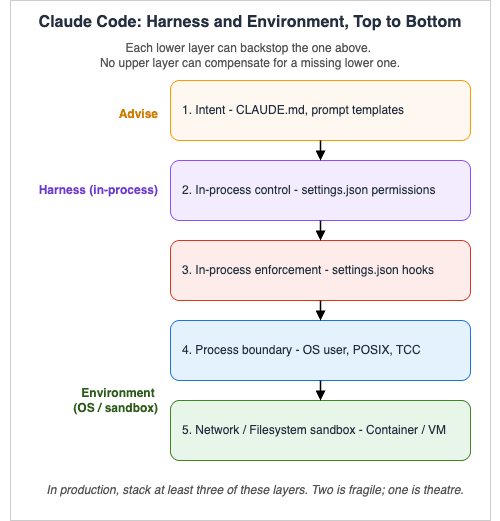
| Class | Layer | Surface | What it does | What it cannot do |
|---|---|---|---|---|
| Intent | Intent | CLAUDE.md (project, user, subdir), prompt templates | Tells the agent what is expected and why | Block, deny, or audit anything |
| Harness | In-process control | settings.json permissions (allow / deny / ask) | Tells Claude Code what tools / commands / files are off-limits before invocation | Stop the agent from emitting a bash command that, once spawned, decides to move sideways |
| Harness | In-process enforcement | settings.json hooks (PreToolUse, etc.) | Runs your code at lifecycle events; can block tool calls or mutate inputs | Catch what the spawned subprocess subsequently decides to do on its own |
| Harness | External tool surface | MCP server gates and per-tool allow / deny rules | Decides which external systems the harness exposes to the agent and at what privilege | Limit what the underlying token does once an MCP call has been authorized |
| Environment | Process boundary | OS user, file ACLs, capabilities | Stops anything Claude Code or its children try to do that the OS user is not allowed to do | Stop network egress to a bad domain unless paired with a network filter |
| Environment | Network / FS sandbox | Container, devcontainer, VM, sandbox settings, firewall | Defines a hard outer boundary inside which the agent and all of its descendants live | Express domain-specific intent like "this repo is production" — that is the layer above's job |
A useful rule of thumb: every line you write in
CLAUDE.md should be a sentence the agent would honour even if it forgot the line existed. Anything stricter belongs in the harness. Anything that must survive a misbehaving subprocess belongs in the environment.2.3 The Same Sentence at Each Layer
To make the table concrete, take a single rule — "Never delete files insidesecrets/" — and watch how it lives at every layer.- (Intent) In
CLAUDE.md: a line saying "Treatsecrets/as read-only — do not delete or modify files there." The agent will mostly comply. Mostly. - (Harness) In
permissions.deny:"Bash(rm secrets/*)","Bash(rm -rf secrets*)","Write(secrets/**)". Now the in-process tool dispatcher refuses those calls before they are spawned. - (Harness) In a
PreToolUsehook: a shell script that inspects the proposed command and exits non-zero if it touchessecrets/. Catches commands shaped differently from the literal patterns above. - (Environment) In OS permissions:
chmod 000 secretsplus ownership by a different user. Now even if the agent escapes the in-process checks, the kernel says no. - (Environment) In the sandbox: a container where
secrets/is not even mounted. There is nothing for the agent to delete because the file does not exist in its world.
3. Anatomy of settings.json
Layer: HarnessThe single most important file in Claude Code harness engineering is
settings.json. The official reference at code.claude.com/docs/en/settings documents every key; this section walks the subset that matters for our three patterns.3.1 Where the File Lives — Precedence, Top to Bottom
Claude Code reads settings from five scopes. Higher scopes override lower scopes for scalar fields, and array fields merge. The precedence, highest to lowest, is:- Managed settings — IT-administered, shipped via MDM, the Anthropic admin console, or an OS policy file (
/Library/Application Support/ClaudeCode/managed-settings.jsonon macOS,/etc/claude-code/managed-settings.jsonon Linux/WSL,C:\Program Files\ClaudeCode\managed-settings.jsonon Windows). Cannot be overridden by anything below. Note for Windows: the legacyC:\ProgramData\ClaudeCode\managed-settings.jsonpath appears in older blog posts and tooling and may not be read by current Claude Code versions — before deploying a managed policy, verify the supported path against the official settings reference for your installed CLI version. - Command-line arguments —
--permission-mode,--allowedTools, etc. Affect only the current invocation. .claude/settings.local.jsonin the project — personal, not committed..claude/settings.jsonin the project — committed to source control, shared with the team.~/.claude/settings.json— your personal global default for every project.
.claude/settings.json as a published interface: commits to it affect everyone who pulls. Second, arrays merge but do not deduplicate by intent — a project allow rule and a user deny rule for the same path will both load, and the deny wins because deny is checked first regardless of scope. The corollary is that you can keep a strict global deny list in ~/.claude/settings.json and trust it to backstop every project.3.2 The Keys We Will Use in This Article
Many of the settings keys in the official reference relate to UI niceties (spinnerTipsEnabled, prefersReducedMotion) or telemetry. The keys we touch in this article are the security surface:permissions— the allow/deny/ask ruleset, the most-used field. Sub-keys:allow,ask,deny,defaultMode,additionalDirectories.hooks— lifecycle hooks. Sub-keys are event names likePreToolUse,PostToolUse, etc.disableAllHooks— the kill switch.allowedHttpHookUrls— allowlist for HTTP-typed hooks (so a misconfiguration cannot exfiltrate to an arbitrary URL).httpHookAllowedEnvVars— allowlist for env vars that HTTP hooks can interpolate into headers/bodies.env— env vars applied to every session. Useful forCLAUDE_CODE_ENABLE_TELEMETRYand OTEL exporters.model— pin the model used in this scope.mcpServers— MCP server definitions (more typically lives in.mcp.json, butsettings.jsonkeys likeenableAllProjectMcpServers,enabledMcpjsonServers,disabledMcpjsonServers,allowedMcpServers,deniedMcpServersgate which of those servers are actually loaded).sandbox— advanced OS-level sandboxing for the Bash tool and its descendants. The keys you actually reach for, verified 2026-04 against the official sandboxing reference:sandbox.enabledto turn the feature on;sandbox.filesystem.allowRead/denyRead/allowWrite/denyWritefor filesystem boundaries (sandbox paths use standard conventions distinct fromRead/Editrules:/tmp/buildis an absolute path,~/.kubeis home-relative, and./outputor a bareoutputresolves to the project root for project settings or to~/.claudefor user settings; the older//pathprefix for absolute paths still works but is no longer the canonical form. SandboxdenyRead/denyWriteentries are merged with paths fromRead(...)/Edit(...)permission rules into the final sandbox configuration);sandbox.network.allowedDomains/deniedDomainsfor egress;sandbox.network.allowUnixSocketsfor explicit Unix-socket grants; andsandbox.autoAllowBashIfSandboxed(defaulttrue), which suppresses the per-command Bash prompt because the sandbox boundary is doing the gating. Two managed-only switches lock policy down centrally:sandbox.filesystem.allowManagedReadPathsOnlyandsandbox.network.allowManagedDomainsOnly. Pattern C in §9.4 builds on these — refer to the official sandboxing reference for platform-specific behavior (macOS uses Seatbelt out of the box; Linux and WSL2 use bubblewrap and require thebubblewrapandsocatpackages; WSL1 is not supported).apiKeyHelper— script to produce auth values dynamically. The right place to inject short-lived, rotated credentials.cleanupPeriodDays— how long session files are kept.worktree.symlinkDirectories— used in Pattern C to give the agent an isolated working tree. Worktree-related keys evolve quickly; consult the official settings reference for the exact key path before relying on it.
3.3 A Minimal, Safe Starting Point
Before we get to the three patterns, here is the smallest non-trivialsettings.json that already adds real value over the defaults. Drop this into ~/.claude/settings.json and you have raised the floor for every project on the machine.{
"permissions": {
"deny": [
"Bash(rm -rf /*)",
"Bash(rm -rf ~)",
"Bash(sudo *)",
"Read(./.env)",
"Read(./.env.*)",
"Read(~/.aws/credentials)",
"Read(~/.ssh/**)"
],
"ask": [
"Bash(git push *)",
"Bash(git reset --hard *)"
]
},
"cleanupPeriodDays": 14
}
git push) or wipe local state (git reset --hard). The 14-day session cleanup is a courtesy to disk and a courtesy to anyone reviewing what the agent has done lately.This is a floor. The patterns in §9 build on top.
4. The Permission Model in Practice
Layer: HarnessThe
permissions key is where most of the actual gating happens. It is also where most of the misunderstandings happen.4.1 Evaluation Order — Deny Before Ask Before Allow
A tool call in Claude Code is checked against three lists, in this order:deny— first match wins; the call is rejected.ask— first match wins; the user is prompted.allow— first match wins; the call proceeds without a prompt.defaultMode— if no rule matched, the default mode applies. The valid values, per the official permissions reference as of 2026-04, are:"default"(standard behavior — prompt for permission on first use of each tool),"acceptEdits"(auto-accept file edits and common filesystem commands likemkdir/touch/mv/cpfor paths in the working directory oradditionalDirectories; still prompt for everything else),"plan"(analyze only — no tool execution),"auto"(auto-approve tool calls with background safety checks via theautoModeclassifier — then a research preview),"dontAsk"(auto-deny any tool that is not pre-approved viapermissions.allowor the/permissionsUI — the opposite of bypass), and"bypassPermissions"(skip permission prompts entirely, except for writes to protected directories such as.git,.claude,.vscode,.idea, and.husky— with.claude/commands/,.claude/agents/, and.claude/skills/explicitly carved out of the.claudeblock so authoring those is still allowed; gated by a one-time confirmation unlessskipDangerousModePermissionPrompt: true). Note: the literal value"ask"is not accepted — theaskarray of patterns is a separate concept from thedefaultModestring.
"Bash(npm *)" in allow and later add "Bash(npm publish)" in deny, deny is checked first regardless, so npm publish is blocked. You do not need to reorder anything; the lists are evaluated in the right order globally.4.2 Rule Format
The general shape isTool or Tool(specifier):"Bash"— every Bash command. Use sparingly; this is essentially "the agent can run anything.""Bash(npm run lint)"— exact match for that command line."Bash(npm run *)"— prefix match. Anything starting withnpm runfollowed by any arguments."Read(./.env)","Read(./.env.*)","Read(./secrets/**)"— file-path patterns;*is single-segment,**is recursive."Write(src/**)"— same syntax, write side."WebFetch(domain:example.com)"— domain-specific WebFetch grant."mcp__github__create-pull-request"— MCP tool, double-underscore between server name and tool name; no parenthesised content allowed."Agent(Explore)","Agent(Plan)","Agent(my-custom-agent)"— subagent-scoped rule. Most useful indenyto disable a specific subagent (e.g."Agent(Explore)"stops Claude from spawning the built-in Explore subagent at all). Pair with--disallowedToolson the CLI when you need a session-scoped override.
./ matters: paths are resolved relative to the working directory unless absolute. additionalDirectories extends the agent's reachable filesystem beyond the current working directory; without it, Claude Code by default cannot reach above its CWD. For Read and Edit rules specifically, the gitignore-style prefix conventions are stricter: //path is absolute (note the double slash — a single-slash /path resolves relative to the project root, not the filesystem root), ~/path resolves from your home directory, and bare path or ./path resolves from the current working directory.Three subtleties of pattern matching are worth fixing in muscle memory before they bite. First, compound commands are checked subcommand-by-subcommand. The recognized separators are
&&, ||, ;, |, |&, &, and newlines — a rule like "Bash(npm test *)" does not authorize npm test && curl evil.example; the second half is evaluated against your rules independently and (lacking its own match) prompts. Second, a fixed set of process wrappers is silently stripped before matching — timeout, time, nice, nohup, stdbuf, and bare xargs — so "Bash(npm test *)" covers timeout 30 npm test. Crucially, environment runners that take a command as arguments are not in the strip list: npx, docker exec, devbox run, mise exec, direnv exec. A rule like "Bash(devbox run *)" therefore grants the runner blanket authority over whatever follows, including devbox run rm -rf .; write per-inner-command rules ("Bash(devbox run npm test)") instead. Third, watch, setsid, ionice, flock, and find with -exec/-delete always prompt — only an exact-match rule for the full command string can auto-approve them. When the pattern you would need is more permissive than you can write safely, push the rule down to a PreToolUse hook (§5).4.3 What Permissions Cannot Stop
This is the section to read twice. Thepermissions key is a Claude Code-internal check. It is enforced before the tool is dispatched. After a Bash invocation has been approved and a subprocess has spawned, Claude Code's permission model has no further say. Specifically:- Derived shell side-effects. If you allow
"Bash(npm *)", annpm installof a malicious package will run that package's postinstall script with the full privileges of your user. Claude Code did not run that script; npm did. Permissions cannot block what they cannot see. - Network egress at byte level.
permissionsdoes not gate raw network traffic.WebFetch(domain:example.com)gates the WebFetch tool. It does not gatecurl example.orginvoked viaBash. - Off-host actions. Anything the agent triggers via API call to a remote system — pushing a git tag, opening a GitHub PR via MCP, sending a Slack message — is permitted at the tool boundary, but the consequences happen on systems that have no relationship with your settings file.
- Race conditions on the filesystem. A sequence of allowed reads and writes can produce a state your rules did not anticipate. Permissions are pointwise; sequences are not.
- Supply-chain at install time. The package whose
Bash(npm install package-x)you authorized may, at any future install, ship a different post-install script. Pinning helps; permissions do not.
npm ci plus a lockfile policy for supply-chain.⚠ The two npm items above describe npm 11 and earlier, which includes the npm bundled with Node.js 22, 24, and 26 as of October 9, 2026. npm 12, generally available since July 8, 2026, blocks dependency lifecycle scripts by default unless the project approves them. Which package managers run install-time scripts by default, since which version, and where the approval is recorded is covered in Install-Time Scripts by Package Manager.
4.4 Permission Modes
defaultMode selects what happens to unmatched tool calls. There is also a runtime concept of plan mode — entering it via the slash command or --permission-mode plan allows Claude to read, reason, and produce a plan without executing tools. It is the cheapest way to dry-run an autonomous task: ask Claude to plan first, review the plan, then approve.bypassPermissions is the mode that turns the in-process gate off for almost everything — the protected-directory exceptions documented in §3.2 (writes to .git, .claude, .vscode, .idea, .husky, with .claude/commands//agents//skills/ carved back in) still apply, but every other tool call proceeds without a prompt. It is the right choice in exactly one place — Pattern C — and only because the boundaries below it (OS user, container, network filter) are doing the actual containment.4.5 Built-in Read-Only Commands — What You Do Not Need to Allow
A small, fixed set of Bash commands is recognized as read-only by Claude Code and runs without a prompt in every mode, including Pattern A. The set, not configurable, isls, cat, head, tail, grep, find, wc, diff, stat, du, cd (into the working directory or any additionalDirectories entry), and the read-only forms of git (status, diff, log, show, blame, etc.). Compound commands like cd packages/api && ls run silently when each subcommand qualifies on its own; combining cd with git in one compound command always prompts, regardless of target directory.The practical consequence: several entries in Pattern B's allow list (
Bash(git status), Bash(git diff *), Bash(git log *)) are technically redundant with the built-in set — they are kept in the example as documentation of intent, not because they are load-bearing. Two further wrinkles are worth knowing. First, to require a prompt for a built-in read-only command, add an explicit ask or deny rule for it; the built-in allowance is overridable but cannot be turned off globally. Second, commands with write- or exec-capable flags (find, sort, sed, non-read-only git) still prompt when an unquoted glob is present, because the glob could expand into a flag like -delete; quoting the glob ('src/*.py') keeps the command in the read-only fast path.5. Hooks: The Real Enforcement Layer
Layer: Harnesspermissions is declarative — a list of patterns. Hooks are programmatic — they let you run a shell script (or hit an HTTP endpoint, or call another agent) at lifecycle events, with the proposed action passed in as JSON on stdin. Hooks are how you turn "block the obvious patterns" into "block anything that semantically matches a pattern I can describe in code."5.1 The Lifecycle Events
As of early 2026, the official hook reference enumerates the events listed below. New events are added periodically; treat the canonical reference as authoritative when designing for production. The ones you reach for most often:| Event | Fires when… | Common use |
|---|---|---|
SessionStart | A session is initialized or resumed | Print a banner, log session ID, snapshot Git head |
SessionEnd | A session ends | Flush logs, post a summary somewhere |
UserPromptSubmit | The user submits a prompt | Inject context, redact secrets in the prompt |
PreToolUse | Before a tool executes | Block the call by exiting 2 |
PermissionRequest | A permission dialog is about to appear | Auto-respond, log every prompt |
PostToolUse | After a tool succeeds | Audit log, post-format, run a linter |
PostToolUseFailure | After a tool fails | Telemetry on failure modes |
Notification | Permissions, idle, or auth notifications | Push to chat / a desktop notifier |
Stop | Claude completes a response | Run an end-of-turn linter, mark the session in your tracker |
SubagentStart / SubagentStop | A subagent starts/finishes | Per-subagent audit |
PreCompact / PostCompact | Around context compaction | Preserve a snapshot of the pre-compaction state |
InstructionsLoaded | CLAUDE.md or .claude/rules/*.md is loaded | Verify checksum; alert if a teammate's rules changed |
ConfigChange | Configuration changes mid-session | Alert on settings drift |
WorktreeCreate / WorktreeRemove | Git worktree lifecycle | Pair with a backup or quota check |
TaskCompleted | A task is marked complete | Outbound notification |
TeammateIdle | Just before an Agent Teams member goes idle | Final cleanup |
Elicitation / ElicitationResult | An MCP server requests user input | Audit the prompt and the answer |
Note: Hook event names are case-sensitive PascalCase. The canonical set as of 2026-04 (verified at code.claude.com/docs/en/hooks) includes:
SessionStart, UserPromptSubmit, UserPromptExpansion, PreToolUse, PermissionRequest, PermissionDenied, PostToolUse, PostToolUseFailure, PostToolBatch, Notification, SubagentStart, SubagentStop, TaskCreated, TaskCompleted, Stop, StopFailure, TeammateIdle, InstructionsLoaded, ConfigChange, CwdChanged, FileChanged, WorktreeCreate, WorktreeRemove, PreCompact, PostCompact, Elicitation, ElicitationResult, SessionEnd. Roughly half of these are blocking (exit 2 or a JSON decision can stop the action) and the rest are observational; the official reference labels each. Confirm any new event against the reference before deploying.5.2 Exit Codes — How a Hook Talks Back
A hook is a shell command (or HTTP call). Its exit code controls whether the action proceeds:- Exit
0— success. If the hook printed JSON on stdout, that JSON is parsed and may modify the action. - Exit
2— blocking error. The action is cancelled, andstderris fed back to Claude as feedback so the model can react. - Any other exit code — non-blocking error.
stderris shown in verbose mode; the action proceeds.
0 does not "approve" in any meaningful sense — Claude was already going to proceed unless something stopped it. The only way to actually block is exit 2. Logging to stdout and returning 0 produces a polite trace and zero protection.5.3 A PreToolUse That Actually Stops a Bad rm
Here is a small hook that double-checks every Bash invocation against a regex denylist before letting it run.#!/usr/bin/env bash
# ~/.claude/hooks/preToolUse-bash-guard.sh
# Reads the proposed tool invocation as JSON on stdin.
set -euo pipefail
payload="$(cat)"
# Extract the proposed command. The tool input schema for Bash is at
# .tool_input.command (verified 2026-04 at code.claude.com/docs/en/hooks).
# Confirm against the official hook reference if the schema changes.
cmd=$(printf '%s' "$payload" | jq -r '.tool_input.command // empty')
if [[ -z "$cmd" ]]; then
exit 0 # not a Bash tool call; nothing to do
fi
# A regex-based denylist that catches shapes a literal pattern cannot.
deny_patterns=(
'rm[[:space:]]+-rf?[[:space:]]+/' # rm -rf / or variants
'rm[[:space:]]+-rf?[[:space:]]+~' # rm -rf ~
'rm[[:space:]]+-rf?[[:space:]]+\$HOME' # rm -rf $HOME
':(){.*};:' # classic fork bomb
'mkfs\.' # any mkfs.* invocation
'dd[[:space:]]+if=.*of=/dev/' # dd to a raw device
)
for re in "${deny_patterns[@]}"; do
if printf '%s' "$cmd" | grep -E -q "$re"; then
printf 'pre-tool guard: refusing to run "%s" (matched %s)\n' "$cmd" "$re" >&2
exit 2
fi
done
exit 0
~/.claude/settings.json:{
"hooks": {
"PreToolUse": [
{
"matcher": "Bash",
"hooks": [
{
"type": "command",
"command": "~/.claude/hooks/preToolUse-bash-guard.sh"
}
]
}
]
}
}
permissions.deny pattern would not catch. Pair it with the deny rules; do not replace them.5.4 Common Hook Mistakes
In rough order of how often I see them:- Logging to stdout instead of exiting
2. The hook tells you it noticed; the action still runs. - Forgetting to
chmod +xthe script. The hook is silently skipped. - Reading stdin twice. Stdin is a stream, not a file. Read it once into a variable.
- Hooks defined in the wrong scope. A hook in
.claude/settings.local.jsondoes not apply to a teammate. A hook in~/.claude/settings.jsondoes not apply if the project's.claude/settings.jsonhasdisableAllHooks: true. - Slow hooks. A
PreToolUsethat takes seconds will make every tool call feel sluggish. Keep it under ~100 ms; push expensive checks intoPostToolUse. - HTTP hooks without
allowedHttpHookUrls. You either get a misconfiguration that does nothing, or a misconfiguration that exfiltrates. Lock the URL allowlist down.
6. CLAUDE.md as Intent and Norms
Layer: Intent / Harness SideCLAUDE.md is the most beloved and most misunderstood file in the Claude Code ecosystem. It is loaded automatically at session start and becomes part of the model's context, so it is genuinely useful — and it is genuinely not a control plane.6.1 The Three Tiers
There are three tiers ofCLAUDE.md, each with a clean responsibility.~/.claude/CLAUDE.md— your personal preferences. Examples: "Use double quotes in JSON, single in TypeScript." "When writing shell, preferset -euo pipefail." "Always include type hints in Python." Travels with you across projects.<project>/CLAUDE.md— committed to the repo. Project conventions: where the test runner lives, whatmake builddoes, which directories are generated, which APIs are stable. Travels with the project.<subdir>/CLAUDE.md— directory-scoped instructions, concatenated with the files above it rather than overriding them. Loaded when Claude reads files in that subtree.
The
InstructionsLoaded hook event fires when any of these CLAUDE.md files are loaded. A common production move is to checksum them and fail-fast if a teammate has changed the project file unexpectedly — that turns CLAUDE.md into something that causes an alarm, even though it cannot itself enforce anything.6.2 Things CLAUDE.md Is Genuinely Good At
- Locating things. "Tests live under
tests/. The CDK app is incdk/. Generated code is ingen/and must not be hand-edited." - Naming idioms. "Branches are
feat/*,fix/*,chore/*. Commit subjects are imperative." - Tooling shorthand. "Run
make cibefore opening a PR. The migration script isscripts/migrate.sh." - Where credentials are not. "Secrets live in
~/.config/myorg/, never in.env. Do not write to that directory." - Domain-specific landmines. "The
legacy/package is read-only; we are migrating off it but not changing it."
CLAUDE.md: would a new human teammate benefit from reading it during onboarding? If yes, write it.6.3 Things CLAUDE.md Cannot Do, No Matter How Bold the Font
- It cannot block any action. Block via
permissions.denyor aPreToolUsehook. - It cannot deny access to a directory. Deny via
permissions.denyor OS user separation. - It cannot sandbox the agent away from credentials. Sandbox via OS user, container, or
sandbox.filesystem.denyRead. - It cannot audit what happened. Audit via
PostToolUsehooks. - It cannot rate-limit anything. Rate-limit via the surrounding shell (
timeout,ulimit) or the sandbox.
CLAUDE.md, treat that as a flag: there should be a permissions.deny or hook rule with the same intent, and the CLAUDE.md line is documentation of that rule, not the rule itself.6.4 A Defensible CLAUDE.md Pattern
A pattern I now use across projects: each CLAUDE.md ends with a short "Enforcement" section that names the settings file the rules above are backed by. Example tail:## Enforcement
The rules above are advisory. Hard limits live in:
- `.claude/settings.json` (committed): permissions for paths and bash patterns
- `~/.claude/settings.json` (per-engineer): the destructive-operation hook
- `Dockerfile` for Pattern C runs: filesystem layout and non-root user
If any of those files change, the InstructionsLoaded hook will alert me.
CLAUDE.md."7. MCP Servers as Harness Tool-Surface Extension
Layer: HarnessModel Context Protocol (MCP) servers are the canonical way to give Claude Code access to external systems — GitHub, Slack, a database, a search index, your internal API. They extend the harness's tool surface, not the OS-level environment: an MCP server is loaded into Claude Code's tool registry, and the harness then mediates each call. From a harness-engineering point of view, every MCP server is a new tool surface that needs the same allow / deny / ask treatment as Bash and Read, plus its own scope and credential management.
7.1 Where MCP Servers Are Defined
The recommended layout is:.mcp.jsonat the project root — server definitions (command, args, env). Committed..claude/settings.json— gates which of those servers are loaded for this project.~/.claude/settings.json— your global view across projects.
enableAllProjectMcpServers: true— auto-approve every server in.mcp.json. Convenient on personal machines, dangerous on shared ones.enabledMcpjsonServers: ["github", "filesystem"]— explicit allowlist of servers to load.disabledMcpjsonServers: ["scary-experimental-thing"]— explicit denylist.allowedMcpServers/deniedMcpServers— the managed equivalents (admin only).allowManagedMcpServersOnly: true(managed only) — only admin-approved servers load, regardless of project.mcp.json.
7.2 A Read-Only MCP Server Pattern
The single highest-leverage MCP design choice is scope your tokens, not just your servers. A GitHub MCP server withrepo:read only is a different beast from one with repo:write. The same applies to a database MCP — a read-replica connection is fundamentally different from a primary writer.A typical
.mcp.json for a defensive setup:{
"mcpServers": {
"github-readonly": {
"command": "npx",
"args": ["-y", "@modelcontextprotocol/server-github"],
"env": {
"GITHUB_PERSONAL_ACCESS_TOKEN": "${GITHUB_READONLY_TOKEN}"
}
},
"fs-docs": {
"command": "npx",
"args": ["-y", "@modelcontextprotocol/server-filesystem", "/Users/me/work/docs"],
"env": {}
}
}
}
GITHUB_READONLY_TOKEN is, by name and by GitHub-side configuration, scoped to read access only. The filesystem server is rooted at a documents directory — it cannot see the rest of the disk regardless of what Claude Code asks it to do.7.3 Permission Rules for MCP Tools
Once a server is loaded, its individual tools follow the same allow/deny/ask rules as any other tool. The naming convention ismcp__<server>__<tool>, double-underscore separated:{
"permissions": {
"allow": [
"mcp__github-readonly__list_issues",
"mcp__github-readonly__get_issue",
"mcp__fs-docs__read_file"
],
"ask": [
"mcp__github-readonly__create_comment"
],
"deny": [
"mcp__github-readonly__delete_issue",
"mcp__github-readonly__merge_pull_request"
]
}
}
deny, the deny rule is paranoia in depth, not redundancy. The token might be replaced one day with a more powerful one; the deny rule will outlive that mistake.7.4 Secrets and apiKeyHelper
For MCP servers and for Claude Code itself, do not write long-lived API keys into settings.json — settings.json is checked into source control half the time. Use either:${ENV_VAR}interpolation inmcpServers[].envplus anhttpHookAllowedEnvVarsallowlist for HTTP hooks.apiKeyHelper— a small script that prints the auth value on stdout. It runs whenever a token is needed, so it can do whatever you want, including callingaws sts assume-rolefor a short-lived AWS session, decrypting apassentry, or fetching from the macOS keychain.
apiKeyHelper is the right place to inject ephemeral, rotated credentials in Pattern C. The key never sits on disk in a static form.8. OS-Level Boundaries
Layer: EnvironmentEverything in §3 through §7 is the harness layer — enforcement inside Claude Code itself. Sections 8 onwards are the environment layer — enforcement outside the harness, on the operating system, the network, and the container around it. These are the layers that hold even when an in-process harness check has been bypassed, fooled, or simply has not been written.
8.1 macOS — TCC Is Your Friend
On macOS, Apple's Transparency, Consent, and Control framework is what gates access to "private" parts of the filesystem and various peripherals: full-disk access, the Documents/Desktop/Downloads folders, the camera and microphone, screen recording, and accessibility. Whatever Claude Code's launcher app inherits, the agent inherits. If you grant your terminal full-disk access for an unrelated reason, every Claude Code session launched from that terminal can read every file on the disk.Practical defaults:
- Do not grant Full Disk Access to the terminal you launch Claude Code from. Use a separate terminal app for cases that legitimately need it.
- Do not grant Accessibility (which includes synthetic input) to anything Claude Code touches unless you actually want the agent to be able to drive other apps.
- Screen Recording grants are harder to roll back than to grant — if you turn it on for any reason, audit it later in System Settings → Privacy & Security.
8.2 A Dedicated POSIX User
The cheapest, oldest, most underused boundary: run Claude Code as a different user from the one that owns your credentials. On macOS or Linux:# Create a system user with no shell-login by default.
sudo useradd -m -s /bin/bash claudebot
# Optional: deny SSH login and most interactive uses.
sudo passwd -l claudebot
# Give claudebot a workspace and nothing else.
sudo mkdir -p /workspaces/claudebot
sudo chown claudebot:claudebot /workspaces/claudebot
sudo chmod 750 /workspaces/claudebot
sudo -u claudebot claude (or its equivalent — check your launcher's options). The agent cannot read ~/.aws/credentials, ~/.ssh/id_rsa, or your browser cookies, because those files belong to your user and are mode 600. It can only see what claudebot owns or what is world-readable.Pair this with
permissions.additionalDirectories to expose just the project paths the agent needs, and you have a tight box without any container overhead.8.3 Windows — Standard User Plus WSL2
On Windows, the equivalent move is:- A non-administrator standard user account whose home directory does not contain credentials, SSH keys, or browser data.
- Or, more strongly: Claude Code inside WSL2, using a Linux POSIX user as in §8.2. This trades some convenience for a clean filesystem boundary.
8.4 Filesystem Hygiene — Move Credentials Out of Reach
Even before user separation, simple filesystem hygiene goes a long way. The principle: the agent's reachable tree should not contain anything you would not want to give to a stranger.- Put SSH keys in
~/.ssh/and never start Claude Code from a directory that has~as an ancestor (useadditionalDirectoriesto expose what you need explicitly). - Put cloud credentials in their canonical locations (
~/.aws/credentials,~/.config/gcloud/) and add them topermissions.denyas belt-and-braces. - Browser profiles (
~/Library/Application Support/Google/Chrome/, etc.) — keep them out of the working tree, deny-list them. .envfiles — deny them globally; if a project genuinely needs.env, scope an allow to that one path.
pwd, run find . -name '.env*' -o -name 'credentials' -o -name 'id_rsa*' 2>/dev/null and look at the output. That is the list of secrets the agent can already see.8.5 Network Boundary
The OS layer is the last place where you can reliably gate network egress. Options:- macOS firewall + Little Snitch / LuLu for an interactive deny-by-default outbound policy.
- Linux
iptables/nftableswith an allowlist of destination domains. - Container network policies (see §9.3 / Pattern C).
- Cloud-side egress if the agent runs on a cloud VM: VPC egress controls, Network Firewall rules.
9. Three Reference Patterns
Layers: Both (Harness + Environment)Now the payoff. Three patterns, ordered by autonomy. Each one matches a class of repository, hardware, and stake. Each pattern is also tagged by which layers it relies on: harness only, harness with light environment, or harness plus full environment.
9.1 Comparison Table
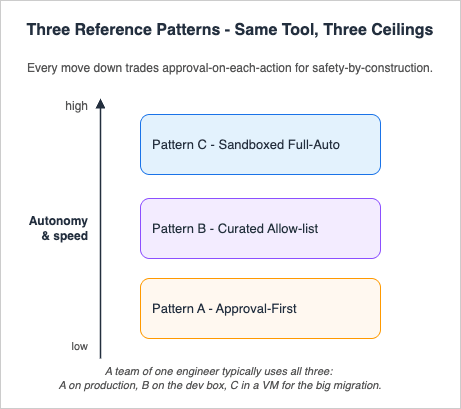
| Pattern | Layers used | Approval frequency | Speed | Blast radius | Where it runs | Use case |
|---|---|---|---|---|---|---|
| A — Approval-First | Harness only (host OS as-is) | Every non-trivial action | Slow (human-paced) | Smallest — you pause before each step | Your normal user, work laptop | Production repos, sensitive work, first session in a new project |
| B — Curated Allow-list | Harness + light environment (deny-list paths, no container) | Only on rare destructive paths | Medium-fast | Bounded by allowlist + deny | Your normal user, dev box | Personal projects, PoCs, daily exploratory work |
| C — Sandboxed Full-Auto | Harness + full environment (container + non-root user + network filter) | Almost never | Fastest (autonomous) | Bounded by container + non-root user | Container or VM, dedicated user | Long-running batch tasks, refactor sweeps, overnight runs |
The table is meant to be read top-to-bottom: every move down trades approval-on-each-action for safety-by-construction by adding more environment layers underneath the harness. A team of one engineer typically uses all three: A on the production repo, B on the personal dev box, C in a VM for the big migration sweep.
9.2 Pattern A — Maximum Safety / Approval-First
Layer: Harness onlyForbids: every destructive bash shape, all reads of secret directories, every form of network fetch unless explicitly allowed.
Allows: nothing by default — every write and every shell command surfaces a prompt.
Where: your normal user, on the host OS, in the actual project directory.
The configuration is small because most of the work is "ask on everything."
{
  "permissions": {
    "defaultMode": "default",
    "deny": [
      "Bash(rm -rf /*)",
      "Bash(rm -rf ~)",
      "Bash(rm -rf $HOME*)",
      "Bash(sudo *)",
      "Bash(curl *)",
      "Bash(wget *)",
      "Read(./.env)",
      "Read(./.env.*)",
      "Read(./secrets/**)",
      "Read(~/.aws/credentials)",
      "Read(~/.ssh/**)",
      "Write(./.git/**)",
      "WebFetch"
    ],
    "ask": [
      "Bash(*)",
      "Write(**)"
    ]
  },
  "hooks": {
    "PreToolUse": [
      {
        "matcher": "Bash",
        "hooks": [
          {
            "type": "command",
            "command": "~/.claude/hooks/preToolUse-bash-guard.sh"
          }
        ]
      }
    ],
    "PostToolUse": [
      {
        "matcher": "",
        "hooks": [
          {
            "type": "command",
            "command": "~/.claude/hooks/postToolUse-audit.sh"
          }
        ]
      }
    ]
  }
}
Bash(*) and Write(**) in ask to force a prompt on every shell command and every write, with defaultMode: "default" as a final catch-all that prompts on anything still unmatched. Keep the deny list explicit even though most of those items would also be caught by ask — deny is a hard floor that never depends on the human clicking the right button under fatigue.The Pattern A
CLAUDE.md should be short and direct: "This is a production repo. Confirm every change. Read before you write. Pause if you are unsure." The CLAUDE.md is documentation; the ask rules are the actual mechanism.9.3 Pattern B — Balanced / Curated Allow-list
Layers: Harness + light environmentForbids: the same destructive shell patterns,
.env and credential directories, raw curl and wget.Allows: read everywhere in the working tree, format/lint/test commands, scoped git, MCP read tools. Specific writes go through
ask.Where: your normal user, on a dev box, against a personal project or PoC.
{
  "permissions": {
    "defaultMode": "default",
    "additionalDirectories": ["../shared-docs"],
    "allow": [
      "Read(**)",
      "Bash(npm run lint)",
      "Bash(npm run test)",
      "Bash(npm run test:*)",
      "Bash(npm ci)",
      "Bash(pnpm install)",
      "Bash(uv sync)",
      "Bash(uv run *)",
      "Bash(ruff check)",
      "Bash(ruff format)",
      "Bash(pytest *)",
      "Bash(git status)",
      "Bash(git diff *)",
      "Bash(git log *)",
      "Bash(git add *)",
      "Bash(git commit -m *)",
      "Write(src/**)",
      "Write(tests/**)",
      "mcp__github-readonly__list_issues",
      "mcp__github-readonly__get_issue",
      "mcp__github-readonly__list_pull_requests",
      "mcp__fs-docs__read_file"
    ],
    "ask": [
      "Bash(git push *)",
      "Bash(git reset --hard *)",
      "Bash(npm install *)",
      "Bash(pnpm add *)",
      "Bash(uv add *)",
      "Write(.github/**)",
      "Write(infrastructure/**)",
      "mcp__github-readonly__create_comment"
    ],
    "deny": [
      "Bash(rm -rf /*)",
      "Bash(rm -rf ~)",
      "Bash(rm -rf $HOME*)",
      "Bash(sudo *)",
      "Bash(curl *)",
      "Bash(wget *)",
      "Bash(* | sh)",
      "Read(./.env)",
      "Read(./.env.*)",
      "Read(~/.aws/credentials)",
      "Read(~/.ssh/**)",
      "Write(./.git/**)",
      "Write(./.env*)",
      "WebFetch"
    ]
  },
  "hooks": {
    "PreToolUse": [
      {
        "matcher": "Bash",
        "hooks": [
          {
            "type": "command",
            "command": "~/.claude/hooks/preToolUse-bash-guard.sh"
          }
        ]
      }
    ],
    "PostToolUse": [
      {
        "matcher": "",
        "hooks": [
          {
            "type": "command",
            "command": "~/.claude/hooks/postToolUse-audit.sh"
          }
        ]
      }
    ]
  },
  "cleanupPeriodDays": 30
}
additionalDirectories extends reachability to a sibling docs directory without dropping the Read(**) allow into ~.The
npm install * / uv add * rules are in ask rather than deny because adding a dependency is a normal-but-consequential action — you want to think before you confirm, but you do not want to block it outright. Once you have decided you trust a package, an allow for that specific spec is reasonable.9.4 Pattern C — Full Auto / Sandboxed Worker
Layers: Harness + full environmentForbids: nothing, in process — everything is allowed at the tool layer.
Allows: broad shell, broad write, MCP servers needed for the task. Network is governed by the container, filesystem is governed by the container and the non-root user.
Where: a Docker container, devcontainer, or dedicated VM, running as a non-root user, with credentials mounted as short-lived tokens or not mounted at all.
The crucial framing: in Pattern C, the in-process permission gate is largely off, on purpose, because the layers below it are doing the actual containment (the protected-directory exceptions from §3.2 still apply, but every other tool call flows through). Running Pattern C without those layers is not Pattern C — it is reckless.
{
  "_comment": "Pattern C: do NOT paste this into ~/.claude/settings.json on a bare host OS. This config is only safe inside a container, devcontainer, or dedicated VM where the OS user, network egress filter, and filesystem mount are doing the containment. On a host OS this would let the agent run arbitrary shell with full filesystem write.",
  "permissions": {
    "defaultMode": "bypassPermissions",
    "allow": ["Bash(*)", "Read(**)", "Write(**)"],
    "deny": []
  },
  "hooks": {
    "SessionStart": [
      {
        "matcher": "",
        "hooks": [
          {
            "type": "command",
            "command": "/usr/local/bin/claudebot-session-start.sh"
          }
        ]
      }
    ],
    "PostToolUse": [
      {
        "matcher": "",
        "hooks": [
          {
            "type": "command",
            "command": "/usr/local/bin/claudebot-audit.sh"
          }
        ]
      }
    ],
    "Stop": [
      {
        "matcher": "",
        "hooks": [
          {
            "type": "command",
            "command": "/usr/local/bin/claudebot-flush-audit.sh"
          }
        ]
      }
    ]
  },
  "env": {
    "CLAUDE_CODE_ENABLE_TELEMETRY": "1",
    "OTEL_METRICS_EXPORTER": "otlp"
  },
  "apiKeyHelper": "/usr/local/bin/claudebot-fetch-token.sh",
  "cleanupPeriodDays": 7
}
Dockerfile (an excerpt — full version in §10) does the heavy lifting:- Non-root user
claudebotwith no sudo, no SSH agent, no host network access by default. --networkrules limiting egress to a domain allowlist via the runtime's network configuration or an in-container proxy.- Bind mount of the working tree as the only writable host path; everything else is ephemeral container state.
- No mount of
~/.ssh,~/.aws/credentials,~/.config/gcloud/, or browser profiles. Ever. - Short-lived credentials produced on demand by
apiKeyHelper, never written to a long-lived file.
--dangerously-skip-permissions (or its defaultMode: "bypassPermissions" equivalent) become defensible. On the bare host, with your real user, it is the configuration most likely to ruin a Saturday. Inside a container that does not have your credentials and cannot reach your secrets, it is the throughput unlock that makes overnight refactors feasible.10. Concrete Configuration Snippets
This section is the copy-pasteable companion to §9. Treat the snippets as starting points — every project has its own canonical commands, and the allow lists need to be tuned accordingly.10.1 The Audit Hook Used by All Three Patterns
A minimalPostToolUse hook that appends one JSON line per tool use to a JSONL file. With it on, every action becomes inspectable.#!/usr/bin/env bash
# ~/.claude/hooks/postToolUse-audit.sh
set -euo pipefail
LOG_DIR="${CLAUDE_AUDIT_DIR:-$HOME/.claude/audit}"
mkdir -p "$LOG_DIR"
LOG_FILE="$LOG_DIR/$(date -u +%Y-%m-%d).jsonl"
# Pass the JSON payload through unchanged, with a wall-clock prefix.
ts="$(date -u +%Y-%m-%dT%H:%M:%SZ)"
printf '{"ts":"%s","payload":%s}\n' "$ts" "$(cat)" >> "$LOG_FILE"
exit 0
Stop time so a crashed container does not lose its history.10.2 The CLAUDE.md Template
# CLAUDE.md

## Project
- Build: `make build`
- Test: `make test`
- Lint: `make lint`
- Typecheck: `make typecheck`
- Production deploy: never run from this repo. Deploys go through CI.

## Layout
- `src/` — application code
- `tests/` — unit + integration; mirror the `src/` layout
- `infrastructure/` — IaC; treat as read-only unless the task is explicitly infra
- `scripts/` — operator scripts; safe to run, but check the deny list first

## Conventions
- Branches: `feat/*`, `fix/*`, `chore/*`
- Commits: imperative subject, body explains why not what
- Imports: absolute from project root, no deep relative paths

## Where credentials live (do not touch)
- `~/.aws/credentials`, `~/.config/gcloud/`, `~/.ssh/`
- `.env`, `.env.local`, `.env.*` — every shape is denied at the permissions layer

## Enforcement
- `permissions` rules are in `.claude/settings.json` (committed) and
  `~/.claude/settings.json` (per-engineer)
- `PreToolUse` and `PostToolUse` hooks are in `~/.claude/hooks/`
- Pattern C runs use the `Dockerfile.claudebot` and `compose.claudebot.yml`
  in this repo
- If any of the above changes, the InstructionsLoaded hook will alert me
CLAUDE.md may mistake it for the rules themselves.10.3 The Pattern C Dockerfile
A working-but-minimal container. Adjust the base image and language tooling to match your stack.# Dockerfile.claudebot
FROM debian:stable-slim
ARG NODE_VERSION=20
ARG CLAUDE_CODE_VERSION="latest" # pin to a specific version (e.g. 2.1.120) for reproducibility; check https://github.com/anthropics/claude-code/releases for the current release
# System deps: just what is needed to run claude-code and a typical toolchain.
RUN apt-get update && apt-get install -y --no-install-recommends \
curl ca-certificates git jq tini \
&& rm -rf /var/lib/apt/lists/*
# Node + Claude Code CLI
# Note: npm global install is used here because this is an isolated container environment —
# the isolation provided by Docker replaces the host-level concerns that make npm -g discouraged
# in the getting-started guide. Inside a dedicated container, the global install is safe and practical.
RUN curl -fsSL https://deb.nodesource.com/setup_${NODE_VERSION}.x | bash - \
&& apt-get install -y --no-install-recommends nodejs \
&& npm install -g "@anthropic-ai/claude-code@${CLAUDE_CODE_VERSION}" \
&& rm -rf /var/lib/apt/lists/*
# Non-root user
RUN useradd --create-home --shell /bin/bash claudebot
USER claudebot
WORKDIR /workspace
# Audit + token helper scripts go in /usr/local/bin (root-owned, claudebot-readable)
# (Build them from a separate stage or volume-mount them at runtime.)
# Pre-baked settings live in the user's home, but the working tree is mounted at /workspace.
COPY --chown=claudebot:claudebot settings.claudebot.json /home/claudebot/.claude/settings.json
# tini handles signal forwarding and orphaned-child reaping.
ENTRYPOINT ["/usr/bin/tini", "--"]
CMD ["claude"]
compose.claudebot.yml below mounts only the working tree, keeps the host home directory completely absent, and scopes network access to a named bridge network where an upstream firewall or proxy enforces the egress allowlist:# compose.claudebot.yml
# Usage: docker compose -f compose.claudebot.yml run --rm claudebot
services:
claudebot:
build:
context: .
dockerfile: Dockerfile.claudebot
image: claudebot:local
# Run as the non-root user defined in the Dockerfile
user: claudebot
# Mount only the project working tree — never mount $HOME
volumes:
- type: bind
source: ${PWD} # host project directory
target: /workspace
read_only: false
# Optional: pre-baked settings override (read-only)
# - type: bind
# source: ./settings.claudebot.json
# target: /home/claudebot/.claude/settings.json
# read_only: true
working_dir: /workspace
# Attach to a restricted bridge network; do NOT use host networking
networks:
- claudebot-net
# Keep credentials out of the container — use apiKeyHelper instead
environment:
- CLAUDE_AUDIT_DIR=/workspace/.claude-audit
- CLAUDE_CODE_ENABLE_TELEMETRY=1
# tini (PID 1) is already set as ENTRYPOINT in the Dockerfile
command: ["claude", "--dangerously-skip-permissions"]
networks:
claudebot-net:
driver: bridge
# Add --opt com.docker.network.bridge.enable_ip_masquerade=true
# and pair with iptables / nftables rules on the host to restrict
# which external domains this network can reach.
driver_opts:
com.docker.network.bridge.name: br-claudebot
Key invariants: no
$HOME, no ~/.aws, no ~/.ssh are mounted; the container joins only the named claudebot-net bridge, not the host network stack; audit output is written to /workspace/.claude-audit so it survives container exit.10.4 The Token Helper
#!/usr/bin/env bash
# /usr/local/bin/claudebot-fetch-token.sh
# Print a short-lived auth value on stdout. Called by apiKeyHelper.
set -euo pipefail

# Example: rotate a session token from a sidecar credentials service.
# In production, fail closed if the upstream is unreachable.
curl -fsS --max-time 5 "http://creds.local/v1/issue?ttl=900" \
  | jq -r '.token'
apiKeyHelper removes the "long-lived API key on disk" anti-pattern entirely.11. Audit and Observability
You cannot improve an environment you cannot inspect. The good news is that Claude Code, run with even a minimal hook setup, is one of the most observable AI tools in common use.11.1 What to Capture
- Tool invocations. The
PostToolUsehook gives you tool name, inputs, and (depending on the schema version) result metadata. JSONL is enough; you can build dashboards later. - Permission prompts. The
PermissionRequesthook tells you which rules nearly fired. A high rate of permission prompts in a settled project is a smell — either the allow list is wrong or the agent is reaching for things it should not. - Session boundaries.
SessionStart/SessionEndfor total session count, average session length, and which projects produced the most activity. - Subagent activity.
SubagentStart/SubagentStopif you use Agent Teams or otherwise spawn subagents. - Compaction events.
PreCompact/PostCompactfor how often the agent is operating against compressed context — useful for spotting sessions that are running too long.
11.2 Off-Claude File-System Audit
Hooks see what Claude Code initiated. They do not see what a spawned subprocess subsequently did. To close that gap, watch the filesystem from outside:- macOS:
fswatch -r /workspacepiped to a logger. - Linux:
inotifywait -mr /workspaceorauditdrules. - Both: a periodic
git status+git diff --statsnapshot that records what changed between runs.
11.3 Telemetry
If you have an OTEL collector, set:{
"env": {
"CLAUDE_CODE_ENABLE_TELEMETRY": "1",
"OTEL_METRICS_EXPORTER": "otlp"
}
}
CLAUDE_CODE_ENABLE_TELEMETRY=1 to enable, OTEL_METRICS_EXPORTER / OTEL_LOGS_EXPORTER to choose exporters for metrics and logs, and OTEL_EXPORTER_OTLP_ENDPOINT / OTEL_EXPORTER_OTLP_PROTOCOL / OTEL_EXPORTER_OTLP_HEADERS for the OTLP endpoint. Distributed tracing is gated separately: setting OTEL_TRACES_EXPORTER alone does nothing — you must also set CLAUDE_CODE_ENHANCED_TELEMETRY_BETA=1 (or the alias ENABLE_ENHANCED_TELEMETRY_BETA=1) for spans to be emitted. Default export intervals are 60 seconds for metrics and 5 seconds for logs (override with OTEL_METRIC_EXPORT_INTERVAL / OTEL_LOGS_EXPORT_INTERVAL); traces use the OTLP defaults. Content opt-in flags, off by default and roughly ordered from least to most revealing: OTEL_LOG_USER_PROMPTS=1 includes raw prompt text on user_prompt events, OTEL_LOG_TOOL_DETAILS=1 adds Bash command strings, MCP server/tool names, file paths and tool arguments to tool events, and OTEL_LOG_TOOL_CONTENT=1 records the input and output bodies of every tool call (truncated at 60 KB per span; requires tracing). The most powerful flag, OTEL_LOG_RAW_API_BODIES=1, emits the entire Anthropic Messages API request and response JSON — including the full conversation history — as api_request_body/api_response_body log events; enabling it implies consent to everything the three previous flags would reveal. Reserve it for dedicated debugging environments. The docs occasionally add new exporters and metric names — treat the reference as authoritative. Even basic metrics (tool calls per minute, session duration) make it obvious when something is misbehaving.11.4 Session File Hygiene
cleanupPeriodDays controls how long Claude Code keeps session files locally. The default is 30; for Pattern C, 7 is reasonable; for Pattern A on a sensitive repo, 7 or even 3 is reasonable. The session files are useful for incident response, but they also accumulate sensitive context. Decide deliberately.12. Backup and Reversibility
Autonomous environments break things. Good environments make breakage cheap to undo.12.1 Git Is Always First
Every change Claude Code makes lives or dies on whether it is committed. Three habits:- Commit before invoking a long-running task. A clean working tree is the cheapest checkpoint there is.
- Have the agent commit on logical boundaries. Per-step commits are easier to bisect than one giant blob.
- Tag before risky runs.
git tag claudebot/2026-04-26-pre-refactor— the tag is free, and "where were we before the refactor" becomes a one-line answer.
Bash(git push *) rule lives in ask for a reason: pushing makes the bad state visible to others. Local commits are reversible; pushed commits are reversible but conspicuous.12.2 Disk-Level Snapshots
Above Git there is the OS:- macOS: Time Machine, plus APFS snapshots (free, fast, automatic for system updates and on-demand via
tmutil localsnapshot). - Linux: ZFS or Btrfs snapshots.
- Cloud VMs: provider-side snapshots, ideally on a schedule.
12.3 Worktrees for Cheap Branches
Theworktree.symlinkDirectories setting and the WorktreeCreate / WorktreeRemove hook events give you a clean idiom for parallel autonomous tasks: each task gets its own worktree, the agent runs there, and discarding the worktree discards the task's effects. For Pattern C, this is the standard way to run many tasks in parallel without each one stepping on the other's working tree.12.4 Cloud-Side Reversibility
If the agent has any reach into cloud-side state — pushing to remote storage, deploying infrastructure — the corresponding cloud-side recovery posture has to be in place: versioning on object stores, retention windows on snapshots, change history on IaC. The agent's actions on the local disk are usually the easy half; the actions that reach beyond your laptop are where backup hygiene actually pays.13. Anti-Patterns
The six configurations I see most often that defeat the entire premise of harness and environment engineering.--dangerously-skip-permissionson the host with home-mounted credentials. The fastest setup, the worst safety profile. If the agent makes a mistake, your AWS credentials, SSH keys, and browser cookies are within reach. If you genuinely need bypass, run it inside Pattern C.CLAUDE.mdas a "guard" with nopermissions.denybackstop. "Do not runrm -rf /" inCLAUDE.mdis a hint, not a wall. Without a deny rule and a hook, any sufficiently confused session can ignore it. Always pair the prose with the enforcement.- Plaintext keys in
~/.aws/credentialsreachable from the agent's CWD. The single most common credential leak path. Fix with deny rules, OS user separation, or container isolation — ideally all three.apiKeyHelperfor short-lived rotation closes the gap further. - Hooks that log to stdout but never block. A
PreToolUsethat prints "would have blocked: rm -rf /" and exits 0 is a polite trace, not a guard. The block requires exit code 2. - Allowlisting
Bash(*)"for productivity" and forgetting MCP elevation. A wide-open Bash allow plus an MCP server with write scopes turns a typo into an outbound action against a real system. Treat MCP scopes the same way you treat Bash patterns: scope the underlying token, then layer permissions on top, then layer hooks on top of those. - Production repo +
bypassPermissionsmode for "just one task." The temptation is real and the cost is sometimes survivable. The cost on the day it isn't is enormous. Make a local clone in a Pattern C container instead. The five extra minutes will save the bad day.
dangerous, bypass, or skip, ask which OS-level boundary is doing the containment. If the answer is "none," reach for something else.14. Migration Path — A → B → C
Most engineers do not start at Pattern C. They start at Pattern A on the first project, slip into Pattern B once they trust the tooling, and only adopt Pattern C when a specific task makes the case. The promotion criteria I use:14.1 A → B
Promote a project from Approval-First to Curated Allow-list when all of the following are true:- You have at least a week of Pattern A sessions on the project and the dominant pattern is "approve, approve, approve" — i.e. the prompts are tedious because they are predictable.
- You can name the safe operations in this project explicitly enough to write them as allow rules. If you cannot, you do not yet know what "safe" means in this codebase.
- You have a deny list and a hook backstop, so the rule "block destructive shell" does not depend on the allow list being correct.
- You have a recent backup. Always a recent backup.
allow.14.2 B → C
Promote from Curated Allow-list to Sandboxed Full-Auto when all of the following are true:- A specific task is large enough or repetitive enough to justify autonomy: a multi-day refactor, a batch of similar fixups across many files, a migration sweep.
- The OS-level boundary is in place: a non-root user, a container, a network policy, an
apiKeyHelper. Not "I will set it up before the run starts." In place, today, tested. - The audit hook ships JSONL somewhere persistent, not just
/tmpinside the container. - You have agreed with yourself, in advance, on the failure mode: how you will discover that the run went wrong, and what the rollback step is. "I will look at git diff in the morning" is a perfectly fine answer; "I will figure it out" is not.
14.3 C → Back to A
There is also a return trip. When a Pattern C run touches a sensitive area — production credentials, a shared piece of infrastructure, a public-facing repository — drop back to Pattern A or Pattern B for that specific repo. Autonomy is a tool, not a posture. The right pattern depends on what is on the other side of "I made a mistake."15. Closing — Harness and Environment Engineering Are the Work
The most reliable observation I have collected over the last year is that the engineers who get the most out of Claude Code are not the ones with the cleverest prompts. They are the ones whose harness and environment are both designed for it. Their harness — permission lists, hooks, MCP scopes,CLAUDE.md — fits the projects they touch and catches the failure modes they have actually seen. Their environment — OS user, container, network filter, backups, audit pipeline — does not have their AWS keys mounted, and its logs are readable in the morning.This is what the parent article was reaching for when it said the differentiating skill of the local-AI era lives at this layer. It is not a glamorous skill. There is no demo where you stand on a stage and show off your
permissions.deny list or your Dockerfile.claudebot. But the gap between an undirected Claude Code on a laptop and a Claude Code with a tuned harness sitting inside a tuned environment is the gap between "interesting toy" and "reliable colleague."If you take one thing from this article: write enforcement on the side that enforces, write intent on the side that advises, and decide consciously whether each enforcement rule belongs in the harness (in-process) or the environment (out-of-process). Everything else — the three patterns, the snippets, the audit setup — is implementation detail in service of those three layered rules.
16. References
- Claude Code Settings Reference (official)
- Claude Code Permissions — rules, modes, managed policies (official)
- Claude Code Hooks Reference (official)
- Claude Code Sandboxing — OS-level Bash isolation (official)
- Claude Code Monitoring & OpenTelemetry (official)
- Aymen Furter — Environment Engineering as Platform Engineering for AI Agents
- Beyond Self-Disruption: The Paradigm Shift Software Engineers Need in the AI Era
- Claude Code Getting Started — Why Knowing About Local AI Agents Changes Everything
- Amazon Bedrock AgentCore Implementation Guide Part 2: Multi-Layer Security with Identity, Gateway, and Policy
- Amazon Bedrock AgentCore Implementation Guide Part 3: Infrastructure as Code
Related Articles in This Series
- Claude Code Getting Started — Why Knowing About Local AI Agents Changes Everything
The entry-point companion to this article. Covers installation, the four major Claude Code interfaces (CLI, VS Code, JetBrains, Web), the minimum skill bar for non-developers, and the first three reproducible tasks for new users. - Beyond Self-Disruption: The Paradigm Shift Software Engineers Need in the AI Era
The conceptual parent of this article. Argues that harness and environment engineering together form the differentiating skill of the local-AI era, and introduces the four-skill model (Prompt → Context → {Harness, Environment}) re-quoted in §1. - MCP Server on AWS Lambda Complete Guide
Once your local environment can host MCP servers safely, the next step is to expose your own tools to Claude Code over MCP. This article covers the deployment side — how to build a server, host it on Lambda, and gate it with the same permission model that this article configures locally.
References:
Tech Blog with curated related content
Written by Hidekazu Konishi