Claude Code Hooks Complete Guide - Deterministic Enforcement Across the Tool Lifecycle
First Published:
Last Updated:
settings.json today.Source-of-truth note: the hook event names, input JSON fields, exit-code semantics, and JSON output fields below were verified against the official Claude Code hooks reference and hooks guide at the time of writing. The set of hook events grows over time; the official reference remains authoritative.
1. Introduction — Why Hooks Exist
A system prompt is a request. A hook is a guarantee.When you tell Claude Code "always run the formatter after editing a file," or "never touch the production credentials file," you are asking a language model to comply. Most of the time it will. But "most of the time" is not a security posture, and it is not a CI gate. A model can be steered by an unusual prompt, distracted by a long task, or simply make a mistake. If the only thing standing between an agent and an irreversible action is a politely worded instruction, you do not have a control — you have a hope.
Hooks move that control out of the model and into the harness. A hook is a user-defined command (or HTTP endpoint, or MCP tool, or sub-model evaluation) that Claude Code executes deterministically at a fixed point in the tool-and-conversation lifecycle. The model does not decide whether the hook runs. The harness does. When a
PreToolUse hook exits with a blocking status, the tool call is blocked — regardless of what the model intended, what the user prompt said, or how the conversation was steered to that point. That is the entire value proposition: hooks make the enforcement deterministic where the prompt makes it probabilistic.This guide is the reference for that enforcement layer. It covers the full set of hook events and where each one fires in the lifecycle, the two ways a hook communicates back to Claude Code (exit codes and structured JSON), how matchers scope a hook to specific tools, where hook definitions live across the settings hierarchy, and a set of worked examples you can adapt directly: auto-formatting on write, blocking secrets and dangerous commands, audit logging, guarding the end of a turn, and injecting context at session start. It closes with how hooks relate to the two other control surfaces — the permission system and
CLAUDE.md — and with the security model and anti-patterns that matter once hooks are running with your full shell privileges.This article is a companion to the broader Claude Code Harness and Environment Engineering Guide, which introduces hooks as one layer of the overall control stack. Here we go deep on that one layer. For the surrounding settings model and the permission rules hooks interact with, see the Claude Code Features and Settings Reference. Audience: platform and security engineers, and developers who want Claude Code to run autonomously without giving up deterministic guardrails.
A note on scope. This guide covers hooks as configured for the Claude Code CLI through
settings.json and component frontmatter. The Claude Agent SDK exposes a programmatic hook interface in code rather than JSON; that surface is covered in the Claude Agent SDK Complete Guide. We also do not restate the full permission model or the complete settings.json schema — those live in the references linked above. Prices, quotas, and model-specific billing are out of scope by site policy; where a feature interacts with model effort or cost, we describe the mechanism and link to the official documentation.2. The Hook Lifecycle
To use hooks well you have to see the timeline they hang off. A single Claude Code turn is not one event — it is a sequence: the session starts, the user submits a prompt, the model thinks and emits tool calls, each tool call is checked and executed and observed, and eventually the model stops and the turn ends. Hooks fire at the boundaries between these phases. Picking the right event is mostly a matter of knowing which boundary you care about.The figure below maps the major events onto that timeline. Read it top to bottom as the flow of a turn, with the inner tool loop (the part that repeats for every tool the model calls) drawn as a cycle — the dashed arrow back to
PreToolUse is the per-tool-call repetition.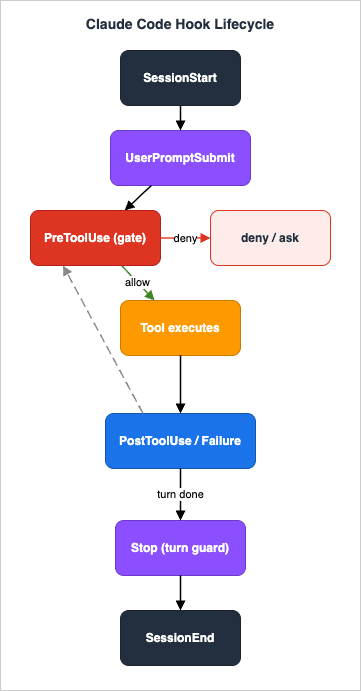
The phases, in order:
Session boundary. When a session starts or resumes,
SessionStart fires once. Around it sit Setup (one-time project initialization in headless mode), InstructionsLoaded (each time a CLAUDE.md or rules file is read into context), and the configuration watchers ConfigChange and CwdChanged. When the session ends, SessionEnd fires.Prompt boundary. Each time the user submits a message,
UserPromptSubmit fires before the model sees it — the single most useful place to inject just-in-time context or to reject a prompt outright. If the prompt expands a slash command, UserPromptExpansion fires as that expansion happens.The tool loop (repeats per tool call). This is the heart of the model. For each tool the model wants to use,
PreToolUse fires before execution and can block it. The permission flow may fire PermissionRequest (a dialog is about to be shown) and PermissionDenied (auto-mode rejected the call). After the tool runs, exactly one of PostToolUse (success) or PostToolUseFailure (failure) fires. When the model issues several tools in parallel, PostToolBatch fires once after the whole batch resolves and before the next model call.Subagents and tasks. If the model spawns a subagent,
SubagentStart and SubagentStop bracket its run; a Stop hook registered inside a subagent is automatically treated as SubagentStop. Task tracking emits TaskCreated and TaskCompleted, and agent-team coordination emits TeammateIdle.Context management. When the conversation approaches the context limit and Claude Code compacts the transcript,
PreCompact fires before and PostCompact after.Turn boundary. When the model finishes responding,
Stop fires — and, crucially, can refuse to let the turn end (sending control back to the model with a reason). If the turn ends because of an API error instead, StopFailure fires.Display, files, and MCP.
Notification fires when Claude Code surfaces a notification; MessageDisplay fires as assistant text is shown and can even rewrite what the user sees. FileChanged watches files on disk; WorktreeCreate and WorktreeRemove bracket git worktree lifecycle; Elicitation and ElicitationResult bracket an MCP server asking the user for structured input.You will spend most of your time with a handful of these —
PreToolUse, PostToolUse, UserPromptSubmit, Stop, SessionStart, SubagentStop, and PreCompact. The rest are there when you need them. Section 3 walks the full set; the deep dives concentrate on the events that carry the most weight in practice.3. The Hook Events
Claude Code defines on the order of thirty hook events as of this writing. Because the set is actively expanding, treat the official hooks reference as the canonical list — do not assume an event exists (or does not) based on memory. The tables below group the current events by the lifecycle phase from Section 2, with the firing condition and whether the event accepts a matcher (Section 5).3.1 The Complete Event Reference
Session and configuration| Event | Fires when | Matcher field |
|---|---|---|
Setup | --init, --init-only, or --maintenance runs in headless (-p) mode | trigger (init, maintenance) |
SessionStart | A session starts or resumes | source (startup, resume, clear, compact) |
InstructionsLoaded | A CLAUDE.md or .claude/rules/*.md file is loaded | load reason |
ConfigChange | A settings file changes mid-session | config source |
CwdChanged | The working directory changes | none |
SessionEnd | The session terminates | termination reason |
Prompt
| Event | Fires when | Matcher field |
|---|---|---|
UserPromptSubmit | The user submits a prompt, before the model sees it | none |
UserPromptExpansion | A slash command or MCP prompt expands into the prompt | command name |
Tool loop
| Event | Fires when | Matcher field |
|---|---|---|
PreToolUse | Before a tool executes (can block) | tool name |
PermissionRequest | A permission dialog is about to be shown | tool name |
PermissionDenied | The auto-mode classifier denied a tool call | tool name |
PostToolUse | After a tool call succeeds | tool name |
PostToolUseFailure | After a tool call fails | tool name |
PostToolBatch | After a batch of parallel tools resolves, before the next model call | none |
Subagents and tasks
| Event | Fires when | Matcher field |
|---|---|---|
SubagentStart | A subagent is spawned | agent type |
SubagentStop | A subagent finishes | agent type |
TaskCreated | A task is created | none |
TaskCompleted | A task is marked completed | none |
TeammateIdle | An agent-team teammate goes idle | none |
Turn boundary and context
| Event | Fires when | Matcher field |
|---|---|---|
Stop | The model finishes responding (can block the stop) | none |
StopFailure | A turn ends due to an API error | error type |
PreCompact | Before context compaction | trigger (manual, auto) |
PostCompact | After compaction completes | trigger (manual, auto) |
Display, files, worktrees, and MCP
| Event | Fires when | Matcher field |
|---|---|---|
Notification | Claude Code sends a notification | notification type |
MessageDisplay | Assistant message text is displayed | none |
FileChanged | A watched file changes on disk | literal filenames |
WorktreeCreate | A git worktree is created | none |
WorktreeRemove | A git worktree is removed | none |
Elicitation | An MCP server requests user input | MCP server name |
ElicitationResult | The user responds to an elicitation | MCP server name |
3.2 Common Input
Every hook receives a single JSON object on standard input. A common set of fields is present on all events:{
"session_id": "abc123",
"transcript_path": "/Users/you/.claude/projects/.../transcript.jsonl",
"cwd": "/Users/you/my-project",
"hook_event_name": "PreToolUse",
"permission_mode": "default"
}
permission_mode reflects the current mode (default, plan, acceptEdits, auto, dontAsk, or bypassPermissions). When a hook runs inside a subagent, the input additionally carries agent_id and agent_type, which is how you tell a subagent's tool call apart from the main agent's. An effort object ({"level": "low" | "medium" | "high" | "xhigh" | "max"}) is present where applicable. Individual events add their own fields on top of this base, described below.3.3 The High-Value Events in Depth
PreToolUse — the gate. This is the event you reach for when you want to prevent something. It fires after the model has decided to use a tool but before the tool runs, and it can block. The input addstool_name (e.g. Bash, Edit, Write, or an MCP tool like mcp__github__create_issue) and tool_input — the structured arguments the model produced. For a Bash call, tool_input.command is the shell string; for an Edit, tool_input.file_path and the edit payload. A PreToolUse hook can do three useful things: block the call (deny), force the user to confirm (ask), or silently allow and even rewrite the arguments (updatedInput). This is where command allow/deny-listing, secret-file protection, and "never run destructive commands unattended" rules live. Two properties make it the strongest control surface in Claude Code. A PreToolUse deny is evaluated before any permission-mode check, so it blocks the tool even under bypassPermissions or --dangerously-skip-permissions — a user cannot escape it by switching their permission mode. And a hook can only tighten, never loosen: returning allow skips the interactive prompt but does not override a matching deny or ask rule in settings, so a hook can never grant more access than the permission system already would.PostToolUse — the reaction. Fires after a tool call succeeds. The input carries
tool_name, tool_input, and tool_response (the result the tool produced). It cannot un-run the tool — the side effect already happened — but it can react: run a formatter on the file that was just written, lint it, append an audit record, or feed information back to the model as additionalContext. The companion PostToolUseFailure fires when the tool failed and additionally carries tool_error. PostToolBatch fires once after a parallel batch and receives batch_results, an array of the resolved tool outcomes — useful when you want to react to a whole fan-out rather than each call.UserPromptSubmit — the context injector and prompt gate. Fires the moment the user submits, before the model processes the prompt. The input adds
prompt (the raw text). Two things make this event special. First, its standard output is fed directly into the model's context — so printing text from this hook is a clean way to inject just-in-time context (the current git branch, an on-call notice, today's deployment freeze) into every turn. Second, it can block: a blocking result rejects the prompt and erases it from context, which lets you stop a prompt that violates policy before the model ever reads it. The two powers compose: a single UserPromptSubmit hook can inject the current freeze status as context and reject any prompt that asks to deploy while a freeze is on — so the model stays aware of policy on every turn and never even sees a request that violates it.Stop / SubagentStop — the turn guard.
Stop fires when the model is about to finish its response. Blocking it does not end the turn — it sends control back to the model with your reason, telling it to keep working. This is the mechanism behind "don't stop until the tests pass" or "warn me if there are uncommitted changes before ending." SubagentStop is the same idea for a subagent; note that a Stop hook registered inside a subagent is automatically converted to SubagentStop. Use the turn guard sparingly — a Stop hook that always blocks will loop forever (Section 10).SessionStart — the bootstrap. Fires once when a session starts or resumes. The input carries
source (startup, resume, clear, or compact), the model, and an optional session_title. Its stdout, like UserPromptSubmit, is injected as context — so this is where you seed the agent with the state it needs before the first prompt: recent commits, open issues, the contents of a scratchpad. Its JSON output can also set watchPaths, reload skills, or even supply an initialUserMessage to kick off the session automatically. SessionStart, Setup, CwdChanged, and FileChanged hooks can additionally write export VAR=value lines to the file named by CLAUDE_ENV_FILE to persist environment variables into every subsequent Bash command in the session.PreCompact — the memory checkpoint. Fires before Claude Code compacts the transcript to stay under the context limit, with
trigger set to manual or auto. Use it to snapshot important state to disk before earlier turns are summarized away, or to block an automatic compaction you would rather defer. PostCompact fires after the summary is in place.PermissionRequest and PermissionDenied — the permission-flow hooks. These sit inside the tool loop alongside
PreToolUse, but they hook the permission machinery rather than the call itself. PermissionRequest fires when Claude Code is about to show a permission dialog; a hook can pre-empt the dialog by returning a nested decision of allow or deny, optionally rewriting the input and even adding a standing permission rule on allow (addPermissionRuleOnAllow). PermissionDenied fires when auto-mode's classifier has rejected a call; a hook can return retry: true to tell the model it may try again. Together with PreToolUse they give you three distinct points to shape one tool call: gate it (PreToolUse), resolve its permission dialog (PermissionRequest), or recover from an auto-denial (PermissionDenied).Notification and the rest.
Notification (carrying message and notification_type) is handy for routing Claude Code's notifications to Slack or a desktop notifier. MessageDisplay can rewrite assistant text before the user sees it (redaction, for instance). FileChanged, WorktreeCreate/WorktreeRemove, and the MCP Elicitation pair round out the set for more specialized automation. Reach for them when the lifecycle phase they cover is exactly what you need to observe.4. The Communication Protocol
A hook talks back to Claude Code in two ways: a coarse channel (the process exit code) and a fine channel (a JSON object on standard output). Most simple hooks use exit codes alone. Anything that needs to make a decision, inject context, or rewrite an argument uses JSON. You can think of exit codes as the fast path and JSON as the expressive path.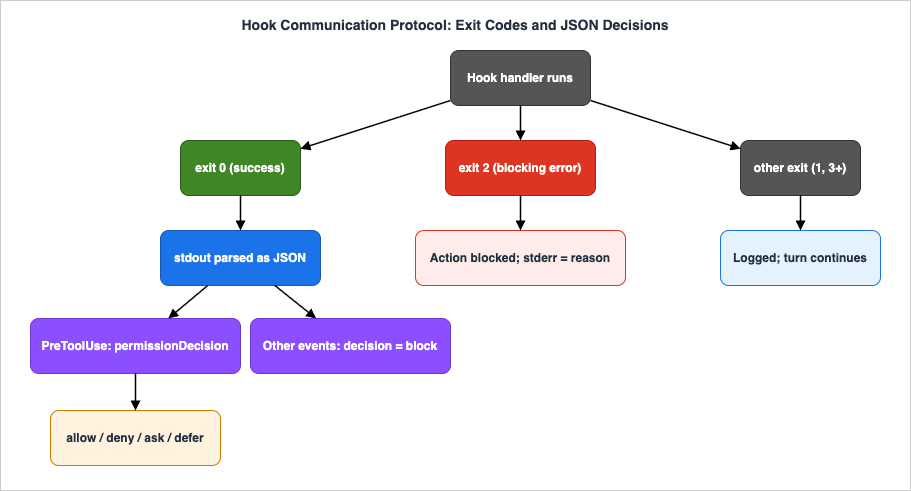
4.1 The Exit-Code Channel
Claude Code interprets a hook's exit code as follows:| Exit code | Meaning | Effect |
|---|---|---|
0 | Success | Standard output is parsed as JSON (Section 4.2). For a few events, non-JSON stdout is treated as plain-text context. |
2 | Blocking error | Standard error is fed back as the reason; the action is blocked for events that support blocking. |
other (1, 3, …) | Non-blocking error | Standard error is shown in the transcript (first line) and the debug log; execution continues. |
The key distinction is exit
2. For a PreToolUse hook, exiting 2 blocks the tool call and the contents of stderr are surfaced to the model as the reason it was blocked. The simplest possible deny hook is therefore a one-liner: inspect the input, print a reason to stderr, and exit 2.Which events actually block on exit
2 matters, because it is not all of them. Blocking events include PreToolUse (blocks the tool), PermissionRequest (denies), UserPromptSubmit and UserPromptExpansion (block the prompt/expansion), Stop and SubagentStop (prevent stopping), TaskCreated/TaskCompleted (roll back / prevent), ConfigChange (block the change), PreCompact (block compaction), PostToolBatch (halts the agentic loop before the next model call), Elicitation/ElicitationResult, and TeammateIdle. For the observe-only events — PostToolUse and PostToolUseFailure — exit 2 does not undo anything; it simply surfaces stderr to the model. For purely informational events such as SessionStart, Notification, SubagentStart, CwdChanged, FileChanged, PostCompact, and SessionEnd, exit 2 is shown to the user (or ignored) and blocks nothing. WorktreeCreate is the special case: any non-zero exit fails the worktree creation.4.2 The JSON Channel
For anything beyond block/allow, exit0 and print a single JSON object to stdout. A set of universal fields applies to every event:{
"continue": true,
"stopReason": "Message shown to the user when continue is false",
"suppressOutput": false,
"systemMessage": "Warning surfaced to the user"
}
continue: false stops Claude Code entirely, regardless of event, with stopReason shown to the user (not the model). suppressOutput: true hides the hook's stdout from the transcript (it still goes to the debug log). systemMessage surfaces a warning in the interface. A terminalSequence field (restricted OSC/BEL escape sequences) can trigger desktop notifications or window-title changes.On top of the universal fields, events carry decision controls. There are two shapes, and getting them right is the most common source of hook bugs.
Most decision-capable events use a top-level
decision:{
"decision": "block",
"reason": "Explanation shown to the user / fed back to the model",
"hookSpecificOutput": {
"hookEventName": "PostToolUse",
"additionalContext": "Extra text added to the model's context"
}
}
UserPromptSubmit, UserPromptExpansion, PostToolUse, PostToolUseFailure, PostToolBatch, Stop, SubagentStop, ConfigChange, and PreCompact. Setting decision: "block" blocks (or, for Stop, refuses to stop) with reason as the explanation.PreToolUse is different — it uses hookSpecificOutput.permissionDecision:{
"hookSpecificOutput": {
"hookEventName": "PreToolUse",
"permissionDecision": "deny",
"permissionDecisionReason": "Editing the production credentials file is not allowed.",
"additionalContext": "Optional context for the model",
"updatedInput": { "command": "rewritten command" }
}
}
permissionDecision field takes one of four values:allow— auto-approve the call with no permission dialog.deny— block the call;permissionDecisionReasonis sent to the model.ask— escalate to the interactive user permission dialog.defer— defer to the normal permission flow (equivalent to exiting0with no JSON).
When you return
updatedInput to rewrite the tool's arguments, you must also return permissionDecision: "allow" or "ask" — the rewrite and the decision travel together. The related PermissionRequest event uses a nested hookSpecificOutput.decision object ({"behavior": "allow" | "deny", "updatedInput": …, "addPermissionRuleOnAllow": "Bash(npm *)"}), and PermissionDenied uses hookSpecificOutput.retry: true to let the model retry a denied call.4.3 stdout, stderr, and Context Injection
Where a hook's stdout goes depends on the event. For most events, exit-0 stdout is parsed as JSON and otherwise sent only to the debug log. But for a specific set — UserPromptSubmit, UserPromptExpansion, and SessionStart — plain-text stdout is injected into the model's context. This is the clean way to add context without JSON: a SessionStart hook that prints git log --oneline -10 puts the last ten commits in front of the model on every session. (MessageDisplay is the related but distinct case: it rewrites what the user sees, through its displayContent JSON field rather than raw stdout.) Tool-loop events (PreToolUse, PostToolUse, and friends) carry their context through additionalContext rather than raw stdout. stderr is the reason channel for blocking; on a non-blocking exit it lands in the transcript and debug log.5. Matchers and Scoping
A hook event without a matcher fires on every occurrence. A matcher narrows it — most often to specific tools, but for several events to other discriminators like the session source or the compaction trigger.5.1 Matcher Syntax
Claude Code evaluates a matcher string with three rules:| Matcher | Interpreted as | Example |
|---|---|---|
"*", "", or omitted | Match everything | fires on all |
Only letters, digits, _, and | | Exact string, or |-separated list of exact strings | Bash, Edit|Write |
| Anything else | JavaScript regular expression | ^Notebook, mcp__memory__.* |
The third rule is a frequent trap with MCP tools. MCP tool names follow the pattern
mcp__<server>__<tool> — and because mcp__memory contains only letters and underscores, it is treated as an exact match and will never match mcp__memory__create_entities. To match all tools from a server you must force regex evaluation, e.g. mcp__memory__.*. Likewise mcp__.*__write.* matches write-style operations across every MCP server.5.2 Which Events Scope on What
Matchers do not always filter on tool name. The discriminator depends on the event:- Tool name —
PreToolUse,PostToolUse,PostToolUseFailure,PermissionRequest,PermissionDenied(e.g.Bash,Edit|Write,mcp__.*). - Session source —
SessionStart(startup,resume,clear,compact). - Termination reason —
SessionEnd(clear,resume,logout, …). - Trigger —
PreCompact,PostCompact(manual,auto);Setup(init,maintenance). - Agent type —
SubagentStart,SubagentStop(Explore,Plan, custom names). - Notification / config source / error type / load reason —
Notification,ConfigChange,StopFailure,InstructionsLoaded. - MCP server name —
Elicitation,ElicitationResult. - Literal filenames —
FileChanged(a watch list, not a regex).
Several events take no matcher and always fire:
UserPromptSubmit, PostToolBatch, Stop, TeammateIdle, TaskCreated, TaskCompleted, WorktreeCreate, WorktreeRemove, CwdChanged, MessageDisplay.5.3 The Settings Hierarchy
Hooks are defined in the same layered settings files as the rest of Claude Code's configuration, and the layer a hook lives in determines who it applies to and who can override it:| Location | Scope | Shared? |
|---|---|---|
~/.claude/settings.json | All your projects (user) | No |
.claude/settings.json | One project | Yes — commit to the repo |
.claude/settings.local.json | One project | No — git-ignored |
| Managed policy settings | Organization-wide | Yes — admin-controlled |
Plugin hooks/hooks.json | When a plugin is enabled | Yes — with the plugin |
| Skill / agent frontmatter | While the component is active | Yes — in the component |
Hooks from all applicable layers are merged, and the resolution order is Managed > Local > Project > Plugin > User — a higher-priority layer wins, so a hook in managed settings overrides one in local, project, plugin, or user settings. The practical consequence for platform teams: a hook defined in managed policy settings cannot be overridden or disabled by a user's personal config, which is exactly what you want for a non-negotiable guardrail. We return to this in Section 9.
6. Configuration in settings.json
6.1 The hooks Block
A hook configuration is a tree: the top-levelhooks key maps each event name to an array of matcher entries; each matcher entry pairs a matcher string with an array of hook handlers to run when it matches. Here is the canonical shape for a PreToolUse hook scoped to Bash:{
"hooks": {
"PreToolUse": [
{
"matcher": "Bash",
"hooks": [
{
"type": "command",
"command": "${CLAUDE_PROJECT_DIR}/.claude/hooks/guard-bash.sh",
"timeout": 30,
"statusMessage": "Checking command safety..."
}
]
}
]
}
}
type selects the mechanism. There are five:command— run a shell command or executable. The default and most common. Withcommandalone you get full shell processing (pipes,&&, redirects); withcommand+ anargsarray you get exec form (no shell, each argument literal) — use exec form when paths or inputs may contain spaces or shell metacharacters.http— POST the hook input JSON to a URL and read the JSON output from the response. Headers may reference environment variables, but only those you allow-list withallowedEnvVars.mcp_tool— call a tool on a configured MCP server, with${path}substitution from the input fields.prompt— ask a Claude model a yes/no question and use its answer as the decision.agent— spawn a subagent to verify something (experimental).
Common fields apply across handler types:
timeout (seconds; defaults are 600 for command/http/mcp_tool, 30 for prompt, 60 for agent, and UserPromptSubmit lowers the command/http/mcp_tool default to 30), statusMessage (custom spinner text), if (a permission-rule expression like Bash(git *) that further filters when the hook runs), and async/asyncRewake for background execution. disableAllHooks: true turns everything off, respecting the hierarchy.The hook receives its input as JSON on stdin. The minimal pattern in any language is: read stdin, parse the JSON, branch on the fields, and either exit with a code or print a JSON decision. Path placeholders —
${CLAUDE_PROJECT_DIR}, ${CLAUDE_PLUGIN_ROOT}, ${CLAUDE_PLUGIN_DATA} — are expanded in command, args, and HTTP header values, and are also exported as environment variables to the spawned process. Always reference your hook scripts through ${CLAUDE_PROJECT_DIR} rather than a relative path, because a hook may run with a working directory you do not control.You can inspect everything that is wired up with the
/hooks command inside Claude Code — it lists every configured hook, its type, and its source layer (User / Project / Local / Plugin / Session / Built-in), read-only.6.2 Handler Types Beyond command
Most hooks arecommand hooks, but the other four types each fit a specific need. The http type is for centralized policy: instead of shipping a script to every developer, point the hook at an internal endpoint that returns the same JSON decision shape. Allow-list exactly which environment variables may appear in headers with allowedEnvVars, and only target endpoints you control (Section 9).{
"hooks": {
"PostToolUse": [
{
"matcher": "Write|Edit",
"hooks": [
{
"type": "http",
"url": "https://hooks.internal.example.com/claude/post-edit",
"headers": { "Authorization": "Bearer $POLICY_TOKEN" },
"allowedEnvVars": ["POLICY_TOKEN"],
"timeout": 10
}
]
}
]
}
}
prompt type asks a Claude model to make the call — useful when the decision is too fuzzy for a regex but cheap enough to delegate to a fast model. The handler turns the model's judgment into a permission decision.{
"hooks": {
"PreToolUse": [
{
"matcher": "Bash",
"hooks": [
{
"type": "prompt",
"prompt": "Does this command delete data, force-push, or exfiltrate files? Decide whether to allow or ask. Command: $ARGUMENTS",
"model": "claude-haiku-4-5",
"timeout": 30
}
]
}
]
}
}
mcp_tool type routes the decision to a tool on a configured MCP server (with ${path} substitution from the input), and the experimental agent type spawns a subagent to verify something more involved. Both trade latency for capability; reserve them for checks that genuinely need an external service or multi-step reasoning, and keep the per-call cost in mind on hot tool-loop events.6.3 Testing and Debugging Hooks
A hook is code, so test it like code before you trust it with a block decision. The fastest loop is to feed the hook a realistic event on stdin and inspect what it prints:# Feed a hook a realistic event on stdin and inspect what it returns.
echo '{
"hook_event_name": "PreToolUse",
"tool_name": "Bash",
"tool_input": { "command": "rm -rf /" }
}' | .claude/hooks/guard.py
# Expected: a deny decision on stdout, exit code 0.
# {"hookSpecificOutput": {"hookEventName": "PreToolUse", "permissionDecision": "deny", ...}}
/hooks inside Claude Code to see exactly which hooks are registered and from which settings layer — this catches the common case where a hook lives in the wrong file or a matcher never matches. Start Claude Code with claude --debug to watch hook execution, stdout, stderr, and exit codes in real time. And remember the two silent-failure modes from Section 10: a malformed JSON object on stdout (often a stray echo that should have gone to stderr) is ignored, and a non-blocking exit code (anything other than 2 for a gate) lets the action through. When a hook "does nothing," it is almost always one of these.6.4 Hooks in Skills and Agents
Hooks are not confined tosettings.json. A skill or a subagent can carry its own hooks in its YAML frontmatter, scoped to the lifetime of that component — the hooks are active only while the skill or agent is loaded, and they go away when it unloads. This is the right home for a hook that only makes sense inside a specific workflow: a release skill that confines edits to a release directory, say, or a review agent that logs every file it reads.---
name: release-helper
description: Helps prepare and cut a release; keeps edits inside the release directory.
hooks:
PreToolUse:
- matcher: Write|Edit
hooks:
- type: command
command: ${CLAUDE_PROJECT_DIR}/.claude/hooks/release-scope.sh
---
# Release Helper
While this skill is active, only edit files under release/ ...
settings.json. One extra field is available here: once: true runs the hook a single time per session and then removes it, which is handy for one-shot setup. And the subagent rule from Section 3 applies — a Stop hook declared in an agent's frontmatter is automatically treated as SubagentStop when that agent runs as a subagent. Because these hooks travel with the component, they are also a clean way to ship a guardrail as part of a reusable skill rather than asking every consumer to edit their settings.7. Worked Examples
The examples below are complete and adaptable. Each pairs asettings.json fragment with the script it calls. They use jq to parse the stdin JSON in shell and the standard library in Python; both are dependency-light on purpose.7.1 Auto-Format on Write (PostToolUse)
The most-requested hook: run a formatter every time the agent writes or edits a file, so the model never has to remember to. This reacts after the write, scoped toWrite|Edit.{
"hooks": {
"PostToolUse": [
{
"matcher": "Write|Edit",
"hooks": [
{
"type": "command",
"command": "${CLAUDE_PROJECT_DIR}/.claude/hooks/format-file.sh",
"timeout": 60
}
]
}
]
}
}
#!/usr/bin/env bash
# .claude/hooks/format-file.sh - format the file Claude just wrote.
set -euo pipefail

# The tool input arrives on stdin as JSON; pull the file path out of it.
file_path="$(jq -r '.tool_input.file_path // empty')"
[ -z "$file_path" ] && exit 0
[ -f "$file_path" ] || exit 0

case "$file_path" in
  *.py)        ruff format "$file_path" >&2 ;;
  *.ts|*.tsx|*.js|*.jsx|*.json|*.css|*.md) npx --no-install prettier --write "$file_path" >&2 ;;
  *.go)        gofmt -w "$file_path" >&2 ;;
  *)           exit 0 ;;
esac

exit 0
stderr so it does not get parsed as a JSON decision on stdout. And the script exits 0 even when it does nothing — a formatter is a convenience, not a gate, so it should never block the turn.7.2 Block Secrets and Dangerous Commands (PreToolUse deny)
This is the gate. One hook protects sensitive files from edits and refuses obviously destructive shell commands. It is scoped broadly (*) because it inspects more than one tool.{
"hooks": {
"PreToolUse": [
{
"matcher": "*",
"hooks": [
{
"type": "command",
"command": "${CLAUDE_PROJECT_DIR}/.claude/hooks/guard.py",
"timeout": 15
}
]
}
]
}
}
#!/usr/bin/env python3
# .claude/hooks/guard.py - deny edits to secrets and destructive bash.
import json
import re
import sys

data = json.load(sys.stdin)
tool = data.get("tool_name", "")
tool_input = data.get("tool_input", {})


def deny(reason: str) -> None:
    # PreToolUse uses hookSpecificOutput.permissionDecision, not a top-level decision.
    print(json.dumps({
        "hookSpecificOutput": {
            "hookEventName": "PreToolUse",
            "permissionDecision": "deny",
            "permissionDecisionReason": reason,
        }
    }))
    sys.exit(0)


# 1. Protect sensitive files from any file-writing tool.
if tool in ("Write", "Edit", "MultiEdit"):
    path = tool_input.get("file_path", "")
    if re.search(r"(^|/)\.env($|\.)|/secrets?/|\.pem$|/\.aws/credentials$", path):
        deny(f"Refusing to modify sensitive file: {path}")

# 2. Refuse clearly destructive shell commands.
if tool == "Bash":
    command = tool_input.get("command", "")
    dangerous = [
        r"\brm\s+-rf\s+/(?!\w)",   # rm -rf / (not /tmp/foo)
        r"\bgit\s+push\s+.*--force\b",
        r"\bmkfs\b", r"\bdd\s+if=.*of=/dev/",
    ]
    for pattern in dangerous:
        if re.search(pattern, command):
            deny(f"Blocked a potentially destructive command (matched /{pattern}/).")

# Nothing matched - defer to the normal permission flow.
sys.exit(0)
deny with a clear permissionDecisionReason is better than exiting 2, because the reason is structured and reaches the model cleanly. Note that this is a guardrail, not a complete security boundary — a determined adversary can obfuscate a command past a regex. Treat it as defense in depth alongside the permission system and a properly sandboxed environment, not as a substitute for them.7.3 Audit Logging (PostToolUse)
Append a structured record of every tool call to a JSONL file. This is invaluable for reviewing what an autonomous run actually did.{
"hooks": {
"PostToolUse": [
{
"matcher": "*",
"hooks": [
{
"type": "command",
"command": "${CLAUDE_PROJECT_DIR}/.claude/hooks/audit.sh",
"timeout": 10,
"async": true
}
]
}
]
}
}
#!/usr/bin/env bash
# .claude/hooks/audit.sh - append a one-line audit record per tool call.
set -euo pipefail

log_dir="${CLAUDE_PROJECT_DIR}/.claude/audit"
mkdir -p "$log_dir"

# Re-emit the input with a timestamp; keep only the fields we care about.
jq -c '{
  ts: now | todateiso8601,
  session: .session_id,
  tool: .tool_name,
  input: .tool_input
}' >> "$log_dir/tool-calls.jsonl"

exit 0
async: true runs it in the background so logging never adds latency to the turn — appropriate because the audit record has no decision to make.7.4 Guard the End of a Turn (Stop)
Refuse to let the turn end while there are uncommitted changes, nudging the model to finish the job. Because aStop hook that always blocks would loop forever, this one only blocks once and uses a marker file to avoid re-triggering.{
"hooks": {
"Stop": [
{
"hooks": [
{
"type": "command",
"command": "${CLAUDE_PROJECT_DIR}/.claude/hooks/stop-guard.sh",
"timeout": 15
}
]
}
]
}
}
#!/usr/bin/env bash
# .claude/hooks/stop-guard.sh - warn once about uncommitted changes at end of turn.
set -euo pipefail
cd "${CLAUDE_PROJECT_DIR}"

marker="${CLAUDE_PROJECT_DIR}/.claude/.stop-guard-fired"

# Already nudged once this turn? Let the model stop.
if [ -f "$marker" ]; then
  rm -f "$marker"
  exit 0
fi

if [ -n "$(git status --porcelain 2>/dev/null)" ]; then
  touch "$marker"
  # decision:block on a Stop hook sends control back to the model with the reason.
  jq -n '{
    decision: "block",
    reason: "There are uncommitted changes. Review them and either commit or explain why they should be left, then finish."
  }'
  exit 0
fi

exit 0
7.5 Inject Context at Session Start (SessionStart)
Seed every new session with the repository's current state so the model starts oriented.SessionStart stdout is injected into context, so a plain echo is enough — no JSON required.{
"hooks": {
"SessionStart": [
{
"matcher": "startup|resume",
"hooks": [
{
"type": "command",
"command": "${CLAUDE_PROJECT_DIR}/.claude/hooks/session-context.sh",
"timeout": 15
}
]
}
]
}
}
#!/usr/bin/env bash
# .claude/hooks/session-context.sh - print repo state for context injection.
set -euo pipefail
cd "${CLAUDE_PROJECT_DIR}"

echo "## Repository context (injected at session start)"
echo
echo "Branch: $(git branch --show-current 2>/dev/null || echo 'n/a')"
echo
echo "Recent commits:"
git log --oneline -5 2>/dev/null || echo "  (no git history)"
echo
echo "Working tree status:"
git status --short 2>/dev/null || echo "  (clean)"

exit 0
SessionStart output can also set a sessionTitle, declare watchPaths for FileChanged, or supply an initialUserMessage. And if you need an environment variable to persist into every later Bash call, write export VAR=value to the file named by $CLAUDE_ENV_FILE from this same hook.7.6 Checkpoint Before Compaction (PreCompact)
On a long autonomous run, Claude Code compacts the transcript as it approaches the context limit — summarizing earlier turns and discarding their detail. If the agent has been keeping working notes, aPreCompact hook can snapshot them to disk first, so nothing important is lost to the summary. Scoping the matcher to auto targets the automatic, context-pressure compactions rather than a manual /compact.{
"hooks": {
"PreCompact": [
{
"matcher": "auto",
"hooks": [
{
"type": "command",
"command": "${CLAUDE_PROJECT_DIR}/.claude/hooks/checkpoint.sh",
"timeout": 15
}
]
}
]
}
}
#!/usr/bin/env bash
# .claude/hooks/checkpoint.sh - snapshot scratch notes before auto-compaction.
set -euo pipefail

notes="${CLAUDE_PROJECT_DIR}/.claude/scratch/NOTES.md"
dest_dir="${CLAUDE_PROJECT_DIR}/.claude/checkpoints"
mkdir -p "$dest_dir"

# The important state must survive the summary that is about to replace earlier
# turns, so copy the working notes alongside a timestamp marker.
ts="$(date -u +%Y%m%dT%H%M%SZ)"
[ -f "$notes" ] && cp "$notes" "$dest_dir/NOTES-$ts.md"

exit 0
CLAUDE.md: the model writes durable notes to a known file, and the PreCompact hook guarantees a copy survives each compaction boundary.7.7 Reject a Policy-Violating Prompt (UserPromptSubmit)
AUserPromptSubmit hook sees the prompt before the model does, and can both inject context and reject the turn outright. This example enforces a simple deployment-freeze policy: if a freeze marker is present, any prompt that asks to deploy is blocked before the model can act on it; otherwise the freeze status is injected as context so the model stays aware of it.{
"hooks": {
"UserPromptSubmit": [
{
"hooks": [
{
"type": "command",
"command": "${CLAUDE_PROJECT_DIR}/.claude/hooks/freeze-gate.py",
"timeout": 10
}
]
}
]
}
}
#!/usr/bin/env python3
# .claude/hooks/freeze-gate.py - block deploy prompts during a release freeze.
import json
import os
import sys

data = json.load(sys.stdin)
prompt = data.get("prompt", "").lower()
project = os.environ.get("CLAUDE_PROJECT_DIR", ".")
frozen = os.path.exists(os.path.join(project, ".deploy-freeze"))

asks_to_deploy = any(k in prompt for k in ("deploy", "release to prod", "ship it"))

if frozen and asks_to_deploy:
    print(json.dumps({
        "decision": "block",
        "reason": "A deployment freeze is in effect (.deploy-freeze present). "
                  "Deployment prompts are blocked until the freeze is lifted.",
    }))
    sys.exit(0)

# Otherwise inject the freeze status as context (UserPromptSubmit stdout is read by the model).
print("Deployment freeze:", "ACTIVE" if frozen else "none")
sys.exit(0)
UserPromptSubmit stdout is injected as context, the non-blocking path simply prints the status and the model reads it on every turn. The blocking path returns decision: "block" with a reason, and the prompt never reaches the model — deterministic policy, not a request the model may decline to honor. The same shape generalizes to any prompt-level guardrail: redacting a pattern, requiring a ticket reference, or refusing work outside business hours.7.8 Rewrite a Tool Call In Place (PreToolUse updatedInput)
APreToolUse hook does not have to be a binary gate — it can also edit the call before it runs. Returning permissionDecision: "allow" together with an updatedInput object replaces the tool's arguments with your version. The most useful application is making a slightly dangerous command safe rather than rejecting it outright: here, rewriting a bare git push --force into the safer --force-with-lease so the agent keeps moving without clobbering a teammate's work.{
"hooks": {
"PreToolUse": [
{
"matcher": "Bash",
"hooks": [
{
"type": "command",
"command": "${CLAUDE_PROJECT_DIR}/.claude/hooks/safe-push.py",
"timeout": 10
}
]
}
]
}
}
#!/usr/bin/env python3
# .claude/hooks/safe-push.py - downgrade a force-push to force-with-lease in place.
import json
import re
import sys

data = json.load(sys.stdin)
tool_input = data.get("tool_input", {})
command = tool_input.get("command", "")

# Only rewrite a git push that forces but does not already lease.
if re.search(r"\bgit\s+push\b", command) and "--force" in command \
        and "--force-with-lease" not in command:
    rewritten = command.replace("--force", "--force-with-lease")
    print(json.dumps({
        "hookSpecificOutput": {
            "hookEventName": "PreToolUse",
            "permissionDecision": "allow",
            "updatedInput": {**tool_input, "command": rewritten},
            "additionalContext": "Rewrote --force to --force-with-lease.",
        }
    }))
    sys.exit(0)

# Nothing to rewrite - defer to the normal permission flow.
sys.exit(0)
updatedInput is honored only alongside a permissionDecision of allow or ask — never with deny, and never on its own. And because the tool now runs a command the model did not write, re-validate the rewritten arguments as carefully as you would the original; a careless transform is just a new place for a bug to hide. Reach for in-place rewriting sparingly — it is powerful, but a user who sees one command in the transcript and a different one in the result is right to be surprised, so keep the transformation small, total, and obvious.8. Hooks vs Permissions vs CLAUDE.md
Claude Code gives you three ways to shape what the agent does, and they are not interchangeable. Choosing the wrong one is how teams end up with guardrails that quietly do not hold.CLAUDE.md is guidance. It is text placed in the model's context. It shapes behavior through instruction, and the model follows it most of the time — but it is advisory by construction. Use it for conventions, preferences, and the "how we like to work here" that benefits from the model's judgment: coding style, which libraries to prefer, how to phrase commit messages. Never rely on it for anything that must not happen.Permissions are the allow/deny rule layer. The permission system decides, rule by rule, whether a given tool call is allowed, denied, or needs to ask —
Bash(npm run test:*) allowed, Read(./.env) denied, and so on. Permissions are deterministic and declarative, and they are the right tool for static, expressible policy: this set of commands is fine, that set is not. They are evaluated by the harness, not the model.Hooks are programmable enforcement. Where a permission rule expresses what is allowed as a static pattern, a hook runs code at a lifecycle point and can make a decision no static rule can: inspect the actual contents of a file before allowing the edit, call out to a policy service, rewrite a command, or react to a result. A hook can do everything a permission rule can and more — at the cost of being code you have to write and trust.
The three layers on one requirement. Take a single concern — "the production credentials file must never be edited." In
CLAUDE.md you might write "never modify config/prod.env"; the model will comply most of the time, but a confused or adversarially-steered turn can still try, and nothing stops it. A permission rule makes the refusal deterministic for that exact path — deny the read, write, and edit of config/prod.env and the harness enforces it with no judgment involved. A PreToolUse hook reaches past what a static path can express: it can deny edits to any file whose contents look like a credential regardless of its name, escalate an unusual case to ask, and append an audit record of every attempt for later review. The same requirement is served loosely by the first layer, firmly by the second, and programmably by the third — and a hardened setup typically runs all three at once, each catching what the others let through.The mental model:
CLAUDE.md persuades, permissions filter, hooks enforce-and-react. They compose. A typical hardened setup uses CLAUDE.md for conventions, permission rules for the broad static allow/deny policy, and hooks for the dynamic checks and the post-action reactions (format, lint, audit) that rules cannot express. When a requirement is "this must be deterministically prevented or deterministically done," it belongs in permissions or hooks — not in CLAUDE.md. The Harness and Environment Engineering Guide develops this layering across the whole control stack; the Features and Settings Reference documents the permission rule syntax hooks sit alongside.9. Security Considerations
The first thing to internalize about hooks is that a hook is arbitrary code execution that you have authorized to run automatically. Acommand hook runs with your full shell privileges — your $PATH, your environment variables, your credentials, your network access, your ability to modify or delete files. Claude Code executes it without asking, at the lifecycle point you configured, every time. This is the source of all of the hook security model, and it cuts in several directions.A hook config is executable, so treat it like code. When you clone a repository and it ships a
.claude/settings.json with hooks, those hooks will run on your machine the moment you trigger their events. Review hooks from untrusted repositories exactly as you would review a Makefile or a package.json postinstall script — because they have the same power. Project hooks live in .claude/settings.json (committed, shared) and .claude/settings.local.json (git-ignored, personal); know which is which before you trust either.Managed settings are how an organization makes a guardrail non-negotiable. Because the resolution order is Managed > Local > Project > Plugin > User, a hook defined in managed policy settings cannot be removed or overridden by a developer's personal config. The
allowManagedHooksOnly: true flag goes further, blocking all user, project, and plugin hooks so that only organization-approved hooks run at all. This is the correct place for a security control that must hold across an entire fleet — a PreToolUse deny hook that protects production credentials, say — because no individual can turn it off.A rewriting hook becomes a tool-call author. The moment a
PreToolUse hook returns updatedInput (Section 7.8), it stops merely observing the model's command and starts producing one. That rewritten command runs with your full privileges and skips the interactive prompt, so a logic error in the rewrite is a silent grant of action. Treat rewrite hooks as the most safety-critical code in your hook set: keep the transformation small and total, re-validate the result, and prefer rejecting an input you do not fully understand over rewriting it into something you only believe is safe.The HTTP handler sends data off the machine, so constrain it. An
http hook POSTs the full hook input — which can include prompts, file paths, and command strings — to a URL. Only point it at endpoints you control, and use allowedEnvVars to allow-list exactly which environment variables may appear in headers, so a hook cannot smuggle an arbitrary secret into an outbound request.Mind the trust boundary around hook input. The
tool_input a hook inspects was produced by the model, which may be acting on untrusted content (a web page, an issue comment, a file). Write hooks defensively: validate and quote everything, never eval a field from the input, and prefer exec-form command + args over shell-form when a path or argument could contain metacharacters. A guard hook that itself mishandles a crafted command is worse than no hook at all.Logs are a data-handling decision. Audit hooks (Section 7.3) write tool inputs to disk. Those inputs can contain secrets, tokens, or personal data. Decide deliberately where the logs live, who can read them, and how long they are retained — an audit trail that leaks is its own incident.
Finally, hooks run without a controlling terminal — there is no
/dev/tty — so a hook cannot prompt interactively; use the JSON ask decision or a notification instead. And a hook that hangs holds up the agent, so always set a timeout appropriate to the work.10. Anti-Patterns and Pitfalls
Hooks fail in a small number of recognizable ways. Knowing them up front saves an afternoon of confusion.The slow hook tax. Synchronous hooks run on the critical path — Claude Code waits for them. A
PreToolUse hook that takes two seconds adds two seconds to every matching tool call, and in an agentic run that is thousands of calls. Keep gate hooks fast (single-digit seconds), set a tight timeout, and push anything non-decisive — logging, notifications, formatting that need not block — to async: true so it runs in the background.Confusing the two JSON shapes. This is the single most common bug.
PreToolUse decisions live under hookSpecificOutput.permissionDecision (allow/deny/ask/defer); almost everything else uses a top-level decision: "block" with reason. Returning a top-level decision from a PreToolUse hook, or a permissionDecision from a PostToolUse hook, silently does nothing. When a hook "isn't working," check the shape against the event first.Exit code mix-ups. Exit
2 blocks; any other non-zero is a non-blocking error that is logged and ignored. A guard hook that means to block but exits 1 will let the action through while looking like it ran. And a stray print/echo to stdout in a hook that exits 0 becomes malformed JSON — redirect diagnostics to stderr.Infinite loops at the turn boundary. A
Stop hook that always blocks creates a loop: the model tries to stop, the hook says "keep going," the model works and tries to stop again, the hook blocks again. The same trap exists when a UserPromptSubmit hook spawns work that triggers more UserPromptSubmit events. Always give a blocking Stop (or SubagentStop) hook a termination condition — the marker-file pattern in Section 7.4, a bounded retry count, or a check of the transcript — so it cannot block twice for the same reason.Assuming subagent behavior matches the main agent. Hooks fire inside subagents too, and the semantics differ in ways that surprise people. A
Stop hook registered for a subagent is automatically converted to SubagentStop. Subagents do not automatically inherit the main agent's permissions, so a PreToolUse hook may be the thing standing between a subagent and an unapproved tool. Use the agent_id and agent_type fields in the input to tell whose tool call you are inspecting, and test guardrails with subagents in the loop, not just the main agent.OS and environment assumptions. Hooks run as real processes on the host. A hook that shells out to
jq, prettier, or ruff assumes those binaries are on $PATH — which may differ from your interactive shell, and differs again on Windows (shell: "powershell") versus macOS and Linux. Reference scripts through ${CLAUDE_PROJECT_DIR} rather than relative paths, do not assume a particular working directory, and keep portability in mind if the hooks are committed for a team on mixed platforms.Mistaking
allow for a way to loosen policy. A PreToolUse hook can tighten what the permission system allows, but it cannot loosen it. Returning permissionDecision: "allow" skips the interactive prompt — it does not override a matching deny or ask rule in settings, which are still evaluated. Wire an allow hook expecting it to unblock a command that a deny rule forbids and the call stays blocked while the hook looks broken. When you genuinely need to permit something, change the permission rule; reserve hook allow for auto-approving calls that were already going to be allowed.Over-hooking. Not every preference needs a hook. If the cost of the model occasionally not doing something is low,
CLAUDE.md guidance is lighter weight and easier to maintain. Reserve hooks for what must be deterministic — the things whose failure you cannot tolerate. A wall of hooks that each save a few keystrokes is harder to reason about than a couple that enforce what actually matters.11. Frequently Asked Questions
What are Claude Code hooks?Hooks are user-defined commands that Claude Code runs automatically at fixed points in the tool-and-conversation lifecycle — before and after tool calls, when a prompt is submitted, when a session starts, when the model tries to stop, and more. Unlike instructions in
CLAUDE.md, which the model follows by choice, hooks are executed deterministically by the harness, so they can enforce policy that must hold regardless of what the model decides.How do I block a tool call?
Register a
PreToolUse hook, inspect the tool_name and tool_input from the JSON on stdin, and either exit with code 2 (printing the reason to stderr) or — better — exit 0 and print {"hookSpecificOutput": {"hookEventName": "PreToolUse", "permissionDecision": "deny", "permissionDecisionReason": "..."}}. The deny decision blocks the call and sends your reason to the model. See Section 7.2 for a complete example.What is the difference between PreToolUse and PostToolUse?
PreToolUse fires before a tool runs and can block it — it is for prevention (deny a command, protect a file, require confirmation). PostToolUse fires after a tool succeeds and cannot undo it — it is for reaction (format the file that was just written, lint it, log it, feed context back to the model). If you need to stop something, use PreToolUse; if you need to respond to something that already happened, use PostToolUse.How do I auto-format on save?
Use a
PostToolUse hook matched to Write|Edit. Read tool_input.file_path from the stdin JSON, run your formatter on that path (sending its output to stderr so it is not parsed as a decision), and exit 0. Because the formatter is a convenience rather than a gate, it should never block — always exit 0. Section 7.1 has the full script.Do hooks run for subagents?
Yes. Hooks fire inside subagents, with a few differences: a
Stop hook registered for a subagent is automatically treated as SubagentStop, the input carries agent_id and agent_type so you can identify the subagent, and subagents do not automatically inherit the main agent's permissions — so a PreToolUse hook may be the only thing gating a subagent's tool calls. Dedicated SubagentStart and SubagentStop events bracket each subagent's run.12. Summary
Hooks are the layer where Claude Code stops asking and starts enforcing. The model proposes; the harness, through your hooks, disposes — deterministically, at well-defined points in the lifecycle. The working knowledge fits on a card: pick the event for the boundary you care about (PreToolUse to prevent, PostToolUse to react, UserPromptSubmit and SessionStart to inject context, Stop to guard the turn, PreCompact to checkpoint); communicate back with an exit code for simple block/allow or a JSON object for real decisions, remembering that PreToolUse uses hookSpecificOutput.permissionDecision while most other events use a top-level decision; scope with matchers, watching the MCP regex trap; and place the definition in the settings layer whose authority matches the control — managed settings for guardrails no one may override. Above all, remember that a hook is arbitrary code running with your privileges: keep gate hooks fast, give blocking Stop hooks a termination condition, and review hooks from repositories you do not control.Hooks are one layer of a larger control stack. For how they fit alongside the permission system, the environment, and the rest of the harness, see the Claude Code Harness and Environment Engineering Guide and the Claude Code Features and Settings Reference. For the subagents whose lifecycle the
SubagentStart/SubagentStop events bracket, see the Claude Code Subagents and Multi-Agent Orchestration Guide. And for using the same enforcement ideas to build unattended guardrails in continuous integration, see Claude Code in CI/CD and Headless Automation.13. References
- Claude Code Hooks Reference — the canonical event list, input JSON, exit codes, and JSON output schema.
- Claude Code Hooks Guide — task-oriented walkthroughs of common hook patterns.
- Claude Code Settings — the settings hierarchy and
settings.jsonschema that hooks live in. - Claude Code Documentation — the overall Claude Code documentation set.
- Claude Code Harness and Environment Engineering Guide — hooks in the context of the full control stack (internal).
- Claude Code Features and Settings Reference — permission rules and settings reference (internal).
Related Articles in This Series
- Claude Code Subagents and Multi-Agent Orchestration Guide — the subagent lifecycle that
SubagentStart/SubagentStophooks observe. - Claude Code in CI/CD and Headless Automation — unattended guardrails built on hooks.
References:
Tech Blog with curated related content
Written by Hidekazu Konishi