Claude Agent SDK Complete Guide - Building Custom Agents Beyond the CLI
First Published:
Last Updated:
This guide is a practical, implementation-level reference for that move. It covers installation and the first query, how the SDK differs from the raw Messages API, how to configure the agent, how to wire in tools and Model Context Protocol (MCP) servers, how the permission system protects you, how hooks and subagents work from code, how to route the SDK through Anthropic's API, Amazon Bedrock, or Google Cloud Vertex AI, how to run it headless in automation, and a full worked example. Every code sample is written against the current SDK surface; where a detail is version-dependent, it is flagged so you can verify it against the official documentation rather than trusting a guess.
A note on naming before anything else: the package you may remember as the "Claude Code SDK" has been renamed to the "Claude Agent SDK." It is still built on Claude Code and exposes the same capabilities, but the package names, import paths, and option object have changed. If you are copying code from an older blog post or your own notes, assume the identifiers are stale and verify them against this guide and the official documentation.
If you have not used Claude Code at all yet, start with the Claude Code Getting Started Guide first — this article assumes you already understand what the agent loop does interactively and want to drive it programmatically.
1. Introduction
Claude Code is an interactive coding agent that runs in your terminal. It reads files, runs commands, searches the web, edits code, asks for permission on risky actions, and keeps working until the task is done. The Claude Agent SDK is that same engine, exposed as a library.The relationship is the important part. The SDK is not a thin HTTP wrapper around the Messages API, and it is not a re-implementation of Claude Code's behavior. It is Claude Code, packaged so that your code becomes the driver instead of a human at a prompt. The agent loop — call the model, let it choose a tool, execute the tool, feed the result back, repeat until the model is finished — runs inside your process. The built-in tools (Read, Write, Edit, Bash, Glob, Grep, WebSearch, WebFetch) ship with the SDK, so an agent can start doing real work without you implementing a single tool executor.
Three things are worth making concrete about "the same engine." First, the model is the same — you choose any current Claude model, and the SDK speaks to it through whichever provider you configure. Second, the tools are the same — the file, shell, and search tools the CLI uses are bundled and execute on your machine, in the working directory you point at. Third, the safety machinery is the same — permission modes, allow and deny rules, and hooks all apply, so an SDK agent is no more permissive than a CLI agent unless you make it so. What changes is only the driver: instead of a person reading output and pressing keys, your code consumes a stream of typed messages and decides what to do with each one.
When to reach for the SDK
The CLI and the SDK share capabilities; they differ in interface and therefore in fit:- Productizing an agent. You want an agent inside your own application — a chat surface, an IDE plugin, a backend service — with your own UI, your own auth, and your own branding. The SDK gives you the loop as a function call.
- Embedding into internal tools. You want a "fix the failing test," "triage this exception," or "summarize this repository" capability that your team triggers from a script, a Slack command, or a web form rather than from a terminal.
- Unattended execution. You want the agent to run with no human watching — in CI, on a cron schedule, in response to a webhook — making decisions and producing artifacts on its own.
For interactive, one-off, exploratory work at your own keyboard, the CLI remains the better tool. Many teams use both: the CLI for daily development, the SDK for production. Workflows translate directly between them because they are the same agent underneath.
This guide answers three questions in order: what the SDK is and how it differs from talking to the model directly (sections 1–2), how to configure and extend it (sections 3–9), and how to run it unattended and avoid the common mistakes (sections 10–12).
2. SDK vs Raw Messages API
The most common point of confusion is the difference between the Claude Agent SDK and the Anthropic Client SDK (theanthropic / @anthropic-ai/sdk package that calls the Messages API directly). They solve different problems.With the Client SDK, you own the agent loop. You send a prompt, the model may respond with a
tool_use block, and it is your job to execute that tool, append the result, and call the API again — looping until the model stops asking for tools. You implement tool execution, retries, context window management, and parallelism yourself. This is the right level when you want complete control over every tool call, or when you are not building an agent at all (classification, extraction, a single summarization call).With the Agent SDK, Claude owns the loop. You describe the task and which tools are allowed; the SDK runs the model, executes built-in and custom tools, manages context, and streams messages back to you until it produces a final result. You consume a stream instead of writing a
while loop.The contrast in code is stark:
# Client SDK (anthropic): you implement the tool loop
response = client.messages.create(...)
while response.stop_reason == "tool_use":
    result = your_tool_executor(response.content)
    response = client.messages.create(messages=[...result...], **params)

# Agent SDK (claude_agent_sdk): Claude runs the loop, you stream messages
async for message in query(prompt="Fix the bug in auth.py", options=options):
    print(message)
| Dimension | Client SDK (Messages API) | Agent SDK | Managed Agents |
|---|---|---|---|
| Who runs the agent loop | You write it | The SDK, in your process | Anthropic (hosted) |
| Tool execution | You implement every tool | Built-in tools + your custom tools, in your process | Anthropic-hosted per-session sandbox |
| Runs in | Your process | Your process and infrastructure | Anthropic infrastructure |
| Custom tools | n/a (you build the loop) | In-process Python/TypeScript functions | You execute and return results over HTTP |
| Best for | Single calls, non-agentic work, bespoke loops | Custom agents acting on your files and services | Hosted agents without operating a sandbox |
There is a third row above worth dwelling on so you can rule it out: Managed Agents, a hosted REST API where Anthropic runs the agent loop and the sandbox, and your application sends events and streams results back over HTTP. The Agent SDK runs the loop inside your process, on your infrastructure, against files and services you control; Managed Agents runs it on Anthropic-managed infrastructure with a per-session sandbox. That is the default cloud environment: Managed Agents can also run tool execution in a self-hosted sandbox on your own infrastructure while the loop stays on Anthropic's side, and how that line falls against the OpenAI Agents API, Amazon Bedrock, and GKE Agent Substrate is laid out in Managed Agent Runtimes. A common path is to prototype locally with the Agent SDK and move to Managed Agents when you need hosted sandboxes and session infrastructure you would rather not operate. This guide is about the Agent SDK; for direct Messages API tool use and prompt-level cost control, see the Anthropic Claude API Prompt Caching and Token Efficiency Guide.
Rule of thumb: if you find yourself writing a tool-execution loop by hand, and the tools you need are file/shell/search operations, the Agent SDK will do that work for you. If you need a single model response with no tools, or you must control every step of a bespoke loop, the Client SDK is the right level.
Figure 1 shows where the SDK sits: your application drives
query(), which runs the agent loop, which calls built-in tools, MCP servers, and subagents, all backed by whichever provider you route to.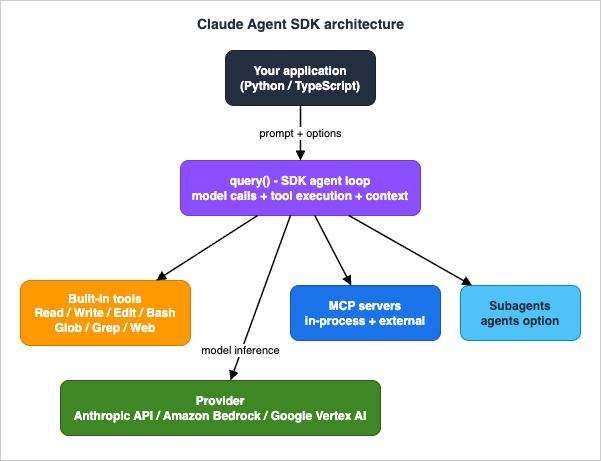
3. Installation and First Query
The SDK ships for two languages. Pick the one your application is written in; the concepts are identical and the identifiers differ only in casing (snake_case in Python, camelCase in TypeScript).3.1 Install
# TypeScript
npm install @anthropic-ai/claude-agent-sdk

# Python (requires Python 3.10 or later)
pip install claude-agent-sdk
pip reports No matching distribution found for claude-agent-sdk, your interpreter is older than 3.10.3.2 Authenticate
By default the SDK readsANTHROPIC_API_KEY:export ANTHROPIC_API_KEY=your-api-key
claude -p is metered separately from interactive limits.)3.3 Your first query
The primary entry point in both languages isquery(). It starts the agent loop and returns an async iterator of messages. You drive it with async for.import asyncio
from claude_agent_sdk import query, ClaudeAgentOptions
async def main():
async for message in query(
prompt="What files are in this directory?",
options=ClaudeAgentOptions(allowed_tools=["Bash", "Glob"]),
):
if hasattr(message, "result"):
print(message.result)
asyncio.run(main())
import { query } from "@anthropic-ai/claude-agent-sdk";

for await (const message of query({
  prompt: "What files are in this directory?",
  options: { allowedTools: ["Bash", "Glob"] }
})) {
  if ("result" in message) console.log(message.result);
}
3.4 Reading messages by type
print(message) is fine for a first run, but real code inspects message types. The most useful are the assistant message (text and tool-use content as it is produced) and the result message (the final outcome plus metadata like turn count and usage).from claude_agent_sdk import query, ClaudeAgentOptions, AssistantMessage, TextBlock, ResultMessage
async def main():
async for message in query(
prompt="Summarize what this project does in two sentences.",
options=ClaudeAgentOptions(allowed_tools=["Read", "Glob", "Grep"]),
):
if isinstance(message, AssistantMessage):
for block in message.content:
if isinstance(block, TextBlock):
print(block.text, end="")
elif isinstance(message, ResultMessage):
print(f"\n[done in {message.num_turns} turns]")
for await (const message of query({
  prompt: "Summarize what this project does in two sentences.",
  options: { allowedTools: ["Read", "Glob", "Grep"] }
})) {
  if (message.type === "assistant") {
    for (const block of message.message.content) {
      if (block.type === "text") process.stdout.write(block.text);
    }
  } else if (message.type === "result") {
    console.log(`\n[done in ${message.num_turns} turns]`);
  }
}
total_cost_usd and a usage object. We will not quote prices in this guide — they change, and the site avoids pinning numbers — but it is useful to know the field exists for your own budgeting and observability; see the cost-control discussion in section 10 and the Prompt Caching and Token Efficiency Guide.3.5 Streaming partial output
By default the SDK yields a complete assistant message after Claude finishes generating each turn. For a responsive UI you want tokens as they arrive. Enable partial-message streaming by settinginclude_partial_messages (Python) / includePartialMessages (TypeScript) to true. The SDK then also yields stream events containing raw API deltas; render text incrementally by watching for content_block_delta events whose delta type is text_delta.async for message in query(
prompt="Explain what this repository does.",
options=ClaudeAgentOptions(
allowed_tools=["Read", "Glob", "Grep"],
include_partial_messages=True,
),
):
# Inspect StreamEvent messages for text_delta to render incrementally.
# The exact StreamEvent shape is documented in the SDK streaming reference.
print(message)
query().3.6 Capturing and resuming a session
query() starts a fresh session each call, but the agent's work — files read, analysis done, conversation so far — is persisted, and you can resume it. The first system message of a run (a SystemMessage with subtype init in Python; a system/init message in TypeScript) carries the session_id. Capture it, then pass it back with the resume option to continue with full context.from claude_agent_sdk import query, ClaudeAgentOptions, SystemMessage, ResultMessage
session_id = None
async for message in query(
prompt="Read the authentication module.",
options=ClaudeAgentOptions(allowed_tools=["Read", "Glob"]),
):
if isinstance(message, SystemMessage) and message.subtype == "init":
session_id = message.data["session_id"]
# Later - resume exactly where the previous run left off.
async for message in query(
prompt="Now find every place that calls it.",
options=ClaudeAgentOptions(resume=session_id),
):
if isinstance(message, ResultMessage):
print(message.result)
session_id, and a later job (or a retry after a crash) can continue the same reasoning rather than starting cold. For genuinely interactive, in-process multi-turn work, ClaudeSDKClient (section 8) is the more ergonomic option; resume is for picking a session back up later.4. Configuring the Agent
Everything about how the agent behaves is set through one options object:ClaudeAgentOptions in Python, the Options type in TypeScript. The fields below are the ones you will reach for most.4.1 The core options
from claude_agent_sdk import query, ClaudeAgentOptions


options = ClaudeAgentOptions(
    system_prompt="You are a careful, terse code reviewer.",
    allowed_tools=["Read", "Glob", "Grep"],     # auto-approved, no prompt
    disallowed_tools=["Bash"],                   # always denied
    model="claude-opus-4-8",                     # pin a model
    cwd="/path/to/project",                      # working directory
    max_turns=12,                                # cap the agent loop
)

async for message in query(prompt="Review the auth module.", options=options):
    ...
import { query } from "@anthropic-ai/claude-agent-sdk";

for await (const message of query({
  prompt: "Review the auth module.",
  options: {
    systemPrompt: "You are a careful, terse code reviewer.",
    allowedTools: ["Read", "Glob", "Grep"],
    disallowedTools: ["Bash"],
    model: "claude-opus-4-8",
    cwd: "/path/to/project",
    maxTurns: 12
  }
})) {
  // ...
}
system_prompt/systemPrompt— the agent's instructions and persona. Pass a plain string to set it directly. You can also build on Claude Code's own system prompt with a preset (below).allowed_tools/allowedTools— tools that are auto-approved without prompting. This is your primary capability allowlist.disallowed_tools/disallowedTools— tools that are always denied, even if a permission mode would otherwise allow them. Deny rules win.model— the Claude model id (for exampleclaude-opus-4-8orclaude-sonnet-4-6). Omit to use the SDK default. On Bedrock and Vertex the id format differs; see section 9.cwd— the working directory the agent's file and shell tools operate in. Default is the process working directory.max_turns/maxTurns— a hard cap on agentic turns. The single most important guardrail against a runaway loop in unattended runs.permission_mode/permissionMode— how tool calls are gated; see section 6.mcp_servers/mcpServers— external and in-process MCP servers; see section 5.hooks— lifecycle callbacks; see section 7.agents— programmatic subagent definitions; see section 8.setting_sources/settingSources— which filesystem settings to load; see the gotcha below.
4.2 Building on the Claude Code system prompt
A plain string replaces the system prompt entirely. If you want your agent to keep Claude Code's built-in coding behavior and only add to it, use the preset form and append:options: {
systemPrompt: {
type: "preset",
preset: "claude_code",
append: "Focus on performance. Never edit files under /vendor."
}
}
options = ClaudeAgentOptions(
    system_prompt={
        "type": "preset",
        "preset": "claude_code",
        "append": "Focus on performance. Never edit files under /vendor.",
    }
)
4.3 The settings-loading gotcha
This is the configuration detail that trips up almost everyone, so it gets its own subsection.By default the SDK loads the same filesystem settings as the Claude Code CLI. With
setting_sources left unset, query() reads your user, project, and local settings from disk — ~/.claude/settings.json, .claude/settings.json, .claude/settings.local.json, and (through the project source) your CLAUDE.md — and managed policy settings always apply. That means an SDK agent inherits whatever permission rules and project instructions happen to be on disk where it runs: convenient on a developer machine, but a surprise — and a reproducibility hazard — in a clean service or CI environment. Control it explicitly with setting_sources.# Default (setting_sources unset): load user + project + local from disk
options = ClaudeAgentOptions()
# Scope to project settings only (.claude/settings.json, CLAUDE.md, etc.)
options = ClaudeAgentOptions(setting_sources=["project"])
# Load nothing from disk - behavior is determined entirely by your code
options = ClaudeAgentOptions(setting_sources=[])
"user" (~/.claude/settings.json), "project" (.claude/settings.json), and "local" (.claude/settings.local.json); CLAUDE.md is loaded only when "project" is among them. Two consequences are worth stating plainly. First, if you want a library whose behavior is fully determined by your code rather than by whatever is on disk where it runs, pass setting_sources=[] explicitly rather than assuming a clean environment. Second, if you set setting_sources to a narrowed list that leaves out "project", the permission rules and CLAUDE.md you expected from the project silently stop applying. If "my settings.json or CLAUDE.md isn't being respected" is your symptom, an over-narrow or empty setting_sources is almost always the cause.4.4 Other options worth knowing
Beyond the core fields, a handful of options matter once you move past prototypes:- Cancellation. Always keep a way to stop an agent you launched. In TypeScript, pass an
abortControllerand call.abort(), or use theinterrupt()method on theQueryobject. In Python,ClaudeSDKClient.interrupt()halts an in-flight task. - Environment for tools.
envinjects environment variables into the agent's tool-execution context — useful for pointing theBashtool at the rightPATH, a credentials directory, or feature flags, without changing your own process environment. - Reasoning effort. Both the TypeScript
Optionsand the PythonClaudeAgentOptionsexpose aneffortsetting (lowthroughmax) and athinkingconfiguration to trade latency and token spend against depth of reasoning. Tune these per workload. - Session continuation.
resume(a capturedsession_id) andcontinuepick up a prior session; in TypeScript,persistSessionandsessionIdcontrol how sessions are stored and named (section 3.6).
The two options you should never omit in an unattended run are
max_turns and an explicit permission posture; both are covered in sections 6 and 10.5. Tools and MCP Integration
An agent is only as capable as its tools. The SDK gives you three layers: built-in tools, custom in-process tools, and external MCP servers.5.1 Built-in tools
These ship with the SDK and need no implementation from you. The most important:| Tool | What it does |
|---|---|
Read | Read a file in the working directory (text, images, PDFs, notebooks) |
Write | Create a new file |
Edit | Make a precise string replacement in an existing file |
Bash | Run terminal commands, scripts, git operations |
Glob | Find files by pattern (**/*.ts, src/**/*.py) |
Grep | Search file contents with regex |
WebSearch | Search the web for current information |
WebFetch | Fetch and parse the content of a URL |
Agent | Invoke a subagent (see section 8) |
You expose tools by listing them in
allowed_tools / allowedTools. A read-only analysis agent is just allowed_tools=["Read", "Glob", "Grep"]; an agent that may also edit code adds "Edit" and "Write".5.2 Custom in-process tools
When the agent needs a capability your application owns — query a database, hit an internal API, look up a record — you define a tool as an ordinary function in your process. The SDK exposes these through an in-process MCP server. In TypeScript you build it withtool() and createSdkMcpServer(); in Python with the @tool decorator and create_sdk_mcp_server().import { tool, createSdkMcpServer, query } from "@anthropic-ai/claude-agent-sdk";
import { z } from "zod";
const lookupOrder = tool(
"lookup_order",
"Look up an order by its ID and return status and total.",
{ orderId: z.string() },
async ({ orderId }) => {
const order = await db.orders.find(orderId); // your code, your DB
return { content: [{ type: "text", text: JSON.stringify(order) }] };
}
);
const orders = createSdkMcpServer({ name: "orders", tools: [lookupOrder] });
for await (const message of query({
prompt: "What is the status of order 10042?",
options: {
mcpServers: { orders },
allowedTools: ["mcp__orders__lookup_order"]
}
})) {
// ...
}
from claude_agent_sdk import tool, create_sdk_mcp_server, query, ClaudeAgentOptions
from typing import Any


@tool("lookup_order", "Look up an order by its ID and return status and total.", {"order_id": str})
async def lookup_order(args: dict[str, Any]) -> dict[str, Any]:
    order = await db_find_order(args["order_id"])   # your code, your DB
    return {"content": [{"type": "text", "text": str(order)}]}


orders = create_sdk_mcp_server(name="orders", version="1.0.0", tools=[lookup_order])

options = ClaudeAgentOptions(
    mcp_servers={"orders": orders},
    allowed_tools=["mcp__orders__lookup_order"],
)
mcp__<server>__<tool>, and that is the name you must add to allowed_tools to auto-approve it. Forgetting the prefix is a common reason a custom tool "isn't available."5.3 External MCP servers
To connect a third-party capability — a browser, a database driver, a SaaS integration — point the SDK at an external MCP server. Stdio servers are launched as a subprocess via a command; URL-based servers are reached over HTTP.options: {
mcpServers: {
playwright: { command: "npx", args: ["@playwright/mcp@latest"] }
}
}
options = ClaudeAgentOptions(
    mcp_servers={
        "playwright": {"command": "npx", "args": ["@playwright/mcp@latest"]}
    }
)
Building an MCP server is its own topic. If you want to author a server (rather than consume one) and deploy it serverlessly, see the MCP Server on AWS Lambda Complete Guide, which walks through a production stdio-to-HTTP MCP server end to end. For the broader vocabulary of agents, tools, and protocols, the AI Agent Engineering Glossary is a useful companion.
6. Permission Modes and Safety
The whole point of running an agent in your own process is that it can do things — write files, run commands, call APIs. The permission system is what keeps that power bounded. It has two layers: a coarse global mode, and a fine-grained per-call callback.6.1 Permission modes
A permission mode sets the default posture for the whole session. Set it once withpermission_mode / permissionMode, or change it mid-session (section 8).| Mode | Behavior |
|---|---|
default | Standard behavior — pre-approved tools run, others fall through to your callback or are blocked. |
acceptEdits | Auto-approve file edits (Edit/Write) so the agent can refactor without prompting on every change. |
plan | Read-only mode — the agent can analyze and propose, but not modify. Ideal for "plan first, then execute." |
bypassPermissions | Approve everything that reaches the mode check. Maximum autonomy, maximum risk — only in fully sandboxed, trusted contexts. |
dontAsk | Deny anything not pre-approved instead of prompting — non-interactive runs fail closed rather than hang. |
The TypeScript SDK additionally exposes an
auto mode that uses a model classifier to approve or deny. For unattended execution, the combination that matters is a tight allowed_tools allowlist plus a mode that fails closed — never bypassPermissions outside a sandbox.6.2 How a tool call is evaluated
When the model requests a tool, the SDK evaluates it through a fixed pipeline. Understanding the order prevents a lot of "why did my deny rule not fire" confusion.- Hooks run first. A
PreToolUsehook can deny a call outright. (A hook that returns "allow" does not skip the deny and ask checks below — those still run.) - Deny rules are checked. Anything in
disallowed_tools(or a deny rule in loaded settings) is blocked — even underbypassPermissions. Deny always wins. - The permission mode is applied.
bypassPermissionsapproves what reaches this step;acceptEditsapproves file operations; other modes fall through. - Allow rules are checked. Anything in
allowed_tools(or an allow rule in loaded settings) is approved. - The
canUseToolcallback decides the rest — anything not resolved above is handed to your runtime callback.
Two consequences worth stating plainly: deny rules cannot be overridden by a permissive mode, and the filesystem allow/deny rules in
settings.json apply only while their setting source is loaded — loaded by default, but dropped under an empty or narrowed setting_sources (section 4.3).Figure 2 shows this pipeline.

6.3 The canUseTool callback
For anything the static rules don't settle,canUseTool / can_use_tool is your runtime decision point. It receives the tool name and input and returns an allow or deny decision. Allow can optionally rewrite the input (for example, to redact a path or clamp a parameter); deny carries a message back to the model so it can adapt, and can optionally interrupt the run.from claude_agent_sdk import ClaudeAgentOptions
from claude_agent_sdk.types import PermissionResultAllow, PermissionResultDeny
async def gate(tool_name: str, input_data: dict, context) -> object:
# Block writes outside the project directory.
if tool_name in ("Write", "Edit"):
path = input_data.get("file_path", "")
if not path.startswith("/workspace/project/"):
return PermissionResultDeny(
message="Writes are restricted to /workspace/project/.",
interrupt=False,
)
return PermissionResultAllow(updated_input=input_data)
options = ClaudeAgentOptions(
allowed_tools=["Read", "Edit", "Write", "Glob", "Grep"],
can_use_tool=gate,
)
import type { CanUseTool } from "@anthropic-ai/claude-agent-sdk";

const gate: CanUseTool = async (toolName, input) => {
  if (toolName === "Write" || toolName === "Edit") {
    const path = String((input as any).file_path ?? "");
    if (!path.startsWith("/workspace/project/")) {
      return { behavior: "deny", message: "Writes are restricted to /workspace/project/." };
    }
  }
  return { behavior: "allow", updatedInput: input };
};

// options: { allowedTools: ["Read","Edit","Write","Glob","Grep"], canUseTool: gate }
canUseTool is the cleanest place to encode a security boundary the model should not be able to talk its way past: it is your code, it sees the exact arguments, and it runs on every matching call. For deterministic, settings-style enforcement that also applies to interactive Claude Code, hooks are the other lever — covered next, and in depth in the Claude Code Hooks Complete Guide.7. Hooks in the SDK
Hooks run your code at fixed points in the agent lifecycle. In the CLI they are shell commands configured insettings.json; in the SDK they are callback functions you pass in the options object. Use them to log, audit, validate, block, or transform agent behavior deterministically — independent of whatever the model decides.The events you can hook include
PreToolUse, PostToolUse, Stop, SessionStart, SessionEnd, UserPromptSubmit, and more. (One cross-language caveat: SessionStart and SessionEnd are registrable as SDK callbacks in TypeScript only; in Python they come from settings-file shell hooks rather than the hooks option.) You register a callback against an event, optionally with a matcher that scopes it to specific tools.import asyncio
from datetime import datetime
from claude_agent_sdk import query, ClaudeAgentOptions, HookMatcher
async def log_file_change(input_data, tool_use_id, context):
file_path = input_data.get("tool_input", {}).get("file_path", "unknown")
with open("./audit.log", "a") as f:
f.write(f"{datetime.now().isoformat()}: modified {file_path}\n")
return {} # empty result = observe only, do not block
async def main():
async for message in query(
prompt="Refactor utils.py to improve readability.",
options=ClaudeAgentOptions(
permission_mode="acceptEdits",
hooks={
"PostToolUse": [HookMatcher(matcher="Edit|Write", hooks=[log_file_change])]
},
),
):
if hasattr(message, "result"):
print(message.result)
asyncio.run(main())
import { query, HookCallback } from "@anthropic-ai/claude-agent-sdk";
import { appendFile } from "fs/promises";

const logFileChange: HookCallback = async (input) => {
  const filePath = (input as any).tool_input?.file_path ?? "unknown";
  await appendFile("./audit.log", `${new Date().toISOString()}: modified ${filePath}\n`);
  return {};
};

for await (const message of query({
  prompt: "Refactor utils.py to improve readability.",
  options: {
    permissionMode: "acceptEdits",
    hooks: { PostToolUse: [{ matcher: "Edit|Write", hooks: [logFileChange] }] }
  }
})) {
  if ("result" in message) console.log(message.result);
}
{}) means "observe and continue." Hooks can also block or steer a call — a PreToolUse hook can stop a tool from running — but the exact return schema for a blocking decision is best taken from the current SDK reference rather than memorized. For the full event catalog, return-value protocol, matchers, and security patterns (format-on-write, secret-scanning, audit trails), the Claude Code Hooks Complete Guide is the dedicated reference; the same concepts apply whether the hook is a shell command in the CLI or a callback in the SDK.When deciding between
canUseTool and a hook for enforcement: canUseTool is the SDK-native, allow/deny-with-rewrite gate for a single session; hooks are the deterministic, settings-portable layer that also governs interactive Claude Code. Many production agents use both — hooks for universal invariants, canUseTool for session-specific policy.8. Subagents in the SDK
Subagents let a main agent delegate a focused subtask to a specialized agent with its own instructions and its own (usually narrower) tool set. The main agent stays on the high-level goal; the subagent does the deep, scoped work and reports back. This keeps each agent's context clean and lets you fan out independent work in parallel.You define subagents programmatically with the
agents option, mapping a name to an AgentDefinition (a description, a system prompt, and the tools that agent may use). Subagents are invoked through the Agent tool, so include "Agent" in allowed_tools to auto-approve those invocations. (This tool was renamed from "Task" to "Agent" in Claude Code v2.1.63; the former "Task" name can still surface in the system/init tool list and in permission-denial records, so match on both if you key logic off the exact string.)from claude_agent_sdk import query, ClaudeAgentOptions, AgentDefinition
async def main():
async for message in query(
prompt="Use the code-reviewer agent to review this codebase.",
options=ClaudeAgentOptions(
allowed_tools=["Read", "Glob", "Grep", "Agent"],
agents={
"code-reviewer": AgentDefinition(
description="Expert code reviewer for quality and security reviews.",
prompt="Analyze code quality and flag security issues. Be specific.",
tools=["Read", "Glob", "Grep"],
)
},
),
):
if hasattr(message, "result"):
print(message.result)
asyncio.run(main())
for await (const message of query({
  prompt: "Use the code-reviewer agent to review this codebase.",
  options: {
    allowedTools: ["Read", "Glob", "Grep", "Agent"],
    agents: {
      "code-reviewer": {
        description: "Expert code reviewer for quality and security reviews.",
        prompt: "Analyze code quality and flag security issues. Be specific.",
        tools: ["Read", "Glob", "Grep"]
      }
    }
  }
})) {
  if ("result" in message) console.log(message.result);
}
parent_tool_use_id field, so you can attribute streamed output to the subagent execution that produced it — essential when several subagents run at once and you are rendering progress.A subagent defined inline this way is the SDK equivalent of a
.claude/agents/*.md file used by the CLI. Defining them in code keeps the whole agent configuration in one place and versioned with your application.Subagents are also how you fan work out in parallel. Because each subagent runs in its own context with its own tools, a coordinator can dispatch several at once — one per file to review, one per service to check, one per candidate to evaluate — and collect their results, rather than doing the work serially in a single context that grows unwieldy. Scope each subagent narrowly (the smallest tool set and clearest instructions that let it finish its slice), and reserve delegation for genuinely independent work; for a single sequential read, work directly rather than paying the overhead of spawning a subagent. The orchestration patterns — when to fan out, how to bound concurrency, how to merge results — are the subject of the Claude Code Subagents and Multi-Agent Orchestration Guide; everything there about agent definitions and tool scoping applies directly to the SDK
agents option.8.1 Sessions, interruption, and streaming input
For multi-turn, interactive, or long-running agents, Python offersClaudeSDKClient — a client you connect once and then send multiple prompts to, retaining context between them. It also supports interruption and dynamic permission changes. (TypeScript exposes the same capabilities through the Query object returned by query(), which has interrupt(), setPermissionMode(), and setModel() methods.)import asyncio
from claude_agent_sdk import ClaudeSDKClient, ClaudeAgentOptions, AssistantMessage, TextBlock
async def main():
options = ClaudeAgentOptions(allowed_tools=["Read", "Glob", "Grep"])
async with ClaudeSDKClient(options=options) as client:
await client.query("Read the authentication module.")
async for message in client.receive_response():
if isinstance(message, AssistantMessage):
for block in message.content:
if isinstance(block, TextBlock):
print(block.text, end="")
# Follow-up retains full context from the first turn.
await client.query("Now list every place that calls it.")
async for message in client.receive_response():
...
asyncio.run(main())
ClaudeSDKClient is the right tool when the agent must hold a conversation, when you need to interrupt a long task and redirect it, or when you want to change the permission mode partway through (for example, start in plan mode, review the plan, then switch to acceptEdits to execute). Sessions can also be captured by id and resumed later via the resume option, so an agent can pick up exactly where a previous run left off.9. Provider Routing
The SDK can run the same agent against Anthropic's API, Amazon Bedrock, Google Cloud Vertex AI, or other supported backends. The agent code does not change; only environment variables and the model id format do. This is the same routing model used by Claude Code itself, so anything you have configured for the CLI carries over.| Provider | Enable with | Credentials |
|---|---|---|
| Anthropic API (default) | ANTHROPIC_API_KEY | Console API key |
| Amazon Bedrock | CLAUDE_CODE_USE_BEDROCK=1 | AWS credential chain (profile / SSO / instance role), AWS_REGION |
| Claude Platform on AWS | CLAUDE_CODE_USE_ANTHROPIC_AWS=1 + ANTHROPIC_AWS_WORKSPACE_ID | AWS credentials |
| Google Vertex AI | CLAUDE_CODE_USE_VERTEX=1 | Google Cloud ADC, project and region |
| Microsoft Azure (Foundry) | CLAUDE_CODE_USE_FOUNDRY=1 | Azure credentials |
# Anthropic API (default)
export ANTHROPIC_API_KEY=sk-ant-...

# Amazon Bedrock
export CLAUDE_CODE_USE_BEDROCK=1
export AWS_REGION=us-east-1
# model id on Bedrock uses the Bedrock format, e.g. an inference profile id

# Google Vertex AI
export CLAUDE_CODE_USE_VERTEX=1
export ANTHROPIC_VERTEX_PROJECT_ID=my-project
export CLOUD_ML_REGION=us-east5
ANTHROPIC_API_KEY left in the environment alongside CLAUDE_CODE_USE_BEDROCK=1 is a common source of "it is hitting the wrong backend" confusion; export only what the chosen route needs. And because the SDK uses the same provider plumbing as Claude Code, a configuration you have already validated for the CLI — an AWS profile, a Vertex project, a corporate proxy via a base-URL override — carries over without change.The one cross-provider subtlety is the model id. The same generation of Claude is addressed differently on each provider — a bare id like
claude-opus-4-8 on the Anthropic API, a Bedrock-style id or inference-profile id on Bedrock, and a Vertex-style id on Vertex AI. Set the right form in the model option (or the corresponding model environment variable) for the provider you target, and verify the exact strings against the provider's own model catalog — these change as new models ship. The full mapping, the IAM/model-access prerequisites for each route, and the subscription-vs-metered decision are the subject of the companion Claude Code on Pay-As-You-Go API Billing guide; for Bedrock specifically, the Amazon Bedrock Basic Info and API Examples article covers model access and the API surface. This guide keeps provider detail to the essentials and defers the rest to those references.10. Headless and Automation
Running the agent unattended is where the SDK earns its keep. There is no terminal, no human to answer a permission prompt, and the run must either finish cleanly or fail in a way your pipeline can detect. A few principles make headless runs reliable.Fail closed on permissions. In a pipeline, an unexpected permission prompt has no one to answer it. Pre-approve exactly the tools the job needs in
allowed_tools, deny the rest, and choose a permission mode that does not hang waiting for input. Provide a can_use_tool callback that returns a decision programmatically for anything that slips through, so there is never an open question the run can stall on.Cap the loop. Always set
max_turns. It is the difference between an agent that gives up after a bounded amount of work and one that loops until your budget alarm goes off.Inspect the result, don't just read text. The result message tells you how the run ended. Branch on it to set your process exit code.
import sys
from claude_agent_sdk import query, ClaudeAgentOptions, ResultMessage


async def run() -> int:
    final = None
    async for message in query(
        prompt="Run the test suite and fix any failing unit tests.",
        options=ClaudeAgentOptions(
            allowed_tools=["Read", "Edit", "Bash", "Glob", "Grep"],
            permission_mode="acceptEdits",
            max_turns=40,
            cwd="/workspace/project",
        ),
    ):
        if isinstance(message, ResultMessage):
            final = message

    if final is None:
        return 1
    # subtype distinguishes success from error_max_turns / error_during_execution
    return 0 if final.subtype == "success" else 1


# sys.exit(asyncio.run(run()))
let final: any = null;
for await (const message of query({
  prompt: "Run the test suite and fix any failing unit tests.",
  options: {
    allowedTools: ["Read", "Edit", "Bash", "Glob", "Grep"],
    permissionMode: "acceptEdits",
    maxTurns: 40,
    cwd: "/workspace/project"
  }
})) {
  if (message.type === "result") final = message;
}
process.exitCode = final && final.subtype === "success" ? 0 : 1;
ANTHROPIC_API_KEY (or the provider variables from section 9) injected from your secrets manager. The result message's total_cost_usd and usage give you per-run telemetry to feed into budgets and dashboards.Emit telemetry. Claude Code, and therefore the SDK, can export OpenTelemetry metrics for tokens and cost, and every run's
ResultMessage carries num_turns, usage, and total_cost_usd. Record these per run so you can alert on a job that suddenly takes far more turns or tokens than its peers — the earliest signal of a prompt regression or a stuck loop.Make runs idempotent and retryable. An unattended agent will occasionally fail mid-task — a transient API error, a tool timeout, a hit turn cap. Design the job so a retry is safe: have the agent work on a branch or a scratch copy, gate the irreversible step (open the pull request, send the message, write to production) behind a final explicit tool that runs only after the work validates, and capture the
session_id so a retry can resume rather than start over. Treat a result subtype other than success as a failure your pipeline surfaces, not something to swallow.Running the agent as a library inside a service or job (this article) is one half of automation. Running the Claude Code CLI itself unattended in a pipeline —
claude -p, stream-json output, the official GitHub Action — is the other half, and the better fit when the unit of work is "run the same thing I'd run interactively, but in CI." That split is the subject of the Claude Code in CI/CD and Headless Automation guide: use the SDK (this article) when you are embedding the loop in your own program; use the headless CLI when you are scripting the existing agent.11. A Worked Example: A Repository-Summary Agent
The pieces come together best in one small, complete agent. We will build a read-only "repository scout": given a path, it explores the codebase with the built-in search tools, calls a custom in-process tool to record findings in a structured form, and returns a concise summary — without ever being able to modify a file. It demonstrates a limited tool allowlist, a custom MCP tool, a permission boundary, and result handling in one program.
11.1 Python
import asyncio
from typing import Any
from claude_agent_sdk import (
    query,
    ClaudeAgentOptions,
    tool,
    create_sdk_mcp_server,
    ResultMessage,
)
from claude_agent_sdk.types import PermissionResultAllow, PermissionResultDeny

FINDINGS: list[dict[str, str]] = []


@tool(
    "record_finding",
    "Record one structured finding about the repository.",
    {"category": str, "detail": str},
)
async def record_finding(args: dict[str, Any]) -> dict[str, Any]:
    FINDINGS.append({"category": args["category"], "detail": args["detail"]})
    return {"content": [{"type": "text", "text": f"recorded: {args['category']}"}]}


notebook = create_sdk_mcp_server(name="notebook", version="1.0.0", tools=[record_finding])


async def read_only_gate(tool_name: str, input_data: dict, context) -> object:
    # Defense in depth: even though we never allow Write/Edit/Bash,
    # reject anything that could mutate the repo.
    if tool_name in ("Write", "Edit", "Bash"):
        return PermissionResultDeny(message="This agent is read-only.", interrupt=True)
    return PermissionResultAllow(updated_input=input_data)


async def scout(repo_path: str) -> str:
    options = ClaudeAgentOptions(
        system_prompt=(
            "You are a repository scout. Explore the codebase using Glob, Grep, and Read. "
            "For each notable fact (purpose, stack, entry points, tests, risks), call "
            "record_finding with a category and a one-line detail. Then write a short summary."
        ),
        cwd=repo_path,
        allowed_tools=["Glob", "Grep", "Read", "mcp__notebook__record_finding"],
        disallowed_tools=["Write", "Edit", "Bash"],
        mcp_servers={"notebook": notebook},
        permission_mode="plan",          # read-only posture
        can_use_tool=read_only_gate,     # belt and braces
        max_turns=30,
        model="claude-opus-4-8",
    )

    summary = ""
    async for message in query(prompt=f"Scout the repository at {repo_path}.", options=options):
        if isinstance(message, ResultMessage):
            summary = message.result or ""
    return summary


async def main():
    summary = await scout("/workspace/project")
    print("=== SUMMARY ===")
    print(summary)
    print(f"\n=== {len(FINDINGS)} STRUCTURED FINDINGS ===")
    for f in FINDINGS:
        print(f"- [{f['category']}] {f['detail']}")


asyncio.run(main())
11.2 TypeScript
import {
  query,
  tool,
  createSdkMcpServer,
  type CanUseTool,
} from "@anthropic-ai/claude-agent-sdk";
import { z } from "zod";

const findings: { category: string; detail: string }[] = [];

const recordFinding = tool(
  "record_finding",
  "Record one structured finding about the repository.",
  { category: z.string(), detail: z.string() },
  async ({ category, detail }) => {
    findings.push({ category, detail });
    return { content: [{ type: "text", text: `recorded: ${category}` }] };
  }
);

const notebook = createSdkMcpServer({ name: "notebook", tools: [recordFinding] });

const readOnlyGate: CanUseTool = async (toolName, input) => {
  if (toolName === "Write" || toolName === "Edit" || toolName === "Bash") {
    return { behavior: "deny", message: "This agent is read-only.", interrupt: true };
  }
  return { behavior: "allow", updatedInput: input };
};

async function scout(repoPath: string): Promise<string> {
  let summary = "";
  for await (const message of query({
    prompt: `Scout the repository at ${repoPath}.`,
    options: {
      systemPrompt:
        "You are a repository scout. Explore with Glob, Grep, and Read. For each notable " +
        "fact, call record_finding with a category and a one-line detail. Then summarize.",
      cwd: repoPath,
      allowedTools: ["Glob", "Grep", "Read", "mcp__notebook__record_finding"],
      disallowedTools: ["Write", "Edit", "Bash"],
      mcpServers: { notebook },
      permissionMode: "plan",
      canUseTool: readOnlyGate,
      maxTurns: 30,
      model: "claude-opus-4-8"
    }
  })) {
    if (message.type === "result") summary = message.result ?? "";
  }
  return summary;
}

const summary = await scout("/workspace/project");
console.log("=== SUMMARY ===\n" + summary);
console.log(`\n=== ${findings.length} STRUCTURED FINDINGS ===`);
for (const f of findings) console.log(`- [${f.category}] ${f.detail}`);
11.3 What this demonstrates
Read the example for the pattern, not the prose. Five SDK ideas are doing the work: a limited allowlist (Glob, Grep, Read, and one custom tool — nothing that writes); a custom in-process tool (record_finding) that captures structured output into your own data structure while the model also produces a prose summary; a permission mode (plan) that sets a read-only posture; a canUseTool gate that hard-blocks mutating tools as defense in depth even though they are not on the allowlist; and result handling that pulls the final summary out of the result message. Swap the custom tool for a database writer and add Edit to the allowlist and you have a code-fixing agent; the skeleton is the same.11.4 Testing the agent
Agents are non-deterministic, but the scaffolding around them is testable, and three layers are worth covering. Unit-test your custom tools as ordinary functions —record_finding, lookup_order, and friends are plain Python or TypeScript and need no model to test. Assert on the permission boundary by driving the agent against a fixture where it is tempted to do something disallowed and checking that your canUseTool gate denied it; this is the test that protects you from a prompt-injection attempt or a model mistake escalating into a real action. Smoke-test the loop end to end with a tiny fixed prompt and a tight max_turns, asserting that the run reaches a success result and that the structured side effects (files written, findings recorded) match expectations. Pin a model for repeatability, and keep these runs small — you are testing your harness and tools, not the model's intelligence.11.5 Variations on the same skeleton
The scout is deliberately minimal so the skeleton stays visible. The same five pieces — a system prompt, a tool allowlist, optional custom tools, a permission posture, and result handling — reshape into very different agents with small changes. Six quick variations show the range.A pull-request review helper. Keep the read-only posture and the search tools, drop the
record_finding tool, and add a custom post_review_comment tool that calls your code host's API. The agent reads the diff and the surrounding files, reasons about correctness and style, and calls your tool once per finding; your tool — not the model — decides how and where the comment is posted, so the model never holds a token or touches the network directly. Because the only mutating capability is a single, narrowly-typed custom tool, the blast radius is exactly "can leave review comments" and nothing more.A documentation generator. Switch the posture to
acceptEdits, add Write and Edit to the allowlist, and point cwd at a docs directory. Constrain it with a canUseTool gate that allows writes only under docs/ and denies everything else, and the agent can read the codebase, infer structure, and produce or update Markdown files — while being structurally unable to modify source. The gate is what lets you grant Write without granting "write anywhere."A triage bot. Give it a custom
fetch_issue tool and a label_issue tool backed by your tracker, no filesystem tools at all, and a tight max_turns. Triggered by a webhook when an issue is filed, it reads the issue, optionally searches the web for context, and applies labels — a complete, useful agent that never touches a filesystem because it does not need one. Dropping the built-in file tools entirely is itself a permission decision: the smallest allowlist that does the job.A release-notes drafter. Read-only over the repo, plus a custom
fetch_merged_prs tool that lists pull requests merged since the last tag, and a write restricted to a single changelog file via the gate. The agent reads the pull requests and the diffs they reference, groups them by theme, and drafts release notes in the project's voice — the kind of tedious synthesis that is easy to specify and annoying to do by hand.A dependency-upgrade agent. Allow
Read, Edit, and Bash scoped to the package manager, set acceptEdits, and give it a bounded task: bump one dependency, run the tests, and fix the fallout. A canUseTool gate that only permits Bash commands matching your test and install runners keeps it from wandering, and max_turns keeps a stubborn upgrade from looping forever. Run it per dependency in CI and it becomes a fleet of small, auditable upgrade jobs rather than one big risky one.A data-pipeline fixer. Combine the patterns: read-write under a scratch directory, a custom
run_query tool that executes against a read replica (never the primary), and a canUseTool gate that blocks any Bash command containing a destructive verb. The agent investigates a failed nightly job, reproduces it against the replica, proposes a fix on a branch, and stops short of deploying — the irreversible step stays behind a human or a separate, audited tool. This is the idempotent-and-retryable shape from section 10 made concrete: the agent does all the reversible work autonomously and hands the one irreversible action back to you.None of these variations required a new SDK concept. Each is the section-11 program with a different allowlist, a custom tool or two, and a permission posture chosen to match the job's reversibility. When you build your own agent, start from two questions — what is the smallest set of tools that lets this finish, and what is the one action I never want it to take without me? The answers map directly onto
allowed_tools, a custom tool, and a canUseTool gate, and the rest of the SDK exists to support that core.12. Common Pitfalls
- Using stale names and APIs. The biggest one. It is the Claude Agent SDK (
@anthropic-ai/claude-agent-sdk/claude-agent-sdk), not the old "Claude Code SDK." Old snippets reference renamed packages, imports, and option fields. When a sample doesn't run, check the identifiers against the current docs before debugging anything else. - Narrowing
setting_sourcesand losing settings.json or CLAUDE.md. The SDK loadsuser,project, andlocalsettings by default, but if you setsetting_sourcesexplicitly and omit"project"— or pass[]— the permission rules andCLAUDE.mdyou rely on from the CLI are silently dropped (section 4.3). - Forgetting the MCP tool-name prefix. A custom tool is exposed as
mcp__<server>__<tool>. Put that fully-qualified name inallowed_tools, not the bare tool name, or the agent can't use it. - Authentication mismatches. The default is
ANTHROPIC_API_KEY. For Bedrock/Vertex you must set the provider flag and the cloud credentials; missing one leads to confusing auth errors. Don't try to use a claude.ai subscription login for a shipped product — use API keys. - No turn cap or permission boundary in unattended runs. Without
max_turnsand a fail-closed permission posture, an unattended agent can loop or take an action you didn't intend. Cap turns, pin an allowlist, and never usebypassPermissionsoutside a sandbox. - Mishandling the stream.
query()yields many message types, not just text. Branch on message type; pull final state from theResultMessage; and if you need incremental tokens, enable partial-message streaming rather than expecting deltas by default. - Confusing the SDK with the Client SDK. If you're hand-writing a
while stop_reason == "tool_use"loop, you're using the Client SDK; the Agent SDK does that loop for you (section 2).
13. Frequently Asked Questions
What is the Claude Agent SDK?It is a Python and TypeScript library that gives you the same agent loop, tools, and context management that power Claude Code, callable from your own code. You provide a prompt and configuration; the SDK runs the model, executes tools, and streams messages back until it produces a result.
Is it the same as the Claude Code SDK?
Yes — it is the renamed successor. The "Claude Code SDK" became the "Claude Agent SDK." It is still built on Claude Code and exposes the same functionality, but the package names (
@anthropic-ai/claude-agent-sdk, claude-agent-sdk), import paths, and options object changed. Treat any older "Claude Code SDK" identifiers as stale.TypeScript or Python?
Whichever your application is in — both are first-class and expose the same capabilities (
query(), options, MCP, permissions, hooks, subagents). Choose based on your existing stack, not on feature availability.Can I run it on Amazon Bedrock or Google Vertex AI?
Yes. Set
CLAUDE_CODE_USE_BEDROCK=1 (with AWS credentials and region) or CLAUDE_CODE_USE_VERTEX=1 (with Google Cloud ADC, project, and region). The agent code is unchanged; only environment variables and the model-id format differ. See section 9 and the billing guide.When should I use the SDK instead of the Messages API?
Use the Agent SDK when you want an autonomous agent with built-in tool execution and don't want to write the tool loop yourself. Use the Messages API (Client SDK) when you need a single response, a non-agentic call, or full manual control over every step of a custom loop. The SDK runs the loop; the Client SDK makes you run it.
Do I need to install Claude Code separately?
No. The TypeScript package bundles a native Claude Code binary for your platform as an optional dependency, so
npm install @anthropic-ai/claude-agent-sdk is enough. The Python package (pip install claude-agent-sdk) requires Python 3.10 or later.Why are my settings.json or CLAUDE.md being ignored?
By default they are not — with
setting_sources unset, the SDK loads your user, project, and local settings just like the CLI. If they are being ignored, you have almost certainly set setting_sources to a list that omits the source you need: CLAUDE.md and project rules load only when "project" is included, and setting_sources=[] disables all of them. Re-add the source you need — for example setting_sources=["project"] (Python) / settingSources: ["project"] (TypeScript) (section 4.3).Can I stop or steer a run while it is in progress?
Yes. Use
interrupt() on the Python ClaudeSDKClient or the TypeScript Query object (or an AbortController in TypeScript) to halt a run, and change the permission mode mid-session with set_permission_mode / setPermissionMode — for example, start in plan mode and switch to acceptEdits after reviewing the plan.14. Summary
The Claude Agent SDK turns Claude Code from a terminal tool into a building block. You install one package, callquery(), and get the full agent loop — built-in tools, permission gating, MCP, hooks, subagents, and provider routing — running inside your own program. The difference from the raw Messages API is exactly that loop: the SDK runs it; the Client SDK makes you write it. The difference from Managed Agents is where it runs: your process and infrastructure, versus Anthropic-hosted.The path from here: confirm what Claude Code does interactively in the Getting Started Guide; pick the provider and billing model that fits your organization in Claude Code on Pay-As-You-Go API Billing; design your delegation strategy with the Subagents and Orchestration Guide; lock down enforcement with the Hooks Complete Guide; take it to a pipeline with CI/CD and Headless Automation; and if you need to author the MCP servers your agent consumes, the MCP Server on AWS Lambda Complete Guide walks through one end to end.
Start small: a read-only agent with three tools and a tight allowlist, like the scout in section 11. Add capability — a custom tool, an edit permission, a subagent — one step at a time, and keep the permission boundary ahead of the autonomy. That is how a safe custom agent grows.
15. References
- Claude Agent SDK - Overview
- Claude Agent SDK - Quickstart
- Claude Agent SDK - Python reference
- Claude Agent SDK - TypeScript reference
- Claude Agent SDK - Configure permissions
- Claude Agent SDK - MCP integration
- Claude Agent SDK - Subagents
- Claude Agent SDK - Hooks
- Claude Agent SDK - Streaming output
- Claude Agent SDK - Sessions
- Claude Agent SDK - Modifying system prompts
- claude-agent-sdk-python (GitHub)
- claude-agent-sdk-typescript (GitHub)
- Claude Agent SDK example agents (GitHub)
Related Articles in This Series and on This Site
- Claude Code Getting Started Guide — what the agent does interactively, before you drive it from code.
- Claude Code on Pay-As-You-Go API Billing — the three provider routes and subscription-vs-metered decision.
- Claude Code Subagents and Multi-Agent Orchestration Guide — delegation strategy for the SDK
agentsoption. - Claude Code Hooks Complete Guide — the full hook event catalog and enforcement patterns.
- Claude Code in CI/CD and Headless Automation — running the CLI unattended, the complement to embedding the SDK.
- MCP Server on AWS Lambda Complete Guide — author the MCP servers your agent consumes.
- AI Agent Engineering Glossary — the vocabulary of agents, tools, and protocols.
- Amazon Bedrock Basic Info and API Examples — Bedrock model access and API surface.
References:
Tech Blog with curated related content
Written by Hidekazu Konishi