Anthropic Claude API Prompt Caching and Token Efficiency Guide - Cache Breakpoints, Batch Processing, and Context Engineering
First Published:
Last Updated:
This guide is a definitive, implementation-level walkthrough of those levers for the Anthropic Claude API: prompt caching and cache breakpoints, the Message Batches API, token counting, context engineering, and model selection. It is the natural next step after deciding to run Claude on metered, pay-as-you-go billing — see the companion guide on Claude Code on Pay-As-You-Go API Billing for how the three billing routes work; this article is about spending fewer tokens once you are on a metered route.
A deliberate constraint runs through the whole article: there are no prices here. No dollar figures, no per-token rates, no discount percentages. Rates change, and an article that hard-codes them goes stale the week after publication. Everything below is expressed in the units that do stay stable — tokens, cache hit rates, request structure, and decision criteria — with links to the official Pricing page wherever an exact rate matters. Every mechanism described was verified against the
claude-api reference and the official Anthropic documentation; model IDs and parameter names are current as of writing.1. Introduction
The token bill for an LLM application is rarely dominated by the cleverness of the prompt. It is dominated by repetition and waste: the same long system prompt re-sent on every turn, the same retrieved documents re-read on every question, a 200-message conversation carried verbatim into turn 201, a frontier model answering a yes/no classification, a real-time request that could have waited an hour. None of those are quality problems. They are structural ones, and structure is exactly what an engineer controls.This article covers five mechanisms, each of which attacks a different source of that waste:
- Prompt caching removes the cost of re-processing a stable prefix. If the first part of your request does not change between calls, the platform can cache it and serve it back cheaply instead of re-reading it every time.
- The Message Batches API removes the latency premium from workloads that do not need an immediate answer, processing large volumes asynchronously at a reduced rate.
- Token counting lets you measure a request before you send it, so prompt bloat is caught at build time rather than discovered on the invoice.
- Context engineering reduces how much you carry in the first place — trimming, summarizing, and externalizing context so each request holds only what it needs.
- Model selection routes each unit of work to the smallest model that can do it well, reserving the expensive frontier model for the parts that genuinely need it.
Throughout, the measuring stick is the response's
usage object — the ground truth of what every request actually consumed. If you take one habit from this guide, make it this: read usage on every call, and judge optimizations by what happens to the token counts, not by what you assume happened.2. How Tokens Are Consumed
Before optimizing consumption, you need a precise model of what gets consumed. The Claude API meters work in tokens, and the response'susage object breaks them into categories that map directly to the levers in this guide.A non-cached request has two basic quantities:
input_tokens— the tokens in everything you sent that was processed at full rate: the system prompt, the tools, the conversation history, and the current user turn.output_tokens— the tokens Claude generated in response.
max_tokens (a hard ceiling) and shape it with prompting and the effort parameter, but you do not get to pre-write it. Input, by contrast, is almost entirely under your control, and it is where caching, context engineering, and token counting do their work.When prompt caching is active, the input splits into three reported categories:
cache_creation_input_tokens— tokens written into the cache on this request. A cache write carries a premium over a normal input token (more on the economics in Section 3), because the platform is doing extra work to store the prefix for reuse.cache_read_input_tokens— tokens served from a previously written cache entry. These are billed at a small fraction of the normal input rate; this is where the savings live.input_tokens— the remaining uncached tokens, processed at full rate. With caching active, this is only the part of the request after your last cache boundary.
total prompt tokens = input_tokens + cache_creation_input_tokens + cache_read_input_tokensThis formula matters more than it looks. If you run a long agent and notice
input_tokens reads only a few thousand on a turn that clearly carried a huge history, do not celebrate prematurely — the rest of the history was almost certainly served as cache_read_input_tokens. Read the sum, not the single field.What drives consumption up, then, is anything that inflates these categories:
- Re-sending stable context uncached. A large system prompt sent on a hundred turns is a hundred copies of input tokens if none of it is cached. The same prompt behind a cache breakpoint is one write and ninety-nine cheap reads.
- Carrying dead history. Conversations and agent loops accumulate tool results, thinking blocks, and superseded turns that no longer inform the next answer but still count as input on every request.
- Over-retrieving. RAG pipelines that stuff twenty documents into context when three would answer the question pay for seventeen documents of input on every call.
- Generating more than needed. Verbose output, unbounded
max_tokens, and highefforton simple tasks all inflateoutput_tokens. - Routing everything to the largest model. A frontier model processes the same tokens as a small one, but each of those tokens is metered at the frontier rate.
input_tokens into cheap cache_read_input_tokens. Context engineering shrinks the input before it is ever counted. Token counting measures the input ahead of time. Model selection changes the rate the tokens are metered at. Batching changes the rate for an entire workload. Keep the usage object in mind as the scoreboard for all of them.3. Prompt Caching Mechanics
Prompt caching is the single highest-leverage token optimization for most applications, because most applications re-send a large, identical prefix on every request. Understanding it correctly requires internalizing exactly one invariant, from which everything else follows.3.1 The One Invariant: Prefix Matching
Prompt caching is a prefix match. Any change anywhere in the prefix invalidates the cache for everything after it.The platform computes a hash of the exact bytes of your rendered prompt up to each cache breakpoint. On a later request, if the bytes up to that breakpoint are identical, the cached work is reused; if a single byte differs — a character in the system prompt, a reordered JSON key, an extra tool — the match fails at that point and everything from there onward is re-processed at full rate.
The rendered prompt has a fixed order, and you must design around it:
1. tools      (the tools array)
2. system     (the system blocks)
3. messages   (the conversation, in order)
A cache breakpoint placed on the last system block therefore caches both the tools and the system prompt together, because both render before it. This ordering is why stable content belongs at the front and volatile content at the back: a timestamp interpolated into the system prompt sits near position zero and invalidates the entire downstream cache on every request.
3.2 Setting a Cache Breakpoint
You mark a cache boundary with acache_control field on a content block. The only supported type is ephemeral:import anthropic
client = anthropic.Anthropic()
response = client.messages.create(
model="claude-opus-4-8",
max_tokens=1024,
system=[
{
"type": "text",
"text": LARGE_STABLE_SYSTEM_PROMPT, # e.g. tens of thousands of tokens
"cache_control": {"type": "ephemeral"},
}
],
messages=[{"role": "user", "content": "Summarize the key points."}],
)
print(response.usage.cache_creation_input_tokens) # written on the first call
print(response.usage.cache_read_input_tokens) # served on later calls
print(response.usage.input_tokens) # only the uncached remainder
On the first call, the system prompt is written to the cache and you see it counted in
cache_creation_input_tokens. On the next call with the same prefix, the same tokens come back as cache_read_input_tokens, and only the new user turn is counted as full-rate input_tokens.One precondition is easy to miss: a cacheable prefix must clear a model-specific minimum length before it caches at all — on the order of a thousand to a few thousand tokens, with the exact per-model figure on the official prompt-caching reference. A prefix below that minimum is silently processed without caching even with a correct
cache_control marker: no error is returned, and cache_creation_input_tokens simply stays at zero. This is a different failure from the silent invalidators in Section 4.6 — there the prefix bytes differ between requests; here they are byte-identical but the prefix is just too short to cache.If you do not need fine-grained placement, the simplest option is automatic caching: put
cache_control at the top level of the request and the platform applies the breakpoint to the last cacheable block for you, moving it forward automatically as a conversation grows.response = client.messages.create(
model="claude-opus-4-8",
max_tokens=1024,
cache_control={"type": "ephemeral"}, # auto-caches the last cacheable block
system=LARGE_STABLE_SYSTEM_PROMPT,
messages=[{"role": "user", "content": "Summarize the key points."}],
)
You may set up to four explicit
cache_control breakpoints in a single request (top-level automatic caching uses one of those slots). More on why you would want several in Section 4.3.3 Cache Write, Cache Read, and the Economics — Without the Numbers
There are three states a cacheable prefix can be in on any given request, and each is metered differently:- Cache write (
cache_creation_input_tokens) — the prefix was not in the cache, so it was stored. A write costs more than processing the same tokens as plain input, because of the extra storage work. - Cache read (
cache_read_input_tokens) — the prefix was already cached, so it was served back. A read costs a small fraction of the plain input rate. This is the win. Since 2026-09-01 that fraction is model-dependent: it is 0.1 of the base input rate on most Claude models and 0.025 on Claude Fable 5.1 and Claude Mythos 5.1, so a long agentic session that re-reads the same prefix pays a quarter of what the same pattern costs on Claude Fable 5. - Uncached (
input_tokens) — the tokens after the last breakpoint, processed at the normal rate.
3.4 Time-to-Live: 5 Minutes and 1 Hour
A cache entry does not live forever. The default time-to-live is five minutes, refreshed each time the entry is read — so a steady stream of requests keeps a hot prefix alive indefinitely. For workloads with longer gaps between requests, you can request a one-hour TTL:system=[
{
"type": "text",
"text": LARGE_STABLE_SYSTEM_PROMPT,
"cache_control": {"type": "ephemeral", "ttl": "1h"},
}
]
Neither TTL requires a beta header. The trade-off is again purely structural: the one-hour entry costs more to write than the five-minute one, so it pays off only when the longer lifetime actually prevents re-writes that the five-minute entry would have suffered. Use the default five-minute TTL for interactive, steady traffic; reach for one hour when requests are bursty or spaced out — notably for batch processing, where a batch can take longer than five minutes to work through and a longer-lived cache markedly improves hit rates. You can even mix the two in one request, with the constraint that one-hour entries must appear before five-minute entries in the prefix.
3.5 What Belongs Behind a Breakpoint
The figure below shows the anatomy of a well-structured cached request: a stable prefix of tool definitions, a frozen system prompt, and fixed context, terminated by a cache breakpoint, with the volatile per-turn input left after it.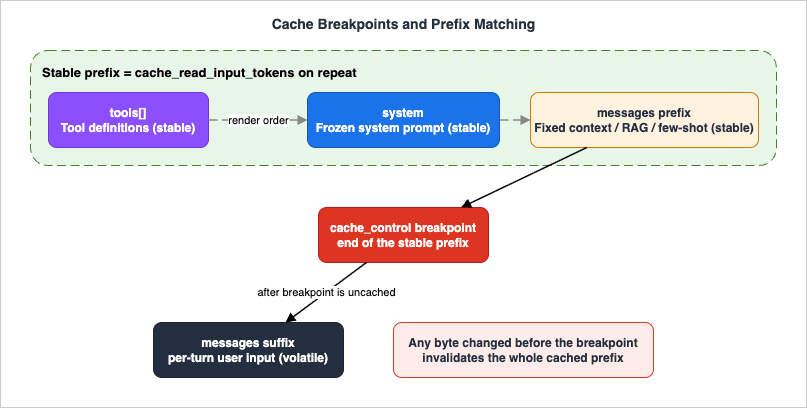
Good candidates for the cached prefix are exactly the things that are large and stable:
- The system prompt, when it is large and frozen — instructions, policies, persona, format specifications.
- The tool definitions, when the tool set is fixed for the session. Because tools render first, caching them is free once you cache anything after them.
- Long fixed context carried in the first message blocks — a reference document, a knowledge base excerpt, a code file under discussion, a large set of few-shot examples.
3.6 Pre-Warming the Cache
There is a subtlety in concurrency: a cache entry becomes readable only after the first request that writes it has begun streaming its response. If you fan out many identical-prefix requests simultaneously at a cold start, all of them pay the write — none can read what the others are still writing. The fix is to pre-warm: send one cheap request first, wait for it to start responding, then fire the rest.The idiomatic pre-warm uses
max_tokens: 0, which runs the prefill (and writes the cache) without generating any output:client.messages.create(
model="claude-opus-4-8",
max_tokens=0, # prefill only; returns empty content
system=[
{"type": "text", "text": LARGE_STABLE_SYSTEM_PROMPT,
"cache_control": {"type": "ephemeral"}},
],
messages=[{"role": "user", "content": "warmup"}],
)
# Response has empty content and stop_reason "max_tokens";
# usage.cache_creation_input_tokens confirms the write happened.
Pre-warming is worth it when first-request latency is user-visible and the shared prefix is large — run it at startup or just before a known traffic burst. It is unnecessary when traffic is continuous (the first real request warms the cache for the rest) or when the prefix is small.
4. Designing Cache Breakpoints
Knowing the mechanism is not the same as placing breakpoints well. The art of caching is arranging your request so the stable part is genuinely stable and the breakpoint sits exactly at the stable/volatile boundary. This section covers the placement patterns and the failure modes.4.1 The Core Principle: Stable Front, Volatile Back
Sort your request content by how often it changes, and make the physical order match:- Never changes (frozen system prompt, fixed tool set) → front, before any breakpoint.
- Changes per session (a document the whole session is about, the user's profile) → after the global prefix, cached per session.
- Changes per turn (the current question, this turn's retrieved chunks) → after the last breakpoint, never cached.
4.2 Multi-Turn Conversations
In a growing conversation, the entire prior history is a stable prefix for the next turn — it does not change, you are only appending to it. Place a breakpoint on the last content block of the most recently completed turn, and each new request reuses the whole conversation as a cache read. With automatic top-level caching, this breakpoint advances on its own as the conversation grows.One detail catches people: the 20-block lookback window. When the platform searches for a cache hit at your breakpoint and finds no exact match, it walks backward through at most 20 content blocks looking for a prefix that an earlier request already wrote. If a single turn adds more than 20 blocks — common in agent loops that emit many
tool_use/tool_result pairs — the next request's breakpoint can fall outside the window of the last write and silently miss. The fix is to place an intermediate breakpoint every dozen or so blocks in long turns, keeping each new write within 20 blocks of the previous one.4.3 Large Tool Definitions
Agents often carry sizable tool schemas. Because tools render first in the prefix, they are cached together with the system prompt whenever you cache anything after them — but only if the tool set is byte-stable. Two rules follow:- Serialize tools deterministically. If your tool list is assembled from a dict or set, sort it by name so the bytes are identical every request. Non-deterministic ordering silently invalidates the cache.
- Do not add, remove, or reorder tools mid-session. Any change to the tools array invalidates the tools cache and everything after it — system and messages included. If you need different capabilities at different times, prefer a tool-search approach that appends schemas on demand (preserving the existing prefix) over swapping the tool set. Since 2026-07-24 a second route that leaves the array untouched has been in beta: declare every tool up front, deferring the ones the model should not see yet, and offer or withdraw them partway through with
tool_additionandtool_removalblocks in a mid-conversation system message. What that route keeps in the prompt cache and in preserved thinking, compared with rewritingtools, is covered in Mid-Conversation Changes in the Claude API.
4.4 RAG Context
Retrieval-augmented generation has a stable part (the instruction prompt, the task framing, often a fixed set of few-shot examples) and a volatile part (the documents retrieved for this query). The mistake is to cache the whole assembled prompt including the retrieved chunks: since the chunks differ on every query, every request writes a distinct cache entry and nothing is ever read back. You pay the write premium on every call and get zero reads.The correct structure puts the breakpoint at the end of the shared portion and leaves the retrieved chunks and the question after it:
response = client.messages.create(
    model="claude-opus-4-8",
    max_tokens=1024,
    system=[
        {"type": "text", "text": RAG_INSTRUCTIONS_AND_FEWSHOT,
         "cache_control": {"type": "ephemeral"}},   # shared, stable -> cached
    ],
    messages=[
        {"role": "user", "content": [
            {"type": "text", "text": retrieved_context},  # varies per query -> uncached
            {"type": "text", "text": user_question},      # varies per query -> uncached
        ]},
    ],
)
If a corpus-wide document is shared across many queries (not retrieved per query), it can move into the cached prefix and earn reads. The test is always the same: would this exact block be byte-identical on the next request? If yes, cache it; if no, keep it after the breakpoint.
4.5 The Invalidation Hierarchy
Not every parameter change invalidates everything. The cache has three tiers — tools, system, messages — and a change only invalidates its own tier and the tiers after it:| Change | Tools cache | System cache | Messages cache |
|---|---|---|---|
| Tool definitions added / removed / reordered | invalidated | invalidated | invalidated |
| Model switch | invalidated | invalidated | invalidated |
| System prompt content edited | valid | invalidated | invalidated |
tool_choice, images toggled | valid | valid | invalidated |
| Thinking parameters changed | model-specific | model-specific | invalidated |
| Message content appended | valid | valid | invalidated |
The practical implications are worth internalizing. Switching models mid-session throws away the entire cache (caches are model-scoped) — if you need a cheaper model for a sub-task, spawn a separate call rather than switching the main loop's model. Editing the system prompt mid-session invalidates from system downward; when you must inject operator instructions mid-conversation, append a
{"role": "system", ...} message to messages (no beta header is required, though not every model supports it) instead of mutating the top-level system, which preserves the cached history prefix. By contrast, you can toggle tool_choice per request without losing the tools-plus-system cache. Changing the thinking configuration is different: it always invalidates the messages cache, and on models that render that configuration ahead of the tools and system, it invalidates those caches as well.4.6 The Silent-Invalidator Audit
Whencache_read_input_tokens stays at zero across requests that should share a prefix, a silent invalidator is at work. The symptom is always the same — the bytes differ where you assumed they were identical — and the usual culprits are:| Pattern | Why it breaks caching |
|---|---|
datetime.now() / a timestamp in the system prompt | The prefix changes every request |
| A UUID or per-request ID near the front of the content | Every request is byte-unique |
json.dumps(obj) without sort_keys=True, or iterating a set | Non-deterministic serialization |
| A session or user ID interpolated into the system prompt | A per-user prefix that never shares across users |
Conditional system sections (if flag: system += ...) | Each flag combination is a distinct prefix |
| A tool list assembled per user | Tools render at position zero; nothing caches across users |
The audit is mechanical: diff the rendered bytes of two requests that should have matched, find the first difference, and move it after the breakpoint (or make it deterministic, or delete it if it is not load-bearing). And always confirm with the scoreboard — if
cache_read_input_tokens is non-zero and growing across repeated requests, the cache is working; if it is stuck at zero, it is not, regardless of how the request looks.5. Batch Processing
Caching attacks the cost of re-processing stable input. The Message Batches API attacks a different axis entirely: the cost and latency profile of work that does not need an answer right now.5.1 What the Batches API Is
The Message Batches API (POST /v1/messages/batches) accepts a list of Messages API requests, processes them asynchronously and independently, and lets you retrieve the results when the batch finishes. In exchange for giving up immediate, synchronous responses, batched usage is billed at a reduced rate relative to standard synchronous calls. (The exact reduction is on the Pricing page; the point here is the mechanism — asynchronous processing in exchange for a lower rate and higher throughput.)The shape of the workload that fits is specific: high volume, latency-tolerant, and offline. Large-scale evaluations, content moderation sweeps, bulk summarization or extraction over a dataset, one-time data transformations, generating descriptions for an entire catalog — anything where "within the hour" is an acceptable turnaround and you have many requests to send at once.
5.2 Creating and Polling a Batch
Each entry in a batch carries acustom_id (your handle for matching results back to inputs) and a params object that is an ordinary Messages API request:import anthropic
from anthropic.types.message_create_params import MessageCreateParamsNonStreaming
from anthropic.types.messages.batch_create_params import Request
client = anthropic.Anthropic()
batch = client.messages.batches.create(
requests=[
Request(
custom_id=f"classify-{i}",
params=MessageCreateParamsNonStreaming(
model="claude-haiku-4-5",
max_tokens=64,
messages=[{"role": "user",
"content": f"Classify sentiment (one word): {text}"}],
),
)
for i, text in enumerate(documents)
]
)
print(batch.id, batch.processing_status) # e.g. "in_progress"
A batch starts in
processing_status: "in_progress" and moves to "ended" once every request has finished. You poll the retrieve endpoint until it ends:import time
while True:
batch = client.messages.batches.retrieve(batch.id)
if batch.processing_status == "ended":
break
time.sleep(60)
The
request_counts object on the batch tracks how many requests are processing, succeeded, errored, canceled, and expired, giving you an at-a-glance health check.5.3 Retrieving Results
Results stream back as a.jsonl file, one line per request. Each has one of four result types:| Result type | Meaning |
|---|---|
succeeded | The request produced a message. |
errored | The request failed (invalid request or server error). Not billed. |
canceled | You canceled the batch before this request ran. Not billed. |
expired | The batch hit its 24-hour limit before this request ran. Not billed. |
for result in client.messages.batches.results(batch.id):
    if result.result.type == "succeeded":
        msg = result.result.message
        text = next((b.text for b in msg.content if b.type == "text"), "")
        store(result.custom_id, text)
    elif result.result.type == "errored":
        log_error(result.custom_id, result.result.error)
    elif result.result.type == "expired":
        resubmit(result.custom_id)
One rule has bitten many integrations: results can come back in any order. Never assume line N of the output corresponds to request N of the input — always match on
custom_id.5.4 Limits and What Can Be Batched
The operational envelope is worth committing to memory:- A batch holds at most 100,000 requests or 256 MB, whichever comes first.
- Most batches finish well under an hour; the hard ceiling is 24 hours, after which unfinished requests
expire. - Results are downloadable for 29 days after creation.
- Batches are scoped to a Workspace.
speed), stateful Threads parameters, and max_tokens: 0 (every batched request must request at least one output token, so cache pre-warming does not apply inside a batch).5.5 Stacking Batching with Caching
The two levers compose, and their savings stack. If every request in a batch shares a large common prefix — the same system prompt, the same reference document — put an identicalcache_control block in each one and the batch earns cache reads on top of the batch rate:shared_system = [
{"type": "text", "text": "You are a literary analyst."},
{"type": "text", "text": FULL_NOVEL_TEXT,
"cache_control": {"type": "ephemeral", "ttl": "1h"}}, # 1h TTL suits batches
]
batch = client.messages.batches.create(
requests=[
Request(
custom_id=f"q-{i}",
params=MessageCreateParamsNonStreaming(
model="claude-opus-4-8",
max_tokens=1024,
system=shared_system, # identical across requests
messages=[{"role": "user", "content": question}],
),
)
for i, question in enumerate(questions)
]
)
Because batch requests are processed concurrently and asynchronously, cache hits are best-effort rather than guaranteed — observed hit rates vary widely with traffic shape. Two habits raise them: use the one-hour TTL (a batch can easily run longer than five minutes), and keep the shared block byte-identical across every request so they all match the same prefix.
6. Token Counting Before You Send
Caching and batching change what a request costs. Token counting tells you what it costs before you send it, which turns prompt size from something you discover after the fact into something you design against.6.1 The count_tokens Endpoint
The token counting endpoint (POST /v1/messages/count_tokens) accepts the same structured inputs as a real Messages request — model, system, messages, tools, even images and PDFs — and returns the input token count without generating anything:count = client.messages.count_tokens(
model="claude-opus-4-8",
system=SYSTEM_PROMPT,
tools=TOOLS,
messages=messages,
)
print(count.input_tokens)
Two properties make it reliable. First, it is model-specific: token counts differ between models, so you pass the same
model you will use for the real call. Second, it is free to call (subject to its own per-minute rate limit, separate from message creation). The returned number is an estimate — it can differ from the eventual billed count by a small amount, and it excludes any system-added optimization tokens you are not billed for — but it is accurate enough to budget against.6.2 Do Not Use tiktoken (or Any Non-Claude Tokenizer)
A recurring and costly mistake is estimating Claude token counts withtiktoken or a similar library. Those tokenizers are built for other model families and undercount Claude tokens — often by a meaningful margin on ordinary prose, and by much more on code or non-English text. An estimate that is systematically low leads to prompts that overflow limits you thought you were under and budgets you blow through. The only correct way to count Claude tokens is the count_tokens endpoint with the target model.6.3 Three Things Counting Buys You
- Catching prompt bloat at build time. Run
count_tokensin tests or CI against representative prompts. When a prompt grows past a threshold you set, you find out in the pull request, not on the bill. Because the endpoint is stateless, you can also measure the delta a change introduces by counting the before and after and subtracting. - Budgeting
max_tokens. Knowing the input size lets you setmax_tokensdeliberately — large enough that responses are not truncated mid-thought (which forces a wasteful retry), small enough that a runaway generation cannot blow the budget. For streaming requests you can afford a generous ceiling; for non-streaming requests, keep it modest to stay under request timeouts. - Routing decisions. When the same task could go to a small or a large model, the input size is one input to that decision. A request whose context dwarfs the cost difference between models, or that approaches a smaller model's context window, informs which model — and which batching strategy — fits.
7. Context Engineering
Caching makes a large stable context cheap to re-send. Context engineering asks a prior question: does this content need to be in the request at all? Every token you do not carry is a token you never pay for, never wait on, and never have to cache. For long-running conversations and agents, this is often the largest lever of all, because their context grows without bound unless something actively manages it.7.1 Carry Only What the Next Step Needs
The discipline is to treat the context window as a working set, not an archive. Before a request, ask what the model actually needs to produce the next output, and include only that:- Structure the input. Pass the specific fields, records, or document sections relevant to the task rather than whole objects or whole files. A well-scoped small context frequently produces a better answer than a large dump, and costs a fraction as much.
- Trim tool output. Tools — search, database queries, API calls — often return far more than the model needs. Filter and summarize results before they enter the context rather than pasting raw payloads that will sit in the history for the rest of the session.
- Externalize what you can re-fetch. Information the model can retrieve on demand through a tool does not need to live permanently in context. A reference the agent reads once and acts on can be dropped afterward.
7.2 Context Editing: Pruning Stale Turns
Over a long agent run, the transcript fills with content that no longer informs the next step: tool results from completed sub-tasks, thinking blocks from earlier reasoning. Context editing clears these based on configurable thresholds — it prunes rather than summarizes, removing stale tool results and thinking blocks while leaving the conversation's structure intact. It is the right tool when old tool outputs are simply no longer relevant and you want a leaner transcript without paying to summarize what you are about to discard.7.3 Compaction: Summarizing to Stay Under the Window
When a conversation approaches the context window limit, compaction condenses earlier history into a summary server-side so the interaction can continue. It is a beta feature (headercompact-2026-01-12) supported on current Claude models. The one critical implementation detail is that compaction returns a compaction block in the response, and you must append the full response.content — not just the text — back into your message history, because the platform uses that block to replace the compacted history on the next turn:response = client.beta.messages.create(
betas=["compact-2026-01-12"],
model="claude-opus-4-8",
max_tokens=16000,
messages=messages,
context_management={"edits": [{"type": "compact_20260112"}]},
)
# Append the full content (preserves the compaction block), not just the text:
messages.append({"role": "assistant", "content": response.content})
Extracting only the text and appending that silently discards the compaction state, and the next request re-processes the full uncompacted history. Compaction trades a one-time summarization cost for a permanently smaller carried context — worth it precisely when a conversation would otherwise grow past what the window (or your budget) allows.
7.4 Memory and Tool Search
Two further patterns externalize context out of the request entirely:- Memory persists state across sessions in a file store the model reads and writes through a tool, so cross-session context does not have to be re-injected into every conversation's prompt.
- Tool search lets an agent discover tools from a large library on demand instead of carrying every tool schema in the prefix. Crucially, discovered schemas are appended rather than swapped in, which preserves the cached prefix — making tool search both a context lever and a caching-friendly one.
7.5 A Caution on Over-Compression
Context engineering has a failure mode in the opposite direction: trim too aggressively and you starve the model of information it needed, degrading output quality. The goal is not the smallest possible context but the smallest sufficient one. Validate that an aggressive trimming or summarization step has not hurt answer quality on a representative set before shipping it — token savings that come at the cost of wrong answers are not savings.8. Model Selection as a Lever
The same tokens metered at a smaller model's rate cost less than at a frontier model's rate. Model selection is therefore a token-efficiency lever, but a subtle one: route too aggressively to small models and quality suffers; route everything to the frontier model and you overpay for work that did not need it. The skill is matching each unit of work to the smallest model that does it well.8.1 The Model Tiers
The current Claude generation spans four tiers, each with a different speed, capability, and context profile. The Mythos-class tier was added above Opus in June 2026 and reached its second generation on 2026-09-01 with Claude Fable 5.1 and Claude Mythos 5.1; the latter is limited to Project Glasswing participants and is left out of the table below because it is not generally callable. See What's new in Claude Fable 5.1 for what changed at that tier:| Model | Model ID | Context window | Role |
|---|---|---|---|
| Claude Fable 5.1 | claude-fable-5-1 | 1M | Mythos-class tier above Opus; demanding reasoning and long-horizon agentic work, at the highest per-token rate |
| Claude Opus 5 | claude-opus-5 | 1M | The documented starting point for most workloads; hardest reasoning and the difficult core |
| Claude Sonnet 5 | claude-sonnet-5 | 1M | Best balance of speed and intelligence; high-volume production |
| Claude Haiku 4.5 | claude-haiku-4-5 | 200K | Fastest and most economical; light classification and routing |
Claude Opus 5.5 (2026-09-22) and Claude Sonnet 5.5 (2026-09-28) were released after this table was last updated.
The pattern that falls out of this is tiered routing: send the bulk of high-volume, mechanical work (classification, routing, extraction, simple transforms) to Haiku; send the workhorse tasks to Sonnet; reserve Opus for the genuinely hard parts — the difficult reasoning, the long autonomous loops, the steps where a wrong answer is expensive; and step up to Fable only when evaluations on Opus at a higher
effort still fall short, because that tier costs twice as much per token in both directions. In an agent, this often means a small model handles the routine sub-tasks while the frontier model drives the main loop; spawning a small-model subagent for a cheap sub-task keeps the expensive model's context lean and its tokens reserved for what matters.8.2 Effort: Tuning How Much the Model Spends
Beyond which model, theeffort parameter tunes how much a model spends thinking and acting on a request. It lives inside output_config:response = client.messages.create(
model="claude-opus-4-8",
max_tokens=16000,
thinking={"type": "adaptive"},
output_config={"effort": "high"}, # low | medium | high | xhigh | max
messages=[{"role": "user", "content": task}],
)
Lower effort means fewer and more-consolidated tool calls, less preamble, and terser output — fewer tokens for less intelligence-sensitive work. Higher effort spends more for harder problems. The default is
high on most models and medium on Claude Opus 5.5, and the max and xhigh levels are available only on the models the Effort page lists. The practical guidance is to treat effort as a dimension to tune per route rather than a fixed setting: sweep medium, high, and xhigh on your own evaluation set and pick by the intelligence-versus-token trade-off for that route. For coding and agentic work, higher effort given the full task specification up front often reduces total tokens by cutting the number of turns.8.3 Adaptive Thinking and Task Budgets
Two related controls round out the model levers:- Adaptive thinking (
thinking: {type: "adaptive"}) lets the model decide when and how much to think per request, rather than a fixed thinking budget. On current Opus models the older fixed-budgetbudget_tokensparameter is removed in favor of adaptive thinking combined witheffort. - Task budgets (a beta feature) tell the model how many tokens it has for a full agentic loop — it sees a running countdown and self-moderates, wrapping up gracefully as the budget is consumed. This is distinct from
max_tokens, which is an enforced per-response ceiling the model is not aware of. Use a task budget when you want the model to pace itself across a multi-step loop, andmax_tokensas the hard cap on any single response.
9. Measuring the Effect
Every optimization in this guide is verifiable in tokens, and none should be trusted on faith. Theusage object is the instrument; this section is how to read it.9.1 Read usage on Every Call
After any request, the response carries the four numbers that tell you what happened:u = response.usage
print("uncached input:", u.input_tokens)
print("cache write: ", u.cache_creation_input_tokens)
print("cache read: ", u.cache_read_input_tokens)
print("output: ", u.output_tokens)
Internalize what each shift means. When caching starts working, you should see
cache_creation_input_tokens spike on the first request of a series and then cache_read_input_tokens carry the bulk on subsequent ones, with input_tokens dropping to just the volatile suffix. When context engineering works, the total input (the sum of all three categories) falls. When model routing works, the token counts may be similar but they are metered at a lower tier.9.2 Judge Caching by the Cache-Read Ratio, Not by Vibes
The single most useful derived metric is the cache hit rate: how much of your repeated input is being served ascache_read_input_tokens versus re-processed as input_tokens. If you have set a breakpoint and cache_read_input_tokens is still zero across requests that share a prefix, the cache is not working — run the silent-invalidator audit from Section 4.6. If it is non-zero and growing, the cache is working, and you can measure exactly how much full-rate input you eliminated.This is also why the framing of this guide is tokens and ratios rather than money. A cache hit rate is a stable, comparable number that means the same thing this year and next. It tells you unambiguously whether a structural change worked, independent of whatever the current rates happen to be. Optimize the ratio; let the rate card translate it into currency.
9.3 Measure Before and After, on Real Traffic
The honest way to validate an optimization is a controlled comparison: captureusage on a representative sample before the change, apply the change, capture it again, and compare the token categories. Token counting (Section 6) lets you estimate input ahead of time; usage confirms the actual outcome. Watch for second-order effects — an aggressive context trim that cuts input but raises retries because answers got worse is a net loss that only a before/after on real traffic reveals.10. Putting It Together
The levers compose. The figure below maps them onto the lifecycle of a request: you count and engineer context before sending, structure cache breakpoints and select the model as you build the request, dispatch synchronously or in a batch, and readusage to measure the result.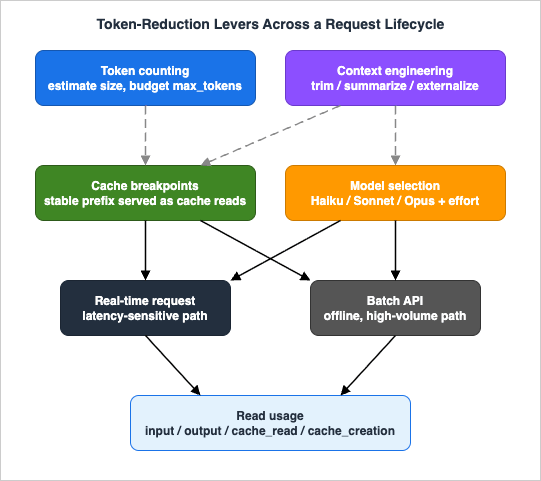
Here is how the composition plays out across three common workloads.
10.1 A Conversational Agent
A tool-using agent that holds long sessions benefits from nearly every lever at once:- Cache the frozen system prompt and the deterministically-serialized tool definitions behind a breakpoint at the front; add an advancing breakpoint on the conversation so each turn reuses the history as a cache read, with intermediate breakpoints to stay inside the 20-block window.
- Engineer context continuously: trim tool outputs before they enter the transcript, prune stale tool results with context editing, and compact when the conversation nears the window.
- Select models per step: route the main reasoning loop to Opus or Sonnet, and spawn small-model subagents for cheap, parallelizable sub-tasks so the main loop's cache and budget stay intact.
- Tune effort to the task, giving the full specification up front so high effort converges in fewer turns.
- Measure by watching the cache-read ratio climb and the per-turn
input_tokensstay flat even as the conversation grows.
10.2 A RAG Question-Answering Service
A service that answers questions against retrieved context optimizes around the stable/volatile split:- Cache the instruction prompt and any fixed few-shot examples behind one breakpoint; keep the per-query retrieved chunks and the user question after it so they never invalidate the cache.
- Engineer context by retrieving fewer, better chunks — over-retrieval is pure waste paid on every query — and trimming each chunk to the passage that matters.
- Count tokens on the assembled prompt to catch a retrieval step that has started returning bloated context.
- Select a model by question difficulty: a small model for lookups and a frontier model for synthesis questions, if your router can tell them apart.
- Measure the cache-read ratio on the shared prefix and the average retrieved-context size per query.
10.3 A Bulk Transformation Job
An offline job — classifying a corpus, summarizing a dataset, extracting fields from thousands of documents — is the natural home of the Batch API:- Batch the entire workload through
POST /v1/messages/batches, trading immediacy for a reduced rate and high throughput. - Cache any shared context (a common system prompt, a shared reference document) with an identical block in every request and a one-hour TTL, so the batch earns cache reads on top of the batch rate.
- Select the smallest sufficient model — bulk mechanical work is usually Haiku or Sonnet territory, and at corpus scale the tier choice dominates the bill.
- Count tokens on a sample request first to size the job and set
max_tokenstightly (recall a batch cannot usemax_tokens: 0). - Measure via the batch's
request_countsand by readingusageon the succeeded results to confirm the cache hit rate held across the run.
usage keep the whole thing honest.11. Common Pitfalls
The mechanisms in this guide fail in predictable ways. Knowing the failure modes is most of avoiding them.- A breakpoint that never gets a cache hit. Usually a silent invalidator in the prefix — a timestamp, a UUID, non-deterministic JSON ordering, a per-user value near the front — or, less obviously, a cached prefix below the model's minimum cacheable length, which never caches no matter how stable it is. Confirm with
cache_read_input_tokens; if it is stuck at zero, first check the prefix clears that minimum, then diff the rendered bytes and move any volatile piece after the breakpoint. (See Sections 3.2 and 4.6.) - Caching a prefix that changes every request. Putting
cache_controlafter content that varies per call (retrieved RAG chunks, the user's question) means every request writes a fresh entry and none is ever read — you pay the write premium for nothing. Cache only what is byte-stable across requests. - TTL expiry between requests. A five-minute entry dies in a quiet stretch, and the next request silently re-writes it. For bursty or spaced-out traffic — batches especially — use the one-hour TTL or pre-warm before the burst.
- Falling outside the 20-block lookback. Long agent turns that emit more than 20 blocks push the next breakpoint out of the lookback window, missing the previous write. Add intermediate breakpoints in long turns.
- Switching models or mutating tools mid-session. Either invalidates the cache from its tier downward. Keep the main loop on one model and one byte-stable tool set; use subagents and tool search instead of swapping.
- Over-compressing context. Trimming or summarizing past the point of sufficiency degrades answers and triggers retries that cost more than the context you saved. Validate quality on real traffic after any aggressive context change.
- Estimating tokens with the wrong tokenizer.
tiktokenand friends undercount Claude tokens; budgets and limit checks built on them are wrong. Usecount_tokenswith the target model. - Assuming batch result order. Batch results return in any order — match on
custom_id, never on position. - Assuming provider parity. Prompt caching, batching, and related features do not behave identically across the first-party Anthropic API, Amazon Bedrock, and Google Cloud Vertex AI. On Bedrock and Vertex AI, prompt caching supports explicit breakpoints but not automatic top-level caching; some features (the Files API, server-side tools, and managed-agent features) are first-party only; and model IDs are formatted differently. Always confirm the specific feature against the provider's own documentation before relying on it — see the companion billing guide for how the three routes differ, and the Amazon Bedrock basics article for the Bedrock surface.
12. Frequently Asked Questions
What is Claude prompt caching?
Prompt caching stores a stable prefix of your request — typically the tool definitions, system prompt, and any long fixed context — so that on later requests with the identical prefix, those tokens are served back cheaply instead of being re-processed at the full input rate. You mark the boundary with acache_control block, and the response's cache_read_input_tokens and cache_creation_input_tokens fields tell you whether the cache was read or written. It is a prefix match: the cached portion must be byte-identical across requests, so stable content goes at the front and volatile content after the last breakpoint.How do cache breakpoints work?
A cache breakpoint is acache_control: {"type": "ephemeral"} marker on a content block. The platform hashes the rendered prompt — in the order tools, then system, then messages — up to each breakpoint, and reuses cached work when that hash matches a prior request. You may set up to four breakpoints, with a default five-minute TTL or an optional one-hour TTL. The golden rule is that any byte change before a breakpoint invalidates the cache from that point onward, so you place the breakpoint exactly at the boundary between the stable prefix and the volatile remainder. Top-level automatic caching places the breakpoint on the last cacheable block for you.When should I use the Batch API?
Use the Message Batches API when you have a high volume of requests that do not need an immediate answer: evaluations, content moderation, bulk summarization or extraction, one-time transformations. In exchange for asynchronous processing — most batches finish within an hour, with a 24-hour ceiling — usage is billed at a reduced rate and throughput is higher. A batch holds up to 100,000 requests or 256 MB, results are available for 29 days, and you match results back to inputs bycustom_id because they can return out of order. Prompt caching stacks with batching; use the one-hour TTL for better hit rates across a batch. Do not use it for anything interactive or latency-sensitive.How do I count tokens before sending?
Call thecount_tokens endpoint with the same model, system, messages, and tools you intend to send; it returns input_tokens without generating a response and is free to call. The count is model-specific, so pass the model you will actually use, and it is an estimate that may differ slightly from the billed amount. Do not use tiktoken or other non-Claude tokenizers — they undercount Claude tokens. Counting before sending lets you catch prompt bloat in CI, budget max_tokens, and inform model-routing decisions.Which model should I pick?
Match the model to the difficulty of the work. Route light, high-volume tasks — classification, routing, extraction — to Haiku 4.5; send workhorse tasks to Sonnet 4.6; reserve Opus 4.8 for the hardest reasoning and long autonomous loops. Tune theeffort parameter per route to spend more or fewer tokens for more or less intelligence, and use adaptive thinking so the model decides how much to reason. In agents, a common pattern is a frontier model on the main loop with small-model subagents for cheap sub-tasks, which keeps the expensive model's context and cache intact. Sweep effort and model on your own evaluation set and decide by the token-versus-quality trade-off for each route.13. Summary
Token efficiency on the Claude API is an engineering discipline, not a pricing trick. The same output quality can cost dramatically different amounts depending on how the request is structured, and every lever that changes the structure is measurable in tokens:- Prompt caching converts a repeated, full-rate stable prefix into cheap cache reads — provided you keep that prefix byte-identical and place the breakpoint at the stable/volatile boundary.
- The Batches API trades immediacy for a reduced rate and higher throughput on offline, high-volume work, and stacks with caching.
- Token counting moves prompt size from a post-hoc surprise to a build-time design constraint, measured with the correct Claude tokenizer.
- Context engineering — structuring input, trimming tool output, context editing, compaction, memory, and tool search — shrinks what you carry before any other lever applies.
- Model selection, with
effortand adaptive thinking, meters each unit of work at the right tier and the right depth.
usage object. Read it on every call, judge optimizations by the movement of its token categories and the cache-read ratio, and let the rate card translate those stable numbers into whatever the current prices are.For the surrounding context, see the related articles on this site: the companion guide to Claude Code on Pay-As-You-Go API Billing for how the metered routes and providers work; the Claude Agent SDK Complete Guide for applying these caching and context patterns when building custom agents; Basic Information about Amazon Bedrock with API Examples for the Bedrock surface where some of these features differ; and the Anthropic Claude Model Release Timeline for how the model generations and their capabilities have evolved. As the API adds capabilities and the model lineup changes, the mechanisms here will continue to evolve; the structural principles — stable prefixes cache, offline work batches, carry only what you need, route to the smallest sufficient model, and measure in tokens — are the durable part.
14. References
Anthropic official documentation- Prompt caching
- Batch processing (Message Batches API)
- Token counting
- Context editing
- Extended and adaptive thinking
- Models overview
- Pricing
- Claude on Amazon Bedrock
Related Articles on This Site
- Claude Code on Pay-As-You-Go API Billing - Anthropic API, Amazon Bedrock, and Google Cloud Vertex AI
How the three metered routes work and how to control spend; the parent article to this one. - Claude Agent SDK Complete Guide - Building Custom Agents Beyond the CLI
Applying caching, context engineering, and model selection when you build your own agents. - Basic Information about Amazon Bedrock with API Examples
The Amazon Bedrock surface, where some of these features behave differently. - Anthropic Claude Model Release Timeline
How the Claude model generations and their capabilities have evolved.
References:
Tech Blog with curated related content
Written by Hidekazu Konishi