Claude Code Subagents and Multi-Agent Orchestration Guide - Delegation, Parallel Fan-Out, and Custom Agent Definitions
First Published:
Last Updated:
If you have never run Claude Code before, start with the Claude Code Getting Started Guide and come back. Everything below assumes you already run Claude Code daily and have hit the wall this article is about: a single conversation that fills up with logs, file dumps, and search output you will never read again.
1. Introduction
There is a moment, in almost every non-trivial Claude Code session, when the main conversation stops being an asset and starts being a liability. You asked it to find every call site of a function across a large repository. It read forty files. Now those forty files sit in your context window, crowding out the actual change you wanted to make, slowing every subsequent turn, and inching you toward auto-compaction. The work was necessary. Keeping its byproducts in your main thread was not.Delegation is the answer to that problem, and it rests on a single idea: the parent should receive only the conclusion, not the work that produced it. A subagent is a separate Claude instance that the main session spawns to handle a scoped task. It runs in its own context window, with its own system prompt, its own tool access, and its own permissions. It does the noisy work — the forty file reads, the test run, the documentation crawl — entirely inside its own context, and returns one thing to you: a summary. The byproducts stay where they belong, out of your way.
That one mechanism unlocks three distinct wins, and it is worth being precise about which is which because they pull in slightly different directions:
- Context preservation. The verbose middle of a task never touches your main window. You keep more usable context for the work that actually needs back-and-forth.
- Parallelization. Several subagents can run at once. Three independent investigations that would take three sequential passes can run concurrently and report back together.
- Role separation and least privilege. A subagent can be locked down to a narrow tool set — a research agent with no ability to edit files, an auditor that can read but never write. The boundary is enforced by configuration, not by hoping the model behaves.
Throughout, the source of truth is the official Claude Code documentation, not folklore. Field names, built-in agent names, precedence rules, and the renames that have happened along the way (the tool that spawns subagents was called
Task and is now called Agent) are stated as the docs state them. Where a detail is version-dependent, that is called out so you can check it against your own installed version.2. The Mental Model
Before any configuration, get the mental model right, because most subagent mistakes are mental-model mistakes wearing a syntax costume.2.1 The independent context boundary
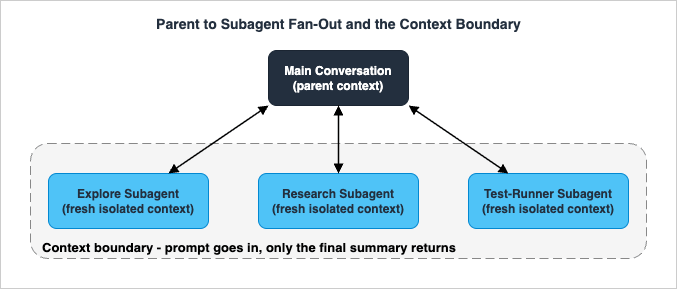
The defining property of a subagent is that it starts with a fresh, isolated context window. It does not see your conversation history. It does not see the files Claude has already read in the main thread. It does not see the skills you have already invoked. It begins from near-zero and builds up its own context as it works.The only channel from parent to subagent is the prompt string that the main agent writes when it delegates. That delegation message is the subagent's entire briefing. If the subagent needs a file path, an error message, a branch name, or a decision already made in the main conversation, that information has to be in the delegation prompt, because nothing else crosses the boundary automatically.
What the subagent does receive, for a normal (non-fork) custom or general-purpose subagent, is a small, well-defined bundle: its own system prompt plus environment details (like the working directory) that Claude Code appends — not the full Claude Code system prompt; the delegation task message; your
CLAUDE.md and memory hierarchy; a git-status snapshot taken at the start of the parent session; and the full content of any skills named in its skills field. The two built-in research agents, Explore and Plan, deliberately skip CLAUDE.md and git status to stay fast and cheap.The return channel is just as narrow, and this is the part worth tattooing on the inside of your eyelids: only the subagent's final message returns to the parent. Every intermediate tool call, every file the subagent read, every line of test output it processed — all of it stays inside the subagent's context and is never injected into yours. The parent receives the final message verbatim as the result of the
Agent tool call, though it may then summarize that result in its own user-facing response.The figure below shows the shape of it: one parent context, several isolated subagent contexts fanned out beneath it, and a thin return path carrying only conclusions back up.
2.2 What isolation buys, and what it costs
Isolation is the whole point, but it is a trade, not a free lunch.What it buys: a clean main window, the ability to run several workers at once, and hard tool boundaries per worker. What it costs: the subagent starts cold. It has no shared memory of what you have been discussing, so a poorly briefed subagent will waste its first several turns rediscovering context you already had. And when it finishes, its summary lands back in your main conversation and consumes context there — modest for one well-scoped worker, but real if you spawn many workers that each return a detailed report.
So the boundary is a filter, not a wall with no cost on either side. The skill is in deciding what to push through the narrow inbound channel (a precise prompt) and being disciplined about what comes back (a summary, not a transcript).
2.3 When to delegate, and when to just do it yourself
A useful first cut, expanded in section 7:Use a subagent when the task produces verbose output you will not reference again, when you want to enforce specific tool restrictions, or when the work is self-contained and can be reduced to a summary. Classic fits: "run the test suite and report only the failures," "search these three modules in parallel," "crawl this documentation and extract the two facts I need."
Use the main conversation when the task needs frequent back-and-forth, when multiple phases share heavy context (planning, then implementation, then testing, all referring to the same evolving picture), when you are making a quick targeted change, or when latency matters — a subagent starts fresh and spends time gathering context that your main thread already has.
The deepest cut is this: delegation trades latency and a clean window against re-gathering context and a cold start. When the byproducts are large and the conclusion is small, delegate. When the context is shared and the interaction is tight, stay home.
3. The Built-in Agent and the Agent Tool
You do not have to define anything to start delegating. Claude Code ships with built-in subagents and a single tool that spawns them.3.1 The Agent tool (formerly Task)
Subagents are invoked through theAgent tool. The main agent calls it with a subagent_type and a prompt; Claude Code spins up the named subagent, runs it, and returns its final message as the tool result.One naming note that trips people reading older configs and blog posts: in Claude Code version 2.1.63 the
Task tool was renamed to Agent. Existing Task(...) references in settings and agent definitions still work as aliases, and some SDK surfaces still report "Task" in places like the initial tools list even while emitting "Agent" in tool-use blocks. When you read Task and Agent in different documents, they are the same mechanism at different points in time.Most of the time you never type the tool name. You describe what you want, and Claude decides whether to delegate based on the task and on each subagent's
description. You can also steer it explicitly, covered later in this section.3.2 The built-in subagents
Claude Code includes a small roster of built-in subagents that Claude uses automatically when appropriate. Each inherits the parent conversation's permissions with additional tool restrictions. The three you will see most:- Explore — a fast, read-only agent optimized for searching and analyzing codebases. Since version 2.1.198 it runs on the main conversation's model instead of Haiku (when the main conversation runs Fable, the model depends on how you connect), is denied the Write and Edit tools, and exists for file discovery, code search, and codebase exploration. When Claude invokes Explore it specifies a thoroughness level: quick for targeted lookups, medium for balanced exploration, or very thorough for comprehensive analysis. Explore skips your
CLAUDE.mdfiles and the parent's git status to keep research cheap. - Plan — a read-only research agent used during plan mode to gather context before Claude presents a plan. It inherits the main conversation's model, is denied Write and Edit, and exists to research the codebase for planning. Plan also skips
CLAUDE.mdand git status. - General-purpose — a capable agent for complex, multi-step tasks that need both exploration and action. It inherits the main model, has access to all tools, and is what Claude reaches for when a task needs exploration plus modification, complex reasoning, or multiple dependent steps.
/statusline) and claude-code-guide (runs on Haiku, used when you ask questions about Claude Code features).The pattern worth internalizing: the read-only research agents (Explore, Plan) run lean and cheap; the do-everything agent (general-purpose) inherits your model and your full tool set. The built-ins already encode the least-privilege idea you will apply by hand to custom agents in section 5.
3.3 Search fan-out with the built-ins
The single most common high-value use of built-in subagents is isolating high-volume operations. Anything that produces a flood of output — running tests, crawling docs, processing logs, sweeping a large codebase for call sites — is a candidate. You delegate it, the verbose output stays in the subagent's window, and only the summary returns.A natural-language request is enough:
Use a subagent to run the test suite and report only the failing tests with their error messages.Research the authentication, database, and API modules in parallel using separate subagents.3.4 Foreground and background execution
A subagent runs either in the foreground or the background, and the difference is operationally important:- Foreground subagents block the main conversation until they finish. Crucially, permission prompts are passed through to you as they come up — if the subagent wants to do something that needs approval, you get asked.
- Background subagents run concurrently while you keep working. When a background subagent reaches a tool call that needs permission, Claude Code surfaces the prompt in your main session and names the subagent that is asking; approve it and the subagent continues, or press Esc to deny that one tool call without stopping the subagent. Background subagents also run with a smaller built-in tool set than foreground subagents, except for forks and resumed foreground subagents.
CLAUDE_CODE_DISABLE_BACKGROUND_TASKS to 1 runs subagents in the foreground in every kind of session, and Ctrl+B backgrounds a running task. The defaults outside an interactive session depend on the version: the documentation says fork mode is off by default with -p and in the Agent SDK, while the version 2.1.302 changelog turns fork subagents on by default in claude -p, the Agent SDK, the desktop app, and VS Code (both as of October 17, 2026), so confirm the behavior of the version you run.The permission behavior of background subagents changed in version 2.1.186. Before that version, a background subagent auto-denied any tool call that would otherwise prompt, so an edit that needed your approval silently did not happen; older posts and configurations describe that behavior. What has not changed on any version is the constraint in section 5.2: a subagent cannot ask you a clarifying question. Section 9 treats that as the headline pitfall.
3.5 Invoking a subagent explicitly
Automatic delegation handles the common case: Claude reads the task and each subagent'sdescription and decides. But when automatic matching is not enough, there are three ways to steer it, escalating from a one-off nudge to a session-wide default:- Natural language. Name the subagent in your prompt and Claude typically delegates — no special syntax. "Use the test-runner subagent to fix failing tests" or "Have the code-reviewer subagent look at my recent changes." Claude still decides whether to delegate; you are only suggesting.
- @-mention. Type
@and pick the subagent from the typeahead, the same way you @-mention files. This guarantees that specific subagent runs rather than leaving the choice to Claude. Your full message still goes to Claude, which writes the subagent's task prompt — the @-mention controls which subagent runs, not what prompt it receives. - Session-wide via
--agent. Passclaude --agent <name>to start a session where the main thread itself takes on that subagent's system prompt, tool restrictions, and model. The subagent's prompt replaces the default Claude Code system prompt entirely, and the choice persists when you resume the session. To make it the default for a project, set"agent": "<name>"in.claude/settings.json; the CLI flag overrides the setting when both are present.
--agent for a whole session that is that agent.4. Custom Agent Definitions
Built-ins cover a lot. But the moment you find yourself spawning the same kind of worker with the same instructions over and over, you should define it once as a custom subagent and reuse it.4.1 Where definitions live, and who wins
A custom subagent is a Markdown file with YAML frontmatter. Claude Code looks for these definitions in several locations, and when two share the samename, the higher-priority location wins. From highest to lowest priority:- Managed settings — organization-wide, deployed by administrators. Highest priority.
--agentsCLI flag — defined as JSON when you launch Claude Code, scoped to that one session..claude/agents/— project scope, checked into the repository, shared with your team.~/.claude/agents/— user scope, personal, available across all your projects.- Plugin
agents/directory — provided by an installed plugin. Lowest priority.
.claude/agents/) are the right home for anything specific to one codebase; check them into version control so the whole team uses and improves the same definitions. User subagents (~/.claude/agents/) are your personal toolkit, available everywhere. Both directories are scanned recursively, so you can organize definitions into subfolders like agents/review/ or agents/research/ — the subfolder path does not change the agent's identity, which comes only from the name field. Keep names unique across the whole tree: if two files in one scope declare the same name, Claude Code keeps one and discards the other without warning.4.2 The anatomy of a definition
The file is frontmatter plus a Markdown body. The body becomes the subagent's system prompt. The minimal shape:---
name: code-reviewer
description: Reviews code for quality and best practices
tools: Read, Glob, Grep
model: sonnet
---
You are a code reviewer. When invoked, analyze the code and provide
specific, actionable feedback on quality, security, and best practices.4.3 The frontmatter fields
Onlyname and description are required. The main supported fields, with the behavior that matters (the documentation's table also lists omitClaudeMd, autoCompactWindow, and experimental, as of October 18, 2026):name(required) — a unique identifier in lowercase letters and hyphens. Hooks receive this value asagent_type. The filename does not have to match the name.description(required) — when Claude should delegate to this subagent. This is the field Claude reads to decide whether a task is a match, so write it for the dispatcher, not for a human reader. Phrases like "use proactively" encourage Claude to reach for it.tools— an allowlist of tools the subagent may use. Omit it and the subagent inherits every tool available to the main conversation. This default is the trap discussed in section 5: omittingtoolsis not "no tools," it is "all tools."disallowedTools— a denylist subtracted from whatever the subagent would otherwise have. If bothtoolsanddisallowedToolsare set,disallowedToolsis applied first, thentoolsis resolved against the remaining pool; a tool named in both is removed.model—sonnet,opus,haiku,fable, a full model ID such asclaude-opus-5-5, orinherit. When you omit it, Claude Code follows the subagent model order in section 8.1, which ends at the main conversation's model. Section 8 is about choosing this well.permissionMode— the permission mode the subagent runs under:default,acceptEdits,auto,dontAsk,bypassPermissions, orplan, withmanualaccepted as an alias fordefault.maxTurns— a ceiling on the number of agentic turns before the subagent stops.skills— skills to preload into the subagent's context at startup; the full skill content is injected, not just the description.mcpServers— MCP servers available to this subagent, by reference to an already-configured server or as an inline definition. Defining a server inline here keeps its tool descriptions out of the main conversation's context entirely.hooks— lifecycle hooks scoped to this subagent (covered as a teaser in section 5 and in depth in the Hooks guide).memory— a persistent memory scope (user,project, orlocal) that gives the subagent a directory that survives across conversations.background— set totrueto always run this subagent as a background task. Defaultfalse.effort— the reasoning effort level (low,medium,high,xhigh,max) while this subagent is active; overrides the session effort. Available levels depend on the model.isolation— set toworktreeto run the subagent in a temporary git worktree, giving it an isolated copy of the repository. The worktree is cleaned up automatically if the subagent makes no changes.color— a display color for the subagent in the task list and transcript (red,blue,green,yellow,purple,orange,pink, orcyan).initialPrompt— auto-submitted as the first user turn when the agent runs as the main session agent (via--agentor theagentsetting).
hooks, mcpServers, and permissionMode — Claude Code drops them at load time for security. If a plugin agent genuinely needs any of those, copy its file into .claude/agents/ or ~/.claude/agents/, where the fields take effect.A note on loading: as of October 18, 2026, the documentation says Claude Code watches
~/.claude/agents/ and .claude/agents/ and picks up a definition you add or edit on disk within a few seconds, with no restart. Three cases still need a restart: the first agent file in an agents directory that did not exist when the session started, a .claude/agents/ directory inside a directory added with --add-dir or /add-dir, and a session started with --disable-slash-commands.4.4 Three ways to create one
You do not have to hand-write the file. There are three on-ramps:- Asking Claude — ask Claude to create or manage a subagent, and it writes the file for you. Since version 2.1.198, running
/agentsprints a reminder to ask Claude or edit.claude/agents/and~/.claude/agents/directly. On version 2.1.197 and earlier,/agentsopened an interactive wizard with a Running tab for live subagents and a Library tab for creating, editing, and deleting them. - A Markdown file — write
.claude/agents/<name>.mdby hand, as above. Best when you want the definition in version control and reviewed like any other code. - The
--agentsCLI flag — pass JSON when launching Claude Code for session-only subagents that never touch disk. Useful for quick tests and automation scripts:
claude --agents '{
  "code-reviewer": {
    "description": "Expert code reviewer. Use proactively after code changes.",
    "prompt": "You are a senior code reviewer. Focus on code quality, security, and best practices.",
    "tools": ["Read", "Grep", "Glob", "Bash"],
    "model": "sonnet"
  }
}'--agents JSON uses the same fields as file-based frontmatter, with prompt standing in for the Markdown body.4.5 Giving an agent persistent memory
By default a subagent forgets everything the moment it finishes — fresh context in, summary out, nothing retained. Thememory field changes that for agents where accumulated knowledge pays off. Set it to a scope and the subagent gets a persistent directory that survives across conversations, where it can build up codebase patterns, debugging insights, and architectural decisions over time:---
name: code-reviewer
description: Reviews code for quality and best practices. Use proactively after changes.
memory: project
---
You are a code reviewer. As you review code, update your agent memory with
patterns, conventions, and recurring issues you discover. Consult your memory
before starting a review so you reuse what you have already learned.user (~/.claude/agent-memory/<name>/) for knowledge that should follow the agent across every project; project (.claude/agent-memory/<name>/) for project-specific knowledge you want shareable through version control — the recommended default; and local (.claude/agent-memory-local/<name>/) for project-specific knowledge that should not be checked in. When memory is enabled, Claude Code automatically turns on the Read, Write, and Edit tools so the agent can manage its own files, and injects the top of the directory's MEMORY.md into the agent's system prompt at startup. The practical pattern is to tell the agent, in its body, to read its memory before working and write to it after — over many sessions this turns a generic reviewer into one that knows your recurring issues.5. Tool Scoping and Least Privilege
If you take one design principle from this guide, take this one: scope each subagent's tools to its job, and remember that omittingtools grants everything.5.1 Allowlist, denylist, and the dangerous default
There are two levers. Thetools field is an allowlist — name the tools, and the subagent can use only those. The disallowedTools field is a denylist — name the tools, and they are removed from whatever the subagent would otherwise have inherited. The default, when you specify neither, is that the subagent inherits all tools available to the main conversation, including MCP tools.That default is the thing to be deliberate about. A research agent you forgot to scope is a research agent that can edit files, run shell commands, and call every MCP server you have connected. Most of the time that is not what you intended.
The cleanest expression of "research only" is an explicit allowlist:
---
name: safe-researcher
description: Research agent with restricted capabilities. Reads and searches only.
tools: Read, Grep, Glob, Bash
---

You are a research specialist. Investigate the question you are given,
read and search whatever you need, and return a concise findings summary.
You cannot edit or write files. If a change is needed, describe it; do not attempt it.---
name: no-writes
description: Inherits every tool except file writes.
disallowedTools: Write, Edit
---Read, Grep, Glob; research agents that also need the web get Read, Grep, Glob, WebFetch, WebSearch; test runners get Bash, Read, Grep.5.2 Tools a subagent does not get
A handful of tools depend on the main conversation's UI or session state and are not available to subagents even if you list them:AskUserQuestion, EndConversation, EnterPlanMode, ExitPlanMode (unless the subagent's permissionMode is plan), ScheduleWakeup, WaitForMcpServers, and Workflow, plus Agent for a subagent at the nesting depth limit described below (as of October 17, 2026).AskUserQuestion being on that list matters more than it looks. A subagent cannot ask you a clarifying question through that tool. This is the structural reason behind the operational rule in section 9: a subagent has no way to stop and ask you what you meant. Since version 2.1.186 a background subagent's permission prompts reach your main session, but approving or denying one tool call is not the same as answering a question about the task.Agent on that list encodes a limit, not a ban: by default a subagent can spawn subagents of its own, up to three layers below the main conversation. That default dates from version 2.1.219; versions 2.1.172 through 2.1.216 allowed five layers, and versions 2.1.217 and 2.1.218 allowed one. CLAUDE_CODE_MAX_SUBAGENT_SPAWN_DEPTH sets the number of layers, and a value of 1 turns nesting off. In an interactive session only the top-level subagent's summary returns to you, so if you want to see each step's result in the main conversation, chain subagents from the main conversation instead (section 6.3) or use Skills.5.3 Restricting which subagents can be spawned
When an agent runs as the main thread viaclaude --agent, it can spawn subagents through the Agent tool, and you can constrain which ones using Agent(type) syntax in its tools field:---
name: coordinator
description: Coordinates work across specialized agents.
tools: Agent(worker, researcher), Read, Bash
---worker and researcher can be spawned; any other type fails. Agent with no parentheses allows spawning any subagent; omitting Agent entirely means the agent cannot spawn subagents at all. To block specific agents while allowing the rest, use permissions.deny in settings instead:{
"permissions": {
"deny": ["Agent(Explore)", "Agent(my-custom-agent)"]
}
}5.4 Scoping MCP servers to a subagent
Tool scoping is not only about the built-in tools. ThemcpServers field lets you give one subagent access to MCP servers — by referencing a server already configured in your session, or by defining one inline. An inline server is connected when the subagent starts and disconnected when it finishes:---
name: browser-tester
description: Tests features in a real browser using Playwright.
mcpServers:
- playwright:
type: stdio
command: npx
args: ["-y", "@playwright/mcp@latest"]
- github
---
Use the Playwright tools to navigate, screenshot, and interact with pages..mcp.json, and only that subagent pays the context cost of those tool descriptions — the main conversation never sees them. For a heavyweight MCP server that only one specialized agent needs, scoping it to that agent keeps the main window lean. (Enterprise MCP restrictions and --strict-mcp-config still apply to servers declared in subagent frontmatter, so managed policies are not bypassed by this route.)5.5 Where tool scoping meets enforcement
Tool scoping decides what a subagent can call. It does not decide which arguments are acceptable for a tool it is allowed to call. For that finer control — allowSELECT queries but block INSERT, run a formatter after every write, block edits to a protected path — you reach for hooks, which can validate or veto an operation before it executes. A subagent can carry its own hooks in frontmatter (a PreToolUse hook that inspects a Bash command and exits non-zero to block it, for example), and the session can carry SubagentStart and SubagentStop hooks that fire around the subagent's lifecycle.Hooks are their own subject, and the full treatment — every event, the exit-code and JSON protocol,
SubagentStop specifically — lives in the Claude Code Hooks Complete Guide. The pairing to remember here: tools/disallowedTools is the coarse "which tools," hooks are the fine "which uses of a tool," and together they give a research-only or write-restricted subagent real teeth. The settings and permission layers these build on are covered in the Claude Code Harness and Environment Engineering Guide.6. Orchestration Patterns
Once you can define and scope agents, the question becomes how to combine them. A handful of patterns cover almost everything.6.1 Isolate high-volume operations (the workhorse)
The default pattern, and the one with the best return: take any single operation that produces a lot of output and push it into one subagent. Test runs, documentation crawls, log processing, large code sweeps. The verbose output lives and dies in the subagent's context; your main window receives the distilled result. This is not glamorous, but it is where most of the day-to-day value is.6.2 Parallel fan-out
When you have several investigations that do not depend on each other, spawn a subagent for each and let them run concurrently:Research the authentication, database, and API modules in parallel using separate subagents,
then summarize how the three interact.6.3 Pipeline (chaining)
For multi-step workflows, run subagents in sequence, each consuming the previous one's result:Use the code-reviewer subagent to find performance issues, then use the optimizer subagent to fix them.6.4 Role panels (review and verify)
A powerful composition for quality-sensitive work: spawn several differently-scoped agents to look at the same artifact from different angles, then synthesize. Astyle-checker, a security-scanner, and a test-coverage agent reviewing the same change in parallel each bring a distinct lens, and the parent collects their verdicts. The value is diversity — each agent is blind to what the others surface, so the panel catches failure modes a single reviewer would miss.In practice you define each panelist once, as a focused project agent with read-only tools, and let the description steer when it runs. A security reviewer, for instance:
---
name: security-scanner
description: Reviews changes for security issues only - injection, secrets, authz gaps. Use as part of a review panel.
tools: Read, Grep, Glob, Bash
model: sonnet
---

You are a security reviewer. Examine the diff for injection vulnerabilities,
exposed secrets or credentials, missing input validation, and broken
authorization checks. Report only security findings, each with a severity
and a concrete fix. Ignore style and performance - other reviewers own those.Review the changes on this branch with the security-scanner, style-checker,
and test-coverage subagents in parallel, then give me a single consolidated
list of issues grouped by severity, de-duplicated across the three.6.5 Background and later retrieval
For work you do not want to block on, run a subagent in the background and keep working; its result arrives as a message when it finishes. This is the right move for long, self-contained jobs. Since version 2.1.186, a background subagent that needs a permission surfaces the prompt in your main session (section 3.4), so if you want the job to run unattended, reserve this for tasks that need no approvals once they start.6.6 Resuming a subagent
Every subagent invocation creates a new instance with fresh context, so by default a follow-up spawns a worker that knows nothing about the first one's findings. When you want continuity instead — a second review pass that builds on the first — ask Claude to resume the subagent rather than start over:Use the code-reviewer subagent to review the authentication module.
[agent completes]
Continue that review and now analyze the authorization logic.SendMessage tool. As of October 17, 2026, the documentation states that SendMessage does not require agent teams to be enabled; only structured team-protocol messages do.6.7 Knowing when you have outgrown subagents
Subagents are designed for a handful of delegated tasks per turn. There are two adjacent features for when you need more, and it is worth knowing the boundary so you reach for the right tool:- Forks. A fork is a subagent that inherits the entire conversation so far instead of starting cold. It drops the inbound isolation — the fork sees the same system prompt, tools, model, and history as the main session — so you can hand it a side task without re-explaining anything, while its own tool calls still stay out of your window and only its final result returns. Because its prompt and tools are identical to the parent, its first request reuses the parent's prompt cache, which makes a fork cheaper than a fresh subagent for tasks that need the same context. You start one yourself with
/subtaskfollowed by a task (version 2.1.212 and later; on versions 2.1.161 through 2.1.211 the command was/fork, which now copies the whole session into a new background session), and in fork mode Claude can also start one through the Agent tool. - Agent teams and background agents. When you need sustained parallelism — many workers each with its own independent context, possibly communicating — you have outgrown the within-a-session subagent model. Agent teams (an experimental feature, off by default until you set
CLAUDE_CODE_EXPERIMENTAL_AGENT_TEAMS=1) give each worker its own context and let them coordinate; background agents let you run many independent sessions in parallel and watch them from one place. And for orchestrating dozens to hundreds of agents from a script rather than turn by turn, the Agent SDK's workflow mechanism moves the orchestration out of the conversation entirely.
6.8 A worked example, end to end
Concretely: you land in a large service repository and need to understand how authentication, the data layer, and the public API fit together before you touch the login flow. The investigation is broad, read-heavy, and produces output you will discard the moment you have the picture — a textbook delegation. You fan out three research workers, one per area, and brief each one precisely, because the delegation prompt is the only channel in:Research how login works, in parallel, using three separate subagents: one for the
auth module (src/auth), one for the data layer (src/db), one for the HTTP API (src/api).
Each returns only its entry points, the handful of files that matter, and how its area
hands off to the others. Summaries, not file dumps.7. Delegation Heuristics
Patterns tell you how to delegate. Heuristics tell you whether to. Getting this judgment right is most of what separates a session that flies from one that thrashes.7.1 What is worth delegating
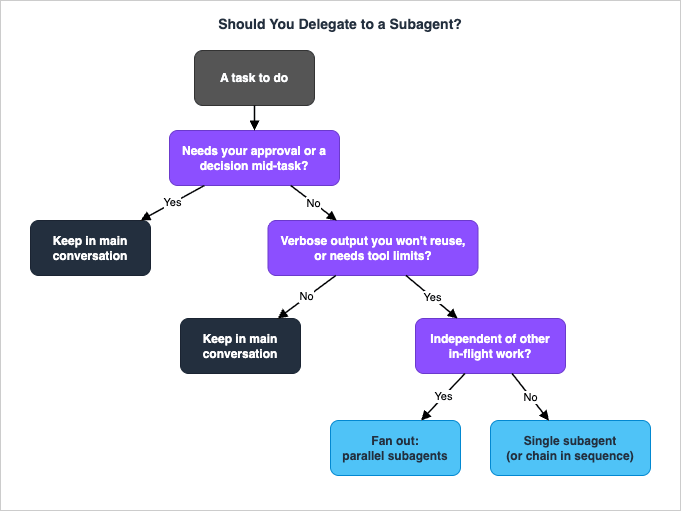
Three properties make a task a good delegation candidate, and the more of them it has, the stronger the case:- It produces a lot of output you will not reuse. Test logs, search results across a large tree, documentation you need one fact from. The output-to-conclusion ratio is high, which is exactly what the context boundary is for.
- It is independent. It can complete without results from other in-flight work. Independence is the precondition for parallel fan-out — dependent tasks have to be a pipeline instead.
- It is read-heavy and self-contained. Broad reads, sweeps, and analyses that end in a summary. These map cleanly onto a research-scoped, read-only subagent and carry no approval risk.
7.2 What is not worth delegating
The mirror image. Delegation is a net loss when:- The work is tightly coupled to ongoing edits. If you are iterating on a file with frequent small changes and tight feedback, a subagent's cold start and one-shot return get in the way. Stay in the main thread.
- It is a small, already-decided change. Spinning up a subagent to make a two-line edit costs more in cold-start latency than it saves.
- It needs your approval partway through. This is the decisive one. A subagent cannot use
AskUserQuestion, so it cannot stop and ask you what you meant. Since version 2.1.186 a background subagent's permission prompts do reach your main session, but they ask about one tool call at a time. Work that needs a human decision in the middle does not belong in a delegated agent — keep it in the main conversation. - The phases share heavy context. Planning, implementing, and testing that all refer to the same evolving picture are cheaper to keep together than to ship across the narrow delegation channel three times.
7.3 A practical rule of thumb
If you can describe the task as "go find out X and tell me the answer," with no edits required and no decision needed from you along the way, delegate it — and if there are several independent X's, fan them out. If the task is "let's work on this together," with edits, iteration, or judgment calls in the loop, keep it in the main conversation. Most regret about delegation comes from sending the second kind of task to a subagent and watching it either thrash on a cold start or, on versions before 2.1.186, silently fail on a permission it could not ask about.8. Cost and Model Selection per Agent
Subagents are also a cost-control surface, because each one can run on its own model. Used well, you spend heavy-model budget only where it earns its keep.8.1 Model per agent
Themodel field on a subagent accepts an alias (sonnet, opus, haiku, fable), a full model ID such as claude-opus-5-5, or inherit; when you omit it, the order below decides. The built-in Explore no longer runs on a smaller model by default: since version 2.1.198, it runs on the main conversation's model instead of Haiku, and the documentation suggests defining a user or project subagent named Explore with model: haiku to run exploration on a lower-cost model. For your custom agents, a light, read-only research worker is a natural fit for a small fast model; an agent that writes code or reasons through a tricky migration should run on something more capable, or inherit so it tracks whatever you are using.When Claude invokes a subagent it can also pass a per-invocation
model, and there is a session-wide default. The full resolution order, highest priority first (version 2.1.251 and later, as of October 18, 2026):- The per-invocation
modelparameter Claude passes. - The subagent definition's
modelfrontmatter, whereinheritselects the main conversation's model. - The
CLAUDE_CODE_SUBAGENT_MODELenvironment variable, if set. - The main conversation's model.
CLAUDE_CODE_SUBAGENT_MODEL_FORCE=1 (version 2.1.257 and later), which applies one model to every subagent, teammate, and workflow agent.8.2 How this lands on the bill
The cost mechanics depend entirely on how you are paying for Claude Code, and the structure differs between a subscription seat and metered API billing. This guide does not quote prices — they move, and the site keeps article bodies free of figures that go stale — but the shape is worth stating: on metered API billing, every token a subagent reads and writes is billed, so an exploration sweep that reads forty files on a small model such as Haiku is dramatically cheaper than the same sweep on a frontier model, and routing routine research to a small model is real money. The flip side is the returns problem from section 6.2: each subagent's summary is also tokens, in your context, on your model, so a fan-out of many verbose reports has a cost of its own.For the full treatment of how the three billing routes (Anthropic API, Amazon Bedrock, Google Cloud Vertex AI) and the subscription tiers differ, and how spend is observed and capped, see the Claude Code on Pay-As-You-Go API Billing guide. For the techniques that cut token consumption per call — prompt caching, batching, context engineering — see the Anthropic Claude API Prompt Caching and Token Efficiency guide. Two facts from there are worth previewing because they bear directly on subagents: a non-fork subagent keeps a separate prompt cache from the main session, while a fork reuses the parent's cache on its first request, which is part of why forks are cheaper than fresh subagents for same-context work. Pricing numbers themselves live on the official pricing pages linked in the References.
8.3 A reasonable default policy
Absent a specific reason, a sane starting policy is: let research and search agents run on a small fast model, let agents that write code or make consequential decisionsinherit your main model, and set CLAUDE_CODE_SUBAGENT_MODEL together with CLAUDE_CODE_SUBAGENT_MODEL_FORCE only when you need a hard ceiling across the whole session. Then watch where the tokens actually go and adjust — the right split is workload-specific, and the only way to know it is to measure.9. Failure Modes and Recovery
Most subagent trouble comes from a small set of failure modes. Each has a tell and a fix.9.1 The headline pitfall: subagents cannot ask you mid-task
This is the one that bites hardest, and it follows directly from a fact established earlier: a subagent cannot useAskUserQuestion. A delegated agent has no way to stop and ask you what you meant; it decides on its own and carries on. On versions up to 2.1.185 a second fact made it worse: a background subagent auto-denied any tool call that would otherwise prompt, so it could not get your approval either.The practical consequence — and this is the operational rule worth adopting as policy — is to use subagents for investigation, analysis, and summarization, and keep file edits and other approval-gated actions in the parent. A research agent that reads and reports is on solid ground. On versions before 2.1.186, an agent you delegated a write to, while your settings would normally prompt for that write, quietly failed to make the change: the auto-deny fired, the edit never happened, and because the subagent continued anyway, it could report success-shaped output describing a change that did not exist on disk. On version 2.1.186 and later, the prompt surfaces in your main session and names the subagent; approve it and the edit happens, or press Esc to deny that one tool call while the subagent keeps running. Because a denied tool call does not stop the subagent, read its final message against what is actually on disk.
If you have already hit this — a background subagent that "did" an edit that is not there — the recovery is straightforward: pull the edit back into the main conversation, and if you are on a version before 2.1.186, where the prompt never reached you, update Claude Code. Better still, scope the agent so the situation cannot arise: a research agent with
tools: Read, Grep, Glob has no Write tool to be denied, so it never silently fails on one. The constraint becomes a non-issue precisely when you have designed for it.9.2 Verbose result bloat
The symptom: you fanned out five subagents to protect your context, and your context is now fuller than before. The cause: each subagent returned a long, detailed report, and five long reports add up. The fix is in the briefing — instruct each subagent to return a summary, not a transcript ("report only the failing tests with their error messages," not "report the test run"). The boundary keeps the subagent's internal work out of your window automatically; it does not police the size of the final message, which is the one thing that does cross. That part is on your prompt.9.3 Context exhaustion inside a subagent
A subagent has a finite context too, and a genuinely large job — sweeping an enormous codebase, processing a giant log — can exhaust it. Subagents support automatic compaction using the same logic as the main conversation, and their transcripts persist independently, so a subagent that compacts does not disturb your main window. But the better fix is upstream: scope the task so it fits. Ask for the specific thing ("find the three files that define the routing table") rather than the open-ended sweep ("understand the whole routing system"), and the subagent stays inside its window. Explore's thoroughness levels — quick, medium, very thorough — are a built-in dial for exactly this.9.4 Cold-start thrash from under-briefing
The symptom: the subagent spends its first several turns rediscovering things you already knew, or heads off in the wrong direction. The cause: the only channel into the subagent is the delegation prompt, and that prompt was thin. The subagent does not see your conversation, the files you already read, or the decisions you already made unless they are in the prompt. The fix is to brief it like the stranger it is — paths, error messages, constraints, the relevant rule from yourCLAUDE.md if it must reach a research agent that skips CLAUDE.md — all stated explicitly. A precise prompt is the entire difference between a subagent that lands on the answer and one that wanders.9.5 Orphaned-edit and worktree conflicts
When you do let an agent make changes, two agents touching the same files in parallel can collide, leaving a half-applied or conflicting state. The structural fix is theisolation: worktree field: the subagent gets an isolated copy of the repository in a temporary git worktree, branched from your default branch, and the worktree is cleaned up automatically if it makes no changes. Reserve it for agents that genuinely mutate files in parallel — it has real setup cost and is wasted on read-only workers — but when two writers would otherwise conflict, it is the clean answer.9.6 The stale-definition gotcha
A small but common one: you edited an agent file on disk, and Claude Code is still using the old behavior. As of October 18, 2026, the documentation says Claude Code picks up edits in~/.claude/agents/ and .claude/agents/ within a few seconds, so a stale definition now points to one of the three cases that still need a restart: an agents directory created after the session started, a directory added with --add-dir or /add-dir, or a session started with --disable-slash-commands. If a definition change "isn't working," check these first.10. Frequently Asked Questions
10.1 What is a Claude Code subagent?
A subagent is a separate Claude instance that your main Claude Code session spawns to handle a scoped task. It runs in its own context window with its own system prompt, tool access, and permissions, does its work in isolation, and returns only a final summary to the parent. The point is to keep the noisy middle of a task — file reads, test output, search results — out of your main conversation, so your context stays focused on the work that needs it.10.2 How do I create a custom agent?
Three ways. You can ask Claude to create one; since version 2.1.198,/agents prints a reminder to do this instead of opening the wizard it opened in earlier versions. You can also write a Markdown file with YAML frontmatter at .claude/agents/<name>.md (project scope) or ~/.claude/agents/<name>.md (user scope); only name and description are required, and the Markdown body becomes the system prompt. For throwaway or scripted agents, pass JSON to the --agents CLI flag when launching Claude Code. Claude Code picks up files you add or edit on disk within a few seconds, except in the three cases in section 4.3.10.3 Can subagents run in parallel?
Yes. The main session can spawn multiple subagents that run concurrently and report back independently — the basis of the parallel fan-out pattern. Two caveats: Claude is conservative about parallelism by default, so ask for it explicitly and name how many you want; and each subagent's summary returns to your main context, so a large fan-out of detailed reports can itself consume the context you were protecting. For sustained, large-scale parallelism, agent teams or SDK workflows are the better fit than within-session subagents.10.4 Can a subagent edit files?
Technically yes, if its tool set includes Write and Edit and the permission context allows it — but this is exactly where the most common failure lives. A subagent cannot ask you a clarifying question (AskUserQuestion is unavailable to subagents). On version 2.1.186 and later, a background subagent's permission prompt surfaces in your main session; on earlier versions a background subagent auto-denied any tool call that would otherwise prompt for permission, so a delegated edit that would normally prompt failed silently while the subagent reported as if it succeeded. The reliable practice is still to use subagents for research, analysis, and summarization and keep approval-gated edits in the parent conversation. Scoping research agents to read-only tools removes the hazard entirely.10.5 How is context shared between the parent and a subagent?
Narrowly, and in one direction at a time. Into the subagent: only the delegation prompt the parent writes, plus the subagent's own system prompt, environment details, yourCLAUDE.md/memory hierarchy, a git-status snapshot, and any preloaded skills. The subagent does not see your conversation history, the files you already read, or the skills you already invoked. Out of the subagent: only its final message, which the parent receives verbatim as the tool result. Everything in between — every tool call and intermediate result — stays inside the subagent. The exception is a fork, which inherits the full parent conversation instead of starting fresh.10.6 When should I use a fork instead of a subagent?
Use a named subagent when the task is self-contained and a short, precise prompt is enough to brief it — a research sweep, a test run, a scoped review. Use a fork when the side task needs so much of the current conversation that re-explaining it would be wasteful, or when you want to try several approaches from the same starting point. A fork inherits the entire conversation — same system prompt, tools, model, and history — so you hand it a side task with zero re-briefing, while its own tool calls still stay out of your window and only its final result returns. The trade is that a fork drops the inbound isolation a named subagent gives you: it sees everything, where a subagent sees only what you put in the prompt. Reach for a fork (/subtask on version 2.1.212 and later) when context-transfer cost, not output volume, is the problem you are solving.10.7 Do subagents share my prompt cache?
It depends on the kind. A normal named subagent keeps a separate prompt cache from the main session — its system prompt and tools differ from yours, so there is nothing to reuse. A fork, because its system prompt and tool definitions are identical to the parent at the moment it spawns, reuses the parent's prompt cache on its first request. That is a concrete reason forks are cheaper than fresh subagents for same-context work: you pay to build context once and the fork reads it back. The broader caching mechanics — breakpoints, time-to-live, what invalidates a cache — are the subject of the token-efficiency guide linked in the References.11. Summary
Subagents are Claude Code's answer to a single recurring problem: the work a task generates is often far larger than the conclusion it produces, and you do not want the work clogging your main thread. Delegation pushes that work into an isolated context and returns only the conclusion. From that one mechanism comes context preservation, parallelization, and per-agent least privilege.The throughline of this guide: get the mental model right first — fresh isolated context in, final message only out — and most of the syntax follows. Reach for the built-ins (Explore, Plan, general-purpose) before defining anything. Define a custom agent when you keep spawning the same worker, and remember that omitting
tools grants all tools, not none. Scope each agent to its role, and lean on hooks when you need argument-level control. Compose with the orchestration patterns — isolate high-volume operations, fan out independent research, chain dependent steps, panel for quality — and graduate to forks, agent teams, or SDK workflows when you outgrow a few tasks per turn. Apply the delegation heuristics: delegate "go find out X and tell me," keep "let's work on this together." Use model-per-agent to spend frontier budget only where it earns it. And internalize the headline failure mode: a subagent cannot ask you mid-task, so investigation belongs in subagents and approval-gated edits belong in the parent.Where to go next. The enforcement layer that gives scoped agents real teeth — every hook event, the
SubagentStop lifecycle, the exit-code protocol — is the Claude Code Hooks Complete Guide. Building subagents programmatically, outside the CLI, with the agents parameter and AgentDefinition, is the Claude Agent SDK Complete Guide. The settings, permissions, and boundaries these all build on are the Claude Code Harness and Environment Engineering Guide, and the broader day-to-day operating context is the Claude Code Operator's Handbook. For the vocabulary of agents in general, the AI Agent Engineering Glossary is a useful companion. As the product evolves, this guide will be revised to match the official documentation.12. References
Official Claude Code documentation- Create custom subagents
- Subagents in the SDK
- Agent teams
- Background agents
- Context window visualization
- Hooks
- Dynamic workflows
- Model configuration (including CLAUDE_CODE_SUBAGENT_MODEL)
- Permission modes
- Git worktrees
- CLI reference
- Settings
- Plugins
Related Articles in This Series
- Claude Code Operator's Handbook
The day-to-day operating manual this guide extends. - Claude Code Harness and Environment Engineering Guide
The settings, permissions, and boundaries subagents run inside. - Claude Code Hooks Complete Guide
The deterministic enforcement layer, including SubagentStop. - Claude Agent SDK Complete Guide
Building subagents programmatically beyond the CLI. - Claude Code on Pay-As-You-Go API Billing
How delegated token spend lands on the bill across three routes. - Anthropic Claude API Prompt Caching and Token Efficiency Guide
Cutting per-call token cost, including subagent and fork caching.
References:
Tech Blog with curated related content
Written by Hidekazu Konishi