AI-Assisted Security Testing on AWS - What You Approve, What You Can Only Stop, and What the Findings List Hides by Default
First Published:
Last Updated:
For those considering implementation, the key change is not the extent of automation. It is which parts of your own approval process you may hand over, and which parts a human keeps.
This article addresses that critical distinction. It is written for the people who sit on the receiving end of an internal security review: those who authorize a run, take delivery of the results, and approve the fixes, rather than those who operate the tests.
To begin with, here is the core conclusion: the execution plan for this agent cannot be reviewed in advance. The plan is determined during execution, based on the agent's exploration of the target application. Therefore, the control available to the receiving side shifts from pre-execution approval to three key areas: defining fixed boundaries, observing and stopping during execution, and evaluating the evidence that remains after execution. Implementing this without proper design risks creating an empty approval process.
All specifications mentioned in this article have been verified against official AWS documentation, as of August 18, 2026. That verification turned up six discrepancies inside AWS's own material. The side that is wrong is, in each case, a page the person on the receiving side opens first. Every one of them bears on an operational decision, so Chapter 12 sets them out together and gives the reason for treating one side as correct.
This article does not cover attack procedures. Vulnerability types are mentioned only as configuration identifiers used to define the scope of the testing. It covers how to accept a run and where to stop it, not how to attack.
A note on how to read it: this article is not intended to be read straight through. Many chapters serve as reference, listing the rationale behind specific decisions. If you are short on time, start with Chapter 13, the acceptance checklist, and return to the body only for the items that need their basis. Each item in the checklist carries the section it came from. For the design itself, Chapter 4 is the core of this article. Chapters 2 and 3 are there to settle the names, the availability status, and the resource hierarchy before you reach it.
To clarify the division of labor with related articles, a separate article addresses issues that arise spontaneously during operation. This article focuses on proactively initiating testing. For the design of detection, see Threat Detection for AI Workloads on AWS. The two are not independent; as noted later, running automated penetration tests can trigger detection mechanisms.
Table of Contents
- 1. Why the Receiving Side Needs a Design of Its Own
- 2. What Is Called What Now, and Which Parts Are Generally Available
- 3. What the Test Takes In and What It Puts Out
- 4. The Execution Plan Cannot Be Reviewed in Advance
- 5. The Source of the Exclusion List Decides What Cannot Be Excluded
- 6. How to Treat Confidence, and What Is Hidden by Default
- 7. Your Own Triage Changes the Next Run
- 8. What Remains as Evidence
- 9. How to Accept Automatic Remediation
- 10. Coexistence with Existing Security Services
- 11. What This Path Does Not Catch
- 12. Where the Primary Sources Contradict Themselves
- 13. Acceptance Checklist
- 14. Frequently Asked Questions
- 15. Conclusion
- 16. References
1. Why the Receiving Side Needs a Design of Its Own
1.1 Changes in the Scope of Approval
Until now, approving the execution plan was what settled the acceptance of a penetration test. The contracted vendor would submit a plan outlining the scope, methodology, and timeframe, which the receiving side would review, specifying any exclusions or time periods, and then sign. The assumption was that any actions taken during the test would stay inside the boundaries the plan defined.However, with testing conducted by autonomous agents, this assumption no longer holds true. The agent generates the plan as it runs, out of its own exploration. The agent identifies endpoints, reads responses, and determines the next steps in real-time. No plan document exists to read.
Therefore, the receiving side's design must shift from reviewing a plan to designing boundaries, stop conditions, and evidence collection. If this transition is not carefully considered, the traditional approval documentation may remain in place while the actual process fails to align with it.
1.2 What This Article Covers and What It Does Not
| Covered | Not Covered |
|---|---|
| Designing a system to accept automated tests | Attack procedures, proof-of-concept code, payload examples, and evasion techniques |
| Determining control points (boundaries fixed in advance, observation while running, and stopping) | Procedures for initial response after a security breach |
| Handling the confidence level of findings and default behavior | The specific aspects considered during human code reviews |
| Review processes for accepting automated fixes | Designing containment for custom agents |
| Coexistence with existing security services | The methodologies for threat modeling |
Existing articles hold the neighboring topics. AWS Security Incident Response Playbooks covers the initial response after a security breach. Code Review Checklist and Anti-Pattern Catalog sets out what human code reviewers look for. Agent Sandboxing and Blast-Radius Isolation on AWS covers containment for agents you build yourself. Threat Modeling Generative AI Applications on AWS gives the steps of threat modeling with STRIDE. What AWS Transform Automates and What Stays Human asks the same question this article asks, about what you approve and what a person keeps, of migration and code transformation instead of security testing.
This article will not reiterate these topics. Instead, it focuses solely on what control points you can establish for agents running on AWS. Section 11.6 returns to the same division at the end, as a list of blind spots, and names two areas beyond the ones above.
1.3 Running the Test Itself Trips the Detection System
Before beginning the acceptance design, confirm the most immediate practical impact. AWS security best practices outline potential outcomes when testing in a production environment, including the following:Data modification or deletion
Service disruptions or performance degradation
Unintended state changes
Triggering of security alerts or incident response proceduresThe final item on that list is the point of contact with the detection system. The run is legitimate as far as you are concerned; to the detection system it is indistinguishable from an attack. GuardDuty raises findings, they flow into Security Hub, and the on-call engineer is paged. AWS names none of those services there. The bullet says only that security alerts and incident response procedures get triggered; the chain is what that comes to in an account already running them.
Therefore, acceptance design for testing must include advance notification to the detection system and a plan for handling findings during the testing period. This is not solely a technical matter but a procedural one, but failing to address it will almost certainly result in problems. For what the detection system picks up, see Threat Detection for AI Workloads on AWS.
1.4 How This Differs from a Contract with an Outside Vendor
Verify first whether existing acceptance procedures can be directly applied. There will be a clear distinction between what can and cannot be incorporated.| Traditional Procedures | Equivalent in this Process |
|---|---|
| Review of Implementation Plans | No equivalent. The plan is finalized during execution. |
| Agreement on Scope | Verification of domain ownership and specification of out-of-scope paths. |
| Agreement on Methodology | Specification of the risk types to exclude. The coverage of that list needs care. |
| Agreement on Execution Timeframe | No equivalent. There is no scheduling functionality. |
| Notification of Suspension | Operation to stop execution. However, it is not immediate. |
| Receipt of Reports | List of findings, PDF reports, and verification scripts. |
| Request for Retesting | Retesting focused on specific findings only. |
| Confidentiality Agreement | The visibility of remediation pull requests, and the Regions where data is processed. |
Two rows read no equivalent: review of implementation plans and agreement on execution timeframe. If you attempt to use existing approval forms for these two items, you will either be left with incomplete fields, or the information provided may not accurately reflect the actual situation.
Chapter 13 of this article constructs a checklist that addresses these gaps by incorporating alternative control mechanisms.
2. What Is Called What Now, and Which Parts Are Generally Available
2.1 AWS Security Agent Becomes Part of AWS Continuum
This chapter comes first because getting the name or the availability status wrong makes the rest of the article unreadable.On June 17, 2026, AWS announced AWS Continuum. At the same time, the functionality previously perceived as a separate entity, AWS Security Agent, was integrated into the AWS Continuum framework. The "What's New" description stated:
AWS Security Agent penetration testing and code scanning are now available as
Continuum penetration testing and Continuum code scanning (preview).
Subsequent AWS announcements consistently refer to AWS Security Agent (now part of AWS Continuum). It is an inclusion relationship, not two separate services operating in parallel.
However, in practical terms, you will encounter both names. The console, user guides, and API service identifiers still use "securityagent," while Continuum works as the product-level grouping. This article distinguishes them as follows:
| Context | Name Used |
|---|---|
| Product pages, announcements, feature categories | AWS Continuum |
| Console, user guides, web applications | AWS Security Agent |
| API service identifiers, CloudTrail eventSource | securityagent |
2.2 Availability Status Varies by Feature
Do not refer to the entire Continuum as generally available (GA). The availability status differs for each feature, and these differences directly impact acceptance decisions. Verification date: August 18, 2026.| Feature | Availability status | Announced |
|---|---|---|
| Continuum penetration testing | Generally available | March 31, 2026 |
| Continuum code scanning | Preview | Regrouped under Continuum on June 17, 2026 |
| Continuum threat modeling | Public preview | June 17, 2026 |
| Continuum for code vulnerabilities | Gated preview, access by request | June 17, 2026 |
| Simulated validation | Announced as a capability of the code scanner. AWS states no separate status for it. | June 17, 2026 |
It is crucial for users to understand that only the penetration testing feature is generally available (GA). Code scanning and threat modeling are in preview, and Continuum for code vulnerabilities, which runs the full lifecycle of a vulnerability, cannot be used without requesting access. Writing implementation plans based on the entire Continuum as if it were fully available will lead to discrepancies between the plan and what is actually usable.
Simulated validation carries one restriction the other rows do not, and it is a restriction of place rather than of status. The announcement of July 1, 2026, which brought three Regions online, states that simulated validation remains available only in US East (N. Virginia). Section 6.6 returns to what that means for reading a finding.
2.3 Regions and Processing Beyond Them
Like the other numbers in this article, the list of Regions moves. What follows is only the structure a decision needs.The user guide's section on resilience lists nine Regions as of August 18, 2026. This includes six Regions from the GA point, with three additional Regions added on July 1, 2026. The official page carries the full list. The following sentence is what is relevant to the design.
AWS Security Agent always uses cross-Region inference. Furthermore, there are two types. Geographic cross-Region inference keeps processing inside that geographic boundary for most features. Global cross-Region inference routes inference requests to any commercial Region. The latter is what the three Regions added later use.
Furthermore, the security best practices page in the user guide states the following. That page is a separate one from the resilience page that lists the Regions.
Cross-Region inference is always enabled and cannot be opted out of.
Cross-Region inference is not impacted by customer policies in Service Control Policies (SCPs)
or AWS Control Tower that restrict customer content to specific Regions.
This is a critical item that will certainly be flagged during acceptance reviews. If your organization has implemented Region restrictions using SCP, those restrictions will not apply to this path. The data stays in the Region the request came from; the processing of input prompts and output results does not.
There are also feature-level exceptions. According to the table on that same best practices page, requests originating in Australia and Japan have their code fixes generated in a different geography. Even where you are on geographic cross-Region inference, this one feature routes processing outside the geography you selected.
Recall what you are passing to the agent: source code, design documents, API specifications, and the procedure for obtaining credentials. It is impossible to know which of these will cross boundaries without consulting the table for each feature.
2.4 Understanding the Integrated Features
Even when you adopt it solely for penetration testing, other capabilities line up under the same configuration. The receiving side needs to know what arrives next to it. This is because the design of permissions and the creation of evidence differ depending on the specific function.| Feature | Input | Output | Execution Method |
|---|---|---|---|
| Penetration Testing | Target URL, credentials, Documents, Source Code | Validated findings, Reproduction steps, Remediation proposals | Reusable configuration, independent runs |
| Design Review | Design Documents | Findings against the organization's security requirements, with remediation guidance | One-time evaluation. Cannot be re-executed; must be duplicated and recreated. |
| Code Review | Repository or S3 Source | Findings with remediation guidance | Reusable configuration, Automated comments on pull requests |
| Threat Modeling | Design Documents, Source Code, or both | Threats and mitigation strategies aligned with the STRIDE framework | Reusable configuration, on-demand runs |
Note that the execution methods vary for each feature. Only the design review cannot be re-executed. To re-evaluate with updated documentation, you must duplicate the existing review and create a new one.
Code review offers two operational modes: one that scans the entire application on demand from the web application, and another that automatically analyzes and posts comments on GitHub when a pull request becomes available for review. The latter operates without manual intervention. From the receiving side's perspective, whether to enable this mode is an independent decision.
Threat modeling produces a system overview of the architecture, trust boundaries, and data flows, together with a set of threats classified by STRIDE category. Each threat carries a severity, the evidence behind it, and an actionable recommendation. While the methodology for threat modeling using STRIDE is covered in Threat Modeling Generative AI Applications on AWS, this article focuses solely on how to receive the resulting outputs.
2.5 The Ways to Start a Run Have Multiplied
The announcements of June 17 and July 1, 2026, added ways to start a run from the development environment.The announcements name Kiro and Claude Code plugins, along with MCP integration, as the new places a run can be started from. The announcements state that developers can now connect existing source control systems and perform tasks such as threat model creation, code scanning, and remediation of findings from code reviews and penetration testing, all without leaving the integrated development environment.
Regarding source control and document integration, the announcements list GitHub, GitHub Enterprise Server, GitLab.com, GitLab Self Managed, Bitbucket, and Confluence.
For the receiving side, this means the number of places a run can be started has grown. Watch only the console and the web application and you cannot see runs started from a development environment. The CloudTrail record covered in Chapter 8 becomes the one place that catches all of them, whatever the origin.
3. What the Test Takes In and What It Puts Out
3.1 What Is Shared Across the Organization, and What Belongs to One Application
To determine where to place control points, you first need to understand which settings apply at which level of granularity. The user guide categorizes resources into two tiers.At the organization level, three resources are shared: security requirements, GitHub integrations, and IAM Identity Center configurations. The middle one is worth reading precisely: what registers at the organization level is the GitHub organization or user account, while the wider set of providers attaches one level down. Changes to security requirements will apply to all subsequent design and code reviews. The user guide explicitly states that existing reviews are not affected.
Within an Agent Space, the following are managed: penetration test configurations, design reviews themselves, threat models, integrations with source and documentation providers, code review settings, the setting for which repositories may receive remediation, and user assignments.
AWS recommends creating one Agent Space per application. From the receiving side's point of view, the Agent Space is the unit that separates permissions and evidence. Within this unit, you determine who can view which tests and which repositories are eligible to receive corrections.
The same unit appears in another AWS agent service, where it draws a different line. AWS DevOps Agent also organizes work into Agent Spaces, and there the accounts associated with a space bound which accounts an investigation can reach — but not which Regions, because the agent maps resources across every Region in an associated account. AWS DevOps Agent - What It Investigates by Default, What Needs Approval, and What It Refuses Even When the Role Allows It works through that boundary and the permission layers stacked behind it. The definition of an Agent Space itself belongs to this article.
3.2 A Configuration and a Run Are Separate Things
Penetration testing splits into reusable configurations and independent runs that you launch from them. A configuration can be used to initiate multiple runs, and each run generates new findings.This separation works in the approval process's favor. Approval is granted for the configuration itself, not for individual runs. Approve a configuration and anyone assigned to that Agent Space can start a run inside its scope. The StartPentestJob API operation has no approval parameter.
On the API side the unit of a test is a pentest, the unit of a run is a pentest job, and each piece of work inside one is a task. Each task reports its own duration and its own task hours, and you can filter tasks by phase name. The evidence discussed in Chapter 8 depends on this level of granularity.
3.3 Items to Provide to the Agent
CreatePentest accepts five types of assets:| Type | Content |
|---|---|
| Endpoints | The URIs of the endpoints to test. |
| Actors | The identities the agent authenticates as. Holds the credential provider, the target URIs, and the settings for email-based multi-factor authentication. |
| Documents | Documents that give the agent context. These may include documents from S3, uploads, or integrated systems. |
| Source Code | A source archive you place in S3. |
| Integrated Repositories | A connected repository, optionally pinned to a branch. |
The credential provider can take four values: Secrets Manager, a Lambda function, an IAM role, and an AWS-internal provider. The user guide recommends creating new credentials specifically for penetration testing, with limited permissions. It also advises that the credentials provided should reflect the permissions of a typical user, rather than administrator privileges.
The first thing the receiving side should check is what is in
actors. Providing credentials with broad permissions will allow the agent to operate the application using those permissions. Guardrails are intended to limit the strength of the payloads, not to restrict the permissions that are provided.Besides the credentials themselves,
actors now holds a second thing that needs approving. On August 6, 2026, support for email-based multi-factor authentication was added. According to the AWS announcement, a unique forwarding address is generated for each credential, and you route your application's MFA email to that address with a forwarding rule in your own email provider. During a run the agent reads the forwarded message and submits the code or link to complete authentication. The email account credentials themselves are not stored. The API carries the corresponding fields on an actor.From the receiving side, this is a separate approval from the approval of the credentials. What you are approving is a rule inside your own email infrastructure that forwards the multi-factor authentication messages your application sends to an address AWS generated. The scope of that rule, when it comes off, and whether it outlives the testing period belong on the checklist as items of their own, apart from the credentials.
3.4 The Phases of a Run
The web application shows the progress of a run in four steps: Preflight, Static analysis, Pentests, and Finalizing.The API side carries one stage more. The
stepName field on ListPentestJobTasks takes five values: the four that correspond to the screen, PREFLIGHT, STATIC_ANALYSIS, PENTEST, and FINALIZING, plus VALIDATION. It is the validation stage that the screen does not show. If the design is based solely on the four stages displayed there, the independent nature of the verification phase is easy to overlook. This is one of the discrepancies discussed in Chapter 12. Figure 1 illustrates the five stages on the API side.The API reference itself lists those five in two different orders. The parameter syntax puts
VALIDATION last; the description places it before FINALIZING. Better not to read the order as a specification.A run itself can be in one of five states: In Progress, Stopping, Stopped, Failed, and Completed. The independent existence of the "Stopping" state is relevant to the discussion of stopping processes in Chapter 4.
3.5 What a Run Puts Out
The test puts out more than findings. The receiving side should plan for all of the following:| Output | Characteristics |
|---|---|
| Findings | Includes confidence level, severity, risk type, status, and validation status. |
| Reproduction Steps | Includes examples of requests and responses. |
| Verification Script | The agent generates one only for a confirmed vulnerability. |
| Execution Logs | To a specified CloudWatch log group, or a default log group if none is specified. |
| List of Discovered Endpoints | Shows how far the agent actually reached. |
| Report | Exported as a PDF, with the findings filtered as you choose. |
| Remediation Pull Request | Only when you have enabled remediation. |
Among these, the list of discovered endpoints is the output the receiving side most often underrates. When a run returns no findings, it is the only material that separates "nothing is there" from "nothing was reached."
3.6 Three Interfaces, Used for Different Things
The resource hierarchy splits the places where you do the work. Dividing the roles in the acceptance process along the same lines is the straightforward course.| Location | Function | User |
|---|---|---|
| AWS Management Console | Organization-wide settings, Agent Space creation, domain ownership verification, authorizing where fixes may be applied, user assignment | Administrator |
| Web application | Test configuration and start, log observation, finding review and editing, requesting a fix | Implementer and receiving side |
| Source control | Remediation pull requests, code review comments | Developer |
There are two methods for user access: either through single sign-on using IAM Identity Center, or IAM-only access through the AWS console. This is an initial organization-wide setting, and it does not turn back. The user guide states that if you choose IAM-only access and later want to use IAM Identity Center, you will need to delete the AWS Security Agent setup and complete the setup process again. This is the one item on the page that must not be treated as a setting you can revisit.
Domain ownership verification and the authorization of repositories that may receive fixes both sit with the administrator. These two functions represent a boundary that the implementer cannot cross. When designing the acceptance process's permissions, it is best to begin by determining who will manage these two functions.
3.7 Capacity Limits Are Shared, and Some Reset Monthly
Service quotas bear on the acceptance design in three ways. The user guide splits them across two tables. Take the monthly one first.| Resource | Scope | Quota | Adjustable |
|---|---|---|---|
| Design reviews | Per month per account per Region | 200 | Yes |
| PR code reviews | Per month per account per Region | 1,000 | Yes |
The other table holds the configuration quotas.
| Resource | Scope | Quota | Adjustable |
|---|---|---|---|
| Agent Spaces | Per account per Region | 100 | Yes |
| Integrations | Per account per Region | 20 | No |
| Integrated resources per integration | Per integration | 50 | No |
| Security requirement packs | Per account per Region | 20 | No |
| Security requirements per pack | Per pack | 30 | No |
| Enabled security requirements | Per account per Region | 150 | No |
| Pentest projects | Per account per Region | 1,000 | Yes |
| Concurrent pentest runs | Per account per Region | 5 | Yes |
| Code review projects | Per account per Region | 1,000 | Yes |
| Concurrent code review runs | Per account per Region | 5 | Yes |
First, the concurrency allowance is shared, not held per team. The quota table scopes it per account and Region, and the user guide states that the five concurrent runs are counted independently of who starts them. When several teams work in the same account, another team's run can delay a pre-release test.
Second, certain items have non-adjustable limits. This includes the number of integrations and the number of security requirement packs. For organizations with a large number of repositories, the limit per integration will likely be reached first.
Third, a monthly quota, once spent, stays spent until the month turns over. The user guide states that reaching one blocks additional reviews until the next month. Only design reviews and PR code reviews carry a quota of that shape. If your pattern is to run them in a burst before a release, when the allowance comes back has to sit on the monthly calendar.
The user guide also clarifies that these quotas represent capacity limits, not spending limits. To bound the amount of work a run performs, use the maximum task hours covered in Section 4.2. As that section explains, it is not a limit on elapsed time.
4. The Execution Plan Cannot Be Reviewed in Advance
4.1 Constraints the Primary Sources State Outright
This section forms the core of the article. The security considerations section of the user guide states:Currently there is no way to preview the course of action for AWS Security Agent.
The AWS Security Agent plan is dynamic in nature based on its exploration of the target application.Following that, it outlines what actions are possible.
Customers can monitor AWS Security Agent as it goes through its exploration in real time
by observing the penetration test logs. If logs show an invalid or undesirable trajectory,
customers can stop ongoing penetration test run.
AWS states plainly that the control point moves from approval beforehand to observation and stopping during the run. Leave the first of those two passages, the one that says the plan cannot be previewed, out of the document that records the adoption decision, and every design decision that follows rests on nothing.
Figure 1 sets out the control the receiving side holds at each stage of a run.
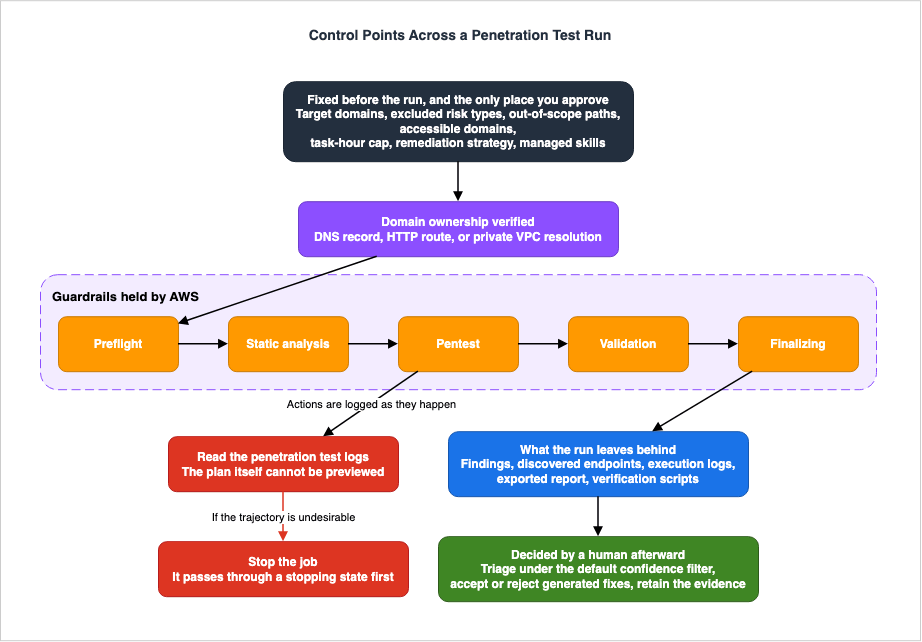
4.2 What You Can Fix Before a Run Starts
While the plan itself cannot be read, you can fix the boundaries in advance. This is where the receiving side does its real work.| Control | What to Define |
|---|---|
| Target Domain | The agent tests only domains whose ownership you have verified. Subdomains do not require individual verification. |
| Excluded Risk Types | Specify the types of tests to exclude. Detailed in Chapter 5. |
| Excluded URL Paths | Excludes the path you name and everything beneath it. This is used to avoid destructive operations or access to administrative functions. |
| Accessible Domains | Domains required for testing but not considered part of the primary target. Detailed in Section 4.4. |
| Custom HTTP Headers | Marks every request the agent sends. |
| Network Traffic Rules | Define allowed and blocked access based on URL patterns. |
| VPC Configuration | Specifies the execution environment when testing private applications. By default the application is reached over the public internet. |
| Maximum Task Hours | The cumulative time the agent spends actively working. Not a limit on elapsed time. |
| Automatic remediation strategy | Two values, AUTOMATIC or DISABLED. |
| Disabled managed skills | Findings Personalization and login optimization can be switched off independently. |
There are three methods for verifying ownership: DNS TXT records, HTTP routes, and name resolution within a VPC. The third option is specifically for testing within private VPCs and confirms that the domain resolves to an IP address within a private CIDR range. If the domain is managed within Route 53 on the same account, you can easily create and verify records with a single click.
There is a ceiling on the number of target domains. It is five. The figure belongs to the enablement step that registers and verifies domains, though, not to the pentest configuration itself. Since only verified domains can be selected for a test, in practice the question that binds first is which domains you keep verified.
The VPC row repays a second look, because its default is easy to invert. The user guide states that in the default configuration the agent reaches your application over the public internet. Specifying a VPC is the extra step for testing private applications. "No VPC configured" does not mean the path is closed; it means the traffic arrives from outside.
Maximum task hours is the row in this table most likely to be misread. The API reference states the default this way:
The maximum number of billable task hours allowed for jobs started from this pentest.
Must be a positive number. If not set, jobs run to completion with no budget cap.
If not specified, there is no limit. That qualifying clause is easy to skip past. The unit matters more, though. The user guide defines a task hour as follows:
Task hours measure the cumulative time the agent spends actively working on the test,
including time across parallel testing. Task hours are not the same as elapsed wall-clock
time, because AWS Security Agent runs multiple tasks at once.
Task hours are not elapsed time. The agent runs multiple tasks at once, so the total accrues faster than the clock on the wall. The user guide's remark elsewhere that most runs finish within 16 hours describes elapsed time, not task hours. Setting a ceiling by reading those two figures on the same axis produces a run of a length nobody intended.
There is a floor as well. The user guide states that the smallest limit you can set is 20 hours, and that a custom value must be at least 20 hours. Cutting it short to make a run finish early is not available.
How a run ends at the ceiling matters to the receiving side too. The user guide states that on reaching the limit the agent stops work, keeps the findings discovered so far, and the run finishes with a status of Completed. A truncated run therefore sits in the list wearing the same status as one that ran to the end. Section 4.7 makes the case that zero findings is not proof of safety; the status alone will not tell you whether a run was cut off. If you set a ceiling, the value you set has to go into the record of the run.
One more gap sits between the two sources. The API reference says only that
maxTaskHours must be a positive number; the floor of 20 hours appears solely on the procedure page for the screen. When creating a pentest through the API, do not assume the screen's constraint applies.4.3 What You Can and Cannot Do While Running
During execution, there are only two actions possible: viewing the logs and stopping the process.The API operation that stops a run is StopPentestJob. Its description states:
The job transitions to a stopping state and then to stopped after cleanup completes.It does not say the run stops immediately. After you issue the stop, the service works through a cleanup period. When incorporating the stop procedure into your operations, design it to account for this delay. The API includes a distinct "stopping" state, which can be observed.
Conversely, the user guide clearly states what cannot be done during execution. It specifies that there is no scheduling functionality, and that the service offers no concurrency control over the requests it makes to the target endpoint when a run starts. There is no setting that throttles the load, so there is nothing to adjust once the run is under way either. If the load becomes a problem, the remedy the user guide names is to stop the run.
Concurrency of a different kind does have a ceiling: a service quota of five concurrent penetration test runs per account and Region, counted no matter who started them. You can request an increase to that quota.
4.4 Accessible Domains: A Declaration of Trust
One of the settings that can be fixed in advance is easy to misread. It is worth singling out.Accessible domains specify the domains that the system is allowed to reach during testing, but which are not themselves the targets of the tests. This is often used to connect to external authentication providers or payment services, dependencies necessary for the application to function. Ownership verification is not required.
By default, the network is configured to block access. The user guide states that the network blocks access to any endpoint not listed. Up to this point, the design appears straightforward.
The issue arises from a single sentence found on the security best practices page:
AWS Security Agent is not instructed to perform security testing on accessible URLs.
By specifying accessible URLs, you indicate trust in these dependencies.
Penetration test data, including credentials, may be transmitted to these accessible URL endpoints during testing.
Credentials can be sent. Adding an accessible domain is not simply granting communication permission; it is a declaration of trust in that entity. During acceptance testing, this list of accessible domains must be treated with the same level of scrutiny as the list of target domains.
4.5 AWS Holds the Guardrails
In addition to the configurations you define, there are guardrails that are permanently implemented on the AWS side. In an acceptance decision, do not confuse them with your own controls.The agent is instructed to use payloads of minimal impact. The user guide gives the example: on discovering a SQL injection it extracts the SQL version rather than dropping a table. AWS also confines the agent within deterministic guardrails against behavior such as placing excessive load on the target application, and runs velocity controls over the number of calls it makes to an endpoint.
The network blocks traffic outside the target and accessible domains. AWS monitors for misuse on its own, and where it detects an attempt to run unauthorized testing against a third-party endpoint, it terminates every penetration test running in that account.
The user guide continues in the same answer: guardrails are in place, yet unintentional or non-obvious business logic interactions can still arise, and so penetration testing against a pre-production environment is always recommended.
4.6 Knowing What the Tools Actually Are
While the description of guardrails is relatively gentle, the security best practices page is more direct.AWS Security Agent uses a comprehensive suite of penetration testing tools from the Kali Linux distribution.
These tools are designed to identify security vulnerabilities and may perform actions
that modify application state, data, or system configurations.It states outright that the tools may modify application state, data, and system configuration. The page lists the conditions that a test environment must meet, including not containing real customer data, being isolated from the production environment, having a configuration equivalent to production, and not using credentials that provide access to production.
This is where specifying excluded URL paths, as mentioned in Section 4.2, becomes effective. Excluding paths that could lead to destructive operations is not merely a cosmetic setting; it is the setting that determines whether or not something is deleted.
4.7 The Results Vary from Run to Run
Beyond the inability to review a plan in advance, one more characteristic bears on the acceptance design. The security best practices page states:Due to the non-deterministic nature of AI systems,
penetration test runs may produce varying results across different executions.Furthermore, the FAQ in the user guide states that, given its stochastic nature, it does not guarantee the discovery and testing of all critical application logic and endpoints for any target application.
Therefore, a run that yields zero findings does not constitute proof that there are no vulnerabilities. If this process is to be incorporated into the release decision-making process, the criteria should not be based on the presence or absence of findings, but rather on whether the list of discovered endpoints aligns with the expected scope. AWS itself recommends running the service multiple times to improve coverage.
For the same reason, AWS positions the service as follows:
AWS Security Agent is not a professional penetration testing service,
and we encourage users to integrate AWS Security Agent into their security review workflow.
It is an integration, not a replacement. When designing the acceptance process, this statement should be taken as a fundamental principle.
4.8 Marking Test Communications
One setting fixed in advance pays off both during the run and after it. It is easy to overlook, and it gives the receiving side the best return of any single item here.Specify a custom HTTP header and the agent attaches it to every request it sends. The user guide states that unless you specify a different custom User-Agent value, the agent adds a custom User-Agent header set to
securityagent. Marking is therefore on by default; what you choose is whether the mark says anything more than the product name.The setting earns its place in three ways.
First, it allows you to tell test traffic apart from a genuine attack in your own logs. As Section 1.3 notes, a run trips the detection system. By using the header to differentiate, you can mechanically determine which alerts generated during the test period can be safely disregarded.
Second, after the test, you can verify, from your own access logs, where the agent actually reached. A list of discovered endpoints, as presented from the service's perspective, is a record from that side. Corroborating this information with your own logs significantly strengthens its evidentiary value.
Third, you can confirm whether the agent reached any paths that were supposed to be excluded. This allows you to verify that the settings are functioning as intended, not on the configuration screen but in the traffic itself.
Whether to use the default value or to include a value that can identify each individual run is a design decision. Including a value that identifies each run allows you to differentiate between multiple runs later on.
Additionally, you can configure network traffic rules. This allows you to permit or deny access based on URL patterns. Currently, only URL patterns are supported. While it overlaps in function with specifying excluded URL paths, this setting is effective at the communication layer.
4.9 Who has the authority to stop a run?
Being able to stop a run and having someone there to stop it are two different things. The operational design has to settle the second one.The information needed to decide whether to stop is in the running logs. They are visible on the penetration test logs page of the web application. The page groups actions by action type and risk type, and selecting one opens its detail.
Therefore, the individual with the authority to stop the process must simultaneously meet three criteria: They must have access to the web application, be able to review the logs and determine that an undesirable process is underway, and be able to execute the stop action.
Regarding the third criterion, the stop action is the StopPentestJob API operation. It can also be initiated from the screen. If you want to isolate permissions using IAM, you can design a role that only allows this specific action.
In practical operations, it is common for the person who can make the judgment and the person who can execute the stop action to be different individuals. When long-running tests are scheduled during nighttime or weekends, this discrepancy can lead to a de facto inability to stop the process. The thing not to do here is reach for the maximum task hours of Section 4.2 as a substitute. That setting caps work, not elapsed time, and its floor of 20 hours makes it useless for fencing off an unattended window. Deciding not to start a run when nobody is watching holds better than trying to solve it in configuration. Start one anyway and you have approved a run that goes until morning with nobody able to stop it.
5. The Source of the Exclusion List Decides What Cannot Be Excluded
5.1 The Two Lists Do Not Match
Of the pre-emptive controls mentioned in Chapter 4, the risk type exclusion feature is the most powerful. Exclude a risk type and the agent does not test for it.The problem is that the documents do not agree on the list of risk types.
The user guide's section on security considerations lists thirteen types of vulnerabilities that can be detected: arbitrary file upload, code injection, command injection, cross-site scripting, insecure direct object reference, JSON Web Token vulnerabilities, local file inclusion, path traversal, privilege escalation, server-side request forgery, server-side template injection, SQL injection, and XML external entity.
In contrast, the API reference enumerates twenty-eight risk types. Where it enumerates them is the part to read carefully. The
excludeRiskTypes parameter on CreatePentest, the one you exclude with, is typed as an array of strings and carries no list of valid values. The riskType on a finding is a plain string as well. The twenty-eight appear in exactly one place: the riskType on the tasks that ListPentestJobTasks returns.For the person building an exclusion list, that arrangement makes things worse rather than better. Reading the description of the exclusion parameter tells you nothing about which values it will take. The names of the types you can actually name are legible only from the definition on the side that lists tasks after a run.
5.2 Differences Include Destructive Types
Looked at as a difference, the shape of it is something the receiving side cannot leave alone. These values exist only in the API:| Enumeration Value | Description |
|---|---|
| DEFAULT_CREDENTIALS | Default Credentials |
| INSECURE_DESERIALIZATION | Insecure Deserialization |
| INFORMATION_DISCLOSURE | Information Disclosure |
| GRAPHQL_VULNERABILITIES | GraphQL-Specific |
| BUSINESS_LOGIC_VULNERABILITIES | Business Logic |
| CRYPTOGRAPHIC_VULNERABILITIES | Cryptographic Handling |
| DENIAL_OF_SERVICE | Denial of Service |
| FILE_ACCESS | File Reading |
| FILE_CREATION | File Creation |
| FILE_DELETION | File Deletion |
| DATABASE_ACCESS | Database Reading |
| DATABASE_MODIFICATION | Database Modification |
| OUTBOUND_SERVICE_REQUEST | Outbound Request |
| OTHER | Other |
| UNKNOWN | Unknown |
The types that can corrupt the system's state, such as Denial of Service, File Deletion, and Database Modification, have names only on the API side. When constructing an exclusion list based on the thirteen categories in the user guide, it is impossible to explicitly exclude these.
This meshes squarely with Section 4.6. The documentation says the tool suite can modify application state and data, yet the names of the risk types that correspond to those changes appear nowhere on the pages that describe the feature.
5.3 How to Handle This in Practice
Therefore, the process for creating the exclusion list is as follows:First, take the API reference as the authority, while remembering from Section 5.1 where it puts the twenty-eight: on the task side, not on the exclusion parameter. A page that describes a feature may simplify the categories, and a simplified list cannot tell you whether an exclusion is complete.
Second, confirm at first configuration that the console's choices match the API enumeration. This article has not verified the screen implementation, so it makes no claim there. The only claim it rests on is that twenty-eight enumeration values are available through the API.
Third, it is crucial to document any exclusions as a reduction in coverage. The user guide advises excluding only the types that do not apply to your application or that you intend to test separately. Exclude the destructive types and that ground goes uninspected. Without a record that it was excluded, that gap is invisible at the next release decision.
5.4 Severity and Confidence Are Distinct Axes
Alongside exclusions, it helps to lay out the axes a finding carries. They are easy to conflate.| Axis | Possible Values | Meaning |
|---|---|---|
| riskLevel | Unknown, Informational, Low, Medium, High, Critical | The severity. Its CVSS breakdown appears under Risk Reasoning. |
| confidence | False positive, Unconfirmed, Low, Medium, High | How likely the agent considers the finding to be real. |
| validationStatus | Confirmed, Not reproduced, Validation failed, Validating, Not validated | The result of simulated validation. |
| status | Active, Resolved, Accepted, False positive | The handling state you assign. |
The values above are the ones the API enumerates. The screen shows a shorter list on the first axis: the severity badge takes Critical, High, Medium, Low, and Informational, without the API's
UNKNOWN. Reconciling a finding pulled through the API against one read on the screen begins with knowing that the first axis is six values wide in one place and five in the other.Severity and confidence are independent factors. The user guide recommends prioritizing findings with a critical or high severity, and a high confidence level. Conversely, if you sort solely by severity, findings with low confidence may appear at the top of the list.
It also emphasizes the importance of not ignoring findings with low severity. Low-severity vulnerabilities chain into heavier attack paths.
5.5 Matching Thirteen Categories and Twenty-Eight Categories
For the practical work of building an exclusion list, here is how the two lists line up. The thirteen categories listed in the user guide all have corresponding values in the API enumeration.| User Guide Name | API Enumeration Value |
|---|---|
| Arbitrary File Upload | ARBITRARY_FILE_UPLOAD |
| Code Injection | CODE_INJECTION |
| Command Injection | COMMAND_INJECTION |
| Cross-Site Scripting | CROSS_SITE_SCRIPTING |
| Insecure Direct Object Reference | INSECURE_DIRECT_OBJECT_REFERENCE |
| JSON Web Token Vulnerabilities | JSON_WEB_TOKEN_VULNERABILITIES |
| Local File Inclusion | LOCAL_FILE_INCLUSION |
| Path Traversal | PATH_TRAVERSAL |
| Privilege Escalation | PRIVILEGE_ESCALATION |
| Server-Side Request Forgery | SERVER_SIDE_REQUEST_FORGERY |
| Server-Side Template Injection | SERVER_SIDE_TEMPLATE_INJECTION |
| SQL Injection | SQL_INJECTION |
| XML External Entity | XML_EXTERNAL_ENTITY |
The names correspond directly. The issue is not the correspondence itself, but rather the remaining fifteen.
A disagreement of this shape is harder to spot than one where the two sources use different names for the same thing. Because every name that does appear on both sides lines up exactly, someone reviewing the list of thirteen has every reason to read it as the whole set. Nothing in the wording invites you to doubt the count.
5.6 How to Document Exclusions
Exclusions are operations that reduce comprehensiveness, so record the decisions made. The following items should be documented:- The specific enumerated values that were excluded, and the reason for their exclusion.
- Whether and where this type will be checked separately.
- The conditions under which the exclusion can be lifted.
The third point is often the most effective. By explicitly documenting the process of temporarily lifting exclusions to test potentially disruptive types in a pre-production environment, you can prevent exclusions from becoming permanent. Repeatedly running tests with certain items excluded hardens a belief across the organization that the excluded ground has already been inspected.
Risk types identified by agents may also combine during exploration. The user guide states that findings may originate from within these risk classifications, or may emerge as a result of investigating clues that combine multiple classifications. Exclusions are a means of reducing the scope of exploration; they do not guarantee the classification of findings.
6. How to Treat Confidence, and What Is Hidden by Default
6.1 Validation Methods
The primary sources say how a finding arrives at its confidence, and say no more than that. The user guide states:AWS Security Agent uses deterministic validators to help validate the reported finding.
In the risk types where it is not possible to use deterministic validators,
AWS Security Agent will independently replay the finding steps to gain confidence in the validity of the finding.Two things are worth reading closely.
First, AWS itself acknowledges that there are risk types for which deterministic validators cannot be used. Where they cannot, the agent replays the finding's steps on its own to arrive at a confidence level. Replaying is not deterministic validation.
Second, the passage does not say which risk types the deterministic validators cover. Therefore, it is incorrect to assume that using AI will eliminate false positives. There is a significant difference between reducing false positives and eliminating them entirely. The primary documentation only mentions the former.
6.2 What Is Hidden by Default
This is the second most important point to understand.The security considerations page carries the answer directly after the one quoted above, in the same FAQ:
AWS Security Agent only reports the high or medium confidence findings
and hides the unverified findings by default.
Meanwhile, the page that gives the procedure for reviewing findings states the default filter as follows:
By default, you see only findings with High agent confidence.
To also show findings with Medium or Low agent confidence and false positives,
turn off the Hiding unverified findings toggle.
These two statements are inconsistent. The former states that both high and medium findings are reported, while the latter states that by default, only high-confidence findings are displayed.
Which one is correct? The page that gives the procedure is more accurate, because it names the toggle and says what becomes visible when the toggle is turned off. It is safer to consider the side that provides specific details as the correct one. Therefore, you should design the system assuming that by default, only high-confidence findings are displayed.
The practical implications are clear. Medium and low confidence, and anything already marked a false positive, stay off the screen until somebody turns the toggle off. You need to determine how to handle this within your acceptance process.
6.3 How to Handle Hidden Items
Three courses are open, and which one fits depends on what the test is for.| Approach | Suitable Scenarios | Costs |
|---|---|---|
| Leave the default and look only at high confidence | Iteration during development, keeping the count small and the cycle fast | Medium and low confidence go unseen by anyone for the whole run. |
| Toggle to view all items | Release validation, external reporting | Requires triage of all items, including false positives. |
| Retrieve items by specifying a confidence level via API | Logging and automation | You are responsible for defining and documenting the scope of items retrieved. |
Regarding the third option, ListFindings accepts a confidence level as a filtering condition, allowing you to specify five different values. That is finer control than the screen's two-state toggle. If you need to extract all items for logging purposes, this approach is more straightforward.
Regardless of the approach you choose, record how many were hidden on that run. Without a count of the hidden items, you cannot validate the design's effectiveness later on.
6.4 Verification Scripts Attach Only to Confirmed Findings
On May 22, 2026, per-finding verification script generation was added. When executed with the environment variables configured, these scripts allow independent reproduction of the vulnerability.It is a powerful instrument for the receiving side, with two conditions attached.
First, verification scripts are generated only for confirmed vulnerabilities. The agent has to have generated a reproducible script and validated it successfully. Note which axis that condition sits on: it is validation, not confidence, and Section 6.6 explains why the two must not be read as one. What follows for the receiving side is simply that a finding without a script is not thereby a lesser finding. The question raised in the previous section, of what to do about the findings that stay hidden, is not one that verification scripts answer.
Second, the script itself is a deliverable. The user guide notes:
Verification scripts are generated using generative AI. Review the script before execution
and run it only against systems you are authorized to test.
Inside the acceptance process, running a verification script is itself something to approve. Before implementing an automated way of running them, settle who reviews the script and who runs it.
6.5 How Far to Read the Basis for a Severity Rating
A finding carries its severity alongside a breakdown of the CVSS metrics. The severity section of the user guide lists the metrics included in this breakdown.| Metric | Possible Values |
|---|---|
| Attack Vector | Network, Adjacent, Local, Physical |
| Attack Complexity | Low, High |
| Privileges Required | None, Low, High |
| User Interaction | None, Required |
| Scope | Does the impact extend beyond the vulnerable component? |
| Impact on Confidentiality, Integrity, Availability | None, Low, High |
The same page states that vulnerabilities exploited over a network with low complexity and a high impact on confidentiality or integrity are the most critical and require immediate attention.
The real value for the user lies not in the severity number itself, but in the underlying breakdown. The number represents a single, aggregated score, which may not always align with your specific environment. For example, if an endpoint is only accessible from within your internal network, the assumption of a "network-based attack" may not be valid.
The Risk Reasoning section of the finding holds the breakdown. When adjusting the severity level using the editing features discussed in Chapter 7, record in the note field which assumptions from the breakdown do not apply to your environment. The API calls that field
customerNote and describes it as an optional note explaining your rationale for the edit. Filling it is what lets a later reader reproduce your judgment instead of guessing at it.6.6 Do Not Confuse Confidence with Validation Status
Confidence and validation status measure different things, and their names are close enough to blur together. Their scopes differ too.Confidence level reflects how likely an agent considers a finding to be accurate. It takes false positive, unconfirmed, low, medium, and high, and the screen's default filter acts on this axis. This applies to findings from penetration tests as well as those from code reviews.
Validation status is the result of simulated validation. Its five values are confirmed, not reproduced, validation failed, validating, and not validated, and it appears in the finding summary returned by the API. AWS announces simulated validation itself as a capability of the code scanner. The announcement of June 17, 2026, describes it as running code scanner findings in an isolated environment and returning evidence of exploitation. The user guide page that explains what the five values mean is likewise the page for reviewing code review findings.
That page says a finding reads as not validated either when validation is not enabled or when the validation step times out before reaching it. Not validated does not mean validation was attempted and failed. It also covers the case where validation never got there.
Regarding penetration testing findings, the page that gives the procedure for reviewing findings uses different wording again. The badge it names is Unknown, carrying the text that the finding is not validated by AWS Security Agent yet, and it explains that detection of the vulnerability is still being confirmed and that such findings may require manual verification. The word "unverified" belongs to the toggle, not to the badge. Reading the toggle's name onto the finding puts a state on the screen that the screen never shows.
So when reading the two axes side by side, establish first which capability produced the finding. On top of that, simulated validation is available only in US East (N. Virginia), as noted in Section 2.2. In other Regions the axis is never filled in.
7. Your Own Triage Changes the Next Run
7.1 The Learning Feature Is On by Default
This section addresses a behavior that is most often overlooked during the acceptance design.You can edit a finding. The editable fields are name, description, status, risk type, risk level, risk score, reasoning, proof-of-concept code, and the note field that records your rationale for the edit. Up to this point, this appears to be a standard feature for recording triage results.
On top of that, the user guide says Findings Personalization is enabled by default, and that while it is enabled the agent learns from your edits and applies the same adjustments to similar findings in later runs.
In other words, triage actions taken here will influence the output of future runs.
7.2 How Learning Occurs
Here are the conditions the primary sources state.| Item | Description |
|---|---|
| Default | Enabled |
| Items to be Learned | All editable items |
| State Handling | Within the status field, only FALSE_POSITIVE counts as a learnable preference. Other status values do not. |
| Scope of Learning | Only edits made during the most recently completed run are learned. |
| Activation Point | Learning does not occur if the feature is not active at the start of a run. |
| Priority | The most recent edit always takes precedence. |
| Display | Findings that have been adjusted will display a "Personalization changes" section. |
| Reference to the original | A version selector shows the finding as the agent first produced it. |
The user guide gives an example in which the severity was raised from medium to critical and the risk score from 5.3 to 9.5. The same mechanism raises and lowers.
7.3 The Decision for the Receiving Side
The feature raises two questions for an audit.First, can the reader distinguish whether the presented severity level reflects an agent's assessment or is the result of past edits made by the organization itself? Yes. An adjusted finding carries a dedicated section listing the original value, the adjusted value, and the reason. However, this assumes the reader will view that section.
Second, how should the potential impact of marking findings as false positives be addressed, potentially silencing similar findings in the future? Every field you edit feeds the learning, but on the status field alone the user guide singles out one value: marking a finding FALSE_POSITIVE is the only status change treated as a preference. The button pressed most often during triage is therefore the one that reaches furthest into later runs.
Therefore, the acceptance procedures involve choosing one of the following options:
If using learning, require a justification whenever a finding is marked as a false positive, and compare against the original agent version on a regular basis. The note field of Section 6.5 is where that justification belongs.
If not using learning, switch the managed skill off in the pentest configuration. In the API, you name Findings Personalization in
disableManagedSkills. The screen carries the same switch. This option provides a straightforward approach for external reporting and audits, allowing the system to report the content as originally produced by the agent.Login optimization can also be disabled individually, using the same parameter. These two settings should be specified separately.
7.4 What Changes When Learning Is Switched Off
Switch the managed skill off and findings appear exactly as the agent produced them. The user guide states that the service preserves what it has already learned and applies it again once you switch the feature back on. Disabling the feature does not delete the learned content.That behavior is usable in operations. You can leave learning off for the runs that feed external reporting or an audit, and on for everyday iteration. Note what that costs procedurally: the switch lives in the pentest configuration, and Section 3.2 established that the configuration is the unit the approval attaches to. Flipping it between runs means editing an approved configuration each time, so the acceptance process has to say who may do that. Edits you make while the feature is on do not reach runs that happen while it is off; they will only take effect when you re-enable the feature. Without keeping a record of these changes, it will be difficult to determine later which runs have been adjusted and which are in their original state.
There is also a condition regarding when the feature is enabled. The user guide states that for learning to occur, the feature must be enabled at the start of a run. If you enable the feature during a run, it will not learn from that run. The effects of the switch will only be seen in the next run.
7.5 Findings Personalization and Login Optimization Are Different Things
Two things can be switched off as managed skills, and the API names them as separate values: Findings Personalization and login optimization.This chapter has dealt only with the first. The latter refers to optimization related to the login process and does not involve adjusting the content of findings. Disable both when you meant to disable one, and tests that require authentication lose a capability built to help them get through the login. AWS does not describe that outcome. It follows from what login optimization is for, and it is the article's reading rather than a documented behavior.
To stop the learning, switching off Findings Personalization is enough.
8. What Remains as Evidence
8.1 Three Paths
What remains after execution varies depending on where the data is stored.| Path | Content | Location |
|---|---|---|
| CloudWatch Logs | Logs of all operations performed, including requests, responses, and identified vulnerabilities. | Remains within your account. |
| Web Application | Findings, reproduction steps, evidence, discovered endpoints, and a summary of the execution. | Remains on the service side. |
| PDF report | Executive summary, scope of test, test methodology, and finding details. | What you export is what remains. |
The contents of that report are not fixed, and that matters here. According to the AWS announcement, a report can be generated with the findings filtered by risk level, confidence level, finding status, risk type, and task status. Several different reports can therefore come out of one run. If a report is going to serve as evidence, what has to be kept alongside it is the filter it was generated under. Read together with the default confidence filter of Section 6.2, a report with no record of its filter is a stack of paper from which nobody can recover what is missing.
If you do not specify a log group, a log group with a prefix of
/aws/securityagent will be automatically created. Another section of the user guide mentions a format like /aws/securityagent/<agent name>/<pentest id>. It is best to specify your own log group, as this allows you to configure retention and encryption settings according to your own preferences.CloudWatch logs sit in your account, so your settings decide how long they live. Put the other way, unless you decide between keeping it indefinitely at the default and cutting it short, the lifetime of your evidence gets settled by accident.
8.2 API Operation Logging
Beyond simply identifying events, you need a record of who did what. This is because initiating and stopping penetration tests are things the acceptance process approves.securityagent is integrated with CloudTrail. The user guide states that calls from the console and code calls to the API are both recorded. The event source is
securityagent.amazonaws.com.There is a catch, however. The CloudTrail examples listed on the logs and monitoring page do not accurately reflect the actual names of the API operations. The examples use the name StartPentestExecution, which appears nowhere in the API reference's operation list; the operation that starts a run is StartPentestJob.
If you are creating detection or auditing rules based on CloudTrail, be sure to verify the actual event names recorded in your own account, rather than relying on the examples provided in the documentation. This discrepancy will be included as one of the inconsistencies listed in Chapter 12.
8.3 Notification Channels
AWS Security Agent integrates with EventBridge. The user guide provides instructions on creating rules for events sourced fromaws.securityagent, including an example of how to receive notifications when critical findings are detected.The user guide names four occasions on which an event is sent: a penetration test execution completes, critical or high severity findings are discovered, a code review or design review completes, and a security requirement is violated.
In practice this outlet is the entry point for automating the acceptance process. What it does not carry is the start of a run. Completion is available; the moment somebody begins a run is not. To catch runs nobody approved, the material is the CloudTrail record of Section 8.2 or the execution-count metric of Section 8.6. Of the four occasions, the security requirement violation attaches to the review capabilities rather than to penetration testing, since security requirements are what design and code reviews evaluate against.
CloudWatch metrics sit alongside this outlet as the other route into automation. Section 8.6 names them.
8.4 Timing the Run
The service records execution time per task. Each task returned by ListPentestJobTasks carries the step name, the risk type, the execution status, and the task hours it consumed.There are two uses. One is to use the measured values as a basis for setting the maximum task hours described in Section 4.2. What this view yields is time per task, so it compares directly against the task-hour axis rather than against elapsed time. The other is to analyze the time spent on each risk type to validate the effectiveness of the exclusion settings. If a significant amount of time is being spent on a particular risk type, it may indicate that the exploration of that type is impacting the progress of other areas.
8.5 Put the Service's Own Positioning on Record
To close the discussion of evidence, one sentence from the resilience page is worth quoting:AWS Security Agent is a tool used during the development of your application,
and should not be deployed as critical or customer-facing infrastructure.AWS classifies its own service as development tooling, and says outright that it does not belong in critical or customer-facing infrastructure. If you build this path into the release gate, decide in advance whether an unavailable service stops the release or lets it through.
8.6 What the Metrics Show
In addition to logs, CloudWatch provides metrics. According to the user guide, these include:| Metric | Description |
|---|---|
PentestExecutions | The number of penetration test executions started. |
PentestExecutionDuration | The duration of penetration test executions, in seconds. |
FindingsGenerated | The number of security findings generated. |
CriticalFindings / HighFindings / MediumFindings / LowFindings | The count at each severity, as four separate metrics. |
CodeReviews | The number of code reviews performed. |
DesignReviews | The number of design reviews performed. |
Note that severity is not a dimension on a single findings metric. It is four metrics with four names, so an alarm has to name the one it watches.
Four dimensions filter these metrics:
PentestId, ExecutionId, Severity, and FindingType. The user guide states that these statistics are retained for 15 months.The receiving side has two uses for them. One is to set up alerts that trigger when the number of critical findings exceeds a threshold. The other is to monitor the trend in the number of runs to ensure that the number of unapproved runs is not increasing. As mentioned in Section 2.5, the number of initiation points is increasing.
8.7 What to Copy Out and Keep
Distinguish between data retained by the service and data retained within your own account. Data retained by the service is not subject to your own retention settings.Retention is not the only thing outside your reach. The user guide states that when you delete data from the service it first stops being accessible, and is then deleted from all AWS Security Agent systems within 30 days. If somebody deletes a finding or a review, the service-side evidence becomes unrecoverable at the end of that window. Copying the evidence out later stops being a viable plan well before those 30 days are up.
Encryption uses AWS-managed keys by default. A customer managed key can be specified when you create an Agent Space or an integration, so key management has to be settled at creation time if it is going to follow your own standard.
For runs used in release validation or audits, it is advisable to keep copies of the following readily available:
- Complete run configuration, including excluded risk types, excluded paths, accessible domains, and maximum task hours.
- Every finding, retrieved with the confidence filter turned off.
- A list of discovered endpoints.
- PDF reports, recorded together with the filter each was generated under.
- CloudWatch logs. Place these logs within log groups where you have configured your own retention period.
- Relevant CloudTrail events.
The first item is the most easily overlooked. Saving only the findings alone can make it difficult for someone reviewing the data later to understand why that specific scope was examined. The exclusion records mentioned in Section 5.6 are actually useful here.
9. How to Accept Automatic Remediation
9.1 Separate a Reversible Mitigation from a Durable Fix
What is distinctive about Continuum's design is that it splits remediation into two stages. The announcement puts it plainly: a confirmed exposure first receives a fast, reversible mitigation inside the guardrails you define, and a durable fix follows through your own review and deployment process. The Security Blog, setting out the same four phases in more detail, adds that blast radius visibility and rollback paths come where feasible.For the receiving side, taking that split as given is the straightforward course. Automate the reversible mitigation under guardrails you set, and route the durable fix through the review process you already have. Collapse the two into one and it stops being clear which standard the approval was given against.
Continuum's trust model is also implemented in stages. The security blog states:
Continuum starts in learn mode with a human in the loop. Every recommendation includes
the reasoning behind it. As you gain confidence, you can graduate Continuum to enforce mode,
enabling remediation that can be increasingly automated based on categories and risk profiles you define.
Learn mode graduates to enforce mode by degrees, according to categories and risk profiles you define yourself. What the receiving side has to design is those categories, and the standard for raising the mode.
Note that Continuum for code vulnerabilities is in gated preview and requires requesting access. The two-stage arrangement is not necessarily available to you today.
9.2 The Four Phases of Continuum, in the Receiving Side's Terms
The Security Blog post introducing Continuum for code vulnerabilities describes four continuous phases. For the receiving side, the thing to settle is which phase needs a human judgment.| Phase | What happens | What the receiving side decides |
|---|---|---|
| Discovery | Continuum ingests your existing backlog of findings and runs a vulnerability scan of its own across the environment. | What data it may ingest. Which environments it may scan. |
| Prioritization | Evaluate based on whether the vulnerability is deployed, reachable, present in production paths, and the potential business impact if exploited. | Definition of business impact. What constitutes a high priority. |
| Validation | Build exploit examples that operate in an isolated environment and create reproducible evidence. | To what extent will validation results be accepted as evidence? |
| Mitigation and remediation | Assess the existing defenses, then recommend a network, policy, or code change. The same system that confirmed the vulnerability validates the recommendation. | Which categories may be applied automatically. |
The prioritization phase is the most challenging aspect to evaluate within this framework. Judging business impact depends on the organization's context, and that context is inferred from the environment information Continuum holds. The blog lists structured information such as infrastructure, permissions, network topology, and code, as well as unstructured information such as documents, communications, and business priorities.
From the receiving side's point of view, what you let it read as the basis for priority is what decides whether that priority is sound. Defining the scope of the information you provide is essentially the real approval at this stage.
Regarding the mitigation phase, the blog states that it also provides blast radius visibility and rollback paths where feasible. The phrase "where feasible" marks a limit, so it is not guaranteed that every remediation will include a rollback path.
9.3 Automated Remediation on the Penetration Testing Side
The penetration testing side also carries automated remediation, and it is a two-state setting.The CreatePentest API accepts two values for
codeRemediationStrategy: AUTOMATIC and DISABLED. With AUTOMATIC, the agent starts remediation on the associated repository as soon as it confirms a finding. It is also possible to manually trigger remediation on an individual basis.Acceptance review has three things to check.
First, remediation must be explicitly enabled on a repository-by-repository basis. Inside the Agent Space you set which repositories may receive automatic remediation pull requests. This setting applies to both penetration testing and code review findings, so once enabled, it affects both.
Second, consider the visibility of the pull requests. The user guide notes:
To remediate security findings in your source code repositories, AWS Security Agent may submit
pull requests to your repositories. The pull requests may be visible to all users who have
read access to the repositories.
A remediation pull request discloses the shape of the vulnerability. Anyone with read access to the repository can read it. This raises the question of who can see the details of unpatched vulnerabilities while the fix is being implemented.
Third, public repositories are handled differently. On a public repository the service hands you a diff file instead of opening a pull request, and you apply it yourself. The code review side withholds findings from public repositories altogether. The user guide explains that this is to avoid exposing vulnerabilities before they are patched.
9.4 How to Review a Generated Fix
AWS itself asks you to verify the generated remediation code. The security best practices page calls for examining the proposed fixes for completeness and correctness, testing them thoroughly in a non-production environment, and confirming that they introduce no new vulnerabilities and break no functionality. Furthermore, it emphasizes adhering to your organization's code review and approval processes.In short, automatic remediation does not replace the developer review step. It replaces one part only: understanding the vulnerability and drafting a proposed fix. The review process itself remains essential.
The Code Review Checklist and Anti-Pattern Catalog discusses what to look for during human review. This article will not reiterate those perspectives.
9.5 Revalidation After a Fix
Following the application of a fix, there is a way to check whether the finding still holds true.The
StartPentestJob API operation takes two values for jobType, FULL and REVALIDATION. With REVALIDATION you pass the identifiers of the findings to check. This allows you to confirm the status of specific findings without running a full scan.From a release perspective, it makes sense to include this revalidation as a condition for completing the fix. This is because the merging of a pull request and the resolution of a vulnerability are separate events.
The user guide recommends planning additional penetration testing after making broader changes, and also suggests revalidating findings after deploying a fix to confirm whether they are still exploitable.
10. Coexistence with Existing Security Services
10.1 Differences in Scope of Responsibility
This path will be added to environments already running GuardDuty, Amazon Inspector, and Security Hub. Grasp the overlaps and the gaps first.One assumption about scope is worth settling before the rest. For the target of a penetration test, the GA announcement names AWS, Azure, GCP, other cloud providers, and on-premises. What gets tested is not necessarily on AWS. From the receiving side that means the approval can reach assets outside this account, and the target column below is not a column of AWS assets.
Figure 2 outlines the scope of responsibility for each.
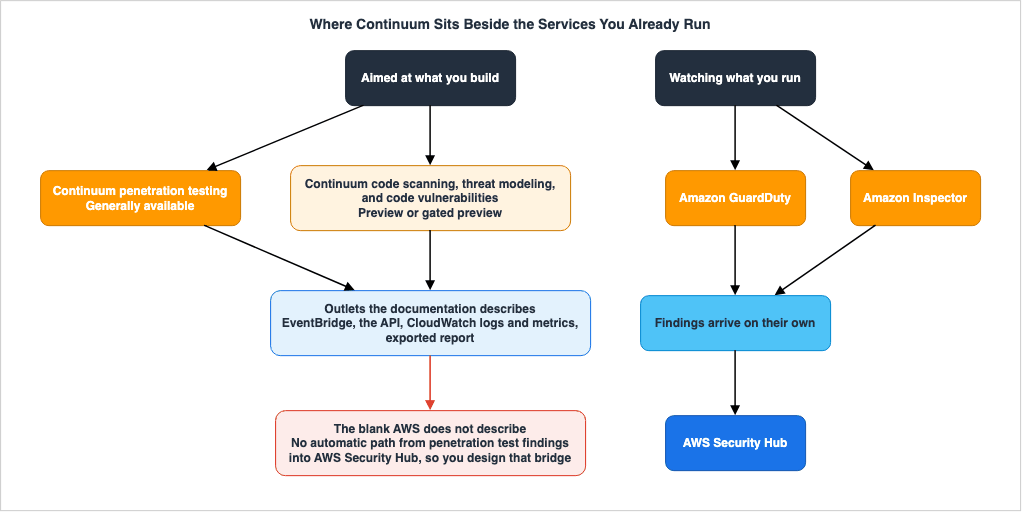
| Path | Initiator | Target |
|---|---|---|
| Continuum penetration testing | You start it explicitly | The behavior of a running application |
| Continuum code scanning | Runs based on configured triggers | Source code |
| GuardDuty | Runs continuously and automatically | Account activity and logs |
| Amazon Inspector | Runs continuously and automatically | Assets with known vulnerabilities |
| Security Hub | Aggregates and evaluates findings | Findings and configurations from other services |
Of these, Continuum penetration testing is the only path you point at the application itself. Code scanning is also something you set going, but it reads source; the last three react to what changes in the environment. That difference is why the acceptance design for penetration testing is unlike the others.
10.2 Creating Your Own Integration Points
AWS Continuum's "What's New" documentation states that it works alongside existing AWS security services, specifically mentioning GuardDuty and Security Hub.No statement that penetration test findings flow automatically into Security Hub could be found in AWS's material, however. Not finding it is not proof that it does not exist. What follows is only the set of outlets that could be confirmed.
| Output | Purpose |
|---|---|
| EventBridge | Route critical findings to existing notification channels. |
| API | Retrieve a list of findings and update their status. |
| CloudWatch Logs | Detailed information on ongoing activities. |
| CloudWatch Metrics | Track the number of findings and their trends over time. |
| PDF report | A report for human review, filtered as you choose when you generate it. |
Therefore, organizations that are consolidating data within Security Hub will need to design their own integration processes. Build the operation on the assumption that findings land on one screen the way other AWS security services put them there, and you are building on something the documentation does not give you.
Threat Detection for AI Workloads on AWS covers how Security Hub aggregates findings.
10.3 Knowing Your Assets Is a Prerequisite, Not an Achievement
The limitation of being able to register up to five target domains means, conversely, that you need to know in advance what you should be testing.The agent discovers endpoints inside the targets you name. It does not turn up assets you never named. The network confines it.
So a test has to be preceded by knowing what the assets are. That is not this article's job. The discovery of AI assets is covered in AI Bill of Materials on AWS.
10.4 Permissions Entry Points Also Require Review
Both the IAM roles passed to agents and the test credentials are potential entry points for permissions.The user guide provides default roles with access to services such as VPC, CloudWatch Logs, Secrets Manager, and Lambda functions, and recommends using these unless there are specific requirements. It is important for the receiving side to explicitly decide whether to use the default roles or create custom roles with more limited permissions.
Regarding test credentials, as mentioned in Section 3.3, these should be created specifically, with limited permissions, and aligned with the level of access typically required by a standard user.
The review of whether these roles and credentials are operating within their intended scope can be performed using existing tools. Access analysis, both internal and external, is covered in AWS IAM Access Analyzer Deep Dive.
11. What This Path Does Not Catch
11.1 The Reason for Listing Blind Spots
The final element in designing an acceptance framework is a comprehensive list of areas that this process will not cover. Blind spots are harder to see than covered ground, and for a plain reason: they produce no signal and no output at all.Every item in this chapter either comes straight out of the primary sources or is something this article confirmed the sources do not say. Nothing was added on a guess.
11.2 Blind Spots in the Exploration Process
- Only assets that have been explicitly specified will be targeted. Because the network is blocked, domains that have not been registered will not be discovered. Registration itself tops out at five domains.
- The discovery of all endpoints and application logic is not guaranteed. The user guide clearly states that the results are probabilistic in nature.
- Results may vary with each run. Assets that were found in a previous run may not be found in the current run.
- An excluded risk type is never a starting point for exploration. Exclude the destructive types and that ground stays uninspected.
- Accessible domains will not be tested. Vulnerabilities in dependent systems will not be identified through this method.
11.3 Blind Spots in How Results Are Read
- By default the screen shows only high-confidence findings. Medium, low, and false positive look like they do not exist until the toggle is turned off.
- The Regions where the simulated validation axis is filled in are limited. Elsewhere, validation status cannot be used as a criterion at all.
- With learning enabled, the severity shown is not necessarily the agent's own. The adjustment appears in a dedicated section, but only if the reader looks at it.
- Verification scripts attach only to confirmed findings. Independently checking a low-confidence finding falls back to hand work.
11.4 Blind Spots Arising from Operation and Configuration
- The concurrency allowance is shared per account and Region, not held per team. Another team's run can hold up a pre-release test.
- Design reviews and code reviews carry monthly quotas. Spend one and no further review of that kind runs until the next month.
- There is no built-in scheduling functionality. If you need scheduled execution, you will need to implement that externally.
- Without specifying maximum task hours, there is no upper limit. Setting one does not bound elapsed time either, and the floor is 20 hours, so a short cap that ends a run early is not on offer.
- A run that hits the ceiling also ends as Completed. Whether it was cut off is not readable from the status.
- A stop is not immediate. The job passes through a stopping state.
- Cross-Region inference cannot be opted out of, and SCP restrictions do not apply. Organizational controls over Region boundaries do not reach this path.
- Generating a code fix can be processed outside the geography you chose.
11.5 Blind Spots Where Output Joins Up
- No statement that findings flow automatically into Security Hub could be found in AWS's material. An organization that consolidates there designs the join itself.
- CloudTrail event names diverge between the documentation's example and the API's operation list. Confirm the real one before writing a rule.
- Artifacts that live on the service side are outside your own retention settings.
11.6 Blind Spots Outside the Scope
Existing articles hold what this path does not. This one does not repeat them, but the receiving side cannot leave the gaps open either.| Area | Responsibility |
|---|---|
| Automated detection during operation | Threat Detection for AI Workloads on AWS |
| Initial response after a security incident | AWS Security Incident Response Playbooks |
| The methodology of threat modeling itself | Threat Modeling Generative AI Applications on AWS |
| Containment of custom agents | Agent Sandboxing and Blast-Radius Isolation on AWS |
| Understanding the system under test | AI Bill of Materials on AWS |
| Review of access controls | AWS IAM Access Analyzer Deep Dive |
| Perspective for human review of proposed changes | Code Review Checklist and Anti-Pattern Catalog |
12. Where the Primary Sources Contradict Themselves
12.1 Why give these a chapter of their own?
The preceding chapters have touched on places where AWS's own material disagrees with itself. Gathering them here is not about the individual differences; it is the shape they make that matters.The side that is wrong is, every time, the security considerations page and the logging and monitoring page — that is, the pages the person on the receiving side opens first. The accurate side is the API reference and the pages that give individual procedures.
This is not coincidental. Pages that describe features often simplify categorization, and updates tend to lag behind when circumstances change. Documents written to define limitations are, by their nature, more accurate than those written to simply describe functionality.
12.2 List of Six Items
Verification date: August 18, 2026.| # | Description of Security Considerations, etc. | Other Primary Sources | Assessment |
|---|---|---|---|
| 1 | No public APIs are available. | The securityagent API is publicly available. Version: 2025-09-06. | Consider the API reference as correct. |
| 2 | No integration with existing security tools or CI/CD pipelines. | Integration exists with EventBridge, IDE plugins, MCP, and source management and documentation. The product page states outright that testing can be embedded into a CI/CD pipeline through full API support. | Take the individual pages, the product page, and the "What's New" announcements as correct. |
| 3 | Detects thirteen types of vulnerabilities. | The API lists twenty-eight values. | Consider the API reference as correct. |
| 4 | Reports findings with high and medium confidence levels. | The procedures page states that it only displays findings with high confidence by default. | Consider the procedures page as correct. |
| 5 | Two ownership verification methods, DNS and HTTP. | The enablement procedure gives a third, resolution inside a private VPC. | Take the procedure page as correct. |
| 6 | The CloudTrail example uses the operation name StartPentestExecution. | The API operation is StartPentestJob. | Take the API reference as correct. |
The impact of each item is described in detail in their respective sections.
12.3 Rules for Determining the Authoritative Source
Four rules fall out of these six cases, and they are worth keeping inside the acceptance process, where they can be reused.First, take the API reference as authoritative for enumerations and counts. Do not draw how many kinds there are, or what values they take, from a page that explains a feature. The gap of twenty-eight against thirteen ran straight into real harm, in the coverage of an exclusion list.
Second, take the individual procedure page as authoritative for default values and procedures. An overview page summarizes the default, and the qualifying clause falls out in the summary. The disagreement over the confidence default is of that kind.
Third, confirm identifiers against the real thing. Operation names and event names are what stay stale inside a documented example. Before writing a CloudTrail rule, look at an event that actually landed in your own account.
Fourth, when two pages disagree, check which one moved last. The first three rules all trace back to reality moving: the integration into Continuum on June 17, 2026, and the feature additions around it. The security considerations pages have not kept pace with these changes.
12.4 This Article Will Go Out of Date Too
The same rules apply to this article. The information provided here, including supported Regions, enumerated values, and default behavior, is accurate as of August 18, 2026.This subject moves fast. In the not-quite five months from general availability on March 31, 2026, to this article's verification date, What's New alone carried eight announcements, counting the general availability announcement itself. For enumerated values and supported Regions, go to the API reference and the official documentation rather than to this article.
13. Acceptance Checklist
What follows rearranges the preceding chapters into the order the decisions get made. The basis for each item is in the chapter it came from.13.1 Things to Decide Before Approval
- Determine whether to use generally available features or preview features. Clearly define whether to incorporate preview features into pre-production validation (Section 2.2).
- Obtain approval, based on organizational standards, confirming that cross-Region inference cannot be opted out and that SCP Region restrictions do not apply (Section 2.3).
- Confirm that generating a code fix can be processed outside the Region you selected (Section 2.3).
- Confirm that the execution environment is pre-production. If running in production, ensure the approver understands that state changes and data deletion may occur (Section 4.6).
- Define the process for advance notification to detection systems and how findings will be handled during the testing period (Section 1.3).
- Confirm that the concurrency limit is shared per account and Region, and that this has been agreed upon with other teams (Section 3.7).
- Allocate the monthly quotas for design reviews and code reviews so that a release does not arrive with them already spent (Section 3.7).
- The user access method. Choose IAM-only and moving to IAM Identity Center later means deleting the setup and running it again. (Section 3.6)
- Decide whether to halt or proceed with a release if the service becomes unavailable (Section 8.5).
13.2 Defining Boundaries
- A list of target domains and the methods for verifying ownership (Section 4.2).
- The list of accessible domains. Register one only after approving that credentials can be sent there. (Section 4.4)
- URLs that are out of scope. Exclude potentially disruptive operations and management functions (Section 4.2).
- The risk types to exclude. Build the list from the API enumeration as the authority, and record what was left out as uninspected. (Section 5.3)
- Maximum task hours. If not specified there is no upper limit, and if specified it will be 20 hours or more. It does not bound elapsed time. (Section 4.2)
- Permissions for test credentials. Create dedicated credentials with a level of access typical for regular users (Section 3.3).
- If email-based multi-factor authentication is in play, the scope of the forwarding rule and when it comes off. (Section 3.3)
- IAM role used for execution. Determine whether to use the default role or restrict it (Section 10.4).
- Whether to specify a VPC. Leave it unspecified and the agent arrives over the public internet. (Section 4.2)
13.3 What to Keep Hold of While It Runs
- Identify the person(s) responsible for monitoring logs and the frequency of monitoring (Section 4.9).
- Define the criteria for stopping the process and identify who is authorized to initiate a stop (Section 4.9).
- A stop is not immediate. The job passes through a stopping state first (Section 4.3).
- The maximum number of concurrent runs is capped per account and Region. Runs by other teams consume the same slots (Section 4.3).
13.4 Determining Actions Upon Receiving Results
- By default, only results with a high confidence level are displayed (Section 6.2).
- Should the system record the number of hidden items? If so, retrieve this information through API filtering (Section 6.3).
- Who will review and who will execute the verification scripts? (Section 6.4)
- Whether edits to findings should be learned from. For a run used in external reporting or an audit, consider switching the managed skill off. (Section 7.3)
- Should the process of marking a finding as a false positive require a justification to be provided? (Section 7.3)
13.5 Preserving Evidence
- You can specify your own CloudWatch log groups, allowing you to align retention periods and encryption to your own standards (Section 8.1).
- Whether an Agent Space and its integrations use a customer managed key. That decision is only available at creation. (Section 8.7)
- A list of discovered endpoints. In runs where no findings were identified, this list becomes the sole basis for assessment. (Section 3.5)
- CloudTrail events. Before defining rules, verify the actual event names. (Section 8.2)
- Configuration details for each run, including excluded risk types and excluded paths (Section 8.7).
- A PDF report, or all findings retrieved via the API. Record which filter produced the report. (Section 8.1)
- A deadline for copying evidence out, set against the service-side deletion that completes within 30 days (Section 8.7).
13.6 What to Settle Before Accepting a Fix
- The repositories where automatic remediation is enabled. It has to be turned on repository by repository. (Section 9.3)
- How to treat the fact that a remediation pull request is visible to everyone with read access (Section 9.3).
- On a public repository the fix arrives as a diff file (Section 9.3).
- The review procedure for a generated fix. The existing code review step stays (Section 9.4).
- Whether revalidation after the fix belongs in the definition of done (Section 9.5).
14. Frequently Asked Questions
Does AI validation eliminate false positives?
No. The primary sources say deterministic validators are used for the risk types where they can be, and that for the rest the agent independently replays the finding's steps to gain confidence. Reducing false positives is claimed; eliminating them is not. The security best practices page goes further the other way, asking you to validate findings before you act on them and to review generated remediation code before you deploy it.Can the execution plan be reviewed in advance?
No. The user guide states that there is currently no way to preview the course of action, and that the plan is determined dynamically based on the exploration of the target application. The control point is not prior approval. It is watching the running logs, and the operation that stops the run.Can a run be stopped once it has started?
Yes, but not instantly. According to the API documentation, the process transitions to a stopping state, and completes its cleanup procedures before fully stopping. When you build the stop into an operating procedure, design it to account for that delay.If a run returns no findings, can the application be called safe?
No. The user guide states that due to the non-deterministic nature of AI, the results may vary from run to run, and that it is not guaranteed that all critical application logic and endpoints will be discovered and tested. If you are using this information to make a judgment, do not rely on the presence or absence of a finding. Instead, verify that the list of discovered endpoints covers the expected scope.Does the default view show every finding?
It does not. The page that gives the procedure for reviewing findings states that only high-confidence findings appear by default, and that seeing medium, low, and false positives requires turning off the toggle that hides unverified findings. The security considerations page, meanwhile, says high and medium are reported, and the two do not agree. This article takes the page that gives the concrete procedure as the correct one.Where is the authoritative list of risk types that can be excluded?
The API reference. The user guide's security considerations page lists thirteen types, but the API documentation lists twenty-eight. The differences include types that could compromise the system's state, such as denial of service, file deletion, and database modification. If you compile a list of excluded types based on the pages describing the functionality, you cannot explicitly exclude these.Does marking a finding as a false positive affect later runs?
Yes. Findings Personalization is enabled by default, and when active, the agent learns from your edits and applies similar adjustments to similar findings in future runs. Every field you edit feeds the learning; on the status field alone, only marking a finding FALSE_POSITIVE counts. To stop it happening at all, switch the managed skill off in the pentest configuration.Is there an upper limit on how long a run lasts?
Not on elapsed time. What you can set is maximum task hours, the cumulative time the agent spends actively working. The user guide states plainly that task hours sum work performed in parallel and are not the same as elapsed time. Leave it unset and there is no ceiling; set it and the smallest value available is 20 hours. The remark that most runs finish within 16 hours is an observation of elapsed time, not a task-hour ceiling. A run that reaches the ceiling ends with a status of Completed, keeping the findings gathered up to that point.If SCPs restrict Regions, does the processing stay inside them too?
No, it does not. The user guide explicitly states that cross-Region inference is always enabled and cannot be opted out of, and that it is not affected by Service Control Policies (SCPs) or AWS Control Tower policies that restrict customer content to specific Regions. The data stays in the Region the request came from; the processing of input prompts and output results does not.Are findings automatically collected in Security Hub?
Not so far as the documentation goes. No statement that penetration test findings flow automatically into Security Hub could be found in AWS's material. The outlets that could be confirmed are EventBridge, the API, CloudWatch logs and metrics, and the exported report. An organization that consolidates in Security Hub designs that join itself.Is it okay to run this in the production environment?
Plan on pre-production. AWS recommends running this against a non-production environment that mirrors production. The security best practices page notes that the tools used may modify the application's state, data, and system configuration. Running it in production could result in data changes or deletion, service disruptions, unintended state changes, and the triggering of security alerts or incident response procedures.Can test traffic be told apart in your own logs?
Yes. Unless a different value is given, every request the agent sends carries a User-Agent header with the value securityagent. You can also add any custom headers through the custom HTTP header settings. Including a value that identifies the run will allow you to differentiate multiple runs later on.Is it possible to schedule recurring runs?
The service has no scheduling feature of its own. The user guide states that there is neither a public API nor a way to schedule runs, but that sentence has not been updated since the API was published. An API operation that starts a run does exist. Scheduling therefore means calling that operation from something outside the service.Who can start the test?
Anyone assigned access to the Agent Space. User access is assigned at the Agent Space level, and organizations choose a system-wide setting to determine the access method: either single sign-on through IAM Identity Center or direct access via IAM. Furthermore, tests can also be initiated through integrated development environment plugins and integrations with MCP, so relying solely on the console and the web application does not give a complete picture. CloudTrail serves as the central location for capturing all initiation events, regardless of the source.Can a design review be re-run after the documents are corrected?
The same review cannot be re-run. The user guide states that a design review is a one-time assessment, and that updating the documents and running a fresh analysis means cloning the existing review into a new one with the original documents preloaded. Penetration testing, code reviews, and threat modeling, on the other hand, can all be run repeatedly using reusable configurations.Are AWS Security Agent and AWS Continuum separate services?
No. On June 17, 2026, AWS Security Agent became a part of AWS Continuum. The penetration testing and code scanning features are now offered as Continuum penetration testing and Continuum code scanning, respectively. The console, the user guide, and the API service identifier all continue to use the name securityagent.15. Conclusion
Designing for automated, offensive testing begins not with an understanding of features, but with an understanding of constraints.Execution plans cannot be reviewed in advance. This is the fundamental principle. AWS explicitly states that there is no way to verify the course of action beforehand, and plans are determined dynamically based on exploration. Therefore, acceptance control is divided into three areas: boundaries defined before execution, observation and stopping during execution, and evidence collected after execution.
The boundaries that can be defined in advance are surprisingly broad. These include the target domain, risk types to be excluded, URL paths that are out of scope, accessible domains, maximum task hours, the automated remediation policy, and whether the learning feature is on. Maximum task hours repays care: it caps the agent's working time, not the clock, and it will not go below 20 hours. Solidifying these boundaries constitutes a practical form of acceptance, even when the plan itself is unpredictable.
However, the default behavior has two potential pitfalls. First, only high-confidence findings reach the screen. Second, your own triage decisions can influence the output of subsequent runs. Both of these are default behaviors that can easily go unnoticed if not explicitly considered.
The source of the exclusion list can also create problems. When built from thirteen different categories describing features, it is impossible to explicitly exclude destructive types such as denial-of-service attacks or database modifications. Take the API reference as the authority for the count.
And the primary sources contradict themselves. The stale side, moreover, is the page the person on the receiving side opens first. Four rules carry over: read enumerations and counts off the API reference, read default values and procedures off the individual procedure page, confirm identifiers against a real log entry, and when two pages disagree, check which one moved last. They hold their shape when the specifications move.
What the path does not cover belongs in the list too. Assets that are not explicitly specified will not be targeted, and even within specified assets, comprehensive coverage is not guaranteed. Therefore, a run that yields zero findings does not constitute proof that there are no vulnerabilities. If used for validation, verify that the list of discovered endpoints aligns with the expected scope.
Finally, this approach does not replace human review. AWS itself emphasizes that this is not a substitute for professional penetration testing services, but rather a tool to be integrated into existing security review processes. It replaces one stretch of work only: finding the vulnerability, writing down how to reproduce it, and drafting a fix. Ultimately, humans continue to decide what to approve, where to stop, and what evidence to retain.
16. References
- Security Considerations for AWS Security Agent and AI assisted penetration testing - AWS Security Agent User Guide
- Security best practices for AWS Security Agent - AWS Security Agent User Guide
- Create a penetration test - AWS Security Agent User Guide
- Enable penetration test - AWS Security Agent User Guide
- Review findings from a penetration test - AWS Security Agent User Guide
- Remediate a penetration test finding - AWS Security Agent User Guide
- Enable users to start remediation of penetration test and code review findings - AWS Security Agent User Guide
- Understand the resource hierarchy and lifecycle - AWS Security Agent User Guide
- Severity ratings and CVSS metrics - AWS Security Agent User Guide
- Logging and monitoring in AWS Security Agent - AWS Security Agent User Guide
- Data protection in AWS Security Agent - AWS Security Agent User Guide
- Resilience in AWS Security Agent - AWS Security Agent User Guide
- Service Quotas - AWS Security Agent User Guide
- Set up AWS Security Agent - AWS Security Agent User Guide
- CreatePentest - AWS Security Agent API Reference
- AWS Continuum
- AWS Security Agent
- Introducing AWS Continuum for security at machine speed - AWS What's New
- Introducing AWS Continuum: Security at machine speed - AWS Security Blog
- AWS Security Agent on-demand penetration testing is now generally available - AWS What's New
- AWS Security Agent adds Kiro Power, Claude Code, simulated validations and new integrations support - AWS What's New
- AWS Security Agent announces support for Threat Modeling - AWS What's New
- AWS Security Agent adds verification scripts for pentest findings - AWS What's New
- AWS Security Agent now supports downloading penetration testing reports - AWS What's New
- AWS Security Agent now supports email-based MFA for penetration testing - AWS What's New
- AWS Security Agent now available in Asia Pacific (Mumbai), Asia Pacific (Singapore), and South America (Sao Paulo) - AWS What's New
References:
Tech Blog with curated related content
Written by Hidekazu Konishi