AI Bill of Materials on AWS - Discovering Models, Agents, and External Endpoints
First Published:
Last Updated:
A self-declared catalog always goes stale. The person who declared an asset transfers out, the endpoint stood up for verification gets deleted, and a call to an external AI API that nobody declared stays buried deep in an application. A stale catalog reaches the audit table without anyone knowing that it is stale.
This article covers the design that discovers AI assets running on AWS mechanically, from the running environment itself. It is not about producing documents for a regulator. The core principle is that what cannot be discovered cannot be controlled. Most of this article is therefore spent on what each discovery path shows and what it does not.
To state the conclusion upfront: AWS made AI asset discovery generally available in July 2026, and it discovers assets over three paths. However, even when these three paths are combined, gaps will still remain. AWS's own documentation states the shape of the remaining gap, which makes it a specification rather than a guess. Designing an inventory means deciding which of those gaps to fill, and how much of the rest to accept as gap.
This article checked its specifications against AWS's official documentation, most recently on August 17, 2026. That confirmation turned up six discrepancies inside AWS's own documentation. Because they bear directly on the scope of discovery, section 6.1 sets the six side by side and gives the reasoning for which document to treat as correct. One of the sources cited as grounds in the first version also disappeared while that confirmation was under way. Section 3.2 gives the circumstances.
Table of Contents
- 1. A Bill of Materials Is Not a Document but a System for Discovery
- 2. What Counts as an Asset
- 3. Path 1 - Taking Stock from Configuration Data
- 4. Path 2 - Detection from the Composition of Artifacts
- 5. Path 3 - Detection from Network Traffic
- 6. The Gap That Remains After All Three Paths
- 7. What to Record, and What to Decide Not to Record
- 8. How to Handle Differences Between Declarations and Discoveries
- 9. Addressing Obsolescence
- 10. Design Checklist
- 11. Frequently Asked Questions
- 12. Summary
- 13. References
1. A Bill of Materials Is Not a Document but a System for Discovery
1.1 The Form of Unanswerable Questions
The need for an AI asset inventory typically arises as an external inquiry. Whether it is an audit, an incident response, or a notification of model deprecation, the question is always the same: What is currently running, and where?When organizations attempt to answer this question by opening the catalog, three common issues emerge. First, many assets listed in the catalog no longer exist. Second, assets are actively running in production that are not listed in the catalog. And third, there is no established method to determine which is correct, the catalog or the actual state.
The third issue is the most critical. Without a way to reconcile the catalog with reality, updating the catalog will perpetually rely on human goodwill. And human goodwill decays without exception once a quarter boundary has passed.
So the first decision in designing a bill of materials is neither the list of recorded items nor the approval flow. It is where to draw how many paths that scan the running environment and enumerate assets mechanically. Items and approvals can be added later, based on the results of the enumeration. The reverse order is simply not feasible.
1.2 The Term model catalog Has Three Distinct Meanings
Start with the meaning of the term model catalog. Within the AWS context, this phrase refers to at least three different concepts. Continuing your design work without understanding these distinctions could lead to inadvertently recreating existing solutions.First, there is the
Model catalog found in the Amazon Bedrock console. The console's help documentation defines it as follows:The model catalog is a repository of all serverless and Marketplace models available in Amazon Bedrock.This is a listing of models available for your use, a catalog seen from the AWS side. A published article covers the models currently available; if the question is which models you can use, that article answers it.
Second, there is the model catalog described in the AWS Well-Architected Generative AI Lens under
GENREL04-BP02. The lens states:GENREL04-BP02 Implement a model catalog
Model catalogs store and manage model versions. They act as a reliable store for models which
may need to be deployed or rolled back at any time. They also facilitate decoupled deployment
automation.This is a record of models approved and versioned by your organization. It is an artifact created and maintained by people.
Third, and the subject of this article, is the AI inventory provided by AWS Security Hub. This is a listing of assets actually running within your organization, and is the result of discovery processes. It is not created by people. It emerges as a result of scans.
Here is a table summarizing the differences:
| Term | Listing of | Created by | How it goes stale |
|---|---|---|---|
Bedrock Model catalog | Models you can use | AWS | Does not go stale, because AWS keeps it current. But it never reflects what your organization actually runs. |
Model catalog in GENREL04-BP02 | Models and versions you approved | People in your organization | Goes stale the moment declarations stop |
| Security Hub AI inventory | Assets that are running | The result of scans | Does not go stale, but never contains an asset the scan did not reach |
This article takes the third, and centers on how it differs from the second. It treats the first as given and does not go into it.
1.3 Scope of this Article
This article covers six areas: what constitutes an asset, what each of three discovery paths identifies and what they miss, the gaps that remain even when combining those three paths, what information is recorded regarding discovered assets and what is not, how to handle discrepancies between declared and discovered assets, and how fast an inventory goes stale, along with where to automate its updates.Some topics are deliberately out of scope. This article does not evaluate the licensing status of any specific model. The inventory carries the license as a recorded item, and the decision on whether a license is acceptable belongs to the legal review process. It also makes no determination about regulatory compliance. The provenance of generated output belongs to a published article on this site. The end-of-life dates for models likewise have their canonical source in a published article. The signing and verification of container artifacts belong to another article in this series. This article carries no pricing figures.
1.4 Differentiation from Existing Content
This website contains several articles covering similar areas, and this article addresses a different subject matter from all of them. In particular, there is some overlap in terminology, so it is necessary to clearly define the boundaries at the beginning.| Previously Published | Question Addressed | Relationship to Current Article |
|---|---|---|
| Content Provenance for AI-Generated Media | Origin and history of generated content. Content credentials, asymmetric signatures and verification, certificate revocation. | The subject matter differs. The published article traces the history of what was produced, while this article inventories what is currently running. The general discussion of asymmetric signatures is already covered in the published article, so it will not be repeated here. |
| AI Model Deprecation and Lifecycle Calendar | End-of-life dates for models provided by various vendors. Meaning of dates and terminology differences between vendors. | Dates have their canonical source in the published article. This article asks what your own organization is running, and does not restate any of those dates. Refer to section 9. |
| Amazon Bedrock Model Catalog | A list of models available on Bedrock and their regional availability. | The term model catalog overlaps. That article lists the models you can use; this one inventories the assets actually running. |
| Amazon Bedrock Security and Governance | Security and governance for Bedrock. IAM, SCP, private connections, model invocation logs, and CloudTrail. | The published article documents invocation logging. Section 6.2 here uses invocation traces as discovery material and sends the reader back there for the mechanism itself. |
| Responsible AI Guardrails Architecture on AWS | Controlling outputs. An independent guardrail layer. | The timing differs. That article covers what happens while an asset is running; this one covers knowing the asset exists at all. |
| Threat Modeling Generative AI Applications on AWS | A list of assets for threat modeling. Prompts, conversation history, credentials, and traces. | The asset list there is a conceptual list of what needs protecting, and people write it. Machines generate the inventory in this article by scanning. While both use the term asset, the creation process is different. |
| Software Supply Chain Security on AWS | Creating and verifying the provenance of artifacts. Signatures, attestations, and admission control. | This is the previous article in the series. It sits on the production side; this one sits on the consumption side. Section 4.5 sets out the split. |
| AWS Config Rules, Conformance Packs, and Remediation | AWS Config recording scope, rules, aggregation, and advanced queries. | The path described in section 3 builds upon AWS Config. The published article covers the design of the recording scope itself. |
| AWS Systems Manager Fleet Operations Guide | Inventory of nodes. Interaction between Systems Manager Inventory and tag design. | That article covers node-level inventory. This one covers the AI assets running on those nodes. |
| Amazon GuardDuty Extended Threat Detection Architecture | GuardDuty signal sources and protection plans. Baseline data sources, and how DNS visibility depends on resolver selection. | Section 5.2 here overlaps material the published article already holds. That article follows what the loss of one detection signal costs; this one follows only how the same constraint surfaces as a count in the inventory. |
| AWS AI and ML Glossary | Terminology. Definitions of model cards and datasheets. | The definition of model card is already covered in the published article. This article only addresses the aspect of it as a record in section 7.3. |
2. What Counts as an Asset
2.1 Four Categories
Before creating an inventory, it is necessary to determine what constitutes a single item. Starting a scan without this definition yields results at different levels of granularity for each path, which makes the overall total meaningless.AI assets can be operationally divided into four categories. This categorization corresponds to different discovery paths, and the subsequent discussion will build upon this framework.
| Category | Examples | Who Creates It |
|---|---|---|
| Managed service assets | Amazon Bedrock knowledge bases and guardrails, Amazon Bedrock AgentCore runtime, Amazon SageMaker endpoints and models | AWS holds the substance; you hold the configuration |
| Self-hosted models and inference servers | Hugging Face models running on EC2 instances, inference servers such as vLLM and Ollama, and the same things baked into container images | You hold all of it |
| Agents | Agents on AgentCore, and agents running on compute you provide | Spans the two rows above |
| External AI API endpoints | Third-party model APIs that your own workloads call | Nobody holds it inside your organization |
The fourth category is most often overlooked. External AI APIs do not create any resources within your organization's account, so they will not appear when you browse resource lists. You will only find records of communication with them.
2.2 Determining Counting Units
When the same model is running on ten instances, is this considered one or ten? The answer depends on the purpose, so the inventory system needs to have a structure that can accommodate both counting methods.AWS Security Hub handles this using the concept of a
CanonicalId. According to the user guide:The canonical ID identifies what a resource is, independent of where it runs. For example, two
Amazon EC2 instances that run the same Hugging Face model share the same canonical ID, so that
you can find all deployments of a specific model across your organization.The format of the canonical ID is also defined. For models, the package URL is directly used.
For ML models: model/<purl> (for example, model/pkg:huggingface/meta-llama/llama-3-8b)
For inference endpoints and agents: a type/asset-identifier-name format
For external endpoints: the normalized domain (for example, api.*.openai.com)
The package URL is the identifier an SBOM uses to name a component, describing the breakdown of the artifact. The SBOM generated by Amazon Inspector also uses this format for each component. The key point to remember is that the identifier that describes a composition is reused as the key that links assets across environments.
There are two design guidelines regarding counting units. First, count each model version as one unit. Second, maintain a separate count for each deployment location. Failing to adhere to the first guideline will prevent you from accurately determining the scope of impact when a deprecation notice is received. Neglecting the second guideline will make it impossible to identify the specific assets that need to be stopped.
2.3 Three Discovery Paths
AWS Security Hub's AI inventory identifies assets based on three signals. The user guide categorizes these discovery methods into two types, and the self-hosted side carries two of those signals.Managed – AI resources that AWS provides as a managed service. Security Hub discovers these
resources from AWS Config configuration items. Managed resource types include a supported
subset of Amazon Bedrock, Amazon Bedrock AgentCore, and Amazon SageMaker.
Self-hosted – AI resources that aren't provided as a managed service. Examples include open
source models, agents, and inference servers that run on your own compute. Security Hub detects
these resources from contributing signals on Amazon Elastic Compute Cloud (Amazon EC2) instances
and Amazon Elastic Container Registry (Amazon ECR) images. The signals include Amazon Inspector
software bill of materials (SBOM) findings and Amazon GuardDuty DNS activity.The What's New announcement, in contrast, describes the same feature as three discovery methods, while the product page calls it two methods. The difference in the number of categories across documents comes from whether they count by type or by signal; the underlying feature is the same. This article works through the blind spot of each signal, so it treats them as three paths.
| Path | Signal | Primarily Discovered Categories |
|---|---|---|
| Path 1 - Taking stock from configuration data | AWS Config configuration items | Managed service assets |
| Path 2 - Detection from the composition of artifacts | Amazon Inspector SBOM findings | Self-hosted models, inference servers, and agents |
| Path 3 - Detection from network traffic | Amazon GuardDuty DNS activity | Destinations of external AI API calls |
The diagram below sets out the three paths and the blind spot of each.
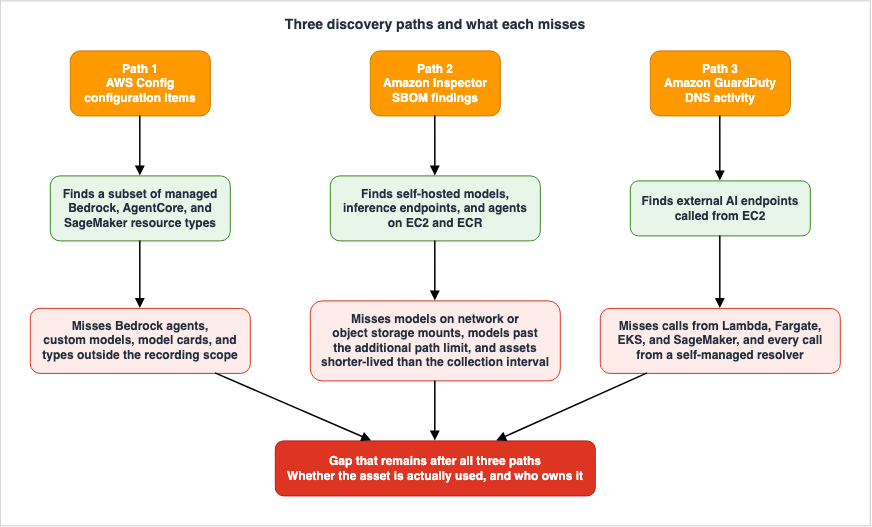
AI Inventory is included with Security Hub Essentials at no additional cost and requires no new
enablement. It is available in all AWS commercial Regions where Security Hub is offered.
That nothing needs enabling carries a design consequence. Path 1 has no switch of its own and produces results as soon as Security Hub is on and AWS Config is recording. Conversely, Paths 2 and 3 return nothing at all unless the services behind them are already enabled. That asymmetry drives sections 4.2 and 5.2. Having no switch is not the same as having no prerequisite. Path 1 reads AWS Config configuration items, so an account that records nothing produces nothing, and section 3.3 works through that condition.
3. Path 1 - Taking Stock from Configuration Data
3.1 What Can Be Seen
Path 1 reads AWS Config configuration items. Therefore, it is limited to the range of resource types that AWS Config records.As of August 17, 2026, the Amazon Bedrock resource types supported by AWS Config are as follows:
AWS::Bedrock::ApplicationInferenceProfile
AWS::Bedrock::DataSource
AWS::Bedrock::FlowAlias
AWS::Bedrock::Guardrail
AWS::Bedrock::KnowledgeBase
AWS::Bedrock::Prompt
AWS::BedrockAgentCore::BrowserCustom
AWS::BedrockAgentCore::CodeInterpreterCustom
AWS::BedrockAgentCore::Evaluator
AWS::BedrockAgentCore::Gateway
AWS::BedrockAgentCore::GatewayTarget
AWS::BedrockAgentCore::Memory
AWS::BedrockAgentCore::OnlineEvaluationConfig
AWS::BedrockAgentCore::Runtime
AWS::BedrockAgentCore::RuntimeEndpoint
AWS::BedrockAgentCore::WorkloadIdentity
Similarly, the Amazon SageMaker AI resource types are as follows:
AWS::SageMaker::AppImageConfig
AWS::SageMaker::Cluster
AWS::SageMaker::CodeRepository
AWS::SageMaker::DataQualityJobDefinition
AWS::SageMaker::Domain
AWS::SageMaker::EndpointConfig
AWS::SageMaker::Endpoint
AWS::SageMaker::FeatureGroup
AWS::SageMaker::Image
AWS::SageMaker::InferenceExperiment
AWS::SageMaker::MlflowTrackingServer
AWS::SageMaker::Model
AWS::SageMaker::ModelBiasJobDefinition
AWS::SageMaker::ModelExplainabilityJobDefinition
AWS::SageMaker::ModelQualityJobDefinition
AWS::SageMaker::ModelPackageGroup
AWS::SageMaker::MonitoringSchedule
AWS::SageMaker::NotebookInstance
AWS::SageMaker::NotebookInstanceLifecycleConfig
AWS::SageMaker::Pipeline
AWS::SageMaker::StudioLifecycleConfig
AWS::SageMaker::UserProfile
AWS::SageMaker::Workteam
These two lists set the ceiling on what Path 1 can see. However, Security Hub applies further filtering. Its wording is the following, and it does not disclose which specific types are included.
Managed AI resources are a supported subset of Amazon Bedrock, Amazon Bedrock AgentCore, and
Amazon SageMaker configuration item types, each with the AI/ML resource category.
What Path 1 shows is therefore a subset of the resource types AWS Config records. The ceiling is public; the actual set is not.
3.2 Items Not Listed Will Not Appear in Path 1
Read the list for what is missing, not for what is there. Several AI assets that immediately come to mind are absent.AWS::Bedrock::Agent, AWS::Bedrock::CustomModel, and AWS::Bedrock::ImportedModel are not listed. This is not speculation. The list above is the AWS Config supported resource type list itself, and their absence from it settles the point: AWS Config does not record them. The only way to discover them is to directly call the API.A second source backed that reading until August 14, 2026. The initial version of this article included a reference to the Workload Discovery on AWS documentation. That documentation contained a table listing resources that the solution could discover but that AWS Config did not support, and that table included
AWS::Bedrock::Agent, AWS::Bedrock::CustomModel, and AWS::Bedrock::ImportedModel. That page now returns a redirect to the solution overview rather than a 404, and the redirect target states:Notice of discontinuation
This AWS Solution is no longer available. We encourage customers to explore using Amazon
CloudWatch Application Map and AWS DevOps Agent to discover, visualize, and explain workloads
on AWS.The solution has been discontinued, and the implementation guide pages have been removed along with it. This does not impact the claims made based on the AWS Config list, but one piece of supporting documentation is now gone.
One of the two successors named in that notice is an agent, and that changes the shape of the question. A resource type list is bounded by what the list covers; an agent that discovers workloads is bounded by what it is permitted to reach — the accounts its Agent Space is associated with, a read-only default policy, and a ceiling the customer does not own. AWS DevOps Agent - What It Investigates by Default, What Needs Approval, and What It Refuses Even When the Role Allows It works through those boundaries, which is what you would have to read before treating the agent as the replacement inventory source.
This situation is itself a prime example of the article's central theme. When designing an inventory of AI assets, relying on external documents to provide justification for what can be discovered creates a vulnerability. If those documents disappear, the justification disappears with them. A page that states the specification of a feature, like the resource type list above, and a page that states what some other implementation covers have different lifespans. A decision that rests on the latter belongs on a list of things to re-confirm on a schedule.
The same principle applies to SageMaker. While
AWS::SageMaker::ModelPackageGroup is listed, the individual versions inside it, AWS::SageMaker::ModelPackage, are not. You see the model registry groups, but not which versions sit inside them.And perhaps the most ironic omission is
AWS::SageMaker::ModelCard. Model cards were added as a CloudFormation resource type on February 2, 2023, so a template can create one. AWS Config still does not list the type. The record that describes a model is not itself recorded as configuration information. Section 7.3 treats model cards as a useful container, but the configuration data path cannot tell you whether that container exists.It is worth noting that the page listing AWS Config resource types itself indicates an update frequency.
This page is updated on a monthly cadence at the beginning of each month.Therefore, this omission is not a permanent design flaw, but rather reflects the state of the system as of the verification date. If you rely on this list for inventory design, you should incorporate a process to regularly compare differences on a monthly basis.
3.3 Operational Blind Spots: The Recording Scope
Path 1 has another blind spot stemming not from AWS specifications, but from the organization's own configurations. If a resource type falls outside the AWS Config recording scope, no configuration item is created for it at all.Whether to record all supported types or to record a named subset is a design decision, and the published AWS Config Rules, Conformance Packs, and Remediation works through that decision. The key point here is this: For organizations that have chosen a partial subset, Path 1 will remain silent and return nothing unless the resource types associated with AI assets are explicitly added to the scope. This silence is indistinguishable from an empty result. From an inventory perspective, an environment with no AI assets will appear identical to an environment that is simply not recording them.
The prerequisite on the Security Hub side also needs checking. The FAQ states the following:
The enhanced Security Hub does not require AWS Config. However, Security Hub CSPM, which is a
core capability of Security Hub, requires that you enable AWS Config in your account and
configure it to record resource configuration changes.
Security Hub itself does not require AWS Config. However, Path 1 relies on reading configuration items from AWS Config; therefore, Path 1 will not function without AWS Config. The statement that it is not a requirement and the conditions under which this path operates are two separate matters.
3.4 Summary of Visibility for Path 1
| Visible | Not Visible |
|---|---|
| Bedrock knowledge base, guardrails, prompts, data sources | Bedrock agents, custom models, and imported models |
| AgentCore runtime, gateway, memory, workload identity | Security Hub exclusions (list not publicly available) |
| SageMaker endpoints, models, model package groups | Individual versions of model packages, model cards |
| Resource configurations (displayed in JSON in the details panel) | Resource types excluded from the AWS Config recording scope |
4. Path 2 - Detection from the Composition of Artifacts
4.1 What Can Be Seen
Path 2 reads the SBOM that Amazon Inspector generates. When inference servers or model components appear in the SBOM, they become the clue for assembling a list of assets.Security Hub defines four types for self-hosted assets. The names of these types and what they represent are as follows:
Models (SelfHosted::AI::Model) – Hugging Face and Ollama models.

Inference endpoints (SelfHosted::AI::InferenceEndpoint) – Supported model-serving software,
such as vLLM, Ollama, TorchServe, Triton, Text Generation Inference (TGI), SGLang, llama.cpp,
LocalAI, BentoML, Xinference, Ray Serve, and GPT4All.

Agents (SelfHosted::AI::Agent) – OpenClaw agents.

External endpoints (SelfHosted::AI::ExternalEndpoint) – External AI service domains that your
Amazon EC2 instances call.
The list of inference servers is extensive, while the list of agents is limited. Twelve different types of inference servers are specifically identified, whereas only one type is designated as an agent. If your organization builds agents on a different framework, nothing in the current documentation guarantees that they land in the agent category. A design that makes the agent inventory depend on Path 2 does not hold.
The API reference provides a different perspective on the same scope. While the user guide lists four resource types, the
AIDetails structure in the Security Hub API reference has a count field for each of the seven values of ResourceSubCategory:Model
ModelServing
Agent
ExternalEndpoint
AgentFramework
AgentToolsAndIdentity
DevelopmentThree of these do not correspond to any of the four resource types, and the subcategory name associated with the
SelfHosted::AI::InferenceEndpoint resource type is ModelServing. In an area where the user guide only mentions a single agent product, the API includes a category for agent frameworks. Which frameworks it detects is still not specified, so the previous conclusion remains unchanged. What changes is the way information is queried. While filters are discussed in section 9.2, specifying only Agent will cause entries to be missed that fall under AgentFramework and AgentToolsAndIdentity. This discrepancy is listed in section 6.1.How a detection is made is stated as well. One signal alone never establishes an asset.
Security Hub uses a confidence-based detection system for self-hosted AI resources. Each
detection is anchored to a primary signal, such as an SBOM component. Security Hub then
correlates additional signals to establish confidence before a resource appears in your
inventory. Security Hub shows only the resources that meet the confidence threshold, which
helps minimize false positives.
A design tuned against false positives pays for it in false negatives. Detections that do not meet the defined thresholds will not be included in the inventory. From the inventory alone, you cannot tell whether an asset went undetected or never existed in the first place.
4.2 What Happens When the Prerequisites Are Not Met
Path 2 has additional prerequisites. It is not enough simply to have Amazon Inspector enabled; there are also conditions related to the scanning method.Amazon Inspector – Enable Amazon Inspector (with Security Hub essentials) to generate SBOMs.
Security Hub uses these SBOMs to detect self-hosted models, inference endpoints, and agents.
For Amazon EC2 instances, enable agent-based scanning with enhanced scanning mode, agentless
scanning, or hybrid scanning. Agent-based scanning without enhanced scanning mode doesn't
produce the deep software inventory that AI resource detection requires.The key point is this: Enabling the agent alone is not sufficient. In Amazon Inspector's terminology, the Amazon Inspector VM Scanner performs enhanced scanning, replacing the legacy SSM plugin. The Amazon Inspector documentation describes the role of this scanner as follows:
Amazon Inspector VM Scanner leverages the inventory collection capabilities of Amazon Inspector
SBOM Generator to generate a Software Bill of Materials (SBOM) and submits the SBOM for
evaluation through the Inspector Telemetry channel.
In essence, Path 2's structure repurposes the software inventory that was previously collected for vulnerability assessments, and also uses it to discover AI assets. This structure offers excellent cost-effectiveness, but the trade-off is that the scan configuration chosen for vulnerability assessment decides the scope of AI asset discovery. Change the scan settings and you change not only which vulnerabilities surface but which assets the inventory holds.
4.3 Location Constraints Have the Greatest Impact
Within the blind spots of Path 2, location constraints are the most frequently encountered limitation in practical use. The Security Hub documentation states the following about models:Security Hub detects models only in the default model-cache directories (such as the Hugging
Face and Ollama caches) and in custom paths that you configure for Amazon Inspector scanning.Only models that sit in a default cache directory, or in an additional path registered with Amazon Inspector, show up. The weight of that condition becomes clear once you look at where the default scan actually goes. Regarding Linux instances, the page that covers the legacy Amazon Inspector SSM plugin states:
Amazon Inspector scans all custom paths in addition to the locations that Amazon Inspector
scans by default for all accounts. On Linux instances, the default locations include the
following:

  /usr/lib
  /usr/lib64
  /usr/local/lib
  /usr/local/lib64
All four hold language runtime libraries. None of them holds model weights. If you are using a non-default location for your models, they will not be detected unless you register additional paths.
This list applies to the older scanner, and the page itself explicitly states this in the introduction. The note reads
This page applies to customers that have not opted in to Enhanced EC2 Scanning. As described in section 4.2, configurations that establish Path 2 via agents specifically require this opt-in; therefore, the list above does not apply to Path 2. The user guide does not provide a corresponding list for the scanner that Path 2 actually uses.Does Inspector VM Scanner scan the same locations as Inspector SSM Plugin?
Not necessarily. Inspector VM Scanner scans a default set of locations that varies by operating
system and can differ from Inspector SSM Plugin. Software installed in a custom location is
scanned only if you add it as a custom path.Therefore, the default scan range for Path 2 cannot be enumerated in the documentation. This fact does not weaken the practical advice; rather, it reinforces it. Registering the model's location as an additional path is the only way to make that location certain. The four paths mentioned earlier remain useful as examples illustrating the types of locations that a package scanner examines, even though they are not where model weights are stored.
There are limitations to the additional paths. Here again, the primary documentation contains a discrepancy. The user guide states:
All accounts can define up to 5 custom paths. The delegated administrator for an organization
can define 10 custom paths.
The console help covers the same setting and describes it differently.
A standalone account, delegated administrator, or member account in an organization can define
up to 5 custom paths for their individual account. If you're the delegated administrator for
your organization, you can define 5 additional paths that will apply across your entire
organization. This amounts to a total of up to 10 custom paths scanned per account in an
organization.
Read literally, the user guide grants a delegated administrator ten paths to assign, while the console help grants five for the account plus a separate organization-wide five. The API reference settles it.
UpdateEc2DeepInspectionConfiguration holds the account paths and the organization paths in separate arrays, and each array caps at five entries.packagePaths
The Amazon Inspector deep inspection custom paths you are adding for your account.
Array Members: Minimum number of 0 items. Maximum number of 5 items.
orgPackagePaths
The current Amazon Inspector deep inspection custom paths for the organization.
Array Members: Minimum number of 0 items. Maximum number of 5 items.This article considers the API reference and console help to be authoritative. Rather than allowing a delegated administrator to freely assign ten paths, the total is ten: five for the individual account and five that apply uniformly across the entire organization. This difference in interpretation impacts the design. Because the five organization-level paths are the same across all accounts, environments where model locations vary by team may find that the organization-level paths cannot cover all teams. If the design assumes ten paths are available, it may prove insufficient.
Furthermore, a discrepancy remains regarding path length. The user guide and console help state a length of 256 characters, while the API reference states
Length Constraints: Minimum length of 1. Maximum length of 512. This article does not attempt to determine which is correct. When placing models in deep hierarchies, it is safer to design with the shorter value.The location of the paths themselves carries a constraint as well.
Custom paths must be local paths. Amazon Inspector doesn't scan mapped network paths, such as
Network File System mounts or Amazon S3 file system mounts.
This limitation directly conflicts with how models are typically deployed. When several instances share one set of large model weights, a shared file system or object storage is the natural place for them. However, the moment you do so, they become invisible to Path 2. The inference server process is detected, but the model it is reading is not detected.
And one more limit points the opposite way from discovery. Amazon Inspector caps collection itself, and names additional paths as the way around that cap.
The package limit per instance is 5,000. The maximum package inventory collection time is 15
minutes. Amazon Inspector recommends that you choose custom paths to avoid these limits.
Additional paths are originally intended as a tool to narrow down the scan. However, those creating the inventory are using them to broaden the scan. Because the same function is being used in reverse, every large directory you add, models included, moves the instance closer to that cap. On instances with a large number of packages, adding additional paths can trigger the collection to stop prematurely, and the inventory then lands without telling you what it dropped. AWS does not state what hitting that limit looks like in the inventory.
The supported platforms matter too. The user guide states that the handling of paths varies depending on the scanning method.
Custom paths are supported for Linux, Windows, and macOS instances when you use Enhanced EC2
Scanning (the Amazon Inspector VM Scanner). If you use the legacy Amazon Inspector SSM plugin
instead of Enhanced EC2 Scanning, deep inspection and custom paths are available only for Linux
instances.
As described in section 4.2, using Path 2 through an agent requires enhanced scanning. Therefore, as long as Path 2 is operating through the agent, additional paths can be used across all three platforms. Conversely, environments still using the legacy method do not meet the prerequisite in section 4.2, so agent-based scans will not provide any data to Path 2 on any platform. It is also explicitly stated that, for Windows, items placed outside the system drive will not be scanned by default.
Differences in scanning methods are also significant. The Amazon Inspector documentation explicitly states that the results for Linux language packages can vary between methods.
When scanning Linux instances for application programming language package vulnerabilities, the
agentless method scans all available paths, whereas agent-based scanning only scans the default
paths and additional paths you specify as part of Amazon Inspector deep inspection for
Linux-based Amazon EC2 instances. This may result in the same instance having different findings
depending on whether it is scanned using the agent-based method or agentless method.
This description concerns the detection of vulnerabilities. However, as mentioned in section 4.2, the detection of AI assets is also included in the same software inventory. Therefore, it is reasonable to assume that even on the same instance, the assets that appear in the inventory can vary depending on the scanning method. This is an inference based on two documents, and not a fact explicitly stated by AWS. In real-world environments, it is advisable to standardize scanning methods within an organization. If standardization is not possible, the inventory should carry the scanning method as an attribute.
The scanning method also changes the update interval. The Amazon Inspector documentation presents agent-based scanning as continuous, meaning that a new vulnerability or a change to the instance triggers a scan. Agentless scanning, by contrast, rescans every 24 hours. Continuous describes what triggers a scan, not how often the software inventory underneath is collected. Section 9.1 puts numbers on that second interval, and those numbers are what bound Path 2. The slowest path sets the freshness of the whole inventory.
4.4 ECR Images Are Not Tied to a Host
Path 2 scans not only EC2 instances but also container images from ECR. There is a unique characteristic to this.Security Hub doesn't attribute Amazon ECR images to a parent host in this release, so the host
AI counts don't include them.You can tell that an image contains vLLM. However, the inventory does not reveal where that image is running, or even whether it is currently running. The images in the registry represent potential assets, rather than currently running ones. This information can be obtained from another source. Amazon Inspector associates ECR images with the Amazon ECS tasks and Amazon EKS pods that are running them, and exposes that association through the
ecrImageInUseCount and ecrImageLastInUseAt filters. The service that supplies Path 2 answers the question the inventory drops. Section 6.4 lists this as the way to fill that gap.This characteristic directly impacts inventory aggregation. Images are not included in host-level aggregation. Therefore, the total for host-level assets and the overall total will not match. While this discrepancy is by design, any report built on these totals has to say which number it is quoting, or the reader will read it wrong.
4.5 How the Roles Split Against the Previous Article in This Series
This series also covers container images and SBOMs, as addressed in the previous article in this series, Software Supply Chain Security on AWS. Both articles use the same services, so the roles are split explicitly.The previous article uses Amazon Inspector as an evaluation path. It continuously assesses images for known vulnerabilities and tracks the impact of new vulnerabilities on existing images. The section Questions Answered and Unanswered by SBOMs in the previous article provides a definitive explanation. The previous article also holds the export formats and version numbers, so they are not repeated here.
This article uses Amazon Inspector as a discovery path. It identifies AI components within images and instances, serving as a means to assemble an inventory of assets.
The following table summarizes this distinction:
| Perspective | Previous Article (Producer Side) | This Article (Consumer Side) |
|---|---|---|
| Amazon Inspector's role | Evaluates artifacts | Discovers assets |
| SBOM's role | Created, signed, and used to prove content | Material for inferring what is running |
| Question | Is this deliverable secure, and where did it come from? | What is running in this environment? |
| Output | Approval/rejection | A line in the inventory |
The previous article's Table of Four Deliverables details what the four deliverables (signatures, attestations, SBOMs, and vulnerability reports) prove and what they do not. This article assumes this distinction and does not redefine these concepts.
The standardized identifiers used to describe the components of a deliverable are directly applicable on the consumer side as well. As seen in section 2.2, the canonical ID contains the package URL. The identifiers used to refer to SBOM components are functioning as a key to connect and aggregate operational assets. This demonstrates a relationship where the producer's standards contribute to the consumer's observability.
5. Path 3 - Detection from Network Traffic
5.1 What Can Be Seen
Path 3 reads Amazon GuardDuty DNS activity to detect calls to external AI services. It is the only path that can identify assets that do not create any resources within your own organization's account.External endpoints (SelfHosted::AI::ExternalEndpoint) – External AI service domains that your
Amazon EC2 instances call. Security Hub maintains an allow list of known AI service domains,
such as OpenAI, Anthropic, Cohere, Mistral, and other major AI providers, and detects when your
instances make DNS requests to them. External endpoints are detected from GuardDuty DNS activity
on Amazon EC2 only.Path 3 records what it detects as a normalized domain. As mentioned in section 2.2, the format for canonical IDs is a normalized domain, such as
api.*.openai.com. It groups results by provider, rather than individual hostnames.The questions that Path 3 answers are qualitatively different from those answered by the other two paths. While Path 1 and Path 2 focus on what exists within your own organization, Path 3 identifies what services your organization relies on externally. Because reliance on third parties impacts both contractual obligations and availability, the inventory has to treat it differently.
5.2 Blind Spots, Part One: Assumptions of the Resolver
The primary assumption for Path 3 is that DNS queries are passing through the AWS resolver. GuardDuty's documentation explicitly states this.If you use AWS DNS resolvers for your Amazon EC2 instances (the default setting), then GuardDuty
can access and process your request and response Route53 Resolver DNS query logs through the
internal AWS DNS resolvers. If you use another DNS resolver, such as OpenDNS or GoogleDNS, or if
you set up your own DNS resolvers, then GuardDuty cannot access and process data from this data
source.The published Amazon GuardDuty Extended Threat Detection Architecture covers this constraint and what it costs threat detection. That article follows what the loss of one detection signal means, and it establishes the foundational data sources, including the point that instances on AWS Outposts can fall outside DNS monitoring. This section covers only what the constraint means for the inventory.
If you are using your own DNS resolver, Path 3 will not function. It is not uncommon for companies seeking to integrate on-premises name resolution with their environments to set up their own resolvers.
The implications for the inventory are particularly subtle. Change the resolver and the signal simply stops arriving, so the external endpoint count settles at zero. AWS does not describe what the inventory displays in that state, and no error is documented for it; this follows from the signal being absent rather than from any statement in the documentation. The detection side registers the loss of a source, while the inventory shows only a number that is slightly lower, which a reader can easily take for the actual state. Zero does not prove that nothing is being called.
5.3 Blind Spots, Part Two: Caller Attribution
Path 3 only receives DNS queries originating from EC2 instances. Security Hub documentation specifically lists instances where caller attribution is not applied.Security Hub detects external endpoints from GuardDuty DNS activity on Amazon EC2 only. In this
release, Security Hub doesn't attribute calls from AWS Fargate, AWS Lambda, Amazon SageMaker,
Amazon EKS, or other service-managed compute.This statement significantly limits the scope of Path 3's application. In practice, the code that calls an external AI API usually sits in a Lambda function or a container task. Configurations that use EC2 instances to call external APIs are comparatively less common.
The AWS Security Blog itself offers an example of a developer wiring an external model API in through a Lambda function. The user guide names that very path as one it does not attribute.
5.4 Blind Spots, Part Three: Listing Known Domains
Path 3 judges against a list of known AI service domains. Consequently, calls to providers not on this list will not be detected.This is an inherent characteristic of the system, not a defect. There is no general method to classify communications to any domain as AI-related or not. It does affect how the inventory should be read, however. Path 3 identifies dependencies on major providers, rather than representing the entirety of external AI dependencies.
A self-hosted model placed outside the company, or a call to an endpoint that another internal team stood up, stays invisible for the same reason.
5.5 Summary of Path 3 Visibility
| Visible | Invisible |
|---|---|
| Calls from EC2 instances to major AI providers | Calls from Lambda, Fargate, EKS, and SageMaker |
| Domains normalized by provider | All calls from self-managed resolver environments |
| Whether a call happened at all | Calls to providers absent from the list, and calls from instances on Outposts |
6. The Gap That Remains After All Three Paths
6.1 Clarifying Discrepancies in Primary Sources
Confirming the scope of discovery turned up six discrepancies inside AWS's own documentation. Each one can send a reader toward the wrong design decision, so this article places both original texts side by side.Five of these discrepancies have already been addressed in the main body of this article. The number of additional paths, the length of those paths, and the default scanning locations are covered in section 4.3, the number of discovery methods in section 2.3, and the categorization of self-hosted assets in section 4.1. The remaining one bears most on design, so this section takes it head-on.
The subject is the scope of support for self-hosted assets. The AWS Security Blog, in a post dated July 14, 2026, states:
For self-hosted and external workloads, it finds models running on EC2, ECS, and EKS through
runtime analysis, and identifies the external model endpoints your workloads make calls to.
In contrast, the Security Hub user guide states the following about the feature whose general availability was announced that same day:
Self-hosted AI detection is supported on Amazon EC2 instances and Amazon ECR images only. AWS
Lambda functions and other compute types aren't supported.
Security Hub detects external endpoints from GuardDuty DNS activity on Amazon EC2 only. In this
release, Security Hub doesn't attribute calls from AWS Fargate, AWS Lambda, Amazon SageMaker,
Amazon EKS, or other service-managed compute.The blog puts Amazon ECS and Amazon EKS inside the supported scope; the user guide names EKS on the unsupported side. The term
ECR does not appear anywhere in the blog, and the section dealing with the AI inventory does not use the term image, suggesting that the blog's references to EKS and ECS may be referring to images. But the user guide places EKS outside the supported scope, and that reading does not account for it.This article treats the user guide as authoritative. There are three reasons for this. First, the user guide includes a
Considerations section that lists limitations, making it a document specifically intended to describe constraints. Second, one page of the user guide states the scope of self-hosted asset discovery and the scope of external endpoint attribution in two separate locations, and both limit it to EC2 instances. Furthermore, the API descriptions provide EC2 instances as examples of host resources, and this is consistent in both the HostResourceType field and the description of the counts held on a host. The blog post, on the other hand, is intended to convey the direction of the feature and is not designed to provide a comprehensive list of limitations.The design implications are clear. In environments where inference servers are running on EKS clusters, it is necessary to verify in a real-world environment whether those servers are identified as assets associated with the underlying EC2 instances. You should not assume that the environment is supported based solely on the blog post.
The general rule that follows is simple. When it comes to specifications that directly impact design decisions, as with the scope of discovery, it is essential to cross-reference information from three sources: the overview page, the user guide, and the reference documentation, before adopting it. Had this article stopped at the blog post, it would have said that inference servers on EKS are discovered automatically.
Set the six side by side and a pattern appears in where discrepancies arise.
| Discrepancy | Document A | Document B | Assessment of this Article |
|---|---|---|---|
| Scope of self-hosted assets | The AWS Security Blog lists EC2, ECS, and EKS | The user guide states that only EC2 instances and ECR images are supported, and names EKS on the unsupported side | The user guide is treated as correct |
| Number of additional paths | The user guide states that a delegated administrator can define 10 paths | The API reference caps both the account array and the organization array at 5 entries | The API reference and the console help are treated as correct |
| Length of additional paths | The user guide and the console help state 256 characters | The API reference states a maximum of 512 | Not decided here. Design against the shorter value |
| Number of discovery methods | The What's New announcement says three discovery methods | The product page says two methods, and the user guide says two discovery types | A difference in how they count, not in the feature. This article counts one path per signal. |
| Types of self-hosted assets | The user guide lists four resource types under SelfHosted::AI:: | The API reference lists seven values for ResourceSubCategory and refers to the inference endpoint type as ModelServing | Both lists are accurate; they represent different categories. However, for queries, follow the list in the API reference. Section 4.1 gives the consequence |
| Default scan locations | The deep inspection page lists four Linux directories, but the page explicitly states that it is for accounts that have not opted in to Enhanced EC2 Scanning | The VM Scanner page states that its default locations vary by operating system and can differ, and lists none | Both are accurate regarding their respective scanners. Path 2 runs on the one with no published list |
The most accurate information is found in documents that explicitly describe limitations; documents that primarily describe functionality are less precise. The
Considerations section in the user guide and the Constraints section in the API reference are examples of documents where the authors intended to describe limitations. The blog and product page provide information to users about functionality, and are not intended to be comprehensive or highly accurate. Take the specifications for an inventory design from the former.The final item does not fit this pattern. Both scanner pages are accurate regarding their respective scanners; the potential issue lies not in the numbers listed on the pages, but in the scope of application described in the notes. Therefore, this general rule requires a second part. Before taking a number from a page, determine which configuration that page applies to.
6.2 Operational Status and Usage Are Distinct
All three paths answer questions about existence. However, one question remains: Is the asset being used?An endpoint that nobody stopped and an endpoint that is called every day are indistinguishable in the inventory. Both appear as one row carrying the same attributes. Their control priority is not remotely the same. An inference endpoint that is not being called represents a cost issue, but also a vulnerable foothold for attackers.
Usage traces sit elsewhere. For Amazon Bedrock invocations, the CloudTrail logs contain the identifier of the model that was called. This mechanism is thoroughly documented in the published Amazon Bedrock Security and Governance, so it is not explained again here. This section covers only where it sits in the overall design.
| Question | Mechanism for Answering | Included in the Three Paths? |
|---|---|---|
| What exists? | AI inventory (three paths) | Yes |
| Is it being used? | Invocation logs | No |
| Who is using it? | Caller identifier within invocation logs | No |
| What went in and what came out? | Model invocation logs (disabled by default) | No |
To add a usage column to the inventory, you need to correlate invocation logs, separate from the three discovery paths. That correlation can be automated, but nothing enables it for you.
6.3 Detection Results Are Not Attached to Self-Hosted Assets
Due to limitations at the time of general availability, the following statement applies:Self-hosted AI resources don't have findings in this release. Security Hub shows finding counts
for managed AI resources only.A vulnerability can exist on a self-hosted asset, yet no finding attaches to it. Managed assets, by contrast, carry a finding count.
That asymmetry inverts the priority order. Sort the inventory by finding count and self-hosted assets sink to the bottom every time, which is exactly where the least governed assets are. Self-hosted models rarely carry the configuration controls that managed services provide. Finding count alone is therefore the wrong key for prioritization.
Which finding types fire against managed AI assets, what each one requires before it can fire, and why every one of them names the IAM identity rather than the model, are covered in Threat Detection for AI Workloads on AWS.
6.4 Remaining Gaps
The gaps below are the ones that survive all three paths, as far as this article could confirm them. The table separates what you can fill from what you cannot fill today.| Gap | Cause | Potential Solution |
|---|---|---|
| Bedrock agents and custom models | Not recognized as resource types in AWS Config | Directly call the API and integrate the inventory |
| Individual versions of model packages | Same as above | Same as above |
| Models on shared file systems | Amazon Inspector excludes those paths | Standardize the location onto a default cache or a registered additional path |
| Agent frameworks the user guide does not name | The detection list is narrow | Hold them in the declared catalog |
| External API calls from Lambda and Fargate | Outside the scope of attribution | Route outbound communication through a central point and record it there |
| External calls from self-managed resolver environments | GuardDuty cannot obtain the data | Collect the query logs from that resolver separately |
| Providers absent from the list | A necessary consequence of the method | Cannot be filled. Accept it as a gap |
| Asset usage | Outside the scope of the three paths | Obtain records of calls |
| Deployment locations of ECR images | The inventory does not associate images with their hosts | Leverage existing data from Amazon Inspector to correlate ECR images with running ECS tasks and EKS pods |
| Assets with lifespans shorter than the collection interval | Software inventory collection runs on a periodic basis. With Enhanced EC2 Scanning, the default interval is three hours; for agentless scans, it is 24 hours | Trace through start and stop records. Reducing the interval only narrows the window, and does not completely close it. |
It is not necessary to fill every gap. It is more important to document the decision to leave certain gaps unfilled. With that record in place, the same question can be answered later with its reasoning attached.
7. What to Record, and What to Decide Not to Record
7.1 Starting Point: Aligning with Well-Architected Best Practices
You do not have to devise the list of items to record from scratch. The Well-Architected Generative AI Lens lists implementation steps for model cards, and those steps read directly as a list of items to record.3. Implement model cards:
* Define required model information
* Document model capabilities and limitations
* Record training data characteristics
* Specify intended use cases and constraints
* Include ethical considerations and biasesThe same best practice also states what the catalog should hold.
Foundation models are rarely developed from scratch, and as a result, foundation model catalogs
should maintain first-party models, third-party models, and custom models developed from
third-party models.
Putting all three kinds of model in one catalog is the point of that instruction. Whether the model was created internally, is a third-party model, or is a model that your company has adapted from a third-party model, each has different origins, responsibilities, and licenses. If they are not all recorded in a single catalog, it will be impossible to answer cross-cutting inquiries.
7.2 What to Add to Discovered Assets
The three discovery paths return an asset's identifier and its location. That alone does not function as an inventory. People have to add columns.| Column | What to Record | Automatically Populated by Discovery |
|---|---|---|
| Source | Primary provider, third party, or an adjusted version from a third party? | Partially populated. The provider can be determined from the package URL associated with the canonical ID. |
| Version | The model's version and a string that identifies it. | May be populated. |
| Training Data Characteristics | What data was used for training? Does it include the organization's own data? | Not populated. |
| Intended Use and Limitations | Acceptable and unacceptable use cases. | Not populated. |
| License | The applicable license and its identifier. | Not populated. |
| Owner | The person or organization who can answer questions about this asset. | Not populated. |
| Classification | Which of the organization's data classifications does this asset relate to? | Not populated. |
Most of the columns will remain empty. This is not a flaw in the paths but the limit of what a scan can answer. A scan answers what exists. It does not answer how the thing may be used.
The SageMaker model card documentation gives concrete guidance on what to write in the intended use column.
* The general purpose of the model
* Use cases for which the model was intended
* Use cases for which the model was not intended
* Assumptions made when developing the model
In practice, the third item is the most valuable. A record that only lists acceptable use cases cannot answer questions about boundaries. Write down the unacceptable cases, and the next request for a new use is answered by reference rather than by fresh judgment.
7.3 SageMaker Model Cards as a Repository
Once the recording items have been determined, the question of where to store them remains. Within AWS, Amazon SageMaker Model Cards serve as that repository. While the general definition of a model card is documented in the published AWS AI and ML Glossary, this section covers only its characteristics as a container for the inventory.First, the risk assessment field is defined with four possible values.
This risk rating can be unknown, low, medium, or high.The inclusion of
unknown as a valid value is significant. Being able to record that something is unknown is worth a great deal in an inventory. A blank field can read as either not filled in or not applicable, whereas unknown states explicitly that no assessment has been made.Second, the versioning is immutable.
Any edits other than an approval status update made to a model card result in additional model
card versions in order to have an immutable record of model changes.
Any edits, excluding changes to the approval status, create a new version. Therefore, a model card not only preserves the current description but also records the history of those descriptions. It provides a structure that allows you to track who changed the intended use and when.
Third, there are limitations to its function as a repository. As seen in section 3.2, model cards are absent from the AWS Config resource type list. So the configuration data path cannot tell you whether a model card exists. If you need to control the presence of model cards, you will need to directly call the SageMaker API, and hold that process on the inventory side.
Fourth, there is a scope of applicability. Model cards are SageMaker resources, and for models trained within SageMaker, the training job, training data, and inference environment can be automatically populated. For models outside of SageMaker, users must manually input the information. In organizations where the majority of assets reside outside of SageMaker, the portion that can be automatically populated will be relatively small.
Fifth, there is a connection to the declaring party's records. The SageMaker AI documentation states that model cards are integrated with the model registry.
Amazon SageMaker Model Card is integrated with SageMaker Model Registry. If you're registering
a model within Model Registry, you can use the integration to add auditing information.
When implementing the model catalog, which corresponds to the second of the three categories defined in section 1.2, specifically
GENREL04-BP02, within SageMaker, that functionality is realized through the model registry. Holding the container for the description and the ledger of versions in the same place makes the reconciliation work in section 8 lighter. If an approved version exists in the registry, and the intended use and risk assessment are documented in the model card, the declaring party can consolidate that information in one location. However, this means consolidation for the declaring party, not necessarily alignment with the discovery party. Whether or not there is alignment is the subject of section 8.7.4 Determining What Not to Record
Discussions about recording items tend to focus on what to add. However, what keeps an inventory maintainable is the items you decide not to record.There are several categories of items that should be excluded from recording.
Do not have people transcribe items the discovery side already holds. Location, instance identifiers, region, and account are examples of information included in discovery results. Transcribe them into the catalog and you create two versions of the truth that will diverge. The inventory should hold references to discovery results, but should avoid storing the values themselves.
Do not have people hold items that change too fast. The current call count and the current running state go out of date the moment anyone writes them down. These should not be inventory columns themselves, but should sit where the inventory can reach them.
Do not record judgments themselves within the inventory. Whether a license is suitable for your organization's use is a judgment. Storing only the conclusion, without the underlying rationale and date, can lead to that conclusion being taken out of context later. The inventory should hold the license identifier, and keep the judgment separately, as a record of that judgment.
Do not mix input and output content into the inventory. Prompts and responses, even if they should be recorded, are not inventory items. As detailed in the published Amazon Bedrock Security and Governance, recording this type of data necessitates considering that the protected entities may change over time.
7.5 Licenses as Items, Evaluations as Processes
Organizations handling self-hosted models will inevitably need to verify licenses. However, this article does not judge whether a license fits a given use. Evaluations are a legal process, not a technical one.The technical team should focus on three key aspects. First, they must be able to record a license identifier for each asset. Second, that identifier must correspond one-to-one with the discovered asset. Third, they must be able to detect when an identifier changes.
The third point is often overlooked. Even if models have the same name, their licensing terms may change with different versions. If the inventory does not track versions, it will not be possible to detect changes in licensing terms. As mentioned in section 2.2, tracking versions individually helps address this issue.
8. How to Handle Differences Between Declarations and Discoveries
8.1 Who declares, and what discovers?
The subject of this section is fixed from the start: people declare, and mechanisms discover.Those who declare are the individuals or teams who created the assets. The deliverable of the declaration corresponds to item 2 in section 1.2, the model catalog, specifically
GENREL04-BP02.What performs the discovery is the set of three paths examined in sections 3 through 5. The deliverable of this discovery corresponds to item 3 in section 1.2, the AI inventory.
The core of operating the inventory is comparing these two and identifying the differences. The differences are the deliverables; alignment is not.
Visually, the process follows this order: a declaration occurs, a discovery occurs, and differences emerge from the combination of the two.
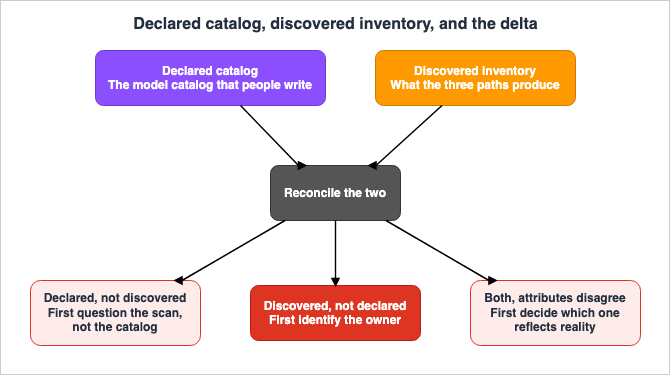
8.2 Three Types of Discrepancies
Discrepancies fall into three categories. Because each type has a different meaning and requires a different approach, they should not be combined into a single list.The first type is declared but not discovered. The record lists the asset, but no scan finds it. Three causes account for this: someone already deleted the asset, the asset sits where the scan does not reach, or the detection never cleared the confidence threshold. Weighing only the first cause leads to declaring a live asset gone.
The second type is discovered but not declared. This is what this article is aimed at. An asset is running and nobody declared it. The cause is rarely malice; far more often it is friction in the procedure, or the declaration was simply forgotten. The trend in the count of this type is the only measure of whether the declaration procedure is healthy.
The third type is declared and discovered, with attributes that disagree. The catalog says version A; the scan returns version B. This type of discrepancy often leads to subtle errors. Decisions based solely on the records may be applied to an outdated model, resulting in incorrect judgments.
The table below sets out the three types.
| Type | Declared | Discovered | Primary Causes | First Thing to Do |
|---|---|---|---|---|
| First | Yes | No | Already deleted, outside scan range, below threshold | Look for a deletion record. If none exists, suspect that the scan does not reach it. |
| Second | No | Yes | Procedural friction, oversight | Identify the owner. The suspension decision comes after that. |
| Third | Yes | Yes | Forgotten updates, granularity that differs by path | Decide which one reflects reality, not which one is newer. |
8.3 Handling Discrepancies
After identifying discrepancies, many organizations initially make the mistake of treating these instances as violations.Treating undeclared assets as violations can lead to fewer declarations being made. Fewer declarations result in an increase in instances of the second type (discrepancies). Handle that increase too strictly and the assets simply move to places the scan does not reach. In organizations caught in this cycle, the accuracy of the inventory will continue to decline.
The correct order of action should be as follows:
- Identify the owner. Trace the account or tag back to the individual responsible for it, based on its operational context. Assets for which an owner cannot be identified represent the highest priority issue.
- Create declarations retrospectively. Based on the findings, create a record entry and have the owner fill in only the missing fields, as outlined in section 7.2. Do not require them to start from scratch.
- Determine whether to suspend operations. This decision should be made in agreement between the owner and the control team. The inventory serves as information to inform the decision, but is not the decision itself.
- Assess the friction in the process. If the second type (discrepancies) repeatedly emerge from the same team, the problem lies in the declaration process, not the team.
For the first type and the third type, begin by questioning the scan rather than the catalog. As seen in sections 3 through 5, there are many potential blind spots in the discovery process. There is always a possibility that the record is simply accurate, and the scan is not reaching all relevant areas.
8.4 Not Aiming for Zero Discrepancies
Setting a goal of zero discrepancies can render an inventory useless the moment it is achieved. Discrepancies disappear in only two situations: when both sides are built from the same source, or when scanning has stopped.A more realistic set of goals consists of three points: First, the number of records of the second type should decrease over time. Second, the average retention time for these records should be short. Third, the number of assets with unknown ownership should be zero.
Regarding the third point only, it is acceptable to set an absolute value. Assets with unknown ownership cannot be controlled, scanned, or updated. Within the inventory, this is the only record type for which setting a numerical target makes sense.
9. Addressing Obsolescence
9.1 Three Rates at Which the Inventory Degrades
Each column within the inventory degrades at a different rate. Treating all columns with the same update frequency can lead to a significant increase in overall update costs, as the faster-changing columns drive up the workload.| Rate | Corresponding Columns | Cause of Degradation |
|---|---|---|
| Minutes to Hours | Operational status, call status | Assets start and stop |
| Days to Weeks | Deployment location, instance, version | Deployments move |
| Months to Years | Source, training data characteristics, intended use, license | The nature of the asset itself does not change |
The columns that degrade most quickly should not be directly managed by humans. As described in section 9.2, these should be used as references to the results of discovery. It is more accurate for humans to manage the columns that degrade most slowly, because no scan yields that information.
The columns with intermediate degradation rates present the most significant design challenges. Deployment is automated while the catalog update stays manual, and that pairing produces the most discrepancies. Whether the inventory update process can be integrated into the deployment automation will determine the dividing line for this layer.
However, the discovery process itself also has inherent limitations. Amazon Inspector collects the software inventory that Path 2 reads, and it does so on a schedule. The collection frequency is determined by the scanning method, and the methods accepted by Path 2 have already been narrowed down in section 4.2. Regarding the agent-based method, where the Amazon Inspector VM Scanner is running, the user guide states:
Once installed, the scanner executes periodically (every 3 hours by default) and sends results
to the Amazon Inspector Telemetry Service.
For methods that do not use agents, the interval is the 24 hours stated in section 4.3. Any changes that appear and disappear within this collection interval will, by their very nature, not be reflected in the inventory that Path 2 produces. An asset that starts up briefly, performs an inference, and then shuts down may not be detected at all between two collection cycles. Because the interval is determined by the scanning method, organizations that use a mixed approach will end up with two different freshness figures, and a report based on only one of them describes only a portion of the environment.
The legacy Amazon Inspector SSM plugin collects data every six hours instead, and this interval can be shortened by modifying the Systems Manager association. The user guide warns against shortening this interval excessively.
Depending on your use case, if you set the rate for schedule-expression from 6 hours to an
interval like 30 minutes, you can exceed the daily ssm inventory limit. This causes results to
be delayed, and you might encounter Amazon EC2 instances with partial error statuses.
Shortening the interval does not necessarily guarantee increased freshness. Once collection crosses the limit, results arrive late and instances end up in partial error states. This plugin is not among the configurations that Path 2 accepts, so this warning does not represent a limit for Path 2. Nevertheless, it is worth noting. What sets the freshness of the inventory is not how often collection runs, but how often it finishes, and this principle remains true regardless of the scanner used.
9.2 Where to Automate Updates
Automation belongs in three places.First, obtaining the results of discovery. Security Hub can retrieve the inventory via API. The user guide lists two operations:
You can retrieve AI inventory data programmatically with the GetResourcesV2 and
GetResourcesStatisticsV2 operations.
There are limitations when filtering down to AI assets. It is not possible to filter solely by subcategory, and the same constraint applies to grouping in the statistics operation.
When you use GetResourcesV2 and filter by ResourceSubCategory, you must also include a
ResourceCategory filter. Set the comparison to EQUALS and the value to AI/ML. This requirement
also applies when you group by ResourceSubCategory, ResourceInfo.AIDetails.HostResourceType, or
ResourceInfo.AIDetails.CanonicalId in GetResourcesStatisticsV2. Otherwise, the operation returns
a ValidationException.
The filter format is as follows:
{
    "Filters": {
        "CompositeFilters": [
            {
                "Operator": "AND",
                "StringFilters": [
                    {
                        "FieldName": "ResourceCategory",
                        "Filter": {
                            "Comparison": "EQUALS",
                            "Value": "AI/ML"
                        }
                    },
                    {
                        "FieldName": "ResourceSubCategory",
                        "Filter": {
                            "Comparison": "EQUALS",
                            "Value": "Model"
                        }
                    }
                ]
            }
        ]
    }
}
The value of this second filter is where section 4.1 becomes relevant. While the example uses
Model, the seven subcategory values do not correspond to the four resource types listed in the user guide. Querying with Agent does not return AgentFramework or AgentToolsAndIdentity. Therefore, the retrieval process should be written based on the subcategory list in the API reference, rather than the resource type list in the user guide.Second, retrieval that fills the gaps between paths. As mentioned in section 6.4, Bedrock agents and custom models do not appear in the configuration data path. Call the API directly and merge the results. Record on the inventory side that the merge happened. Otherwise the results blend into the Path 1 output and their origin disappears. Each entry in the inventory should indicate which path provided the data.
Third, calculating discrepancies. The process of comparing the declared records with the discovery results and categorizing them into the three types described in section 8.2 is entirely mechanical. Manual review is infrequent, and infrequent reviews lead to accumulating discrepancies that become unmanageable.
9.3 Parts That Should Be Handled Manually
There are certain parts that should not be automated.Identifying the owner cannot be automated. Tags sometimes yield the owner mechanically, but the tags themselves go stale. A person confirms the owner and a person records it.
Describing intended use and limitations cannot be automated. This involves making judgments, and judgments can only be expressed in written form.
Decisions regarding suspension should not be automated. Implementing a system that suspends assets solely based on a lack of declaration would directly lead to the cyclical issue described in section 8.3.
The decision to accept or reject blank fields must also be made by a person. As stated at the end of section 6.4, record every blank you decided not to fill as a decision. Without such a record, the next responsible party will have to repeat the same evaluation.
9.4 Connecting with Model End-of-Life Announcements
One of the most valuable situations for an inventory is when it receives an announcement that a particular model's support is ending. It is only when the inventory possesses version information that it can accurately assess the impact.A published article, AI Model Deprecation and Lifecycle Calendar, addresses the end-of-life dates for each vendor and the varying interpretations of those dates across vendors. Because the article provides the definitive source for those dates, they are not repeated here. Instead, this article focuses solely on the necessary connection points.
The inventory should prepare three key pieces of information. First, a unique identifier, including version information. Second, a list of locations where that specific version is currently in use. Third, a list of owners who can provide information about that version. With those three in place, an end-of-life announcement mechanically yields the list of what to do. Without them, you will be starting the stocktake only after the notice arrives.
10. Design Checklist
Definitions- Are you using different names to refer to the list of available models, the approved model catalog, and the inventory of running assets?
- Have you defined what each line in the inventory represents (e.g., model version, deployment location)?
Discovery Paths
- Have you verified which of the three paths are actually running in your environment?
- For Path 1, does the AWS Config recording scope include resources related to AI?
- For Path 2, is the EC2 scanning using enhanced scanning mode, an agentless method, or a combination of both?
- For Path 2, are the model locations either the default cache or registered additional paths?
- For Path 2, is the number of additional paths manageable (five for the account itself, and five applied uniformly across the entire organization; the organization-level paths are the same for all accounts)?
- For Path 2, have you confirmed that the added paths do not push against the package count and collection time limits?
- For Path 3, is the DNS query passing through AWS resolvers?
Identifying Blind Spots
- Have you incorporated the fact that models on shared file systems are excluded from the scan into the location design?
- Are you using alternative methods to track external AI API calls from Lambda and Fargate?
- Are you directly retrieving Bedrock agents and custom models via API and integrating them?
- Have you verified in your actual environment how EKS-based inference servers are identified (due to discrepancies in section 6.1, this cannot be determined solely from documentation)?
- Have you recorded, as a decision, each gap you chose not to fill?
Record Details
- Does the inventory carry columns for source, version, training data characteristics, intended use and limitations, license, owner, and classification?
- Are you documenting scenarios where the model should not be used?
- Are you keeping people from transcribing values that the discovery side already holds?
- Do you hold the license identifier and the suitability judgment separately?
Reconciliation
- Are you regularly and mechanically comparing the declared catalog with the discovery results?
- Are you categorizing discrepancies into three types?
- Are you avoiding treating undeclared assets as violations?
- Is the number of assets with unknown ownership zero?
Obsolescence
- Are the fastest-degrading columns kept out of human hands?
- Does each line in the inventory indicate which discovery path provided the information?
- Does the description of freshness include the fact that assets with lifespans shorter than the collection interval are not included in the inventory, and that the interval for Path 2 aligns with the scanning method?
- Is the structure designed to allow you to derive the impact scope from end-of-service notifications?
- Have you included regular re-validation of any external documents that provide the basis for the discovery scope?
Operational Notes
- Are you avoiding ordering the inventory by finding count alone (self-hosted assets carry no findings)?
- Are you keeping host-level totals and organization-wide totals apart (ECR images are not attributed to a host)?
- Are you refusing to read a zero external endpoint count as proof that nothing is being called?
11. Frequently Asked Questions
Are there any additional services that need to be enabled to use the AI inventory?
Yes, for two of the three paths. The AI inventory itself needs nothing: the Security Hub FAQ states that it requires no additional opt-in, enablement, or permissions. Path 2 and Path 3, however, rest on other services. To detect self-hosted assets, Amazon Inspector is required, and for EC2 instances the account has to run agent-based scanning in enhanced scanning mode, agentless scanning, or hybrid scanning. To detect external endpoints, Amazon GuardDuty is required. Whether the feature needs enabling and whether a path can run are two separate questions.If the inventory shows no results, can you assume that there are no AI assets?
No. As described in section 3.3, a resource type outside the AWS Config recording scope never reaches Path 1. As described in section 4.2, if the scanning method does not meet the requirements, Path 2 will not function. As described in section 5.2, if you are using your own DNS resolver, Path 3 will not function. An empty result can mean either that there are no assets, or that a particular path is not functioning. Verify the functionality of each path before drawing any conclusions.If the same model is running on multiple instances, how many do you count?
It depends on the purpose. Security Hub has the concept of a canonical ID, which groups the same asset together regardless of where it is running. When determining the scope of a product end-of-life, you should count by model version. When identifying targets for shutdown operations, you should count by instance location. The inventory should be structured to accommodate both counting methods.Are model weights placed on shared storage detected?
No, they are not. The Amazon Inspector documentation states that any additional paths must be local, and it does not scan network file systems or mounts of object storage. This can result in a situation where the inference server is detected, but the model itself is not. The most reliable solution is to standardize the model's location beforehand.When calling external AI APIs from a Lambda function, will it appear in the inventory?
No. Security Hub only detects external endpoints based on DNS activity on EC2 instances. It explicitly states that calls originating from managed compute resources such as Fargate, Lambda, SageMaker, and EKS are not attributed. Relying solely on the inventory to identify external dependencies is not a viable approach. Aggregating outbound traffic at a central point and recording it there takes a separate mechanism.What happens if you are running inference servers on EKS?
As mentioned in section 6.1, there are inconsistencies in the AWS documentation. The Security Hub user guide limits support for self-hosted detection to EC2 instances and ECR images, explicitly excluding EKS from endpoint attribution. Conversely, the AWS Security Blog includes EKS in the supported scope. This article follows the user guide, but the behavior is worth confirming in a real environment. A quick way to confirm is to observe what appears on the EC2 instances that serve as worker nodes.Is an inventory still needed once model cards exist?
Yes. Model cards are a declaration from the creator, and they only contain the information the creator has documented. An asset nobody documented never reaches a model card either. The value of an inventory lies in its ability to identify assets that are not included in model cards. Conversely, an inventory alone is not sufficient. As mentioned in section 7.2, many columns remain unfilled even after scanning, and model cards play a role in filling those gaps. Both are necessary.If you discover an undeclared asset, what should you do first?
The priority is to identify the owner. It is neither a suspension nor a reprimand. As described in section 8.3, treating undeclared assets as violations starts a cycle in which declarations fall and the accuracy of the inventory keeps dropping. Instead, identify the owner, use the discovery as an initial value to create a record in the catalog, and then fill in any missing information that cannot be obtained through automated scans. The decision on whether to suspend further action should be made later.How current is the inventory data?
The freshness varies depending on the path, as the slowest path determines the overall freshness. Path 1 follows the recorded configuration information. Path 2 runs continuously when agents are in use, as described in section 4.3, while agentless scans repeat every 24 hours. Furthermore, as outlined in section 9.1, the process of collecting the software inventory that Path 2 reads runs on a periodic basis; by default, this is every three hours with Enhanced EC2 Scanning. Path 3 only detects assets when communication occurs, so assets that are not actively communicating will not be displayed. When using the inventory data in reports, it is essential to clearly specify the data's timestamp for each path.Can you determine whether the license for a specific model is suitable for your intended use by checking the inventory?
No. The inventory should hold the license identifier and nothing more. The assessment of suitability is part of the legal review process. As stated in section 7.5, the technical team is responsible for three things: recording the identifier, ensuring that the identifier corresponds one-to-one with the identified asset, and detecting when an identifier changes. If the assessment itself were recorded in the inventory, only the conclusion would remain, even after the reasoning behind it is lost.12. Summary
The argument of this article comes down to one line: What cannot be discovered cannot be controlled. Therefore, a bill of materials for AI assets is not a document format but the design of the paths that enumerate those assets mechanically from the running environment.AWS made three such paths generally available in July 2026: taking stock from configuration data, detection from the composition of artifacts, and detection from network traffic. Each path captures a different category of asset and carries its own blind spots.
The shape of each blind spot is stated in AWS's own documentation. The configuration data path is bound by the AWS Config resource type list, and Bedrock agents, custom models, and SageMaker model cards are absent from it. The composition path is bound by the directories it scans, so models on a shared file system fall outside it. The network traffic path is bound by the DNS resolver and by caller attribution, so calls from Lambda and Fargate are not attributed.
Even stacked together, the three paths still leave gaps. It is not necessary to fill every single gap, but decisions should not be based solely on the inventory without understanding where those gaps exist. Gaps that are intentionally left unfilled should be documented as such.
The value of a bill of materials sits in the gap between what people declared and what the scan found. A clean match is not the deliverable. The value is in finding assets that the catalog does not list. When the scan turns one up, do not treat it as a violation. Identify the owner, then build the catalog retroactively from the discovery result. Only an organization that keeps that order ends up with an inventory whose discrepancy count falls over time.
A closing note on how facts were confirmed. Writing this article turned up six inconsistencies inside AWS's own documentation. They concerned the scope of support for self-hosted assets, the number of additional scan paths, the length of those paths, how many discovery methods to count, how many kinds of self-hosted asset the service distinguishes, and which directories the default scan visits.
One pattern held across five of the six: A document written to state constraints is the most accurate; a document written to convey what a feature does is the least. The sixth ran differently, and it is the one most likely to catch a careful reader. Two pages were each correct about a different scanner, and the only thing separating them was a scoping note at the top of one of them. Specifications that directly impact design decisions, such as those related to discovery scope, require careful cross-referencing between overview pages, user guides, and reference documentation. Had this article stopped at the blog post, it would have stated that inference servers on EKS are discovered automatically.
Furthermore, this article itself experienced a striking event that demonstrated its core message. The AWS document that the first version cited as grounds is gone. The solution it belonged to has been discontinued, and the page was still reachable on August 14, 2026, two days before the first confirmation pass. The core argument was unaffected, because it rests on the primary source directly. What the episode makes plain is that any reliance on external documentation means the grounds decay at the same rate as those documents. Just as inventories can become outdated, so too can the rationale behind their design. Both need re-confirmation on a schedule, and the design has to make room for it.
13. References
- AWS Security Hub User Guide - AI Inventory in Security Hub
- AWS Security Hub User Guide - What is AWS Security Hub
- AWS Security Hub FAQs
- AWS Security Hub Features
- AWS Security Hub API Reference - AIDetails
- AWS What's New - AWS Security Hub now provides AI inventory for organization-wide visibility of AI assets
- AWS Security Blog - Security Hub adds AI workload protection and multicloud support for Microsoft Azure
- AWS Config Developer Guide - Supported Resource Types for AWS Config
- AWS Config Developer Guide - Querying the Current Configuration State of AWS Resources
- Workload Discovery on AWS - Notice of discontinuation
- Amazon Inspector User Guide - Exporting SBOMs with Amazon Inspector
- Amazon Inspector User Guide - Scanning Amazon EC2 instances with Amazon Inspector
- Amazon Inspector User Guide - Amazon Inspector deep inspection for Linux-based Amazon EC2 instances
- Amazon Inspector User Guide - Amazon Inspector VM Scanner
- Amazon Inspector User Guide - Enabling Inspector VM Scanner
- Amazon Inspector User Guide - Scanning Amazon Elastic Container Registry container images with Amazon Inspector
- Amazon Inspector console help - Deep inspection
- Amazon Inspector console help - Scan mode
- Amazon Inspector API Reference - UpdateEc2DeepInspectionConfiguration
- Amazon GuardDuty User Guide - GuardDuty foundational data sources
- Amazon GuardDuty User Guide - GuardDuty AI Protection
- Amazon GuardDuty User Guide - GuardDuty AI Protection finding types
- AWS Well-Architected Generative AI Lens - GENREL04-BP02 Implement a model catalog
- AWS Well-Architected Generative AI Lens - Appendix A: Best practice lifecycle mapping
- Amazon SageMaker AI Developer Guide - Amazon SageMaker Model Cards
- Amazon SageMaker AI Developer Guide - Model governance
- AWS CloudFormation Template Reference - AWS::SageMaker::ModelCard
- Amazon Bedrock console help - Model catalog
References:
Tech Blog with curated related content
Written by Hidekazu Konishi