Amazon GuardDuty Extended Threat Detection Architecture - Attack Sequences, Runtime Monitoring, and Response Automation
First Published:
Last Updated:
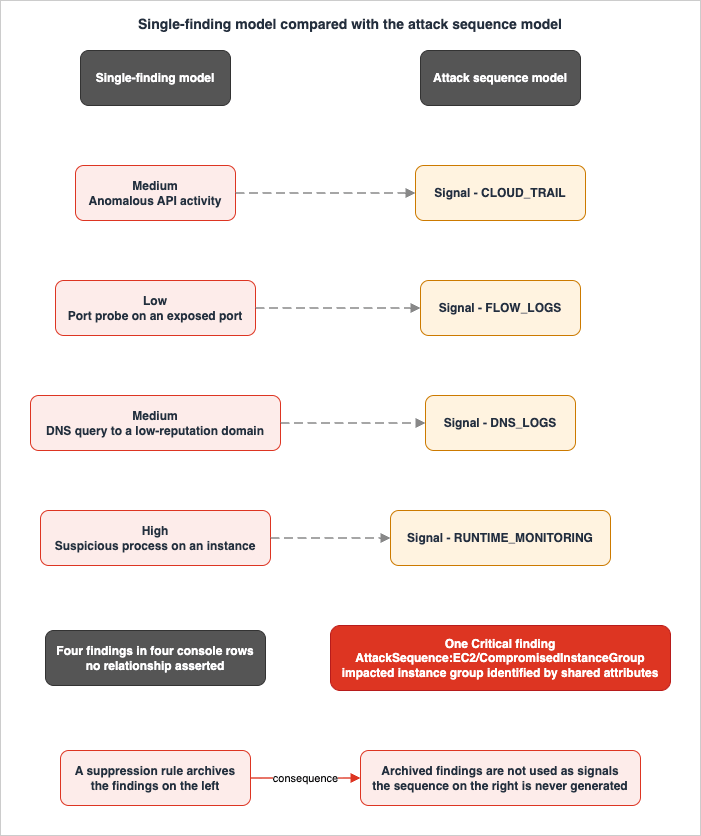
The difference is not cosmetic. A single finding answers "something odd happened to this resource." An attack sequence answers "these events, in this order, by this actor, against these resources, look like one intrusion in progress." Those two outputs demand different detection architectures, different pipelines, different automation, and — the point most teams miss — different tuning discipline, because the noise-reduction techniques that work well against individual findings actively degrade sequence detection.
This article is about designing for the second model. It covers what GuardDuty actually correlates and what it does not, which protection plans widen the correlation surface, when Runtime Monitoring earns its operational cost, how the multi-account topology has to be laid out, how findings get from GuardDuty to something that acts on them, how to build response automation that can be reversed when it fires on a false positive, and how to suppress noise without going blind.
Everything below was verified against AWS documentation on 2026-08-04. Finding type names, API enumerations, and quotas are quoted exactly as AWS publishes them; where a number is a default service quota, re-check it before designing against it.
1. Introduction: What This Article Covers, and Where It Stops
1.1 The problem with the single-finding model
GuardDuty has always generated findings that are individually reasonable and collectively unhelpful at scale. ARecon:EC2/Portscan here, an anomalous API call there, a DNS query to a low-reputation domain somewhere else. Each is real. Each is, on its own, ambiguous. The analyst's job in that model is to hold several weak observations in working memory long enough to notice they belong together — across accounts, across days, across a console that sorts by severity rather than by story.AWS describes the raw material for this explicitly. GuardDuty calls events that "on their own, don't present themselves as a clear potential threat" weak signals, and Extended Threat Detection exists to "identify when a sequence of multiple actions align to a potentially suspicious activity" and emit one finding for the whole thing. The correlation inputs include both those weak signals and findings GuardDuty had already generated independently.
The practical consequence is that the highest-value output of GuardDuty is no longer the finding with the highest severity in isolation — it is the finding that says other findings are related. Detection architecture should be built to make that correlation possible, to route its output differently from ordinary findings, and to avoid quietly destroying its inputs.
1.2 What this article covers
Section 2 establishes the correlation model: what counts as a signal, what the time window is, and what the severity means. Section 3 maps signal sources to protection plans and states which plans widen which sequences. Section 4 covers Runtime Monitoring — the one protection plan with a real deployment footprint — and how to decide whether you need it. Section 5 is the anatomy of an attack sequence, including the grouping attributes that make EC2 sequence detection work and the cross-service enrichment that AWS added in 2026. Section 6 covers multi-account topology. Section 7 covers the findings pipeline. Section 8 covers response automation, including reversal. Section 9 covers triage order. Section 10 covers tuning. Section 11 collects failure modes.1.3 What it deliberately does not cover
Three subjects have a home elsewhere on this site, and duplicating them here would produce a worse version of each:- What you do after triage. Containment, evidence preservation, eradication, and recovery are covered scenario by scenario in my AWS Security Incident Response Playbooks - First-Response Runbooks for Common Scenarios. This article stops at the boundary where a human takes over: which attributes you read first, and what the automation is permitted to do in the meantime. Layer-specific triage decision trees are in Incident Triage Flowcharts - Network, DB, and Application Layer.
- Log aggregation and audit trails. Organization trails, AWS Config aggregators, the log archive account, immutability, and query paths are covered in Centralized Logging and Audit Architecture on AWS - Multi-Account Log Aggregation, Detection, and Query with CloudTrail, Config, Security Hub, and OpenSearch. Section 3.1 explains why GuardDuty's relationship to your logging platform is looser than most people assume, and then leaves the platform itself alone.
- Container runtime detection in depth. GuardDuty emits attack sequence findings for Amazon EKS and Amazon ECS. They appear in the tables below because omitting them would misrepresent the finding type list, but the container-specific design questions — cluster topology, admission control, task-level isolation — are out of scope here.
The third of those now has an article of its own. Workload Isolation Levels on Amazon EKS takes task-level isolation as its subject and separates it into four levels — namespaces and RBAC, Pod Security Standards, user namespaces, and RuntimeClass — naming what each level does not stop. Next to it, eBPF on Amazon EKS opens the kernel layer of an EKS node from both sides — the eBPF program that enforces network policy through TC hooks, and the GuardDuty agent that observes through tracepoints and kprobes — and maps which compute types the agent reaches and which it does not.
Also out of scope, by site policy and by the nature of the subject: pricing (protection plan selection is argued below on data source, visibility, operational burden, and finding volume — never on cost), attack reproduction detail (threat descriptions stay within what AWS publishes), and independent threat or severity assessment (severity is whatever GuardDuty assigns; this article does not second-guess it).
1.4 A note on what detection guarantees
Nothing in this article should be read as "turn this on and you will detect X." GuardDuty evaluates specific inputs with undisclosed proprietary correlation algorithms and produces findings when its models fire. The honest formulation is: here is what gets fed in, here is what gets evaluated, and here are the conditions under which nothing will be produced at all. Those conditions recur throughout — a protection plan that is off, an agent that was never deployed, activity that falls outside the correlation window, and findings that a suppression rule has already archived. Section 11 collects them.2. From Findings to Attack Sequences
2.1 What counts as a signal
The GuardDuty API is unusually specific about correlation inputs, which is helpful because it lets you reason about coverage without guessing. TheSignal object carries a type field with exactly seven valid values:* You can sort the table by clicking on the column name.
Signal.type | What it represents | Available when |
|---|---|---|
FINDING | An individually generated GuardDuty finding | Always; breadth depends on which protection plans are on |
CLOUD_TRAIL | Activity observed from CloudTrail logs | Always (foundational) |
S3_DATA_EVENTS | Activity from CloudTrail data events for S3 | Only with S3 Protection enabled |
EKS_AUDIT_LOGS | Kubernetes audit log activity | Only with EKS Protection enabled |
FLOW_LOGS | VPC Flow Logs activity | Always (foundational) |
DNS_LOGS | Route 53 Resolver DNS query log activity | Always (foundational) |
RUNTIME_MONITORING | Operating-system-level runtime activity | Only with Runtime Monitoring enabled and an agent deployed |
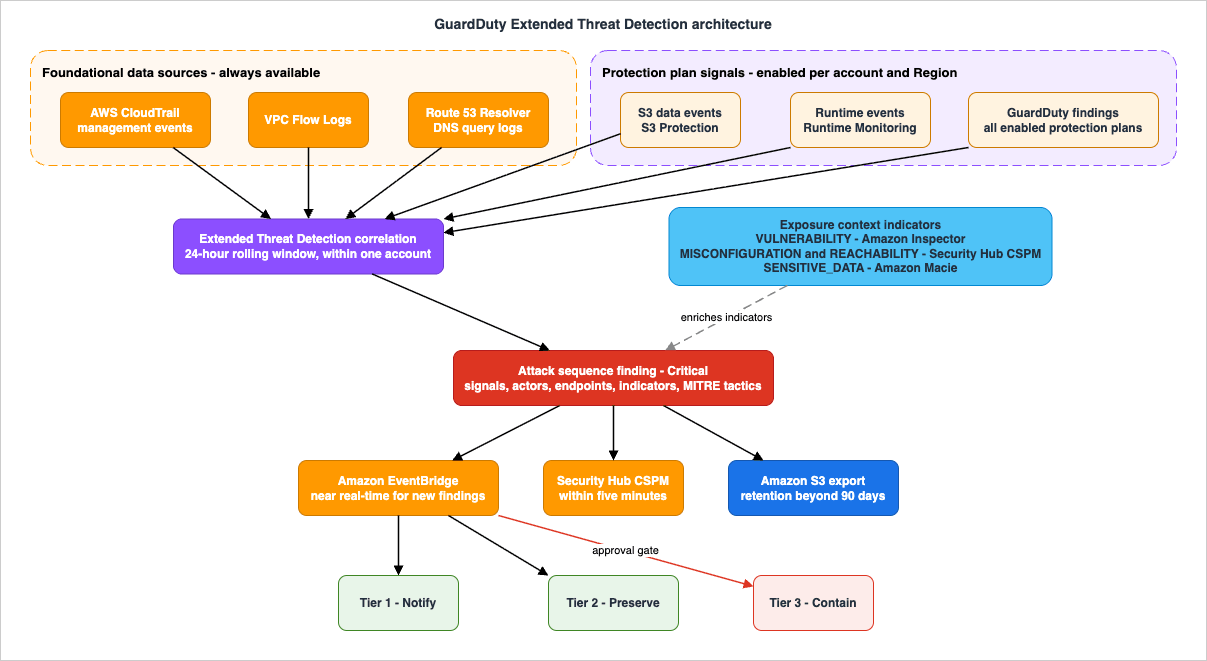
Read that table as a coverage map rather than a feature list. Three of the seven signal types are available to every account that has GuardDuty on. The other four are gated behind a protection plan, and one of those four is additionally gated behind agent deployment. The set of sequences GuardDuty can possibly construct in your account is bounded by which rows are live.
The
Signal object also carries count, firstSeenAt, lastSeenAt, severity, actorIds, endpointIds, resourceUids, and signalIndicators. In other words, a signal is not a bare event — it is an aggregated observation with its own timeline, its own actors, and its own indicators, which is what makes the sequence view legible when you open it.2.2 Weak signals and why the correlation is the product
GuardDuty describes individual API activities as weak signals "because they don't present themselves as potential threat." That phrasing is worth taking literally: many of the inputs to an attack sequence would never, on their own, generate a finding at all. They are not suppressed low-severity findings; they are observations below the threshold of being findings.This is the structural reason attack sequences cannot be reproduced by post-processing your finding stream in a SIEM. A SIEM correlating GuardDuty findings can only correlate findings. Extended Threat Detection correlates findings plus the sub-finding activity that never crossed the reporting threshold. AWS states that Extended Threat Detection "uses artificial intelligence and machine learning algorithms trained at AWS scale to automatically correlate security signals."
That does not make downstream correlation useless — you still want cross-service context that GuardDuty does not have. It does mean that turning off the protection plans and rebuilding correlation yourself is not a like-for-like substitution.
2.3 The time window, and what falls outside it
GuardDuty is "designed to identify potential in-progress or recent attack behaviors (within a 24-hour rolling time window)."Twenty-four hours is generous for a smash-and-grab and short for a patient adversary. An intrusion whose stages are separated by a week is not going to be assembled into one sequence, and no amount of protection plan enablement changes that. This is the clearest example of the "detection does not happen" cases that need to stay visible in your design: slow campaigns are a longitudinal analysis problem for your log platform, not an Extended Threat Detection problem.
The window also has an operational implication for response. If a sequence is emitted, AWS's model is that the activity is in progress or very recent. That justifies treating attack sequence findings as a distinct routing class in Section 7 — they carry an implicit freshness claim that a 60-day-old archived finding does not.
2.4 Severity is assigned, not derived
Every attack sequence finding type carries a default severity of Critical, and GuardDuty is explicit about why: "Because of the nature of the associated threat scenarios, GuardDuty considers all Attack sequence finding types as Critical."GuardDuty's severity scale runs from 1.0 to 10.0, divided into four bands:
| Severity level | Value range | AWS's description |
|---|---|---|
| Critical | 9.0 - 10.0 | An attack sequence may be in progress or had recently happened |
| High | 7.0 - 8.9 | The resource in question is compromised and is actively being used for unauthorized purposes |
| Medium | 4.0 - 6.9 | Suspicious activity that deviates from normally observed behavior |
| Low | 1.0 - 3.9 | Attempted suspicious activity that did not compromise your environment |
Note that AWS's own definition of the Critical band is written in terms of attack sequences. This is a useful anchor for alert routing: if your paging policy treats Critical as "wake someone up," that policy and GuardDuty's severity model agree by construction, and you do not need to invent a local severity mapping. Building your own scoring layer on top is a common instinct and a poor one — it means the number your responders see is one you have to defend, and it drifts from AWS's as detections evolve.
3. Signal Sources and Protection Plans
3.1 The foundational data sources, and their independence from your logging platform
When GuardDuty is enabled in a Region, it automatically begins consuming three foundational data sources:| Foundational data source | What GuardDuty consumes | Your configuration's role |
|---|---|---|
| AWS CloudTrail management events | Control-plane API activity, consumed "directly from CloudTrail through an independent and duplicated stream of events" | None. GuardDuty "does not manage your CloudTrail events or affect your existing CloudTrail configurations," and your configuration does not affect GuardDuty |
| VPC Flow Logs | IP traffic to and from EC2 instance network interfaces, via "an independent and duplicate stream of flow logs" | None. "You don't need to create or configure VPC flow logs in your account for GuardDuty to access this data" |
| Route 53 Resolver DNS query logs | Request and response DNS query logs, but only when instances use the AWS DNS resolvers | Indirect but decisive — see below |
Two design consequences follow, and they run in opposite directions.
The first is reassuring: GuardDuty's foundational detection does not depend on your log aggregation architecture. If someone deletes your organization trail, GuardDuty keeps seeing management events. This is why the boundary with Centralized Logging and Audit Architecture on AWS is clean rather than arbitrary: that platform exists for retention, audit, and investigation, and this one exists for detection. They share subject matter and almost no plumbing. It is also why "the attacker disabled logging" is a signal rather than a blindness event — GuardDuty can observe the
StopLogging call through its own stream while your trail stops receiving anything.The second is a real gap: DNS visibility is contingent on your resolver choice. AWS is explicit that "if you use another DNS resolver, such as OpenDNS or GoogleDNS, or if you set up your own DNS resolvers, then GuardDuty cannot access and process data from this data source." An environment that has standardized on a third-party resolver has silently removed
DNS_LOGS from Section 2.1's table — which removes an input from EKS and EC2 sequence construction. GuardDuty also does not support DNS log monitoring for EC2 instances launched on AWS Outposts, because Route 53 Resolver query logging is unavailable there. Neither gap produces an error message. Both are worth an explicit inventory item.3.2 The protection plans
The following table reproduces the protection plans and AWS's descriptions of them as published in the GuardDuty User Guide. Confirmed 2026-08-04. Inclusion criterion: every plan listed in the "Use-case focused GuardDuty protection plans" table in "What is Amazon GuardDuty?" on that date, in the order AWS lists them. GuardDuty adds plans regularly — AI Protection was recorded in the document history on July 13, 2026 — so treat this as a dated snapshot, not a permanent list.* You can sort the table by clicking on the column name.
| Protection plan | What it analyzes (AWS's description) | Adds to sequence correlation |
|---|---|---|
| AI Protection | Threats to AI workloads that use Amazon Bedrock, Amazon Bedrock AgentCore, and Amazon SageMaker AI, such as anomalous model invocations and cost harvesting attacks | Findings only, as FINDING signals |
| S3 Protection | Data exfiltration and destruction attempts in Amazon S3 buckets | S3_DATA_EVENTS signals; required for S3 sequences |
| EKS Protection | Kubernetes audit logs from Amazon EKS clusters | EKS_AUDIT_LOGS signals; one of two paths to EKS sequences |
| Runtime Monitoring | Operating-system-level events on Amazon EKS, Amazon EC2, and Amazon ECS including AWS Fargate | RUNTIME_MONITORING signals; recommended for EC2, required for ECS |
| Malware Protection for EC2 | Scans the Amazon EBS volumes associated with Amazon EC2 instances | Findings that appear as data sources for EC2 and ECS sequences |
| Malware Protection for S3 | Newly uploaded objects within Amazon S3 buckets | Findings only |
| Malware Protection for AWS Backup | Backup resources including EBS snapshots, EC2 AMIs, and AWS Backup recovery points | Findings only |
| RDS Protection | RDS login activity for supported Amazon Aurora and Amazon RDS databases | Findings only |
| Lambda Protection | Lambda network activity logs, starting with VPC Flow Logs | Findings only |
Two enablement behaviors matter more than the list itself, and both are documented:
- When you enable GuardDuty for the first time, GuardDuty automatically enables all protection plans except Runtime Monitoring.
- If you are an existing customer, a protection plan that launches after you enabled GuardDuty is not enabled automatically.
Rule 2 is the one that bites. An account that turned GuardDuty on in 2023 does not have AI Protection or Malware Protection for AWS Backup today unless someone went and enabled them. The set of plans in a mature environment is therefore a function of when each account was onboarded, not of any decision anyone made. Auditing protection plan state per account, per Region is a standing operational task, not a one-off.
AI Protection itself produces three finding types —
Impact:IAMUser/AnomalousModelInvocation, Impact:IAMUser/CostHarvesting, and Impact:IAMUser/PromptInjection.Direct — and the Resource type on all three is AccessKey, so the identity a finding names is the caller rather than the model. What each type requires before it can fire, and the blind spots that remain, are covered in Threat Detection for AI Workloads on AWS.3.3 Which plans open which sequences
This is the table that actually drives enablement decisions, and it is worth being precise because AWS's requirements differ per sequence type:| Attack sequence finding type | Foundational alone | What AWS requires or recommends |
|---|---|---|
AttackSequence:IAM/CompromisedCredentials | Yes | Nothing additional; data source is CloudTrail management events |
AttackSequence:S3/CompromisedData | Partially | Without S3 Protection, GuardDuty can detect that a bucket policy became overly permissive. With S3 Protection it "gains the ability to detect potential data exfiltration activities that may occur after your S3 bucket becomes overly permissive" |
AttackSequence:EC2/CompromisedInstanceGroup | Yes | Runtime Monitoring is recommended, not required. AWS: "To enhance Extended Threat Detection for EC2 detection capabilities, enable Runtime Monitoring" |
AttackSequence:EKS/CompromisedCluster | No | At least one of EKS Protection or Runtime Monitoring with the EKS add-on; both recommended |
AttackSequence:ECS/CompromisedCluster | No | Required: Runtime Monitoring for Fargate or EC2 depending on infrastructure type. AWS notes ECS on Managed EC2 instances is not supported |
The EC2 row is the interesting one and the reason this batch of the sequence family matters for non-container estates.
AttackSequence:EC2/CompromisedInstanceGroup will fire on foundational signals alone — VPC Flow Logs and DNS logs are listed among its data sources — so an account with no agents anywhere still gets some EC2 sequence coverage. Runtime Monitoring makes those sequences more complete rather than making them possible. That distinction determines whether Runtime Monitoring is a prerequisite or an investment, which is Section 4's subject.3.4 Global service events and the multi-Region argument
GuardDuty replicates CloudTrail Global Service Events — events from services such as IAM, AWS STS, Amazon S3, Amazon CloudFront, and Amazon Route 53 — and "processes them in each Region where you have enabled GuardDuty," in order to maintain user and role profiles per Region.This produces one confusing artifact and one architectural instruction.
The artifact: for findings generated from global service events, the
Region value in the finding may differ from the Region where GuardDuty created the detection. A finding can read us-east-1 even though the detection happened elsewhere. Anyone writing Region-based routing or filtering logic needs to know this before they debug it at 3 a.m.The instruction: AWS recommends enabling GuardDuty in all available Regions, including ones you do not use, on the reasoning that "threat actors can potentially launch attacks through global services" and "attempt to create unauthorized resources to exploit Regions where you have limited presence." An unused Region with GuardDuty off is not a quiet Region — it is an unobserved one. Since Extended Threat Detection correlates within an AWS account and is enabled automatically wherever GuardDuty is on, per-Region enablement is also per-Region sequence coverage.
4. Runtime Monitoring: What It Adds and How to Decide
4.1 What becomes visible
Runtime Monitoring "observes and analyzes operating system-level, networking, and file events." Concretely, the GuardDuty security agent "adds visibility into runtime behavior, such as file access, process execution, command line arguments, and network connections."For Extended Threat Detection specifically, AWS describes the combination as complementary rather than additive: foundational GuardDuty "monitors CloudTrail and network activity," Runtime Monitoring "observes process behaviors and system calls within instances," and correlating both "allows GuardDuty to detect sophisticated attack sequences such as unauthorized access through misconfigured credentials, privilege escalation attempts, and unauthorized access to sensitive data."
The detection catalog keeps growing in this direction. On July 1, 2026 AWS announced three sensitive-file-modification detections —
Persistence:Runtime/SensitiveFileModified, PrivilegeEscalation:Runtime/SensitiveFileModified, and DefenseEvasion:Runtime/SensitiveFileModified — which monitor five file operations (open-for-write, rename, symlink, link, and unlink) directly, and which AWS says "can detect threats even when attackers use obfuscated techniques that bypass traditional command-line monitoring." Detections of that shape exist only where an agent is running.4.2 The three deployment models and what each one does to your environment
Runtime Monitoring is a two-step feature: enable the plan, then manage the agent. For EC2, there are three ways to do the second step, and they differ substantially in footprint.Automated agent configuration (AWS's recommendation). You permit GuardDuty to install and update the agent. The side effects are documented and are not small:
- GuardDuty creates one SSM association covering EC2 instances that are SSM managed and appear under Fleet Manager. The association is named
GuardDutyRuntimeMonitoring-do-not-delete. - GuardDuty creates VPC endpoints in all VPCs, including shared VPCs, as long as there is at least one Linux EC2 instance in that VPC not in the terminated or shutting-down state. This covers both centralized and spoke VPCs; AWS explicitly states that creating a VPC endpoint only for the centralized VPC is not supported.
- Alongside each endpoint, GuardDuty creates a new security group and adds inbound rules matching the VPC CIDR range, adapting them when the CIDR range changes.
That third bullet is the one to socialize with your network team before enabling, not after. A detection feature that creates security groups and interface endpoints across every VPC in the account is a change that VPC-level change control should know about in advance.
GuardDuty-managed documents in AWS Systems Manager. You install the agent on instances that are already SSM managed, using GuardDuty managed documents. An Amazon-owned document named
AmazonGuardDuty-ConfigureRuntimeMonitoringSsmPlugin is available for this. This is the middle path: you keep control of rollout timing, and you still get SSM-based lifecycle management. Systems Manager fleet mechanics themselves are a large enough subject to have their own home, and this article does not restate them.RPM installation scripts. You install the agent with RPM scripts, whether or not the instance is SSM managed. This is the escape hatch for instances outside SSM's reach. Note that with manual management, creating the VPC endpoint is your prerequisite, not GuardDuty's job.
In every model the agent delivers events through a VPC endpoint so the data stays on the AWS network, and GuardDuty uses instance identity roles to authenticate the agent per resource type.
4.3 Staging the rollout with tags
The tag behavior is the mechanism that makes a phased rollout possible, and it has a non-obvious precedence rule:| Tag | Value | Effect |
|---|---|---|
GuardDutyManaged | true | Inclusion. GuardDuty manages the agent on this instance even when automated agent configuration is not explicitly enabled |
GuardDutyManaged | false | Exclusion. GuardDuty will "neither install nor manage" the agent on this instance, including when automated agent configuration is enabled |
The inclusion tag's behavior is the useful one for a controlled rollout: leave automated agent configuration off, tag a pilot fleet
GuardDutyManaged:true, and GuardDuty honors the tag and manages only those instances. Expand the tag, then flip the account-level setting once you are satisfied, keeping GuardDutyManaged:false on anything that must stay untouched.It is also the behavior most likely to surprise someone. A tag applied by a well-meaning engineer changes agent installation without any change to the GuardDuty configuration itself. If your organization treats tags as free-form metadata,
GuardDutyManaged is now a reserved key.4.4 The decision
Runtime Monitoring is the only protection plan in Section 3.2 with a deployment footprint — an agent per host, endpoints per VPC, security groups, and an SSM association. That cost is real and recurring; the agent is versioned and updated, with version 1.16.0 released for EKS, EC2, and ECS-Fargate resources on July 17, 2026, and keeping agents current is an ongoing fleet task.The decision reduces to three questions:
- Do you run ECS? Then it is not a decision. Extended Threat Detection for ECS requires Runtime Monitoring for Fargate or EC2 depending on infrastructure type. Without it,
AttackSequence:ECS/CompromisedClustercannot be produced. - Do you run long-lived EC2 instances that execute code you did not build? Application servers running third-party code, build agents, anything internet-reachable. This is where process-level and file-level visibility changes what a sequence can see, and where the sensitive-file-modification detections apply.
- Can you actually operate an agent fleet? Agent version currency, coverage gaps when instances launch outside SSM's reach, and the endpoint and security group footprint from Section 4.2 are permanent operational obligations. An agent deployed once and never updated is a worse outcome than a considered decision not to deploy it — it produces the appearance of runtime coverage without the substance.
For an estate of short-lived, immutable, single-purpose instances built from a hardened AMI, the honest answer is often that foundational EC2 sequence coverage plus Malware Protection for EC2 is proportionate, and that the effort would do more good spent on the tag and naming discipline in Section 5.2.
5. Anatomy of an Attack Sequence
5.1 The structure
An attack sequence finding is a container. TheSequence API object holds a description, a uid, and between 1 and 100 signals, plus up to 400 each of actors, endpoints, resources, and sequenceIndicators. In the console this surfaces as three tabs — Overview (signals, MITRE tactics, and potentially impacted resources), Signals (a timeline of the events involved), and Resources (the resources potentially at risk).The four component types answer four different questions:
| Component | Question it answers |
|---|---|
| Signals | What happened, in what order? Each signal that is itself a GuardDuty finding carries its own severity |
| Actors | Which credentials did the threat actor assume? |
| Endpoints | Which network endpoints were used? |
| Indicators | Why does GuardDuty believe this is suspicious? |
There is also a field on the individual
Finding object that matters more than its documentation length suggests: associatedAttackSequenceArn, the ARN of the attack sequence finding a given finding is associated with. That is a join key. It means a downstream system holding a stream of individual findings can determine, per finding, whether GuardDuty later decided it was part of a sequence — without re-implementing any correlation. Section 7.2 builds on this.5.2 Grouping: why tags and IaC discipline are a detection control
For EC2, GuardDuty identifies attack sequences "affecting individual instances or groups of instances that share common attributes such as Auto Scaling groups, IAM instance profiles, launch templates, CloudFormation stacks, AMIs, or VPC IDs." AWS's reasoning is that "instance groups typically represent applications managed through infrastructure-as-code" and that because these resources "commonly operate as part of the same application, activity observed across them might originate from a single underlying compromise."This is not a documentation-only concept. The
ResourceV2 object's resourceType enumeration includes each grouping attribute as a first-class resource type:EC2_INSTANCE, EC2_NETWORK_INTERFACE, S3_BUCKET, S3_OBJECT, ACCESS_KEY, EKS_CLUSTER, KUBERNETES_WORKLOAD, CONTAINER, ECS_CLUSTER, ECS_TASK, AUTOSCALING_AUTO_SCALING_GROUP, IAM_INSTANCE_PROFILE, CLOUDFORMATION_STACK, EC2_LAUNCH_TEMPLATE, EC2_VPC, and EC2_IMAGE.An Auto Scaling group, an instance profile, a CloudFormation stack, a launch template, a VPC, and an AMI are all things a sequence can name as an affected resource.
The design implication is the most actionable thing in this article: the quality of your resource grouping is an input to detection quality, and it is entirely under your control. Consider two environments running the same workload:
| Environment A | Environment B | |
|---|---|---|
| Provisioning | Every instance launched from one shared "golden" launch template, no CloudFormation, one flat VPC | Per-application CloudFormation stacks, per-application launch templates and instance profiles, per-application Auto Scaling groups |
| Grouping signal available | Everything shares every attribute | Attributes partition cleanly along application boundaries |
| Effect on a sequence | A group is either "one instance" or "the whole estate" | A group is "this application's fleet" |
In Environment A, the grouping attributes carry almost no information — they cannot distinguish the compromised application from its neighbours, so a sequence's impacted-resource set is either too narrow to show spread or too broad to act on. In Environment B, the same detection names the affected application.
The corollary for the anti-pattern list: a shared IAM instance profile across unrelated workloads is already a well-known privilege-blast-radius problem, of the kind cataloged in IAM Anti-Patterns - Real-World Mistakes and Their Root Causes. What is less appreciated is that it is simultaneously a detection problem, because it destroys the signal GuardDuty uses to scope the sequence. The same is true of one enormous CloudFormation stack, one launch template for everything, and one VPC with no application boundaries. Infrastructure hygiene that was already justified on blast-radius grounds turns out to have a second payoff.
The same grouping attributes are also what makes an estate enumerable rather than merely monitored, which is the starting point of AI Bill of Materials on AWS. That article builds an inventory of models, agents, and external endpoints by discovery rather than by self-declaration, and it uses this article as the reference for what the underlying data sources see.
5.3 Indicators, and the cross-service enrichment added in 2026
Indicators are "pieces of data that suggest why GuardDuty generated this attack sequence." TheIndicator object's key field has 22 valid values:SUSPICIOUS_USER_AGENT, SUSPICIOUS_NETWORK, MALICIOUS_IP, TOR_IP, ATTACK_TACTIC, HIGH_RISK_API, ATTACK_TECHNIQUE, UNUSUAL_API_FOR_ACCOUNT, UNUSUAL_ASN_FOR_ACCOUNT, UNUSUAL_ASN_FOR_USER, SUSPICIOUS_PROCESS, MALICIOUS_DOMAIN, MALICIOUS_PROCESS, CRYPTOMINING_IP, CRYPTOMINING_DOMAIN, CRYPTOMINING_PROCESS, MALICIOUS_FILE, VULNERABILITY, MALICIOUS_PACKAGE, MISCONFIGURATION, REACHABILITY, and SENSITIVE_DATA.The last five of those are recent, and they change what an attack sequence is. The GuardDuty document history records, on May 20, 2026, that Extended Threat Detection "adds five new indicator types to the attack sequence finding details: MALICIOUS_PACKAGE, MISCONFIGURATION, REACHABILITY, SENSITIVE_DATA, and VULNERABILITY."
What makes these different from the original seventeen is their provenance. The first seventeen are things GuardDuty observes itself. These five are exposure context sourced from other AWS services:
* You can sort the table by clicking on the column name.
| Indicator | What it asserts | Source AWS names |
|---|---|---|
VULNERABILITY | The resource has known vulnerabilities; values include CVE identifiers and severity levels | Amazon Inspector |
MALICIOUS_PACKAGE | The resource contains a package identified as malicious; values use OSV designation (MAL-*) | OSV designations |
MISCONFIGURATION | The resource has a security misconfiguration that may increase potential impact — administrative access policies, disabled versioning, missing encryption | AWS Security Hub CSPM |
REACHABILITY | The resource is reachable from the internet or publicly accessible | AWS Security Hub CSPM |
SENSITIVE_DATA | An S3 bucket involved in the sequence contains sensitive data | Amazon Macie, through AWS Security Hub CSPM |
The Security Hub side of that mapping is documented from the other direction as well. Security Hub's supported trait types table attributes Misconfiguration to Security Hub CSPM control findings, GuardDuty threat findings, and AWS Config resource information; Reachability to Security Hub CSPM control findings, GuardDuty threat findings, and Amazon Inspector network reachability findings; Sensitive Data to Macie sensitive data findings; and Vulnerability to Amazon Inspector package vulnerability findings and GuardDuty EC2 malware findings.
Two things follow.
First, this is what makes GuardDuty a cross-service design problem rather than a single-service one. The same sequence reads very differently with and without enrichment. "A group of instances is exhibiting suspicious process behavior" is a page. "A group of instances is exhibiting suspicious process behavior, is internet-reachable, and carries a known exploitable CVE" is a page with a starting hypothesis and a scope already attached.
Second, and this is the part to plan for: these indicators require the source services to be enabled. GuardDuty cannot report a CVE that Inspector never found or sensitive data that Macie never classified. AWS's Security Hub FAQ is explicit that enabling Security Hub automatically enables Security Hub CSPM, but that Amazon Inspector capabilities and GuardDuty analytics require additional enablement steps, and that Amazon Macie is not automatically enabled. Security Hub CSPM controls in turn depend on AWS Config being enabled in each account and Region.
So the enrichment has a dependency chain — AWS Config under Security Hub CSPM, Inspector alongside it, Macie separately — and every link is per-account and per-Region. Detection quality here is not purchased by a GuardDuty setting; it is a consequence of your broader security service enablement posture. If you already run AWS Config Rules and Conformance Packs - Compliance Detection, Automated Remediation, and Organizations Deployment organization-wide, most of the foundation is in place.
5.4 MITRE tactics and network indicators
Attack sequences carry MITRE ATT&CK tactics and techniques as indicators (ATTACK_TACTIC with values such as Discovery and Impact, and ATTACK_TECHNIQUE), and the console colors threat purposes to align with the severity colors of the findings involved.Treat the MITRE mapping as a communication aid, not a control. It tells you the stage of the intrusion in a vocabulary your organization probably already speaks, which is genuinely useful for handoff. It does not tell you the mapping is complete, and reading absence of a tactic as absence of the behavior is a mistake.
The
SUSPICIOUS_NETWORK and MALICIOUS_IP indicators carry an additional layer worth knowing about because it changes triage speed. When present, they include network indicator values that explain why a network is suspicious — for example TUNNEL_VPN, IS_ANONYMOUS, ALLOWS_FREE_ACCESS, KNOWN_THREAT_OPERATOR, RISK_CALLBACK_PROXY, IS_SCANNER, CATEGORY_RESIDENTIAL_PROXY, or RISK_GEO_MISMATCH. AWS notes these tags are based on threat intelligence it collects from sources including Spur.The distinction between
CATEGORY_COMMERCIAL_VPN and CATEGORY_RESIDENTIAL_PROXY is exactly the kind of thing that decides whether an alert is a traveling employee or something else, and it is available in the finding rather than requiring a separate enrichment lookup. AWS's caveat on RISK_GEO_MISMATCH is a good model for reading all of them: if the indicator value is absent, "it doesn't mean that there is no mismatch. It might imply that there is insufficient data to confirm the discrepancy."6. Multi-Account Detection Architecture
6.1 The delegated administrator, and the fact that it is Regional
In an AWS Organization, the management account designates a delegated GuardDuty administrator account. That account can then enable and manage GuardDuty for member accounts.The constraint that shapes everything else: GuardDuty is a Regional service, and the delegated administrator relationship is per-Region. AWS states that delegated administrator accounts and member accounts "must be added through AWS Organizations in each desired Region where you have GuardDuty enabled." Designating an administrator in one Region gives you an administrator in exactly that Region.
Layered on top is a consistency requirement: you must designate the same member account as delegated administrator across all Regions where GuardDuty is enabled. You cannot have account A administer Europe (Ireland) and account B administer Canada (Central).
Combined with Section 3.4's advice to enable GuardDuty everywhere, the practical shape is: one security tooling account, designated as delegated GuardDuty administrator in every Region, with the designation itself automated. Doing this by hand across every Region is exactly the sort of task that is done once and then silently drifts as new Regions launch. The broader account topology this sits inside is covered in AWS Multi-Account Operational Patterns - Control Tower, Organizations, SCPs.
Scale limits are generous but finite: a delegated administrator can manage a maximum of 50,000 member accounts through AWS Organizations, and 5,000 by invitation. Exceeding the Organizations limit produces notifications through CloudWatch, the Health Dashboard, and email to the administrator.
6.2 Auto-enable, and the opt-in Region ordering trap
Organization auto-enable can be set to new member accounts only (NEW) or all member accounts (ALL). In a default Region this behaves as expected. In an opt-in Region it does not, and the failure is silent.AWS documents the sequence requirement precisely. With auto-enable set to
NEW, this order must hold:- The member accounts opt in to the opt-in Region.
- The member accounts are added to your organization in AWS Organizations.
If you reverse those steps,
NEW will not work in that opt-in Region, because by the time the account opts in it is no longer new to the organization. Since account creation almost always precedes Region opt-in in practice, the reversed order is the default outcome, not the exception.AWS offers two remedies: set auto-enable to
ALL, which makes ordering irrelevant, or manage the configuration per account in that Region. For most organizations ALL is the correct setting and the ordering trap is a good reason to choose it deliberately rather than inherit NEW.A related asymmetry: if the delegated administrator opts out of an opt-in Region, GuardDuty cannot be enabled for any member account in the organization that currently has GuardDuty disabled there — regardless of the auto-enable setting. The administrator's Region opt-in status gates the organization's ability to expand coverage in that Region.
6.3 Which account should hold the role
AWS states that the organization's management account can be the delegated administrator, but that "the AWS security best practices follow the principle of least privilege and doesn't recommend this configuration."The reasoning generalizes past GuardDuty. Making the management account the security operations console means every analyst who needs to triage findings needs access to the account that can create accounts and attach organization policies. A dedicated security tooling account keeps the detection plane separate from the organization control plane. The policy scaffolding that protects both is covered in AWS Organization Guardrails - Service Control Policies, Resource Control Policies, and Data Perimeter Design — and a service control policy denying
guardduty:DeleteDetector, guardduty:DisableOrganizationAdminAccount, and the suppression-rule write actions outside a break-glass principal is a natural companion to everything in Section 10.6.4 What happens when the administrator changes
The behavior on administrator removal is specific and worth knowing before you need it: removing a delegated administrator removes all member accounts associated with it, but GuardDuty remains enabled for those accounts.The consequence is a state that looks fine from inside each account and is broken from the outside. Detection keeps running everywhere. Findings keep being generated. Nobody is aggregating them, no organization-level suppression rules or lists apply, and the administrator's EventBridge rules stop receiving member findings. Detection continues; detection operations stop.
This deserves an explicit monitored invariant rather than a runbook step — something that periodically confirms that the expected administrator is designated in every Region and that member count matches organization account count. It also argues for treating administrator changes as a planned migration with verification, not as a configuration edit.
7. The Findings Pipeline
7.1 EventBridge, and the two notification frequencies
GuardDuty automatically publishes findings to Amazon EventBridge, withsource of aws.guardduty and detail-type of GuardDuty Finding. Every finding has a finding ID, and GuardDuty creates an event for every finding with a unique ID.There are two frequencies, and only one is adjustable:
| Event class | Frequency | Adjustable |
|---|---|---|
| Newly generated finding with a unique finding ID | Near real-time | No. "By default, you can not modify this frequency" |
| Subsequent occurrences of an existing finding | Aggregated into 6-hour intervals by default | Yes: 15 minutes, 1 hour, or the default 6 hours — administrator account only |
Two operational notes. First, in a multi-account environment the frequency for subsequent occurrences is set organization-wide by the delegated administrator; a member account cannot change it for itself. Second, the setting applies to updates of existing findings across EventBridge, the S3 export destination, and Amazon Detective simultaneously.
For attack sequences, the near-real-time path is the one that matters, since a sequence is a new finding with a new ID. But the 6-hour default is worth revisiting deliberately: if your response automation depends on seeing that an existing finding is still recurring, six hours is a long time to wait, and 15 minutes is available.
In a multi-account setup, EventBridge rules in the administrator account trigger on applicable findings from member accounts, and the originating account is identifiable through the
accountId field.7.2 Routing attack sequences separately
Attack sequence findings arrive on the same event bus as everything else, which means the first design decision is whether to treat them as a distinct class. They should be, for three reasons: they are always Critical, they carry the 24-hour freshness property from Section 2.3, and they are the only finding type whose arrival means "several other findings you may have already dismissed are related."Because finding type names are prefixed consistently, EventBridge prefix matching is sufficient to separate them. EventBridge supports prefix matching for string values:
{
  "source": ["aws.guardduty"],
  "detail-type": ["GuardDuty Finding"],
  "detail": {
    "type": [{ "prefix": "AttackSequence:" }]
  }
}
The
detail value is the JSON of a single finding, so detail.type is the finding's type field and detail.severity is its numeric severity. A rule matching on severity alone would catch attack sequences along with every other Critical finding; matching on the type prefix catches exactly the sequence family and nothing else. If you want to be conservative against future finding types, combining both is reasonable.The join key from Section 5.1 is what makes the rest of the pipeline coherent. A finding carries
associatedAttackSequenceArn when it belongs to a sequence, so a downstream store can:- Ingest all findings as they arrive, ordinary ones included.
- On an attack sequence event, retrieve the sequence's
signalsand itsresources. - Retroactively re-rank the individual findings that share the sequence ARN.
That third step is the one worth building. It converts "an analyst dismissed a Medium finding yesterday" from a permanent mistake into a recoverable one, because the sequence arriving today tells you which dismissals to revisit. Building this as a stream transformation rather than an application is a natural fit for the patterns in EventBridge Pipes Event-Driven Architecture Implementation Patterns, and testing the match expressions before deployment is what the EventBridge Pattern Tester on this site is for.
7.3 Security Hub CSPM, and where the duplication actually is
When Security Hub CSPM is enabled, the GuardDuty integration activates automatically and GuardDuty immediately begins sending findings. New findings arrive in Security Hub CSPM within five minutes; updates follow the EventBridge "Updated findings" setting from Section 7.1.The mistake to avoid is treating EventBridge and Security Hub CSPM as competing destinations and picking one. They serve different functions:
| Path | Latency | What it is good for |
|---|---|---|
| EventBridge | Near real-time for new findings | Automation. Machine action within seconds of a finding |
| Security Hub CSPM | Within five minutes | Aggregation, human workflow, cross-service correlation, and the exposure context that feeds the Section 5.3 indicators back into GuardDuty |
| S3 export | About five minutes for new active findings | Retention beyond 90 days and re-analysis |
Because Section 5.3's enrichment flows through Security Hub CSPM, disabling that integration to "reduce duplication" costs you more than a duplicate view. Run both, and put the deduplication in the ticketing layer where it belongs — keyed on the finding ID, which is stable across occurrences of the same finding.
7.4 Retention, export, and the 90-day wall
GuardDuty retains findings for 90 days. This is a hard quota that cannot be increased. Anything longer is your responsibility, through EventBridge to a destination of your choice or through the built-in S3 export.The S3 export has constraints worth designing around rather than discovering:
- New active findings are exported within about 5 minutes of generation.
- Archived findings are not exported. This includes new instances of suppressed findings. To export something archived, you must unarchive it first.
- Export settings are Regional — configure per Region.
- The S3 bucket and the AWS KMS key must be in the same Region as each other.
- Findings generated in a commercial Region can be exported to a bucket in any commercial Region, but not to an opt-in Region. Findings generated in an opt-in Region can go to that same opt-in Region or any commercial Region, but not to a different opt-in Region.
- When configured in an administrator account, findings from associated member accounts generated in the same Region are exported to the same location.
The archived-findings exclusion is the one with teeth, and it connects directly to Section 10: a suppression rule does not merely hide a finding from your console today, it removes that finding from the long-term record you will want during a future investigation. If your retention story depends on the S3 export, every suppression rule is also a retention decision.
Where the archive lands and how it is queried is the subject of Centralized Logging and Audit Architecture on AWS rather than this article; the relevant boundary here is that GuardDuty's 90 days is not a retention design, it is a deadline.
8. Response Automation Design
8.1 Three tiers, and why the boundary between them is an approval gate
Response automation for threat detection fails in two directions. Too little, and the Critical finding sits in a queue overnight. Too much, and a false positive terminates production capacity at 2 a.m. The way through is to be explicit that automated actions come in tiers with different reversibility, and to place human approval at the point where reversibility ends.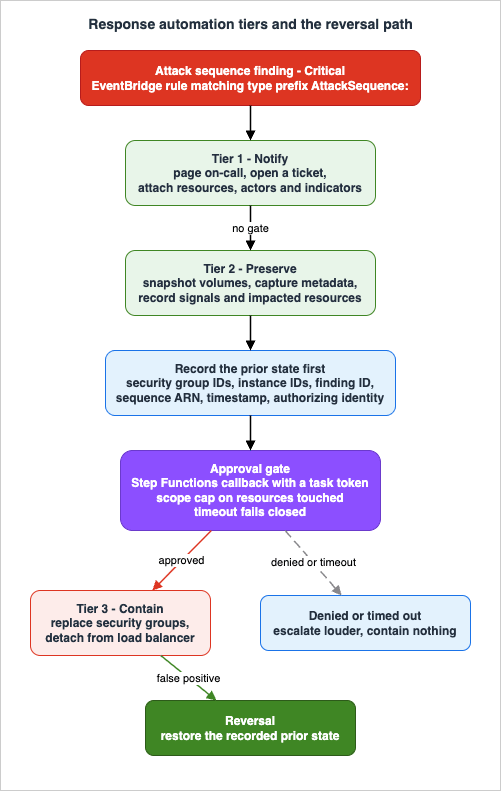
| Tier | Example actions | Reversible? | Gate |
|---|---|---|---|
| 1. Notify | Page on-call, open a ticket, post to a channel, enrich with sequence context | Fully — the cost of a mistake is an unnecessary notification | None. Automate freely |
| 2. Preserve | Snapshot volumes, capture instance metadata, record the sequence and its signals, tag resources as under investigation | Effectively — artifacts can be discarded | None, but bound the volume |
| 3. Contain | Replace security groups, detach from load balancers, revoke sessions, quarantine | No, not without a recorded prior state | Human approval, or a very narrow pre-authorized scope |
Tier 1 needs no defense. Tier 2 deserves more use than it gets: evidence has a short half-life, an auto-scaled instance may be gone before an analyst logs in, and capturing state is not a destructive act. Automating Tier 2 on attack sequence findings buys investigation quality at low risk. What you preserve and how you handle it afterwards is covered in the playbooks article, which treats evidence preservation and the containment trade-off directly.
Tier 3 is where the caution belongs.
8.2 Recording the reversal before taking the action
The rule that makes Tier 3 survivable: an automated containment action must write down how to undo itself before it does anything. Not afterwards, and not implicitly.Concretely, before an automation replaces an instance's security groups, it should persist the current group IDs, the instance ID, the finding ID, the sequence ARN, a timestamp, and the identity that authorized the action. The reversal path then exists as data, and restoring the prior state is a lookup rather than an archaeology exercise conducted under pressure by whoever is awake.
This matters more for attack sequences than for ordinary findings, for a reason specific to Section 5.2: a sequence names a group of resources. An automated containment triggered by
AttackSequence:EC2/CompromisedInstanceGroup may act on every instance sharing an Auto Scaling group or an instance profile. The blast radius of a false positive scales with the size of the group, and so does the cost of reversing it by hand.Three practices follow:
- Bound the scope explicitly. Cap the number of resources a single automated action may touch, and require approval beyond the cap. An automation that contains three instances without asking and forty with approval fails safely in the case that matters.
- Prefer additive, reversible mechanisms. Attaching a restrictive security group and recording what was detached is reversible. Terminating the instance is not, and it also destroys the evidence Tier 2 exists to collect.
- Treat the reversal path as code that must work. It has all the properties of code that is never exercised in production and is needed exactly when things are worst. Whatever confidence you have in it should come from having run it deliberately, not from having written it carefully.
8.3 Where the approval gate goes
AWS Step Functions supports pausing a workflow and waiting for an external signal to resume, through the callback pattern with a task token. That is the mechanism for an approval gate: run Tier 1 and Tier 2 automatically, pause, notify a human with the sequence context already assembled, and proceed to Tier 3 only on an explicit response — with a timeout that fails closed to "no containment, escalate louder" rather than "contain anyway."Choosing between a single Lambda function and a state machine is a real decision rather than a stylistic one:
| Lambda function | Step Functions state machine | |
|---|---|---|
| Best for | Tier 1, and Tier 2 where the work is short and independent | Anything with an approval gate, ordered dependent steps, or partial-failure semantics |
| Waiting for a human | Requires you to build the state store and resumption yourself | Native, via the callback pattern |
| Auditability of what ran | Whatever you log | Execution history is the record |
| Partial failure across a resource group | You handle it | Per-item error handling and retry are first-class |
For a sequence naming twenty instances where the automation must snapshot each, wait for approval, and act on the ones that succeeded, the state machine is the right tool and the single function is a distributed system you will end up writing anyway.
8.4 The reachability problem
An automated response frequently needs to reach into an instance — collect a process list, capture a memory artifact, verify whether the reported behavior is present. If that reach depends on SSH from a bastion, it depends on network paths that a containment action may have just severed, and on credentials that may be part of what is compromised.This is a design dependency worth naming while building the automation rather than during the incident: the mechanism by which your automation reaches a host must not share a failure domain with the thing being contained. Fleet-wide access mechanics are their own subject and this article defers them, but the constraint belongs in the response design.
8.5 What not to automate
Two actions are commonly proposed and should not be automated on a GuardDuty finding:Disabling or reconfiguring GuardDuty itself. Never as a response action. Beyond the obvious, note Section 10.1: an automated suppression rule created to quiet a noisy finding type also removes those findings from sequence correlation. An automation that tunes detection in response to detection output is a feedback loop that reduces visibility precisely when visibility is being tested.
Archiving findings automatically. Archiving is what suppression rules do, and Section 10 argues that this should be a deliberate, reviewed, human decision with a recorded justification. An automation that archives findings to keep a dashboard clean is doing the opposite of its stated job.
9. Triage in Practice
9.1 What to read first
An attack sequence finding contains more context than an ordinary finding, which is helpful once you know the reading order and overwhelming before that. The order below moves from scope to cause, because scope determines who needs to be involved and cause determines what they do.- Resources. Which resources are named, and — the question specific to sequences — which grouping attribute do they share? An Auto Scaling group tells you the workload. An instance profile tells you the permissions in play. A CloudFormation stack tells you the owning team. This is the fastest route from a finding to a person who can answer questions about it.
- Actors. Which credentials were assumed. This determines whether the blast radius is bounded by an instance profile's permissions or by something broader.
- Indicators, exposure ones first.
REACHABILITYandVULNERABILITYare about how this became possible;MALICIOUS_IP,TOR_IP, andSUSPICIOUS_NETWORKwith its network indicator values are about who;HIGH_RISK_APIandUNUSUAL_API_FOR_ACCOUNTare about what was attempted. - Signals timeline. Only now. The timeline is the most detailed view and the easiest to get lost in; entering it with a hypothesis from steps 1 through 3 makes it evidence rather than a maze.
- MITRE tactics. As the summary you hand to whoever comes next.
Step 1 is the step that differs most from single-finding triage, and it is the one that pays back the grouping discipline from Section 5.2.
From here, the initial response procedure belongs to the playbooks. Which credentials to revoke and in what order, what to capture before terminating anything, when to involve outside help, and the containment trade-off against evidence preservation are all covered scenario by scenario in AWS Security Incident Response Playbooks. This article's job ends at the handoff.
9.2 Narrowing without losing the sequence
Two habits are worth building.Pivot on the shared attribute, not the individual resource. If the sequence names an instance profile, the question is what else uses that profile — including resources not in the finding. Sequences describe what GuardDuty observed, not the boundary of what is affected.
Use the sequence to re-open closed findings. The
associatedAttackSequenceArn join from Section 7.2 exists for this. Findings that were individually dismissed as noise become evidence once a sequence claims them, and the pipeline should surface that rather than requiring an analyst to remember.For the CloudTrail-side investigation that usually follows, CloudWatch Logs Insights Query Cookbook: Practical Recipes for Incident Investigation, Cost Analysis, and Security Audits has query recipes, and the CloudTrail Event Viewer on this site helps with reading individual events. Background on how CloudTrail's own capabilities arrived is in AWS History and Timeline regarding AWS CloudTrail.
9.3 GuardDuty Investigation, and its current limits
AWS announced AI-powered investigations in GuardDuty in preview on June 23, 2026. An investigation examines finding context, related activity from the last 90 days, affected resources, and threat indicators using knowledge graphs, and returns a Risk level (Info, Low, Medium, High, or Critical), a Confidence rating (Unknown, Low, Medium, or High), a summary, investigation details, and recommended actions.It is enabled per detector by turning on the
AI_ANALYST feature, and requires guardduty:CreateInvestigation, guardduty:GetInvestigation, and guardduty:ListInvestigations. Administrator accounts can create investigations for themselves and their members; member accounts can only get and list their own.The constraints that matter for design are preview constraints, and they are the reason to keep it out of the critical path for now:
- Availability is limited to 10 commercial Regions: US East (N. Virginia), US East (Ohio), US West (Oregon), Canada (Central), Europe (Frankfurt), Europe (Ireland), Europe (London), Europe (Paris), Europe (Stockholm), and Asia Pacific (Tokyo).
- Quotas are small: up to 10 investigations per account per day, with a total limit of 100 per account. Failed investigations do not count.
- Analysis covers all Extended Threat Detection findings and select findings from the foundational, S3, and Runtime plans.
A 10-per-day ceiling is a analyst-assist budget, not an automation budget. Use it on the sequence you are already working, and design the pipeline so nothing breaks if the feature is unavailable, quota-exhausted, or absent in the Region where the finding fired. Note also that the confidence rating is an input to your judgment, not a replacement for it — a High confidence assessment is a reason to look harder, not a reason to stop looking.
10. Tuning Without Going Blind
10.1 The mechanism that makes suppression different here
Suppression rules automatically archive new findings matching their criteria. GuardDuty keeps generating the findings; they are simply marked archived, retained for 90 days, and viewable by selecting Archived in the console or queryingListFindings with service.archived equal to true. Suppressed findings are not sent to AWS Security Hub CSPM, Amazon S3, Amazon Detective, or Amazon EventBridge, and they do not initiate a Malware Protection for EC2 scan.Then there is the consequence that changes tuning strategy:
Findings archived by suppression rules are not considered as signals for attack sequences.
AWS states this directly and gives the worked example: a suppression rule that archives all EKS cluster-related findings, rather than targeting specific known activities, means "GuardDuty won't be able to use those findings to detect an attack sequence where a threat actor exploits a container, obtains privileged tokens, and accesses sensitive resources."
This inverts the usual noise-reduction calculus. Under the single-finding model, suppressing a finding type you have decided not to act on is straightforwardly good hygiene: less noise, same coverage of the things you do act on. Under the correlation model, the finding you have decided not to act on individually may be exactly the weak signal that lets GuardDuty assemble a Critical sequence. A broad suppression rule does not just hide alerts; it removes correlation inputs, and it does so invisibly — there is no notification that a sequence was not constructed.
GuardDuty's own recommendations are correspondingly narrow: continue using suppression rules to reduce alerts from known trusted activities, and "keep the suppression rules focused on specific behaviors for which you don't want GuardDuty to generate a finding." Elsewhere it adds that you should "build suppression rules reactively and only for findings for which you have repeatedly identified false positives in your environment."
10.2 Narrow rules, and the tooling for them
The difference between a safe suppression rule and a dangerous one is the number of criteria. AWS's documented examples are all two-criteria rules — a finding type plus something that identifies the specific benign context:| Finding type | Second criterion in AWS's example | The benign situation |
|---|---|---|
UnauthorizedAccess:IAMUser/InstanceCredentialExfiltration.OutsideAWS | API caller IPv4 address | Internet traffic egressing via an on-premises gateway rather than a VPC internet gateway |
Recon:EC2/Portscan | Instance image ID | An authorized vulnerability scanner |
UnauthorizedAccess:EC2/SSHBruteForce | Instance tag value | A bastion host, where brute-force attempts are expected |
Recon:EC2/PortProbeUnprotectedPort | Instance tag key | Intentionally exposed instances such as web servers |
Every one of these suppresses a finding type in one context and leaves it live everywhere else. That is the shape to copy. "Suppress
Recon:EC2/Portscan" is a mistake; "suppress Recon:EC2/Portscan from the scanner AMI" is tuning.Two recent capabilities make narrow rules easier to express, both recorded in the GuardDuty document history:
- Wildcards (December 2, 2025):
MatchesandNotMatchesconditions supporting*for any number of characters and?for at most one. - Filtering on any finding field (April 20, 2026): suppression rules can now filter on any field of a finding, with timestamp fields accepting Unix Epoch millisecond values.
These raise the ceiling on precision. They also raise the ceiling on damage — a wildcard makes it much easier to write a rule that matches far more than intended, and
NotMatches inverts the intuition about what a rule catches. Review wildcard rules for what they match rather than what they were meant to match.The quota is 100 saved filters per account per Region, and only the GuardDuty administrator can create suppression rules in a multi-account environment. That centralization is a feature: it makes suppression a reviewable act rather than something each account does privately.
10.3 Lists: trusted, threat, and the entity list transition
Lists are the other tuning surface, and they behave differently from suppression rules — a trusted list prevents findings from being generated, rather than archiving them after the fact.AWS announced general availability of custom threat detection using entity lists on September 5, 2025. Entity lists support IP addresses, domains, or both, and AWS states they offer "simplified permission management" and avoid "impacting IAM policy size limits across multiple AWS Regions" compared with the legacy IP list format. GuardDuty recommends using entity lists for custom threat detection. IP address lists remain supported.
The quotas differ substantially between the two, which is itself an argument for the newer form in some cases and against it in others:
| List type | Max lists per account per Region | Max entries per list |
|---|---|---|
| Trusted IP address list | 1 | 2,000 IP addresses and CIDR ranges |
| Threat IP address list | 6 | 250,000 IP addresses and CIDR ranges |
| Trusted entity list | 1 | 1,000 entities |
| Threat entity list | 6 | 1,000 entities |
Maximum file size for an upload is 35 MB. A threat feed of hundreds of thousands of indicators still needs the IP address list form; a curated list that includes domains needs the entity form.
Behaviors to know before relying on lists:
- Lists are administrator-owned. Lists uploaded by a GuardDuty administrator apply to all member accounts, and member accounts cannot upload or manage lists.
- Trusted wins. If an entry appears in both a trusted and a threat list, GuardDuty processes it as trusted and will not generate a finding for activity associated with it.
- Changes are not instant. Activating, deactivating, updating, or deleting a list is estimated to complete within 15 minutes and may take up to 40 minutes.
- Trusted IP lists accept only publicly routable IPv4 addresses. IPv6 is not supported, and AWS notes that adding a domain name, private IP address, or IPv6 address to a trusted IP list results in GuardDuty generating findings anyway.
- Changing a list requires reactivating it for the change to take effect.
The strategic caution is the same as for suppression rules, and stronger. A trusted list entry is a standing statement that traffic from an address is not worth reporting. That is a reasonable statement about a corporate egress range and an unreasonable one about anything that could be taken over. AWS guidance in its own troubleshooting material leans toward preferring a suppression rule over a trusted IP list "for awareness of detected issues in your environment" — because a suppression rule leaves an archived finding you can go and read, and a trusted list leaves nothing at all.
10.4 Making suppression accountable
Because a suppression rule silently reduces correlation coverage, it needs the accountability of a change to a security control rather than the informality of a dashboard filter. Four practices, none of which require tooling you do not already have:- Record the justification with the rule. Which false positive, observed how many times, over what period. AWS's "build suppression rules reactively" guidance is only checkable if the evidence is written down.
- Give every rule an expiry review. Environments change; the scanner AMI is replaced, the bastion is decommissioned, the on-premises gateway is retired. A rule that outlives its justification is pure blindness.
- Monitor the archived stream. Archived findings are visible for 90 days. A rule whose archive volume suddenly changes is either matching more than intended or the environment changed underneath it. Nobody looks at this by default, which is exactly why it is worth a scheduled report.
- Treat suppression as a privileged action. Only the administrator can create these rules; make the creation itself auditable and alertable.
CreateFilterandUpdateFiltercalls on a GuardDuty detector belong in the same alerting tier as changes to logging configuration.
Tuning decides what a managed detector stops telling you. What it never told you in the first place is a separate design job, and that job starts at the log that has to be accepted before a rule can be written against it. Detection Engineering on AWS works through what a custom source must satisfy on Amazon Security Lake, and what the resulting detection still does not see.
11. Failure Modes and Anti-Patterns
11.1 Enabled everywhere, watched nowhere
GuardDuty enabled organization-wide, findings flowing to Security Hub CSPM, and no routing to anything that pages a human. The service is on, the coverage report is green, and the mean time to acknowledge a Critical finding is however long until someone opens the console.Attack sequences make this worse rather than better, because their entire value proposition is timeliness — AWS's model is activity in progress or very recent. A Critical sequence discovered on Monday from Saturday night is a post-mortem input, not a detection. The routing in Section 7.2 is not an enhancement; it is the point.
11.2 Suppressing the noise that was doing the work
Covered in Section 10.1 and repeated here because it is the failure mode most specific to this architecture and the one least visible after the fact. A broad suppression rule removes correlation inputs, and nothing tells you a sequence was not built. The tell is a suppression rule whose criteria are a finding type and nothing else.11.3 Unconditional automated containment
Tier 3 actions from Section 8.1 wired directly to a finding, with no approval and no recorded prior state. The failure is not that automation is wrong — it is that the first false positive is unbounded in both blast radius and recovery time. WithAttackSequence:EC2/CompromisedInstanceGroup, "the instances sharing an Auto Scaling group" can be the entire production tier of an application.The specific tell: an automation with no persisted prior state. If it cannot say what the security groups were, it cannot put them back.
11.4 Member accounts that were never enrolled
The Section 6.2 opt-in ordering trap, plus every account created during a window when auto-enable was misconfigured, plus accounts invited rather than added through Organizations. Each produces an account that appears in the organization and not in GuardDuty.The tell is a member count that does not match the organization account count, per Region. This should be a monitored invariant, because it degrades silently and is invisible from inside the unenrolled account — where GuardDuty may be running perfectly and reporting to nobody.
11.5 Detection that was never verified end to end
Everything is enabled and nobody has confirmed that a finding reaches a human. The pipeline has several links — EventBridge rule, target, notification path, on-call rotation — and any one of them can be broken indefinitely without producing an error.GuardDuty supports generating sample findings, which are marked with a
[SAMPLE] prefix, and a guardduty-tester script for use in a dedicated non-production account. Note that the tester script deploys resources in order to simulate findings, which is why AWS is specific about the account. Sample findings are the safe, read-only-in-effect way to prove the delivery path works, and proving it once a quarter is cheap.11.6 Grouping attributes that carry no information
Section 5.2's Environment A. One launch template, one instance profile, one flat VPC, no per-application stacks. The sequence fires and its impacted-resource set is either a single instance or the whole estate, so it cannot tell you what is affected.The tell is being unable to answer "which application does this instance belong to?" from resource attributes alone. If a human cannot answer it from tags and IaC structure, neither can the correlation.
11.7 Enrichment that was assumed rather than enabled
The Section 5.3 indicators require Amazon Inspector, AWS Security Hub CSPM (which requires AWS Config), and Amazon Macie to be enabled — and Macie in particular is not enabled automatically when Security Hub is. The failure mode is a team that has read aboutVULNERABILITY and SENSITIVE_DATA indicators, expects them during triage, and finds an empty section.The tell is per-account and per-Region: enablement state of Config, Security Hub CSPM, Inspector, and Macie. Absent indicators look identical to "there is nothing to report."
11.8 A protection plan inventory frozen at onboarding
Section 3.2's rule 2: existing customers do not automatically receive plans launched after they enabled GuardDuty. Over several years this produces an estate where coverage varies by account onboarding date, with nobody having decided anything.The tell is a per-account, per-Region protection plan matrix that nobody has produced. Producing it is the whole remediation; the differences are usually obvious once visible.
12. Frequently Asked Questions
Do I need to enable Extended Threat Detection separately?
No. It is automatically enabled for each AWS account when GuardDuty is enabled, requires no use-case-focused protection plan, and by default correlates events across all foundational data sources. What you choose is not whether to have it, but how wide to make its input surface — which is the protection plan decision in Section 3.Can I reproduce attack sequences in my SIEM instead?
Not equivalently. A SIEM correlating GuardDuty findings can only see findings. Extended Threat Detection also correlates weak signals — API activity that GuardDuty describes as not presenting itself as a potential threat, and which therefore never becomes a finding you could forward. You can and should correlate further downstream with context GuardDuty lacks, such as your CMDB and identity data, but that is an addition rather than a substitute.Which protection plan should I enable first if I only run EC2 and S3?
S3 Protection, because it is the plan that changes what a sequence can conclude rather than only adding findings: without it GuardDuty can detect that a bucket policy became overly permissive, and with it GuardDuty gains the ability to detect potential data exfiltration activity afterwards.AttackSequence:EC2/CompromisedInstanceGroup already works on foundational signals, so Runtime Monitoring is the second decision and a heavier one — Section 4.4.Why did GuardDuty not produce a sequence for an incident I know happened?
Several documented possibilities, in rough order of likelihood: the stages fell outside the 24-hour rolling window; a required protection plan was off, so the constituent findings were never generated; a suppression rule archived the constituent findings, which excludes them from correlation; Runtime Monitoring was enabled but no agent was running on the hosts involved; or the activity spanned accounts, since Extended Threat Detection correlates within an AWS account. None of these produce an error, which is why they belong on a checklist.Does a suppression rule stop the finding from being generated?
No. GuardDuty continues to generate findings that match a suppression rule and marks them archived, retained for 90 days and viewable in the console. They are not sent to Security Hub CSPM, Amazon S3, Amazon Detective, or EventBridge, they do not initiate a Malware Protection for EC2 scan, and — the consequence specific to this architecture — they are not used as signals for attack sequences. A trusted IP list is different: it prevents the finding from being generated in the first place, which is why AWS's own troubleshooting guidance leans toward a suppression rule when you want to retain awareness.How do I route only attack sequence findings to my automation?
Match on the finding type prefix in EventBridge, since EventBridge supports prefix matching for string values and every one of these finding types begins withAttackSequence:. The pattern is in Section 7.2. Matching on Critical severity alone is a broader net that also catches non-sequence Critical findings.What happens to findings after 90 days?
They are gone from GuardDuty. The 90-day finding retention period is a quota that cannot be increased. Anything longer requires you to have exported them — through EventBridge to a destination you control, or through the built-in S3 export, which does not export archived findings and is configured per Region with cross-Region restrictions.Should the organization management account be the GuardDuty delegated administrator?
It can be, but AWS does not recommend it, citing least privilege. Use a dedicated security tooling account, designate it in every Region — the same account in all of them, which GuardDuty requires — and monitor that the designation is still in place, because removing a delegated administrator removes its member associations while leaving GuardDuty enabled in each account.Is Runtime Monitoring required for the EC2 attack sequence?
No — recommended. AWS's wording is that enabling it enhances detection capabilities, andAttackSequence:EC2/CompromisedInstanceGroup lists VPC Flow Logs and Route 53 Resolver DNS query logs among its data sources, so foundational coverage exists without an agent. It is required for the ECS sequence, where AWS states Extended Threat Detection for ECS requires Runtime Monitoring for Fargate or EC2 depending on infrastructure type.Why are there indicators referencing Amazon Inspector and Amazon Macie in a GuardDuty finding?
Because Extended Threat Detection gained five exposure-context indicator types, recorded in the GuardDuty document history on May 20, 2026:MALICIOUS_PACKAGE, MISCONFIGURATION, REACHABILITY, SENSITIVE_DATA, and VULNERABILITY. AWS attributes vulnerabilities to Amazon Inspector, misconfiguration and reachability to AWS Security Hub CSPM, and sensitive data to Amazon Macie through Security Hub CSPM. They appear only when those services are enabled and have something to report, which is why Section 5.3 treats detection quality here as a function of your overall security service enablement rather than a GuardDuty setting.13. Summary
The shift from single findings to attack sequences changes what a GuardDuty deployment has to be designed for. The service still emits individual findings and always will; what is new is a Critical-severity finding whose content is the claim that several other observations belong together, and whose production depends on architectural choices that look unrelated to detection.- The input surface is bounded by enablement, and it is enumerable. Seven
Signal.typevalues, three available foundationally and four gated behind protection plans. Section 3.3's table maps plans to sequences; work from it rather than from a general instinct to turn things on. - Grouping quality is a detection control you own. Auto Scaling groups, instance profiles, launch templates, CloudFormation stacks, AMIs, and VPCs are first-class resource types in the sequence API. Estates with clean per-application boundaries get sequences that name an application; estates without them get sequences that name everything or one thing. This is the same discipline that limits privilege blast radius, with a second payoff.
- The enrichment that makes sequences actionable comes from outside GuardDuty.
VULNERABILITY,MISCONFIGURATION,REACHABILITY,SENSITIVE_DATA, andMALICIOUS_PACKAGEdepend on Amazon Inspector, AWS Security Hub CSPM, AWS Config, and Amazon Macie. Absent enrichment is indistinguishable from nothing to report. - Tuning cuts differently than it used to. Findings archived by suppression rules are not used as signals for attack sequences. Broad suppression rules trade a quieter console for correlation you will never know you lost. Narrow rules, recorded justifications, and expiry reviews are the price of a quiet console that still works.
- Automation must be able to undo itself. Notify and preserve freely; put the approval gate in front of containment; write down the prior state before changing it; and bound how many resources one automated action may touch, because a sequence names a group.
- Multi-account correctness degrades silently. Per-Region administrator designation, the opt-in Region ordering trap with auto-enable set to
NEW, and the fact that removing an administrator leaves GuardDuty enabled but unaggregated are all conditions that look fine from inside an account and are broken from outside.
Detection has failure modes that produce no error. The recurring discipline in all of the above is to make those failures visible on purpose — a monitored member count, a protection plan matrix, a periodic sample finding through the full notification path, a report on archived-finding volume — because the alternative is a system that looks healthy right up until the moment it is measured by an actual intrusion.
14. References
- Amazon GuardDuty User Guide - What is Amazon GuardDuty?
- Amazon GuardDuty User Guide - GuardDuty Extended Threat Detection
- Amazon GuardDuty User Guide - GuardDuty attack sequence finding types
- Amazon GuardDuty User Guide - GuardDuty foundational data sources
- Amazon GuardDuty User Guide - GuardDuty finding types
- Amazon GuardDuty User Guide - Understanding and generating findings
- Amazon GuardDuty User Guide - Finding details
- Amazon GuardDuty User Guide - Severity levels of GuardDuty findings
- Amazon GuardDuty User Guide - Suppression rules in GuardDuty
- Amazon GuardDuty User Guide - Creating suppression rules in GuardDuty
- Amazon GuardDuty User Guide - Working with trusted IP lists and threat lists
- Amazon GuardDuty User Guide - Processing GuardDuty findings with Amazon EventBridge
- Amazon GuardDuty User Guide - Exporting generated findings to Amazon S3 buckets
- Amazon GuardDuty User Guide - Managing GuardDuty accounts with AWS Organizations
- Amazon GuardDuty User Guide - GuardDuty Runtime Monitoring
- Amazon GuardDuty User Guide - How Runtime Monitoring works
- Amazon GuardDuty User Guide - How Runtime Monitoring works with Amazon EC2 instances
- Amazon GuardDuty User Guide - Enabling GuardDuty automated agent for Amazon EC2 resources in a standalone account
- Amazon GuardDuty User Guide - Using shared VPC with Runtime Monitoring
- Amazon GuardDuty User Guide - GuardDuty security agent release versions
- Amazon GuardDuty User Guide - GuardDuty Investigation (Preview)
- Amazon GuardDuty User Guide - Integrating with AWS Security Hub CSPM
- Amazon GuardDuty User Guide - GuardDuty integrating with AWS security services
- Amazon GuardDuty User Guide - Remediating detected GuardDuty security findings
- Amazon GuardDuty User Guide - Remediating a potentially compromised Amazon EC2 instance
- Amazon GuardDuty User Guide - Amazon GuardDuty quotas
- Amazon GuardDuty User Guide - Amazon GuardDuty Regions and endpoints
- Amazon GuardDuty User Guide - Document history
- Amazon GuardDuty API Reference - Sequence
- Amazon GuardDuty API Reference - Signal
- Amazon GuardDuty API Reference - Indicator
- Amazon GuardDuty API Reference - ResourceV2
- Amazon GuardDuty API Reference - Finding
- Amazon GuardDuty API Reference - Actor
- Amazon GuardDuty API Reference - NetworkEndpoint
- Amazon GuardDuty API Reference - GetFindings
- Amazon GuardDuty API Reference - UpdateDetector
- AWS Security Hub User Guide - Supported trait types in Security Hub
- AWS Security Hub User Guide - AWS service integrations with Security Hub CSPM
- AWS Security Hub User Guide - Enabling and configuring AWS Config for Security Hub CSPM
- Amazon EventBridge User Guide - Comparison operators for use in event patterns
- Amazon EventBridge User Guide - Events and event patterns
- AWS Step Functions Developer Guide - Callback pattern example
- AWS News Blog - Introducing Amazon GuardDuty Extended Threat Detection
- AWS News Blog - Amazon GuardDuty adds Extended Threat Detection for Amazon EC2 and Amazon ECS
- AWS Security Blog - Navigating Amazon GuardDuty protection plans and Extended Threat Detection
- AWS What's New - Amazon GuardDuty Extended Threat Detection now supports Amazon EKS
- AWS What's New - Amazon GuardDuty Extended Threat Detection now supports Amazon EC2 and Amazon ECS
- AWS What's New - Enhancing threat detection with Amazon GuardDuty new custom entity lists
- AWS What's New - Amazon GuardDuty AI-powered investigations accelerate threat response (Preview)
- AWS What's New - Amazon GuardDuty adds sensitive file modification threat detections
- AWS What's New - Introducing Amazon GuardDuty AI Protection for AWS AI workloads
References:
Tech Blog with curated related content
Written by Hidekazu Konishi