eBPF on Amazon EKS - What Loads Into Your Nodes, When a Network Policy Starts Enforcing, and Where the Coverage Stops
First Published:
Last Updated:
NetworkPolicy in an Amazon EKS cluster, one question is worth putting to yourself. What is actually making that decision?Not the Kubernetes API server. The API server receives the object and stores it. The thing making the decision is an eBPF program attached to the Pod's veth interface, working from data held in BPF maps in the kernel. If those maps are empty, communication will pass through regardless of how correctly your
NetworkPolicy is written.In the same cluster you will often find a second eBPF program running. If you have GuardDuty Runtime Monitoring enabled, the
aws-guardduty-agent EKS add-on is loading probes into the kernel on each node. This one enforces nothing. It observes, and it sends what it sees to AWS.The reader wrote neither of them. They use different hooks, they have different blind spots, and the compute types they never reach are different too. Yet, in operational conversations, they are often lumped together as a single act of installing an add-on.
This article opens it up. It covers three things: who is loading what into the kernel, when the policies you've written actually take effect, and where the coverage at the kernel layer ends.
Here's the conclusion upfront, in three points:
First, with the default configuration, newly launched Pods will experience a period where policies are not yet active. Amazon VPC CNI configures policies in parallel with Pod provisioning. Until that configuration is complete, the Pod starts with a default allow policy. This isn't a bug; it's the default behavior, documented as
standard mode. You can switch to strict mode, but strict mode comes with its own trade-offs. Section 4 sets the two side by side.Second, the compute type limits kernel-level coverage, and the limit points in a different direction for each feature. GuardDuty Runtime Monitoring supports EKS running on Amazon EC2 and EKS Auto Mode, but it doesn't support EKS Hybrid Nodes or EKS running on AWS Fargate. Conversely, DNS-based policies only work with EKS Auto Mode. Auto Mode has the most enforcement capability and the least means of looking into the node. Sections 8 and 9 draw that map.
Third, the kernel is a shared resource. In addition to the programs within VPC CNI and GuardDuty probes,
kube-proxy still writes rules into netfilter, and any third-party eBPF you add sits in the same layer. AWS's own documentation recommends replacing the nodes after you remove another network policy plugin, because programs can stay behind in the kernel. Section 10 takes this up.All specifications, default values, identifiers, and compatibility information mentioned in this article have been verified against primary sources. The verification date is August 26, 2026. The specific sources consulted vary depending on the type of information. The behavior on Amazon EKS and Amazon GuardDuty is based on their respective user guides, AWS What's New, and the official AWS blog. The
NetworkPolicy specification for Kubernetes is based on the official documentation at kubernetes.io. The handling of kube-proxy's IPVS mode is based on the original Kubernetes Enhancement Proposals (KEPs), and the general properties of eBPF are documented at ebpf.io. No secondary media sources were used.Table of Contents
- 1. The Enforcement Point Is No Longer Near Your YAML
- 2. Two Kinds of eBPF Program Are Already on Your Nodes
- 3. The Enforcement Path: From NetworkPolicy to a Verdict in the Kernel
- 4. The Window Before a Policy Takes Effect
- 5. What the Policy Never Hands to the Kernel
- 6. DNS-Based Policies: The FQDN Never Reaches the Kernel
- 7. The Observation Path: Kernel Facts and User-Space Metadata
- 8. Where Kernel-Level Coverage Stops
- 9. Auto Mode Moves the Dial and Removes the Way to Look
- 10. What It Means to Share a Kernel
- 11. Confirming What Is Actually Loaded
- 12. Where the Primary Sources Disagree
- 13. Failure Modes and Anti-Patterns
- 14. Frequently Asked Questions
- 15. Summary
- 16. References
1. The Enforcement Point Is No Longer Near Your YAML
1.1 Intended Audience
This article is aimed at infrastructure and security personnel who are using Amazon EKS and have implemented KubernetesNetworkPolicy, have the GuardDuty add-on installed, but may not have a comprehensive understanding of their environment beyond that.Specifically, this article is for readers who may be experiencing issues such as: communication unexpectedly occurring despite policies being applied, assuming similar detection capabilities on Fargate, finding that troubleshooting steps involving node access no longer work after migrating to EKS Auto Mode, or repeatedly seeing the term eBPF in release notes but being unable to explain what specific eBPF components are actually running in their cluster.
This article is not an introduction to eBPF. It will not cover writing BPF programs or implementing them in C or Go. Instead, it focuses on how to identify and assess the eBPF programs already running on your nodes, and to what extent you can trust them.
1.2 What This Article Covers
This article takes the kernel layer of Amazon EKS as a single cross-section. It follows the enforcement side and the observation side separately, and sets out the structure and the blind spot of each.On the enforcement side, the article covers the path that
NetworkPolicy takes to reach the eBPF program on a Pod's veth interface, including the PolicyEndpoint intermediate object, and what data is stored in the BPF maps. It also explores the differences between the standard and strict default behaviors.On the observation side, the article examines the structure in which the
aws-guardduty-agent loads a probe into the kernel and user space adds the Kubernetes metadata to the facts the kernel produces.Finally, it maps out the extent of coverage for both sides, based on the type of compute and the kernel version.
1.3 What This Article Leaves to Other Articles
This article focuses on the kernel layer. The layer above it, and the operational decisions next to it, are handed to articles already published on this site.This article will not delve into the specifics of writing
NetworkPolicy. Details on VPC CNI IP design, prefix delegation, custom networking, Security Groups for Pods, and how to differentiate between standard NetworkPolicy and ClusterNetworkPolicy are detailed in Amazon EKS Networking Deep Dive. This article addresses who is enforcing a given policy and where, rather than what the policy itself contains.This article will not cover the steps involved in deploying GuardDuty agents. Information on the three deployment models for Amazon EC2, and the side effects that automated deployment has on your environment — the SSM association it creates, the VPC endpoints it creates in every VPC, the security groups that follow the VPC CIDR, and the precedence rule that governs a tag-staged rollout — belong to Section 4 of Amazon GuardDuty Extended Threat Detection Architecture, with verbatim excerpts. This article focuses on what happens in the kernel after an agent is deployed, and identifies compute resources where an agent is not deployed. That article names this article's territory in the following sentence:
Container runtime detection in depth. GuardDuty emits attack sequence findings for Amazon EKS
and Amazon ECS. They appear in the tables below because omitting them would misrepresent the
finding type list, but the container-specific design questions — cluster topology, admission
control, task-level isolation — are out of scope here.
This article will not cover finding classification and triage. Information on what GuardDuty AI Protection detects and does not detect, and how to interpret findings, is available in Threat Detection for AI Workloads on AWS.
This article will not address the overall design of segmentation and inspection. The design that spans VPCs, AWS Network Firewall, VPC Lattice, and AWS Verified Access is detailed in AWS Zero-Trust Network Architecture Guide. This article looks only at the inside of the kernel in that design.
This article does not cover admission control, as the enforcement points differ. The Kubernetes API server handles signature verification, attestation, and image validation, and settles all of it before a Pod exists. This article focuses on the decisions made by the kernel, at the level of packets and system calls, after a Pod has been created. The former is covered in Software Supply Chain Security on AWS.
The choice of isolation boundary is also out of scope. Deciding which unit to contain is covered in Agent Sandboxing and Blast-Radius Isolation on AWS. Choosing the boundary belongs to that article; what the kernel observes and enforces inside the boundary belongs to this one.
This article is the third in a series of three. The first article, Life After Ingress NGINX on Amazon EKS, addressed the entry layer, specifically L7 routing and data plane selection on AWS. The second article, Gang Scheduling and Dynamic Resource Allocation on Amazon EKS, focused on the scheduler layer, specifically gang scheduling and the device allocation paths.
What all three articles have in common is that the decisions are made outside of what the reader defines in their YAML files. In the first article, the AWS data plane is determined the moment the
gatewayClassName is specified, and that branching point is not visible from the route definition side. In the second article, the node supply model decides whether a ResourceClaim can be written at all. And this article represents the most extreme example of that pattern. The enforcement point itself sits in the kernel, and even the timing of its activation is determined there.1.4 What Running in the Kernel Does Not Guarantee
One thing has to be stated up front: this article is not intended to promote eBPF as a secure technology.ebpf.io defines eBPF as follows:eBPF is a revolutionary technology with origins in the Linux kernel that can run sandboxed
programs in a privileged context such as the operating system kernel.The sandbox contains a verifier. The verifier checks that a program will certainly terminate, that it will not read uninitialized variables, that memory accesses are within bounds, and that the complexity of the execution path is finite. However, the same page also limits the verifier's role, stating:
The verifier is meant as a safety tool, checking that programs are safe to run. It is not a
security tool inspecting what the programs are doing.
The verifier guarantees that the kernel will not crash; it does not guarantee that the program will function as the user intends. The fact that a program can be loaded does not imply that it is functioning correctly. This distinction is a prerequisite for the verification procedures outlined in Section 11.
One more point: only privileged processes can load eBPF programs.
Unless unprivileged eBPF is enabled, all processes that intend to load eBPF programs into the
Linux kernel must be running in privileged mode (root) or require the capability CAP_BPF.
What ends up in a node's kernel is therefore decided by whoever can hold privilege on that node. In the case of an EKS node, that is not the reader, but rather the add-ons the reader installs, as well as AWS.
2. Two Kinds of eBPF Program Are Already on Your Nodes
2.1 The One That Enforces and the One That Observes
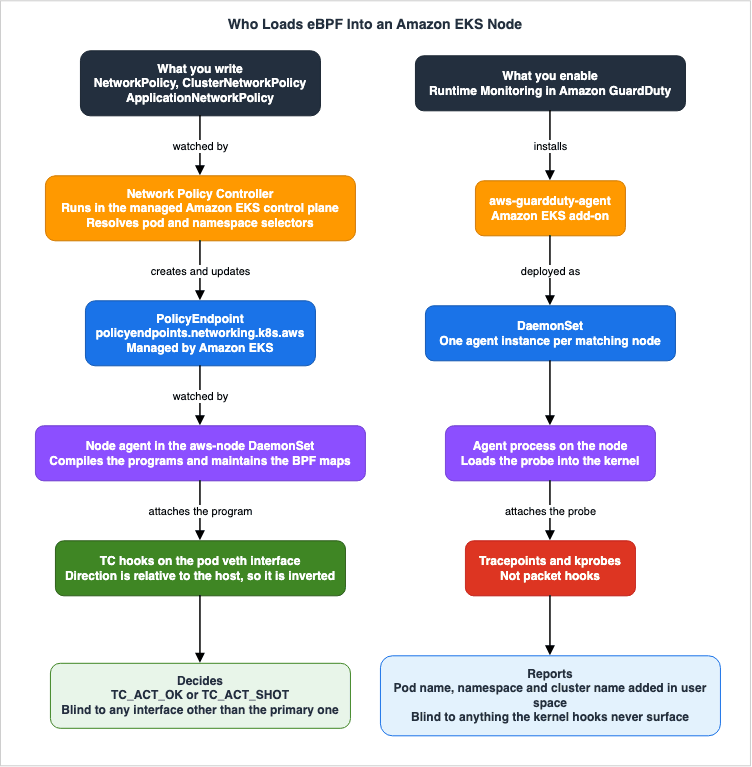
Nodes in Amazon EKS can host at least two types of AWS-provided eBPF programs, each with a different purpose and managed by a different entity.The first is the enforcement side. When you enable the network policy feature of Amazon VPC CNI, the node agent in the
aws-node DaemonSet attaches an eBPF program to each Pod veth interface. This program determines whether to allow or block network packets.The Amazon EKS User Guide explains the reasoning behind this choice as follows:
Enforcement of Kubernetes NetworkPolicy objects is implemented using the Extended Berkeley
Packet Filter (eBPF). Relative to iptables based implementations, it offers lower latency and
performance characteristics, including reduced CPU utilization and avoiding sequential lookups.
The second is the observation side. When you enable GuardDuty Runtime Monitoring and install the
aws-guardduty-agent add-on, a DaemonSet loads probes into the kernel on each node. This program drops nothing. It captures file access, process execution, and network connections, and sends what it captures to AWS.2.2 They Use Different Hooks
The two systems use different kernel interfaces.The enforcement side uses Traffic Control hooks. The evaluation runs as a packet passes through a Pod veth interface. What it evaluates is the packet, and what it evaluates against are the IP prefixes, protocols, and ports held in a BPF map.
The observation side uses tracing-related hooks. The Amazon GuardDuty User Guide describes the kernel-side functionality required by the agent in this way:
Kernel support includes eBPF, Tracepoints and Kprobe.Tracepoints and kprobes are not packet hooks. They hook function calls and events inside the kernel. Therefore, the observation side doesn't see whether a packet passed through; instead, it observes which process performed what actions and what resources were opened.
This difference creates blind spots. The enforcement side never sees anything that does not pass through the Pod veth interface. The observation side never sees anything that does not surface at a kernel hook. Combining the data from both systems still doesn't provide a complete picture of everything that happens in the cluster.
2.3 Neither One Is Code You Wrote
Both share one property: the reader wrote neither of them. What the reader wrote was theNetworkPolicy YAML and the configuration value that turns an add-on on.Beyond that, the two systems are activated separately, have their own version releases, and may fail to function for different reasons. Having installed one is no reason to believe the other is installed. That much is obvious, and it still breaks down in practice. The one thing the two have in common is that both run in the node's kernel, and that single shared property is enough to make a conversation treat them as one thing.
3. The Enforcement Path: From NetworkPolicy to a Verdict in the Kernel
3.1 The Three Components
The Amazon EKS network policy feature is built from three components. The current structure reflects the classification outlined in the AWS launch blog.The first component is the network policy controller. It runs in the managed Amazon EKS control plane and is not present on your nodes. It monitors the creation of
NetworkPolicy objects, resolves podSelector and namespaceSelector values, and converts them into IP-based rules.The second component is the node agent. The VPC CNI ships it to every node, where it runs as a container in the
aws-node DaemonSet. It receives results from the controller and compiles eBPF programs, attaching them to Pod veth interfaces while maintaining BPF maps.The third component is the eBPF SDK. This is a collection of tools located in
/opt/cni/bin on the nodes, used to inspect the programs and maps. It will be discussed in Section 11.From the perspective of Kubernetes RBAC, the controller and node agent are also treated as separate entities. The VPC CNI uses a
ClusterRole named aws-node, while the controller uses a ClusterRole named eks:network-policy-controller. If one side loses its permissions, that side alone stops working.3.2 PolicyEndpoint as the Bridge
Controllers and node agents do not communicate directly. Instead, a custom resource calledPolicyEndpoint sits between them.The CRD for this resource is named
policyendpoints.networking.k8s.aws and the VPC CNI creates it when the network policy feature is enabled. The Amazon EKS User Guide explicitly instructs readers not to modify this CRD.The network policy feature creates and requires a PolicyEndpoint Custom Resource Definition
(CRD) called policyendpoints.networking.k8s.aws. PolicyEndpoint objects of the Custom Resource
are managed by Amazon EKS. You shouldn't modify or delete these resources.The presence of this intermediary layer changes the troubleshooting process. When a policy isn't working as expected, the possible causes split across three places: a wrong label selector, a controller that has not created the
PolicyEndpoint, or a node agent that has not carried it down into eBPF. The User Guide provides instructions on how to identify the second symptom.If you make a network policy kind: NetworkPolicy and it doesn't affect the pod, check that the
policyendpoint object was created in the same namespace as the pod.3.3 What the Node Agent Attaches to the veth
An AWS re:Post article breaks the node agent's tasks down like this: it monitorsPolicyEndpoint objects, compiles eBPF programs, attaches them to Pod veth interfaces, and maintains BPF maps.Four types of data are stored in the maps: approved IP prefixes, protocol and port rules, connection tracking information, and policy status.
The same article outlines the four-step process when a packet passes through. When a packet arrives at a node and is destined for a Pod, the TC ingress hook fires the eBPF program. For an established connection it consults the
aws_conntrack_map and the connection follows the fast path. For new connections, it references the policy map to evaluate the connection. It then returns a decision. The TC egress hook evaluates traffic leaving the Pod the same way.3.4 The Direction of a TC Hook Is Inverted
There's a recurring issue that always arises when examining nodes, as noted in the same re:Post article.In tc, direction is relative to the host. The pod's egress is tc ingress on veth, and the pod's
ingress is tc egress on veth.From the perspective of
tc, the orientation is relative to the host. Traffic leaving a Pod hits tc ingress on the veth, and traffic entering a Pod hits tc egress on the veth.In practice, when you run
tc filter show, even when you specify ingress, the command returns a program named handle_egress.If you examine the node without understanding this reversal, you can reach the wrong conclusion, investigating an ingress rule when the rule that matters is on the egress side. Read the four steps in Section 3.3 with this in mind. They are written from the packet's side as it reaches the node, while the hook names you see on a veth are written from the host's.
3.5 TC_ACT_OK and TC_ACT_SHOT
The result of the evaluation returns one of two values:TC_ACT_OK if the connection is allowed, and TC_ACT_SHOT if it is not. The latter indicates that the packet will be dropped.The drop occurs before the packet reaches the container. Therefore, from the application's perspective, it experiences a timeout rather than a connection refusal. For example, in the re:Post article, a
wget command originating from an unauthorized Pod results in a download timeout, not a connection refusal.This distinction changes the approach to troubleshooting. If a connection is refused, you can confirm that the remote endpoint is active. However, a timeout provides no way to determine whether the endpoint is offline or if the path is blocked. Consequently, there will be no clues in the application's logs that a policy blocked the connection.
3.6 The Authority Is the BPF Map, Not the YAML
The re:Post article concludes:This authoritative enforcement state occurs on the BPF map that's attached to the pod's veth
interface, not the YAML definition.Ultimately, the authoritative source is the BPF maps attached to Pod veth interfaces, not the YAML definitions. The two ought to agree, and a state in which they do not agree can exist: the controller has not created a
PolicyEndpoint, the node agent has died, or the version in use carries a known defect.The information returned by
kubectl get networkpolicy represents the intended state, not necessarily the current reality. The verification procedures discussed in Section 11 are designed to examine these two aspects separately.4. The Window Before a Policy Takes Effect
4.1 What standard Mode Does by Default
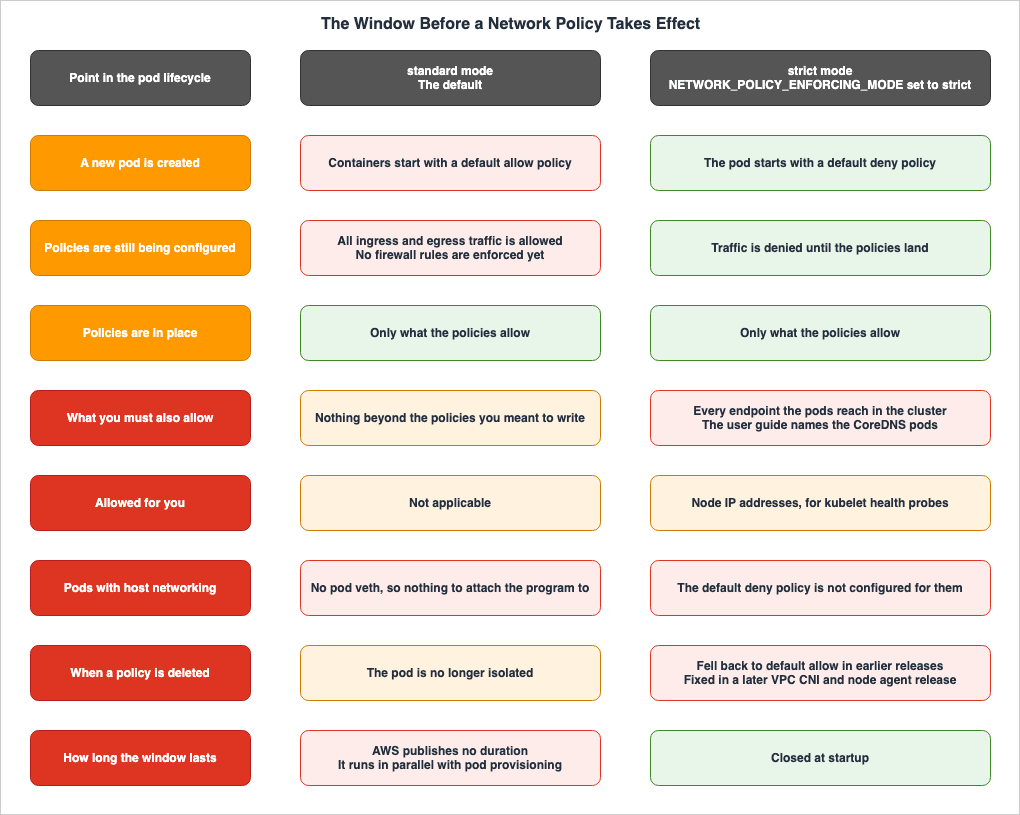
The Amazon EKS User Guide states the default behavior as follows:The Amazon VPC CNI plugin for Kubernetes configures network policies for pods in parallel with
the pod provisioning. Until all of the policies are configured for the new pod, containers in
the new pod will start with a default allow policy. This is called standard mode. A default
allow policy means that all ingress and egress traffic is allowed to and from the new pods. For
example, the pods will not have any firewall rules enforced (all traffic is allowed) until the
new pod is updated with the active policies.Policy configuration and Pod provisioning proceed concurrently. Until the configuration is complete, new Pods will start with a default-allow policy. This is the
standard mode.The launch blog also describes the same behavior.
Network policy controller configures policies for pods in parallel to pod provisioning, until
then new pods will come up with default allow policy. All ingress and egress traffic is allowed
to and from the new pods until they are reconciled against the existing policies.
It is important not to interpret this as a defect. This is a documented default behavior, and both primary sources state the same thing. As a design tradeoff, the default has been chosen to avoid delaying Pod startup.
AWS publishes no duration for the window. It states only the condition: the work runs in parallel with Pod provisioning and continues until every policy for that Pod is configured. AWS does not say what governs the length either. The only way to know is to measure it in your own environment.
4.2 What strict Mode Demands in Return
There is a way to close the window. The same page continues:With the NETWORK_POLICY_ENFORCING_MODE variable set to strict, pods that use the VPC CNI start
with a default deny policy, then policies are configured. This is called strict mode. In strict
mode, you must have a network policy for every endpoint that your pods need to access in your
cluster. Note that this requirement applies to the CoreDNS pods. The default deny policy isn't
configured for pods with Host networking.When
NETWORK_POLICY_ENFORCING_MODE is set to strict, Pods start in a default-deny state, and policies are then applied. The window is closed.The consequence is that every destination a Pod needs to reach in the cluster must have a policy. The User Guide explicitly states that this requirement also applies to CoreDNS Pods. Apply a set of policies that forgot to allow name resolution to a
strict cluster, and the application starts, and then resolves nothing.A re:Post article organizes the implications of
strict into four points: Pods start in a default-deny state. DNS communication must be explicitly permitted. Node IP addresses are automatically permitted for kubelet health probes. All other necessary communication must be explicitly allowed, and failing to do so will cause applications to fail.The same article recommends, as a best practice, verifying dependencies in a testing environment before deploying to production.
4.3 What strict Mode Does Not Cover
Even withstrict mode enabled, one area stays open. The last sentence of the User Guide passage above is the one.The default deny policy isn't configured for pods with Host networking.A Pod that uses the host network gets no default deny policy. Host network pods do not have their own veth interfaces; instead, they directly use the node's network namespace. The enforcement point sits on the Pod veth, so there is nothing to attach for these Pods.
Pods that use the host network are therefore outside this mechanism, regardless of whether they are running in
standard or strict mode. Choosing a mode changes nothing about this group. They need a separate control.4.4 The Window Also Opened Somewhere Else
The primary sources contradict the reading thatstrict mode settles the matter. The known issues section of the Amazon EKS User Guide carries this:When network policies are enabled in strict mode, pods start with a default deny policy. After
policies are applied, traffic is allowed to the specified endpoints. However, when policies are
deleted, the pod doesn't return to the default deny state and instead goes to a default allow
state.In
strict mode, after a policy is deleted, Pods were reverting to default allow instead of reverting to default deny. In other words, the window was open not at startup, but when the policy was removed. According to the same page, this issue was resolved in VPC CNI 1.19.3, which includes network policy agent version 1.2.0.It's crucial to understand that the important factor isn't simply that the issue has been fixed. The key point is that the default deny setting, a critical configuration, is inconsistently enforced depending on the implementation version. The mode is a declaration of intent, not a reflection of the kernel's actual state. The distinction outlined in Section 3 is relevant here.
4.5 Choosing Between Them
There are three key factors to consider.First, what can pass through during the window? If the new Pod is designed to initiate outbound communication immediately upon startup, the window will actually allow communication. Conversely, if the Pod is designed to begin communication only after a certain initialization process, the window is likely to be closed before communication can begin. This will depend on the nature of the reader's application.
Second, can the
strict requirement be met? A system is needed to comprehensively cover and maintain policies for all destinations, including CoreDNS. Failure to do so will result in application failures.Third, how should Pods using the host network be handled? Neither mode covers this group, so it needs a policy of its own, decided apart from the mode.
None of these three factors can be determined simply by switching modes.
5. What the Policy Never Hands to the Kernel
5.1 Only the Primary Interface Gets the Program
The Amazon EKS User Guide specifies that eBPF programs are only applied to the primary interface.The Amazon VPC CNI plugin for Kubernetes doesn't apply network policies to additional network
interfaces for each pod, only the primary interface for each pod (eth0).Network policies only apply to the primary interface of a Pod,
eth0. The same page highlights two specific configurations where this applies.One is for IPv6 Pods with
ENABLE_V4_EGRESS set to true. This configuration enables IPv6 Pods to reach IPv4 endpoints outside the cluster by creating an additional interface with a loopback IPv4 address. Policies do not apply to this additional interface.The other scenario involves using chain-based plugins like Multus. These plugins add interfaces to a Pod, and the policy does not reach the interfaces they add.
This limitation is not apparent from the policy definitions themselves. The
podSelector identifies Pods, but does not select specific interfaces.5.2 Pods That No Controller Owns
Another limitation exists. The User Guide states:Amazon EKS optimizes network policy enforcement for Pods that have a metadata.ownerReferences
field set. This includes Pods managed by controllers such as Deployments, StatefulSets,
DaemonSets, Jobs, and CronJobs. Standalone Pods created directly without a controller don't
have metadata.ownerReferences set, and network policy enforcement might not work reliably for
these Pods.Pods that are not managed by a controller and exist as standalone entities do not have
metadata.ownerReferences, and policy enforcement may not function as expected on such Pods.The troubleshooting page uses narrower language. In the known issues section, it states that the network policy agent currently only supports Pods deployed as part of a Deployment or ReplicaSet, and applying policies to standalone Pods may result in inconsistent behavior. Furthermore, a note at the beginning of the same page provides an even narrower definition, stating that policies are only applied to Pods created by Kubernetes Deployments.
Therefore, the scope of applicability is described in three different ways across two pages. The broadest description includes Deployments, StatefulSets, DaemonSets, Jobs, and CronJobs, while the narrowest description only mentions Deployments. And the two narrowest of them share a page. The safe reading is to not count on a policy reaching a standalone Pod.
5.3 The Limit of Twenty-Four Combinations per CIDR
There is a numeric limit as well.The maximum number of combinations of ports and protocols for a single IP address range (CIDR)
is 24 across all of your network policies. Selectors such as namespaceSelector resolve to one
or more CIDRs. If multiple selectors resolve to a single CIDR or you specify the same direct
CIDR multiple times in the same or different network policies, these all count toward this
limit.For each CIDR, the combination of ports and protocols across all policies is limited to 24. Furthermore, selectors like
namespaceSelector can resolve to one or more CIDRs, so you may reach this limit even if you don't explicitly specify the CIDR.This limit has been observed in practice, causing issues. The User Guide's section on known issues includes a case where, after switching from Calico to the VPC CNI network policy, communication between Pods fails. The root cause is that the VPC CNI cannot specify as many ports as Calico, and the solution involves modifying the port ranges to reduce the number of unique ports.
The reason why policies that worked in the previous environment are not working in the new environment is due to a numerical limit, rather than a difference in semantics.
5.4 What the Upstream NetworkPolicy API Itself Cannot Express
Everything so far has been a constraint on the implementation side. The upstreamNetworkPolicy specification has its own limits on what it can express. The Kubernetes documentation, as of version 1.36, explicitly lists ten pieces of functionality that do not exist in the NetworkPolicy API. These include routing cluster communication through a common gateway, handling TLS-related aspects, creating policies that specify nodes using Kubernetes identifiers, referencing services by name, creating or managing policy requests that a third party fulfills, applying default policies to all namespaces or Pods, performing advanced policy queries and reachability investigations, logging network security events, writing an explicit deny, and blocking loopback traffic or traffic from the node the Pod sits on.The same page also notes potential workarounds, operating system components, Layer 7 technologies, or admission controllers.
Three of those ten line up exactly with what the EKS extensions supply.
ClusterNetworkPolicy carries the default policy applied to all namespaces, the Admin tier Deny action carries the explicit deny, and the network policy flow logs carry the logging of network security events. What the upstream API states it does not have, the implementation supplies as a separate API and as logs.The inability to write a deny rule is the premise you need in order to read the EKS implementation. The upstream
NetworkPolicy is a set of allows, and a denial is what results from not being allowed. The same page states:Network policies do not conflict; they are additive. If any policy or policies apply to a given
pod for a given direction, the connections allowed in that direction from that pod is the union
of what the applicable policies allow. Thus, order of evaluation does not affect the policy
result.Policies are non-conflicting and additive. Therefore, the order of evaluation does not affect the result.
And there's another sentence directly relevant to the subject of this article:
Creating a NetworkPolicy resource without a controller that implements it will have no effect.Without a controller to implement it, creating a
NetworkPolicy has no effect. The upstream specification explicitly states that this API is merely an object declaration. What gives it effect is the implementation, and in Amazon EKS that implementation is eBPF in the kernel.5.5 The EKS Tiers Do Not Follow the Additive Rule
On December 15, 2025, Amazon EKS expanded its network policy capabilities. The What's New announcement stated:ClusterNetworkPolicy is available in all EKS cluster launch modes using VPC CNI v1.21.1 or
later. DNS-based policies are only supported in EKS Auto Mode-launched EC2 instances.According to AWS,
ClusterNetworkPolicy is the EKS implementation that combines the upstream AdminNetworkPolicy and BaselineAdminNetworkPolicy into a single CRD. This API does not have the additive behavior found upstream. The Admin tier goes first, lowest priority number first, and the result settles the moment one of them matches.The specific order in which tiers are evaluated is outside the scope of this article. Details on which tier is evaluated in what order, and what
Deny, Allow, and Pass each do, belong to Amazon EKS Networking Deep Dive. For the purposes of this article, it is only necessary to understand that an order exists.Unlike upstream
NetworkPolicy, where order does not affect the outcome, in EKS's ClusterNetworkPolicy, the priority value determines the result. This is not a contradiction; the two are separate APIs. However, for a reader who uses both in one cluster, it means that rules with an order that influences the outcome coexist with rules that do not, in the same place. Furthermore, both ultimately execute the same eBPF program on the same nodes.Note that the User Guide places a default deny at the end of the tier evaluation, which applies if no policy matches. This description was written in the context of
ClusterNetworkPolicy tier evaluation and is a separate concept from the default allow in standard mode, which was discussed in Section 4. Reading these two concepts in the same context can create a perceived contradiction, so it is important to understand which tier evaluation is being discussed in each case.5.6 The One Point the Spec Hands to the Implementation
There is one section where the upstream specifications explicitly state that the responsibility for handling a particular aspect is delegated to the implementation. This concerns existing connections.When the set of NetworkPolicies that applies to an existing connection changes - this could
happen either due to a change in NetworkPolicies or if the relevant labels of the
namespaces/pods selected by the policy (both subject and peers) are changed in the middle of an
existing connection - it is implementation defined as to whether the change will take effect
for that existing connection or not.The document states that when the set of policies governing existing connections changes, whether that change will affect those existing connections is implementation-dependent. This applies not only when the policies themselves are modified, but also when labels on Pods or namespaces are changed during an existing connection. The same section recommends not changing policies, Pods, or namespaces in ways that might affect existing connections.
Amazon EKS answers that question with the connection tracking map from Section 3. Established connections take a fast path through the
aws_conntrack_map, and only a new connection goes to the policy map for evaluation.Therefore, the observation that communication continues even after a policy change does not necessarily mean that the policy is not working. What you are looking at may be the behavior the specification handed to the implementation. This distinction is easy to confuse with the window discussed in Section 4. The window is about newly created Pods; this section is about existing connections.
6. DNS-Based Policies: The FQDN Never Reaches the Kernel
6.1 Resolved Addresses and Their TTL Are Written Into an eBPF Map
With the same extension released in December 2025, a CRD calledApplicationNetworkPolicy was introduced. It is the EKS extension of the upstream NetworkPolicy, and it adds an FQDN filter to egress rules, so traffic leaving the cluster can be allowed by domain name or by a pattern that matches one.If FQDNs can be written, one might assume that the decisions are also being made based on names. However, that is not the case. The Amazon EKS User Guide details exactly what is happening in seven steps.
The platform team implements DNS-based policies. A controller monitors these policies, reconciles the policy endpoints, and instructs the node agent to filter DNS requests against the allow-listed domains. When a workload attempts to resolve the IP address of an endpoint outside the cluster, that DNS request first passes through a proxy that filters against the allow-listed domains. The proxy then forwards the request to CoreDNS. CoreDNS in turn sends it to the external DNS resolver, Amazon Route 53 Resolver, to obtain the list of IP addresses behind the domain name. And the next step is at the heart of this section.
The resolved IPs with TTL are returned in the response to the DNS request. These IPs are then
written in an eBPF map which is used in the next step for IP layer enforcement.
The resolved IP addresses are returned in the response, along with their TTLs, and those IPs are written to an eBPF map, to be used in subsequent steps for enforcement at the IP layer. An eBPF probe attached to the Pod's veth then filters outbound communication based on those IPs. The same page also states that the validity period of these IPs is based on the TTL obtained from Route 53 Resolver.
In other words, the FQDN does not reach the kernel. The kernel only contains the IP address that was just resolved, and its expiration time. Rules written using names are, at runtime, translated into a time-limited IP allowlist.
This structure has two implications. First, the relationship between the rate at which name-to-IP mappings change and the TTL determines the accuracy of the enforcement. Second, if a Pod obtains an IP address directly, bypassing DNS, that communication will not be included in this allowlist. Without DNS resolution, there is no trigger to write to the map.
6.2 Limited to EC2 Instances Launched by EKS Auto Mode
This feature comes with a condition on the compute type. The User Guide states:DNS based rules defined using the ApplicationNetworkPolicy are only applicable to workloads
running in EKS Auto Mode-launched EC2 instances. If you are running a mixed mode cluster
(consisting of both EKS Auto and non EKS Auto worker nodes), your DNS-based rules are only
effective in the EKS Auto mode worker nodes (EC2 managed instances).It only applies to workloads running on EC2 instances launched with EKS Auto Mode. In a mixed-mode cluster it takes effect only on the Auto Mode nodes.
The point that matters is that in a mixed-mode cluster the rule is applied only in part. The policy looks as though it covers the whole cluster, and whether it takes effect turns on which node a Pod lands on. And neither the text of the policy nor the state of the object tells you which way it went.
6.3 Giving Them the Same Name Breaks Both
ApplicationNetworkPolicy and NetworkPolicy are distinct CRDs, and they can sit in the same namespace. The User Guide warns of a potential issue.Do not use the same name for an ApplicationNetworkPolicy and a NetworkPolicy within the same
namespace. If the names collide, the resulting PolicyEndpoints objects may not reflect either
policy correctly. Both resources are accepted without error, making this issue difficult to
diagnose.When
ApplicationNetworkPolicy and NetworkPolicy share a name in the same namespace, the resulting PolicyEndpoints objects may not accurately reflect either policy. Furthermore, both resources will be accepted without error.As seen in Section 3, the intermediary layer becomes apparent here. The name conflict corrupts the
PolicyEndpoint objects, and subsequently, the BPF maps associated with them. On the API server's side, nothing happens, so kubectl apply succeeds, and kubectl get returns both resources.6.4 The Second Enforcement Point Sits at the Route 53 Resolver
DNS-based policies have another enforcement point further out. The User Guide describes the relationship with Amazon Route 53 DNS Firewall as follows:EKS Admin and Network policies are evaluated first at the pod level when traffic is initiated.
If an EKS network policy allows egress to a specific domain, the pod then performs a DNS query
that reaches the Route 53 Resolver. At this point, Route 53 DNS Firewall rules are evaluated.
If DNS Firewall blocks the domain query, DNS resolution fails and the connection cannot be
established, even though the EKS network policy allowed it.Policies on the EKS side are first evaluated at the Pod level. If permitted, the DNS query then reaches Route 53 Resolver. DNS Firewall rules run at that point. If DNS Firewall blocks the query, name resolution fails and the connection never forms, even though the EKS policy allowed it.
The same page describes these two layers as complementary. EKS DNS-based policies handle egress control at the Pod level, while the DNS Firewall provides overall VPC protection and organization-wide blocklists.
The operational implications are straightforward: when communication fails, the cause is not necessarily in the kernel. The verification procedures discussed in Section 11 are designed to examine the kernel, but they do not reach this second layer.
7. The Observation Path: Kernel Facts and User-Space Metadata
7.1 The Add-On, the DaemonSet, and the Probe
Now to the observation side. The Amazon GuardDuty User Guide describes what Runtime Monitoring is on Amazon EKS like this:Runtime Monitoring uses an EKS add-on aws-guardduty-agent, also known as the GuardDuty security
agent. After GuardDuty security agent gets deployed on your EKS clusters, GuardDuty is able to
receive runtime events for these EKS clusters.The Amazon EKS User Guide registers an add-on under the same name. Its add-on list describes the GuardDuty agent as collecting runtime events from the nodes in your cluster - file access, process execution, and network connections - and handing them to GuardDuty Runtime Monitoring for analysis. It gives the add-on name as
aws-guardduty-agent and notes that the add-on requires no permissions.7.2 User Space Adds the Names the Kernel Does Not Know
An AWS Containers blog describes how the agent is distributed and how it relates to the kernel:The Amazon EKS Runtime Monitoring agent is deployed as a DaemonSet. The DaemonSet instantiates
an instance of the agent on every matching node in an Amazon EKS cluster. The agent loads an
eBPF probe directly into the kernel in a sandboxed-like environment. Once installed, the agent
starts capturing data from the underlying kernel, including host level events and container
processes. Data from the kernel is then enriched with additional metadata gathered from
userspace such as the Kubernetes Pod name, the namespace the pod is running in, and the cluster
name.This is the place to read the structure as two separate parts. The kernel only provides host-level events and container processes. It is unaware of Pod names, namespaces, or cluster names; those are added in user space.
According to the subsequent text, events are transmitted to GuardDuty's backend through managed VPC endpoints. Agents obtain temporary credentials using an Amazon EC2 instance identity role and send telemetry data.
The fact that kernel-reported facts and user-space metadata come from separate sources impacts how findings are interpreted. Even if the facts reported by the kernel are correct, if the corresponding information in user space is not accurate, it's impossible to determine which Pod the event relates to. Conversely, changes to Kubernetes metadata do not affect the facts observed by the kernel.
7.3 What the Kernel Has to Provide
Agents are not compatible with every kernel. The GuardDuty User Guide sets the conditions along three lines: the operating system distribution, the kernel version, and the CPU architecture. Furthermore, the guide specifies the necessary configurations on the kernel side as follows:Kernel support includes eBPF, Tracepoints and Kprobe.The supported CPU architectures are AMD64 and ARM64, with ARM64 specifically referring to Graviton2 and later. First-generation Graviton instances, such as instance type A1, are not supported.
There are also requirements for the kernel build configuration.
For any kernel version, you must set the CONFIG_DEBUG_INFO_BTF flag to y (meaning true). This
is required so that the GuardDuty security agent can run as expected.
Regardless of the kernel version,
CONFIG_DEBUG_INFO_BTF must be set to y. In environments using custom AMIs, this single kernel setting can determine whether observations are available.And there is one more condition that directly affects the coverage map.
Presently, with Kernel version 6.1, GuardDuty can't generate GuardDuty Runtime Monitoring
finding types that are related to Domain Name System (DNS) events.
Currently, kernel version 6.1 is unable to generate finding types related to DNS events. This is not a limitation based on compute type, but rather a limitation specific to the kernel version. Even on the same EKS, with the same add-on at the same version, if the node's kernel is version 6.1, this specific set of detections will not be generated.
The primary source qualifies this with
Presently, so this one line is something to re-verify. The verification date of this article captures a state in which kernel 6.1 is named for this particular gap.7.4 The Name Has Changed
There is one point you will always run into when consulting the primary sources. EKS Runtime Monitoring is a legacy name.The GuardDuty User Guide explains the integration process: The introduction of Runtime Monitoring expanded threat detection to include Amazon ECS containers and Amazon EC2 instances. The functionality previously known as EKS Runtime Monitoring has been integrated into Runtime Monitoring. Users should enable Runtime Monitoring and manage GuardDuty security agents for the specific resource types they wish to monitor.
The transition process requires specific steps.
GuardDuty will not migrate your EKS Runtime Monitoring settings on your behalf automatically.
This requires an action at your end.
There are potential pitfalls in the migration sequence. The same page cautions against disabling EKS Runtime Monitoring before enabling Runtime Monitoring.
If you disable EKS Runtime Monitoring, the Amazon EKS add-on management will also get disabled.If you disable the legacy functionality first, it will also disable the Amazon EKS add-on management. This means that if you get the order wrong, you cut the management path for the agents.
From here on, this article uses
Runtime Monitoring as the feature name. The legacy name appears only in the context of migration.7.5 Deployment Models and Their Side Effects Belong to Another Article
This article will not delve into the methods for agent deployment, nor the potential environmental impact of automated deployment.The three deployment models for Amazon EC2, the SSM association named
GuardDutyRuntimeMonitoring-do-not-delete, the creation of VPC endpoints across all VPCs, including both central and spoke VPCs, security groups that adapt to changes in VPC CIDR blocks, and the tiered prioritization rules defined by the tag GuardDutyManaged, are all detailed in Section 4 of Amazon GuardDuty Extended Threat Detection Architecture, with verbatim excerpts.This article focuses solely on the stages before and after agent installation. It will examine what happens in the kernel after an agent is deployed, and also identify the compute resources where agents are not deployed.
8. Where Kernel-Level Coverage Stops
8.1 Support by Compute Type
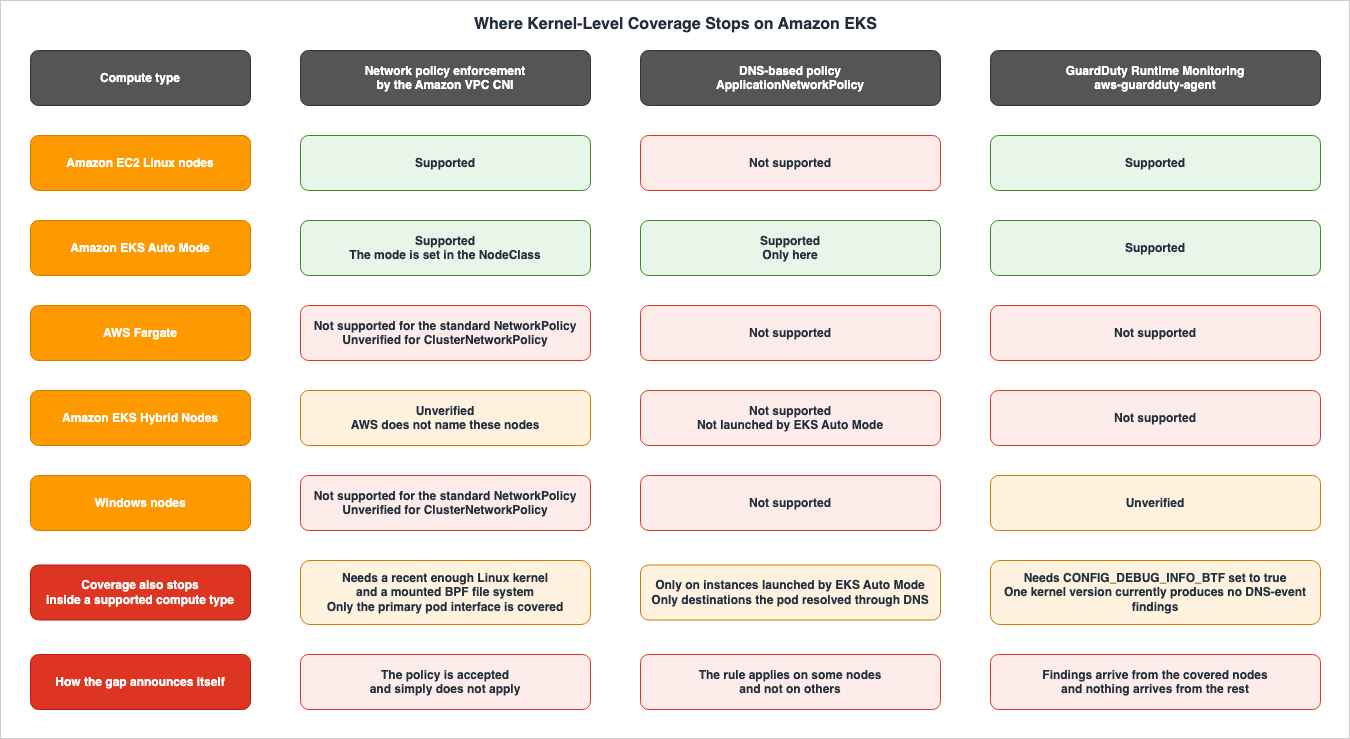
The Amazon GuardDuty User Guide states the following regarding support for different compute types within Amazon EKS. The same information appears on two separate pages.Runtime Monitoring supports Amazon EKS clusters running on Amazon EC2 instances and Amazon EKS
Auto Mode.
Runtime Monitoring doesn't support Amazon EKS clusters with Amazon EKS Hybrid Nodes, and those
running on AWS Fargate.It supports EKS and EKS Auto Mode running on Amazon EC2. It does not support EKS Hybrid Nodes or EKS running on AWS Fargate.
The enforcement side has a boundary of the same kind. The Amazon EKS User Guide limits the scope of VPC CNI network policies like this.
When applying Amazon VPC CNI plugin for Kubernetes network policies to your cluster with the
Amazon VPC CNI plugin for Kubernetes, you can apply the policies to Amazon EC2 Linux nodes
only. You can't apply the policies to Fargate or Windows nodes.
It only applies to Linux nodes running on Amazon EC2 and is not supported on Fargate or Windows nodes.
Here's a table summarizing this information by feature. The verification date is August 26, 2026, and each row rests on a passage quoted verbatim from a primary source in the body above. Combinations that could not be verified against a primary source are marked as unverified. No cells are left blank.
| Compute Type | Standard NetworkPolicy | ClusterNetworkPolicy | DNS-Based Policy | GuardDuty Runtime Monitoring |
|---|---|---|---|---|
| Amazon EC2 Linux nodes | Supported | Supported (the VPC CNI version requirement is in Section 12.1) | Not supported | Supported |
| Amazon EKS Auto Mode | Supported (the mode is set on the NodeClass) | Supported | Supported, and only here | Supported |
| Amazon EKS on AWS Fargate | Not supported | Unverified (the two primary sources are not reconciled; see below) | Not supported | Not supported |
| Amazon EKS Hybrid Nodes | Unverified (AWS does not name how these nodes are treated by the VPC CNI) | Unverified | Not supported (not launched by EKS Auto Mode) | Not supported |
| Windows nodes | Not supported | Unverified (the two primary sources are not reconciled; see below) | Not supported | Unverified |
It matters that the unverified cells are not left blank. Not supported is something you can only write when a primary source says so. The absence of a statement does not constitute proof that a feature is unsupported.
Three cells in the
ClusterNetworkPolicy column are marked unverified. Two of them, Fargate and Windows, are unverified because two primary sources describe the scope at different resolutions. The third, EKS Hybrid Nodes, is unverified because no primary source names it at all. The What's New entry states that ClusterNetworkPolicy is available for all EKS cluster launch modes. In contrast, the Considerations section of the User Guide states that VPC CNI network policies can only be applied to Amazon EC2 Linux nodes and cannot be applied to Fargate or Windows nodes. The latter sits on a page that covers both the standard NetworkPolicy and the admin policies, so it reads as applying to both. The two are not reconciled for Fargate and Windows. Recording that they are not reconciled is safer than picking one of them and stating it as fact.8.2 The Asymmetry Also Runs the Other Way
Read the table down its columns, and only the Amazon EKS Auto Mode row carries support in every one. And the DNS-based policy column has support in that row and nowhere else.In terms of enforcement capability, Auto Mode has more of it than any other compute type. Where the primary sources name Auto Mode as a restriction, they are adding capability rather than removing it.
What stops is not the capability but the ability to confirm it. As discussed in Section 9, in Auto Mode, the controller is invisible to the user's account, and there is no way to access the nodes directly. Rewrite the same table around the means of confirming rather than the capability, and the Auto Mode row is the one that flips.
To summarize this asymmetry, Auto Mode increases what the kernel can do and reduces the means of looking into it.
8.3 Coverage Also Stops at the Kernel Version
The compute type is not the only axis along which coverage stops. The two conditions outlined in Section 7 apply here as well.One is
CONFIG_DEBUG_INFO_BTF. Without this setting, the agent may not function as expected. On a managed Amazon EKS optimized AMI this stays out of sight, but on a custom AMI it becomes something to check.The second is the finding related to DNS events on kernel version 6.1. This blind spot never appears as a row in the table.
The enforcement side carries a condition of the same kind. The Amazon EKS User Guide requires that the nodes' Linux kernel be version 5.10 or later as a prerequisite for network policies. According to the same page, the latest versions of the Amazon EKS-optimized Amazon Linux AMI, the accelerated Amazon Linux AMI, and the Bottlerocket AMI already meet this requirement. A mounted BPF file system at
/sys/fs/bpf is the second condition on this side. The same page states the kernel requirement on its own and does not name the mount, so the kernel version alone does not settle it.8.4 Where the Assumption of Whole-Cluster Visibility Breaks
Put into operational terms, this comes down to three statements.First, no enforcement-side eBPF or observation probes can be deployed on Pods running on Fargate. A Fargate Pod carries an isolation boundary of its own, and that is a different thing from the kernel-level control this article is about. If a cluster includes even a single Fargate profile, any Pod that lands within it will be outside the scope of both enforcement and observation.
Second, no observation agents can be deployed on EKS Hybrid Nodes. Where on-premises nodes join an Amazon EKS cluster through EKS Hybrid Nodes, even if the GuardDuty console displays a single cluster, runtime events will only originate from a portion of those nodes.
Third, no enforcement agents can be deployed on Windows nodes. Even if you define standard
NetworkPolicy rules, they will not apply to Pods running on Windows nodes.The first and third of those follow the Amazon EKS User Guide. For
ClusterNetworkPolicy on Fargate and Windows nodes the two primary sources are still unreconciled, which is why Section 8.1 leaves those cells unverified.
Importantly, these limitations do not generate any errors. Policies are accepted, add-ons are displayed as active, and findings do come from the clusters that are covered. The silence of the places that produce nothing is the nature of this blind spot.
9. Auto Mode Moves the Dial and Removes the Way to Look
9.1 A NodeClass Instead of an Environment Variable
The dial for the default behavior discussed in Section 4 was an environment variable in theaws-node container on Amazon EC2 nodes. EKS Auto Mode puts the same dial somewhere else.The Amazon EKS User Guide describes enabling network policies in Auto Mode in two steps. First, it instructs you to modify the
ConfigMap named amazon-vpc-cni in the kube-system namespace, setting enable-network-policy-controller to true to enable the network policy controller. After that, changing the default behavior of the node agent means creating a NodeClass.apiVersion: eks.amazonaws.com/v1
kind: NodeClass
metadata:
name: network-policy-config
spec:
# Optional: Changes default network policy behavior
networkPolicy: DefaultAllow
# Optional: Enables logging for network policy events
networkPolicyEventLogs: EnabledDo not modify the default
NodePool or NodeClass. The User Guide states that EKS Auto Mode manages the defaults and that you should not edit them, and that you create an additional NodePool or NodeClass when you want different behavior.The names, types, and locations of these settings are all different. In Amazon EC2, you set the
NETWORK_POLICY_ENFORCING_MODE environment variable to the string strict. In Auto Mode, you set a value on the spec.networkPolicy field of a NodeClass, and it reaches the nodes through a NodePool that references that NodeClass. According to the Auto Mode networking documentation, you can configure network policies to be either Default Deny or Default Allow.However, AWS does not state what the behavior will be if you don't configure this. The Amazon EC2 side states plainly that
standard is the default, while the relevant page for Auto Mode simply lists this field as optional and does not specify a default value. This one point is why the discussion of the window in Section 4 cannot be carried over to Auto Mode as it stands.Therefore, in clusters that have both Amazon EC2 nodes and Auto Mode nodes, you will need to express the same intention using different configurations in two separate locations. And it's possible to modify only one of those configurations.
Enabling logging follows a similar process, moving the configuration to the
NodeClass side. On Amazon EC2 you set nodeAgent.enablePolicyEventLogs in the VPC CNI add-on configuration values. However, in Auto Mode, you need to set networkPolicyEventLogs to Enabled.9.2 The Controllers Are Not Visible in Your Own Account
In Auto Mode, some add-ons become redundant. The Amazon EKS User Guide lists Amazon VPC CNI,kube-proxy, CoreDNS, Amazon EBS CSI Driver, and the EKS Pod Identity Agent as components that become redundant when using Auto Mode. The same page further explains:Additionally, with EKS Auto mode, the controllers listed above run on AWS owned infrastructure.
So, you may not even see them in your accounts unless you are using EKS auto mode with other
types of compute in which case, you will see the controllers you installed on your cluster.These controllers run on AWS-owned infrastructure and may not be visible from your account. The ones you see are the controllers you installed on your own cluster when you are using Auto Mode alongside other compute options.
Of the three components in Section 3, the controller was already in the managed control plane. In Auto Mode, the node agents also share this characteristic. Therefore, commands like
kubectl get daemonset -n kube-system aws-node, which you might use on Amazon EC2 nodes, will not produce the same results in Auto Mode. AWS does not specify the exact output you will receive.9.3 There Is No SSH
And there's no way to access the nodes. The AWS Containers blog states the following regarding diagnostics on nodes running in Auto Mode:On EKS Auto Mode it does not work at all. Auto Mode nodes are Amazon Elastic Compute Cloud
(Amazon EC2) managed instances with no SSH access by design. The NodeDiagnostic CRD and kubectl
ekslogs are your only window into what happened on these nodes.An Auto Mode node has no SSH access by design, and the
NodeDiagnostic CRD and kubectl ekslogs are the only window into what happened on it.The security overview whitepaper for Amazon EKS Auto Mode further emphasizes this limitation. Auto Mode runs on EC2 managed instances, and AWS uses IAM to block operations that would undermine its ability to operate the nodes. For example, it's not possible to modify the instance profile of a node or attach/detach Elastic Network Interfaces (ENIs). These restrictions hold regardless of the IAM identity and its permissions, and not even the AWS account root user can get around them. The node's operating system is a modified version of Bottlerocket, optimized solely for running containers.
Therefore, the troubleshooting steps described in Section 11 are not applicable in Auto Mode. The process of accessing a node using
kubectl debug node/..., then chroot /host, and executing tools from /opt/cni/bin is not a viable option.9.4 What to Look at Instead
What you use in place of the lost tools depends on your objective.To learn the enforcement state, use the network policy event logs. Set
networkPolicyEventLogs on the NodeClass and the policy verdicts appear as flow logs. These logs are in the same format as those from Amazon EC2 nodes, and can be viewed without accessing the nodes themselves. They show you the verdicts, though, not the contents of the maps.If you want to investigate node failures, use the
NodeDiagnostic CRD and kubectl ekslogs.It's important to accept that the scope of what you can observe in Auto Mode is inherently more limited than when examining Amazon EC2 nodes. The distinction drawn in Section 3, between the intent in the YAML and the current state of the kernel, cannot be measured directly under Auto Mode. What you can measure is the result that difference produced, which is the verdict that reached the log.
10. What It Means to Share a Kernel
10.1 kube-proxy Is Still Writing netfilter Rules
This article has talked about eBPF for long enough that the node data plane may look as though it runs entirely on eBPF. It does not.kube-proxy still writes rules into netfilter. The Amazon EKS best practices guide describes the available backend options as follows:Even though the nftables backend is GA, iptables remains the default kube-proxy mode for
compatibility reasons. You must explicitly opt in to nftables mode.The
nftables backend was alpha in Kubernetes 1.29, beta in 1.31, and reached general availability in 1.33. However, the default remains iptables for compatibility, and you must explicitly select nftables to use it.According to the same page, the
nftables backend requires a Linux kernel version 5.13 or later on worker nodes, and it has compatibility requirements with CNI.The nftables backend might not be compatible with all network plugins. Consult your CNI
provider's documentation before enabling nftables mode. The Amazon VPC CNI is compatible with
nftables mode starting with version v1.23.0.Inside one node's kernel, netfilter handles destination address translation for Services, while eBPF manages reachability control between Pods. A single packet goes through both. Troubleshooting by looking at only one of them does not produce an answer.
The same page also notes that switching to
nftables mode involves a disruptive change, and recommends using kube-proxy version 1.36.0 or later for large clusters.10.2 One Network Policy Plugin at a Time
The first consequence of sharing the kernel is that you cannot load two implementations that do the same job. As stated in the AWS launch blog:To maintain consistency and avoid unexpected pod communication behavior, it is recommended to
run only a single network policy plugin at any given time. It is crucial to remove any existing
third-party network policy CNI plugin before upgrading to the latest version of Amazon VPC CNI.To maintain consistency and avoid unexpected behavior between Pods, it is recommended to run only one network policy plugin at a time. The blog also notes that it is important to remove any existing third-party plugins before upgrading the VPC CNI to the latest version.
The Amazon EKS User Guide says the same thing from the other direction: you can carry your existing policies over, and you must not let two things manage them. If you are currently using a third-party solution to manage
NetworkPolicy, you can use the same policy with the VPC CNI, but you must disable your existing solution to ensure it does not manage the same policy.10.3 What Stays in the Kernel After You Remove It
It's not simply a matter of removing something and being done. The User Guide includes warnings about actions to take after removal.We recommend that after you remove a network policy solution, then you replace all of the nodes
that had the network policy solution applied to them. This is because the traffic rules might
get left behind by a pod of the solution if it exits suddenly.After you remove a network policy solution, the recommendation is to replace every node the solution had been applied to. The reason is that traffic rules can be left behind in the kernel if a Pod belonging to that solution exits suddenly.
The launch blog says the same thing and names what gets left behind: recycling the worker nodes helps eliminate leftover changes on a node, such as
iptables rules or eBPF programs.This is the primary source that states this article's subject most directly. Deleting a resource on the Kubernetes side does not guarantee that what sits in the kernel goes with it. The API server's state defines when a deletion is complete; the node's state does not.
10.4 Three Axes for Any Third-Party eBPF
Whether to incorporate eBPF-based products like Cilium, Tetragon, and Falco is outside the scope of this article. This article does not compare products. However, whichever product goes into the same kernel, three axes are worth settling in advance.The first axis is who loads it. Do you put it into your own cluster as a DaemonSet, or does AWS manage it as an add-on? In the first case the version and the configuration are yours to hold. In the second they are not.
The second axis is which hook it attaches to. As Section 2 showed, the VPC CNI on the enforcement side uses TC hooks for Pod veth interfaces, while the GuardDuty agent on the observation side uses tracepoints and kprobes. Implementations can coexist if they use different hooks in the same layer, but implementations that compete for the same hook cannot coexist. Cilium implements both the CNI and network policies, so it overlaps in function with the VPC CNI. Falco and Tetragon are not network policy implementations, so what they overlap with is something else.
The third axis is whether it decides or only reports. Tetragon's official documentation describes its position as follows:
Tetragon applies policy and filtering directly in eBPF in the kernel. It performs the
filtering, blocking, and reacting to events directly in the kernel instead of sending events to
a user space agent.
It applies policy directly in eBPF in the kernel, doing the filtering, the blocking, and the reaction to events there, rather than sending events to a user space agent. This is the opposite of the design of the GuardDuty agent in Section 7. GuardDuty's agent processes data collected from the kernel in user space and sends it to AWS for decision-making.
Falco's official documentation positions itself as a detection tool. It observes events and, when a rule is violated, generates real-time alerts. It does not enforce any actions.
Of the three, this last one bears hardest on operational design. Adding an implementation that blocks inside the kernel means the decision completes on the node, and a gap opens between that decision and the record of it leaving. Conversely, an implementation that decides outside the kernel has a longer path to the decision, and leaves the record of it somewhere central.
10.5 Measuring the Cost of Observation With Another eBPF Program
The implications of sharing the kernel are also reflected in AWS's own measurement methods.A 2023 Containers blog post, which measured the impact of the GuardDuty agent on cluster performance, used a tool called Inspektor Gadget, an eBPF-based tool. In essence, it was measuring the load of a second eBPF program using a third eBPF program.
The blog post presented the following data: the agent has upper limits of 1000m for CPU and 1 GB for memory. When running the application and the agent, and taking a 4-second trace, the agent was invoked 525 times, and ran for just over 1 millisecond during that 4-second window.
These are figures AWS published. They are not measurements taken by this site. The same blog post also notes that because workloads vary, the results depend on the nature of the workload and the runtime events it generates.
There are also costs associated with the enforcement side. When enabling network policy logging, the Amazon EKS User Guide explicitly states additional requirements.
Network policy logs require an additional 1 vCPU for the aws-network-policy-agent container in
the VPC CNI aws-node DaemonSet manifest.
Enabling logging requires adding 1 vCPU to a container in the
aws-node DaemonSet. Observation requires node resources.Nodes also consume ports. According to the same User Guide, the network policy feature uses port 8162 by default for metrics and port 8163 for health probes. If you are running another application on the node or in a Pod that uses these ports, that application fails to start. The VPC CNI version
v1.14.1 and later allows you to change the port numbers.10.6 Admission Control Is a Different Enforcement Point
One last enforcement point is worth separating out, because it is easily confused with the kernel layer.Admission control works at the Kubernetes API server. It verifies image signatures and refuses to create a Pod that violates a policy, and it does so before the Pod exists. What this article has been about is the decision the kernel makes at the level of packets and system calls, after the Pod exists.
The two differ in when they act and in where they act. Software Supply Chain Security on AWS.
There is a third answer, which is to stop sharing the kernel at all. Namespaces, Pod Security Standards, user namespaces, and RuntimeClass are levels of separation rather than enforcement points, and each one gives up something the level below it kept. Workload Isolation Levels on Amazon EKS works through the four of them and names what each level does not stop.
11. Confirming What Is Actually Loaded
11.1 Looking From the Cluster Side
Start by exhausting what you can establish without going into a node.You can determine if the network policy feature is enabled by checking the number of containers in the
aws-node Pod. The Amazon EKS User Guide states that with VPC CNI version 1.14 and later, the aws-node Pod has two containers, while earlier versions, or when network policies are disabled, have only one.kubectl get pods -n kube-system | grep 'aws-node\|amazon'A READY column of
2/2 means the second container is running.The container names themselves come from this command.
kubectl get ds -n kube-system aws-node -o jsonpath='{.spec.template.spec.containers[*].name}{"\n"}'As Section 12 shows, the name the User Guide uses in its prose can differ from the name that appears in this output. Confirm the name with this output before you open
kubectl edit daemonset.Whether the policy has reached the nodes shows up as a
PolicyEndpoint. Look for a policyendpoint object in the same namespace as the Pod. If it is not there, the chain has stopped at the controller stage.The GuardDuty agent is an EKS add-on, so the add-on list and its version answer for it.
11.2 Looking From Inside the Node
If the node is an Amazon EC2 node, you can use the eBPF SDK provided by the VPC CNI. The Amazon EKS User Guide states:The Amazon VPC CNI plugin for Kubernetes installs eBPF SDK collection of tools on the nodes.
You can use the eBPF SDK tools to identify issues with network policies. For example, the
following command lists the programs that are running on the node.The command is as follows:
sudo /opt/cni/bin/aws-eks-na-cli ebpf progsAn AWS re:Post article goes further. The correspondence between programs and maps for each Pod comes from this:
# Narrow the output to the pod identifier you are investigating
/opt/cni/bin/aws-eks-na-cli ebpf loaded-ebpfdata | grep <pod-identifier> -A11
The output displays the Pod identifier, direction, program ID, and the name and ID of the associated map. The maps that appear in the actual output include
ingress_map, egress_map, ingress_pod_state_map, egress_pod_state_map, policy_events, and aws_conntrack_map.You can retrieve the contents of these maps by specifying their IDs.
# Replace 93 with the map ID from the previous output
/opt/cni/bin/aws-eks-na-cli ebpf dump-maps 93
The contents of the
ingress_map list the IP prefixes permitted to reach that Pod, along with the protocol and port ranges. If the source IP you are looking for is not listed here, the eBPF program will return TC_ACT_SHOT. This corresponds to the authoritative state described in Section 3.Whether the eBPF program is attached at all is a question for
tc.# Replace the interface name with the veth of the pod under investigation
tc filter show dev eni9c515deae49 ingress
tc filter show dev eni9c515deae49 egressAccording to the re:Post article, the
tc command may not be pre-installed on the Amazon EKS optimized AMI, so you install it on the container you are using to investigate. Furthermore, the direction reversal mentioned in Section 3 becomes apparent here. Specifying ingress and getting back a program named handle_egress is the normal result.11.3 Looking at the Logs
The verdicts themselves can go to a log. According to the Amazon EKS User Guide, the VPC CNI records every verdict it reaches on whether a policy allows or denies a connection, as a flow log. On the node the log sits at/var/log/aws-routed-eni/network-policy-agent.log.By default, logging is disabled. To enable it, set
enablePolicyEventLogs in the VPC CNI add-on configuration values. If you want to send the logs to CloudWatch Logs, also set enableCloudWatchLogs and grant the IAM role used by the VPC CNI the necessary permissions to write to logs. For an Amazon EKS cluster the logs land under /aws/eks/cluster-name/cluster/.{
"enableNetworkPolicy": "true",
"nodeAgent": {
"enablePolicyEventLogs": "true",
"enableCloudWatchLogs": "true"
}
}One caution. According to the known issues section of the same User Guide, even if you set
enable-policy-event-logs to false, not all logs from the network policy agent will stop being generated. The setting stops the policy verdict logs, not everything the agent writes. That name is the argument on the container, not the add-on configuration key used two paragraphs above.11.4 What Changes Under Auto Mode
As mentioned in Section 9, the procedures outlined in Section 11.2 do not apply in EKS Auto Mode. Because you cannot access the nodes, the tools located in/opt/cni/bin and the tc command are also inaccessible.Therefore, in Auto Mode, you are limited to verifying the cluster from the cluster-side, as described in Section 11.1, and examining the logs, as described in Section 11.3. Turning the logs on happens on the
NodeClass, through networkPolicyEventLogs, rather than in the VPC CNI add-on configuration values.The difference shows up as a difference in how deep you can troubleshoot. On Amazon EC2 nodes, you can read the difference between the intent and the current state directly out of the maps. In Auto Mode you see only the verdicts that difference produced. You can establish that communication was dropped, but you cannot tell with the same tools whether the reason lies in the contents of a map or in the program never having been loaded at all.
12. Where the Primary Sources Disagree
Among the primary sources consulted for this article, there were places where AWS's own documents disagreed with one another, and places where AWS and the upstream project disagreed. Every one of them sits where a reader will actually run into it, so they are recorded here as they are.Discrepancies about scope were handled in the section where each one matters. Whether a standalone Pod is subject to a policy is described three different ways across two pages, and Section 5 covers that. Whether
ClusterNetworkPolicy reaches Fargate and Windows is described one way by the What's New entry, which names all EKS cluster launch modes, and another by the User Guide, which names Amazon EC2 Linux nodes only, and Section 8 records that.What this section collects are the disagreements that change the string a reader types.
12.1 The VPC CNI Version Splits Between 1.21.0 and 1.21.1
The VPC CNI version required forClusterNetworkPolicy differs between primary sources.The Amazon EKS User Guide's
NetworkPolicy section states that versions 1.21.0 and later of the Amazon VPC CNI plugin support both standard and admin network policies.However, both the What's New entry from December 15, 2025, and an AWS Containers blog post that explains the same functionality, specify version 1.21.1 and later. The blog post specifically notes that for EC2-based EKS clusters, updating the VPC CNI to version 1.21.1 or later is required to use the admin network policy.
Of the three documents, two specify version 1.21.1, while only the User Guide mentions 1.21.0. Given that the announcements and explanations are consistent, it is safest to use version 1.21.1 or later.
12.2 The Second Container Has Two Names
The second container in theaws-node DaemonSet goes by two different names across the primary sources.The Amazon EKS User Guide consistently refers to the container as
aws-network-policy-agent. It instructs users to modify the args of the aws-network-policy-agent container in both log and port configurations.However, the actual command output shown in the AWS launch blog indicates that the container names are
aws-node and aws-eks-nodeagent.# The blog shows this command and the two container names it returned
kubectl get ds -n kube-system aws-node -o jsonpath='{.spec.template.spec.containers[*].name}{"\n"}'
# aws-node aws-eks-nodeagentaws-network-policy-agent is also the name of the GitHub repository that houses the node agent's implementation. Therefore, it's possible that the User Guide is referring to the project name when describing the container. No primary source showing the container name as actual output from a current cluster could be found, so the correct container name remains unverified.As a practical measure, one thing is settled. Verify the container name in your own cluster with the command above before you open
kubectl edit daemonset. The User Guide tells you to rewrite the args: of that container, so getting the container name wrong means either not finding what you meant to edit, or editing a different container.12.3 A Map Name Differs Between the Explanation and the Output
The re:Post article describes a section explaining packet evaluation, stating that new connections are evaluated using apolicy_map.In the same article, though, where it shows the actual output of
loaded-ebpfdata, the map named policy_map does not appear. Instead, the output includes ingress_map, egress_map, ingress_pod_state_map, egress_pod_state_map, policy_events, and aws_conntrack_map. Subsequent steps then specify the ID of ingress_map to dump its contents.It is reasonable to read
policy_map as a general term used for descriptive purposes, rather than the name of a map that actually exists on the node. The map used for connection tracking, aws_conntrack_map, appears with the same name in both the description and the actual output, indicating that this is a valid name.12.4 IPVS Is Said to Be Removed in 1.36, but the Upstream Plan Says Otherwise
Regardingkube-proxy's IPVS mode, the Kubernetes 1.35 release notes in the Amazon EKS User Guide say this:Deprecation Notice - IPVS Mode: IPVS mode in kube-proxy is deprecated and will be removed in
Kubernetes 1.36.The upstream plan differs. KEP-5495, which covers the removal, divides it into five stages. In version 1.35, a deprecation notice appeared on the Kubernetes website, and
kube-proxy instances running in ipvs mode began issuing warnings. Version 1.37 introduces a feature gate called KubeProxyIPVS, which is enabled by default. The KEP then describes the plan from there:Docs and warning messages are updated to indicate that the plan is for the feature gate to go
Default: false in 1.40 and LockToDefault: true in 1.43 (after which ipvs mode will no longer be
available).The feature gate will be disabled by default in version 1.40 and then locked to that default in version 1.43. At that point, the
ipvs mode will no longer be available.Therefore, while the deprecation began in version 1.35, the removal is not scheduled for version 1.36. The Amazon EKS 1.36 release notes also do not mention the removal of IPVS.
It should be noted that this KEP itself contains an internal inconsistency. Stage 2 states that
LockToDefault: true arrives in version 1.43, while Stage 4 states that the feature gate is flipped to LockToDefault: false. Only the former is consistent with the Stage 3 description, so this article quotes Stage 2.For users of Amazon EKS who are currently using the
ipvs mode, the recommended migration options are iptables or nftables. As mentioned in Section 10, nftables reached general availability in Kubernetes 1.33, and Amazon VPC CNI supports it from version v1.23.0 and later.12.5 The ConfigMap Key Has Two Spellings
TheConfigMap key that enables the network policy controller differs between documents.The Amazon EKS User Guide states that, whether using Amazon EC2 or EKS Auto Mode, you place
enable-network-policy-controller in the amazon-vpc-cni ConfigMap in the kube-system namespace. Two separate pages use the same string.However, the Auto Mode security section of the Amazon EKS best practices guide provides an example of placing
enable-network-policy in the same ConfigMap. Notably, it does not include the -controller suffix.Given that both dedicated feature pages agree on
enable-network-policy-controller, that is the one to trust. This is a typical example where documentation that describes a feature across multiple pages contradicts the example provided on a dedicated feature page.12.6 The JSON in the Console Procedure Is Not Valid as Written
In the procedure for sending network policy logs to CloudWatch Logs, the console example in the Amazon EKS User Guide includes a trailing comma after the value ofenableCloudWatchLogs before closing the curly brace. The same section states that the input text must be a valid JSON object.The example provided for the AWS CLI on the same page is correct. Only the console example includes the trailing comma, and it needs to be removed before pasting it into the console input field. The JSON example shown in Section 11 has the trailing comma removed.
13. Failure Modes and Anti-Patterns
13.1 Treating the Time You Applied a Policy as the Time It Took Effect
The momentkubectl apply succeeds and the moment the rules reach that Pod's kernel are not the same moment. In the default standard mode, newly launched Pods operate with full permissions until their configuration is complete.What to check is not whether the apply succeeded, but whether the rules are in the map for that Pod. On Amazon EC2 nodes, this can be directly observed using the steps outlined in Section 11.
13.2 Assuming strict Closes Everything, and Forgetting CoreDNS
Whenstrict mode is enabled, Pods are blocked by default, which means that a policy is required for every destination in the cluster. The User Guide explicitly states that this requirement also applies to CoreDNS Pods.A policy set that forgets to allow name resolution lets the application start, and then quietly breaks it. The primary source recommends confirming the dependencies in a test environment before this goes to production.
13.3 Assuming Host-Networked Pods Are Under the Same Control
Even withstrict enabled, Pods using the host network do not have a default deny policy. This does not change based on the mode selected.It is necessary to identify this group and apply a separate policy. The cluster-wide default deny declaration does not apply to this group.
13.4 Leaving Multus and IPv4 Egress Interfaces Out of the Count
Network policies only apply to a Pod's primary interface,eth0. The policy does not reach the interfaces a chained plugin such as Multus adds, nor the extra interface ENABLE_V4_EGRESS creates.This blind spot is not visible from the policy definition. The
podSelector selects Pods, but it does not select interfaces.13.5 Treating Coverage as Uniform in a Cluster With Fargate and Hybrid Nodes
GuardDuty's Runtime Monitoring does not support EKS running on AWS Fargate, nor does it support EKS Hybrid Nodes. VPC CNI network policies cannot be applied to Fargate or Windows nodes, and forClusterNetworkPolicy on those two the primary sources are unreconciled rather than negative.And importantly, these systems will not report errors. Add-ons will appear to be active, and policies will be accepted. That nothing is arriving from some of the compute types is not visible as long as you are looking at the ones it does arrive from.
13.6 Removing a Third-Party Policy Implementation and Keeping the Nodes
The primary sources recommend replacing the nodes after you remove a policy solution. The reason is that traffic rules can be left behind in the kernel if a Pod belonging to that solution exits suddenly.Deleting something on the Kubernetes side does not mean deleting it on the kernel side. The behavioral inconsistencies that linger right after removal come from that gap.
13.7 Writing the Same Intent in Two Places and Fixing Only One
In Amazon EC2 nodes, the environment variableNETWORK_POLICY_ENFORCING_MODE and, in EKS Auto Mode, the NodeClass's spec.networkPolicy serve the same purpose. In a mixed-mode cluster, the same setting lives in two different places.Fixing only one of the two is possible, and that state looks entirely normal. In a mixed-mode cluster, the two have to be handled as one change.
13.8 Reading a DNS-Based Policy as Enforcement by Name
WhileApplicationNetworkPolicy can be written using fully qualified domain names (FQDNs), the kernel receives resolved IP addresses and their Time-To-Live (TTL) values. Traffic that never goes through DNS resolution has nothing to put it on that allowlist.Furthermore, this rule only applies to workloads running on EC2 instances with EKS Auto Mode enabled. In a mixed-mode cluster, whether the rule takes effect depends on which node the Pod lands on.
13.9 Turning a Detection Blind Spot Into a Design Assumption
This article has created a map highlighting areas that are not being protected. This map is not intended to be used to select locations where protection is not provided.The correct response to the fact that GuardDuty agents cannot be installed on Fargate or Hybrid Nodes is to either choose different workloads for those compute environments or implement alternative controls. You should not use the lack of kernel-level coverage as a reason to deploy something there.
14. Frequently Asked Questions
14.1 Does writing a NetworkPolicy make it take effect on its own?
No. On Amazon EC2 nodes, you need to enableenableNetworkPolicy in the Amazon VPC CNI add-on configuration. In EKS Auto Mode, you need to enable the network policy controller in the amazon-vpc-cni ConfigMap. Furthermore, the official Kubernetes documentation clearly states that creating a NetworkPolicy without implementing the necessary controller will not have any effect.14.2 Does the default mode really leave a new pod fully open for a while?
Yes. However, this is not a bug. It is the default behavior documented in the Amazon EKS User Guide as thestandard mode, and is a consequence of policy configuration proceeding concurrently with Pod provisioning.14.3 How many seconds is that window?
AWS doesn't provide a specific number. It only indicates that the process runs concurrently with Pod provisioning and continues until all policies for that Pod are configured. The only way to determine this is to measure it in your own environment.14.4 Does strict mode close the window completely?
Not completely. It closes for the startup of new Pods, and two caveats come with that. A Pod that uses the host network gets no default deny policy. Additionally, there was a previous issue where Pods would fail to revert to the default deny policy after a policy was removed; this has been resolved in VPC CNI version 1.19.3.14.5 Why does an existing connection survive after I fix the policy?
The upstream Kubernetes documentation explicitly states that this behavior is implementation-dependent. When the set of policies affecting existing connections changes, it's up to the implementation to determine whether those changes will impact those existing connections. In the Amazon EKS implementation, established connections utilize a fast path through the connection tracking map. It is worth not confusing this with the window that opens when a new Pod starts. They are different phenomena.14.6 Does the GuardDuty agent run on EKS on AWS Fargate?
No. The GuardDuty User Guide explicitly states that Runtime Monitoring does not support clusters that use Amazon EKS Hybrid Nodes, nor does it support clusters running on AWS Fargate. It is only compatible with EKS running on Amazon EC2 instances and EKS Auto Mode.14.7 Can I confirm what is loaded on a node under EKS Auto Mode?
In part. What you cannot do is go into the node and look. Auto Mode nodes have no SSH access by design. You can only obtain information by checking from the cluster level and through event logs enabled byNodeClass network policies. For troubleshooting node issues, the NodeDiagnostic CRD and kubectl ekslogs tool will be helpful.14.8 Should you add Cilium or Tetragon?
This article does not recommend any specific products, so it will not provide a definitive yes or no answer. Three things are worth settling before the decision: who loads it, which hook it attaches to, and whether it decides or only reports. For network policy implementations alone, the primary sources recommend running only one at a time. This consideration should take precedence over product selection.14.9 How much does the GuardDuty agent affect cluster performance?
AWS publishes its own measurement: the agent has upper limits of 1000m for CPU and 1 GB for memory, and in a 4-second trace it was called 525 times and ran for just over 1 millisecond. These are figures AWS published. They are not measurements taken by this site. The same source also notes that workloads differ, so results depend on the nature of the workload and the runtime events it causes.14.10 What does enabling network policy logs require?
Enabling network policy logging requires adding 1 vCPU to the network policy agent container in theaws-node DaemonSet. Section 12.2 records that the primary sources give that container two different names. If you are sending logs to CloudWatch Logs, you will also need to grant the IAM role used by the VPC CNI write permissions to the logs.14.11 If it runs in the kernel, is it safe by that fact alone?
No. Theebpf.io website clearly states that the verifier is a tool for ensuring safety, not a security tool for examining what a program is doing. The verifier guarantees that the kernel will not crash; it does not guarantee that the program will function as intended.14.12 How many eBPF programs are on a cluster?
While you can verify the number on a node (on an Amazon EC2 node, you can list the programs usingsudo /opt/cni/bin/aws-eks-na-cli ebpf progs), in practical terms, what matters more than the number is knowing which entity owns each program, which hook it uses, and what blind spot it carries.15. Summary
When writingNetworkPolicy in Amazon EKS, the decisions are not made by the API server. Instead, an eBPF program attached to the Pod's veth interface makes them, and the material for those decisions sits in BPF maps in the kernel. AWS's official documentation explicitly states that BPF maps, and not the YAML configuration itself, hold the authoritative enforcement state.There are intermediary layers involved. A controller in the managed control plane resolves the
NetworkPolicy and creates PolicyEndpoint objects. The node agent within aws-node then reads these and loads the eBPF program onto the veth interface. The reasons a policy is not taking effect therefore split across three places.By default, there is a window before the policy takes effect. The VPC CNI configures the policy in parallel with Pod provisioning, and until it finishes the Pod runs with everything allowed. This is the default behavior, documented as
standard mode. Switching to strict mode will close this window, but it requires a policy for all destinations, including CoreDNS, and pods using the host network remain excluded. And there was once a defect under which a Pod in strict mode fell back to default allow when a policy was deleted. The mode is a declaration of intent, not a reflection of the kernel's actual state.There are also things the policy never hands to the kernel. The eBPF program goes on the primary interface,
eth0, and nowhere else. Interfaces added by Multus or by the IPv4 egress feature are outside it. Pods that no controller owns are not reliably covered. Furthermore, there is a limit of 24 combinations of ports and protocols per CIDR.Rules written using FQDNs are not passed to the kernel as names. DNS-based policies resolve the FQDN to an IP address and write that IP and its TTL to the eBPF map, blocking outbound communication based on that IP. It is not enforcing based on the name itself. This functionality is only available on EC2 instances with EKS Auto Mode enabled.
The observation side sits on a different hook. The GuardDuty agent uses tracepoints and kprobes, and the facts it takes from the kernel get the Pod name, the namespace, and the cluster name added in user space before they are sent. The kernel is unaware of any of this.
And coverage stops at the compute type and at the kernel version. Runtime Monitoring supports Amazon EKS clusters running on Amazon EC2 instances and Amazon EKS Auto Mode, and it does not support clusters with Amazon EKS Hybrid Nodes or clusters running on AWS Fargate. At present, findings related to DNS events are not produced on kernel 6.1. VPC CNI network policies cannot be applied to Fargate or Windows nodes, and for
ClusterNetworkPolicy on those two the primary sources are unreconciled. None of these produce an error. The silence of the places that produce nothing is the nature of this blind spot.The asymmetry also runs the other way. Amazon EKS Auto Mode has the most enforcement capability of any compute type, and it is the only place DNS-based policies work. In exchange, the controllers run on AWS-owned infrastructure and are not visible from your own account, and the nodes have no SSH access by design. The kernel gains capability, and the means to look into it are taken away.
The relationship between the upstream API and the implementation also deserves a different reading. The Kubernetes documentation lists ten pieces of functionality that do not exist in the
NetworkPolicy API. Three of them - a default policy applied to all namespaces, an explicit deny, and the logging of network security events - are supplied in Amazon EKS as a separate API and as logs. And the one point the upstream specification declares implementation defined, namely whether a policy change takes effect on an existing connection, is answered in Amazon EKS by what sits in the connection tracking map. Reading the upstream specification alone does not determine what happens in your own cluster.The kernel is a shared resource.
kube-proxy still writes rules into netfilter, and the default is still iptables. Only one network policy implementation can run at a time. And the primary sources recommend replacing the nodes after you remove a network policy solution. This is because deleting something on the Kubernetes side does not mean deleting it on the kernel side.Finally, one note on how to read the sources. The primary sources consulted for this article disagreed with one another, whether regarding version requirements, container names,
ConfigMap keys, or the timing of IPVS removal. And these discrepancies weren't limited to a single type. Sometimes the specifications were older than the announcements, other times the descriptions of cross-functional features differed from dedicated pages, and in some cases, the conceptual explanation and the actual output disagreed inside one article. Ultimately, determining which document is correct depends on the purpose for which each document was written. A document written to state a constraint is less likely to drop a condition, and actual command output is the most concrete thing there is. When you are deciding what string to type, look at the latter first.What a reader actually has to check narrows to one thing. Not where the policy was written, but whether that policy is loaded, right now, in the kernel of the Pod it is meant to cover.
16. References
- Limit Pod traffic with Kubernetes network policies
- Restrict Pod network traffic with Kubernetes network policies
- Troubleshooting Kubernetes network policies for Amazon EKS
- Use Network Policies with EKS Auto Mode
- Learn about VPC Networking and Load Balancing in EKS Auto Mode
- Amazon EKS add-ons
- AWS add-ons
- Review release notes for Kubernetes versions on standard support
- Running kube-proxy in nftables Mode
- Benefits - Security Overview of Amazon EKS Auto Mode
- EKS Auto Mode data plane - Security Overview of Amazon EKS Auto Mode
- How Runtime Monitoring works with Amazon EKS clusters
- Prerequisites for Amazon EKS cluster support
- Migrating from EKS Runtime Monitoring to Runtime Monitoring
- GuardDuty Runtime Monitoring
- Troubleshooting Kubernetes network policies: Enforcing policies in Amazon EKS
- Amazon VPC CNI now supports Kubernetes Network Policies
- Amazon EKS introduces enhanced network policy capabilities
- Enhance Amazon EKS network security posture with DNS and admin network policies
- Measure cluster performance impact of Amazon GuardDuty EKS Agent
- Under the hood: how Amazon EKS Auto Mode detects, repairs, and diagnoses node failures
- Amazon EKS introduces enhanced network security policies
- Kubernetes Documentation - Network Policies
- KEP-5495 Deprecate ipvs mode in kube-proxy
- What is eBPF?
- Tetragon Documentation - Overview
- Falco Documentation
- Cilium Documentation - Introduction to Cilium
- Amazon EKS Networking Deep Dive - VPC CNI, IP Address Management, Security Groups for Pods, and Pod Connectivity
- Amazon GuardDuty Extended Threat Detection Architecture - Attack Sequences, Runtime Monitoring, and Response Automation
- Threat Detection for AI Workloads on AWS - What GuardDuty AI Protection Detects, What It Does Not, and How to Read a Finding
- AWS Zero-Trust Network Architecture Guide - Segmentation, Inspection, and Identity-Aware Access with VPC, Network Firewall, VPC Lattice, and Verified Access
- Software Supply Chain Security on AWS - Signing, Attestation, and Admission Control
- Agent Sandboxing and Blast-Radius Isolation on AWS - Choosing the Unit of Each Containment Boundary and What Each One Does Not Stop
- Amazon EKS Pod Identity and IRSA Decision Guide - Workload Identity Design, Trade-offs, and Migration Paths
- AWS History and Timeline regarding Amazon EKS - Overview, Functions, Features, Summary of Updates, and Introduction
- Life After Ingress NGINX on Amazon EKS - Where the Upstream and AWS Disagree About the Order of Migration, and What GatewayClass Actually Decides
- Gang Scheduling and Dynamic Resource Allocation on Amazon EKS - Why One Half of the Vocabulary Is Still Alpha, and What Decides Which Device Allocation Path You Get
References:
Tech Blog with curated related content
Written by Hidekazu Konishi