Gang Scheduling and Dynamic Resource Allocation on Amazon EKS - Why One Half of the Vocabulary Is Still Alpha, and What Decides Which Device Allocation Path You Get
First Published:
Last Updated:
kubectl get pods reports that it's Running, but the training doesn't progress. Upon closer inspection, out of eight ranks, seven have started, while one remains stuck in a Pending state. Those seven ranks are holding onto accelerators but doing nothing. Other jobs are unable to utilize those resources.Similar situations can arise in other contexts. A higher-priority job might preempt your group, forcing three Pods to be evicted. The remaining five remain active, but the work halts. Alternatively, a single GPU on a node might fail during execution. The node itself remains healthy, and other Pods continue to function. Nevertheless, the system will cordon off and drain the entire node.
These three look like separate failures, and they share one shape. Partially alive, and not progressing. For a long time, Kubernetes had no vocabulary for that shape. The unit the scheduler worked with was the Pod.
This article details the introduction of this vocabulary into Kubernetes and its current availability within Amazon EKS.
Three conclusions up front.
First, the vocabulary Kubernetes added over the last two releases splits into two halves, and only one of them has arrived. The scheduler-side vocabulary, including
Workload, PodGroup, gang scheduling, and workload-aware preemption, is currently all in alpha as of v1.36. In contrast, the device-side vocabulary, related to Dynamic Resource Allocation, reached GA in v1.34 and had surrounding features move to Beta in v1.36. Despite appearing together in the release notes, the practical difference in their availability is significant.Second, there is no published way to enable the scheduler-side vocabulary in an Amazon EKS cluster. You enable these features through feature gates on
kube-apiserver, kube-scheduler, and kube-controller-manager. Amazon EKS only publicly exposes four parameters for control plane configuration, and feature gates are not included within those. The Kubernetes 1.36 release notes for Amazon EKS also do not mention workload-aware scheduling. Section 9 measures that distance.Third, the device side is usable, and the path is split in two, with which one you can take decided by how the nodes are supplied. The DRA driver can be selected with managed node groups, self-managed nodes, and Karpenter's static capacity provisioning. It cannot be used with EKS Auto Mode. And AWS describes this fork at two different resolutions across its own primary sources. Section 8 is the core of this article.
All specifications, versions, feature gate names, and identifiers mentioned in this article have been checked against primary sources. The verification date is August 26, 2026. The specific sources used for verification vary depending on the type of claim. For the API version and stability of the core Kubernetes components, as well as the behavior of the scheduler, the sources are the official
kubernetes.io blog and documentation, together with the original Kubernetes Enhancement Proposals (KEPs). For behavior within Amazon EKS, they are the Amazon EKS User Guide and AWS What's New. For AWS Batch behavior, it is the AWS Batch User Guide. No secondary media sources were used.Table of Contents
- 1. What This Article Decides, and Two Things Spelled Workload
- 2. The Same Failure in Three Places
- 3. What Kubernetes v1.35 Gave the Scheduler
- 4. What v1.36 Restructured
- 5. Preemption, Topology, and Claims at the Group Level
- 6. The Job Controller Integration, and the Four Conditions
- 7. What DRA Changed About Asking for a Device
- 8. On Amazon EKS the Allocation Path Forks
- 9. Reading the Stability Levels
- 10. Failure Modes and Anti-Patterns
- 11. Frequently Asked Questions
- 12. Summary
- 13. References
1. What This Article Decides, and Two Things Spelled Workload
1.1 Intended Audience
This article is aimed at infrastructure engineers who are running distributed training or multi-node inference on Amazon EKS, and who can understand Kubernetes scheduler configurations, but are still unfamiliar with terminology such asWorkload, PodGroup, and Dynamic Resource Allocation.More specifically, this article is for anyone who recognizes one of these. The job is Running and does not progress. A higher-priority job arrives and the group breaks halfway. One accelerator fails and the whole node gets cordoned. It's also for those who may have come across the term "gang scheduling" in the Kubernetes 1.36 release notes and are trying to determine if it's applicable to their cluster.
The purpose of this article is to provide the necessary information to make that determination. It is not a step-by-step guide. AWS publishes no way to enable these features, so there is no procedure to write. That absence is itself one of the things this article is here to hand over.
1.2 The Common Noun and the Resource
One pair of terms has to be separated first. Without that, everything below reads two ways.In this article,
Workload written in a code span is the name of a resource in the Kubernetes scheduling.k8s.io API group. Written without a code span, workload is the ordinary noun, meaning the application you are running in your cluster.It can be confusing, as these two concepts often appear together in Kubernetes documentation. Kubernetes has long had a category of concepts called "Workloads," which includes resources like Deployments, Jobs, and StatefulSets. The
Workload resource added in v1.35 is a different thing. The category defines what to run. The resource defines how it gets placed.The official Kubernetes blog for v1.35 describes this distinction as follows:
While user-facing workloads like Jobs define what to run, the Workload resource
determines how a group of Pods should be scheduled and how its placement should be managed
throughout its lifecycle.
For the same reason,
PodGroup refers to the resource only when it appears in a code span. The word group is used as an ordinary noun.1.3 What This Article Leaves to Other Articles
This article focuses on the scheduler layer. The layers above and below it, and the design decisions next to it, go to articles already published here.This article does not get into accelerator selection or Karpenter NodePool design. Self-Managed LLM Inference on Amazon EKS owns the choice between GPUs and Neuron, the consolidation settings, and the shape of single-Pod inference serving. The decision regarding which device plugin or DRA driver to use when selecting Neurons is also covered in Section 4 of that article. This article does not address those specific decisions, but rather focuses on the fact that the same branching logic applies to all three device types, and what factors determine that logic.
It does not get into the design of interruptions either. Designing for Spot Interruptions on AWS owns allocation strategies, rebalance signals, and graceful degradation. That article raises gang scheduling twice, and both times to send it away: once as something that is not a reason to constrain a Spot fleet, and once as a workload shape that does not belong on interruptible capacity at all.
If your workload genuinely requires all-or-nothing gang scheduling, that is a signal you are in
Section 11 territory, not a reason to add a constraint.
It does not walk through the configurable parameters of
kube-scheduler. This information is available in Amazon EKS Control Plane Configuration. That article also cuts off its discussion of DRA with the following line.Third, a different plugin schedules the resources that Dynamic Resource Allocation manages,
so nodeResourcesFit never scores them.This article is where both of those hand-offs land. One of them names gang scheduling as a workload shape to keep off interruptible capacity, and the other closes the subject of DRA in a single line. Neither describes the mechanism behind the name. This article does.
It does not explain what EFA is. Elastic Fabric Adapter and the AWS Network Fabric owns SRD, ENA Express, and placement group design. This article only mentions EFA in the context of how EFA interfaces are assigned to Pods. Disaggregated Prefill and Decode for LLM Serving on AWS owns the internal design of distributed inference and the KV transfer.
It does not get into what happens after the group is placed and one member is lost. Distributed Training Resilience on AWS owns where the state of a training job lives and how far a failure sends it back. The unit this article allocates and the unit that article recovers are not the same unit. The unit that gets isolated is a third one again: Workload Isolation Levels on Amazon EKS asks what may share a node and a kernel once the allocation has been made. The unit that gets subdivided is a fourth one: Sharing One GPU on Amazon EKS asks what a single device can be split into before it is claimed at all, and what each way of splitting it leaves shared. This article counts the units the scheduler is offered; that article asks where those units came from.
This article is the second in a series of three. The previous article, Life After Ingress NGINX on Amazon EKS, addressed the entry layer, meaning L7 routing and the choice of AWS data plane. The third article, eBPF on Amazon EKS, covers the kernel layer, following the enforcement side and the observation side separately. A common element across all three articles is that the decisions are made outside of the YAML files the reader will be writing. In the first article, choosing the
gatewayClassName immediately determined the data plane used by AWS. In this article, how the nodes are supplied decides whether you can write a ResourceClaim at all.This article will not discuss pricing. While it will explain how the configuration impacts the cost structure, specific monetary figures will not be provided.
2. The Same Failure in Three Places
A distributed job stops moving in three places. The moment differs, and the immediate cause differs. The shape of the failure does not.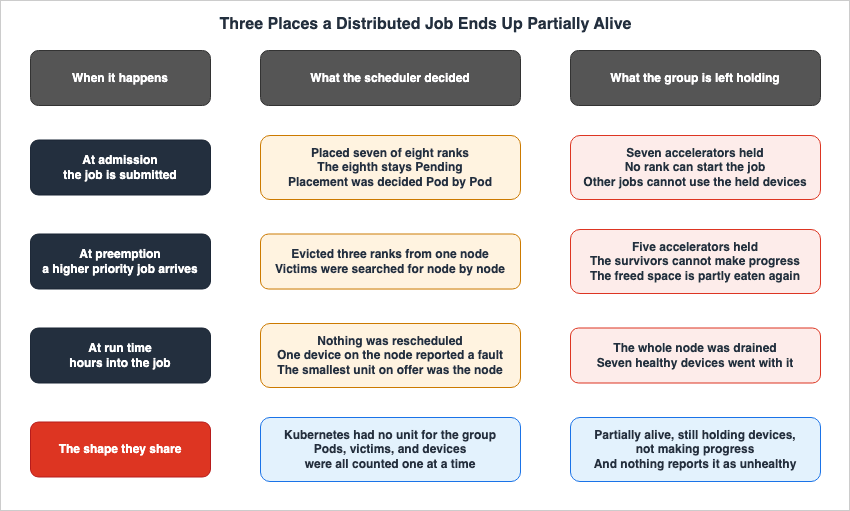
2.1 At Admission: Some Pods Land and the Job Does Not Start
You submit one distributed training job with eight ranks. The cluster has room for seven. A Pod-by-Pod scheduler places the seven that fit and leaves the eighth Pending.Two things follow. The seven Pods that landed hold accelerators without computing anything. And because they hold them, another job that arrives later cannot run either. If the two jobs end up waiting on each other's resources, nothing breaks the tie until someone intervenes from outside.
The official Kubernetes v1.35 blog describes this situation as follows:
Without gang scheduling, a Job might be partially scheduled, consuming resources without being
able to run, leading to resource wastage and potential deadlocks.
From the Kubernetes side, none of this looks abnormal. The Pods are Running, the nodes are healthy, and no container is restarting. The one thing that is wrong is that the job is not progressing, and the only thing watching that is a metric on the workload side.
2.2 At Preemption: Part of the Group Is Evicted
Suppose the job started. Some time later, a higher-priority job is submitted. The default preemption searches for victims node by node. Where it decides room can be made, it evicts the Pods on that node.If three of the eight ranks were running on that node, the group is down to five. The five are alive. The work stops. And because those five still hold their devices, part of the room the eviction created is eaten right back by the five that are no longer making progress.
Partial eviction is a problem because neither side gains anything from it. The high-priority job may still not get enough room, and the low-priority job stops making progress without having died.
2.3 At Run Time: One Device Fails
Suppose the job started and was never preempted. After several hours of training, one of the eight GPUs on the node reports a fault.At this point the granularity Kubernetes has traditionally offered is the node. You cordon the node, evict the Pods, and replace it. The seven healthy GPUs go down with it.
There's another, more challenging issue. When the application entered a crash loop, there was no way to tell from the Pod's status whether the root cause was the code or the device. The Amazon EKS Kubernetes 1.36 release notes state that this has been addressed as follows:
Resource Health Status (Beta): Reports per-device health in Pod status, allowing operators to
determine whether a crash loop is due to an Unhealthy or Unknown device status rather than
application issues. Works with both Device Plugins and Dynamic Resource Allocation.
2.4 What the Three Have in Common
In all three, only part of the system is alive, and the part that is alive is holding devices. Left alone, the pool of usable devices keeps shrinking.What Kubernetes lacked against this shape, for a long time, was the unit of the group itself. The scheduler evaluates Pods one at a time and binds them to nodes. Preemption picks victims one at a time. Device allocation counts numbers per container, per Pod. At no stage was there anywhere to write down the fact that the eight are one thing.
The sections that follow cover the two places Kubernetes built for it. Sections 3 through 6 are the scheduler side. Sections 7 and 8 are the device side.
3. What Kubernetes v1.35 Gave the Scheduler
3.1 The Workload Resource and gang.minCount
Kubernetes v1.35 introduced theWorkload resource to the scheduling.k8s.io/v1alpha1 API group. This resource is designed to define the scheduling requirements for applications composed of multiple Pods in a machine-readable format.In v1.35, a
Workload contained an array of podGroups, where each group had a name and a policy.apiVersion: scheduling.k8s.io/v1alpha1
kind: Workload
metadata:
name: training-job-workload
namespace: some-ns
spec:
podGroups:
- name: workers
policy:
gang:
# The gang is schedulable only if 4 pods can run at once
minCount: 4On the Pod side, a
workloadRef field specified a particular group within that Workload.apiVersion: v1
kind: Pod
metadata:
name: worker-0
namespace: some-ns
spec:
workloadRef:
name: training-job-workload
podGroup: workersThe
gang policy represents an all-or-nothing placement strategy. minCount specifies the minimum number of Pods within that group that must be running simultaneously.3.2 The Permit Gate and the Five-Minute Timeout
The implementation in v1.35 was built upon the existing Pod-based scheduling framework. The process works as follows:When the Pods are created, the scheduler's
GangScheduling plugin holds them at the PreEnqueue stage. It keeps them there while it waits for the referenced Workload to exist, confirms the presence of a designated group, and checks that the number of pending Pods in that group has reached the minCount.Once sufficient Pods are gathered, the scheduler attempts to find a placement. However, it doesn't immediately confirm the placement. The Pods are held at a Permit gate. Only when a valid allocation is found for the entire group, encompassing at least
minCount Pods, does the gate open, and all Pods are bound.The behavior when a suitable allocation isn't found is characteristic of this version.
If only a subset of the group pods was successfully scheduled within a timeout
(set to 5 minutes), the scheduler rejects all of the Pods in the group.
They go back to the queue, freeing up the reserved resources for other workloads.
The five-minute timeframe indicates that this design relies on time to resolve issues. The group holds its consistency by reserving resources and waiting for every member to show up. If the group isn't complete, the system discards the reserved resources and restarts the process.
3.3 Opportunistic Batching Is a Different Thing
Kubernetes v1.35 includes another feature related to scheduling, called opportunistic batching. While it's easy to confuse this with gang scheduling, the goals are different.Opportunistic batching focuses on speed. When a run of Pods has identical scheduling requirements, meaning the same container image, the same resource requests, and the same affinity, the scheduler reuses the feasibility calculations performed for the first Pod when scheduling subsequent, identical Pods. Because Pods in distributed jobs are often identical, this optimization is particularly effective.
Unlike gang scheduling, this feature doesn't require the
Workload API and doesn't require explicit opt-in from users. Its stability is different too. Opportunistic batching is Beta as of v1.35 and enabled by default. To disable it, you can use the OpportunisticBatching feature gate.So what actually reached readers' clusters in v1.35 was the batching. Gang scheduling was Alpha and off by default.
4. What v1.36 Restructured
4.1 Workload Became a Template, PodGroup Became the Runtime Object
Kubernetes v1.36 rebuilt the API that v1.35 introduced. Here is how the official blog puts it.Kubernetes v1.36 introduces a significant architectural evolution by cleanly separating API
concerns: the Workload API acts as a static template, while the new PodGroup API handles the
runtime state.In v1.35, the group of Pods and their runtime state sat inside the
Workload resource. In v1.36, this has been split into two. The Workload now serves as a static template, and a new PodGroup holds the runtime state. The API group has also been moved to scheduling.k8s.io/v1alpha2, completely replacing v1alpha1.The
Workload now contains podGroupTemplates instead of podGroups.apiVersion: scheduling.k8s.io/v1alpha2
kind: Workload
metadata:
name: training-job-workload
namespace: some-ns
spec:
# Pod groups are now defined as templates.
podGroupTemplates:
- name: workers
schedulingPolicy:
gang:
# The gang is schedulable only if 4 pods can run at once
minCount: 4Controllers stamp out runtime
PodGroup objects from this template. The PodGroup holds the actual scheduling policies, references the template it was created from, and also has a status.apiVersion: scheduling.k8s.io/v1alpha2
kind: PodGroup
metadata:
name: training-job-workers-pg
namespace: some-ns
spec:
# The PodGroup references the Workload template it originated from.
podGroupTemplateRef:
workload:
workloadName: training-job-workload
podGroupTemplateName: workers
schedulingPolicy:
gang:
minCount: 4
status:
conditions:
- type: PodGroupScheduled
status: "True"
lastTransitionTime: 2026-04-03T00:00:00ZThe reasons for this split can be understood from two key benefits. First, it improves performance and scalability. By decoupling the
PodGroup, status updates can now be divided on a replica basis. Second, it simplifies the scheduler. Because the PodGroup now contains all the information the scheduler requires, the scheduler no longer needs to watch or parse the Workload object itself.This structural change was proposed as a KEP (Kubernetes Enhancement Proposal) titled "WAS: Decouple PodGroup API." The number is 5832, SIG Scheduling owns it, and it carries the alpha stage label. However, the body of that issue begins by stating:
This KEP was merged back into #4671 (Gang Scheduling Support in Kubernetes)Therefore, the KEP number that should be referenced for this change is KEP-4671, "Gang Scheduling Support in Kubernetes." This is also the one referenced in the "Learn more" section of the official Kubernetes v1.36 blog. Referencing only number 5832 would point to a closed issue.
4.2 The Pod Field Changed from workloadRef to schedulingGroup
The field that indicates a Pod's association with a group has also changed. TheworkloadRef field from v1.35 is gone, replaced by schedulingGroup. A Pod no longer points at a Workload. It points at the runtime PodGroup.apiVersion: v1
kind: Pod
metadata:
name: worker-0
namespace: some-ns
spec:
# The workloadRef field has been replaced by schedulingGroup
schedulingGroup:
podGroupName: training-job-workers-pgThis field name will become significant later. As you'll see in Section 6, one of the conditions that triggers the Job controller integration is whether this field is already set.
4.3 The PodGroup Scheduling Cycle
In v1.35, the scheduler held the Pods at the Permit gate until the group assembled. In v1.36 that approach was replaced with a dedicated scheduling cycle. The official blog states:Instead of evaluating and reserving resources sequentially Pod-by-Pod, which risks scheduling
deadlocks, the scheduler evaluates the group as a unified operation.When the scheduler retrieves members of a
PodGroup from the queue, it gathers the other queued Pods that belong to that group, sorts them deterministically, and runs an atomic cycle. This cycle consists of the following steps:- The scheduler takes a single snapshot of the cluster state. This ensures consistency and prevents race conditions while the system evaluates the entire group.
- Using an algorithm built for
PodGroups, the scheduler searches for valid node placements for every Pod in the group. The filtering and scoring phases leverage existing mechanisms used for individual Pods. - The scheduler applies the outcome atomically to the whole
PodGroup.
On success, the schedulable member Pods move to the bind phase together. Any Pod the scheduler could not place goes back to the queue and waits until it can join the ones that already landed. On failure, the scheduler treats the whole group as unschedulable, binds none of the Pods, and puts the group back on the queue to retry after a backoff.
The center of gravity of the scheduling phase moved from holding a reservation while the group assembles, to judging the whole group from a single snapshot. This is the core change in v1.36. The practice of holding Pods in the PreEnqueue stage until the
minCount is reached remains unchanged. The change lies in the subsequent scheduling phase.4.4 What minCount Guarantees, and What It Does Not
Misreadinggang.minCount puts your operational expectations out of step with the implementation. The wording in the official blog has to be read exactly.The scheduler holds Pods at the PreEnqueue stage until the
minCount requirement is met. The actual scheduling phase is then delegated to a new PodGroup scheduling cycle. During the algorithm's execution, the scheduler verifies whether the number of schedulable Pods meets the minCount. If the cluster cannot accommodate the minimum required number, no Pods will be bound. The group will fail and wait until sufficient resources become available.Therefore,
minCount only guarantees a minimum number. It does not guarantee that all Pods in the group will be scheduled. For example, if you set minCount to 4 and attempt to create 8 Pods, the cycle may succeed if only 4 of them are placed. If you need every Pod placed, set minCount equal to the size of the group.There's another behavior, as noted in the official blog, that is particularly important for operations.
Crucially, Pods already assigned to Nodes remain running.
The scheduler will not unassign or evict them, even if the group fails to meet its requirements
in subsequent cycles.
Once Pods have been assigned to a node, they will continue to run even if the group fails to meet the requirement in subsequent cycles. Gang scheduling is not a mechanism for reclaiming Pods that have already been placed. The state described in Section 2.1, where only part of the group holds devices and nothing progresses, can still arise once a group has formed and then falls apart.
4.5 The Limitations the Release States Itself
The v1.36 blog explicitly lists what this initial implementation does not guarantee. It's worth reading in its entirety.For a homogeneous Pod group, meaning one where every Pod has the same scheduling requirements and there are no inter-Pod dependencies such as affinity, anti-affinity, or topology spread, the algorithm is expected to find a placement if one exists.
Otherwise, the following occurs:
For heterogeneous Pod groups, finding a valid placement if one exists is not guaranteed,
even when the solution might seem trivial.
Furthermore, if there are dependencies between Pods, for example, if one Pod's ability to be scheduled depends on another Pod through inter-pod affinity, the algorithm may fail to find a placement regardless of the cluster's current state.
Distributed training worker groups are often homogeneous, so this constraint is unlikely to affect initial users. It is more likely to apply to configurations where the leader and worker Pods have different resource requirements, or configurations that impose constraints on distributing Pods across racks.
5. Preemption, Topology, and Claims at the Group Level
What decoupling thePodGroup bought shows up less in gang scheduling itself than in the three features that sit on top of it.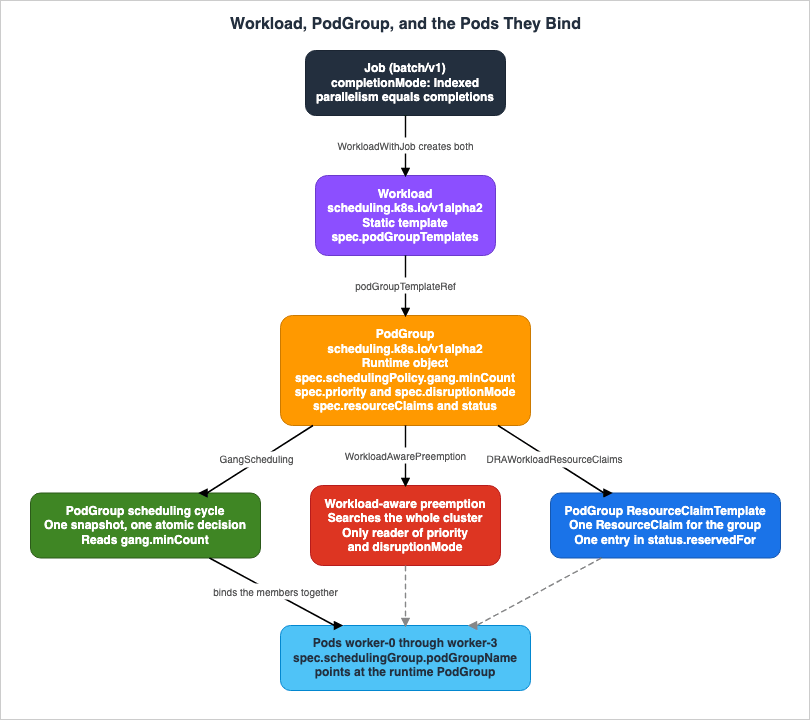
5.1 Workload-Aware Preemption Searches the Whole Cluster
Kubernetes v1.36 introduces a new preemption mechanism, workload-aware preemption. When aPodGroup cannot be scheduled, the scheduler uses this mechanism to attempt to make it schedulable.The difference from default preemption lies in the unit of search.
Compared to the default preemption used in the standard Pod-by-Pod scheduling cycle, this new
mechanism treats the entire PodGroup as a single preemptor unit.
Instead of evaluating preemption victims on each Node separately, it searches across the entire
cluster.
The scheduler looks for victims across the whole cluster. It does not evaluate them node by node. This allows the scheduler to simultaneously evict Pods from multiple nodes, creating sufficient available resources to accommodate the entire
PodGroup.As seen in Section 2.2, partial preemption occurred because the decision of which Pods to evict was made at the Pod level. By treating a group as a single unit, the system inherently avoids making decisions to evict only a portion of the group.
5.2 Only One Mechanism Reads the Group Priority and Disruption Mode
Workload-aware preemption introduces two concepts to thePodGroup API. One is the PodGroup priority, which overrides the priority of the individual Pods that make up the group. The other is disruptionMode, which specifies whether the group's Pods may be evicted independently or have to go together in an all-or-nothing fashion.apiVersion: scheduling.k8s.io/v1alpha2
kind: PodGroup
metadata:
name: victim-pg
spec:
priorityClassName: high-priority
priority: 1000
disruptionMode: PodGroupIn this example, when
victim-pg is evaluated as a potential victim during the workload-aware preemption cycle, a priority of 1000 is used, and eviction occurs strictly in an all-or-nothing manner.However, there is a potentially confusing limitation.
In Kubernetes v1.36, these fields are only respected by the workload-aware preemption
mechanism.
Even if a
PodGroup is assigned a priority and a disruptionMode, only workload-aware preemption will read these values. The default preemption mechanism, which operates at the Pod level, does not consider them. This applies to other sources of disruption as well. The official blog states that future releases aim to extend support to include the default preemption mechanism and other sources, but as of v1.36, this is not yet the case.5.3 Topology Constraints on the PodGroup
Kubernetes v1.36 also included the initial iteration of topology-aware scheduling. When topology constraints are directly specified for aPodGroup, the scheduler will attempt to ensure that all Pods within that group reside within a specific physical or logical domain.apiVersion: scheduling.k8s.io/v1alpha2
kind: PodGroup
metadata:
name: topology-aware-workers-pg
spec:
schedulingPolicy:
gang:
minCount: 4
# Enforce that the pods are co-located based on the rack topology
schedulingConstraints:
topology:
- key: topology.kubernetes.io/rackThe scheduler tests various combinations of nodes to satisfy this constraint, selecting the optimal placement based on how efficiently the
PodGroup can utilize resources and how many Pods can be accommodated within that domain. To enable this, the PodGroup scheduling cycle is extended with a placement-based algorithm, and two extension points, PlacementGenerate and PlacementScore, have been added.Currently, preemption is not triggered to satisfy topology constraints. Deeper integration with multi-level topologies, soft constraints, and DRA (Dynamic Resource Allocation) is identified as a goal for future releases.
5.4 One ResourceClaim per PodGroup, and the Limit of 256
The third point is the connection to DRA. This section connects the first and second halves of this article.In DRA, multiple Pods can share a device by referencing the same
ResourceClaim by name. Reference a ResourceClaimTemplate instead, and Kubernetes generates one ResourceClaim per Pod. Between those two there was no shape for what a large job needs. If only a specific group of Pods needed to share a device, the only option was to manually create and manage individual ResourceClaim objects.Kubernetes v1.36 allows
PodGroup to be used as the replication unit for ResourceClaimTemplate. When a PodGroup's spec.resourceClaims references a ResourceClaimTemplate, Kubernetes generates exactly one ResourceClaim for the whole PodGroup, no matter how many Pods the group holds.apiVersion: scheduling.k8s.io/v1alpha2
kind: PodGroup
metadata:
name: training-job-workers-pg
spec:
resourceClaims:
- name: pg-claim
resourceClaimTemplateName: my-claim-templateThis change has a secondary, but practically significant, effect.
Previously, kube-scheduler could only list individual Pods in a ResourceClaim's
status.reservedFor field which is limited to 256 items.
Now, a single PodGroup reference in status.reservedFor can represent many more than 256 Pods,
allowing high-cardinality sharing of devices.
The limit of 256 was a real constraint for large-scale training jobs. By allowing
PodGroup to be counted as a single entry, this limit is effectively removed.The feature gate here is
DRAWorkloadResourceClaims, and it has to go on in four places: kube-apiserver, kube-controller-manager, kube-scheduler, and kubelet. The stability is Alpha.6. The Job Controller Integration, and the Four Conditions
6.1 What the Job Controller Does for You
It's not practical for users to write theWorkload and PodGroup definitions themselves. Kubernetes v1.36 introduces an integration that delegates this task to the Job controller.When the
WorkloadWithJob feature gate is enabled, the Job controller automatically performs the following three actions for Jobs that meet certain criteria: First, it creates the Workload and the corresponding runtime PodGroup. Second, it sets the .spec.schedulingGroup for all Pods created by the Job, ensuring that the scheduler treats them as a single group. Finally, it sets the owner of the generated objects to the Job, allowing them to be garbage collected when the Job is deleted.You turn the gate on in both
kube-apiserver and kube-controller-manager.6.2 The Four Conditions
The integration fires only when a Job has a well-defined, fixed shape. Four conditions have to hold..spec.parallelism is greater than 1
.spec.completionMode is set to Indexed
.spec.completions is equal to .spec.parallelism
The schedulingGroup is not already set on the Pod template.The official blog explains the intent behind them. Being
Indexed means that each Pod has a stable identifier. parallelism being equal to completions indicates that the size of the group is known and fixed at the time of admission. Finally, schedulingGroup being unset signifies that no other controllers have yet claimed responsibility for scheduling.A Job that meets these conditions can be represented as follows:
apiVersion: batch/v1
kind: Job
metadata:
  name: training-job
  namespace: job-ns
spec:
  completionMode: Indexed
  parallelism: 4
  completions: 4
  template:
    spec:
      restartPolicy: Never
      containers:
      - name: worker
        image: registry.example/trainer:latest
6.3 Jobs Outside Those Conditions Are Scheduled Pod by Pod
The fourth condition is designed to coexist with external batch systems. If you setschedulingGroup on the Pod template yourself, for example because a higher-level controller is managing the workload, the Job controller leaves the Pod template alone and creates no Workload and no PodGroup of its own.And here is what happens to the Jobs that do not meet them.
Jobs that do not meet these conditions are scheduled Pod-by-Pod, exactly as before.This provides operational reassurance. Even if a feature gate is enabled, the behavior of Jobs that do not meet the conditions will remain unchanged. However, conversely, existing Jobs that do not have matching
parallelism and completions values will not be gang scheduled, even if the feature gate is enabled. Support for elastic Jobs and integration with other built-in controllers is being tracked in KEP-5547, and currently, support is limited to static, indexed, and fully parallel Jobs.7. What DRA Changed About Asking for a Device
This is the second half. Unlike the vocabulary on the scheduler side, DRA itself has already reached GA. Beta and Alpha are mixed in among the surrounding features, but the foundation runs.7.1 What Extended Resources Could Not Express
Before DRA, the mechanism for exposing specialized hardware to Kubernetes was the device plugin. Device plugins advertise devices as extended resources. Examples includenvidia.com/gpu and aws.amazon.com/neuroncore, where users would specify the quantity in the container's resources.requests and resources.limits.The Amazon EKS User Guide lists four limitations of this approach.
Devices are requested as opaque integer counts with no attribute-based filtering.
No support for device sharing between containers or Pods.
No expressive topology-aware allocation across device types.
Custom scheduler extensions are often required for intelligent placement.
All four limitations share the fact that the node could only expose a number, not any details about the device itself. The number 8 says nothing about which model those eight are, how much memory they carry, which PCIe root they hang off, or which four of them are directly connected. So there was nowhere to express a request for four directly connected devices, and the only way to get one was to add a dedicated scheduler extension.
DRA reverses this approach. Drivers now publish a wealth of device attributes to the scheduler through
ResourceSlice objects, and users request devices using ResourceClaim and ResourceClaimTemplate objects, referencing a category called DeviceClass. You narrow by attribute with Common Expression Language.All of these API kinds belong to the
resource.k8s.io/v1 API group.The focus has shifted from the number of devices a node exposes to the structure of what the workload requests. That is the essence of DRA.
7.2 Choosing Between ResourceClaim and ResourceClaimTemplate
These two are usually the first thing that confuses people about DRA. While their names are similar, their lifecycles are essentially opposite.| Behavior | ResourceClaim | ResourceClaimTemplate |
|---|---|---|
| Creation | Manually created by the user, prior to Pod creation. | Automatically generated by Kubernetes, on a per-Pod basis. |
| Lifecycle | Remains until explicitly deleted. | The template itself persists. Generated claims are associated with the Pod that triggered their creation. |
| Sharing Across Pods | Possible. Pods referencing the same claim will share the same device and are placed on the same node. | Not possible. Each Pod receives a separate device. |
| Reference Field | resourceClaimName | resourceClaimTemplateName |
| When Not Found | The Pod remains in a pending state. | Not applicable. |
Furthermore, with v1.36, a third use case was added, as seen in Section 5.4:
ResourceClaimTemplate within a PodGroup. This allows you to allocate separate devices for each group, while allowing sharing within that group.The choice depends on the intended use. If each worker in a distributed training environment requires its own dedicated GPU, use
ResourceClaimTemplate. If multiple Pods need to share the same EFA interface, use ResourceClaim. If you need to allocate resources on a group level and allow sharing within that group, use ResourceClaimTemplate within a PodGroup.7.3 Device Taints Instead of Cordoning the Whole Node
The operational practice described in Section 2.3, where an entire node is taken down if a single GPU fails, can now be replaced with DRA's device-level taint mechanism.Device taints are similar to node taints, consisting of a string key, a value, and an effect. The effect reaches the
ResourceClaim that is using the device, and every Pod that references that claim. The NoSchedule effect stops those Pods from being scheduled. A tainted device drops out of the candidate set for ResourceClaim allocation.The "NoExecute" effect implies "NoSchedule" and in addition causes eviction of all Pods
which have been scheduled already.The device taint eviction controller in
kube-controller-manager carries out the NoExecute eviction, and it does so by deleting the affected Pods. The ResourceClaim can tolerate taints, and a tolerated taint has no effect. Specifying a tolerance duration allows for a delay in eviction, calculated from the time the taint was applied to the device.The functionality, and therefore the stability, is divided into two categories, depending on who applies the taint.
When applied by the driver, the DRA driver includes the taint in the device information published through the
ResourceSlice. The DRADeviceTaints feature gate covers this one, and it is Beta and on by default in v1.36.When applied by an administrator, a new API type called
DeviceTaintRule is introduced. This allows administrators and control plane components to taint devices, even if the DRA driver doesn't include the taint in its published device information.apiVersion: resource.k8s.io/v1beta2
kind: DeviceTaintRule
metadata:
name: example
spec:
# The entire hardware installation for this driver is broken.
# Evict all pods and don't schedule new ones.
deviceSelector:
driver: dra.example.com
taint:
key: dra.example.com/unhealthy
value: Broken
effect: NoExecuteYou select devices by
DeviceClass name, driver name, pool name, and device name. If no selector is specified, no devices will be tainted. The design exists to keep a forgotten selector from evicting every Pod. Drivers for node-local devices are encouraged to use the node name as their pool name. By tainting based on the pool name, it's possible to taint all devices on a node simultaneously.The stability of this second route needs care.
In contrast to DRADeviceTaints, DRADeviceTaintRules is off by default because of this
dependency on the beta API group, which has to be off by default.
The
DeviceTaintRule requires the resource.k8s.io/v1beta2 API version, and a beta API group has to be off by default. That is why DRADeviceTaintRules is Beta and yet disabled by default. Judging it usable from the word Beta alone puts you on the wrong side of this line. There is also no publicly documented way to enable a beta API group on Amazon EKS. The taint applied by the driver is enabled by default upstream, so the practical distance between the two paths is considerable.7.4 Device Health Reaches the Pod Status
While taint isolates devices, this mechanism allows you to observe what is happening.When the
ResourceHealthStatus feature gate is on and the DRA driver implements the DRAResourceHealth gRPC service, the driver reports any device anomaly it detects to the kubelet. The kubelet then writes this information into the allocatedResourcesStatus field of each container's status. Each entry can include an optional message field, allowing you to provide human-readable context, such as details about the error or the reason for the failure.These two names are easy to swap.
ResourceHealthStatus is the feature gate. DRAResourceHealth is the gRPC service the driver implements. The gate is Beta in v1.36 and enabled by default.How the timeout works matters here.
If the kubelet does not receive a health update from a DRA driver within a timeout period,
the device's health status is marked as "Unknown".
You set the timeout per device through the
health_check_timeout_seconds field in the DeviceHealth gRPC message. If no timeout is specified, the kubelet will use a default of 30 seconds. Because GPU, FPGA, and storage devices have different health reporting characteristics, you can choose appropriate values for each type.There is one limitation.
Device health status is not updated in the Pod status after a Pod has terminated
(for example, in Failed state).
Therefore, you cannot use this information to investigate failed Pods and determine if the failure was caused by the device. You have to look while the Pod is still failing.
8. On Amazon EKS the Allocation Path Forks
This is the core of the article. Everything up to Section 7 was about Kubernetes, and it holds on any distribution. From here on it is specific to Amazon EKS.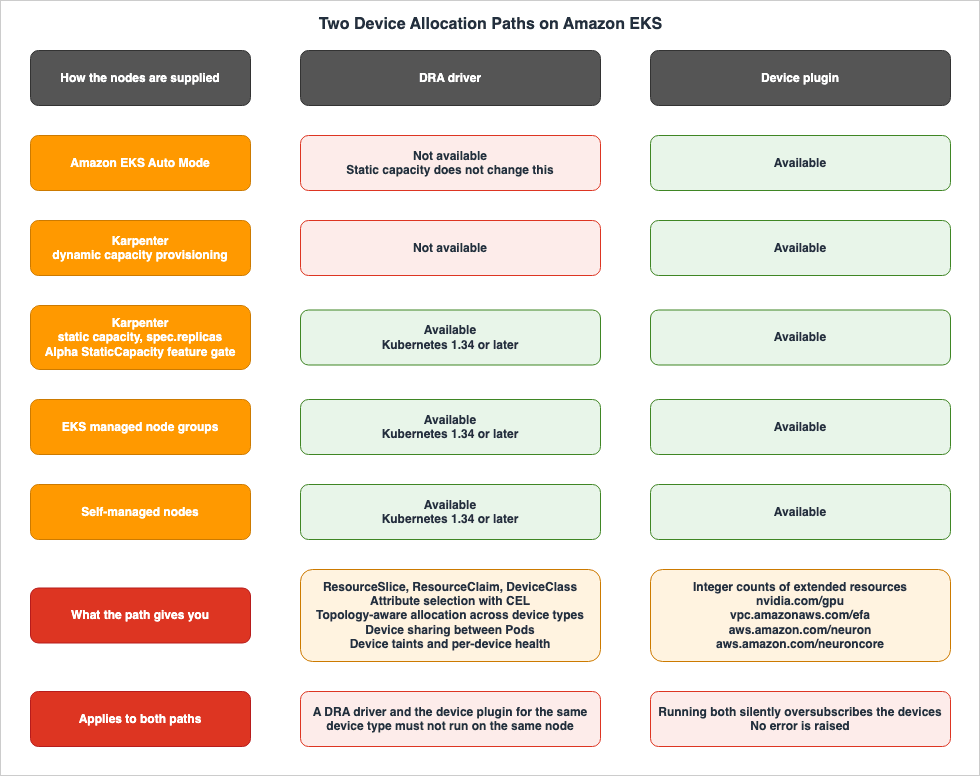
8.1 Three DRA Drivers and Three Device Plugins
Amazon EKS supports two mechanisms for working with specialized hardware, and it handles three different types of devices.| Device | DRA Driver | DeviceClass | Extended Resource Advertised by Device Plugin |
|---|---|---|---|
| NVIDIA GPU | NVIDIA DRA driver for GPUs | gpu.nvidia.com | nvidia.com/gpu |
| Elastic Fabric Adapter | EFA DRA driver, derived from the upstream DRANET project | efa.networking.k8s.aws | vpc.amazonaws.com/efa |
| AWS Trainium and AWS Inferentia | Neuron DRA driver | neuron.aws.com | aws.amazon.com/neuron and aws.amazon.com/neuroncore |
Regarding the EFA DRA driver, the Amazon EKS User Guide explicitly states how the name is handled. The EFA DRA driver and DRANET refer to the same thing and the documentation uses them interchangeably. The driver's name is
dra.net, and it runs as a DaemonSet on each node, automatically discovering EFA devices.The three drivers can be selected independently, but they gain meaning when combined. The EFA DRA driver publishes topology information to pair EFA interfaces with GPUs or Neuron devices connected to the same PCIe root. This pairing utilizes
matchAttribute constraints.apiVersion: resource.k8s.io/v1
kind: ResourceClaimTemplate
metadata:
name: aligned-efa-nvidia
spec:
spec:
devices:
requests:
- name: 1-efa
exactly:
deviceClassName: efa.networking.k8s.aws
count: 1
- name: 1-gpu
exactly:
deviceClassName: gpu.nvidia.com
count: 1
constraints:
- requests: ["1-gpu", "1-efa"]
matchAttribute: "resource.kubernetes.io/pcieRoot"To achieve this configuration, both the EFA and GPU sides require a DRA driver. Simply moving to a DRA driver on one side will not establish the necessary topology alignment.
The Neuron side also has corresponding attributes. The
matchAttribute allows you to assign subsets of connected devices, from resource.aws.com/devicegroup1_id through resource.aws.com/devicegroup16_id. The trailing number is how many Neuron devices the connected group holds. Selecting an attribute with the same number as the requested count ensures that the allocated devices sit in the same connected group.EFA also has a setting called
allocationMode. The default, ExactCount, requests a specific number of devices as defined by the count parameter. All requests every matching device in the pool. For example, with an instance type like p5.48xlarge, which has four EFA devices sharing a single PCIe root with one GPU, you can secure an aligned set by putting allocationMode: All on the EFA request, even without knowing the exact EFA-to-GPU mapping or the count.8.2 The Node Supply Model Decides the Path
This is where the decision splits. Which mechanism you can use is decided by how the nodes are supplied. The type of device does not decide it.The Amazon EKS User Guide places a comparison table of the same shape on three pages, one for NVIDIA, one for EFA, and one for Neuron. The other rows vary by device. The row labeled
EKS Compute is identical on all three. Transposed, it reads as follows.| Mechanism | Available Amazon EKS Compute |
|---|---|
| DRA driver | Karpenter (static capacity only), EKS managed node group, self-managed node |
| Device plugin | EKS Auto Mode, Karpenter, EKS managed node group, self-managed node |
The minimum Kubernetes version differs too. The DRA driver needs Kubernetes 1.34 or later. The device plugin works on every Kubernetes version Amazon EKS supports. The Amazon EKS User Guide states the following regarding the device plugin:
Device plugins remain fully supported for all Kubernetes versions.In other words, the device plugin is not something you settle for during a migration. It is one of the two paths.
The conditions on DRA itself are worth pinning down too.
DRA is available on Amazon EKS with Kubernetes version 1.33 and above, but it is
recommended for Kubernetes versions 1.34 and later because of an upstream Kubernetes
issue on GitHub.
DRA works on Kubernetes 1.33, and 1.34 or later is what AWS recommends. The reason given is an upstream issue. The driver prerequisites themselves say 1.34 or later, so reading the whole thing as 1.34 or later is the safe practice.
8.3 Static Capacity Is Necessary but Not Sufficient
The term static capacity turned up alongside Karpenter, so it needs pinning down.A static capacity NodePool is a NodePool that maintains a fixed number of nodes, regardless of workload demand. Setting the
spec.replicas field turns it on. It's used to avoid cold starts for latency-sensitive inference workloads, or to ensure a minimum infrastructure scale for the cluster.In self-managed Karpenter, this feature itself is behind a feature gate.
With self-managed Karpenter, static capacity is gated by the alpha StaticCapacity feature
(launched in Karpenter version v1.8), which must be enabled in the Helm values:
So the path where Karpenter uses the DRA driver rests on an alpha feature of Karpenter. The Kubernetes side is GA, and there is still an alpha in front of it.
And this matters more. EKS Auto Mode has static capacity NodePools as well. You can set
spec.replicas in Auto Mode, and the Amazon EKS User Guide carries an example of an Auto Mode static capacity NodePool. DRA is still unavailable there.DRA is not currently compatible with EKS Auto Mode.So there are two axes. One is whether this is Auto Mode. The other is, if you are on Karpenter, whether the capacity is static or dynamically provisioned. Being static is the condition that applies when you are on Karpenter. It does not lift the Auto Mode restriction.
Static capacity also comes with constraints you cannot undo. Once
replicas is set on a NodePool you cannot remove it, and one NodePool cannot move between static and dynamic. Static capacity NodePools are not considered for consolidation either. Leaning on static capacity purely to unlock a path changes the character of your node operations.8.4 Two AWS Sources Describe the Karpenter Case at Different Resolutions
Here is a potential pitfall for readers. Two primary AWS documents describe the Karpenter case at different resolutions.The Amazon EKS User Guide's hardware devices page explicitly states the conditions.
DRA is not currently compatible with Karpenter when using dynamically provisioned capacity.
You must use static capacity provisioning in Karpenter, or EKS managed node groups or
self-managed nodes with DRA drivers.
In contrast, the AWS What's New entry announcing EFA's DRA support reads as follows:
The EFA DRA driver is recommended for new deployments on Amazon EKS clusters running Kubernetes
version 1.34 or later with EKS managed node groups or self-managed nodes.
The EFA device plugin remains supported and is recommended for use with Karpenter and
Amazon EKS Auto Mode.A reader who only reads What's New might conclude that a device plugin is required when using Karpenter. The User Guide puts Karpenter's static capacity provisioning on the DRA side. This difference isn't a contradiction. What's New provides a summary of recommendations, while the User Guide is a document that outlines conditions. However, this discrepancy will affect a reader's decision. A cluster holding a fixed number of GPU nodes in a static capacity NodePool would, following the What's New entry, give up a path it was eligible for.
All three driver pages name Karpenter's static capacity provisioning in prose as a condition for the DRA driver. Only the NVIDIA page says which kind of Karpenter the device plugin is for.
Use the NVIDIA device plugin with EKS Auto Mode, or with Karpenter when you use dynamic
capacity provisioning.
The term "dynamic capacity provisioning" appears here exclusively. For the device plugin, the EFA and Neuron pages say only
Karpenter in the table. It's possible that a reader, comparing the recommendations in What's New with the table in the User Guide, will discover that the answer they're seeking is found on a page related to a different device.The User Guide should be the primary source for making decisions. A document written to state constraints drops fewer conditions than a document written to convey a feature. A similar pattern was previously addressed in Amazon EKS Control Plane Configuration.
8.5 The Two Mechanisms Cannot Share a Node
When discussing path selection, it's crucial to understand that the process always involves removing the alternative paths. Judged by the strength of the warning alone, this is the point in this section that must not be missed.DRA drivers and device plugins for the same device type must not run simultaneously on the same
node.
Uninstall the device plugin before installing the corresponding DRA driver, or deploy them on
separate nodes.
Running both DRA driver and device plugin for the same device on the same node can cause silent
oversubscription of the underlying hardware devices.The term "silent" is key here. Each device's page states that multiple Pods on the same node could potentially be assigned the same device. Because there are no warnings during the assignment process, the only way to detect this issue is by observing the behavior of the workloads.
The same warning is prominently displayed on all three device pages, and it's particularly important when using Bottlerocket. The EKS-optimized Bottlerocket NVIDIA variant ships the NVIDIA device plugin and enables it by default. Before using the DRA driver, you must disable this plugin by setting
settings.kubelet-device-plugins.nvidia.enabled to false in the node's user data. This setting is available from Bottlerocket version 1.63.0 and later; earlier versions do not allow disabling the built-in device plugin.There is one more misconception, about the AMIs.
The EKS AL2023 and Bottlerocket AMIs do not include the EFA DRA driver or EFA device plugin,
and these must be installed separately on your cluster before deploying workloads.
Both the EKS-optimized AL2023 AMI and the Bottlerocket AMI include the host-side components required for EFA, specifically what
aws-efa-installer installs. However, neither AMI includes the allocation mechanism itself. Regardless of which AMI you choose, you'll need to install this separately within your cluster.8.6 The Bridge That Lets Manifests Stay As They Are
A significant factor influencing decisions to migrate often revolves around the manifests of workloads. When you have numerous Deployments, for example, each specifyingresources.limits with nvidia.com/gpu: 1, converting them all to ResourceClaimTemplate can become a major bottleneck in the migration process.DRA's extended resource support, introduced in Beta in v1.36, serves as this bridge. By assigning extended resource names to a
DeviceClass, the scheduler can select devices that match that class when fulfilling requests for those extended resources.This allows users to continue using extended resource requests in a pod to request either
extended resources provided by device plugin, or DRA devices.It's possible to have different configurations across nodes: on some nodes, a device plugin might provide the extended resource, while on others, DRA handles it. The Amazon EKS User Guide also says that you can use DRA to manage the device plugin extended resources without changing your workload specifications.
This capability allows cluster operators to decide when to transition to DRA, and application developers to adopt the
ResourceClaim API, independently of each other. The feature gate is DRAExtendedResource, and it is Beta in v1.36. Check the table in Section 9.1 against your own cluster's version before you build on it.9. Reading the Stability Levels
9.1 It Differs per Feature and Moves per Release
The terms alpha, beta, and GA have appeared repeatedly throughout this article. Here's a summary in a table.This table covers only the features this article mentions. It does not encompass all features of DRA and workload-aware scheduling, and functionality may change with future releases. For the full list and the current state, go to the Kubernetes feature gates reference and the feature state banner on each feature's page. The stability and default columns come from the feature gates reference. The enabling-target column comes from the official blog for v1.36. The information in this table was verified on August 26, 2026.
The scheduler side looks like this.
| Feature | Feature Gate | Targets for Enabling | Stability (v1.36) | Default |
|---|---|---|---|---|
Workload and PodGroup API | GenericWorkload | kube-apiserver, kube-scheduler | Alpha, from v1.35 | Disabled |
| Gang Scheduling | GangScheduling | kube-scheduler | Alpha, from v1.35 | Disabled |
| Opportunistic Batching | OpportunisticBatching | kube-scheduler | Beta, from v1.35 | Enabled |
| Topology-Aware Scheduling | TopologyAwareWorkloadScheduling | kube-scheduler | Alpha, from v1.36 | Disabled |
| Workload-Aware Preemption | WorkloadAwarePreemption | kube-scheduler | Alpha, from v1.36 | Disabled |
| Job Controller Integration | WorkloadWithJob | kube-apiserver, kube-controller-manager | Alpha, from v1.36 | Disabled |
PodGroup Resource Claims | DRAWorkloadResourceClaims | kube-apiserver, kube-controller-manager, kube-scheduler, kubelet | Alpha, from v1.36 | Disabled |
GenericWorkload is a prerequisite for all other settings. The scheduling.k8s.io/v1alpha2 API group has to be on as well. WorkloadAwarePreemption also requires that GangScheduling is enabled.The official blog from v1.36 summarizes this as follows:
All below workload-aware scheduling improvements are available as Alpha features in v1.36.Opportunistic batching is the only row in that table that is on by default. And it is not gang scheduling.
The device side looks like this.
| Feature | Feature Gate | Stability (v1.36) | Default |
|---|---|---|---|
| DRA Core | DynamicResourceAllocation | GA, from v1.34 | Enabled |
| Prioritized List | DRAPrioritizedList | GA, from v1.36 | Enabled |
| Admin Access | DRAAdminAccess | GA, from v1.36 | Enabled |
| Partitionable Devices | DRAPartitionableDevices | Beta, from v1.36 | Enabled |
| Consumable Capacity | DRAConsumableCapacity | Beta, from v1.36 | Enabled |
| Device Taints (applied by drivers) | DRADeviceTaints | Beta, from v1.36 | Enabled |
DeviceTaintRule (applied by administrators) | DRADeviceTaintRules | Beta, from v1.36 | Disabled, depends on resource.k8s.io/v1beta2 |
| Device Binding Conditions | DRADeviceBindingConditions | Beta, from v1.36 | Enabled |
| Bridge to Extended Resources | DRAExtendedResource | Beta, from v1.36 | Enabled |
| Device Health Status | ResourceHealthStatus | Beta, from v1.36 | Enabled |
Device Status for ResourceClaim | DRAResourceClaimDeviceStatus | Beta, from v1.33 | Enabled |
| Granular Status Authorization | DRAResourceClaimGranularStatusAuthorization | Beta, from v1.36 | Enabled |
| Resource Pool Status | DRAResourcePoolStatus | Alpha, from v1.36 | Disabled |
| Node Allocatable Resources | DRANodeAllocatableResources | Alpha, from v1.36 | Disabled |
| List-Type Attributes | DRAListTypeAttributes | Alpha, from v1.36 | Disabled |
The GA version of DRA itself needs care. The feature gates reference lists
DynamicResourceAllocation as GA v1.34, and the Amazon EKS Kubernetes 1.34 release notes also state "Dynamic Resource Allocation (DRA) Core APIs (GA)." However, only the feature state banner on the Kubernetes DRA concept page indicates "Kubernetes v1.35 stable." Both sources are official. This article will prioritize the feature gate table and the Amazon EKS release notes, treating GA as v1.34.The purpose of creating this table is to keep the granularity. It is not to be exhaustive. The statement that DRA has reached GA effectively collapses fifteen rows in the table into a single row. As a result, a row that is by default disabled may appear to be enabled. Conversely, the statement that the
Workload API is still in alpha may make opportunistic batching, which is enabled by default, appear to be disabled. There are very few claims in this area that can be written without separating the feature name, the version, the stability, and the default.9.2 The Distance Between In Kubernetes and On Amazon EKS
Reading that table, the next thing you want to do is turn something on. That is where the distance shows.The functionality discussed in Sections 3 through 6, on the scheduler side, is all enabled through feature gates in
kube-apiserver, kube-scheduler, and kube-controller-manager. However, on Amazon EKS, users do not manage these three components.Amazon EKS exposes advanced configuration settings for the control plane. Four parameters are configurable.
| Component | Parameter |
|---|---|
kube-scheduler | nodeResourcesFit.scoringStrategy |
kube-controller-manager | horizontalPodAutoscalerControllerConfig.horizontalPodAutoscalerSyncPeriod |
kube-apiserver | eventTtl |
kube-apiserver | serviceNodePortRange |
However, feature gates are not exposed. There are also no publicly available methods for enabling alpha API groups. Therefore, as of now, there is no publicly documented way to enable
GenericWorkload and GangScheduling on Amazon EKS clusters.There is another piece of evidence. The Amazon EKS Kubernetes 1.36 release notes do not mention the
Workload API, gang scheduling, or workload-aware scheduling at all. What they do mention is seven things: Resource Health Status reaching Beta, three DRA features becoming enabled by default, the removal of the gitRepo volume, the change in SELinux volume labeling, stricter IP and CIDR validation, user namespaces reaching Stable, and the deprecation of the externalIPs field on Services.The Amazon EKS release notes record what becomes usable in that cluster. Even if a feature is included in the upstream Kubernetes release, if there is no publicly available method to enable it through the managed control plane, it will not appear in the Amazon EKS release notes. This difference is only visible if you read both sets of release notes.
For reference, here is when each Kubernetes version reached Amazon EKS.
| Kubernetes Version | Upstream Release Date | Amazon EKS Release Date | End of Standard Support |
|---|---|---|---|
1.36 | April 22, 2026 | June 2, 2026 | August 2, 2027 |
1.35 | December 17, 2025 | January 27, 2026 | March 27, 2027 |
1.34 | August 27, 2025 | October 2, 2025 | December 2, 2026 |
Gang scheduling landed upstream in v1.35, and Amazon EKS 1.35 followed about six weeks later. Those six weeks did not make it possible to enable. The availability of an upstream Kubernetes version and the availability of its alpha features are separate events.
9.3 What That Leaves You Today
If the scheduler-side vocabulary has not arrived, a reader who needs all-or-nothing today still needs an answer.AWS names one of its own features gang scheduling. It is the multi-node parallel job in AWS Batch.
You can use AWS Batch on Amazon Elastic Kubernetes Service to run multi-node parallel
(MNP) jobs (also known as gang scheduling) on your managed Kubernetes clusters.
For Amazon EKS, the MNP job definition sets the
type to multinode and uses the nodeProperties field to specify the number of nodes, the index of the main node, and properties for each node range. On Amazon EKS the node range properties sit under eksProperties.podProperties and carry the container definitions.{
"jobDefinitionName": "MyEksMnpJobDefinition",
"type": "multinode",
"nodeProperties": {
"numNodes": 2,
"mainNode": 0,
"nodeRangeProperties": [
{
"targetNodes": "0:",
"eksProperties": {
"podProperties": {
"containers": [
{
"name": "test-eks-container-1",
"image": "public.ecr.aws/amazonlinux/amazonlinux:2",
"command": ["sleep", "60"],
"resources": {
"limits": { "cpu": "1", "memory": "1024Mi" }
}
}
]
}
}
}
]
}
}You submit an MNP job as one job. The main node starts first, and the child nodes follow. The job finishes when the main node exits, and all child nodes stop at that point. The main node's final state determines the final state of the whole job.
This path expresses the group in the AWS Batch vocabulary rather than the Kubernetes one. Job queuing, retries, and priority become AWS Batch concepts, and the Kubernetes
Job and PriorityClass play no part. What you get in exchange is that you touch no feature gate at all.Adopting that vocabulary brings constraints of its own, and this article does not take them up: which compute environments a multi-node parallel job is allowed to run on, and how job queues and fair-share scheduling policies decide which job receives the nodes. Those are covered in Batch and HPC Job Scheduling on AWS.
The other option is to put a queuing system into the cluster that carries gang semantics of its own. Systems of that kind bring their own CRDs alongside the built-in API and make the admission decision for a group themselves. This article does not compare specific implementations, but the layer is worth naming as an option. Upstream is building for coexistence with that layer, not for replacement. As Section 6.3 showed, the Job controller integration keeps its hands off a Pod template that already carries a
schedulingGroup, and the official blog says that condition is what makes the feature safe to enable on a cluster already running an external batch system. For v1.37, a unified controller integration API is on the list, so that real workload controllers get one standardized way to consume workload-aware scheduling.10. Failure Modes and Anti-Patterns
10.1 Reading a Kubernetes Release Note as an Amazon EKS Capability
The upstream Kubernetes 1.36 release notes and the Amazon EKS 1.36 release notes describe different things. The former details features that have been incorporated upstream, while the latter outlines features that become available within your cluster. If you write the migration plan from the upstream notes alone, you get stopped at the enablement step. Read both.10.2 Compressing Stability Into a Single Sentence
The sentence "DRA has reached GA" collapses the fifteen rows of the table in Section 9.1 into one. Collapsed that way,DRADeviceTaintRules looks enabled when it is disabled by default, and the alpha DRAResourcePoolStatus looks reachable. In this area, almost no claim survives being written without separating the feature name, the version, the stability, and the default.10.3 Treating minCount as a Guarantee That the Whole Group Runs
gang.minCount is a minimum. Unless you set it to the size of the group, the cycle succeeds once minCount Pods can be placed. For a workload that needs every Pod, set minCount equal to the group size.10.4 Expecting Gang Scheduling to Reclaim Pods That Already Landed
Once a Pod has been assigned to a node, it will continue to run even if subsequent scheduling cycles determine that the group no longer meets its requirements. The scheduler will neither unassign nor evict them. Gang scheduling prevents partial placement from occurring in the first place. It does not, however, prevent groups that have already been placed from being disrupted later.10.5 Setting a PodGroup Priority and Expecting Everything to Honor It
In v1.36, reading thepriority and disruptionMode of a PodGroup only applies to workload-aware preemption. Default preemption at the Pod level, as well as other sources of disruption, do not examine these fields. Writing a priority onto a PodGroup does not make every eviction path treat the group as one unit.10.6 Reading Only the What's New Entry Before Choosing a Path
The What's New entry, announcing EFA's DRA support, recommends using device plugins with both Karpenter and EKS Auto Mode. The User Guide puts Karpenter's static capacity provisioning on the DRA side. A cluster with a static capacity NodePool that reads only the What's New entry gives up a path it was eligible for.10.7 Assuming Static Capacity Alone Unlocks DRA
EKS Auto Mode has static capacity NodePools too. DRA is still unavailable there. Being static is the condition that applies when you are on Karpenter. It does not lift the Auto Mode restriction. And a NodePool that hasreplicas set cannot go back to dynamic.10.8 Running a DRA Driver Next to Its Device Plugin
When running the same DRA driver and device plugin for the same device type on the same node, the same device may be assigned to multiple Pods in duplicate. Nothing warns you at allocation time. Since the Bottlerocket NVIDIA variant includes the device plugin by default, disable it using user data before installing the DRA driver.10.9 Expecting the AMI to Bring the Driver
The EKS-optimized AL2023 AMI and the Bottlerocket AMI both include the EFA host-side components. However, neither AMI includes the EFA DRA driver or the EFA device plugin. Both of these need to be installed separately on the cluster.10.10 Cordoning a Whole Node for One Failed Device
A device taint removes only the failed device from allocation and evicts only the Pods that are using it. The taint applied by the driver is enabled by default in v1.36. An operating practice that takes healthy accelerators down with the failed one can be replaced by this. The path where an administrator applies the taint through aDeviceTaintRule is disabled by default and needs a beta API group enabled. There is no publicly documented way to do that on Amazon EKS. Confirm it before you build on it.10.11 Rewriting Every Manifest Before Moving to DRA
By assigning extended resource names to theDeviceClass using DRAExtendedResource, you can request DRA devices while retaining the existing resources.limits configurations. The decision to migrate the cluster to DRA and the decision for applications to adopt the ResourceClaim API can be made at separate times.11. Frequently Asked Questions
11.1 Can we turn on gang scheduling in an Amazon EKS cluster today?
No. At least, there are no publicly available methods provided by AWS. Gang scheduling needs theGenericWorkload feature gate on both the kube-apiserver and the kube-scheduler, and the GangScheduling feature gate on the kube-scheduler. Amazon EKS currently exposes four control plane configuration parameters, and these do not include feature gates. Furthermore, the Kubernetes 1.36 release notes for Amazon EKS do not mention these features. Section 9.3 covers what to reach for instead.11.2 Does gang scheduling replace Kueue or Volcano?
No, not yet. As of v1.36, all features are in alpha, and there is no publicly available method to enable them on Amazon EKS. Furthermore, integration with the Job controller includes a condition that it will not be applied if the Pod template already has aschedulingGroup defined. The official blog states that this allows for safe enablement even on clusters already using external batch systems. The upstream direction is coexistence with that layer, not replacement of it.11.3 Is Dynamic Resource Allocation alpha?
No. The core functionality of DRA reached GA in Kubernetes v1.34. What is alpha are the surrounding features added in v1.36:DRAResourcePoolStatus, DRANodeAllocatableResources, DRAListTypeAttributes, and DRAWorkloadResourceClaims, the one that scopes a ResourceClaim to a PodGroup. Read the table in Section 9.1 feature by feature.11.4 Which device allocation path should a new cluster start on?
The Amazon EKS User Guide recommends the DRA driver for new deployments on Kubernetes 1.34 or later that use Karpenter's static capacity provisioning, EKS managed node groups, or self-managed nodes. With EKS Auto Mode, and with Karpenter provisioning nodes dynamically, it is the device plugin. So you cannot make this call before the node supply model is settled.11.5 Can EKS Auto Mode use a DRA driver?
No. The Amazon EKS User Guide states plainly that DRA is not currently compatible with EKS Auto Mode. That does not change when Auto Mode uses a static capacity NodePool. In Auto Mode you use the device plugin.11.6 Does moving to DRA mean rewriting every workload manifest?
No. WithDRAExtendedResource, giving a DeviceClass an extended resource name lets you request DRA devices while the existing resources.limits entries stay as they are. The same extended resource can even come from the device plugin on one node and from DRA on another. The feature is Beta in v1.36.11.7 What happens when one accelerator fails on a node?
If the DRA driver applies taints, the failed device drops out of the candidate set for newResourceClaim allocations. If the effect is NoExecute, Kubernetes evicts the Pod that is using that device. And if ResourceHealthStatus is on, the device's health shows up in the allocatedResourcesStatus of each container. However, the health status will not be updated after the Pod terminates, so it cannot be used for post-incident investigation.11.8 Does gang.minCount mean every Pod in the group runs?
No.minCount refers to the minimum number of Pods that must be running simultaneously. For example, if you create 8 Pods and set minCount to 4, the cycle will succeed if at least 4 Pods are running. If you require all Pods to be running, set minCount to the same value as the size of the group.11.9 Does any of this matter if we do not use EFA?
Yes. The fork in the device allocation path lands the same way on NVIDIA GPUs, on Neuron devices, and on EFA. The three Amazon EKS User Guide pages carry identical content in theEKS Compute row. EFA is special only in one respect: topology alignment requires a DRA driver on the EFA side and on the accelerator side.11.10 How do we track when these features become usable on Amazon EKS?
Reading the Amazon EKS release notes for each version under standard support is the shortest way in. You can monitor the stability of Kubernetes itself by referring to the feature gates reference and the feature state banners on the individual feature pages. Cross-reference the two, or you will miss the features that have landed upstream but for which Amazon EKS has not yet published a way to enable them.12. Summary
The failure where a distributed job stays partially alive and stops happens in three places: at admission, at preemption, and at run time. In every case the cause is that Kubernetes had no unit for the group.Kubernetes built that unit across the last two releases. v1.35 added the
Workload resource and gang.minCount. v1.36 split Workload into a static template and PodGroup into a runtime object. On top of that sit workload-aware preemption, topology constraints, and a ResourceClaim scoped to the PodGroup, and the Job controller integration hides the API from the user.All of it is alpha. And Amazon EKS publishes no way to set a feature gate. The Amazon EKS Kubernetes 1.36 release notes do not mention this set of features either. A migration plan written from the upstream release notes alone gets stopped at the enablement step.
The device side is a different story. DRA itself reached GA in v1.34. In v1.36 the prioritized list and admin access reached GA, and partitionable devices, consumable capacity, device taints, device binding conditions, the bridge to extended resources, and device health all reached Beta. The practice of taking a whole node down over one failed GPU is now replaceable by a device taint.
And on Amazon EKS, the usable side has a fork in it. The DRA driver can be chosen with Karpenter's static capacity provisioning, EKS managed node groups, and self-managed nodes. It cannot be chosen with EKS Auto Mode. What decides that fork is how the nodes are supplied. The type of device does not decide it. The order runs one way: the node supply model first, the allocation mechanism second.
If you need all-or-nothing today, the answer sits outside the Kubernetes vocabulary. AWS calls its multi-node parallel jobs gang scheduling in its own documentation. In exchange, the group is expressed in an AWS Batch job definition rather than in a Kubernetes
Job.One last note on reading the sources. The What's New entry announcing DRA for EFA recommends the device plugin for Karpenter, while the User Guide puts Karpenter's static capacity provisioning on the DRA side. A document written to state constraints drops fewer conditions. Make the path decision from the User Guide, not from the announcement.
13. References
- Kubernetes v1.36: Advancing Workload-Aware Scheduling
- Kubernetes v1.36: More Drivers, New Features, and the Next Era of DRA
- Kubernetes v1.35: Introducing Workload Aware Scheduling
- Kubernetes Documentation - Dynamic Resource Allocation
- Kubernetes Documentation - Feature Gates
- KEP-4671 Gang Scheduling Support in Kubernetes
- KEP-5547 WAS: Integrate Workload APIs with Job controller
- KEP-5710 Workload-aware preemption
- KEP-5729 DRA: ResourceClaim Support for Workloads
- KEP-5732 Topology-aware workload scheduling
- KEP-5832 WAS: Decouple PodGroup API
- Manage hardware devices on Amazon EKS
- Manage EFA devices on Amazon EKS
- Use the NVIDIA DRA driver or device plugin on Amazon EKS
- Manage Neuron devices on Amazon EKS
- Advanced Kubernetes control plane configuration
- Review release notes for Kubernetes versions on standard support
- Understand the Kubernetes version lifecycle on EKS
- Manage compute for AI/ML workloads with EKS Auto Mode and Karpenter
- Announcing Kubernetes Dynamic Resource Allocation for Elastic Fabric Adapter
- Multi-node parallel jobs on Amazon EKS
- Multi-node parallel jobs
- Create an Amazon EKS MNP job definition
- Self-Managed LLM Inference on Amazon EKS - Serving Open-Weight Models with vLLM, Neuron/GPU, and Karpenter
- Designing for Spot Interruptions on AWS - Allocation Strategies, Rebalance Signals, and Graceful Degradation
- Amazon EKS Control Plane Configuration - What You Can Set, What Blocks the Way Back, and How Far Each Setting Reaches
- Elastic Fabric Adapter and the AWS Network Fabric - SRD, ENA Express, and Placement Group Design
- Disaggregated Prefill and Decode for LLM Serving on AWS - The KV Transfer, the Routing Threshold, and What Disaggregation Does Not Fix
- Amazon EKS Networking Deep Dive - VPC CNI, IP Address Management, Security Groups for Pods, and Pod Connectivity
- AWS History and Timeline regarding Amazon EKS - Overview, Functions, Features, Summary of Updates, and Introduction
- Life After Ingress NGINX on Amazon EKS - Where the Upstream and AWS Disagree About the Order of Migration, and What GatewayClass Actually Decides
- eBPF on Amazon EKS - What Loads Into Your Nodes, When a Network Policy Starts Enforcing, and Where the Coverage Stops
References:
Tech Blog with curated related content
Written by Hidekazu Konishi