Self-Managed LLM Inference on Amazon EKS - Serving Open-Weight Models with vLLM, Neuron/GPU, and Karpenter
First Published:
Last Updated:
This article is for the case where that default does not fit: you have decided, deliberately, to run open-weight models yourself on Amazon EKS. The reasons are rarely about a single feature. They are usually some combination of: pinning an exact model and its exact weights (no silent version changes underneath you), keeping prompts and model artifacts inside a network and account boundary you fully control, shaping tail latency by owning batching and placement, and dialing throughput per replica rather than per shared endpoint. Cost is not the framing here — open-weight self-hosting can be cheaper or more expensive than managed inference depending on utilization, and pricing changes constantly, so this article does not argue from price.
What it does argue is the implementation: how to assemble Amazon EKS, the vLLM inference server, AWS Inferentia2/Trainium (via AWS Neuron) or GPU nodes, Karpenter for node autoscaling, the AWS Load Balancer Controller for ingress, Amazon S3 plus EKS Pod Identity for least-privilege artifact access, and an optional hybrid fallback to Amazon Bedrock — into one named reference architecture, and how a single inference request flows through it, where it can fail, and how to contain that failure.
This is a Level 400 walkthrough. It assumes you already know what RAG, agents, and Bedrock are; the deep dives for those live in other articles and are linked rather than repeated. Observability is wired in here but its full treatment is delegated to the LLMOps article in this series. The serving engine and the autoscaler are the parts that get the deepest treatment, because they are where self-hosting actually lives or dies.
1. Introduction: Why Self-Host Open-Weight Inference at All
The hard part of self-hosted inference is not "calling a model." It is operating an accelerator fleet whose unit of work is expensive, slow to schedule, and bursty in demand. A single LLM replica may need a whole GPU or a whole Inferentia2/Trainium chipset; a cold node can take minutes to come up and load weights; and traffic for an interactive endpoint is spiky. Managed inference hides all of that. Self-hosting means you own it.So the decision to self-host should be made on axes you can actually control, not on price:
- Model control. You choose the exact open-weight checkpoint, the exact serving-engine version, the quantization, and the inference-time parameters. Nothing upgrades underneath you. For open-weight models such as Meta Llama, Mistral, or OpenAI's
gpt-ossfamily, the weights are yours to pin in Amazon S3 and serve unchanged for as long as you like. - Data residency and network boundary. Prompts, completions, and weights stay inside your VPC, your account, your Region, and the subnets you decide. For regulated data, "the request never leaves this network boundary" is sometimes a hard requirement rather than a preference.
- Latency shaping. You own continuous batching, KV-cache sizing, replica placement, and how aggressively you scale. That gives you levers over tail latency (p95/p99) that a shared managed endpoint does not expose.
- Throughput shaping. You decide how many concurrent sequences a replica serves and how many replicas exist, trading latency against tokens-per-second per accelerator explicitly.
If none of those is binding for your workload, stop here and use Bedrock — Section 9 makes that case honestly. If at least one is binding, the rest of this article is the implementation. Self-hosting also hands you three choices that are subjects in their own right: reproducibility of the numbers themselves in Reproducible LLM Inference, speculative decoding in Speculative Decoding and Draft Models on AWS, and the quantization named above in LLM Weight Quantization on AWS.
1.1 The Scope of This Article
This article stays on the serving and scaling plane. It does not re-derive RAG, agent loops, or managed model selection — those are delegated. It does not cover the training side of the same accelerators either; where the state of a training job lives and how far a failure sends it back is the subject of my Distributed Training Resilience on AWS. It does not discuss price. It does not present attack techniques. Where a current service limit, model ID, or instance specification could not be confirmed against official documentation at the time of writing, it is marked as a placeholder to verify against official docs rather than guessed, because the AWS AI and accelerator surface moves quickly and a wrong number is worse than an explicit gap.2. The Reference Architecture at a Glance
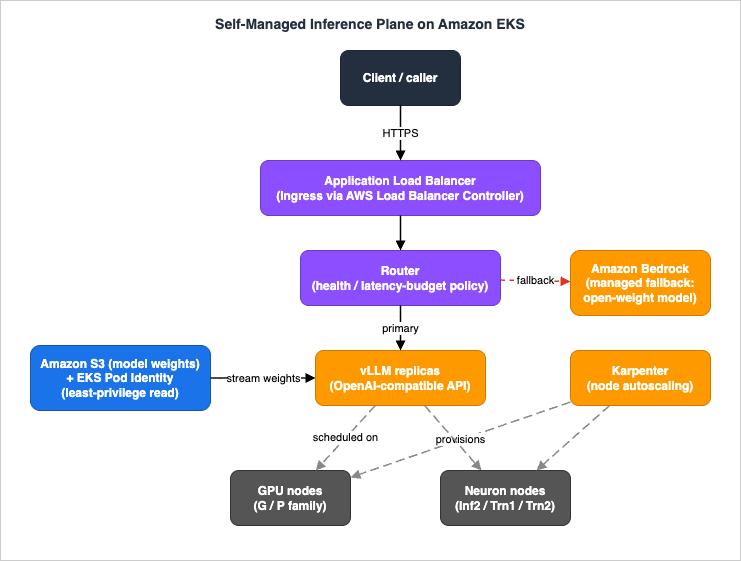
Throughout the article, the backbone is one named construct: the self-managed inference plane on Amazon EKS. It is the set of services and Kubernetes objects that, together, take an HTTP request to a token stream and back, with autoscaling and an optional managed fallback.The plane has seven moving parts:
- Amazon EKS — the managed Kubernetes control plane plus the data plane (nodes) where everything runs. The control plane is AWS-operated; the accelerator nodes are yours.
- vLLM — the model server. It loads an open-weight model, batches requests continuously, manages the KV cache with PagedAttention, and exposes an OpenAI-compatible HTTP API. AWS publishes vLLM Deep Learning Containers (DLCs) for both GPU and Neuron.
- Accelerator nodes — either GPU instances (for example the G and P families) or AWS Inferentia2 / Trainium instances driven by the AWS Neuron SDK. This is the most consequential selection in the whole architecture (Section 4).
- Karpenter — the node autoscaler. It provisions accelerator nodes just-in-time when pods are pending and consolidates them when they are idle, using
NodePoolandEC2NodeClasscustom resources (Section 5). - AWS Load Balancer Controller — turns a Kubernetes
Ingressinto an Application Load Balancer (ALB) so the endpoint is reachable, with health checks and target-group management (Section 6). - Amazon S3 + EKS Pod Identity — model weights live in S3; the vLLM pod reads them under a least-privilege IAM role delivered by EKS Pod Identity (Section 7).
- Amazon Bedrock (optional fallback) — a managed endpoint serving an open-weight model that a router can fall back to during a capacity crunch or a node failure (Section 6.3).
Observability — vLLM's own Prometheus metrics, Container Insights, and tracing — is wired across all of these, but its design is delegated to the LLMOps article (Section 8).
3. Serving with vLLM on EKS
vLLM is the engine. Everything else in the plane exists to put a request in front of it and to keep enough of it running. Understanding what vLLM does — and what its flags actually control — is the floor for the whole design.3.1 What vLLM Actually Does
vLLM is a high-throughput inference server for LLMs. Three of its mechanisms matter for capacity planning:- Continuous (in-flight) batching. Rather than waiting to assemble a fixed batch, vLLM admits new requests into the running batch at each decoding step and evicts finished ones. This keeps the accelerator busy across requests with very different output lengths, which is exactly the shape of real chat/agent traffic.
- PagedAttention KV cache. The attention key/value cache is the dominant consumer of accelerator memory at serving time, and its size grows with sequence length and concurrency. PagedAttention manages it in fixed-size blocks (like virtual-memory paging), which sharply reduces fragmentation and lets vLLM pack more concurrent sequences into the same memory. The practical consequence: your concurrency ceiling is a memory-management problem, and vLLM's flags are how you set it.
- OpenAI-compatible API. vLLM serves an HTTP API compatible with the OpenAI Chat Completions / Completions shape (by default on port 8000). That is why a self-hosted endpoint and a managed Bedrock endpoint can sit behind the same client code with minimal divergence — and why the fallback in Section 6.3 is feasible at all.
One pool serves both phases of inference here. Splitting the prefill phase and the decode phase onto separate pools is a different serving topology with its own failure modes, and Disaggregated Prefill and Decode for LLM Serving on AWS covers it.
3.2 Containerizing the Server
You do not build vLLM from source. AWS publishes Deep Learning Containers (DLCs) — Docker images with vLLM, the right framework versions, CUDA (for GPU) or the Neuron runtime (for Inferentia2/Trainium), and security patches preinstalled. The official EKS walkthrough uses a GPU vLLM DLC published underpublic.ecr.aws/deep-learning-containers/vllm with SOCI enabled for faster container startup.Note: Pin the exact DLC tag (vLLM version, Python version, CUDA version, OS) in your manifests so a redeploy is reproducible. The precise current GPU and Neuron DLC tags should be taken from the DLC release gallery at deploy time (verify against official docs), not copied from a blog post, because tags roll forward.
Two startup optimizations are worth knowing because cold-start latency is a first-class problem for accelerator pods:
- SOCI (Seekable OCI) lets the container start before the full image is pulled, by lazily loading layers. The DLCs ship SOCI-enabled variants.
- Run:ai Model Streamer streams weights directly from S3 into accelerator memory rather than downloading to local disk first, cutting weight-load time from minutes to seconds for multi-gigabyte checkpoints. In vLLM this is
--load-format=runai_streamerwith ans3://model path.
3.3 The Deployment
The vLLM server runs as a standard KubernetesDeployment, with a Service in front of it for in-cluster addressing. The shape below mirrors the official EKS guide (GPU variant), trimmed to the parameters that matter:apiVersion: apps/v1
kind: Deployment
metadata:
name: vllm-inference
spec:
replicas: 1
selector:
matchLabels:
app: vllm-inference
template:
metadata:
labels:
app: vllm-inference
spec:
# EKS Pod Identity supplies S3 read credentials via this service account (Section 7)
serviceAccountName: model-reader-sa
# Only schedule onto accelerator nodes (Section 5 provisions them)
nodeSelector:
karpenter.sh/nodepool: gpu-inference
tolerations:
- key: nvidia.com/gpu
operator: Exists
effect: NoSchedule
containers:
- name: vllm
image: public.ecr.aws/deep-learning-containers/vllm:<PINNED_GPU_TAG> # verify tag against official docs
ports:
- containerPort: 8000
args:
- "--model=s3://<your-bucket>/<model-prefix>/"
- "--load-format=runai_streamer" # stream weights S3 -> GPU memory
- "--host=0.0.0.0"
- "--port=8000"
- "--tensor-parallel-size=1" # shard across N accelerators in one pod
- "--gpu-memory-utilization=0.9" # fraction of accel. memory vLLM may use
- "--max-model-len=8192" # max context length it will admit
- "--max-num-seqs=64" # max concurrent sequences (KV-cache bound)
resources:
limits:
nvidia.com/gpu: 1 # request one GPU
---
apiVersion: v1
kind: Service
metadata:
name: vllm-inference
spec:
selector:
app: vllm-inference
ports:
- port: 8000
targetPort: 8000
--tensor-parallel-size— how many accelerators in a single pod the model is sharded across. A model that does not fit in one accelerator's memory needs tensor parallelism greater than 1, which means a node (or pod) with multiple connected accelerators.--gpu-memory-utilization— the fraction of accelerator memory vLLM is allowed to claim for weights plus KV cache. Higher means more concurrency headroom but less safety margin; push it too high and you risk out-of-memory under load (Section 8).--max-model-len— the maximum context length the server will accept. This caps per-request KV-cache footprint; raising it lowers the number of sequences you can run concurrently.--max-num-seqs— the hard ceiling on concurrent sequences in the running batch. This is your direct throughput/latency dial.
These three memory-related flags (
--gpu-memory-utilization, --max-model-len, --max-num-seqs) interact: they jointly determine whether a given model and traffic mix fit in a given accelerator. There is no universal correct value — it is a per-model, per-instance calibration, and Section 8 covers what happens when you get it wrong.3.4 Readiness and the Request Path
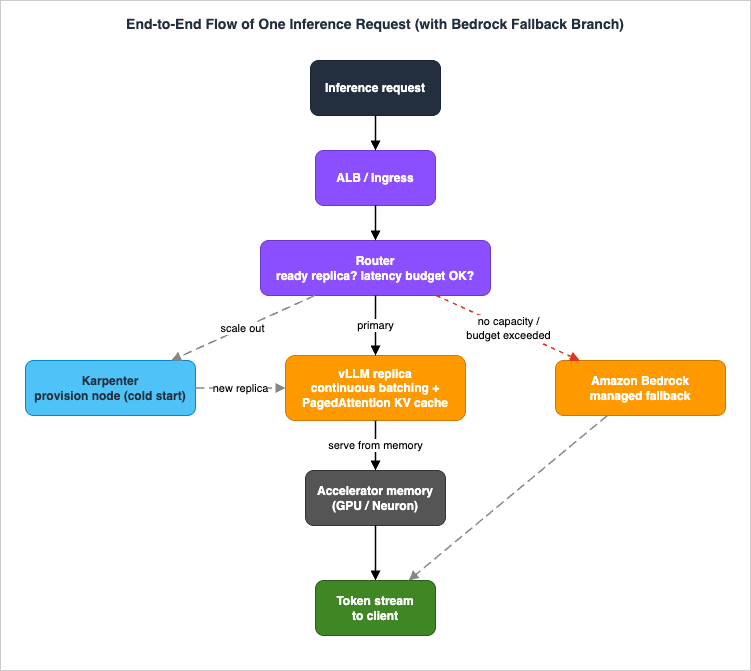
vLLM is not ready the moment the pod starts — it must load (stream) the weights and warm up first. Wire that into a Kubernetes readiness probe against the model's health endpoint so the Service (and the ALB target group in Section 6) only sends traffic to replicas that can actually answer. A missing readiness probe is one of the most common causes of "the first requests after a scale-up all fail."A single inference request, end to end, looks like this:
4. Accelerators: Inferentia2/Trainium (Neuron) vs GPU
This is the selection that shapes everything downstream — the AMI, the device plugin, the KarpenterNodePool, the container image, and the compilation step. Frame it on control, performance, memory fit, and availability, not on price. AWS's purpose-built accelerator lineup has expanded steadily over the years (for the broader trajectory, see the AWS Generative AI History and Timeline).4.1 The Two Families
GPU instances are the path of least resistance. The G family (cost-efficient inference for small and mid-size models) and the P family (large models and tensor-parallel serving) run the GPU vLLM DLC directly. The ecosystem (CUDA, kernels, model support) is the broadest, and most open-weight checkpoints "just work" with no model-specific compilation step. If your priority is breadth of model support and minimal moving parts, GPU is the default.AWS Inferentia2 (Inf2) and AWS Trainium (Trn1/Trn2) are AWS's purpose-built ML accelerators, driven by the AWS Neuron SDK (compiler, runtime, profiler, and libraries). Their relevant properties:
- Inf2 is inference-optimized: up to 12 Inferentia2 accelerators per instance with up to 384 GB of accelerator memory, connected by NeuronLink, scaling from
inf2.xlarge(1 accelerator) toinf2.48xlarge(12 accelerators). It is the only inference-optimized family to offer the NeuronLink interconnect, which lets data flow directly between accelerators for distributed inference of models too large for one chip. - Trn1 / Trn2 are training-first but also serve inference, including for models larger than Inf2 can hold (for example
trn1.32xlargewith 16 Trainium accelerators and 512 GB of accelerator memory;trn2.48xlargefor the latest generation).
Neuron exposes standard vLLM V1 APIs on Trainium and Inferentia, with features such as expert parallelism, disaggregated inference, and speculative decoding, plus optimized kernels from the Neuron Kernel Library. So the serving interface is the same vLLM you already know — the difference is underneath.
Note: Exact current instance sizes, accelerator-memory figures, and the recommended serving instances for a given model size should be confirmed against the EC2 instance pages and the Neuron documentation at design time (verify against official docs). The families and the architectural properties above are stable; specific numbers churn.
4.2 The Neuron Compilation Step
The one workflow difference that surprises GPU-first teams: models for Neuron are ahead-of-time compiled by the Neuron compiler into an optimized executable for the target accelerator and configuration (batch size, sequence length, tensor-parallel degree). vLLM on Neuron uses NeuronX Distributed Inference (NxDI) under the hood. Practically:- Compilation is sensitive to the serving configuration. Changing tensor-parallel degree or max sequence length can trigger recompilation.
- You generally want to compile once and cache the artifact (rather than compile on every cold start), or your node cold-start time balloons. Treat the compiled artifact like the weights: build it deliberately, store it, and load it.
This is the cost of Neuron's efficiency: a build step GPU serving does not require. It is worth it when Neuron's throughput and memory characteristics fit your model, and a tax when you are iterating across many models quickly.
Everything described here stays on the compiler's side of that build step. What the compiler stops deciding once you write a kernel by hand, and when not to descend that far, is the subject of my Programming AWS Trainium with the Neuron Kernel Interface.
4.3 Scheduling Neuron Devices on EKS - the Karpenter Constraint
EKS advertises Neuron devices to Kubernetes through one of two mechanisms, and the choice is not free when you use Karpenter — this is the single most important Level-400 detail in the accelerator section:* You can sort the table by clicking on the column name.
| Aspect | Neuron device plugin | Neuron DRA driver |
|---|---|---|
| Works with Karpenter / EKS Auto Mode | Yes (both) | Karpenter static capacity only — plus managed/self-managed node groups. Not with Karpenter's dynamically provisioned capacity, and not with EKS Auto Mode. |
| Minimum Kubernetes version | All EKS-supported versions | 1.34+ |
| How devices are advertised | Integer count of aws.amazon.com/neuron and aws.amazon.com/neuroncore extended resources | Rich attributes via ResourceSlice objects (DeviceClass neuron.aws.com) |
| Contiguous / connected device subsets | Requires the Neuron scheduler extension | Native (1, 4, 8, or 16 connected devices) |
| Per-workload Logical NeuronCore (LNC) config | Pre-configured in EC2 launch templates | Per-workload via ResourceClaimTemplate |
The recommendation for new deployments on Kubernetes 1.34+ is the DRA driver — it is the richer, topology-aware mechanism — but only where the capacity underneath it is static: managed node groups, self-managed nodes, or a Karpenter
NodePool pinned to a fixed node count. The DRA driver does not work with capacity that Karpenter provisions dynamically, and it is not supported with EKS Auto Mode at all. That is the binding constraint here, because this architecture leans on Karpenter precisely for its just-in-time provisioning and consolidation (Section 5), and a static-capacity NodePool is never consolidated — so the plane uses the Neuron device plugin, which advertises aws.amazon.com/neuron / aws.amazon.com/neuroncore extended resources that your pod requests like any other resource. For contiguous multi-device allocation with the device plugin, add the Neuron scheduler extension.Note: The two mechanisms cannot coexist on the same node — do not run the device plugin and the DRA driver together. If part of the fleet later runs on fixed capacity — managed or self-managed node groups, or a static-capacity Karpenter
NodePool (set spec.replicas; on self-managed Karpenter this is still behind the alpha StaticCapacity feature gate introduced in v1.8) — the DRA driver becomes available there, and its CEL-based attribute selection and connected-subset allocation are worth adopting. Keep those nodes in their own NodePool, separate from the dynamically provisioned one, so the two mechanisms never meet on a single node.A Neuron pod requests devices by extended resource rather than
nvidia.com/gpu:resources:
limits:
aws.amazon.com/neuron: 1 # request one Inferentia2/Trainium device (device-plugin model)
One thing the request line above does not settle:
nvidia.com/gpu: 1 asks for one advertised unit, which is not necessarily one physical card. What that unit becomes once time-slicing, MPS, or MIG is turned on — and what each of those leaves shared between the pods that land on it — is worked through in Sharing One GPU on Amazon EKS. This article does not go into splitting a device.5. Autoscaling with Karpenter
Karpenter is what makes accelerator self-hosting operationally tractable. Cluster Autoscaler grows pre-defined node groups; Karpenter looks at pending pods and provisions right-sized nodes just-in-time, then removes them when they are no longer needed. For an expensive, bursty accelerator fleet, that just-in-time behavior is the whole point.5.1 NodePool and EC2NodeClass
Karpenter (v1 API) is configured with two custom resources:NodePool(karpenter.sh/v1) — constraints on what nodes Karpenter may create and what pods may run on them: instance types, capacity type (on-demand/spot), architecture, taints, and disruption policy.EC2NodeClass(karpenter.k8s.aws) — the AWS-specific node template: AMI family/alias, subnets, security groups, instance storage, IAM, and feature gates.
A dedicated GPU
NodePool, tainted so only inference pods land on the expensive nodes:apiVersion: karpenter.sh/v1
kind: NodePool
metadata:
name: gpu-inference
spec:
template:
metadata:
labels:
karpenter.sh/nodepool: gpu-inference
spec:
nodeClassRef:
group: karpenter.k8s.aws
kind: EC2NodeClass
name: gpu-inference
taints:
- key: nvidia.com/gpu
value: "true"
effect: NoSchedule
requirements:
- key: node.kubernetes.io/instance-type
operator: In
values: ["<gpu-instance-types>"] # selected G/P sizes (verify against official docs)
- key: karpenter.sh/capacity-type
operator: In
values: ["on-demand"] # add "spot" for interruption-tolerant replicas
- key: kubernetes.io/arch
operator: In
values: ["amd64"]
disruption:
consolidationPolicy: WhenEmptyOrUnderutilized
consolidateAfter: 1m
NodePool is the same shape with Inf2/Trn instance types and the Neuron AMI on its EC2NodeClass. On EKS Auto Mode, the accelerator selection can also be expressed declaratively with an instance-category requirement:- key: "eks.amazonaws.com/instance-category"
operator: In
values: ["inf", "trn"] # Inferentia and Trainium families (EKS Auto Mode)
5.2 Scale-Out, Cold Start, and the Pending-Pod Queue
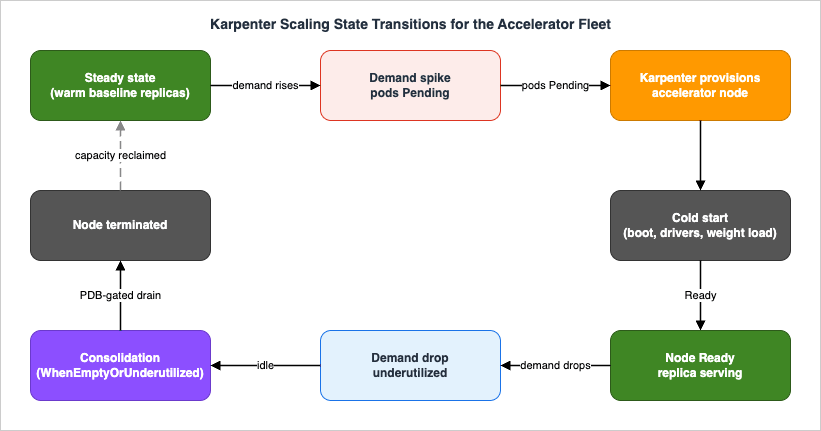
The scale-out sequence when demand rises:- Traffic rises; existing vLLM replicas saturate (
max-num-seqsreached). - The Horizontal Pod Autoscaler (or a custom queue metric) adds a vLLM replica.
- The new replica is
Pending— no node has a free accelerator. - Karpenter sees the pending pod and provisions a right-sized accelerator node.
- The node boots, the AMI and drivers initialize, and the device plugin advertises accelerators.
- The pod schedules; vLLM streams weights from Amazon S3 and warms up.
- The readiness probe passes; the ALB target group adds the replica, and it starts serving.
- Run:ai Model Streamer + SOCI (Section 3.2) attack step 6 and the image pull directly.
- A warm baseline. Keep a small number of replicas always running so the first burst is absorbed without waiting for a cold node; let Karpenter add capacity for the rest.
- Provisioning headroom. Some teams run low-priority "pause" pods that Karpenter keeps a spare node warm for, evicted instantly when a real pod needs the capacity. This trades steady-state utilization for faster scale-out.
The queue between steps 3 and 7 is just Kubernetes pending pods. If accelerator capacity (or your vCPU/accelerator service quota) is exhausted, those pods stay Pending — which is exactly the condition the Bedrock fallback (Section 6.3) is designed to ride over.
5.3 Scale-In and Disruption Control
When traffic drops, Karpenter consolidates: it removes empty or underutilized nodes (consolidationPolicy: WhenEmptyOrUnderutilized) after consolidateAfter. For an inference fleet you want this to be graceful, because evicting a replica mid-generation drops in-flight requests:- Pod Disruption Budgets (PDBs). Karpenter's consolidation respects PDBs. Set one so a minimum number of vLLM replicas always stay available during voluntary disruption.
- Disruption budgets on the NodePool. Limit how many nodes Karpenter may disrupt at once (as a percentage or absolute count), and optionally schedule those budgets so consolidation is quieter during peak hours.
expireAfter. Nodes are recycled after a max lifetime, which is how you roll AMI/driver patches through the fleet without a manual drain.- Spot interruption. If you run replicas on Spot for cost-tolerance, handle the interruption signal so vLLM stops admitting new sequences and drains in-flight work before the node goes away.
Node supply is only one half of the scheduling picture. The cluster-wide scheduler and controller settings that decide how quickly pending pods are placed and how quickly autoscaling signals are read live on the control plane, cannot be scoped to a namespace, and are covered in Amazon EKS Control Plane Configuration.
Karpenter also assumes that replicas are placed one at a time. A distributed job that only makes progress once every rank has landed needs the whole group placed or none of it, and the accelerators themselves have to be claimed through a path the Pod-by-Pod scheduler does not decide. Gang Scheduling and Dynamic Resource Allocation on Amazon EKS covers both halves, and why the node supply model rather than the device type is what selects the allocation path.
6. Ingress, Routing, and Hybrid Fallback to Bedrock
The plane is useless if requests cannot reach it and survive a bad day. This section exposes the endpoint and wires the managed escape hatch.6.1 Exposing the Endpoint with the AWS Load Balancer Controller
The AWS Load Balancer Controller watches KubernetesIngress and Service objects and provisions the corresponding AWS load balancers:- A Kubernetes
Ingress→ an Application Load Balancer (ALB) — the right choice for the HTTP(S) inference API, with path/host routing, TLS termination, and health checks. - A Kubernetes
Serviceof typeLoadBalancer→ a Network Load Balancer (NLB) — for L4 exposure; the controller supports IP and instance target types. - A Kubernetes
Gateway→ an ALB — supported in recent controller versions for teams standardizing on the Gateway API.
That last entry carries more weight than its length suggests. Which AWS data plane a
Gateway resolves to is settled by gatewayClassName, and the same pair of Gateway API resources can become either an ALB or an Amazon VPC Lattice service depending on what that one field says. Life After Ingress NGINX on Amazon EKS takes that branch apart, along with the migration path off ingress-nginx that makes the question urgent.A minimal ALB Ingress for the vLLM Service, using IP targets so the ALB talks straight to pods:
apiVersion: networking.k8s.io/v1
kind: Ingress
metadata:
  name: vllm-inference
  annotations:
    alb.ingress.kubernetes.io/scheme: internal          # keep it inside the VPC boundary
    alb.ingress.kubernetes.io/target-type: ip
    alb.ingress.kubernetes.io/healthcheck-path: /health  # vLLM readiness
spec:
  ingressClassName: alb
  rules:
  - http:
      paths:
      - path: /
        pathType: Prefix
        backend:
          service:
            name: vllm-inference
            port:
              number: 8000
scheme: internal — for a self-hosted endpoint chosen partly for data-residency reasons, an internal ALB that is only reachable inside the VPC (consumed by your own services or via PrivateLink) is usually the right default, not an internet-facing one. The ALB health-check path should match vLLM's readiness so unready replicas are pulled from rotation automatically.6.2 Why a Router Sits in Front
Behind the ALB, put a thin router (a small service, or gateway logic) between clients and the vLLM Service. Its job is not load balancing — the ALB and Kubernetes do that — but policy: deciding, per request, whether to serve from the self-hosted fleet or fall back to a managed endpoint. It is the natural place to enforce a latency budget, read fleet health, and emit the metrics the LLMOps article consumes.6.3 Hybrid Fallback to Amazon Bedrock
The fallback exists because self-hosted capacity is finite and nodes fail. When the fleet cannot serve — pods Pending on exhausted accelerator capacity, a Region-level accelerator shortage, or a latency-budget breach during a cold start — the router routes that request to Amazon Bedrock instead of failing it.This is feasible because Bedrock serves open-weight models that can match (or closely approximate) what you self-host. OpenAI's open-weight
gpt-oss models are available on Bedrock as openai.gpt-oss-120b-1:0 and openai.gpt-oss-20b-1:0 (128K context), and Meta Llama models are available as well — all invocable through the Bedrock Converse API, the InvokeModel API, or an OpenAI-compatible Chat Completions endpoint. Because vLLM already speaks the OpenAI shape, the router can keep most of the request/response handling identical across the two backends. The full managed catalog and model IDs are in the Amazon Bedrock Model Catalog 2026.A trigger sketch (illustrative, not a drop-in):
import boto3

bedrock = boto3.client("bedrock-runtime")  # SigV4 auth via the pod's IAM role

def infer(messages, *, self_hosted_ok: bool):
    if self_hosted_ok:
        # Primary path: call the in-cluster vLLM OpenAI-compatible endpoint.
        return call_vllm(messages)

    # Fallback path: managed open-weight model on Bedrock via the Converse API.
    resp = bedrock.converse(
        modelId="openai.gpt-oss-120b-1:0",   # open-weight parity with self-hosted
        messages=messages,
        inferenceConfig={"maxTokens": 1024},
    )
    return resp["output"]["message"]["content"][0]["text"]
Two honesty caveats, both qualitative (no numbers, no price):
- Behavioral parity is not identity. Even falling back to "the same" open-weight family on Bedrock, the served weights, quantization, sampling defaults, and tool-call formatting may differ from your pinned self-hosted checkpoint, so outputs can differ. Treat the fallback as graceful degradation, not a transparent mirror — the same lesson the managed-model world has learned about model-to-model fallback. Design downstream consumers (and any structured-output parsing) to tolerate the difference.
- The boundary changes on fallback. A request that falls back to Bedrock leaves your self-hosted network boundary for a managed service. If data residency was a reason you self-hosted, the fallback path must respect the same constraint (for example, confirm the model and Region satisfy your residency policy, or disable fallback for residency-bound traffic). Do not let the safety valve quietly violate the requirement that motivated the architecture.
For Bedrock pricing, consult the official Amazon Bedrock pricing page rather than reasoning about it here.
7. Cross-Cutting: IAM (Pod Identity/IRSA), Artifacts, and Data Residency
The plane touches IAM, S3, and the network boundary on every request and every scale event. Getting least privilege right here is what keeps "self-hosted for control" from becoming "self-hosted and over-permissioned."7.1 Least-Privilege Credentials: EKS Pod Identity vs IRSA
The vLLM pod needs exactly one AWS permission at runtime: read the model artifacts from its S3 prefix. (The router additionally needsbedrock:InvokeModel / bedrock:Converse for the fallback.) Both should be scoped to the narrowest possible resource. There are two ways to give a pod an IAM role:* You can sort the table by clicking on the column name.
| Aspect | EKS Pod Identity (recommended) | IRSA |
|---|---|---|
| Setup | Enable the Pod Identity Agent add-on; associate a role with a service account | Create an IAM OIDC provider per cluster; encode trust in the role's policy |
| Cross-cluster reuse | One role trusts pods.eks.amazonaws.com; reusable across clusters with no per-cluster change | Trust policy must be updated with each cluster's OIDC provider |
| Scaling limits | No IAM OIDC provider needed, so the per-account OIDC-provider limit does not apply | Bounded by the per-account OIDC-provider limit and trust-policy size |
| Credential delivery | Pod Identity Agent delivers credentials; no sts:AssumeRoleWithWebIdentity call in your code | SDK calls sts:AssumeRoleWithWebIdentity to exchange the projected token |
AWS recommends EKS Pod Identity for new workloads, and this architecture uses it: associate a least-privilege "model-reader" role (S3
GetObject/ListBucket on the model prefix only) with the model-reader-sa service account that the vLLM Deployment uses (Section 3.3). The model server can read weights and nothing else.{
"Version": "2012-10-17",
"Statement": [
{
"Effect": "Allow",
"Action": ["s3:GetObject", "s3:ListBucket"],
"Resource": [
"arn:aws:s3:::<your-bucket>",
"arn:aws:s3:::<your-bucket>/<model-prefix>/*"
]
}
]
}
7.2 Model Artifacts and Supply Chain
Weights live in S3, pulled into the bucket once (for example by a one-time KubernetesJob that downloads from the model hub and uploads to S3, as the official EKS guide does). After that, the bucket is the source of truth and the network path is S3 → pod, inside your account. Treat the bucket as a supply-chain control point: enable versioning so a checkpoint is immutable and auditable, restrict who can write to it, and verify integrity. The whole point of pinning open weights is undermined if the artifact in S3 can change unnoticed.7.3 Data Residency and the Network Boundary
For the workloads that justify self-hosting, the boundary is the feature:- Keep accelerator nodes in private subnets; reach S3 and other AWS services over VPC endpoints so artifact and API traffic does not traverse the public internet.
- Keep the ALB internal (Section 6.1) unless you genuinely need public exposure.
- Confirm that the fallback path (Section 6.3) honors the same residency constraint, or is disabled for residency-bound requests.
Prompts and completions never leave the cluster on the self-hosted path; weights never leave the account. That property — not a benchmark — is frequently the entire reason the architecture exists.
8. Observability and Failure Modes
You cannot operate an accelerator fleet you cannot see, and the failures here are specific. This section covers the failure modes and how to isolate them; the design of the observability and evaluation stack — tracing, metrics pipelines, automated evaluation gates — is delegated to the LLMOps Observability and Evaluation Architecture on AWS article in this series.8.1 What to Watch
vLLM exposes Prometheus metrics (the official EKS guide wires aServiceMonitor and a Grafana dashboard) covering the signals that actually predict trouble: requests running vs waiting (queue depth), KV-cache utilization, time-to-first-token, and tokens/second. Pair those with node-level and Kubernetes signals (Container Insights, accelerator utilization, pending-pod count) and a latency-budget SLO on the router. The deep treatment of how to assemble this into trace-and-evaluate pipelines is the LLMOps article's job.8.2 The Four Failure Modes
* You can sort the table by clicking on the column name.| Failure | Typical symptom | Root cause | Isolation and remediation |
|---|---|---|---|
| Out of memory (OOM) | Pod OOMKilled or vLLM aborts requests under load; KV-cache-full warnings | --gpu-memory-utilization too high, or --max-model-len × --max-num-seqs exceeds the KV-cache budget for the accelerator | Lower --max-num-seqs or --max-model-len; reduce --gpu-memory-utilization; or move to a larger / more-accelerator instance. Watch KV-cache utilization to right-size before it OOMs. |
| Model-load failure | Replica never becomes Ready; readiness probe never passes | S3 permission denied (Pod Identity role too narrow/misassociated), wrong --load-format or model path, corrupt/incomplete weights, or (Neuron) missing/incompatible compiled artifact | Check pod logs at startup; verify the Pod Identity association and S3 prefix; confirm the DLC tag matches the accelerator; for Neuron, confirm the compiled artifact matches the serving config. |
| Node starvation | vLLM replicas stuck Pending; no nodes provisioned | Accelerator capacity unavailable in the AZ/Region, or vCPU/accelerator service quota reached | Inspect Karpenter events and pod events; request a quota increase; widen the NodePool instance-type list and AZs; let the Bedrock fallback absorb traffic while capacity returns. |
| Latency-budget breach | p95/p99 exceeds the router's SLO; slow first tokens after scale-up | Cold start in progress (node provisioning + weight load), or batch saturation (max-num-seqs reached) | Trip the router's latency-budget fallback to Bedrock; add warm baseline/headroom (Section 5.2); scale replicas earlier on a queue-depth metric rather than reacting to latency. |
8.3 Blast Radius and Containment
The architecture is designed so a single failure does not take the endpoint down:- An OOM or crash on one replica is contained by having multiple replicas plus PDB-gated disruption — the ALB pulls the unhealthy target and routes around it.
- A node failure triggers Karpenter to reprovision while surviving replicas (and, if needed, the Bedrock fallback) carry traffic.
- A whole-fleet capacity crunch (the worst case) is contained by the Bedrock fallback, which is the only component that does not depend on your accelerator supply. That is precisely why it earns its place in an architecture whose entire premise is not using managed inference.
9. When Managed Inference (Bedrock) Is the Better Choice
Self-hosting is a commitment to operating accelerators, drivers, autoscalers, and a serving engine. Be honest about when that commitment is not worth it — choosing managed inference is the correct engineering decision far more often than choosing to self-host.Prefer Amazon Bedrock (managed) when:
- None of the four self-hosting axes is binding. If you do not need to pin an exact checkpoint, do not have a hard data-residency boundary, and can live with the latency/throughput a shared endpoint gives you, the operational burden of self-hosting buys you nothing.
- Your team is small or generalist. Operating an accelerator fleet — capacity quotas, driver and AMI patching, Neuron compilation, autoscaler tuning — is real, ongoing platform work. Managed inference is zero of that.
- Model breadth and rapid iteration matter more than control. Bedrock lets you switch and compare many frontier and open-weight models behind one API without provisioning anything.
- Demand is low, spiky, or unpredictable. Without steady utilization, keeping accelerators warm is operationally awkward; a managed endpoint scales to zero attention from you.
Choose self-hosting on EKS only when at least one of model control, data residency, latency shaping, or throughput shaping is a genuine requirement — and even then, keep the Bedrock fallback so the managed path remains your safety valve. The two are not rivals in this architecture; the managed service is the floor under the self-hosted ceiling. (This is a control-and-operations decision, not a cost decision — pricing for either path is on the respective official pricing pages.)
10. Frequently Asked Questions
Do I need Karpenter, or can I use managed node groups or EKS Auto Mode?All three work for serving vLLM. Karpenter gives the most flexible just-in-time, right-sized accelerator provisioning and is the focus here. EKS Auto Mode embeds Karpenter and handles the AMI/device exposure for you (and supports the
eks.amazonaws.com/instance-category accelerator selection). Remember the constraint from Section 4.3: with EKS Auto Mode, or with Karpenter provisioning capacity dynamically as it does here, you use the Neuron device plugin, not the Neuron DRA driver.GPU or Inferentia2/Trainium - how do I choose?
Default to GPU for the broadest model support and no compilation step. Choose Inf2/Trn when Neuron's throughput and memory characteristics fit your model and you are willing to adopt the ahead-of-time compilation workflow (Section 4.2). Decide on control, performance, memory fit, and availability — not price.
How big a model can I serve on one node?
It depends on accelerator memory versus the model's weights plus its KV cache at your target concurrency. If the model does not fit one accelerator, use tensor parallelism (
--tensor-parallel-size greater than 1) across multiple connected accelerators in one instance (NeuronLink on Inf2/Trn, NVLink on multi-GPU instances). Confirm specific memory figures against the official instance pages (verify against official docs).Why keep a Bedrock fallback if the whole point is to self-host?
Because self-hosted accelerator capacity is finite and can be exhausted (Section 8.2). The fallback is the one component independent of your accelerator supply, so it contains the worst-case blast radius. It is graceful degradation, with the residency and behavioral caveats in Section 6.3 — not a transparent mirror.
Does the fallback break my data-residency guarantee?
It can, if you let it. A request that falls back to Bedrock leaves your self-hosted boundary. For residency-bound traffic, either confirm the fallback model and Region satisfy the policy, or disable fallback for that traffic (Section 7.3).
Where does observability and evaluation live?
The signals to watch are in Section 8.1, but the design of tracing, metrics pipelines, and automated evaluation gates is delegated to the LLMOps article in this series.
11. Summary
Self-hosting open-weight LLM inference on Amazon EKS is justified by control, data residency, latency, and throughput — not by price. When one of those is binding, the implementation is a single named plane: vLLM serving an open-weight model from S3 (streamed under least-privilege EKS Pod Identity), on GPU or Inferentia2/Trainium (Neuron) nodes that Karpenter provisions just-in-time and consolidates gracefully, exposed by the AWS Load Balancer Controller as an internal ALB, with a thin router that falls back to Amazon Bedrock when the fleet cannot serve.The Level-400 substance is in the seams: the Neuron device-plugin-versus-DRA-driver constraint that Karpenter's dynamic provisioning forces; the three interacting vLLM memory flags that set your concurrency ceiling; the cold-start sequence and the warm-baseline/headroom levers that tame it; the four failure modes and how multiple replicas, PDB-gated consolidation, and the Bedrock fallback contain their blast radius; and the discipline of keeping prompts, completions, and weights inside a boundary you control — without letting the safety valve quietly breach it.
If none of the self-hosting axes is binding for your workload, the honest answer is to use managed inference. If one is, this plane is how you self-host without giving up the managed path as your floor.
12. References
- Load and Serve Models on Amazon EKS (vLLM)
- Set up an Amazon EKS cluster for AI/ML workloads
- Manage Neuron devices on Amazon EKS (device plugin vs DRA driver)
- Use EKS-optimized accelerated AMIs
- Deploy an accelerated workload (EKS Auto Mode)
- Karpenter best practices (NodePools, disruption, consolidation)
- Manage compute for AI/ML workloads with EKS Auto Mode and Karpenter (static capacity NodePools)
- Manage hardware devices on Amazon EKS - DRA vs device plugins
- Route internet traffic with AWS Load Balancer Controller
- Grant Kubernetes workloads access to AWS - EKS Pod Identity vs IRSA
- AWS Neuron (SDK for generative AI and deep learning)
- Amazon EC2 Inf2 instances
- Amazon Bedrock - OpenAI open-weight models (gpt-oss)
- Amazon Bedrock Converse API reference
- OpenAI open weight models now available on AWS
- vLLM documentation
- Amazon Bedrock pricing
Related Articles in This Series
- Amazon Bedrock Model Catalog 2026
The managed-model contrast: every foundation model on Amazon Bedrock, with model IDs, context windows, and Region availability. - AWS Generative AI History and Timeline
How the AWS generative-AI and accelerator stack evolved over time. - Amazon Bedrock Glossary
Reference definitions for Bedrock and generative-AI terminology used throughout this series. - LLMOps Observability and Evaluation Architecture on AWS
The delegated deep dive on tracing, metrics, and automated evaluation gates for the metrics this plane emits.
References:
Tech Blog with curated related content
Written by Hidekazu Konishi