Designing for Spot Interruptions on AWS - Allocation Strategies, Rebalance Signals, and Graceful Degradation
First Published:
Last Updated:
This article does not discuss pricing. Spot is treated here purely as capacity that can be reclaimed, and every trade-off below is expressed in signals, lead times, quotas, pool diversity, and the amount of work you lose when a node disappears. That framing is not a workaround — it is how AWS's own Spot best-practices documentation is written, and it is the framing that determines whether your workload survives.
Every fact below was checked against AWS official documentation on 2026-08-04 — the Amazon EC2 User Guide, the Amazon EC2 Auto Scaling User Guide, the Amazon SQS Developer Guide and API Reference, and the AWS Fault Injection Service User Guide — with the relevant page linked at the point of use. Spot behavior is documented qualitatively by AWS: this article contains no interruption-rate or interruption-probability figures, because AWS does not publish them as design constants and any number I invented would be worse than useless. Nor does it report measurements: no interruption was simulated and no fleet was launched to produce this text. The configurations shown follow the documented specifications.
Table of Contents
- 1. Introduction: Designing for Compute That Can Be Taken Away
- 2. What an Interruption Actually Is
- 3. The Two Signals Before the Stop
- 4. Capacity Pools and Allocation Strategies
- 5. Fleet Composition
- 6. Graceful Degradation in the Workload
- 7. Checkpointing and Idempotency
- 8. Queue-Based Patterns
- 9. When Capacity Is Not Available
- 10. Observability for Interruptions
- 11. Workloads That Should Not Run This Way
- 12. Failure Modes and Anti-Patterns
- 13. Frequently Asked Questions
- 14. Summary
- 15. References
1. Introduction: Designing for Compute That Can Be Taken Away
The premise of this article is narrow and, once accepted, surprisingly generative: assume the machine can vanish, and design backward from that.Most availability engineering assumes failures are rare, unannounced, and adversarial. Spot interruptions are the opposite on two of those three axes. They are announced — you get a signal, sometimes two — and they are routine, which means you can build a control loop around them instead of an incident response. What you do not get is a guarantee, and that asymmetry is the whole design problem. AWS is explicit that "it is always possible that your Spot Instance might be interrupted," and equally explicit that following best practices "provides the best chance for high availability" but that "there are no guarantees that capacity will be available."
A workload that handles this correctly has four properties, and this article is organized around them:
- It hears the signals — both of them — and knows what each one licenses it to do.
- It spreads across enough capacity pools that losing one pool is not losing the fleet.
- It drains in bounded time, because the budget is two minutes and the budget is not negotiable.
- It resumes without redoing everything and without doing anything twice.
The intended reader runs batch jobs, asynchronous workers, or training jobs on interruptible capacity and has been told to make them "resilient." The scope is the interruption mechanism and the design that absorbs it.
What this article deliberately does not cover:
- Container orchestrator interruption handling. How Amazon ECS and Amazon EKS drain tasks and Pods on a terminating node is a distinct subject with its own controllers and its own failure modes. This article stays at the EC2 and Auto Scaling layer.
- Batch pipeline architecture. How to structure a large fan-out pipeline, its state machine, and its result aggregation belongs to Large-Scale Batch Generative AI Pipeline on AWS. This article supplies the interruption-tolerance layer such a pipeline sits on.
- General Auto Scaling design. Warm pools, instance refresh, and scaling policy selection are their own topic. Auto Scaling appears here only where it is the mechanism that reacts to a Spot signal.
- Pricing, in any form. See the note above.
2. What an Interruption Actually Is
2.1 Why EC2 reclaims an instance
The EC2 User Guide enumerates three reasons an instance is interrupted, and they are not equally interesting.| Reason | What AWS documents | Design consequence |
|---|---|---|
| Capacity | EC2 "can interrupt your Spot Instance when it needs it back." Reclaim is "mainly to repurpose capacity, but it can also occur for other reasons such as host maintenance or hardware decommission" | The one you must design for. It is not correlated with anything you control |
| Price | The request's optional maximum is exceeded | Avoidable — see below |
| Constraints | If the request includes a constraint such as a launch group or an Availability Zone group, the instances "are terminated as a group when the constraint can no longer be met" | A self-inflicted correlated failure. Avoid launch groups in interruption-tolerant designs |
The second and third rows are worth dwelling on because both are opt-in failure modes. A Spot request may carry an optional maximum; the User Guide notes that if you specify one, "your instances will be interrupted more frequently than if you do not specify it," and the Auto Scaling User Guide is blunter: "We strongly recommend that you do not specify a maximum price. Your application might not run if you do not receive any Spot Instances." Read as an availability statement, that is unambiguous — setting the parameter adds an interruption trigger and a launch-failure mode that the default does not have. Leave
SpotMaxPrice unset.Launch groups and Availability Zone groups are the same shape of mistake at fleet scale: they convert independent instance lifetimes into one shared lifetime. If your workload genuinely requires all-or-nothing gang scheduling, that is a signal you are in Section 11 territory, not a reason to add a constraint. On Kubernetes that requirement has its own vocabulary and its own scheduler-side machinery, and Gang Scheduling and Dynamic Resource Allocation on Amazon EKS works through how far it has actually shipped.
2.2 The three interruption behaviors
When EC2 interrupts an instance it terminates, stops, or hibernates it, according to the behavior specified on the request. The default is terminate.| Behavior | Two-minute warning | Requirements and constraints |
|---|---|---|
terminate | Yes | Default. Instance store contents are lost; EBS volumes follow their delete-on-termination setting |
stop | Yes | Request type must be persistent; for EC2 Fleet or Spot Fleet the type must be maintain. No launch group. Only Amazon EC2 can restart the stopped instance |
hibernate | No | The interruption notice is issued, but "you do not receive a two-minute warning because the hibernation process begins immediately" |
The
hibernate row is the trap. It reads like the safest option — memory is preserved, the process resumes where it stopped — and it is the one behavior that gives your shutdown code no time to run at all. If you have built a drain handler that flushes buffers and deregisters from a load balancer on the two-minute notice, choosing hibernate silently disarms it. Hibernation is a state-preservation mechanism, not a graceful-shutdown mechanism, and the two are not substitutes.The
stop behavior has its own operational surface that is easy to under-read. The User Guide documents that a stopped Spot Instance from a persistent request is restarted by EC2 "when capacity is available in the same Availability Zone and for the same instance type as the stopped instance (the same launch specification must be used)" — which means a stopped instance is pinned to exactly one capacity pool, the least diversified position you can hold. While stopped you may modify some attributes but not the instance type. If you detach the root volume and EC2 attempts to start the instance, "the instance will fail to start and Amazon EC2 will terminate the stopped instance." Cancelling the request terminates any associated stopped instances.So
stop is best understood as a narrow optimization for a workload that is genuinely time-flexible and genuinely pinned, not as the general answer. For most interruption-tolerant fleets, terminate plus a good checkpoint is both simpler and more available, because it leaves the replacement free to land in any pool.2.3 What the application actually observes
From inside the instance, an interruption is an ordinary operating-system shutdown that arrives without a human behind it. There is no exception thrown into your process, no signal unique to Spot. What exists is:- an item in the instance metadata that appears when the instance is marked for interruption, and
- an event delivered to Amazon EventBridge outside the instance.
Neither of these interrupts your code. If nothing in your application polls or subscribes, an interruption is indistinguishable from a power cut — which is precisely how a large number of Spot deployments actually behave, and precisely why "we enabled Spot and it seemed fine" is not evidence of a working design.
3. The Two Signals Before the Stop
There are two distinct signals, they carry different information, they arrive at different times, and confusing them is the most consequential misunderstanding in this area.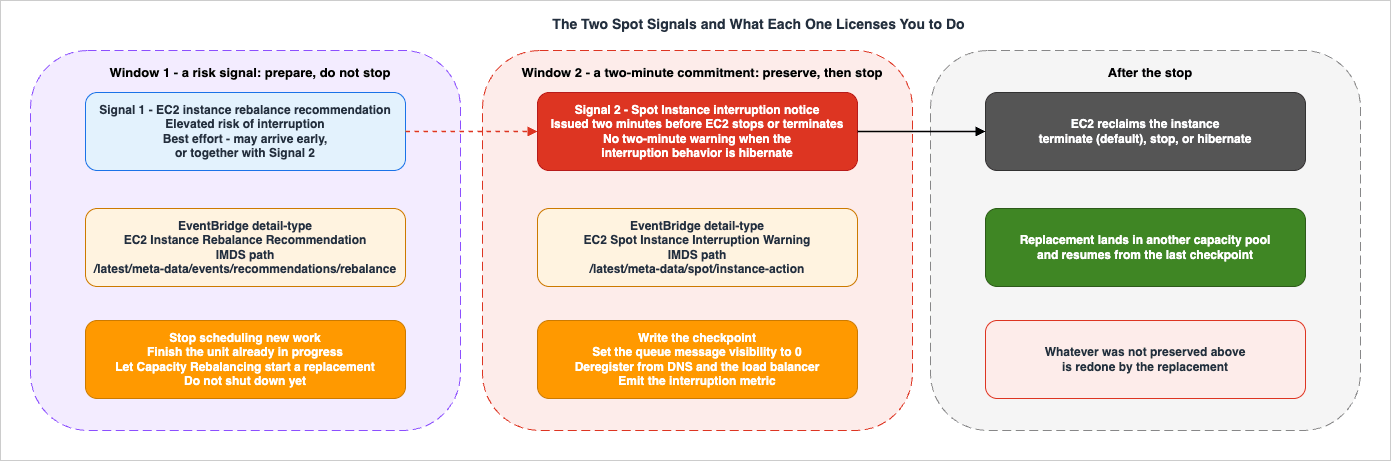
3.1 The rebalance recommendation
An EC2 instance rebalance recommendation is, in the User Guide's words, "a signal that notifies you when a Spot Instance is at elevated risk of interruption." It is a risk signal, not a countdown. Its value is that it "can arrive sooner than the two-minute Spot Instance interruption notice, giving you the opportunity to proactively manage the Spot Instance."Three properties govern how much you can lean on it:
- It may not arrive first. AWS states plainly: "It is not always possible for Amazon EC2 to send the rebalance recommendation signal before the two-minute Spot Instance interruption notice. Therefore, the rebalance recommendation signal can arrive along with the two-minute interruption notice." Any design whose correctness depends on having more than two minutes is broken.
- It is best effort. Rebalance recommendations "are emitted on a best effort basis." Missing one is a documented possibility, not an anomaly.
- It has a floor. Rebalance recommendations are "only supported for Spot Instances that are launched after November 5, 2020 00:00 UTC."
AWS names three actions the signal licenses, and the distinction between them is the design content:
- Graceful shutdown — begin shutdown procedures, ensuring processes complete before stopping them: upload logs to Amazon S3, shut down Amazon SQS workers, complete deregistration from DNS, "save your work in external storage and resume it at a later time."
- Prevent new work from being scheduled — stop accepting new work "while continuing to use the instance until the scheduled work is completed." This is the action most implementations forget, and it is the one that takes the least effort to add.
- Proactively launch new replacement instances — delegate to Auto Scaling groups, EC2 Fleet, or Spot Fleet with Capacity Rebalancing enabled.
Action 2 deserves emphasis. On the rebalance recommendation the correct default is usually not to shut down — it is to stop pulling new units of work while finishing the current one. Shutting down immediately on a risk signal converts a probabilistic warning into a certain loss of a healthy worker.
3.2 The interruption notice
The Spot Instance interruption notice is a different kind of object: "a warning that is issued two minutes before Amazon EC2 stops or terminates your Spot Instance." It is a commitment, not a probability — subject to thehibernate exception in Section 2.2, where the notice is issued but the two minutes are not.Like the rebalance recommendation, interruption notices "are emitted on a best effort basis." AWS recommends checking for them "every 5 seconds."
3.3 The two delivery paths, and why you probably need both
Each signal is delivered two ways, and the two paths are not redundant — they reach different actors.| Rebalance recommendation | Interruption notice | |
|---|---|---|
EventBridge detail-type | EC2 Instance Rebalance Recommendation | EC2 Spot Instance Interruption Warning |
EventBridge source | aws.ec2 | aws.ec2 |
detail fields | instance-id | instance-id, instance-action |
| Instance metadata path | /latest/meta-data/events/recommendations/rebalance | /latest/meta-data/spot/instance-action |
| Metadata payload | {"noticeTime": "2020-10-27T08:22:00Z"} | {"action": "stop", "time": "2017-09-18T08:22:00Z"} |
| When absent | HTTP 404 | HTTP 404 |
| Recommended poll interval | Every 5 seconds | Every 5 seconds |
| Delivery guarantee | Best effort | Best effort |
The possible values of
instance-action are hibernate, stop, and terminate — which means the in-instance handler can, and should, branch on which behavior is about to happen rather than assuming termination.Use instance metadata for anything that must run inside the instance — flushing a buffer, writing a checkpoint, completing a unit of work, telling a queue to release a message. A polling loop against the Instance Metadata Service is the only path that reaches the process holding the state.
Use EventBridge for anything outside the instance — deregistering from a service registry, updating a job-tracking table, emitting the metric that tells you the design is working, triggering a replacement outside of Auto Scaling. One detail catches people writing EventBridge rules: the User Guide notes that the ARN format of the Spot interruption event is
arn:aws:ec2:availability-zone:instance/instance-id, and that "this format differs from the EC2 resource ARN format." If you are pattern-matching on resources, that difference matters.A note on the older metadata item:
termination-time still exists but is "maintained for backward compatibility." Use instance-action. termination-time is also present when a persistent Spot request is canceled — a different event from a capacity interruption — and it retains a stale past timestamp if EC2 fails to terminate the instance. It is not a good branch condition.3.4 Retrieving the signals
Both paths use the Instance Metadata Service. With IMDSv2:# Interruption notice — returns 404 when the instance is not marked for interruption
TOKEN=$(curl -sX PUT "http://169.254.169.254/latest/api/token" \
-H "X-aws-ec2-metadata-token-ttl-seconds: 21600")
curl -s -H "X-aws-ec2-metadata-token: $TOKEN" \
http://169.254.169.254/latest/meta-data/spot/instance-action
# Rebalance recommendation — also 404 until the signal is emitted
curl -s -H "X-aws-ec2-metadata-token: $TOKEN" \
http://169.254.169.254/latest/meta-data/events/recommendations/rebalanceTwo implementation notes that matter more than they look. First, 404 is the normal case, not an error — a handler that logs an exception every five seconds for the life of a healthy instance will bury the one response that matters. Second, the token has a TTL; a long-running poller must refresh it rather than fetching once at start-up.
4. Capacity Pools and Allocation Strategies
4.1 The pool is the unit of failure
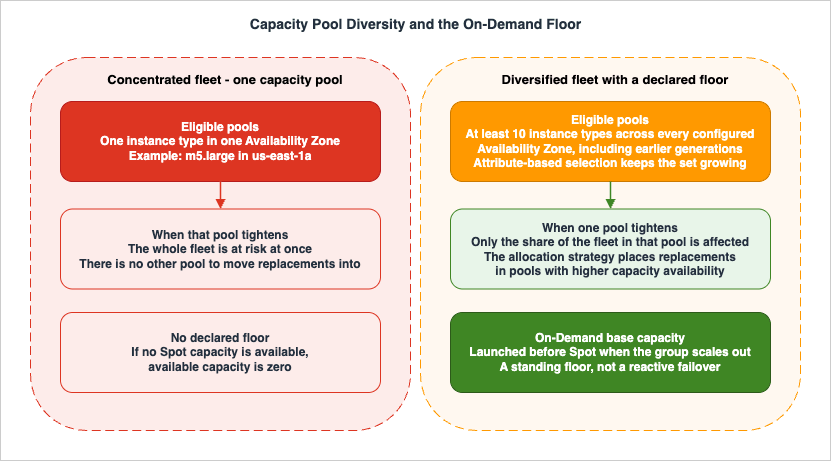
A Spot capacity pool is "a set of unused EC2 instances with the same instance type (for example,m5.large) and Availability Zone (for example, us-east-1a)." That definition is the single most useful sentence in the Spot documentation, because it tells you the granularity at which capacity disappears.Capacity fluctuates independently per pool. A fleet that requests one instance type in one Availability Zone is a fleet with one pool, and its availability is the availability of that pool — no amount of retry logic changes that. A fleet spread across many types and many zones fails partially instead of totally.
This is the same reasoning that underlies fault isolation generally; if you want the broader treatment of blast-radius reduction, see Cell-Based Architecture and Shuffle Sharding on AWS. Here the boundary is handed to you: it is the pool, and your only lever is how many of them you are eligible to draw from.
4.2 The allocation strategies
The allocation strategy decides which pools a fleet actually draws from, out of all the pools its launch configuration makes eligible. Note the two-step structure: your launch template and overrides define the possible pools; the allocation strategy picks among them. Widening the first without setting the second sensibly buys you less than you think.| Strategy | How AWS describes the selection | Interruption-risk consequence |
|---|---|---|
price-capacity-optimized | Identifies "the pools with the highest capacity availability for the number of instances that are launching," then selects among those. AWS calls it "the best choice for most Spot workloads" | Recommended default. AWS states it draws from pools "that we believe have the lowest chance of interruption in the near term" |
capacity-optimized | Identifies the pools with the highest capacity availability, "looking at real-time capacity data and predicting which are the most available" | For workloads that lose significant work on restart. AWS notes capacity "fluctuates in real time" while other pool attributes change slowly |
capacity-optimized-prioritized | Optimizes for capacity first, then "will honor instance type priorities on a best-effort basis" | Use when disruption must be minimized and certain instance types are preferred. Spot Fleet requires a launch template |
diversified | Instances "are distributed across all Spot capacity pools" | Blunt but effective spreading for large or long-running fleets |
lowest-price | Draws from a single dimension only | AWS explicitly does not recommend it: it "has the highest risk of interruption for your Spot Instances" |
Two operational facts about
lowest-price make it more dangerous than a merely suboptimal choice:- It is the AWS CLI default for
CreateFleet. The Spot best-practices page states that the Spot allocation strategy "defaults tolowest-priceper unit, but you can change it toprice-capacity-optimized,capacity-optimized, ordiversified," and the allocation-strategy page adds: "When using the AWS CLI, this is the default strategy. However, we recommend that you override the default." A fleet created from a minimal CLI request has silently opted into the strategy AWS warns against. - It poisons replacements. Both the Auto Scaling and the EC2 Fleet documentation warn that with
lowest-price, replacement instances "might be at an elevated risk of interruption," because instances are launched into the selected pool "even if your replacement Spot Instances are likely to be interrupted soon after they launch." The combination oflowest-pricewithlaunch-before-terminateis called out separately: AWS "strongly recommends against" it.
The
InstancePoolsToUseCount parameter is valid only with lowest-price. If you find yourself reaching for it, the more direct fix is to change the strategy.4.3 What the strategy does during replacement
Allocation strategy is not only a launch-time decision — it governs replacement too. For a fleet of typemaintain, the documentation states the behavior per strategy: price-capacity-optimized launches replacements "in the pools that have the most Spot Instance capacity availability while also taking price into consideration"; capacity-optimized launches "in the pools that have the most Spot Instance capacity availability"; diversified "distributes the replacement Spot Instances across the remaining pools."The practical reading: a bad allocation strategy compounds. Each interruption is an opportunity to land in a better pool or a worse one, and the strategy decides which. Over a long-running fleet the difference is not a one-time launch decision but a repeated one.
5. Fleet Composition
5.1 Instance type and Availability Zone flexibility
AWS gives an unusually concrete target here: "A good rule of thumb is to be flexible across at least 10 instance types for each workload," and "make sure that all Availability Zones are configured for use in your VPC and selected for your workload."The guidance on which types to add is more interesting than the count, and it runs against instinct:
- If the workload can be vertically scaled, include larger instance types — more vCPUs and memory — in your requests.
- If the workload can only scale horizontally, include older generation instance types, and the stated reason is an availability argument: they "are less in demand from On-Demand customers." The Auto Scaling guide repeats it as a recommendation — "don't limit yourself to the most popular new instance types. Choosing earlier generation instance types tends to result in fewer Spot interruptions."
Availability Zone flexibility earns its own justification: spanning zones gives access to "a deeper Amazon EC2 capacity pool when compared to groups in a single Availability Zone," because capacity fluctuates independently per type per zone.
5.2 Attribute-based instance type selection
Maintaining a hand-curated list of ten or more instance types is exactly the kind of configuration that decays. Attribute-based instance type selection (ABIS) replaces the list with a specification: you declare vCPUs, memory, storage, and other attributes, and EC2 Auto Scaling or EC2 Fleet "automatically identify and launch instances that match your specified attributes."The availability argument for ABIS is not that it saves typing. It is that ABIS "enables you to automatically use newly released instance types as they become available," which means your eligible-pool count grows on its own instead of decaying as your hardcoded list ages. A hardcoded list from two years ago is a list that has been quietly losing pools ever since.
5.3 Spot placement score, and what it is not
The Spot placement score feature returns "a score ranging from 1 to 10 for each Region or Availability Zone, indicating the likelihood of successfully provisioning your requested Spot capacity in that location." A score of 10 indicates the request "is highly likely to succeed."Its documented limits are as important as its output:
- It is point-in-time. AWS states it "does not guarantee available capacity or predict the risk of interruption." It answers "can I get capacity here now," not "will I keep it."
- You must specify at least three different instance types, or attributes that resolve to at least three, "otherwise Amazon EC2 will return a low Spot placement score." A low score on a two-type request is a measurement artifact, not a finding.
- The target capacity you can score is bounded by your recent Spot usage, and AWS may limit new request configurations within a 24-hour period.
Use it to choose where to expand, to find an optimal combination of instance types, or to pick a zone for a single-zone workload. Do not use it as an interruption predictor — AWS says explicitly that it is not one.
5.4 Mixing On-Demand into the group
An Auto Scaling group can run both purchase options. Two parameters govern the split, and their interaction has a documented order:- On-Demand base capacity — a fixed number of On-Demand Instances. Auto Scaling "waits to launch Spot Instances until after it launches the base capacity of On-Demand Instances when the group scales out."
- On-Demand percentage above base capacity — how the remainder splits. When the percentage produces a fraction, Auto Scaling "rounds up to the next integer in favor of On-Demand Instances."
One default worth knowing: a mixed instances group uses On-Demand Instances by default. To use Spot at all you must explicitly set the On-Demand percentage. A group that "should have been" Spot but was never configured is a group running entirely On-Demand.
The design use of base capacity is to make a floor explicit. If your workload has a minimum serving capacity below which it is meaningfully broken, that floor should not be interruptible. Everything above the floor can be. This is the single most effective structural answer to "what if we cannot get any Spot capacity," and Section 9 explains why the alternative reflex is worse.
5.5 Choosing the request mechanism
AWS publishes a direct verdict on the four request APIs, and two of them carry an unambiguous instruction:| API | AWS's guidance |
|---|---|
CreateAutoScalingGroup | Recommended. Use when you want lifecycle management automated through a configurable API |
CreateFleet | Recommended. Use when you want to self-manage the instance lifecycle; AWS suggests an instant type fleet if you do not need auto scaling |
RunInstances | Not recommended for this purpose — it "does not allow mixed instance types in a single request," which forecloses pool diversity |
RequestSpotFleet | "DO NOT USE. RequestSpotFleet is legacy API with no planned investment" |
RequestSpotInstances | "DO NOT USE. RequestSpotInstances is legacy API with no planned investment" |
If your infrastructure code still calls either legacy API, that is a finding on its own — independent of whether it currently works.
5.6 Capacity Rebalancing: what each service actually does
Capacity Rebalancing is the feature that consumes the rebalance recommendation on your behalf. Its behavior differs between Auto Scaling and the fleet APIs in ways that change your drain design.In an Auto Scaling group, with Capacity Rebalancing enabled:
- Auto Scaling "waits until the new instance passes its health check before it terminates the previous instance."
- Because it launches before terminating, it "can temporarily exceed the group's maximum size by up to 10 percent of the desired capacity." If you have sized
MaxSizetightly against a quota, this is where you find out. - Without a lifecycle hook, termination of the previous instance starts as soon as the replacement passes its health check. With a hook, that is extended by the hook's timeout.
- It will not always replace. Auto Scaling "will only launch a new instance if the new instance provides the same or better availability than the existing instance." If the risk of the replacement would be worse, no replacement is launched — the group continues to assess pools and acts if availability improves. In that window your at-risk instance is still your instance.
- It does not change the underlying rate: "Capacity Rebalancing does not increase your Spot Instance interruption rate," though more instances may be replaced than if you had waited.
In EC2 Fleet or Spot Fleet, the configuration is explicit:
| Setting | Values and constraints |
|---|---|
| Availability | Only for fleets of type maintain. The setting cannot be modified while the fleet is running — changing it requires deleting and recreating the fleet |
ReplacementStrategy: launch | Launches a replacement; does not terminate the instance that received the notification. You terminate the old instances or leave them running |
ReplacementStrategy: launch-before-terminate | Launches a replacement, waits TerminationDelay, then terminates the old instance |
TerminationDelay | Minimum 120 seconds, maximum 7200 seconds. Required with launch-before-terminate, invalid with launch |
| Replacement ceiling | The fleet "stops launching new replacement Spot Instances" once fulfilled capacity reaches double target capacity |
The critical caveat on
launch-before-terminate is one sentence in the User Guide and it undoes a common assumption: "Amazon EC2 can interrupt the old instances with a two-minute warning before the termination-delay." The delay is a maximum you are granted, not a floor you are owed. AWS recommends using this strategy "only if you can predict how long your instance shutdown procedures will take to complete."6. Graceful Degradation in the Workload
6.1 The budget is two minutes, and part of it is already spent
Everything in this section is constrained by one number. The Auto Scaling documentation states the requirement without hedging: "It's critical to design the custom action to finish in under two minutes."That budget is not two minutes of your code. Subtract:
- up to your polling interval before you notice the signal at all (AWS recommends five seconds — a 60-second cron is a 60-second tax),
- load balancer deregistration, if the instance is in a target group,
- whatever your process manager takes to deliver and handle a shutdown signal.
Design the drain so that the irreducible part — writing the checkpoint, releasing the queue message — happens first and completes in seconds, and the nice-to-have part — uploading logs, emitting a final metric — happens after. If you get it backwards, the part you needed is the part that gets cut.
6.2 Lifecycle hooks, and the limit that surprises people
Auto Scaling lifecycle hooks pause an instance in a wait state so a custom action can run. They are available for instance launch and instance termination, and — importantly here — they fire for Capacity Rebalancing replacements as well as ordinary scaling.The mechanics:
| Property | Documented behavior |
|---|---|
| Default heartbeat timeout | One hour |
| Global timeout | 48 hours or 100 times the heartbeat timeout, whichever is smaller |
| Outcomes | CONTINUE or ABANDON. On termination both allow the instance to terminate; ABANDON stops remaining actions such as other hooks, CONTINUE allows other hooks to complete |
| Default reliability | Termination lifecycle hooks "operate on a best-effort basis." On timeout or abandon, Auto Scaling "proceeds with terminating the instance immediately" |
| Failure behavior | Auto Scaling "limits the rate at which it allows instances to launch if the lifecycle hooks are failing consistently" |
Now the sentence that governs the whole design. The lifecycle hooks documentation states: "You can use lifecycle hooks with Spot Instances, but a lifecycle hook does not prevent an instance from terminating in the event that capacity is no longer available, which can happen at any time with a two-minute interruption notice."
A one-hour default heartbeat on a Spot instance is therefore not a one-hour drain window. It is a one-hour window that EC2 may end at any moment, and the only enforceable budget remains two minutes. Teams that set a generous hook timeout and write a leisurely drain routine have built something that works perfectly during scale-in tests and fails during actual interruptions — which is the worst possible distribution of outcomes, because the tests pass.
There is one ordering detail worth planning around: if the Auto Scaling group is behind an Elastic Load Balancing load balancer, Auto Scaling "waits for the instance to deregister from the load balancer before calling your lifecycle hook." AWS notes the consequence directly — if deregistration plus the lifecycle action takes too long, "the instance might be interrupted while Amazon EC2 Auto Scaling waits for your lifecycle action to complete." Long deregistration delays and short interruption budgets are in direct competition.
6.3 What a drain handler should actually do
Ordered by what you lose if it does not run:- Stop taking new work. Set the local "draining" flag, stop the poll loop from requesting more messages, deregister from the work dispatcher. On a rebalance recommendation this is often the only step you should take.
- Make the current unit recoverable. Write the checkpoint (Section 7) or return the queue message to visibility (Section 8). This is the step that determines whether the interruption costs you seconds or hours.
- Make the instance externally invisible. Deregister from DNS or the service registry so that nothing new is routed to a machine that is about to disappear.
- Report. Emit the event that lets you count this interruption and measure how much lead time you actually had (Section 10).
- Best effort. Upload logs and diagnostics. If this is cut off, you lose observability, not work.
The design test is simple: if the process were killed with no warning at any point in that sequence, is the work still recoverable? If the answer is no at any step, the sequence is a wish, not a design.
7. Checkpointing and Idempotency
7.1 Idempotency is the actual requirement
Checkpointing gets the attention, but it is the junior partner. A checkpoint tells you where to resume; idempotency is what makes resuming safe. Without it, every interruption is a correctness event rather than a latency event.The reason is structural. Any interruption-tolerant system has a window between "the work was performed" and "the work was durably recorded as performed," and an interruption inside that window causes the work to be performed again. You cannot close the window — you can only make the second execution harmless. Every retry mechanism in this article, from Auto Scaling replacement to SQS redelivery, is an at-least-once mechanism.
Practically, that means the following are unsafe unless made idempotent explicitly:
- appending to a file or a table without a natural key,
- incrementing a counter,
- sending a notification, an email, or a webhook,
- calling any external API that creates something,
- any operation whose result depends on how many times it ran.
The usual remedies are a deterministic key derived from the work unit rather than from the attempt, conditional writes, and dedupe tables keyed on that identifier. The choice matters less than the discipline of deriving the key from the input, never from the run.
7.2 Checkpoint granularity
AWS recommends checkpointing directly for this purpose: for workloads that lose significant work on restart, "you should implement checkpointing so that applications can restart from that point if they're interrupted."Granularity is the real decision, and it is a genuine trade-off with a failure mode at each end:
| Granularity | What an interruption costs | What it costs continuously |
|---|---|---|
| Too coarse (e.g. once per hour) | Up to an hour of work, every time | Almost nothing |
| Too fine (e.g. every record) | Almost nothing | Checkpoint write dominates the job; the job may run slower than it would with no interruptions at all |
| Calibrated | Bounded by the checkpoint interval | Proportional to interval |
A workable heuristic: make the checkpoint interval small enough that redoing one interval takes less time than the drain window you have — because if redoing lost work takes longer than two minutes, you cannot recover it inside the notice anyway and must recover it on the replacement. Then verify the write itself completes well inside the drain budget. A checkpoint that takes 90 seconds to write is not a checkpoint; it is a second failure mode.
7.3 Where the checkpoint lives
The constraint is simple and absolute: the checkpoint must outlive the instance.- Instance store is disqualified. The User Guide describes instance store volumes as "storage volumes for temporary data that is deleted when you stop, hibernate, or terminate your instance."
- A root EBS volume is disqualified by default, since it follows delete-on-termination.
- Amazon S3 is the ordinary answer for checkpoint blobs.
- A database or a job-state table is the ordinary answer for position markers and status.
- A separately attached EBS volume can survive termination, but it is pinned to one Availability Zone — which directly contradicts the zone diversity of Section 5. Reaching for it usually signals a workload that has not externalized its state.
Two properties are worth designing for explicitly. First, write checkpoints atomically — a checkpoint half-written when the instance died must not be readable as valid. Write to a temporary key and promote it, or make the record's completeness verifiable. Second, make the checkpoint self-describing: the resuming process is on a different instance, possibly a different instance type, and cannot assume anything about the machine that wrote it.
7.4 Resume is a first-class path, not an error path
The most common defect in this area is not a missing checkpoint. It is a checkpoint that is written faithfully and never read in anger, because resume is only exercised when something goes wrong and nothing has gone wrong yet in staging.Resume must be a path you run deliberately. Start jobs from a mid-state checkpoint as part of routine testing. Verify that a job resumed from a checkpoint produces the same result as one that ran straight through. Where resume correctness genuinely matters, injecting interruptions is a legitimate way to exercise it — AWS Fault Injection Service provides
aws:ec2:send-spot-instance-interruptions, which sends a real interruption notice two minutes before interrupting the target and issues a rebalance recommendation immediately when the action starts, with durationBeforeInterruption configurable from 2 to 15 minutes. That is a controlled way to observe both signals in the correct order. No such experiment was run for this article, and interruption injection should be treated as a destructive action to be scheduled deliberately, not tried casually.8. Queue-Based Patterns
8.1 Why a queue is the natural fit
A queue is the most direct way to get the property Section 7 demands: work that is claimed rather than assigned. If a worker disappears mid-unit, the unit becomes visible again and another worker takes it. The interruption stops being an event the system must handle and becomes an event the system absorbs.For choosing among AWS's messaging and routing options, see AWS Messaging and Event Routing Decision Guide. This section covers only the parameters that interact with interruptions.
8.2 Visibility timeout is an interruption parameter
Amazon SQS visibility timeout is usually tuned against processing time. On interruptible compute it is also tuning how long a unit of work stays lost after its worker vanishes.The documented bounds:
| Parameter | Value |
|---|---|
| Default visibility timeout | 30 seconds |
| Minimum | 0 seconds |
| Maximum | 12 hours |
| Adjustable per message | Yes, via ChangeMessageVisibility |
| In-flight message limit | Approximately 120,000 for most standard queues; 120,000 for FIFO queues |
The trade-off is now explicit. A long visibility timeout protects a long unit of work from duplicate processing, but when the worker is interrupted, that message sits invisible for the remainder of the timeout before anyone can retry it. A short timeout returns work quickly but risks a second worker starting a unit the first is still processing.
The resolution is to stop treating it as one number. Use a heartbeat pattern: set a modest visibility timeout, and have the worker call
ChangeMessageVisibility periodically while it makes progress. The interruption behavior falls out for free — when the worker dies, heartbeats stop, and the message returns after one short interval rather than one long one.Then add the interruption-specific step: on the interruption notice, explicitly set the message's visibility timeout to 0. That returns the work immediately instead of waiting out even the short interval. This is a single API call and it is the highest-leverage line of code in a queue-based Spot worker.
8.3 Redrive and the poison-message problem
Interruptions interact badly with dead-letter queue configuration in a way that is easy to miss. A redrive policy moves a message to a dead-letter queue oncemaxReceiveCount is exceeded — and ReceiveCount counts receives, not failures. An interruption increments it exactly like a bug would.A
maxReceiveCount of 2 or 3, which looks prudent on stable compute, will route perfectly healthy messages to the dead-letter queue on interruptible compute simply because they were unlucky twice. AWS's own guidance is to "set the maxReceiveCount high enough to allow for sufficient retries," and AWS Support guidance for a related case recommends at least five. On interruptible workers, budget for interruption-driven receives on top of failure-driven ones.The corollary is a monitoring requirement: a message in the dead-letter queue is no longer self-explanatory. It may be poison, or it may be a message that was interrupted repeatedly. Recording the interruption events (Section 10) is what lets you tell the two apart, and the distinction determines whether the right response is redrive or debug.
8.4 Sizing the unit of work
The unit of work is a design parameter, not an inherited fact, and interruption tolerance pulls it downward.- A unit that takes minutes is comfortable: an interruption costs at most one unit, and the drain handler can often finish it.
- A unit that takes hours is not: the drain handler cannot finish it, and only a checkpoint prevents the loss.
- A unit that cannot be split at all is the Section 11 case.
Where the natural unit is large, the usual fix is to split it into a coordinated set of smaller units with an external tracker recording which parts are done — which is precisely the structure described in Large-Scale Batch Generative AI Pipeline on AWS. Splitting also improves pool flexibility, since smaller units fit more instance types.
9. When Capacity Is Not Available
9.1 The reflex AWS tells you not to have
The instinctive answer to "we could not get Spot capacity" is "fall back to On-Demand." AWS explicitly discourages this, and the reasoning is worth reading closely because it is not obvious. The Spot best-practices page says AWS "strongly discourage using Spot Instances for these workloads or attempting to fail over to On-Demand Instances to handle interruptions or periods of unavailability," and then gives two reasons: "Failing over to On-Demand Instances can inadvertently drive interruptions for your other Spot Instances," and "if Spot Instances for a combination of instance type and Availability Zone get interrupted, it might become difficult for you to get On-Demand Instances with that same combination."Two mechanisms are named. First, reactive On-Demand demand is itself a driver of Spot reclamation — a fallback that fires across a fleet can worsen the condition it is responding to. Second, a pool short on Spot capacity is, by construction, a pool under demand pressure, so the fallback is aimed at the least likely place to succeed.
The design conclusion is not "never run On-Demand." It is that On-Demand should be a structural floor, not a reactive fallback — declared in advance through On-Demand base capacity (Section 5.4), running continuously, sized to your minimum viable capacity. A floor that is always there does not create a demand spike when Spot capacity tightens. A fallback that fires on failure does exactly that.
9.2 The mechanisms available
| Mechanism | What it gives you | Where it fits |
|---|---|---|
| On-Demand base capacity | A fixed number of non-interruptible instances launched before Spot on scale-out | The default answer for a minimum viable capacity floor |
| On-Demand Capacity Reservations | Reserved capacity in a specific Availability Zone for any duration | When the floor must be guaranteed in a specific zone ahead of a known peak |
| Availability Zone retry | If there is no capacity for your instance types in one zone, Auto Scaling "keeps trying to launch Spot Instances in other enabled Availability Zones until it succeeds" | Free, provided Section 5.1 was done — it only works across zones you actually enabled |
| Spot placement score | A point-in-time recommendation of where capacity is more likely to be available | Relocation and expansion planning, not runtime failover |
| Wider eligibility | More instance types, more zones, ABIS | The intervention with the highest ceiling. Usually the correct first response |
For quota headroom — which determines whether a replacement can launch at all — see AWS Service Quotas Practical Cheat Sheet.
9.3 Waiting versus degrading
When capacity genuinely is not available, there are only two honest options, and choosing between them in advance is what separates a designed system from one that improvises during an incident.Wait is correct when the work is deferrable: a nightly batch, a backfill, a training run with a deadline measured in days. The queue absorbs the backlog, throughput drops, and the work completes later. This requires that the backlog is bounded, that queue retention exceeds the plausible wait, and that someone is alerted before the deadline rather than after it.
Degrade is correct when the work is time-sensitive but partially reducible: process the high-priority queue and let the low-priority one grow, reduce quality or thoroughness per unit, drop optional enrichment. This requires that the reduction is designed and tested rather than discovered.
The failure mode is choosing neither — a system that neither waits cleanly nor degrades cleanly, but retries indefinitely into an empty pool, holds messages in flight until they expire, and reports success because nothing threw an exception. The general treatment of graceful degradation in the AWS Well-Architected Reliability Pillar applies directly here, as does the availability-strategy framing in AWS Disaster Recovery Strategies Guide.
10. Observability for Interruptions
10.1 Record both signals, separately
The foundation is an EventBridge rule per signal, each writing to something durable. Two rules, not one, because the two signals answer different questions:{
"source": ["aws.ec2"],
"detail-type": ["EC2 Instance Rebalance Recommendation"]
}{
"source": ["aws.ec2"],
"detail-type": ["EC2 Spot Instance Interruption Warning"]
}Record instance ID, instance type, Availability Zone, and timestamp for each. Instance type and zone together identify the capacity pool, and a record keyed by pool is what turns interruptions from anecdotes into a distribution you can act on. Without it, "we get a lot of interruptions" is unfalsifiable; with it, you can see whether they concentrate in two of your twelve pools.
For instrumenting this alongside the rest of your telemetry, see AWS Observability Architecture Guide.
10.2 What to measure
The useful signals are about your design, not about Spot. AWS does not publish interruption rates as design constants, and your own rate is not a number you control — but everything in the right-hand column below is.| Signal | Why it tells you something actionable |
|---|---|
| Lead time actually received | Time from rebalance recommendation to interruption notice, per instance. AWS documents that the two can coincide, so this is a distribution, not a constant. If most of your lead times are near zero, any design that assumes advance warning is unsupported |
| Drain completion rate | Fraction of interruptions where the drain handler ran to completion. This is the single best measure of whether Section 6 works |
| Drain duration | Time from signal to drain completion, compared against the two-minute budget. Watch the tail, not the mean |
| Work lost per interruption | Checkpoint age at the moment of interruption. Directly validates the granularity choice in Section 7.2 |
| Re-execution rate | Units of work processed more than once. Rising values point at a visibility timeout or checkpoint problem, and the same counter is what proves your idempotency is exercised rather than theoretical |
| Interruptions by capacity pool | Concentration indicates insufficient diversity, not bad luck |
| Replacement latency | Time from interruption to replacement in service. This is what a capacity shortage looks like before it becomes a backlog |
| Dead-letter queue arrivals with interruption correlation | Separates poison messages from interruption casualties (Section 8.3) |
10.3 What to alert on
Interruptions themselves are not alertable — they are the normal operating condition, and paging on them produces exactly the alert fatigue that makes real signals invisible. Alert instead on the design failing:- drain completion rate falling below its normal band,
- replacement latency rising — the leading indicator of a capacity shortage,
- re-execution rate rising sharply, which usually means work is being lost and redone rather than resumed,
- dead-letter queue arrivals exceeding the baseline,
- backlog age exceeding the deadline implied by the "wait" strategy in Section 9.3.
Chaos experiments that inject interruptions on a schedule are the natural way to keep these signals honest, since the alternative is discovering that the drain handler broke three deploys ago during an actual capacity event.
11. Workloads That Should Not Run This Way
The most useful thing an article like this can do is mark the boundary honestly. AWS does so in the Spot best-practices page, and the sentences deserve to be read as a specification rather than a disclaimer: Spot Instances "are not suitable for workloads that are inflexible, stateful, fault-intolerant, or tightly coupled between instance nodes," and AWS does "not recommend Spot Instances for workloads that are intolerant of occasional periods when the entire target capacity is not completely available."That last clause is the strictest test, and it is the one most often skipped. It is not asking whether your workload survives losing an instance. It is asking whether it survives a period in which the entire target capacity is unavailable. Many designs that pass the first test fail the second.
Concretely, do not put the following on interruptible capacity:
| Workload shape | Why it fails |
|---|---|
| Tightly coupled parallel jobs | Nodes that must communicate synchronously fail as a unit; losing one node fails the job. Gang-scheduled work is named directly by AWS as unsuitable |
| Long indivisible operations | An operation that cannot be checkpointed or split and takes longer than the expected uninterrupted lifetime will, statistically, never finish |
| State that cannot be externalized | If the work cannot survive the loss of local storage, no signal handling helps. The two-minute budget is not enough to evacuate meaningful state |
| Non-idempotent side effects that cannot be made idempotent | If duplicate execution is harmful and cannot be prevented, at-least-once delivery is a correctness bug |
| Hard-deadline work with no degradation path | If neither waiting nor degrading is acceptable, the design has no move when capacity is unavailable |
| Anything requiring a specific instance type in a specific zone | This is a single capacity pool by definition — the least available configuration possible |
The tightly-coupled case is worth separating out because it is the one people most often try to engineer around. Work distributed across nodes with synchronous, low-latency communication has no partial-failure mode: losing one participant fails the whole collective operation, so the interruption tolerance of the job is the interruption tolerance of its least fortunate node. That is a different design problem entirely — the network fabric and placement constraints such workloads depend on are covered in a sibling article, Elastic Fabric Adapter and the AWS Network Fabric. On the scheduler side the boundary is not left to judgment at all: AWS Batch does not support multi-node parallel jobs on compute environments that use Spot Instances, and that constraint and the ones around it are covered in Batch and HPC Job Scheduling on AWS.
The honest answer for these shapes is a floor of non-interruptible capacity. Reaching that conclusion at design time is a success of this analysis, not a failure of it.
12. Failure Modes and Anti-Patterns
| Anti-pattern | Why it is wrong | What to do instead |
|---|---|---|
| One instance type, one Availability Zone | That is one capacity pool. The workload's availability is the pool's availability | At least 10 instance types, all zones configured in the VPC (Section 5.1) |
| Accepting the CLI default allocation strategy | CreateFleet defaults to lowest-price, which AWS says "has the highest risk of interruption" | Set price-capacity-optimized explicitly (Section 4.2) |
lowest-price with launch-before-terminate | AWS "strongly recommends against" the combination — replacements land in pools likely to be interrupted again | Use capacity-optimized or capacity-optimized-prioritized for rebalancing fleets |
| Receiving a signal and doing nothing | Enabling Capacity Rebalancing without a drain handler replaces the instance while your in-flight work still dies | Handle the signal in the instance (Section 6.3) |
| Treating the rebalance recommendation as a countdown | It can arrive simultaneously with the two-minute notice | Design the drain for two minutes; treat earlier warning as a bonus (Section 3.1) |
Choosing hibernate for a graceful shutdown | Hibernation begins immediately — there is no two-minute warning and your handler does not run | Use terminate with a checkpoint (Section 2.2) |
| Relying on a lifecycle hook to hold the instance | A hook "does not prevent an instance from terminating in the event that capacity is no longer available" | Treat the hook as a coordination point, not a guarantee (Section 6.2) |
| Checkpoints on instance store or the root volume | Both are deleted on termination | S3 or a database (Section 7.3) |
| Checkpoint interval far larger than the drain window | Every interruption costs a full interval of work | Calibrate against the two-minute budget (Section 7.2) |
| Checkpoint interval so small it dominates runtime | The job runs slower than it would with no interruption handling at all | Same calibration, from the other side |
| Non-idempotent side effects | Every retry mechanism here is at-least-once | Deterministic keys derived from input, conditional writes (Section 7.1) |
maxReceiveCount of 2 or 3 | An interruption increments ReceiveCount exactly like a failure does | Budget for interruption-driven receives (Section 8.3) |
| Long visibility timeout with no heartbeat | Interrupted work stays invisible for the remainder of the timeout | Short timeout plus ChangeMessageVisibility heartbeat, set to 0 on the notice (Section 8.2) |
| On-Demand as a reactive fallback | AWS documents that this can drive further Spot interruptions and is aimed at the pool least likely to have capacity | On-Demand base capacity as a structural floor (Section 9.1) |
| No On-Demand floor at all | There is no minimum below which the system stays functional | Size the floor to minimum viable capacity (Section 5.4) |
RequestSpotFleet or RequestSpotInstances | AWS marks both "DO NOT USE... legacy API with no planned investment" | CreateFleet or CreateAutoScalingGroup (Section 5.5) |
| Setting a maximum on the request | Adds an interruption trigger and a launch-failure mode; AWS "strongly recommends" against it | Leave it unset (Section 2.1) |
MaxSize set tightly against a quota | Capacity Rebalancing can exceed the group maximum by up to 10 percent of desired capacity | Leave headroom (Section 5.6) |
| Never testing the resume path | Resume is only exercised when something breaks, so it breaks silently | Start jobs from checkpoints routinely (Section 7.4) |
| Alerting on every interruption | Interruptions are the normal operating condition | Alert on drain failures and replacement latency (Section 10.3) |
13. Frequently Asked Questions
How much warning do I actually get before an instance is interrupted?
Two minutes, from the Spot Instance interruption notice. The rebalance recommendation "can arrive sooner," but AWS states that it "is not always possible" for it to arrive first and that it "can arrive along with the two-minute interruption notice." Design for two minutes. The exception ishibernate, where the notice is issued but the two-minute warning is not, because hibernation begins immediately.Should I use the rebalance recommendation or the interruption notice?
Both, for different actions. The rebalance recommendation is a risk signal — the right default response is to stop scheduling new work while finishing what is in progress, not to shut down. The interruption notice is a commitment — that is when you flush, checkpoint, release the queue message, and stop. Acting on the rebalance recommendation as though it were the interruption notice throws away healthy workers.Should I poll instance metadata or subscribe to EventBridge?
Both, because they reach different actors. Only the in-instance metadata poll can reach the process holding your state. Only EventBridge can drive actions outside the instance, such as updating a job tracker or emitting the metric that tells you the design works. AWS recommends checking metadata every 5 seconds for both signals.Which allocation strategy should I use?
price-capacity-optimized unless you have a specific reason otherwise; AWS calls it "the best choice for most Spot workloads." Use capacity-optimized or capacity-optimized-prioritized when restarting lost work is especially disruptive or when instance type preference matters. Do not use lowest-price — AWS says it "has the highest risk of interruption." Note that it is the AWS CLI default for CreateFleet, so leaving the strategy unset opts you into it.How many instance types do I need?
AWS's rule of thumb is "at least 10 instance types for each workload," across all Availability Zones configured in your VPC. Counter-intuitively, older generation types help: AWS documents that they "tend to result in fewer Spot interruptions because they are less in demand from On-Demand customers." Attribute-based instance type selection avoids maintaining the list by hand and automatically picks up newly released types.Does enabling Capacity Rebalancing reduce my interruptions?
No, and AWS says so directly: "Capacity Rebalancing does not increase your Spot Instance interruption rate" — nor does it decrease it. What it changes is the timing: replacements are launched proactively on the rebalance recommendation instead of reactively after the interruption, so more instances may be replaced overall, but you get lead time to drain gracefully. Note also that Auto Scaling "will only launch a new instance if the new instance provides the same or better availability than the existing instance," so a replacement is not guaranteed.Can a lifecycle hook keep the instance alive long enough to finish my work?
No. The Auto Scaling documentation states that a lifecycle hook "does not prevent an instance from terminating in the event that capacity is no longer available, which can happen at any time with a two-minute interruption notice." The default heartbeat timeout is one hour, but on Spot that hour is a window EC2 may end at any moment. AWS's own instruction is that the custom action must "finish in under two minutes."What should I do when I cannot get Spot capacity at all?
Not fall back to On-Demand reactively — AWS states this "can inadvertently drive interruptions for your other Spot Instances" and that On-Demand for the same instance type and zone combination may itself be hard to get. The structural answers are a declared On-Demand base capacity, wider instance type and zone eligibility, and an explicit decision in advance about whether the workload waits or degrades.Can I use Spot for a distributed training job?
Only if the job checkpoints and can resume with a different set of nodes. AWS names workloads that are "tightly coupled between instance nodes" as unsuitable, because losing one participant fails the collective operation. A job whose framework supports checkpoint and elastic restart is a different case from one that requires all nodes for its entire duration; the second belongs on non-interruptible capacity. Moving it there removes the interruption, not the failure: what a hardware fault costs on reserved capacity, and how far back it sends the job, is covered in my Distributed Training Resilience on AWS.How do I test that my interruption handling works?
AWS Fault Injection Service providesaws:ec2:send-spot-instance-interruptions, which issues a rebalance recommendation immediately and an interruption notice two minutes before interrupting the target, with durationBeforeInterruption configurable from 2 to 15 minutes. The EC2 console can also initiate an interruption on a Spot request, using FIS underneath. Treat either as a destructive action: scheduled deliberately, in an environment where losing the instance is acceptable.14. Summary
Designing for Spot interruptions is availability engineering with an unusual property: the failure announces itself. That announcement is the entire opportunity, and most of the design follows from taking it literally.The load-bearing points:
- There are two signals, not one. The rebalance recommendation is a risk signal that licenses you to stop taking new work; the interruption notice is a two-minute commitment that licenses you to shut down. AWS documents that the first may not arrive before the second, so the enforceable budget is always two minutes.
- The capacity pool — instance type plus Availability Zone — is the unit of failure. AWS's rule of thumb is at least 10 instance types across all configured zones, with older generations helping because they are less in demand.
- The allocation strategy is not a detail.
price-capacity-optimizedis AWS's recommendation;lowest-priceis the CLI default forCreateFleetand the strategy AWS warns has the highest interruption risk. That combination makes it easy to opt into the wrong behavior by writing nothing. - Capacity Rebalancing buys lead time, not fewer interruptions. And it only replaces when availability would be the same or better.
- A lifecycle hook is a coordination point, not a guarantee. It cannot hold an instance that EC2 is reclaiming.
- Idempotency is the real requirement; checkpointing is the optimization. Every retry path here is at-least-once, and the interval should be calibrated against the two-minute budget from both directions.
- On-Demand belongs underneath as a floor, not beside as a fallback — AWS documents that reactive failover can drive further interruptions.
- Some workloads should not run this way, and AWS names them: inflexible, stateful, fault-intolerant, tightly coupled, or intolerant of periods when the entire target capacity is unavailable.
The test that matters is not whether the workload survives losing an instance. It is whether, at every instant, the work in flight is recoverable by a process that has never seen the machine that started it. A workload that passes that test handles interruptions because it no longer depends on any particular machine — which is a good property to have regardless of what kind of capacity it runs on.
15. References
All AWS documentation pages below were verified on 2026-08-04.- Amazon EC2 User Guide - Spot Instance interruptions
- Amazon EC2 User Guide - Spot Instance interruption notices
- Amazon EC2 User Guide - Behavior of Spot Instance interruptions
- Amazon EC2 User Guide - EC2 instance rebalance recommendations
- Amazon EC2 User Guide - Best practices for Amazon EC2 Spot
- Amazon EC2 User Guide - Use allocation strategies to determine how EC2 Fleet or Spot Fleet fulfills Spot and On-Demand capacity
- Amazon EC2 User Guide - Use Capacity Rebalancing in EC2 Fleet and Spot Fleet to replace at-risk Spot Instances
- Amazon EC2 User Guide - Spot placement score
- Amazon EC2 User Guide - Specify attributes for instance type selection for EC2 Fleet or Spot Fleet
- Amazon EC2 User Guide - EC2 Fleet and Spot Fleet
- Amazon EC2 User Guide - Example CLI configurations for EC2 Fleet
- Amazon EC2 User Guide - Spot request status
- Amazon EC2 User Guide - Initiate a Spot Instance interruption
- Amazon EC2 User Guide - On-Demand Capacity Reservations
- Amazon EC2 Auto Scaling User Guide - Capacity Rebalancing in Auto Scaling to replace at-risk Spot Instances
- Amazon EC2 Auto Scaling User Guide - Amazon EC2 Auto Scaling lifecycle hooks
- Amazon EC2 Auto Scaling User Guide - Auto Scaling groups with multiple instance types and purchase options
- Amazon EC2 Auto Scaling User Guide - Setup overview for creating a mixed instances group
- Amazon EC2 Auto Scaling User Guide - Create mixed instances group using attribute-based instance type selection
- Amazon SQS Developer Guide - Amazon SQS visibility timeout
- Amazon SQS Developer Guide - Using dead-letter queues in Amazon SQS
- Amazon SQS API Reference - ChangeMessageVisibility
- AWS Fault Injection Service User Guide - AWS FIS actions reference
- AWS Well-Architected Framework - Reliability Pillar
Related Articles
- Large-Scale Batch Generative AI Pipeline on AWS - The pipeline architecture that this article's interruption tolerance sits underneath.
- AWS Messaging and Event Routing Decision Guide - Choosing among AWS messaging services before tuning the parameters in Section 8.
- Event-Driven Architecture Anti-Patterns on AWS - Where at-least-once delivery and idempotency go wrong more generally.
- Cell-Based Architecture and Shuffle Sharding on AWS - Fault isolation boundaries when you get to choose them, rather than inheriting the capacity pool.
- AWS Disaster Recovery Strategies Guide - The availability strategy vocabulary that Section 9 borrows.
- AWS Observability Architecture Guide - Instrumenting the signals in Section 10 alongside the rest of your telemetry.
- AWS Service Quotas Practical Cheat Sheet - Quota headroom determines whether a replacement instance can launch at all.
- AWS Well-Architected Practical Checklist - Where interruption tolerance fits in a broader reliability review.
- Amazon EC2 Instance Types History and Timeline - The instance type generations that Section 5.1 asks you to be flexible across.
- AWS History and Timeline regarding Amazon EC2 - How the EC2 purchase and capacity model arrived at its present shape.
- LLM Inference Resilience Patterns on AWS - The same retry and degradation vocabulary applied to inference workloads.
References:
Tech Blog with curated related content
Written by Hidekazu Konishi