Batch and HPC Job Scheduling on AWS - Job Queues, Fair-Share Policies, Multi-Node Parallel Constraints, and the Slurm Route
First Published:
Last Updated:
What makes this hard is not a shortage of information. Quite the opposite. AWS Batch, AWS PCS, and AWS ParallelCluster are all introduced with the same description: they take a job, launch EC2 instances, and run it. Listing their features often results in a list that looks remarkably similar. The deciding factor is not the feature list. It is whether the job can make progress on a partial allocation.
With 10,000 independent jobs, you run whatever you managed to secure. Capacity for ten at a time still gets you ten finished, then the next ten. This is the shape a queue is good at. On the other hand, if a single job requires 64 nodes and synchronizes at each iteration, securing 63 nodes buys nothing. This is not a difference of scale. It is a difference of requirement. And when the requirements differ, the features you demand from a scheduler, and the features you may end up unable to use, also change.
This article is not a guide to using AWS Batch. It is an article about choosing where to submit, and about counting up from the primary sources what becomes a constraint once you have chosen. In particular, AWS Batch's support for multi-node parallel jobs has limitations that are explicitly stated in the official documentation, often in negative terms. Missing just one of these limitations can result in a cluster that is unable to communicate externally in a production environment.
The technical descriptions in this article are based on the AWS Batch User Guide, AWS Batch API Reference, AWS Batch console help panel, AWS Parallel Computing Service User Guide, AWS Parallel Computing Service API Reference, AWS ParallelCluster User Guide, AWS CloudFormation Template Reference, AWS What's New, and the AWS HPC Blog, as of August 30, 2026. This article does not build a cluster and measure it. So it does not take up which route is faster, where saturation arrives first, or what scaling efficiency looks like. Instead, it focuses on the official specifications, limitations, and default values defined by AWS, and it points out where the official documents disagree with each other. This article does not discuss pricing.
Table of Contents
- 1. Where You Submit Decides What Stays Your Responsibility
- 2. The Components of AWS Batch, and What Holds the Capacity
- 3. The Default Is FIFO, and Queue Priority Is Not a Guarantee
- 4. The Unit of Capacity Differs by Compute Type
- 5. A Crowd of Independent Jobs - Array Jobs and Dependencies
- 6. What a Tightly Coupled Job Asks For
- 7. What Choosing a Multi-Node Parallel Job Takes Away
- 8. The Slurm Route - AWS PCS and AWS ParallelCluster
- 9. The Constraints That Sit Outside the Scheduler
- 10. Where the Primary Sources Disagree
- 11. Failure Modes and Anti-Patterns
- 12. Frequently Asked Questions
- 13. Summary
- 14. References
1. Where You Submit Decides What Stays Your Responsibility
1.1 Two Submission Surfaces
There are two broad surfaces for submitting a job on AWS.One is using queues. You register a job definition, and when you submit a job to a job queue, the scheduler prepares the capacity and runs it. AWS Batch operates in this manner. You submit containers, and the service manages the compute resources after submission.
The other is using clusters. A Slurm controller is constantly running, and you submit job scripts from a login node using the
sbatch command. AWS PCS and AWS ParallelCluster function in this way. You submit job scripts, and the cluster itself, as an asset, remains under your ownership.These two do not line up by how many features each has. The same job often runs on either one. What differs is what stays your responsibility after you have submitted it.
1.2 What Decides It Is Coupling, Not Scale
Choosing by scale is where this usually goes wrong. A queue can handle ten thousand jobs, and a job that spans only eight nodes can still demand the cluster-shaped mechanism.The axis that decides it is whether the job can make progress on a partial allocation.
A crowd of independent jobs can make progress on a partial allocation. Whatever fits runs, and as one finishes the next begins. Short capacity shows up as a later finish, and it does not touch the correctness of the result.
A tightly coupled job cannot make progress on a partial allocation. Because each iteration requires synchronization across all nodes, if even one node is unavailable, the computation cannot proceed. What the scheduler is asked for here is that the job does not start until every node it needs is available. And keeping that promise drags a chain of surrounding constraints along with it.
1.3 What Earlier Articles Already Cover
This article does not cover the following. Each of them already has a home.| Article | What it covers |
|---|---|
| Gang Scheduling and Dynamic Resource Allocation on Amazon EKS - Why One Half of the Vocabulary Is Still Alpha, and What Decides Which Device Allocation Path You Get | Focuses on gang scheduling and dynamic resource allocation within Kubernetes. That article states that what AWS calls gang scheduling among its own features is the multi-node parallel job in AWS Batch, and goes as far as the job definition on Amazon EKS. This article does not repeat that introduction. It takes up only the constraints and the design. |
| Elastic Fabric Adapter and the AWS Network Fabric - SRD, ENA Express, and Placement Group Design | Discusses network fabrics, defining the concept of tight coupling, explaining why tail latency is dominant, and detailing the internal workings of EFA, SRD, and placement groups. This article does not explain communication. It states only the scheduler-side fact that a cluster placement group in a single Availability Zone is what a tightly coupled job is told to use. |
| Self-Managed LLM Inference on Amazon EKS - Serving Open-Weight Models with vLLM, Neuron/GPU, and Karpenter | Covers node provisioning in Kubernetes using Karpenter. This article does not cover Karpenter. |
| Designing for Spot Interruptions on AWS - Allocation Strategies, Rebalance Signals, and Graceful Degradation | Covers how to prepare for Spot Instance interruptions. This article states only the constraint that a multi-node parallel job does not run on a Spot compute environment. |
| Disaggregated Prefill and Decode for LLM Serving on AWS - The KV Transfer, the Routing Threshold, and What Disaggregation Does Not Fix | Addresses the infrastructure for large language model inference. This article does not go into inference infrastructure. |
| Large-Scale Batch Generative AI Pipeline on AWS - Asynchronous Inference at Scale with Bedrock Batch, Step Functions, and SQS | Describes a pipeline for processing large volumes of generative AI asynchronously. The word "batch" there means bulk inference in Amazon Bedrock, which is a different thing from the AWS Batch service this article is about. |
| Amazon EFS Performance Engineering - Throughput Modes, IOPS Ceilings, Per-Client Limits, and Burst Credits | Examines the performance model for shared file systems. It details the different types of limits and clarifies that the per-client limit is independent of the number of compute nodes. This article does not carry the values of those ceilings. |
| Sharding Aurora PostgreSQL with Limitless Database - Table Types, Shard Keys, Single-Shard Optimization, and What You Cannot Change Later | Asks the same question on the database side, where the unit that gets requested is the ACU rather than the vCPU or the node, and where what stays shared is a single logical database behind a router. This article does not cover sharding. |
1.4 What This Article Answers
The article runs in this order. First it sets out the components of AWS Batch and settles which of them actually holds the capacity. Then it looks at the default scheduling behavior and at what changes once you enable fair-share. From there it separates independent jobs from tightly coupled ones and counts, from the primary sources, what choosing the latter takes away. After that it compares the two routes that use Slurm and takes up the constraints that sit outside the scheduler. It closes with the places where the primary sources disagree, the failure modes, and the questions that come up most.2. The Components of AWS Batch, and What Holds the Capacity
2.1 Eight Components
The "Components of AWS Batch" section in the AWS Batch User Guide outlines eight components:| Component | Role |
|---|---|
| Compute environment | The set of compute resources that runs the jobs. It is either managed or unmanaged. |
| Job queue | Where a submitted job sits until the scheduler places it on a compute environment. |
| Job definition | A blueprint that defines how a job should be executed, including the container image, required vCPU and memory, IAM role, and mount points. |
| Job | A unit of work submitted for execution. It is run as a container using the parameters defined in the job definition. |
| Scheduling policy | Settings that decide how a job queue divides compute resources between users and workloads. |
| Consumable resource | Resources required for job execution, beyond compute resources. Examples include third-party license tokens, database bandwidth, and the number of calls to external APIs. |
| Service environment | Configuration that enables AWS Batch to integrate with Amazon SageMaker. It defines capacity limits for each service type. |
| Service job | A unit of work executed within a service environment. AWS Batch handles the queuing and the prioritization, and delegates the actual execution to an external service. |
Of these, the first four are essential components that you will always create when setting up AWS Batch. The latter four, while directly impacting scheduling behavior, are often overlooked in component descriptions. In particular, consumable resources represent a mechanism that can prevent jobs from running even when compute resources are available, and we will address this later.
2.2 The Unit of Capacity Is the vCPU
When setting up a compute environment, the specification is not based on the number of instances. The user guide states that in managed compute environments, in addition to the compute type and instance size, you specify a "minimum, desired, and maximum number of vCPUs."Therefore, in AWS Batch, the unit of capacity is the vCPU. Instances are a means of providing vCPUs, not the target of the specification. This design aligns with the fact that job definitions also request resources in terms of vCPUs. For example, if a job requests 2 vCPUs and the compute environment's
maxvCpus is set to 256, a simple calculation would suggest that 128 jobs could run concurrently.While this relationship seems straightforward, how AWS Batch evaluates
maxvCpus depends on the compute type. Section 4 is where that sits.2.3 Job Queues and Compute Environments: A Many-to-Many Relationship
Job queues can be associated with one or more compute environments. The user guide states that each compute environment associated with a job queue has a defined order, and the scheduler uses this order to determine where to run jobs. If the first compute environment is in anINVALID state or unable to provide the necessary compute resources, the scheduler will attempt to run the job on the next compute environment in the sequence.A single compute environment can also be associated with several job queues. The API reference specifies that all compute environments associated with a job queue must share the same architecture, and it is not possible to mix different compute environment architectures within a single job queue.
The order of compute environments may also be subject to additional conditions based on the compute type. The user guide's "Job Queues" section states that for job queues that include both On-Demand and Spot compute environments within Amazon ECS Managed Instances, all On-Demand compute environments must be listed before any Spot compute environments in the
computeEnvironmentOrder.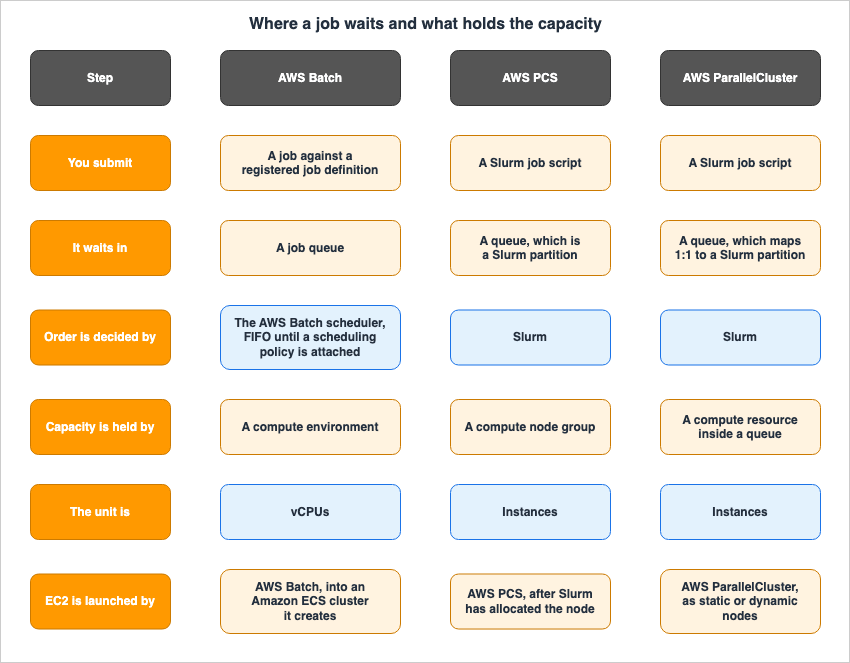
2.4 What Managed Compute Environments Create Behind the Scenes
When you choose a managed compute environment, AWS Batch creates and manages several AWS resources within your account. The user guide specifically mentions Amazon EC2 launch templates, Amazon EC2 Auto Scaling groups, Amazon EC2 Spot Fleets, and Amazon ECS clusters.The same page includes an important note: manually modifying these resources managed by AWS Batch can lead to various issues, including an environment status of
INVALID, suboptimal instance scaling, delayed job processing, and unexpected costs. The user guide explicitly states that running your own Amazon ECS tasks or services on an Amazon ECS cluster managed by AWS Batch, or directly launching additional processes or daemons on instances managed by AWS Batch, are unsupported modifications.You also have the option to choose an unmanaged compute environment. In the user guide's wording, provisioning and scaling the instances in the Amazon ECS cluster that AWS Batch creates is then your responsibility.
The AMIs used in a managed compute environment are not upgraded for you. The user guide clearly states that AWS Batch will not automatically upgrade the AMI after the compute environment is created, and that managing the guest operating system is the user's responsibility.
3. The Default Is FIFO, and Queue Priority Is Not a Guarantee
3.1 The Scheduler Is FIFO Until a Scheduling Policy Is Attached
"Components of AWS Batch" states that the AWS Batch job scheduler, by default, uses a first-in, first-out (FIFO) strategy.As described in the AWS HPC Blog, FIFO means that jobs are processed in the order they are submitted, executing when they reach the front of the queue and sufficient compute resources are available. While simple and predictable, this approach can lead to longer jobs blocking shorter jobs, causing the latter to experience significant delays.
To modify this behavior, you can create a scheduling policy and attach it to the job queue. The AWS HPC Blog explains that creating and attaching a scheduling policy to a job queue is the action that enables fair-share scheduling for that queue. The user guide tutorial also specifies that you must first create a scheduling policy before creating a job queue that uses it.
The API reference indicates that once a job queue is created, while you can replace the fair-share scheduling policy, you cannot remove it.
3.2 If You Want to Decide the Order Itself, Use Dependencies
The relationship between a scheduling policy and execution order is easy to confuse. A fair-share scheduling policy is a mechanism for adjusting resource allocation, not for specifying the execution order.To define the execution order, you should use job dependencies. By listing job IDs in the
dependsOn field of a SubmitJob request, the AWS Batch scheduler will execute that job only after all the specified dependencies have successfully completed. The user guide states that a single job can declare a dependency on up to 20 other jobs. If even one of those dependencies fails, the dependent job will automatically transition from PENDING to FAILED.3.3 Queue Priority: Evaluated First, Not Necessarily Executed First
Job queues allow you to set a priority value. The API documentation describes this as meaning that queues with higher priorities are evaluated first. If you interpret this to mean that jobs placed in a higher-priority queue will necessarily execute before jobs in lower-priority queues, you may encounter unexpected behavior in real-world operation.The API reference rules this reading out explicitly. There are four points:
- AWS Batch evaluates queues in cycles, in descending order of priority.
- A job queue's priority does not guarantee that a specific job will execute before jobs in lower-priority queues.
- A job that arrives in a higher-priority queue partway through an evaluation cycle may wait for the next cycle.
- A job is dispatched from a queue only if resources are available when that queue is evaluated. If they are not available at that moment, the cycle proceeds to the next queue.
As a result, jobs in a higher-priority queue may sometimes be forced to wait for the completion of multiple jobs in lower-priority queues. The documentation further suggests using job dependencies as a means of controlling order in these situations.
3.4 The Three Parameters of Fair-Share
The fair-share scheduling policy has three parameters. Each one controls something different.shareDecaySeconds defines the length of time used to calculate the fair-share percentage for each share identifier in use. The decay gives more weight to jobs that ran recently than to jobs that ran earlier. A value of zero means the default minimum time window, 600 seconds. The maximum value is 604800 seconds, or one week. The user guide tutorial explains that increasing this value means job scheduling will consider resource utilization over a significantly longer period.computeReservation reserves a portion of the maximum available vCPUs for inactive share identifiers. The reserved ratio is computeReservation divided by 100, raised to the power of the number of active share identifiers. The minimum value is 0, and the maximum value is 99.The official documentation gives worked examples.
computeReservation | 1 Share Identifier | 2 Share Identifiers | 3 Share Identifiers |
|---|---|---|---|
| 50 | 50% | 25% | 12.5% |
| 25 | 25% | 6.25% | 1.56% |
weightFactor defines the proportion of compute resources allocated to each share identifier. There is no need to pre-configure share identifiers, and the weight for share identifiers not included in the policy defaults to 1.0.Here the parameter runs opposite to intuition. According to the AWS HPC Blog, specifying a
weightFactor of 0.5 for a particular workload means that workload will receive twice the resources compared to a workload with the default value of 1. In other words, smaller values result in a greater allocation of resources. Assigning larger values to teams you want to prioritize can lead to the opposite effect.3.5 Prioritization Within and Outside of Shares
A fair-share job queue adds one more level of priority. TheSubmitJob API action carries a schedulingPriorityOverride, which lets you set a priority at submission time alongside the share identifier.The AWS HPC Blog post on job queue snapshots clearly describes how this prioritization works. In a first-in, first-out job queue, jobs are ordered by their submission time. In a fair-share job queue, they are ordered by their share's usage. Within a share, jobs are then ordered by their individual job priority. However, this prioritization only applies within each share and does not affect the overall placement of jobs across different shares.
Therefore, assigning a high priority to jobs from a particular team will only move those jobs higher within that team's share; it will not cause them to overtake jobs from other teams.
The API reference sets a limit of 500 active share identifiers at a time on a job queue that has a scheduling policy.
3.6 Making a Job Wait on Something Other Than Compute
Whether using first-in, first-out (FIFO) or fair-share scheduling, what the scheduler is watching is the free vCPU, GPU, and memory in the compute environment. Those being free does not mean the job will succeed. A third-party license token may be exhausted, the connections to a database may already be at their limit, or the calls to an external API may need to be throttled.AWS Batch resource-aware scheduling checks the availability of dependent resources that live outside the compute environment, before the job is scheduled onto one. The user guide explains that you register the consumable resources and their total counts in advance, then state the name and the quantity each job needs. AWS Batch schedules a job from the queue only when every consumable resource that job declared is available.
The reach of this is wide. The user guide states that resource-aware scheduling works with both FIFO and fair-share scheduling policies and with every compute platform AWS Batch supports, Amazon EKS, Amazon ECS, and Fargate included. It covers array jobs, multi-node parallel jobs, and regular jobs alike.
According to the AWS HPC Blog, some consumable resources are replenished while others are not. A replenishable resource returns to the available count once the job that took it finishes.
4. The Unit of Capacity Differs by Compute Type
4.1 The Compute Types on Offer
AWS Batch scales compute capacity, and the landing page of the user guide names Amazon EC2 instances, Fargate resources, and Amazon ECS Managed Instances. The "Components of AWS Batch" section also lists Fargate, Amazon EC2, and Amazon ECS Managed Instances as the compute types you specify in a managed compute environment.There is a discrepancy worth registering here: in the API reference's
ComputeResource, the prose for type and its Valid Values disagree. While the descriptive text lists EC2, SPOT, FARGATE, FARGATE_SPOT, and ECS_MANAGED_INSTANCES, the same page's Valid Values section does not include ECS_MANAGED_INSTANCES. Section 10 takes up this inconsistency. This article does not attempt to enumerate the total number of compute type options.Support for Amazon ECS Managed Instances is relatively new. The AWS What's New page states that AWS Batch now supports Amazon ECS Managed Instances as a new compute option, and that you specify the allowed instance types and the networking configuration in the
managedInstancesProvider block. It also notes that this feature is available in all AWS Regions where AWS Batch is offered.4.2 Spot Is a Type in One Place and a Field in Another
For Amazon EC2 and Fargate, Spot capacity is expressed as a separate compute environment type. Those areSPOT and FARGATE_SPOT.However, this is different with Amazon ECS Managed Instances. The user guide states plainly that, unlike Fargate and Amazon EC2 compute environments, Spot capacity is not expressed as a separate type, and that there is no
ECS_MANAGED_INSTANCES_SPOT type. Instead you specify On-Demand or Spot capacity through capacityOptionType inside managedInstancesProvider.instanceLaunchTemplate. The default value is ON_DEMAND, but you can select SPOT.This
capacityOptionType cannot be changed after the compute environment is created. The user guide lists three attributes that cannot be modified after creation: the compute environment type, the capacityOptionType, and fipsEnabled.4.3 maxvCpus Can Be Exceeded, for Two Different Reasons
maxvCpus is the maximum number of vCPUs a compute environment can scale to. However, the actual capacity may exceed this value, and the reasons for this vary depending on the compute type.The first comes from the Amazon EC2 allocation strategy. The API reference and the user guide carry the same sentence: with any allocation strategy except
BEST_FIT on On-Demand Amazon EC2 compute resources, AWS Batch might need to go over maxvCpus to meet the capacity requirement. In that event it never goes over by more than a single instance.Second comes Amazon ECS Managed Instances, where the gap can be much wider. The user guide highlights that currently, AWS Batch evaluates
maxvCpus based on the total number of vCPUs requested by running jobs, rather than evaluating the total number of vCPUs on the underlying Amazon EC2 instances. Amazon ECS Managed Instances use multi-tenant instance allocation. As a result, the actual instance vCPU capacity provisioned might exceed the job vCPU total. The compute environment may provision more instance capacity than maxvCpus suggests.And that same Important note closes with this sentence: this behavior might be refined in a future update.
So this behavior is not something to build into a design as a settled specification. A design that treats
maxvCpus as the ceiling on instance capacity does not hold on Amazon ECS Managed Instances.4.4 There Are Compute Environments Where the Allocation Strategy Does Not Apply
In Amazon EC2 compute environments, allocation strategies are used to determine which instance type to select when the required capacity increases. The user guide outlines the following strategies:| Strategy | Scope |
|---|---|
BEST_FIT | Prioritizes the least expensive instance type. Waits if no capacity is available. Does not support compute environment updates. |
BEST_FIT_PROGRESSIVE | Selects additional instance types that meet the size requirements of jobs in the queue, prioritizing those with the lowest price per vCPU. |
BEST_FIT_PROGRESSIVE_ORDERED | Selects instance types based on the order specified in the instanceTypes list. Only available for On-Demand Amazon EC2 compute resources. |
SPOT_CAPACITY_OPTIMIZED | Prioritizes instance types that are less likely to be interrupted. Only available for Spot compute resources. |
SPOT_PRICE_CAPACITY_OPTIMIZED | Considers both interruption likelihood and price. Only available for Spot compute resources. |
SPOT_CAPACITY_OPTIMIZED_PRIORITIZED | Prioritizes capacity while attempting to respect the specified priority order. Only available for Spot compute resources. |
Where these strategies apply is the part to hold on to. The user guide states that this parameter does not apply to jobs running on Fargate resources or Amazon ECS Managed Instances, and should not be specified for those compute environments. In Amazon ECS Managed Instances, Amazon ECS manages instance type selection from the
instanceRequirements configuration in managedInstancesProvider, so an allocation strategy is not required.The user guide and the API reference also state the default differently. The user guide just labels
BEST_FIT as the default. The API reference writes the conditions out: the parameter is required for Amazon EKS compute environments, BEST_FIT is used by default for Amazon ECS compute environments when the parameter is not specified, and the parameter does not apply to jobs running on Fargate resources. So BEST_FIT is the default in exactly one place, an Amazon ECS compute environment with nothing specified.The user guide provides warnings for both
BEST_FIT_PROGRESSIVE_ORDERED and SPOT_CAPACITY_OPTIMIZED_PRIORITIZED. Putting large instance types at the top of the list can over-provision for small jobs. Putting small instance types at the top can make the compute environment reach the Amazon EC2 instance count limit before it reaches maxvCpus.4.5 Parameters That Cannot Be Specified with Amazon ECS Managed Instances
The compute environment for Amazon ECS Managed Instances is configured differently. Everything about networking, the instance profile, and instance selection lives in themanagedInstancesProvider block.As a result, some of the parameters that sit directly under
computeResources must not be specified here. The user guide lists them: allocationStrategy, bidPercentage, desiredvCpus, minvCpus, imageId, instanceTypes, instanceRole, ec2Configuration, ec2KeyPair, launchTemplate, placementGroup, spotIamFleetRole, subnets, and securityGroupIds. Subnets and security groups move under managedInstancesProvider.instanceLaunchTemplate.networkConfiguration.The inclusion of
placementGroup in this list will become relevant in Section 7.4.6 Where Fargate Sits
In a Fargate compute environment, an isolation boundary is drawn around each job. The user guide states that each Fargate job has its own isolation boundary and does not share kernel, CPU, memory, or Elastic Network Interfaces with other jobs.There are limits on where it applies. Fargate is only available within AWS Batch compute environments that use Amazon ECS as the orchestrator; it is not supported within AWS Batch compute environments running on Amazon EKS.
There is also a note in the
SubmitJob API reference. Jobs running on Fargate resources cannot be guaranteed to run continuously for more than 14 days. After 14 days the Fargate resources can become unavailable and the job can be terminated. A design that puts a long-running simulation on Fargate collides with that sentence.5. A Crowd of Independent Jobs - Array Jobs and Dependencies
5.1 An Array Job Creates Many Children From One API Call
You reach for an array job when you want to launch a large number of child jobs that share the same job definition, vCPU, and memory, and that run independently of one another. The user guide provides examples such as Monte Carlo simulations, parameter sweeps, and large-scale rendering.You submit an array job the same way as a regular job. The key difference is that you must specify the array size, which must be a value between 2 and 10,000. For example, submitting a job with a size of 1000 will launch a single parent job that creates 1000 child jobs. The parent job exists as a reference for managing all of the child jobs.
The job ID for each child job is derived from the parent job ID, with the array index appended. The first child job in the array will have an ID like
example_job_ID:0. When a child job is running, the AWS_BATCH_JOB_ARRAY_INDEX environment variable will contain its index. The index is zero-based.The way timeouts work here is worth stopping on. The
attemptDurationSeconds timeout is applied to each individual child job. There is no timeout applied to the parent array job itself.The state transitions for the parent job also differ from those of a regular job. The parent array job can be in the states
SUBMITTED, PENDING, FAILED, or SUCCEEDED. When any of the child jobs enters the RUNNABLE state, the parent job transitions to the PENDING state, and remains PENDING for as long as the child jobs are running.5.2 Two Types of Dependencies for Array Jobs
Array jobs have two types of dependencies that are not present in standard jobs.SEQUENTIAL works without a job ID. Each child job then completes in order, starting at index 0. Reach for it when the elements of one array need an order among themselves.N_TO_N takes a job ID, and expresses a relationship between two array jobs. For example, if array job B depends on array job A, then each child job within array job B will begin execution only after the corresponding child job in array job A has completed.5.3 Job States, and Why a Job Waits
Everything described so far shows up as job state transitions. AWS Batch jobs progress through states such asSUBMITTED, PENDING, RUNNABLE, STARTING, and RUNNING, ultimately reaching either SUCCEEDED or FAILED.| State | Meaning |
|---|---|
SUBMITTED | The job sits in the queue, and the scheduler has not evaluated it yet. If there are dependencies, it transitions to PENDING; otherwise, it moves to RUNNABLE. |
PENDING | The job cannot be executed yet due to dependencies on other jobs or resources. |
RUNNABLE | Dependencies have been resolved, and the job is ready to be scheduled to a host. |
STARTING | The job has been scheduled to a host, and the container initiation operations are underway. |
RUNNING | The job is running as a container job on a container instance in the compute environment. |
The definition of
RUNNABLE is particularly important for troubleshooting. The user guide states that jobs in this state will begin executing as soon as sufficient resources become available within any of the compute environments associated with the job queue. It then adds that jobs can remain in this state indefinitely when sufficient resources are unavailable.There is also a subtle point to be aware of regarding the definition of
STARTING. Tasks such as image retrieval, completion of Amazon EKS initContainers, and resolution of Amazon ECS container dependencies all occur while the job is in the STARTING state. And, STARTING is not included in the timeout calculation. The timeout is only measured from the RUNNING state. A job that takes 3 minutes to retrieve an image will remain in the STARTING state for those 3 minutes, but those 3 minutes will not consume the attemptDurationSeconds.5.4 A Queue Blocked at the Head Can Be Detected
When a job remains in theRUNNABLE state and fails to proceed, it can block the entire queue. AWS Batch has mechanisms to detect this condition.The user guide states that when AWS Batch detects a
RUNNABLE job at the head of a queue that is blocking it, a Job queue blocked event goes to Amazon CloudWatch Events with the reason. The same reason will also be included in the statusReason field of the responses from ListJobs and DescribeJobs. AWS Batch infers the reason from the state of the connected compute environments, and it falls into three categories: capacity, misconfiguration, and invalid compute environments.Setting
jobStateTimeLimitActions on a job queue also lets you automatically cancel jobs that remain in the RUNNABLE state for longer than a specified threshold. According to the API reference, the minimum value for maxTimeSeconds is 600 seconds (10 minutes), and the maximum value is 86,400 seconds (24 hours).Every shape covered up to this point can make progress on a partial allocation. With capacity for only 100 jobs against an array job of 10,000, 100 run, and as they finish the next ones start. A shortage of capacity shows up as taking longer, and nothing about correctness is lost. From here on, the shapes where that no longer holds.
6. What a Tightly Coupled Job Asks For
6.1 A Single Job Spanning Multiple Instances
An AWS Batch multi-node parallel job runs a single job that spans multiple Amazon EC2 instances. The user guide describes this as "gang scheduling" and explains that it allows large-scale high-performance computing applications and distributed GPU model training to run without directly launching, configuring, and managing Amazon EC2 instances. It works with any framework that supports IP-based, inter-node communication, and the user guide names Apache MXNet, TensorFlow, Caffe2, and Message Passing Interface as examples.Readers who want to place this feature against the Kubernetes vocabulary have my Gang Scheduling and Dynamic Resource Allocation on Amazon EKS. That article settles that the feature AWS itself calls gang scheduling is this multi-node parallel job, and it goes as far as the job definition on Amazon EKS. This article does not repeat that mapping. What it takes up from here is the constraints that this shape pushes back onto the design.
6.2 The Main Node Starts First, and Its Exit Ends the Job
Multi-node parallel jobs are submitted as a single job. The job definition, or the node overrides given at submission, specify how many nodes to create and what node groups to create.The execution order follows a defined pattern. As described in the user guide, each multi-node parallel job contains a single main node, which is the first to start. Once the main node is up, AWS Batch launches the child nodes and starts them. The job only completes when the main node finishes. At that point, all child nodes are stopped.
The same design shows through consistently in how state is handled.
- The main node's final state determines the job's final state,
SUCCEEDEDorFAILED. - The
started,stoppedAt,statusReason, andexitinformation comes from the main node. - For details on a child node, describe it individually with the
#Nnotation. The index starts at 0. - If retries are specified, a failure of the main node will trigger the next retry attempt, but a failure of a child node will not.
The last of these bears directly on design. Because retries key off the main node, a failure confined to a child node produces no new attempt. If you want a child node failure to count as a job failure, your application has to detect it and carry it into the main node's exit code.
6.3 One Node Per Instance
Nodes in multi-node parallel jobs are single-tenant. As described in the user guide, only one job container can run on a single Amazon EC2 instance.The vocabulary needs pinning down: in a multi-node parallel job, a node is a container, not an instance. However, because it is single-tenant, it effectively corresponds to one node per instance. In AWS PCS, a compute node refers to the EC2 instance itself, so even when using the term "node," the meaning can differ.
A group of nodes forms a node group. A node group is a set of job nodes that share the same container properties, and a job can specify a maximum of five different node groups. You can configure different container images, commands, and environment variables for each group, allowing you to create configurations such as one node for the main node and five for child nodes. All the nodes in a job can also share one node group.
There is a ceiling on scale. The user guide states that a single job can have a maximum of 1,000 nodes. This is the default maximum for Amazon ECS cluster instance counts, and it is possible to request an increase.
Currently, there is one limitation regarding node groups. All node groups within a multi-node parallel job must use the same instance type. A configuration in which only the main node uses a different instance type is not available.
6.4 Each Node Learns Its Role From Environment Variables
Environment variables injected at runtime tell each node which role it has. The user guide lists four such variables:| Environment Variable | Description |
|---|---|
AWS_BATCH_JOB_MAIN_NODE_INDEX | The index number of the main node for that job. |
AWS_BATCH_JOB_MAIN_NODE_PRIVATE_IPV4_ADDRESS | The private IPv4 address of the main node. |
AWS_BATCH_JOB_NODE_INDEX | The index number of the node itself. It starts at 0, and each node receives a unique value. |
AWS_BATCH_JOB_NUM_NODES | The number of nodes requested for that multi-node parallel job. |
A node can determine if it is the main node by comparing its own
AWS_BATCH_JOB_NODE_INDEX with the value of AWS_BATCH_JOB_MAIN_NODE_INDEX.One point about
AWS_BATCH_JOB_MAIN_NODE_PRIVATE_IPV4_ADDRESS is worth stopping on. The user guide explicitly states that this variable is only set for child nodes in a multi-node parallel job and is not present on the main node. If you use the same startup script for all nodes and unconditionally reference this variable, the main node will attempt to read an undefined variable.6.5 How far is "it does not start until the whole set is there" actually written down?
For a tightly coupled job, the promise at the center of what the scheduler owes is not to start the job until every node it needs is available. How clearly that is written down varies by document, so the two are taken separately here.In AWS PCS, this is explicitly stated. The "Job-level scaling" page states that a job will only execute after all required nodes are available. It will not start with a partial allocation. It then sets out two forms the capacity provisioning takes:
- All at once. AWS PCS provides all the nodes the job needs together, or none. The job starts only once its full capacity is available.
- Incrementally. For some jobs, such as those that need more capacity than a single Amazon EC2 request can provide, AWS PCS provides capacity as it becomes available, holding what it has acquired while it works toward the full set.
When the full capacity required by a job is not available, the job will not start. AWS PCS may choose not to launch any instances for that job, or it may release instances that have already been launched. The job remains in a pending state, and AWS PCS repeatedly evaluates it at intervals until capacity becomes available.
On the AWS Batch side, the same thing is written as a condition on capacity. "Compute environment considerations for MNP with AWS Batch" states that the compute environment must have sufficient maximum vCPUs to support multi-node parallel jobs, and provides a specific example related to Amazon EC2 instance quotas. If a job requires 30 instances but the account can only run 20 instances in a Region, the job gets stuck in
RUNNABLE.The page on managed compute environments carries a related passage. If a compute environment supports both single-node and multi-node parallel jobs, and
minvCpus or maxvCpus are configured, AWS Batch will wait for existing jobs to complete before allocating the necessary compute resources to run new jobs if those resources are not immediately available.The two documents differ in how strongly they state it. AWS PCS writes down as a commitment of the design that it does not start on a partial allocation. For AWS Batch multi-node parallel jobs no such sentence appears; what is written is that the job stays in
RUNNABLE when capacity is short. This article keeps that difference as it is, and does not claim on the AWS Batch side that all nodes are secured at the same moment.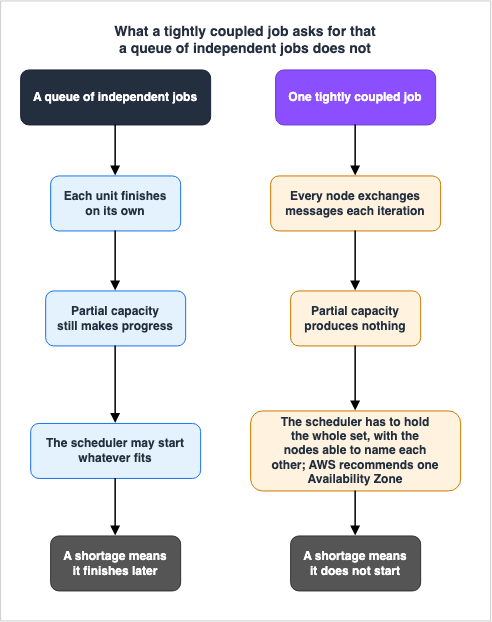
7. What Choosing a Multi-Node Parallel Job Takes Away
7.1 Gathering What Becomes Unavailable Into One Table
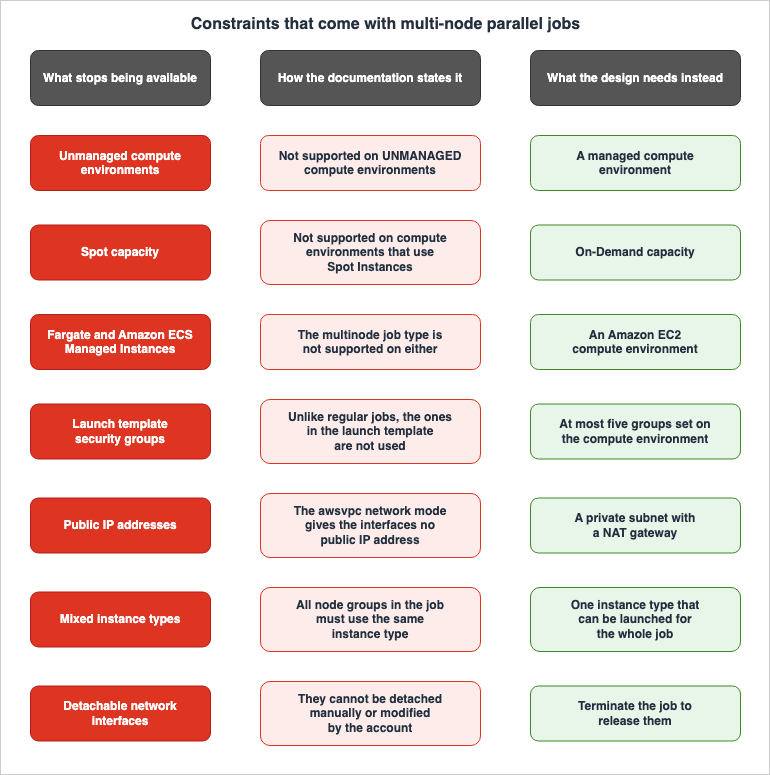
This is the core of the article. Choosing a multi-node parallel job takes away several things that a regular job has. These features are individually documented in various sections of the official documentation, but a consolidated table listing them is not readily available.The following information has been compiled from the AWS Batch User Guide sections "Compute environment considerations for MNP with AWS Batch," "Job definition parameters for ContainerProperties," "Node groups," "Managed compute environments," "Instance type allocation strategies for AWS Batch," and the AWS Batch API Reference's
ComputeResource section.| # | Constraint | Origin |
|---|---|---|
| 1 | Not supported on UNMANAGED compute environments. | Compute Environment Considerations |
| 2 | Not supported in compute environments using Spot Instances. | Compute Environment Considerations, ComputeResource |
| 3 | Not supported with Amazon ECS Managed Instances. | ComputeResource, Job Definition Parameters |
| 4 | The multinode type cannot be used with Fargate resources. | Job Definition Parameters |
| 5 | nodeProperties cannot be specified with Fargate resources. Use containerProperties instead. | Job Definition Parameters |
| 6 | nodeProperties should not be specified with Amazon EKS resources. | Job Definition Parameters |
| 7 | AWS recommends creating a cluster placement group in a single Availability Zone and associating it with the compute resources. | Compute Environment Considerations |
| 8 | A compute environment can be associated with a maximum of five security groups. | Compute Environment Considerations |
| 9 | Unlike regular jobs, multi-node parallel jobs do not use the security groups specified in a launch template. | Compute Environment Considerations |
| 10 | Elastic Network Interfaces do not have public IP addresses. A private subnet using a NAT gateway is required for communication with external resources. | Compute Environment Considerations |
| 11 | Once created and attached to a compute resource, Elastic Network Interfaces cannot be detached manually or modified by the account. | Compute Environment Considerations |
| 12 | The compute environment must have sufficient maximum vCPU capacity to support the job. | Compute Environment Considerations |
| 13 | The number of instances the job needs has to fit the account's Amazon EC2 instance quota. | Compute Environment Considerations |
| 14 | If an instance type is specified in a node group, the compute environment must be able to launch that instance type. | Compute Environment Considerations |
| 15 | All node groups must use the same instance type. | Node Groups |
| 16 | AWS recommends dedicated compute environments for multi-node parallel jobs and for non-multi-node parallel jobs. | Managed Compute Environments |
| 17 | If the chosen instance type becomes unavailable for lack of capacity, no other instance type in the same family is launched. | Allocation Strategy |
7.2 The Network Constraints All Come From One Design Decision
Constraints 8 through 11 in the table above are not independent of each other. They all derive from a single design decision: using theawsvpc network mode. Constraint 7, the placement group, comes from a different reason, and the next section takes it up.The user guide states that AWS Batch multi-node parallel jobs use the Amazon ECS
awsvpc network mode, allowing the containers within these jobs to share the same network characteristics as the Amazon EC2 instances. Each container receives its own Elastic Network Interface, a primary private IP address, and an internal DNS hostname. The network interface is created in the same VPC subnet as its host compute resource.Three consequences follow from that one decision:
The first is where the security groups come from. The Elastic Network Interfaces created and attached to a multi-node parallel task use the security groups specified in the compute environment. If no security groups are specified, the VPC's default security group is used. Unlike standard AWS Batch jobs, multi-node parallel jobs do not use the security groups specified in the launch template. An operation that standardizes its network settings through the launch template gets a separate treatment at exactly this point. A compute environment can be associated with up to five security groups.
The second is the absence of a public IP address. The
awsvpc network mode does not assign public IP addresses to the Elastic Network Interfaces used by multi-node parallel jobs. To access the internet, the compute resources must be launched within a private subnet configured to use a NAT gateway. Inter-node communication has to go through the node's private IP address or DNS hostname.And this page carries one sentence that you will meet in production if you skim past it: Multi-node parallel jobs running on compute resources within a public subnet do not have outbound network access. This contradicts the typical expectation that placing resources in a public subnet automatically grants internet access.
The third is what happens to the Elastic Network Interfaces. Once created and attached to compute resources, Elastic Network Interfaces cannot be detached manually, nor can they be modified through the account settings. This is to prevent accidental deletion of Elastic Network Interfaces associated with running jobs. To release an Elastic Network Interface used by a task, you must terminate the job.
7.3 The Placement Group Requirement, and Amazon ECS Managed Instances
The user guide recommends creating a cluster placement group within a single Availability Zone and associating it with compute resources when deploying multi-node parallel jobs to the compute environment. The rationale provided is to ensure that multi-node parallel jobs are kept in close proximity within a logical grouping of instances that have the potential for high network throughput.Why proximity makes communication faster is outside this article. What it means that a cluster placement group is confined to a single Availability Zone, that it gives no rack-level fault isolation, and that it is placed in a segment of the network with high bisection bandwidth is covered in my Elastic Fabric Adapter and the AWS Network Fabric.
What is worth looking at here is something else. As Section 4 noted,
placementGroup is on the list of parameters that must not be specified for an Amazon ECS Managed Instances compute environment. The note on ComputeResource states that multi-node parallel jobs are not supported on Spot Instances or Amazon ECS Managed Instances. These two statements point in the same direction.7.4 Securing Capacity, and Choosing the Instance Type
A multi-node parallel job also changes how the instance type gets chosen.The description for the
BEST_FIT_PROGRESSIVE allocation strategy includes a note regarding multi-node parallel jobs. For these jobs, AWS Batch selects the most suitable instance type based on available capacity. However, if that instance type becomes unavailable due to capacity constraints, AWS Batch does not launch other instance types in the same family.A single-node job can often find capacity by spreading to another size in the same instance family. Multi-node parallel jobs do not have this option. Combined with the constraint that all node groups in the job must use the same instance type, the availability of the instance type you chose becomes the availability of the job.
The recommendations regarding environment isolation also become clearer in this context. The page on managed compute environments recommends creating dedicated compute environments for multi-node parallel jobs and for non-multi-node parallel jobs. The reason it gives is the way compute capacity is created inside a managed compute environment. When you create a new managed compute environment and specify a
minvCpus value greater than zero, AWS Batch creates an instance pool for use with non-multi-node parallel jobs only. When a multi-node parallel job is submitted, AWS Batch will provision new instance capacity to run it.In other words, the capacity kept warm by
minvCpus is not used for multi-node parallel jobs. Mix them in one compute environment and you get instances running continuously while the multi-node parallel job waits for new capacity to be created.8. The Slurm Route - AWS PCS and AWS ParallelCluster
8.1 AWS PCS Has Three Tiers
AWS PCS is a managed service that uses Slurm to run and scale high-performance computing workloads. Its structure is organized into three tiers. The user guide, "Concepts in AWS PCS," states that an AWS PCS cluster consists of one or more queues, and each queue is associated with at least one compute node group.A cluster encompasses the configuration for compute, networking, storage, identity, and the job scheduler. When creating a cluster, you specify the job scheduler to be used, the scheduler's configuration, the service controller that manages the cluster, and the VPC where the cluster's resources are launched. Currently, the only available job scheduler is Slurm. The scheduler accepts and schedules jobs, and also launches the compute nodes (EC2 instances) that will process those jobs.
A compute node group is a collection of compute nodes that AWS PCS uses to execute jobs or provide interactive access to the cluster. When defining a compute node group, you specify common attributes such as the Amazon EC2 instance type, the minimum and maximum number of instances, the target VPC subnet, the Amazon Machine Image (AMI), the purchase option, and a custom launch configuration.
A queue is where you submit a job. The user guide notes that this is sometimes referred to as a "partition," and on another page, it explicitly states that in the case of Slurm, an AWS PCS queue is equivalent to a Slurm partition. A job stays in that queue until AWS PCS schedules it onto a compute node group. A single queue can be associated with one or more compute node groups.
And there is a crucial point: Users do not submit jobs directly to compute nodes or compute node groups. Jobs must always be submitted to a queue.
Login nodes also fit within this structure. An AWS PCS cluster usually needs at least one login node for interactive access and job management. One approach is to create a static compute node group that incorporates login node functionality. The user guide recommends a static scaling configuration of at least one instance, the On-Demand purchase option so that the instances are not reclaimed, and the same network file system mounts as the compute instances. A standalone EC2 instance outside AWS PCS management can serve as a login node instead. That instance has to have a compatible Slurm version installed, reach the cluster's
Slurmctld endpoint, and run sackd, the Slurm authentication and credential kiosk daemon, configured against the cluster.8.2 The Path from Job Submission to EC2 Instance Launch
The path by which AWS PCS provides capacity to jobs differs from a standard Slurm environment.The "Job-level scaling" section of the user guide states that AWS PCS manages a cluster's dynamic capacity through job-level scaling. Dynamic capacity means the instances between the minimum and maximum counts set on a compute node group. AWS PCS periodically reviews pending jobs and launches Amazon EC2 instances to fulfill their requirements. Once a job completes and an instance becomes idle, AWS PCS reduces the dynamic capacity. Static capacity, the minimum you keep always-on, is not affected by job-level scaling.
The interaction between scheduling and scaling works as follows: when a job is submitted, Slurm selects and allocates nodes from the cluster to meet the job's requirements. For nodes allocated based on dynamic capacity, AWS PCS launches the necessary Amazon EC2 instances to support those nodes, assigning each instance to its corresponding node.
Slurm allocates the node first, and the EC2 instance is launched after that. In a standard Slurm environment, nodes correspond to physical machines. With AWS PCS, the nodes that Slurm can see exist first, and the instances that back them are launched only once they are needed.
As described in Section 6, when capacity is insufficient, jobs do not start and remain pending. AWS PCS may choose not to launch any instances for those jobs, or it may release instances that were previously launched. If you want to guarantee that capacity is available when a job starts, the user guide suggests backing compute node groups with capacity reservations. Options mentioned include On-Demand Capacity Reservations and Amazon EC2 Capacity Blocks for ML.
8.3 The Usable Cores on a Compute Node Are Half the Advertised vCPU Count
One specification of an AWS PCS compute node bears directly on how you size the cluster.The user guide's page on compute node groups puts it this way. AWS PCS disables simultaneous multithreading, also known as Hyper-Threading on Intel processors, on all compute node instances at bootstrap. This is not configurable.
As a result, on instance types that support simultaneous multithreading, each vCPU corresponds to a dedicated physical core rather than a hardware thread. The total vCPU count is therefore half the default for that instance type. The user guide's example is an instance type that advertises 96 vCPUs and has 48 usable cores on an AWS PCS compute node. Instance types that do not support simultaneous multithreading, such as Graviton, are not affected.
The user guide also explains the rationale behind this choice, stating that many high-performance computing workloads perform better or equally well with simultaneous multithreading disabled. It adds that disabling Hyper-Threading removes the contention between sibling threads and gives each physical core exclusive access to its cache and execution units. This is common practice across high-performance computing environments. This account is AWS's own, not something this article measured.
The design consequence is plain. Size the cluster from the advertised vCPU count of an instance type that supports simultaneous multithreading, and the usable cores come to half that number.
8.4 Slurm Configuration and AWS Parameters
Since AWS PCS is a managed service, Slurm configuration is not handled through distributing configuration files. Certain parameters are exposed through the AWS PCS API, while others are passed throughslurmCustomSettings.The setting you will touch most often is the time before an idle node is scaled down. The
ClusterSlurmConfiguration API reference defines scaleDownIdleTimeInSeconds as the time (in seconds) before an idle node is scaled down, and the default value is set to 600. The valid range is from a minimum of 1 to a maximum of 10,000,000.This value can be overridden on a compute node group level. The
UpdateComputeNodeGroupSlurmConfigurationRequest specifies that if no value is provided, the cluster-level setting is applied. If a value is provided, it overrides the cluster-level scaleDownIdleTimeInSeconds. A value of -1 removes the override and puts the compute node group back on the cluster-level setting. This override requires Slurm version 25.11 or later.There are other settings that can be set at the cluster level.
ClusterSlurmConfiguration carries accounting, authKey, cgroupCustomSettings, jwtAuth, slurmCustomSettings, slurmdbdCustomSettings, and slurmRest.slurmCustomSettings does not take arbitrary values. The user guide page "Configuring custom Slurm settings in AWS PCS" publishes an allow-list of the settings you can pass, one per resource type: clusters, compute node groups, and queues. The stated policy is to restrict settings that could compromise the security of the service-owned account or interfere with the managed service. Validation runs synchronously on create and on update, and a call that fails it returns a ValidationException naming the invalid fields.Queues take custom Slurm settings as well.
UpdateQueueSlurmConfigurationRequest accepts slurmCustomSettings, and the allow-list there carries the settings that decide partition-level behavior, among them Default, MaxTime, PriorityTier, and QOS.The cluster's
size is also a setting that influences Slurm's behavior. The CreateCluster API reference defines size as the maximum number of compute nodes in the cluster, as well as the maximum number of active and queued jobs.size | Maximum Number of Compute Nodes | Maximum Number of Jobs |
|---|---|---|
SMALL | 32 | 256 |
MEDIUM | 512 | 8,192 |
LARGE | 2,048 | 16,384 |
The same page also states that AWS PCS creates the cluster controller in a service-owned account, and that for any given combination of one AWS Region and one AWS account, only one cluster can be in the
Creating state.8.5 Slurm Versions Have a Lifetime
The Slurm version you run on AWS PCS has a stated lifetime. This bears directly on operational planning.The "Slurm versions in AWS PCS" section of the user guide states that SchedMD regularly releases new major versions and plans to support a maximum of three versions concurrently. The Frequently Asked Questions (FAQ) page states that AWS PCS supports the current version and the two most recent major versions. When SchedMD ends support for a particular major version, AWS PCS will treat that version as End of Life.
What happens after that is the part that matters. Once a version reaches End of Life, it will no longer be possible to create new clusters using that version. However, existing clusters can continue to operate for up to 12 months, although without guaranteed support.
As of August 30, 2026, the following versions are supported:
| Slurm Version | SchedMD Release Date | AWS PCS Release Date | AWS PCS End of Life |
|---|---|---|---|
| 25.11 | November 6, 2025 | April 9, 2026 | May 31, 2027 |
| 25.05 | May 29, 2025 | October 16, 2025 | November 30, 2026 |
The versions that are not supported are 24.11, 24.05, and 23.11, with End of Life dates of May 31, 2026, November 30, 2025, and May 31, 2025.
Patching responsibilities are also divided. According to the FAQ, AWS PCS is designed to automatically apply patches to the cluster controller, which runs within a service-owned account. To patch EC2 instances within a user's account, you must update the Amazon Machine Image (AMI) for the compute node group and then update the compute node group. Slurm controllers are unavailable while AWS updates them, though running jobs are unaffected. Jobs submitted before the controller went unavailable are held until it is available again.
8.6 AWS ParallelCluster Builds the Same Slurm Cluster Under a Different Division of Responsibility
AWS ParallelCluster is an open-source cluster management tool supported by AWS. The user guide explains that it automatically sets up the necessary compute resources, schedulers, and shared file systems.The structure is similar to AWS PCS, although the terminology differs. Amazon EC2 instances defined in the compute resources under
Scheduling/SlurmQueues/ComputeResources back the compute nodes, and those nodes sit in queues declared under Scheduling/SlurmQueues. These queues correspond one-to-one with Slurm partitions.Nodes are categorized into two types:
Static nodes are instances launched to maintain a minimum number of nodes, as defined by the
MinCount setting. Once started, they are meant to persist in the cluster, and the system does not terminate them unless a particular event or condition occurs. Examples of such events include failures in Slurm or Amazon EC2 health checks, or when the Slurm node state changes to DRAIN or DOWN.Dynamic nodes are instances launched on demand to handle increased cluster load, within a range from 1 to
MaxCount minus MinCount. These nodes are temporary in nature; they are launched to process pending jobs and are terminated after being idle for the time period defined in the cluster configuration under Scheduling/SlurmSettings/ScaledownIdletime. The default value for this setting is 10 minutes.Node names also follow a specific pattern. Static nodes are named
<Queue/Name>-st-<ComputeResource/Name>-<num>, while dynamic nodes are named <Queue/Name>-dy-<ComputeResource/Name>-<num>. When reviewing the output of sinfo, this -st- and -dy- distinction directly reflects the nature of the node.There are limitations when modifying the cluster's capacity. The user guide states that for AWS ParallelCluster versions 3.9.0 and later, to reduce the size of a queue, you must either stop the compute fleet before updating the cluster, or set the
QueueUpdateStrategy to TERMINATE. This step is not required when adding queues or compute resources, or when increasing the MaxCount.When a node is removed and an Amazon EC2 instance is terminated, any
sbatch job running on it is re-queued, unless no other node satisfies the job's requirements.8.7 The Two Are Not in a Successor Relationship
Misunderstanding spreads most easily here, so the official wording goes down as it stands.The AWS HPC Blog post, "What's the difference between AWS ParallelCluster and AWS Parallel Computing Service?", defines both services as follows: AWS PCS is a managed high-performance computing environment that lets you run tightly coupled, large-scale simulations across many nodes with minimal infrastructure setup. AWS ParallelCluster is an open-source cluster management tool that automates the deployment and management of high-performance computing clusters on AWS, giving users control and responsibility over configuration, scaling, and environment setup.
Nowhere does it state that either is a successor to the other. The same article explicitly states that AWS continues to develop ParallelCluster.
On the other hand, the article also clearly states which service AWS recommends. Feedback from many users indicates that PCS is a product that should have been created years ago, and therefore, it is likely the service that should be considered first. It goes on to say that for production high-performance computing workloads where uptime, compliance, and operational efficiency matter, PCS is the safer bet, while ParallelCluster continues to offer value for experimentation, research, and custom environments requiring deep control.
So writing that one is the successor of the other is wrong, and writing that AWS is neutral is not accurate either. Both are current, and AWS recommends considering AWS PCS first.
The same article also carries a sentence on where AWS Batch sits. It says that AWS Batch is a container-based, cloud-native job scheduler service, and that it is very much not a Slurm-based service. This is a factual statement, not an evaluation. Do not reinterpret the fact that it is not Slurm-based as evidence that it is unsuitable for high-performance computing. The AWS Batch user guide itself describes its ability to handle multi-node parallel jobs as a feature for large-scale high-performance computing applications.
Regarding AWS ParallelCluster, there have been changes related to scheduler selection. The user guide says that AWS ParallelCluster can be used with the AWS Batch and Slurm schedulers, and then adds this sentence: starting with AWS ParallelCluster version 3.16.0, AWS Batch as a scheduler is no longer supported. Any migration plans that assume using AWS Batch as a scheduler within AWS ParallelCluster are now invalidated by this change.
8.8 Comparison of Responsibilities
The diagram in Section 2 illustrates the paths a job can take. Here, we outline where operational responsibility lies.| Item | AWS Batch | AWS PCS | AWS ParallelCluster |
|---|---|---|---|
| The scheduler implementation | Specific to AWS Batch | Slurm | Slurm |
| Running the scheduler | AWS | AWS, with the controller in a service-owned account | You |
| Version management of the tool | Not needed | Not needed | You |
| The compute node AMI | You | You | You |
| The cluster as an asset | Not held | Always present | Always present |
| Slurm vocabulary and operational assets | Not used | Used | Used |
According to the AWS HPC Blog, there are also differences in the type of support offered. AWS PCS is being rolled out AWS Region by AWS Region, and wherever it is available it comes with full AWS support and service-level agreements. AWS ParallelCluster runs in a larger number of Regions, but it does not come with a managed service-level agreement.
9. The Constraints That Sit Outside the Scheduler
9.1 A Ceiling That Adding Compute Nodes Does Not Raise
So far we have looked at where a job goes and what constraints follow. The last thing to take up sits outside the scheduler, where no scheduler setting reaches it.High-performance computing clusters almost invariably have a shared file system. If the home directories are not shared, scripts written on the login node cannot be read from the compute nodes. Input and output both have to be visible from one place, or handling them gets awkward.
A shared file system has a ceiling that is independent of the number of compute nodes. The ceiling for the whole file system and the ceiling for one client connected to it are different things, and the second of them does not rise when you add compute nodes. Increasing the number of nodes only affects the total load that can be applied to the file system; it does not increase the capacity of a single client.
The types of limits and how they are determined, and which metric answers for which ceiling, are covered in my Amazon EFS Performance Engineering. This article does not carry those values.
And this article does not say whether the shared file system or the scheduler becomes the limiting factor first. That is a claim that requires measurement, and this article has not measured anything.
9.2 AWS's Own Getting-Started Procedure Uses Two Different Shared File Systems
One thing holds without measurement: the getting-started procedure in the AWS PCS user guide has you create two different kinds of shared storage."Create shared storage for AWS PCS in Amazon Elastic File System" says that the AWS PCS demonstration cluster uses an EFS file system to provide a shared home directory between the cluster nodes.
"Create shared storage for AWS PCS in Amazon FSx for Lustre" says that the same demonstration cluster can use an FSx for Lustre file system to provide a high-performance shared directory between the cluster nodes.
The roles are split. A shared home directory and a high-performance shared directory can both be called shared storage, but AWS's own procedure assigns a different service to each.
AWS PCS is not limited to these two shared file systems. "Using network file systems with AWS PCS" names Amazon EFS, Amazon FSx for Lustre, Amazon FSx for NetApp ONTAP, Amazon FSx for OpenZFS, and Amazon File Cache, along with self-managed file systems such as NFS servers. What to weigh when choosing among them is covered in my Amazon FSx Family Decision Guide.
9.3 A Mount Failure Shows Up as a Scheduling Failure
There is a path by which a misconfigured shared file system surfaces not as a storage problem but as jobs that will not run.The considerations under "Using network file systems with AWS PCS" say that file system mounts are done using EC2 launch templates, and then add this: errors or timeouts in mounting a network file system may prevent instances from becoming available to run jobs.
The same section also contains several other easily overlooked prerequisites. The necessary software for the file system must be installed on the instance. A network route has to exist between the shared network file system and the compute node group instances. The security group rules on both the file system and the compute node group instances must allow connections to the relevant ports. And a consistent POSIX user and group namespace has to hold across every resource that touches the file system. Otherwise, jobs and interactive processes on the AWS PCS cluster may hit permission errors.
The same caution applies to login nodes. The user guide recommends configuring the login nodes with the same network file system mounts as the compute instances. If only the login node's configuration differs, this can lead to failures where a path that was visible at submission time is not visible inside the job.
10. Where the Primary Sources Disagree
Open several official documents to check a technical claim and you reach places where what they say does not line up. Below is a list of the discrepancies I ran into while writing this article. I have listed them without making any final judgments. All of the information presented reflects the state of affairs as of August 30, 2026.10.1 The Compute Type List Against Its Valid Values
The AWS Batch API reference's ComputeResource lists EC2, SPOT, FARGATE, FARGATE_SPOT, and ECS_MANAGED_INSTANCES in the prose describing the type field. However, the Valid Values row for that same field only lists four options: EC2, SPOT, FARGATE, and FARGATE_SPOT.The prose does say that choosing
ECS_MANAGED_INSTANCES requires a managedInstancesProvider configuration, so the value is clearly not being ruled out. A dedicated page for Amazon ECS Managed Instances compute environments is also available in the user guide. It seems reasonable to assume that the Valid Values row has not been updated to reflect this, although it is not confirmed. This article does not attempt to enumerate the total number of compute type options.10.2 Default Idle Time
The AWS PCS API reference forClusterSlurmConfiguration sets the default value for scaleDownIdleTimeInSeconds to 600.In contrast, the "Release notes for Slurm versions in AWS PCS" section of the AWS PCS user guide, specifically the section for Slurm 23.11, states that the default value for
SuspendTime is 60, and that AWS PCS's scaleDownIdleTimeInSeconds should be used to configure it.Slurm 23.11 is not a supported version. Its End of Life date is May 31, 2025. So that section should not be read as a statement about the versions in support today. This article takes the API reference value, 600.
10.3 Where the Slurm Settings List Lives
The previous section is one instance of a wider problem: the same information sits in two places, and only one of them is kept current.Within "Release notes for Slurm versions in AWS PCS," the section titled "Slurm settings you can change in AWS PCS" sits under Slurm 23.11 alone. It lists that
MaxJobCount and MaxArraySize depend on the cluster's size, that the default for SelectTypeParameters is CR_CPU, that Prolog and Epilog can be configured at the cluster level, and that Weight and RealMemory can be configured at the compute node group level. The sections for the supported versions, 25.11 and 25.05, address only changes and known issues, and do not include this list.Read only the release notes and it looks as though the list has been left behind on a version that is out of support. It has not. The user guide carries a separate page, "Configuring custom Slurm settings in AWS PCS," that is not tied to any version, and it holds one allow-list per resource type: clusters, compute node groups, and queues. The cluster list includes
Prolog, Epilog, and SelectTypeParameters; the compute node group list includes Weight and RealMemory. So the items in the 23.11 section are still configurable. What is out of date is not the settings, but the place the list is filed.The two places do not cover the same ground either. The queue-level allow-list has no counterpart in the release notes. Going the other way, the current pages state their version conditions outright:
CR_Socket and CR_Socket_Memory for SelectTypeParameters, and Parameters and Sockets on compute node groups, are supported from Slurm 25.11 onward. Take the set of settings you can change from the custom Slurm settings pages, and use the release notes for what changed in a given version.That
MaxJobCount and MaxArraySize depend on the cluster's size is, for its part, consistent with the definition of the size parameter in CreateCluster, which sets both the maximum number of compute nodes in the cluster and the maximum number of jobs, active and queued.10.4 Environments Not Supported for Multi-Node Parallel Jobs
While it is documented in several places that multi-node parallel jobs are not supported on Fargate, the information is not consistently presented.- The job definition parameter
typeis documented as not supporting themultinodeoption for jobs running on either Fargate or Amazon ECS Managed Instances. - The note on
typein the API reference'sComputeResourcestates that multi-node parallel jobs are not supported on Spot Instances or Amazon ECS Managed Instances. - The user guide's section, "Compute environment considerations for MNP with AWS Batch," lists unmanaged compute environments and compute environments using Spot Instances, but does not mention Amazon ECS Managed Instances or Fargate.
- The console's help panel simply states, "AWS Fargate does not support multi-node parallel jobs."
These four descriptions do not contradict one another, but reading only one of them leaves a constraint out. The table in Section 7 of this article provides a consolidated view of all four.
10.5 How Strongly Execution Order Is Written Down
The fullest account of job queue priority sits in theJobQueueDetail description in the API reference. It states that priority does not guarantee a specific execution order, that queues are evaluated in cycles, and that the cycle moves on to the next queue when resources are not available.In contrast, the "Job queues" section of the user guide is much shorter, saying only that a job queue has a priority that the scheduler uses to decide which queue's jobs to evaluate first. The CloudFormation template reference also only states that jobs in higher-priority queues are evaluated first.
Only the API documentation includes a disclaimer clarifying that priority does not provide a guarantee. Design the priority scheme from the user guide and the template reference alone and you never meet that caveat.
11. Failure Modes and Anti-Patterns
11.1 Running Multi-Node Parallel Jobs on a Public Subnet
The usual intuition that placing resources on a public subnet allows communication with the outside world is reversed in this scenario. Because theawsvpc network mode does not assign public IP addresses to the Elastic Network Interfaces used by multi-node parallel jobs, resources running within a public subnet will not have outbound network access, as described in the user guide.The recommended solution is to launch resources on a private subnet configured with a NAT gateway. The typical symptom is that the job starts successfully, but the containers fail to retrieve data from external sources, leading to failure. Troubleshooting network configurations can often be a lengthy process.
11.2 Running Multi-Node Parallel Jobs on Spot Instances or Amazon ECS Managed Instances
You hit this by reusing a compute environment that is already running single-node jobs. Multi-node parallel jobs are not supported on compute environments that use Spot Instances, and they are not supported on Amazon ECS Managed Instances either.Amazon ECS Managed Instances also have another limitation. As discussed in Section 4, compute environments using Amazon ECS Managed Instances do not allow the
placementGroup parameter to be specified. This prevents the use of cluster placement groups within a single Availability Zone, which is the recommended configuration for multi-node parallel jobs.11.3 Assuming the Launch Template's Security Groups Take Effect
In environments where launch templates are used to standardize network configurations, this pitfall is particularly easy to fall into. Unlike regular AWS Batch jobs, multi-node parallel jobs do not use the security groups specified in the launch template. They use the security groups set on the compute environment, or the VPC's default security group when none is set.The resulting issues often manifest as either a failure in communication between nodes, or unexpectedly broad communication. Users may repeatedly review their launch templates, unable to identify the root cause because a default security group, which they didn't explicitly configure, is unexpectedly in effect.
11.4 Saying "My Turn Never Comes" Without Attaching a Scheduling Policy
AWS Batch's job scheduler defaults to a first-in, first-out (FIFO) order. When a large number of long-running jobs are ahead in the queue, shorter jobs may have to wait. This is normal behavior and not an indication of a fault.If you want to distribute resources between teams or workloads, you should create a scheduling policy and attach it to the job queue. Simply increasing a job's priority without implementing a scheduling policy will not affect its placement in a FIFO queue.
11.5 Assuming a Larger weightFactor Wins More Capacity
The weightFactor runs opposite to intuition. As explained in the AWS HPC Blog, a workload assigned a value of 0.5 receives twice the resources of a workload with the default value of 1. In fact, smaller values result in a greater allocation of resources.Assigning a large value to teams you want to prioritize will actually reduce their share. And because fair-share adjusts the allocation over time, the symptom does not necessarily appear right after you change the setting.
11.6 Designing Around Queue Priority as if It Were a Guarantee of Order
Designing a deadline-bound process on the premise that a job in a higher-priority queue runs first is how you hit this. The API documentation states plainly that priority does not guarantee a specific order of execution, that queues are evaluated in cycles, and that when resources are not available at the moment a queue is evaluated, the cycle moves on to the next queue.To control the order of execution directly, use job dependencies. The same passage names dependencies as the way to control the order of jobs that span queues of different priority.
11.7 Expecting Priority Across Shares
When you increase the priority of a job within a fair-share queue, the effect is contained within that share. As stated in the AWS HPC Blog, job priority only applies within each individual share and does not affect the overall scheduling of jobs across all shares.Even if you assign a high priority to an urgent job for one team, it will not overtake jobs from other teams. If you want a job to potentially overtake jobs from other shares, you need to adjust the share policies.
11.8 Sizing AWS PCS Compute Nodes by the Advertised vCPU Count
AWS PCS disables simultaneous multithreading on all compute node instances at bootstrap, and this is not configurable. Instance types advertised with 96 vCPUs will effectively provide 48 usable cores.When determining the number of nodes based on the instance type list, you will need twice the number of nodes to meet the required core count. Instance types that do not support SMT, such as Graviton, are not affected, so in mixed estimates, only one side of the calculation will deviate.
11.9 Treating maxvCpus as a Ceiling on Instance Capacity
The meaning of maxvCpus varies depending on the compute type. In Amazon ECS Managed Instances, AWS Batch evaluates this value based on the total vCPU requested by running jobs, rather than the total vCPU of the underlying Amazon EC2 instances. Due to the use of multi-tenant instance allocation, the actual vCPU capacity of the provisioned instances may exceed the total vCPU requested by the jobs.Similarly, Amazon EC2 compute environments may also experience overages resulting from the allocation strategy. However, these overages are limited and occur only when using allocation strategies other than
BEST_FIT with On-Demand Amazon EC2 compute resources, and the overage is contained within a single instance.The user guide writes that this behavior might be refined in a future update. Incorporating this into a design as a definitive specification is risky for two reasons. First, the value itself may change. Second, its meaning may differ from what the parameter name suggests.
11.10 Mixing Multi-Node Parallel Jobs and Single-Node Jobs in One Compute Environment
When you specify aminvCpus value greater than zero, AWS Batch creates an instance pool for use with non-multi-node parallel jobs only. When a multi-node parallel job arrives, AWS Batch creates new instance capacity to run it.You end up with instances running continuously while the multi-node parallel job waits for new capacity. For this reason, the user guide recommends creating dedicated compute environments for multi-node parallel jobs and for non-multi-node parallel jobs.
11.11 Planning Around Choosing AWS Batch as the Scheduler in AWS ParallelCluster
The AWS ParallelCluster user guide states that as of version 3.16.0, AWS ParallelCluster no longer supports AWS Batch as a scheduler.Any migration plan based on the premise of configuring AWS ParallelCluster to use AWS Batch as its scheduler is now invalidated by this statement. Before planning a version upgrade, check which scheduler the existing cluster runs on.
11.12 Touching the Resources AWS Batch Manages
What AWS Batch creates for a managed compute environment is a set of Amazon EC2 launch templates, Amazon EC2 Auto Scaling groups, Amazon EC2 Spot Fleets, and Amazon ECS clusters.Manually modifying these resources can lead to issues such as the compute environment becoming
INVALID, suboptimal instance scaling, delayed job processing, and unexpected costs. Running your own Amazon ECS tasks on an Amazon ECS cluster managed by AWS Batch, or directly launching daemons on instances managed by AWS Batch, are also considered unsupported modifications.11.13 Counting the STARTING Time Toward the Timeout
The attemptDurationSeconds timer begins when the job enters the RUNNING state. Image retrieval, completion of Amazon EKS initContainers, and resolution of Amazon ECS container dependencies all happen in the STARTING state and are not included in the timeout.The user guide provides an example stating that if a job takes 3 minutes to retrieve its image, it will remain in the
STARTING state for 3 minutes. Set a short timeout and you are still holding the instance for longer than that.11.14 Writing Down an Order You Have Not Measured
Writing down an unmeasured order is a constraint this article places on itself as well. Whether the shared file system, the network fabric, or the scheduler's response becomes the limiting factor depends on the configuration and the workload. The official documentation states the ceilings and the constraints of each element, not which of them takes effect first.Establishing an order requires measurement. Writing an order that goes beyond what the specifications support leaves readers to apply it to their own configuration and set the wrong priorities.
12. Frequently Asked Questions
Which should you choose: AWS Batch or AWS PCS?
The decision depends on whether your jobs can proceed with partial resource allocation. An AWS Batch job queue can handle a crowd of independent jobs. If a single job needs multiple nodes moving in step, you need a mechanism that guarantees every required node is available before the job starts. AWS PCS runs a job only after all required nodes are available, and does not start it on a partial allocation. While AWS Batch also supports multi-node parallel jobs, it comes with the limitations outlined in Section 7.Is AWS PCS a successor to AWS ParallelCluster?
No. The AWS HPC Blog describes the two as different approaches, and does not mention any integration or succession. The same article explicitly states that AWS is continuing development of ParallelCluster. However, it is not entirely neutral. The article also suggests that PCS should likely be the first option considered, and that PCS is a safer choice for production-level high-performance computing workloads.I heard that AWS Batch isn't based on Slurm. Is it not well-suited for high-performance computing?
That it is not Slurm-based is AWS's own wording. However, that's a description of the implementation, not an assessment of its suitability. The same AWS Batch user guide describes its ability to handle multi-node parallel jobs as a feature for large-scale high-performance computing applications and distributed GPU model training. The deciding factor is whether you already have Slurm's terminology and operational assets, and whether you can accept the limitations outlined in Section 7.Does a larger weightFactor get more resources?
No, it's the opposite. According to the AWS HPC Blog's explanation, a workload assigned a weightFactor of 0.5 will receive twice the resources compared to a workload with the default value of 1. Lower values result in a greater allocation of resources.Does a job in a higher-priority job queue run sooner?
There is no guarantee. The API documentation explicitly states that a job's priority in the queue does not guarantee it will be executed before jobs in lower-priority queues. The system evaluates queues in descending order of priority, and if resources are unavailable at the time of evaluation, it moves on to the next queue. If you need to control the execution order directly, you should use job dependencies.Will prioritizing jobs in the fair-share queue allow them to overtake jobs from other teams?
No. According to the AWS HPC Blog, job priority only applies within a specific share; it does not affect the overall placement of jobs across different shares. If you want a job to take precedence, you need to adjust the share policies.Does specifying 0 for shareDecaySeconds disable decay?
No. The official documentation states that a value of 0 refers to the default minimum time window of 600 seconds. The maximum value is 604800 seconds, or one week.Can you run multi-node parallel jobs on Spot Instances?
No. Multi-node parallel jobs are not supported on compute environments that use Spot Instances. The API reference states that they are also not supported with Amazon ECS Managed Instances.Can you use different instance types for each node in a multi-node parallel job?
No. The user guide specifies that all node groups within a multi-node parallel job must use the same instance type. While you can change the container image and commands for each node group, the instance type cannot be altered.What is the maximum number of nodes for a multi-node parallel job?
The user guide states that a single job can have a maximum of 1,000 nodes. This is the default maximum for the number of instances in an Amazon ECS cluster, and you can apply to increase this limit. A job can have a maximum of 5 node groups.Does setting maxvCpus keep the instance capacity inside that value?
No. In the Amazon EC2 compute environment, if you are using an allocation strategy other than BEST_FIT with On-Demand compute resources, AWS Batch may exceed the maxvCpus setting. The excess stays within a single instance. With Amazon ECS Managed Instances, the maxvCpus setting is evaluated based on the total vCPU requested by running jobs, which means the actual vCPU capacity of the provisioned instance may exceed that value. The user guide notes that this behavior may be subject to change in future updates.Does an instance type with 96 vCPUs give 96 cores on AWS PCS?
No. AWS PCS disables simultaneous multithreading on all compute node instances at bootstrap, and this is not configurable. An instance type advertised as having 96 vCPUs offers 48 usable cores on an AWS PCS compute node. Instance types that do not support SMT, such as Graviton, are not affected.How many nodes can an AWS PCS cluster scale to?
The cluster'ssize determines this. SMALL supports 32 compute nodes and 256 jobs. MEDIUM supports 512 compute nodes and 8,192 jobs. LARGE supports 2,048 compute nodes and 16,384 jobs. The number of jobs refers to the total of active and queued jobs.What happens when the version of Slurm used on AWS PCS reaches its end of support?
You will no longer be able to create new clusters using that version. Existing clusters will continue to function for up to 12 months, but without guaranteed support. AWS PCS notifies you by email six months before the End of Life date, and may suspend a cluster if a vulnerability is identified in that version.Can AWS ParallelCluster use AWS Batch as its scheduler?
It depends on the version. The AWS ParallelCluster user guide states that while AWS ParallelCluster can work with both AWS Batch and Slurm as schedulers, versions 3.16.0 and later have discontinued support for AWS Batch as a scheduler.Which will become the bottleneck first: the shared file system or the scheduler?
This article does not answer that question. Claims about which component—the shared file system or the scheduler—becomes the bottleneck first require measurements, and this article does not provide any measurements. What the official documentation supports is two statements: a shared file system has a ceiling that is independent of the number of compute nodes, and AWS's own getting-started procedure assigns a different service to the shared home directory and to the high-performance shared directory.13. Summary
Where to submit a job is not settled by comparing feature lists. What decides it is whether the job can make progress on a partial allocation.For a crowd of independent jobs, a queue is the most straightforward shape. AWS Batch defaults to a first-in, first-out (FIFO) order, and attaching a scheduling policy enables fair-share allocation. Of the three parameters that adjust the allocation,
weightFactor runs opposite to intuition: a smaller value gets a larger allocation. Job queue priority means only that a queue is evaluated first. It does not guarantee a specific order of execution. To define a precise order, use job dependencies.One tightly coupled job changes the picture. It needs a promise that the job does not start until all the required nodes are available, and the surrounding constraints follow from that promise. Choosing the AWS Batch multi-node parallel job takes
UNMANAGED compute environments, Spot Instances, Amazon ECS Managed Instances, and Fargate off the table in one move. The security groups specified in a launch template stop being used, and because no public IP address is assigned, a private subnet and a NAT gateway become necessary. All node groups have to use the same instance type, and the availability of that instance type becomes the availability of the job.There are two paths when using Slurm. AWS PCS offers a managed Slurm environment, structured in three tiers: cluster, compute node groups, and queues. Among the sources compared here, it is the one that states in so many words that a job runs only after all required nodes are available and does not start on a partial allocation. On its compute nodes, simultaneous multithreading is disabled at bootstrap, and that is not configurable. AWS ParallelCluster provides a path to manage the same Slurm cluster yourself, with a clear distinction between static and dynamic nodes. The two are not in a successor relationship. AWS itself, though, writes that AWS PCS is probably the one to consider first.
Constraints also exist outside the scheduler. Adding compute nodes does not raise the per-client ceiling of a shared file system. AWS's own getting-started procedure assigns a different service to the shared home directory and to the high-performance shared directory. And a mount failure surfaces not as a storage problem but as an instance that cannot take a job.
Finally, there are discrepancies between the official documentation. The compute type list disagrees with its own
Valid Values, the default idle time is stated twice with different numbers, the list of Slurm settings you can change is filed in two different places, the environments where multi-node parallel jobs are unsupported are written down four different ways, and only one of the sources carries the caveat about execution order. If you base your design solely on information from a single page, you risk encountering limitations that page doesn't address in a real-world environment.14. References
- AWS Batch User Guide - What is AWS Batch?
- AWS Batch User Guide - Components of AWS Batch
- AWS Batch User Guide - Compute environments for AWS Batch
- AWS Batch User Guide - Managed compute environments
- AWS Batch User Guide - Compute environments on Amazon ECS Managed Instances
- AWS Batch User Guide - Fargate compute environments
- AWS Batch User Guide - Instance type allocation strategies for AWS Batch
- AWS Batch User Guide - Job queues
- AWS Batch User Guide - Use fair-share scheduling policies to assign share identifiers
- AWS Batch User Guide - Tutorial: Create a fair-share scheduling policy
- AWS Batch User Guide - Resource-aware scheduling
- AWS Batch User Guide - Service environments for AWS Batch
- AWS Batch User Guide - Jobs
- AWS Batch User Guide - Job states
- AWS Batch User Guide - Job dependencies
- AWS Batch User Guide - Array jobs
- AWS Batch User Guide - Multi-node parallel jobs
- AWS Batch User Guide - Environment variables
- AWS Batch User Guide - Node groups
- AWS Batch User Guide - Compute environment considerations for MNP with AWS Batch
- AWS Batch User Guide - Job definition parameters for ContainerProperties
- AWS Batch User Guide - Jobs stuck in a RUNNABLE status
- AWS Batch console help panel - Multi-node
- AWS Batch API Reference - ComputeResource
- AWS Batch API Reference - JobQueueDetail
- AWS Batch API Reference - SubmitJob
- AWS CloudFormation Template Reference - AWS::Batch::SchedulingPolicy FairsharePolicy
- AWS Parallel Computing Service User Guide - What is AWS Parallel Computing Service?
- AWS Parallel Computing Service User Guide - Concepts in AWS PCS
- AWS Parallel Computing Service User Guide - AWS PCS compute node groups
- AWS Parallel Computing Service User Guide - AWS PCS queues
- AWS Parallel Computing Service User Guide - AWS PCS login nodes
- AWS Parallel Computing Service User Guide - Job-level scaling
- AWS Parallel Computing Service User Guide - Slurm versions in AWS PCS
- AWS Parallel Computing Service User Guide - Configuring custom Slurm settings in AWS PCS
- AWS Parallel Computing Service User Guide - Release notes for Slurm versions in AWS PCS
- AWS Parallel Computing Service User Guide - Frequently asked questions about Slurm versions in AWS PCS
- AWS Parallel Computing Service User Guide - Using network file systems with AWS PCS
- AWS Parallel Computing Service User Guide - Create shared storage for AWS PCS in Amazon Elastic File System
- AWS Parallel Computing Service User Guide - Create shared storage for AWS PCS in Amazon FSx for Lustre
- AWS Parallel Computing Service API Reference - CreateCluster
- AWS Parallel Computing Service API Reference - ClusterSlurmConfiguration
- AWS Parallel Computing Service API Reference - UpdateComputeNodeGroupSlurmConfigurationRequest
- AWS Parallel Computing Service API Reference - UpdateQueueSlurmConfigurationRequest
- AWS ParallelCluster User Guide - What is AWS ParallelCluster
- AWS ParallelCluster User Guide - Slurm Workload Manager (slurm)
- AWS HPC Blog - What's the difference between AWS ParallelCluster and AWS Parallel Computing Service?
- AWS HPC Blog - Introducing fair-share scheduling for AWS Batch
- AWS HPC Blog - Job queue snapshots: see what's at the head of your queues in AWS Batch
- AWS HPC Blog - How to use rate-limited resources in AWS Batch jobs with resource aware scheduling
- AWS What's New - AWS Batch now supports Amazon ECS Managed Instances
References:
Tech Blog with curated related content
Written by Hidekazu Konishi