Sharding Aurora PostgreSQL with Limitless Database - Table Types, Shard Keys, Single-Shard Optimization, and What You Cannot Change Later
First Published:
Last Updated:
Amazon Aurora PostgreSQL Limitless Database offers this last option as a managed service. Limitless Database spreads the data across several shards, and the client still sees one database. You do not need a specialized driver; you connect to the familiar cluster endpoint.
However, while it appears as a single database, it does not necessarily behave as one. Once you divide it, the division itself remains. Performance now depends on where you put each table, which columns you name as shard keys, and how you write the SQL. The same query may finish inside one shard, or it may send a router to every shard to collect rows and join them. And some of these choices are irreversible.
This article is not a feature overview of Limitless Database. Instead, it is a compilation, based on official documentation, of the implications that remain after partitioning, outlining the items you should confirm before making those decisions. Two questions sit at the center. First, what makes a statement finish inside one shard? And second, what are the irreversible decisions you will make?
This article checks its technical statements, as of August 30, 2026, against the Amazon Aurora User Guide, the Amazon Aurora PostgreSQL release notes, the Amazon Aurora extended content, the AWS News Blog, and the AWS Database Blog. This article does not involve building and measuring your own DB shard groups. Therefore, it does not discuss which configurations are fastest, by what factor, or where bottlenecks are likely to emerge. Instead, it focuses on the official specifications, limitations, and default values, and highlights areas where official documentation conflicts. This article does not cover pricing.
Table of Contents
- 1. What Remains After You Divide the Database
- 2. Two-Layer Architecture - Who Does What
- 3. Three Types of Tables
- 4. When a Statement Runs on One Shard
- 5. Where the Primary Sources Disagree
- 6. Three Things You Cannot Change Later
- 7. The Maximum Capacity Determines the Topology
- 8. What to Check Before You Move
- 9. Failure Modes and Anti-Patterns
- 10. Frequently Asked Questions
- 11. Summary
- 12. References
1. What Remains After You Divide the Database
1.1 Distinguishing Concepts with Similar Spellings
Before you continue reading this article, it is important to differentiate three terms. They all share similar spellings, are used in an AWS context, and are not the primary subject of this article.First, there is shuffle sharding. This is a technique for improving availability, which assigns users to combinations of nodes to limit the impact of any single failure. What it divides is not the data but the set of customers any one failure can reach. The partitioning discussed in this article is for capacity management, and serves a different purpose.
Second, there is Amazon Aurora DSQL. While it includes "Aurora" in its name and is a distributed SQL service compatible with PostgreSQL, it is a separate service from Limitless Database, with different internal architectures and design considerations. This article will not compare Aurora DSQL to Limitless Database.
Third, there is Aurora Parallel Query's pushdown feature. This is a function within Aurora MySQL that pushes analytical processing to the distributed storage layer. In this article, "pushdown" refers to passing the actual execution of SQL queries from the router to the shards. The destination of the "pushdown" is different.
1.2 The Two Questions This Article Answers
Those considering Limitless Database typically do not primarily want to know "what Limitless Database is." Instead, they are most interested in "How should we determine the tables and shard keys? And if we make the wrong choices, can we correct them later?"This article answers those two questions. The first half builds up the table types, and the conditions that keep a statement inside one shard, from the primary sources. The second half lists the aspects that cannot be changed after creation, and explores alternative approaches.
⚠ Stating the shape of the conclusion up front. Three things in Limitless Database cannot be undone: the value of a shard key, a shard split (there is no merge), and the number of routers and shards. The first is a schema decision. The other two are decisions about the shape of the DB shard group, and that shape is fixed when you create it. All three have to be settled before the migration starts.
1.3 Not Actually Limitless
While the service name includes the word "Limitless," the official documentation does not claim it offers infinite capabilities. The AWS News Blog states that Limitless Database allows you to scale beyond the existing write throughput and storage limits of Aurora. It allows you to exceed these existing limits, but it does not eliminate them entirely.In fact, many of the figures mentioned in this article represent those limits. A single DB cluster can only accommodate one DB shard group. A single AWS Region can support up to five DB shard groups. The maximum capacity ranges from 16 to 6144 ACUs. Standard tables are limited to the capacity of a single shard. Dividing the database raises these ceilings. It does not remove them.
1.4 What the Published Articles Already Cover
This article does not cover the following topics, as they are already documented elsewhere.| Published | Scope |
|---|---|
| Amazon Aurora DSQL Design Decision Guide - Distributed SQL Between Amazon DynamoDB and Aurora PostgreSQL | A design guide for determining whether to choose Aurora DSQL. Covers the internal workings of the distributed architecture, compatibility audits, and implementation of retry layers. This article does not compare Aurora DSQL and Limitless Database. |
| Transaction Isolation on AWS Databases - Same Level Name, Different Anomalies, and the Statement That Changes Nothing | A cross-engine comparison of transaction isolation levels on AWS databases. It highlights that isolation levels with the same name can permit different anomalies in different database engines, and how some statements change nothing at all. This article states as a fact which isolation level cannot be set in Limitless Database, without providing a detailed explanation of isolation levels themselves. |
| Cell-Based Architecture and Shuffle Sharding on AWS - Blast Radius Reduction Patterns for Large-Scale Workloads | Covers cell-based architecture and shuffle sharding, focusing on methods for reducing the potential impact (blast radius) of failures in large-scale workloads. While it includes terms with similar spellings but different concepts, this article only differentiates them in section 1.1. |
| Summary of Differences and Commonalities in AWS Database Services using the Quorum Model - Comparison Charts of Amazon Aurora, Amazon DocumentDB, and Amazon Neptune | Focuses on the storage layer and quorum model for Aurora. This article does not explain the storage layer quorum. |
| Heterogeneous Database Migration on AWS - Schema Conversion, Full Load with CDC, Data Validation, and a Cutover You Can Reverse | Covers migration between different database types. Includes schema conversion, full data loading with Change Data Capture (CDC), data validation, and a reversible cutover process. This article does not detail the migration steps. |
| Zero-Downtime Database Change on RDS and Aurora - Blue/Green Deployments, Upgrades, and Rollback Design | Focuses on Blue/Green deployments and upgrades. This article does not detail the upgrade process. |
| AWS History and Timeline regarding Amazon Aurora - Overview, Engines, Features, Summary of Updates, and Introduction | A timeline of when each Aurora feature arrived. This article does not create a timeline. |
| PostgreSQL Autovacuum, Bloat, and Planner Statistics on Aurora and RDS - Why the Defaults Stop Being Enough, and What to Tune First | Covers what degrades inside the tables themselves on Aurora PostgreSQL and RDS for PostgreSQL: dead tuples, table and index bloat, stale planner statistics, and the ladder of transaction age. Dividing a database across shards does not remove that work. This article does not cover autovacuum tuning. |
This article is also one of three that trace the same shape through different resources. When you grow past one machine without giving up the sharing, the nature of whatever you kept sharing sets the ceiling. The other two are Amazon EFS Performance Engineering - Throughput Modes, IOPS Ceilings, Per-Client Limits, and Burst Credits (which continues sharing a single namespace) and Batch and HPC Job Scheduling on AWS - Job Queues, Fair-Share Policies, Multi-Node Parallel Constraints, and the Slurm Route (which continues sharing a single compute pool). Here what stays shared is a single logical database, and what sets the ceiling is the statement that does not stay on one shard.
2. Two-Layer Architecture - Who Does What
2.1 There Are Only Two Kinds of Node
The user guide describes Limitless Database as a two-layer architecture in which every node is either a router or a shard.Shards are Aurora PostgreSQL DB instances that hold a portion of the database's data. The user guide explains that shards achieve high write throughput by processing requests concurrently. Shards receive queries from routers but cannot be connected to directly by clients.
Routers manage the distributed nature of the system and present a single database view to clients. The user guide gives a router four jobs. It keeps the metadata on where data lives. It parses incoming SQL commands and sends them to the shards. It aggregates what the shards return into one result for the client. And it manages the distributed transactions that hold the whole distributed database consistent.
⚠ This fourth function is particularly important. Routers are not simply relay points. Consistency is the router's responsibility. Therefore, when a query cannot be fully resolved by a single shard, the router acts as an aggregation point.
2.2 The DB Shard Group Replaces the Instances
This is the key difference from a standard Aurora DB cluster. The user guide states that Limitless Database differs from a standard Aurora DB cluster in that it has a DB shard group instead of a writer DB instance and reader DB instances.According to the user guide's terminology, a DB shard group is "a container for Limitless Database nodes (shards and routers)." Routers and shards both live inside it.
And that group is not visible in your AWS account. The user guide states plainly that the individual shards and routers in a DB shard group are not visible there, and that you reach Limitless Database through the DB cluster endpoint.
This design has two significant implications. First, the connection experience from the application remains unchanged. Second, you cannot address an individual node. The limitation, discussed in Section 6, that individual shards and routers cannot be deleted, is a direct consequence of this design.
2.3 Connections and Router Selection
You connect with psql or any other PostgreSQL-compatible utility. The default database for the DB shard group ispostgres_limitless.psql -h DB_cluster_endpoint -p port_number -U database_username -d postgres_limitless⚠ The official documentation flags one thing here. The user guide explains that clients connect to the cluster endpoint, and Amazon Route 53 directs traffic to the transaction router. However, it also states that Route 53 has limited load balancing capabilities, and load distribution between transaction routers may not always be even. As a solution, it points to the Limitless Connection Plugin in the AWS JDBC Driver, which does load-aware balancing on the client side.
One SQL query tells you how many routers you have.
SELECT * FROM rds_aurora.limitless_subclusters;The query returns a
subcluster_id and a subcluster_type for each node. The subcluster_type will be either router or shard. This is where you observe the node counts that Section 7 works through.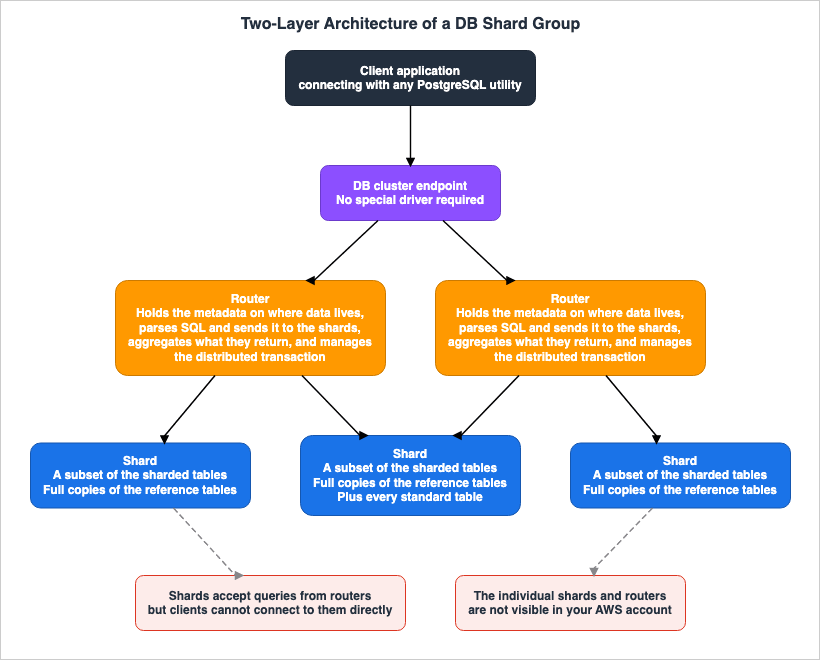
3. Three Types of Tables
3.1 Sharded, Reference, Standard
Limitless Database has three table types. Each one solves a different problem.Sharded tables (
sharded) distribute data across every shard in the DB shard group. Limitless Database distributes them by a shard key, which is the column or set of columns you name when you partition the table. Every row that carries the same shard key value lands on the same shard.⛔ A crucial point to remember: The user guide explicitly states that sharding is hash-based and is not range-based or list-based. This means that the order of shard key values has no relationship to the arrangement of shards. Even if you use sequential IDs as the shard key, there is no guarantee that rows with similar values will end up on the same shard.
The user guide highlights three good uses for sharded tables: when an application needs to handle a clearly defined subset of data; when the table is extremely large; and when the table is likely to grow faster than other tables.
Reference tables (
reference) contain a complete copy of all their data on every shard in the DB shard group. The user guide points them at smaller tables with a lower write volume that still need frequent joining and do not lend themselves to sharding. Examples include tables containing dates, and tables holding geographic data such as state, city, and postal code.Standard tables (
standard) are not distributed; they reside on a single shard selected internally by the system.3.2 ⛔ The Default Table Type Is standard
This one word is the one you must not lose anywhere in this article. The user guide clearly states that the standard table type is the default table type within Limitless Database. Furthermore, the default value for therds_aurora.limitless_create_table_mode variable is also set to standard.The implications of this are straightforward. When importing a schema into a Limitless Database cluster and executing
CREATE TABLE statements, the tables will not be distributed. They will not become sharded tables or reference tables; instead, all tables will reside on a single shard.Every reading of the form "moving to Limitless distributes the tables for you" traces back to losing this one word. Distribution is not a byproduct of migration; it is the result of an explicit declaration.
3.3 Standard Tables Have a Capacity Limit
That standard tables sit on one shard has a further consequence. The user guide's terminology adds three statements about standard tables.The system picks one shard and puts every standard table on it, so a join between two standard tables stays on that shard. However, standard tables are limited to the shard's maximum capacity of 128 TiB. Furthermore, because that shard also holds data for the sharded table and reference tables, the effective maximum size for standard tables is actually less than 128 TiB.
⚠ This third point is crucial to understand. The maximum size for standard tables cannot be determined simply by looking at the standard tables themselves. Data from the sharded table, along with a complete copy of the reference table residing on the same shard, effectively reduces the available space. The more reference tables you add, the less room is left for the standard tables.
3.4 Collocation - Confining Joins to a Single Shard
Sharded tables can be collocated. According to the user guide's terminology, collocated tables are "two sharded tables that share the same shard key and are explicitly declared as collocated." Data with the same shard key value will always be routed to the same shard.The user guide also describes the resulting benefits. When tables are collocated and joined on a shard key, all the necessary data resides on that single shard, allowing the join operation to be executed within that single shard.
Collocation is not automatic. Simply having the same column name and data type for the shard key is not sufficient. You must explicitly specify this during table creation using
rds_aurora.limitless_create_table_collocate_with.3.5 Creating the Tables, and Why Going Back Is Hard
A session variable decides the table type.BEGIN;
SET local rds_aurora.limitless_create_table_mode='sharded';
SET local rds_aurora.limitless_create_table_shard_key='{"customer_id"}';
CREATE TABLE customers(customer_id int PRIMARY KEY, name text, email text);
COMMIT;⛔ A significant constraint exists that dictates the schema design. The user guide states that all primary keys and unique keys must include a shard key. In other words, the shard key must be a subset of the primary key or unique key.
This constraint decides whether an existing schema moves across unchanged. If a table already carries a single-column surrogate key as its primary key and you want it sharded, you either widen the primary key into a composite key or make that surrogate key the shard key. The choice of shard key will ultimately determine the performance characteristics of the queries handled by the table, demonstrating how primary key design and query design are interconnected here.
Existing standard tables can also be converted.
-- Convert a standard table into a sharded table
CALL rds_aurora.limitless_alter_table_type_sharded(
    'public.my_table', ARRAY['item_id', 'location_code']);

-- Convert a standard table into a reference table
CALL rds_aurora.limitless_alter_table_type_reference('public.zipcodes');
⚠ There are three operational considerations when converting to a reference table. According to the user guide, this process executes synchronously and acquires an
ACCESS EXCLUSIVE lock on the target table. After the process is successful, the original standard table is deleted, and a reference table with the same name becomes available. Furthermore, the standard table being converted must have a primary key.It is important to note that reference tables cannot be created using
CREATE TABLE AS. The user guide explains that this is because reference tables require primary key constraints, but CREATE TABLE AS does not propagate primary key constraints to the new table.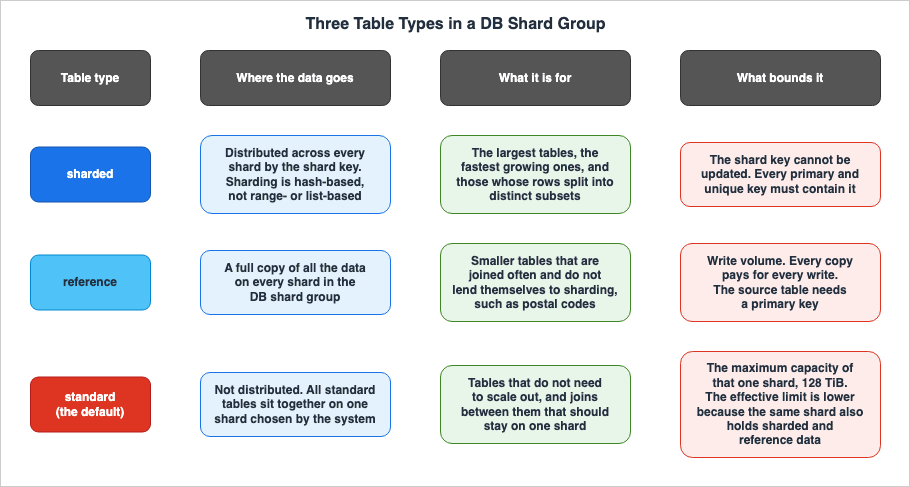
4. When a Statement Runs on One Shard
This is the core of the article. Two SQL queries that return the same result can sometimes be executed in completely different ways. One goes to a single shard in its entirety and finishes there. For the other, a router gathers rows from several shards and combines them. How you write the predicates makes the difference.4.1 The Name the User Guide Uses Is Single-Shard Query
To ensure clarity, let's establish the terminology. The user guide uses the termssingle-shard query and single-shard optimization. The term "pushdown" is only used as a verb in the user guide, which says that the planner "proceeds to push down the entire SQL query to the corresponding shard."The string that appears in the output of
EXPLAIN is Single Shard Optimized.postgres_limitless=> EXPLAIN (VERBOSE, COSTS OFF)
SELECT * FROM customers WHERE customer_id = 100;
QUERY PLAN
---------------------------------------------------------
Foreign Scan
Output: customer_id, other_id, customer_name, balance
Remote SQL: SELECT customer_id,
other_id,
customer_name,
balance
FROM public.customers
WHERE (customer_id = 100)
Single Shard Optimized
(9 rows)⚠ The appearance of this line is the only reliable way to confirm this. It is faster to check the
EXPLAIN output than to try and determine the conditions manually.According to the user guide, this optimization applies to
INSERT, SELECT, UPDATE, and DELETE operations.4.2 The Test Is Partition Elimination
Understanding the mechanism carries further than memorizing the conditions.The user guide explains that single-shard optimization is based on partition elimination. PostgreSQL's optimizer eliminates partitions based on constant conditions. When Limitless Database finds that the surviving partitions and tables all sit on the same shard, the query becomes eligible for single-shard optimization.
The user guide also clearly states the conditions under which this process will not work. Partition elimination will not function unless all filter conditions are explicit. Limitless Database can only eliminate partitions if there is at least one join or filter predicate for every shard key of every sharded table mentioned in the query.
⛔ The word to notice is "every." If even a single sharded table lacks any conditions, the process will fail.
4.3 The User Guide's Own Counterexample
The user guide provides specific examples illustrating how strict this "all" requirement is. This example is the most important quote in this article.Assume three tables,
customers, orders, and order_details, all sharded on the customer_id column. The application is attempting to retrieve all data for a single customer, consolidating it into a single shard. Consider the following query:SELECT * FROM
customers c, orders o, order_details od
WHERE c.customer_id = o.customer_id
AND od.order_id = o.order_id
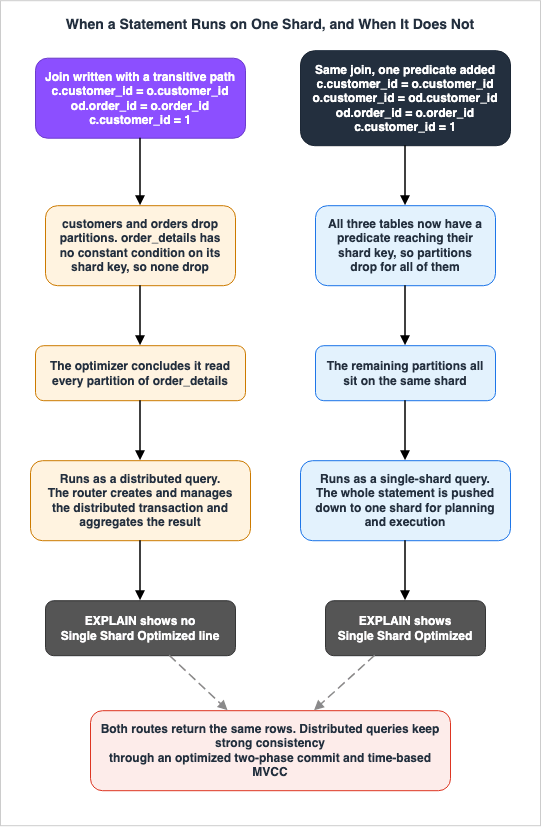
AND c.customer_id = 1;This query retrieves all data for a single customer. That data resides on a single shard. Nevertheless, Limitless Database does not classify this query as a single-shard query. The user guide explains the optimizer's behavior in three steps.
First, the optimizer can exclude partitions for the
customers and orders tables. The basis for this is the derived, implicit condition o.customer_id = 1, which is inferred from c.customer_id = 1 and c.customer_id = o.customer_id.Next, the optimizer cannot exclude partitions for the
order_details table. This is because there is no constant condition on this table. While od.order_id = o.order_id is a condition on order_id, it is not a condition on customer_id, which is the shard key for order_details.Finally, the optimizer concludes that the query reads all partitions of
order_details. Therefore, this query is not eligible for single-shard optimization.The solution is to add one more predicate.
SELECT * FROM
    customers c, orders o,  order_details od
WHERE c.customer_id = o.customer_id
     AND o.customer_id = od.customer_id
     AND od. order_id = o. order_id
 AND c.customer_id =  1;
By explicitly adding
o.customer_id = od.customer_id, the optimizer can exclude partitions for order_details, and the query will be classified as a single-shard query.⚠ Logically, this query returns the same result as the original query. The inference that
c.customer_id = od.customer_id is true if c.customer_id = o.customer_id and o.customer_id = od.customer_id may seem obvious to humans. However, there is no guarantee that the optimizer will apply the transitive property along this path. Whether it is explicitly written or not makes a difference in how the query is executed.This illustrates exactly what changes the moment you write SQL that cannot be "pushed down." The SQL is correct, the results are correct, and the intention is correct. The only thing that changes is the way it is executed.
4.4 Four Conditions That Reject a Correctly Written Predicate
Even if the predicate is written correctly, single-shard optimization can still fail to apply. The user guide lists four such conditions as constraints. These conditions are effective regardless of the predicate, making them difficult to detect simply by examining the SQL.Regarding functions, a query containing functions is only eligible for single-shard optimization if the function is immutable, or if the function is mutable but registered in the
rds_aurora.limitless_distributed_functions view.⚠ This one is easy to walk into. Functions like
nextval, uuid_generate_v4, and pg_sleep are all volatile. The user guide points to the provolatile value in the pg_proc view and offers those same three as examples. Query pg_proc to see the volatility of a function.SELECT proname, provolatile FROM pg_proc WHERE proname='uuid_generate_v4';
proname | provolatile
------------------+-------------
uuid_generate_v4 | v
(1 row)Regarding views, if a query includes one or more views, optimization may be disabled if any of the views have a
security_barrier attribute, or if the objects the query uses require more than one user's privileges. The user guide provides an example where optimization is disabled if the query includes two views, each executed under a different user.Regarding PREPARE and EXECUTE, Limitless Database supports single-shard optimization for prepared
SELECT, UPDATE, and DELETE statements. However, if PREPARE and EXECUTE are used with plan_cache_mode set to 'force_generic_plan', the query planner will reject any attempt to apply single-shard optimization to that query.Regarding PL/pgSQL, queries containing PL/pgSQL variables are executed as implicit prepared statements. If a query includes even a single PL/pgSQL variable, the planner will reject single-shard optimization. However, within a PL/pgSQL block, statements that do not include variables are still eligible for optimization.
These four issues all share a common origin: they stem from the way code is written on the application side. You can design the schema and the shard key correctly and still lose the optimization, because the data access layer routes through a PL/pgSQL function or forces a generic plan. When considering a migration, it is necessary to examine not only the schema, but also the data access paths.
4.5 How Execution Changes When the Optimization Does Not Apply
When single-shard optimization is not possible, the query is executed as a distributed query. The user guide defines a distributed query in one line: "Distributed queries run on a router and more than one shard." It then walks through the route.One of the routers receives the query. The router creates and manages a distributed transaction, sending it to the participating shards. Each shard then opens a local transaction in the context the router supplied, and runs the query. When the transaction is committed, the router uses an optimized two-phase commit protocol and time-based MVCC to provide ACID semantics.
⚠ Consistency is maintained. The user guide explains the mechanism of time-based MVCC, and explicitly states that under this protocol, you can expect to always see data with strong consistency within Limitless Database. A query that does not stay on one shard is not a correctness problem.
What changes is the execution model. The router becomes the manager of the distributed transaction and assumes the role of aggregation. As seen in Section 2.1, the router's responsibilities already include "aggregating data returned from shards" and "managing distributed transactions." Queries that can be completed within a single shard are those that do not require the router to perform these two functions.
The user guide does not state that distributed queries are always disadvantageous. Instead, it notes that for a Cartesian product, that is, a cross join, it may be more efficient to retrieve data separately from the shards rather than executing a distributed query.
4.6 Active Shard Key - Adding the Predicate for You
There is a workaround for the requirement to explicitly specify predicates. By using the active shard key feature, you can configure a single shard key when issuing a query. This will automatically add the shard key as a constant predicate toSELECT and DML queries.SET rds_aurora.limitless_active_shard_key = '{"123"}';
SELECT * FROM customers;
-- This statement is changed to:
SELECT * FROM customers WHERE customer_id = '123'::int;The user guide explains that this feature is particularly useful when migrating to Limitless Database, allowing you to denormalize the schema and add shard keys to tables without altering existing SQL logic.
⚠ However, there are two conditions. First, the predicate is only added to tables that are compatible with the active shard key. A table counts as compatible when its shard key has as many columns as the value you set in
rds_aurora.limitless_active_shard_key. If a query touches an incompatible table, the system raises an error instead.Second, this applies to joins. The user guide states that automatic addition of shard key predicates to tables involved in a join will only occur if all tables in the query belong to the same collocation group. If the query spans more than one collocation group, the system raises an error instead.
⇒ While a workaround exists, it does not free you from the constraints of collocation design.
5. Where the Primary Sources Disagree
As you delve into the official documentation for Limitless Database, you’ll notice that the same conditions for optimization are worded differently from one document to the next. While all the sources are official AWS documentation and none are demonstrably incorrect, the conclusions you reach when making design decisions can vary depending on which source you choose.5.1 The Pushdown Conditions Are Stated in Three Ways
| Source | How it states the condition |
|---|---|
| Aurora User Guide, "Querying" page | "If all relations are sharded tables with a filtered shard key on the same shard, or reference tables, then query planning is skipped on the router layer and completely pushed down to the shard for planning and execution." |
| Aurora User Guide, "Single-shard queries" page | "All filter conditions must be explicit for partition elimination to work. Aurora PostgreSQL Limitless Database can't eliminate partitions without one or more join predicates or filter predicates on the shard keys of every sharded table in the statement." |
| AWS Database Blog glossary | "These statements have equality predicates on all tables' shard keys, the tables have the same shard keys and for joins these tables are collocated. Reference tables may be included in the statements." |
There are three key differences.
First, the type of predicate is different. The blog uses the term "equality predicate," while the user guide's sub-page uses "join predicate or filter predicate."
Second, the handling of collocation differs. The blog lists collocation as a requirement, while the sub-page does not. The sub-page describes this as a discussion of partition elimination, treating collocation as a separate topic.
Third, and most importantly, even if the blog's conditions are met, a query may not be recognized as a single-shard query. Section 4.3 provides an example from the user guide that illustrates this. Even when all tables share the same shard key and an equality predicate like
c.customer_id = 1 exists, the query with three table joins may still not be classified as a single-shard query.5.2 Which One to Design Against
⇒ It is safest to design based on the most stringent conditions, specifically those described on the user guide's "Single-shard queries" page.There are two reasons for this. First, that page is the only one that lists concrete examples that do not work. An example that fails marks the boundary more precisely than a sentence that states the specification. Secondly, that page is written in conjunction with a verification method: the output of
EXPLAIN.⚠ And, rather than memorizing conditions, it is more reliable to look at
EXPLAIN. There is no need to determine which of three descriptions is correct. You can determine this simply by whether the line Single Shard Optimized appears. What should be included in design reviews is not a checklist of conditions, but rather the execution plan for representative queries.The AWS Database Blog glossary carries two more lines worth quoting with the attribution attached. It calls pushdown "the fastest and most scalable way to run statements in a sharded system." It also describes a router as a node that either runs a request itself or pushes it down to the shards, and says of the second of those that "the latter performs and scales better." Both of those are statements AWS makes. Neither is a measurement taken for this article.
5.3 The Release Calendar and the Release Notes Do Not Agree
The same issue is present in the version information.The "Amazon Aurora PostgreSQL Limitless Database updates" page in the Aurora PostgreSQL release notes lists seven versions:
16.13-limitless, 16.11-limitless, 16.10-limitless, 16.9-limitless, 16.8-limitless, 16.6-limitless, and 16.4-limitless. According to that page, version 16.13-limitless was released on April 25, 2026, and its patch, 16.13.101, was released on July 13, 2026.However, the "Release calendars for Aurora PostgreSQL" section of the same release notes, which contains a table of minor versions for Limitless Database, shows that as of August 30, 2026,
16.11-limitless is listed at the top, and 16.13-limitless is not included.| PostgreSQL Limitless minor engine version | Aurora release date | Aurora end of standard support date |
|---|---|---|
| 16.11-limitless | February 25, 2026 | October 2027 |
| 16.10-limitless | February 24, 2026 | September 2027 |
| 16.9-limitless | September 5, 2025 | March 2027 |
| 16.8-limitless | May 8, 2025 | November 2026 |
| 16.6-limitless | January 24, 2025 | September 2026 |
| 16.4-limitless | October 31, 2024 | September 2026 |
⚠ Two things follow for day-to-day work. First, you should not rely on the release calendar to determine the latest version. Second, if you need to know the end of standard support date, you must refer to the calendar; the release notes update page does not list those dates. You will need to cross-reference both sources.
The release notes explicitly state that Limitless Database follows the same lifecycle policy as Aurora PostgreSQL, using the same engine version. The dates above carry a note of their own: those given only as a month and a year are approximate, and will be updated once the exact date is known.
6. Three Things You Cannot Change Later
This is the second core of the article. The user guide's "requirements and considerations" section lists the considerations that apply to DB shard groups. Among them are the things you cannot change once the group exists or the data is loaded.6.1 A Shard Key Value Cannot Be Updated
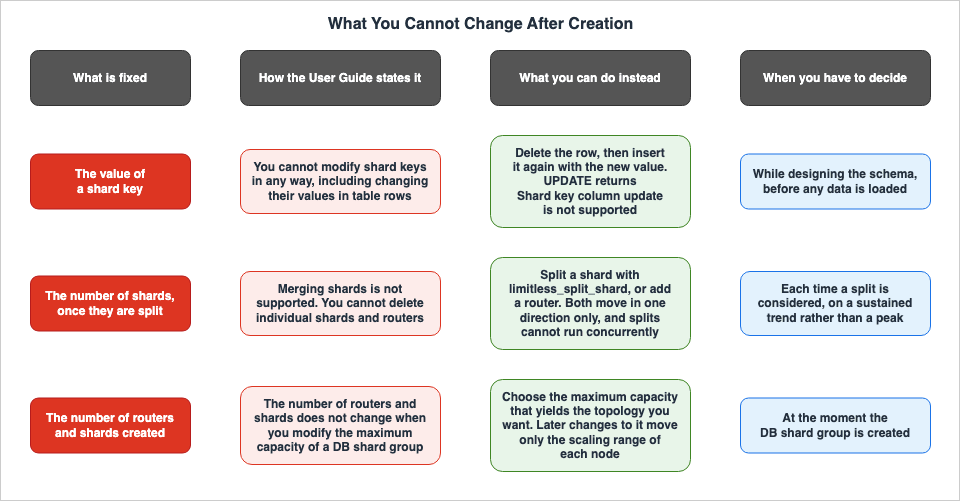
The user guide states that shard keys cannot be modified in any way. This "in any way" explicitly includes changing the value of the shard key within a table row. Furthermore, it explains that to change a shard key, you must first delete the row and then recreate it.This manifests as an SQL error. The user guide's section on DML limitations provides the actual error message.
postgres_limitless=> UPDATE customers SET customer_id = 11 WHERE customer_id =1;
ERROR: Shard key column update is not supported
⚠ The second of the two examples matters more. The same section indicates that you will encounter the same error even when attempting updates based on columns other than the shard key.
postgres_limitless=> UPDATE customers SET customer_id = 11 WHERE customer_name='abc';
ERROR: Shard key column update is not supported
The engine decides on the column in the
SET clause, not the one in WHERE. There is no way to modify the value of a shard key using an UPDATE statement. Instead, you must DELETE the row and then INSERT it again with the new shard key value.⇒ This has two consequences for the design.
First, you should not use columns that are subject to change as shard keys. You need to select columns that are guaranteed to remain unchanged throughout the row's lifecycle, such as tenant IDs or customer IDs. Choosing columns that may change over time, such as "department ID," will result in row deletion and recreation with each modification.
The second point relates to schema-level constraints. The columns themselves are restricted too. The user guide's section on DDL limitations states that you cannot delete columns that are part of a shard key, and you cannot change the data type of columns that are part of a shard key.
6.2 Shards Can Be Split, but Not Merged
The user guide puts two operations side by side. You use SQL functions to split shards and add routers. And merging shards is not supported.A single function performs the split. The function starts a shard-split job that runs asynchronously. It returns a job ID once it accepts the job.
SELECT rds_aurora.limitless_split_shard('subcluster_id');⚠ The same page carries a note: concurrent shard split operations are not supported. Run them one at a time, and let each one finish before starting the next.
This asymmetry requires that splitting be treated as an irreversible operation. The count only goes up, so a split made in response to a temporary spike leaves a shape you keep. Base the decision on a sustained trend, not a peak.
Furthermore, the user guide also states that individual shards and routers cannot be deleted. There is no way to reduce the number of nodes.
6.3 The Node Count Does Not Move When You Change the Maximum Capacity
The maximum capacity you set when you create a DB shard group fixes its initial number of routers and shards. Furthermore, changing the maximum capacity of a DB shard group will not change the number of routers and shards.The same information is also presented on the "Creating a DB cluster" page, though worded differently. Dynamic configuration of a DB shard group based on maximum capacity is only available during creation. If the maximum capacity is changed, the number of routers and shards remains unchanged.
⚠ Put those two together. After creation, the maximum capacity acts only as a ceiling on how far each node can scale up. It does not represent a setting to increase the number of nodes. If you want to increase the number of nodes, you will need to either split the shards using the SQL functions described in Section 6.2, or add more routers.
6.4 What You Can Do Instead
Each of the three, plus the related restriction on deleting nodes, has a documented route forward. None of them undoes the original choice.| Cannot Do This | Instead, You Can Do This |
|---|---|
| Update the shard key value. | Delete the row and then re-insert it with the new shard key value. |
| Merge shards. | Split a shard with rds_aurora.limitless_split_shard, or add a router. Both move in one direction only, and splits cannot run concurrently. |
| Delete individual shards or routers. | Delete the entire DB shard group. If you are deleting a DB cluster, you must first delete the DB shard group. |
| Add nodes by raising the maximum capacity. | Split the shard. Add routers. While you can modify the maximum capacity using modify-db-shard-group, this only affects the scaling range of each individual node. |
7. The Maximum Capacity Determines the Topology
7.1 What does ACU refer to?
When adding a DB shard group, you specify the maximum compute capacity for the whole DB shard group, meaning the sum of the capacities of every router and shard, in Aurora capacity units (ACUs). The user guide describes 1 ACU as a combination of approximately 2 GiB of memory, along with the corresponding CPU and network resources.⚠ The same unit, ACU, is also used in Aurora Serverless v2. The key difference when specifying ACU for Limitless Database is that it refers to the capacity of the entire DB shard group, not the capacity of individual instances.
Each node also has its own capacity, expressed in ACU. The user guide explains that nodes scale up when their capacity is too low for the load, and scale down when it is higher than necessary. However, it also states that nodes will not scale up when the total capacity has reached its maximum, nor will they scale down when it has reached its minimum.
The AWS Database Blog glossary defines ACU as a measure of the resources allocated to a shard group. It adds that raising the minimum ACU improves responsiveness, and raising the maximum ACU raises the capacity ceiling.
7.2 How Maximum Capacity Maps to Node Count
The user guide provides a table showing the maximum capacity and the number of nodes that can be created for a DB shard group. The table carries a note that these values are subject to change.| Total nodes | Routers | Shards | Default minimum capacity (ACUs) | Maximum capacity range (ACUs) |
|---|---|---|---|---|
| 4 | 2 | 2 | 16 | 16–400 |
| 5 | 2 | 3 | 20 | 401–500 |
| 6 | 2 | 4 | 24 | 501–600 |
| 7 | 3 | 4 | 28 | 601–700 |
| 8 | 3 | 5 | 32 | 701–800 |
| 9 | 3 | 6 | 36 | 801–900 |
| 10 | 4 | 6 | 40 | 901–1000 |
| 11 | 4 | 7 | 44 | 1001–1100 |
| 12 | 4 | 8 | 48 | 1101–1200 |
| 13 | 5 | 8 | 52 | 1201–1300 |
| 14 | 5 | 9 | 56 | 1301–1400 |
| 15 | 5 | 10 | 60 | 1401–1500 |
| 16 | 6 | 10 | 64 | 1501–1600 |
| 17 | 6 | 11 | 68 | 1601–1700 |
| 18 | 6 | 12 | 72 | 1701–1800 |
| 19 | 7 | 12 | 76 | 1801–1900 |
| 20 | 7 | 13 | 80 | 1901–2000 |
| 21 | 7 | 14 | 84 | 2001–2100 |
| 22 | 8 | 14 | 88 | 2101–2200 |
| 23 | 8 | 15 | 92 | 2201–2300 |
| 24 | 8 | 16 | 96 | 2301–6144 |
Three things stand out.
The first is the minimum configuration. Even if you set the maximum capacity to 16 ACUs, four nodes will be created, consisting of two routers and two shards. There is no Limitless Database with only one shard.
The second is that the ratio of routers to shards is not fixed. As you move down the table, the number of routers increases from 2 to 8, while the number of shards increases from 2 to 16. Since the number of shards increases more rapidly, the ratio shifts from approximately 1:1 to approximately 1:2.
The third point matters most for design. Through the middle of the table, the rows are segmented into units of 100 ACU. For example, from 401 to 500, and from 501 to 600, each increase of 100 ACU adds one node. The two rows at the ends are wider: the top row covers 16 through 400, and the bottom row handles the range from 2301 to 6144 in a single row. This means that a DB shard group created with a maximum capacity of 2301 ACU and a DB shard group created with a maximum capacity of 6144 ACU will both have the same topology: eight routers and sixteen shards. The only difference is the total range that each node can scale within.
⚠ And as we saw in Section 6.3, this number does not change even if you later modify the maximum capacity. The initial maximum capacity is not simply a setting that defines an upper limit; it is a setting that defines the structure.
7.3 Counting Subnet IP Addresses
The user guide requires you to ensure that the DB subnet used to create a DB shard group has sufficient available IP addresses. The required number is specified: one per router, and up to three per shard.Combining this with the table in Section 7.2, you can estimate the number of IP addresses needed. For a minimal configuration with two routers and two shards, you will need at least two IP addresses for the routers and a maximum of six for the shards. For a maximum configuration with eight routers and sixteen shards, you will need at least eight IP addresses for the routers and a maximum of forty-eight for the shards.
⚠ Furthermore, this number is not fixed. It rises when you split shards and add routers, as described in Section 6.2. It will also increase when configuring compute redundancy, as outlined in the next section, 7.4. Attempting to fit this into an existing VPC with limited available subnets may result in issues later on.
If you intend to make the DB shard group publicly accessible, you will need to set up an internet gateway in the VPC.
7.4 Compute Redundancy and High Availability
DB shard groups have a setting called "compute redundancy." According to the AWS CLI reference fordescribe-db-shard-groups, there are three valid values.| Value | Meaning |
|---|---|
| 0 | Does not create a standby DB shard group. This is the default value. |
| 1 | Creates one standby DB shard group in a different Availability Zone. |
| 2 | Creates two standby DB shard groups in two separate Availability Zones. |
The FAQ in Amazon Aurora's expanded content states that to achieve 99.99% availability with automatic failover, you should set compute redundancy to a value greater than 0.
⚠ This setting affects the number of nodes. The user guide indicates that setting compute redundancy to a non-zero value will double or triple the total number of shards. Furthermore, the standby nodes are scaled up and down to match the capacity of the primary node, and you cannot configure a separate capacity range for the standby nodes.
Additionally, the considerations section also provides relevant information. When setting compute redundancy to 2, you need at least three Availability Zones in your DB subnet group.
⇒ Configuring high availability will impact the IP address estimates discussed in Section 7.3. Subnet design and availability design are interconnected here.
⚠ It is important to note the contrast with the "unchangeable" aspects mentioned in Section 6. The AWS CLI command
modify-db-shard-group allows you to modify settings for a DB shard group, and according to the reference, it accepts three parameters: --max-acu, --min-acu, and --compute-redundancy. Therefore, you can change the maximum capacity, minimum capacity, and compute redundancy after creation. What cannot be changed is the resulting change in the number of nodes. You can modify the settings, but this does not rebuild the topology you initially defined during creation.7.5 Five per AWS Region
The user guide lists two numbers. A DB shard group is one per DB cluster, and a maximum of five per AWS Region. The implications of this are also clearly stated. Therefore, the maximum number of DB clusters for Limitless Database that you can have within a single AWS Region is five.⚠ This limit applies to how you organize your environments. If you design your system with separate clusters for production, staging, development, and test environments as separate clusters in one AWS Region, you may quickly reach this limit. Furthermore, combined with the restriction on selecting Availability Zones individually (Section 8.1), the flexibility in placement within a region is limited.
The maximum capacity can be configured from 16 to 6144 ACUs. The user guide advises users to contact AWS for information regarding capacity limits exceeding 6144 ACUs.
8. What to Check Before You Move
Limitless Database is a type of Aurora PostgreSQL, but it is not the same as a standard Aurora PostgreSQL cluster. In many cases, whether or not a migration is possible depends not on the design of the shard key, but on the surrounding prerequisites.8.1 What the Cluster Itself Has to Be
This section organizes the requirements listed in the user guide's "requirements" section by category.Start with Regions and Availability Zones. Limitless Database runs in every AWS Region except Asia Pacific (Taipei). However, there are specific notes. When creating a cluster in US East (N. Virginia), the DB subnet group must not include the
us-east-1e Availability Zone. Resource limitations keep Aurora serverless, and therefore Limitless Database, out of us-east-1e.Node placement follows a similar rule. When you create a DB shard group or add nodes, Limitless Database puts them in one of the Availability Zones the DB cluster can use. It is not possible to select a specific Availability Zone for individual nodes.
Storage and instances carry two hard requirements. Limitless Database only supports the Aurora I/O-Optimized DB cluster storage configuration. Furthermore, the DB cluster cannot have either writer DB instances or reader DB instances. This is because, as described in section 2.2, DB shard groups serve as replacements for these.
Monitoring is not optional. The user guide states that Enhanced Monitoring and Performance Insights must be enabled, the retention period for Performance Insights must be at least one month (31 days), and PostgreSQL logs must be exported to Amazon CloudWatch Logs. The same page notes that these required features carry extra charges.
For the engine version, Limitless Database uses dedicated Aurora PostgreSQL versions of the form
16.X-limitless.Furthermore, regarding considerations for clusters, it is important to note that Limitless Database cannot be a source for replication, DB clusters must be deleted after DB shard groups are removed, and scaling parameters can only be configured for DB shard groups during cluster creation.
8.2 Aurora Features Not Supported
The user guide includes a section titled "Features not supported in Aurora PostgreSQL Limitless Database," which lists the Aurora PostgreSQL features that are not supported in the Limitless Database.⛔ This article will not reproduce that complete list. Such lists are subject to change, and including a copy within this article would quickly become outdated. Instead, this article focuses on providing guidance on where to look for this information within your own configuration and highlights some representative examples. For accurate and up-to-date information, always refer to the official documentation.
The considerations can be categorized into four areas:
1. Authentication and Connection Pathways. Representative examples in this area include RDS Proxy and custom endpoints. If your application relies on connection aggregation or dedicated endpoints, you may need to redesign the connection layer.
2. Backup and Replication Pathways. Representative examples in this area include read replicas and Aurora Global Database. Considering the limitation that it cannot serve as a replication source (as mentioned in Section 8.1), you cannot design disaster recovery solutions in the same way as with standard Aurora.
3. Integration with Other Services. A representative example in this area is the Aurora zero-ETL integration. If you have implemented automation or data integration processes that originate from the database, you will need to individually verify whether those pathways remain viable.
4. Operational Features. A representative example in this area is Amazon RDS Blue/Green Deployments.
⚠ The inability to use Blue/Green Deployments directly impacts your change management design. If you have established procedures for zero-downtime schema changes or version upgrades that rely on Blue/Green deployments in standard Aurora, those procedures cannot be directly applied to the Limitless Database. While the previously published Zero-Downtime Database Change on RDS and Aurora - Blue/Green Deployments, Upgrades, and Rollback Design discusses this topic, you will need to read it knowing that some of the methods it relies on are not available in the Limitless Database.
8.3 SQL and Schema Constraints
SQL itself also has limitations. The user guide notes, as considerations, that some SQL commands are not supported and that not all PostgreSQL extensions are supported, directing users to detailed pages for further information.⛔ This article does not reproduce the full lists either. The status of support for individual commands is detailed in the "Supported and unsupported Data Manipulation Language (DML) and query processing SQL commands" page. DDL limitations are described in the "DDL limitations and other information for Aurora PostgreSQL Limitless Database" page, and extensions are discussed in the Extensions section of that same page.
What follows instead is the set of items that force a decision during schema design.
Primary keys and unique keys come first, and Section 3.5 already stated the rule: every one of them must contain the shard key.
Foreign keys have rules specific to each table type. According to the user guide, you can only specify
FOREIGN KEY within a CREATE TABLE statement for standard tables. To add foreign keys to sharded tables or reference tables, you must first create the table without any foreign key constraints, and then add them using ALTER TABLE ADD CONSTRAINT. Furthermore, standard tables with foreign key constraints cannot be converted to sharded tables or reference tables. You must first remove the constraints before converting, and then re-add them afterward.There are also rules regarding combinations of table types. A sharded table can only have foreign key constraints if the parent and child tables are collocated, and the foreign key is a superset of the shard key. Foreign key constraints are supported from a sharded table to a reference table. Foreign key constraints are also supported from one reference table to another.
Two constraint types are worth naming.
CHECK constraints are supported for simple constraints that involve comparisons with literals, but constraints that require more complex expressions or functions are not supported. Expressions like length(tag) > 0 or op_date <= now() will result in errors. Additionally, EXCLUDE constraints (exclusive constraints) are not supported.For column definitions, Limitless Database does not support
IDENTITY columns. Also, the name of a sharded table must be 54 characters or less.For indexes, sharded tables accept
CREATE INDEX CONCURRENTLY but not CREATE UNIQUE INDEX CONCURRENTLY. Furthermore, using \d table_name in the router does not guarantee that all indexes will be visible, so the user guide recommends using the pg_catalog.pg_indexes view.Functions carry one more limitation beyond the volatility question in Section 4.4. It is not supported to modify the volatility of existing functions. This applies to both
ALTER FUNCTION and CREATE OR REPLACE FUNCTION.⚠ In practical migration scenarios, this last point can be a significant factor. If you have existing codebases where you routinely adjust the volatility of functions, that approach will not be available. And, as noted in Section 4.4, volatility can impact the success of single-shard optimization.
8.4 The Isolation Level You Cannot Set
The user guide briefly mentions isolation levels. Repeatable read, read committed, and read uncommitted isolation levels are supported. It is not possible to set the isolation level to serializable.⛔ This article does not provide an explanation of isolation levels themselves. Existing documentation, specifically Transaction Isolation on AWS Databases - Same Level Name, Different Anomalies, and the Statement That Changes Nothing, shows how different database engines admit different anomalies with isolation levels of the same name, and that setting an isolation level may sometimes have no effect. The single point to carry away is this: if your application relies on the serializable isolation level, that assumption does not hold in Limitless Database.
8.5 A Limit on the Migration Tooling
While the specific steps for the migration itself are outside the scope of this article, there is one limitation that applies during the stage of selecting the source and destination databases.The previously published Heterogeneous Database Migration on AWS - Schema Conversion, Full Load with CDC, Data Validation, and a Cutover You Can Reverse provides a table outlining conditions under which AWS Database Migration Service (DMS) data validation does not function. Aurora PostgreSQL Limitless tables are included in that table. Validation does not run, and the state is shown as "No primary key."
⚠ Consequently, if your design relies on DMS data validation to ensure the accuracy of the migration, that validation will not be available with Limitless Database. You will need to implement alternative validation methods.
On backup and restore, version
16.10-limitless added support for database migration with pg_dump and pg_restore. According to the release notes, it is possible to create a backup from an Aurora Limitless database and restore it to another Aurora Limitless cluster or a standard PostgreSQL database. When migrating between Aurora Limitless clusters using metadata extraction functions, the sharded table and reference table configurations are preserved.9. Failure Modes and Anti-Patterns
Here is a list of common pitfalls to watch out for in the design process, drawn from the specifications and constraints above.9.1 Carrying the Schema Over and Assuming It Is Distributed
This is the one that happens most often. As described in Section 3.2, the default is a standard table. Simply listingCREATE TABLE statements will not result in any distribution. Everything will reside on a single shard, and as write operations increase, you will approach the effective limit described in Section 3.3 (less than 128 TiB).There are ways to detect this. You can obtain a list of nodes using
rds_aurora.limitless_subclusters and then verify the table types. The user guide also provides views for checking table types. Be sure to include a condition in your migration completion criteria: "every table that should be distributed is a sharded table."9.2 Making Every Table a Sharded Table
This is the same mistake in the opposite direction. The user guide identifies three ideal use cases for sharded tables: tables dealing with clearly defined subsets of data, extremely large tables, and tables that grow significantly faster than others. Small tables that are frequently joined are not part of any of these categories.Converting such tables to sharded tables introduces the possibility of crossing shards with each join operation. This is precisely the case the reference table type exists for: the user guide describes it as the type for tables that do not lend themselves to sharding.
9.3 Making a Write-Heavy Table a Reference Table
A reference table keeps a full copy of itself on every shard. The user guide points reference tables at smaller tables with a lower write volume that still need to be joined frequently.⚠ Drop the second of those three conditions, low write volume, and the choice stops working. The AWS Database Blog glossary also defines reference tables as tables with infrequent data modification (DML) and typically static tables. It is possible to mistakenly designate a table intended for master data, only to discover that it is actually updated with large volumes of data on a daily basis.
9.4 Treating the Shard Key as Something You Can Change Later
As stated in section 6.1, the value of the shard key cannot be updated with anUPDATE command. To change the shard key, you must delete and recreate the data. Therefore, this decision must be finalized before the migration process begins.⚠ A particularly risky practice is using columns with business significance as shard keys. If you shard on a value the business can change later, such as an organizational unit, a contract type, or a regional classification, every one of those changes turns into a delete and an insert. Choose a column whose immutability your business rules already guarantee.
9.5 Routinely Writing Joins That Do Not Stay on One Shard
As demonstrated by the counterexample in section 4.3, it is natural to write SQL that is logically correct, produces the intended results, and yet does not complete within a single shard. Particularly when joining three or more sharded tables, relying solely on join predicates through intermediate tables may not be sufficient.⚠ This cannot be detected by automated checks. The syntax is correct, and the results are accurate. As part of your pre-release checks, it is important to analyze representative queries using
EXPLAIN and verify whether the Single Shard Optimized line appears. This is a practical application of the principle mentioned in section 5.2: "Observe EXPLAIN rather than memorizing conditions."9.6 Building Small on the Assumption That Capacity Can Be Raised Later
As sections 6.3 and 7.2 set out, the maximum capacity you choose at creation fixes the number of routers and shards, and raising it later moves nothing. The strategy of starting with a smaller size and increasing capacity later only allows you to increase the capacity limit; it does not allow you to add more nodes.Adding nodes requires a separate process involving shard splitting and adding routers. Furthermore, as stated in section 6.2, a shard split runs asynchronously, two splits cannot run at once, and there is no reverse operation.
9.7 Designing the Data Access Layer Without the Four Conditions in Section 4.4
Here the design attends only to how predicates are written and misses function volatility, thesecurity_barrier attribute on a view, plan_cache_mode, and PL/pgSQL variables.⚠ These factors originate from the application code, not the schema. They are often difficult to detect during database design reviews. When planning a migration, it is necessary to consider how ORMs and data access frameworks handle prepared statements internally, and to what extent stored procedures are being utilized.
9.8 Designing Subnets and Availability Separately
As outlined in sections 7.3 and 7.4, the number of required IP addresses is one per router, and up to three per shard. Enabling compute redundancy will double or triple the total number of shards.Placing DB shard groups in unused subnets within existing VPCs can lead to IP address exhaustion if you later attempt to increase availability. Furthermore, to achieve a compute redundancy of 2, the DB subnet group must span at least three Availability Zones. Therefore, it is crucial to design your subnets after determining your target level of availability.
10. Frequently Asked Questions
If you move to Limitless Database, are your writes distributed automatically?
No. Standard tables are the default table type. Limitless Database does not distribute them; the system picks one shard and puts them there. If you want to distribute a table, you need to either create it as a sharded table, specifying a shard key, or convert an existing standard table.Can the shard key be changed later?
No. The user guide states that the shard key cannot be changed in any way, including altering values within a table row. To make a change, you would need to delete the existing data and recreate it. Attempting to use theUPDATE command returns the error Shard key column update is not supported.Can you reduce the number of shards if you add too many?
No. The user guide clearly states that shard merging is not supported, and that individual shards and routers cannot be deleted. You can only increase the number of shards.Will increasing the maximum capacity increase the number of shards?
No. The maximum capacity you set when you created the DB shard group fixed the number of shards, and changing that maximum later moves nothing. To increase the number of nodes, you can either use an SQL function to split the shards, or add more routers.Can you create a configuration with only one shard?
No. Even at the minimum maximum capacity of 16 ACUs, the correlation table in the user guide creates four nodes: two routers and two shards.Is a shard group created at 2301 ACUs different from one created at 6144 ACUs?
Not in node count. The correlation table in the user guide covers 2301 through 6144 ACUs in a single row of 24 nodes, made up of eight routers and sixteen shards. What differs is the range each node can scale within.Does a query that does not stay on one shard return less accurate results?
No. For distributed queries the router uses an optimized two-phase commit protocol and time-based MVCC, and the user guide says that under this protocol you can always expect to see strongly consistent data. What changes is how the statement runs, not whether it is right.Are there ways to verify whether single-shard optimization is working?
You can useEXPLAIN. The execution plan for an optimized query carries a Single Shard Optimized line. That is more reliable than working through the conditions by hand.If all tables use the same shard key, will the join operation complete within a single shard?
Not necessarily. The user guide provides an example where, even if three tables are all sharded on the same column and one of them has a constant condition, the query is still not a single-shard query, because the condition does not reach the third table. Adding an explicit join predicate resolves it.Can the serializable isolation level be used?
No. The user guide states that repeatable read, read committed, and read uncommitted are supported, and that you cannot set the isolation level to serializable. For isolation levels in general, see the published article on transaction isolation linked in Section 8.4.Can Amazon RDS Blue/Green Deployments be used?
No, they cannot. They are listed as an unsupported feature in the user guide. If you have existing procedures for Blue/Green deployments based on standard Aurora, those procedures will not work as is with Limitless Database.What changes when you enable high availability?
You set compute redundancy to a value greater than 0. The FAQ states that this achieves 99.99% availability with automatic failover. According to the user guide, the total number of shards will double or triple. If you set compute redundancy to 2, your DB subnet group needs at least three Availability Zones.Where do you look up the latest minor version?
On the "Amazon Aurora PostgreSQL Limitless Database updates" page. As of August 30, 2026 the calendar table on the "Release calendars for Aurora PostgreSQL" page did not carry the newest version. Standard support end dates, on the other hand, appear only in that calendar. You need both pages.11. Summary
There is no single answer to whether or not to adopt Limitless Database. Instead, here are the items that should be confirmed before beginning the migration, based on information gathered from primary sources.Decisions Regarding Schema:
Determine the schema. Which tables will be sharded, reference, or standard tables? By default, tables are standard, meaning they will not be distributed unless explicitly configured. For sharded tables, determine which column will serve as the shard key. Will that column remain immutable throughout the row's lifecycle? Ensure that all primary and unique keys incorporate the shard key. Decide which tables should be collocated. Are there tables that carry foreign key constraints?
Decisions Regarding Queries:
Will major queries be optimized for single-shard execution? In areas where three or more sharded tables are joined, does the query predicate reach the shard key of all tables involved? Is the data access layer avoiding the use of PL/pgSQL variables or
force_generic_plan? What is the volatility of the functions being used? Is the process of obtaining EXPLAIN plans included in pre-release checks?Decisions Regarding Capacity and Network:
What is the maximum capacity to be provisioned initially? Is the number of routers and shards determined by that value acceptable? This number cannot be changed later. Are there enough free IP addresses in the subnet? Based on the desired level of availability, has the compute redundancy been determined? Does the proposed environment segmentation comply with the limit of five per AWS Region?
Verification of Prerequisites:
Is the target region available? Is Aurora I/O-Optimized compatible? Are you prepared to accept the requirements for Enhanced Monitoring and Performance Insights? Does the list of unsupported features include anything you currently depend on? The four areas to check are authentication and connection pathways, backup and replication pathways, integration with other services, and operational features. Is the system predicated on serializable isolation? Can a validation process for the migration be established?
⇒ In essence, this article argues that while Limitless Database maintains the appearance of a single database while increasing write capacity, maintaining that appearance is distinct from preserving design flexibility. After you divide the database, what remains are the table types, the shard keys, and the topology fixed at creation, and several of those cannot be changed later.
12. References
- Amazon Aurora User Guide - Using Amazon Aurora PostgreSQL Limitless Database
- Amazon Aurora User Guide - Aurora PostgreSQL Limitless Database architecture
- Amazon Aurora User Guide - Aurora PostgreSQL Limitless Database requirements and considerations
- Amazon Aurora User Guide - Creating a DB cluster that uses Aurora PostgreSQL Limitless Database
- Amazon Aurora User Guide - Working with DB shard groups
- Amazon Aurora User Guide - Splitting a shard in a DB shard group
- Amazon Aurora User Guide - Adding a router to a DB shard group
- Amazon Aurora User Guide - Creating Aurora PostgreSQL Limitless Database tables
- Amazon Aurora User Guide - Creating limitless tables by using variables
- Amazon Aurora User Guide - Converting standard tables to limitless tables
- Amazon Aurora User Guide - Querying Aurora PostgreSQL Limitless Database
- Amazon Aurora User Guide - Single-shard queries in Aurora PostgreSQL Limitless Database
- Amazon Aurora User Guide - Distributed queries in Aurora PostgreSQL Limitless Database
- Amazon Aurora User Guide - Supported and unsupported Data Manipulation Language (DML) and query processing SQL commands
- Amazon Aurora User Guide - DML limitations and other information for Aurora PostgreSQL Limitless Database
- Amazon Aurora User Guide - DDL limitations and other information for Aurora PostgreSQL Limitless Database
- Amazon Aurora PostgreSQL Release Notes - Amazon Aurora PostgreSQL Limitless Database updates
- Amazon Aurora PostgreSQL Release Notes - Release calendars for Aurora PostgreSQL
- Amazon Aurora Extended Content - Scalability
- AWS CLI Command Reference - describe-db-shard-groups
- AWS CLI Command Reference - modify-db-shard-group
- AWS News Blog - Amazon Aurora PostgreSQL Limitless Database is now generally available
- AWS Database Blog - Benchmarking Amazon Aurora Limitless with pgbench
- PostgreSQL Documentation - CREATE TABLE
- PostgreSQL Documentation - Function Volatility Categories
- PostgreSQL Documentation - Transaction Isolation
References:
Tech Blog with curated related content
Written by Hidekazu Konishi