PostgreSQL Autovacuum, Bloat, and Planner Statistics on Aurora and RDS - Why the Defaults Stop Being Enough, and What to Tune First
First Published:
Last Updated:
Availability design does nothing on this path. What is degrading is not the instance. It is what sits inside the tables.
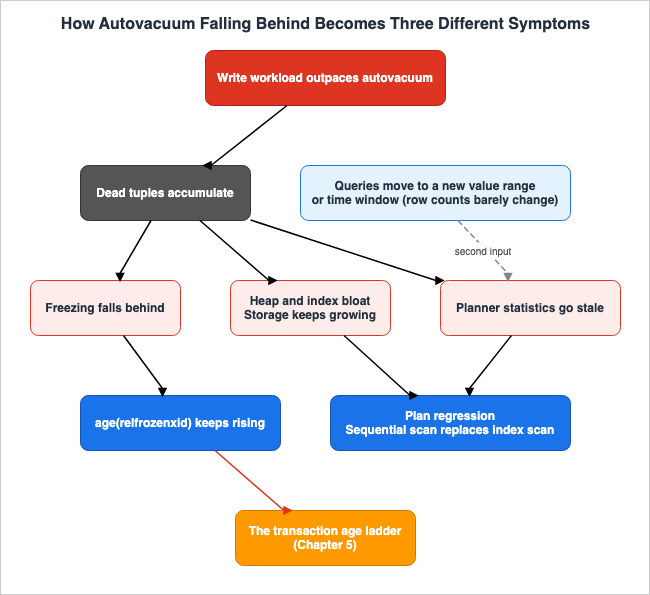
The Amazon Aurora PostgreSQL and Amazon RDS for PostgreSQL user guides state the cause of this in a single paragraph. A single background process, called autovacuum, is responsible for four critical tasks: reclaiming dead tuples, preventing table and index bloat, updating planner statistics, and preventing transaction ID wraparound. When writes outpace what autovacuum can keep up with, three symptoms start appearing at once. They look like separate failures. The cause behind them is one.
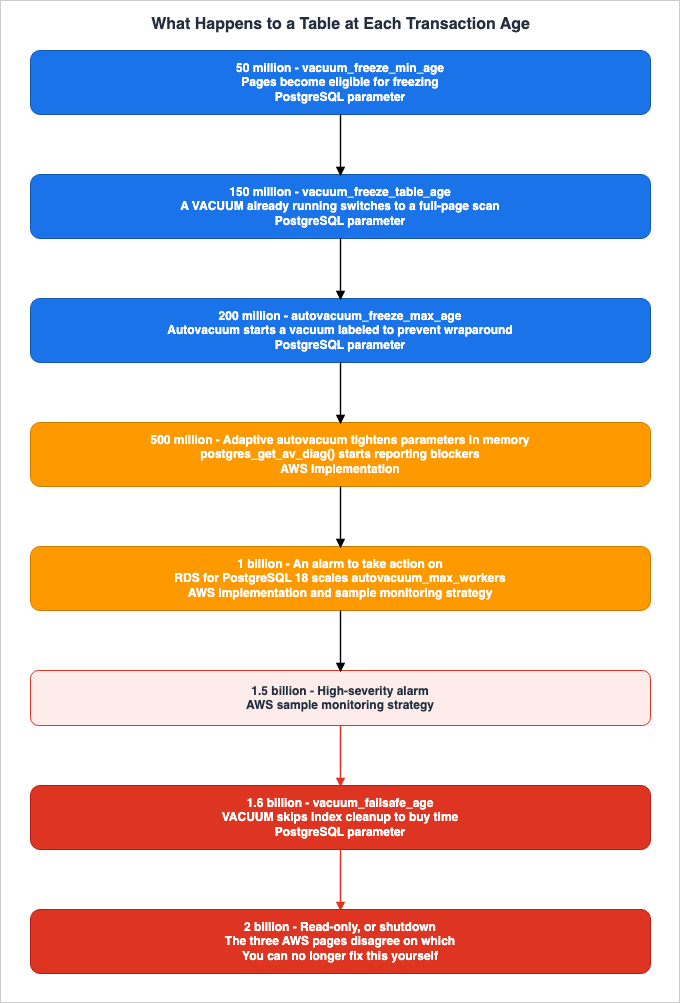
This article is not a comprehensive list of autovacuum parameters. Instead, we believe that what readers truly want to know is: which step their database is on, and which parameter to touch first. Therefore, we are structuring this article from symptoms to root cause, from root cause to observable metrics, and finally, to the parameters that should be modified. At the center is a single ladder: who does what as the age of transaction IDs climbs. This ladder is not laid out on any single page of the official documentation. Instead, it is scattered across five separate pages and the PostgreSQL documentation. This article consolidates that information into a single, cohesive guide. All information presented here was verified as of September 4, 2026.
Table of Contents
- 1. Introduction - The Decisions This Article Supports
- 2. One Process, Four Jobs
- 3. What "Conservative Defaults" Actually Means
- 4. The Order in Which Things Break
- 5. What Happens to a Table at Each Transaction Age
- 6. What to Change First
- 7. Not Loosening the Whole Database - Table-Level Overrides
- 8. When Vacuum Runs but Makes No Progress
- 9. Large Indexes, REINDEX, and the Cost of Skipping Index Cleanup
- 10. Seeing Where You Are
- 11. Failure Modes
- 12. Frequently Asked Questions
- 13. Summary
- 14. References
1. Introduction - The Decisions This Article Supports
The intended audience for this article is DBAs and SREs who operate heavily-written production PostgreSQL databases on Aurora PostgreSQL or RDS for PostgreSQL. You have already implemented availability designs, including failover, read replicas, and connection pooling. However, you are facing a situation where, over time, queries are slowing down, free storage keeps shrinking, and there is a risk that writes may eventually stop.This article supports three key decisions.
First, it helps you place the symptom you are seeing on a step. A slow query is often a symptom of at least two underlying causes: one, the tables have physically grown, impacting the query planner's cost estimates; and two, the statistics themselves are no longer representative of the actual data distribution. Addressing these requires different approaches.
Second, it guides you in identifying which parameters to adjust. There are more than a dozen parameters tied to autovacuum. The ones worth looking at first are a much shorter list. Importantly, one of these parameters can behave differently depending on the engine version and the default settings within AWS; modifying it without checking the version may result in no noticeable change.
Finally, it helps you decide whether to adjust parameters across the entire database or focus solely on the problematic tables. While autovacuum parameters affect the entire instance or cluster, the root cause is often limited to one or two specific tables.
1.1 What This Article Leaves to Other Articles
This article does not cover database operations in general. The following subjects belong to earlier articles on this site.- The switching process itself, including blue/green deployments, limitations of logical replication, major version upgrades, and rollback design belong to Zero-Downtime Database Change on RDS and Aurora. This article focuses on the subsequent issues. It takes the case where the switch succeeds and the contents degrade afterward. The referenced article deals with a scenario where the target environment has no existing statistics. This article addresses the scenario where statistics exist but go stale.
- The design of failover, Multi-AZ, read replicas, RDS Proxy, and Aurora Global Database belongs to Amazon RDS and Aurora High Availability Guide. This article does not delve into availability design.
- The table types and shard key design for Aurora PostgreSQL Limitless Database belong to Sharding Aurora PostgreSQL with Limitless Database.
- Design decisions for Aurora DSQL belong to Amazon Aurora DSQL Design Decision Guide. Aurora DSQL has a different architecture, so the discussions in this article are not directly applicable.
- The order of steps for triaging an incident belongs to Incident Triage Flowcharts. While this article presents a focused investigation process specifically for autovacuum, it does not recreate the troubleshooting flowcharts.
1.2 Two Words That Mean Two Different Things
This article uses the term "bloat" to refer to the expansion of PostgreSQL's heap and B-tree indexes, specifically the state where deleted or pre-updated rows leave behind physical versions of data, causing the files to grow in size. We define this term here.The same word is also used in the context of vector search, but it refers to something different. The "index bloat" discussed in Vector Database Selection on AWS refers to a phenomenon where, when elements are removed from a Hierarchical Navigable Small World (HNSW) graph, remnants of the graph structure remain – often referred to as "tombstones." The causes and the fixes are different from the ones in this article, so vector index bloat belongs to that article.
One more word needs care: "catalog." When this article refers to PostgreSQL's internal metadata, we will always use the term "system catalog." The "catalog" used as a metadata layer for data lakes, as discussed in The Iceberg Catalog Layer on AWS, is a different concept entirely and should not be confused with PostgreSQL's "system catalog."
1.3 Where the Official Documentation Disagrees With Itself
One note on how this article is written.Regarding the subject matter of this article, there are several pages in AWS's official documentation that contradict each other on the same topics. For example, three different pages describe different outcomes for the database when transaction IDs reach their maximum age, and two pages list different parameters that should be adjusted first.
This is not simply a case of one being outdated. One page might provide a general overview, while another focuses specifically on a particular feature. The content, timing of publication, and intended audience also differ. This article will not arbitrarily dismiss one of these pages in favor of the other. Instead, we will present both perspectives and clearly indicate which page each description refers to. This is to ensure that readers have the information they need to verify the details within their own environments.
2. One Process, Four Jobs
A common explanation for autovacuum describes it as a process that reclaims space occupied by deleted rows. While not incorrect, this is only half the story.The Aurora PostgreSQL and RDS for PostgreSQL user guides, in their troubleshooting performance issues section, describe autovacuum's responsibilities as follows. This single sentence forms the core of this article.
Autovacuum is the background process that reclaims dead tuples, prevents table and index
bloat, updates planner statistics, and protects against transaction ID wraparound. The default
autovacuum settings are conservative and designed for small databases. High-write production
workloads almost always require tuning.
A single process performs four key functions: reclaiming dead tuples, preventing table and index bloat, updating planner statistics, and protecting against transaction ID wraparound.
The fact that these four functions coexist within a single process explains almost everything we will discuss in this article. The same page continues:
When autovacuum cannot keep up with your write workload, bloat accumulates, planner
statistics become stale, and the risk of transaction ID wraparound increases. If
age(relfrozenxid) approaches 2 billion, the database shuts down to prevent data
corruption.
Bloat builds up, statistics go stale, and the risk of transaction ID wraparound rises. These three issues often manifest as separate problems in the field. Storage alerts, query slowdowns, and the potential for eventual downtime often trigger different responses and require different response times. However, the official documentation lists them under a single condition: that autovacuum is unable to keep up with the write load.
Without understanding this underlying structure, troubleshooting efforts tend to be piecemeal. When storage fills up, you expand it. When queries slow down, you add indexes. When a transaction ID wraparound alarm triggers, you manually run a vacuum. Each of these actions addresses a symptom, but fails to address the single, underlying cause that is generating all three.
2.1 The Fourth Job Is Not Like the Other Three
Of the four jobs, the first three are fundamentally different from the fourth.Reclamation, bloat suppression, and statistics updates all degrade performance when they fall behind. That decline is continuous, which leaves room to notice it. Protection against wraparound behaves differently: when it falls behind, performance barely moves. A single number, the age, rises quietly. Past a certain point the behavior changes in steps, and at the end writes stop.
The same delay in the same process therefore shows up as a slow slide on one side and as a cliff on the other. While you are addressing the gradual performance decline, the risk of the sudden drop-off is approaching at a different rate. The ladder in Chapter 5 divides the distance to that cliff into steps.
3. What "Conservative Defaults" Actually Means
The official documentation states that the default settings are conservative and designed for smaller databases. This does not mean that the default settings are inherently bad. Rather, it means that they are designed with a specific assumption in mind, and that assumption may not hold true when dealing with production workloads involving high write volumes. Let us examine what those assumptions are.The user guides for Aurora PostgreSQL and RDS for PostgreSQL state the following regarding the default settings:
By default, autovacuum is turned on for the Aurora PostgreSQL DB instances that you
create using any of the default PostgreSQL DB parameter groups. Other configuration parameters
associated with the autovacuum feature are also set by default. Because these defaults are
somewhat generic, you can benefit from tuning some of the parameters associated with the
autovacuum feature for your specific workload.
They describe them as "somewhat generic," a term that implies they are overly broad. This is a less forceful statement than the phrasing "almost always require tuning" found on the initial troubleshooting page quoted in Chapter 2. We will retain this distinction.
3.1 The Threshold Formula, and Why It Scales Badly
A threshold formula determines which tablesautovacuum targets. The user guide includes this formula directly.Vacuum-threshold = vacuum-base-threshold + vacuum-scale-factor * number-of-tuplesHere, the base threshold is
autovacuum_vacuum_threshold, the scale factor is autovacuum_vacuum_scale_factor, and the number of tuples is pg_class.reltuples.The default values have some important differences. According to the AWS Prescriptive Guidance documentation, both Amazon RDS and Aurora use a base threshold of 50, which matches the default in core PostgreSQL. However, both RDS and Aurora use a scale factor of 0.1, which is half of the core PostgreSQL default of 0.2.
In other words, AWS has already shifted the community's default values slightly in a more aggressive direction. As noted in Chapter 2, even after that shift, high-write production workloads almost always require tuning.
Looking at the formula, it becomes clear that the second term is the most impactful. Using AWS's default values, a table with 10,000 rows would have a threshold of 1,050 rows, while a table with 100,000,000 rows would have a threshold of 10,000,050 rows. This means that as tables grow larger, the number of dead tuples that can accumulate before
autovacuum starts rises in proportion.This is the essence of why it is described as being suitable for smaller databases. For smaller tables, 10 percent represents a small absolute value, but for larger tables, 10 percent becomes a massive absolute value. Furthermore, the work of reclaiming those 10,000,050 rows lands on a single
vacuum run. The larger the table, the later autovacuum starts and the heavier that one run becomes.This structure was mitigated in PostgreSQL 18. A new upper limit,
autovacuum_vacuum_max_threshold, was introduced. The value calculated using the scale factor will no longer exceed this limit. According to the PostgreSQL documentation, the default is 100,000,000 tuples, and specifying -1 reverts to the previous behavior, effectively disabling the limit. The official AWS blog states that this is a dynamic parameter you can change without a restart on both Aurora and RDS, and that you can also override it per table.Even with this cap in place, the nature of the second term does not go away. Below the cap, the threshold still scales with the size of the table.
3.2 Autovacuum Also Runs ANALYZE
The name "autovacuum" might suggest that it only automates theVACUUM process. In reality, it automates both VACUUM and ANALYZE. The user guide says so in its opening.Autovacuum automates the start of the VACUUM and the ANALYZE commands.ANALYZE also has its own independent threshold. According to AWS Prescriptive Guidance, the default values for autovacuum_analyze_threshold and autovacuum_analyze_scale_factor are 50 and 0.05, respectively, on both Amazon RDS and Aurora. This one is also half of the core PostgreSQL default of 0.1. The scale factor for ANALYZE is smaller than that for VACUUM, indicating that the system is designed to perform statistical updates more frequently.This aspect becomes particularly relevant in Chapter 4. The paths by which statistics go stale are not limited to autovacuum falling behind.
4. The Order in Which Things Break
When autovacuum falls behind, what issues arise and in what order? The initial troubleshooting page describes a phenomenon where performance degrades even without any application changes, and it outlines the sequence of events.4.1 Bloat Comes First
Initially, the issue is bloat. Let us examine the explanation in the user guide:Bloat accumulation is a workload change. PostgreSQL's multiversion concurrency control (MVCC)
retains old row versions until autovacuum reclaims them. When dead tuples accumulate faster
than autovacuum can process them, tables and indexes grow physically larger. The query planner
may then switch from efficient index scans to sequential scans because the cost estimates
shift as the table size increases. Your SQL hasn't changed, but the data the planner sees has.The final sentence carries the point. While the SQL query remains unchanged, the data the planner is seeing has changed.
What happens here is not a corruption of the statistics. Even if the statistics are accurate, as the table physically grows, the relative cost estimates between sequential scans and index scans can shift. At a certain point, the planner switches its approach. In other words, the first path to plan regression does not pass through stale statistics.
The user guide lists four symptoms of bloat: a gradual decline in query performance over weeks or months, an increase in storage usage despite a stable data volume, the planner choosing sequential scans over index scans because of stale statistics, and an increase in the number of dead tuples within the table statistics.
It is worth noting that this third point contradicts the earlier part of the same page. The earlier section stated that the reason for that switch was due to the cost estimates being affected by the table's size, not because the statistics were stale. As mentioned in Section 1.3, this article does not dismiss either explanation. We simply record the fact that both explanations are present on the same page.
4.2 Statistics Go Stale, but Not Only for This Reason
The second is statistics going stale. This one is not straightforward. The same page states:Statistics can be stale even when autovacuum runs. Autovacuum triggers ANALYZE based on the
number of rows inserted or updated, not on whether the data distribution has meaningfully
changed. If your application shifts to querying a different value range or time window, the
planner's cost estimates may be inaccurate even though autovacuum has run recently.Statistics can be stale even when autovacuum has run recently. This is because the trigger for initiating
ANALYZE is the number of inserted or updated rows, not whether the data distribution has changed in a meaningful way.This is a caveat regarding the causal structure illustrated in Chapter 2. Bloat and wraparound tie back cleanly to the single cause of autovacuum falling behind. However, there is a second input into stale statistics that is independent of how far autovacuum has fallen behind. This occurs when an application shifts the range of values or the time window it queries, resulting in a decline in the validity of the statistics without any change in the number of rows.
So when you see stale statistics, suspecting the autovacuum parameters alone can send you the wrong way. Even if you lower
autovacuum_analyze_scale_factor, ANALYZE will not run unless rows are actually modified. What works here is putting a manual ANALYZE into the operational routine.The same page also mentions that parameterized queries that use different value ranges, and the overall growth of tables themselves, can both contribute to changes in workload. Regarding the latter, it notes that Aurora uses the
VolumeBytesUsed metric, while RDS uses FreeStorageSpace.4.3 Freezing Falls Behind Quietly
The third is freezing falling behind. As Chapter 2 noted, this one barely shows up as performance.PostgreSQL transaction IDs utilize a finite space that cycles. Row versions record the transaction ID that created them. When that ID reaches a point considered too old, visibility checks become impossible. To avoid this, row versions that are sufficiently old are marked with a "freeze" flag, effectively excluding them from age calculations. The
VACUUM process is responsible for applying this flag.The
age() function gives you the transaction age. The user guide defines it precisely.The age() function for transaction IDs calculates the number of transactions that have
occurred since the oldest unfrozen transaction ID for a database (pg_database.datfrozenxid)
or table (pg_class.relfrozenxid).At the database level, the age is calculated from
pg_database.datfrozenxid, and at the table level, it is calculated from pg_class.relfrozenxid. The database value is the minimum relfrozenxid across the tables in that database. So a single table left unfrozen drags the age of the whole database up with it.5. What Happens to a Table at Each Transaction Age
This section is the core of the article. As a transaction ID's age progresses, the actions taken regarding the table change incrementally. The thresholds for these steps are all documented, but no single page carries them together. They sit in the PostgreSQL documentation and across several pages of the Aurora and RDS user guides.Below is a consolidated list, assuming default values.
| Transaction age | What happens | Determined by |
|---|---|---|
| 50 million | Pages become old enough for VACUUM to consider freezing them. | vacuum_freeze_min_age (PostgreSQL default: 50 million) |
| 150 million | If a VACUUM operation is already running, it switches to scanning all pages, including those it would normally skip. | vacuum_freeze_table_age (PostgreSQL default: 150 million) |
| 200 million | Autovacuum targets the table even when nothing else would have triggered it. This is a vacuum operation described as "to prevent wraparound." | autovacuum_freeze_max_age (Default: 200 million) |
| 500 million | Amazon RDS's adaptive autovacuum starts tightening parameters in memory. postgres_get_av_diag() starts reporting blockers. The sample monitoring strategy puts a low-severity alarm here. | AWS implementation |
| 1 billion | The sample monitoring strategy calls this an alarm to act on. In RDS for PostgreSQL 18, adaptive autovacuum dynamically increases the number of worker processes. | AWS implementation |
| 1.5 billion | The sample monitoring strategy raises a high-severity alarm here. | AWS sample monitoring strategy |
| 1.6 billion | VACUUM starts skipping index cleanup to buy time. | vacuum_failsafe_age (PostgreSQL default: 1.6 billion) |
| 2 billion | End state. The official documentation contains conflicting information regarding this point (discussed later). | PostgreSQL structure |
5.1 Two Different Paths to "to prevent wraparound"
The second and third rows both relate to an aggressive vacuum, but their meanings are different. Confusing these two can make it difficult to understand the diagnostic output later on.vacuum_freeze_table_age modifies the behavior of an already running VACUUM. If a vacuum is initiated for any reason, and the age of the table exceeds this value, it will scan all pages, including those that would normally be skipped using the visibility map. According to the PostgreSQL documentation, the default is 150 million, but it is internally limited to ensure it does not exceed 95 percent of the autovacuum_freeze_max_age value. With the default settings, the upper limit is 190 million.autovacuum_freeze_max_age, on the other hand, triggers the vacuum process. Autovacuum targets any table whose age passes this value, even when the dead tuple count has not reached its threshold. We will quote the wording from the user guide.Tables whose relfrozenxid value is greater than the number of transactions in
autovacuum_freeze_max_age are always targeted by autovacuum.The former determines how thoroughly an ongoing vacuum will scan. The latter determines whether a vacuum will run at all.
The user guide defines what an aggressive vacuum does.
An aggressive VACUUM operation conducts a comprehensive scan of all pages within a table,
including those typically skipped during regular VACUUMs. This thorough scan aims to "freeze"
transaction IDs approaching their maximum age, effectively preventing a situation known as
transaction ID wraparound.
5.2 Where AWS Inserts Itself - Adaptive Autovacuum
The 500 million step is set by AWS, not by core PostgreSQL. Both Aurora PostgreSQL and RDS for PostgreSQL include a feature called adaptive autovacuum, which is enabled by default. The dynamic parameterrds.adaptive_autovacuum controls it, and the documentation strongly recommends leaving it on.The conditions that trigger adaptive autovacuum are described in the user guide.
With adaptive autovacuum parameter tuning turned on, Amazon RDS begins adjusting autovacuum
parameters when the CloudWatch metric MaximumUsedTransactionIDs reaches the value of the
autovacuum_freeze_max_age parameter or 500,000,000, whichever is greater.
The threshold is the larger value between the setting for
autovacuum_freeze_max_age and 500,000,000. If the default value of 200 million remains unchanged, adaptive autovacuum fires at 500 million.When triggered, the system modifies parameters to allocate more resources to the autovacuum process. There are two key characteristics to be aware of from an operational perspective.
First, these changes are made only in the instance's memory and do not modify the values in the parameter group. Therefore, you cannot determine if adaptive autovacuum is active by simply examining the parameter group. Use the
SHOW command to view the currently effective values.Second, the changes are unidirectional. As stated in the user guide, new values are only applied if they result in a more aggressive autovacuum process. AWS will not reduce settings that you have already configured to be more aggressive.
When the
MaximumUsedTransactionIDs falls below the threshold, the parameters revert to their values in the parameter group. During both activation and reversion, Amazon RDS generates events. By subscribing to these events, you can track when adaptive autovacuum is active.The list of parameters that are modified differs between Aurora and RDS. Aurora lists four parameters:
autovacuum_vacuum_cost_delay, autovacuum_vacuum_cost_limit, autovacuum_work_mem, and autovacuum_naptime. RDS lists five, adding autovacuum_max_workers, and notes that this applies specifically to PostgreSQL 18 and later versions.5.3 What PostgreSQL 18 Adds, and Where It Applies
PostgreSQL 18 adds new behavior at the 1 billion step. The user guide covers it in a section of its own.The scope of this section needs settling first. While this section appears in both the Aurora user guide and the RDS user guide, both versions begin with a description of RDS for PostgreSQL version 18 and do not explicitly mention Aurora PostgreSQL. Only the RDS documentation lists
autovacuum_max_workers among the parameters modified by the adaptive autovacuum feature discussed in Section 5.2. So read what follows as behavior documented for RDS for PostgreSQL. Whether this behavior applies to Aurora PostgreSQL is not determined by these pages.In previous versions, changing the value of
autovacuum_max_workers required a server restart. In PostgreSQL 18, this parameter is now dynamic, allowing Amazon RDS to increase it without a restart. When the MaximumUsedTransactionIDs value exceeds 1 billion, it is increased to a value calculated using the following formula:LEAST(GREATEST({DBInstanceClassMemory/32185783296}, 16), 32)For instances up to 512 GiB of memory, adaptive autovacuum scales to 16 workers. For larger instances, the maximum number of workers increases proportionally to the memory available, up to a maximum of 32. The user guide provides an example where the default
autovacuum_max_workers value for a db.m5.4xlarge instance, which is 3, is increased to 16.Simultaneously, a new parameter called
autovacuum_worker_slots has been introduced. This parameter reserves backend process slots at server startup, and autovacuum_max_workers cannot exceed this value. Changing this parameter requires a restart.However, there is a potential issue. As the number of workers increases, so does the total amount of memory used by autovacuum. The user guide specifically states that if
autovacuum_work_mem is set to 1 GB and the number of workers increases from 3 to 16, the maximum amount of memory used by autovacuum will increase from 3 GB to 16 GB. Because wraparound approaching is what triggers this mechanism, it fires exactly when the instance has the least room to spare.5.4 The Failsafe
The 1.6 billion step belongs to core PostgreSQL. Once the age reachesvacuum_failsafe_age, VACUUM takes extraordinary measures to avoid wraparound. According to the PostgreSQL documentation, the default value is 1.6 billion, and it is internally adjusted to ensure that the effective value does not fall below 105 percent of the autovacuum_freeze_max_age.The Aurora user guide describes this mechanism from the index perspective.
Manual VACUUM in PostgreSQL version 12 and later allows skipping the index cleanup phase,
while emergency autovacuum in PostgreSQL version 14 and later does this automatically based
on the vacuum_failsafe_age parameter.
In PostgreSQL 14 and later, once this threshold is reached, autovacuum skips the index cleanup phase automatically. It prioritizes avoiding wraparound, and postpones index health to do so. As Chapter 9 shows, skipping index cleanup has a cost. The cost incurred here will ultimately be borne by someone else at a later time.
5.5 The End State - Where the Sources Disagree
The 2 billion step is where the official documentation disagrees with itself. Three pages describe three different potential outcomes.The initial troubleshooting page states that the database shuts down.
If age(relfrozenxid) approaches 2 billion, the database shuts down to prevent data
corruption.
The page that determines whether a vacuum is necessary states that it becomes read-only.
When the age of a database reaches 2 billion transaction IDs, transaction ID (XID)
wraparound occurs and the database becomes read-only.
The best practices page even describes what happens after the system shuts down.
Not running autovacuum can result in an eventual required outage to perform a much more
intrusive vacuum operation. In some cases, an RDS for PostgreSQL DB instance might become
unavailable because of an over-conservative use of autovacuum. In these cases, the PostgreSQL
database shuts down to protect itself. At that point, Amazon RDS must perform a
single-user-mode full vacuum directly on the DB instance. This full vacuum can result in a
multi-hour outage.
This article does not determine which of these three descriptions is correct. It remains unclear from these pages whether the transition to read-only status and the shutdown process are separate events, or simply different levels of detail describing the same event. What is clear is that once this point is reached, it is impossible to correct the issue independently. AWS runs the "single-user-mode full vacuum" that the best practices page describes, and it can mean extended downtime.
One phrase deserves attention. The initial troubleshooting page uses the term "approaches," suggesting a gradual progression, while it does not use "reaches." The page that determines whether a vacuum is necessary, however, uses "reaches." This distinction is not explored further in this article.
The alarm design in Chapter 10 takes this uncertainty as its premise. The sample monitoring strategy in the official documentation, which raises a high-severity alarm at 1.5 billion, puts the line somewhere that does not depend on knowing exactly what happens at 2 billion.
6. What to Change First
Once you know which step you are on, the next question is what to change.One thing to state up front: this article does not recommend specific values. Your workload determines the appropriate values, and the official documentation gives values for very few of them. We will only extract the values provided in the documentation and, for everything else, focus on outlining the principles for making your own decisions.
6.1 Memory - and the Version Trap
The user guide provides conflicting information regarding the most effective parameters for optimizing autovacuum performance, stating different things in two separate locations.The initial section on the autovacuum page mentions
autovacuum_work_mem.One of the most important parameters influencing autovacuum performance is the
autovacuum_work_mem parameter.Later in the same page, in the section titled "Other parameters that affect autovacuum," it lists
maintenance_work_mem first among the most important ones.These two are separate parameters on AWS. Which one takes effect also changes with the engine version. The same page explains why.
In Aurora PostgreSQL versions 14 and prior, the autovacuum_work_mem parameter is set to -1,
indicating that the setting of maintenance_work_mem is used instead. For all other versions,
autovacuum_work_mem is determined by GREATEST({DBInstanceClassMemory/32768}, 65536).
Specifically, in versions 14 and earlier,
autovacuum_work_mem is set to -1, so autovacuum uses the value of maintenance_work_mem. However, in versions 15 and later, autovacuum_work_mem is populated with a calculated value based on the instance class's memory, and autovacuum no longer considers maintenance_work_mem.Therefore, increasing
maintenance_work_mem in Aurora PostgreSQL 15 and later, or RDS for PostgreSQL 15 and later, will not improve autovacuum performance. Only manual VACUUM gets faster. The user guide provides this clarification regarding manual operations.Manual vacuum operations always use the maintenance_work_mem setting, with a default setting
of GREATEST({DBInstanceClassMemory/63963136*1024}, 65536), and it can also be adjusted at the
session level using the SET command for more targeted manual VACUUM operations.This difference manifests as a situation where, after changing the parameter, nothing appears to happen. The settings are reflected, and the new value is visible when using
SHOW, but the parameter has no effect because autovacuum does not read it.6.2 What the Memory Actually Buys
Understanding whatautovacuum_work_mem determines can help you estimate appropriate values.The autovacuum_work_mem determines memory for autovacuum to hold identifiers
of dead tuples (pg_stat_all_tables.n_dead_tup) for vacuuming indexes.This parameter defines the area used to hold the identifiers of dead tuples. When processing indexes, the
vacuum process first scans the heap to collect the identifiers of rows marked for deletion, and then scans the index using those identifiers. If the identifiers do not all fit, vacuum handles as many as fit, scans the index, collects more, and scans the index again. This cycle repeats until all dead tuples are processed.The user guide details how this memory is allocated. Since a tuple identifier is 6 bytes, multiplying
pg_stat_all_tables.n_dead_tup by 6 will give you an estimate of the memory required for a single pass.There are version-specific limits. In PostgreSQL 16 and earlier versions, the
vacuum process's memory usage is capped at 1 GB, which allows it to process approximately 179 million dead tuples in a single pass. Tables with more dead tuples will require the index to be scanned multiple times. In PostgreSQL 17, this 1 GB limit has been removed. The Aurora user guide states that this limit was removed because PostgreSQL 17 introduced TidStore, allowing it to dynamically allocate memory instead of using a single allocation for an array.Therefore, increasing
autovacuum_work_mem above 1 GB in PostgreSQL 16 and earlier versions will not yield any noticeable effect due to this limit. Here again you set something and nothing happens.The user guide also notes that on larger instances, setting
maintenance_work_mem or autovacuum_work_mem to at least 1 GB can improve the performance of vacuum operations on tables with a large number of dead tuples. This is one of the few places where the documentation provides a specific recommendation.6.3 Changing It Is Not Enough
Another potential pitfall regarding memory parameters lies in the timing of their application.While autovacuum_work_mem is a dynamic parameter, it's important to note that for the new
memory setting to take effect, the autovacuum daemon needs to restart its workers.Because the parameter is dynamic, you can change it without a restart. However, changes will not be reflected in worker processes that are already running. To ensure the new values take effect, you must first confirm that the settings have been applied, and then terminate any processes currently running
autovacuum.In an emergency, when the age of a large table is climbing, raising
autovacuum_work_mem does not reach the worker already processing that table. It keeps running on the old value. As a more immediate solution, the user guide suggests increasing maintenance_work_mem within a session and then manually executing VACUUM FREEZE.SET maintenance_work_mem TO '1GB';
VACUUM FREEZE VERBOSE table_name;As mentioned in Section 6.1,
maintenance_work_mem only applies to manual vacuum operations. Conversely, this is the correct parameter to adjust when performing a manual vacuum.6.4 Workers and Throttling
Following memory, the next consideration is concurrency and throttling.autovacuum_max_workers determines the number of autovacuum workers that can run concurrently. The default in core PostgreSQL is 3. The Aurora user guide describes what happens when there are not enough workers available. The autovacuum launcher attempts to start a worker for each database approximately every autovacuum_naptime seconds, but if there are N databases, new workers can only start approximately every autovacuum_naptime divided by N. autovacuum_max_workers caps the concurrency, so once the number of tables or databases needing work passes that limit, the next one waits for a worker to free up. If multiple large tables are being processed simultaneously, every worker can stay occupied for a long stretch, which delays maintenance on other tables.A pair of parameters controls throttling. Autovacuum accumulates a numerical measure of the workload, and when it reaches the
autovacuum_vacuum_cost_limit, it pauses for a period specified by autovacuum_vacuum_cost_delay. These default values vary depending on the version, so specific numbers are not provided in this article. We recommend checking the actual values in your environment using pg_settings. The query in Chapter 10 does exactly this.A common oversight is that these two parameters are subject to automatic adjustments by adaptive autovacuum. As seen in Section 5.2, when a database reaches a certain age threshold, AWS may rewrite these parameters to be more aggressive. Whether to set these aggressively during normal operation is a decision you make knowing that something already tightens them for you.
6.5 The Consequence Chain of Raising autovacuum_freeze_max_age
There may be situations where you want to increase theautovacuum_freeze_max_age setting, particularly when frequent, aggressive vacuum operations are occurring and placing a high load on the system. However, adjusting this single parameter reaches several steps of the Chapter 5 ladder at once.The effective value of
vacuum_freeze_table_age is capped at 95 percent of this value, while the effective value of vacuum_failsafe_age is floored at 105 percent of this value. The trigger point for adaptive autovacuum is the greater of this value and 500 million. Raising this value therefore reaches three points of the ladder at once, but not in the same way. Where AWS begins tightening follows it directly. The other two are bounds, and at the default settings neither bound is binding: raising this value to the 750 million ceiling leaves aggressive scanning at 150 million and the failsafe at 1.6 billion. Those two move only if vacuum_freeze_table_age or vacuum_failsafe_age has been changed as well.The official AWS blog states that the maximum configurable value for
autovacuum_freeze_max_age in RDS for PostgreSQL is 750 million transactions. It is worth noting that this figure comes from the official AWS blog and does not appear in the user guide.7. Not Loosening the Whole Database - Table-Level Overrides
Theautovacuum parameters affect the entire instance, and in Aurora, the entire cluster. However, in many cases, only a small number of tables are actually causing issues. Applying adjustments to the entire system can impose unnecessary load on tables that are functioning correctly, while relaxing the settings across the entire system could leave problematic tables unattended.A direct solution to this dilemma is table-level overrides. The user guide states that, in certain situations, applying these overrides is preferable to altering the behavior of the entire database.
You can set autovacuum-related storage parameters at a table level, which can be better than
altering the behavior of the entire database. For large tables, you might need to set
aggressive settings and you might not want to make autovacuum behave that way for all tables.
For example, a common scenario involves a single table that is 300 GB in size, alongside 30 tables that are each less than 1 GB. In such a configuration, applying specific settings to only the larger table can avoid the need to modify the system-wide behavior.
You can determine which tables have overrides configured by examining the system catalog.
SELECT relname, reloptions
FROM pg_class
WHERE reloptions IS NOT null;
Overrides are configured using the
ALTER TABLE command. The user guide provides an example of disabling cost-based delays for a specific table.ALTER TABLE mytable set (autovacuum_vacuum_cost_delay=0);This approach involves allowing
autovacuum to continue running without interruption, even if it consumes more system resources for that particular table. The official AWS blog also gives an example of lowering the scale factor for one table. To revert these settings, use the RESET command.7.1 What Not to Override
You can also setautovacuum_enabled to false on a table-by-table basis. The official AWS blog mentions this as a potential solution when autovacuum I/O impacts performance during large data loads, but it comes with a significant caveat.Never turn off autovacuum globally.The instruction carries no qualifier. Even when you turn it off on a single table for a load, running
vacuum manually afterward is part of the procedure.The best practices page emphasizes that autovacuum should not be reduced as a performance optimization measure. It further states that tables with high update and delete frequencies will rapidly degrade if autovacuum is not running. The description of the shutdown quoted in Section 5.5 sits on the same page, in the same context.
8. When Vacuum Runs but Makes No Progress
Sometimes, even after adjusting parameters, the age does not decrease. The vacuum is running, but it is not able to reclaim any dead tuples.This condition is evident in the output when you run a manual
VACUUM with verbose mode. The message says that dead row versions cannot be removed yet, and it prints the oldest xmin. A transaction that is still open is older than those row versions, so the vacuum cannot rule out that it still needs them.8.1 The Diagnostic Function
Aurora PostgreSQL and RDS for PostgreSQL provide a function for diagnosing this condition:postgres_get_av_diag().This function has certain conditions.
Note that postgres_get_av_diag() only checks for aggressive vacuum blockers when the age
exceeds Amazon RDS' adaptive autovacuum threshold of 500 million transaction IDs. For
postgres_get_av_diag() to detect blockers, the blocker must be at least 500 million
transactions old.
Until the age exceeds 500 million, this function reports nothing. It also reports a blocker only when the blocker itself is older than 500 million transactions. This is not a tool for regular monitoring. It is a tool for use once you are on the 500 million step of the ladder in Chapter 5.
Below the threshold, the function emits a NOTICE saying the age has not reached it yet, and prints the current age. This message clarifies that the function is active, but the age is still below the threshold, rather than the function simply not producing any output.
There is also a connection constraint. This function provides the most accurate results when executed while connected to the database containing the oldest transaction ID. If connected to a different database, a NOTICE message will indicate which database should be connected to instead. Because temporary table metadata and index metadata are database-specific, using a different connection can lead to inaccurate diagnostics.
8.2 What Blocks Reclamation
The types of blockers identified by the function differ slightly in how they are presented in Aurora and RDS. Both the Aurora and RDS pages list the following six items as potential blockers: executing statements, idle connections within a transaction, prepared transactions, logical replication slots, reader instances, and temporary tables.On the RDS side, the function's reference lists seven possible values returned by the
blocker column. This is because the reader instance item listed on both pages is further divided into two categories: read replicas with physical replication slots and read replicas used for streaming replication. The example output on the Aurora page includes a different string that refers to an Aurora reader instance. When counting the number of types, it is important to verify which page and level of detail you are referring to.Each type of blocker has a different meaning and requires a different approach to resolution.
Executing statements and idle connections within a transaction. Both of these indicate a state where an open transaction is holding onto an older version of a row. The function's output includes the process ID of the affected process and a suggested command to terminate it. However, terminating a session will roll back any changes made, so you should carefully evaluate whether re-execution is necessary before using the command. Regarding idle connections within a transaction, the user guide recommends configuring
idle_in_transaction_session_timeout to automatically terminate these connections.Prepared transactions. These are transactions that have been prepared for a two-phase commit but remain unresolved. They hold a transaction ID and therefore prevent freezing. The only way to resolve these is by using
COMMIT PREPARED or ROLLBACK PREPARED. The user guide also notes that backups taken while prepared transactions exist may, upon restoration, still include those transactions. Currently, you can check for these using pg_prepared_xacts.Logical replication slots. This is the type that requires the most careful attention in this article. Slots are mechanisms that hold changes that have not yet been sent, and if they are not consumed, they will continue to accumulate WAL (Write-Ahead Log) data. The user guide states that this particularly blocks autovacuum from cleaning up the system catalog tables, due to restrictions on overwriting LSN (Log Sequence Number) information. If left unattended, this can lead to system catalog bloat, performance degradation, and an increased risk of wraparound. This issue applies not only to inactive slots, but also to active slots that are falling behind. This is because the
catalog_xmin update is delayed.This article will stop here. The design of layers that continuously extract and transmit changes – specifically, logical decoding and change data capture – belongs to Change Data Capture on AWS Beyond Zero-ETL. This article carries only the causal link: that a slot can block reclamation.
Reader instances. A long-running query on a reader can stop reclamation on the writer. When
hot_standby_feedback is enabled, the writer will not remove rows that a query on the reader still needs. There are Aurora-specific constraints related to this.hot_standby_feedback is enabled by default and unmodifiable in Aurora PostgreSQL.In Aurora PostgreSQL, this feature is enabled and immutable by default. There is no way to turn this path off through configuration. The remaining options are to terminate the query on the reader, or to delete the reader instance if you no longer need it. The output of
postgres_get_av_diag() includes a backend_xmin value, which you can use to find the session on the reader that holds it.Queries on Aurora PostgreSQL foreign tables that read Apache Iceberg and Apache Parquet data are one case of such long reader queries. The Aurora User Guide says that they can run for minutes or hours and recommends a dedicated reader instance for analytics-heavy workloads. What the user guide's pages say about the effect on the writer, which they state with different strength, is covered in Querying Apache Iceberg and Parquet from Amazon Aurora PostgreSQL.
Temporary tables. This type differs significantly from the other five.
However, these tables are invisible to PostgreSQL's autovacuum process, and must be manually
vacuumed by the session that created them. Trying to vacuum the temp table from another
session has no effect.
From the perspective of autovacuum, these tables are not visible. Only the session that created the table can process it. Attempting to vacuum the temporary table from a different session will not be effective. If the session that created the temporary table terminates abnormally, an orphaned temporary table will remain. Autovacuum detects this and writes it to the log, but it cannot reclaim the table.
8.3 What the Function Cannot See
Reasons that the function cannot identify are also documented as independent sections. There are different numbers of items listed for Aurora and RDS. Aurora lists two reasons: index inconsistencies and extremely high transaction rates. RDS lists three: these two, plus invalid pages.Index inconsistencies refer to a situation where logically corrupted indexes prevent the progress of
VACUUM. Errors will appear in the logs either during the index's VACUUM process or during the execution of SQL queries that use that index. Possible solutions include rebuilding the index or manually excluding the index using VACUUM FREEZE. In PostgreSQL 12 and later versions, REINDEX INDEX ... CONCURRENTLY rebuilds the index without taking an exclusive lock. However, this may be slower on heavily used tables.Extremely high transaction rates occur when autovacuum is unable to keep up with the workload. You get the rate from the difference in
max(age(datfrozenxid)) between two points in time. The Performance Insights counters show the sum of xact_commit and xact_rollback as the total transaction count. The user guide suggests three possible solutions: if possible, reduce the transaction rate; for tables with frequent updates, periodically run manual VACUUM FREEZE during off-peak hours; or increase the instance class.8.4 Clearing the Top Blocker Does Not Immediately Help
The behavior after removing a blocker can be counterintuitive, as detailed in the user guide with specific examples.For example, suppose you have a blocker at transaction age 1 billion and a table requiring an
aggressive vacuum to prevent wraparound at the same transaction age. Additionally, there's
another blocker at transaction age 750 million. After clearing the blocker at transaction age
1 billion, the transaction age won't immediately drop to 750 million.Clearing the blocker at transaction age 1 billion does not drop the age to 750 million. It remains high until the processing of tables requiring an aggressive vacuum is complete, or until older transactions (those exceeding 750 million) are cleared. During this time, the age continues to increase.
The same page also states that the age only decreases when an aggressive vacuum completes successfully. That property matters while you are responding to an incident. The fact that metrics do not change immediately after removing a blocker does not necessarily indicate that the intervention is ineffective.
9. Large Indexes, REINDEX, and the Cost of Skipping Index Cleanup
A significant portion of the time it takes for aVACUUM operation to complete is often due to indexes.The Aurora user guide lists the phases of a
VACUUM operation in order: initialization, heap scanning, index and heap vacuuming, index cleanup, heap truncation, and final cleanup. VACUUM works through every index before it touches the table itself. When several large indexes are present, this phase consumes a large share of the time and resources.Therefore, the first recommended solution outlined in the official documentation is not parameter tuning. Instead, it is about managing the number of indexes and removing those that are no longer used. It is not uncommon to encounter configurations where the total size of the indexes exceeds the size of the table data. The user guide provides an example where a 6404 MB table has 11 GB of indexes.
The
idx_scan column in pg_stat_user_indexes shows how often an index gets used. However, there is a potential pitfall in this approach. This statistic represents a cumulative value since the last reset, so indexes that are only used quarterly or only used for specific reports may appear unused, even if they are still occasionally needed. Indexes that exist solely due to uniqueness constraints will not be scanned. The user guide explicitly states that identifying truly unused indexes requires a deep understanding of the application and its queries. The stats_reset column in pg_stat_database gives you the last reset time.9.1 Skipping Index Cleanup
When wraparound is closing in, there is a way to vacuum the table quickly while skipping the index work. This is possible using theINDEX_CLEANUP clause, available in PostgreSQL 12 and later versions.VACUUM (INDEX_CLEANUP FALSE, VERBOSE TRUE) pgbench_accounts;The consequences are clearly stated.
Skipping index cleanup regularly causes index bloat, which degrades scan performance. The
index retains dead rows, and the table retains dead line pointers. As a result,
pg_stat_all_tables.n_dead_tup increases until autovacuum or a manual VACUUM with index cleanup
runs. As a best practice, use this procedure only to prevent transaction ID wraparound.
Dead rows stay in the index, and dead line pointers stay in the table. Consequently,
n_dead_tup will continue to increase. The documentation is explicit that this procedure is only for preventing transaction ID wraparound.As seen in Section 5.4, in PostgreSQL 14 and later versions, this process automatically occurs as a failsafe. For example, if an emergency autovacuum is triggered after the database reaches an age of 1.6 billion, this consequence is automatically applied. After resolving the crisis, it is necessary to check the state of the indexes and, if needed, rebuild them.
9.2 REINDEX While Autovacuum Is Running
If an index is corrupted, autovacuum will repeatedly attempt to process the table and fail. Attempting a manual vacuum will likely result in an error message prompting you to rebuild the index.When attempting
REINDEX in this situation, it may conflict with an autovacuum session that is already running. REINDEX acquires an exclusive lock on the table, which halts writes and any reads that go through that index.The user guide recommends a procedure that involves opening two separate sessions. In one session, retrieve the process ID of the autovacuum process from
pg_stat_activity. In the other session, execute REINDEX. If the process appears to be stalled, terminate the autovacuum process using pg_terminate_backend(). A key point to note is that autovacuum may restart immediately, as it is likely to be at the top of the autovacuum workload queue for that table.A similar procedure is outlined for manual vacuum and freeze operations. There, the guide recommends a utility that keeps the session alive if the connection drops.
9.3 Parallel Index Vacuuming
In PostgreSQL 13 and later versions, manualVACUUM operations can process indexes in parallel. A worker is assigned to each index. The user guide lists three conditions for parallel execution: the presence of two or more indexes, a max_parallel_maintenance_workers value of 2 or greater, and an index size exceeding the min_parallel_index_scan_size value, which defaults to 512 KB.This applies to manual
VACUUM operations and does not apply to autovacuum. It is a useful option to consider when performing manual maintenance in emergency situations.10. Seeing Where You Are
Let us consolidate what we have covered so far into the observation points you would actually use.10.1 The Age of Each Database
One query gives you the age of every database.SELECT datname, age(datfrozenxid) FROM pg_database ORDER BY age(datfrozenxid) desc limit 20;The user guide recommends running this query several times a day to collect metrics. The thresholds in the upper half of the Chapter 5 ladder come from this page, which offers them as a sample monitoring strategy. Here it is in full.
A sample monitoring strategy might look like this:

* Set the autovacuum_freeze_max_age value to 200 million transactions.
* If a table reaches 500 million unfrozen transactions, that triggers a low-severity alarm.
  This isn't an unreasonable value, but it can indicate that autovacuum isn't keeping up.
* If a table ages to 1 billion, this should be treated as an alarm to take action on. In
  general, you want to keep ages closer to autovacuum_freeze_max_age for performance reasons.
  We recommend that you investigate using the recommendations that follow.
* If a table reaches 1.5 billion unvacuumed transactions, that triggers a high-severity alarm.
  Depending on how quickly your database uses transaction IDs, this alarm can indicate that
  the system is running out of time to run autovacuum. In this case, we recommend that you
  resolve this immediately.
It is worth holding on to the fact that this is offered as an example. Even so, the spacing of the four steps, and the instruction to resolve the last one immediately, transfer directly into an alarm design.
The same value can also be obtained from the CloudWatch metric
MaximumUsedTransactionIDs. The conditions that trigger adaptive autovacuum, and the automatic worker scaling in RDS for PostgreSQL 18, both watch this metric. That makes it the natural place to hang an alarm.A separate section covers what happens when an invalid database is in the mix. A database whose
DROP DATABASE was interrupted partway gets a datconnlimit of -2 in pg_database, and is treated as invalid. Autovacuum ignores these, so they will not affect the freeze behavior of valid databases. However, the query above will still pick them up, so they need to be excluded in the monitoring query. The value of -2 is valid in Aurora PostgreSQL from version 15.4 and later, 14.9 and later, 13.12 and later, 12.16 and later, and 11.21 and later.10.2 Which Tables Are Bloated
You can estimate how far bloat has gone from the system catalog alone, with no extension installed. You can run the queries provided in the user guide.SELECT schemaname, relname,
n_dead_tup,
n_live_tup,
ROUND(n_dead_tup::numeric / GREATEST(n_live_tup, 1) * 100, 2) AS dead_pct,
last_autovacuum,
last_autoanalyze
FROM pg_stat_user_tables
WHERE n_dead_tup > 10000
ORDER BY n_dead_tup DESC
LIMIT 20;The presence of the
last_autovacuum and last_autoanalyze columns indicates practical relevance. When you can see both a high dead tuple count and no recent autovacuum, you can conclude that autovacuum is not keeping up on that table. For a more precise measurement, you can use the pgstattuple extension.For reorganizing a table that has already bloated, the user guide points to the
pg_repack extension, which rebuilds tables and indexes while holding minimal locks. However, the same page attaches a caveat.Rather than relying on manual maintenance, ensure that autovacuum is enabled and
properly tuned for your workload.Reorganizing cleans up the result. It does not address the cause.
10.3 Which Tables Are Eligible Right Now
A query is also available to show which tablesautovacuum currently considers eligible. It reads the threshold parameters from pg_settings, expands the table-level overrides out of reloptions in pg_class, and then presents the results alongside the calculated age(relfrozenxid) and n_dead_tup. The difference between this query and one you would write yourself is that it accounts for table-level overrides.10.4 Is Autovacuum Running, and on What
You can check if autovacuum is running by examining thepg_stat_activity view.SELECT datname, usename, pid, current_timestamp - xact_start
AS xact_runtime, query
FROM pg_stat_activity WHERE upper(query) LIKE '%VACUUM%' ORDER BY
xact_start;The column you should focus on is
query. You can determine if an aggressive vacuum is running by examining the string in this column.query | autovacuum: VACUUM public.t3 (to prevent wraparound)The display within parentheses, "to prevent wraparound," tells you that one of the two paths in Section 5.1 started the run.
To monitor the progress, refer to the
pg_stat_progress_vacuum view. The user guide provides a query that, when combined with pg_stat_activity, displays the percentage of the heap scanned, the number of index vacuum operations, the total number of indexes, the percentage of the heap vacuumed, and the elapsed time. If the number of index vacuum operations exceeds the total number of indexes, this indicates that multiple passes, as described in Section 6.2, are occurring.10.5 Logging
The activity of autovacuum can also be logged. Therds.force_autovacuum_logging_level parameter allows you to set the logging level, while log_autovacuum_min_duration determines the minimum duration (in milliseconds) for which an event will be logged. Setting the latter to -1 will prevent any logging, while setting it to 0 will log all events.The user guide recommends setting the former to
WARNING and the latter to a value between 1000 and 5000. When configured with a value other than -1, messages will remain even if autovacuum processing is interrupted due to lock conflicts or relationship deletions. That record earns its keep when you investigate a database that is falling behind. However, the documentation advises limiting increases to debug levels to short-term investigations only.10.6 The Values That Are Actually in Effect
You can verify the effective values of parameters usingpg_settings. The user guide includes a query that lists parameters directly affecting autovacuum.SELECT name, setting, unit, short_desc
FROM pg_settings
WHERE name IN (
'autovacuum_max_workers',
'autovacuum_analyze_scale_factor',
'autovacuum_naptime',
'autovacuum_analyze_threshold',
'autovacuum_analyze_scale_factor',
'autovacuum_vacuum_threshold',
'autovacuum_vacuum_scale_factor',
'autovacuum_vacuum_threshold',
'autovacuum_vacuum_cost_delay',
'autovacuum_vacuum_cost_limit',
'vacuum_cost_limit',
'autovacuum_freeze_max_age',
'maintenance_work_mem',
'vacuum_freeze_min_age');This query has two primary uses. One is to confirm the actual values of parameters in your environment, rather than relying on descriptions in articles or documentation, as default values can vary depending on the PostgreSQL version and engine. The two throttling parameters mentioned in Section 6.4, which we did not specify numerically, also appear here.
The other use is to observe which values are being modified during the operation of adaptive autovacuum. As mentioned in Section 5.2, AWS only modifies values in memory, not those within parameter groups. Since
pg_settings returns the effective, in-memory values, any differences between these values and those in the parameter group will reveal the effects of adaptive autovacuum.10.7 The Diagnostic Function and Its Version Gate
To usepostgres_get_av_diag(), two conditions must be met: it must be compatible with the database version, and the rds_tools extension must be installed.The compatible versions differ in only one location between Aurora and RDS. As of September 4, 2026, the user guide lists the following compatible versions: for RDS for PostgreSQL, versions 17.2 and later in the 17 series, versions 16.7 and later in the 16 series, versions 15.11 and later in the 15 series, versions 14.16 and later in the 14 series, and versions 13.19 and later in the 13 series. For Aurora PostgreSQL, only the 17 series differs, starting at 17.4 and later; the other series are the same as those supported by RDS. This list should be read in conjunction with the date it was verified.
Note that PostgreSQL 13, the lowest version on that list, has an RDS end of standard support date of February 28, 2026, according to the RDS Release Calendar. As of September 4, 2026, that date has passed. A database still on 13 is therefore in Amazon RDS Extended Support.
The required extension is
rds_tools.CREATE EXTENSION rds_tools;After installation, you can verify the version using
\dx rds_tools. The user guide provides examples showing version 1.9 for Aurora and version 1.8 for RDS. The version of this extension affects the content of the NOTICE messages generated by the function. For example, the message displayed when the function detects that an index vacuum is failing to complete in a single attempt due to memory constraints is documented for version 1.9 of rds_tools.The columns returned by the function include the type of blocker, the name of the target database, the blocker identifier, the waiting event, the number of autovacuum-related transactions that are lagging, suggested actions, and the proposed command. The proposed command is presented directly, which may tempt users to execute it immediately. However, the user guide repeatedly emphasizes that actions such as ending a session, resolving a prepared transaction, or deleting a slot can all involve rollbacks or replication interruptions. Therefore, it is crucial to carefully verify any proposed action before execution.
11. Failure Modes
Here are the quiet failure patterns this article has passed through. Every one of them has a basis in the official documentation. The common thread: the setting looks correct, the confirmation command returns the new value, and the intended effect never arrives.Raising
maintenance_work_mem and finding autovacuum no faster. In Aurora PostgreSQL 15 and later, and RDS for PostgreSQL 15 and later, autovacuum only references autovacuum_work_mem. maintenance_work_mem only affects manual VACUUM operations. Migrating existing operational procedures from versions 14 and earlier can lead to this issue.Raising
autovacuum_work_mem, seeing the new value in SHOW, and seeing no change. While this is a dynamic parameter, it does not reflect in currently running workers. It is necessary to restart the workers. During critical situations, running workers often continue to operate for extended periods.Raising
autovacuum_work_mem above 1 GB and getting no effect. In PostgreSQL versions 16 and earlier, the memory usage for vacuum operations is capped at 1 GB. That ceiling holds roughly 179 million dead tuples in a single pass. This limitation is removed in PostgreSQL 17 and later.Clearing the top blocker and watching the age stay where it was. A secondary blocker and the completion of an aggressive vacuum remain pending. The age only decreases when the aggressive vacuum completes. During that time, the age continues to increase.
A long-running query on a reader stopping reclamation on the writer. In Aurora PostgreSQL,
hot_standby_feedback is enabled by default and cannot be modified. There is no configuration option to bypass this, so you have to look at the queries running on the reader instance.An orphaned temporary table that nobody can vacuum. These are not visible to autovacuum. If the session that created the temporary table terminates abnormally, there is no process to handle it. Vacuuming the temporary table from a different session will not be effective.
Index bloat left behind by an emergency skip. Whether you passed
INDEX_CLEANUP FALSE yourself or the PostgreSQL failsafe skipped the phase for you, dead rows stay in the index. Once the crisis passes, cleaning up the index is still on someone's list.Judging an index unused from
idx_scan alone. The statistic is cumulative since the last reset. An index used only at the end of a quarter, an index used by one specific report, and an index that exists to enforce a uniqueness constraint all look unused.Raising
autovacuum_freeze_max_age and expecting three things to move. Only where adaptive autovacuum begins tightening follows it directly. The 95 percent cap on vacuum_freeze_table_age and the 105 percent floor under vacuum_failsafe_age do not bind at the default settings, so aggressive scanning stays at 150 million and the failsafe stays at 1.6 billion.12. Frequently Asked Questions
Are there situations where it is acceptable to disable autovacuum?You should not disable it globally. The official AWS blog explicitly states, "Never turn off autovacuum globally." While it is documented that you can temporarily disable it on a table-specific basis, even in those cases, running a vacuum manually afterward is part of the procedure. The best practices page notes that disabling autovacuum can result in the instance becoming unavailable, after which AWS has to run a full vacuum in single-user mode, which can mean several hours of downtime.
With adaptive autovacuum in place, is there anything I need to do?
Regular tuning remains necessary. The user guide states that even with adaptive autovacuum enabled, wraparound can still happen, and it recommends setting up CloudWatch alarms. This mechanism only fires once the transaction age passes a threshold, so it does not replace the need for proactive design considerations before that threshold is reached.
Will upgrading to PostgreSQL 18 eliminate the need for adjustments?
No, it will not. In PostgreSQL 18, the automation primarily involves dynamically increasing the number of worker processes when wraparound is approaching and setting an upper limit on the threshold calculated using the scale factor. Memory allocation, throttling, table-level overrides, and clearing blockers all remain. A new consideration arrives with it: more workers means more total memory.
Did the plan change because the statistics are stale?
There could be multiple causes. If a table physically grows, the relative cost estimates can change, even if the statistics are correct. Conversely, even if autovacuum recently ran, the statistics might still be inaccurate. This is because the trigger for running
ANALYZE is a change in the number of rows, not a change in the data distribution.Is blocking reclamation with a long transaction specific to PostgreSQL?
The underlying issue can exist in other database engines as well. Transaction Isolation on AWS Databases discusses how transactions left open in Amazon Redshift can stop storage from being reclaimed. While the symptoms may appear similar, the views to check and the methods for resolving the issue differ for each engine, so you will need to investigate on a per-engine basis.
Is it normal for
postgres_get_av_diag() to return nothing?Usually, yes. If the age has not reached 500 million, the function emits a NOTICE saying so. If you are connected to a database other than the one holding the oldest transaction ID, you get a NOTICE telling you to reconnect. In that state, the function can misattribute a temporary table blocker.
Should you manually run
VACUUM on a regular basis?Yes, when you target specific tables. AWS Prescriptive Guidance recommends avoiding frequent manual
VACUUM operations on the entire database if autovacuum is already running. Instead, it suggests running manual VACUUM on busy tables during periods of low load, running ANALYZE immediately after large data loads, and vacuuming temporary tables. The user guide also recommends periodically running manual VACUUM FREEZE on busy tables during maintenance windows.13. Summary
Autovacuum carries four jobs in a single process: reclaiming dead tuples, preventing table and index bloat, updating planner statistics, and protecting against transaction ID wraparound. The default settings are conservative, designed for smaller databases, and the official documentation states that adjustments are almost always necessary in production environments with high write workloads.When autovacuum falls behind, three symptoms appear at once: bloat builds up, statistics go stale, and the risk of transaction ID wraparound rises. They look like separate failures. They come from one cause. Stale statistics alone carry a second input. Row counts trigger
ANALYZE, not the distribution of the data. This pathway is not affected by parameter adjustments.The transaction age changes behavior in steps. At 150 million, a vacuum that is already running switches to a full-page scan. At 200 million, autovacuum starts on the table even when nothing else would have triggered it, and labels the run to prevent wraparound. At 500 million, AWS's adaptive autovacuum starts tightening parameters and the diagnostic function starts reporting. At 1 billion, the worker count rises on RDS for PostgreSQL 18, and at 1.6 billion, the failsafe starts skipping index cleanup. The official documentation provides three different descriptions of what happens at 2 billion. The one thing they agree on is that you can no longer fix it yourself.
The first parameter to consider is memory. However, the specific parameter that is relevant varies by version. In versions 15 and later,
maintenance_work_mem only affects manual vacuum operations; autovacuum utilizes autovacuum_work_mem instead. Changes to this parameter will not be reflected in currently running worker processes. In PostgreSQL 16 and earlier, anything above 1 GB hits the cap.Instead of tightening the whole database, you can tighten only the tables that misbehave, through table-level overrides. The official documentation suggests that this approach can sometimes be preferable to altering the behavior of the entire database.
Even with parameter adjustments, it is possible that the age will not decrease. Open transactions, prepared transactions, unused logical replication slots, a long-running query on a reader, or a temporary table is blocking reclamation.
postgres_get_av_diag() can identify these issues, but it does not report anything until the age exceeds 500 million. It is a tool for troubleshooting after the problem has already progressed, rather than a tool for proactive monitoring.Availability design determines what happens when an instance fails. This article discussed a scenario where the instance remains active, but its contents degrade. No matter how robust the design for handling instance failures, it cannot prevent this latter issue.
14. References
- Working with PostgreSQL autovacuum on Amazon Aurora PostgreSQL
- Working with PostgreSQL autovacuum on Amazon RDS for PostgreSQL
- Initial troubleshooting for common PostgreSQL performance issues in Aurora PostgreSQL
- Initial troubleshooting for common PostgreSQL performance issues in RDS for PostgreSQL
- Determining if the tables in your database need vacuuming
- Determining which tables are currently eligible for autovacuum
- Performing a manual vacuum freeze
- Reindexing a table when autovacuum is running
- Managing autovacuum with large indexes
- Other parameters that affect autovacuum
- Setting table-level autovacuum parameters
- Logging autovacuum and vacuum activities
- Understanding the behavior of autovacuum with invalid databases
- Adaptive autovacuum enhancements in PostgreSQL version 18
- Identify and resolve aggressive vacuum blockers in Aurora PostgreSQL
- Installing autovacuum monitoring and diagnostic tools in Aurora PostgreSQL
- Installing autovacuum monitoring and diagnostic tools in RDS for PostgreSQL
- Functions of postgres_get_av_diag() in RDS for PostgreSQL
- Resolving identifiable vacuum blockers in Aurora PostgreSQL
- Resolving unidentifiable vacuum blockers in Aurora PostgreSQL
- Resolving unidentifiable vacuum blockers in RDS for PostgreSQL
- Resolving vacuum performance issues in Aurora PostgreSQL
- Explanation of the NOTICE messages in Aurora PostgreSQL
- Best practices for Amazon RDS
- Release calendars for Amazon RDS for PostgreSQL
- Vacuuming and analyzing tables automatically - AWS Prescriptive Guidance
- Vacuuming and analyzing tables manually - AWS Prescriptive Guidance
- Understanding autovacuum in Amazon RDS for PostgreSQL environments
- Prevent transaction ID wraparound by using postgres_get_av_diag() for monitoring autovacuum
- PostgreSQL 18 on Amazon Aurora and Amazon RDS: Performance enhancements
- Optimized bulk loading in Amazon RDS for PostgreSQL
- How do I troubleshoot autovacuum when it runs the "to prevent wraparound" flag in Amazon RDS for PostgreSQL or Aurora PostgreSQL-Compatible databases?
- Vacuuming - PostgreSQL Documentation
- Resource Consumption - PostgreSQL Documentation
- Client Connection Defaults - PostgreSQL Documentation
- Routine Vacuuming - PostgreSQL Documentation
References:
Tech Blog with curated related content
Written by Hidekazu Konishi