Querying Apache Iceberg and Parquet from Amazon Aurora PostgreSQL - What DuckDB Runs, What Your Transaction Sees, How Current a Read Is, and What Reaches the Writer
First Published:
Last Updated:
When a query reads these foreign tables, PostgreSQL parses and plans it, and DuckDB, embedded in the PostgreSQL server, executes it; when the query contains constructs that cannot be pushed down, DuckDB executes only the foreign table scan. This removes the step that used to import data lake rows into Aurora, and lets you join operational database tables and lake tables in one query.
When you read the data lake from inside an operational database, what you need to check is not a list of features. Foreign tables are read-only, and processes outside Aurora write the data in the lake. DuckDB not only scans the foreign tables but, when the whole query is pushed down, also performs joins with local tables. The Aurora User Guide says that queries joining foreign tables with local tables "see your session's uncommitted writes". By default, Iceberg tables read the latest snapshot. When you specify the
timestamp option, its value is resolved when the foreign table is created. What happens on the writer when a long query runs on a reader is stated with different strength on different pages of the same user guide. In Aurora Global Database, of the resources related to this feature, only the extension and the foreign table definitions replicate from the primary DB cluster; IAM role associations and VPC networking are provisioned in each Region.This article places foreign tables, local tables, and tables materialized from foreign tables in the Writer-Reader Table defined in Amazon S3 Metadata Tables. It then adds the Writer Impact Table, which lists what reaches the writer depending on where a query runs. This article is based solely on sources reviewed on October 6, 2026. It has not been verified through actual cluster creation. Pricing is not discussed.
Related articles on this site:
- Amazon S3 Metadata Tables - Who Writes the Journal, Live Inventory, and Annotation Tables, How Current Each One Is, and What You Can Answer Without Listing a Bucket
- Apache Iceberg Materialized Views on AWS - Who Refreshes Them, Who Can Write Them, Which Engines Read Them, and How Current a Read Is
- Zero-ETL Integrations on AWS - The Source and Target Matrix Across Amazon Redshift, AWS Glue, and Amazon OpenSearch Service
- AWS Data Lakehouse Architecture Guide - Building a Governed Lakehouse with S3, Lake Formation, Glue, Athena, and Apache Iceberg
- Transaction Isolation on AWS Databases - Same Level Name, Different Anomalies, and the Statement That Changes Nothing
- PostgreSQL Autovacuum, Bloat, and Planner Statistics on Aurora and RDS - Why the Defaults Stop Being Enough, and What to Tune First
- Amazon RDS and Aurora High Availability Guide - Multi-AZ, Read Replicas, RDS Proxy, and Global Database Failover
- IAM Authentication to Databases, Caches, and Streams on AWS - Token Lifetime, What Revoking Access Does to Open Connections, and the Identity Inside the Service
- The Iceberg Catalog Layer on AWS - Catalog Federation, the REST Catalog API, and Scoped Credential Vending
- AWS Acquisitions History and Timeline - Which Companies Became Which Services, and What Remains Today
- AWS History and Timeline regarding Amazon Aurora - Overview, Engines, Features, Summary of Updates, and Introduction
Table of Contents
- 1. The Scope of This Article and the Date It Was Verified
- 2. How to Read the Writer-Reader Table and the Table This Article Adds
- 3. What a Foreign Table Holds and What It Does Not
- 4. PostgreSQL Plans, DuckDB Executes
- 5. Writer-Reader Table, Part 1 — Who Writes Each Table and Who Can Delete It
- 6. What Your Transaction Sees
- 7. Writer-Reader Table, Part 2 — Who Can Read Each Table and How Current a Read Is
- 8. What Reaches the Writer and the Readers — The Writer Impact Table
- 9. Aurora Global Database and Regions
- 10. Permissions — The PostgreSQL Side and the AWS Side
- 11. A Small Query Layer Inside the Operational Database, and Version Deadlines
- 12. Where the Sources Disagree, and Where No Statement Was Found
- 13. Frequently Asked Questions about Querying Iceberg and Parquet from Aurora PostgreSQL
- 14. Summary
- 15. References
1. The Scope of This Article and the Date It Was Verified
This section first sets the questions that this article asks about foreign tables. It then gives what this article covers and what it does not, the date of verification and the sources read, and the names this article uses.1.1 Four Questions When an Operational Database Reads the Data Lake
When an Aurora PostgreSQL database that processes business transactions reads tables in a data lake, designers need to know four things first. This article asks these four questions in order.- What runs each part of a query? This question asks which parts of a query PostgreSQL executes and which parts DuckDB executes. It also asks who reads the local tables.
- What does the transaction see? This question asks whether your session's own uncommitted writes are visible. It also asks whether a row lock is taken on the rows of a foreign table.
- How current is a read? This question asks which snapshot of an Iceberg table is read, what is read after a Parquet file is overwritten, and what the on-disk read cache affects.
- What reaches the writer? This question asks what reaches the writer instance when the query runs on the writer, on a reader, or in a secondary cluster of an Aurora Global Database.
As a prerequisite for addressing these four questions, this article lists who writes, who can delete, and who can read each table in the Writer-Reader Table (Sections 5 and 7).
1.2 What This Article Covers and What It Does Not
This article focuses on foreign tables created by theaurora_analytics extension for Aurora PostgreSQL. These foreign tables are associated with aurora_analytics_server, the foreign server that the extension creates, and are created using the CREATE FOREIGN TABLE command. A foreign table can point to Parquet and Iceberg data in Amazon S3, Iceberg tables in Amazon S3 Tables, and tables registered in the AWS Glue Data Catalog.The following topics are not covered.
- Configuration steps, and reproducing the user guide tutorial. Refer to the Aurora User Guide.
- Mechanisms that run in the opposite direction. Sections 2.1 and 5 of Zero-ETL Integrations on AWS cover the zero-ETL integration that replicates data from Aurora to Amazon Redshift or a data lakehouse. Section 6.3 of AWS Data Lakehouse Architecture Guide covers Athena Federated Query, which reads outside data from the Amazon Athena side. The feature in this article goes the other way: it reads the lake from within Aurora. None of the sources this article read uses the term "zero-ETL" for this feature, and this article does not call the feature zero-ETL either.
- How Amazon agreed to acquire DuckLabs, the team that maintains DuckDB. This is covered in AWS Acquisitions History and Timeline (briefly mentioned in Section 11.2).
- A general discussion of isolation levels. This is covered in Transaction Isolation on AWS Databases.
- IAM authentication for accessing databases. This is covered in IAM Authentication to Databases, Caches, and Streams on AWS. The IAM role in this article is a different one: the role that the DB cluster uses to reach S3 and AWS Glue (Section 10.3).
- Designing failover for Aurora Global Database. This is covered in Section 7 of Amazon RDS and Aurora High Availability Guide. This article only describes how foreign table definitions, roles, and the on-disk read cache are handled.
- The mechanism for capacity in Aurora serverless.
- Whether a foreign table can read Apache Iceberg materialized views or Amazon S3 Metadata tables. The Aurora User Guide says that foreign tables accept AWS Glue ARNs and S3 Tables ARNs as locations. However, no statement was found that names either the Iceberg materialized views covered in Apache Iceberg Materialized Views on AWS or the S3 Metadata tables covered in Amazon S3 Metadata Tables. This article says neither that they can be read nor that they cannot (Section 12.3).
- How to use DuckDB on its own, and the internal workings of DuckDB.
- Performance metrics and comparisons with Amazon Athena and Amazon Redshift.
- The
aws_s3extension for importing files from S3. This is covered in Moving Data Between Amazon S3 and Aurora or RDS for PostgreSQL with the aws_s3 Extension. - Pricing.
1.3 The Verification Date and the Sources Read
This article's content is based on sources reviewed on October 6, 2026. Since the AWS user guides do not display update dates, the date of review is considered the verification date.The sources reviewed consisted of the following six categories:
- All 24 pages of the chapter "Querying Apache Iceberg and Parquet data directly in Aurora PostgreSQL" in the Amazon Aurora User Guide: the overview page; How it works; Getting started; Prerequisites; Working with foreign tables; Data formats and type mapping; Resource management; Best practices and its seven subpages; Monitoring and troubleshooting; Execution plan; Using foreign tables with Aurora Global Database (the Global Database page below); Limitations; Technical reference and its three subpages; and the Tutorial. Along with these, the following pages of the same user guide were read: the document history page, the
Resolving identifiable vacuum blockers in Aurora PostgreSQLpage, theUsing Amazon Aurora delegated extension support for PostgreSQLpage, the extension versions page, the page on adding Aurora Replicas, the Global Database overview page, and the Aurora serverless performance and scaling page. - Release notes for Aurora PostgreSQL, including the updates page (its 17.11 and 18.6 sections), the release calendar page, and the supported extensions page.
- Two announcements from What's New with AWS (the September 29, 2026 announcement of the versions and the September 30, 2026 announcement of this feature). The dates refer to the publication dates of the announcements.
- Two articles: one from the AWS News Blog published on September 30, 2026, and one from the AWS Database Blog published on April 20, 2026. The dates refer to the publication dates of the articles.
- The catalog federation page of the AWS Lake Formation Developer Guide.
- A page from the official PostgreSQL 17 documentation, specifically the page for
REFRESH MATERIALIZED VIEW.
The user guide's Using a dedicated reader instance for analytics page (the Dedicated reader page below) and Getting started page link to a page about vacuum blockers and a page about delegated extensions. As of October 6, 2026, these two links redirected to the top page of the user guide. This article found the matching pages of the Aurora User Guide by searching, read them, and lists their URLs in the References section.
For some points, no statement was found. Before writing that, this article searched all of the sources above for terms including the following:
format version, delete file, deletion vector, Lake Formation, fine-grained, DuckDB, instance class, Region, China, Blue/Green, clone, restore, snapshot, isolation, REPEATABLE, SERIALIZABLE, transaction, uncommitted, stale, cache, vacuum, dead tuple, hot_standby_feedback, shared_buffers, replica, failover, per-Region, access point, REFRESH MATERIALIZED VIEW, materialized view, S3 Metadata, metadata.json, serverless, ACU, aurora_analytics. The fact that a topic was not found does not necessarily mean it does not exist. This article only says that no statement was found (Section 12.3).1.4 Terms with the Same Spelling, and the Names This Article Uses
In the sources for this feature, several terms with the same spelling refer to different things. This article distinguishes them as follows.- Foreign table. When this article writes "foreign table", it means a table created with PostgreSQL's
CREATE FOREIGN TABLE. It is distinct from an external table created withCREATE EXTERNAL TABLEin Amazon Athena or Amazon Redshift. - Materialized view. This article always says which one it means. A PostgreSQL materialized view stores its results inside Aurora. An Apache Iceberg materialized view keeps its definition in the Glue Data Catalog and stores its results as an Iceberg table in S3 (Apache Iceberg Materialized Views on AWS). The only materialized views that appear as rows in the Writer-Reader Table are PostgreSQL materialized views.
- Federation. The "AWS Glue Data Catalog federation" described in the user guide is a mechanism that federates an external Iceberg REST catalog into the Glue Data Catalog, and a foreign table reads that catalog's tables. This is different from Amazon Athena's Federated Query.
- Snapshot. This term has three different meanings. An Iceberg snapshot is the state of an Iceberg table at a point in time. An Aurora snapshot is a backup of the DB cluster. The "xmin snapshot" on the Monitoring and troubleshooting page (the Monitoring page below) is the snapshot that a running PostgreSQL query holds for row visibility. This article always says which one it means.
- Reader. This article distinguishes a reader instance from the cluster reader endpoint. The reader endpoint distributes connections across all readers.
- Cache. There are three types of cache. The on-disk read cache keeps S3 data on the DB instance's local storage. A cached file handle is held by an open connection.
shared_buffersis the PostgreSQL buffer, and the user guide says that queries reading foreign tables do not use it (the sources disagree about the part of a query that reads local tables; Section 12.1). - IAM role. The IAM role in this article is the role attached to the DB cluster to read S3, S3 Tables, and AWS Glue. It is distinct from IAM authentication for getting into the database.
- Refresh. The
aurora_analytics_refresh_foreign_table()function re-infers the column definitions of a foreign table from the metadata of the source data. This is different from theREFRESH MATERIALIZED VIEWcommand in PostgreSQL or the refresh process for Iceberg materialized views. - Analytics engine. In the user guide, "analytics engine" refers to DuckDB, which is embedded in the PostgreSQL server. This article uses "analytics engine" in the same sense.
- Aurora serverless. The AWS Database Blog (April 20, 2026) begins with the statement, "April, 2026: Aurora Serverless v2 has been renamed Aurora serverless. No action required." The main text of this article refers to the renamed Aurora serverless. The user guide pages for this feature use the old name, Aurora Serverless v2, so verbatim quotes keep the old name.
2. How to Read the Writer-Reader Table and the Table This Article Adds
This article places foreign tables and the tables around them in the Writer-Reader Table. It borrows the table defined in Amazon S3 Metadata Tables without changing its columns, leading words, or cell rules. What this article adds is a way to name the type of source in a cell (Section 2.2) and the Writer Impact Table (Section 2.3). This section describes the columns and rows of the table, how to write the cells, and the columns of the table that this article adds.2.1 Columns and Four Rows
The Writer-Reader Table has the following six columns:Table: The table that the row covers.Who Writes It: The principal that the sources say writes the data in the table. If the sources say which permissions or role it uses to write, this column gives them too.Who Can Delete It: The principal that the sources say can delete the table. It specifies whether what is deleted is the PostgreSQL definition or the data in S3.Who Can Read It: The principals that read the table and the permissions needed to read it, as the sources describe them.How Current a Read Is: The point in time that a read value comes from. It gives only the time words and conditions that the sources state.Where the Source Says So: The sources the row cites. The formal title and URL of each page are in the References section.
To avoid creating an overly large table, the six columns are organized into two tables. Both tables share the
Table and Where the Source Says So columns. Part 1 covers Who Writes It and Who Can Delete It (Section 5), while Part 2 covers Who Can Read It and How Current a Read Is (Section 7). The two tables maintain consistent row ordering.The rows are as follows:
Foreign table over Parquet (s3:// URI or AWS Glue ARN)Foreign table over an Iceberg table (s3:// URI, AWS Glue ARN, or S3 Tables ARN)Local Aurora table joined in the same queryAurora table or PostgreSQL materialized view filled from a foreign table
The fourth row is an Aurora table into which the results of reading a foreign table are written with
CREATE TABLE AS SELECT or a similar statement. The user guide calls this materializing the results. This article calls it materialization. This article calls the resulting table a materialized table.2.2 Leading Words and Cell Rules
The cells in the four columns –Who Writes It, Who Can Delete It, Who Can Read It, and How Current a Read Is – begin with one of the following four leading words. The cells in three columns of the Writer Impact Table (Section 2.3) – What It Uses on That Instance, What Reaches the Writer, and What the Source Recommends – begin with the same leading words.States:The source explicitly references the table or location in that row.Sources disagree:The sources present conflicting information on the same topic. Give the sentences from both sources, in the cell or in the section the cell points to, and name the type of each source. Do not favor one over the other.General rule only:The source only describes a general rule and does not explicitly reference the table or location in that row.The source does not say.No statement was found in the search described in Section 1.3.
When a single cell contains multiple pieces of information, begin each with the leading word that applies to it. When the source is the AWS News Blog, name the type of source, as in
States (AWS News Blog):. A cell that says "Same as the previous row." takes over the leading words of the cell in the row above.Cells should be written according to the following rules:
- Cells should only contain the source's exact wording or a summary of that wording. Any inferences that can be drawn from the source's statements should be stated in the body of the article, outside the table, as inferences.
- If the source does not state something, write
The source does not say.Before writing this, perform the search described in Section 1.3. - When sources disagree, present both. Do not state that either is incorrect, nor should you state that either reflects the current behavior.
- Include only the time-related terms and conditions as stated by the source. Do not write "Resolved at table creation time" as resolved on every query. Do not drop "briefly" from "can read stale data briefly".
- Always explicitly state the action being described. Clearly indicate whether the cell refers to writing, deleting, or reading. Do not describe the deletion of a definition as the deletion of data.
- Do not expand the scope of what the source explicitly references. For example, the statements about dead tuple cleanup on the writer are written about reader instances on the user guide's Dedicated reader page and Monitoring page. They do not name readers in a Global Database secondary cluster.
2.3 The Table This Article Adds — The Writer Impact Table
The six columns of the Writer-Reader Table cannot hold where a query runs or whether it reaches the writer. This article adds the Writer Impact Table. Its leading words and cell rules are the same as in Section 2.2. The table has the following five columns (Section 8).Where the Query Runs: Where a query that reads a foreign table, or a materialization statement, runs.What It Uses on That Instance: Where the query is sent or runs, and the resources it uses on that instance.What Reaches the Writer: What the sources say happens on the writer instance because of that query.What the Source Recommends: What the sources recommend for that place.Where the Source Says So: The same as in the Writer-Reader Table.
2.4 S3 Tables Terms
Terms for S3 Tables (table bucket, namespace,s3tablescatalog, and integration with AWS analytics services) are used with the same meaning as in Section 2.3 of Amazon S3 Metadata Tables. The following notations are used throughout this article:- The ARN (Amazon Resource Name) that refers to an S3 Tables table through the Glue Data Catalog has the format:
arn:aws:glue:region:account:table/s3tablescatalog/bucket/namespace/table. - The ARN that refers to an S3 Tables table without using Glue takes different forms in different sources (Section 12.2).
3. What a Foreign Table Holds and What It Does Not
This section checks what a foreign table holds and what it does not, against the user guide's statements. While foreign tables have a tabular structure, they do not contain data.3.1 Only the Schema and the Location
The How it works page of the user guide, regarding foreign tables, states:The foreign table stores only metadata (schema and location); no data is copied into Aurora.
Foreign tables only contain the schema (column names and types) and the location. The data remains in S3, and is read when a query is executed. Frequently accessed data is cached in the DB instance's local storage (Section 7.5). When the column list is written as empty parentheses, Aurora PostgreSQL infers the column names and types from the Parquet or Iceberg metadata. When columns are listed, only those columns are read when the query runs (the Working with foreign tables page: "When columns are explicitly specified, only those columns are projected during query execution.").
The syntax of a foreign table, as given on the Working with foreign tables page of the user guide, is as follows.
CREATE FOREIGN TABLE [ IF NOT EXISTS ] [schema_name.]table_name ( [
    column_name data_type [, ... ]
] )
SERVER aurora_analytics_server
OPTIONS (
    location 'location'
    [, format 'parquet' | 'iceberg' ]
    [, region 'region' ]
    [, snapshot 'snapshot_id' ]
    [, timestamp 'timestamp' ]
);
Only the
location is always required. For an AWS Glue ARN or an S3 Tables ARN, format is detected automatically from the catalog metadata; the page says that format is "Required only for raw Amazon S3 URI locations when the format cannot be inferred." The region is inferred automatically from the ARN, or the bucket in the S3 URI determines it. snapshot and timestamp are optional and specific to Iceberg, allowing you to specify the snapshot to read (Section 7.3).3.2 Each Format Can Point to Different Locations
The user guide specifies the methods for indicating locations, organized by format, as follows:| Format | Access Path in the User Guide |
|---|---|
| Apache Parquet | Amazon S3 URI or AWS Glue ARN |
| Apache Iceberg | Amazon S3 URI, AWS Glue ARN, or Amazon S3 Tables ARN |
The user guide lists the following as paths for Parquet data: Amazon S3 URIs and AWS Glue ARNs. As examples of how to specify a
location, the user guide provides six formats:- Amazon S3 URI (Parquet): In the format
s3://bucket-name/path/. - Amazon S3 URI (Iceberg): In the format
s3://bucket-name/warehouse/table/, where the path either contains aversion-hint.textfile or points directly to ametadata.jsonfile. - Amazon S3 Tables ARN.
- AWS Glue ARN (for standard Glue Data Catalog tables).
- AWS Glue ARN (for an S3 Tables table referenced through
s3tablescatalog). - AWS Glue ARN (for tables in a federated catalog).
The final format describes the path for accessing tables managed by an external Iceberg REST catalog. The user guide states that to read tables managed by an external Iceberg REST catalog, you use AWS Glue Data Catalog federation.
For what is not accepted as a location, the Limitations page of the user guide lists Amazon S3 Multi-Region Access Point (MRAP) ARNs and hostnames. The Global Database page lists, in addition to MRAPs, "Amazon S3 access-point ARNs" (Section 12.2).
3.3 Read-Only, and Processes Outside Aurora Change the Data
The Limitations page of the user guide states that foreign tables are read-only.Read-only access: These foreign tables are read-only. INSERT, UPDATE, DELETE, TRUNCATE, and COPY FROM operations on foreign tables are not supported. To modify your data, update the source files in Amazon S3 (for Parquet) or update your Iceberg table through AWS Glue or other tools.
The Working with foreign tables page also lists the characteristics of foreign tables, reiterating the same information: "Modify your data through external processes that update the Amazon S3 files or Iceberg tables." This list specifies four unsupported operations:
INSERT, UPDATE, DELETE, and TRUNCATE. A subsequent list on the same page includes five operations, adding COPY FROM, the same five as on the Limitations page. This is a difference in wording within one page, not a disagreement between sources. The same page also notes that column OPTIONS, LIKE clauses, TABLESPACE, and storage parameters using WITH are not supported for foreign tables.Processes outside Aurora write the data behind a foreign table. For Parquet, it is a process that updates the files in Amazon S3. For Iceberg, it is a process that updates the Iceberg table with AWS Glue or other tools. A foreign table definition holds only the schema and the location (Section 3.1), and it has no information about who writes the data.
3.4 Row-Locking Clauses Are Accepted, but No Lock Is Taken on the External Data
The Working with foreign tables page states the following in a note about row-locking clauses.Row-locking clauses (FOR UPDATE, FOR NO KEY UPDATE, FOR SHARE, and FOR KEY SHARE) are accepted in queries against foreign tables, and the query runs and returns rows. However, no row-level lock is taken on the external data. This is standard PostgreSQL foreign data wrapper behavior, not specific to this feature.
The Limitations page also says, under the heading "Row locking has no effect", that a query with any of the four clauses runs and returns rows. Even when reading foreign tables using
SELECT ... FOR UPDATE, no row-level lock is applied to the external data. Section 6 of Transaction Isolation on AWS Databases covers what SELECT ... FOR UPDATE means on each database engine.3.5 System Columns, Constraints, and Statistics
Foreign tables lack some features found in PostgreSQL tables.- System Columns. The Limitations page notes that the system columns
ctid,xmin,xmax,cmin,cmax, andtableoidcannot be used with foreign tables. Attempting to access them will result in a[Aurora Analytics] system column is not supportederror. - Constraints. The Working with foreign tables page says that
NOT NULL,CHECK, andDEFAULTconstraints are "stored in metadata for documentation purposes but are not enforced when reading external data." - Statistics. PostgreSQL planner statistics (
SET STATISTICS) have no effect. The analytics engine plans queries using metadata from Parquet and Iceberg.
3.6 Types and Column Names
Types and column names are subject to the following restrictions. This article gives only the main points and leaves the full list to the user guide's Data formats and type mapping page.- When creating columns using empty parentheses, the system cannot infer the type for
STRUCT,MAP,LIST,GEOMETRY, andGEOGRAPHY. This will result in an error when usingCREATE FOREIGN TABLE. Settingaurora_analytics.skip_unsupported_columnstotruewill instruct the system to skip these columns during table creation. You can also explicitly declareSTRUCT,MAP, andLISTcolumns asjson. - The following data types –
JSONB, serial types such asSERIAL, array types,ENUM, network types,MONEY, range types, geometric types,TSVECTORandTSQUERY, andXML– cannot be used for columns in foreign tables. However, these types can be used in other parts of the same query. - Column names inferred from metadata cannot exceed 63 characters (the
NAMEDATALENlimit in PostgreSQL). Two columns whose names differ only in ASCII letter case cannot be placed in the same foreign table. Inferred column names are, by default, converted to lowercase (aurora_analytics.lowercase_unquoted_column_namedefaults totrue). - Only the C and ICU collations are supported for defining columns in foreign tables.
3.7 Operations on the Definition — ALTER, DROP, and IMPORT FOREIGN SCHEMA
The definition of a foreign table can be modified using ALTER FOREIGN TABLE. This allows you to change the table name, move it to a different schema, and add or remove columns. The OPTIONS (SET) clause allows you to modify location, format, region, snapshot, and timestamp ("Modifies location, format, region, snapshot or timestamp."). The Working with foreign tables page explains this as follows:Because a foreign table is a definition rather than a copy of your data, these changes update only how PostgreSQL interprets the external data; the underlying data in Amazon S3 is untouched.
Only the table owner can execute
ALTER FOREIGN TABLE and DROP FOREIGN TABLE. Even as the owner, modifying options requires USAGE permission on the foreign server aurora_analytics_server. The user guide gives the reason: "pointing a foreign table at a new data source is functionally equivalent to creating a new one."When the schema of the source data changes, you need to update the definition of the foreign table.
aurora_analytics_refresh_foreign_table() re-infers the column definitions from the metadata of the source data. Passing false as the second argument displays the proposed changes only; passing true applies those changes. Only the table owner or rds_superuser can use it. The Monitoring page notes that this function aligns the column definitions without dropping and recreating the foreign table, "preserving grants and dependent objects".IMPORT FOREIGN SCHEMA creates several foreign tables at once from an AWS Glue database or an S3 Tables namespace. The user guide states that this operation executes the CREATE FOREIGN TABLE statements it generates "within a single transaction", meaning that if the creation of any one table fails, the entire operation is rolled back. S3 URIs cannot be imported, because they have no catalog metadata that lists tables.4. PostgreSQL Plans, DuckDB Executes
This section examines how PostgreSQL and DuckDB divide the execution of queries that read foreign tables, using examples from the user guide and execution plans. DuckDB does not only read foreign tables.4.1 PostgreSQL Plans, and DuckDB in the Same Process Executes
The How it works page of the user guide describes the flow of a query that includes foreign tables as follows.When your application submits a query that references a foreign table, PostgreSQL parses and plans the query, then delegates execution to DuckDB, the open-source columnar analytical engine embedded directly in the PostgreSQL server.
The same page states, "Because the engine runs in-process with PostgreSQL, there is nothing separate to install or manage." DuckDB runs inside the PostgreSQL server, not on a separate server.
On reading S3, the same page says the following.
Using the IAM role attached to your DB cluster, the engine reads only the byte ranges it needs from Amazon S3 or Amazon S3 Tables. Predicate pushdown and column pruning skip row groups and columns your query does not reference.
The analytics engine reads data from S3 with the IAM role attached to the DB cluster. The credential that the sources name for reading S3 is this IAM role. No statement was found that S3 is read with IAM credentials for each PostgreSQL user (Section 10). The engine returns the results to the application as standard PostgreSQL rows.
4.2 Predicate Pushdown and Column Pruning
The How it works page describes predicate pushdown and column pruning as follows:WHERE clause conditions are applied during the read stage, leveraging statistics from Parquet and Iceberg. Row groups and files that cannot match the conditions are not read. Only the columns referenced in the query are read.The Optimizing data layout in Amazon S3 page of the user guide highlights reducing the number of small files, optimizing the size of row groups, and partitioning data by columns used for filtering as factors that influence the amount of data read by a query.
4.3 Two Kinds of Pushdown — The Whole Query or Only the Table Scan
The user guide's Execution plan page lists two pushdown methods, which the planner automatically selects.- Full query pushdown. The analytics engine executes the entire query, including joins, aggregations, subqueries, CTEs,
ORDER BY, andLIMIT. The execution plan will show a singleCustom Scannode at the very top. - Table-scan pushdown. This is a fallback method used when the query contains constructs that cannot be passed to the analytics engine. The analytics engine executes only the foreign table scan. Supported filter conditions and column selections are pushed down to the scan. PostgreSQL executes joins, sorting, and the operations that cannot be passed. In the execution plan, the
Custom Scannode appears inside the PostgreSQL nodes.
You can determine which method was used by examining the output of
EXPLAIN (VERBOSE). A single Custom Scan node at the very top means full query pushdown. A Custom Scan node inside the nodes that PostgreSQL runs means table-scan pushdown.4.4 When the Whole Query Is Pushed Down, DuckDB Also Reads Local Tables
The third example on the Execution plan page demonstrates a join between a foreign table and a local table (a standard heap table). In this example, the analytics engine itself reads the local table. The execution plan is as follows: Custom Scan
Output: aurora_analytics.s_regionkey, aurora_analytics.count
Pushdown SQL: SELECT ls.s_regionkey, count(*) AS count
FROM ((SELECT l_suppkey::BIGINT AS l_suppkey, l_shipdate::DATE AS l_shipdate
FROM system.main.read_parquet($aurora_analytics_parameter_1) AS ft_lineitem) ft_lineitem
JOIN aurora_analytics.public.local_supp ls ON ((ft_lineitem.l_suppkey = ls.s_suppkey)))
WHERE (ft_lineitem.l_shipdate > '1998-01-01'::DATE)
GROUP BY ls.s_regionkey
-> HASH_GROUP_BY
Groups: #0
Aggregates: count_star()
-> PROJECTION
Projections: s_regionkey
-> HASH_JOIN
Join Type: INNER
Conditions: l_suppkey = CAST(s_suppkey AS BIGINT)
-> READ_PARQUET
Table: ft_lineitem
Filters: l_shipdate>'1998-01-01'::DATE
Projections: l_suppkey
-> POSTGRES_SCAN
Table: local_supp
Projections: s_suppkey, s_regionkeyThe user guide describes the
POSTGRES_SCAN node as follows:POSTGRES_SCAN (local_supp): The local heap table is read by the analytics engine itself and fed into the pushed-down HASH_JOIN.
The same page states, "Joining a foreign table with a local table does not force a fallback." A join with a local table is not by itself a reason to fall back to table-scan pushdown. If every function, type, and collation that the query uses is supported, the analytics engine executes the entire query, including the local table.
4.5 Types, Functions, and Collations That Prevent Full Pushdown
The same page also shows an example where full pushdown does not happen. For instance, in the local tablenation where the column n_name is of type character(25), the user guide states:In the following example, the local nation table's n_name column is character(25), an unsupported type, so Aurora PostgreSQL pushes only the foreign table scan and performs the join in PostgreSQL
In this case, the local table
nation is read using "PostgreSQL's standard executor (shared_buffers → Aurora Storage)." PostgreSQL executes the join and the aggregation. The filter conditions and column selections remain pushed down to the foreign table scan. The user guide says that if this table were a foreign table with TEXT columns, full pushdown would succeed.EXPLAIN (VERBOSE) shows why full pushdown did not happen under "Unsupported Pushdown Expressions". The user guide categorizes these reasons into six categories:- Function (e.g.,
soundex(text), user-defined functions) - Type (e.g.,
vector,integer[],geometry) - Operator (e.g., regular expressions using
~,LIKEwith a non-C collation) - Collation (a non-C collation in comparison expressions)
- Aggregate (e.g.,
percent_rank(),array_agg()) - SQL syntax (e.g., the
ONLYkeyword, recursive CTEs, dynamic data masking)
The
aurora_analytics_available_features() function returns a list of operators, functions, and data types that can be pushed down to the analytics engine. The SQL functions reference page in the user guide states:A query is eligible for full pushdown only when every operator, function, and type it references appears in this function's output with no restricting description.
4.6 How a Running Query Appears
While the analytics engine is executing a query, the PostgreSQL backend reports theExtension:AuroraAnalyticsExecute wait event. The user guide's Monitoring page states that this wait event is counted per session and encompasses both calculations and reads from S3. However, the same page also notes, "The engine does not currently emit a separate wait event for Amazon S3 reads."The analytics engine executes a single query using multiple worker threads. The same page indicates that these worker threads do not appear in
pg_stat_activity. Consequently, even with a small number of sessions, CPU utilization may be high. The number of threads can be observed using the AuroraAnalyticsActiveThreads metric in Amazon CloudWatch.4.7 The AWS News Blog's Description of Its Example, and the User Guide's Example
The AWS News Blog (September 30, 2026) provides an example demonstrating how to combine local Aurora tables and S3 Parquet files usingUNION ALL, stating:DuckDB handles the analytical scan of the Parquet data under the hood, while Aurora handles the operational data.
This sentence describes the example presented in the blog post. The blog does not show the execution plan for the example. Who reads the local table depends on whether the entire query is pushed down. The Execution plan page of the user guide illustrates this difference using the output of
EXPLAIN (Sections 4.4 and 4.5). For who reads the local table, this article uses the user guide's Execution plan page as its source.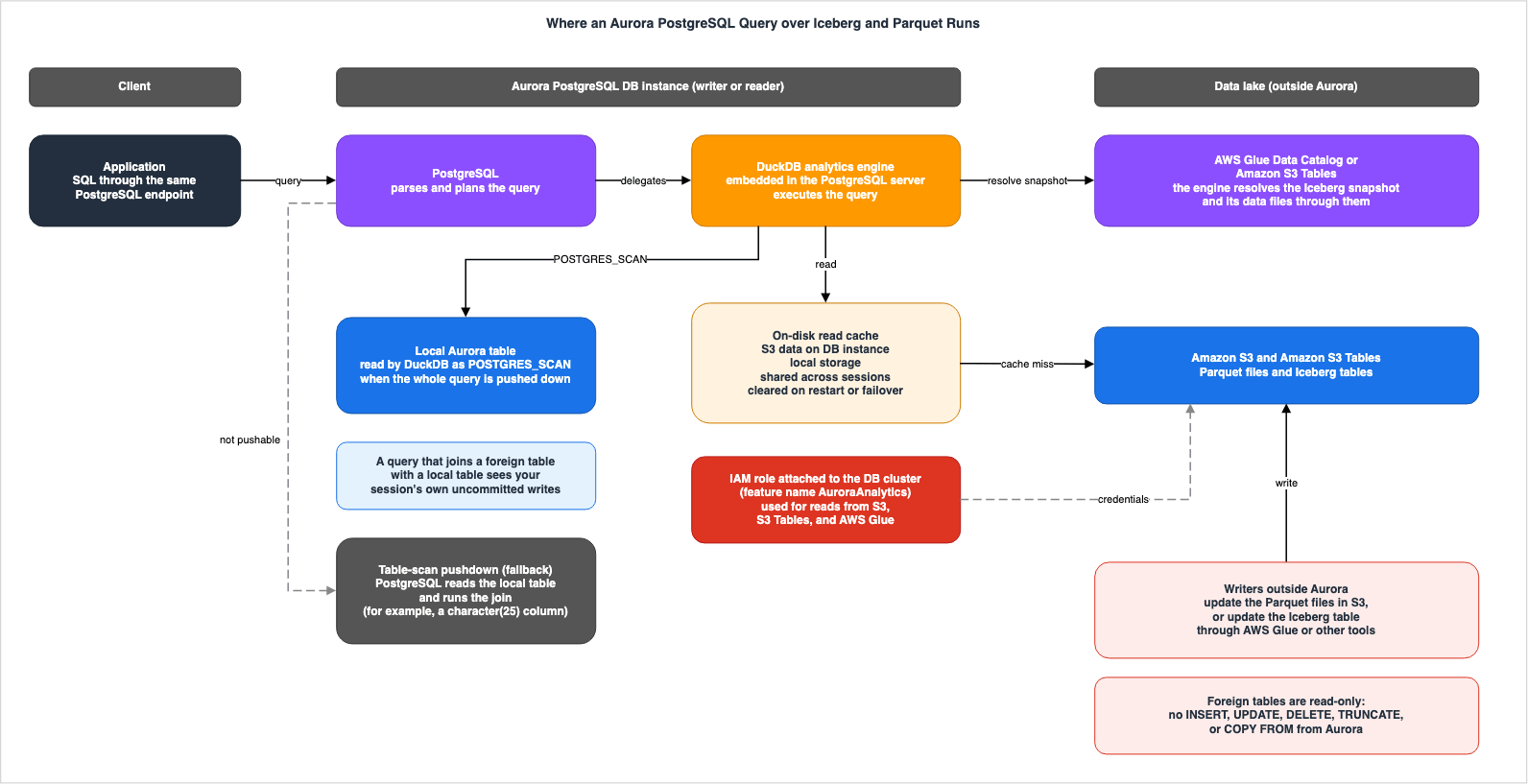
5. Writer-Reader Table, Part 1 — Who Writes Each Table and Who Can Delete It
This section shows Part 1 of the Writer-Reader Table and reads, row by row, what the sources say about who writes and who can delete.5.1 Writer-Reader Table, Part 1
| Table | Who Writes It | Who Can Delete It | Where the Source Says So |
|---|---|---|---|
| Foreign table over Parquet (s3:// URI or AWS Glue ARN) | States: Processes outside Aurora update the source files in S3 ("update the source files in Amazon S3 (for Parquet)"). States: The foreign table does not accept INSERT, UPDATE, DELETE, TRUNCATE, or COPY FROM operations. | States: Only the table owner can delete the foreign table definition with DROP FOREIGN TABLE. The source does not say. Whether DROP FOREIGN TABLE touches the data in S3. General rule only: A foreign table holds only the schema and the location, and ALTER does not touch the data in S3. | Aurora User Guide (Limitations, Working with foreign tables, How it works) |
| Foreign table over an Iceberg table (s3:// URI, AWS Glue ARN, or S3 Tables ARN) | States: Processes outside Aurora update the Iceberg table with AWS Glue or other tools ("update your Iceberg table through AWS Glue or other tools"). States: The foreign table is read-only (same as the previous row). | Same as the previous row. | Aurora User Guide (Limitations, Working with foreign tables, How it works) |
| Local Aurora table joined in the same query | The source does not say. (The user guide chapter does not discuss who writes local tables. They are regular Aurora PostgreSQL tables.) | The source does not say. (Same as above.) | Aurora User Guide (How it works) |
| Aurora table or PostgreSQL materialized view filled from a foreign table | States: CREATE TABLE AS SELECT, CREATE MATERIALIZED VIEW AS SELECT, INSERT INTO ... SELECT, and MERGE INTO write the results of reading the foreign table into Aurora. States (AWS News Blog): "The materialization commands write data into Aurora, so they run on the writer instance." (The blog's examples do not include CREATE MATERIALIZED VIEW AS SELECT.) General rule only: The page on adding Aurora Replicas in the Aurora User Guide states that the primary DB instance (the writer) makes all data changes to the cluster volume. The source does not say. No statement saying that materialization runs on the writer was found in this feature's chapter. | The source does not say. | Aurora User Guide (How it works, overview page, Adding Aurora Replicas to a DB cluster), AWS News Blog (2026-09-30) |
5.2 Processes Outside Aurora Write the Data Behind a Foreign Table
In the two foreign table rows, processes outside Aurora write the data (Section 3.3). Aurora only reads, and it cannot change the data in the lake through a foreign table.This matters for the design of the reading side. A foreign table definition does not know who the writer is (Section 3.3). When and by whom a lake table was written is decided outside Aurora. For example, if the table uses the Iceberg format, the writer might be an AWS Glue job or another engine. What the reading side decides in a foreign table definition is which location to read and, in the case of Iceberg, which snapshot to read (Section 7.3).
5.3 Who Writes Local Tables
Local tables are standard Aurora PostgreSQL tables. The user guide chapter does not discuss who writes local tables. What the chapter says about local tables is what is visible in a join with a foreign table (Section 6) and who reads the local table in a join (Section 4.4).5.4 Who Writes Materialized Tables, and Two Kinds of Materialized Views
The How it works page of the user guide states that you can:Materialize query results into a PostgreSQL table or materialized view with CREATE TABLE AS SELECT and CREATE MATERIALIZED VIEW AS SELECT.
The Use cases item on the overview page names
CREATE TABLE AS SELECT, INSERT INTO ... SELECT, and MERGE INTO as the statements that load lake data into Aurora tables for low-latency reads. What these statements write is Aurora tables, not foreign tables.The AWS News Blog states where the materialization commands run:
The materialization commands write data into Aurora, so they run on the writer instance.
No statement was found in this feature's chapter that says materialization statements run on the writer. This article uses the AWS News Blog as the source for this point. The page on adding Aurora Replicas in the Aurora User Guide also states the following as a general rule.
The primary DB instance supports read and write operations, and performs all data modifications to the cluster volume. Aurora Replicas connect to the same storage volume as the primary DB instance, but support read operations only.
The materialized views discussed here are PostgreSQL materialized views. The results are stored within Aurora. The Iceberg materialized views that Apache Iceberg Materialized Views on AWS covers keep their definitions in the Glue Data Catalog and store their results as Iceberg tables in S3. The two are different things.
5.5 What Is Deleted — The Definition or the Data
Only the table owner can executeDROP FOREIGN TABLE (Section 3.7). Since foreign tables only hold schema and location information (Section 3.1), what is deleted is the definition within PostgreSQL. However, no statement was found that names DROP and says that it does not touch the data in S3. The statement that the data in S3 is untouched is about ALTER operations (Section 3.7). In the Who Can Delete It cells of the foreign table rows in Writer-Reader Table, Part 1, this article writes the missing statement about DROP as The source does not say. and the ALTER statement as General rule only:.Deleting the data itself within S3 is an operation performed outside of Aurora, similar to writing data.
Materialized tables and PostgreSQL materialized views, like regular Aurora tables, reside within PostgreSQL. The user guide chapter does not discuss who can delete them.
6. What Your Transaction Sees
This section checks, against the sources, how queries that include foreign tables relate to Aurora transactions. Whether your session's own uncommitted writes are visible and whether the foreign table data is fixed within a transaction are separate questions.6.1 A Join with a Local Table Sees Your Session's Own Uncommitted Writes
The user guide's How it works page states the following.Queries that join foreign tables with local Aurora PostgreSQL tables run within a single process and see your session's uncommitted writes, participating in your transactions like any other PostgreSQL query.
The subject of this sentence is a query that joins a foreign table with a local table. What it sees is your session's own uncommitted writes ("your session's uncommitted writes"). And the query takes part in transactions like any other PostgreSQL query.
For example, suppose an application inserts a row into a local table within a single transaction and, before committing, runs a query that joins that table with history in the lake. According to this sentence, the join sees the row that was just inserted. This article did not test this. It is a reading of the sentence in the sources.
As described in Sections 4.4 and 4.5, a local table may be read either by the analytics engine (using
POSTGRES_SCAN) or by PostgreSQL's standard executor. The How it works sentence describes queries that join foreign tables with local tables without differentiating between these two scenarios.6.2 The Sources Do Not Say That Other Sessions' Uncommitted Writes Are Visible
What the How it works sentence says is visible is your session's own uncommitted writes. It says nothing about reading other sessions' uncommitted writes (a dirty read). Sections 2.3 and 4.2 of Transaction Isolation on AWS Databases quote the official PostgreSQL documentation on this: dirty reads do not occur in PostgreSQL, andREAD UNCOMMITTED behaves as READ COMMITTED even when it is specified.The How it works sentence says that this join query takes part in transactions "like any other PostgreSQL query." What matters for this feature is that the sentence does not exclude queries that the analytics engine executes (Section 6.1).
6.3 The AWS News Blog Sentence Does Not Say Whose Writes
The AWS News Blog (September 30, 2026) states:DuckDB is now embedded directly within Aurora PostgreSQL, so you can query live operational data (including uncommitted writes) alongside your data lake in a single query.
This sentence does not specify whose uncommitted writes are being referenced. It has no words that correspond to the user guide's "your session's". Read alone, this sentence could be taken to allow reading other sessions' uncommitted writes. This article uses the user guide's How it works sentence as the source for what is visible, and does not rely on the AWS News Blog sentence.
6.4 Is the Foreign Table Data Fixed Within a Transaction?
For local tables, PostgreSQL's isolation level determines what is visible within a single transaction. For foreign tables, no statement that says the same thing was found. When the same foreign table is read twice within one transaction, do both reads read the same Iceberg snapshot? If a process outside Aurora updates the Iceberg table between the two reads, does the second read see the new snapshot? This article searched the sources in Section 1.3 forisolation, REPEATABLE, SERIALIZABLE, transaction, and snapshot, and found no statement.The How it works page states that the engine resolves Iceberg tables to corresponding snapshots and data files through the Glue Data Catalog or S3 Tables (Section 7.3). However, this sentence has no word for when the resolution happens, and says nothing about transactions. This article states neither that foreign table data is fixed within a transaction nor that it is not.
Within what the sources say, there is a way to fix the snapshot that is read. For Iceberg tables, the foreign table definition can include a
snapshot or timestamp option, which determines the snapshot that is read (Section 7.3). It is also possible to subsequently specify a snapshot or timestamp using ALTER FOREIGN TABLE ... OPTIONS (SET ...) (Section 3.7). However, no statement was found on when a timestamp value changed with ALTER is resolved (Section 12.3).6.5 Other Behavior Related to Transactions
On operations with foreign tables that involve transactions or locks, the sources say the following.- Row locks. Row-locking clauses on a foreign table are accepted, but no row-level lock is taken on the external data (Section 3.4).
IMPORT FOREIGN SCHEMA. It runs theCREATE FOREIGN TABLEstatements it generates in a single transaction, and if any one of them fails, the entire import rolls back (Section 3.7).- Locking for definition changes. The Global Database page says about
ALTER FOREIGN TABLE ... OPTIONS (SET ...): "It takes a brief ACCESS EXCLUSIVE lock on that single foreign table. Therefore, it is blocked by any in-flight query on the same table." Statements that modify the target of a foreign table will wait for any currently running queries accessing that table to complete. - Query cancellation due to memory protection. When memory across the instance becomes critical, Aurora's memory protection cancels running queries (Section 8.5). The error then includes
DETAIL: Transaction cancelled due to insufficient memory.
7. Writer-Reader Table, Part 2 — Who Can Read Each Table and How Current a Read Is
This section shows Part 2 of the Writer-Reader Table and reads, row by row, what the sources say about who reads and how current a read is.7.1 Writer-Reader Table, Part 2
| Table | Who Can Read It | How Current a Read Is | Where the Source Says So |
|---|---|---|---|
| Foreign table over Parquet (s3:// URI or AWS Glue ARN) | States: PostgreSQL roles that were given SELECT on the foreign table with GRANT. The analytics engine reads S3 with the IAM role attached to the DB cluster. States: The Dedicated reader page recommends reading on a dedicated reader instance for analytics-heavy workloads. States (AWS News Blog): Names both the writer and readers. States: Secondary DB clusters of a Global Database can also read it. | States: New Parquet files added to an existing prefix are discovered on the next query. When an existing file is overwritten, "an open connection can read stale data briefly because it holds a cached file handle." (Reconnecting shows the new data.) States: A restart or a failover clears the on-disk read cache. | Aurora User Guide (Working with foreign tables, How it works, Resource management, Dedicated reader, Global Database), AWS News Blog (2026-09-30) |
| Foreign table over an Iceberg table (s3:// URI, AWS Glue ARN, or S3 Tables ARN) | Same as the previous row. States: To read tables in S3 Tables, four s3tables actions are required (Section 10.2 for handling tables in different accounts). | States: If snapshot and timestamp are omitted, the latest snapshot is read. snapshot is specified by ID. timestamp is "Resolved at table creation time." States: The engine resolves the corresponding snapshot and data files through either the Glue Data Catalog or S3 Tables (the S3 URI path is not named). The on-disk read cache does not affect which snapshot is read. The source does not say. Whether two reads within one transaction read the same snapshot. | Aurora User Guide (Working with foreign tables, How it works, Resource management, Dedicated reader, Global Database, IAM policies reference), AWS News Blog (2026-09-30) |
| Local Aurora table joined in the same query | States: If the entire query is pushed down, the analytics engine itself reads the data (POSTGRES_SCAN). If full pushdown does not happen, the standard PostgreSQL executor reads it. | States: Queries that join a foreign table see your session's own uncommitted writes ("see your session's uncommitted writes"). | Aurora User Guide (How it works, Execution plan) |
| Aurora table or PostgreSQL materialized view filled from a foreign table | States (AWS News Blog): "The materialized table lives in Aurora and is queried like any other PostgreSQL table". | The source does not say. (The freshness of the copy.) General rule only: The official PostgreSQL documentation states that REFRESH MATERIALIZED VIEW re-executes the defining query and replaces the contents ("the backing query is executed to provide the new data"). No statement was found that names foreign tables. | AWS News Blog (2026-09-30), PostgreSQL 17 documentation (REFRESH MATERIALIZED VIEW) |
7.2 Read Permissions Have Two Layers
PostgreSQL permissions decide whether you can read a foreign table. The Working with foreign tables page states that foreign tables follow standard PostgreSQL permissions, and you can manage which roles have read access usingGRANT and REVOKE.On the other hand, what actually reads S3 is the analytics engine, using the IAM role attached to the DB cluster (Section 4.1). The credential that the sources name for reading S3 is this IAM role. No statement was found about IAM credentials for each PostgreSQL user. To read tables within a federated catalog, the IAM role also requires the
lakeformation:GetDataAccess permission (Section 10.2). The overview page describes reading the lake through PostgreSQL as a benefit, as follows.Consistent security and governance: Data lake access flows through PostgreSQL, so the roles, permissions, audit logs, and network controls you already use for Aurora extend automatically to foreign table queries.
In this article's reading,
SELECT on the foreign tables decides who can read the lake data through Aurora. And what the cluster's IAM role can read becomes what anyone who can create foreign tables in that cluster can point to. Creating foreign tables requires CREATE permissions on the schema and USAGE permissions on the foreign server (Section 10.1). The user guide's statement that pointing a foreign table at a new location is equivalent to creating a new one (Section 3.7) bears on this scope.As for which instances read foreign tables, the Dedicated reader page recommends running foreign table queries on dedicated Aurora reader instances for analytics-heavy workloads. The AWS News Blog states, "The read queries can run on any Aurora PostgreSQL instance in your cluster, whether the writer or a read replica". The Global Database page provides instructions on connecting to a secondary DB cluster to read foreign tables (Section 9).
Even if you can read a foreign table, you may not be able to use the functions that inspect Iceberg metadata. The SQL functions reference page says that only the table owner or
rds_superuser can use three functions such as aurora_analytics_iceberg_snapshots() ("SELECT on the table alone is not sufficient.").7.3 Which Snapshot an Iceberg Table Reads
The options in its definition decide which snapshot an Iceberg foreign table reads. The Working with foreign tables page describessnapshot as follows.Optional. (Iceberg only) The Iceberg snapshot ID to query. If both snapshot and timestamp are omitted, Aurora PostgreSQL uses the latest snapshot. Mutually exclusive with timestamp.
The same page describes
timestamp as follows.Optional. (Iceberg only) Query the Iceberg table as of a specific point in time. Accepts any PostgreSQL-compatible timestamp format (for example, '2024-01-01 12:00:00'), a date (for example, '2024-01-01'), epoch milliseconds (for example, '1704110400000'), or special keywords (now, today, tomorrow, yesterday). Resolved at table creation time. Mutually exclusive with snapshot.
The user guide gives the following example of
timestamp:CREATE FOREIGN TABLE ft_orders_timetravel ()
SERVER aurora_analytics_server
OPTIONS (
location 'arn:aws:glue:us-east-1:123456789012:table/my_database/orders',
timestamp '2024-06-15 12:00:00'
);This article separates three cases.
- When a
snapshotis specified: The table reads the snapshot with the specified ID. - When a
timestampis specified: The value is resolved at the time the foreign table is created. Even with a keyword such asnoworyesterday, the value is the one at the time the table was created, not "now" at query time. The same page reiterates, "The timestamp value is resolved at table creation time." - When both are omitted: The table reads the latest snapshot.
For the case where both are omitted, the sources have two more sentences. In the paragraph after the one that describes the query flow, the How it works page says the following.
For Iceberg tables, the engine resolves the corresponding snapshot and its data files through the AWS Glue Data Catalog or Amazon S3 Tables.
This sentence names the Glue Data Catalog and S3 Tables, and does not name the path through an S3 URI. It also has no word for when the resolution happens. On the cache, the Resource management page says "for Iceberg tables the cache never affects which snapshot you see."
Read together with "the latest snapshot" for the case where both are omitted, these two sentences suggest that each query resolves the latest snapshot at that time. However, no statement was found that says so in one sentence. This article treats it as an inference. No statement was found about reading twice within one transaction either (Section 6.4), or about what the latest snapshot means when an S3 URI points directly to a
metadata.json file (Section 12.3).To determine which snapshots are available, you can use the
aurora_analytics_iceberg_snapshots() function. This function returns, for each snapshot, the sequence_number, snapshot_id, timestamp_ms, and manifest_list.For tables federated with the AWS Glue Data Catalog, the catalog federation page of the AWS Lake Formation Developer Guide says, "When you query a federated table, Data Catalog discovers the latest table information in the remote catalog at query time". This statement is a general rule for federation and does not name Aurora. Section 5.1 of The Iceberg Catalog Layer on AWS covers federation and resolution at query time.
7.4 When a Parquet File Is Added or Overwritten
For Parquet, the Resource management page says the following.New Parquet files added to an existing Amazon S3 prefix are discovered and cached on the next query, and for Iceberg tables the cache never affects which snapshot you see. If you overwrite an existing Parquet file, an open connection can read stale data briefly because it holds a cached file handle. To see the updated data right away, reconnect. You do not need to clear the cache.
Added files are discovered on the next query. When an existing file is overwritten, an open connection holds a cached file handle and can read stale data for a short time. To see the new data right away, reconnect. You do not need to clear the on-disk read cache.
The cause of reading stale data that is named here is the file handle that the connection holds. The same passage says that you do not need to clear the on-disk read cache. How long is described only as "briefly".
7.5 The On-Disk Read Cache Is on the DB Instance's Local Storage and Is Cleared on Restart
The How it works page says that frequently accessed data is cached on local storage and shared across sessions ("Frequently accessed data is cached on the DB instance's local storage and shared across sessions"). The key concepts on the same page say that all sessions on that DB instance share the cache ("The cache is shared across all sessions on the DB instance."). The SQL functions reference page gives the scope ofaurora_analytics_cache_size() as "Whole instance, current". About the time after a switchover, the Monitoring page says, "A low AuroraAnalyticsCacheHitRatio on the new primary is expected until its cache warms." From these statements, this article reads that the cache exists per DB instance, and that the writer and each reader have their own caches.The cache is cleared during restarts and failovers. The Resource management page and the Limitations page confirm this. The Monitoring page says that the cache does not survive an instance replacement either ("The on-disk read cache does not survive an instance restart, replacement, or failover."), and it then separates two cases. For classes with an NVMe instance store, the instance store is erased. For classes that use only Amazon EBS, the EBS volume persists, but the cache is invalidated. In either case, the cache starts empty. The Global Database page indicates that during a switchover or failover, the cache is "not persisted or transferred".
When the cache is empty, the first queries read from S3 again. For latency-sensitive workloads, the Operational best practices page recommends that after a restart, you first run a representative set of queries to populate the cache before production traffic resumes. The cache does not affect which snapshot of the Iceberg table is read (Section 7.3).
7.6 How Current a Materialized Copy Is
No statement was found in the sources for this feature on how current a read of a materialized Aurora table or a PostgreSQL materialized view is.On refreshing PostgreSQL materialized views, the official PostgreSQL documentation states a general rule.
REFRESH MATERIALIZED VIEW completely replaces the contents of a materialized view.
The same page says that when
WITH DATA is specified or applies by default, the backing query is executed to produce the new data ("the backing query is executed to provide the new data"). This statement does not name foreign tables. This article treats it as an inference from this general rule that running REFRESH MATERIALIZED VIEW on a PostgreSQL materialized view built from a foreign table reads the lake again.The Use cases item on the overview page describes a data tiering approach where new operational data is placed in Aurora, while older historical data is migrated to the data lake in Iceberg or Parquet formats using existing pipelines. Here, the existing pipelines write the older data to the data lake, while Aurora continues to read the older data through foreign tables.
8. What Reaches the Writer and the Readers — The Writer Impact Table
This section lists, for each location where foreign table read queries are executed, the resources used by that instance and what ultimately reaches the writer. On what a long query on a reader does to the writer, the sources disagree.8.1 The Writer Impact Table
| Where the Query Runs | What It Uses on That Instance | What Reaches the Writer | What the Source Recommends | Where the Source Says So |
|---|---|---|---|---|
| Foreign table query on the writer instance | States: Memory within aurora_analytics.query_mem, worker threads, and local storage (the read cache and spill files). Sources disagree: Whether it uses shared_buffers (Section 12.1). | General rule only: "Foreign table queries compete with the rest of the instance's traffic for CPU and memory." (The writer is not named.) General rule only: On mixed workload instances, heavy spilling can lead to local storage I/O contention, which may indirectly impact local PostgreSQL operations. | States: Run analytics-heavy workloads on a dedicated reader "so they do not interrupt the OLTP workload on your writer." On a shared instance, keep query_mem low. | Aurora User Guide (Choosing the right DB instance class, Dedicated reader, Tuning query_mem, Resource management, Execution plan) |
| Foreign table query on a reader reached through the cluster reader endpoint | States: The cluster reader endpoint distributes connections across all readers and sends foreign table queries to instances tuned for other workloads. | Sources disagree: (Same as the row below, Section 8.2). | States: Connect to the instance endpoint of the specific reader, or to a custom endpoint, rather than to the cluster reader endpoint. | Aurora User Guide (Dedicated reader, Monitoring and troubleshooting) |
| Foreign table query on a dedicated analytics reader | States: On this reader, you can reduce shared_buffers and increase query_mem. General rule only: Aurora serverless instances do not use the value you specify for shared_buffers (Section 8.7). | Sources disagree: The Dedicated reader page states that a long-running query "holds back dead tuple cleanup on the writer", while the Monitoring page states that long-running queries "can prevent autovacuum on the writer from reclaiming dead tuples". The Monitoring page also says, "Running analytical workloads on a dedicated reader isolates this impact". General rule only: "hot_standby_feedback is enabled by default and unmodifiable in Aurora PostgreSQL." | States: Set the promotion tier to 15, the lowest priority. Configure statement_timeout and monitor the writer's oldest_reader_feedback_xid_age. | Aurora User Guide (Dedicated reader, Monitoring and troubleshooting, Resolving identifiable vacuum blockers, Aurora serverless performance and scaling) |
| Foreign table query on a reader in an Aurora Global Database secondary cluster | States: Reads S3 in the Region named in the definition. If that differs from the secondary's Region, it reads across Regions. | General rule only: The vacuum blockers page adds "(also applicable to reader instances in Aurora Global Database)" to its statement that reader queries keep the writer from removing dead rows. This feature's pages do not name secondary readers. | States: Provide the IAM role association, the IAM policy, and VPC networking in each Region. | Aurora User Guide (Global Database, Resolving identifiable vacuum blockers) |
| Materialization (CREATE TABLE AS SELECT, INSERT INTO ... SELECT, MERGE INTO, CREATE MATERIALIZED VIEW AS SELECT) | States (AWS News Blog): Runs on the writer instance (the blog's examples are CREATE TABLE AS SELECT, INSERT INTO ... SELECT, and MERGE INTO; it does not name CREATE MATERIALIZED VIEW AS SELECT). | States (AWS News Blog): "The materialization commands write data into Aurora, so they run on the writer instance." | The source does not say. | AWS News Blog (2026-09-30) |
In this article's reading, because a materialization statement reads the foreign table while it runs on the writer, the resources in the first row are then used on the writer.
8.2 Long Queries on a Reader and Dead Tuples on the Writer
Three pages of the user guide write about what a long query on a reader does to the writer. They differ in strength and in whether a dedicated reader isolates the effect.The Dedicated reader page recommends, at the outset, that for analytics-heavy workloads, foreign table queries should be run on a dedicated Aurora reader instance to prevent them from disrupting the writer's OLTP operations ("run your foreign table queries on a dedicated Aurora reader instance so they do not interrupt the OLTP workload on your writer"). Later on the same page, it states:
Impact on the writer: A long-running foreign table query on a reader holds back dead tuple cleanup on the writer. While the query runs, the writer cannot reclaim the dead tuples that its vacuum normally removes, so they accumulate and degrade performance on the writer. Because foreign table queries can run for minutes or hours, this effect is more pronounced on an analytics reader.
The Monitoring page says the following.
Long-running analytical queries on reader instances hold an xmin snapshot open, which can prevent autovacuum on the writer from reclaiming dead tuples. Running analytical workloads on a dedicated reader isolates this impact; for more information, see Using a dedicated reader instance for analytics.
The Dedicated reader page opens by recommending a dedicated reader so as not to disrupt the writer, and in its section on long queries it states flatly that a long query "holds back" cleanup and that the effect is "more pronounced" on an analytics reader. The Monitoring page writes "can prevent", a possibility, and says that running analytical work on a dedicated reader "isolates" this impact. The Monitoring page does not say what it isolates the impact from.
The vacuum blockers page (
Resolving identifiable vacuum blockers in Aurora PostgreSQL), which the Dedicated reader page links to for details, says the following about reader instances.When the hot_standby_feedback setting is enabled, it prevents autovacuum on the writer instance from removing dead rows that might still be needed by queries running on the reader instance.
The same page says in a note, "hot_standby_feedback is enabled by default and unmodifiable in Aurora PostgreSQL." This page is not about foreign tables and does not name foreign table queries. This article only places the statements of the three pages side by side and does not decide which is the current behavior. Section 8.2 of PostgreSQL Autovacuum, Bloat, and Planner Statistics on Aurora and RDS covers how reader queries keep the writer from reclaiming rows.
There are recommendations that two of the pages share. Both the Dedicated reader page and the Monitoring page recommend setting a limit on the length of individual queries using the
statement_timeout parameter. The Dedicated reader page also recommends monitoring the writer's oldest_reader_feedback_xid_age using either Database Insights or Amazon CloudWatch.8.3 Replication Conflicts on the Reader
The same Dedicated reader page also describes what happens on the reader. A foreign table query also reads local catalog tables and can join with regular PostgreSQL tables. So, like any other query, it pins page buffers on the reader.While those buffers are pinned, DDL or vacuum operations on the writer can trigger replication conflicts (snapshot, lock, or buffer pin) that cancel the query or restart the reader.
The same page says that because foreign table queries tend to run longer, they are more likely to run into these conflicts.
8.4 Where to Place the Reader
For analytics-heavy workloads, the Dedicated reader page recommends three things.- Reduce
shared_buffers. The Dedicated reader page says that queries reading foreign tables do not useshared_buffers, and that on an analytics reader you can reduceshared_buffersand increasequery_mem. However, the sources disagree about whether a foreign table query usesshared_bufferswhen it reads local tables (Section 12.1). For Aurora serverless instances, see Section 8.7. - Set the promotion tier to 15. A reader tuned for analytics makes a poor writer if it is promoted in a failover. Set its promotion tier to 15, the lowest priority, so that a reader tuned for transactions is promoted first. If no other instance is available, Aurora can still promote this reader as a last resort. Section 5.3 of the Amazon RDS and Aurora High Availability Guide covers promotion tiers.
- Connect to the instance endpoint or a custom endpoint. The cluster's reader endpoint distributes connections across all readers, so foreign table queries reach instances tuned for other workloads.
8.5 Memory — query_mem, shared_buffers, and Memory Protection
The parameter aurora_analytics.query_mem determines the memory that queries reading foreign tables use. The Resource management page describes this as the upper limit of memory that a single query can use. If intermediate results exceed this limit, the query will spill data to local storage and continue without failing. The same page also says that spilling does not guarantee completion ("it does not guarantee completion").The default value for
query_mem is determined based on the instance's memory. The Configuration parameters page states that the default value is the smallest of three values.query_mem = LEAST(
48 GiB, -- ceiling for the derived default
DBInstanceClassMemory x 12.5%, -- lower bound on smaller instances
DBInstanceClassMemory x 3.125% + 8 GiB -- lower bound on larger instances
)query_mem can be set at four levels: parameter group, database, role, and session. The Tuning query_mem page recommends setting it at the lowest level that resolves the issue. The table on the Configuration parameters page indicates that "Any user" can modify query_mem. Using the SET command within a session, any user can change the query_mem value for their own queries. In this article's reading, the parameter group value is a default and does not work as a per-user cap. There is an instance-level limit, and the same page states, "Setting a larger value succeeds, but the engine still uses the capped value."On memory allocation, the Resource management page states that
shared_buffers is, by default, allocated approximately two-thirds of the instance's memory. Queries that read foreign tables do not use shared_buffers ("Queries involving foreign tables do not use shared_buffers"). Therefore, the amount of memory available for queries involving foreign tables is roughly the instance's total memory minus the amount allocated to shared_buffers. Conversely, the Execution plan page, in an example where full pushdown does not happen, says that local tables are read using "PostgreSQL's standard executor (shared_buffers → Aurora Storage)" (Section 12.1).The Concurrency sizing page states that, as a guideline, with the default
shared_buffers, the total query_mem for concurrently running queries should be kept within approximately 30 percent of the instance's total memory. The note on the Configuration parameters page, however, says, without the shared_buffers condition, that the product of the number of concurrent sessions and the query_mem value should not exceed approximately 30 percent. The Choosing the right DB instance class page advises estimating memory usage based on peak usage, rather than assuming that every query uses its full query_mem ("budget for peak memory rather than assuming every query uses the full query_mem").When memory across the instance becomes critical, Aurora's memory protection cancels running queries. It acts on queries that are running and using memory, not on queries that have not started ("not on queries that have not started yet"). The Resource management page explains that this protection comes from Aurora PostgreSQL's improved memory management (
rds.enable_memory_management, enabled by default) and recommends keeping this feature enabled. The same page also states that canceled queries will receive an error, but the DB instance will remain stable, and other sessions will continue uninterrupted. It also says that queries run by users with the rds_superuser role are not subject to this cancellation.The sources describe the cap on
query_mem in two different ways (Section 12.1).8.6 Local Storage — The Cache and Spills Share the Same Space
Both the on-disk read cache and temporary files used for spills use the instance's local storage. The Resource management page states the following about instances running mixed workloads.OLTP impact: On instances running mixed workloads, heavy spilling can create local storage I/O contention that indirectly affects local PostgreSQL operations.
The Monitoring page provides information specific to instance classes. For classes that only use Amazon EBS (such as db.r8g, db.r7g, and db.r7i), the read cache and spill files share the EBS volume with the rest of the database, and the page says, "Analytical I/O therefore competes with normal PostgreSQL I/O". For classes that have an NVMe instance store (such as db.r8gd and db.r6gd), the page says that the read cache and spill files are placed on the instance store rather than the EBS volume. The sources disagree about the conditions for placing the on-disk read cache on NVMe (Section 12.1).
When the local storage used for spill files is exhausted, queries will fail with a
No space left on device error. The Monitoring page notes that, because query_mem is a per-query limit and concurrent queries each spill, it is often the concurrent execution of multiple queries, rather than a single large query, that triggers the exhaustion of local storage.8.7 Aurora serverless
The Limitations page describes Aurora serverless as follows:Serverless scaling considerations: With Aurora Serverless v2 deployments, running multiple resource-intensive analytical queries concurrently might exceed the rate at which the DB instance can scale up.
The Aurora serverless performance and scaling page of the Aurora User Guide says that, for Aurora PostgreSQL,
shared_buffers is resized dynamically during scaling and that custom values you specify are not used ("Aurora serverless doesn't use any custom parameter values that you specify"). This page does not name foreign tables. No statement was found on how the recommendation in Section 8.4 to reduce shared_buffers applies to an Aurora serverless reader.This article does not delve into the details of how Aurora serverless capacity is managed. No statement was found either on how the default
query_mem for foreign table queries is set on Aurora serverless (Section 12.3). query_mem is also not in the list of parameters that the Aurora serverless performance and scaling page says are computed from the maximum capacity. As a general rule, the same page says, in its section on parameters that Aurora adjusts during scaling (for Aurora PostgreSQL, shared_buffers), "For all parameters other than those listed here, Aurora serverless DB instances work the same as provisioned DB instances." It does not name query_mem. What you set, what Aurora decides within your range, and which parameters the maximum ACU fixes are covered in How Amazon Aurora serverless Decides Its Capacity - What You Set, What Aurora Decides Within Your Range, What the Maximum ACU Fixes, and Where Each Shows Up.9. Aurora Global Database and Regions
This section checks, against the user guide's Global Database page, what replicates when foreign tables are used with an Aurora Global Database, what each Region needs, and which Region's data is read. Section 7 of Amazon RDS and Aurora High Availability Guide covers failover design itself.9.1 For This Feature, Only the Extension and the Foreign Table Definitions Replicate
Of the resources related to this feature, the Global Database page says that only the following two replicate from the primary DB cluster to each secondary DB cluster ("Only the following replicate"). In this article's reading, the "Only" on this page is a statement about this feature's resources, set against the IAM role association, IAM policy, and VPC networking listed next.- Installation of the
aurora_analyticsextension. - Definition (DDL) of foreign tables.
The following are not replicated and must be provisioned in each Region where the secondary DB cluster resides:
- IAM role associations for the DB cluster.
- IAM policies that grant access to S3, AWS Glue, and S3 Tables.
- VPC networking (endpoints or NAT) for access to those services.
The on-disk read cache is not carried over in a switchover or failover either (Section 7.5).
Replication of the Aurora data itself follows a separate general rule. The Global Database overview page of the Aurora User Guide says, "Aurora uses the cluster storage volume and not the database engine for fast, low-overhead replication." Since materialized Aurora tables and PostgreSQL materialized views are tables within Aurora, this article reads them as falling under this general rule (replication through the cluster storage volume). This feature's pages do not name the replication of materialized tables or PostgreSQL materialized views.
This feature's Global Database page says that foreign table DDL and the extension replicate only after the secondary is attached and in sync. The same page says to install the extension and create foreign tables on the primary after the secondary is connected, so that they propagate.
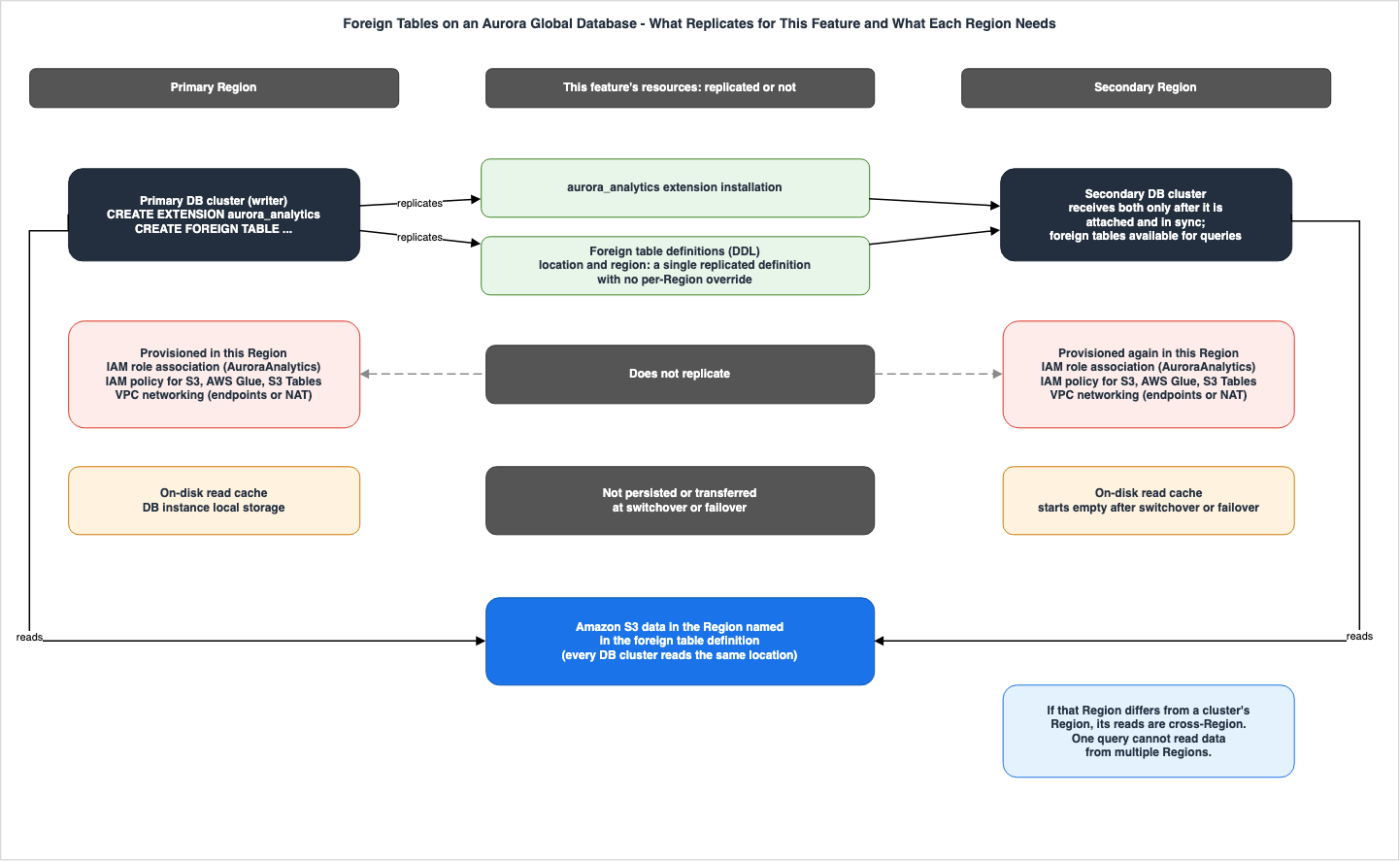
9.2 One Definition Decides Where Every Cluster Reads
The location and Region of a foreign table are written in the definition and replicated to all DB clusters in the Global Database. All DB clusters read from the same location. The Global Database page says the following.Foreign table location and region are a single replicated definition with no per-Region override. Both clusters cannot hold different Regions for the same table.
The secondary DB clusters read data from the Region specified in the definition. If that Region differs from the secondary cluster's Region, data is read across Regions. The same page says that after a switchover, repointing a foreign table location to the new primary's Region makes the former primary DB cluster read across Regions. The Monitoring page also says that no configuration lets the two Regions each read data in their own Region at the same time.
The Limitations page says that one query cannot read data from more than one Region ("You cannot access data from multiple AWS Regions within a single query."). All the S3 data that one query reads must be in the same Region.
9.3 Multi-Region Access Points and Access Points
The Global Database page states that Aurora PostgreSQL accepts onlys3:// URIs, AWS Glue table ARNs, and S3 Tables ARNs as locations, and does not accept S3 Multi-Region Access Point (MRAP) ARNs or hostnames. A list at the end of the same page says that, in addition to MRAPs, S3 access point ARNs are not accepted either. The Limitations page, as detailed in Section 12.2, only lists MRAPs.9.4 Networking in Each Region
The Global Database page says that the VPC in each Region needs the following three endpoints.| Service | Endpoint Type | Required For (Global Database Page) |
|---|---|---|
| Amazon S3 | Gateway | All Amazon S3 and Amazon S3 Tables data access |
| AWS Glue | Interface | AWS Glue Data Catalog access (Iceberg tables) |
| AWS STS | Interface | IAM role credential retrieval |
The Prerequisites page lists S3 and AWS Glue as the required endpoints. AWS STS is not listed (Section 12.1).
The Global Database page also states that VPC gateway endpoints are regional and do not reach S3 in other Regions. Cross-Region access requires either a NAT gateway, an internet egress point, or a Transit Gateway.
9.5 What Is Needed After a Switchover or Failover
The Global Database page describes the following requirements after a switchover or failover:- Wait for the IAM role to become Active. Right after a role is attached, or right after an instance starts or is promoted, foreign table queries can briefly return the error
credential to access AWS service is unavailable. - Prepare statements that repoint the location. Prepare a Region-local copy with S3 Cross-Region Replication, and prepare
ALTER FOREIGN TABLE ... OPTIONS (SET ...)statements. Running queries that read the foreign table block these statements (Section 6.5). - Accepting cross-Region reads suits only a planned switchover in which the original Region is healthy.
- The cache starts empty. The first query after a switchover will read from S3, resulting in higher latency until the cache warms up.
- Definitions changed during a switchover also replicate to the original Region after it returns. When the original primary Region recovers, Aurora adds it back to the Global Database as a secondary.
ALTER FOREIGN TABLEchanges made during the switchover or failover also replicate to it ("Any ALTER FOREIGN TABLE changes made during the switchover or failover replicate to it through global replication.").
The Monitoring page says that when queries slow down after a switchover, read-volume metrics alone cannot tell cross-Region reads from a cold cache being re-read. Aurora PostgreSQL does not emit a latency metric for reads from S3 ("Aurora PostgreSQL doesn't emit a remote-read latency metric"). The same page recommends enabling Amazon S3 Request Metrics on the bucket and monitoring the
TotalRequestLatency. For the case where the secondary Region has no route to S3, the same page says "Amazon S3 timeouts are long, with minutes of retries." It recommends setting statement_timeout and retry handling.9.6 Readers in a Secondary Cluster and the Writer in the Primary
The vacuum blockers page in Section 8.2 adds "(also applicable to reader instances in Aurora Global Database)" to its statement that reader queries keep the writer from removing dead rows. This article reads the sentence as saying that queries on readers in a Global Database secondary cluster also bear on the removal of rows on the primary's writer.This feature's Dedicated reader page and Monitoring page do not name secondary readers in their statements about dead tuples on the writer. In the Writer Impact Table, this article writes the secondary cluster row as
General rule only:.10. Permissions — The PostgreSQL Side and the AWS Side
This section checks the permissions needed to use foreign tables, on the PostgreSQL side and on the AWS side.10.1 The PostgreSQL Side
- Installing the extension.
CREATE EXTENSION aurora_analyticsrequires therds_superuserrole, or a user who has been granted therds_extensionrole and delegated this extension. Delegation is done by settingaurora_analyticsinrds.allowed_delegated_extensions. The Monitoring page says that being the database owner is not enough ("Being the database owner is not sufficient."). The extension is installed in each database where you use it. - Enabling the feature. You set
aurora_analytics.enabledin the DB cluster parameter group. The default isfalse. Because it is a dynamic parameter, the change applies without a reboot. However, the default parameter group cannot be modified, so if you create a custom parameter group and associate it with the cluster, applying that association requires a reboot of the DB instances. - Creating a foreign table. You need
CREATEon the target schema andUSAGEon the foreign serveraurora_analytics_server. - Changing or deleting a foreign table. Only the table owner can do this. Changing options also requires
USAGEon the foreign server (Section 3.7). - Reading a foreign table. You grant it with
GRANT SELECT(Section 7.2). - Changing memory and log settings. Any user can change
aurora_analytics.query_memin a session ("Any user"; Section 8.5). Only users with therds_superuserrole can change the log settings (aurora_analytics.enable_loggingandaurora_analytics.logging_level). - Using the functions. Only
rds_superusercan useaurora_analytics_clear_cache(), which clears the on-disk read cache. Only the table owner or users with therds_superuserrole can use the three functions to inspect Iceberg metadata, and the functionaurora_analytics_refresh_foreign_table(). To useaurora_analytics_remote_tables(), which lists tables in a remote catalog, you needUSAGEon the foreign server. By default,aurora_analytics_stat_statements()only returns statistics for queries executed by the user's own role; members of therds_superuserrole can view statistics for all queries.
10.2 The AWS Side — The DB Cluster's IAM Role
The analytics engine, which reads from S3, S3 Tables, and AWS Glue, uses the IAM role associated with the DB cluster. This role is configured with a trust policy that allows assumption byrds.amazonaws.com and is associated with the DB cluster with the feature name AuroraAnalytics. The association is asynchronous, and the role can be used once its status changes from PENDING to ACTIVE. The IAM policies reference page shows a trust policy example that uses the condition keys aws:SourceAccount and aws:SourceArn so that the role can be assumed only on behalf of your own cluster.The permissions required for the role vary depending on the data format and access path. The two columns for the access path and the permissions, taken from the table on the IAM policies reference page, are as follows (column names and values are as in the source).
| Data Format and Access Path | Required Permissions |
|---|---|
| Apache Parquet, single file | s3:GetObject |
| Apache Parquet, folder or wildcard path | s3:GetObject, s3:ListBucket |
| Apache Iceberg, AWS Glue Data Catalog | glue:GetTable, s3:GetObject |
| Apache Iceberg, AWS Glue federated catalog (remote catalogs such as Snowflake and Databricks) | lakeformation:GetDataAccess, glue:GetTable, s3:GetObject |
| Apache Parquet, AWS Glue Data Catalog (crawler-registered) | glue:GetTable, s3:GetObject, s3:ListBucket |
| Apache Iceberg, Amazon S3 Tables through AWS Glue | glue:GetTable, s3tables:GetTable, s3tables:GetTableBucket, s3tables:GetTableData, s3tables:GetNamespace |
| Apache Iceberg, Amazon S3 Tables by table ARN | s3tables:GetTable, s3tables:GetTableBucket, s3tables:GetTableData, s3tables:GetNamespace |
| Any of the preceding, with SSE-KMS encryption | + kms:Decrypt |
The same page lists three points that affect how much you need to grant.
- The
s3:ListBucketpermission is only required when searching for files. Iceberg tables do not require listing because their manifests contain the exact keys for the data files. - S3 Tables needs four
s3tablesactions, not one ("Amazon S3 Tables requires four s3tables actions, not one."). The table bucket, the namespace, the table metadata, and the table data are each authorized separately. Neither access path requiress3:GetObjectors3:ListBucket. For tables in a different account, you can grants3tables:GetTableBucketands3tables:GetNamespacein the data owner's table bucket policy, while only includings3tables:GetTableands3tables:GetTableDatain your own IAM policy. - To read data from a different account, both the data owner's account resource policy and your own account's IAM policy must grant the necessary permissions.
The Prerequisites page mentions that
IMPORT FOREIGN SCHEMA (requires glue:GetTables or s3tables:ListTables), access to data in a different account, resource policy-based access, and tables managed by Lake Formation all require additional permissions.The IAM policies reference page suggests, as a best practice, that if different databases or users access different data in S3, you consider using separate IAM roles for each scope ("consider using separate IAM roles for each scope"). No statement was found on how to use different roles for different foreign tables or users in one DB cluster (Section 12.3).
10.3 The Outbound IAM Role and Inbound IAM Authentication
The IAM role in this article is for the DB cluster's outbound access to S3, S3 Tables, and AWS Glue. It is distinct from IAM authentication, in which database users connect to the database with IAM credentials. IAM Authentication to Databases, Caches, and Streams on AWS covers inbound IAM authentication.For foreign table queries, the credential that the sources name for reading the lake is the DB cluster's IAM role (Section 7.2). No statement was found that the lake is read with the IAM credentials of the user who connected to the database.
10.4 Fine-Grained Permissions in AWS Lake Formation
To read Iceberg tables in an external catalog federated into the AWS Glue Data Catalog, the IAM role needslakeformation:GetDataAccess (the table in Section 10.2). Tables managed by Lake Formation need additional permissions (Section 10.2).On the other hand, no statement was found on whether Aurora applies fine-grained Lake Formation permissions at the row or column level to its queries. At its start, the catalog federation page of the Lake Formation Developer Guide lists the engines that can use federation, "including Amazon Redshift, Amazon EMR, Amazon Athena, AWS Glue, third-party engines like Apache Spark, and more." This list is open, ending with "and more." On fine-grained permissions, the following paragraph on the same page states that Lake Formation issues credentials "allowing the engines to apply fine-grained permissions". This paragraph names Amazon Athena, Amazon Redshift, and Amazon EMR as engines. Neither list mentions Aurora. Section 7.4 of The Iceberg Catalog Layer on AWS covers how engines declare the types of permissions they can apply. This article states neither that Aurora applies fine-grained permissions nor that it does not.
11. A Small Query Layer Inside the Operational Database, and Version Deadlines
This section checks, in the user guide's Use cases, what this feature is described as doing inside an operational database. It then gives one sentence about DuckLabs, and the supported versions and their deadlines.11.1 Four Use Cases the User Guide Lists
The overview page of the user guide lists four use cases. This article lists them as the sources write them and does not evaluate their effects.- Enrich operational queries with data lake data. Directly join Iceberg or Parquet data in the lake with Aurora tables using a single query. For example, combine support cases currently being handled in Aurora with customer purchase history and past interactions stored in the data lake.
- Building agentic AI applications. Read both operational data and historical data from a single PostgreSQL endpoint using SQL.
- Architecture simplification. When data needs to be in Aurora for low-latency reads, load data directly from the data lake to Aurora tables using
CREATE TABLE AS SELECT,INSERT INTO ... SELECT, andMERGE INTO. - Data tiering. Keep new operational data in Aurora and move older history to the data lake using existing pipelines. Aurora continues to read older data through foreign tables.
In this article's reading, in all four scenarios, writing data to the data lake is performed outside of Aurora. On the Aurora side, what is written is the Aurora tables that materialization statements write. Foreign tables within Aurora represent a layer that reads data from the data lake, but do not write to it.
The Benefits item on the same page names improved performance. This article leaves that wording to the source and does not evaluate performance.
11.2 DuckLabs and DuckDB
The AWS News Blog (September 30, 2026) states:DuckLabs, the team that maintains the DuckDB project, recently joined Amazon, and this capability is an example of how the efficiency of DuckDB is being integrated into our services.
AWS Acquisitions History and Timeline covers Amazon's agreement to acquire DuckLabs, and how the company and the open-source project are handled separately. No statement was found on the version of DuckDB embedded in Aurora (Section 12.3). The user guide's Tutorial page shows
1.0 as an example version of the aurora_analytics extension.11.3 Supported Versions and Their Deadlines
The overview page for the user guide specifies the supported versions as follows:This capability is available on Aurora PostgreSQL 17.11 or higher, and 18.6 or higher, including Aurora Serverless v2.
This article keeps the version condition. The feature is available on Aurora PostgreSQL 17.11 or higher, and 18.6 or higher, not simply on Aurora PostgreSQL 17. The Aurora PostgreSQL release calendar, as of October 6, 2026, includes the following dates:
| Minor Version | Aurora Release Date | Aurora End of Standard Support Date |
|---|---|---|
| 18.6 | 2026-09-29 | 2028-02-28 |
| 17.11 | 2026-09-29 | 2028-02-28 |
| 17.7 (LTS) | 2025-12-18 | 2030-02-28 |
The long-term support (LTS) version for the Aurora PostgreSQL 17 series is 17.7. Note that 17.7 is a lower version than 17.11, the minimum version required for this feature. The standard support end dates in the table above are specific to each minor version. For the major versions, Aurora PostgreSQL 17 has a standard support end date of February 28, 2030, and version 18 has a standard support end date of February 28, 2031.
No mention of
aurora_analytics was found in the 17.11 and 18.6 sections of the Aurora PostgreSQL release notes. It was not found on the extension pages of the release notes and the user guide either. Among the sources this article read, the ones that cover this feature are the user guide chapter and its document history (September 30, 2026), What's New, and the AWS News Blog.On Regions, What's New (September 30, 2026) states "in all AWS commercial and GovCloud (US) Regions," and the AWS News Blog also says that it is available in all commercial Regions and the AWS GovCloud (US) Regions. The Limitations page of the user guide directs users to the overview page for supported versions, instance classes, and Regions. However, as of October 6, 2026, the overview page gives only the version requirements (including the mention of Aurora Serverless v2) and has no list of instance classes or Regions.
12. Where the Sources Disagree, and Where No Statement Was Found
This section places the points where the sources say different things in two tables, and then lists the points where no statement was found. In both tables, this article does not call either source wrong, nor say which is the current behavior.12.1 The Writer, Networking, Local Storage, and Memory
| Topic | One Source | Another Source | How This Article Writes It |
|---|---|---|---|
| Long Queries on a Reader and Dead Tuples on the Writer | Aurora User Guide – Dedicated reader page: Opens by recommending that, for analytics-heavy workloads, foreign table queries run on a dedicated reader "so they do not interrupt the OLTP workload on your writer", and in the section on long queries, states "holds back dead tuple cleanup on the writer" and "this effect is more pronounced on an analytics reader." | Aurora User Guide – Monitoring page: States "can prevent autovacuum on the writer from reclaiming dead tuples" and "Running analytical workloads on a dedicated reader isolates this impact". | Presents both. Also adds "hot_standby_feedback is enabled by default and unmodifiable in Aurora PostgreSQL." from the vacuum blockers page. The Monitoring page does not say what it isolates the impact from (Section 8.2). |
| Required VPC Endpoints | Aurora User Guide – Prerequisites page: Lists two: an S3 gateway and an AWS Glue interface. The IAM and networking recommendations page also lists an S3 gateway and "an AWS Glue interface endpoint for Iceberg". | Aurora User Guide – Global Database page: Lists three, including an AWS STS interface. The Monitoring page also says to create the three in the secondary Region. | Presents both. The Global Database page and the IAM and networking recommendations page say that the AWS Glue endpoint is for Iceberg. The IAM policies reference page also lists glue:GetTable for Parquet tables registered by a crawler (Sections 9.4 and 10.2). |
| Conditions for Placing the On-Disk Read Cache on NVMe | Aurora User Guide – Resource management page: "On instances with local NVMe storage (such as db.r8gd) and using Aurora I/O-Optimized, the cache uses NVMe". | Aurora User Guide – Choosing the right DB instance class page: States "Local NVMe (available on d-type instances such as db.r8gd)" and recommends NVMe for production environments. The Monitoring page states that on NVMe-enabled instance types (such as db.r8gd and db.r6gd), the cache and spill are placed in the instance store. Neither states the Aurora I/O-Optimized condition. | Presents both (Section 8.6). |
query_mem Limit | Aurora User Guide – Resource management page: "capped at instance memory minus the memory reserved for PostgreSQL shared_buffers." | Aurora User Guide – Configuration parameters page: "capped at instance memory minus the memory reserved for the engine's shared structures." | Presents both. The wording differs regarding what value is deducted to determine the limit (Section 8.5). |
Foreign Table Queries and shared_buffers | Aurora User Guide – Resource management page: "Queries involving foreign tables do not use shared_buffers". Dedicated reader page: "Queries against foreign tables do not use shared_buffers". | Aurora User Guide – Execution plan page: In an example where full pushdown does not happen, a local table is read with "PostgreSQL's standard executor (shared_buffers → Aurora Storage)." Dedicated reader page: a foreign table query also reads local catalog tables and can join regular PostgreSQL tables, so "it pins page buffers on the reader like any other query." | Presents both. No statement was found that separates the part of a query that reads foreign table data from the part that reads local tables (Sections 8.4 and 8.5). |
12.2 Setting Values, Functions, ARN Forms, and the Scope of Lists
| Topic | One Source | Another Source | How This Article Writes It |
|---|---|---|---|
aurora_analytics.enabled Value | Aurora User Guide – Configuration parameters page: Valid values are true and false. The Prerequisites and Getting started pages also say true. The error hint on the Monitoring page says, "Set aurora_analytics.enabled to true in the parameter group". | Aurora User Guide – Monitoring page, regarding the same symptom: States "aurora_analytics.enabled is set to off" and instructs users to set it to on. | Even the Monitoring page words it two ways. This article uses true and false as described on the Configuration parameters page. |
Columns of aurora_analytics_stat_statements() | AWS News Blog: "reports metrics such as rows scanned, bytes read from Amazon S3, and cache hits." | Aurora User Guide – SQL functions reference page: The table of returned columns does not include the column corresponding to the number of rows scanned. | Presents both descriptions. The Monitoring page also uses analytics_total_result_size as a column for this function, a column not listed in the table. The SQL functions reference page also says after the table, "The function also returns the normalized query text for each row", so the function returns a value that is not in the table. |
| ARN for S3 Tables (without using Glue) | Aurora User Guide – Working with foreign tables page: arn:aws:s3tables:region:account:bucket/bucket-name/table/namespace/table | Aurora User Guide – Prerequisites page: .../bucket/mybucket/table/table_id. Aurora User Guide – IAM policies reference page: Provides an example of the table ID format. | Presents both formats. Does not state which format works. |
| Unsupported Locations (Differences in Listing) | Aurora User Guide – Limitations page: Lists MRAP ARNs and hostnames. | Aurora User Guide – Global Database page (end): Lists S3 access point ARNs in addition to MRAPs. | The scope of the listing differs. The three supported formats listed are consistent across both pages (Section 9.3). |
IMPORT FOREIGN SCHEMA Scope (Differences in Scope) | Aurora User Guide – Working with foreign tables page: Refers to either an AWS Glue database or an S3 Tables namespace. | AWS News Blog: The Iceberg and Parquet tables in an AWS Glue Data Catalog database. | The blog's wording is only narrower; this article does not call it a disagreement. |
| IAM Minimum Permissions (Differences in Listing) | Aurora User Guide – IAM and networking recommendations page: "Grant only s3:ListBucket and s3:GetObject." For AWS Glue, grant glue:GetTable on specific ARNs only. | Aurora User Guide – IAM policies reference page: Iceberg tables do not require s3:ListBucket; S3 Tables do not require S3 permissions; federated catalogs require lakeformation:GetDataAccess; SSE-KMS requires kms:Decrypt. The example policy on the Tutorial page also grants s3:GetBucketLocation. | This article writes the permissions for each path from the table on the IAM policies reference page (Section 10.2). |
12.3 Where No Statement Was Found
For the following points, no statement was found in the sources in Section 1.3. Not finding a statement does not mean that it does not exist. This article only says that no statement was found, and does not say that a thing can or cannot be done.| Item | Search Terms | What Was Found |
|---|---|---|
| Support for Iceberg format versions (1, 2, 3) | format version, format-version, v2, v3 | Not found. Discussions regarding versions are delegated to Apache Iceberg V3 on AWS. |
| How to handle delete files and deletion vectors when reading | delete file, deletion vector, position delete, equality | The column descriptions for aurora_analytics_iceberg_metadata() mention manifest_content ("data or deletes") and content ("data or equality-deletes"). No information was found regarding how these are handled during reading. |
| Whether fine-grained Lake Formation permissions on rows and columns are applied | Lake Formation, fine-grained, row-level, column-level | A federated catalog needs lakeformation:GetDataAccess, and tables managed by Lake Formation need additional permissions. Aurora is not in the engine lists of the Lake Formation catalog federation page, but the first list is open ("and more") (Section 10.4). |
| Version of the embedded DuckDB | DuckDB | Example of extension version: 1.0 (Tutorial). |
| List of supported instance classes | instance class | Examples include db.r8gd, db.r8g, db.r8i, db.r7g, db.r7i, and db.r6gd. |
| List of Regions | Region, China | What's New and the AWS News Blog: all commercial Regions and the AWS GovCloud (US) Regions (Section 11.3). |
| Handling foreign tables and role associations in Blue/Green deployments, clones, and restores from Aurora snapshots | Blue/Green, clone, restore | Not found in this feature's chapter. |
| The snapshot read when the same foreign table is read twice within one transaction | isolation, REPEATABLE, SERIALIZABLE, transaction, snapshot | Not found (Section 6.4). |
When the value is resolved after timestamp is changed with ALTER FOREIGN TABLE | ALTER, timestamp, Resolved | Only the sentence that OPTIONS (SET) can change timestamp, and "Resolved at table creation time" (Section 6.4). |
Which snapshot counts as the latest when an S3 URI points directly to metadata.json | metadata.json, version-hint, latest | Only the sentence that location can point directly to metadata.json, and the sentence that, if omitted, it "uses the latest snapshot" (Section 7.3). |
Whether REFRESH MATERIALIZED VIEW on a PostgreSQL materialized view reads the foreign tables again | REFRESH MATERIALIZED VIEW | The sources for this feature have only the one sentence about CREATE MATERIALIZED VIEW AS SELECT. The official PostgreSQL documentation states, as a general rule, that it runs the backing query again (Section 7.6). |
| How to use multiple IAM roles within a single DB cluster | separate IAM roles | Only recommends considering separate roles for different scopes (Section 10.2). |
The default value of query_mem on Aurora serverless, and how the advice to reduce shared_buffers applies there | ACU, serverless, DBInstanceClassMemory, shared_buffers | The default value is defined using DBInstanceClassMemory. The Aurora serverless performance and scaling page says that custom values for shared_buffers are not used, and does not include query_mem among the parameters computed from the maximum capacity (Section 8.7). As a general rule, the same page says that parameters other than those it lists as adjusted during scaling (for Aurora PostgreSQL, shared_buffers) work the same as on provisioned DB instances. |
| Whether foreign tables can read Iceberg materialized views and S3 Metadata tables | materialized view, S3 Metadata | Only the general statement that Glue ARNs and S3 Tables ARNs are accepted (Section 1.2). |
aurora_analytics in release notes and extension version lists | aurora_analytics | Not found (Section 11.3). |
13. Frequently Asked Questions about Querying Iceberg and Parquet from Aurora PostgreSQL
This section summarizes the information presented in the main text in the form of frequently asked questions. The basis for each answer is detailed in the sections enclosed in parentheses.Q1. Can I run INSERT or UPDATE on a foreign table?
No. The user guide says that foreign tables are read-only and do not support INSERT, UPDATE, DELETE, TRUNCATE, or COPY FROM operations. To modify data, if using Parquet, update the source files in S3; if using Iceberg, update the Iceberg table using AWS Glue or other tools (Section 3.3).Q2. Can I lock rows of a foreign table with SELECT ... FOR UPDATE?
The clauses are accepted, and the query returns rows. However, no row-level lock is taken on the external data. The user guide calls this standard PostgreSQL foreign data wrapper behavior (Section 3.4).Q3. Can a query see other sessions' uncommitted writes?
What the user guide says is visible is your session's own uncommitted writes, in a query that joins a foreign table and a local table. It does not say that a query reads other sessions' uncommitted writes. The AWS News Blog's "including uncommitted writes" does not say whose writes they are, so this article does not use it as a basis (Section 6).Q4. Does DuckDB also run the join with a local table?
Yes, it can. If every function, type, and collation used in the query is supported, the analytics engine reads the local table (usingPOSTGRES_SCAN) and runs both the join and the aggregation. If something in the query is unsupported, such as a type (for example, character(25)), the analytics engine executes only the foreign table scan, and PostgreSQL executes the join (Sections 4.4 and 4.5).Q5. Which snapshot does a query read from an Iceberg table?
Ifsnapshot and timestamp are omitted, it reads the latest snapshot. If a snapshot is specified, the table reads the snapshot with that ID. If a timestamp is specified, the value is resolved at the time the foreign table was created. Using now also resolves to the time the table was created. No statement was found on whether two reads within one transaction read the same snapshot (Sections 6.4 and 7.3).Q6. If I overwrite a Parquet file, do new values appear right away?
Not necessarily. The user guide says that an open connection holds a cached file handle and can read stale data briefly. To see the new data right away, reconnect. Newly added files are discovered on the next query (Section 7.4).Q7. If I run the queries on a dedicated analytics reader, is the writer unaffected?
The sources disagree. The Dedicated reader page opens by recommending a dedicated reader so that analytics work does not disrupt OLTP on the writer. However, in its section on long queries, the same page says that a long query on a reader "holds back" dead tuple cleanup on the writer, and that the effect is stronger on an analytics reader. The Monitoring page writes "can prevent" and says that running the work on a dedicated reader "isolates" this impact. The vacuum blockers page says thathot_standby_feedback is enabled by default in Aurora PostgreSQL and cannot be modified. This article does not decide which is the current behavior (Section 8.2).Q8. Can a Global Database secondary read S3 data in a different Region?
The location and Region of a foreign table are replicated to all DB clusters as one definition and cannot be overridden per Region. The secondary reads data in the Region written in the definition. If that Region is different, it reads across Regions (Section 9.2). Because VPC gateway endpoints do not reach S3 in other Regions, a cross-Region path requires a NAT gateway, an internet egress point, or a Transit Gateway (Section 9.4).Q9. Can a foreign table read Iceberg materialized views or S3 Metadata tables?
No statement was found. The user guide says that foreign tables accept AWS Glue ARNs and S3 Tables ARNs as locations, but it names neither Iceberg materialized views nor S3 Metadata tables. This article says neither that they can be read nor that they cannot (Sections 1.2 and 12.3).Q10. Which Aurora PostgreSQL versions support this?
Versions 17.11 and above, and versions 18.6 and above are supported. Aurora serverless is included. 17.7, the long-term support version in the 17 series, is below the 17.11 minimum (Section 11.3).14. Summary
This article confirmed the following from the sources.- Aurora PostgreSQL foreign tables only contain schema and location information. The data stays where it is, in S3 or S3 Tables or behind the AWS Glue Data Catalog, and the foreign tables are read-only. Processes outside Aurora write the data, and row-locking clauses on a foreign table take no lock on the external data.
- PostgreSQL plans queries involving foreign tables, and DuckDB, embedded in the PostgreSQL server, executes the parts pushed down to it. What reads S3 is the analytics engine, using the IAM role attached to the DB cluster. If the functions, types, and collations are supported, the analytics engine also reads the local table and runs the join with it (
POSTGRES_SCAN). If the query uses an unsupported function, type, or collation, only the foreign table scan is pushed down, and the joins, sorts, and unsupported operations run in PostgreSQL. - Queries that join foreign tables and local tables see your session's own uncommitted writes. The sources do not say that other sessions' uncommitted writes are visible. No statement was found on whether the foreign table data is fixed within one transaction.
- Iceberg tables, when
snapshotandtimestampare omitted, read the latest snapshot. When thetimestampoption is specified, its value is resolved at the time the foreign table is created. If you overwrite a Parquet file, open connections may read old data for a short time. The on-disk read cache is on the DB instance's local storage, and a restart or a failover clears it. - Queries that read foreign tables use memory up to
query_mem, and local storage. The user guide says that they do not useshared_buffers, but the pages disagree about the part that reads local tables. Foreign table queries compete for CPU and memory with other work on the same instance, and the Dedicated reader page recommends a dedicated reader for analytics-heavy workloads so as not to disrupt OLTP on the writer. Any user can changequery_memin a session. What a long query on a reader does to dead tuple cleanup on the writer is stated with different strength on different pages of the user guide. - In Aurora Global Database, of the resources related to this feature, only the extension and the foreign table definitions replicate from the primary DB cluster. IAM role associations, IAM policies, and VPC networking are provisioned in each Region. The location and Region of a foreign table are one definition and cannot be overridden per Region.
- This feature is available on Aurora PostgreSQL 17.11 and later and 18.6 and later. It was announced on September 30, 2026. Standard support for minor versions 17.11 and 18.6 is scheduled to end on February 28, 2028.
15. References
- Querying Apache Iceberg and Parquet data directly in Aurora PostgreSQL - Amazon Aurora
- How it works - Amazon Aurora
- Getting started - Amazon Aurora
- Prerequisites - Amazon Aurora
- Working with foreign tables - Amazon Aurora
- Data formats and type mapping - Amazon Aurora
- Resource management - Amazon Aurora
- Best practices - Amazon Aurora
- Choosing the right DB instance class - Amazon Aurora
- Using a dedicated reader instance for analytics - Amazon Aurora
- Tuning query_mem for your workload - Amazon Aurora
- Concurrency sizing - Amazon Aurora
- Optimizing data layout in Amazon S3 - Amazon Aurora
- IAM and networking recommendations - Amazon Aurora
- Operational best practices - Amazon Aurora
- Monitoring and troubleshooting - Amazon Aurora
- Execution plan - Amazon Aurora
- Using foreign tables with Aurora Global Database - Amazon Aurora
- Limitations - Amazon Aurora
- Technical reference - Amazon Aurora
- Configuration parameters - Amazon Aurora
- IAM policies reference - Amazon Aurora
- SQL functions reference - Amazon Aurora
- Tutorial: Querying Amazon S3 data - Amazon Aurora
- Resolving identifiable vacuum blockers in Aurora PostgreSQL - Amazon Aurora
- Using Amazon Aurora delegated extension support for PostgreSQL - Amazon Aurora
- Adding Aurora Replicas to a DB cluster - Amazon Aurora
- Using Amazon Aurora Global Database - Amazon Aurora
- Performance and scaling for Aurora serverless - Amazon Aurora
- Document history - Amazon Aurora
- Extension versions for Amazon Aurora PostgreSQL - Amazon Aurora
- Release calendars for Aurora PostgreSQL - Amazon Aurora
- Amazon Aurora PostgreSQL updates - Amazon Aurora
- Extensions supported for Amazon Aurora PostgreSQL - Amazon Aurora
- Catalog federation to remote Iceberg catalogs - AWS Lake Formation
- PostgreSQL: Documentation: 17: REFRESH MATERIALIZED VIEW
- Amazon Aurora now supports PostgreSQL 18.6, 17.11, 16.15, 15.19, 14.24 - What's New with AWS (2026-09-29)
- Aurora PostgreSQL now supports querying of Apache Iceberg and Parquet data - What's New with AWS (2026-09-30)
- Amazon Aurora PostgreSQL now supports direct querying of Apache Iceberg and Parquet data in your data lake - AWS News Blog
- Aurora serverless: Faster performance, enhanced scaling, and still scales down to zero - AWS Database Blog
References:
Tech Blog with curated related content
Written by Hidekazu Konishi