Apache Iceberg V3 on AWS - Which Engines Read Format Version 3, Where the Official Support Matrices Disagree, and What to Check Before You Upgrade
First Published:
Last Updated:
The difficulty in making this decision is not necessarily due to a lack of clarity regarding the new features introduced in V3. Rather, the challenge lies in the fact that upgrading the table format version is a single action that imposes requirements on every engine that interacts with that table. It is not sufficient for only the writing side to be compatible; every reader must also be compatible. And among those readers is something you have not accounted for.
AWS publishes the support status of each engine as a table. There are two such tables, they carry different columns, and they list different services. On top of that, there are places where those tables have not kept pace with the product documentation of the individual services. There is also a service that supports V3 and appears in only one of the two tables. What a reader wants first is a single table, but building one table and trusting it is the most dangerous move on this particular subject.
This article is not a catalog of new features in V3, nor is it a recommendation to upgrade. Instead, it addresses the question of who will no longer be able to read the table after the upgrade, and what needs to be verified before making that decision. It also openly presents discrepancies found between official documentation. These discrepancies are not necessarily flaws in the documentation itself, but rather a reflection of the fact that features are being implemented at different speeds across various services – and this, in itself, can inform the reader's decision-making process.
The technical statements in this article were checked, as of August 29, 2026, against the official Apache Iceberg table spec, the Amazon S3 User Guide, AWS Prescriptive Guidance, the Amazon Athena User Guide, the AWS Glue Developer Guide, the Amazon Redshift Database Developer Guide, the Amazon EMR Release Guide, and AWS What's New. Statements touched by AWS updates after that date were rechecked on October 7, 2026, and are marked where they appear. Support status and version numbers move. Look them up again at the time you read this. This article does not cover pricing.
Table of Contents
- 1. What Is Already Decided Before You Upgrade
- 2. What V3 Adds to the Specification
- 3. How Far Each AWS Engine Supports V3
- 4. Where the Primary Sources Disagree
- 5. Why the Variant Type Is Treated Separately
- 6. What Setting format-version to 3 Actually Does
- 7. What to Inventory Before You Upgrade
- 8. What Goes Wrong After the Upgrade
- 9. Frequently Asked Questions
- 10. Summary
- 11. References
1. What Is Already Decided Before You Upgrade
1.1 The Position This Article Assumes
This article assumes the perspective of someone who already has Iceberg tables in V2 format on S3 and is deciding whether to upgrade them to V3. It is not about considering whether to adopt Iceberg; rather, it is about a situation where Iceberg has already been implemented and is in operation.The initial challenge is not the lack of a list of available features. The Apache Iceberg table spec documents that. The real difficulty lies in determining which of the engines currently in your environment will be unable to read the tables after the upgrade – and that is not something you can easily determine from a single document.
Most environments mix several engines. Apache Spark jobs run on Amazon EMR, part of the transformation sits in an AWS Glue ETL job, analysts fire SQL at Amazon Athena, and the dashboards behind all of it may run on Amazon Redshift. Tools outside AWS read the same tables as well. Different teams added these at different times, and often no list of them exists.
The actual upgrade process itself is a single command. The complexity does not lie in that single command, but rather in the necessary assessment required to determine whether executing that command is safe and will not break existing workflows.
1.2 What Earlier Articles Already Cover
This article does not cover the following. Two earlier articles already own Iceberg itself.| Existing Publication | Responsibilities |
|---|---|
| AWS Data Lakehouse Architecture Guide - Building a Governed Lakehouse with S3, Lake Formation, Glue, Athena, and Apache Iceberg | Why use Iceberg, the differences from Hive format, the metadata tree structure, and the registration path to the catalog. That article mentions merge-on-read and positional delete files only in passing, inside a note about how Athena handles row-level changes, so this article defines both in Section 2.2. This article will only address the differences in Iceberg versions and will not discuss the reasons for adopting Iceberg. |
| Cloud Data Warehouse History and Timeline - Separation of Storage and Compute, Open Table Formats, and Convergence with the Data Lake | The position of open table formats within the industry trends. This article will not create a timeline. |
Other earlier articles own the history and the surrounding design of the services named here.
| Existing Publication | Responsibilities |
|---|---|
| AWS History and Timeline regarding AWS Glue - Overview, Functions, Features, Summary of Updates, and Introduction | History of feature additions for AWS Glue. This article focuses solely on the conditions associated with V3, without listing the complete version history of Glue. |
| AWS History and Timeline regarding Amazon Athena - Overview, Functions, Features, Summary of Updates, and Introduction | History of the engine and features for Amazon Athena. This article only covers the current state of Athena, without detailing the history leading to that point. |
| Fine-Grained Access Control for AI Data with AWS Lake Formation - LF-Tags, Column-Level Permissions, and Cross-Account Sharing | The permission model for Lake Formation. This article only states, as a fact, that the Variant type does not coexist with fine-grained access control, and leaves the permission design here. |
| Zero-ETL Integrations on AWS - The Source and Target Matrix Across Amazon Redshift, AWS Glue, and Amazon OpenSearch Service | Pathways for data ingestion into tables. This article does not describe the ingestion pathways. |
| Amazon MSK Broker Types and Storage Tiers - What Standard Brokers, Express Brokers, and MSK Serverless Each Take Away | Direct delivery from streams to S3 tables. This article does not describe the delivery pathways. |
| The Iceberg Catalog Layer on AWS - Catalog Federation, the REST Catalog API, and Scoped Credential Vending | How an engine finds the table at all: catalog federation in the AWS Glue Data Catalog, the Iceberg REST protocol running in both directions, and the credential AWS Lake Formation vends for the data. This article holds the specification of what is inside the table, and does not describe the path that finds it. |
The decision of which execution mode to use for Apache Spark, and the mechanisms for verifying the accuracy of the data within tables, are outside the scope of this article. The former concerns the choice between Amazon EMR and AWS Glue, while the latter relates to data quality. Both of these exist on a separate layer from the table format versions. Each of those two layers is the subject of its own article.
| Existing Publication | Responsibilities |
|---|---|
| Running Apache Spark on AWS - Where the Billed Clock Starts, What Gets Measured, and What You Rewrite When You Move a Job Between EMR Serverless, EMR on EKS, and AWS Glue | Where a Spark job runs, and what a move between Amazon EMR Serverless, Amazon EMR on EKS, and AWS Glue rewrites. This article names the engine versions that read V3 and does not compare execution models. |
| Data Quality and Data Contracts on AWS - Where to Evaluate, What Each Failure Action Does to Your Data, and Why the Default Is to Keep Going | Whether the rows inside a table are correct, and what happens to the data when a check fails. This article stops at whether the table can be read at all. |
1.3 Three Questions This Article Answers
The first is which AWS engine stops being able to read the table once it is on V3. The answer is Amazon Athena. Section 3 carries the evidence and the error string you actually get back.The second is whether the support matrix AWS publishes can be taken at face value. It can be trusted as an entry point, but not as the basis for a final decision. Section 4 explains why.
The third is what to check before upgrading. The checks fit into four items. Section 7 has them.
2. What V3 Adds to the Specification
2.1 The Authority Is the Apache Iceberg Table Spec
The definitive source for what V3 defines is not AWS, but rather the table specification published by the Apache Iceberg project. This specification is organized into sections, each corresponding to a specific version format, and the V3 section is titled "Version 3: Extended Types and Capabilities."The specification lists the following six additions for V3:
| Item Listed in the Specification | Description |
|---|---|
| New Data Types | timestamp and timestamptz with nanosecond precision, unknown, variant, geometry, geography |
| Column Defaults | Allows defining default values for columns |
| Multi-Argument Transforms | Partition and sort transformation functions can now accept multiple arguments |
| Row Lineage Tracking | Tracks identifiers and updates on a per-row basis |
| Binary Deletion Vector | Represents the locations of deleted rows using a bitmap |
| Table Encryption Keys | Enables encryption at the table level |
This article will focus on three items: the deletion vector, row lineage, and the Variant type, which is one of the new data types. That focus follows the AWS support matrices, which are built around these three. The rest are left out not because they matter less, but because the support matrices carry a status only for these three. The S3 User Guide now adds, in notes under its matrix rather than in its columns, that S3 Tables support all V3 data types and that column default values are supported in S3 Tables, AWS Glue 5.1 and later, and Amazon Redshift (rechecked October 7, 2026). Where an individual service does state something about the others, it says so plainly: the AWS Glue 6.0 known limitations list Iceberg native table encryption keys and Iceberg multi-argument transforms as not supported.
Finally, it is important to note that the same specification already includes a section titled "Version 4: Metadata Structure and Representation," which lists support for relative locations in metadata fields. V3 is not the final version of the format. The inventory procedure in this article is written so that it still works for the next version.
2.2 What Deletion Vectors Replace
Delete a row from a V2 table and the data file stays as it is. Iceberg writes a separate positional delete file instead, recording which rows of which files went away. A read then pulls both the data file and the delete file, and hands back the rows that are left. This is whatmerge-on-read means.The deletion vector in V3 replaces this positional delete file. According to AWS Prescriptive Guidance, "Deletion vectors replace the positional delete files that were used in version 2 with an efficient binary format stored as Puffin files."
The spec carries the details. A deletion vector identifies the deleted rows of a file by encoding the deleted positions in a bitmap: a set bit at position P means row P is deleted. Storage uses the
deletion-vector-v1 blob definition from the Puffin spec. It supports 64-bit positions but optimizes for the case where most of them fit in 32 bits, so it holds a collection of 32-bit Roaring bitmaps.Amazon Redshift's documentation explicitly describes the characteristics of this structure. The deletion vector is a compressed bitmap, and a data file can have at most one deletion vector. When subsequent deletions occur on the same data file, a new deletion vector is generated, integrating the previous and new deletions, ensuring that only one deletion vector exists per data file.
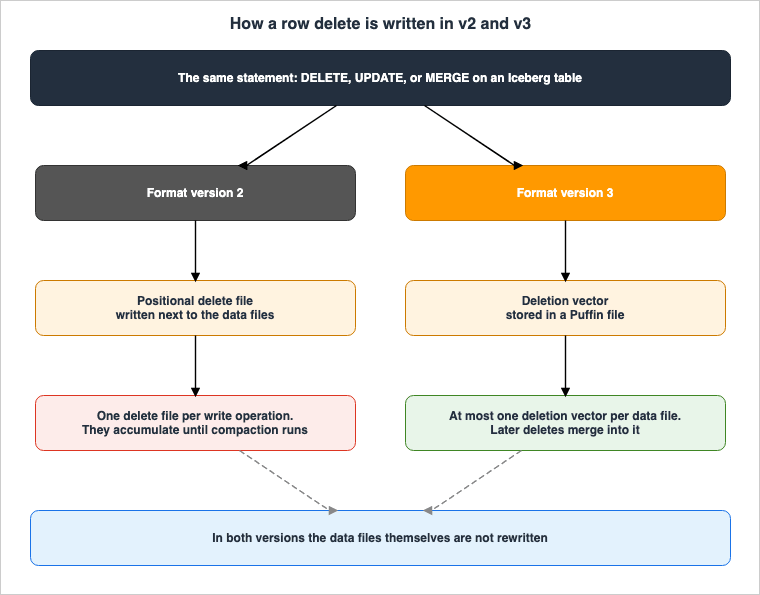
Redshift's documentation adds a limitation for V3 tables: "Iceberg v3 tables cannot fall back to positional delete files for new write operations." While V3 tables can read existing positional delete files, they cannot add new ones; new deletions can only be added as part of a deletion vector.
2.3 The Two Pseudo-Columns Row Lineage Adds
A V3 table automatically carries metadata fields that track changes at the row level. Two of them are visible to the reader.| Column | What it holds |
|---|---|
_row_id | A BIGINT that uniquely identifies each row. Assigned automatically on write operations. |
_last_updated_sequence_number | A BIGINT holding the snapshot sequence number of the write operation that last modified the row. |
The usage is straightforward: simply extract rows where the sequence number is greater than the sequence number from the previously processed data, and you will obtain the rows that have been changed.
-- Read only the rows changed since the last processed sequence number
SELECT
    id,
    data,
    _row_id,
    _last_updated_sequence_number
FROM myns.orders_v3
WHERE _last_updated_sequence_number > :last_processed_sequence
The Amazon Redshift documentation highlights two potential pitfalls when using these two columns. First, the row lineage columns are not included in
SELECT *. You must explicitly specify the column names to retrieve them. Second, querying these two columns on tables that are not V3 will return NULL values. This does not result in an error.AWS says this removes the need to build change tracking yourself. As Section 6 shows, though, a table that was just upgraded from V2 does not get lineage values for its pre-upgrade data right away.
2.4 How the Variant Type Stores Semi-Structured Data
The Variant type allows you to directly write semi-structured data, such as JSON, into Iceberg tables without defining a fixed schema in advance.While it is possible to write data into string columns, the key difference with the Variant type is that the engine decomposes the data into hidden columns at the time of writing. AWS refers to this process as "shredding." These decomposed hidden columns generate Parquet column statistics, which the query engine then uses to optimize file skipping and other operations. As a result, the amount of data that analysis queries scan is reduced.
-- Declare a VARIANT column and write JSON into it without a fixed schema
CREATE TABLE IF NOT EXISTS myns.events (
    event_id bigint,
    event_timestamp timestamp,
    source string,
    event_data VARIANT
)
USING iceberg
TBLPROPERTIES (
    'format-version' = '3'
)
-- PARSE_JSON converts the JSON text into the binary VARIANT representation
INSERT INTO myns.events VALUES (
1,
current_timestamp(),
'web-app',
PARSE_JSON('{"user_id": "u-1234", "action": "page_view", "duration_ms": 350}')
);The Variant type sits in a clearly different position from deletion vectors and row lineage. Fewer engines support it, fewer Regions offer it, and turning it on costs you something else. That is why Section 5 treats it separately.
3. How Far Each AWS Engine Supports V3
3.1 AWS Publishes Two Support Matrices
AWS publishes the V3 support status as a table in two places. The two cover the same subject, but they are not the same table.The first table sits in the Amazon S3 User Guide, in the section
Working with Apache Iceberg V3. It carries two columns, separating support for V3 itself from support for the Variant type. It sits in the troubleshooting section, where it serves to narrow down the cause of the error format-version 3 is not supported.The second table sits in AWS Prescriptive Guidance, in
Working with Iceberg table format specification version 3. This table is placed at the beginning of the section and has only one column. It carries no Variant column, and it does not mention the Variant type itself. The beginning of the same page states, "AWS provides support for deletion vectors and row lineage as defined in the Iceberg version 3 specification," which is a wording that leaves the Variant type outside its scope.The two tables also have slightly different lists of services. The Prescriptive Guidance document lists
AWS Glue, while the S3 User Guide lists AWS Glue ETL. The Prescriptive Guidance document lists Amazon EMR for Apache Spark as "Amazon EMR release 7.12 or later", while the S3 User Guide lists EMR Spark as Release 7.12+. They point at the same things, but they do not line up if you try to search one and match it against the other.On August 29, 2026, neither table listed Amazon Redshift. By October 7, 2026, the S3 User Guide table listed it, and the Prescriptive Guidance table still did not. Section 3.3 takes that up.
3.2 Four Sources Say the Same Thing About Athena in Different Words
One fact sits at the center of this article. Amazon Athena cannot work with Iceberg V3 tables. That is a strong negative claim, so it was checked against four primary sources, each of which words it differently.| Source | Description |
|---|---|
| Amazon S3 User Guide support matrix | The row for Amazon Athena (Trino) indicates "No" for both V3 and Variant support. |
| AWS Prescriptive Guidance support matrix | The row for Amazon Athena (Trino) indicates "No." |
| Amazon Athena User Guide: Considerations and Limitations | "Athena supports Apache Iceberg version 1.4.2" and "Athena only creates and operates on Iceberg v2 tables." |
| AWS Prescriptive Guidance: Athena Chapter | "Athena supports table format version 2, so any Iceberg table that you create with the console, CLI, or SDK inherently uses that version." |
The AWS Glue 5.1 migration guide adds one more thing, in its list of known Iceberg limitations: the error string that actually comes back. It reads "Athena SQL compatibility - Cannot read Iceberg V3 tables created by EMR Spark due to error:
GENERIC_INTERNAL_ERROR: Cannot read unsupported version 3".That one line is worth more to a reader than the
No cells, because it is what comes back when an Athena query fails after the upgrade. The AWS Glue 5.1 wording is scoped to V3 tables created by EMR Spark. The AWS Glue 6.0 migration guide drops that qualifier and carries the same item among its known limitations: "Iceberg tables created with 'format-version'='3' cannot be read by Athena SQL (error: Cannot read unsupported version 3). Use Iceberg v2 for cross-engine compatibility with Athena." Two AWS Glue releases document this failure, one scoped to tables written by EMR Spark and one written for V3 tables in general.The number in
Apache Iceberg version 1.4.2 in the Athena User Guide needs care too. This refers to the version of the Iceberg library that Athena incorporates, and not the table format version. The library version "1.4.2" and the table format version "2" are distinct numbers. Because both appear on the same page, readers may mistakenly conclude that "Athena only supports up to version 1.4." In fact, Athena supports table format versions up to version 2.Athena may support V3 later. What can be stated here is narrower: as of August 29, 2026, the verification date for this article, it does not.
3.3 Amazon Redshift Was Missing From Both Matrices
On August 29, 2026, neither of the two support matrices listed Amazon Redshift. However, the Amazon Redshift Database Developer Guide includes a dedicated page titledApache Iceberg v3 features in Amazon Redshift, whose opening line reads "Amazon Redshift supports Apache Iceberg v3 tables. Iceberg v3 introduces default column values, row lineage tracking, and deletion vectors."The same developer guide, in the section
Using Apache Iceberg tables with Amazon Redshift, also lists version 3 alongside versions 1 and 2 as supported versions. The dedicated page details the creation of V3 tables, upgrades from V2, row lineage pseudo-columns, deletion vector behavior, and Redshift-specific limitations.At the time, this article did not call it an omission in the support matrices. Two things could be stated:
- Neither of the two official support matrices mentioned Amazon Redshift.
- The Amazon Redshift documentation explicitly stated support for V3.
No What's New announcement for this Redshift V3 support was found at the time, so this article treated the support as unverified, with the text in the database developer guide as its only basis. A What's New post followed on August 31, 2026: "Amazon Redshift now supports reading from and writing to Apache Iceberg v3 tables in your data lake." The same post says, "Amazon Redshift's Graviton based provisioned and serverless clusters support the new v3 format." By October 7, 2026, the S3 User Guide matrix listed
Amazon Redshift with Patch 204+ for V3 and No for Variants, while the Prescriptive Guidance table still did not list it.Redshift's V3 support carries limits that no other engine has. A single cell in a matrix cannot express them. As of October 7, 2026, the Limitations section of the developer guide page lists the following.
- Iceberg v3 can be used only on Amazon Redshift Serverless (except the 4 RPU configuration) and on provisioned clusters that use RG instance types.
- Certain data types and composite types cannot be read or written in V3 tables. The developer guide specifically lists:
struct,list,map,variant,geometry,geography,binary,uuid,time,timestamp_ns,timestamptz_ns, andunknown. - Iceberg v3 tables that contain equality deletes cannot be used.
- Materialized views cannot be created on Iceberg v3 tables. The Iceberg materialized views that Amazon Redshift creates also require source tables in format version 2 or lower, as covered in Apache Iceberg Materialized Views on AWS.
- Upgrading to V3 changes the handling of the
timestamptzdata type. While in V2 tables, Iceberg'stimestamptzcorresponded to Redshift'sTIMESTAMP, in V3 it corresponds toTIMESTAMPTZ. The developer guide notes that, as a result, queries return timestamps that include time zone information.
The change to
timestamptz means that the query output changes after the upgrade. Nothing becomes unreadable, so it never shows up from the vantage point of a support matrix. This is the kind of effect you only find by reading the documentation of the engine you actually use.3.4 The EMR Entry Release 8.0+ Is Not a Release Label
The table in the S3 User Guide gives EMR Spark's Variant support asRelease 8.0+. Search for that number as an EMR release label and you will not find it.The page in the Amazon EMR Release Guide is titled
AWS runtime for Apache Spark (emr-spark-8.0.0), and the release label is emr-spark-8.0.0. The migration section of that same page spells this out: "Separate release train - The release label is emr-spark-8.0.0, not emr-8.0.0. This release focuses on Spark. For Flink, HBase, Phoenix, Tez, Trino, Presto, use EMR 7.x and wait for the future emr-8.0.0 multi-engine release."In other words,
emr-spark-8.0.0 is a separate release train specifically for Spark, and a multi-engine release labeled emr-8.0.0 does not yet exist. If you run Flink, HBase, Phoenix, Tez, Trino, or Presto, you stay on EMR 7.x, and the Variant type is not available there.The contents of that release repay a look. The initial release date was May 21, 2026, and both the end of standard support and end of life fall on May 20, 2028. It includes Spark 4.0.2 and Iceberg 1.10.1, and is available across all execution environments: Amazon EC2, Amazon EKS, and EMR Serverless. The release notes give the Iceberg v3 support as "VARIANT data type support in Iceberg tables, AWS S3 Tables integration."
The condition for V3 itself,
Release 7.12+, does resolve cleanly to an EMR release label. The What's New for Amazon EMR 7.12, dated November 21, 2025, says the release brings support for the Iceberg v3 table format along with Apache Iceberg 1.10.3.5 The Two Matrices Merged Into One
Here is all of it on one page. Note, though, that this table is an entry point and not the basis for a final decision. Section 4 explains why.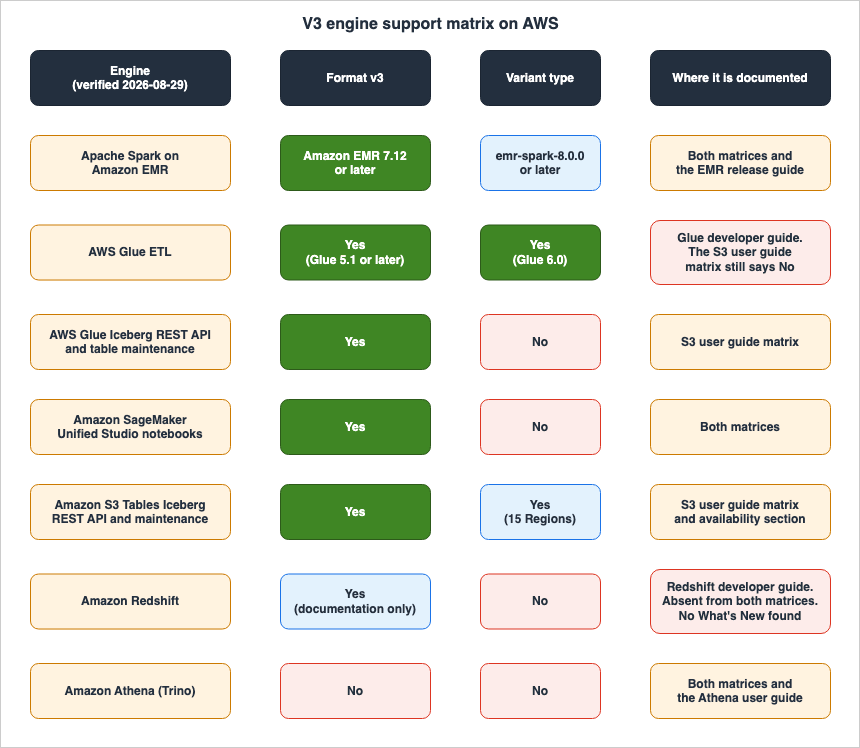
| Engine | Format v3 | Variant type | Where it is documented |
|---|---|---|---|
| Apache Spark on Amazon EMR | Amazon EMR 7.12 or later | emr-spark-8.0.0 or later | S3 User Guide table, Prescriptive Guidance table, EMR Release Guide |
| AWS Glue ETL | Yes (Glue 5.1 or later) | Yes (Glue 6.0) | S3 User Guide table (Version 6.0+ for Variants as of October 7, 2026; No on August 29, 2026), Glue documentation. See Section 4.2. |
| AWS Glue Iceberg REST API and table maintenance | Yes | No in the S3 User Guide table. AWS Glue says its table optimization supports the variant type (October 1, 2026) | S3 User Guide table, AWS What's New. See Section 4.2. |
| Amazon SageMaker Unified Studio notebooks | Yes | No | S3 User Guide table, Prescriptive Guidance table |
| Amazon S3 Tables Iceberg REST API and maintenance | Yes | Yes (15 Regions) | S3 User Guide table |
| Amazon Redshift | Yes (Patch 204+ in the S3 User Guide table; Redshift Serverless, except 4 RPU, and RG instance types only) | No | S3 User Guide table (listed after August 29, 2026), Redshift Database Developer Guide, AWS What's New (August 31, 2026). Absent from the Prescriptive Guidance table. See Section 3.3. |
| Amazon Athena (Trino) | No | No | S3 User Guide table, Prescriptive Guidance table, Athena User Guide |
The
No in the Variant column for Amazon Redshift first came from the Redshift Database Developer Guide, which names variant among the types it cannot read or write in a V3 table. The S3 User Guide matrix now shows the same No.4. Where the Primary Sources Disagree
Merging the matrices into one page reassures the reader, and that reassurance has nothing behind it. What was thrown away in the merge is where the material for the decision lives. What follows are the disagreements found while checking, sorted into four kinds and left in plain sight.Every one of them, except the new gap noted at the end of this paragraph, was confirmed against the primary sources on August 29, 2026, the date this article was first written. Any of them can be resolved by an update on the AWS side at any time. If one is resolved, that is a good outcome and not an error in this article. What still stands in that case is the conclusion in Section 4.5, not the individual example. By October 7, 2026, the S3 User Guide had resolved both disagreements in Section 4.2 and part of the one in Section 4.4, and an AWS Glue announcement of October 1, 2026, had opened a new gap in the same matrix. Each is marked where it appears.
4.1 Each Page Names a Different Set of V3 Features
While referring to the same V3, AWS documentation mentions its features in nine different locations, but the listed items are not consistent across these mentions. When combined with Apache Iceberg's specification, resulting in a total of ten mentions, only one combination is completely consistent.First the authority and the main AWS pages:
| Document | Features of V3 Listed | Number of Items |
|---|---|---|
| Apache Iceberg Table Specification | New data types, column defaults, multi-argument transforms, row lineage, binary deletion vector, table encryption key | 6 |
| Amazon S3 User Guide (rechecked October 7, 2026) | Deletion vector, row lineage, column defaults, and six data types: variant, geometry, geography, unknown, and nanosecond-precision timestamps with and without a time zone. On August 29, 2026, it listed deletion vector, row lineage, and Variant type. Each data type is counted separately here. | 9 |
| AWS Prescriptive Guidance | Deletion vector, row lineage | 2 |
| What's New (November 26, 2025) | Deletion vector, row lineage | 2 |
| Amazon Redshift Database Developer Guide | Column defaults, row lineage, deletion vector | 3 |
Then the pages tied to a specific service release:
| Document | Features of V3 Listed | Number of Items |
|---|---|---|
| AWS Glue 5.1 What's New | Column defaults, deletion vector for merge-on-read tables, multi-argument transforms, row lineage tracking | 4 |
| AWS Glue 6.0 What's New | Variant type with automatic shredding, deletion vector, geometry and geography types, flexible schema evolution using UNKNOWN and DEFAULT column values | 4 |
| AWS Glue Developer Guide (Format Version Section) | Variant type, nanosecond-precision timestamp, geospatial data types | 3 |
| Amazon EMR 7.12 What's New (benefit-oriented wording, not a list of spec feature names) | Efficient deletion, row-level change tracking, table-level encryption | 3 |
emr-spark-8.0.0 Release Notes | Variant type support for Iceberg tables, integration with S3 Tables | 2 |
Only the AWS Prescriptive Guidance and the November 26, 2025, What's New document provide a completely consistent description. All other documents list different combinations of features.
None of these descriptions are incorrect. Each page simply documents the features implemented within its specific scope. However, for the reader, this results in the definition of "V3" varying depending on the page they are reading.
One practical conclusion falls out of this. When a page says it supports V3, check on the spot what that page means by V3. Whether it supports deletion vectors, the Variant type, or the
geometry type decides whether it helps you at all.4.2 The Support Matrix Has Not Caught Up With AWS Glue
On August 29, 2026, the table in the S3 User Guide listedAWS Glue ETL's support for Variants as No.The What's New for AWS Glue 6.0, dated August 21, 2026, says something else: "With Apache Iceberg v3, AWS Glue 6.0 adds the VARIANT data type with automatic shredding for faster reads on semi-structured data, deletion vectors for high-performance row-level updates, geometry and geography data types for spatial processing, and flexible schema evolution through UNKNOWN data type and DEFAULT column values."
The AWS Glue Developer Guide also states the same. The migration page notes that "Iceberg upgraded to 1.11.0 with full support for Apache Iceberg version 3 specifications," and lists the "VARIANT data type with variant shredding for optimized semi-structured data queries." The section on format versions states that "Iceberg v3 introduces additional capabilities, such as the VARIANT data type, nanosecond-precision timestamps, and geospatial data types."
In other words, the Variant cell for
AWS Glue ETL in the S3 User Guide matrix did not reflect what Glue 6.0 does (checked August 29, 2026). By October 7, 2026, it did: the row reads Version 5.1+ for V3 and Version 6.0+ for Variants. The same lag has moved to the other AWS Glue row. The row AWS Glue: Iceberg REST API, Table Maintenance still lists Variant support as No (rechecked October 7, 2026), while the AWS What's New of October 1, 2026, says that AWS Glue Data Catalog now supports table optimization for Apache Iceberg V3 tables and that "These optimizations support V3 data types, including variant, geospatial, and nanosecond-precision timestamps."The same S3 User Guide page held a second disagreement (checked August 29, 2026). The introductory text stated that "The variant data type is specific to S3 Tables", while the same page's table listed
EMR Spark's support for Variants as Release 8.0+. The text and the table on the same page were inconsistent. By October 7, 2026, that sentence was gone. The introduction now says, "S3 Tables support all of the data types that V3 introduces." That no longer conflicts with the EMR Spark row.4.3 The AWS Glue Documentation Disagrees With Itself About Versions
The AWS Glue Developer Guide, specifically the section "Using the Iceberg framework in AWS Glue," includes a table listing the Iceberg versions bundled with each version of Glue.5.1 is the highest version in that table, and there is no row for 6.0.Further down on the same page, in the section "Specifying the Iceberg table format version," the first sentence states, "AWS Glue 6.0 supports Iceberg table format versions 2 and 3."
Within the same page, a version that is absent in the table appears as the subject in the subsequent section (checked August 29, 2026). A reader who takes that section and picks Glue 6.0, then goes back up to the table on the same page to confirm the version, does not find it.
4.4 When Deletion Vectors and Row Lineage Actually Arrived
The AWS Glue migration documentation lists the Variant type and the geospatial types as changes in Glue 6.0, and next to them writes "The following Iceberg features are already supported by AWS Glue ETL since AWS Glue 5.1: deletion vectors (merge-on-read using Roaring Bitmaps stored in Puffin files) and row lineage tracking throughfirst-row-id metadata."Glue 5.1 introduced deletion vectors and row lineage; Glue 6.0 added the Variant type and the geospatial types. On August 29, 2026, that distinction could not be read out of the single cell where the
AWS Glue ETL row said Yes. The S3 User Guide matrix now splits it into Version 5.1+ for V3 and Version 6.0+ for Variants (rechecked October 7, 2026), while the Prescriptive Guidance table still gives AWS Glue a single Yes. A reader who has decided to use V3 on AWS Glue has to decide next between 5.1 and 6.0, and the matrices carry that granularity only in part.4.5 What These Four Have in Common
All of these disagreements have the same shape. A cross-service matrix will always lag the documentation of the individual service. Features land in each service at their own time, and the cross-service matrix is updated after that.Therefore, here is how to use the support matrix:
- Use the support matrix as an index to determine which services to investigate.
- The final determination of whether a service is supported should always be based on the service's own documentation and release notes.
- Do not assume that a service is "not supported" simply because it is not listed in the support matrix. Amazon Redshift was a prime example, and it is still absent from the Prescriptive Guidance table.
- For services listed as "No" in the support matrix, look for contradictory information in the service's release notes. AWS Glue ETL's Variant was a good example until the S3 User Guide matrix caught up, and the Variant cell for AWS Glue table maintenance is the current one.
That applies to this article too. The merged matrix in Section 3.5 will go stale. Take away the method for building the table rather than the table.
5. Why the Variant Type Is Treated Separately
5.1 Fewer Engines Support It
Deletion vectors and row lineage work on more or less any AWS engine that supports V3. The Variant type does not.In the S3 User Guide table, three rows carry Variant support:
EMR Spark at Release 8.0+, AWS Glue ETL at Version 6.0+, and Amazon S3 Tables (rechecked October 7, 2026; on August 29, 2026, the AWS Glue ETL row read No, as Section 4.2 describes). As mentioned in Section 3.4, the EMR Spark entry is a separate series called emr-spark-8.0.0, and the Amazon S3 Tables entry includes a note indicating that it is only available in certain Regions.The Prescriptive Guidance table does not even carry a Variant column. Amazon Redshift supports V3, but its developer guide names
variant among the types it cannot read or write in a V3 table.5.2 Fewer Regions Support It
For deletion vectors and row lineage, the S3 User Guide says that these features are available in "all AWS Regions where Amazon EMR, AWS Glue Data Catalog, AWS Glue ETL, and S3 Tables operate." It does not provide a specific list of regions.However, this is not the case for the Variant data type. As of August 29, 2026, the Variant data type in S3 Tables is limited to these 15 Regions:
| Region |
|---|
| US East (N. Virginia) |
| US East (Ohio) |
| US West (Oregon) |
| Asia Pacific (Mumbai) |
| Asia Pacific (Seoul) |
| Asia Pacific (Singapore) |
| Asia Pacific (Sydney) |
| Asia Pacific (Tokyo) |
| Canada (Central) |
| Europe (Frankfurt) |
| Europe (Ireland) |
| Europe (London) |
| Europe (Paris) |
| Europe (Stockholm) |
| South America (São Paulo) |
The list sits in the Availability section of the S3 User Guide. Region lists grow. Look this one up again before you rely on it.
The narrow Region coverage bites when the same configuration is rolled out across several Regions. It shows up as something that worked in the development environment and does not work in the production Region.
5.3 What You Give Up by Using the Variant Type
The release notes foremr-spark-8.0.0 list the following two known issues:- When Iceberg tables use the VARIANT data type, native fine-grained access control is not available.
- When Iceberg tables use the VARIANT data type, they do not support Glue Managed Compaction.
The AWS Big Data Blog article on the Variant type says the same thing about the first one: it states that Lake Formation's fine-grained access control currently does not support the VARIANT data type. The AWS Glue 6.0 migration guide also lists the first one for AWS Glue among its known limitations: "Fine-grained access control (FGAC) is not supported with VARIANT columns" (rechecked October 7, 2026). The
emr-spark-8.1.0 release notes (initial release September 8, 2026) list neither of the two known issues and do not say that either was resolved; they list a different V3 limit instead (rechecked October 7, 2026): "Transforms that take more than one argument are not supported for Iceberg v3 tables."The first known issue is not immediately apparent from the support matrices. Even in engines that show
Yes in the Variant column of the table, adding even a single column with the Variant type can disable certain functionalities for that table. Bringing the Variant type into a table that carries column-level or row-level access control is a decision bundled with the decision to give that access control up.The second known issue now has a source on the other side (rechecked October 7, 2026). The AWS What's New of October 1, 2026, says that AWS Glue Data Catalog table optimization supports Apache Iceberg V3 tables and that "These optimizations support V3 data types, including variant, geospatial, and nanosecond-precision timestamps." The
emr-spark-8.0.0 release notes still list the known issue, and the S3 User Guide matrix still shows No for Variants on the AWS Glue table maintenance row. Under the rule in Section 4.5, the AWS Glue announcement is the source to follow for AWS Glue's own compaction. The S3 User Guide adds one limit that holds either way: for V3 tables, the sort and Z-order compaction strategies do not support the variant, geometry, geography, and nanosecond-precision timestamp data types.5.4 Shredding Can Make Files Unreadable to Older Readers
The S3 User Guide states, regarding compaction, that by default, compaction writes shredded variant Parquet files. Older readers that do not support shredding may be unable to read files after compaction. You can disable shredding by setting the table propertywrite.variant.shredding.enabled to false.The structure is the same as in Section 3. Even if the writing side is compatible, if the reading side is not, it may become unreadable. In this case, the trigger for becoming unreadable is a table maintenance process, an automated operation. You do not have to remember running an
INSERT by hand. It stops being readable at whatever moment compaction runs.However, S3 Tables continue to provide ongoing table maintenance, including compaction, even for columns with the Variant data type. This process aggregates small files from semi-structured data sources into larger files. Because the same functionality provides both the maintenance you want to enable and the shredding you want to disable, the decision regarding
write.variant.shredding.enabled should be made separately from the decision to halt maintenance.6. What Setting format-version to 3 Actually Does
6.1 The Upgrade Does Not Rewrite Data
Start with the default. A table is created at V2 unless you say otherwise. The AWS Glue Developer Guide states, "By default, AWS Glue creates Iceberg v2 tables," and the Amazon Redshift Database Developer Guide states, "If you do not specify format-version, Amazon Redshift creates the table as Iceberg v2." V3 is something you choose explicitly. Nothing drifts into it on its own.When creating a new table using V3, set the table property
format-version to 3.-- Create a new table at format version 3
CREATE TABLE IF NOT EXISTS myns.orders_v3 (
order_id bigint,
customer_id string,
order_date date,
total_amount decimal(10,2),
status string,
created_at timestamp
)
USING iceberg
TBLPROPERTIES (
'format-version' = '3'
)When upgrading existing tables from V2, apply the same property settings.
-- Upgrade an existing V2 table in place
ALTER TABLE myns.existing_table
SET TBLPROPERTIES ('format-version' = '3')
AWS Glue 6.0 also provides a method for changing the default settings at the catalog level, rather than on a per-table basis. If you provide a default format version in the Spark session configuration, newly created tables will default to V3 without needing to specify the property for each table.
--conf spark.sql.catalog.glue_catalog.table-default.format-version=3Amazon Redshift uses slightly different syntax. Instead of
TBLPROPERTIES, it uses TABLE PROPERTIES.-- Redshift spells the clause TABLE PROPERTIES, not TBLPROPERTIES
ALTER TABLE iceberg_table
SET TABLE PROPERTIES ('format-version' = '3');The S3 User Guide and Prescriptive Guidance summarize the effects of this upgrade in three points: a new metadata snapshot is created atomically, existing Parquet data files are reused without modification, and row lineage fields are added to the table's metadata. The data files themselves are not rewritten.
What happens after that is written down as well. The next compaction removes the old V2 delete files, and every later change uses the V3 deletion vector files. And the upgrade does not backfill row lineage change tracking records for the past.
Amazon Redshift's documentation provides more specific details on this point. Immediately after the upgrade, for data that existed before the upgrade, both
_row_id and _last_updated_sequence_number will return NULL. Values are only populated during the first write operation after the upgrade, at which point the row lineage values for the entire table are generated. This is a metadata-only operation and does not modify existing data files.6.2 Deletion Vectors Need Table Properties of Their Own
This is the part that gets missed most often in practice. Settingformat-version to 3 on its own does not make deletion vectors get written.To use deletion vectors for updates, deletions, and merges, you must configure the table properties for write mode.
-- Deletion vectors are only written when the write modes are merge-on-read
ALTER TABLE myns.orders_v3
SET TBLPROPERTIES ('format-version' = '3',
                   'write.delete.mode' = 'merge-on-read',
                   'write.update.mode' = 'merge-on-read',
                   'write.merge.mode' = 'merge-on-read'
                  )
The S3 User Guide states that this configuration causes updates, deletions, and merges to create a deletion vector file instead of rewriting the entire data file. Conversely, if this setting is not configured, the system will continue to rewrite the data file.
The same user guide addresses this as a troubleshooting item for performance degradation after upgrades. It suggests checking whether these three properties are configured when investigating why performance is not improving after an upgrade, alongside potential compaction failures. You can check what is actually set with the following statement.
-- Verify that the write modes and the format version are actually set
DESCRIBE FORMATTED myns.orders_v3
Amazon Redshift handles this differently. The Redshift Database Developer Guide states that when executing
DELETE, UPDATE, or MERGE operations on V3 tables, Redshift records the locations of deleted rows in a deletion vector rather than a positional delete file. It says this is handled automatically and that no change to the SQL syntax is needed. The same table therefore needs different settings depending on which engine writes to it.Do not read this as meaning the upgrade is harmless as long as you leave the feature off. The write mode properties decide whether a deletion vector gets written. The format version field decides who can read the table at all. An engine that does not support V3 rejects the table on that field alone, with no deletion vector anywhere in it. The Athena error in Section 3.2 comes back from reading exactly that field. Setting
format-version to 3 is not a harmless configuration change that only starts to matter once you turn the feature on.6.3 The Upgrade Is One-Way
The upgrade from V2 to V3 does not go back. That is not a guess: several primary sources say so outright.| Document | Description |
|---|---|
| Amazon S3 User Guide | "V3 is a one-way upgrade. Once a table is upgraded from V2 to V3, it cannot be downgraded back to V2 through standard operations." |
| AWS Prescriptive Guidance | Describes the same content, using the term "version 3." |
| AWS Glue Developer Guide | "You can't downgrade a table from v3 back to v2. Iceberg rejects setting 'format-version'='2' on a v3 table, so plan to adopt v3 as a one-way change." |
| Amazon Redshift Database Developer Guide | "Downgrading from v3 to v2 is not supported." |
Do not drop the qualifier "through standard operations" that the Amazon S3 User Guide and AWS Prescriptive Guidance attach. The AWS Glue documentation goes further, stating that Iceberg itself rejects the setting of
'format-version'='2'. In practice, it is correct to plan as if there is no way to revert the change.The AWS Glue Developer Guide provides further guidance immediately following this point. If you are using another service that does not support Iceberg v3, you should keep those tables on v2 and avoid upgrading them to v3. Section 7.3 expands on this single sentence.
6.4 The V2 Delete Files That Survive the Upgrade
After an upgrade, V2 positional delete files do not disappear immediately.The Amazon Redshift Database Developer Guide states that even after upgrading from V2 to V3, existing V2 positional delete files remain active and are applied during read operations. Subsequent write operations, such as
DELETE, UPDATE, and MERGE, integrate the existing V2 positional deletes into the deletion vector for the data files affected by those operations. This behavior is consistent with the Iceberg specification.The S3 User Guide and Prescriptive Guidance describe a similar process, but from the perspective of compaction. They state that the next compaction will remove older V2 delete files.
The implication for the reader is that immediately after the upgrade, the table will be in a state where both V2 delete files and V3 deletion vectors coexist. Measuring the impact immediately after the upgrade will therefore reflect this mixed state. Both documents recommend running a compaction after the upgrade to consolidate the delete files, and this is due to the aforementioned reason.
6.5 Some Query Output Changes After the Upgrade
The change in Amazon Redshift's type mapping, mentioned in Section 3.3, is worth confirming a second time here in the section about upgrading.In V2 tables, Iceberg's
timestamptz was mapped to Redshift's TIMESTAMP. When upgrading to V3, it now maps to TIMESTAMPTZ. The developer guide states that, as a result, queries return timestamps that include time zone information.Nothing fails. The query succeeds and the value changes. This is the kind of effect that neither the support matrix nor an error-message search will surface. You find it by reading the V3 section of the documentation for the engine you actually run.
7. What to Inventory Before You Upgrade
7.1 Count Everything That Touches the Table
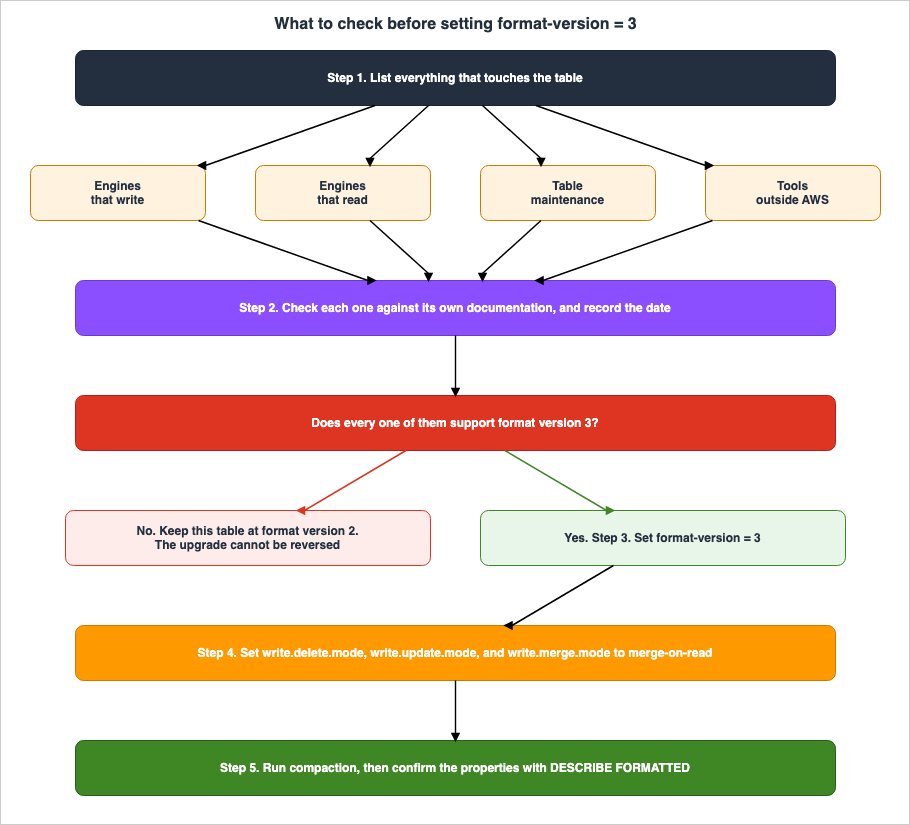
The first move is to write out everything that touches the table in question.Four categories go on that list. First, the engines that write: Apache Spark jobs, AWS Glue ETL jobs, writes coming from Amazon Redshift. Second, the engines that read. If Amazon Athena is in that list, the answer is already decided. Third, identify the entity responsible for table maintenance. Is it managed by S3 Tables, AWS Glue, or a custom compaction process? Finally, consider any tools external to AWS.
The fourth is the one that gets missed. Both the S3 User Guide and Prescriptive Guidance say to verify a third-party tool's V3 compatibility before you create or upgrade a V3 table, to consider keeping V2 tables for the tools that are not compatible, and to ask the vendor about its V3 timeline.
AWS puts this first in its own introduction to V3: "Before creating or upgrading V3 tables, make sure the Iceberg engines in your solution are V3-compatible."
7.2 Check Each Engine Against Its Own Documentation
For each engine on the list, confirm the support status. Do not treat the merged matrix in Section 3.5 as the final evidence. Where you look differs per engine.| Item to Verify | Resource to Consult |
|---|---|
| Does the Amazon EMR release support V3? | The relevant release page in the Amazon EMR Release Guide. |
| Can the Variant type be used in Amazon EMR? | The release notes for emr-spark-8.0.0. It is not supported in EMR 7.x. |
| Which version of AWS Glue is compatible with V3? | The migration page and release notes in the AWS Glue Developer Guide. The supported range differs between versions 5.1 and 6.0. |
| Does Amazon Athena support V3? | The "Considerations and limitations" section in the Amazon Athena User Guide. |
| Limitations of Amazon Redshift | The "V3 Features" page in the Amazon Redshift Database Developer Guide. |
| Regions supporting the Variant type in S3 Tables | The "Availability" section in the Amazon S3 User Guide. |
| Third-party tools | Vendor documentation. |
Record the date alongside what you found. Support status moves, so a record that does not say when it was checked is of no use the next time somebody reads it.
7.3 Deciding to Stay on V2
If even one engine on the list does not support V3, not upgrading is a choice. It is not a fallback: the AWS documentation names it explicitly.The AWS Glue Developer Guide advises keeping a table at v2 if you use another service that does not support Iceberg v3. Similarly, the S3 User Guide suggests considering maintaining tables on V2 as a way to address potential incompatibilities with third-party tools.
The call gets harder when you can decide per table. The format version is a table property, so different tables can hold different values. You can put the tables that only V3-capable engines touch on V3, and leave the tables Amazon Athena reads on V2. What that split creates is the ongoing cost of keeping track of which table is which. Every new table raises the question again, and a miss shows up as a failed Athena query.
One more thing worth confirming is that V2 and V3 can sit side by side. Both the S3 User Guide and Prescriptive Guidance state that V3 maintains backward compatibility with V2, and that AWS services can handle both V2 and V3 tables simultaneously. It is possible to run queries that span both versions, run time travel queries across snapshots of both V2 and V3, and utilize schema evolution and hidden partitions across different table versions. The coexistence of both versions is not inherently problematic. The issue arises only when engines that are not compatible with V3 attempt to read tables that are on V3.
7.4 What to Verify After the Upgrade
The check right after the upgrade matters as much as the preparation before it. What the S3 User Guide and Prescriptive Guidance list as the way to migrate is to try it outside production first, to upgrade during a quiet period, to watch the metrics afterward, to run compaction so the delete files are consolidated, and to update the team's documentation.In addition to these recommendations, add the specific verification steps discussed in this article.
- Use
DESCRIBE FORMATTEDto verify that theformat-versionand the properties of the three write modes are configured as intended. - Verify that compaction is not failing. For S3 Tables, you can check this through logs and monitoring.
- If you plan to use row lineage, verify that downstream processes account for the fact that
_row_idand_last_updated_sequence_numberwill returnNULLuntil the initial write is complete. - If you are reading from Amazon Redshift, verify that the output of columns with
timestamptzdata types has not changed.
8. What Goes Wrong After the Upgrade
Here is everything above, sorted by the symptom instead.| Symptom | Observed Behavior | Location to Check |
|---|---|---|
Amazon Athena queries fail with GENERIC_INTERNAL_ERROR: Cannot read unsupported version 3. | Athena only works with Iceberg v2 tables, and something is reading a table that was upgraded to V3. The AWS Glue 5.1 guide records the string for a V3 table created by EMR Spark; the AWS Glue 6.0 guide records the same failure for V3 tables in general. | Athena User Guide - Considerations and limitations. The error string is also mentioned in the AWS Glue 5.1 and 6.0 migration guides. |
Another engine returns format-version 3 is not supported. | The engine version does not support version 3. | S3 User Guide - Troubleshooting. Refer to the release notes for that specific engine. |
| Writes are no faster after the upgrade. | The three write mode properties are not set to merge-on-read, so no deletion vector is being written. Or compaction is failing. | Output of DESCRIBE FORMATTED. Compaction logs. |
The two row lineage columns return NULL. | The first write after the upgrade has not yet occurred. Alternatively, the query is being run against a table that is not using version 3, or the query is attempting to retrieve data using SELECT *. | Redshift Database Developer Guide - row lineage section. |
| Fine-grained access control stops working on a table with a Variant column. | Native fine-grained access control is not supported on Iceberg tables that use the Variant data type. | Release notes for emr-spark-8.0.0 - Known issues. |
| Older tools are unable to read files after compaction. | Compaction is writing shredded Variant Parquet files by default. | S3 User Guide - Considerations for compaction. |
| Timestamps are displayed differently in Redshift queries. | In version 3, Iceberg's timestamptz corresponds to Redshift's TIMESTAMPTZ. In version 2, it was TIMESTAMP. | Redshift Database Developer Guide - Limitations section. |
| A Variant column cannot be created in another Region. | The Variant data type in S3 Tables is offered in a limited set of Regions. | S3 User Guide - Availability section. |
Only some of these announce themselves. Four rows end in something refusing to read or refusing to be created: the two error strings at the top, the older tools that cannot read files after compaction, and the Variant column that cannot be created in another Region. The rest succeed and hand back something other than what was expected, or quietly stop enforcing what you thought was still enforced. That second kind is much harder to notice.
9. Frequently Asked Questions
Can Amazon Athena read Iceberg V3 tables?
As of August 29, 2026, it cannot. The Athena User Guide states that Athena only creates and operates on Iceberg v2 tables, and two AWS support matrices list "Amazon Athena (Trino)" as not supported. The AWS Glue 5.1 and 6.0 migration guides also record the error Athena returns when it is pointed at a V3 table. Athena may add support later, so look up the "Considerations and limitations" section of the Athena User Guide again before you decide.Is the Apache Iceberg version 1.4.2 in the Athena User Guide a table format version?
No, that is the version of the Iceberg library that Athena uses. The version of the table format is listed elsewhere on the same page, and it is version 2. Both numbers appear on that one page, so it is easy to read one as the other.Can I go back to version 2 after upgrading to version 3?
No. Plan on the basis that it cannot be undone. The Amazon S3 User Guide and AWS Prescriptive Guidance state that a table cannot be downgraded back to V2 through standard operations. The AWS Glue Developer Guide goes further and writes that Iceberg rejects setting'format-version'='2' on a v3 table. The Amazon Redshift Database Developer Guide also states that downgrading from v3 to v2 is not supported.Does setting format-version to 3 mean deletion vectors get written?
Not on its own, if Apache Spark is doing the writing. Three more table properties have to be set tomerge-on-read: write.delete.mode, write.update.mode, and write.merge.mode. DESCRIBE FORMATTED shows whether they are. If Amazon Redshift is doing the writing, its developer guide says deletion vectors are handled automatically and the SQL syntax does not change.Can version 2 and version 3 tables coexist in the same environment?
Yes, you can mix V3 and V2 tables within the same environment. Both the Amazon S3 User Guide and AWS Prescriptive Guidance state that V3 maintains backward compatibility with V2, and that AWS services can handle both versions concurrently. It is stated that you can execute queries that span both V2 and V3, including time travel queries across snapshots of both versions. Issues only arise when an engine that is not compatible with V3 attempts to read a V3 table.Can I use the AWS support matrices as my final source?
No. They are useful as an entry point, and they are not the thing to decide on. Checking for this article on August 29, 2026, found that the S3 User Guide matrix did not reflect the Variant support in AWS Glue 6.0, and that neither of the two matrices listed Amazon Redshift. By October 7, 2026, the S3 User Guide matrix had added both, and its AWS Glue table maintenance row had fallen behind an AWS Glue announcement of October 1, 2026. Cross-service matrices tend to lag behind the documentation for individual services. Use the support matrices as an index for the services you need to investigate, but make your final decisions based on the documentation and release notes for those specific services.Which AWS Glue version do I need for V3?
The appropriate version depends on your use case. The AWS Glue migration documentation puts deletion vectors and row lineage in AWS Glue 5.1, and the VARIANT data type and the geospatial data types in AWS Glue 6.0. If your only goal is to use deletion vectors, version 5.1 is sufficient. However, if you need to use the VARIANT data type, version 6.0 is required.Are there limits on using the Variant type?
Yes, three of them.First, fewer engines and fewer Regions carry it than carry V3 itself. Second, according to the release notes for
emr-spark-8.0.0, Iceberg tables using the VARIANT data type do not support native fine-grained access control and Glue Managed Compaction; the emr-spark-8.1.0 release notes list neither, without saying that either was resolved (Section 5.3). For compaction, an AWS What's New of October 1, 2026, says the opposite for AWS Glue Data Catalog table optimization (Section 5.3). Third, because compaction defaults to writing shredded Parquet files, older readers that do not support shredding may not be able to read the data. This limitation can be avoided by setting the table property write.variant.shredding.enabled to false.The two row lineage columns return NULL after the upgrade. Why?
For data written before the upgrade,NULL comes back until the first write operation after the upgrade. According to the Amazon Redshift Database Developer Guide, this initial write operation generates the row lineage values for the entire table. This is a metadata-only operation and does not modify existing data files. Note that these two columns are not included in SELECT *, so you need to explicitly specify the column names to retrieve them.10. Summary
Raising the table format version looks like a settings change on one table, and it is an operation that puts a condition on every engine that touches that table. Look only at the side that writes and you will get the call wrong.Three things came out of this article.
The first is that Amazon Athena does not work with Iceberg V3 tables. Four sources – two AWS support matrices, the Athena User Guide, and the Athena section of AWS Prescriptive Guidance – all state the same thing in different ways. Attempting to read the table after the upgrade results in an error message documented in the AWS Glue 5.1 and 6.0 migration guides. If even one reference from Athena is left, that table needs a decision to stay on V2.
The second is that the official AWS support matrices cannot be the final source. There are two of them and they carry different columns. On August 29, 2026, neither listed Amazon Redshift and one had not caught up with the Variant support in AWS Glue 6.0; by October 7, 2026, that one had added both, and a new gap had opened on its AWS Glue table maintenance row. On top of that, what each page says V3 adds differs page by page: across the ten places counted, including the Apache Iceberg spec, exactly one pair matches. None of them is wrong; each writes its own scope. And the property that a cross-service matrix always lags the documentation of the individual service will not change at the next version either.
The third is that setting
format-version to 3 is not where the work ends. When writing from Apache Spark, you must use the merge-on-read write mode, otherwise deletion vectors will not be written, row lineage will not have values until the initial write, and V2 delete files will remain until compaction is performed. On Amazon Redshift the type mapping changes and the query output changes with it. Adding a Variant column costs you fine-grained access control.The necessary steps can be summarized into two: First, write out everything that touches the table, covering what writes, what reads, what maintains it, and what sits outside AWS. Second, for each item on that list, confirm the support status in that engine's own documentation, and record it together with the date you checked. With those two done, the decision itself takes very little time. The bottleneck is the inventory, not the decision.
The Apache Iceberg table spec already carries a Version 4 section. The procedure picked up here works there unchanged.
11. References
- Apache Iceberg Table Spec - Apache Iceberg
- Puffin Spec - Apache Iceberg
- Releases - Apache Iceberg
- Working with Apache Iceberg V3 - Amazon Simple Storage Service User Guide
- Working with Iceberg table format specification version 3 - AWS Prescriptive Guidance
- Working with Iceberg tables by using Athena SQL - AWS Prescriptive Guidance
- Working with Iceberg in Amazon EMR - AWS Prescriptive Guidance
- Query Apache Iceberg tables - Amazon Athena User Guide
- Using the Iceberg framework in AWS Glue - AWS Glue Developer Guide
- Migrating AWS Glue for Spark jobs to AWS Glue version 5.1 - AWS Glue Developer Guide
- Migrating AWS Glue for Spark jobs to AWS Glue version 6.0 - AWS Glue Developer Guide
- Documentation history for AWS Glue - AWS Glue Developer Guide
- Apache Iceberg v3 features in Amazon Redshift - Amazon Redshift Database Developer Guide
- Using Apache Iceberg tables with Amazon Redshift - Amazon Redshift Database Developer Guide
- AWS runtime for Apache Spark (emr-spark-8.0.0) - Amazon EMR Release Guide
- AWS runtime for Apache Spark (emr-spark-8.1.0) - Amazon EMR Release Guide
- Iceberg - Amazon EMR Release Guide
- AWS announces support for Apache Iceberg V3 deletion vectors and row lineage - AWS What's New
- Amazon EMR 7.12 now supports the Apache Iceberg v3 table format - AWS What's New
- Introducing AWS Glue 5.1 - AWS What's New
- Amazon S3 Tables now support the Variant data type for Apache Iceberg V3 - AWS What's New
- AWS Glue 6.0 delivers 30% price reduction and Iceberg v3 support - AWS What's New
- Amazon Redshift now supports Apache Iceberg v3 tables - AWS What's New
- Amazon S3 Tables now support all Apache Iceberg V3 data types - AWS What's New
- AWS Glue Data Catalog now supports table optimization, statistics, and crawlers for Apache Iceberg V3 - AWS What's New
- Accelerate data lake operations with Apache Iceberg V3 deletion vectors and row lineage - AWS Big Data Blog
- Unlock the power of Apache Iceberg v3 deletion vectors on Amazon EMR - AWS Big Data Blog
- Beyond JSON blobs: Implementing the VARIANT data type in Apache Iceberg V3 - AWS Big Data Blog
References:
Tech Blog with curated related content
Written by Hidekazu Konishi