Apache Iceberg Materialized Views on AWS - Who Refreshes Them, Who Can Write Them, Which Engines Read Them, and How Current a Read Is
First Published:
Last Updated:
However, the three kinds differ in who refreshes them and who can write them. The What's New post of September 30, 2026, in the text announcing system-managed materialized views, states that, for materialized views that are not system-managed, "anyone with write access can change it, either through the catalog or by writing to the files in Amazon S3." Among the kinds this article covers, at the time of that announcement, the materialized views that were not system-managed were the regular materialized views created with Spark. System-managed materialized views, on the other hand, reject writes from anything other than AWS Glue. Only Redshift refreshes and deletes the materialized views that Redshift created. However, the Amazon Redshift Developer Guide lists modification of the materialized view data outside a Redshift refresh as one of the conditions under which Redshift falls back to a full refresh. Of the three kinds, system-managed materialized views are the only ones that the sources describe as rejecting writes from anything other than AWS Glue. The engines that can read the materialized views, and those that automatically rewrite queries to use them, also differ. Only the AWS optimized Spark runtime performs automatic query rewrite that uses Iceberg materialized views; Redshift does not use even the Iceberg materialized views it created for automatic query rewrite. The sources also disagree in places, such as on whether nested materialized views can be created and what the minimum interval for automatic refreshes is. Furthermore, an AWS Big Data Blog post (September 2, 2026) states that Iceberg materialized views are not part of the Apache Iceberg specification.
This article places the three kinds of materialized views in the Writer-Reader Table defined in Amazon S3 Metadata Tables. It then adds a Refresh Table, which lines up the refresh paths, and an Engine Table, which lines up what each engine can do. The information in this article is based solely on sources read on October 6, 2026. It has not been verified through actual materialized view creation. The article does not discuss pricing.
Related articles on this site:
- Amazon S3 Metadata Tables - Who Writes the Journal, Live Inventory, and Annotation Tables, How Current Each One Is, and What You Can Answer Without Listing a Bucket
- Querying Apache Iceberg and Parquet from Amazon Aurora PostgreSQL - What DuckDB Runs, What Your Transaction Sees, How Current a Read Is, and What Reaches the Writer
- AWS History and Timeline regarding AWS Glue - Overview, Functions, Features, Summary of Updates, and Introduction
- AWS History and Timeline regarding Amazon Athena - Overview, Functions, Features, Summary of Updates, and Introduction
- AWS Data Lakehouse Architecture Guide - Building a Governed Lakehouse with S3, Lake Formation, Glue, Athena, and Apache Iceberg
- The Iceberg Catalog Layer on AWS - Catalog Federation, the REST Catalog API, and Scoped Credential Vending
- Fine-Grained Access Control for AI Data with AWS Lake Formation - LF-Tags, Column-Level Permissions, and Cross-Account Sharing
- Zero-ETL Integrations on AWS - The Source and Target Matrix Across Amazon Redshift, AWS Glue, and Amazon OpenSearch Service
- Apache Iceberg V3 on AWS - Which Engines Read Format Version 3, Where the Official Support Matrices Disagree, and What to Check Before You Upgrade
- What Consistent Means, Service by Service on AWS - The Same Word, a Different Contract, and What You Must Not Carry Across
Table of Contents
- 1. The Scope of This Article and the Date It Was Verified
- 2. How to Read the Writer-Reader Table and the Two Tables This Article Adds
- 3. Three Kinds of Materialized Views in One AWS Glue Data Catalog
- 4. Writer-Reader Table, Part 1 — Who Writes Each Materialized View and Who Can Delete It
- 5. Who Refreshes — The Refresh Table
- 6. Writer-Reader Table, Part 2 — Who Can Read Each Materialized View and How Current a Read Is
- 7. Which Engines Read and Which Use the MVs Automatically — The Engine Table
- 8. Outside the Apache Iceberg Specification
- 9. Where the Sources Disagree, and Where No Statement Was Found
- 10. Frequently Asked Questions about Iceberg Materialized Views on AWS
- 11. Summary
- 12. References
1. The Scope of This Article and the Date It Was Verified
This section first defines the questions to be asked regarding each of the three kinds of MV. Subsequently, it details the scope of the analysis, what will not be covered, the dates on which information was verified, and the sources consulted. It also clarifies the terminology used in this article.1.1 Four Questions for Each Kind of Materialized View
A materialized view is a derived table created from source tables. If you intend to use a derived table as a component of your design, you need to understand the following four points. This article applies these four questions to each of the three kinds of materialized views.- Who refreshes it? This question asks which path starts a refresh, and which compute runs it under which IAM role. It also asks who chooses between a full refresh and an incremental refresh.
- Who can write, and who can delete? This question asks whether the materialized view accepts writes from outside a refresh. For deletion, it also asks whether what is deleted is the definition in the Glue Data Catalog or the data in Amazon S3.
- Who can read? This question asks which engines can read the materialized view and which permissions reading requires. It also distinguishes between engines that can read the materialized view and those that automatically rewrite queries to use the materialized view.
- How current are the values being read? This question takes the time words that the sources use, and the conditions attached to those words, as they are.
1.2 What This Article Covers and What It Does Not
This article covers the following three kinds of Apache Iceberg materialized views (MVs) whose definitions are kept in the AWS Glue Data Catalog:- Regular materialized views. These are created using the
CREATE MATERIALIZED VIEWcommand in the AWS optimized Spark runtime. The minimum versions are AWS Glue 5.1 and Amazon EMR release 7.12.0. In its section on system-managed MVs, the AWS Glue Developer Guide refers to this kind of MV as a "regular materialized view", and this article will use the same terminology. - System-managed materialized views. These are created using the
CREATE MANAGED MATERIALIZED VIEWcommand with Spark on AWS Glue 6.0 or later. - Materialized views created by Amazon Redshift. These are created using the
CREATE MATERIALIZED VIEW … USING ICEBERGcommand within Amazon Redshift.
The following topics are not covered.
- The steps for creating materialized views (MVs), and a list of SQL syntax. Refer to the guides for each service.
- AWS Glue Data Catalog views and catalog integration. Data Catalog views are virtual tables that execute SQL queries each time they are accessed, and are distinct from materialized views (MVs) which store results. The catalog integration and the Iceberg REST catalog API are covered in The Iceberg Catalog Layer on AWS.
- General information on fine-grained permissions in AWS Lake Formation. Fine-Grained Access Control for AI Data with AWS Lake Formation covers this topic. This article covers only what the sources say about MVs.
- Native materialized views in Amazon Redshift. These materialized views store results in Redshift Managed Storage (RMS) and are separate from the three kinds discussed in this article. Section 8.3 of Zero-ETL Integrations on AWS explains how to use native materialized views in the target of a zero-ETL integration. The automatic refresh announced in the What's New post of July 15, 2025 (
Amazon Redshift announces support for automatic refresh of materialized views on Apache Iceberg tables) is about native materialized views whose source tables are Iceberg tables. It is separate from the MVs created by Amazon Redshift in this article, which write their results as Iceberg tables. - Materialized views in AWS Glue 6.0 using Spark Declarative Pipelines. The AWS Big Data Blog (September 9, 2026) states about the materialized views in these pipelines: "Materialized views recompute their full result set on each run." This article does not cover them. The sources do not say whether they use the same mechanism as the three kinds in this article.
- PostgreSQL materialized views created within Amazon Aurora PostgreSQL. Refer to Querying Apache Iceberg and Parquet from Amazon Aurora PostgreSQL.
- Operating Amazon SageMaker Unified Studio and Amazon SageMaker Data Agent.
- Performance figures and the effect of automatic query rewrite.
- Pricing.
1.3 The Verification Date and the Sources Read
The information in this article is based on sources read on October 6, 2026. Because AWS developer guide and user guide pages do not show update dates, the date they were read is the verification date.The sources read are of the following eight types.
- The AWS Glue Developer Guide, including the pages for Materialized Views (
Using materialized views with AWS Glue), the Materialized View API page, the Table API page, the Data Catalog Views page, the AWS Glue versioning page, the migration pages for versions 5.1 and 6.0, the version support policy page, and the document history page. This article also read the AWS Glue quotas page in the AWS General Reference. - The AWS Lake Formation Developer Guide, including the Materialized Views page, two pages related to Data Catalog Views, and the document history page.
- The Amazon EMR Release Guide, including the Materialized Views page (
Using materialized views with Amazon EMR) and the release notes for versions 7.12.0, 7.13.0, and 7.14.0. - The Amazon Athena User Guide, including the Materialized Views page (
Query AWS Glue Data Catalog materialized views) and the release notes. - The Amazon Redshift Database Developer Guide (called the Amazon Redshift Developer Guide in this article), including the pages for Iceberg Materialized Views (
Materialized views stored as Apache Iceberg tables),CREATE MATERIALIZED VIEW,REFRESH MATERIALIZED VIEW,DROP MATERIALIZED VIEW, and an overview of Materialized Views. - Seven announcements from "What's New with AWS" (dated July 15, 2025; November 30, 2025; March 17, 2026; June 5, 2026; September 22, 2026; September 30, 2026; and October 5, 2026). The dates represent the publication dates of the announcements. For the system-managed materialized views announcement, the year and month in the URL are October 2026, but the publication date is September 30, 2026.
- Six articles from the AWS Big Data Blog (dated December 9, 2025; May 11, 2026; September 2, 2026; September 9, 2026; September 10, 2026; and October 5, 2026), and one article from the AWS Storage Blog (dated August 5, 2026). The dates represent the publication dates of the articles.
- Two specification pages for Apache Iceberg (Table Spec and View Spec), and pull request #11041 from the apache/iceberg repository on GitHub.
For some points, no statement was found in the sources. Before writing that, this article searched all of the sources above for terms including
refresh, rewrite, stale, consisten, interval, minute, nested, write, outside, drop, fine-grained, managed, definer, specification, and portable. Not finding a statement does not mean that it does not exist. This article only states that no statement was found (Section 9.3).1.4 Terms with the Same Spelling, and the Names This Article Uses
In the MV sources, several terms with the same spelling refer to different things. This article distinguishes them as follows.- Materialized View (MV). When used in this article, "MV" refers to Apache Iceberg materialized views defined in the AWS Glue Data Catalog. It is distinct from Redshift native materialized views and PostgreSQL materialized views. This article does not cover the materialized views in Spark Declarative Pipelines (Section 1.2).
- View. The Lake Formation Developer Guide distinguishes materialized views from AWS Glue Data Catalog views, Apache Spark views, and Amazon Athena views, stating, "While Data Catalog views are virtual tables that execute the SQL query definition each time they are accessed, materialized views physically store precomputed query results." When this article writes "view" alone, it means these virtual tables.
- Source Table. This is the table that the materialized view's definition queries read from. The AWS Glue, Amazon EMR, and Lake Formation guides all use both "source table" and "base table". This article uses "source table" for both.
- Managed. There are three distinct meanings. "System-managed" means that only AWS Glue can write the materialized view. The term "managed Spark compute" refers to the compute that AWS Glue Data Catalog uses to execute materialized view refreshes (the AWS Glue Developer Guide's term). "AWS managed table bucket" refers to the location where the tables covered in Amazon S3 Metadata Tables are stored. According to the AWS Glue Developer Guide, system-managed materialized views are stored in "an Amazon S3 Tables bucket within your account." The guide does not say that they are stored in an AWS managed table bucket.
- Definer Role. This is the IAM role that created the materialized view. AWS Glue Data Catalog assumes this role when performing automatic refreshes. The Lake Formation Developer Guide also uses the term "definer roles" in relation to Data Catalog views. When this article writes "definer role", it means the definer role of a materialized view. The Amazon Redshift Developer Guide's
CREATE MATERIALIZED VIEWpage refers to the IAM role associated with an external schema as the "MV definer role" ("The IAM role associated with the external schema (the MV definer role)"). - Refresh. A "full refresh" recalculates the materialized view from all data in the source table. An "incremental refresh" processes only the data that has changed since the last refresh.
- Automatic Query Rewrite. This is the process where the database engine rewrites queries that would otherwise read from the source table to instead read from the materialized view. This is distinct from explicitly querying the materialized view.
- Time-Related Terminology. This article uses the words of the sources, such as "eventually consistent", "stale data", "immediate consistency", and "minimum automatic refresh interval".
2. How to Read the Writer-Reader Table and the Two Tables This Article Adds
This article places the three kinds of MVs in the Writer-Reader Table. This table is borrowed from Amazon S3 Metadata Tables, keeping its columns and its cell rules unchanged. This section describes the table's columns and rows, the format of the cells, and the columns for the two additional tables included in this article.2.1 Columns and Three Rows
The Writer-Reader Table has the following six columns:Table: The kind of MV that the row covers.Who Writes It: The principal that the sources say writes to the MV. If the sources say which permissions or role it uses to write, this column gives them too.Who Can Delete It: The principal that the sources say can delete the MV. It specifies whether what is deleted is the definition in the Glue Data Catalog or the data in Amazon S3.Who Can Read It: The engines that can read the MV and the permissions needed to read it, as the sources describe them.How Current a Read Is: The point in time to which the read data corresponds. It gives only the time words and conditions that the sources state.Where the Source Says So: The sources the row cites. The formal title and URL of each page are in the References section.
To avoid creating an overly large table, the six columns are organized into two tables. Both tables share the
Table and Where the Source Says So columns. Part 1 covers Who Writes It and Who Can Delete It (Section 4), while Part 2 covers Who Can Read It and How Current a Read Is (Section 6). The two tables maintain consistent row ordering.The rows are as follows:
Regular materialized view (CREATE MATERIALIZED VIEW in Spark)System-managed materialized view (CREATE MANAGED MATERIALIZED VIEW)Materialized view created by Amazon Redshift (USING ICEBERG)
2.2 Leading Words and Cell Rules
The cells in the four columns –Who Writes It, Who Can Delete It, Who Can Read It, and How Current a Read Is – start with one of the following four leading words:States:The source explicitly refers to the kind of MV in question.Sources disagree:The sources present conflicting information on the same topic. Give the sentences from both sources, in the cell or in the section the cell points to, and name the type of each source. Do not favor one over the other.General rule only:The source describes a general rule but does not explicitly refer to the kind of MV.The source does not say.The desired information was not found during the search described in Section 1.3.
When a single cell contains multiple pieces of information, each should begin with the leading word that corresponds to that specific piece of information. In this article, some cells have more than one writer for a single MV. Those cells separate the writers by operation and begin each with its own leading word.
Cells should be written according to the following rules:
- Cells should only contain the source's exact wording or a summary of that wording. Any conclusions that can be drawn from the source's text should be stated in the body of the article, outside the table, clearly indicating that they are inferences.
- If the source does not state the information, write
The source does not say.Before writing this, perform the search described in Section 1.3. - When sources present conflicting information, include both. Do not state that either source is incorrect, nor should you indicate which is the current behavior.
- Record only the time-related terms and conditions as stated by the source. Do not write
eventually consistentas consistent. Do not turnmay return stale datainto a definite statement that stale data is returned. Do not omit version conditions (for example, AWS Glue 6.0 or later). - Always explicitly state the action being described. Clearly indicate whether the cell refers to writing, refreshing, deleting, or reading. Do not describe the ability to refresh or delete as the ability to write.
- Do not expand the scope of what the source explicitly references. For example, the Amazon Redshift Developer Guide's statement that MVs created by other engines can be read as read-only tables does not explicitly refer to system-managed MVs. The row for system-managed MVs gives that statement as
General rule only:.
2.3 Two Tables This Article Adds
The six columns of the Writer-Reader Table cannot hold the refresh paths and the differences between engines. This article adds the following two tables. Their leading words and cell rules are the same as in Section 2.2.Refresh Table: This table has five columns (Section 5).
Refresh Path: Specifies which MV is refreshed and through which path. Regular MVs have three paths, so they take three rows.Who Starts It: The principal that starts the refresh and the permissions needed to start it.What Runs It and Under Which Role: The compute that runs the refresh and the IAM role used when it runs.Full or Incremental: Who chooses between a full refresh and an incremental refresh, and on what basis.Where the Source Says So: The same as in the Writer-Reader Table.
Engine Table: This table also has five columns (Section 7).
Engine: Identifies the engine that interacts with the MV.Read: Indicates whether the engine can read the MV.Create, Refresh, or Drop: Specifies whether the engine can create, refresh, or drop the MV.Automatic Query Rewrite: Indicates whether the engine uses the MV by automatically rewriting queries.Where the Source Says So: The same as in the Writer-Reader Table.
The
Read and Automatic Query Rewrite columns are separated because the engines that can read the MV and the engines that use it automatically are different (Section 7).2.4 S3 Tables Terms
The results of an MV are stored either in an Amazon S3 general purpose bucket or in an S3 Tables table bucket. The terminology related to S3 Tables (including "table bucket", "namespace",s3tablescatalog, and integration with AWS analytics services) is used with the same meaning as described in Section 2.3 of Amazon S3 Metadata Tables. The following conventions are used throughout this article:- The AWS Glue and Amazon EMR Spark configuration examples refer to the table bucket's catalog in the format
111122223333:s3tablescatalog/my-table-bucket. - The Amazon Redshift Developer Guide's
CREATE MATERIALIZED VIEWpage refers to the table bucket's tables using a format such as"bucket@s3tablescatalog".database.mv_name.
3. Three Kinds of Materialized Views in One AWS Glue Data Catalog
This section sorts the three kinds of MV by the engine that creates them, the versions they require, and where their definitions and results are stored.3.1 Regular Materialized Views — Created with the AWS Optimized Spark Runtime
Regular materialized views are created using the AWS optimized Spark runtime. The AWS Glue Developer Guide states, "AWS Glue version 5.1 and later supports creating and managing Apache Iceberg materialized views in the AWS Glue Data Catalog." The Amazon EMR Release Guide specifies version 7.12.0 or later. The Lake Formation Developer Guide states, "You can create materialized views using Apache Spark version 3.5.6+ in Amazon Athena, Amazon EMR, or AWS Glue." Open-source Apache Spark is not supported. The AWS Big Data Blog (December 9, 2025) notes that the syntax for working with materialized views has been added only to the AWS optimized Spark runtime, and explicitly states, "Open source Spark is not supported."The location for definitions and results is described at the beginning of the AWS Glue Developer Guide.
When you create a materialized view using Spark in AWS Glue, the view definition and metadata
are stored in the AWS Glue Data Catalog. The precomputed results are stored as Apache Iceberg
tables in Amazon S3 Tables buckets or Amazon S3 general purpose buckets within your account.
The definition and metadata are stored in the Glue Data Catalog, and the computed results are placed in an S3 Tables table bucket or a general purpose bucket in the user's account. The Amazon EMR Release Guide also contains similar wording.
The SQL used to create materialized views follows a format exemplified in the AWS Glue Developer Guide. Within the AWS Glue job script, SQL is passed to
spark.sql. Adding a SCHEDULE REFRESH EVERY clause enables scheduled automatic refreshes.spark.sql("""
CREATE MATERIALIZED VIEW customer_orders
SCHEDULE REFRESH EVERY 1 HOUR
AS
SELECT
customer_name,
COUNT(*) as order_count,
SUM(amount) as total_amount
FROM glue_catalog.sales.orders
GROUP BY customer_name
""")The S3 Metadata annotation table covered in Amazon S3 Metadata Tables can also be a source table. The AWS Storage Blog (August 5, 2026) gives an example that creates a regular MV with Spark in AWS Glue to read the annotation table, and writes the results to the user's S3 Tables table bucket ("Unlike regular views, they persist results in customer managed S3 Tables buckets and can be incrementally refreshed as the underlying annotation table changes.").
The tables in the definition use three-part naming, referencing the catalog, database, and table. The AWS Glue Developer Guide explains that this is necessary because automatic refreshes do not use the default catalog and database settings. Source tables must be in the same Region and account as the MV. The sources describe the allowed source table formats differently (Section 9.2).
3.2 System-Managed Materialized Views — AWS Glue 6.0 or Later, Stored Only in S3 Tables
System-managed materialized views were announced in the What's New post of September 30, 2026. The AWS Glue Developer Guide defines system-managed materialized views as follows:A system-managed materialized view is a materialized view that only AWS Glue can write. AWS
Glue writes both its data and its definition, and no other engine or user can modify it.To create them, you need AWS Glue 6.0 or later. Create them by setting the Spark session configuration
spark.sql.mv.managed.enabled to true and including the term MANAGED in the creation statement. They can only be stored in S3 Tables; they cannot be placed in general purpose S3 buckets ("System-managed materialized views are stored only in Amazon S3 Tables; Amazon S3 general purpose buckets are not supported."). An example from the AWS Glue Developer Guide is as follows:spark.sql("""
CREATE MANAGED MATERIALIZED VIEW s3t_catalog.analytics.customer_summary
AS
SELECT
customer_name,
COUNT(*) as order_count,
SUM(amount) as total_amount
FROM glue_catalog.sales.orders
GROUP BY customer_name
""")From the moment they are created, AWS Glue computes system-managed materialized views. The AWS Glue Developer Guide states, "AWS Glue computes and writes the materialized view for you; your Spark session does not write it directly." The
CREATE MANAGED MATERIALIZED VIEW statement will not return until AWS Glue has finished creating the materialized view. AWS Glue creates an empty table in S3 Tables and then executes the definition query to populate the table. You can monitor the creation process by calling the GetTable API with IncludeStatusDetails=true.System-managed materialized views do not support schema changes ("Schema evolution is not supported for a system-managed materialized view."). To modify the definition, you must drop the materialized view and recreate it. On the Regions, the What's New post says, "System-managed Apache Iceberg materialized views are available in all regions where Apache Iceberg materialized views are supported."
3.3 Materialized Views Created by Amazon Redshift — The USING ICEBERG Clause
Materialized views created by Amazon Redshift were announced in the What's New post of October 5, 2026. The Amazon Redshift Developer Guide describes the differences between native materialized views and those created with this new feature, stating:Unlike standard Amazon Redshift materialized views, which store data internally in Redshift
Managed Storage (RMS), Iceberg materialized views are stored as standard Iceberg tables and
are accessible to any analytics engine that supports the Iceberg format, including Apache
Spark, Amazon Athena, and Trino.The syntax for creating a materialized view is shown on the
CREATE MATERIALIZED VIEW page. It involves adding the USING ICEBERG clause to the same command used for native materialized views.CREATE MATERIALIZED VIEW mv_name
USING ICEBERG
[LOCATION 's3://bucket/path/']
[PARTITIONED BY (partition_transform [, ...])]
[TABLE PROPERTIES ('property_name' = 'property_value' [, ...])]
AS queryLOCATION is the S3 path used when the MV is stored in a general purpose bucket. Omit it when storing the MV in S3 Tables. LOCATION is required when the MV is named through the Glue Data Catalog root catalog (awsdatacatalog) or through an external schema.When creating a materialized view, Amazon Redshift performs three actions. The developer guide says that Redshift "Executes the defining query and writes the results as Parquet data files in Amazon S3.", registers the table in the Glue Data Catalog with Iceberg metadata, and "Stores the materialized view definition and refresh state in AWS Glue for cluster-independent management."
They can be used only on Redshift Serverless and on provisioned clusters with RG instance types ("Iceberg materialized views are supported on Redshift Serverless and provisioned clusters with RG instance types. RA3 and DC2 instance types are not supported."). The What's New post gives the Regions as "in any region where Redshift Serverless and provisioned Graviton instances are supported". Source tables are Iceberg tables with format version 2 or lower ("Source tables must be in Apache Iceberg format version 2 or lower."). Which engines support Iceberg format version 3 is covered in Apache Iceberg V3 on AWS.
The What's New post also says that Iceberg materialized views can be loaded into Redshift Managed Storage and used as native materialized views. In that case, they are native materialized views stored in RMS, distinct from the MVs created by Redshift that this article covers.
3.4 Where the Definition, the State, and the Results Live
For all three kinds, the definitions are stored in the AWS Glue Data Catalog, and the results are stored as Apache Iceberg tables in Amazon S3. The differences lie in the engine used to create them and the location where the results can be stored.- Regular MVs are created with the AWS optimized Spark runtime. The results can be stored in S3 Tables table buckets or general purpose buckets.
- System-managed MVs are created using Spark in AWS Glue 6.0 or later, and AWS Glue computes them. The results are stored exclusively in S3 Tables table buckets.
- MVs created by Amazon Redshift are created on Redshift Serverless or on a provisioned cluster with RG instance types. The results can be stored in S3 Tables table buckets or general purpose buckets.
The Glue Data Catalog table API includes a
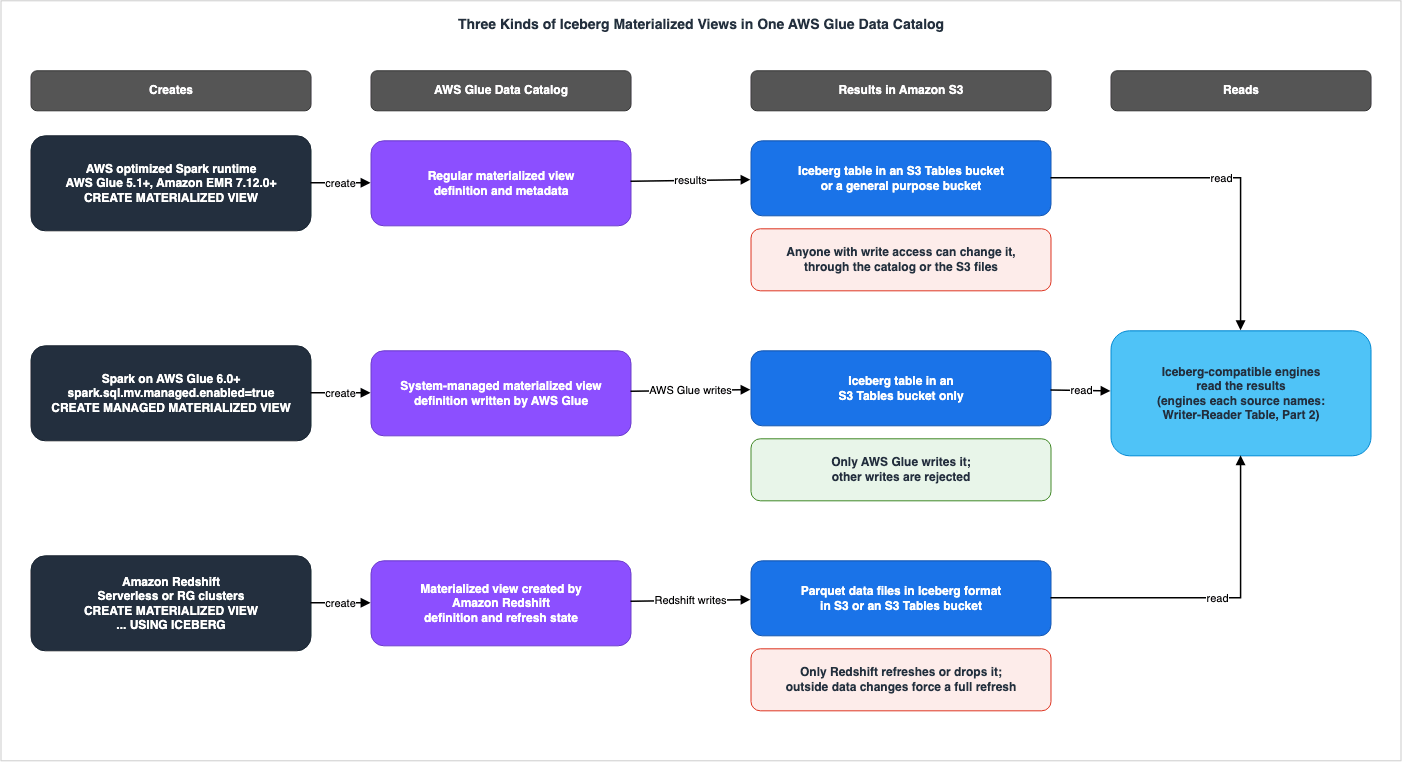
ViewDefinition structure that contains information about the MV's definition. RefreshSeconds specifies the interval for automatic refreshes. The API page states, "Auto refresh interval in seconds for the materialized view. If not specified, the view will not automatically refresh." LastRefreshType indicates the type of the most recent refresh (either FULL or INCREMENTAL). The API page describes SubObjects as "A list of table Amazon Resource Names (ARNs)." Regarding SubObjectVersionIds, it states, "List of the Apache Iceberg table versions referenced by the materialized view." Regarding ViewVersionId, it states, "For materialized views, the version ID is the Apache Iceberg table's snapshot ID."Figure 1 illustrates the three kinds of MVs, listing the creation engine, the definition in the Glue Data Catalog, the results in Amazon S3, and the engines that read them. Under the results of each kind, a note gives what the sources say about writes to it. The middle lane, system-managed MVs, is the only kind that the sources describe as rejecting writes from anything other than AWS Glue.
4. Writer-Reader Table, Part 1 — Who Writes Each Materialized View and Who Can Delete It
This section presents Part 1 of the table, and reads, kind by kind, what the sources say about who writes and who can delete.4.1 Writer-Reader Table, Part 1
| Table | Who Writes It | Who Can Delete It | Where the Source Says So |
|---|---|---|---|
Regular materialized view (CREATE MATERIALIZED VIEW in Spark) | States: In automatic refresh, the AWS Glue Data Catalog writes the results by assuming the definer role ("it assumes the definer role to access source tables and write updated results"). Manual refreshes are started with Spark SQL or the AWS Glue API (Section 5). General rule only: What's New says of materialized views that are not system-managed, "anyone with write access can change it, either through the catalog or by writing to the files in Amazon S3." (among the kinds this article covers, at the time of the announcement, these were the regular MVs created with Spark). | States: Spark's DROP MATERIALIZED VIEW removes the definition in the Glue Data Catalog and also deletes the data in the S3 Iceberg table. The source does not say. The permission needed to drop it (the example policy for the AWS Glue job role includes glue:DeleteTable and s3:DeleteObject). | AWS Glue Developer Guide (MV page), Amazon EMR Release Guide (MV page), Lake Formation Developer Guide (MV page), What's New (2026-09-30) |
System-managed materialized view (CREATE MANAGED MATERIALIZED VIEW) | States: Only AWS Glue can write data and metadata (such as schema and location). Attempts by other query engines, direct calls to AWS Glue's UpdateTable, or direct writes to the Iceberg table are rejected. What remains for users is refreshing (AWS Glue runs the refresh and writes the results) and changing the refresh schedule and table properties. | States: You can delete it if you have the necessary permissions ("Drop the materialized view, if you have permission to drop it"). To modify the definition, you must drop and recreate it. General rule only: The statement that DROP MATERIALIZED VIEW also deletes the data is a general statement in the section on managing MVs and does not name system-managed MVs. | AWS Glue Developer Guide (section on system-managed materialized views, MV management section), What's New (2026-09-30) |
Materialized view created by Amazon Redshift (USING ICEBERG) | States: Amazon Redshift executes the definition query and writes the results as Parquet data files in S3. Only Amazon Redshift can refresh it ("Only Amazon Redshift can refresh or drop materialized views that were created by Amazon Redshift."). States: The Amazon Redshift Developer Guide lists modification of the MV data outside a Redshift refresh as a condition for falling back to a full refresh (Section 4.4). For materialized views stored in a general purpose bucket, the guide recommends compacting the data with an external tool such as Apache Spark's rewrite_data_files. | States: Only Amazon Redshift can delete it; the caller needs DROP permission on the materialized view. Redshift's DROP MATERIALIZED VIEW only removes the table entry in the Glue Data Catalog and does not delete the data files in S3 or the Iceberg metadata files. | Amazon Redshift Developer Guide (Iceberg MV page, REFRESH MATERIALIZED VIEW and DROP MATERIALIZED VIEW pages) |
4.2 Only System-Managed Materialized Views Are Described as Rejecting Writes from Anything Other Than AWS Glue
The AWS Glue Developer Guide describes write protection for system-managed MVs as follows:Only AWS Glue writes the materialized view's data and its metadata, such as its schema and
storage location. Any attempt to change these is rejected, whether it comes from another query
engine, a direct AWS Glue UpdateTable call, or a direct write to the underlying Apache Iceberg
table.This sentence says that every attempt to change the data and metadata is rejected ("Any attempt to change these is rejected") and names three paths: writes from other query engines, direct calls to the AWS Glue
UpdateTable API, and direct writes to Iceberg tables. The What's New post of September 30, 2026, also says of system-managed MVs, "the service guarantees no other writer can alter it."The same AWS Glue Developer Guide section also lists the operations left to users. They are refreshing the MV ("AWS Glue runs the refresh and writes the results for you."), changing the refresh schedule and table properties, and dropping the MV if you have permission. Even when users start a refresh, it is AWS Glue that writes the results.
Of the three kinds, system-managed MVs are the only ones that the sources describe as rejecting writes from anything other than AWS Glue. For MVs that are not system-managed, the What's New post says that anyone with write access can change them (Section 4.3). For materialized views created by Amazon Redshift, the sources limit refresh and deletion to Redshift, but anticipate that the data may be changed outside Redshift (Section 4.4).
Furthermore, the Amazon Redshift Developer Guide includes the statement: "Use AWS Lake Formation permissions or Amazon S3 bucket policies to control who can access the materialized view's underlying Iceberg data files." This statement is presented as one measure to address visibility into changes reflected in the snapshot history (Section 6.5). It controls who can access the files. The sources do not describe it as a way to prevent writes to the materialized view.
4.3 Regular Materialized Views — Anyone with Write Access Can Change Them
The What's New post of September 30, 2026, in the text announcing system-managed materialized views, describes materialized views that are not system-managed as follows. Among the kinds this article covers, at the time of the announcement, the materialized views that were not system-managed were the regular materialized views created with Spark.Because this result is an open Iceberg table in your data lake, anyone with write access can
change it, either through the catalog or by writing to the files in Amazon S3.What's New gives the reason: the result of the materialized view is an open Iceberg table in the data lake ("an open Iceberg table in your data lake"). Consequently, anyone with write permissions to the table, whether through the catalog or directly to the files in Amazon S3, can modify the materialized view. What's New continues that system-managed materialized views close this gap ("System-managed materialized views close this gap by only allowing AWS Glue to write the materialized view's data and definition").
This article reads the following from these sentences: whether the contents of a regular materialized view stay exactly as computed depends on who has write permissions on the MV table and its S3 location. The AWS Glue Developer Guide provides examples of the permissions required for AWS Glue job roles, including
glue:UpdateTable, glue:DeleteTable, and s3:PutObject and s3:DeleteObject for the example bucket (amzn-s3-demo-bucket). The sources give system-managed materialized views as the way to keep the results exactly as computed.How the next refresh behaves after a regular materialized view is overwritten outside a refresh (whether it continues incrementally or falls back to a full refresh) was not found in the AWS Glue, Lake Formation, or Amazon EMR guides (Section 9.3).
4.4 Materialized Views Created by Amazon Redshift — Only Redshift Refreshes or Drops Them, and Outside Changes Force a Full Refresh
The Amazon Redshift Developer Guide states the limits across engines in two sentences.Only Amazon Redshift can refresh or drop materialized views that were created by Amazon Redshift.
Iceberg materialized views created by other engines (such as Apache Spark) can be queried by
Amazon Redshift as read-only tables but cannot be refreshed or dropped by Amazon Redshift.What the guide limits to Redshift is refreshing and dropping. The guide's Iceberg materialized view page lists three conditions that trigger a full refresh instead of an incremental refresh. The third of these conditions is described in the following sentence.
The materialized view data was modified outside of a Amazon Redshift refresh operation.The page dedicated to the
REFRESH MATERIALIZED VIEW command also lists "Data modification on the materialized view by an external engine or tool" as an operation that forces a full recomputation on the next refresh. The developer guide, across two pages, anticipates that external engines or tools might modify the data in a materialized view. No statement was found that limits writing the data to Redshift.For MVs stored in general purpose buckets, the same Iceberg MV page says that Redshift does not perform compaction, and recommends regular compaction with an external tool ("Run compaction regularly using an external tool such as Apache Spark's rewrite_data_files procedure."). No statement was found on whether this compaction counts as a change outside a Redshift refresh, one of the conditions for falling back to a full refresh.
Refresh permissions are divided between the caller and the definer role. The
REFRESH MATERIALIZED VIEW page requires the caller to have ALTER permissions on the materialized view, while it requires the definer role (recorded at create time) to have SELECT permission on the source tables. Multiple Redshift clusters or workgroups can attempt to refresh the same materialized view at the same time. The developer guide says that only one refresh succeeds ("Amazon Redshift uses optimistic concurrency control (OCC) through the AWS Glue Data Catalog's conditional update mechanism to ensure that only one refresh succeeds.").4.5 What Is Deleted — The Definition or the Data
What a drop deletes differs by the kind of MV.- Regular MVs: The AWS Glue Developer Guide and the Amazon EMR Release Guide state that the
DROP MATERIALIZED VIEWcommand "removes the materialized view definition from the AWS Glue Data Catalog and deletes the underlying Iceberg table data from your S3 bucket." This means both the definition and the data are removed. - System-managed MVs: If you have the necessary permissions, you can delete them. However, no statement was found that names system-managed MVs and says whether deleting one also removes the data in S3. The
DROP MATERIALIZED VIEWsentence above is a general statement in the section on managing MVs. - MVs created by Amazon Redshift: The
DROP MATERIALIZED VIEWpage states:
Dropping an Iceberg materialized view is a metadata-only operation. Amazon Redshift removes
the table entry from the AWS Glue Data Catalog but does not delete the underlying data files
or Iceberg metadata files in Amazon S3. You are responsible for removing orphaned files after
dropping an Iceberg materialized view.
With Redshift's
DROP command, only the table entry in the Glue Data Catalog is removed. The data files in S3 and the Iceberg metadata files remain. It is the user's responsibility to delete these remaining files. The same page gives two ways to remove these files: deleting orphan files in AWS Glue, and table maintenance for S3 Tables table buckets. The AWS Big Data Blog (October 5, 2026) also states, "DROP MATERIALIZED VIEW removes the AWS Glue catalog entry but does not delete the underlying data in Amazon S3."In Amazon Athena's SQL, it is not possible to delete MVs created with Spark. Athena's user guide page on materialized views states that the
DROP command is not supported for MVs. The page assumes the MVs were created with Apache Spark and does not specifically mention system-managed MVs or MVs created by Redshift (Section 7.3).5. Who Refreshes — The Refresh Table
This section presents the Refresh Table, giving for each refresh path who starts it, which compute runs it under which role, and who chooses between a full and an incremental refresh.5.1 The Refresh Table
| Refresh Path | Who Starts It | What Runs It and Under Which Role | Full or Incremental | Where the Source Says So |
|---|---|---|---|---|
Regular materialized view — schedule (SCHEDULE REFRESH EVERY) | States: A schedule set with the SCHEDULE REFRESH EVERY clause at creation, or added later with ALTER MATERIALIZED VIEW … ADD SCHEDULE. | States: The AWS Glue Data Catalog runs it on managed Spark compute. It assumes the definer role ("The AWS Glue Data Catalog assumes this role when executing automatic refresh operations."). The role requires a trust policy for glue.amazonaws.com and the iam:PassRole permission. | States: Determined by the Glue Data Catalog based on the definition and the volume of changed data. | AWS Glue Developer Guide (MV section), Lake Formation Developer Guide (MV section), Amazon EMR Release Guide (MV section) |
Regular materialized view — Spark SQL (REFRESH MATERIALIZED VIEW) | States: The user executing SQL in AWS Glue jobs and notebooks, Amazon EMR, and other Spark sessions. | General rule only: The AWS Glue Developer Guide says that the Glue Data Catalog runs refreshes on managed Spark compute, without separating automatic and manual refreshes. The Lake Formation Developer Guide says that the Glue Data Catalog assumes the definer role when it refreshes. Apart from one sentence on billing, no statement that names this path was found (Section 5.3). | States: FULL specifies a full refresh. Without it, and with incremental refresh enabled, the Glue Data Catalog decides whether incremental refresh can be used, and falls back to a full refresh if it cannot. | AWS Glue Developer Guide (MV section), Amazon EMR Release Guide (MV section) |
Regular materialized view — AWS Glue API (StartMaterializedViewRefreshTaskRun) | States: The caller of the API. The Lake Formation Developer Guide says that glue:GetTable permission on the materialized view is required. | General rule only: The record of a refresh task run, MaterializedViewRefreshTaskRun, has a Role ("The IAM role that the service assumes to run the materialized view refresh task."). This record and the limit on concurrent task runs (50 per Region, adjustable) are not described as limited to runs started with the API. | States: FullRefresh specifies a full refresh. The RefreshType in the task run record is either FULL or INCREMENTAL. | AWS Glue Developer Guide (MV API section), Lake Formation Developer Guide (MV section), AWS Glue Quotas page |
| System-managed materialized view | States: Either a schedule or a user-initiated refresh operation. | States: AWS Glue executes and writes the results ("AWS Glue runs the refresh and writes the results for you."). General rule only: The statements that the definer role is assumed do not name system-managed MVs. | General rule only: A general statement that the Glue Data Catalog selects between full and incremental refresh, without specifically mentioning system-managed materialized views. | AWS Glue Developer Guide (system-managed MV section, beginning of the MV page) |
| Materialized view created by Amazon Redshift | States: The Redshift cluster or workgroup that executes REFRESH MATERIALIZED VIEW (requires ALTER access on the materialized view). Automatic refreshes are not supported. | States: Amazon Redshift executes. The definer role recorded at create time must have SELECT permission on the source tables. The AWS Big Data Blog (2026-10-05) states that Redshift assumes the definer role for materialized view operations. If multiple clusters attempt to refresh simultaneously, only one will succeed. | States: Determined by Redshift. The Amazon Redshift Developer Guide lists COUNT and SUM aggregations, and inner joins, as potential forms for incremental refresh, and lists three conditions that trigger a full refresh. | Amazon Redshift Developer Guide (Iceberg MV section, REFRESH MATERIALIZED VIEW section), AWS Big Data Blog (2026-10-05) |
5.2 Automatic Refresh Runs Under the Definer Role
The AWS Glue Data Catalog handles the automatic refresh of regular MVs. The AWS Glue Developer Guide states that Glue Data Catalog handles all aspects of MV maintenance, specifically mentioning "Scheduling and executing refresh operations using managed Spark compute" and "Determining whether to perform full or incremental refresh based on the data changes".The AWS Glue, Lake Formation, and Amazon EMR guides state, in the same sentences, under whose permissions automatic refresh runs.
When you create a materialized view, the definer role's ARN is stored in the view definition.
The AWS Glue Data Catalog assumes this role when executing automatic refresh operations. If
the definer role loses access to source tables, refresh operations will fail until permissions
are restored.
The ARN (Amazon Resource Name) of the IAM role used to create the MV (the "definer role") is recorded in the MV's definition. When performing automatic refreshes, the Glue Data Catalog assumes this role. The Lake Formation Developer Guide even details what actions are performed using the assumed role, stating, "When the AWS Glue Data Catalog refreshes a materialized view, it assumes the definer role to access source tables and write updated results." This statement is in the Key concepts section and is not limited to automatic refresh. Accessing the source tables and writing the updated results both operate under the permissions granted to the definer role.
The definer role therefore has conditions. The AWS Glue Developer Guide requires the
iam:PassRole permission for the role used for automatic refresh ("The role you use for Materialized View auto-refresh must have the iam:PassRole permission on the role."), and a trust policy that lets glue.amazonaws.com assume the role. When placing materialized views in S3 Tables, the role also requires the s3tables:PutTableMaintenanceConfiguration permission. The definer role needs full read access to all source tables. When using Lake Formation, the role must have SELECT or ALL permission without row, column, or cell filters. If the definer role loses access to the source tables, refreshes will fail until the role's permissions are restored.Refresh failures are observable. The Lake Formation Developer Guide says that refresh metrics are published to the
AWS/Glue namespace in Amazon CloudWatch and that run logs are written to the log group /aws-glue/materialized-views/<task_run_id>. Amazon EventBridge will emit events such as Glue Materialized View Refresh Task Failed and Glue Materialized View Auto-Refresh Invocation Failure.The annotation table for Amazon S3 Metadata Tables also works by having an AWS service assume a role that the user passes, and read with it. That article found no statement of what happens when the role loses its permissions. For the definer role of an MV, the sources say that refreshes fail until the permissions are restored.
5.3 Manual Refresh — Spark SQL and the AWS Glue API
Regular MVs can also be refreshed manually, without waiting for the schedule. There are two methods for manual refresh. The Amazon Athena User Guide also states, "Refresh operations must be performed through the AWS Glue Data Catalog API or Apache Spark."One method is using Spark SQL. The AWS Glue Developer Guide provides examples in two forms:
spark.sql("REFRESH MATERIALIZED VIEW customer_orders FULL")spark.sql("REFRESH MATERIALIZED VIEW customer_orders")Specifying
FULL triggers a full refresh. Without it, the system attempts an incremental refresh, but this requires that incremental refresh be enabled in the Spark session. The AWS Glue Developer Guide gives two settings for this: spark.sql.optimizer.incrementalMVRefresh.enabled=true and spark.sql.optimizer.incrementalMVRefresh.deltaThresholdCheckEnabled=false. The Amazon EMR Release Guide lists only the former. The Glue Data Catalog determines whether an incremental refresh is possible.The AWS Glue Data Catalog automatically determines whether incremental refresh is applicable
based on the view definition and the amount of changed data. If incremental refresh is not
possible, the operation falls back to full refresh.For a manual refresh started with Spark SQL, apart from one sentence on billing (below), no statement that names this path was found for which compute runs it and under whose permissions. The sources have only general statements. The sentence common to the three guides says that the definer role is assumed for automatic refresh (automatic refresh operations). The Lake Formation Developer Guide, in the Key concepts section, states, without limiting it to automatic refresh, that the Glue Data Catalog assumes the definer role when it refreshes. The AWS Glue Developer Guide also says that the Glue Data Catalog runs refreshes on managed Spark compute, without separating automatic and manual refresh. No statement was found that says whether Spark SQL refreshes fall under this Glue Data Catalog refresh process. The section on pricing in the AWS Big Data Blog (September 2, 2026) has one sentence that names this path. It is a sentence about billing, and this article does not cover pricing. That sentence does not name a role.
One approach to verifying that an incremental refresh has been performed can provide a different clue. The AWS Glue Developer Guide instructs users to search "the AWS Glue job logs" for the message
DEBUG RefreshMaterializedViewExec: Executed Incremental Refresh. The Amazon EMR Release Guide likewise says to search for the same message in "the Spark output". Because records of the refresh execution appear in the logs of the job that ran the SQL, or in Spark's output, it might seem as though the refresh is running in that session. However, this is an interpretation derived from the verification steps, and it differs from the general statements mentioned earlier. This article does not decide between the two.The second path is the AWS Glue API. The
StartMaterializedViewRefreshTaskRun operation starts a refresh task for the materialized view. Setting FullRefresh to true triggers a full refresh. There are also operations to stop (StopMaterializedViewRefreshTaskRun), check status (GetMaterializedViewRefreshTaskRun), and list tasks (ListMaterializedViewRefreshTaskRuns). The task run record, MaterializedViewRefreshTaskRun, has a Role field, and the API page explains, "The IAM role that the service assumes to run the materialized view refresh task." Therefore, the refresh task is executed using a role assumed by the service. However, this record is a general item of refresh task runs and is not described as limited to runs started with the API.Regarding the permissions required to initiate a refresh via the API, the Lake Formation Developer Guide states, "Required Permission: The AWS credentials used to make the API call must have glue:GetTable permission for the materialized view." Furthermore, there is a limit on the number of refresh tasks that can run concurrently. The AWS Glue quotas page sets "The maximum number of concurrent materialized view refresh task runs." at 50 in each Region, and says that it can be increased.
5.4 AWS Glue Computes and Writes System-Managed Materialized Views
AWS Glue computes and writes system-managed MVs. On creation, the AWS Glue Developer Guide states, "AWS Glue computes and writes the materialized view for you; your Spark session does not write it directly" (Section 3.2). Regarding refreshes, it states, "Refresh the materialized view. AWS Glue runs the refresh and writes the results for you." Refreshes can be tracked in the same way as for other materialized views ("Refreshes are tracked the same way as for other materialized views.").The statement on the minimum interval for automatic refresh names system-managed MVs. The AWS Glue Developer Guide specifies a minimum interval of 10 minutes for AWS Glue version 6.0 and later, stating, "This applies to all materialized views, including system-managed materialized views" (Section 9.1).
However, the section on system-managed MVs does not say which IAM role AWS Glue uses to run their refreshes. The section on system-managed MVs does not mention the definer role. The sources do not settle whether the definer role statements for regular MVs also apply to system-managed MVs (Section 9.3).
5.5 Materialized Views Created by Amazon Redshift Are Refreshed Only Manually
Materialized views created by Amazon Redshift have no automatic refresh. The Amazon Redshift Developer Guide states, "Autorefresh is not supported for Iceberg materialized views. You must refresh them manually using REFRESH MATERIALIZED VIEW." TheCASCADE option, which refreshes dependent materialized views, is also not supported with Iceberg materialized views ("CASCADE refresh is not supported for Iceberg materialized views.").A Redshift cluster or workgroup runs the refresh. According to the AWS Big Data Blog (October 5, 2026), "Amazon Redshift clusters or Serverless workgroups with the appropriate IAM role can refresh it." The same blog explains that the trust policy for the definer role should include both
redshift.amazonaws.com and glue.amazonaws.com because "Amazon Redshift needs to assume the role to perform materialized view operations. AWS Glue needs to check base table permissions on behalf of the materialized view definer role." When multiple clusters attempt to refresh simultaneously, optimistic concurrency control ensures that only one refresh will succeed. The REFRESH MATERIALIZED VIEW page states that if another cluster completes the refresh first, the current operation will be aborted ("If another cluster completes the refresh first, the local operation aborts."). The system view SVL_MV_REFRESH_STATUS only records refreshes performed by the cluster itself. Refreshes performed by other clusters are only visible in those clusters' respective system views.Redshift cannot refresh MVs created by other engines (Section 4.4). Conversely, only Redshift can refresh MVs that it itself created. MVs created by Spark and MVs created by Redshift cannot be refreshed by the other engine.
5.6 Full or Incremental — Who Chooses, What Forces a Full Refresh, and What a Full Refresh Removes
Incremental refreshes process only the data that has changed in the source table since the previous refresh. The conditions under which an incremental refresh can be used differ between regular MVs and MVs created by Redshift.The AWS Glue and Amazon EMR guides limit the SQL that incremental refresh can use, with the following sentence:
The view definition must be a single SELECT-FROM-WHERE-GROUP BY-HAVING block and cannot
contain set operations, subqueries, the DISTINCT keyword in SELECT or aggregate functions,
window functions, or joins other than INNER JOIN.
User-defined functions and some built-in functions are not supported with incremental refreshes. The Glue Data Catalog determines whether an incremental refresh can be used based on the definition's structure and the volume of changed data. If an incremental refresh is not possible, it reverts to a full refresh (Section 5.3).
The Amazon Redshift Developer Guide lists the following as supported structures for incremental refreshes:
COUNT and SUM aggregate functions used within SELECT ... FROM ... WHERE ... GROUP BY statements, and inner joins between Iceberg source tables. The REFRESH MATERIALIZED VIEW page specifies that only COUNT and SUM aggregate functions are supported for incremental refreshes ("For incremental refresh, Amazon Redshift supports only COUNT and SUM aggregate functions."). The AWS Big Data Blog (October 5, 2026) also lists non-aggregated queries ("Non-aggregated queries (row-level delta tracking).") as a form that supports incremental refresh. While DISTINCT, outer joins, window functions, subqueries, set operations, GROUPING SETS / ROLLUP / CUBE, and aggregate functions other than COUNT and SUM can be used in the definition, the refresh will revert to a full refresh. The developer guide lists the following three conditions that trigger an automatic reversion to a full refresh:- The definition uses SQL syntax that is not supported for incremental refreshes.
- The source table snapshots from the last refresh have expired ("Source table snapshots from the last refresh have expired.").
- The data in the MV has been modified outside of Redshift's refresh process (Section 4.4).
For the second condition, the developer guide recommends configuring the snapshot retention period for source tables to be longer than the expected refresh interval ("For source tables, configure snapshot retention to exceed your expected refresh interval.").
A full refresh also affects previous snapshots of the materialized view's tables. The AWS Glue and Amazon EMR guides state, "Full refresh operations override the entire table and make previous snapshots unavailable." Regarding full refreshes for materialized views created by Redshift, the Amazon Redshift Developer Guide states that all data is replaced for each snapshot (Section 6.5).
The sources disagree on whether incremental refresh can handle changes that include deletes (Section 9.1).
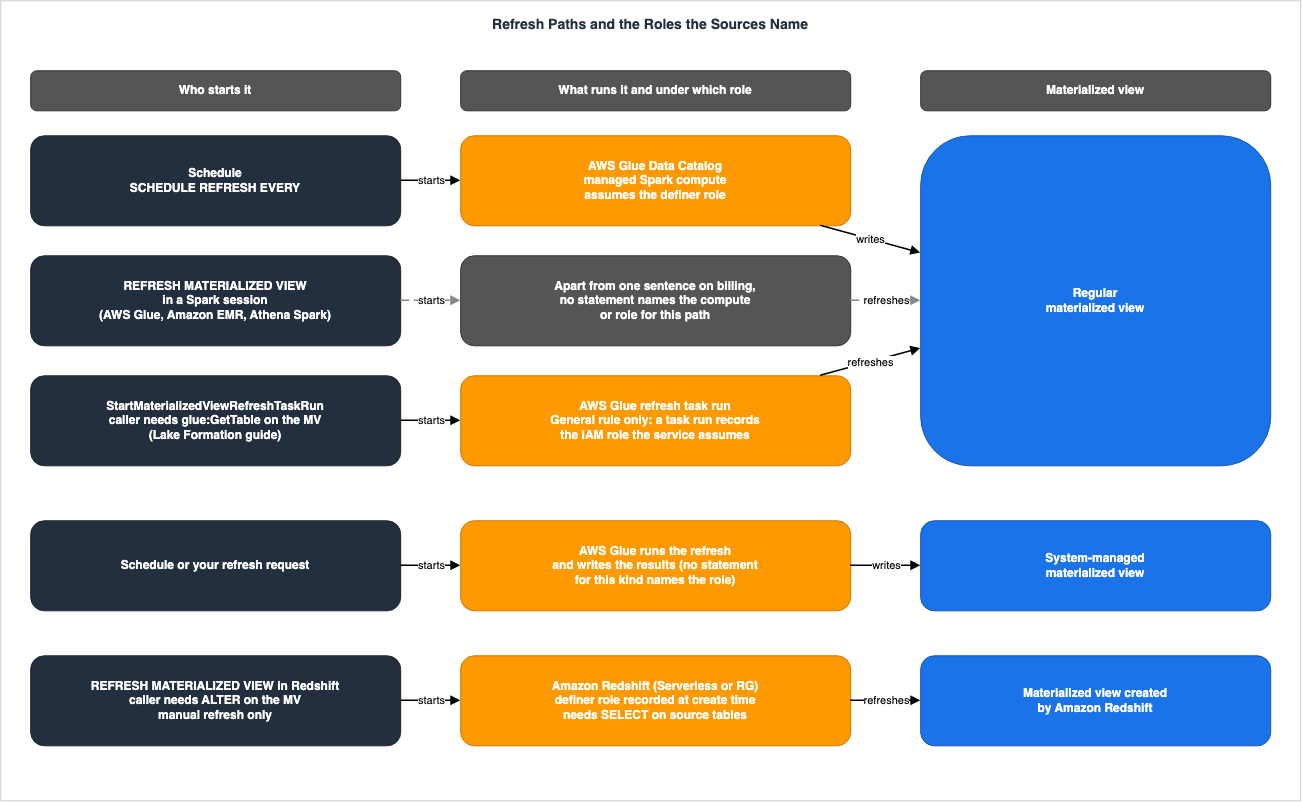
Figure 2 lists five refresh paths, categorized by who initiates them, what runs them, and which roles the sources name. For the Spark SQL path and the system-managed MV path, the figure states plainly what the sources do not name.
6. Writer-Reader Table, Part 2 — Who Can Read Each Materialized View and How Current a Read Is
This section presents Part 2 of the table, and reads, kind by kind, what the sources say about who can read and how current a read is.6.1 Writer-Reader Table, Part 2
| Table | Who Can Read It | How Current a Read Is | Where the Source Says So |
|---|---|---|---|
Regular materialized view (CREATE MATERIALIZED VIEW in Spark) | States: "Any Apache Iceberg-compatible query engine can read the materialized view, including Amazon Athena, Amazon EMR, AWS Glue, Amazon Redshift, and Iceberg-compatible third-party query engines." With IAM-only policies, access is granted via the GetTable permission for the materialized view; with Lake Formation policies, access is granted via the SELECT permission for the materialized view. Neither requires permissions on the source tables. Sources disagree: The Athena User Guide's materialized view page lists Lake Formation permissions required to read with Athena, while the same guide's release notes (2026-03-17) state support for IAM-based authorization (Section 9.2). | States: "Materialized views are eventually consistent with source tables. During the refresh window, queries may return stale data. Execute manual refresh for immediate consistency." Sources disagree: The minimum interval for automatic refreshes (Section 9.1). | AWS Glue Developer Guide (Materialized View page), Lake Formation Developer Guide (Materialized View page), Amazon EMR Release Guide (Materialized View page), Amazon Athena User Guide (Materialized View page, release notes), AWS Big Data Blog (2026-09-10) |
System-managed materialized view (CREATE MANAGED MATERIALIZED VIEW) | States: The What's New post says that "any Iceberg-compatible engine can read it directly". General rule only: Whether Amazon Redshift can read them is covered only by general statements that do not name system-managed MVs (the Amazon Redshift Developer Guide's statement that MVs created by other engines can be read as read-only tables, and the AWS Glue Developer Guide's "The precomputed data is also accessible from other services including Amazon Athena and Amazon Redshift."). | States: The AWS Glue Developer Guide's statement on the minimum interval names system-managed materialized views (10 minutes with AWS Glue 6.0 and later). General rule only: The Lake Formation Developer Guide and the Amazon EMR Release Guide state a one-hour minimum interval without specifying a version and without naming system-managed MVs (Section 9.1). General rule only: The eventual consistency statement does not name system-managed MVs. States: The always-consistent wording in the What's New post comes right after a sentence that ends with a clause on write protection (Section 6.3). The same post says of the results that AWS Glue "keeps them current on your schedule." | AWS Glue Developer Guide (Materialized View page), What's New (2026-09-30), Amazon Redshift Developer Guide (Iceberg Materialized View page), Lake Formation Developer Guide (Materialized View page), Amazon EMR Release Guide (Materialized View page) |
Materialized view created by Amazon Redshift (USING ICEBERG) | States: Any analytics engine that supports the Iceberg format can read it ("accessible to any analytics engine that supports the Iceberg format, including Apache Spark, Amazon Athena, and Trino"). To read with Redshift, grant the SELECT permission for the materialized view via either Lake Formation or AWS Glue resource policies. | States: Automatic refreshes are not supported; only manual refreshes are available. What's New says that manual incremental refresh keeps them current ("keeps them current"). General rule only: The general statements about Redshift materialized views say that when the source tables change, the materialized view results eventually become stale ("eventually becomes stale") and do not change until a refresh (Section 6.4). | Amazon Redshift Developer Guide (Iceberg Materialized View page, Materialized View Overview page, REFRESH MATERIALIZED VIEW page), What's New (2026-10-05) |
6.2 Readers Need No Permissions on the Source Tables — How the Definer Role Shapes Permissions
People who read an MV do not need permission to read its source tables. The AWS Glue Developer Guide states that when managing permissions solely through IAM policies, the following applies.Any IAM identity with GetTable permission on the materialized view can query it. Users can
query the materialized view without requiring direct access to the underlying source tables.When permissions are managed with Lake Formation, you grant
SELECT permission on the materialized view table. In this case too, readers do not need direct permissions on the source tables. The Lake Formation Developer Guide highlights this as an advantage of the permission model, stating, "This security model enables you to grant users access to materialized views without granting them direct permissions on the underlying source tables."This approach, however, relies on the conditions associated with the definer role. The AWS Glue Developer Guide specifies, "The view definer role must have full read access on all source tables." When using Lake Formation, it states that the required permission is "SELECT or ALL permission without row, column, or cell filters applied." A role whose permissions are limited to some rows or columns of the source tables does not meet this condition. The Lake Formation Developer Guide lists one use case for MVs as, "Grant users access to materialized views without exposing underlying source tables". What follows is this article's reading. When you grant permission to read an MV, people without permissions on the source tables can still see results computed from the source tables that the definer role can read. Who sees which data is determined by the definition of the MV and the individuals to whom you grant read permissions for the MV.
The sources describe read permissions slightly differently. For the IAM-policies-only model, the AWS Glue Developer Guide names only
GetTable. The AWS Big Data Blog (May 11, 2026) states, "you can access them using IAM principals that have required IAM permissions to Glue Data Catalog resource and its underlying storage", and also mentions permissions for the underlying storage. The Amazon Athena User Guide, on its materialized views page, lists the necessary Lake Formation SELECT and DESCRIBE permissions, as well as access to the S3 location where the MV data is stored. The same user guide's release notes, dated March 17, 2026, state that Athena now supports IAM-based authorization for S3 Tables and Iceberg Materialized Views. The discrepancies in how the permission models themselves are described are detailed in Section 9.2.6.3 Eventual Consistency and Stale Data
On how current a read of a regular MV is, the AWS Glue and Amazon EMR guides include the following statement in a list of limitations:Materialized views are eventually consistent with source tables. During the refresh window,
queries may return stale data. Execute manual refresh for immediate consistency.MVs are eventually consistent with the source tables. During the refresh window, reading the MV may return stale data. For immediate consistency, perform a manual refresh. The Lake Formation Developer Guide also says that the MV becomes temporarily stale ("temporarily stale") when the source tables change between refresh intervals, and that queries that read the MV directly may return outdated results until the next scheduled refresh completes. The Lake Formation Developer Guide's list of limitations also has the sentence "Materialized views are eventually consistent with base tables." The sources name different SQL for checking the state of an MV. The Lake Formation Developer Guide indicates that
DESCRIBE MATERIALIZED VIEW returns the staleness status, the time of the last refresh, and the refresh schedule configuration. The AWS Glue Developer Guide and the Amazon EMR Release Guide state that DESCRIBE EXTENDED provides information on the definition, refresh status, and the time of the last refresh.Whether a stale MV is read depends on how it is read. Queries that name the MV may return stale data. Automatic query rewrite, on the other hand, does not use stale MVs. The AWS Big Data Blog (September 10, 2026) states, "It skips stale MVs, so rewrite won't return stale results." Even with automatic query rewrite enabled, if the MV is stale, a query on the source tables is not rewritten and reads the source tables (Section 7.2).
The What's New post that announced system-managed materialized views includes the sentence, "You get a governed, always-consistent dataset that you can confidently share." The sentence just before it ends with "while the service guarantees no other writer can alter it", and the previous paragraph ends with a sentence saying that "the result stays exactly as computed". The same paragraph as the
always-consistent sentence also says of the results that AWS Glue "keeps them current on your schedule", which is a statement about freshness on the schedule that the user sets. The AWS Glue Developer Guide also states, immediately following the definition of system-managed materialized views, "This protects the materialized view from unintended changes, so you can share it as a trusted, consistent dataset." Again, the term "consistent" comes after a description of protection from unintended changes. This article reads always-consistent as meaning that other writers cannot change the MV, and not as a claim about freshness relative to the source table. No statement was found that system-managed MVs are outside the eventual consistency limitation. What Consistent Means, Service by Service on AWS addresses how the term "consistent" can have different meanings depending on the service.6.4 How Current a Materialized View Created by Amazon Redshift Is — Manual Refresh and Source Table Snapshots
Materialized views created by Amazon Redshift have no automatic refresh. What brings the MV up to date is theREFRESH MATERIALIZED VIEW that users run. The What's New post of October 5, 2026 says, "Redshift keeps them current by recomputing only what has changed with manual incremental refresh". No eventual consistency statement like the one for regular MVs was found on the Iceberg MV page of the Amazon Redshift Developer Guide. The word stale appears once on that page, in a sentence saying that Redshift checks whether the MV is still stale during a concurrent refresh. More generally, the overview page for Redshift materialized views states, "The result set eventually becomes stale when data is inserted, updated, and deleted in the base tables", while the page dedicated to REFRESH MATERIALIZED VIEW states, "The data in the materialized view remains unchanged, even when applications make changes to the data in the underlying tables." Both of these are general statements about Redshift materialized views and do not specifically refer to Iceberg MVs.Based on the information available, it can be inferred that, unless there are changes outside of a refresh, the contents of a Redshift-created MV will reflect the results of the last successful refresh. However, the developer guide does anticipate changes occurring outside of a refresh (Section 4.4), so it cannot be definitively stated that the contents will always remain the same as the last refresh.
The retention of source table snapshots affects how refreshes are performed. If the source table snapshots from the previous refresh have expired, the next refresh will be a full refresh (Section 5.6).
6.5 Anyone Who Can Read the Files Can See What Changed Between Refreshes
The Amazon Redshift Developer Guide includes another note regarding readers. TheSnapshot history visibility section states that because Materialized Views (MVs) hold snapshot history as Iceberg tables, those who can read the files will be able to see rows added or removed between refreshes.A reader with access to the underlying Iceberg files can compare successive snapshots to
observe which rows were added or removed between refreshes.For aggregate MVs, only changes to the aggregate values are visible. For non-aggregate MVs, only rows in the MV's output that have changed are visible. The developer guide calls this behavior inherent to the Iceberg table format ("This behavior is inherent to the Iceberg table format.") and says that any Iceberg table that receives incremental writes has the same property.
As mitigation strategies, the developer guide lists four options:
- Control access to the underlying Iceberg data files of the MV using Lake Formation permissions or S3 bucket policies.
- Define MVs containing sensitive data that you do not want to expose change history using a syntax that triggers a full refresh, such as
DISTINCT. A full refresh replaces all data for each snapshot. - Configure Iceberg snapshot expiration to shorten the period for which changes are visible.
- Use S3 Tables table buckets, which provide table-level access control.
These are measures concerning what readers of the MV can see. As noted in Section 4.2, the sources do not describe them as a way to prevent writes to the MV. No statement on snapshot history visibility was found in the AWS Glue, Lake Formation, and Amazon EMR guides.
7. Which Engines Read and Which Use the MVs Automatically — The Engine Table
This section presents the Engine Table and shows that the engines that can read MVs, the engines that use MVs automatically, and the engines that can create or refresh MVs are each different.7.1 The Engine Table
| Engine | Read | Create, Refresh, or Drop | Automatic Query Rewrite | Where the Source Says So |
|---|---|---|---|---|
| AWS optimized Spark runtime (AWS Glue 5.1 or later, Amazon EMR 7.12.0 or later, Amazon Athena Spark) | States: Readable using standard Spark SQL, as with other tables. | States: Can create, refresh, and drop regular MVs. System-managed materialized views can be created with AWS Glue 6.0 or later. Sources disagree: Whether regular MVs can be created with Amazon Athena Spark (Section 9.2). The source does not say. Whether system-managed MVs can be created from Amazon EMR or Athena Spark | States: Uses regular MVs. It is opt-in: set spark.sql.optimizer.answerQueriesWithMVs.enabled=true. Does not use stale MVs. General rule only: The statements on automatic query rewrite do not name system-managed MVs. The source does not say. Whether it uses MVs created by Amazon Redshift (Section 7.4). | AWS Glue Developer Guide, Amazon EMR Release Guide, Lake Formation Developer Guide (the MV page of each), Amazon Athena User Guide (MV page), AWS Big Data Blog (2025-12-09, 2026-09-02, 2026-09-10) |
| Amazon Athena SQL | States: Readable with SELECT, DESCRIBE, SHOW TABLES, joins, filtering, and aggregation. | States: Does not accept ALTER, CREATE MATERIALIZED VIEW, REFRESH MATERIALIZED VIEW, DROP, INSERT, UPDATE, MERGE, DELETE, OPTIMIZE, or VACUUM (the page assumes MVs created with Apache Spark). | General rule only: The blog limits automatic query rewrite to the AWS optimized Spark runtime and says that other engines do not rewrite queries. It does not name the Athena SQL engine. | Amazon Athena User Guide (materialized view pages), AWS Big Data Blog (2026-09-10) |
| Amazon Redshift | States: Can read materialized views created by other engines as read-only tables. | States: On Redshift Serverless and provisioned clusters with RG instance types, can create, manually refresh, and drop its own Iceberg materialized views. Cannot refresh or delete materialized views created by other engines. | States: Does not support automatic query rewrite with Iceberg materialized views. | Amazon Redshift Developer Guide (Iceberg materialized view pages) |
| Open source Apache Spark | General rule only: A general statement that it can read if the engine supports Iceberg. | States: SQL syntax for working with materialized views is not supported in open source Spark ("Open source Spark is not supported."). | General rule only: A general statement that other engines do not rewrite queries. | AWS Big Data Blog (2025-12-09, 2026-09-10) |
| Iceberg-compatible third-party engines | States: Readable (Trino is mentioned in the Amazon Redshift Developer Guide; Trino and Snowflake are mentioned in the What's New post (2026-10-05)). | The source does not say. Whether they can create or refresh MVs | General rule only: Does not rewrite queries. ("Other engines can query the materialized view directly, but they don't rewrite queries to use it automatically.") | AWS Big Data Blog (2026-09-10), Amazon Redshift Developer Guide (Iceberg materialized view pages), What's New (2026-10-05) |
7.2 Only the AWS Optimized Spark Runtime Rewrites Queries Automatically, and Only When You Opt In
Automatic query rewrite turns a query against the source tables into a query that reads a materialized view (MV). The AWS Big Data Blog (September 10, 2026) limits the engines that perform automatic query rewrite as follows.Automatic query rewrite is available on the AWS optimized Spark runtime in Amazon Athena,
Amazon EMR, and AWS Glue. Other engines can query the materialized view directly, but they
don't rewrite queries to use it automatically.By default, automatic query rewrite is disabled. The same blog post notes, "Note that automatic query rewrite is opt-in: set spark.sql.optimizer.answerQueriesWithMVs.enabled=true when creating the Apache Spark session." The configuration examples in the AWS Glue Developer Guide also explicitly set this parameter to
true.Automatic query rewrite has additional conditions. The AWS Glue and Amazon EMR guides state that only materialized views with a limited scope of SQL definitions, similar to incremental refreshes, are eligible for rewriting. However, the AWS Big Data Blog (September 10, 2026) indicates that other forms of materialized views, such as those using window functions and outer joins, can also be handled through exact-match rewriting ("Exact-match rewrite handles MVs defined as other shapes, such as window functions and outer joins"). The sources disagree (Section 9.1). After creating a materialized view, rewriting will not function until Spark's metadata cache is populated, a process that "typically completes within 30 seconds." Furthermore, rewriting only functions when the materialized view is up-to-date. The AWS Glue Developer Guide, following an example of rewriting, adds the phrase "provided the materialized view is current." The Lake Formation Developer Guide states that if the materialized view is stale or cannot accurately fulfill the query, the original plan against the source tables is executed. The AWS Big Data Blog (September 10, 2026) also notes that rewriting is disabled by default for
INSERT and MERGE statements.7.3 Amazon Athena SQL Only Reads, and Amazon Redshift Only Reads MVs Created by Other Engines
Amazon Athena's SQL only reads materialized views. The Athena User Guide states:Athena does not support the following operations on materialized views: ALTER, CREATE
MATERIALIZED VIEW, REFRESH MATERIALIZED VIEW, DROP, INSERT, UPDATE, MERGE, DELETE, OPTIMIZE,
VACUUM. To create materialized views, use Apache Spark in Amazon EMR or AWS Glue.The user guide says, "Athena treats materialized views as standard Iceberg tables for read operations". Operations supported by Athena include
SELECT, DESCRIBE, SHOW TABLES, joins with other tables and views, filtering, and aggregation. The prerequisite in the Athena User Guide is that the MV was created with Apache Spark (Amazon EMR release 7.12.0 or later, or AWS Glue version 5.1 or later). This page does not name system-managed materialized views or materialized views created by Redshift.Amazon Redshift reads materialized views created by other engines as read-only tables (Section 4.4). It does not use even the Iceberg materialized views it created for automatic query rewrite ("Automatic query rewriting to use materialized views is not supported for Iceberg materialized views"). Furthermore, Redshift's automated materialized views are also not supported for Iceberg materialized views ("Automated materialized views are not supported for Iceberg materialized views").
7.4 What This Article Does Not Infer by Combining Sources
Combining statements from the sources can make some things look true. This article does not write the following points, because no source names them.- Can system-managed materialized views be read from Amazon Redshift? The What's New post states that system-managed materialized views can be read by Iceberg-compatible engines, while the Amazon Redshift Developer Guide states that Amazon Redshift can read MVs created by other engines as read-only tables. Combining the two makes it look possible, but no statement was found that names system-managed MVs and Redshift together.
- Does Spark's automatic query rewrite use materialized views created by Amazon Redshift? No statement was found.
- Can third-party engines create or refresh materialized views? No statement was found.
- Can foreign tables in Amazon Aurora PostgreSQL read these materialized views? This belongs to Querying Apache Iceberg and Parquet from Amazon Aurora PostgreSQL. This article writes neither that they can nor that they cannot.
8. Outside the Apache Iceberg Specification
This section confirms, with AWS's own statement and the Iceberg specification pages, that AWS's Iceberg materialized views are not part of the Apache Iceberg specification.8.1 AWS's Own Statement and the Apache Iceberg Specification Pages
The AWS Big Data Blog (September 2, 2026) states the following under the item "AWS-specific extension." in the list of limitations of an article that builds a medallion architecture with Iceberg MVs:Iceberg materialized views are not part of the open-source Apache Iceberg specification. They
aren't portable to non-AWS environments.The Iceberg specification pages also align with this. As of October 6, 2026, the Table Spec and View Spec pages do not mention the term
materialized at all. A pull request to add the specifications for Materialized Views is available on GitHub at apache/iceberg as #11041 (Spec: Materialized View Spec). As of October 6, 2026, when checked via the GitHub API, this pull request is still open and has not been merged. The last update was on October 1, 2026.The MV mechanisms that the AWS sources describe are on the AWS side. An AWS Big Data Blog post (December 9, 2025) says that the SQL syntax for working with MVs was added only to the AWS optimized Spark runtime (Section 3.1); the What's New post of October 5, 2026, announced that Amazon Redshift can also create its own MVs with
CREATE MATERIALIZED VIEW … USING ICEBERG (Section 3.3). The definition and refresh status of the MVs are stored in the Glue Data Catalog's ViewDefinition and similar structures (Section 3.4). The tables associated with MVs also include columns used by the system. The AWS Glue Developer Guide states, "Materialized view columns starting with the __ivm prefix are reserved for system use. Amazon reserves the right to modify or remove these columns in future releases." This article follows the AWS sources (the AWS Big Data Blog statement of September 2, 2026, quoted above), treating Iceberg MVs as an AWS mechanism outside the Apache Iceberg specification.8.2 The Statement That They Are Not Portable, and the Statements That They Can Be Read
The second sentence of the medallion article, "They aren't portable to non-AWS environments", does not have a single meaning when placed next to the following statements.- The AWS Big Data Blog (September 10, 2026) includes "Iceberg-compatible third-party query engines" as engines that can read materialized views (MVs).
- The What's New post of October 5, 2026, lists "third-party engines such as Trino, or Snowflake" as engines that can read materialized views created by Redshift.
- The AWS Big Data Blog (October 5, 2026) states, "Iceberg materialized views take the open lakehouse promise further: optimization itself becomes portable."
- The medallion article itself includes "first-party (1P) or third-party (3P) compute engines supporting the Iceberg REST API" among the downstream consumers that its Gold layer MVs serve.
The medallion article places the two sentences under the AWS-specific extension item, but it does not say what is not portable. Other sources, and the medallion article itself, say that the resulting Iceberg tables can be read by third-party engines. It is possible to read this as meaning that what is not portable is the definition and refresh mechanisms, which are tied to the Glue Data Catalog and AWS engines, while the resulting tables are readable. However, this is this article's inference, and the medallion article does not say so. This article only places these statements side by side and does not say that any of them is incorrect.
9. Where the Sources Disagree, and Where No Statement Was Found
This section places, in two tables, the points where the sources say different things, and then lists the points where no statement was found. Neither table says that either source is incorrect or which one reflects the current behavior.9.1 Nesting, the Minimum Interval, Incremental Refresh with Deletes, Automatic Query Rewrite, and Portability
| Topic | One Source | Another Source | How This Article Writes It |
|---|---|---|---|
| Nested Materialized Views | AWS Glue Developer Guide and Amazon EMR Release Guide: "Materialized views cannot reference AWS Glue Data Catalog views, multi-dialect views, or other materialized views as source tables." | Lake Formation Developer Guide: "You can create materialized views that reference other materialized views as base tables, enabling multi-stage data transformations." AWS Big Data Blog (September 2, 2026) also provides an example of creating materialized views on top of other materialized views. | Presents both perspectives. Notes that the statement regarding Redshift's CASCADE refresh not working with Iceberg materialized views refers specifically to materialized views created by Redshift and is a separate issue. |
| Refresh Propagation for Nested Materialized Views | Lake Formation Developer Guide: "the AWS Glue Data Catalog tracks dependencies and automatically propagates updates through the materialized view hierarchy" | AWS Big Data Blog (September 2, 2026): "Cascading refresh isn't automatic. Refreshing Silver doesn't trigger Gold in the same operation." | Presents both perspectives. Even the two sources that allow nested MVs differ on whether updates propagate. |
| Minimum Interval for Automatic Refresh | AWS Glue Developer Guide: Before version 6.0, the minimum interval is one hour; in version 6.0 and later, it is ten minutes. This applies to system-managed materialized views as well. | Lake Formation Developer Guide and Amazon EMR Release Guide: "The minimum automatic refresh interval is one hour." AWS Big Data Blog (September 2, 2026, based on an AWS Glue 5.1 environment): "No sub-hour freshness. The minimum schedule granularity is one hour (SCHEDULE REFRESH EVERY 1 HOUR)." | Writes ten minutes together with the version condition, AWS Glue 6.0 or later. Except for the medallion article, the one-hour sources do not say whether they assume a version earlier than 6.0. No syntax for writing ten minutes was found (Section 9.3). |
| Changes Including Deletions and Incremental Refresh | AWS Big Data Blog (September 2, 2026): In the article's example, the incremental REFRESH applied to the Silver layer detects insertions and updates, but "cannot detect row removals." The same article states that FULL refreshes are required to reflect deletions. | Amazon EMR 7.14.0 release notes (the release was announced in What's New on September 22, 2026): "Incremental refresh now supports Merge-on-Read tables through change data capture. This enables fast refreshes for workloads that use updates and deletes." | Presents both with their dates. The medallion article was written for an AWS Glue 5.1 environment, and the EMR 7.14.0 statement describes a new feature of a later release. No statement was found on whether the EMR 7.14.0 functionality applies to AWS Glue Data Catalog's automatic refresh. |
| Scope of Automatic Query Rewrite | AWS Glue Developer Guide and Amazon EMR Release Guide: "Query automatic rewrite only considers materialized views whose definitions belong to a restricted SQL subset similar to incremental refresh restrictions." | AWS Big Data Blog (September 10, 2026): "Exact-match rewrite handles MVs defined as other shapes, such as window functions and outer joins" | Presents both perspectives (Section 7.2). |
| Portability (Not Asserted as a Disagreement) | AWS Big Data Blog (September 2, 2026): "They aren't portable to non-AWS environments." | AWS Big Data Blog (September 10, 2026): Iceberg-compatible third-party query engines can read them. What's New (October 5, 2026): Mentions Trino and Snowflake by name. | The two statements may refer to different aspects. Presents both without drawing a definitive conclusion (Section 8.2). |
The disagreement on the minimum interval may involve version conditions. The medallion article, which gives one hour, was written in an AWS Glue 5.1 environment ("Amazon SageMaker Unified Studio provides the AI-powered notebook environment with AWS Glue 5.1"). The Lake Formation Developer Guide's list of limitations also refers to "AWS Glue (Version 5.1)" in a separate entry. While the documentation history for the AWS Glue Developer Guide records the addition of information about AWS Glue 6.0 on August 12, 2026, it does not specify when the sentence on the 10-minute minimum interval was added. When each source was written does not tell which one is correct.
There are also syntax clues on how the interval is written. The syntax for the
SCHEDULE clause, as described in the Amazon EMR Release Guide, is as follows:schedule_clause =
{ EVERY number { HOUR | HOURS | DAY | DAYS | WEEK | WEEKS } }The AWS Big Data Blog (December 9, 2025) also states that the interval units are "HOURS, DAYS, or WEEKS." No syntax for writing an interval in minutes was found in any of the sources read. The
RefreshSeconds parameter in the Glue Data Catalog table API accepts intervals in seconds. How to specify a 10-minute interval on AWS Glue 6.0 or later cannot be determined from the sources.9.2 Source Table Formats, Permission Models, Fine-Grained Permissions, and Where MVs Can Be Created
| Topic | One Source | Another Source | How This Article Writes It |
|---|---|---|---|
| Source Table Formats | AWS Glue Developer Guide: Assumes Iceberg tables. The same page states: "Source tables must be Apache Iceberg or Apache Hive tables registered in the AWS Glue Data Catalog." | Amazon EMR Release Guide: Iceberg tables; Apache Hive, Apache Hudi, and Delta Lake tables are "not supported at launch". Lake Formation Developer Guide: Only supports Iceberg tables. AWS Big Data Blog (2026-09-10): "Parquet source tables are supported for automatic query rewrite starting with Amazon EMR 7.14.0 and AWS Glue 8.1." | Presents information from each source separately. The AWS Glue 8.1 mention in the blog post refers to a version of AWS Glue that is not listed on the AWS Glue versions page. This article does not supplement the version information. The source tables of MVs created by Redshift are Iceberg tables with format version 2 or lower (Section 3.3). |
| Permission Models | AWS Glue Developer Guide: Two models: IAM policies only, and Lake Formation. What's New (2026-03-17, applies to "select AWS Regions"; AWS GovCloud (US) Regions added on 2026-06-05): Glue Data Catalog now supports IAM-based authorization for S3 Tables and Iceberg MVs. Amazon Athena User Guide Release Notes (2026-03-17): Athena also supports IAM-based authorization. AWS Big Data Blog (2026-05-11): MVs can use either IAM or Lake Formation access control, independently of their source tables. AWS Big Data Blog (2026-09-10): "Permissions for the definer role. You can use AWS Identity and Access Management (IAM) policies or AWS Lake Formation." | Lake Formation Developer Guide: "To create and manage materialized views, you must configure AWS Lake Formation permissions." Amazon EMR Release Guide assumes Lake Formation permissions are configured (the same page lists both models). Amazon Athena User Guide (MV page): Lake Formation SELECT and DESCRIBE permissions are required to read MVs with Athena. | Presents information from each source separately. In the Amazon Athena User Guide and the Amazon EMR Release Guide, the wording differs even within each guide. The AWS Glue Developer Guide gives the permissions needed in the IAM-policies-only model (Section 6.2). |
| Fine-Grained Permissions (for MVs created with Spark) | AWS Glue Developer Guide: Fine-grained access control with Lake Formation (row, column, cell level) is "not currently supported" for MVs. | Lake Formation Developer Guide: "You can use AWS Lake Formation to manage fine-grained permissions on materialized views." (Followed by a description of using named resources or LF-Tags to grant permissions). | Presents information from each source separately. The Lake Formation Developer Guide's sentence does not name rows, columns, or cells. It is possible that the same term, "fine-grained," refers to different scopes. Regarding MVs created by Redshift, the Amazon Redshift Developer Guide ("Fine-grained access control (FGAC) is not supported on Iceberg materialized views.") and the AWS Big Data Blog (2026-10-05, "coarse-grained (database and table level)") state that it does not support fine-grained permissions. Because these are about a different kind of MV, they are kept separate from the disagreement above. |
| Locations Where MVs Can Be Created | Lake Formation Developer Guide: Can be created with Amazon Athena, Amazon EMR, and AWS Glue using Apache Spark 3.5.6 or later. The AWS Big Data Blog (2025-12-09) also mentions Athena, Amazon EMR, and AWS Glue using Spark. The AWS Big Data Blog (2026-09-02) states: "At time of publication, the following services support creating and refreshing Iceberg materialized views:" followed by Amazon Athena Spark, AWS Glue 5.1 or later, and Amazon EMR 7.12 or later. | Amazon Athena User Guide: "To create materialized views, use Apache Spark in Amazon EMR or AWS Glue." (Does not mention Athena's Spark). The Lake Formation Developer Guide's limitations say that MV creation and automatic query rewrite are available "only from Spark engines in Apache Spark version 3.5.6 and above across Amazon Athena, Amazon EMR, and AWS Glue (Version 5.1)." The Amazon Redshift Developer Guide and What's New (2026-10-05) state that they can be created with Redshift. | Presents information from each source separately. The What's New post (2026-10-05) and the Amazon Redshift Developer Guide state that MVs can be created with Redshift. |
Whether a drop also deletes the data in S3 differs between sources too (Section 4.5). This, however, is a difference between engines. The AWS Glue and Amazon EMR guides discuss Spark's
DROP, while the Amazon Redshift Developer Guide addresses DROP within Redshift. This article does not count it as a disagreement between sources.9.3 Where No Statement Was Found
For the following points, no statement was found in the sources listed in Section 1.3. Not finding a statement does not mean that it does not exist. This article only states that no statement was found, and does not write whether the thing is possible or not.| Item | Search Terms | What Was Found |
|---|---|---|
| Syntax for specifying an interval of 10 minutes (in minutes) with AWS Glue 6.0 and later | MINUTE, MINUTES, EVERY | The grammar in the Amazon EMR Release Guide and the list of units in the AWS Big Data Blog (December 9, 2025) include only hours, days, and weeks (Section 9.1). |
| Can system-managed materialized views be created from Amazon EMR and Amazon Athena's Spark? | system-managed, MANAGED MATERIALIZED, mv.managed | Found only in the AWS Glue Developer Guide and the What's New post; not found in the pages for Amazon EMR, Athena, Lake Formation, or Redshift. |
| Can Amazon Redshift read system-managed materialized views? | system-managed and Redshift appearing in the same sentence | 0 results (Section 7.4). |
| What happens during the next refresh after a regular materialized view is overwritten outside of a refresh? | modified outside, outside of, external engine, overwrit, write access | Not found on the MV pages of the AWS Glue, Lake Formation, or Amazon EMR guides. The relevant results are one sentence in the What's New post and two sentences in the Amazon Redshift Developer Guide (regarding materialized views created by Redshift). Other results, such as those using outside of for manual refreshes performed outside of scheduled events, are unrelated. |
| Which compute and which role run a manual refresh started with Spark SQL? | manual refresh, compute, session, definer | Apart from one sentence on billing (Section 5.3), no statement that names this path was found. The general statements, and this article's reading from the verification steps, are in Section 5.3. |
| With which roles does AWS Glue perform refreshes for system-managed materialized views? | definer and system-managed appearing in the same section | 0 results (Section 5.4). |
| Which sentences specifically mention eventual consistency or stale data for materialized views created by Amazon Redshift? | eventually consistent, stale | eventually consistent found 0 times in the Amazon Redshift Developer Guide pages read. stale found once on the Iceberg materialized view page (regarding concurrent refresh detection) and once in a general sentence in the materialized view overview (Section 6.4). |
| Does Spark's automatic query rewrite use materialized views created by Amazon Redshift? | rewrite and Redshift appearing in the same sentence | Two results found, but they are unrelated (regarding the rewrite method adapted from Amazon Redshift and Redshift's native materialized view rewrite). |
10. Frequently Asked Questions about Iceberg Materialized Views on AWS
This section provides concise answers to common questions, summarizing the topics discussed in this article. The basis for each answer is indicated at the end of each response, referencing the corresponding section.Q1. Can other engines or writes to S3 change a regular materialized view?
Anyone with write access can change it. The What's New post of September 30, 2026, which announced system-managed materialized views, says of materialized views that are not system-managed: "anyone with write access can change it, either through the catalog or by writing to the files in Amazon S3." Among the kinds this article covers, at the time of the announcement, these were the regular materialized views created with Spark. System-managed MVs are the only kind that the sources describe as rejecting writes from anything other than AWS Glue (Section 4.2). Amazon Athena's SQL does not acceptINSERT, UPDATE, MERGE, or DELETE operations on materialized views created with Spark (Section 7.3).Q2. What do I need to create a system-managed materialized view?
With Spark on AWS Glue 6.0 or later, set the session configurationspark.sql.mv.managed.enabled to true and use CREATE MANAGED MATERIALIZED VIEW. The MV is stored only in an S3 Tables table bucket and cannot be placed in a general purpose bucket. Schema changes are not supported, and to modify the definition, you must drop and recreate the MV (Section 3.2).Q3. Can Spark refresh a materialized view created by Amazon Redshift?
No. According to the Amazon Redshift Developer Guide, "Only Amazon Redshift can refresh or drop materialized views that were created by Amazon Redshift." Conversely, Redshift can only read materialized views created by other engines, such as Spark; it cannot refresh or delete them (Section 4.4).Q4. How often can automatic refresh run?
The sources disagree. The AWS Glue Developer Guide states that the minimum interval is 1 hour before version 6.0 and 10 minutes in version 6.0 and later. The Lake Formation Developer Guide and the Amazon EMR Release Guide both state a 1-hour minimum without a version, and the AWS Big Data Blog (September 2, 2026) also gives a 1-hour minimum. No syntax for writing an interval in minutes was found. Materialized views created by Amazon Redshift have no automatic refresh (Sections 9.1 and 5.5).Q5. Do readers need permissions on the source tables?
No, they do not. The AWS Glue Developer Guide states that an IAM principal withGetTable permission on the materialized view can read it without direct permissions on the source tables. When managed through Lake Formation, you must grant the SELECT permission on the materialized view. However, the role used to create the materialized view requires read permissions (without row, column, or cell filtering) on all of its source tables (Section 6.2).Q6. Can I create a materialized view in Amazon Athena?
Materialized views cannot be created using Athena's SQL. The Athena User Guide states that it does not support theCREATE MATERIALIZED VIEW command, and says to create them with Apache Spark in Amazon EMR or AWS Glue. The sources disagree on whether Athena's Spark can create them. The Lake Formation Developer Guide and the AWS Big Data Blog (dated December 9, 2025, and September 2, 2026) include Athena's Spark functionality as a supported environment (Section 9.2).Q7. Can a read return stale values?
Yes. For regular MVs, the AWS Glue, Amazon EMR, and Lake Formation guides state that they are eventually consistent with the source tables and may return stale data during the refresh window. When immediate consistency is needed, run a manual refresh. When a query on the source tables is rewritten automatically, stale MVs are not used (Section 6.3).Q8. Are Iceberg materialized views created by Amazon Redshift used for automatic query rewrite?
These materialized views are not used within Redshift itself. The Amazon Redshift Developer Guide states that automatic query rewrite is not supported for Iceberg materialized views. No statement was found on whether Spark's automatic query rewrite uses MVs created by Redshift (Section 9.3).Q9. Does dropping a materialized view delete the data in S3?
It depends on the kind.DROP MATERIALIZED VIEW in Spark removes the definition in the Glue Data Catalog and also deletes the data in the Iceberg tables stored in S3. In contrast, DROP MATERIALIZED VIEW in Amazon Redshift only removes the entry in the Glue Data Catalog, leaving the files in S3 untouched. It is the user's responsibility to delete any remaining files. No statement that names system-managed MVs says whether dropping one deletes the data (Section 4.5).Q10. Are Iceberg materialized views a standard Apache Iceberg feature?
No, they are not. The AWS Big Data Blog (September 2, 2026) states, "Iceberg materialized views are not part of the open-source Apache Iceberg specification." As of October 6, 2026, the Table Spec and View Spec pages of Apache Iceberg do not mention materialized views, and pull request #11041, which aims to add specifications for materialized views, remains open (Section 8.1).11. Summary
This article confirmed the following from the sources.- AWS Glue Data Catalog hosts three kinds of Apache Iceberg materialized views (MVs). These are regular MVs created with Spark, system-managed MVs that only AWS Glue can write, and MVs created by Amazon Redshift. The definitions are stored in the Glue Data Catalog, while the results are placed as Iceberg tables in Amazon S3.
- Who can write to an MV differs by kind. According to the What's New post, MVs that are not system-managed (among the kinds this article covers, at the time of the announcement, the regular MVs) can be changed by anyone with write permissions, either through the catalog or by directly writing to the S3 files. System-managed MVs, however, reject write attempts from anything other than AWS Glue. Only Redshift can refresh or delete MVs created by Redshift; however, the Amazon Redshift Developer Guide anticipates external modifications as a condition for a full refresh. System-managed MVs are the only kind that the sources describe as rejecting writes from anything other than AWS Glue.
- The process for refreshing also varies by the kind of MV. The Glue Data Catalog runs the automatic refresh of regular MVs by assuming the definer role. Manual refreshes can be performed using either Spark SQL or the AWS Glue API. For a manual refresh with Spark SQL, apart from one sentence on billing, no statement that names this path was found for the compute and the role. AWS Glue computes and writes system-managed MVs. MVs created by Redshift are refreshed only manually.
- The items deleted also differ. A
DROPcommand in Spark deletes both the definition and the data of a regular MV, while aDROPcommand in Redshift only deletes the definition. - The engines that can read MVs and the engines that use them automatically are different. The sources say that Iceberg-compatible engines can read the results, but only the AWS optimized Spark runtime performs automatic query rewrite, as an opt-in, and it does not use stale MVs. Amazon Athena SQL only reads, and Redshift does not use even its own Iceberg MVs for automatic query rewrite.
- People can read MVs without permissions on the source tables. In exchange, the definer role needs read permission on the source tables without filters. Granting permission to read an MV lets people without source table permissions see results computed from the source tables that the definer role can read (this article's reading).
- Regular MVs are eventually consistent with the source tables and may return stale data. The sources disagree on the minimum interval for automatic refresh (10 minutes for AWS Glue 6.0 or later, and one hour without a version).
- Regarding nested MVs (whether they can be created or if refreshes propagate), the targets of automatic query rewrite, whether incremental refresh handles deletes, source table formats, permission models, fine-grained permissions, and where MVs can be created, the sources also disagree. This article places both sides and favors neither.
- The AWS Big Data Blog (September 2, 2026) states that Iceberg MVs are not part of the Apache Iceberg specification. As of October 6, 2026, pull request #11041 remains open.
12. References
- Using materialized views with AWS Glue - AWS Glue
- Materialized view API - AWS Glue
- Table API - AWS Glue
- Working with AWS Glue Data Catalog views in AWS Glue - AWS Glue
- AWS Glue versions - AWS Glue
- Migrating AWS Glue for Spark jobs to AWS Glue version 5.1 - AWS Glue
- Migrating AWS Glue for Spark jobs to AWS Glue version 6.0 - AWS Glue
- AWS Glue version support policy - AWS Glue
- Documentation history for AWS Glue - AWS Glue
- AWS Glue endpoints and quotas - AWS General Reference
- Materialized views - AWS Lake Formation
- Building AWS Glue Data Catalog views - AWS Lake Formation
- Data Catalog views considerations and limitations - AWS Lake Formation
- Document history for AWS Lake Formation - AWS Lake Formation
- Using materialized views with Amazon EMR - Amazon EMR
- Amazon EMR release 7.12.0 - Amazon EMR
- Amazon EMR release 7.13.0 - Amazon EMR
- Amazon EMR release 7.14.0 - Amazon EMR
- Query AWS Glue Data Catalog materialized views - Amazon Athena
- Release notes - Amazon Athena
- Materialized views stored as Apache Iceberg tables - Amazon Redshift
- CREATE MATERIALIZED VIEW - Amazon Redshift
- REFRESH MATERIALIZED VIEW - Amazon Redshift
- DROP MATERIALIZED VIEW - Amazon Redshift
- Materialized views in Amazon Redshift - Amazon Redshift
- Amazon Redshift announces support for automatic refresh of materialized views on Apache Iceberg tables - What's New with AWS (2025-07-15)
- AWS Glue now supports Apache Iceberg based materialized views - What's New with AWS (2025-11-30)
- Simplified permissions for Amazon S3 Tables and Iceberg materialized views - What's New with AWS (2026-03-17)
- Simplified permissions for Amazon S3 Tables and Iceberg materialized views are now available in AWS GovCloud (US) Regions - What's New with AWS (2026-06-05)
- Amazon EMR 7.14 is now available - What's New with AWS (2026-09-22)
- Apache Iceberg materialized views now support system-managed write protection - What's New with AWS (2026-09-30)
- Amazon Redshift adds support for creating and refreshing Apache Iceberg materialized views - What's New with AWS (2026-10-05)
- Introducing Apache Iceberg materialized views in AWS Glue Data Catalog - AWS Big Data Blog
- How to use streamlined permissions for Amazon S3 Tables and Iceberg materialized views - AWS Big Data Blog
- Building medallion architecture with Iceberg materialized views in Amazon SageMaker - AWS Big Data Blog
- Build declarative ETL pipelines with AWS Glue 6.0 - AWS Big Data Blog
- Accelerating Spark queries with Iceberg materialized views - AWS Big Data Blog
- Materialize once, query anywhere: Introducing Iceberg materialized views in Amazon Redshift - AWS Big Data Blog
- Analyze Amazon S3 annotations at scale with materialized views - AWS Storage Blog
- Spec - Apache Iceberg
- View Spec - Apache Iceberg
- Spec: Materialized View Spec - apache/iceberg Pull Request #11041 - GitHub
References:
Tech Blog with curated related content
Written by Hidekazu Konishi