Zero-ETL Integrations on AWS - The Source and Target Matrix Across Amazon Redshift, AWS Glue, and Amazon OpenSearch Service
First Published:
Last Updated:
So you go looking for your own combination. Your source is a PostgreSQL database running in your own data center, and your target is a data lakehouse built on top of Amazon S3 Tables. However, this particular combination is not documented anywhere. It's not simply a matter of not looking hard enough; it's not a supported configuration.
Zero-ETL is not a single, unified feature. The available target options depend on the type of source, and that difference is spread across several documentation sets. There's a page listing supported sources, another listing supported targets, and yet another set of pages carries the restrictions. No matter which page you read, it's impossible to determine whether your specific combination will actually work.
This article aims to consolidate that information into a single resource. However, it will not be a comprehensive matrix. The reason for this is that any such list would quickly become outdated. Instead, this article will outline the key decision-making factors, indicate where the supported combinations break down, and provide guidance on what alternatives to consider when those limitations are encountered.
This article focuses on defining boundaries first. Discussions regarding the physical movement of files and objects are already covered in the previously published AWS Data Movement Decision Guide. This article addresses continuous database replication, which falls within a different scope. The lakehouse architecture itself belongs to AWS Data Lakehouse Architecture Guide, so this article will only describe the pathways by which data enters the lakehouse. It will not delve into the design of permissions that determine who can access that data. Fine-grained access control and cross-account sharing belong to Fine-Grained Access Control for AI Data with AWS Lake Formation, while the path that carries a corporate directory identity down to the data layer belongs to Identity-Aware Data Access on AWS. Stream-based ingestion belongs to AWS Real-Time Streaming Data Pipeline Architecture Guide. The pipeline you are left building when no zero-ETL path exists, and what its runtime asks of you once it is running, belongs to Data Pipeline Orchestration on AWS. The glossary terms belong to AWS Database Glossary, so this article will not include a glossary section. Timelines detailing the release dates of various services are available in timeline articles such as AWS History and Timeline regarding Amazon Redshift and AWS History and Timeline regarding AWS Glue, and the lineage of the cloud data warehouse as a category is in Cloud Data Warehouse History and Timeline. This article will not create a timeline; it will only describe the selection process.
Everything in this article, except the notes added on October 7, 2026, at the ends of Sections 5.2 and 8.3 and the sentence added on October 14, 2026, at the end of Section 5.2, was checked against the official AWS documentation on August 21, 2026. The October 7 notes point to features announced after August 21, 2026. Availability, supported sources, and supported targets all move, so this article states the date it checked. This article will not discuss pricing; it will only describe the structural elements that trigger billing.
Table of Contents
- 1. Why One Page Is Needed
- 2. Three Lineages - The Dividing Line Is Whether the Data Moves
- 3. Reading the Matrix - Decision Criteria, Not an Exhaustive List
- 4. Asymmetry One - Only One Column in the Self-Managed Database Row Is Filled
- 5. Asymmetry Two - The Lakehouse for Aurora and RDS Is Not S3
- 6. What the Source Side Pays
- 7. The Boundary Between Initial Load and Continuous Replication
- 8. What Remains as Operational Work
- 9. Constraints Specific to Application Sources
- 10. Where the Primary Sources Disagree
- 11. Monitoring and the Visibility of Failure
- 12. What to Choose When You Do Not Choose Zero-ETL
- 13. A Checklist Before You Start
- 14. How It Fails
- 15. Questions This Article Cannot Answer
- 16. Frequently Asked Questions
- 17. Summary
- 18. References
1. Why One Page Is Needed
1.1 The Same Term Is Scattered Across Six Documentation Sets
The term "zero-ETL" appears across six different documentation sets.| Document | What it describes |
|---|---|
| Amazon Redshift Management Guide | The list of sources that can target Amazon Redshift, and the considerations for each source type. |
| AWS Glue Developer Guide | A classification and list of sources that AWS Glue can handle, as well as a disclaimer regarding self-managed sources. |
| Amazon Aurora User Guide | Prerequisites, limitations, and quotas when using Aurora as a source. |
| Amazon RDS User Guide | Prerequisites and limitations when using RDS as a source. |
| AWS Database Migration Service User Guide | How it works and the prerequisites for using self-managed databases as a source. |
| Amazon OpenSearch Service Developer Guide | zero-ETL functionality within OpenSearch Service. |
There are six in total. However, reading any single one of these documents is not sufficient to determine all possible configurations. The list of sources appears in both the Redshift Management Guide and the Glue Developer Guide, but the content is not identical. The Glue Developer Guide carries the target restriction, but the DMS User Guide carries the setup steps for the sources that restriction applies to. The Aurora User Guide buries the constraint on pointing Aurora at a lakehouse inside its setup steps, and the target list page never mentions it.
While it's not uncommon for information to be scattered, the way it's scattered is asymmetrical. The overview pages collect what you can do, and the setup procedures hide what you cannot. The initial pages a reader consults do not list all the invalid combinations.
1.2 The Boundary With the Existing Articles
Before writing this article, the scope of the existing articles was measured.| Publication | zero-ETL Appearance | Scope of Coverage |
|---|---|---|
| AWS Data Movement Decision Guide | 0 | Physical data movement using DataSync, Transfer Family, Storage Gateway, and Data Transfer Terminal. |
| AWS Data Lakehouse Architecture Guide | 0 | Lakehouse architecture using S3, Lake Formation, Glue, Athena, and Apache Iceberg. |
| AWS Real-Time Streaming Data Pipeline Architecture Guide | 0 | Ingesting and processing streaming data, primarily using Kinesis. |
| AWS Database Glossary | Definitions Only | Definitions related to integration from Aurora to Redshift and from DynamoDB to OpenSearch, each covering a single paragraph. |
There's no need to hesitate simply because the AWS Data Movement Decision Guide already exists. The scope is different. That guide focuses on moving files and objects, while this article addresses the continuous replication of database rows. The glossary provides definitions for the two integrations, but it doesn't offer guidance on which to choose, nor does it acknowledge incompatible combinations.
1.3 Three Questions This Article Addresses
Readers often encounter challenges in three key areas. This article will address these in the following order.First, does your chosen combination of data source and target make sense? Second, what should you choose if that combination doesn't work? Third, what ongoing operations are necessary once a viable combination is established?
The third question is most often overlooked. Most explanations of zero-ETL primarily address the first question, with few addressing the third. It's not that ETL disappears entirely; rather, part of the ETL moves to the AWS side, and a different set of operational items takes its place. This article will outline the structure of that replacement.
2. Three Lineages - The Dividing Line Is Whether the Data Moves
2.1 The Question That Separates the Lineages
Breaking down what is referred to as "zero-ETL" based on which AWS services provide it only traces the distribution of documentation. There's a more useful way to categorize them: by whether or not data moves.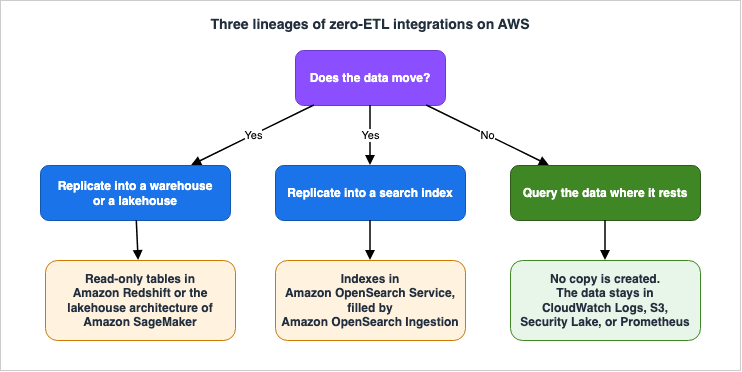
| Lineage | Does the data move? | What is created | Main primary sources |
|---|---|---|---|
| Replication into a warehouse or a lakehouse | Yes | Read-only tables on the target side | Amazon Redshift Management Guide / AWS Glue Developer Guide / Aurora and RDS User Guides |
| Replication into a search index | Yes | OpenSearch indexes | Amazon OpenSearch Service Developer Guide / Amazon DynamoDB Developer Guide |
| Query the data where it rests | No | A data source registration, and optionally indexes for acceleration | Amazon OpenSearch Service Developer Guide |
The third option is different. While OpenSearch Service's direct query is called "zero-ETL," it doesn't move any data. It queries data that remains in places like Amazon CloudWatch Logs, Amazon S3, Amazon Security Lake, and Amazon Managed Service for Prometheus, using OpenSearch's SQL, PPL, and PromQL. The OpenSearch Service Developer Guide states:
Use Amazon OpenSearch Service direct query to analyze data in Amazon CloudWatch Logs,
Amazon S3, Amazon Security Lake, and Amazon Managed Service for Prometheus without
building ingestion pipelines. This zero-ETL integration lets you query data in place
using PromQL, PPL, or SQL, and explore it in Discover.
The phrase
query data in place is right there in the sentence. The same term names both the pages that describe replication and the page whose selling point is that nothing is replicated.2.2 Why This Distinction Matters for Design
In the replicating lineages, the target side experiences increased storage requirements, introduces latency, and necessitates schema change tracking. In return, you can query it as much as you like with the compute on the target side.In the query-in-place lineage, there's no increase in storage, latency is not a factor, and schema change tracking is unnecessary. However, each query requires interpreting the format on the source side, and response times are constrained by the source's capabilities.
Considering these two approaches using the same terminology leads to a flawed comparison. If you first determine which approach you need, the subsequent investigation required will be significantly reduced.
2.3 Replication Into a Search Index Has a Third Character
Integration from DynamoDB and Amazon DocumentDB to Amazon OpenSearch Service falls under a replication process, but it operates differently than replication to a data store. Amazon OpenSearch Ingestion is an integral part of this process.For DynamoDB, an export that uses point-in-time recovery takes the first snapshot, and DynamoDB Streams then carries the changes. The OpenSearch Service Developer Guide outlines two paths: one that includes taking an initial snapshot and one that does not.
With a full snapshot – DynamoDB uses point-in-time recovery (PITR) to create a backup
and uploads it to Amazon S3. OpenSearch Ingestion then indexes the snapshot in one or
multiple OpenSearch indexes. To maintain consistency, the pipeline synchronizes all
DynamoDB changes with OpenSearch. This option requires you to enable both PITR and
DynamoDB Streams.

Without a snapshot – OpenSearch Ingestion streams only new DynamoDB events. Choose this
option if you already have a snapshot or need real-time streaming without historical
data. This option requires you to enable only DynamoDB Streams.
This replication process is unique in that it offers a path that allows you to skip the initial full load. Replication to a data store offers no such option.
This article will not delve into the search functionality itself. Discussions regarding the types of queries that can be written or how vector search is implemented are outside the scope of this article. This article stops at how the data gets in.
3. Reading the Matrix - Decision Criteria, Not an Exhaustive List
3.1 Why This Article Does Not Own an Exhaustive List
This article should not include a table listing all sources. The reason is simple: the moment you create such a table, it becomes outdated.This is not a general observation. Tracking AWS What's New reveals that this area is constantly evolving. In November 2025, AWS added self-managed databases as a source. Later that same month, it widened the range of SAP entities. In December of that year, it extended self-managed sources to seven more regions. In March 2026, it added refresh-interval and on-demand settings to integrations with a DynamoDB source. That same month, Amazon Redshift's concurrency scaling became compatible with zero-ETL. In May 2026, it added an Asia Pacific region, and in July, AWS GovCloud (US). Over the past nine months, there have been seven announcements regarding changes to sources, settings, or regions.
Furthermore, as discussed later in this article, the list itself is not consistent across different primary sources. No matter which page you copy, the resulting table will inevitably differ from others.
Therefore, this article will focus solely on key decision-making criteria and representative examples, delegating the responsibility for providing a complete list to the official AWS documentation.
3.2 Two Decision Criteria
The first consideration is what type of data source you are working with. This determines the set of documents you need to review.The second criterion is which targets that source type is allowed to reach. It is at this point that you determine what is permissible and what is not.
The crucial point is that the permissible target sides vary depending on the type of data source. Even if it's the same zero-ETL process, the set of target sides you can connect to will change based on the nature of the data source. This is the content of the sparse matrix that this article discusses.
3.3 The Matrix (as of August 21, 2026, Representative Examples)
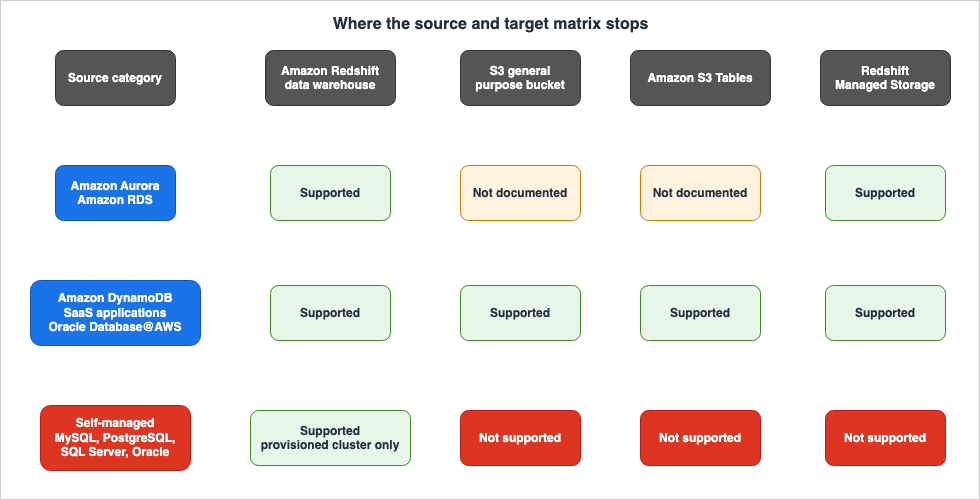
The following table indicates which targets are available for each type of data source. This table is intended to illustrate general trends for each data source type, rather than provide a comprehensive list of every individual service name.The meaning of each cell is as follows: Supported means the primary source explicitly states that the path is supported. Not supported means the primary source explicitly states that it is not. Not documented means the primary source does not describe that path at all; AWS does not say it is prohibited, but with no procedure to follow, treat it as unavailable.
| Data Source Type | Amazon Redshift Data Warehouse | S3 General Purpose Bucket | Amazon S3 Tables | Redshift Managed Storage |
|---|---|---|---|---|
| Amazon Aurora MySQL / Amazon Aurora PostgreSQL | Supported | Not documented | Not documented | Supported |
| Amazon RDS for MySQL / PostgreSQL / Oracle | Supported | Not documented | Not documented | Supported |
| Amazon DynamoDB | Supported | Supported | Supported | Supported |
| SaaS Applications | Supported | Supported | Supported | Supported |
| Oracle Database@AWS | Supported | Supported | Supported | Supported |
| Self-managed MySQL / PostgreSQL / SQL Server / Oracle | Supported (provisioned cluster only) | Not supported | Not supported | Not supported |
The S3 General Purpose Bucket, S3 Tables, and Redshift Managed Storage are all targets accessible through the lakehouse architecture of Amazon SageMaker.
The first thing to notice when reviewing this matrix is that only one column is populated in the last row. Furthermore, the Aurora and RDS rows have two columns on the S3 side that are not populated. These two are the center of this article, and the next two sections take them one at a time.
⚠ This table provides representative examples only. A complete list of data sources can be found in the AWS Glue Developer Guide and the Amazon Redshift Management Guide. This article does not reproduce that complete list. The recommended process for determining compatibility is to first identify which row your data source corresponds to, then check the targets available in that row, and finally verify your data source's listing in the official documentation.
4. Asymmetry One - Only One Column in the Self-Managed Database Row Is Filled
4.1 What the Primary Source Says
The AWS Glue Developer Guide places the following note immediately after listing the target platforms:For self-managed database sources, you can replicate data only to an Amazon Redshift
data warehouse. Other targets are not supported.Other targets are not supported. This is a limitation, not an example. This is the central point of this article.4.2 Why This Matters for Design
A self-managed database here means MySQL, PostgreSQL, SQL Server, or Oracle running in your own data center or on Amazon EC2. In the context of connecting on-premises assets to a cloud-based analytics platform, these are typically the first data sources considered.The common approach typically takes the following form: First you build a lakehouse, then you gather data from everywhere into it. You hold it in the Apache Iceberg table format so that several engines, such as Athena, Amazon EMR, and Amazon Redshift, can read the same single copy. This approach aligns with what AWS promotes, and is also covered in the published AWS Data Lakehouse Architecture Guide.
However, this approach doesn't readily accommodate zero-ETL from self-managed databases. If you plan to build a data lakehouse first and then later connect your on-premises PostgreSQL instance, you'll likely discover, when you attempt the connection, that the only available target is the Redshift data warehouse.
The significance of the design sequence lies in this point: You have to settle the target before you settle the lakehouse architecture.
4.3 There Is a Further, Narrower Restriction
The limitations of self-managed data sources do not end with the target service. The AWS DMS User Guide includes the following line in its prerequisites:Amazon Redshift Serverless cannot be used as a target for zero-ETL integrations from
self-managed sources.Amazon Redshift Serverless is not supported. You need a provisioned cluster.
This represents another layer of restrictions, one that is not apparent simply by reviewing the target list in the AWS Glue Developer Guide. If you interpret "Redshift data warehouse" to mean any Redshift configuration, you will likely encounter issues in the final stages of the setup.
The same page also outlines exclusions for the source side.
RDS SQL Server and Azure SQL Server cannot be used as sources for self-managed
zero-ETL integrations.
RDS for SQL Server cannot be a source on this route.
Furthermore, this route requires customer-managed AWS KMS keys. The steps outlined in the DMS User Guide begin by creating a symmetric encryption key and applying a key policy that grants the
kms:CreateGrant permission to both the Amazon Redshift and AWS Glue service principals. The kms:EncryptionContext condition in the key policy must match the encryption context specified when creating the integration. This is the only route that includes key preparation as a prerequisite.4.4 Knowing the Mechanism Explains the Reason
When you understand how the self-managed source's zero-ETL works, you realize that this asymmetry is not accidental. The AWS DMS User Guide states:You can use existing AWS DMS endpoints previously created for self-managed databases
or create new ones.Furthermore, when you create an integration, AWS DMS automatically generates read-only resources, which include a component called the zero-ETL engine. This engine handles both the full data load and the ongoing change capture.
In essence, the self-managed source's zero-ETL sits on top of AWS DMS. The connection to the source is a DMS source endpoint, and it inherits the same database engine prerequisites as DMS. While the creation process appears to be through the AWS Glue console, the underlying functionality resides within DMS.
Knowing this structure makes it easier to evaluate alternative options. Regarding self-managed sources, choosing not to use zero-ETL is essentially the same decision as using DMS directly.
5. Asymmetry Two - The Lakehouse for Aurora and RDS Is Not S3
5.1 What the Primary Source Says
Both the Aurora User Guide and the RDS User Guide, when targeting a lakehouse, contain the following sentence:When creating a zero-ETL integration with an Amazon SageMaker Lakehouse, you must
create an AWS Glue managed catalog in AWS Lake Formation. The target catalog must be
an Amazon Redshift managed catalog.The target catalog must be an Amazon Redshift managed catalog.5.2 What Actually Happens
When using Aurora or RDS as a source, you are presented with two options for the target: Amazon Redshift data warehouse and data lakehouse. If you select data lakehouse, it actually uses Redshift Managed Storage. It doesn't write data to either a general-purpose S3 bucket or S3 Tables.This collides with what the word lakehouse leads a reader to expect. Generally, "data lakehouse" implies storing data in object storage using open table formats, allowing multiple engines to access the same underlying data. When dealing with Aurora and RDS as sources, this architecture is not available through a zero-ETL path.
In contrast, when considering the sources listed in the AWS Glue Developer Guide – specifically DynamoDB, SaaS applications, and Oracle Database@AWS – both general-purpose S3 buckets and S3 Tables are explicitly presented as target options. Therefore, even under the same term "data lakehouse," the type of storage you can reach varies depending on the source.
The opposite direction is a different feature. Starting September 30, 2026, Aurora PostgreSQL can read Apache Iceberg and Apache Parquet data in Amazon S3, Amazon S3 Tables, and the AWS Glue Data Catalog as read-only PostgreSQL foreign tables. The foreign tables hold only the schema and the location, and the data stays where it is. This feature is covered in Querying Apache Iceberg and Parquet from Amazon Aurora PostgreSQL - What DuckDB Runs, What Your Transaction Sees, How Current a Read Is, and What Reaches the Writer, which found no source that calls it zero-ETL. Importing files from Amazon S3 into a table and exporting query results to Amazon S3 with the
aws_s3 extension of Aurora PostgreSQL and RDS for PostgreSQL is another separate feature, covered in Moving Data Between Amazon S3 and Aurora or RDS for PostgreSQL with the aws_s3 Extension - What the Import and Export Functions Accept, Whose IAM Role Reaches the Bucket, and How They Differ from Foreign Tables.5.3 Catalog Names Are Limited to 19 Characters
When targeting lakehouses, there's one additional limitation outlined in the Aurora User Guide. This is the only restriction specific to lakehouses.Catalog names are limited to 19 characters in length.Limited to 19 characters. If your naming convention includes an environment name or a purpose, you will hit this limit. Before creating a target catalog, it's necessary to verify the number of characters allowed in the name.
5.4 On the Strength of the Assertion
The limitations regarding self-managed sources differ in nature from those described in the previous section. AWS explicitly states that it does not support self-managed sources. Regarding Aurora and RDS, AWS does not state that S3 cannot be used. Instead, it specifies that the target catalog must be the Redshift managed catalog.Therefore, in the table presented in this article, the S3 column for Aurora and RDS is marked as "Not documented" rather than "Not supported." AWS is not prohibiting its use; rather, there is simply no documented procedure for that particular path. The practical outcome is the same, but this article distinguishes the two because the strength of the evidence differs.
5.5 You Cannot Change Your Choice Later
There's another significant reason for this asymmetry. The AWS Glue Developer Guide includes the following note at the beginning of the section describing how to configure targets:You cannot modify the target of a zero-ETL integration after creation.Targets cannot be modified after they are created. While you can change the name, description, and data filter, the source and target cannot be altered. The Aurora User Guide states the same principle, albeit in different wording.
You can modify only the name, description, and data filtering options for a zero-ETL
integration in a supported data warehouse. You can't modify the AWS KMS key used to
encrypt the integration, or the source or target databases.
In essence, selecting a target is a one-time decision. While you can change it by recreating the integration, this requires re-running the initial load, which, as described later, can take a considerable amount of time.
6. What the Source Side Pays
6.1 The Zero in Zero-ETL Is Not Zero Load on the Source
The name zero-ETL refers to the elimination of the need to write ETL pipelines, not the absence of any impact on the source side. This is material for a design decision, so what follows quotes the primary sources as they stand.6.2 Parameters Required by Aurora
To use Aurora as a source, you must create and associate a dedicated DB cluster parameter group. The following requirements, as outlined in the Aurora User Guide, must be met:Aurora MySQL requires the enhanced binary log,
aurora_enhanced_binlog. Additionally, set binlog_format to ROW, binlog_row_image and binlog_row_metadata to full, and binlog_backup and binlog_replication_globaldb to 0. On top of that, binlog_transaction_compression must not be set to ON, and binlog_row_value_options must not be set to PARTIAL_JSON.For Aurora PostgreSQL, the enhanced logical replication, or
aurora.enhanced_logical_replication, is required. In addition, set rds.logical_replication to 1, and aurora.logical_replication_backup and aurora.logical_replication_globaldb to 0.Standard binary logs and logical replication are not sufficient. The enhanced versions are the requirement.
6.3 What Enhanced Logical Replication Brings With It
Aurora PostgreSQL has requirements that, as documented in the user guide, have certain side effects.Enabling enhanced logical replication (aurora.enhanced_logical_replication) will always
write all column values to the write ahead log (WAL) even if REPLICA IDENTITY FULL isn't
enabled. This might increase the IOPS for your source DB cluster.Even if
REPLICA IDENTITY FULL is not configured, all columns will be written to the WAL. Furthermore, the guide itself states that IOPS may increase.An increase in write volume on the source side means a change in the source's performance characteristics. The IOPS headroom your source database has now enters the decision about whether to adopt zero-ETL.
6.4 Switching the Parameter Stops Replication
There's a further, critical warning on the same page.If you enable or disable the aurora.enhanced_logical_replication DB cluster parameter,
the primary DB instance invalidates all logical replication slots. This stops replication
from the source to the target, and you must recreate replication slots on the primary DB
instance. To prevent interruptions, keep the parameter state consistent during
replication.Changing this parameter will disable all logical replication slots. This is not limited to slots used for zero-ETL; it will impact any other logical replication running on that cluster.
Therefore, implementing zero-ETL on an existing Aurora PostgreSQL cluster that is already using logical replication is not a seamless process. It's crucial to understand this limitation before selecting a parameter group.
6.5 Applying the Parameter Group Also Requires a Reboot
When you associate a parameter group with a cluster after it has been created, the Aurora User Guide requires the following steps.If you associate the parameter group with the DB cluster after the cluster is already
created, you must reboot the primary DB instance in the cluster to apply the changes
before you can create a zero-ETL integration.You have to reboot the primary DB instance. When applying this to an existing production cluster, your planning should begin with identifying a suitable window for this restart.
6.6 Prerequisites on the Target Side
The target side also has prerequisites. The Amazon Redshift Management Guide lists the following three considerations, as applicable regardless of the source type:Running Amazon Redshift Serverless or a provisioned cluster of an RG or RA3 node type.
Encrypted (if using a provisioned cluster).
Has case sensitivity enabled.⚠ The first consideration has exceptions based on the source type. As Section 4.3 showed, you cannot use Redshift Serverless when using a self-managed database as the source. Read only this considerations page and Serverless reads as if it is always available.
The third one, case sensitivity, is off by default. The Aurora User Guide states:
By default, case sensitivity is disabled on all provisioned clusters and Redshift
Serverless workgroups.
When using an existing Redshift data warehouse as a zero-ETL target, you need to enable the
enable_case_sensitive_identifier setting. The Amazon Redshift Management Guide refers to this as a setting and explicitly states that it must be enabled to create this integration.The steps to enable this functionality vary depending on the target type:
| Target Type | Procedure | Restart Required |
|---|---|---|
| Provisioned Cluster (at creation) | Create the cluster with an associated parameter group. | No |
| Provisioned Cluster (after creation) | Create and associate a custom parameter group. You can use either the AWS Management Console or the AWS CLI. | Cluster restart required |
| Redshift Serverless Workgroup | Call update-workgroup using the AWS CLI. You cannot change this setting through the Amazon Redshift Serverless console. | No |
If configured at creation, a restart is not required. A restart only occurs when adding it to an existing cluster.
Both the source and target sides may require a restart. The amount of work required when adding it to existing assets is the sum of the work required on both sides.
7. The Boundary Between Initial Load and Continuous Replication
7.1 There Are Two Phases
Integrating zero-ETL involves two distinct phases: the initial load and continuous replication. These two phases differ significantly in terms of the time required and the ways in which they can fail.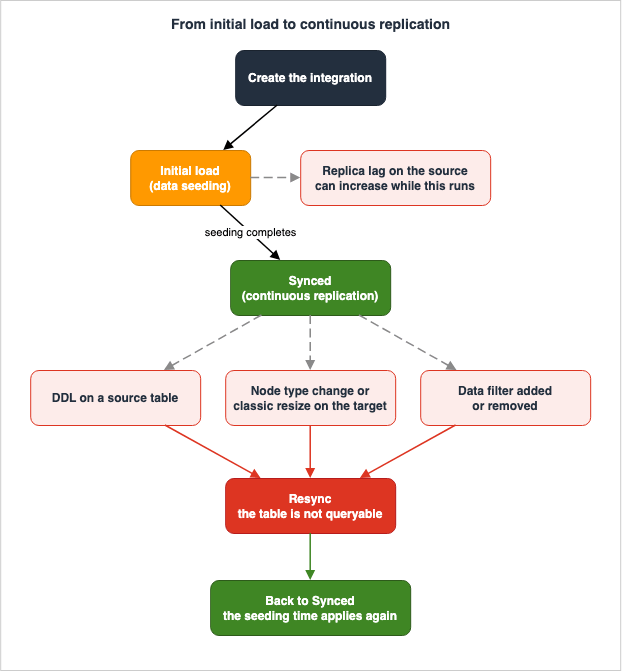
7.2 Time Required for Initial Load
The Aurora User Guide states the following regarding the initial load:When you initially create an integration, or when a table is being resynchronized, data
seeding from the source to the target can take 20-25 minutes or more depending on the
size of the source database. This delay can lead to increased replica lag.20 to 25 minutes, or longer. This time is dependent on the size of the source database.
It's important to note the latter part of the statement:
This delay can lead to increased replica lag. During the initial load, the replica lag on the source side may increase. If a read-only instance on the source is being used for production traffic, the initial load can impact the freshness of production reads.It's also important to consider the mention of "resynchronization" earlier in the same sentence. The time required for the initial load is not a one-time occurrence. Every resynchronization costs the same time again.
7.3 The DynamoDB Case
For a DynamoDB source, the Amazon Redshift Management Guide describes the initial load in different terms.On activation, the zero-ETL integration exports the full DynamoDB table to populate the
Amazon Redshift database. The time it takes for this initial process to complete depends
on the DynamoDB table size. The zero-ETL integration then incrementally replicates updates
from DynamoDB to Amazon Redshift using DynamoDB incremental exports.The integration exports the whole DynamoDB table to seed the target, then keeps it current with incremental exports. This is not a log-based follow, like with Aurora. This difference will manifest as latency differences, as described next.
7.4 Minimum Latency Differs by Source Type
The latency of continuous replication can vary by as much as four times, depending on the source type. More importantly, some source types have publicly documented latency figures, while others do not.| Source Type | Minimum Latency | Documentation |
|---|---|---|
| Amazon Aurora / Amazon RDS | No number published | The user guides say near real-time and stop there. |
| Amazon DynamoDB | 15 minutes | Considerations in the Amazon Redshift Management Guide |
| SaaS Applications | 1 hour | Considerations in the Amazon Redshift Management Guide |
For all source types, setting
REFRESH_INTERVAL to a non-zero value allows you to extend the replication interval.Take the absence of a published minimum latency for Aurora and RDS at face value when you design. The "near real-time" description is a goal, not a contractual guarantee. In designs with strict freshness requirements, it's necessary to monitor actual latency using the
IntegrationLag metric.Regarding the two source types with documented latency figures, the Amazon Redshift Management Guide provides the following descriptions:
Currently, the minimum latency for DynamoDB zero-ETL integration is 15 minutes. You can
increase it further by setting a non-zero REFRESH_INTERVAL for a zero-ETL integration.
The minimum latency for a zero-ETL integration with applications is 1 hour. You can
increase it further by setting a non-zero REFRESH_INTERVAL for a zero-ETL integration.REFRESH_INTERVAL only extends the replication interval; there is no mechanism to reduce latency below the minimum. Requests to ingest from a SaaS application faster than 1 hour cannot be met using zero-ETL.This has direct implications for design decisions. If a dashboard freshness requirement is under 1 hour, you will need to consider alternatives to zero-ETL for SaaS sources.
7.5 Extending the Refresh Interval Changes the Shape of the Processing
Regarding the DynamoDB source, the AWS Glue Developer Guide notes that the processing behavior changes when the update interval is significantly extended.For zero-ETL integrations with an Amazon DynamoDB source, when you configure a refresh
interval of 1440 minutes (24 hours) or greater, the integration uses sequential daily
batch processing instead of a single export operation. This behavior is due to the
DynamoDB export window limitation, which has a maximum export period of 24 hours.When setting an update interval of 24 hours or more, instead of a single export, the process is broken down into sequential batches, each spanning 24 hours. The longer the update interval, the greater the number of export jobs that run with each update. Extending the update interval doesn't necessarily result in a simple reduction in load on the source.
8. What Remains as Operational Work
8.1 ETL Does Not Disappear. It Changes Shape
This is the most crucial point of this article. Adopting a zero-ETL approach means the task of writing ETL pipelines will disappear. Instead, you will continue to manage the following items.8.2 There Is No Transformation
Firstly, it's important to understand that zero-ETL does not perform any transformations. This is as stated in the Amazon Redshift Management Guide.Zero-ETL integration does not support transformations while replicating the data from
transactional data stores to Amazon Redshift. Data is replicated as-is from the source
data base. However, you can apply transformations on the replicated data in Amazon
Redshift.It simply copies the data as is. If transformations are required, they should be performed after the data has reached the target side. This is both a constraint and a clear definition of responsibility. Because the source schema is directly reflected on the analytics side, the design of the source schema directly determines how easily it can be used on the analytics side.
8.3 The Target Is Read-Only
The destination database is read-only. You can't create tables, views, or materialized
views in the destination database. However, you can use materialized views on other
tables in the target data warehouse.
Within databases created through integration, it is not possible to create tables, views, or materialized views. However, if the target data warehouse contains a different database, it is possible to create materialized views that reference replicated tables. This approach is necessary when you need to perform aggregations or joins. These materialized views keep their results in Redshift Managed Storage. Materialized views that Amazon Redshift writes as Apache Iceberg tables with
CREATE MATERIALIZED VIEW … USING ICEBERG are a separate kind, covered in Apache Iceberg Materialized Views on AWS - Who Refreshes Them, Who Can Write Them, Which Engines Read Them, and How Current a Read Is.8.4 DDL Triggers a Resynchronization
What happens when you apply DDL on the source side during continuous replication? According to the Aurora User Guide:Performing DDL commands (for example ALTER TABLE) on a source table can trigger a table
resynchronization, making the table unavailable for querying while it's resynchronizing.The table will become unavailable for queries on the target side during the resynchronization process. As Section 7.2 showed, resynchronization can take 20 to 25 minutes, or longer.
This is an operational item that did not exist when the ETL pipeline was written by hand. Schema changes on the source side now directly impact the availability of the analytics side. Previously, there was a fallback option: even after schema changes, the pipeline would continue to operate using the old schema until it was updated. Zero-ETL doesn't offer that option.
Workarounds are available. Setting the
QUERY_ALL_STATES parameter to TRUE on the target database allows you to query tables that are not in the Synced state. However, the Amazon Redshift Management Guide adds the following:Data returned during resynchronization might be stale until the resynchronization
completes.You can perform queries, but the data returned may be outdated. You can gain availability, but you can't guarantee freshness.
8.5 DDL Is Not the Only Trigger for a Resynchronization
The trigger for resynchronization is not limited to schema changes on the source side; it can also occur during operations on the target side.| Operation | Location of Occurrence | Resynchronization Occurs? | Source |
|---|---|---|---|
ALTER TABLE and similar DDL operations | Source side | Possible | Aurora User Guide |
| Elastic resize (changing only the number of nodes) | Target provisioned cluster | Does not occur | Amazon Redshift Management Guide |
| Elastic resize (changing the node type) | Target provisioned cluster | All tables are resynchronized. | Amazon Redshift Management Guide |
| Classic resize | Target provisioned cluster | All tables are resynchronized. | Amazon Redshift Management Guide |
| Restoration to the same namespace | Target Redshift Serverless | Full resynchronization occurs | Amazon Redshift Management Guide |
| Adding a primary key to a table without one | Source side | Possible | AWS Database Blog |
| Adding or removing data filters | Integration settings | The relevant table is resynchronized | Amazon RDS User Guide |
| Modifying table properties in a DynamoDB source | Integration settings | Possible | AWS Glue Developer Guide |
The rows related to resizing apply when the target is a provisioned cluster. The relevant section in the Amazon Redshift Management Guide explicitly limits the scope to resizing of provisioned clusters.
Furthermore, it's easy to overlook the fact that resizing that changes the node type can trigger resynchronization of all tables. The Amazon Redshift Management Guide also explains the reason for this.
This happens because these resize operations temporarily change the distribution style
of tables while the service redistributes data onto the new cluster configuration.
When planning capacity for your analytics platform, changing the node type can, as long as you have a zero-ETL integration, result in downtime for all tables. Therefore, you need to include the time required for resynchronization in your resize planning.
8.6 Restoring From a Snapshot Comes With Conditions
Restoring data also has specific conditions. Based on the requirements outlined in the Amazon Redshift Management Guide, the following details apply:| Scenario | Outcome of Integration |
|---|---|
| Restoring Redshift Serverless to the same namespace | Integration is maintained, and a full resynchronization will run after the restoration. |
| Restoring Redshift Serverless to a different namespace | Integration is not maintained. |
| Restoring a snapshot of a provisioned cluster | Integration is not maintained. |
| Integrations created after the snapshot was taken | The integration enters the NEEDS_ATTENTION state after restoration. |
| Integrations deleted after the snapshot was taken | These integrations will not be restored. The database originating from the snapshot will remain. |
For provisioned clusters, this integration preservation mechanism does not function. It is necessary to incorporate rebuilding zero-ETL integrations into your disaster recovery procedures.
Furthermore, when using history mode, records created between the time the snapshot was taken and the completion of a full resynchronization will not have their versions recorded. The Amazon Redshift Management Guide states that this behavior is consistent with other full resynchronizations.
8.7 Data Filters Cannot Filter by Column or Row
A data filter is how you narrow what gets copied. The Aurora User Guide clearly states the granularity to which they can be applied.Currently, filtering is limited to the database and table levels. Column- and row-level
filtering are not supported.They cannot filter by column or row. Requests to exclude only columns containing personal information, for example, cannot be fulfilled by this feature. You will need to either exclude entire tables or prepare separate tables in the source that do not include those columns.
The filter format uses Maxwell's filter syntax. You list expressions, each of which is of either
Include or Exclude type, and each expression consists of a comma-separated list of column patterns. A single integration can support a total of up to 99 patterns, and each pattern cannot exceed 256 characters.The format of these patterns varies depending on the source engine. In RDS for MySQL, the format is two-level:
database.table. In RDS for PostgreSQL, it is three-level: database.schema.table. The locations where regular expressions can be used also differ. In RDS for MySQL, regular expressions can be used for both database names and table names, whereas in RDS for PostgreSQL, they can only be used for schema names and table names, and not for database names.Furthermore, adding even a single filter reverses the default behavior. This is stated in the Amazon RDS User Guide.
If you don't specify any data filters in your integration, Amazon RDS assumes a default
filter of include:*.*, which replicates all tables to the target data warehouse. However,
if you add at least one filter, the default logic switches to exclude:*.*, which excludes
all tables by default.
With no filter in place, everything replicates. The moment you add even one filter, the behavior changes to only copying explicitly included data. If you write a single
exclude entry intending to exclude only one table, all other tables will no longer be copied.Pay attention to the behavior when adding filters later. This is also stated in the same user guide.
If you add a filter after you create an integration, Amazon RDS treats it as if it always
existed. It removes any data in the target data warehouse that doesn't match the new
filtering criteria and resynchronizes all affected tables.
It is treated as if that filter has been in place from the beginning. The integration removes any data in the target that does not match. Anything on the analytics side that already references that data breaks.
If the target is a provisioned cluster, data filtering requires patch 180 or later.
8.8 PostgreSQL Sources Require a Filter
In PostgreSQL-based data sources, filtering is not optional but mandatory. This applies to both Aurora PostgreSQL and RDS for PostgreSQL. Both the "Limitations" section in the Aurora User Guide and the "Data Filtering" section in the RDS User Guide contain similar statements regarding this requirement.If you select an Aurora PostgreSQL source DB cluster, you must specify at least one data
filter pattern. At minimum, the pattern must include a single database (database-name.*.*)
for replication to the target warehouse.If you select an RDS for PostgreSQL source database, you must specify at least one data
filter pattern. At minimum, the pattern must include a single database (database-name.*.*)
for replication to the target data warehouse.What is not required for MySQL systems is mandatory for PostgreSQL systems. Even when using the same Aurora or RDS service, the required elements differ depending on the database engine.
When the source is RDS for Oracle, the RDS User Guide provides separate considerations regarding the handling of uppercase and lowercase characters in filter patterns. It is necessary to verify the relationship between Oracle's default capitalization of identifiers and the behavior of the filter.
Avoid including sensitive information directly within the filter patterns. The RDS User Guide explicitly advises against this.
Do not include personally identifying, confidential, or sensitive information in your
filter patterns.
8.9 Tables Without Primary Keys Are Not Replicated
This is more of a prerequisite than an operational issue, but it's the most common obstacle encountered when connecting existing databases. The Amazon Redshift Management Guide states this in the considerations that do not narrow the source type.Tables in the integration source must have a primary key. Otherwise, your tables can't
be replicated to the target data warehouse in Amazon Redshift.Tables without a primary key will not be replicated. The integration status will be set to
Needs attention, and the status of the affected table will be Failed. Adding a primary key after the fact should automatically trigger a resynchronization of that table.Aurora PostgreSQL has stricter requirements; all tables included in the data filter must have a primary key. If a table is included but lacks a primary key, it will be marked as
Failed.8.10 History Mode Preserves Deletions and Updates
By default, deleting a row on the source deletes it on the target too. History mode is what you turn on when you want the old values kept.With history mode on, the target tracks every version of a record you delete or modify on the source. It can be enabled at the database, schema, or table level, and the default setting when creating the integration is disabled.
Only some sources support it. The Amazon Redshift documentation states that Amazon Aurora MySQL, Amazon Aurora PostgreSQL, Amazon RDS for MySQL, and Amazon DynamoDB are supported. It also mentions support for applications such as Salesforce, SAP, ServiceNow, and Zendesk. However, it explicitly states that this is not an exhaustive list. Conversely, RDS for PostgreSQL and RDS for Oracle are not included in this list. If you are designing your system based on history mode, first verify that your own source is supported.
When enabled, three new columns are added to the target table:
| Column | Type | Description |
|---|---|---|
_record_is_active | Boolean | Indicates whether the record is currently active on the source. |
_record_create_time | Timestamp | The time (UTC) when the record became active on the source. |
_record_delete_time | Timestamp | The time (UTC) when the record was updated or deleted on the source. |
There are three key behaviors to keep in mind when using history mode:
First, enabling history mode means that
DROP TABLE commands on the source will not be replicated to the target. The target table will remain in a DroppedSource state and can still be queried. If you want to reuse the same table name on the source, you must first delete or rename the table on the target. Failure to do so will prevent new tables from being replicated.Second, switching history mode only works on tables that are in the
Synced state. It will not apply to tables that are currently being resynchronized.Third, when you disable history mode, the table will be split into two. A table containing only the current records (without historical columns) will remain under the original name, while the table that previously contained historical data will be moved to a new name with a timestamp appended (e.g.,
_historical_). If you forget to delete one of these tables, you will end up with duplicate copies of the same data.The history mode only increases the number of records it stores. Every time a deletion or update occurs on the source, a new row is added to the target. You need to factor this incremental growth into your storage estimates.
History mode is not a feature you add when you realize the default behavior doesn't meet your requirements. Since it doesn't record deletions that occurred before it was enabled, those records cannot be recovered. You must decide whether to enable it at the very beginning of the integration process.
8.11 What You Can No Longer Do to a Source That Has an Integration
Creating an integration can restrict the operational flexibility on the source side. Here are some significant limitations, as outlined in the Aurora User Guide:| Limitation | Consequence |
|---|---|
| Changing the name of a DB cluster and its DB instances | You will need to remove the integration, rename the resources, and recreate the integration. |
| Deleting a DB cluster that has an integration | You must first delete all related integrations. |
| Creating another integration between the same source and target | Duplication is not allowed. |
| Using a cross-account clone as the source | Clones shared via AWS Resource Access Manager cannot be used. |
| Starting the creation of another integration from the same source while one is already being created | Creation cannot proceed in parallel. |
Furthermore, scale and geographical constraints are also fixed.
The source and target must reside in the same region. The source DB cluster must have at least one DB instance. If the source DB cluster is stopped, some recent transactions may not be replicated before it resumes.
A particularly important consideration is the handling of Aurora Global Database.
If your source cluster is the primary DB cluster in an Aurora global database and it
fails over to one of its secondary clusters, the integration becomes inactive. You must
delete and recreate the integration.
Following a failover, the integration becomes inactive and must be deleted and recreated. Recreating it involves a full initial load. Recovery procedures for regional outages should include rebuilding the analytics side and accounting for the time required.
System tables, temporary tables, and views are not replicated. If you want to use content that the source provides as a view on the analytics side, you have to recreate the view definitions on the target side.
Be aware of quotas. Within a single AWS account, you can create a default of 100 integrations, send a maximum of 50 integrations to a single target, and create a maximum of 5 integrations from a single source DB cluster. Each of these is a per-Region value.
8.12 Character Encoding and Collation
Finally, one item where the values themselves can change.Amazon Redshift accepts only UTF-8 characters, so it might not honor the collation defined
in your source. The sorting and comparison rules might be different, which can ultimately
change the query results.The collation order on the source side may not always be respected. The Amazon Redshift Management Guide itself states that if the sorting and comparison rules differ, the query results can change.
When planning validation by running the same query on both the source and target sides and comparing the results, it's important to account for this. You should ensure that if discrepancies arise, you can determine whether they are due to replication delays or differences in collation order.
9. Constraints Specific to Application Sources
9.1 Treat SaaS Sources as a Separate Case
Data sources for applications like Salesforce, SAP, ServiceNow, and Zendesk have limitations that differ from those found with traditional databases. Furthermore, these limitations can lead to quite noticeable failures.9.2 Name Length
Table names and column names from application sources greater than 127 characters are
not supported.
Table names and column names longer than 127 characters are not supported. SaaS custom objects and custom fields are particularly prone to becoming lengthy due to naming conventions. At the planning stage, counting the length of the names of the objects you intend to replicate becomes part of the work.
DynamoDB sources also have the same 127-character limit. However, this limit applies to table names, as well as the names of partition keys and sort keys.
9.3 Value Length, and How It Fails
The maximum length of an Amazon Redshift VARCHAR data type is 65,535 bytes. When the
content from the source does not fit into this limit, replication does not proceed and
the table is put into a failed state. You can set the database parameter TRUNCATECOLUMNS
to TRUE to truncate content to fit in the column.
Amazon Redshift's
VARCHAR has a maximum length of 65,535 bytes. If a value exceeds this limit, replication will fail, and the table will enter a failed state. Rather than a single row failing, the entire table stops processing.A suggested workaround is to set
TRUNCATECOLUMNS to TRUE. With it on, the integration truncates values to fit the column.This represents a design decision. You must choose between allowing truncation or causing a failure. When replicating SaaS objects that contain long text fields, the optimal choice depends on the intended use of the data. If the data is intended for full-text search, truncation is unacceptable. If you only use it as an aggregation key, truncation does not matter.
Furthermore, this setting is applied at the database level. The Amazon Redshift Management Guide refers to
TRUNCATECOLUMNS as a database parameter and provides instructions for configuring it using CREATE DATABASE and ALTER DATABASE. There is no provision for enabling or disabling truncation on a per-table basis. Enabling truncation for one table implies that it will also apply to other tables within the same database, based on the design.9.4 The Latency Floor
As Section 7.4 showed, the minimum latency for application sources is 1 hour. This is four times DynamoDB's 15 minutes, and it operates on a different premise than the "near real-time" terminology often used when referring to database sources.If you start out associating zero-ETL with near real-time, that assumption collapses at the SaaS source. Therefore, it's best to verify this latency figure first when evaluating sources that are SaaS-based.
9.5 Numbers Specific to the DynamoDB Source
Regarding DynamoDB, there are specific limitations regarding data formats.The replicated data lands in a
SUPER column in Amazon Redshift. The maximum precision and scale for partition keys and sort keys are 38 and 18, respectively. While DynamoDB's numeric type supports a precision of up to 38, and Amazon Redshift also supports a precision of 38, Amazon Redshift's default decimal precision and scale are 38 and 10. The Amazon Redshift Management Guide notes that this may result in truncation of scale values.Furthermore, individual attributes within a DynamoDB item, including both the name and value, must not exceed 64 KB in total.
Finally, only one Amazon Redshift database can be associated with a single DynamoDB integration. It is not possible to configure a scenario where the same table is simultaneously replicated to two different analytical databases.
9.6 Unnesting and Partition Keys Are Decided at Creation
When targeting an Amazon SageMaker lakehouse, there are settings that determine the output format during integration creation. Changing these settings later will require a resynchronization.One of these is the nested expansion setting. The
UnnestSpec accepts three values: TOPLEVEL, FULL, and NOUNNEST. This setting determines whether nested structures from the source, such as those found in DynamoDB, should be expanded into columns on the target side. The other setting is the partition key, where you can specify up to 10 custom keys. If you do not specify one, the integration uses the key from the source.The AWS Glue Developer Guide describes the behavior when these settings are changed later:
If this property is updated after the integration is created, then it could trigger a
full table resync when the updated configuration conflicts with the existing
configuration. For example, updating the table "un-nesting" from 'No-Unnest' to
'Full-Unnest', or changing the partition column.
Changing the expansion strategy can trigger a full resynchronization of the table. If you change the expansion strategy after you're already writing analysis queries, you'll need to rewrite those queries and also wait for the resynchronization to complete. It's faster to first verify the expansion results with a small sample of data before creating the full integration.
10. Where the Primary Sources Disagree
10.1 Why This Section Exists
The primary sources cited so far disagree with each other in places. Hiding that would leave readers believing that whichever single page they happened to read is authoritative.The following data, as of August 21, 2026, reflects direct observations. All of these discrepancies are between AWS's official documentation itself, and do not represent differences with secondary sources.
10.2 One Target, Three Names
| Term | Where it Appears |
|---|---|
Lakehouse architecture of Amazon SageMaker | Main text and target list in the AWS Glue Developer Guide |
Amazon SageMaker AI lakehouse | Main text in the Amazon Aurora User Guide and the Amazon RDS User Guide |
Amazon SageMaker Lakehouse | Heading in the same Aurora User Guide, as well as in the "What's New" section and the official blog |
The Aurora User Guide uses different terms to refer to the same feature within the main text and in headings. When searching for this feature, the results you see will vary depending on the term you use.
10.3 Two Names for One Source on the Same Page
The AWS Glue Developer Guide page on zero-ETL listsOracle Database@AWS in the introductory text, while immediately below, in the bulleted list of sources, it lists Oracle at AWS, ODB. This represents an inconsistency within the same page.10.4 Each Document Lists Different Application Sources
| Document | Listed Application Sources |
|---|---|
| AWS Glue Developer Guide | Facebook Ads / Instagram Ads / Salesforce / Salesforce Marketing Cloud Account Engagement / SAP OData / ServiceNow / Zendesk / Zoho CRM |
| Amazon Redshift Management Guide | Salesforce / Salesforce Marketing Cloud Account Engagement / SAP / ServiceNow / Instagram ads / Meta ads / Zendesk |
| What's New (Region Additions) | Salesforce / SAP / Zendesk / Zoho CRM |
All three lists are different. The AWS Glue Developer Guide includes
Zoho CRM, but the Amazon Redshift Management Guide does not. The Redshift Management Guide lists Meta ads, while the Glue Developer Guide lists Facebook Ads. The "What's New" list is even more limited.The capitalization is also inconsistent. The AWS Glue Developer Guide lists
Instagram Ads, while the Redshift Management Guide lists Instagram ads.If you were to create a comprehensive table in this state, any page you copied would result in a table that differs from the others. This is why Section 3 delegates the list to the official documentation.
10.5 Two Different Requirements for the Target Node Type
| Document | Requirements for Amazon Redshift Target |
|---|---|
| Amazon Redshift Management Guide | Running Amazon Redshift Serverless or a provisioned cluster of an RG or RA3 node type. |
| Amazon Aurora User Guide | Using an RA3 node type with at least two nodes, or Redshift Serverless. |
The RG node type is not reflected in the Amazon Aurora User Guide. RG is a currently existing node type. The Amazon Redshift API Reference's
CreateCluster documentation lists RG and RA3 together in the description of valid values for Port.For clusters with RG or RA3 nodes - Select a port within the ranges 5431-5455 or
8191-8215. (If you have an existing cluster with RG or RA3 nodes, it isn't required
that you change the port to these ranges.)Conversely, only the Amazon Aurora User Guide documents the minimum node count. Read only one of them and you will not know one set of the requirements. A reader who only reads the Amazon Aurora User Guide does not learn that RG clusters are an option. A reader who only reads the Amazon Redshift Management Guide does not learn about the minimum node count.
10.6 The Target for Self-Managed Sources Is Described Differently
The AWS DMS User Guide's page on zero-ETL begins with the following sentence:AWS zero-ETL integration is a fully managed solution that makes transactional and
operational data available in Amazon Redshift, Amazon S3, and Amazon S3 Tables from
multiple operational and transactional database sources.It mentions
Amazon S3 and Amazon S3 Tables. However, the next sentence in the same paragraph states that for self-managed sources, data is replicated to Amazon Redshift. Furthermore, as Section 4.1 showed, the AWS Glue Developer Guide explicitly states that other targets are not supported.That initial sentence describes zero-ETL as a whole and does not refer to self-managed sources. It is the correct interpretation. However, if a user searching for instructions on setting up a self-managed source reads that first line of the page, it might appear that S3 Tables is a selectable option.
This article will treat the disclaimer in the AWS Glue Developer Guide as the correct statement. This is because a sentence that describes limitations is more accurate than one that introduces a feature.
10.7 Two Different Scopes for Which Sources Support Data Filters
The Amazon Redshift Management Guide defines the scope of data filters as follows:You can use data filtering for Aurora and RDS for MySQL zero-ETL integrations to define
the scope of replication from the source DB cluster to the target Amazon Redshift data
warehouse.It says
Aurora and RDS for MySQL. Furthermore, in the section of the same page that does not narrow the source type, the same feature is written as for Aurora zero-ETL integrations, which reads as Aurora only.Additionally, the Amazon RDS User Guide includes a section on data filters that provides examples for RDS for MySQL, RDS for PostgreSQL, and RDS for Oracle. As Section 8.8 showed, it explicitly states that at least one filter pattern must be specified for RDS for PostgreSQL. Certain requirements mentioned on one page are not reflected in the descriptions of supported scopes on other pages.
Once again, it's the documentation outlining procedures and limitations, rather than the documentation describing the feature itself, that defines the broader scope.
10.8 Two State Names for history mode on the Same Page
The Amazon Redshift Management Guide's section on history mode uses different names to describe the state a table takes on the target side when it is deleted on the source side, within two consecutive paragraphs on the same page.After you turn on history mode, tables that you drop within the source won't be dropped in
Amazon Redshift. Instead, tables will appear in a DroppedSource state and you can still
query these tables.
If you want to reuse the same table name on the source, you must DROP or RENAME the
corresponding DroppedState table before it can be replicated to Amazon Redshift.The two names are
DroppedSource and DroppedState. They are used differently in those two adjacent paragraphs on the same page.Which name is correct is determined by the system view reference. The description of the
table_state column in SVV_INTEGRATION_TABLE_STATE lists six values, including DroppedSource, and explains their meanings. DroppedState does not appear anywhere in that reference. Therefore, DroppedState is likely a typographical error.However, even those references themselves are inconsistent.
| System View | Values Listed as States |
|---|---|
SVV_INTEGRATION_TABLE_STATE's table_state | Synced / Failed / Deleted / ResyncRequired / ResyncInitiated / DroppedSource |
SYS_INTEGRATION_TABLE_STATE_CHANGE's new_state | Synced / ResyncRequired / ResyncInitiated / Deleted / Failed / ResyncDeleted |
Both list six values, but the sixth value differs. Only the first list includes
DroppedSource, while only the second list includes ResyncDeleted. When implementing code to track state transitions, if you rely on only one of these references, you risk overlooking a critical state value.This inconsistency can mislead users searching by identifier. Searching for the state using
DroppedState will yield no results, and searching for ResyncDeleted in the description for SVV_INTEGRATION_TABLE_STATE will also prove fruitless.10.9 The General Rule This Section Yields
Based on the patterns of discrepancies identified, a common structure emerges.Text introducing features tends to be broad and general, while text describing limitations is precise and accurate. Sections like overview pages and introductory text, as well as "What's New" sections, fall into the former category. Conversely, sections such as "Considerations," "Setup Instructions," and "Limitations" represent the latter.
Therefore, when determining whether your particular configuration will work, it's best to consult the "Considerations" and "Limitations" sections, rather than the overview page. If you proceed in the opposite order, you risk believing it will work and then searching for reasons why it doesn't.
11. Monitoring and the Visibility of Failure
11.1 What You Can See
After creating an integration, how do you determine if it's healthy? The location where you check this varies depending on the system.| Target | Location to Check |
|---|---|
| Amazon Redshift Data Warehouse | Integration details in the Amazon Redshift console, Amazon CloudWatch metrics, and Amazon Redshift system views. |
| The lakehouse architecture of Amazon SageMaker | Metrics in the AWS/Glue/ZeroETL namespace in CloudWatch, and CloudWatch Logs. |
11.2 Metrics on the Amazon Redshift Side
Here are some of the key metrics to monitor initially when managing Amazon Redshift, as outlined in the Amazon Redshift Management Guide.| Metric | Description |
|---|---|
IntegrationLag | The delay between a commit to the source and when the data becomes queryable in Amazon Redshift. |
IntegrationNumTablesReplicated | The number of tables that have been replicated. |
IntegrationNumTablesFailedReplication | The number of tables for which replication has failed. |
IntegrationDataTransferred | The number of logical bytes transferred. |
IntegrationLatestDetectedChange | The time at which the integration last added a change from the source to the replication queue. |
IntegrationLatestAppliedChange | The time at which the integration last completed the ingestion process into Amazon Redshift. |
All of them carry
IntegrationId as a dimension and update every 60 seconds.The most important metric to monitor initially is
IntegrationNumTablesFailedReplication. As seen in Section 9.3, a value that is too long sends the whole table into a failed state. The integration itself keeps running, so watching only the overall status hides these individual failures.The difference between
IntegrationLatestDetectedChange and IntegrationLatestAppliedChange can be used to determine where the delay is occurring. It can help you identify whether the delay is due to slow application of changes to Amazon Redshift, or if changes are no longer being detected from the source.11.3 System Views
Amazon Redshift provides three system views.| View | What it contains |
|---|---|
SVV_INTEGRATION | Details of the integration configuration. |
SYS_INTEGRATION_ACTIVITY | Information about completed integration runs. |
SVV_INTEGRATION_TABLE_STATE | Integration information on a table-by-table basis. |
To track the state of tables, use
SVV_INTEGRATION_TABLE_STATE. Tables that require or have initiated resynchronization will show ResyncRequired or ResyncInitiated, and return to Synced upon completion. The status of history mode is also visible in the is_history_mode column.The
reason column indicates the reason for any failures. The documentation lists common reasons, such as unsupported data types in the table or the absence of a primary key. One of these is the primary key requirement from Section 8.9. When an integration enters a Needs attention state, this column is the first place to look.You can also obtain the number of rows and size using the
table_rows and table_size columns. Comparing these values with the source side allows you to verify whether the replication is keeping pace, providing an alternative perspective to the status values.11.4 Notifications
Amazon Redshift event notification subscriptions deliver notice when an integration runs into trouble. A comprehensive list of integration-related events, delivered via Amazon EventBridge, is available.It's important to understand that metrics alerts and event notifications serve different purposes. Metrics alerts track the volume of delays and failures, while event notifications capture state transitions themselves. It's generally recommended to implement both.
11.5 The Pattern Where Failure Stays Quiet
Finally, one pattern worth designing for. This concerns the behavior when a source is removed.If you delete a source that is an authorized integration source for an Amazon Redshift
data warehouse, all associated integrations will go into the FAILED state. Any previously
replicated data remains in your Amazon Redshift database and can be queried.The integration will transition to a
FAILED state. However, any data that was previously replicated will remain accessible and can still be queried. From the analytics side, the query succeeds and returns rows. The only difference is that the returned values are no longer updated.This state is difficult to detect unless you are specifically monitoring latency metrics or the integration's status itself. Users on the analytics side will likely only notice something is amiss when they observe that the numbers are not changing. This is why it's important to include the integration's status in your monitoring scope.
12. What to Choose When You Do Not Choose Zero-ETL
12.1 The Branch Conditions
When zero-ETL is not feasible, or is feasible but does not meet the requirements, there are primarily two options: AWS Glue jobs and AWS DMS.| Condition | Selection |
|---|---|
| The combination appears in the matrix, no transformation is required, and the latency requirement is met. | zero-ETL |
| Transformations, joins, or data type conversions are required during the data ingestion process. | AWS Glue job |
| You need to exclude specific columns or rows. | AWS Glue job |
| You need to ingest from a SaaS source faster than 1 hour. | AWS Glue job |
| The combination does not appear in the matrix. | AWS Glue job |
| You plan to migrate the entire database to a different engine. | AWS DMS |
| You plan to shut down the source after the migration is complete. | AWS DMS |
12.2 When to Choose an AWS Glue Job
As Section 8.2 showed, zero-ETL does not perform transformations. If transformations are required, that is where you make a decision.It's important to note one point: zero-ETL and Glue jobs are not mutually exclusive. You can configure a system where zero-ETL handles the data that needs to be copied directly, while a Glue job takes the parts that need transformation. Another option is to process the data using materialized views on the target side. In that case the processing lives on the target, so the analytics platform owns the change history.
12.3 When to Choose AWS DMS, and Where the Boundary Lies
Section 4.4 showed that the self-managed path sits on top of AWS DMS. This fact helps explain what it means to use DMS directly.Zero-ETL wraps DMS's full load and change data capture functionality, exposing only a limited set of configuration options. You cannot change the target, you cannot transform, and you cannot filter by column or row. In exchange, it requires fewer configuration settings.
Using DMS directly unlocks all of these features. It offers a wider range of target options, allows you to define transformation rules, and provides granular control through table mapping. In exchange, it requires a greater number of configuration settings.
Therefore, the key distinction lies in whether your requirements can be met by the exposed configuration options. If they can, a zero-ETL solution offers a lighter operational burden. If not, you'll need to remove the wrapper and use DMS directly.
Removing the wrapper does not have to land on AWS DMS, either. Where the capture point sits, what a replication slot obliges the source database to keep, and what guarantee each capture point gives are covered by Change Data Capture on AWS Beyond Zero-ETL - Logical Decoding, Streaming Connectors, and the Guarantees Each Capture Point Gives You.
12.4 Do Not Use It for a Production Cutover
It's crucial to clearly understand this: zero-ETL is not a tool for migrating a production database to a different location.There are three reasons for this. First, the target database is read-only. It accepts no writes, so you cannot point an application at it. Second, it does not perform any transformations. It lacks the functionality to handle schema conversions necessary when moving to a different database engine. Third, it does not support rollbacks. The concept of reverse replication is not implemented.
zero-ETL is designed for creating analytical copies of a production database, assuming that the source database will continue to operate as the primary system. It is not suitable for operations that involve stopping the source database.
Database migration between different database engines – involving schema conversion, full data loads, incremental updates, and cutover – is a separate topic, and it belongs to Heterogeneous Database Migration on AWS. This article does not cover those procedures.
Schema changes within the same database engine, done without downtime, belong to Zero-Downtime Database Change on RDS and Aurora. However, as seen in Section 8.4, when using zero-ETL with a source database that is integrated, performing schema changes without downtime can potentially lead to query failures on the analytics side. These two aspects must be considered together.
The Aurora User Guide also discusses the relationship between blue/green deployments and zero-ETL.
If your cluster is the source of a blue/green deployment, the blue and green environments
can't have existing zero-ETL integrations during switchover. You must delete the
integration first and switch over, then recreate it.
Before switching, remove the integration and recreate it after the switch. Recreating means performing an initial full data load.
13. A Checklist Before You Start
Here's a list of items to confirm before creating an integration. Any changes to these items later on will either be impossible to make, or will require a resynchronization.| # | Item to Confirm | Potential Consequence of Not Confirming |
|---|---|---|
| 1 | The type of source data and which row in the matrix it corresponds to. | The correct set of documents to read will not be determined. |
| 2 | The target options available for that row. | You may discover that you cannot select the desired target during the final build stage. |
| 3 | Whether the target is a provisioned cluster or a serverless environment. | Serverless cannot be used with self-managed sources. |
| 4 | The target node type, encryption settings, and case sensitivity requirements. | Integration creation will fail. |
| 5 | Whether data transformation is required. | If using zero-ETL, you will need to redesign the solution. |
| 6 | Acceptable latency. | The latency of a SaaS source may not meet the requirements. |
| 7 | Frequency of schema changes on the source side. | Changes may render the analytics side unable to query the data. |
| 8 | Existence of tables without a primary key. | These tables will not be replicated. |
| 9 | Whether to use history mode. | Deletions from before history mode was turned on cannot be recovered. |
| 10 | Whether to exclude tables or columns. | Excluding columns may not be possible, requiring an alternative approach. |
| 11 | Available IOPS on the source side. | Enhanced logical replication can increase it. |
| 12 | A reboot window on both the source side and the target side. | The parameters cannot be applied without one. |
| 13 | The resize plan for the target. | Changing the node type resynchronizes every table. |
| 14 | Disaster recovery procedures for the target side. | Integrations will not be maintained on provisioned clusters. |
| 15 | Whether the source is an Aurora global database. | A failover deactivates the integration, and you have to rebuild it. |
| 16 | Planned renaming, deletion, or shutdown of the source. | While the integration exists, renaming or deleting the source is not possible. |
| 17 | If the target is a lakehouse, the unnesting strategy. | Changing it later can trigger a full resynchronization of the table. |
| 18 | For self-managed sources, the AWS KMS key and encryption context. | Integration creation will fail. |
You have to settle the first four before you create the integration. Items five and beyond can be addressed after implementation, but doing so will likely require significant time or a resynchronization.
14. How It Fails
The following lists potential failure scenarios, outlining their causes and appropriate responses.14.1 Building the Lakehouse First, Then Trying to Connect a Self-Managed Database
You plan to build a lakehouse on top of S3 Tables and then connect an on-premises PostgreSQL database to it with zero-ETL. At the final stage of the build, you find that the only selectable target for a self-managed source is the Amazon Redshift data warehouse.What to do: prioritize the selection of the target before finalizing the lakehouse configuration. Alternatively, use AWS DMS for a self-managed source instead of zero-ETL.
14.2 Preparing Amazon Redshift Serverless First, Then Trying to Connect a Self-Managed Source
You prepare a Redshift Serverless workgroup because you want everything serverless. The integration from the self-managed source cannot be created.What to do: prepare a provisioned cluster for the self-managed source. Serverless is available for other source types.
14.3 You Chose the Lakehouse, but Nothing Appears in S3
You choose the lakehouse as the target with Aurora as the source, then go to look at the S3 bucket. Nothing is there. The data is actually located in Redshift Managed Storage.What to do: for Aurora and RDS sources, design on the assumption that the lakehouse target catalog is an Amazon Redshift managed catalog.
14.4 SaaS Ingestion Runs One Hour Behind
You put Salesforce data on a dashboard. The numbers are an hour out of date. Adjusting theREFRESH_INTERVAL does not improve the update speed.What to do: the minimum latency for an application source is 1 hour. If faster data freshness is required, consider alternative ingestion methods other than zero-ETL.
14.5 One Table Stops Quietly
A table with a long text field experiences a failure because the value exceeds theVARCHAR limit. While the overall integration is operational, the console displays a normal status.What to do: raise an alert for
IntegrationNumTablesFailedReplication. Whether to enable TRUNCATECOLUMNS depends on whether truncating data is acceptable for analytical purposes. As this setting is database-specific, verify the impact on other tables within the same database.14.6 You Resize, and All Analysis Stops
You run a resize that changes the node type, to give the analytics platform more headroom. This will put all tables into a resynchronization process, during which queries will not be possible on the target.What to do: before resizing, set
QUERY_ALL_STATES to TRUE to allow queries to continue. However, the results may be outdated. Also, be sure to factor in the estimated resynchronization time in your task planning.14.7 You Apply the Parameter, and a Different Replication Stops
You applyaurora.enhanced_logical_replication to an existing Aurora PostgreSQL cluster that is already using logical replication. This invalidates all existing logical replication slots.What to do: before applying the parameter, identify all logical replications associated with that cluster and include recreating the slots in the implementation steps.
14.8 Global Database Failover Causes Analysis to Stop
The system currently uses the primary cluster of the Aurora global database as its source. In the event of a regional outage, a failover occurs to the secondary region, causing the integration to become inactive.What to do: delete and recreate the integration. The recovery procedure should include the time required to recreate the integration and perform the initial load. Communicate the expected downtime for analysis following the failover to relevant stakeholders in advance.
14.9 Enabling history mode Later to Recover the Past
You want to analyze rows that were deleted, so you turn on history mode. Deletions that occurred before enabling the mode are not recorded.What to do: decide whether you need history mode when you create the integration. If you need the old data, recover it some other way from the source.
14.10 You Reuse a Table Name, and the New Table Is Not Replicated
When using history mode, if a source table is deleted and recreated with the same name, a new table will not be replicated to the target. This is because a table in theDroppedSource state remains on the target side.What to do: before recreating the table on the source side, either delete or rename the corresponding table on the target side.
15. Questions This Article Cannot Answer
This article states plainly what it does not answer. These are the items where the primary sources say nothing, or where this article could not read an answer out of them.15.1 Whether a Not Documented Cell Is Truly Impossible
For the cells marked "Not documented" in the table in Section 3.3, no AWS documentation was found that explicitly prohibits them. This article treats them as unavailable because no procedure exists. A procedure may be added in the future, and one may already exist somewhere this article has not found.15.2 How Large the Impact on the Source Is During a Resynchronization
The Aurora User Guide states that initial loads and resynchronization can increase replication lag. However, it does not specify the extent of this increase. It only mentions that the impact depends on the size and load of the source, and therefore, there are no officially provided methods for estimating this in advance.15.3 How Much Enhanced Logical Replication Increases IOPS
Similarly, the guide says IOPS can increase but does not say by how much. Because every column value is written to the write ahead log, the number of columns and the size of their values clearly matter. However, no official formula or guideline is provided.15.4 Regional Availability Differences Across the Lineages
AWS rolls out regional support for zero-ETL separately for each combination of source and target. This article does not provide a list of supported regions. Such a list would go stale for the reason given in Section 3.1. You should therefore consult the user guide for your source service to verify the supported regions for each specific combination.16. Frequently Asked Questions
Does using zero-ETL eliminate the need for ETL work?
No, using zero-ETL doesn't eliminate ETL work entirely. While it removes the need to write pipelines, it does create new operational responsibilities. These include keeping up with schema changes on the source, handling query failures during resynchronization, detecting failed tables, and managing filters. Section 8 is the full list.Can you replicate a self-managed PostgreSQL instance to Amazon S3 Tables?
No. The AWS Glue Developer Guide explicitly states that for self-managed database sources, the target is limited to Amazon Redshift data warehouses, and does not support other targets.Can you use Amazon Redshift Serverless as the target for a self-managed source?
No. The AWS DMS User Guide explicitly states that Amazon Redshift Serverless cannot be used as a target for zero-ETL integrations from self-managed sources. You need a provisioned cluster.When you choose the lakehouse with Aurora as the source, where does the data land?
The data lands in Redshift Managed Storage. Both the Aurora User Guide and the RDS User Guide state that the target catalog must be an Amazon Redshift managed catalog. There is no mention of pathways that involve using general S3 buckets or S3 Tables.Can you change the target after creating the integration?
No. The AWS Glue Developer Guide clearly states that once created, the target cannot be changed. You can only modify the name, description, and data filter.Can the data be transformed during ingestion?
No. The Amazon Redshift Management Guide states that zero-ETL does not support transformations during replication. You transform after the data reaches the target.Can you exclude specific columns from replication?
No. The Aurora User Guide states that filtering is limited to the database and table levels, and does not support filtering by column or row.Can you ingest from a SaaS source faster than 1 hour?
No. The Amazon Redshift Management Guide states that the minimum latency for zero-ETL from an application source is 1 hour. TheREFRESH_INTERVAL parameter only affects extending the interval.If you only want to exclude one table, is it sufficient to specify exclude once?
No. According to the Amazon RDS User Guide, adding even a single filter changes the default setting from include:*.* to exclude:*.*. If you specify only one exclude rule, all other tables will no longer be replicated. You must explicitly list the tables you want to keep using the include option.Can history mode be used with any source?
No. The Amazon Redshift Management Guide states that it supports Amazon Aurora MySQL, Amazon Aurora PostgreSQL, Amazon RDS for MySQL, and Amazon DynamoDB, and lists applications such as Salesforce, SAP, ServiceNow, and Zendesk as compatible. RDS for PostgreSQL and RDS for Oracle are not included in this list. Verify support for your own source individually, as the list provided is not exhaustive.What happens to the integration if the Aurora global database fails over?
It becomes inactive. The Aurora User Guide states that you will need to delete and recreate the integration. This process involves an initial load.What happens when you execute ALTER TABLE on the source?
According to the Aurora User Guide, this can trigger a resynchronization of the table. During resynchronization, the table will be unavailable for queries on the target. While it is possible to query the table by setting QUERY_ALL_STATES to TRUE, the data returned may still be outdated until the resynchronization is complete.How long does a resynchronization take?
Both the Aurora User Guide and the Amazon Redshift Management Guide state that the process can take 20 to 25 minutes, or longer, depending on the size of the source database.What happens to tables without a primary key?
Tables without a primary key will not be replicated. Their integration status will be marked asNeeds attention, and the table's status will be Failed. Adding a primary key should initiate a resynchronization process for that table.Is it okay to resize the target Amazon Redshift?
It depends on the resize. If you are only changing the number of nodes using an elastic resize, there is no impact. However, elastic resizes and classic resizes that change the node type will require a full resynchronization of all tables with zero-ETL for that cluster.Will the integration remain after restoring from a snapshot?
Only in one case. Restoring from a snapshot preserves the integration only when you restore Redshift Serverless to the same namespace. After the restoration, a full resynchronization will occur. Integrations will not be preserved if you restore to a different namespace, nor will they be preserved when restoring a snapshot from a provisioned cluster.Can you migrate databases using zero-ETL?
No, that is not the intended use. The target database is read-only, doesn't support transformations, and doesn't have any rollback capabilities. It's designed to create a copy for analytical purposes, assuming the source database will continue to operate in production.Does OpenSearch Service's zero-ETL feature use the same mechanism as Amazon Redshift's?
No. The direct query feature in OpenSearch Service does not move data. It queries data that remains in locations such as CloudWatch Logs, S3, Security Lake, and Amazon Managed Service for Prometheus. In contrast, integration with DynamoDB and DocumentDB involves data replication, with OpenSearch Ingestion acting as an intermediary.What happens if you delete the source?
The integration will enter aFAILED state. Any data that was previously replicated will remain on the Amazon Redshift side and can still be queried. Queries will succeed and return results, so you will not notice unless you watch the lag metric or the integration state itself.Can history mode be enabled later?
Yes, but any deletions or updates that occurred before you turned it on are not recorded. Additionally, you can only switch to history mode for tables that are in theSynced state.Is the source-side collation preserved?
Not always. Amazon Redshift only accepts UTF-8, so the collation order defined in the source may not be respected. The Amazon Redshift Management Guide states that a difference in sorting and comparison rules can change query results.Where is the fastest place to start reading?
Start with the considerations and limitations pages. The overview pages are written to introduce features, so they do not carry the combinations that do not work. Section 10.9 explains why.17. Summary
zero-ETL is not a single feature. Some lineages move the data and one does not, and among those that do, the selectable target changes with the type of source. This distinction is not documented on the source list page, but rather in the setup instructions and considerations section.There are two places where the matrix stops. When using a self-managed database as a source, the only available target is Amazon Redshift, and specifically, it must be a provisioned cluster. Furthermore, when selecting a lakehouse as the target while using Aurora or RDS as the source, the underlying storage is actually Redshift Managed Storage, not S3. The former is explicitly listed as unsupported by AWS, while the latter is described in terms of requirements. Both of these limitations, combined with the inability to change the target after it's created, necessitate decisions that should be finalized early in the design process.
And, once established, the ETL process doesn't simply disappear. The integration performs no transformation of its own, the target is read-only, source-side DDL changes can lead to query failures on the analytics side, and resizing the target triggers a full resynchronization of all tables. The source side is required to run enhanced binlog or enhanced logical replication, and the latter can increase the volume of writes. The work of writing pipelines is being replaced by the effort of operating them.
The core of the decision lies in whether the replacement is worthwhile. If transformations are unnecessary, latency requirements are met, and the source-side schema is stable, then it is worth it. If any of these conditions are not met, you should consider using AWS Glue jobs or AWS DMS instead. Whichever path moves the data, what lands still has to be checked. What to evaluate once the rows arrive, and what each failure action does to them, is covered in Data Quality and Data Contracts on AWS - Where to Evaluate, What Each Failure Action Does to Your Data, and Why the Default Is to Keep Going.
Finally, one important note. The information presented in this article is current as of August 21, 2026 (the notes at the ends of Sections 5.2 and 8.3 as of October 7, 2026, and the last sentence of Section 5.2 as of October 14, 2026), and is not exhaustive. Seven announcements in nine months changed a source, a setting, or a region, and the lists themselves do not agree across the primary sources. Use this article as a guide, but verify whether your own source is actually supported by checking the official list at that time.
18. References
- Zero-ETL integrations - AWS Glue Developer Guide
- Configuring a target for a zero-ETL integration - AWS Glue Developer Guide
- Configuring a source for a zero-ETL integration - AWS Glue Developer Guide
- Creating and managing integrations - AWS Glue Developer Guide
- Configuring an integration - AWS Glue Developer Guide
- Zero-ETL integrations - Amazon Redshift Management Guide
- Considerations when using zero-ETL integrations with Amazon Redshift - Amazon Redshift Management Guide
- Metrics for zero-ETL integrations - Amazon Redshift Management Guide
- History mode - Amazon Redshift Management Guide
- Aurora zero-ETL integrations - Amazon Aurora User Guide
- Getting started with Aurora zero-ETL integrations - Amazon Aurora User Guide
- Data filtering for Aurora zero-ETL integrations - Amazon Aurora User Guide
- Modifying Aurora zero-ETL integrations - Amazon Aurora User Guide
- Troubleshooting Aurora zero-ETL integrations - Amazon Aurora User Guide
- Amazon RDS zero-ETL integrations - Amazon RDS User Guide
- Getting started with Amazon RDS zero-ETL integrations - Amazon RDS User Guide
- Data filtering for Amazon RDS zero-ETL integrations - Amazon RDS User Guide
- AWS zero-ETL integration for self-managed database sources - AWS Database Migration Service User Guide
- DynamoDB zero-ETL integration with Amazon SageMaker Lakehouse - Amazon DynamoDB Developer Guide
- Working with Amazon OpenSearch Service direct queries - Amazon OpenSearch Service Developer Guide
- Using an OpenSearch Ingestion pipeline with Amazon DynamoDB - Amazon OpenSearch Service Developer Guide
- Creating an Amazon CloudWatch Logs data source integration in OpenSearch Service - Amazon OpenSearch Service Developer Guide
- Creating an Amazon Security Lake data source integration in OpenSearch Service - Amazon OpenSearch Service Developer Guide
- What is Zero-ETL?
- Handle tables without primary keys while creating Amazon Aurora MySQL or Amazon RDS for MySQL zero-ETL integrations with Amazon Redshift - AWS Database Blog
- AWS Glue zero-ETL is now available in Asia Pacific (Mumbai) region
- AWS Glue zero-ETL integrations with Amazon DynamoDB as the source support new configurations
- Announcing AWS Glue zero-ETL for self-managed Database Sources
References:
Tech Blog with curated related content
Written by Hidekazu Konishi