Moving Data Between Amazon S3 and Aurora or RDS for PostgreSQL with the aws_s3 Extension - What the Import and Export Functions Accept, Whose IAM Role Reaches the Bucket, and How They Differ from Foreign Tables
First Published:
Last Updated:
aws_s3 extension enables transferring data between Amazon S3 and Amazon Aurora PostgreSQL-Compatible Edition (hereafter referred to as Aurora PostgreSQL) and Amazon RDS for PostgreSQL. This extension provides the aws_s3.table_import_from_s3 function for importing files from Amazon S3 into database tables, and the aws_s3.query_export_to_s3 function for exporting query results to files in Amazon S3. The Aurora User Guide describes the import functionality as follows:The copy process uses the arguments and format of the PostgreSQL COPY command to import the data.The same user guide describes the export functionality as follows:
Larger exports are stored in multiple files, each with a maximum size of approximately 6 GB.Although both functions are part of the same extension, they accept and reject different inputs. The Aurora User Guide states
Cross-account import from Amazon S3 is supported. for import and Cross-account export to Amazon S3 isn't supported. for export. When calling these functions, the database user initiates the request, but the identity used to send requests to S3 is not the database user. The user guide outlines associating an IAM role with the DB cluster or DB instance and using that IAM role to access S3.This article provides a detailed breakdown of both functions, mapping what they accept, what they return, what they reject, which identity touches S3, and what you configure to specific descriptions in the documentation. Differences between Aurora PostgreSQL and RDS for PostgreSQL, places where the sources disagree, and places where no statement was found despite a search are shown with both statements and the verification date. This article is not a step-by-step guide for importing data, nor does it recommend whether to use
aws_s3 or foreign tables. This article does not create any AWS resources, nor does it execute any of the described behaviors to verify them.Related articles on this site:
- Querying Apache Iceberg and Parquet from Amazon Aurora PostgreSQL - What DuckDB Runs, What Your Transaction Sees, How Current a Read Is, and What Reaches the Writer
- Zero-ETL Integrations on AWS - The Source and Target Matrix Across Amazon Redshift, AWS Glue, and Amazon OpenSearch Service
- Private Connectivity by Service on AWS Data Services - Which Endpoint Type Each Service Supports, What Private DNS Replaces, and Where the Policy Is Enforced
- Change Data Capture on AWS Beyond Zero-ETL - Logical Decoding, Streaming Connectors, and the Guarantees Each Capture Point Gives You
- Heterogeneous Database Migration on AWS - Schema Conversion, Full Load with CDC, Data Validation, and a Cutover You Can Reverse
- What Watches the Queries in Aurora PostgreSQL and RDS for PostgreSQL - pgAudit, Database Activity Streams, and GuardDuty RDS Protection: What Each Sees, Where It Lands, and Who Can Read It
- IAM Authentication to DynamoDB, Keyspaces, and OpenSearch Service - Where Each Call Is Signed and Checked, What DAX and Fine-Grained Access Control Change, and What Revocation Reaches
Table of Contents
- 1. Introduction — Scope, Verification Date, and Versions
- 2. Vocabulary and Table Columns
- 3. The Two Functions Side by Side
- 4. Whose Permissions Reach Amazon S3
- 5. Import — aws_s3.table_import_from_s3
- 6. Export — aws_s3.query_export_to_s3
- 7. The Network Path — What the Sources State and Where No Statement Was Found
- 8. How the aws_s3 Functions Differ from Foreign Tables and Zero-ETL
- 9. Where the Sources Disagree, Inconsistencies within a Source, and Statements Not Found
- 10. Frequently Asked Questions about the aws_s3 Extension
- 11. Summary
- 12. References
1. Introduction — Scope, Verification Date, and Versions
This chapter defines the scope of this article, including the date and version of the information verified, as well as the source materials consulted. Furthermore, it will first clarify any instances where the same term may refer to different entities.1.1 Scope of This Article
This article covers the two functions of theaws_s3 extension for Aurora PostgreSQL and RDS for PostgreSQL. The aws_s3 extension relies on the aws_commons extension, which provides supporting functions. This article also addresses two functions within aws_commons: aws_commons.create_s3_uri and aws_commons.create_aws_credentials, which are used to generate values passed to the aws_s3 functions.This article does not cover the following:
- Foreign Tables: The ability for Aurora PostgreSQL to read data from S3 in Apache Iceberg and Parquet formats as foreign tables is covered in the previously published Querying Apache Iceberg and Parquet from Amazon Aurora PostgreSQL. That article lists one item it does not cover:
The aws_s3 extension for importing files from S3.This article covers that item. The difference between the two is described only in Section 8. - Zero-ETL Integration, Change Data Capture, Database Migration: The previously published Zero-ETL Integrations on AWS, Change Data Capture on AWS Beyond Zero-ETL, and Heterogeneous Database Migration on AWS cover these topics. This article does not create a comprehensive list of pathways between S3 and databases.
- S3 VPC Endpoint Design: The previously published Private Connectivity by Service on AWS Data Services addresses this. This article will focus solely on what the
aws_s3documentation states regarding networking, presenting that information in Section 7. - Aurora MySQL and S3 Integration: Aurora MySQL has the capability to read data from and write data to text files in S3. This article cites only that integration's networking page, in Section 7.2.
- Snapshot Export to S3: The ability to save DB snapshots and DB cluster snapshots to S3 is a separate feature from the
aws_s3extension. aws_lambdaExtension: This extension allows Aurora PostgreSQL and RDS for PostgreSQL to call AWS Lambda functions. This article cites only the networking statements on that page, in Section 7.2. How this extension and the S3 and Lambda statements of Aurora MySQL call AWS from inside the database, and which IAM role each uses, are covered in Calling AWS from Inside Aurora and RDS - aws_lambda, Aurora MySQL's S3 and Lambda Statements, and Which IAM Role Each Uses.- Pricing: This article does not cover pricing for S3, AWS KMS, or databases.
The previously published What Watches the Queries in Aurora PostgreSQL and RDS for PostgreSQL addressed who is monitoring queries and login activity in the database, where records are delivered, and who can access them. The previously published IAM Authentication to DynamoDB, Keyspaces, and OpenSearch Service focused on where calls are signed and verified. This article uses the same vocabulary to address the side where the database calls S3.
1.2 Verification Date, Versions, and Sources Read
The information presented in this article was verified using the following materials on October 14, 2026.- Amazon Aurora User Guide: Pages on importing from S3 (overview, extension installation, import process, configuring access to S3 buckets, import examples, function reference), pages on exporting to S3 (overview, configuring access to S3 buckets, export examples, function reference, troubleshooting), pages on integrating Aurora PostgreSQL with other AWS services, pages on networking from Aurora to other AWS services, pages on calling Lambda from Aurora PostgreSQL, pages on the Babelfish extension, pages on Aurora PostgreSQL Limitless Database, pages on express configuration.
- Amazon RDS User Guide: Pages on importing from S3 and exporting to S3 (same structure as the Aurora User Guide), pages on calling Lambda from RDS for PostgreSQL.
- Aurora PostgreSQL Release Notes: Pages on the extension version table and pages on updates.
- RDS for PostgreSQL Release Notes: Pages on the extension version table.
- Amazon RDS API Reference:
AddRoleToDBCluster,AddRoleToDBInstance,DBClusterRole,DBInstanceRole,DBEngineVersion. - AWS CloudFormation Template Reference:
DBClusterRoleforAWS::RDS::DBClusterandDBInstanceRoleforAWS::RDS::DBInstance. - AWS CDK API Reference:
AuroraPostgresEngineFeatures. - AWS re:Post Knowledge Center Articles: Import data into an Amazon RDS DB instance (used only in Sections 7.3 and 9.1).
- AWS Database Blog Articles: Work with files in Amazon Aurora PostgreSQL and Amazon RDS for PostgreSQL (published August 4, 2021; used only in Section 9.1).
- What's New Announcement (1 item): Querying data in Aurora PostgreSQL with Apache Iceberg and Parquet (September 30, 2026). (
postDateTimeis2026-09-30T16:00:00Z; used only in Section 8).
The extension versions are the values in the extension version tables of the release notes, checked on October 14, 2026. Articles from re:Post and blog posts are not specifications outlined in the user guide. This article is written to ensure that when referencing them, it is clear that they are not part of those specifications.
1.3 Terms with the Same Spelling Referring to Different Things
This article contains instances where the same term refers to different concepts. To avoid misinterpretations, this article distinguishes them upfront.- Export (three meanings in this article): (1) Exporting query results using
aws_s3.query_export_to_s3. When this article uses the term "export," it refers exclusively to this meaning. (2) Exporting snapshots to S3. This is a separate feature. (3) Exporting database logs to Amazon CloudWatch Logs. This is covered in the previously published What Watches the Queries in Aurora PostgreSQL and RDS for PostgreSQL. - Serverless (two meanings in this article): (1) Aurora serverless. This is the current term in the user guide, and both import and export are supported. (2) Aurora Serverless v1. Neither import nor export is supported.
- Role (two meanings in this article): (1) IAM role. In this article, an IAM role associated with a DB cluster or a DB instance is referred to as an "associated IAM role." (2) Database role. This refers to a collection of permissions within PostgreSQL, such as
rds_superuser. - Credentials (two meanings in this article): (1) AWS credentials passed to an import function. These consist of an access key, a secret key, and an optional session token. (2) Credentials used by a database user to connect to the database. This article does not address this.
- Database User: A PostgreSQL user that calls a function. This is distinct from an IAM user.
2. Vocabulary and Table Columns
This chapter defines the columns and values used in the tables presented in this article. The names of the columns in this article will be the same as those used in the previously published What Watches the Queries in Aurora PostgreSQL and RDS for PostgreSQL. This article will place theDirection column in the first column.2.1 Columns
The two overview tables in Section 3 have a first column labeledDirection. This column will contain either Import (aws_s3.table_import_from_s3) or Export (aws_s3.query_export_to_s3). The other columns, split between the two tables, are as follows:Checked or Seen By: Who checks S3 requests.Acting Identity: The identity under which S3 requests are executed.Lands In: The destination where the data arrives.What You Configure: The settings configured by the user.Where the Source Says So: The source material supporting this row, indicated by page title.
The asymmetry table in Section 3 has four columns:
Aspect, Import, Export, and Where the Source Says So. The Aspect column describes the subject matter addressed in each row. The deployment table in Section 3 also has four columns: Engine and Deployment, Import, Export, and Where the Source Says So.The detailed tables in Sections 4 through 6 have three columns:
Aspect, What the Source Says, and Where the Source Says So.The tables in Section 9 appear in three formats. The table in Section 9.1, listing places where the sources disagree, has columns labeled
#, Topic, One Source Says, Another Source Says, and Section. The table in Section 9.2, listing inconsistencies within a source, replaces the One Source Says and Another Source Says columns with One Part Says and Another Part Says. The table in Section 9.3, listing statements not found, has columns labeled What Was Looked For, Where and How It Was Looked For, and Result. The Section column indicates the relevant section of this article that addresses the topic.2.2 Values
TheActing Identity value can be one of four:The database user: The database user calling the function. This is the same value as described in the previously published What Watches the Queries in Aurora PostgreSQL and RDS for PostgreSQL. This article uses this value only to indicate who calls the function.The DB cluster's IAM role: The IAM role associated with the Aurora PostgreSQL DB cluster.The DB instance's IAM role: The IAM role associated with the RDS for PostgreSQL DB instance.Credentials passed to the function: The AWS credentials passed as arguments to the import function.
The
Checked or Seen By value is IAM. This signifies that requests are evaluated using IAM policies, consistent with the value described in the previously published IAM Authentication to DynamoDB, Keyspaces, and OpenSearch Service.The
Lands In value can be one of two:Table in the database: The database table where the imported data lands.Amazon S3 object: The Amazon S3 object where the exported data lands.
The values for cells in the deployment table are as follows:
Supported: The source states that the function can be used in that deployment.Not supported: The source states that the function cannot be used in that deployment.The source does not say.: Indicates that the source material does not provide this information.
2.3 When the Source Does Not Say, and When the Sources Disagree
Each table cell contains only the information provided by the source, or a summary of that information. If the source does not state something, the cell saysThe source does not say. Before writing this, this article searches the full text of the source document, the pages it links to, and other relevant pages from the same provider. These other pages are all pages from the Aurora and RDS User Guides related to importing and exporting, and the release notes, RDS API reference, CloudFormation, CDK, and "What's New" pages listed in Section 1.2. The searches use the subject of the row, as well as the terms aws_s3, s3Import, VPC endpoint, NAT, Limitless, DSQL, and 0 bytes.When the sources contain conflicting information, this article presents both descriptions, each with its source, without favoring either. This article always uses the phrase
the sources disagree for this. Places where the sources disagree are collected in Section 9.1, inconsistencies on the same page in Section 9.2, and statements that were not found are collected in Section 9.3, along with the locations and search terms used. The fact that a statement was not found does not mean that the behavior does not exist.3. The Two Functions Side by Side
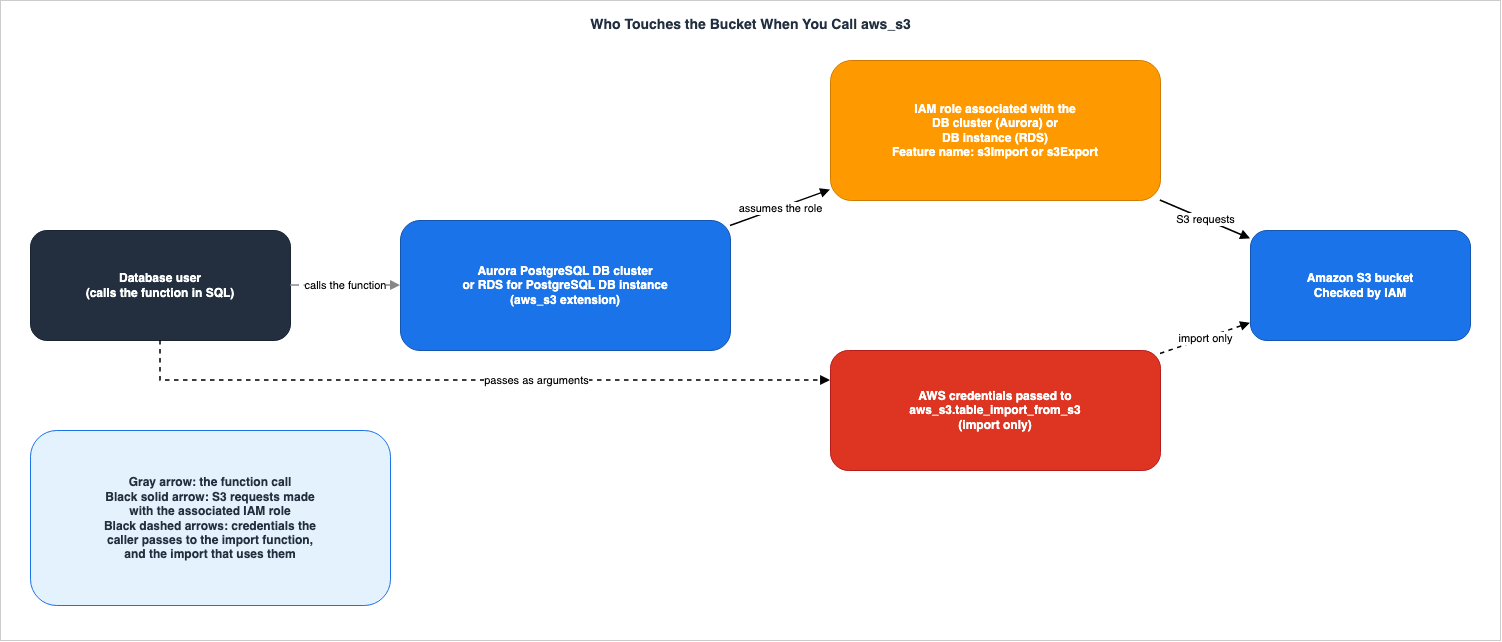
This chapter lines up the two functions, one per row, using the columns in Section 2.1. The supporting statements are shown in Sections 4 through 6.Figure 1 shows who calls the function and which identity touches S3, as separate lines.
| Direction | Checked or Seen By | Acting Identity | Lands In | Where the Source Says So |
|---|---|---|---|---|
| Import (aws_s3.table_import_from_s3) | IAM | The function is invoked by The database user. Requests to S3 are made using either The DB cluster's IAM role (Aurora PostgreSQL) or The DB instance's IAM role (RDS for PostgreSQL). When the credentials argument is passed, the requests are made using Credentials passed to the function. | Table in the database | Both user guides: Setting up access to an Amazon S3 bucket page (import) and function reference page |
| Export (aws_s3.query_export_to_s3) | IAM | The function is invoked by The database user. Requests to S3 are made using either The DB cluster's IAM role (Aurora PostgreSQL) or The DB instance's IAM role (RDS for PostgreSQL). The function's reference page does not specify an argument for credentials. | Amazon S3 object | Both user guides: Setting up access to an Amazon S3 bucket page (export) and function reference page |
The following table lists the settings configured by the user for the two functions.
| Direction | What You Configure | Where the Source Says So |
|---|---|---|
| Import (aws_s3.table_import_from_s3) | Install the aws_s3 extension. IAM policy that allows s3:GetObject and s3:ListBucket. IAM role that trusts rds.amazonaws.com. Associate the IAM role under the feature name s3Import. For gzip files, use the S3 metadata Content-Encoding. | Both user guides: Import pages |
| Export (aws_s3.query_export_to_s3) | Install the aws_s3 extension. IAM policy that allows s3:PutObject and s3:AbortMultipartUpload. IAM role that trusts rds.amazonaws.com. Associate the IAM role under the feature name s3Export. If using bucket encryption, use SSE-KMS. | Both user guides: Export pages |
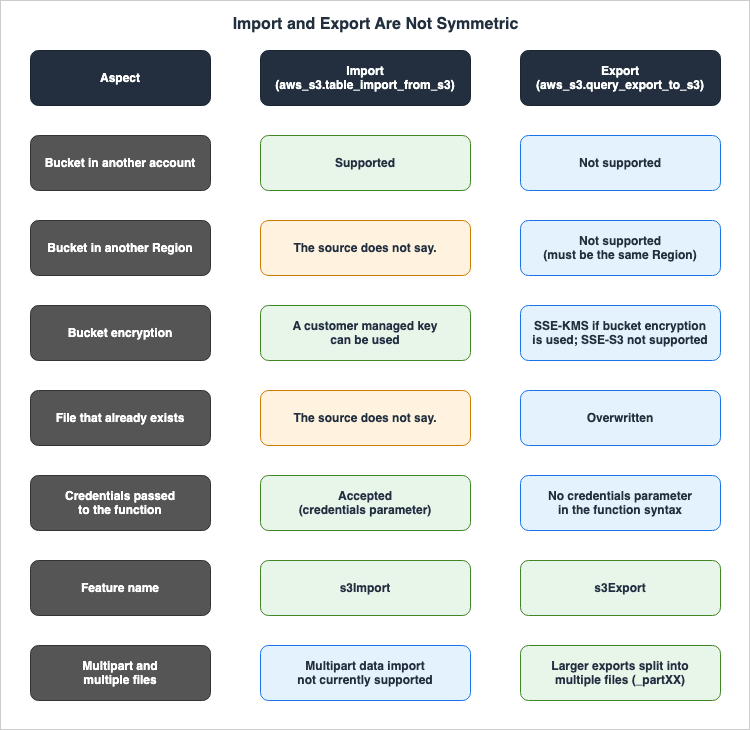
Figure 2 lists the items where what the sources state for import and export differs.
| Aspect | Import | Export | Where the Source Says So |
|---|---|---|---|
| Bucket in another account | Supported (Cross-account import from Amazon S3 is supported.) | Not supported (Cross-account export to Amazon S3 isn't supported.) | Both user guides: Import page and Export page |
| Bucket in another Region | The source does not say. (The function accepts the Region where the file is located as an argument) | Not supported. Must be in the same Region as the exporting DB cluster or DB instance. | Both user guides: Function reference page and Export page |
| Bucket encryption | A customer managed key can be used for import | If using bucket encryption, SSE-KMS. Buckets encrypted with SSE-S3 are not supported. | Both user guides: Import page and Export page |
| File that already exists | The source does not say. | Overwritten | Both user guides: Export examples page |
| Credentials passed to the function | Can be passed via the credentials argument | The function reference syntax does not include an argument for credentials. | Both user guides: Function reference page |
| Feature name | s3Import | s3Export | Both user guides: Setting up access to an Amazon S3 bucket pages |
| Multipart and multiple files | Multipart data import is not currently supported. | Larger exports are split into multiple files, each up to approximately 6 GB. | Both user guides: Import overview page and Export page |
The following table lists, based on the documentation, which engines and deployments support the two functions.
| Engine and Deployment | Import | Export | Where the Source Says So |
|---|---|---|---|
| Aurora PostgreSQL (Provisioned) | Supported (PostgreSQL 10.7 or later) | Supported (All currently available versions) | Aurora User Guide – Import and Export pages |
| Aurora serverless | Supported | Supported | Same as above |
| Aurora Serverless v1 | Not supported | Not supported | Same as above |
| Aurora PostgreSQL Limitless Database | Supported | Supported | Aurora User Guide – Limitless Database page, section on DDL limitations |
| Babelfish for Aurora PostgreSQL | Supported | Supported | Aurora User Guide – Babelfish Extensions page |
| Aurora PostgreSQL clusters created with express configuration | The source does not say. | The source does not say. | Aurora User Guide – Express Configuration page |
| RDS for PostgreSQL | Supported (PostgreSQL 10.7 or later) | Supported (All currently available versions) | RDS User Guide – Import and Export pages |
The two functions are in the same extension and both can access S3 using an associated IAM role. The differences in what the sources state lie in buckets in another account, buckets in another Region, the encryption of the buckets, a file that already exists, and how credentials are passed to the functions.
4. Whose Permissions Reach Amazon S3
This chapter shows that the identity calling the function and the identity accessing S3 are different, and that Aurora PostgreSQL and RDS for PostgreSQL associate the IAM role with different resources.4.1 The Caller of the Function and the Identity That Touches S3 Are Different
A database user connected to the database calls the function. The user guide, regarding extension installation, states:Use psql (or pgAdmin) to connect to the writer instance of your Aurora PostgreSQL DB cluster as a user that has rds_superuser privileges.The user guide does not describe the database user's permissions as a way to give access to the S3 bucket. The Aurora User Guide's import access setup page explains how to grant the DB cluster access to the S3 bucket:
You provide access to an Amazon S3 bucket in one of two ways, as described in the following topics.Two methods are available: using an IAM role or using security credentials. Regarding the method using an IAM role, the same page explains the reason for creating an IAM role:
You do this so Aurora PostgreSQL can assume this IAM role to access your Amazon S3 buckets.The same page in the RDS User Guide gives the subject of this sentence as
Amazon RDS. The function reference page describes the s3_info argument of the import function:When you use this parameter, access to Amazon S3 is provided by an IAM role for the PostgreSQL DB cluster.On the same page of the RDS User Guide,
DB instance is used instead of DB cluster. In this article's reading, the IAM policy of the associated IAM role determines the permissions to access the S3 bucket. When credentials are passed for an import, the permissions of those credentials determine access (see Section 4.4). This article does not address which database users are permitted to execute functions.The export access setup page includes the following warning regarding the scope of IAM policies:
We strongly recommend that you do not create a policy with all-resource access. This access can pose a threat for data security. If you create a policy that gives S3:PutObject access to all resources using "Resource":"*", then a user with export privileges can export data to all buckets in your account. In addition, the user can export data to any publicly writable bucket within your AWS Region.This article interprets the phrase
a user with export privileges as referring to the database user who can call the export function. The warning indicates that the entity calling the function can export to S3 buckets within the scope permitted by the IAM policy of the associated IAM role.4.2 Associating IAM Roles with Aurora and RDS
The resource that the IAM role is associated with differs between Aurora PostgreSQL and RDS for PostgreSQL. The following table outlines these differences.| Aspect | What the Source Says | Where the Source Says So |
|---|---|---|
| Aurora PostgreSQL association target | DB cluster. In the AWS CLI, use aws rds add-role-to-db-cluster; in the API, use AddRoleToDBCluster. | Aurora User Guide – Setting up access to an Amazon S3 bucket page |
| RDS for PostgreSQL association target | DB instance. In the AWS CLI, use aws rds add-role-to-db-instance; in the API, use AddRoleToDBInstance. | RDS User Guide – Setting up access to an Amazon S3 bucket page |
| Feature names | For importing, use s3Import; for exporting, use s3Export. Select it as Feature in the console, or pass it using --feature-name in the AWS CLI. | Both user guides: Setting up access to an Amazon S3 bucket pages |
FeatureName requirement (DB cluster) | The FeatureName in AddRoleToDBCluster is Required: No. The FeatureName in the CloudFormation DBClusterRole is also Required : No. | RDS API Reference AddRoleToDBCluster, CloudFormation AWS::RDS::DBCluster DBClusterRole |
FeatureName requirement (DB instance) | The FeatureName in AddRoleToDBInstance is Required: Yes. The FeatureName in the CloudFormation DBInstanceRole is also Required : Yes. | RDS API Reference AddRoleToDBInstance, CloudFormation AWS::RDS::DBInstance DBInstanceRole |
| Association status | The Status for DBClusterRole can be ACTIVE, PENDING, or INVALID. | RDS API Reference DBClusterRole |
| Aurora Serverless v1 | IAM roles cannot be associated. | Aurora User Guide – Setting up access to an Amazon S3 bucket page (import) |
The requirement for
FeatureName differs between the DB cluster and the DB instance. The Aurora User Guide instructs users to select either s3Import or s3Export as the Feature even when associating the IAM role with a DB cluster. No statement was found on how the import and export functions behave when an IAM role is associated with a DB cluster without a FeatureName (Section 9.3).The API reference describes the
Status value for DBClusterRole as follows:INVALID - the IAM role ARN is associated with the DB cluster, but the DB cluster is unable to assume the IAM role in order to access other Amazon Web Services on your behalf.4.3 IAM Role Trust Policies
The IAM role examples in the user guide specifyrds.amazonaws.com as the principal in the trust policy. The import and export access setup pages also recommend the following for condition keys.We recommend using the aws:SourceArn and aws:SourceAccount global condition context keys in resource-based policies to limit the service's permissions to a specific resource.The following example is a trust policy shown on the Aurora User Guide's import access setup page. The account ID and cluster name are the example values used in the user guide.
{
  "Version": "2012-10-17",
  "Statement": [
    {
      "Effect": "Allow",
      "Principal": {
        "Service": "rds.amazonaws.com"
      },
      "Action": "sts:AssumeRole",
      "Condition": {
        "StringEquals": {
          "aws:SourceAccount": "111122223333",
          "aws:SourceArn": "arn:aws:rds:us-east-1:111122223333:cluster:clustername"
        }
      }
    }
  ]
}
An example on the same page in the RDS User Guide also uses
rds.amazonaws.com as the principal.4.4 Passing Credentials to the Import Function
The import function can also accept AWS credentials as arguments, without using an associated IAM role. The user guide states:If you prefer, you can use security credentials to provide access to an Amazon S3 bucket instead of providing access with an IAM role.The function reference page describes the
credentials argument as follows:The credentials parameter specifies the credentials to access Amazon S3. When you use this parameter, you don't use an IAM role.The
credentials argument is of type aws_commons._aws_credentials_1 and contains the access key, secret key, and session token. Values of this type are created using the aws_commons.create_aws_credentials function. The function reference page describes the session token as follows:If you provide an optional session_token, you can use temporary credentials.The following example mirrors the format used in the user guide. The credential values remain the same as those used in the user guide example.
-- Values are the placeholders shown in the user guide
SELECT aws_s3.table_import_from_s3(
   't', '', '(format csv)',
   :'s3_uri',
   aws_commons.create_aws_credentials('sample_access_key', 'sample_secret_key', '')
);
Regarding the export function, the function reference page lists the arguments
query, s3_info, options, and kms_key, but does not include a credential argument. An alternative syntax simply breaks down s3_info into bucket, file_path, and region. No statement was found on passing credentials to the export function (Section 9.3).4.5 How to Check Whether a Version Has the Feature
The export page of the user guides describes how to check whether a specific engine version supports export to S3, using thedescribe-db-engine-versions command. If the output includes the string s3Export, that version supports export to S3. The following example is from the RDS User Guide.aws rds describe-db-engine-versions --region us-east-1 --engine postgres --engine-version 10.14 | grep s3ExportThe RDS API reference lists the
SupportedFeatureNames for the DBEngineVersion, providing a list of features supported by that version. The descriptions for FeatureName in AddRoleToDBCluster and AddRoleToDBInstance also say that the supported feature names are in DBEngineVersion. The AWS CDK's AuroraPostgresEngineFeatures has two boolean attributes: s3Import and s3Export. The CDK API reference describes s3Import as follows:Whether this version of the Aurora Postgres cluster engine supports the S3 data import feature.5. Import — aws_s3.table_import_from_s3
This chapter describes what the import function accepts, what it returns, and what it rejects.5.1 Arguments and Return Values
The following table lists the arguments and return values for the import function.| Aspect | What the Source Says | Where the Source Says So |
|---|---|---|
| Required Arguments | table_name, column_list, options | Function reference pages in both user guides (Import) |
table_name | The name of the table to import data into. | Same as above |
column_list | A list of columns to copy data into. An empty string indicates that all columns in the table should be used. | Same as above |
options | Arguments for the PostgreSQL COPY command. | Same as above |
s3_info | Of type aws_commons._s3_uri_1, containing the bucket, file path, and region. When using this argument, access to S3 is provided by the IAM role of the DB cluster or DB instance. | Same as above |
credentials | Of type aws_commons._aws_credentials_1. When using this argument, an IAM role is not used. | Same as above |
| Alternative Syntax | For testing purposes, you can pass bucket, file_path, and region instead of s3_info, and access_key, secret_key, and session_token instead of credentials. | Same as above |
| Return Value | text | Function reference pages in both user guides and the import examples page. |
The value of
s3_info is created using aws_commons.create_s3_uri. This function accepts three arguments: bucket, file_path, and region. The following example, shown on the import examples page in the user guides, imports a file that uses the vertical bar as the delimiter character into the columns a, b, d, and e of the table test. The table name, bucket name, and file name are the example values shown in the user guides.SELECT aws_s3.table_import_from_s3(
'test',
'a,b,d,e',
'DELIMITER ''|''',
aws_commons.create_s3_uri('amzn-s3-demo-bucket', 'pipeDelimitedSampleFile', 'us-east-2')
);5.2 Format, Delimiters, Compression, and Encoding
Theoptions argument for the import function corresponds to the arguments for the PostgreSQL COPY command. The import examples page of the user guides states the following regarding format:Choices for format include comma-separated value (CSV) as shown in this example, text, and binary. The default is text.The same page also provides examples of changing the delimiter (the
DELIMITER argument with a vertical bar) and using files encoded in Windows-1252 (e.g., encoding 'WIN1252').Regarding files compressed with gzip, the same page states that the imported file must have the following S3 metadata.
Key: Content-Encoding
Value: gzip
The page also notes that when uploading files via the AWS Management Console, this metadata is typically added by the system.
5.3 What the Import Function Rejects
The following table lists items that the user guides indicate cannot be used for importing data.| Aspect | What the Source Says | Where the Source Says So |
|---|---|---|
| 0-byte files | Importing 0 bytes file will cause an error. | Both user guides: Import examples page |
| Multipart data | Multi part data import from Amazon S3 isn't currently supported. | Both user guides: Import overview page |
| Aurora Serverless v1 | Importing data from Amazon S3 isn't supported for Aurora Serverless v1. It is supported for Aurora serverless. | Aurora User Guide – Import page |
| PostgreSQL versions | Your database must be running PostgreSQL version 10.7 or higher to import from Amazon S3 into Aurora PostgreSQL. (The RDS User Guide uses the term RDS for PostgreSQL instead of Aurora PostgreSQL.) | Both user guides: Import page |
No statement was found on which error message is returned when a 0-byte file is imported (see Section 9.3).
5.4 Other Accounts and Encryption
The import page states the following about buckets in other accounts:Cross-account import from Amazon S3 is supported.The same page describes encryption as follows:
You can use the customer managed key for encryption while importing data from S3.These two statements appear on the import pages of both the Aurora and RDS User Guides. Regarding the Region for import, the function receives the Region where the files are located through the
region argument. No statement was found on whether import can use a bucket in a Region different from that of the DB cluster or DB instance (see Section 9.3).5.5 IAM Permissions Required for Import
The import access setup page lists the required actions that must be included in the IAM policy, specifically:s3:GetObjects3:ListBucket
The resources should include both the ARN of the bucket and the ARN of the objects within that bucket. The following example is the example policy in the user guide.
{
  "Version": "2012-10-17",
  "Statement": [
    {
      "Sid": "s3import",
      "Action": [
        "s3:GetObject",
        "s3:ListBucket"
      ],
      "Effect": "Allow",
      "Resource": [
        "arn:aws:s3:::amzn-s3-demo-bucket",
        "arn:aws:s3:::amzn-s3-demo-bucket/*"
      ]
    }
  ]
}
6. Export — aws_s3.query_export_to_s3
This chapter describes what the export function accepts, what it returns, and what it rejects.6.1 Arguments and Return Values
The following table lists the arguments and return values for the export function.| Aspect | What the Source Says | Where the Source Says So |
|---|---|---|
| Required Arguments | query and s3_info | Function reference pages in both user guides (Export) |
query | The SQL query that PostgreSQL's engine executes. The results are written to the S3 bucket. | Same as above |
s3_info | Of type aws_commons._s3_uri_1, containing the bucket, file path, and region. | Same as above |
options | Optional. Arguments for the PostgreSQL COPY command. | Same as above |
kms_key | Optional. The customer managed KMS key of the S3 bucket where the data is being exported. | Same as above |
| Alternative Syntax | For testing purposes, you can pass bucket, file_path, and region instead of s3_info. region is optional. | Same as above |
Return Value rows_uploaded | The number of rows from the table that were successfully uploaded to S3, based on the provided query. | Same as above |
Return Value files_uploaded | The number of files uploaded to S3. | Same as above |
Return Value bytes_uploaded | The total number of bytes uploaded to S3. | Same as above |
The function reference pages describe the required arguments as follows:
The two required parameters are query and s3_info.The following example, shown on the export examples page in the user guide, exports all rows from the
sample_table table. The table name, bucket name, and file path use the example values provided in the user guide.SELECT * from aws_s3.query_export_to_s3('select * from sample_table',
aws_commons.create_s3_uri('amzn-s3-demo-bucket', 'sample-filepath', 'us-west-2')
);The same page also provides an example of exporting data to a CSV file with a colon as the delimiter by passing
format csv, delimiter $$:$$ as the options argument.6.2 Splitting and Overwriting
The export page states that a large export is split into multiple files.Larger exports are stored in multiple files, each with a maximum size of approximately 6 GB. The additional file names have the same file prefix but with _partXX appended. The XX represents 2, then 3, and so on.The export examples page demonstrates how to create three files:
my-prefix, my-prefix_part2, and my-prefix_part3. The same page states the following about a file that already exists:If the file specified doesn't exist in the Amazon S3 bucket, it's created. If the file already exists, it's overwritten.No statement was found on what happens to files already written when an export fails partway (see Section 9.3).
6.3 Region, Other Accounts, and Encryption
The following table lists the conditions that the export pages state for the target bucket.| Aspect | What the Source Says | Where the Source Says So |
|---|---|---|
| Region | Currently, the AWS Region must be the same as the region of the exporting DB cluster. (The RDS User Guide writes DB instance in place of DB cluster.) If no Region is specified, the data is stored in the same Region as the exporting DB cluster or DB instance. | Both user guide export pages |
| Other accounts | Cross-account export to Amazon S3 isn't supported. | Same as above |
| Default Encryption | By default, the exported data uses server-side encryption with AWS managed keys. | Same as above |
| Bucket Encryption | If using bucket encryption, the bucket must be encrypted with an AWS KMS key (SSE-KMS). Currently, buckets encrypted with Amazon S3 managed keys (SSE-S3) are not supported. | Same as above |
| Customer Managed Key | The Aurora User Guide's export page states that existing customer managed keys can also be used. This statement is not present in the RDS User Guide's export page. The kms_key argument is documented in the reference pages for both functions. | Both user guide export pages and the functions' reference pages |
The statement regarding SSE-S3 pertains to bucket encryption. This article does not combine this statement with the default encryption described in other S3 documentation to determine conditions under which the export might fail.
6.4 Which Instance It Runs On
The export page of the Aurora User Guide, in the section on installing the extension, states:This extension provides functions for exporting data from the writer instance of an Aurora PostgreSQL DB cluster to an Amazon S3 bucket.The same page states the following about deployment types:
You can export from a provisioned or an Aurora serverless DB instance. These steps aren't supported for Aurora Serverless v1.The export page of the RDS User Guide, in the section on installing the extension, describes the export as being from the DB instance. No statement was found on the behavior when the export function is called on an Aurora reader instance (Section 9.3). The Aurora User Guide's page on installing the extension for import also says to install the extension by connecting to the writer instance.
6.5 IAM Permissions Required for Export
The export access setup page lists the two required actions that must be included in the IAM policy:s3:PutObjects3:AbortMultipartUpload
The example policy provided on the same page includes six actions:
s3:PutObject*s3:ListBuckets3:GetObject*s3:DeleteObject*s3:GetBucketLocations3:AbortMultipartUpload
The two actions listed as required and the six actions in the example policy have different numbers. This article does not state whether either is correct (see Section 9.2). The export access setup page also includes a warning regarding the scope of IAM policies, as referenced in Section 4.1. Furthermore, the page provides recommendations regarding network configuration, as detailed in Section 7.1.
7. The Network Path — What the Sources State and Where No Statement Was Found
This chapter separates what the sources state and what was not found, regarding the network paths by which theaws_s3 functions reach S3. The previously published Private Connectivity by Service on AWS Data Services covers the design of private connections.7.1 What the PostgreSQL Import and Export Pages State
The import and export pages in both the Aurora and RDS User Guides (each consisting of 11 pages) describe network configurations in two places.The first instance is on the troubleshooting page for exports. This page lists steps to check when encountering connection issues during an export process.
If you encounter connection problems when attempting to export data to Amazon S3, first confirm that the outbound access rules for the VPC security group associated with your DB instance permit network connectivity. Specifically, the security group must have a rule that allows the DB instance to send TCP traffic to port 443 and to any IPv4 addresses (0.0.0.0/0).This text provides troubleshooting information specifically related to exports. The troubleshooting section on the import access setup page only includes links to pages for troubleshooting Aurora (Amazon RDS in the RDS User Guide) identity and access, S3, and IAM and S3. It does not mention ports or addresses.
The second instance is a warning on the export access setup page.
We recommend that you set up your database within a private VPC that has endpoint policies configured for accessing specific buckets.This text links to the section on S3 endpoint policies in the Amazon VPC User Guide.
7.2 What Other Pages of the Same User Guide State
The termsNAT and VPC endpoint were not found on the PostgreSQL import and export pages. Instead, these two terms are discussed on two separate pages in the same Aurora User Guide.The first page covers network connectivity from Aurora to other AWS services. This page lists operations that utilize Aurora MySQL features, such as invoking Lambda functions, accessing S3 files, accessing AWS KMS for Database Activity Streams, and utilizing SageMaker AI. It explains that for private DB clusters, you can connect via NAT or utilize VPC endpoints for S3, SageMaker AI, and Lambda, and then continues with the following statement:
You can also create an S3 gateway endpoint to access your S3 bucket.The second page details invoking Lambda functions from Aurora PostgreSQL. This page outlines the steps for configuring outbound connections to Lambda as the initial step for the
aws_lambda extension. For public DB clusters, it specifies creating outbound rules for port 443 and all IPv4 addresses (0.0.0.0/0). For private DB clusters, it describes a NAT gateway or a VPC endpoint for Lambda.Neither page is an
aws_s3 page. This article does not present what these two pages state as requirements for aws_s3.7.3 What the re:Post Knowledge Center Article States
The article "Import data into an Amazon RDS DB instance" in the AWS re:Post Knowledge Center states the following in its steps for importing data into Aurora PostgreSQL:Note: If your database is in a private virtual private cloud (VPC), then you must create a VPC endpoint for the S3 bucket.This sentence is from a re:Post article and not from a user guide. This article does not present it as a requirement in the user guide.
7.4 What Was Not Found
No statement on the following three points was found on the import and export pages of the Aurora and RDS User Guides:- Whether importing and exporting data from a private subnet requires a NAT gateway or a VPC endpoint.
- What outbound rules are required for security groups during import.
- Which of the S3 gateway endpoints or interface endpoints can be used.
The search terms and pages are listed in Section 9.3.
8. How the aws_s3 Functions Differ from Foreign Tables and Zero-ETL
This chapter outlines, in a single section, the differences between theaws_s3 functions and the foreign tables and zero-ETL integrations covered in previously published articles.The previously published Querying Apache Iceberg and Parquet from Amazon Aurora PostgreSQL detailed Aurora PostgreSQL's ability to read data from S3 in Apache Iceberg and Parquet formats as foreign tables. "What's New" announced this feature on September 30, 2026. Foreign tables read data while it remains in S3. The
aws_s3 import function copies files from S3 into a database table, while the aws_s3 export function writes query results to files in S3. Among these three, only the aws_s3 import function itself copies data into a database table. The previous publication's Section 5.4 describes writing the results of reading a foreign table into an Aurora table with statements such as CREATE TABLE AS SELECT and INSERT INTO ... SELECT.The mechanism for accessing S3 using an identity is the same for both features. The previous publication's Section 10.2 describes how the analytics engine for foreign tables uses an IAM role associated with the DB cluster. This IAM role trusts
rds.amazonaws.com and is associated under the feature name AuroraAnalytics. aws_s3 uses the same mechanism, with the feature names s3Import and s3Export.The zero-ETL integration, which replicates data from Aurora to services like Amazon Redshift, is covered in the previously published Zero-ETL Integrations on AWS. This article does not compare
aws_s3, foreign tables, and zero-ETL integration in terms of speed or effort.9. Where the Sources Disagree, Inconsistencies within a Source, and Statements Not Found
This chapter lists, separately, places where the sources disagree, inconsistencies on the same page, and statements that were not found despite a search.9.1 Where the Sources Disagree
The following table lists places where the sources disagree.| # | Topic | One Source Says | Another Source Says | Section |
|---|---|---|---|---|
| 1 | Version of aws_s3 Extension | The \dx example on the extension installation pages of both user guides shows the aws_s3 version as 1.1. | The Aurora PostgreSQL Release Notes' extension version table shows 2.0 for versions 18.3 and later, 17.9 and later, 16.13 and later, 15.17 and later, and 14.22 and later. The RDS for PostgreSQL Release Notes' extension version table shows 1.2, also in the columns for 18.6 and the 19 betas. | Section 1.2 |
| 2 | Required Version for Importing with Aurora PostgreSQL | The Aurora User Guide states that PostgreSQL version 10.7 or later is required. The Aurora PostgreSQL Release Notes' extension version table shows aws_s3 as 1.0 in the 10.7 column. The table also shows 1.0 in the 10.6 column and NA in the 10.5 and 10.4 columns. | A re:Post article states that Aurora PostgreSQL can import from S3 only on versions 10.14, 11.9, and 12.4 and later. | Section 5.3 |
| 3 | Spelling of Feature Name | Examples in both user guides and the API reference use the spelling s3Import. | A Database Blog article (August 4, 2021) uses the spelling S3Import for the import role feature and s3Export for the export role feature. | Section 4.2 |
Regarding item 1, the Aurora PostgreSQL Release Notes' updates page lists, for versions 17.9, 16.13, 15.17, 14.22 (released on April 6, 2026) and 18.3 (released on June 11, 2026), that one of the updated extensions is
aws_s3 to version 2.0. No statement was found on what changed in version 2.0 (Section 9.3). This article does not state that the version in any of the sources is incorrect. This article guesses that the 1.1 version listed in the user guide examples may represent the output at the time the example was written.9.2 Inconsistencies within a Source
The following table lists places where statements are inconsistent on the same page or the same set of pages.| # | Topic | One Part Says | Another Part Says | Section |
|---|---|---|---|---|
| 1 | IAM permissions for export | The export access setup page lists two required actions: s3:PutObject and s3:AbortMultipartUpload. | The AWS CLI example policy on the same page lists six actions. | Section 6.5 |
| 2 | Argument names in the alternate syntax for import | The syntax description on the function reference page lists access_key, secret_key, and session_token. | The explanatory text on the same page states, use the combination of the access_key, session_key, and session_token parameters. | Section 5.1 |
| 3 | Customer managed key for export | The export page in the Aurora User Guide states that existing customer managed keys can also be used. | The export page in the RDS User Guide does not contain this statement. The kms_key argument is present in the function reference pages for both functions. | Section 6.3 |
| 4 | Requirement for Feature Names | The procedure in the Aurora User Guide states that when associating with a DB cluster, you should select either s3Import or s3Export under Feature. | The FeatureName parameter is not required for AddRoleToDBCluster or DBClusterRole in CloudFormation. However, FeatureName is required for AddRoleToDBInstance and DBInstanceRole in CloudFormation. | Section 4.2 |
This article does not claim that any of these are errors. Regarding item 4, this article does not describe the behavior when associating a DB cluster without providing a feature name.
9.3 Statements Not Found
The following table lists statements that were not found when searched on October 14, 2026, along with the locations and terms searched for. The fact that a statement was not found does not mean that the behavior does not exist.| What Was Looked For | Where and How It Was Looked For | Result |
|---|---|---|
| Whether NAT or VPC endpoints are required for importing and exporting on a private subnet. | Searched the two user guides for Aurora and RDS, specifically the import and export pages (22 pages), using the terms NAT, VPC endpoint, gateway endpoint, and private. | No statement was found. Only the export troubleshooting statement and the recommendation on the export access setup page were found (Section 7.1). Mentions of NAT and VPC endpoints were found on the page detailing Aurora MySQL integration, the Aurora PostgreSQL aws_lambda page, and in a re:Post article (Sections 7.2 and 7.3). |
| Whether a security group needs an outbound rule for import. | Searched the import pages of the Aurora and RDS User Guides (12 pages), using the terms security group, outbound, egress, 443, and 0.0.0.0. | No statement was found. Among the pages searched, the statement on outbound rules (TCP port 443 and 0.0.0.0/0) appears only on the export troubleshooting page (Section 7.1). |
| Which can be used: an S3 gateway endpoint or an interface endpoint. | Searched the import and export pages of both user guides (22 pages), using the terms gateway endpoint, interface endpoint, and PrivateLink. | No statement was found. The page that mentions an S3 gateway endpoint is the Aurora MySQL page (Section 7.2). |
| Error wording when importing a 0-byte file. | Searched the import pages of both user guides, using the terms 0 bytes and error. | No statement was found. Only a mention that an error occurs was found (Section 5.3). |
What changed in version 2.0 of aws_s3. | Searched the Aurora PostgreSQL Release Notes update page and extension version page, using the term aws_s3. | No statement was found. The update page simply states aws_s3 to version 2.0. (Section 9.1). |
What's New regarding the aws_s3 functionality itself. | Searched AWS documentation, filtering by announcements, and searched three times using the terms aws_s3 extension, import data from Amazon S3, and exporting query data to Amazon S3. | No statement was found. Only an announcement regarding exporting snapshots to S3, a different feature, was found. |
Behavior when a DB cluster is associated without passing a FeatureName. | Searched the Aurora User Guide's import and export access setup pages, as well as the AddRoleToDBCluster, DBClusterRole, and CloudFormation DBClusterRole pages, using the terms FeatureName and feature. | No statement was found (Section 4.2). |
| Passing credentials to a function during export. | Searched the export pages and function reference pages of both user guides, using the terms credentials and access_key. | No statement was found (Section 4.4). |
| Can importing use a bucket in a different region? | Searched the import pages and function reference pages of both user guides, using the terms Region and same. | No statement was found (Section 5.4). |
| Behavior when calling an export function on an Aurora reader instance. | Searched the Aurora User Guide's export pages, using the terms reader, writer, and replica. | No statement was found. A mention of "writer" is found in the extension installation section (Section 6.4). |
| How are files that have already been written handled when an export fails midway? | Searched the export pages of both user guides, using the terms fail, partial, and abort. | No statement was found (Section 6.2). |
Can aws_s3 be used with clusters created using express configuration? | Searched the Aurora User Guide's express configuration page, using the terms S3, aws_s3, IAM role, and extension. | No statement was found. This page lists limitations, stating that express clusters cannot be associated with a VPC and lists unsupported features, but does not mention aws_s3. |
Can aws_s3 be used with Aurora DSQL? | Searched the Aurora DSQL User Guide's PostgreSQL compatibility page (migration guide, supported SQL) using the terms aws_s3 and extension. Also searched AWS documentation twice, using the terms "Aurora DSQL" and "extension." | No statement was found. |
| Database parameters for specifying the IAM role for importing. | Searched the import and export pages of both user guides, using the terms parameter group and s3_import. | No statement was found. |
9.4 What Will Change When the Documentation Is Updated
The following statements in this article change when the sources are updated. When reading this article, reread the following pages.- The table listing the versions of Aurora PostgreSQL and RDS for PostgreSQL Release Notes extensions (Section 9.1).
- The sentences on other accounts, the Region, and SSE-S3 on the export pages of both user guides (Section 6.3). Each of these sentences is written with
Currentlyorisn't supported. - The sentence on multipart data on the import overview pages (Section 5.3). This sentence also uses
currently.
The Aurora PostgreSQL Release Notes update page records the following fix for versions 17.5, 16.9, 15.13, 14.18, and 13.21, released on June 30, 2025.
Fixed an issue in the aws_s3 extension that could cause an import operation to restart and reinsert previously inserted rows.This article does not infer, from this fix, how the import function behaves when it fails.
10. Frequently Asked Questions about the aws_s3 Extension
This chapter presents common questions regarding the aws_s3 extension in a question-and-answer format. The rationale behind each answer can be found in the corresponding sections (indicated in parentheses).Q1. Does the function access S3 with the permissions of the database user who called it?
The user guide does not describe the database user's permissions as a way to give access to S3. While the database user initiates the function call, S3 requests are made using IAM roles associated with either the DB cluster (Aurora PostgreSQL) or the DB instance (RDS for PostgreSQL). The import function can also use AWS credentials passed as arguments (see Sections 4.1 and 4.4).Q2. Can data be exported to a bucket in another account?
The user guide states thatCross-account export to Amazon S3 isn't supported. Regarding importing data, it states that Cross-account import from Amazon S3 is supported. (See Sections 5.4 and 6.3).Q3. Can data be exported to buckets encrypted with SSE-S3?
The user guide states that when using bucket encryption, the bucket must be encrypted with SSE-KMS. Currently, buckets encrypted with SSE-S3 are not supported (Section 6.3).Q4. Can data be exported from an Aurora reader instance?
The Aurora User Guide states that the extension provides functions that can be used to export data from the writer instance of an Aurora PostgreSQL DB cluster. No statement was found on the behavior when the function is called from a reader instance (Sections 6.4 and 9.3).Q5. Does a private VPC require VPC endpoints?
No statement on NAT or VPC endpoint requirements was found on the PostgreSQL import and export pages. The troubleshooting page for export states that the security group must allow TCP traffic to port 443 and to all IPv4 addresses. The export access setup page recommends placing the database in a private VPC with an endpoint policy configured for a specific bucket. The need for VPC endpoints is mentioned in a re:Post article, while the Aurora MySQL integration page describes S3 gateway endpoints (Section 7).Q6. When associating an IAM role with a DB cluster, can the feature name be omitted?
TheFeatureName parameter in AddRoleToDBCluster is not required, while the FeatureName parameter in AddRoleToDBInstance is required. The Aurora User Guide instructions indicate that you should choose either s3Import or s3Export. No statement was found on the behavior when the role is associated without a feature name (Sections 4.2, 9.2, and 9.3).Q7. What is the difference compared to foreign tables?
Foreign tables read data from S3 while the data remains in S3. Withaws_s3, the import copies data into a database table, and the export writes the query results to an S3 file. Both use IAM roles associated with the DB cluster in Aurora PostgreSQL, but the feature names differ (see Section 8).11. Summary
This chapter summarizes the key points of this article, broken down by topic.- The entity calling the function and the ID accessing S3 are separate: The database user calls the function, while requests to S3 are made using an associated IAM role. Only the import function's syntax also includes an argument for AWS credentials.
- The target differs between Aurora and RDS: Aurora PostgreSQL associates the IAM role with the DB cluster (
AddRoleToDBCluster), and RDS for PostgreSQL associates it with the DB instance (AddRoleToDBInstance), under the feature names3Importors3Export. TheFeatureNameis not required for DB clusters but is required for DB instances. - Import accepts
COPYarguments and rejects some input: Supported formats include CSV, text, and binary, with text being the default. For gzip files, the S3 metadataContent-Encodingis required. A 0-byte file causes an error, and multipart data is not currently supported. - Exports are split and overwrite existing files: Larger exports are split into files of up to approximately 6 GB with
_partXXappended, and a file that already exists is overwritten. The return values arerows_uploaded,files_uploaded, andbytes_uploaded. - Import and export are not symmetric: Buckets in other accounts can be used only for import. Export is limited to buckets in the same Region, and it does not support buckets encrypted with SSE-S3. Only the import function's syntax includes an argument for credentials.
- No network requirement was found on the PostgreSQL pages: The PostgreSQL pages have only the export troubleshooting statement and the recommendation on the export access setup page. NAT and VPC endpoints appear on pages for other features and in a re:Post article.
- The sources disagree on the extension version, the required version, and the spelling of the feature name: Examples in the user guide refer to version
1.1, while, for the newest versions, tables in the Aurora Release Notes refer to version2.0, and tables in the RDS Release Notes refer to version1.2. For the required version, the user guide states 10.7 or later, while a re:Post article states 10.14, 11.9, and 12.4 and later. The spelling of the feature name also varies: the user guide and API reference examples uses3Import, while a Database Blog article usesS3Import. This article does not claim that any of these are incorrect.
12. References
- Importing data from Amazon S3 into an Aurora PostgreSQL DB cluster - Amazon Aurora User Guide
- Installing the aws_s3 extension - Amazon Aurora User Guide
- Overview of importing data from Amazon S3 data - Amazon Aurora User Guide
- Setting up access to an Amazon S3 bucket (import) - Amazon Aurora User Guide
- Importing data from Amazon S3 to your Aurora PostgreSQL DB cluster - Amazon Aurora User Guide
- Function reference (import) - Amazon Aurora User Guide
- Exporting data from an Aurora PostgreSQL DB cluster to Amazon S3 - Amazon Aurora User Guide
- Setting up access to an Amazon S3 bucket (export) - Amazon Aurora User Guide
- Exporting query data using the aws_s3.query_export_to_s3 function - Amazon Aurora User Guide
- Function reference (export) - Amazon Aurora User Guide
- Troubleshooting access to Amazon S3 - Amazon Aurora User Guide
- Importing data from Amazon S3 into an RDS for PostgreSQL DB instance - Amazon RDS User Guide
- Setting up access to an Amazon S3 bucket (import) - Amazon RDS User Guide
- Function reference (import) - Amazon RDS User Guide
- Exporting data from an RDS for PostgreSQL DB instance to Amazon S3 - Amazon RDS User Guide
- Setting up access to an Amazon S3 bucket (export) - Amazon RDS User Guide
- Function reference (export) - Amazon RDS User Guide
- Troubleshooting access to Amazon S3 - Amazon RDS User Guide
- Integrating Amazon Aurora PostgreSQL with other AWS services - Amazon Aurora User Guide
- Enabling network communication from Amazon Aurora to other AWS services - Amazon Aurora User Guide
- Invoking an AWS Lambda function from an Aurora PostgreSQL DB cluster - Amazon Aurora User Guide
- Using Aurora PostgreSQL extensions with Babelfish - Amazon Aurora User Guide
- DDL limitations and other information for Aurora PostgreSQL Limitless Database - Amazon Aurora User Guide
- Create with express configuration - Amazon Aurora User Guide
- Extensions supported for Amazon Aurora PostgreSQL - Release Notes for Aurora PostgreSQL
- Amazon Aurora PostgreSQL updates - Release Notes for Aurora PostgreSQL
- Extension versions for Amazon RDS for PostgreSQL - Amazon RDS for PostgreSQL Release Notes
- AddRoleToDBCluster - Amazon RDS API Reference
- AddRoleToDBInstance - Amazon RDS API Reference
- DBClusterRole - Amazon RDS API Reference
- DBInstanceRole - Amazon RDS API Reference
- DBEngineVersion - Amazon RDS API Reference
- AWS::RDS::DBCluster DBClusterRole - AWS CloudFormation Template Reference
- AWS::RDS::DBInstance DBInstanceRole - AWS CloudFormation Template Reference
- interface AuroraPostgresEngineFeatures - AWS CDK API Reference
- Gateway endpoints for Amazon S3 - Amazon VPC User Guide
- Import data into an Amazon RDS DB instance - AWS re:Post Knowledge Center
- Work with files in Amazon Aurora PostgreSQL and Amazon RDS for PostgreSQL - AWS Database Blog
- Aurora PostgreSQL now supports querying of Apache Iceberg and Parquet data - What's New (2026-09-30)
- Querying Apache Iceberg and Parquet from Amazon Aurora PostgreSQL - What DuckDB Runs, What Your Transaction Sees, How Current a Read Is, and What Reaches the Writer
- Zero-ETL Integrations on AWS - The Source and Target Matrix Across Amazon Redshift, AWS Glue, and Amazon OpenSearch Service
- Private Connectivity by Service on AWS Data Services - Which Endpoint Type Each Service Supports, What Private DNS Replaces, and Where the Policy Is Enforced
- Change Data Capture on AWS Beyond Zero-ETL - Logical Decoding, Streaming Connectors, and the Guarantees Each Capture Point Gives You
- Heterogeneous Database Migration on AWS - Schema Conversion, Full Load with CDC, Data Validation, and a Cutover You Can Reverse
- What Watches the Queries in Aurora PostgreSQL and RDS for PostgreSQL - pgAudit, Database Activity Streams, and GuardDuty RDS Protection: What Each Sees, Where It Lands, and Who Can Read It
- IAM Authentication to DynamoDB, Keyspaces, and OpenSearch Service - Where Each Call Is Signed and Checked, What DAX and Fine-Grained Access Control Change, and What Revocation Reaches
References:
Tech Blog with curated related content
Written by Hidekazu Konishi