Calling AWS from Inside Aurora and RDS - aws_lambda, Aurora MySQL's S3 and Lambda Statements, and Which IAM Role Each Uses
First Published:
Last Updated:
aws_lambda.invoke function provided by the aws_lambda extension. Amazon Aurora MySQL-Compatible Edition (hereafter Aurora MySQL) invokes Lambda functions using the native functions lambda_sync and lambda_async, and can read and write files from Amazon S3 using statements such as LOAD DATA FROM S3, LOAD XML FROM S3, and SELECT INTO OUTFILE S3. In all cases, an IAM role must be associated with the DB cluster or DB instance. However, the method of association, the permissions required on the database side, the default waits, and how failures show up differ depending on the route.This article presents these three routes side by side. For each route, it details what users need to write, the available values, what happens if something is omitted, what happens at the boundaries, where this information is visible, and what the sources do not state. In particular, it addresses the difference between Aurora PostgreSQL and RDS for PostgreSQL, which associate roles using
--feature-name Lambda, and Aurora MySQL, which requires both role association and cluster parameter configuration.This article does not cover how to write Lambda functions, ETL design, or pricing. It also does not say which route is better. The information presented is based on documentation verified on October 25, 2026. The results presented in Section 8 were obtained using a small configuration created in the US East (Northern Virginia) Region specifically for this article.
Related articles on this site:
- Moving Data Between Amazon S3 and Aurora or RDS for PostgreSQL with the aws_s3 Extension - What the Import and Export Functions Accept, Whose IAM Role Reaches the Bucket, and How They Differ from Foreign Tables
- Query Auditing in Aurora MySQL and RDS for MySQL - Advanced Auditing, the MariaDB Audit Plugin, and Where Each Audit Log Goes
- IAM Authentication to Databases, Caches, and Streams on AWS - Token Lifetime, What Revoking Access Does to Open Connections, and the Identity Inside the Service
- Private Connectivity by Service on AWS Data Services - Which Endpoint Type Each Service Supports, What Private DNS Replaces, and Where the Policy Is Enforced
- AWS Lambda Concurrency and Scaling Guide - Reserved and Provisioned Concurrency, Throttling, and Event Source Scaling
- How Amazon Aurora serverless Decides Its Capacity - What You Set, What Aurora Decides Within Your Range, What the Maximum ACU Fixes, and Where Each Shows Up
- Querying Apache Iceberg and Parquet from Amazon Aurora PostgreSQL - What DuckDB Runs, What Your Transaction Sees, How Current a Read Is, and What Reaches the Writer
- Storage Initialization on Amazon RDS - Which Operations Lazy-Load, What StorageOperationStatus Shows, and Who Warms the Volumes
Table of Contents
- 1. Scope and Assumptions
- 2. How to Read the Tables
- 3. The Three Routes Side by Side
- 4. The aws_lambda Extension in Aurora PostgreSQL and RDS for PostgreSQL
- 5. Lambda in Aurora MySQL - Two Steps and a Database Role
- 6. The S3 Statements in Aurora MySQL
- 7. Network Paths
- 8. What This Configuration Returned
- 9. What the Sources Do Not State, and Variations Within the Sources
- 10. Failure Modes
- 11. Frequently Asked Questions About Calling AWS from Inside Aurora and RDS
- 12. Summary
- 13. References
1. Scope and Assumptions
This section first defines the intended audience, the scope of this article, the sources read, the names, and how versions are written. The conclusions come first, as the following seven points.- The
aws_lambdapages for Aurora PostgreSQL and RDS for PostgreSQL associate IAM roles with the--feature-name Lambdaparameter. Aurora PostgreSQL associates with the DB cluster, while RDS for PostgreSQL associates with the DB instance. - The Aurora MySQL pages require two steps: associating an IAM role and configuring the ARN for cluster parameters (Lambda uses
aws_default_lambda_role, and S3 usesaws_default_s3_role). The CLI examples on the association page do not include the--feature-nameparameter. Both steps are required, and neither takes precedence over the other. - Simply associating a role is not sufficient to allow database users to call AWS. In PostgreSQL, after installing the extension,
GRANTpermissions are required for users other thanrds_superuser. For Aurora MySQL version 3 and version 8.4, grant the database rolesAWS_LAMBDA_ACCESS,AWS_LOAD_S3_ACCESS, andAWS_SELECT_S3_ACCESS, and activate them in the session. The LOAD and SAVE pages state that the administrative user of the DB cluster is granted the S3 role or privilege by default. - The default wait for the response from
aws_lambda.invokeis 3000 milliseconds on the reference page. The default connection timeout is 1000 milliseconds. No statement was found thataws_lambda.invokewaits until the Lambda function's timeout. - For public databases, the
aws_lambdapages give an outbound rule for port 443. For private databases, the pages give either NAT or a VPC endpoint. Only theaws_lambdapage for RDS for PostgreSQL specifies that settingrds.custom_dns_resolutionto 1 is required to use a Lambda VPC endpoint. - No statement was found that describes how RDS signs requests, the relationship with
statement_timeout, or whether RDS for MySQL and RDS for MariaDB allow SQL to call Lambda or S3. - In this article's configuration (October 24, 2026), calls did not succeed until 59 to about 100 seconds after the Aurora PostgreSQL association status reached
ACTIVE. In Aurora MySQL 3.10.3, the API rejected the--feature-name Lambdaparameter, andaws_default_lambda_roleworked before a reboot (Section 8).
1.1 Who This Article Is For
This article is intended for developers and operations personnel who are considering designs that invoke Lambda functions from Aurora or RDS triggers or stored procedures, or designs that move data between SQL and S3. Specifically, this article assumes readers who hold one of the following assumptions:- Attaching an IAM role to a database allows consistent invocation across different database engines.
- Aurora MySQL also associates a role using
--feature-name. - Associating a role enables immediate use.
aws_lambda.invokewaits for the Lambda function's timeout period.- RDS uses the associated role to sign invocation requests with SigV4.
- RDS for MySQL supports the
LOAD DATA FROM S3command.
The first four of these assumptions are not supported by the documentation. Regarding the fifth assumption, no statement was found that supports or contradicts it. Concerning the sixth assumption, while the documentation states that RDS for MySQL lacks the necessary roles and permissions for
LOAD DATA FROM S3, no statement was found that says it cannot be used in RDS for MySQL. The basis for each of these points is discussed in Sections 4 through 7 and Section 9.1.2 What This Article Covers and Does Not Cover
This article focuses on three specific routes:- The
aws_lambdaextension for Aurora PostgreSQL and RDS for PostgreSQL (role association, extension installation, database permissions, arguments and default values foraws_lambda.invoke, wait parameters, error messages). - The native Lambda functions
lambda_syncandlambda_asyncfor Aurora MySQL (role and cluster parameter configuration, database roles and permissions, considerations when calling from triggers, deprecated stored procedures). - The S3-related statements
LOAD DATA FROM S3,LOAD XML FROM S3, andSELECT INTO OUTFILE S3for Aurora MySQL (role and parameter configuration, database roles and permissions, Region, encryption, the record of loaded files).
In addition, this article addresses the networking aspects related to these three routes, as well as what the sources do not state.
This article does not cover the following.
- The two functions of the
aws_s3extension, the feature namess3Importands3Export, the network configuration for S3 with PostgreSQL, and the difference in whetherFeatureNameis required. These topics are covered in the previously published Moving Data Between Amazon S3 and Aurora or RDS for PostgreSQL with the aws_s3 Extension. That article specifically excludes coverage of theaws_lambdaextension and the integration of Aurora MySQL with S3. This article will address those two excluded areas. - IAM authentication from clients to databases (see IAM Authentication to Databases, Caches, and Streams on AWS on this site). This article covers the opposite direction: calls from the database to AWS services.
- Types of VPC endpoints and the design of private DNS (see Private Connectivity by Service on AWS Data Services on this site).
- Lambda concurrency and throttling (see AWS Lambda Concurrency and Scaling Guide on this site).
- Integration of Aurora with machine learning (using
aws_ml,aws_comprehend,aws_sagemaker,aws_bedrock, and machine learning functions within Aurora MySQL). - Details of integrating RDS for SQL Server and RDS for Oracle with S3 (one line each in Section 9.3).
- Exporting DB cluster snapshots to S3.
- Pricing.
1.3 Sources Read and the Date They Were Checked
The information presented in this article was verified on October 25, 2026. The materials reviewed are as follows:| Source | Pages read |
|---|---|
| Amazon Aurora User Guide (PostgreSQL) | Invoking an AWS Lambda function from an Aurora PostgreSQL DB cluster; Examples: Invoking Lambda functions; Lambda function error messages; AWS Lambda function and parameter reference; Integrating Amazon Aurora PostgreSQL with other AWS services |
| Amazon Aurora User Guide (MySQL) | Integrating Amazon Aurora MySQL with other AWS services; Authorizing Amazon Aurora MySQL to access other AWS services on your behalf; Setting up IAM roles to access AWS services; Creating an IAM policy to access Amazon S3 resources; Creating an IAM policy to access AWS Lambda resources; Creating an IAM role to allow Amazon Aurora to access AWS services; Associating an IAM role with an Amazon Aurora MySQL DB cluster; Enabling network communication from Amazon Aurora to other AWS services; Invoking a Lambda function from an Amazon Aurora MySQL DB cluster; Giving Aurora access to Lambda; Invoking a Lambda function with an Aurora MySQL native function; Invoking a Lambda function with an Aurora MySQL stored procedure (deprecated); Loading data into an Amazon Aurora MySQL DB cluster from text files in an Amazon S3 bucket; Saving data from an Amazon Aurora MySQL DB cluster into text files in an Amazon S3 bucket; Recommendations for MySQL features in Aurora MySQL |
| Amazon Aurora User Guide (common) | Integrating Aurora with other AWS services; Requirements and limitations for Aurora serverless; Scaling to Zero ACUs with automatic pause and resume for Aurora serverless |
| Amazon RDS User Guide | Invoking an AWS Lambda function from an RDS for PostgreSQL DB instance; AWS Lambda function and parameter reference; Lambda function error messages; Using a custom DNS server for outbound network access; Restoring a backup into an Amazon RDS for MySQL DB instance; Enabling RDS for SQL Server integration with S3; Configuring IAM permissions for RDS for Oracle integration with Amazon S3 |
| Release notes | Extension versions for Amazon Aurora PostgreSQL; Extension versions for Amazon RDS for PostgreSQL; Amazon Aurora PostgreSQL updates; Aurora MySQL database engine updates 2025-11-13 (version 3.11.0) |
| Amazon RDS API Reference | AddRoleToDBCluster; AddRoleToDBInstance; DBClusterRole; DBEngineVersion; RestoreDBClusterFromSnapshot |
| AWS CLI Command Reference | add-role-to-db-cluster; add-role-to-db-instance; describe-db-engine-versions |
| AWS Lambda API Reference | Invoke |
| AWS re:Post Knowledge Center | How do I resolve errors when I load data between Amazon Aurora and Amazon S3? (last updated 2025-01-04) |
| AWS Database Blog | Trigger an AWS Lambda function from Amazon RDS for MySQL or Amazon RDS for MariaDB using audit logs and Amazon CloudWatch (2024-02-27); Invoke AWS services directly from Amazon RDS for SQL Server 2025 (2026-07-20); Evaluating the right fit for your Amazon Aurora workloads: provisioned or Serverless v2 (2024-10-23) |
In this article,
the Aurora aws_lambda page refers to the Invoking an AWS Lambda function from an Aurora PostgreSQL DB cluster page in the Aurora User Guide. the Aurora aws_lambda reference page refers to the AWS Lambda function and parameter reference page in the Aurora User Guide, while the RDS aws_lambda page refers to the Invoking an AWS Lambda function from an RDS for PostgreSQL DB instance page in the RDS User Guide. the Aurora MySQL association page refers to the Associating an IAM role with an Amazon Aurora MySQL DB cluster page, and the Aurora MySQL native function page refers to the Invoking a Lambda function with an Aurora MySQL native function page. the Aurora MySQL LOAD page and the Aurora MySQL SAVE page refer to the pages on loading from and saving to S3. Finally, the Aurora MySQL network page refers to the Enabling network communication from Amazon Aurora to other AWS services page.Articles from the Knowledge Center and Database Blog are not considered specifications in the user guides. When citing them, this article gives the source and date in the same sentence.
1.4 Names
In this article, different items that share the same or similar spellings are distinguished as follows:| Name in this article | What it refers to |
|---|---|
| IAM role | An AWS Identity and Access Management role associated with a DB cluster or a DB instance |
| database role | A MySQL role inside Aurora MySQL, such as AWS_LAMBDA_ACCESS, AWS_LOAD_S3_ACCESS, and AWS_SELECT_S3_ACCESS; granted with GRANT and activated with SET ROLE |
| feature name | The value of --feature-name in add-role-to-db-cluster and add-role-to-db-instance (FeatureName in the API), such as Lambda, s3Import, and s3Export |
| cluster parameter | A parameter in a DB cluster parameter group, such as aws_default_lambda_role |
Event | The value of the invocation_type argument of aws_lambda.invoke, and the invocation type of lambda_async; this article does not use the word for events in general |
| VPC endpoint for Lambda | An endpoint in your VPC for the Lambda service, as named by the Aurora aws_lambda page |
aws_lambda.endpoint_override | A parameter of the aws_lambda extension that specifies the Lambda endpoint; not a VPC endpoint |
| Aurora serverless | The name the Aurora User Guide uses for DB instances that scale in ACUs (Aurora capacity units) |
1.5 How Versions Are Written
Aurora MySQL versions are written as version 2, version 3, and version 8.4, following the style used in the documentation. The documentation refers to versions that support native functions asAurora MySQL version 2, or Aurora MySQL version 3.01 and higher, and writes the section on database roles as Aurora MySQL version 3 and version 8.4. This article does not combine these two writing styles into a single format.The versions of the
aws_lambda extension were verified against the extension version tables in the release notes on October 25, 2026. The version for Aurora PostgreSQL 18 is 2.1. The newer versions of Aurora PostgreSQL 13 through 17 have 2.0, and the older versions have 1.0. For RDS for PostgreSQL, all versions are listed as 1.0 (versions 18 and 11 are listed as 1). The Aurora PostgreSQL release notes state, regarding version 2.0, Updated the aws_lambda extension to version 2.0, which resolves a performance issue that was present in version 1.0. No statement was found that describes what changed in version 2.1 (see Section 9.1).2. How to Read the Tables
This section defines the columns in the tables in Sections 3 through 6, as well as how the source of a default is written.2.1 Columns
The contract tables in Sections 4 through 6 use seven column headers in addition to the first column,Setting. The Setting column, for each route, lists what the user writes, the statement to be executed, and the names of function arguments.| Column | What the cell holds |
|---|---|
You Set | What the user writes, and where (an IAM role association, a cluster parameter, a database grant, a SQL statement, or a function argument) |
Allowed Values | The values the source lists, as of 2026-10-25 |
If You Set Nothing | What happens when the user writes nothing |
Source of the Default | Which source states the value in If You Set Nothing |
At the Boundary | What happens at an edge: a missing step, a value that is not active yet, a wait that runs out, or a version condition |
Where It Shows | Where the result becomes visible: an error message, an output column, a table, or a status field |
No Statement Found | What the sources in Section 1.3 do not state |
For each route, the contract tables are divided into two tables: What You Write and What Happens. The rows in both tables are in the same order.
The tables in Section 3 arrange the three routes side by side. The first column is labeled
Setting, and columns 2 through 4 list Aurora PostgreSQL and RDS for PostgreSQL (aws_lambda), Aurora MySQL (Lambda functions), and Aurora MySQL (S3 statements). Role associations, database permissions, and network paths are listed as rows in this table.2.2 How the Source of a Default Is Written
In theSource of the Default column, this article writes one of the following eight labels:| Label | What it means |
|---|---|
Aurora aws_lambda page | Body text of the Aurora aws_lambda page |
Aurora aws_lambda reference page | Body text of AWS Lambda function and parameter reference in the Aurora User Guide |
RDS aws_lambda page | Body text of the RDS aws_lambda page |
Aurora MySQL association page | Body text of Associating an IAM role with an Amazon Aurora MySQL DB cluster |
Aurora MySQL native function page | Body text of Invoking a Lambda function with an Aurora MySQL native function |
Aurora MySQL LOAD page | Body text of the Aurora MySQL page on loading data from text files in Amazon S3 |
Aurora MySQL SAVE page | Body text of the Aurora MySQL page on saving data into text files in Amazon S3 |
No statement found | No source in Section 1.3 states a value |
2.3 No Statement Found, Not Listed, and the Sources Disagree
This article uses different wording for the following three states.- No Statement Found: Despite searching the sources in Section 1.3, no text describing that particular matter was found. This corresponds to the
No Statement Foundcolumn and the phrase "no statement was found" in the main text. This does not mean that the matter does not exist or cannot be done. - Not Listed: The list or table lacks an entry for that particular item. In the main text, this is described as "the documentation does not list." This, too, does not mean that the item is unusable.
- The Sources Disagree: Two different sources provide conflicting information regarding the same matter.
2.4 Values from the Sources and Values Returned in This Configuration
The tables and text in Sections 3 through 7 and Section 9 present only the values from the sources. Values returned in this article's configuration are presented in Section 8, in separate tables from the values of the sources. The values in Section 8 represent this configuration and the records of that day, and are not values guaranteed by the sources.3. The Three Routes Side by Side
This section places the three routes side by side. Section 3.1 shows who can call and by which means, while Section 3.2 shows the network, waits, and errors.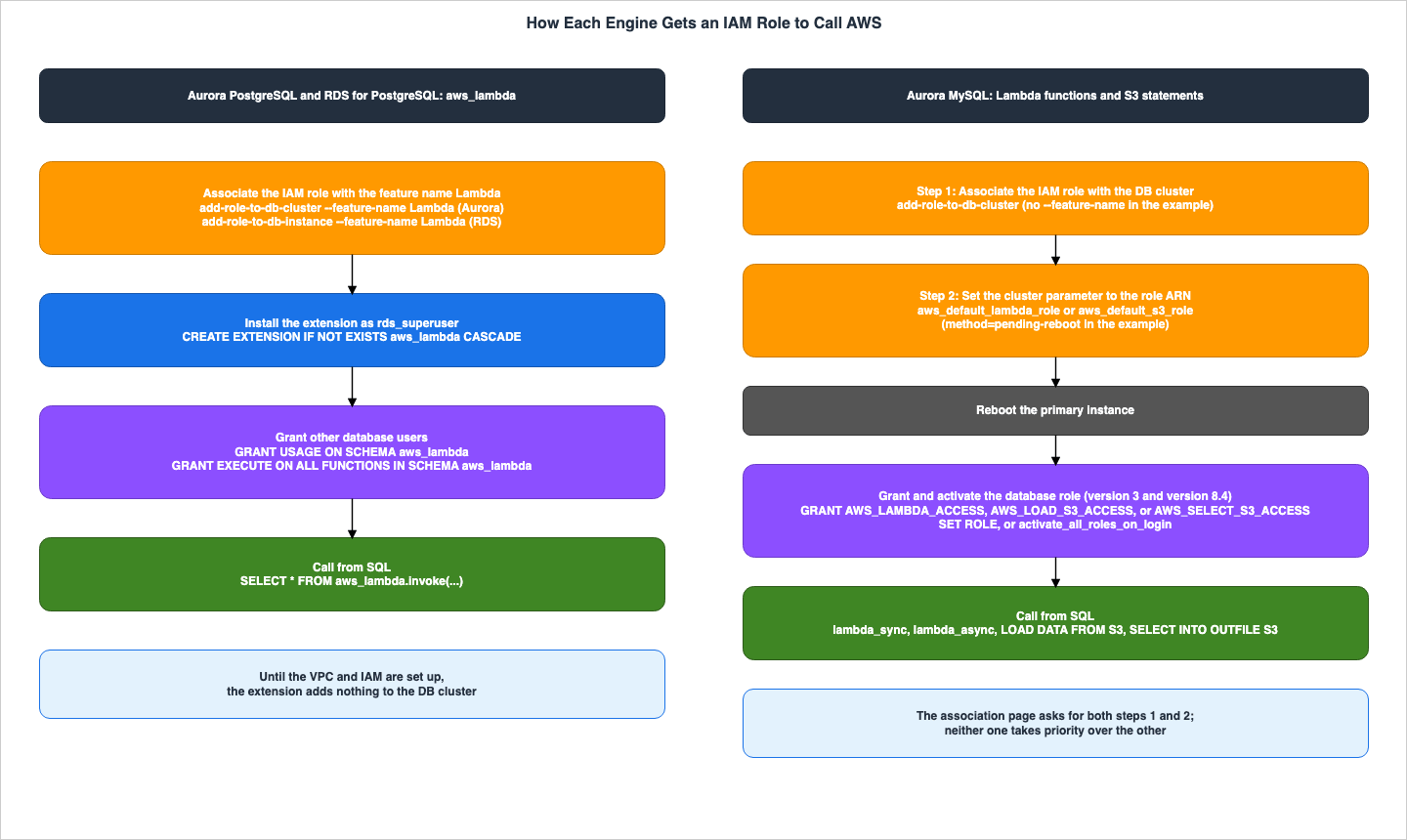
3.1 Who Can Call, and by What Means
| Setting | Aurora PostgreSQL and RDS for PostgreSQL (aws_lambda) | Aurora MySQL (Lambda functions) | Aurora MySQL (S3 statements) |
|---|---|---|---|
| Statement you run | SELECT * FROM aws_lambda.invoke(...) | lambda_sync(...) or lambda_async(...) | LOAD DATA FROM S3, LOAD XML FROM S3, SELECT INTO OUTFILE S3 |
| Role association | DB cluster (Aurora) or DB instance (RDS) | DB cluster | DB cluster |
| Feature name in the example | --feature-name Lambda | None in the CLI example | None in the CLI example |
| Cluster parameter | None on the page | aws_default_lambda_role | aws_default_s3_role; in version 2 also aurora_load_from_s3_role and aurora_select_into_s3_role |
| When it takes effect | No statement found | After the primary instance reboots | After the primary instance reboots |
| Database step | CREATE EXTENSION IF NOT EXISTS aws_lambda CASCADE as rds_superuser | — | — |
| Database privilege | GRANT USAGE on schema aws_lambda and GRANT EXECUTE on its functions | Role AWS_LAMBDA_ACCESS (version 3 and version 8.4); privilege INVOKE LAMBDA (version 2) | Roles AWS_LOAD_S3_ACCESS and AWS_SELECT_S3_ACCESS (version 3 and version 8.4); privileges LOAD FROM S3 and SELECT INTO S3 (version 2) |
| Who can call before the grant | Only rds_superuser | No statement found on the native function page | The administrative user, granted by default |
| Activation of the privilege | — | SET ROLE or activate_all_roles_on_login (version 3) | SET ROLE or activate_all_roles_on_login (version 3) |
| Version condition | Aurora PostgreSQL 11.9 and higher; RDS for PostgreSQL by a version list | Version 2, or version 3.01 and higher | Version 3.05 and higher for customer managed AWS KMS keys |
| Aurora serverless | Stated as supported (including Aurora serverless) | The documentation does not list it | The documentation does not list it |
The "Who can call before the grant" row for the Aurora MySQL S3 route is based on the Aurora MySQL LOAD page and SAVE page, which state,
The administrative user for a DB cluster is granted the appropriate role or privilege by default. The same statement was not found on the page describing Aurora MySQL's native functions.Regarding the "When it takes effect" row, the Aurora MySQL association page places a primary instance reboot at the end of the console instructions, while the CLI examples use
method=pending-reboot for parameter changes. No text describing when the association takes effect was found on the aws_lambda page for PostgreSQL. In this article's configuration, Aurora MySQL 3.10.3's aws_default_lambda_role took effect before a reboot, while the association for Aurora PostgreSQL took effect 59 to about 100 seconds after the status reached ACTIVE (see Sections 8.4 and 8.7). This table gives only the values from the sources, so this row stays unchanged.Concerning the "Aurora serverless" row, the Aurora serverless requirements page lists two features that are not supported: Database Activity Streams and the cluster cache management for Aurora PostgreSQL. The Lambda and S3 routes for Aurora MySQL are not included in this list. However, no text in the user guide stating that these routes are supported was found either. An AWS Database Blog post (October 23, 2024) states that the features that work with provisioned instances also work with Aurora Serverless instances,
with the exception of 2, but it does not name the Lambda and S3 routes. For these two routes, this article writes "the documentation does not list" them, and does not lean toward either supported or unsupported.3.2 Network, Waits, and Errors
| Setting | Aurora PostgreSQL and RDS for PostgreSQL (aws_lambda) | Aurora MySQL (Lambda functions) | Aurora MySQL (S3 statements) |
|---|---|---|---|
| Public DB | Outbound rule for TCP port 443 to 0.0.0.0/0 | Outbound connections to the service endpoints | Outbound connections to the service endpoints |
| Private DB | NAT gateway, or a VPC endpoint for Lambda | NAT, or a VPC endpoint for Lambda | NAT, a VPC endpoint for Amazon S3, or an S3 gateway endpoint |
| DNS condition | RDS for PostgreSQL only: rds.custom_dns_resolution = 1 to use the Lambda VPC endpoint | — | — |
| Kerberos note | Lambda invocations may fail with Lambda VPC endpoints in the AWS Managed Microsoft AD VPC | Same, on the Aurora MySQL network page and the Lambda access page | Same, on the Aurora MySQL network page |
| Default wait | aws_lambda.connect_timeout_ms 1000 and aws_lambda.request_timeout_ms 3000 | No statement found in the user guide; aurora_lambda_request_timeout (default 10 seconds) in the 3.11.0 release notes | No statement found |
| Error when the endpoint cannot be reached | AWS Lambda client returned 'Unable to connect to endpoint' | ERROR 1873 (HY000) | ERROR 1871 (HY000) or ERROR 1815 (HY000) |
| Error when the database privilege is missing | permission denied for schema aws_lambda or permission denied for function invoke | Access denied; you need (at least one of) the Invoke Lambda privilege(s) for this operation | No statement found in the user guide |
| Error when the IAM role is missing | No statement found | No statement found | Error Code: 1871. Missing Credentials (Knowledge Center) |
| Error raised by the function | returned error "Unhandled" | No statement found | — |
| Where results show | Output columns status_code, payload, executed_version, log_result | The return value of the function | mysql.aurora_s3_load_history (load); files and an optional manifest in S3 (save) |
The S3 column of the "Error when the IAM role is missing" row is based on an article in the Knowledge Center (last updated January 4, 2025). The article lists two potential causes for the
Error Code: 1871. Missing Credentials: a lack of IAM role association with the DB cluster, and the presence of only the role name (rather than the ARN) in the parameter group. The same information was not found in the user guide.4. The aws_lambda Extension in Aurora PostgreSQL and RDS for PostgreSQL
This section will cover theaws_lambda extension for Aurora PostgreSQL and RDS for PostgreSQL, in the order of role association, the extension and database permissions, function arguments, waits, and errors. The Aurora page and the RDS page contain largely similar content; any differences will be noted by referencing the specific page name.4.1 Associating the IAM Role
The Auroraaws_lambda page associates roles with a DB cluster using add-role-to-db-cluster. The RDS aws_lambda page associates roles with a DB instance using add-role-to-db-instance. In both examples, the --feature-name Lambda parameter is included.aws rds add-role-to-db-cluster \
--db-cluster-identifier my-cluster-name \
--feature-name Lambda \
--role-arn arn:aws:iam::444455556666:role/rds-lambda-role \
--region aws-regionThe Aurora page describes this process in the following sentence.
This last step allows your DB cluster's database users to invoke Lambda functions.The RDS page writes the same sentence with
DB instance's database users.The principal in the role's trust policy is
rds.amazonaws.com in both page examples. The policy attached to the role, in the examples, is lambda:InvokeFunction for a specific function. The pages also state that a predefined policy, AWSLambdaRole, which allows invoking all functions, can be used.Whether the association targets a DB cluster or a DB instance, and whether the API requires
FeatureName, along with the values representing the association status (e.g., ACTIVE, PENDING, INVALID), are organized for the aws_s3 extension in Section 4.2 of the previously published Moving Data Between Amazon S3 and Aurora or RDS for PostgreSQL with the aws_s3 Extension. For AddRoleToDBCluster, the FeatureName is marked as Required: No, while for AddRoleToDBInstance, it is Required: Yes. The aws_lambda association also utilizes these two APIs. No statement was found that describes the behavior of aws_lambda.invoke when an association is made without a FeatureName. In this article's configuration, the API rejected an association without a FeatureName for the Aurora PostgreSQL cluster (Section 8.3).The methods for associating roles are not limited to
add-role-to-db-cluster. The API reference for RestoreDBClusterFromSnapshot states the following:You can use the AssociatedRoles parameter to associate one or more AWS Identity and Access Management (IAM) roles with an Aurora DB cluster when you restore it from a snapshot.Which feature names are available depends on the engine and version, and
DescribeDBEngineVersions returns this information in the SupportedFeatureNames field. The API reference for DBEngineVersion states, The supported features vary by DB engine and DB engine version. No page was found that lists all the feature names.4.2 The Extension and Database Privileges
After associating the role, install the extension as a user with therds_superuser privilege. The aws_commons extension is also required, and CASCADE installs it together.CREATE EXTENSION IF NOT EXISTS aws_lambda CASCADE;The Aurora page states that the extension can be installed at any time, but that it adds nothing until the VPC and IAM are set up.
the aws_lambda extension adds nothing to your Aurora PostgreSQL DB cluster's capabilities.The Aurora page also states that the extension is installed on the primary DB instance. Right after installing the extension, only
rds_superuser can call.At this point in the procedures, only you as rds_superuser can invoke your Lambda functions.To allow other users to call, execute the following two statements.
GRANT USAGE ON SCHEMA aws_lambda TO db_username;
GRANT EXECUTE ON ALL FUNCTIONS IN SCHEMA aws_lambda TO db_username;
Therefore, in the
aws_lambda route, a user other than rds_superuser can call only after three steps are completed: associating an IAM role, installing the extension, and granting permissions to the database user. Simply associating a role is not sufficient to allow a database user to call.4.3 Arguments of aws_lambda.invoke
The reference page describes four ways to write aws_lambda.invoke. These involve passing the function name as a TEXT value, or passing it as part of a structure created by aws_commons.create_lambda_function_arn. Each of these forms takes either a JSON or a JSONB payload. The form that passes the function name as TEXT with a JSON payload is as follows:aws_lambda.invoke(
IN function_name TEXT,
IN payload JSON,
IN region TEXT DEFAULT NULL,
IN invocation_type TEXT DEFAULT 'RequestResponse',
IN log_type TEXT DEFAULT 'None',
IN context JSON DEFAULT NULL,
IN qualifier VARCHAR(128) DEFAULT NULL,
OUT status_code INT,
OUT payload JSON,
OUT executed_version TEXT,
OUT log_result TEXT)When passing the function name as part of a structure, the
region argument is not included. The Region is included in the structure itself.According to the reference page, the values for the arguments are as follows:
| Argument | Values on the reference page | Default |
|---|---|---|
invocation_type | RequestResponse, Event, DryRun; case-sensitive | RequestResponse |
log_type | Tail (the last 4 KB of the execution log), None; case-sensitive | None |
region | An AWS Region; an error is raised if it conflicts with the Region in the function_name ARN | NULL; the Region from the full ARN, or the Region of the DB instance |
qualifier | A version or alias; an error is raised if it conflicts with the function_name ARN | NULL |
context | Client context in JSON or JSONB | NULL |
Regarding the three possible values for
invocation_type, the reference page describes DryRun as follows:This type of invocation tests access without running the Lambda function.In contrast, Step 5 of the Aurora
aws_lambda page describes the values for this argument as two options: RequestResponse and Event. Only the reference page mentions DryRun. Furthermore, regarding Event, Step 5 states that the response does not include the result payload, while the reference page states returns immediately without a returned payload.The reference page describes the output
status_code as an HTTP status code and refers to the response elements of Lambda Invoke. The Lambda API reference for Invoke states that a successful response returns a status code of 200 for RequestResponse, 202 for Event, and 204 for DryRun. The log_result is only returned when log_type is Tail, and it contains the last 4 KB of the execution log, encoded in Base64.The description for
context in the reference page states, Fields to use include than custom and env. This phrasing is reproduced verbatim in this article.4.4 Waits
The reference page lists two parameters for the waits ofaws_lambda.| Parameter | What the reference page says | Default | Allowed values |
|---|---|---|---|
aws_lambda.connect_timeout_ms | A dynamic parameter; the maximum wait time while connecting to AWS Lambda | 1000 | 1 - 900000 |
aws_lambda.request_timeout_ms | A dynamic parameter; the maximum wait time while waiting for response from AWS Lambda | 3000 | 1 - 900000 |
aws_lambda.endpoint_override | The endpoint used to connect to AWS Lambda; an empty string selects the default endpoint for the Region; a static parameter | No statement found | An endpoint, or an empty string |
The reference page states the default values as follows:
The default values is 3000.The original text's
values is was kept as is. The default value description for aws_lambda.connect_timeout_ms is also written as 1000 in the same format.aws_lambda.endpoint_override is a static parameter, and the reference page indicates that a database restart is required to apply changes. The page describes the behavior when an empty string is used, but it does not explicitly state that the default value is an empty string.You must restart the database for this static parameter change to take effect.The documentation indicates that the default value for the response wait of
aws_lambda.invoke is 3000 milliseconds. No statement was found that it waits until the Lambda function's timeout. No statement was found regarding the relationship between the two parameters and PostgreSQL's statement_timeout, whether the database retries after a timeout, or the specific error message displayed when a timeout occurs.The maximum payload size was not found in the
aws_lambda pages. The Lambda API reference for Invoke states the following regarding the maximum size limit on the Lambda side:The maximum payload size is 6 MB for synchronous invocations and 1 MB for asynchronous invocations.This text refers to the AWS Lambda API, not the
aws_lambda extension. This article does not define this limit as a restriction for aws_lambda.invoke.4.5 Contract Tables
What You Write
| Setting | You Set | Allowed Values | If You Set Nothing | Source of the Default |
|---|---|---|---|---|
| Role association | add-role-to-db-cluster (Aurora) or add-role-to-db-instance (RDS) with --feature-name Lambda | An IAM role ARN; feature names by SupportedFeatureNames | The extension adds nothing | Aurora aws_lambda page |
| Extension | CREATE EXTENSION IF NOT EXISTS aws_lambda CASCADE as rds_superuser | — | aws_lambda.invoke is not installed | Aurora aws_lambda page |
| Database grant | GRANT USAGE ON SCHEMA aws_lambda and GRANT EXECUTE ON ALL FUNCTIONS IN SCHEMA aws_lambda | A database user | Only rds_superuser can invoke | Aurora aws_lambda page |
invocation_type | Function argument | RequestResponse, Event, DryRun (case-sensitive) | RequestResponse | Aurora aws_lambda reference page |
log_type | Function argument | Tail, None (case-sensitive) | None | Aurora aws_lambda reference page |
region | Function argument, or the second argument of aws_commons.create_lambda_function_arn | An AWS Region | The Region from the full ARN, or the Region of the DB instance | Aurora aws_lambda reference page |
aws_lambda.connect_timeout_ms | Parameter (dynamic) | 1 - 900000 | 1000 | Aurora aws_lambda reference page |
aws_lambda.request_timeout_ms | Parameter (dynamic) | 1 - 900000 | 3000 | Aurora aws_lambda reference page |
aws_lambda.endpoint_override | Parameter (static) | An endpoint, or an empty string for the default Lambda endpoint for the Region | No statement found | No statement found |
rds.custom_dns_resolution (RDS for PostgreSQL) | DB parameter in a custom DB parameter group | 0 or 1 | 0 (not enabled) | RDS aws_lambda page |
What Happens
| Setting | At the Boundary | Where It Shows | No Statement Found |
|---|---|---|---|
| Role association | Allows the database users of the DB cluster or DB instance to invoke Lambda functions, together with the extension and the grant | AssociatedRoles of the DB cluster or DB instance | When the association takes effect; behavior without FeatureName |
| Extension | Installed on the primary DB instance | pg_extension | — |
| Database grant | Without it, a non-superuser gets a permission error | permission denied for schema aws_lambda | — |
invocation_type | Event returns without a payload; DryRun tests access without running the function | status_code (200, 202, 204 in the Lambda API Reference) | The error for a value in the wrong case |
log_type | Tail returns the last 4 KB of the execution log | log_result (Base64) | — |
region | A conflict with the Region in the ARN raises an error | The error message | The text of the error |
aws_lambda.connect_timeout_ms | — | — | The error when the wait runs out |
aws_lambda.request_timeout_ms | The wait for the response is 3000 ms by default, not the function timeout | — | The relation to statement_timeout; retries; the error text |
aws_lambda.endpoint_override | A change requires a restart of the database | — | — |
rds.custom_dns_resolution (RDS for PostgreSQL) | Required to use the Lambda VPC endpoint; a reboot applies it | — | An equivalent statement on the Aurora aws_lambda page |
The
No Statement Found entry in the rds.custom_dns_resolution row indicates that the same statement is not found on the aws_lambda page for Aurora. This does not mean that the parameter is absent from Aurora PostgreSQL itself. This article does not explore whether this parameter is present on other pages within Aurora.4.6 Error Messages
The Aurora Lambda function error messages page lists three types of errors.- Configuration issues with the VPC. It notes that a common cause is the absence of an outbound rule on port 443 in the security group.
ERROR:  invoke API failed
DETAIL: AWS Lambda client returned 'Unable to connect to endpoint'.
CONTEXT: SQL function "invoke" statement 1- Insufficient permissions for the user invoking the function. This occurs when the
GRANTstatements from Section 4.2 are missing.
ERROR:  permission denied for schema aws_lambda
ERROR: permission denied for function invoke- The Lambda function threw an exception.
ERROR:  lambda invocation failed
DETAIL:  "arn:aws:lambda:us-west-2:555555555555:function:my-function" returned error "Unhandled", details: "<Error details string>".
The page includes the following text regarding the third item:
Be sure to handle errors in your Lambda functions or in your PostgreSQL application.The "insufficient permissions" described on this page refers to permissions for the database user. Error messages related to IAM roles not being associated or role policies not allowing the function were not found on this page or on other
aws_lambda pages. The error messages returned in this article's configuration are shown in Sections 8.4 through 8.6.5. Lambda in Aurora MySQL - Two Steps and a Database Role
This section covers the Aurora MySQL Lambda route in the order of the two-step association, parameters, database roles, native functions, and the deprecated stored procedure.5.1 Two Steps to Associate the IAM Role
The Aurora MySQL association page states that associating an IAM role with a DB cluster requires two steps.- Using the RDS console,
add-role-to-db-cluster, orAddRoleToDBCluster, add the role to the list of associated roles for the DB cluster. The page states,You can add a maximum of five IAM roles for each Aurora DB cluster. - Enter the ARN (Amazon Resource Name) of the associated role(s) in the cluster parameters for the relevant AWS service.
The second step is described in the following sentence:
Set the cluster-level parameter for the related AWS service to the ARN for the associated IAM role.The CLI example on the page demonstrates running the
add-role-to-db-cluster command without the --feature-name parameter.PROMPT> aws rds add-role-to-db-cluster --db-cluster-identifier my-cluster --role-arn arn:aws:iam::123456789012:role/AllowAuroraLambdaRoleIn the example, the cluster parameters are written with
method=pending-reboot, the parameter group is attached to the DB cluster, and then the cluster is rebooted. The console instructions follow the reboot of the primary instance with the following sentence:When the instance has rebooted, your IAM role is associated with your DB cluster.Therefore, the Aurora MySQL documentation indicates that associating roles and configuring cluster parameters, followed by a reboot, is necessary for the role to be successfully associated with the DB cluster. Neither of the two takes priority, and the user guide does not describe what happens if only one of the steps is performed. For the S3 statements, a Knowledge Center article lists one error for a missing association (Section 3.2).
The
FeatureName parameter for AddRoleToDBCluster is marked as Required: No. The absence of --feature-name in the example on the Aurora MySQL page and the inability to use --feature-name with Aurora MySQL are distinct issues. No statement was found that states the latter. In this article's configuration (Aurora MySQL 3.10.3), the API rejected association requests that include --feature-name Lambda, and SupportedFeatureNames returned only Bedrock (Sections 8.2 and 8.3). Furthermore, aws_default_lambda_role was effective before a reboot (Section 8.7).The Aurora MySQL pages give the order of the two steps in reverse depending on the page. The association page places the role association first, followed by the parameter. The Giving Aurora access to Lambda page and the LOAD and SAVE pages place the parameter first, followed by the role association. This article does not state that either order is correct.
For Aurora global database clusters, the "Giving Aurora access to Lambda" page instructs you to configure parameters, role associations, and outbound connections in the same way across all Aurora clusters in the global database.
5.2 Cluster Parameters
The table on the association page for Aurora MySQL lists the cluster parameters for IAM roles used with other AWS services. The relevant rows are as follows:| Parameter | What the association page says |
|---|---|
aws_default_lambda_role | Used when invoking a Lambda function from your DB cluster |
aws_default_s3_role | Used for LOAD DATA FROM S3, LOAD XML FROM S3, and SELECT INTO OUTFILE S3; in version 2, used if no IAM role is specified for the statement-specific parameter; in version 3 and version 8.4, always used |
aurora_load_from_s3_role | Used for LOAD DATA FROM S3 and LOAD XML FROM S3; if no IAM role is specified, aws_default_s3_role is used; not available in version 3 and version 8.4 |
aurora_select_into_s3_role | Used for SELECT INTO OUTFILE S3; if no IAM role is specified, aws_default_s3_role is used; not available in version 3 and version 8.4 |
The page includes two statements regarding version 3 and version 8.4.
In Aurora MySQL version 3 and version 8.4, the IAM role specified for this parameter is always used.In Aurora MySQL version 3 and version 8.4, this parameter isn't available.The first statement pertains to the row for
aws_default_s3_role, while the second statement applies to the rows for aurora_load_from_s3_role and aurora_select_into_s3_role. This means that statements regarding priority only appear between the two S3-specific parameters in version 2 and the aws_default_s3_role. It does not reflect a priority relationship between role association and cluster parameters.The same table also includes
aws_default_logs_role, which is used to send logs to CloudWatch Logs. The two steps for this role are covered in Section 7.2 of Query Auditing in Aurora MySQL and RDS for MySQL on this site.5.3 Database Roles and Privileges
Apart from the two steps for the IAM role, the database user that calls a function also requires privileges. The Aurora MySQL native functions page separates permissions based on version as follows:| Version | What to grant | Statement on the page |
|---|---|---|
| Version 3 and version 8.4 | The database role AWS_LAMBDA_ACCESS | GRANT AWS_LAMBDA_ACCESS TO user@domain-or-ip-address |
| Version 2 | The privilege INVOKE LAMBDA | GRANT INVOKE LAMBDA ON *.* TO user@domain-or-ip-address |
In version 3, a granted database role might not be active. The Tip on the page says that you can activate it using
SET ROLE role_name or SET ROLE ALL, which only applies to the current session. You will need to re-execute SET ROLE after reconnecting. Using the cluster parameter activate_all_roles_on_login will enable all roles for the user upon connection. However, for a stored procedure that a different user calls, the page says to call SET ROLE ALL explicitly at the beginning of the procedure.The page advises running
SET ROLE if you encounter the following error when calling a function:SQL Error [1227] [42000]: Access denied; you need (at least one of) the Invoke Lambda privilege(s) for this operationThe page also states that when multiple users with the same name exist on different hosts, MySQL selects the user that best matches the host. It recommends ensuring that permissions are granted to the correct user.
5.4 lambda_sync and lambda_async
Aurora MySQL provides two native functions. The page states the versions as follows:You can call the native functions lambda_sync and lambda_async when you use Aurora MySQL version 2, or Aurora MySQL version 3.01 and higher.| Function | Invocation type on the page | Syntax |
|---|---|---|
lambda_sync | RequestResponse (synchronous) | lambda_sync(lambda_function_ARN, JSON_payload) |
lambda_async | Event (asynchronous) | lambda_async(lambda_function_ARN, JSON_payload) |
The page includes the following identical text in the descriptions for both functions:
The function returns the result of the Lambda invocation in a JSON payload.The page says that
lambda_async uses the Event invocation type, yet the sentence quoted above says that the function returns the result of the Lambda invocation in a JSON payload. The page therefore does not make clear what lambda_async returns. This article does not state that lambda_async returns the function's result; see Section 8 for the values returned in this configuration.Regarding calls from a trigger, the page includes the following text:
Triggers aren't run once per SQL statement, but once per row modified, one row at a time.The page continues by stating that the processing when a trigger runs is synchronous, and that a data-modifying statement returns only after the trigger completes. It notes that invoking these functions from triggers on tables with frequent write operations (such as
INSERT, UPDATE, and DELETE) will result in a greater number of Lambda function invocations. For Lambda concurrency on the Lambda side, see AWS Lambda Concurrency and Scaling Guide on this site.Regarding the JSON format for function results, the page states that version 3 includes JSON functions available in MySQL 8.0, while version 2 does not. It also states that if the Lambda function returns a single value, such as a number or string, JSON parsing is not required.
For the Aurora MySQL Lambda route, no statement was found in the user guide that gives the default wait or the error text when the Lambda function throws an exception. The Aurora MySQL 3.11.0 release notes state,
Added a new global variable aurora_lambda_request_timeout to allow users configure AWS Lambda request timeouts (default: 10 seconds). The configuration in Section 8 used version 3.10.3, which is earlier than 3.11.0.5.5 The Deprecated Stored Procedure mysql.lambda_async
Aurora MySQL previously offered a method for invoking Lambda functions using the mysql.lambda_async stored procedure. This feature is now deprecated, as indicated by the (deprecated) label on the relevant page. The page states:In Aurora MySQL version 2, the stored procedure mysql.lambda_async is no longer supported.It further advises,
We strongly recommend that you work with native Lambda functions instead. and notes, In Aurora MySQL version 3, the stored procedure isn't available. However, the pages "Integrating Aurora with other AWS services" and "Authorizing Amazon Aurora MySQL to access other AWS services on your behalf" still list this procedure as one potential option. This article does not include this procedure in the comparison of routes.5.6 Contract Tables
What You Write
| Setting | You Set | Allowed Values | If You Set Nothing | Source of the Default |
|---|---|---|---|---|
| Role association | add-role-to-db-cluster (the CLI example has no --feature-name) | An IAM role ARN; up to five roles per DB cluster | No role is associated | Aurora MySQL association page |
aws_default_lambda_role | Cluster parameter in a custom DB cluster parameter group | The ARN of the associated IAM role | No statement found | No statement found |
| Database role (version 3 and version 8.4) | GRANT AWS_LAMBDA_ACCESS TO user@domain-or-ip-address | A database user | No statement found for users without the role | No statement found |
| Privilege (version 2) | GRANT INVOKE LAMBDA ON *.* TO user@domain-or-ip-address | A database user | No statement found for users without the privilege | No statement found |
| Role activation (version 3) | SET ROLE in the session, or the cluster parameter activate_all_roles_on_login | SET ROLE role_name or SET ROLE ALL | The granted role may not be active | Aurora MySQL native function page |
lambda_sync | SQL function | A Lambda function ARN and a JSON payload | — | — |
lambda_async | SQL function | A Lambda function ARN and a JSON payload | — | — |
What Happens
| Setting | At the Boundary | Where It Shows | No Statement Found |
|---|---|---|---|
| Role association | Needed together with the cluster parameter | AssociatedRoles of the DB cluster | What happens with the association alone |
aws_default_lambda_role | Set with pending-reboot in the example; the role is associated after the primary instance reboots | Parameter group and the member status of the DB cluster | What happens with the parameter alone |
| Database role (version 3 and version 8.4) | A granted role that is not active gives an access-denied error | Access denied; you need (at least one of) the Invoke Lambda privilege(s) for this operation | — |
| Privilege (version 2) | — | — | The error text |
| Role activation (version 3) | SET ROLE applies only to the current session; a stored procedure called by a different user needs SET ROLE ALL | CURRENT_ROLE() | — |
lambda_sync | Called in a trigger, it runs once per modified row, and the statement returns after the trigger completes | The return value | The default wait in the user guide (see Section 5.4); the error text for a function error |
lambda_async | Uses the Event invocation type; the page also says it returns the result in a JSON payload | The return value | What the returned value contains |
6. The S3 Statements in Aurora MySQL
This section covers the three S3 statements of Aurora MySQL. The two steps of role association and cluster parameters are the same as described in Sections 5.1 and 5.2. Here, this section covers what is specific to the S3 statements and the columns that pair with the previously publishedaws_s3 extension article.6.1 LOAD DATA FROM S3 and LOAD XML FROM S3
The Aurora MySQL LOAD page begins with the following statement:In Aurora MySQL, the files are first stored on the local disk, and then imported to the database.The page continues by stating that once the load process is complete, the local files will be deleted.
The preparations required by the page consist of five steps: creating IAM policies and roles, creating a custom DB cluster parameter group, configuring the ARN (Amazon Resource Name) for the parameters (version 3 and version 8.4 use
aws_default_s3_role), associating the role, and establishing outbound connections to S3. For private DB clusters, the page notes that it is possible to create an S3 gateway endpoint.To execute the statement, the database user must be granted the DB role
AWS_LOAD_S3_ACCESS for version 3 and version 8.4, or the LOAD FROM S3 privilege for version 2. The page states that the administrative user of the DB cluster has it by default. In addition, the user must also have INSERT privileges on the database where the data will be loaded.The page further specifies the following additional requirements:
| Aspect | What the Aurora MySQL LOAD page says |
|---|---|
| URI | s3-region://amzn-s3-demo-bucket/file-name-or-prefix; the Region is optional |
| Region | If you don't specify a Region value, Aurora loads your file from Amazon S3 in the same Region as your DB cluster |
| Format | Any text file format supported by the MySQL LOAD DATA INFILE statement; compressed files are not supported |
| Encryption | In version 3.05 and higher, objects encrypted with customer managed AWS KMS keys can be loaded with kms:Decrypt; not needed for AWS managed keys or SSE-S3 |
| Global database | Set the parameter and associate the role for each cluster; only the primary cluster can load data |
| Record | Every successful LOAD DATA FROM S3 statement updates mysql.aurora_s3_load_history with an entry for each file loaded |
Regarding global databases, the page gives the following reason for asking that the settings be made for every cluster.
Although only the primary cluster in an Aurora global database can load data, another cluster might be promoted by the failover mechanism and become the primary cluster.6.2 SELECT INTO OUTFILE S3
The Aurora MySQL SAVE page indicates that files are initially saved to a local disk before being exported to S3, and then deleted.The database user executing the statement requires the
AWS_SELECT_S3_ACCESS role in version 3 and version 8.4, or the SELECT INTO S3 privilege in version 2. The administrative user has it by default.The main conditions outlined on the page are as follows:
| Aspect | What the Aurora MySQL SAVE page says |
|---|---|
| Region | If you don't specify a Region value, Aurora saves your files into Amazon S3 in the same Region as your DB cluster |
| File size | The default file size threshold is 6 GB; above it, multiple files are created |
| Large data | For more than 25 GB, the page recommends multiple statements with different file prefixes |
| Existing files | With OVERWRITE ON, files that match the prefix are overwritten; otherwise an error occurs |
| Manifest | With MANIFEST ON, a manifest file is created after all data files are uploaded |
| Encryption | SSE_S3 and SSE_KMS are available in version 3.05 and higher; customer managed keys need kms:GenerateDataKey |
| Session variable | aurora_select_into_s3_encryption_default; its default is OFF, which follows the default encryption policy of the bucket |
| Failure | Files already uploaded remain in the bucket |
The syntax of the
ENCRYPTION clause on the page is as follows:[ENCRYPTION {ON | OFF | SSE_S3 | SSE_KMS ['cmk_id']}]The sentence for more than 25 GB is a recommendation on the page. This article quotes it only as a sentence of the page, and does not describe how to split the data.
6.3 How the S3 Statements Pair with the aws_s3 Extension
Both the S3 statements for Aurora MySQL and theaws_s3 extension for Aurora PostgreSQL and RDS for PostgreSQL allow reading and writing to S3 from the database. The following table compares the aws_s3 side, as organized in the previously published Moving Data Between Amazon S3 and Aurora or RDS for PostgreSQL with the aws_s3 Extension, with the Aurora MySQL side discussed in this article, across four key aspects. Detailed information regarding the aws_s3 side can be found in Sections 5 and 6 of that article.| Aspect | Aurora MySQL S3 statements | aws_s3 extension (previously published article) |
|---|---|---|
| How the IAM role is associated | Role association and aws_default_s3_role | Role association with the feature name s3Import or s3Export |
| Database privilege | Roles AWS_LOAD_S3_ACCESS and AWS_SELECT_S3_ACCESS (version 3 and version 8.4) | Not addressed by that article (Section 4.1 of that article) |
| Region for saving | The Region in the URI; the same Region as the DB cluster if omitted; an example saves to a bucket in a different Region | The export pages say the Region must be the same as the DB cluster or DB instance |
| Encryption for saving | SSE_S3 and SSE_KMS in version 3.05 and higher | The export pages say buckets encrypted with SSE-S3 are not supported |
Regarding the Region row, the Aurora MySQL SAVE page allows a Region in the URI and describes one of its examples as
The following statement selects all of the data in the employees table and saves the data into an Amazon S3 bucket that is in a different region from the Aurora MySQL DB cluster. The encryption row only places the statements of the two routes side by side, without saying which suits which situation.6.4 Roles and Privileges That RDS for MySQL Does Not Have
The LOAD and SAVE pages for Aurora MySQL state:The AWS_LOAD_S3_ACCESS role and LOAD FROM S3 privilege are specific to Amazon Aurora and are not available for external MySQL databases or RDS for MySQL DB instances.The AWS_SELECT_S3_ACCESS role and SELECT INTO S3 privilege are specific to Amazon Aurora MySQL and are not available for MySQL databases or RDS for MySQL DB instances.These two pages further explain that when an Aurora cluster is configured as the replication source and a MySQL database as the recipient,
GRANT statements for these roles and privileges cause replication to stop with an error. The pages say that the errors can be skipped, and that on RDS for MySQL mysql_rds_skip_repl_error is used.The Restoring a backup into an Amazon RDS for MySQL DB instance page of the RDS User Guide describes how to create a new DB instance from a backup file stored in S3. This process does not involve reading S3 using SQL statements.
No statement was found that says Lambda or S3 can be called from SQL in RDS for MySQL or RDS for MariaDB, and no statement was found that says it cannot. A Database Blog article (dated 2024-02-27) describes a configuration where RDS for MySQL and RDS for MariaDB can trigger Lambda functions by sending audit logs to CloudWatch Logs and using subscription filters. While the article says that Lambda provides direct integration with Aurora MySQL, it does not state that SQL calls to Lambda are unsupported in RDS for MySQL. The audit log settings are covered in Query Auditing in Aurora MySQL and RDS for MySQL on this site.
6.5 Contract Tables
What You Write
| Setting | You Set | Allowed Values | If You Set Nothing | Source of the Default |
|---|---|---|---|---|
| Role association | add-role-to-db-cluster (the CLI example has no --feature-name) | An IAM role ARN; up to five roles per DB cluster | No role is associated | Aurora MySQL association page |
aws_default_s3_role | Cluster parameter in a custom DB cluster parameter group | The ARN of the associated IAM role | No statement found | No statement found |
aurora_load_from_s3_role and aurora_select_into_s3_role (version 2) | Cluster parameters | The ARN of the associated IAM role | aws_default_s3_role is used | Aurora MySQL association page |
| Database roles (version 3 and version 8.4) | GRANT AWS_LOAD_S3_ACCESS and GRANT AWS_SELECT_S3_ACCESS | A database user | The administrative user has them by default | Aurora MySQL LOAD page |
LOAD DATA FROM S3 and LOAD XML FROM S3 | SQL statement with an S3 URI | s3-region://amzn-s3-demo-bucket/file-name-or-prefix, a prefix, or a manifest | The same Region as the DB cluster | Aurora MySQL LOAD page |
SELECT INTO OUTFILE S3 | SQL statement with an S3 URI and options | MANIFEST, OVERWRITE, ENCRYPTION, FORMAT | The same Region as the DB cluster; file size threshold 6 GB | Aurora MySQL SAVE page |
aurora_select_into_s3_encryption_default | Session variable | ON, OFF, SSE_S3, SSE_KMS | OFF; the default encryption policy of the bucket | Aurora MySQL SAVE page |
What Happens
| Setting | At the Boundary | Where It Shows | No Statement Found |
|---|---|---|---|
| Role association | Needed together with the cluster parameter | AssociatedRoles of the DB cluster | What happens with the association alone |
aws_default_s3_role | In version 3 and version 8.4, the role in this parameter is always used | Parameter group | What happens with the parameter alone |
aurora_load_from_s3_role and aurora_select_into_s3_role (version 2) | Not available in version 3 and version 8.4 | Parameter group | — |
| Database roles (version 3 and version 8.4) | SET ROLE or activate_all_roles_on_login activates them | CURRENT_ROLE() | The error text in the user guide |
LOAD DATA FROM S3 and LOAD XML FROM S3 | Files are stored on the local disk first; compressed files are not supported; only the primary cluster of a global database can load | mysql.aurora_s3_load_history | — |
SELECT INTO OUTFILE S3 | An existing file with the same prefix gives an error unless OVERWRITE ON; uploaded files remain after a failure | Files and the manifest in S3 | — |
aurora_select_into_s3_encryption_default | Use either the session variable or the ENCRYPTION clause, not both | The encryption of the S3 objects | — |
7. Network Paths
This section places side by side, in the words of the sources, the network through which the three routes reach AWS services from the DB. For VPC endpoint types and private DNS design, see Private Connectivity by Service on AWS Data Services on this site. The network for theaws_s3 extension for PostgreSQL is covered in Section 7 of the previously published Moving Data Between Amazon S3 and Aurora or RDS for PostgreSQL with the aws_s3 Extension.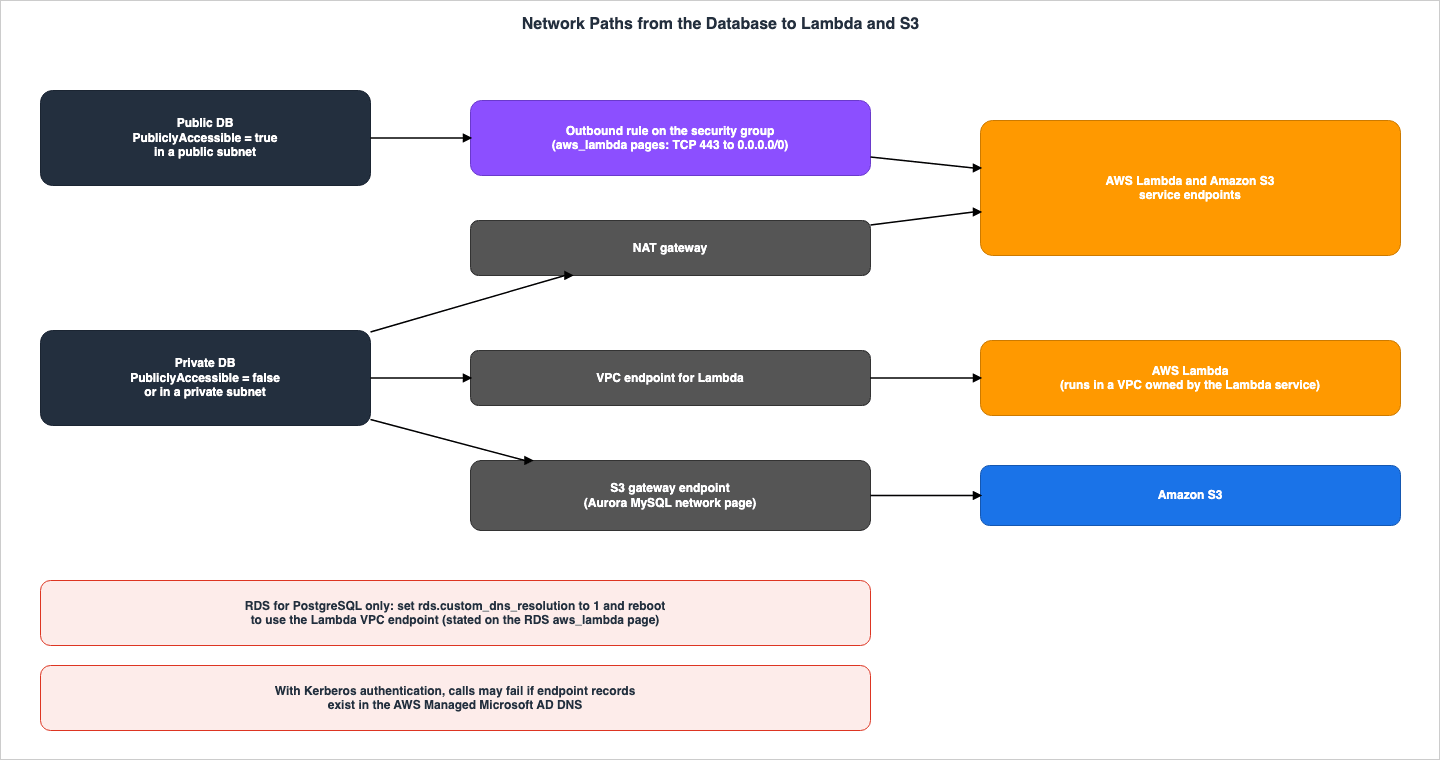
7.1 The PostgreSQL aws_lambda Pages
Step 1 on the Auroraaws_lambda page begins with the following sentence:Lambda functions always run inside an Amazon VPC that's owned by the AWS Lambda service.The DB cluster sends network traffic to this VPC of the Lambda service. The configuration depends on whether the primary DB instance is public or private.
- Public DB cluster: This occurs when the primary DB instance is located in a public subnet in the VPC and
PubliclyAccessibleis set to true. You need to create outbound rules in the VPC's security group. The page states this rule as,The outbound rule specifies that TCP can use port 443 to send packets to any IPv4 addresses (0.0.0.0/0).
- Private DB cluster: This occurs when
PubliclyAccessibleis set to false, or when the DB instance is located in a private subnet. You can either use a NAT gateway or configure a VPC endpoint for Lambda in the VPC. The page states this as,Or, you can configure your VPC with a VPC endpoint for Lambda.
The page does not give the name of the VPC endpoint type (interface endpoint). This article will refer to it as "a VPC endpoint for Lambda," mirroring the language used in the documentation.
7.2 The Aurora MySQL Network Page
The Aurora MySQL network page lists operations requiring outbound connections, including invoking Lambda functions, accessing S3 files, using AWS KMS for Database Activity Streams, and utilizing SageMaker AI. The page states that Aurora returns the following errors when it cannot connect to a service endpoint:ERROR 1871 (HY000): S3 API returned error: Network Connection
ERROR 1873 (HY000): Lambda API returned error: Network Connection. Unable to connect to endpoint
ERROR 1815 (HY000): Internal error: Unable to initialize S3StreamPublic DB clusters are marked as publicly accessible and reside within a public subnet of the VPC. All other clusters are private and are configured to connect to internet addresses through NAT. For S3, SageMaker AI, and Lambda, you can alternatively use VPC endpoints associated with the DB cluster's route table. The page further states:
You can also create an S3 gateway endpoint to access your S3 bucket.Section 7.2 of the previously published
aws_s3 article also quotes this sentence. The page also notes that the ephemeral ports for network ACLs might have to be opened.7.3 A Statement Found Only on the RDS for PostgreSQL Page
The RDSaws_lambda page has a statement, not present on the Aurora page, about using the Lambda VPC endpoint with a private DB instance. The page states that VPC endpoints utilize their own private DNS resolution and continues with the following:RDS for PostgreSQL can't use the Lambda VPC endpoint until you change the value of the rds.custom_dns_resolution from its default value of 0 (not enabled) to 1.The steps outlined on the page are: create a custom DB parameter group, set
rds.custom_dns_resolution to 1, apply that parameter group to the DB instance, and then reboot the instance to apply the changes. This parameter is also mentioned on the "Using a custom DNS server for outbound network access" page in the RDS User Guide.This text is not found on the Aurora
aws_lambda page. This article highlights this difference between the two pages. It does not state that this parameter is unnecessary or unavailable when using Aurora PostgreSQL.7.4 Kerberos Authentication and DNS Conflicts
The Aurora and RDSaws_lambda pages, as well as the Giving Aurora access to Lambda page for Aurora MySQL, contain cautionary sections of the same form. The text on the Aurora aws_lambda page reads as follows:Lambda invocations from your DB cluster may fail if you enable Kerberos authentication and configure Lambda VPC endpoints in your AWS Managed Microsoft AD VPC.The page explains that when Kerberos authentication is enabled, the DB cluster prioritizes the AWS Managed Microsoft AD DNS servers over the VPC's DNS resolver. If the AWS Managed Microsoft AD DNS contains records for the Lambda endpoint, the endpoint may resolve to an address in the Active Directory VPC rather than the database's VPC, and then the invocation does not succeed. The Aurora MySQL network page includes a similar warning regarding Lambda, S3, SageMaker AI, and AWS KMS endpoints. The documentation uses the phrase
may fail. This article does not state that these scenarios will "always fail."8. What This Configuration Returned
This section presents the results obtained using a small configuration created specifically for this article, reflecting data from October 24, 2026 (UTC). The values presented here are based on this configuration and the data recorded on that day, and do not represent guaranteed values from the source material. These values do not show performance or which route is better. Each time value is one or two records.8.1 Configuration
| Item | Value |
|---|---|
| Region | US East (N. Virginia) |
| Aurora PostgreSQL | Version 17.9 (the default version on that day); aws_lambda 2.0 and aws_commons 1.2 after CREATE EXTENSION; one writer, DB instance class db.serverless, 0.5 to 1 ACUs |
| Aurora MySQL | Version 3.10.3 (MySQL 8.0.42, the default version on that day); one writer, db.serverless, 0.5 to 1 ACUs; a custom DB cluster parameter group |
| Network | Public subnets; the security group allowed all outbound traffic, except in the steps that removed the outbound rule |
| Lambda functions | Three Python functions in the same Region: one returns its payload, one sleeps for the given seconds, one raises an exception |
| IAM roles | One role for Aurora PostgreSQL with lambda:InvokeFunction on the three functions; one role for Aurora MySQL with the same permission and the S3 actions listed on the S3 policy page for one bucket |
| Database users | The master user; on Aurora MySQL, caller_user (granted AWS_LAMBDA_ACCESS, AWS_LOAD_S3_ACCESS, and AWS_SELECT_S3_ACCESS, and running SET ROLE ALL before each call) and app_user; on Aurora PostgreSQL, app_user |
| Date and time | 2026-10-24, from 07:46 to 09:05 (UTC) |
RDS for PostgreSQL, Lambda VPC endpoints, NAT gateways, Kerberos authentication, and Aurora MySQL versions 2 and 8.4 were not included in this configuration. Account IDs, cluster names, function names, role names, bucket names, endpoints, and Lambda Request IDs have been redacted in this article. In the quoted messages, account IDs have been replaced with
123456789012, and function names have been replaced with my-function.8.2 Feature Names and Parameters Returned by the API
DescribeDBEngineVersions returned SupportedFeatureNames for the default version of each engine on that day as follows:| Engine | Default version | SupportedFeatureNames returned |
|---|---|---|
aurora-postgresql | 17.9 | Bedrock, Comprehend, Lambda, s3Export, s3Import, SageMaker |
postgres | 18.3 | Lambda, s3Export, s3Import |
aurora-mysql | 8.0.mysql_aurora.3.10.3 | Bedrock |
mysql | 8.4.11 | (empty) |
mariadb | 11.8.9 | (empty) |
The default version for
aurora-mysql did not return Lambda, s3Import, or s3Export. In this configuration, the Lambda and S3 routes for Aurora MySQL worked without feature names (see Sections 8.3, 8.7, and 8.8).Default parameter values were obtained using
DescribeEngineDefaultClusterParameters and DescribeEngineDefaultParameters.| Parameter group family | Parameter | AllowedValues returned | ApplyType |
|---|---|---|---|
aurora-postgresql17 (cluster) | aws_lambda.connect_timeout_ms | 10-900000 | dynamic |
aurora-postgresql17 (cluster) | aws_lambda.request_timeout_ms | 10-900000 | dynamic |
postgres18 (instance) | aws_lambda.connect_timeout_ms | 1-900000 | dynamic |
postgres18 (instance) | aws_lambda.request_timeout_ms | 1-900000 | dynamic |
postgres18 (instance) | rds.custom_dns_resolution | 0,1 | static |
aurora-mysql8.0 (cluster) | aws_default_lambda_role | — | dynamic |
aurora-mysql8.0 (cluster) | aws_default_s3_role | — | dynamic |
For every row, the API did not return a
DefaultValue. The allowed values returned for the Aurora PostgreSQL family were 10-900000, which differed from the 1 - 900000 listed on the reference page. In the database, SHOW returned 1s for aws_lambda.connect_timeout_ms and 3s for aws_lambda.request_timeout_ms. When attempting SHOW aws_lambda.endpoint_override, even with the master user, the system returned must be Aurora superuser to examine "aws_lambda.endpoint_override". The aurora-mysql8.0 family also had rows for aws_default_bedrock_role, aws_default_comprehend_role, and aws_default_sagemaker_role.8.3 API Responses to Role Association
| Call | Response in this configuration |
|---|---|
Aurora PostgreSQL, add-role-to-db-cluster --feature-name Lambda | Accepted; the status moved from PENDING to ACTIVE in about 11 seconds |
Aurora PostgreSQL, add-role-to-db-cluster without --feature-name | InvalidParameterValue: The feature-name parameter must be provided with the current operation for the Aurora (PostgreSQL) engine. |
Aurora MySQL, add-role-to-db-cluster --feature-name Lambda | InvalidParameterValue: The feature name Lambda is not valid for the engine Aurora MySQL. |
Aurora MySQL, add-role-to-db-cluster without --feature-name | Accepted; ACTIVE with no feature name in about 11 seconds |
Aurora MySQL, aws_default_lambda_role and aws_default_s3_role with ApplyMethod=immediate | Accepted; the member status of the DB cluster stayed in-sync; for aws_default_lambda_role, SHOW GLOBAL VARIABLES returned the ARN before any reboot (the step that set aws_default_s3_role rebooted the writer without this check) |
Although the API reference indicates that
FeatureName for AddRoleToDBCluster is Required: No, in this configuration the API rejected calls without a FeatureName for the Aurora PostgreSQL cluster. Conversely, the API rejected calls with the Lambda feature name when targeting Aurora MySQL clusters.8.4 When an Association Takes Effect, and When a Removal Does
The association status and whether calls were successful did not change simultaneously within this configuration.| Situation | What the calls returned in this configuration |
|---|---|
Aurora PostgreSQL, ACTIVE with Lambda (first run) | unable to access credentials stored with the database instance until at least 68 seconds after ACTIVE; the first success was about 100 seconds after ACTIVE |
Aurora PostgreSQL, ACTIVE with Lambda (second run, a call every 10 to 12 seconds) | The same error at 47 seconds after ACTIVE; success at 59 seconds |
| Aurora PostgreSQL, the role removed (first run) | A call 2 seconds after the association disappeared succeeded |
| Aurora PostgreSQL, the role removed (second run) | Calls succeeded until 36 seconds after the association disappeared; the error returned at 48 seconds |
Aurora PostgreSQL, the same role associated only as s3Import | The error continued for 600 seconds after ACTIVE |
Aurora MySQL, the role association removed with aws_default_lambda_role still set | lambda_sync succeeded until 50 seconds after the association disappeared; the error returned at 61 seconds |
The full text of the credential error for Aurora PostgreSQL was as follows:
ERROR:  unable to access credentials stored with the database instance
HINT:  Make sure that the desired Amazon Resource Name (ARN) is associated with the feature-name: "Lambda".
In this configuration,
aws_lambda.invoke did not succeed with the role associated as s3Import. In the first run, the call made right after the association as s3Import succeeded. This was about 18 seconds after the Lambda association was removed, which is shorter than the 36 seconds during which calls still worked after the removal in the second run. This article does not interpret the initial successful invocation as a result of the s3Import association.8.5 Calls from Aurora PostgreSQL
The following table shows the results of the calls after the association has been established.| Call | Result in this configuration |
|---|---|
| Two arguments (function ARN and payload) | status_code 200; the payload returned by the function; executed_version $LATEST |
invocation_type Event | status_code 202; payload and executed_version empty |
invocation_type DryRun | status_code 204; payload and executed_version empty |
invocation_type event (lower case) | ERROR: invoke API failed with Value 'event' at 'invocationType' failed to satisfy constraint: Member must satisfy enum value set: [DryRun, RequestResponse, Event] |
log_type Tail | status_code 200; log_result of 352 characters, 262 characters after Base64 decoding |
| A Region that conflicts with the ARN | ERROR: ambiguous region with DETAIL: The region "us-east-1" encoded in the Lambda name does not match the specified region "us-west-2". |
aws_commons.create_lambda_function_arn | status_code 200 |
app_user without the GRANT statements | ERROR: permission denied for schema aws_lambda |
app_user after the GRANT statements, also with aws_commons.create_lambda_function_arn | status_code 200 in both cases |
A function that raises an exception, RequestResponse | ERROR: lambda invocation failed with returned error "Unhandled" and the error message of the function in details |
A function that raises an exception, Event | status_code 202; no error |
For
app_user, only the two GRANT statements described in Section 4.2 were run. While no GRANT on the aws_commons schema was run, the call using aws_commons.create_lambda_function_arn was successful.8.6 Waits and the Network
The following table shows the times for statements, as indicated by psql's\timing command.| Call | Result in this configuration | Time |
|---|---|---|
| A function that sleeps 2 seconds, default wait | status_code 200 | About 2.4 seconds |
| A function that sleeps 5 seconds, default wait | ERROR: invoke API failed with AWS Lambda client returned 'operation timeout (all attempts including retries) occurred after 3s'. | About 3.2 seconds |
The same, after SET aws_lambda.request_timeout_ms = 10000 | status_code 200 | About 5.4 seconds |
The same, with request_timeout_ms 10000 and statement_timeout 2 seconds | ERROR: canceling statement due to statement timeout | About 5.2 seconds |
A function that sleeps 5 seconds, Event | status_code 202 | About 0.2 seconds |
| No outbound rule, default waits | The same operation timeout … occurred after 3s error | About 3.2 seconds |
No outbound rule, SET aws_lambda.connect_timeout_ms = 5000 | The same operation timeout … occurred after 3s error | About 3.2 seconds |
| Outbound rule restored | status_code 200 | About 0.2 seconds |
The
aws_lambda.request_timeout_ms setting could be changed with SET in the session. Calls with a statement_timeout of 2 seconds did not stop after 2 seconds, but instead resulted in a cancellation error after approximately 5.2 seconds. The records of this configuration do not show that statement_timeout takes effect in the middle of the wait for the Lambda response. With no outbound rule, the error message was the same as the message when the wait runs out, rather than the Unable to connect to endpoint message on the error page. The error message includes the phrase including retries, but the records do not show how many times the DB side tried.8.7 Lambda in Aurora MySQL
| Step | Result in this configuration |
|---|---|
| No role associated, no parameter | ERROR 63987 (HY000) at line 1: Lambda API returned error: Missing designated IAM role (aws_default_lambda_role) |
| Role associated, parameter empty | The same error |
Parameter set with ApplyMethod=immediate, before any reboot | lambda_sync returned the payload of the function |
| After a reboot of the writer | lambda_sync returned the payload of the function |
lambda_async | Returned {} (an empty JSON object, printed with line breaks) |
lambda_async with a function that raises an exception | Returned {}; no error |
lambda_sync with a function that sleeps 5 seconds | Returned after the function finished (about 6.9 seconds on the client, including the connection) |
lambda_sync with a function that raises an exception | ERROR 63987 (HY000) at line 1: Lambda API returned error: Unhandled. followed by the error object of the function |
app_user without AWS_LAMBDA_ACCESS | ERROR 1227 (42000) at line 1: Access denied; you need (at least one of) the Invoke Lambda privilege(s) for this operation |
app_user with AWS_LAMBDA_ACCESS granted, not active (CURRENT_ROLE() returned NONE) | The same ERROR 1227 |
app_user after SET ROLE AWS_LAMBDA_ACCESS | lambda_sync returned the payload of the function |
| No outbound rule | ERROR 63987 (HY000) at line 1: Lambda API returned error: Network Connection. curlCode: 28, Timeout was reached after about 137 seconds |
| Role association removed, parameter still set | ERROR 63987 (HY000) at line 1: Lambda API returned error: Missing IAM Credentials for specified aws_default_lambda_role |
The example on the Aurora MySQL association page writes the parameter with
pending-reboot and then reboots. In this configuration (Aurora MySQL 3.10.3), the API returned aws_default_lambda_role as dynamic, a change with immediate was accepted, and lambda_sync succeeded before any reboot. It is not possible to determine from this record whether the same behavior occurs in other versions.The error number in this configuration was 63987, which is different from
ERROR 1873 listed on the Aurora MySQL network page. Furthermore, the error message when there was no outbound rule also differs from the Unable to connect to endpoint message on the page.8.8 The S3 Statements in Aurora MySQL
| Step | Result in this configuration |
|---|---|
LOAD DATA FROM S3 with no role and no parameter | ERROR 63985 (HY000) at line 1: S3 API returned error: Both aurora_load_from_s3_role and aws_default_s3_role are not specified, please see documentation for more details, followed by warnings that end with Error (Code 1815): Internal error: Unable to initialize S3Stream |
LOAD DATA FROM S3 with the role associated and only aws_default_lambda_role set | The same error |
After setting aws_default_s3_role and rebooting the writer | Three rows loaded |
mysql.aurora_s3_load_history | One row with load_prefix, file_name, bytes_loaded, and load_timestamp; version_number empty |
SELECT INTO OUTFILE S3 with MANIFEST ON | Two objects: demo_export.part_00000 and demo_export.manifest |
app_user without AWS_LOAD_S3_ACCESS | ERROR 1227 (42000) at line 1: Access denied; you need (at least one of) the LOAD FROM S3 privilege(s) for this operation |
Role association removed, aws_default_s3_role still set | ERROR 63985 (HY000) at line 1: S3 API returned error: Missing Credentials: Cannot instantiate S3 Client, followed by Error (Code 1815) |
Even in Aurora MySQL 3.10.3, the error messages contained the name
aurora_load_from_s3_role from version 2. Because the writer was also rebooted in the step that set aws_default_s3_role, these records cannot decide whether the S3 statements need a reboot. The error message after the role association was removed included Missing Credentials, which a Knowledge Center article also names.8.9 What This Configuration Cannot Decide
- The time it takes for associations to take effect, and the time until they cease to function after being removed, are one or two records each. This article cannot say that the same will occur in other configurations or on other days.
- The effectiveness of
ApplyMethod=immediatefor Aurora MySQL is based on a record for Aurora MySQL 3.10.3. Version 2 and version 8.4 were not checked. - This configuration did not check RDS for PostgreSQL, Lambda VPC endpoints,
rds.custom_dns_resolution, or Kerberos authentication. - Based on the wording of
operation timeout (all attempts including retries), it is not possible to determine the number of retry attempts or the intervals used on the database side.
9. What the Sources Do Not State, and Variations Within the Sources
This section lists the statements that this article searched for but did not find, and places where the wording varies in the sources.9.1 Statements Not Found
For the items in the following table, no statement was found in the sources in Section 1.3 or in the places listed in the table. None of these instances indicate that the items are nonexistent or impossible to implement.| Topic | Where it was searched | Result |
|---|---|---|
| How the request to Lambda or S3 is signed (for example, SigV4) | The aws_lambda pages, the Aurora MySQL integration pages, AWS Knowledge searches | No statement found; the sources state the trust principal rds.amazonaws.com and that the association allows database users to invoke |
The relation between aws_lambda.request_timeout_ms and statement_timeout | The aws_lambda pages, AWS Knowledge searches | No statement found |
| Retries by the database after a wait runs out | The aws_lambda pages, the Aurora MySQL native function page | No statement found |
A payload limit of aws_lambda.invoke | The aws_lambda pages | No statement found; the Lambda API Reference states the Lambda-side limit |
The error text when no IAM role is associated (aws_lambda, lambda_sync) | The error messages page, the Aurora MySQL pages, AWS Knowledge searches | No statement found; for the S3 statements, a Knowledge Center article names Error Code: 1871. Missing Credentials |
Default waits and function-error text for lambda_sync | The Aurora MySQL native function page | No statement found; the Aurora MySQL 3.11.0 release notes add aurora_lambda_request_timeout (default 10 seconds) |
| Whether Aurora MySQL's Lambda and S3 routes work on Aurora serverless | The Aurora serverless requirements page, the Aurora MySQL pages | The documentation does not list them as unavailable; no user guide statement that they are available; an AWS Database Blog post (2024-10-23) says the features that work with provisioned instances also work with Aurora Serverless instances, with the exception of 2 (Database Activity Streams and cluster cache management for Aurora PostgreSQL), without naming these routes |
| A complete list of feature names | The API Reference, the CLI Reference | No statement found; SupportedFeatureNames returns them per engine version |
| Whether RDS for MySQL or RDS for MariaDB can call Lambda or S3 from SQL | The RDS User Guide MySQL import page, the Aurora MySQL pages, AWS Knowledge searches, the Database Blog | No statement that they can, and no statement that they cannot |
What changed between aws_lambda versions 1.0, 2.0, and 2.1 | The release notes, AWS Knowledge searches | For 2.0, the Aurora PostgreSQL release notes say it resolves a performance issue that was present in version 1.0; no statement found for 2.1 |
Whether Aurora MySQL accepts --feature-name for these routes | The Aurora MySQL association page, the API Reference | No statement found; FeatureName is Required: No for AddRoleToDBCluster |
Regarding the signing row, the Database Blog article for SQL Server 2025 mentions SigV4 in relation to another method for SQL Server (Section 9.3). The sentence in question is not related to the three routes discussed in this article. For the error messages, the behavior when a wait runs out, the behavior on Aurora serverless, and the feature names in the table, Section 8 shows the values returned in this article's configuration. Because the values in Section 8 are not statements of the sources, the results in this table stay unchanged.
9.2 Variations Within the Sources
The following table lists places in the same set of pages where the wording differs. This table does not indicate that any of these instances are errors.| # | Topic | One part says | Another part says |
|---|---|---|---|
| 1 | Values of invocation_type | The Aurora aws_lambda page, Step 5: RequestResponse and Event | The reference page: RequestResponse, Event, and DryRun |
| 2 | What lambda_async returns | The native function page: invoked with the Event invocation type | The same page: The function returns the result of the Lambda invocation in a JSON payload. |
| 3 | Order of the two steps (Aurora MySQL) | The association page: associate the role, then set the parameter | The Lambda access page and the LOAD and SAVE pages: set the parameter, then associate the role |
| 4 | mysql.lambda_async | The stored procedure page: deprecated, not available in version 3 | Integrating Aurora with other AWS services and the authorizing page still list it as a way to invoke Lambda |
| 5 | Version wording | The native function page: version 2, or … version 3.01 and higher | The same page, for roles: version 3 and version 8.4 |
| 6 | Default value sentence | The reference page: The default values is 3000. | — (the wording of the source, quoted as is) |
9.3 Neighboring Routes
In addition to the three routes discussed in this article, there are also routes from RDS to other AWS services. This article lists only the following three, one line each:- For RDS for SQL Server and RDS for Oracle, integrating with S3 requires associating a role using the
--feature-name S3_INTEGRATIONparameter with theadd-role-to-db-instancecommand. - Regarding
sp_invoke_external_rest_endpointfor RDS for SQL Server 2025, an article on the Database Blog (dated 2026-07-20) notes that AWS services like Amazon SageMaker and Amazon SES require SigV4 signatures for each request, and thatsp_invoke_external_rest_endpoint does not perform itself. The article illustrates a configuration that uses API Gateway and Lambda as intermediaries. - According to an article on the Database Blog (dated 2024-02-27), a method for triggering Lambda from RDS for MySQL and RDS for MariaDB uses audit logs and a CloudWatch Logs subscription filter (see Section 6.4).
10. Failure Modes
This section lists the failures that arise from the contracts in Sections 4 through 7, categorizing them by symptoms and causes.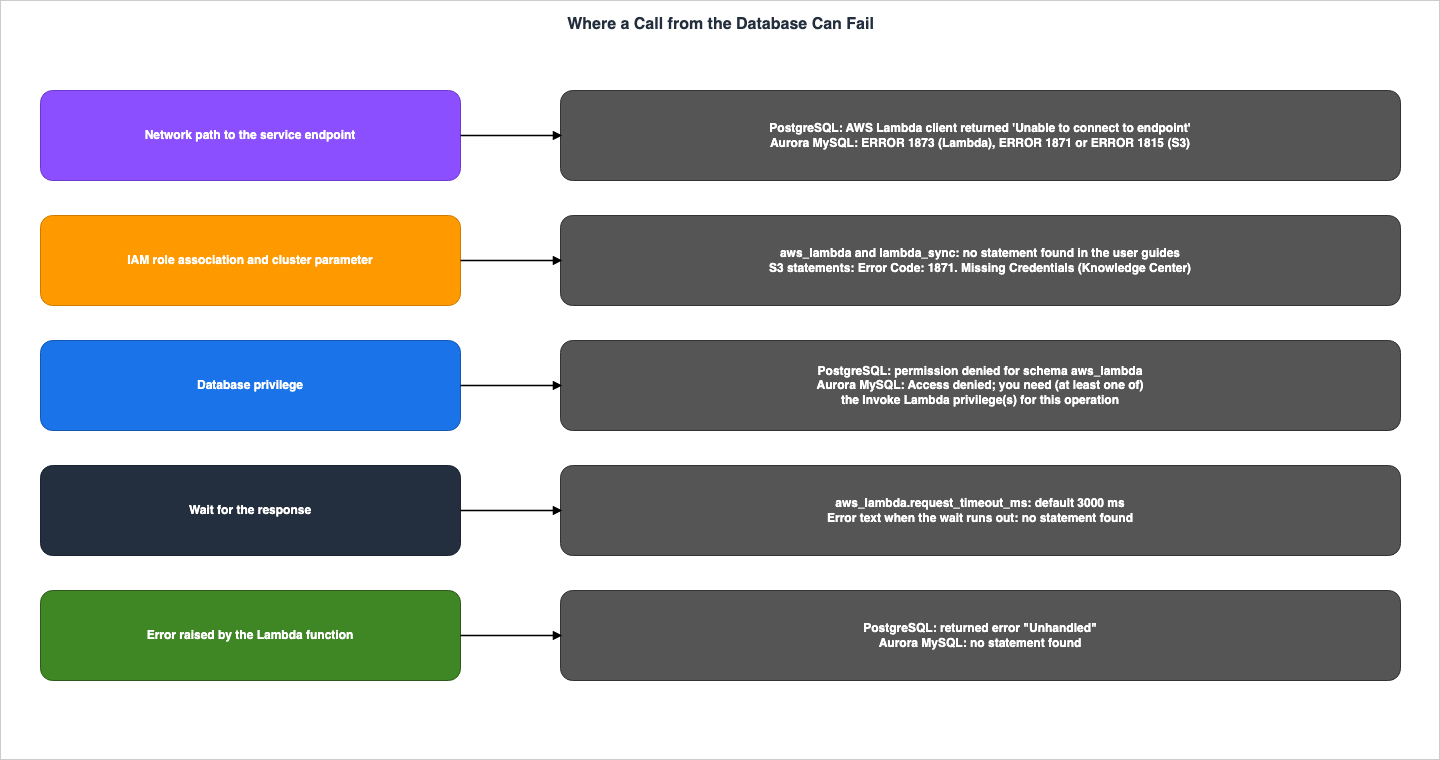
| Symptom | Cause in the contract | Where to look |
|---|---|---|
aws_lambda.invoke does not exist | The extension is not installed | Section 4.2 |
A non-superuser gets permission denied for schema aws_lambda | The GRANT statements on the aws_lambda schema are missing | Section 4.2 |
Unable to connect to endpoint from aws_lambda.invoke | An improperly configured VPC security group, such as no outbound rule for TCP port 443 | Sections 4.6 and 7.1 |
| RDS for PostgreSQL cannot use the Lambda VPC endpoint | rds.custom_dns_resolution is still 0 | Section 7.3 |
| A call to a slow function fails while the function is still running | aws_lambda.request_timeout_ms is 3000 ms by default | Section 4.4 |
event or requestresponse is rejected | invocation_type is case-sensitive | Section 4.3 |
returned error "Unhandled" | The Lambda function raised an exception | Section 4.6 |
Aurora MySQL lambda_sync fails after the role was associated | aws_default_lambda_role is not set (the sources' steps also reboot the primary instance; this configuration did not need the reboot) | Sections 5.1 and 8.7 |
Access denied; you need (at least one of) the Invoke Lambda privilege(s) | The database role AWS_LAMBDA_ACCESS is granted but not active in the session | Section 5.3 |
| A write-heavy table calls Lambda many times | Triggers run once per modified row | Section 5.4 |
Error Code: 1871. Missing Credentials from LOAD DATA FROM S3 | The IAM role is not associated, or the parameter holds a role name instead of an ARN (Knowledge Center) | Section 3.2 |
ERROR 1873 or ERROR 1871 … Network Connection | The DB cluster cannot reach the service endpoint | Section 7.2 |
SELECT INTO OUTFILE S3 fails on a second run | Files with the same prefix exist and OVERWRITE ON is not specified | Section 6.2 |
| Lambda calls fail after Kerberos authentication is enabled | Lambda endpoint records in the AWS Managed Microsoft AD DNS | Section 7.4 |
unable to access credentials stored with the database instance right after the association | In this configuration, calls did not succeed until 59 to about 100 seconds after the Aurora PostgreSQL association status became ACTIVE | Section 8.4 |
operation timeout (all attempts including retries) occurred after 3s | In this configuration, the text for a slow function and for a missing outbound rule | Section 8.6 |
Missing designated IAM role (aws_default_lambda_role) on Aurora MySQL | In this configuration, the text when the parameter was empty, with or without the role association | Section 8.7 |
11. Frequently Asked Questions About Calling AWS from Inside Aurora and RDS
Q1. Does Aurora MySQL also associate the IAM role with --feature-name?
The association page for Aurora MySQL requires both associating a role and configuring the ARN in the cluster parameters. The CLI examples on the page do not include --feature-name. The FeatureName parameter in AddRoleToDBCluster is not required. No statement was found that says --feature-name cannot be used with Aurora MySQL, or that says what happens if it is used (Section 5.1). In this article's configuration (Aurora MySQL 3.10.3), the API rejected --feature-name Lambda with the message The feature name Lambda is not valid for the engine Aurora MySQL. (Section 8.3).Q2. Once the IAM role is associated, can SQL call AWS right away?
The sources do not say so. In PostgreSQL, you need to install an extension and grant permissions to users other thanrds_superuser. In Aurora MySQL, you need to write the ARN in the cluster parameters (the sources' steps then reboot the primary instance; in this article's configuration, the parameter took effect before the reboot), and then grant the database role to the database user and activate it (see Sections 4.2, 5.1, 5.3, and 8.7). In this article's configuration, calls failed with a credentials error, and the first successful call came 59 to about 100 seconds after the Aurora PostgreSQL association status reached ACTIVE (see Section 8.4).Q3. Which takes priority, the role association or the cluster parameter?
Neither takes precedence; the documentation requires both. The concept of precedence only applies between the dedicated S3 parameters for Aurora MySQL version 2 (aurora_load_from_s3_role and aurora_select_into_s3_role) and the aws_default_s3_role. In version 3 and version 8.4, there are no dedicated parameters, and the role specified by aws_default_s3_role is always used (see Section 5.2).Q4. Does aws_lambda.invoke wait until the Lambda function finishes?
The reference page states that the default value for aws_lambda.request_timeout_ms is 3000 milliseconds. No statement was found that aws_lambda.invoke waits until the Lambda function times out, and no statement was found about the relationship between aws_lambda.request_timeout_ms and statement_timeout (Section 4.4). In this article's configuration, when calling a function that sleeps for 5 seconds using the default settings, an operation timeout (all attempts including retries) occurred after 3s error occurred after approximately 3.2 seconds (Section 8.6).Q5. Does RDS sign the request with SigV4 using the associated role?
No statement was found in the sources that describes the signing method. Instead, the documentation states that the principal in the role's trust policy isrds.amazonaws.com, and that through association, database users are able to invoke Lambda functions. This article discusses which role is used for authorization and who can make the calls (Section 9.1).Q6. Can RDS for MySQL use LOAD DATA FROM S3?
The Aurora MySQL LOAD page states that the AWS_LOAD_S3_ACCESS role and the LOAD FROM S3 privilege are not available for RDS for MySQL DB instances. No statement was found that says SQL cannot read from S3 in RDS for MySQL. The RDS User Guide describes using S3 with RDS for MySQL in the context of restoring from backups stored on S3 (Section 6.4).Q7. Does it work on Aurora serverless?
Theaws_lambda page for Aurora PostgreSQL states, Invoking AWS Lambda functions is supported in Aurora PostgreSQL 11.9 and higher (including Aurora serverless). While the Aurora MySQL Lambda and S3 routes do not appear on the list of unsupported features (Section 3.1), no statement was found in the user guide that says they are supported. In the configuration used in this article (Aurora MySQL 3.10.3 with a single db.serverless writer), lambda_sync, LOAD DATA FROM S3, and SELECT INTO OUTFILE S3 worked, and lambda_async returned without an error (Sections 8.7 and 8.8). Whether the function called by lambda_async ran was not checked.Q8. What is needed to call from a DB in a private subnet?
The PostgreSQLaws_lambda pages list either a NAT gateway or a Lambda VPC endpoint. The Aurora MySQL network page lists either NAT or a VPC endpoint, and mentions that gateway endpoints can also be used with S3. When using a Lambda VPC endpoint with RDS for PostgreSQL, you need to set rds.custom_dns_resolution to 1 (see Section 7).12. Summary
- For Aurora PostgreSQL and RDS for PostgreSQL, the
aws_lambdaroute takes three steps: associating an IAM role with--feature-name Lambda, installing the extension, and granting permissions to the database user (the grant is needed for users other thanrds_superuser). For Aurora, the association targets the DB cluster; for RDS, it targets the DB instance. - For Aurora MySQL, the Lambda and S3 routes require two steps: associating a role and configuring the cluster parameter with an ARN. The steps in the sources include a reboot of the primary instance. Both steps are necessary, and neither is prioritized.
- For Aurora MySQL version 3 and version 8.4, grant the database roles
AWS_LAMBDA_ACCESS,AWS_LOAD_S3_ACCESS, andAWS_SELECT_S3_ACCESS, and ensure they are activated in the session. The LOAD and SAVE pages state that the administrative user of the DB cluster is granted the S3 role or privilege by default. - The default wait for the response of
aws_lambda.invokeis 3000 milliseconds. Theinvocation_typeis case-sensitive, andDryRunis only documented on the reference page. - For a private database, the pages name a NAT gateway or a VPC endpoint. Among the
aws_lambdapages, only the RDS for PostgreSQL page states thatrds.custom_dns_resolutionmust be set to 1 to use the Lambda VPC endpoint. - No statement was found in the sources about the signing method, the relationship with
statement_timeout, or whether SQL calls are possible with RDS for MySQL and RDS for MariaDB. - In the configuration described in this article, calls did not succeed until 59 to about 100 seconds after the Aurora PostgreSQL association status became
ACTIVE. After the association was removed, calls still succeeded 36 seconds later (Aurora PostgreSQL) and 50 seconds later (Aurora MySQL). Some of the error messages and error codes differed from those described in the documentation.
13. References
- Amazon Aurora User Guide: Invoking an AWS Lambda function from an Aurora PostgreSQL DB cluster
- Amazon Aurora User Guide: AWS Lambda function and parameter reference
- Amazon Aurora User Guide: Lambda function error messages
- Amazon Aurora User Guide: Examples: Invoking Lambda functions
- Amazon Aurora User Guide: Integrating Amazon Aurora PostgreSQL with other AWS services
- Amazon Aurora User Guide: Integrating Amazon Aurora MySQL with other AWS services
- Amazon Aurora User Guide: Authorizing Amazon Aurora MySQL to access other AWS services on your behalf
- Amazon Aurora User Guide: Setting up IAM roles to access AWS services
- Amazon Aurora User Guide: Creating an IAM policy to access Amazon S3 resources
- Amazon Aurora User Guide: Creating an IAM policy to access AWS Lambda resources
- Amazon Aurora User Guide: Creating an IAM role to allow Amazon Aurora to access AWS services
- Amazon Aurora User Guide: Associating an IAM role with an Amazon Aurora MySQL DB cluster
- Amazon Aurora User Guide: Enabling network communication from Amazon Aurora to other AWS services
- Amazon Aurora User Guide: Invoking a Lambda function from an Amazon Aurora MySQL DB cluster
- Amazon Aurora User Guide: Giving Aurora access to Lambda
- Amazon Aurora User Guide: Invoking a Lambda function with an Aurora MySQL native function
- Amazon Aurora User Guide: Invoking a Lambda function with an Aurora MySQL stored procedure (deprecated)
- Amazon Aurora User Guide: Loading data into an Amazon Aurora MySQL DB cluster from text files in an Amazon S3 bucket
- Amazon Aurora User Guide: Saving data from an Amazon Aurora MySQL DB cluster into text files in an Amazon S3 bucket
- Amazon Aurora User Guide: Recommendations for MySQL features in Aurora MySQL
- Amazon Aurora User Guide: Integrating Aurora with other AWS services
- Amazon Aurora User Guide: Requirements and limitations for Aurora serverless
- Amazon Aurora User Guide: Scaling to Zero ACUs with automatic pause and resume for Aurora serverless
- Amazon RDS User Guide: Invoking an AWS Lambda function from an RDS for PostgreSQL DB instance
- Amazon RDS User Guide: AWS Lambda function and parameter reference
- Amazon RDS User Guide: Lambda function error messages
- Amazon RDS User Guide: Using a custom DNS server for outbound network access
- Amazon RDS User Guide: Restoring a backup into an Amazon RDS for MySQL DB instance
- Amazon RDS User Guide: Enabling RDS for SQL Server integration with S3
- Amazon RDS User Guide: Configuring IAM permissions for RDS for Oracle integration with Amazon S3
- Release Notes for Aurora PostgreSQL: Extension versions for Amazon Aurora PostgreSQL
- Amazon RDS for PostgreSQL Release Notes: Extension versions for Amazon RDS for PostgreSQL
- Release Notes for Aurora PostgreSQL: Amazon Aurora PostgreSQL updates
- Release Notes for Aurora MySQL: Aurora MySQL database engine updates 2025-11-13 (version 3.11.0, compatible with MySQL 8.0.43)
- Amazon RDS API Reference: AddRoleToDBCluster
- Amazon RDS API Reference: AddRoleToDBInstance
- Amazon RDS API Reference: DBClusterRole
- Amazon RDS API Reference: DBEngineVersion
- Amazon RDS API Reference: RestoreDBClusterFromSnapshot
- AWS CLI Command Reference: add-role-to-db-cluster
- AWS CLI Command Reference: add-role-to-db-instance
- AWS CLI Command Reference: describe-db-engine-versions
- AWS Lambda API Reference: Invoke
- AWS re:Post Knowledge Center: How do I resolve errors when I load data between Amazon Aurora and Amazon S3?
- AWS Database Blog: Trigger an AWS Lambda function from Amazon RDS for MySQL or Amazon RDS for MariaDB using audit logs and Amazon CloudWatch
- AWS Database Blog: Invoke AWS services directly from Amazon RDS for SQL Server 2025
- AWS Database Blog: Evaluating the right fit for your Amazon Aurora workloads: provisioned or Serverless v2
- hidekazu-konishi.com: Moving Data Between Amazon S3 and Aurora or RDS for PostgreSQL with the aws_s3 Extension - What the Import and Export Functions Accept, Whose IAM Role Reaches the Bucket, and How They Differ from Foreign Tables
- hidekazu-konishi.com: Query Auditing in Aurora MySQL and RDS for MySQL - Advanced Auditing, the MariaDB Audit Plugin, and Where Each Audit Log Goes
- hidekazu-konishi.com: IAM Authentication to Databases, Caches, and Streams on AWS - Token Lifetime, What Revoking Access Does to Open Connections, and the Identity Inside the Service
- hidekazu-konishi.com: Private Connectivity by Service on AWS Data Services - Which Endpoint Type Each Service Supports, What Private DNS Replaces, and Where the Policy Is Enforced
- hidekazu-konishi.com: AWS Lambda Concurrency and Scaling Guide - Reserved and Provisioned Concurrency, Throttling, and Event Source Scaling
- hidekazu-konishi.com: How Amazon Aurora serverless Decides Its Capacity - What You Set, What Aurora Decides Within Your Range, What the Maximum ACU Fixes, and Where Each Shows Up
- hidekazu-konishi.com: Querying Apache Iceberg and Parquet from Amazon Aurora PostgreSQL - What DuckDB Runs, What Your Transaction Sees, How Current a Read Is, and What Reaches the Writer
- hidekazu-konishi.com: Storage Initialization on Amazon RDS - Which Operations Lazy-Load, What StorageOperationStatus Shows, and Who Warms the Volumes
References:
Tech Blog with curated related content
Written by Hidekazu Konishi