Storage Initialization on Amazon RDS - Which Operations Lazy-Load, What StorageOperationStatus Shows, and Who Warms the Volumes
First Published:
Last Updated:
available. However, the Amazon RDS User Guide notes that the DB instance continues to read data from Amazon S3 in the background, a process referred to as lazy loading. This same behavior occurs during point-in-time recovery, creating read replicas, converting from Single-AZ to Multi-AZ, and creating the green environment in blue/green deployments. Starting August 6, 2026, you can monitor the progress of this data loading through two fields in the response from DescribeDBInstances: StorageOperationStatus and StorageOperationPercentProgress.This article examines five operations that trigger lazy loading, presenting them in a consistent format. For each operation, it details the trigger, the consequences of inaction, what happens at the transition point, which status and fields reflect this process, and whether RDS or the user is responsible for "warming" the volume. It also identifies what the sources do not state. Specifically, it addresses the fact that the
storage-initialization status only appears for the green environment, that the initialization in which RDS reads all blocks also exists only for the green environment, and that the Optimizing value, following storage changes, is a separate operation from initialization.This article does not cover how to use Amazon EBS volume initialization and Fast Snapshot Restore (FSR), blue/green deployment and Multi-AZ design, or pricing. It also does not recommend a preferred method for "warming" the volume. The information presented was verified as of October 25, 2026. The results presented in this article were obtained using a small configuration created in the US East (Northern Virginia) Region specifically for this purpose.
Related articles on this site:
- Amazon EBS Performance Engineering - Volume Types, io2 Block Express, Snapshot Initialization, and Multi-Attach
- Zero-Downtime Database Change on RDS and Aurora - Blue/Green Deployments, Upgrades, and Rollback Design
- Amazon RDS and Aurora High Availability Guide - Multi-AZ, Read Replicas, RDS Proxy, and Global Database Failover
- Query Auditing in Aurora MySQL and RDS for MySQL - Advanced Auditing, the MariaDB Audit Plugin, and Where Each Audit Log Goes
- Calling AWS from Inside Aurora and RDS - aws_lambda, Aurora MySQL's S3 and Lambda Statements, and Which IAM Role Each Uses
- PostgreSQL Autovacuum, Bloat, and Planner Statistics on Aurora and RDS - Why the Defaults Stop Being Enough, and What to Tune First
- AWS Backup Data Protection and Governance - Backup Plans, Vault Lock, and Cross-Account Copy Design
- AWS History and Timeline regarding Amazon RDS - Overview, Engines, Features, Summary of Updates, and Introduction
Table of Contents
- 1. Scope and Assumptions
- 2. How to Read the Tables
- 3. Five Operations That Lazy-Load
- 4. Where Initialization Shows Up
- 5. Who Drives Initialization
- 6. How Each Engine Warms the Volumes
- 7. What This Configuration Showed
- 8. What Is Not Storage Initialization
- 9. What the Sources Do Not State, and Variations Within the Sources
- 10. Failure Modes
- 11. Frequently Asked Questions About Storage Initialization on Amazon RDS
- 12. Summary
- 13. References
1. Scope and Assumptions
This section will first define the intended audience, the scope of this article, the sources read, and the conventions for name usage. The following eight points will outline the conclusions.- The Amazon RDS User Guide states that after a DB instance is created or becomes
available, the volume continues to read data from Amazon S3 in the background for five operations: restoring from snapshots, point-in-time recovery, creating read replicas, converting from Single-AZ to Multi-AZ, and creating the green environment of a blue/green deployment. The point-in-time recovery page notes that performance during this processmight not be at its fullest. - The
storage-initializationstatus only applies to the green environment of a blue/green deployment. For the other four operations, the status table states that the status remainsavailablewhile initialization runs in the background. - Progress during initialization is visible through
StorageOperationStatus(showingInitializingduring initialization) andStorageOperationPercentProgress(ranging from 0 to 100). These two fields only appear while the operation is in progress and disappear once it is complete. These fields were added on August 6, 2026. - The sources describe the initialization in which RDS reads all blocks (storage initialization) only for the green environment of a blue/green deployment. The condition for this is that the volume type must be gp2, gp3, io1, or io2, and the instance class must not be from the t3 or t4 families. For the other four operations, no statement was found that RDS reads all blocks; the data keeps loading in the background, and warming the volumes is left to the user.
- The warming methods that the Amazon RDS User Guide states are a full-table scan, such as
SELECT *(the restore page), and making a read replica Multi-AZ, loading data into its volumes, and then promoting it (the Multi-AZ conversion page). Articles on the AWS Database Blog and the AWS re:Post Knowledge Center list PostgreSQL'spg_prewarm, Oracle's RMAN validation, and MySQL'smysqldump. InnoDB cache warming is a feature that warms the buffer pool, and no statement was found that it can replace warming the volumes. - The
Optimizingvalue and thestorage-optimizationstatus refer to optimization after a storage change, not initialization from a snapshot. - The statement that FSR is not supported on EBS volumes managed by RDS is from an article on the AWS Database Blog (dated October 14, 2026). No such statement was found in the user guide. The statement that there is no lazy loading after restoring Aurora is from an article on the AWS re:Post Knowledge Center that deals with Aurora MySQL. No such statement was found in the Aurora User Guide.
- The CLI wait command
aws rds wait db-instance-availablewaits for theDBInstanceStatusto becomeavailable. A successful return from the wait command does not necessarily mean that initialization is complete.
1.1 Who This Article Is For
The intended audience for this article comprises operations personnel responsible for tasks such as restoring from snapshots, converting to Multi-AZ configurations, adding read replicas, and performing blue/green deployments using RDS for PostgreSQL, RDS for MySQL, RDS for MariaDB, RDS for Oracle, and RDS for SQL Server. Specifically, this article assumes a reader who takes one of the following for granted:- The system can resume production traffic once the status reaches
available. - Initialization is complete if the status is not
storage-initialization. - RDS drives the initialization process for you.
- Using EBS Fast Snapshot Restore (FSR) can avoid lazy loading.
- The same behavior can occur with Aurora.
The first three points are either not supported by the sources or are subject to specific conditions. Regarding the fourth point (FSR), the AWS Database Blog mentions that it cannot be used with EBS volumes managed by RDS; however, no such statement was found in the user guide. Concerning the fifth point, a Knowledge Center article states that lazy loading does not occur after restoring Aurora MySQL; however, no such statement was found in the Aurora User Guide or Aurora PostgreSQL documentation. The basis for each of these points is detailed in Sections 3 to 6 and Section 8.
1.2 What This Article Covers and Does Not Cover
This article will cover the following topics:- Definition of lazy loading, and the five operations that trigger it.
- Status and field visibility (including the fields added on August 6, 2026), and blue/green deployment events.
- Initialization performed by RDS in the green environment of a blue/green deployment, and the conditions under which it occurs.
- Warming methods for each engine type (to the extent the sources describe them).
- Handling of
Optimizing, EBS FSR, and Aurora, along with the source of each statement. - What the sources do not state, and variations within the sources.
This article will not cover:
- EBS volume initialization, FSR usage, and read operations using
ddandfio. These topics are covered in Sections 7 and 8 of the previously published Amazon EBS Performance Engineering. This article focuses on the initialization process from RDS's perspective when managing EBS volumes. - Design, switching, and rollback of blue/green deployments. These topics are covered in the previously published Zero-Downtime Database Change on RDS and Aurora.
- Design and failover of Multi-AZ and read replicas. These topics are covered in the previously published Amazon RDS and Aurora High Availability Guide.
- Pricing, selection of storage types, reproduction of blog metrics, and performance comparisons.
1.3 Sources Read and the Date They Were Checked
The information presented in this article was verified on October 25, 2026. The sources read are as follows:| Source | Pages read |
|---|---|
| Amazon RDS User Guide (operations) | Restoring to a DB instance; Restoring a DB instance to a specified time for Amazon RDS; Creating a read replica; Converting a DB instance to a Multi-AZ deployment for Amazon RDS; Creating a blue/green deployment in Amazon RDS; Switching a blue/green deployment in Amazon RDS; Overview of Amazon RDS Blue/Green Deployments |
| Amazon RDS User Guide (status and storage) | Viewing instance status; Amazon RDS DB instance storage; Settings for DB instances; Amazon RDS event categories and event messages |
| Amazon RDS User Guide (engines) | MySQL feature support on Amazon RDS; Cache warming for MariaDB on Amazon RDS; Warming the InnoDB cache |
| Amazon RDS User Guide (scope checks) | Restoring from a Multi-AZ DB cluster snapshot to a DB instance; Restoring a Multi-AZ DB cluster to a specified time |
| Release notes | Extension versions for Amazon RDS for PostgreSQL; Amazon RDS for PostgreSQL updates |
| Amazon RDS API Reference | DBInstance; AdditionalStorageVolumeOutput; DescribeDBInstances; ModifyDBInstance |
| AWS CLI Command Reference | describe-db-instances; wait db-instance-available |
| Amazon EBS User Guide | Amazon EBS fast snapshot restore; Initialize Amazon EBS volumes |
| Amazon Aurora User Guide | Restoring from a DB cluster snapshot; Restoring a DB cluster to a specified time; Overview of backing up and restoring an Aurora DB cluster; Amazon Aurora storage |
| What's New | Amazon RDS Blue/Green Deployments Green storage fully performant prior to switchover (2024-11-21); Amazon RDS now provides visibility into storage volume initialization status (2026-08-06) |
| AWS Database Blog | Reducing storage initialization impact in Amazon RDS for PostgreSQL after snapshot restore (2026-10-14); Amazon RDS: Snapshot, restore, and recovery demystified (2023-06-13); Prewarm an Amazon RDS for Oracle database to reduce the impact of lazy loading (2023-10-27); Best practices for converting a Single-AZ Amazon RDS instance to a Multi-AZ instance (2021-06-14); Best practices for Amazon RDS for SQL Server with Amazon EBS io2 Block Express volumes up to 64 TiB (2024-07-30); Stop and start Amazon RDS Multi-AZ DB clusters on a schedule (2024-08-02) |
| AWS re:Post Knowledge Center | Reduce the snapshot restore time in Amazon RDS for MySQL (last updated 2026-05-15); Understand the best practices for RDS for Oracle DB snapshot restores (last updated 2023-11-08); Learn about Amazon RDS instance deployment type conversion (last updated 2025-08-26); Troubleshoot snapshot restores for an Aurora MySQL-Compatible DB cluster (last updated 2023-02-28); Troubleshoot long running Amazon Aurora DB cluster clone, snapshots, and point in time restores (last updated 2023-01-23); Resolve the "ERROR: must be loaded via shared_preload_libraries" Error (last updated 2023-06-14) |
Throughout this article,
the RDS restore page refers to the "Restoring to a DB instance" page in the Amazon RDS User Guide. the RDS point-in-time page refers to the "Restoring a DB instance to a specified time" page for Amazon RDS, the RDS read replica page refers to the "Creating a read replica" page, the RDS Multi-AZ conversion page refers to the "Converting a DB instance to a Multi-AZ deployment" page for Amazon RDS, and the RDS blue/green creating page refers to the "Creating a blue/green deployment" page in Amazon RDS. the RDS status table refers to the table displaying the status on the "Viewing instance status" page, and the RDS storage page refers to the "Amazon RDS DB instance storage" page.The dates listed under "What's New" represent the publication dates returned by the "What's New" list API. Articles from the AWS Database Blog and Knowledge Center are not considered part of the user guide specifications. When referencing these external resources, this article includes both the source and the date in the same sentence.
1.4 Names
This article differentiates between different items that share the same or similar spellings, as follows:| Name in this article | What it refers to |
|---|---|
| lazy loading | The background load of data blocks from Amazon S3 into the volumes of a DB instance created from a snapshot, as named on the RDS restore page |
Initializing | The value of StorageOperationStatus while a volume is initializing from a snapshot |
| storage initialization | The process in which Amazon RDS reads all blocks of the green environment volumes in a blue/green deployment, as named on the RDS blue/green creating page |
| EBS volume initialization | Reading the blocks of an Amazon EBS volume that you manage yourself, covered in the previously published Amazon EBS Performance Engineering |
Optimizing | The value of StorageOperationStatus after a storage scaling or modification operation; not initialization from a snapshot |
optimizing (EBS) | A state of an EBS snapshot after fast snapshot restore is enabled; unrelated to RDS |
| warming the volumes | Reading data so that blocks not loaded yet are fetched from Amazon S3 |
| InnoDB cache warming | Saving and reloading the state of the InnoDB buffer pool; it fills memory, and this article does not treat it as warming the volumes |
available | The value of DBInstanceStatus; it does not mean that initialization is complete |
1.5 Engines and Operations in Scope
This article covers five database engines: RDS for PostgreSQL, RDS for MySQL, RDS for MariaDB, RDS for Oracle, and RDS for SQL Server. RDS for Db2 is addressed only to the extent of general user guide content applicable to all engines; no statement was found on warming methods specific to Db2.This article covers DB instances up to and including Multi-AZ DB instances (configurations with a single standby). While the pages on restoring Multi-AZ DB clusters with two readable standbys and on their point-in-time recovery were reviewed, no statement regarding lazy loading was found. An AWS Database Blog post (August 2, 2024) states, regarding a restored Multi-AZ DB cluster,
The restored RDS Multi-AZ DB Cluster continues to load data in the background. This article cites that sentence only and makes no other claims regarding Multi-AZ DB clusters. Aurora is addressed in Section 8.3, only as to how the sources treat it.2. How to Read the Tables
This section defines the columns in the tables presented in Section 3, as well as how the source of a default is written.2.1 Columns
The contract tables in Section 3 use the following seven column headers in addition to theSetting column. The Setting column lists the operation names.| Column | What the cell holds |
|---|---|
You Set | What the user does, and where (an API operation, a console action, or a setting at creation) |
Allowed Values | The values and conditions the source lists, as of 2026-10-25 |
If You Set Nothing | What happens when the user does nothing more after the operation |
Source of the Default | Which source states the behavior in If You Set Nothing |
At the Boundary | What happens at an edge: a block not loaded yet, the end of initialization, a condition that is not met, or a change of storage type |
Where It Shows | Where the state becomes visible: a status, a field, or an event |
No Statement Found | What the sources in Section 1.3 do not state |
The contract table is divided into two tables: "What You Write" (the user's actions) and "What Happens" (the resulting outcomes). The rows in both tables are arranged in the same order. The rows include five operations, as well as changes to storage. While these storage changes are not part of the initialization process, they appear as
Optimizing in the same field, so they are included in the same table to keep the two apart.The table in Section 3.1 lists operations in rows, using five columns:
Status While Loading, Storage Operation Fields, Who Drives It, Named in the API Initializing List, and Events. This table shows visibility and indicates which entity is driving the loading process.2.2 How the Source of a Default Is Written
TheSource of the Default column holds one of the following nine labels:| Label | What it means |
|---|---|
RDS restore page | Body text of Restoring to a DB instance |
RDS point-in-time page | Body text of Restoring a DB instance to a specified time for Amazon RDS |
RDS read replica page | Body text of Creating a read replica |
RDS Multi-AZ conversion page | Body text of Converting a DB instance to a Multi-AZ deployment for Amazon RDS |
RDS blue/green creating page | Body text of Creating a blue/green deployment in Amazon RDS |
RDS status table | The status table on Viewing instance status |
RDS storage page | Body text of Amazon RDS DB instance storage |
API Reference | The DBInstance data type in the Amazon RDS API Reference |
No statement found | No source in Section 1.3 states it |
2.3 No Statement Found, Not Listed, and the Sources Disagree
This article uses a different wording for each of the following three states.- No statement found: Despite searching the sources in Section 1.3, no text describing that specific matter could be found. This corresponds to the
No Statement Foundcolumn and the phrase "no statement was found" in the main text. This does not mean that the matter is nonexistent or impossible. - Not listed: The item is not listed or included in the list or examples provided. In the main text, this is described as "the documentation does not list." This does not mean that the item does not apply either. In particular, items not included in examples that begin with
such asare categorized as being in this state. - The sources disagree: Two different sources provide conflicting information regarding the same matter.
2.4 Values from the Sources and Values Seen in This Configuration
The tables and text in Sections 3 to 6, 8, and 9 will only present the values from the sources. The values seen in this configuration are presented in Section 7, in a separate table, distinct from the values from the sources. The values in Section 7 reflect this configuration and the records from that day, and are not guaranteed by the sources.3. Five Operations That Lazy-Load
This section lists five operations that can trigger lazy loading. Section 3.1 outlines the visibility and who drives each operation. Section 3.2 gives the contract tables, while Sections 3.3 through 3.7 give the statements of the sources for each operation. Section 3.8 shows how the sources list the operations differently.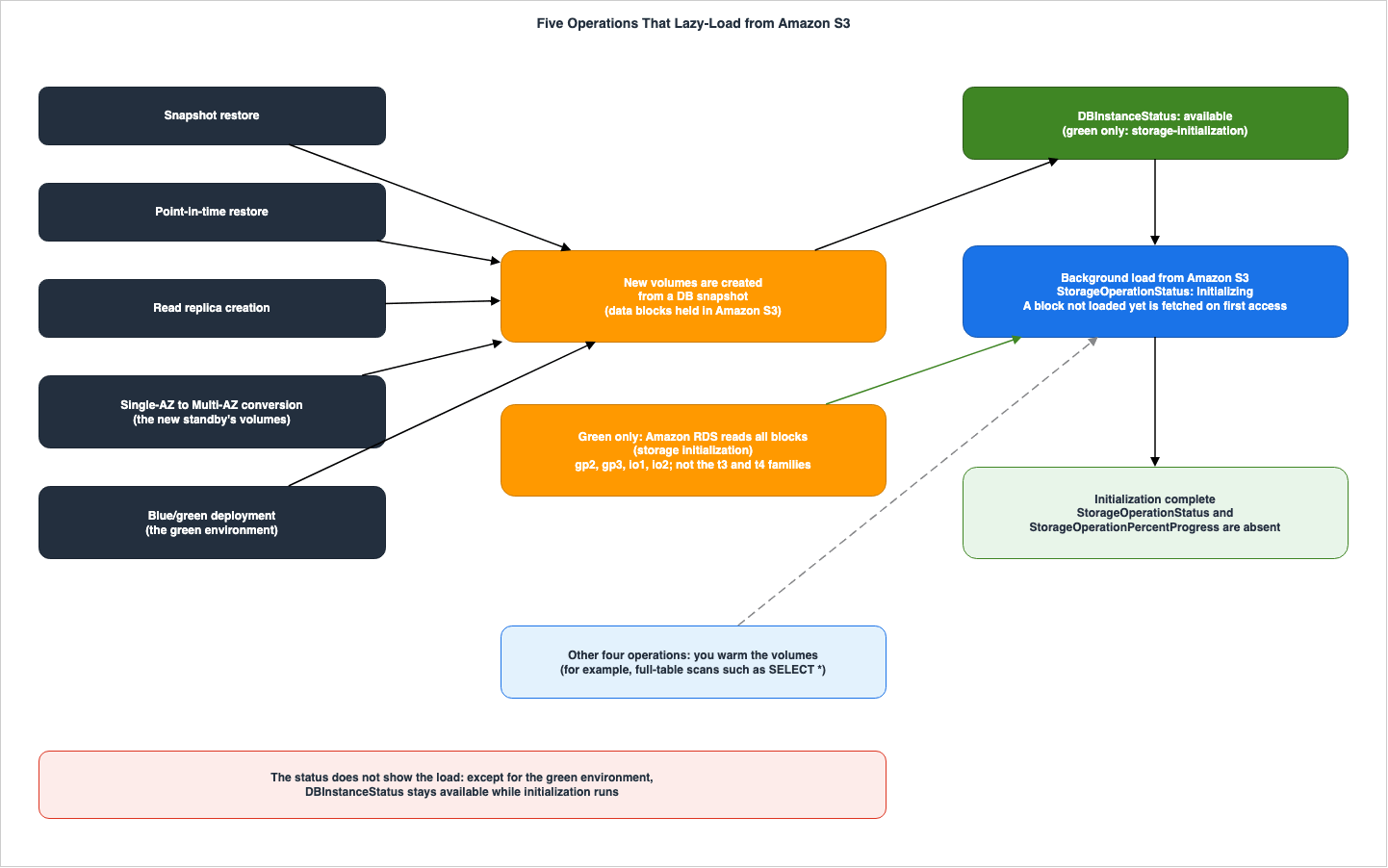
3.1 How Each Operation Shows Up, and Who Drives It
| Setting | Status While Loading | Storage Operation Fields | Who Drives It | Named in the API Initializing List | Events |
|---|---|---|---|---|---|
| Snapshot restore | available | Initializing and a percentage, absent when complete | Background load; you can warm them by reading the data | Yes | No initialization event in the DB instance event table |
| Point-in-time restore | available | Initializing and a percentage, absent when complete | Background load; the page names no warming method (Section 5.2) | Yes | No initialization event in the DB instance event table |
| Read replica creation | available | Initializing and a percentage, absent when complete | Background load; the page names no warming method (Section 5.2) | Yes | No initialization event in the DB instance event table |
| Single-AZ to Multi-AZ conversion | modifying, then available while the new standby's volumes load in the background | Initializing for the new standby, absent when complete | Background load; you can warm them; no statement found that RDS reads all blocks | Not listed (the list uses such as) | RDS-EVENT-0025 when the modification finishes |
| Blue/green deployment (green) | storage-initialization while RDS runs storage initialization | Initializing and a percentage; legacy PercentProgress | Amazon RDS, under the conditions in Section 5.1 | Yes | RDS-EVENT-0405 and RDS-EVENT-0406 in the blue/green deployment event table |
| Storage modification (not initialization) | storage-optimization | Optimizing and a percentage, absent when complete | Amazon RDS | — | RDS-EVENT-0018 and RDS-EVENT-0017 for the allocated storage; no event named for the optimization |
The "Events" column, specifically the "No initialization event in the DB instance event table" entry, indicates that there is no record in the DB instance event table showing the start or completion of the initialization process. The
RDS-EVENT-0025 event, displayed on the events page, reads Finished applying modification to convert to a Multi-AZ DB instance., signifying the completion of the conversion process. However, it does not explicitly state that the standby volume initialization is complete.The "Named in the API Initializing List" column refers to whether a particular item is listed as an example of the
Initializing value in the API reference documentation for StorageOperationStatus. The conversion from Single-AZ to Multi-AZ is not included in this example. Conversely, the status table and the page describing the conversion to Multi-AZ both state that the StorageOperationStatus will be Initializing during the conversion process. This article treats this discrepancy not as a contradiction in the documentation, but rather as a difference in examples (see Section 9.2).3.2 Contract Tables
What You Write
| Setting | You Set | Allowed Values | If You Set Nothing | Source of the Default |
|---|---|---|---|---|
| Snapshot restore | Restore a DB snapshot to a new DB instance | A storage type other than magnetic, starting July 1, 2026; a storage type different from the snapshot makes the restore slower | The DB instance is usable at available and continues to load data in the background | RDS restore page |
| Point-in-time restore | Restore a DB instance to a specified time, as a new DB instance | — | The volumes continue to load data blocks from Amazon S3 after available | RDS point-in-time page |
| Read replica creation | Create a read replica of a source DB instance | — | Amazon RDS takes a DB snapshot of the source; the replica's volumes continue to load after available | RDS read replica page |
| Single-AZ to Multi-AZ conversion | Modify the DB instance to a Multi-AZ DB instance deployment | Apply immediately, or during the next maintenance window | The standby's volumes are created from a snapshot and initialize in the background | RDS Multi-AZ conversion page |
| Blue/green deployment (green) | Create a blue/green deployment | Storage initialization: gp2, gp3, io1, io2; all instance classes except the t3 and t4 families | The green DB instance is restored from a DB snapshot; Amazon RDS reads all blocks when the conditions are met | RDS blue/green creating page |
| Storage modification (not initialization) | Modify storage size, storage type, or performance | Up to four storage modifications within any 24-hour period | The storage is optimized in the background; usually short, sometimes beyond 24 hours | RDS status table |
What Happens
| Setting | At the Boundary | Where It Shows | No Statement Found |
|---|---|---|---|
| Snapshot restore | Data not loaded yet is downloaded from Amazon S3 when accessed; full-table scans such as SELECT * let RDS download the table data | DBInstanceStatus stays available; StorageOperationStatus is Initializing; both fields are absent when complete | How long initialization takes, in the user guide (see Section 9.1) |
| Point-in-time restore | Performance might not be at its fullest until initialization completes | Same as snapshot restore | How long initialization takes, in the user guide (see Section 9.1) |
| Read replica creation | The replica is created from a DB snapshot of the source | Same as snapshot restore, on the read replica | How long initialization takes, in the user guide (see Section 9.1) |
| Single-AZ to Multi-AZ conversion | Maximum volume performance is achieved after the data is fully initialized | available while the new standby's volumes load in the background; the two fields for the new standby | That Amazon RDS reads all blocks of the standby outside a green environment |
| Blue/green deployment (green) | Outside the conditions, storage initialization is not available; the switchover page asks you to make sure data loading is complete | storage-initialization; the two fields; legacy PercentProgress; events 0405 and 0406 | Managed storage initialization for engines other than the three named in the 2024-11-21 What's New |
| Storage modification (not initialization) | You can't modify allocated storage while the status is storage-optimization | storage-optimization; StorageOperationStatus is Optimizing | — |
Regarding the
No Statement Found entry in the blue/green deployment row, the blue/green deployment itself is described in the Note on the overview page as "Currently, blue/green deployments are supported only for RDS for MariaDB, RDS for MySQL, and RDS for PostgreSQL." This article does not state that managed initialization does not work with other engines. It simply indicates that no statement was found regarding other engines.3.3 Snapshot Restore
The RDS restore page defines lazy loading as follows:"You can use the restored DB instance as soon as its status is available. The DB instance continues to load data in the background. This is known as lazy loading."
The same page continues, "If you access data that hasn't been loaded yet, the DB instance immediately downloads the requested data from Amazon S3, and then continues loading the rest of the data in the background." In other words, queries that access blocks that have not been loaded will retrieve those blocks from Amazon S3 and then proceed.
Regarding warming, the same page states, "To help mitigate the effects of lazy loading on tables to which you require quick access, you can perform operations that involve full-table scans, such as SELECT *." It continues, "This allows Amazon RDS to download all of the backed-up table data from S3." This sentence is a recommendation by the source itself. This article will simply cite this passage as it appears in the documentation.
Regarding the progress of the process, the same page states, "During initialization, StorageOperationStatus is set to Initializing, and both fields are absent when initialization is complete."
On the same page, under "Important," it states: "Starting July 1, 2026, you can no longer restore a snapshot to magnetic storage." When restoring a snapshot of magnetic storage, choose a different storage type, such as gp3 or io2 Block Express. The same page also notes that when you restore to a storage type different from the snapshot, "the restore process is slower because of the additional work required to migrate the data to the new storage type." This "slower" refers to the restore process itself, and does not describe how long lazy loading lasts after the restore.
3.4 Point-in-Time Restore
The page describing RDS point-in-time recovery states:"After the restore completes and the DB instance becomes available, its volumes continue to load data blocks from Amazon S3 in the background. During this period, the DB instance is fully operational, but performance might not be at its fullest until initialization completes."
The use of
might in this sentence does not definitively state that performance will be reduced. This article also does not state that performance will always be slow during lazy loading. The same page instructs users to monitor progress using the StorageOperationStatus and StorageOperationPercentProgress fields, noting that the status will display Initializing during the initialization process, and the two fields will disappear once initialization is complete.3.5 Read Replica Creation
The page describing RDS read replicas states, "When you create a read replica, Amazon RDS takes a DB snapshot of your source DB instance and begins replication." Because the replica is created from a snapshot, the same page also states, "After the read replica becomes available, its volumes continue to load data blocks from Amazon S3 in the background." The wording regarding progress is the same as on the restore page: "During initialization, StorageOperationStatus is set to Initializing, and both fields are absent when initialization is complete."3.6 Single-AZ to Multi-AZ Conversion
The page detailing the conversion to Multi-AZ for RDS states that when changing a Single-AZ DB instance to a Multi-AZ DB instance, RDS performs three actions. First, it takes a snapshot of the primary EBS volume. Second, it creates a standby volume from that snapshot. Regarding this step, the page states, "These volumes initialize in the background, and maximum volume performance is achieved after the data is fully initialized." Third, it initiates synchronous block-level replication between the primary and standby volumes.Concerning the status, the same page indicates that during the conversion, the status changes from
available to modifying, and then "returns to available while the new standby's volumes continue to hydrate in the background." The page also instructs users to monitor the initialization of the new standby volumes using StorageOperationStatus and StorageOperationPercentProgress.Under the "Important" section on the same page, it notes that synchronous replication can increase I/O latency and recommends, "As a best practice, avoid converting a production DB instance to a Multi-AZ DB instance." It continues, "Instead, create a read replica, enable backups on it, convert it to Multi-AZ, load data into its volumes, and then promote it to the primary DB instance." This is the recommendation presented in the original documentation. This article will simply cite those two sentences as originating from the documentation. An AWS Database Blog article (June 14, 2021) also describes this approach, stating, "With this approach, underlying storage blocks are copied before they are accessed."
The Knowledge Center article (last updated August 26, 2025) states that when changing from a Single-AZ to a Multi-AZ configuration, "you might experience increased write latency during and after the modification process because of lazy loading."
3.7 The Green Environment of a Blue/Green Deployment
The RDS blue/green creating page states, "When you create a blue/green deployment, Amazon RDS creates the primary DB instance in the green environment by restoring from a DB snapshot." It continues, "After it's created, the green DB instance and its read replicas continue to load data in the background through a process known as lazy loading."Unlike the other four operations, the same page also describes the storage initialization in which RDS reads all blocks. The page states, "To accelerate full volume performance, Amazon RDS provides storage initialization, which reads all blocks in the green environment volume." The conditions, and the status and fields during loading, will be discussed in Sections 4 and 5.
What's New (November 21, 2024) states, "Previously, you had to manually initialize the storage volumes of the Green databases." It continues, "Managed storage initialization of the Green databases is supported for Blue/Green deployments created for RDS for PostgreSQL, RDS for MySQL, and RDS for MariaDB engines."
3.8 How the Sources List the Operations Differently
The list of operations that trigger lazy loading varies depending on the source. None of the sources explicitly state that the lists in other sources are incorrect.| Source | Operations it lists | Operations it does not list |
|---|---|---|
The RDS status table (storage-initialization row) | Point-in-time recovery, snapshot restore, read replica creation, Single-AZ to Multi-AZ conversion (as workflows that stay available), and the green environment | — |
API Reference, Initializing (such as) | Snapshot restore, point-in-time restore, read replica creation, blue/green deployment | Single-AZ to Multi-AZ conversion |
| What's New (2026-08-06) | Point-in-time restore, read replica creation, Single-AZ to Multi-AZ conversion | Snapshot restore, blue/green deployment |
| AWS Database Blog (2026-10-14) | Snapshot restores, PITR, new read replica creation, Single-AZ to Multi-AZ conversion, Blue/Green deployments | — |
| AWS Database Blog (2023-10-27, Oracle) | PITR, Single-AZ to Multi-AZ, restoring from a snapshot, creating a new read replica | Blue/green deployment |
| The RDS storage page (monitoring storage operations per volume) | Snapshot restore, point-in-time recovery, read replica creation, Single-AZ to Multi-AZ conversion | Blue/green deployment |
The five operations mentioned in this article are listed in the individual pages of the user guide, each indicating either lazy loading or initialization. While the "What's New" (2026-08-06) listing does not include restoration, the RDS restore page states that
StorageOperationStatus also becomes Initializing during restoration. This article does not interpret the absence of an operation in a listing as an indication that it is not applicable; instead, it follows the wording used in the user guide pages.4. Where Initialization Shows Up
This section will discuss where initialization can be observed, covering the following areas: the status, the two fields, the per-volume fields, the legacy field, events, and the CLI wait command.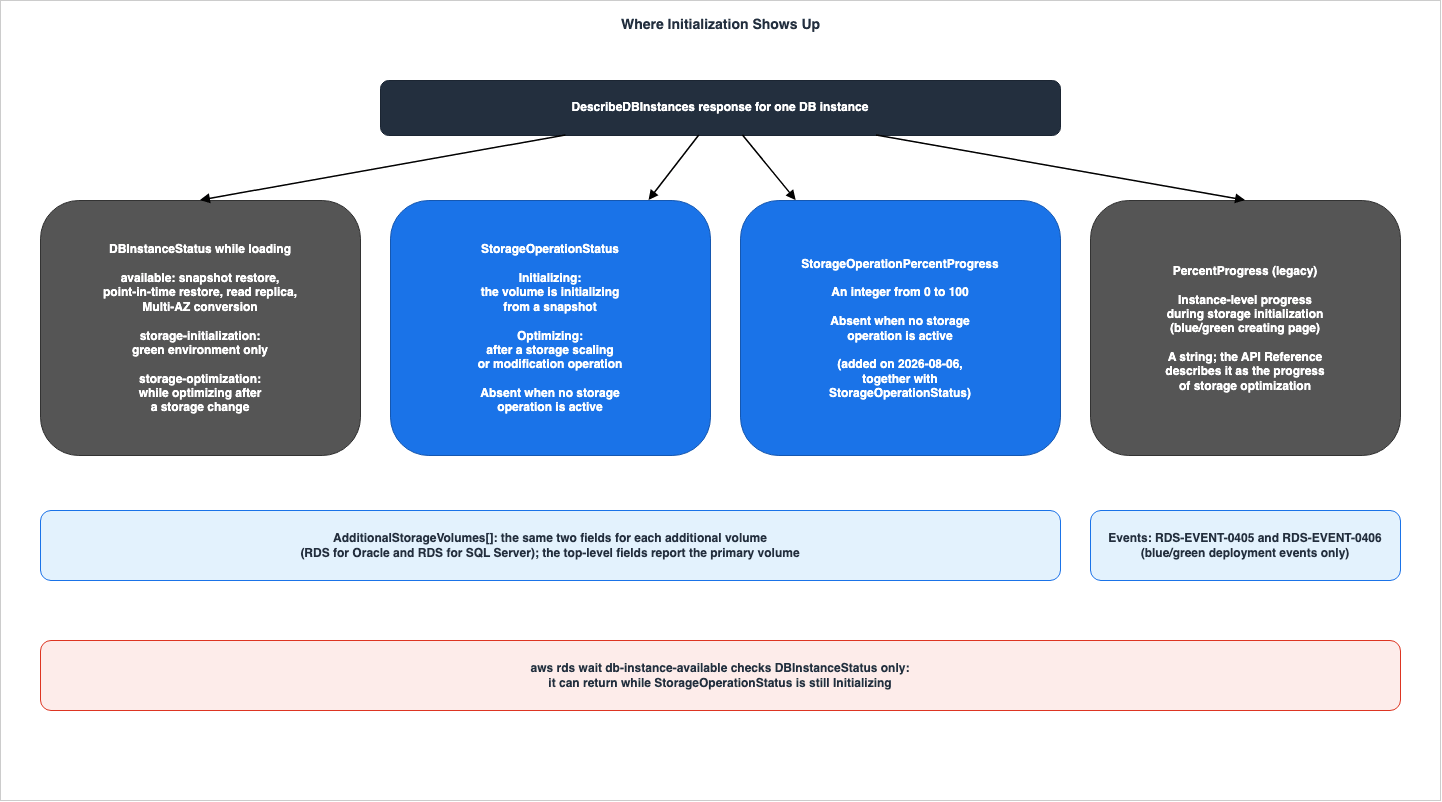
4.1 DBInstanceStatus
The RDS status table includes a row with the status storage-initialization, which states: This status is set only for the green environment of a blue/green deployment. The same row also indicates, regarding other operations, the DB instance status remains available while initialization runs in the background.In other words, simply observing the status does not reveal the initialization process following a restore from snapshot, point-in-time recovery, creation of a read replica, or conversion to Multi-AZ. During these operations, the status remains
available even while initialization is underway.The page for creating a blue/green deployment refers to this status as
Storage-initialization (with a capital "S") in the main text. However, the CLI example on the same page and the status table use storage-initialization (lowercase). This article will maintain the original terminology from the documentation, using lowercase in the body text.4.2 StorageOperationStatus and StorageOperationPercentProgress
The DBInstance in the API reference documentation states about the StorageOperationStatus field: This field appears only while a storage operation is in progress. It isn't present when no storage operation is active. The field has two possible values: Initializing - The volume is initializing from a snapshot, such as during a snapshot restore, point-in-time restore, read replica creation, or blue/green deployment. and Optimizing - The volume is optimizing following a storage scaling or modification operation.StorageOperationPercentProgress is an integer, and the API reference documentation describes it as "The percentage of the in-progress storage operation on the DB instance that has completed, from 0 to 100." This field also only appears while an operation is in progress. The API reference and the CLI reference both continue the Initializing description with "Performance can be lower than provisioned until initialization completes."Both fields disappear from the response when the operation is complete. The API reference documentation states that the field is absent when no operation is in progress, so this absence applies both after the operation completes and before it begins. An article on the AWS Database Blog (October 14, 2026) states "monitor with StorageOperationPercentProgress until 100 percent." This article interprets this phrasing as a difference in wording, rather than a contradiction to the API reference documentation's description that the field disappears (see Section 9.2).
4.3 The Primary Volume and Additional Storage Volumes
The RDS storage page indicates that theStorageOperationStatus and StorageOperationPercentProgress fields at the top level of the DescribeDBInstances response represent the status of the primary volume, while the similarly named fields within each element of the AdditionalStorageVolumes array represent the status of that volume. The same page also states, "For example, a primary volume might still be initializing while an additional storage volume is being optimized after a storage scale-up." The API reference for AdditionalStorageVolumeOutput also includes similarly named fields, described as fields "on the additional storage volume."Both the API reference for
DBInstance and the RDS storage page describe additional storage volumes as a feature for RDS for Oracle and RDS for SQL Server. For other database engines, the only fields to watch are the two at the top level.On the page for creating blue/green deployments, it states regarding the progress indicator, "the progress indicator reflects the minimum initialization level across all volumes of the DB instance."
4.4 The Legacy PercentProgress
The page for creating blue/green deployments states, The legacy PercentProgress field continues to report the instance-level progress during storage initialization. In the same page's CLI example, StorageOperationPercentProgress displays a numerical value of 34, while PercentProgress displays the string "34".In contrast, the API reference for
DBInstance describes PercentProgress as The progress of the storage optimization operation as a percentage. (the data type is a string). The blue/green deployment page refers to the progress of initialization, while the API reference refers to the progress of optimization. This article does not state that either of these is incorrect (see Section 9.2).4.5 Events
The events page for RDS lists the following events in the table for blue/green deployments:RDS-EVENT-0405 Your storage volumes are being initialized. and RDS-EVENT-0406 Your storage volumes have been initialized. Both of these events are categorized as blue/green deployment events.The same page's table of DB instance events does not include any rows indicating the start or completion of initialization. No statement was found describing how to determine the initialization status of other operations through events.
4.6 The CLI Wait Command
The AWS CLI documentation states thataws rds wait db-instance-available "Wait until JMESPath query DBInstances[].DBInstanceStatus returns available for all elements when polling with describe-db-instances." This wait command checks the status every 30 seconds and will terminate after 60 failed attempts.The status table states that, for operations other than the green environment, the status remains
available even during the initialization process (Section 4.1). Combining these two statements, the initialization process can still be ongoing when the wait command returns. The wait command alone cannot determine whether the initialization has completed. The completion of initialization can be determined by checking whether StorageOperationStatus, once it has appeared, has disappeared from the response.4.7 Before August 6, 2026
What's New (August 6, 2026) states,Previously, Amazon RDS reported the instance as available throughout initialization, giving you no direct signal for when performance would stabilize. The same announcement also indicates that the two fields also report the progress of optimization after storage changes. In other words, these two fields were added on August 6, 2026, and documentation and articles written before that date were written when these two fields did not exist.The same announcement states,
The initialization rate varies depending on the workload and which blocks are accessed. This article does not provide an estimate for the time it takes to complete initialization.5. Who Drives Initialization
This section differentiates between the initialization in which RDS reads all blocks and the operations in which the user warms the volumes.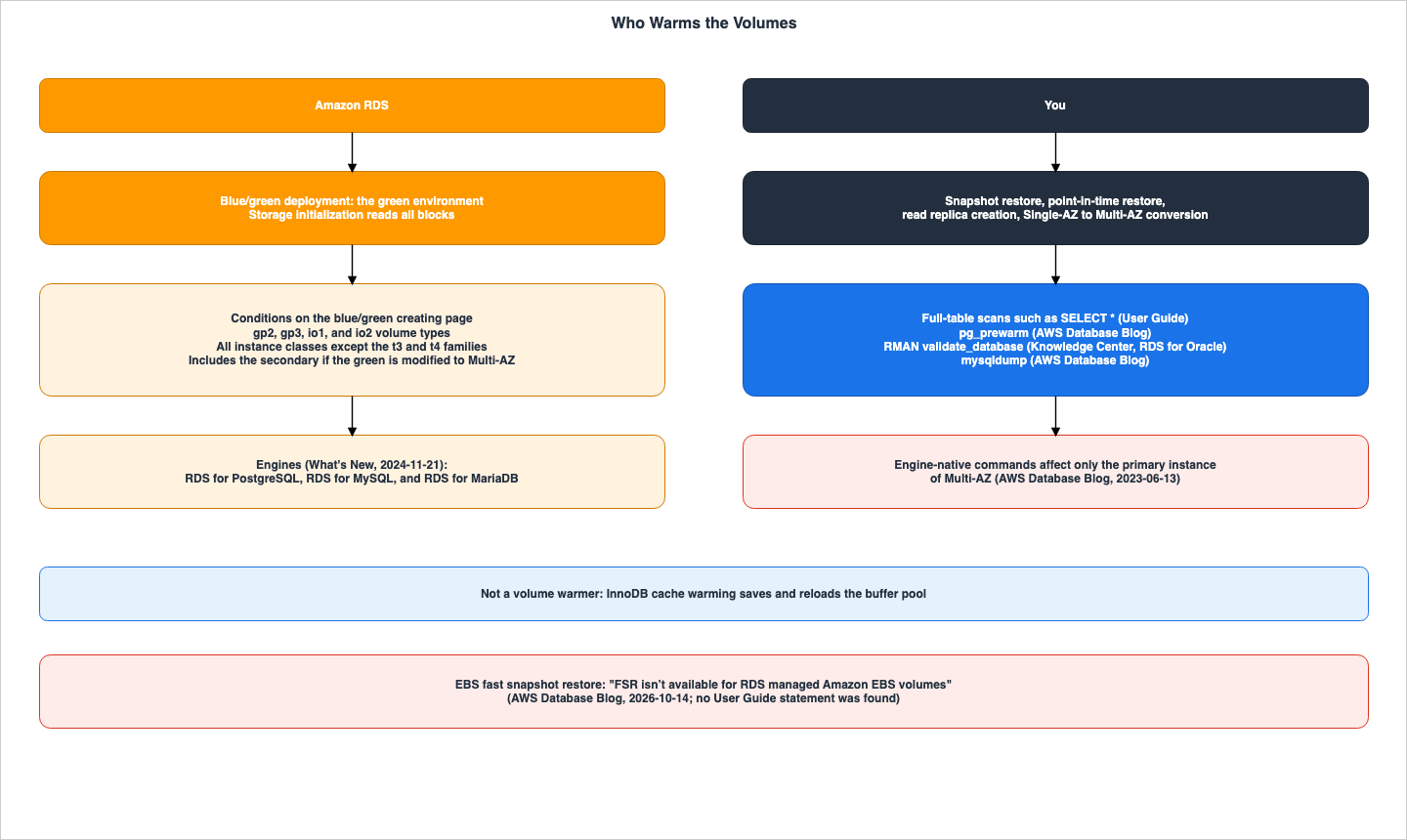
5.1 The Green Environment of a Blue/Green Deployment
The page for creating a blue/green deployment for RDS states the conditions of storage initialization as follows:"Storage initialization is available only for instances in blue/green deployments with gp2, gp3, io1, and io2 volume types. It supports all instance classes except the t3 and t4 families."
The same page continues, "If you modify a green DB instance in a Single-AZ deployment to a Multi-AZ DB instance deployment, storage initialization includes the secondary node in the Multi-AZ configuration." In other words, if you change a green instance to a Multi-AZ configuration, RDS will also initialize the standby volume.
The page further states, "During storage initialization, the instance remains fully available and usable for database operations, though storage might not reach full performance until initialization completes."
On the page for switching blue/green deployments, it advises, "Make sure data loading is complete before switching over."
What's New (November 21, 2024) lists RDS for PostgreSQL, RDS for MySQL, and RDS for MariaDB as supported for managed initialization. The blue/green deployment feature itself is also noted on the overview page, stating that it is only available with these three database engines.
5.2 The Four Operations Outside a Green Environment
No statement was found stating that RDS reads all blocks when performing snapshot restoration, point-in-time recovery, creating read replicas, or converting to Multi-AZ. These pages describe the background load, the full-table scan as a warming method (the restore page), and a method that uses a read replica (the Important on the Multi-AZ conversion page).Note that the RDS blue/green creating page specifically mentions that during conversion to Multi-AZ in the green environment, the secondary volume is also initialized. No statement was found stating that when converting from Single-AZ to Multi-AZ outside of the green environment, RDS reads the standby volume.
5.3 RDS for Oracle, RDS for SQL Server, and RDS for Db2
The overview page for blue/green deployments states that this feature is only available for RDS for MariaDB, RDS for MySQL, and RDS for PostgreSQL. The RDS blue/green creating page describes storage initialization as a function of the green environment in a blue/green deployment. When these two statements are combined, the initialization in which RDS reads all blocks is described as a feature of these three database engines. However, in the scope of this review, no statement was found explicitly stating that RDS performs initialization for RDS for Oracle, RDS for SQL Server, or RDS for Db2.6. How Each Engine Warms the Volumes
This section outlines methods for reading ahead the blocks that have not yet been loaded, organized by source. This article does not recommend any particular method.6.1 What the User Guide States
The warming methods that the Amazon RDS User Guide states are the full-table scan on the restore page (Section 3.3) and the read replica method on the Multi-AZ conversion page (Section 6.6). The restore page states that a full-table scan lets RDS download "all of the backed-up table data." No User Guide statement was found regarding index blocks. An article on the AWS Database Blog (October 14, 2026) states in its table that bothSELECT * and COUNT(*) load only the table's heap, and do not load indexes.6.2 Warming Methods by Source
| Engine | Source | What the source lists |
|---|---|---|
| All engines | RDS restore page | Full-table scans such as SELECT * |
| RDS for PostgreSQL | AWS Database Blog (2026-10-14) | pg_prewarm, SELECT * or COUNT(*), VACUUM ANALYZE (limited), pg_dump |
| RDS for PostgreSQL | AWS Database Blog (2023-06-13) | The pg_prewarm shared library module, pg_dump with jobs and data-only parameters, explicit selects with parallelism |
| RDS for MySQL | AWS Database Blog (2023-06-13) | Selects on large and heavily used tables in parallel, mysqldump |
| RDS for MySQL | Knowledge Center (last updated 2026-05-15) | Full-table scans such as SELECT *; an instance type and an EBS volume with higher throughput during lazy loading |
| RDS for Oracle | Knowledge Center (last updated 2023-11-08) and AWS Database Blog (2023-10-27) | rdsadmin.rdsadmin_rman_util.validate_database, a Data Pump full export, explicit selects with a parallel hint |
| RDS for SQL Server | AWS Database Blog (2023-06-13) | A manual select on large and heavily used tables with parallelism |
| RDS for MariaDB | No engine-specific source found | The RDS restore page applies |
| RDS for Db2 | No engine-specific source found | The RDS restore page applies |
The Knowledge Center article for RDS for MySQL outlines a method for quickly completing lazy loading, using high-throughput instance types and EBS volumes, and includes instructions on how to revert the changes afterward. This article will simply present this method as a statement of the Knowledge Center, without discussing the selection of instances or storage options.
6.3 pg_prewarm on RDS for PostgreSQL
pg_prewarm is listed among the extensions supported by RDS for PostgreSQL. In the table as of October 25, 2026, all versions of RDS for PostgreSQL from 11 through 19 support version 1.2 of pg_prewarm (the columns for 19 are Beta and RC builds).An AWS Database Blog post (dated October 14, 2026) lists three modes for
pg_prewarm: prefetch, which queues multiple I/O requests asynchronously; read, which reads data synchronously, one block at a time; and buffer, which loads data into PostgreSQL's shared_buffers. The post states, "Recommendation: Use prefetch mode for hydration." It also suggests using the buffer mode for frequently accessed tables after initialization. The post provides examples of warming tables, indexes, TOAST tables, and TOAST indexes. This article will simply cite the blog post's recommendation.The same blog post states, "VACUUM isn’t reliable for hydration." It adds that
ANALYZE only reads a sample of the table data. The post also presents performance metrics for a specific configuration (initialization time and query time). This article will not generalize those values.Two sources mention loading
pg_prewarm using shared_preload_libraries. A Knowledge Center article (last updated June 14, 2023) lists pg_prewarm among the modules that can be configured in shared_preload_libraries for RDS for PostgreSQL. The RDS for PostgreSQL release history notes in the PostgreSQL 11.6 section: "Added to shared_preload_libraries support for pg_prewarm to start automatically". However, this section documents a past release, and this article will not state that current versions automatically warm tables based on this information. No RDS documentation mentioning the term autoprewarm was found.6.4 InnoDB Cache Warming on RDS for MySQL and RDS for MariaDB
The RDS for MySQL feature page states,RDS for MySQL DB instances support InnoDB cache warming. This feature saves the state of the buffer pool during shutdown and then reloads the buffer pool from that information upon startup. The RDS for MariaDB page states, Cache warming is enabled by default on MariaDB 10.3 and higher DB instances.Both pages indicate that this feature primarily provides performance benefits for DB instances using standard storage, and typically offers limited advantages with PIOPS storage. InnoDB cache warming is a feature that warms the memory-based buffer pool. No statement was found that this feature replaces warming the volumes. This article does not treat the two as the same thing.
6.5 RDS for Oracle
The Knowledge Center article (last updated November 8, 2023) details steps to take after restoring RDS for Oracle, including immediately reading all data blocks, validating the database usingrdsadmin.rdsadmin_rman_util.validate_database, performing a full Data Pump export, and explicit selects with a parallel hint on large tables. An AWS Database Blog article (October 27, 2023) also mentions RMAN validation, table scans, and statistics collection, as well as Data Pump.6.6 The Multi-AZ Standby
An article on the AWS Database Blog (June 13, 2023) states, "Note that these options are engine-native commands and therefore affect only the primary instance of Multi-AZ Amazon RDS." An Oracle article in the Knowledge Center also states, "These options are engine-native commands so affect only the primary instance for Multi-AZ Amazon RDS for Oracle DB clusters." For restores and point-in-time recovery on Multi-AZ, it lists the steps of RMAN validation, a reboot with failover, and another RMAN validation.When converting from Single-AZ to Multi-AZ, a new standby volume is initialized (see Section 3.6). Regarding this, the user guide's page on converting to Multi-AZ lists a method that makes a read replica Multi-AZ, loads data into its volumes, and then promotes it. An article on conversion in the Knowledge Center (last updated August 26, 2025) lists the following steps: temporarily changing the storage to Provisioned IOPS, converting to Multi-AZ, making a new AZ the primary through failover, performing a full database dump or a full-table scan, verifying
WriteLatency, and then reverting the storage. This article simply lists these steps as they appear in the original sources, without recommending which approach is best.7. What This Configuration Showed
This section presents the results observed on October 24, 2026 (UTC), based on the small configuration created specifically for this article. The values presented here reflect the results obtained from this configuration and the data recorded on that day; they are not guaranteed values provided by the source material. Based on these values, it is not possible to determine performance levels, the effectiveness of different warming methods, or an estimate of initialization time.7.1 Configuration
| Item | Value |
|---|---|
| Region | US East (N. Virginia) |
| Engine | RDS for PostgreSQL 18.3 (the default version on that day) |
| Source DB instance | db.t4g.micro, Single-AZ, gp3 20 GiB (3,000 IOPS and 125 MiB/s as reported), encrypted, no automated backups |
| Data | One table of 8,000,000 rows generated on the server: heap 1,838 MB (235,295 blocks), primary key index 171 MB (21,937 blocks) |
| Snapshot | One manual DB snapshot of the source DB instance |
| Restored DB instance | Restored from the manual snapshot with the same instance class and storage settings, Single-AZ |
| Observation | describe-db-instances about every 17 seconds (a 15-second wait between calls) from the restore request until both fields were absent |
| Date and time | 2026-10-24, from 11:48 to 12:55 (UTC) |
Blue/green deployments, point-in-time recovery, creation of read replicas, conversion to Multi-AZ, and storage changes were not included in this configuration. The account ID, instance names, snapshot names, endpoints, IP addresses, and database usernames have been omitted in this article.
7.2 Status and the Two Fields After the Restore
The following table extracts only the points in time when the values changed, starting from the time the restoration was requested (12:18:55).| Time (UTC) | DBInstanceStatus | StorageOperationStatus | StorageOperationPercentProgress |
|---|---|---|---|
| 12:18:59 | creating | Absent | Absent |
| 12:19:33 | creating | Initializing | 0 |
| 12:22:56 | configuring-enhanced-monitoring | Initializing | 0 |
| 12:24:04 | modifying | Initializing | 0 |
| 12:25:12 | available | Initializing | 0 |
| 12:39:19 | available | Initializing | 87 |
| 12:55:08 | available | Absent | Absent |
In this configuration, the two fields appeared while the status was still
creating. The status transitioned to available at 12:25:12, and the two fields disappeared at 12:55:08. For approximately 30 minutes, the status remained available, while the StorageOperationStatus was Initializing. This corresponds to the behavior described in the status table, where "the DB instance status remains available while initialization runs in the background."The
StorageOperationPercentProgress did not increase gradually during the recording period. The value remained at 0 for roughly 20 minutes, then changed to 87 at 12:39:19, and disappeared along with the other field at 12:55:08. The value 100 never appeared in the records taken about every 17 seconds.The legacy
PercentProgress field did not appear in any of the responses during this restoration. In the source DB instance, which was created empty, the two fields were absent from the responses both immediately after creation and after data was loaded.7.3 The CLI Wait Command
Theaws rds wait db-instance-available command returned at 12:25:33. At that time, the status was available, the StorageOperationStatus was Initializing, and the StorageOperationPercentProgress was 0. Approximately 30 minutes later, the two fields disappeared.7.4 pg_prewarm
The restored DB instance initially had a default version of pg_prewarm of 1.2, which was installed via CREATE EXTENSION. The default shared_preload_libraries included rdsutils,pg_tle,pg_stat_statements,rds_casts, but not pg_prewarm.For approximately 10 minutes after the instance reached the
available status, no data operations were performed, and the StorageOperationPercentProgress remained at 0. Subsequently, pg_prewarm(…, 'prefetch') was executed on the table and its primary key index. The returned values were 235,295 for the table and 21,937 for the index, matching the number of blocks counted on the source DB instance. Following this, a count(*) operation was performed, completing at 12:39:06. A record taken 13 seconds later showed that StorageOperationPercentProgress had changed to 87.This configuration lacks a control DB instance without
pg_prewarm being executed. Therefore, based on these records alone, it is not possible to determine whether pg_prewarm or background data loading caused the change to 87.7.5 Events
The events associated with the restored DB instance wereDB instance restarted and Restored from snapshot. There were no events indicating the start or completion of initialization. This matches the table of DB instance events on the events page, which does not show any entries related to initialization.7.6 What This Configuration Cannot Decide
- The time taken for initialization (approximately 36 minutes from the restoration request) is a single record. It cannot be stated that this would be the same under different conditions, such as data volume, storage type, instance class, or date.
- The reason that
StorageOperationPercentProgressonly took on the values 0, 87, and absent is not documented in either the sources or the records. It is not possible to determine the interval at which this value is updated. - Whether
pg_prewarmaccelerated initialization cannot be determined, as there is no control. No performance comparisons were conducted. - The reason the status passed through
configuring-enhanced-monitoringis unclear based on the records for this configuration. This DB instance was reported to have an enhanced monitoring interval of 0.
8. What Is Not Storage Initialization
This section clarifies items that may appear under similar terminology or in similar contexts, but are not initialization from a snapshot.8.1 Optimizing and storage-optimization
In the API reference, Optimizing describes optimization after scaling or changing storage. The RDS status table indicates that for the storage-optimization status, "The storage optimization process is usually short, but can sometimes take up to and even beyond 24 hours." It also notes that the DB instance remains accessible during the optimization process. During this process, the StorageOperationStatus will show as Optimizing. For a change of storage type, the API reference for ModifyDBInstance states, in the description of StorageType, "The duration of the migration depends on several factors such as database load, storage size, storage type (standard or Provisioned IOPS), amount of IOPS provisioned (if any), and the number of prior scale storage operations."The DB instance configuration page states, "You can't modify allocated storage if the DB instance status is storage-optimization." It also specifies that a single DB instance can undergo a maximum of four storage changes within a 24-hour period.
While both
Initializing and Optimizing appear in the StorageOperationStatus field, they represent different operations. Do not interpret Optimizing as indicating that data is still loading from a snapshot.8.2 EBS Fast Snapshot Restore (FSR)
An article on the AWS Database Blog (October 14, 2026) states thatFSR isn’t available for RDS managed Amazon EBS volumes and continues, Because RDS manages the Amazon EBS volumes on your behalf, those controls aren’t customer-exposed in RDS.This article searched for the same statement in the user guides. Two searches in the Amazon RDS User Guide, the FSR page, and the page on EBS volume initialization in the Amazon EBS User Guide found no references to RDS. Therefore, this article documents this information as a statement from the AWS Database Blog, rather than as a statement of the user guides. The usage of EBS FSR and volume initialization is covered in Sections 7 and 8 of the previously published Amazon EBS Performance Engineering.
8.3 Aurora
The Knowledge Center article addressing Aurora MySQL restoration (Troubleshoot snapshot restores for an Aurora MySQL-Compatible DB cluster, last updated February 28, 2023) states:Unlike the restore process for Amazon Relational Database Service (Amazon RDS) for MySQL instances, lazy loading doesn't occur after the restore.Another Knowledge Center article (Troubleshoot long running Amazon Aurora DB cluster clone, snapshots, and point in time restores, last updated January 23, 2023) discusses continuous backup and restoration techniques for Amazon Aurora, stating:
They also help the cluster’s storage volume to reach full performance as soon as the cluster becomes available. While the opening sentence applies generally to Amazon Aurora, the article's procedures focus on MySQL error logs and InnoDB.No mention of lazy loading was found in the Aurora User Guide's restoration page, point-in-time recovery page, backup overview page, or storage page. No reference to Aurora PostgreSQL was found either. This article does not state that Aurora does not use lazy loading as a general fact for all of Aurora. Instead, it only includes that statement in the context of the Knowledge Center article specifically addressing Aurora MySQL, along with its update date.
8.4 EBS Volume Initialization
The initialization of self-managed EBS volumes created from snapshots, along withInitializationStatusDetails, fast snapshot restore (FSR), and Provisioned Rate, are topics covered in Sections 7 and 8 of the previously published Amazon EBS Performance Engineering. Since users do not directly manipulate EBS volumes in RDS, this article describes how initialization is reflected in the DescribeDBInstances output and how it is warmed up through the database engine's read operations.9. What the Sources Do Not State, and Variations Within the Sources
This section lists statements that could not be found despite searching the sources, as well as instances where the wording varies across the sources.9.1 Statements Not Found
The following items could not be found in the sources in Section 1.3 or in the places listed in the table. None of these instances indicate that the items are nonexistent or impossible to implement.| Topic | Where it was searched | Result |
|---|---|---|
| A User Guide statement that FSR is not available for RDS | Amazon RDS User Guide searches (twice), the EBS fast snapshot restore page, the EBS volume initialization page | No statement found; the AWS Database Blog (2026-10-14) states it |
| An Aurora User Guide statement on lazy loading after a restore | Four Aurora User Guide pages in Section 1.3, AWS Knowledge searches | No statement found; a Knowledge Center article on Aurora MySQL restores states it, and another Knowledge Center article says the storage volume of an Aurora cluster reaches full performance as soon as the cluster becomes available |
| Aurora PostgreSQL and lazy loading | The Aurora User Guide pages, AWS Knowledge searches | No statement found |
| How long initialization takes, or a rate per storage type | The operation pages, the status table, the What's New posts | No statement found; the 2026-08-06 What's New says the rate varies with the workload and the blocks accessed; the AWS Database Blog (2026-10-14) says the window typically lasts hours depending on storage type, and the Knowledge Center article for RDS for Oracle says There's no fixed duration for lazy loading |
| Amazon RDS reading all blocks of the standby outside a green environment | The RDS Multi-AZ conversion page, the RDS blue/green creating page | No statement found; inside a green environment, the secondary is included |
| An event for initialization outside blue/green deployments | The RDS events page | No statement found in the DB instance event table |
autoprewarm on RDS for PostgreSQL | The RDS for PostgreSQL release notes, AWS Knowledge searches | No statement found |
| Warming methods specific to RDS for MariaDB and RDS for Db2 | AWS Knowledge searches, the Database Blog posts in Section 1.3 | No statement found |
| Whether a full-table scan loads index blocks | The RDS restore page | No statement found in the User Guide; the AWS Database Blog (2026-10-14) says SELECT * and COUNT(*) load the heap only |
| Lazy loading on Multi-AZ DB clusters with two readable standbys | The Multi-AZ DB cluster restore and point-in-time pages | No statement found in those pages; an AWS Database Blog post (2024-08-02) says a restored Multi-AZ DB cluster continues to load data in the background |
9.2 Variations Within the Sources
The following table highlights areas where the wording differs across the sources. This section does not claim that any of these differences constitute errors.| # | Topic | One source says | Another source says |
|---|---|---|---|
| 1 | Spelling of the status | The RDS blue/green creating page (body): Storage-initialization | The same page (CLI example) and the status table: storage-initialization |
| 2 | Operations under Initializing | API Reference: such as snapshot restore, point-in-time restore, read replica creation, or blue/green deployment | The status table and the RDS Multi-AZ conversion page: Single-AZ to Multi-AZ conversion also sets Initializing |
| 3 | Operations in the announcement | What's New (2026-08-06): point-in-time restore, read replica creation, Single-AZ to Multi-AZ conversion | The RDS restore page: snapshot restore also reports Initializing |
| 4 | What PercentProgress reports | API Reference: The progress of the storage optimization operation as a percentage. | The RDS blue/green creating page: instance-level progress during storage initialization |
| 5 | The end of monitoring | API Reference: both fields are absent when no storage operation is active | AWS Database Blog (2026-10-14): monitor with StorageOperationPercentProgress until 100 percent |
| 6 | How to warm | The RDS restore page: full-table scans such as SELECT * | AWS Database Blog (2026-10-14): pg_prewarm in prefetch mode for RDS for PostgreSQL |
10. Failure Modes
This section outlines the failures that arise from the contracts discussed in Sections 3 through 8, categorizing them by symptoms and causes.| Symptom | Cause in the contract | Where to look |
|---|---|---|
Queries are slow right after a restore that reports available | Lazy loading continues after available; blocks not loaded yet are fetched from Amazon S3 on access | Sections 3.3 and 3.4 |
A runbook waits for storage-initialization to end after a snapshot restore | That status is set only for the green environment; other operations stay available | Section 4.1 |
aws rds wait db-instance-available returned, but initialization continued | The wait command checks DBInstanceStatus only | Section 4.6 |
A monitor waits for StorageOperationPercentProgress to reach 100 | The fields are absent when the operation is complete | Section 4.2 |
A dashboard reads Optimizing as data still loading from a snapshot | Optimizing follows a storage scaling or modification operation | Section 8.1 |
| Writes slow down after a Single-AZ to Multi-AZ conversion | The user guide names synchronous replication; a Knowledge Center article names lazy loading of the new volumes | Sections 3.6 and 6.6 |
| Warming queries on the primary did not shorten the standby's initialization | The AWS Database Blog (2023-06-13) says engine-native commands affect only the primary of Multi-AZ | Section 6.6 |
| A green environment on a t3 or t4 instance class shows no storage initialization | Storage initialization supports all instance classes except the t3 and t4 families | Section 5.1 |
| The switchover runs while green volumes are still loading | The switchover page asks you to make sure data loading is complete | Section 5.1 |
| InnoDB cache warming is enabled, but the restored volume is still loading | InnoDB cache warming fills the buffer pool; no statement says it replaces warming the volumes | Section 6.4 |
| A plan relies on enabling FSR for an RDS snapshot | The AWS Database Blog (2026-10-14) says FSR isn't available for RDS managed EBS volumes | Section 8.2 |
| A plan assumes Aurora PostgreSQL has no lazy loading | The Knowledge Center statements are about Aurora MySQL restores; no statement was found for Aurora PostgreSQL | Section 8.3 |
| Allocated storage cannot be modified after a storage change | The status is storage-optimization | Section 8.1 |
StorageOperationPercentProgress stays at 0 for a long time, then jumps or disappears | In this configuration, the value was 0 for about 20 minutes, then 87, then the fields were absent | Section 7.2 |
11. Frequently Asked Questions About Storage Initialization on Amazon RDS
Q1. Once a restored DB instance is available, can production load return to it?
While an available status indicates the DB instance is usable, the RDS restore page notes that the instance will continue to read data in the background. The point-in-time recovery page also states that performance might not be at its fullest until initialization completes. When deciding whether to resume the load, it is also important to check if the StorageOperationStatus has disappeared from the response (see Sections 3.3 and 4.2). In the configuration described in this article, even after the status reached available, the StorageOperationStatus remained Initializing for approximately 30 minutes (see Section 7.2).Q2. If the status is not storage-initialization, is initialization complete?
If the status is not storage-initialization, it does not necessarily mean initialization is complete. The status table indicates that storage-initialization is only applied to the green environment of a blue/green deployment, and for all other operations, the status remains available during initialization (as described in Section 4.1).Q3. Does Amazon RDS drive initialization for you?
In the green environment of a blue/green deployment, RDS runs storage initialization, reading all blocks, if certain conditions are met. These conditions are that the volume type is either gp2, gp3, io1, or io2, and that the instance class does not belong to the t3 or t4 family. Regarding the other four operations, no statement was found that RDS reads all blocks (see Sections 5.1 and 5.2).Q4. When StorageOperationStatus is Optimizing, is data still loading?
Optimizing indicates optimization following a storage scaling or modification. Initializing indicates initialization from a snapshot (see Section 8.1).Q5. Can EBS fast snapshot restore avoid lazy loading on RDS?
An article on the AWS Database Blog (October 14, 2026) states that FSR cannot be used with EBS volumes managed by RDS. No such statement was found in the user guide (Section 8.2).Q6. Does the same thing happen on Aurora?
An article in the Knowledge Center regarding Aurora MySQL restores (last updated February 28, 2023) states that, unlike RDS for MySQL, lazy loading does not occur after a restore. No such statement was found in the Aurora User Guide or the Aurora PostgreSQL documentation (Section 8.3).Q7. Does InnoDB cache warming on RDS for MySQL reduce lazy loading after a restore?
InnoDB cache warming is a feature that saves and reloads the state of the buffer pool. No statement was found that it reduces lazy loading or replaces warming the volumes (Section 6.4).Q8. Can an event tell you that initialization is complete?
In blue/green deployments, eventsRDS-EVENT-0405 and RDS-EVENT-0406 indicate the start and completion of initialization. No statement was found on initialization events for other operations. For other operations, refer to the two fields in DescribeDBInstances (see Section 4.5).12. Summary
- Regardless of whether you are restoring from a snapshot, performing point-in-time recovery, creating a read replica, converting from Single-AZ to Multi-AZ, or creating the green environment of a blue/green deployment, the DB instance continues to read data from Amazon S3 in the background after it is created or reaches the
availablestatus. - The
storage-initializationstatus only appears on the green environment. For other operations, the status table states that the status remainsavailablewhile initialization runs in the background, and the CLI wait command only monitors the status. - Progress during initialization is visible through the
StorageOperationStatus(specifically,Initializing) andStorageOperationPercentProgressfields, added on August 6, 2026, which disappear once the initialization is complete. - The sources describe the initialization in which RDS reads all blocks only for the green environment of blue/green deployments, and it requires gp2, gp3, io1, or io2 volumes and an instance class other than the t3 and t4 families. For other operations, no statement was found that RDS reads all blocks; the data loads in the background, and warming the volumes is left to the user.
- The warming methods in the user guide are a full-table scan and the read replica method on the Multi-AZ conversion page;
pg_prewarm, RMAN validation, andmysqldumpare statements of articles on the AWS Database Blog and Knowledge Center. InnoDB cache warming refers to the buffer pool functionality. - In the configuration described in this article (RDS for PostgreSQL 18.3,
db.t4g.micro, gp3 20 GiB, approximately 2 GB of data), theStorageOperationStatusappeared while the status wascreatingand disappeared approximately 30 minutes after the status transitioned toavailable. The CLI wait command returned during theInitializingphase. Optimizingrefers to optimization after a storage change. That FSR is not supported with RDS is a statement of the AWS Database Blog, and that lazy loading does not occur after restoring Aurora is a statement of a Knowledge Center article on Aurora MySQL.
13. References
- Amazon RDS User Guide: Restoring to a DB instance
- Amazon RDS User Guide: Restoring a DB instance to a specified time for Amazon RDS
- Amazon RDS User Guide: Creating a read replica
- Amazon RDS User Guide: Converting a DB instance to a Multi-AZ deployment for Amazon RDS
- Amazon RDS User Guide: Creating a blue/green deployment in Amazon RDS
- Amazon RDS User Guide: Switching a blue/green deployment in Amazon RDS
- Amazon RDS User Guide: Overview of Amazon RDS Blue/Green Deployments
- Amazon RDS User Guide: Viewing instance status
- Amazon RDS User Guide: Amazon RDS DB instance storage
- Amazon RDS User Guide: Settings for DB instances
- Amazon RDS User Guide: Amazon RDS event categories and event messages
- Amazon RDS User Guide: MySQL feature support on Amazon RDS
- Amazon RDS User Guide: Cache warming for MariaDB on Amazon RDS
- Amazon RDS User Guide: Warming the InnoDB cache
- Amazon RDS User Guide: Restoring from a Multi-AZ DB cluster snapshot to a DB instance
- Amazon RDS User Guide: Restoring a Multi-AZ DB cluster to a specified time
- Amazon RDS for PostgreSQL Release Notes: Extension versions for Amazon RDS for PostgreSQL
- Amazon RDS for PostgreSQL Release Notes: Amazon RDS for PostgreSQL updates
- Amazon RDS API Reference: DBInstance
- Amazon RDS API Reference: AdditionalStorageVolumeOutput
- Amazon RDS API Reference: DescribeDBInstances
- Amazon RDS API Reference: ModifyDBInstance
- AWS CLI Command Reference: describe-db-instances
- AWS CLI Command Reference: db-instance-available
- Amazon EBS User Guide: Amazon EBS fast snapshot restore
- Amazon EBS User Guide: Initialize Amazon EBS volumes
- Amazon Aurora User Guide: Restoring from a DB cluster snapshot
- Amazon Aurora User Guide: Restoring a DB cluster to a specified time
- Amazon Aurora User Guide: Overview of backing up and restoring an Aurora DB cluster
- Amazon Aurora User Guide: Amazon Aurora storage
- What's New: Amazon RDS Blue/Green Deployments Green storage fully performant prior to switchover
- What's New: Amazon RDS now provides visibility into storage volume initialization status
- AWS Database Blog: Reducing storage initialization impact in Amazon RDS for PostgreSQL after snapshot restore
- AWS Database Blog: Amazon RDS: Snapshot, restore, and recovery demystified
- AWS Database Blog: Prewarm an Amazon RDS for Oracle database to reduce the impact of lazy loading
- AWS Database Blog: Best practices for converting a Single-AZ Amazon RDS instance to a Multi-AZ instance
- AWS Database Blog: Best practices for Amazon RDS for SQL Server with Amazon EBS io2 Block Express volumes up to 64 TiB
- AWS Database Blog: Stop and start Amazon RDS Multi-AZ DB clusters on a schedule
- AWS re:Post Knowledge Center: Reduce the snapshot restore time in Amazon RDS for MySQL
- AWS re:Post Knowledge Center: Understand the best practices for RDS for Oracle DB snapshot restores
- AWS re:Post Knowledge Center: Learn about Amazon RDS instance deployment type conversion
- AWS re:Post Knowledge Center: Troubleshoot snapshot restores for an Aurora MySQL-Compatible DB cluster
- AWS re:Post Knowledge Center: Troubleshoot long running Amazon Aurora DB cluster clone, snapshots, and point in time restores
- AWS re:Post Knowledge Center: Resolve the "ERROR: must be loaded via shared_preload_libraries" Error
- hidekazu-konishi.com: Amazon EBS Performance Engineering - Volume Types, io2 Block Express, Snapshot Initialization, and Multi-Attach
- hidekazu-konishi.com: Zero-Downtime Database Change on RDS and Aurora - Blue/Green Deployments, Upgrades, and Rollback Design
- hidekazu-konishi.com: Amazon RDS and Aurora High Availability Guide - Multi-AZ, Read Replicas, RDS Proxy, and Global Database Failover
- hidekazu-konishi.com: Query Auditing in Aurora MySQL and RDS for MySQL - Advanced Auditing, the MariaDB Audit Plugin, and Where Each Audit Log Goes
- hidekazu-konishi.com: Calling AWS from Inside Aurora and RDS - aws_lambda, Aurora MySQL's S3 and Lambda Statements, and Which IAM Role Each Uses
- hidekazu-konishi.com: PostgreSQL Autovacuum, Bloat, and Planner Statistics on Aurora and RDS - Why the Defaults Stop Being Enough, and What to Tune First
- hidekazu-konishi.com: AWS Backup Data Protection and Governance - Backup Plans, Vault Lock, and Cross-Account Copy Design
- hidekazu-konishi.com: AWS History and Timeline regarding Amazon RDS - Overview, Engines, Features, Summary of Updates, and Introduction
References:
Tech Blog with curated related content
Written by Hidekazu Konishi