AWS Backup Data Protection and Governance - Backup Plans, Vault Lock, and Cross-Account Copy Design
First Published:
Last Updated:
This guide is about the distance between those two states. It treats AWS Backup not as a way to make copies, but as a governance platform for the backup foundation itself: how backup plans are designed, how backups are made resistant to deletion with Vault Lock, how copies flow across accounts and Regions under KMS constraints, how logically air-gapped vaults and Multi-party approval raise the bar for ransomware resilience, and how all of this is enforced and audited at organization scale.
The companion decision — which disaster recovery posture a workload needs (Backup and Restore, Pilot Light, Warm Standby, or Multi-Site Active-Active), and how to derive RTO and RPO — is covered in the AWS Disaster Recovery Strategies Guide. That guide answers "what configuration should this workload have"; this one answers "how do I govern the backup foundation that every one of those strategies depends on." Where the two touch, this guide delegates strategy selection there and stays focused on the control plane of protection.
A note on scope and cost. This article describes lifecycle and tiering as engineering decisions (warm versus cold, retention floors, copy topology) but does not quote storage prices or per-Region rates, which change frequently — consult the official AWS Backup pricing page for numbers. Every behavior, quota, and constraint below was verified against AWS official documentation; always re-confirm current values for your account and Region before you build.
Table of Contents
- 1. From "Taking Backups" to Governing Them
- 2. AWS Backup Building Blocks
- 3. Backup Plan Design
- 4. Protecting Backups from Deletion: Vault Lock
- 5. Cross-Account and Cross-Region Copy
- 6. Logically Air-Gapped Vaults and Ransomware Resilience
- 7. Governance at Scale
- 8. Restore Testing and Recovery Assurance
- 9. Quotas, Limits, and Failure Modes
- 10. Frequently Asked Questions
- 11. Summary
- 12. References
1. From "Taking Backups" to Governing Them
The word "backup" hides an ambiguity. To a developer it often means "a snapshot exists somewhere." To a governance function it means something much stronger: a recovery point that is created on a defined schedule, retained for a defined period that nobody can silently shorten, stored where the blast radius of a compromised account cannot reach it, and proven restorable. AWS Backup is the service that lets you assert all four of those properties centrally, across the storage, compute, database, and container services your workloads use, instead of configuring each service's native snapshot mechanism one at a time.Three ideas organize everything in this guide.
- Separation of control. AWS Backup is designed so that a backup operator can protect resources without having direct access to those resources, and so that resource owners cannot impact the retention of the backups. In AWS's words, resource owners can't impact retention, and backup operators can't mutate or exfiltrate the data. This separation is the reason backup governance is a distinct discipline from resource administration — the person who can delete an EC2 instance should not, by default, be the person who can delete its backups.
- Immutability as a spectrum. Protection against deletion is not binary. It runs from a resource-based vault policy that denies deletion to most principals, through Vault Lock in governance mode (deletion restricted to privileged IAM identities), to Vault Lock in compliance mode (deletion impossible for anyone, including AWS, until retention expires), to a logically air-gapped vault that additionally removes the storage from your own account's reach. Choosing the right rung is a governance decision, not a default.
- Governance at scale is policy, not clicks. A single account's backup plan is configuration. An organization's data-protection posture is a set of policies — Organizations backup policies, a delegated administrator, and Backup Audit Manager frameworks — that apply uniformly and produce evidence. The jump from the first to the second is what "governed" means.
The rest of the guide walks these ideas from the building blocks outward: plans and vaults (Section 2), plan design (Section 3), deletion resistance with Vault Lock (Section 4), cross-account and cross-Region copy (Section 5), air-gapped vaults and ransomware resilience (Section 6), organization-scale governance (Section 7), restore assurance (Section 8), and the quotas and failure modes that decide whether the design survives contact with production (Section 9).
For the multi-account governance context that surrounds this — organizational units, delegated administration, and account boundaries — the AWS Multi-Account Operational Patterns guide provides the account-structure background that Sections 5 and 7 build on.
2. AWS Backup Building Blocks
Before any governance, three primitives have to be clear, because every later control attaches to one of them.2.1 Backup vault: the container and its key
A backup vault is an encrypted storage location that holds and organizes your backups — the individual copies are called recovery points. When you create a vault you must specify the AWS KMS key that encrypts the backups placed in it, and this choice has consequences that reach all the way into cross-account copy (Section 5). AWS Backup encrypts backup data at rest and in transit, and — importantly — the keys used to encrypt the backups are independent of the keys used to encrypt the source resources. This independent encryption is what lets AWS Backup encrypt a backup of an unencrypted source, and what lets you lock down access to the backup's key to backup-related principals only.The default vault that AWS Backup creates is encrypted with an AWS managed key. That is fine for in-account protection but, as Section 5 details, it is the single most common reason cross-account copies fail — so treat "which vault, encrypted with which key" as a design decision from the start rather than accepting the default.
2.2 Backup plan: schedule, lifecycle, retention
A backup plan is a policy document that defines when backups are taken (schedule), how they age (lifecycle), and how long they are kept (retention), expressed as one or more backup rules. A plan does not, by itself, protect anything; it becomes active only when resources are assigned to it. Splitting the "what to do" (the plan) from the "what to protect" (the assignment) is deliberate: it lets one plan govern many resources, and lets you change protection for a group of resources by re-tagging rather than editing the plan.2.3 Resource assignment: tags as the control surface
When you assign resources to a plan, AWS Backup backs them up automatically according to the plan. There are three ways to define the assignment, and they compose:- Include all resource types that you have opted in to AWS Backup — the simplest, most automated posture.
- Include specific resource types — coarse-grained control by service.
- Refine the selection using tags — the fine-grained control surface, supporting conditional operators so you can express, for example, "all resources tagged
Environment=ProdandRole=Backend."
A subtlety worth internalizing: service opt-in settings always apply. Even if you select "all resources" or match purely on tags, AWS Backup only protects resource types you have opted in to in that account. Tag-based assignment is therefore the recommended backbone of a scalable strategy — a tagging policy applied across applications lets one plan protect everything that carries the right tag — but it does not override the opt-in gate.
In the CLI and CloudFormation this is a
BackupSelection with Resources, NotResources, and Conditions. A minimal example that protects everything tagged backup=true while explicitly excluding EBS volumes:{
"BackupSelection": {
"SelectionName": "prod-tagged-selection",
"IamRoleArn": "arn:aws:iam::111122223333:role/AWSBackupServiceRole",
"Resources": ["*"],
"NotResources": ["arn:aws:ec2:*:*:volume/*"],
"Conditions": {
"StringEquals": [
{ "ConditionKey": "aws:ResourceTag/backup", "ConditionValue": "true" }
]
}
}
}
aws backup create-backup-selection \
  --backup-plan-id "$BACKUP_PLAN_ID" \
  --cli-input-json file://backup-selection.json
2.4 The IAM roles behind backup and restore
AWS Backup assumes an IAM role to act on your behalf. Two AWS managed policies define the two halves of that authority:AWSBackupServiceRolePolicyForBackup grants the permissions to create, copy, and expire backups, and AWSBackupServiceRolePolicyForRestores grants the permissions to restore them — including creating and deleting resources such as EBS volumes, RDS instances, and EFS file systems as part of a restore. The default service role is AWSBackupDefaultServiceRole. One easy-to-miss detail: restoring an EC2 instance additionally requires iam:PassRole so that Backup can launch the instance with its instance profile. Keeping backup and restore permissions on separate, purpose-scoped roles is the first practical expression of the separation-of-control principle from Section 1.3. Backup Plan Design
A plan's rules turn intent into behavior. The design decisions that matter for governance are lifecycle (warm versus cold), retention floors, and whether a resource needs point-in-time recovery rather than periodic snapshots.3.1 Schedules and retention
Each backup rule carries a schedule (a frequency or cron expression, plus a backup window) and a retention period. The governance-relevant discipline is to classify workloads and set frequency and retention per class — daily backups kept for a month, monthly backups kept for a year, and so on — rather than applying one retention to everything. Retention is also where Vault Lock'sMaxRetentionDays and MinRetentionDays (Section 4) will later constrain what a rule is even allowed to request, so it pays to set retention deliberately.3.2 Lifecycle: warm to cold storage
AWS Backup's lifecycle feature can automatically transition a recovery point from the warm storage tier to a lower-cost cold storage tier. Two hard rules govern this, and both have bitten teams that discovered them at restore time:- Cold storage has a 90-day minimum. A backup transitioned to cold must remain there for at least 90 days, so the retention ("delete after") setting must be at least 90 days greater than the "transition to cold after" setting. AWS Backup enforces this — a rule that violates it is rejected.
- The transition point is immutable once crossed. You cannot change the "transition to cold after days" value after a backup has already transitioned to cold.
Cold storage is not available for every resource type. Per AWS documentation it applies to AWS CloudFormation, DynamoDB (with advanced features), Amazon EBS (via EBS Snapshot Archive, which you opt into with
OptInToArchiveForSupportedResources), Amazon EFS, SAP HANA databases on EC2, Amazon Timestream, and VMware virtual machines. For resource types that support incremental backups, AWS recommends not moving backups to cold storage until at least 8 days have passed, because transitioning a full backup too early forces AWS Backup to create another warm full backup.3.3 Continuous backup and point-in-time recovery
For some resource types, periodic snapshots are the wrong granularity — a system of record may need to roll back to a specific second, not to last night. AWS Backup supports continuous backups with point-in-time recovery (PITR) for a defined set of services. Continuous backup works by first creating a full backup and then continuously capturing the resource's transaction logs; a PITR restore replays those logs to the moment you specify. You opt in per rule by selecting "Enable continuous backups for supported resources."Verified specifics from AWS documentation:
- Amazon S3 supports both continuous backups (restore to any point within the last 35 days) and periodic backups (retention for a duration you specify, up to 99 years; schedules such as 1 hour, 12 hours, 1 day, 1 week, or 1 month).
- Amazon RDS supports continuous backup and PITR, reducing RPO to 5 minutes or under directly from the AWS Backup console.
- Amazon Aurora supports continuous backup with PITR within the retention period of up to 35 days. One caveat matters for governance design: Aurora continuous backup data remains within the Aurora service and is not copied into the AWS Backup data plane, so Aurora continuous backups cannot be protected by AWS Backup Vault Lock and do not support logically air-gapped vaults — use periodic Aurora snapshot backups when you need either protection (Sections 4 and 6).
- SAP HANA on Amazon EC2 supports continuous backup with PITR to within 1 second of precision, going back a maximum of 35 days.
One constraint ties Sections 3.2 and 3.3 together: continuous backups do not support the cold storage lifecycle. A recovery point captured continuously cannot be tiered to cold; lifecycle transitions apply to periodic backups. Design for that — PITR is a low-RPO tool, cold storage is a long-retention cost tool, and a single recovery point is not both.
3.4 A minimal plan in CloudFormation
The following fragment defines a plan with a daily rule that transitions to cold after 30 days and deletes after 365 (satisfying the 90-day rule: 365 ≥ 30 + 90), plus a second rule that enables continuous backups for PITR-capable resources. It is a shape to reason from, not a drop-in for production.Resources:
GovernedBackupPlan:
Type: AWS::Backup::BackupPlan
Properties:
BackupPlan:
BackupPlanName: governed-daily-plan
BackupPlanRule:
- RuleName: daily-warm-to-cold
TargetBackupVault: !Ref PrimaryVault
ScheduleExpression: "cron(0 5 * * ? *)"
Lifecycle:
MoveToColdStorageAfterDays: 30
DeleteAfterDays: 365 # must be >= MoveToColdStorage + 90
- RuleName: continuous-pitr
TargetBackupVault: !Ref PrimaryVault
ScheduleExpression: "cron(0 5 * * ? *)"
EnableContinuousBackup: true # PITR; not eligible for cold storage
Lifecycle:
DeleteAfterDays: 35 # continuous backups retain up to 35 days
4. Protecting Backups from Deletion: Vault Lock
A backup you can delete is a backup an attacker — or a careless operator — can delete. This section is the core of the article, because getting the immutability model exactly right is the difference between a governance control and a false sense of security. The controls form a layered hierarchy, shown in Figure 1.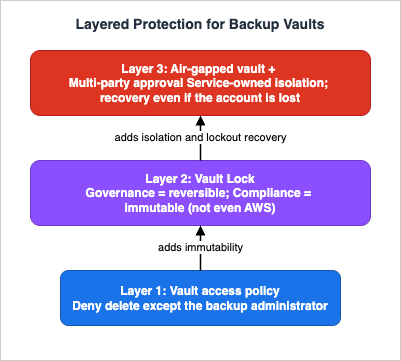
4.1 Layer 1: the vault access policy
A backup vault access policy is an IAM resource-based policy attached to the vault. It controls who can access the backups in the vault and what actions they can perform, across all principals, without defining per-user permissions. The canonical governance use is to deny deletion so that backups are removed only by AWS Backup according to the plan, never by a human. A minimal policy that denies recovery-point deletion to everyone except a named backup administrator role:{
"Version": "2012-10-17",
"Statement": [
{
"Sid": "DenyDeleteExceptBackupAdmin",
"Effect": "Deny",
"Principal": "*",
"Action": [
"backup:DeleteBackupVault",
"backup:DeleteBackupVaultAccessPolicy",
"backup:DeleteBackupVaultLockConfiguration",
"backup:DeleteRecoveryPoint",
"backup:PutBackupVaultLockConfiguration",
"backup:UpdateRecoveryPointLifecycle"
],
"Resource": "*",
"Condition": {
"ArnNotEquals": {
"aws:PrincipalArn": "arn:aws:iam::111122223333:role/BackupAdministrator"
}
}
}
]
}
4.2 Layer 2: Vault Lock, and the two modes
Vault Lock is an optional vault feature that enforces retention and prevents deletion within a specified time frame. It has two modes, and the difference between them is the single most important fact in this article.- Governance mode. The vault can be managed or deleted, but only by users who hold sufficient IAM permissions. It is designed to ensure that only designated personnel change a vault. Crucially, governance mode is reversible — a user with the right permissions can remove the lock with
DeleteBackupVaultLockConfiguration. It protects against accident and unauthorized casual change, not against a determined insider with admin rights. - Compliance mode. The vault (and by extension its contents) is expected to never be deleted or altered until the retention period completes. Once a vault is locked in compliance mode, it is immutable: the lock cannot be removed by any user or by AWS. This is the property regulators ask for, and it is the property you must not enable casually.
The one carve-out to memorize: even a compliance-locked vault can be deleted if it is empty — that is, if it contains no recovery points. Immutability protects the recovery points and the lock configuration; it does not strand an empty container forever.
4.3 The cooling-off period: your only window
Compliance mode does not become immutable the instant you configure it. AWS Backup enforces a grace period — also called a cooling-off period — of at least 72 hours (3 days) before the lock takes effect. During this window you can still alter or remove the lock configuration (DeleteBackupVaultLockConfiguration or PutBackupVaultLockConfiguration). On and after the lock date, the configuration becomes immutable and can no longer be changed or deleted. This is why, in CloudFormation and the API, the parameter that sets the window is called ChangeableForDays and must be 3 or greater.The mechanics of expressing the two modes are asymmetric and easy to get wrong:
- In CloudFormation's
AWS::Backup::BackupVaultLockConfigurationType, and in thePutBackupVaultLockConfigurationAPI, omittingChangeableForDayscreates a governance-mode lock; including it creates a compliance-mode lock. If you include it, it must be ≥ 3. MinRetentionDaysandMaxRetentionDaysbound the retention that any backup or copy job into the vault may request. IfMaxRetentionDaysis set, a job whose lifecycle retention exceeds it will fail — the vault rejects the job rather than silently truncating it. Recovery points already stored before the lock are not affected.
4.4 A Vault Lock snippet — read the warning first
The following creates a compliance-mode lock. Because compliance mode is irreversible after the cooling-off period, the warning is part of the snippet, not a footnote.# ============================ WARNING ============================
# COMPLIANCE MODE IS IRREVERSIBLE. Because --changeable-for-days is
# included, this creates a COMPLIANCE-mode lock. After the cooling-off
# period (minimum 72 hours / 3 days) elapses, the lock becomes IMMUTABLE:
# it cannot be removed or shortened by ANY user, or by AWS, until the
# retention period expires. During the cooling-off window ONLY, you can
# still run delete-backup-vault-lock-configuration to back out.
# Omit --changeable-for-days entirely to create a reversible GOVERNANCE
# lock instead. Validate min/max retention against your policy first.
# ================================================================
aws backup put-backup-vault-lock-configuration \
--backup-vault-name governed-vault \
--min-retention-days 30 \
--max-retention-days 365 \
--changeable-for-days 3
--changeable-for-days. For encryption-key history and the KMS concepts that underpin how these vaults protect data at rest, see the AWS History and Timeline regarding AWS Key Management Service (AWS KMS).4.5 Choosing a rung
The practical guidance is to move up the hierarchy only as far as your requirement demands. Use a vault access policy everywhere as the baseline. Add governance-mode Vault Lock where you want to restrict retention changes to designated administrators while keeping the ability to correct mistakes. Reserve compliance mode for data with a genuine regulatory immutability requirement, and only after you have validated the retention window — because there is no undo, and a mistake means paying to store data you cannot delete until it expires.5. Cross-Account and Cross-Region Copy
A backup that lives only in the same account and Region as its source shares that source's fate. Cross-account and cross-Region copy is how you put recovery points beyond the blast radius of a single account compromise or a single Region event. AWS Backup can copy recovery points across Regions and accounts from a central console, but the copy is where KMS constraints turn from theory into failed jobs, so this section is mostly about encryption.5.1 The rule that governs every copy
A copy is always encrypted with the KMS key of the destination vault. That one sentence drives the whole design. AWS Backup automatically encrypts copies for most resource types even when the original is unencrypted, using the target vault's key. What varies is which kind of key the destination vault is allowed to use, and that depends on whether the resource type is fully managed by AWS Backup or not.- For a recovery point of a resource fully managed by AWS Backup, you can encrypt the copy with either a customer managed key (CMK) or the AWS Backup managed key (
aws/backup). - For a resource not fully managed by AWS Backup, the destination vault's key must be a CMK or the managed key of the service that owns the underlying resource. For an EC2 instance, for example, a Backup managed key cannot be used — you must use a CMK or the Amazon EBS KMS key (
aws/ebs) — or the copy job fails.
5.2 Why cross-account copy forces customer managed keys
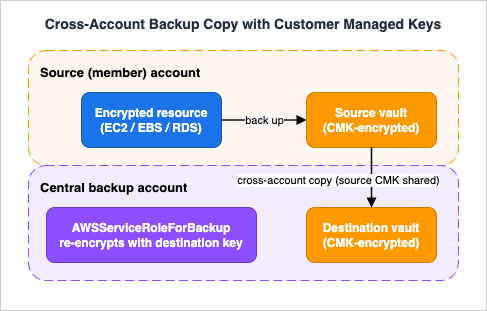
The critical constraint for cross-account copy: AWS managed keys cannot be used to copy resources that are not fully managed by AWS Backup across accounts. The reason is structural — the key policy of an AWS managed key is immutable, which prevents sharing the key across accounts. Because the default backup vault is encrypted with an AWS managed key, the default vault cannot be the destination (or, for service-dependent encryption, the source) of a cross-account copy. The fix is to use CMK-encrypted vaults, and to share the CMK that encrypts the source resource with the destination account so AWS Backup can re-encrypt on arrival. In the destination account, AWS Backup uses the service-linked roleAWSServiceRoleForBackup to perform and monitor the copy.Amazon EFS is the notable exception: because AWS Backup independently manages encryption for each EFS backup vault, you can perform cross-account EFS backups using any EFS vault. And a data-integrity caveat to keep in mind: copies of unencrypted Amazon Aurora, Amazon DocumentDB, and Amazon Neptune clusters remain unencrypted.
Figure 2 shows the resulting topology: a source account with a CMK-encrypted resource and vault, a central backup account with its own CMK-encrypted destination vault, the shared CMK that makes re-encryption possible, and the Organizations boundary that authorizes the whole arrangement.
5.3 Cross-Region copy for Region isolation
Copying to another Region follows the same key rule — the copy is encrypted with the destination Region vault's key — and is the mechanism behind the "put a copy in a second Region" leg of a Backup and Restore DR posture. The vaults must exist in each target Region and account before the copy runs; AWS Backup does not create them for you, and vault names are case-sensitive. CloudFormation StackSets deployed from the management account to organizational units are the common way to pre-create the destination vaults and IAM roles consistently across every member account and Region.6. Logically Air-Gapped Vaults and Ransomware Resilience
Vault Lock makes backups undeletable within your account. A logically air-gapped vault goes one step further: it moves the storage out of your account's reach entirely, which is precisely the property you want when the threat model is an attacker who has already compromised the account.6.1 What a logically air-gapped vault is
A logically air-gapped vault is a second type of vault with additional security built in. Every such vault is encrypted with an AWS owned key by default (or optionally a customer managed key), and every such vault comes equipped with Vault Lock compliance mode — the backups are immutable and locked by default. The defining architectural difference is where the backups live: a logically air-gapped vault stores its recovery points in an AWS Backup service-owned account, not in your account. (Because of this, cross-account sharing of these backups shows up in your CloudTrail as activity "shared outside your organization" — expected behavior, not an incident.)6.2 Sharing for direct restore
The second defining capability is sharing via AWS Resource Access Manager (RAM). You can share a logically air-gapped vault with specific AWS accounts — including accounts in other AWS organizations — and once shared, backups can be restored directly in the destination account, without the usual step of first copying the recovery point into that account. That directness is what compresses recovery time during an incident and what makes the vault convenient for routine restore testing (Section 8). One boundary to note: a vault can be shared only with individual account IDs, not with an entire organization or with organizational units.Recent additions have widened where and how these vaults are used. AWS Backup now supports assigning a logically air-gapped vault as the primary backup target (announced November 2025): fully-managed resource types back up directly to the air-gapped vault, while resource types without full management support are handled by AWS Backup creating a temporary snapshot in a standard vault, copying it to the air-gapped vault, and removing the temporary snapshot. Single-action cross-Region database snapshot copies to logically air-gapped vaults for Amazon Aurora, Amazon Neptune, and Amazon DocumentDB followed (announced February 2026), collapsing what used to be a two-step copy. Support has also expanded across resource types (Amazon EKS in March 2026, Amazon FSx variants in March 2025) and Regions (a further six Regions in July 2026). Because this feature area is moving quickly, confirm current resource-type and Region support in the AWS Backup documentation for your account.
6.3 Multi-party approval: recovery when the account is gone
The hardest ransomware scenario is not deletion — Vault Lock and air-gapping address that — but lockout: an attacker (or an inadvertent action) gains root access to your backup account or your organization's management account, and your backups, though safely stored, become inaccessible to you. Multi-party approval (MPA) for logically air-gapped vaults, generally available since June 2025, is AWS Backup's answer.MPA is a governance capability drawn from AWS Organizations. You create an approval team of trusted individuals (IAM Identity Center users) in your Organizations management account and associate it with a logically air-gapped vault. If you are locked out of your AWS accounts, you request your own approval team to authorize sharing of the vault to any account — even one outside your organization — and once a sufficient set of approvers votes to approve through the Approval portal, you regain access to the backups and can begin recovery. It creates an independent access path to your data that does not depend on the compromised account, and it replaces the slower path of engaging AWS Support to regain account access, improving your effective RTO. There is no additional charge for using MPA with logically air-gapped vaults, and it is available in all Regions where those vaults are supported. As a related safeguard, if a vault-owning account is closed, you can still access the vault's backups via MPA until a post-closure period ends.
Taken together, the three layers of Section 4's hierarchy plus MPA describe a defensible ransomware posture: a vault access policy and Vault Lock stop deletion; a logically air-gapped vault removes the storage from the compromised blast radius; and Multi-party approval guarantees you can still get the data back even if you lose the account entirely. For the object-storage side of a ransomware strategy — S3 access controls, Block Public Access, and bucket-level protections that complement backup governance — see the Amazon S3 Security and Access Control Guide.
7. Governance at Scale
Everything so far configures backups in one account. Governance is what makes the same guarantees hold across dozens or hundreds of accounts, uniformly and with evidence. Three mechanisms do the work.7.1 Organizations backup policies
AWS Backup integrates with AWS Organizations so you can define backup policies centrally and enforce them across every account in the organization. A backup policy is an Organizations policy of typeBACKUP_POLICY that you attach to the organization root, an organizational unit, or an individual account; accounts inherit and combine the policies that apply to them. This is how a security or platform team mandates, for example, "every account backs up tagged production resources daily and retains them for a year" without touching each account by hand.7.2 Delegated administrator
Using the Organizations management account for day-to-day work is discouraged, so AWS Backup supports a delegated administrator: you register a member account to which most backup administrative tasks are delegated. A few properties matter for a correct design:- Accounts, not users, are designated as delegated administrators.
- The management account retains the exclusive rights to register and deregister delegated administrators, to enable cross-account management, and to override member accounts' service opt-in settings.
- A delegated administrator account can manage backup policies across the organization and monitor cross-account jobs, but it cannot register other delegated administrators and cannot override another member's opt-in settings.
The result is that a dedicated backup account — not the management account — becomes the operational home for backup policy and cross-account monitoring, which is the multi-account best practice. The surrounding account-structure patterns are covered in the AWS Multi-Account Operational Patterns guide.
7.3 Backup Audit Manager
Policies enforce; Backup Audit Manager proves. It audits the compliance of your backup activity against controls you define — a control is a procedure that checks a backup requirement such as "are all my resources backed up," "are all my backups encrypted," or "are backups taking place daily." You assemble controls into frameworks, view how many resources are compliant, and generate reports that serve as evidence: AWS Backup Audit Manager automatically produces a new report every 24 hours and publishes it to Amazon S3, and you can also generate reports on demand. There are two report flavors — a Control Compliance Report and a Resource Compliance Report — and cross-account, cross-Region reporting is available from the management or delegated administrator account for an organization-wide view.Two operational facts are easy to miss. First, before you create your first compliance framework you must turn on resource tracking, which lets AWS Config track your AWS Backup resources — and it is AWS Config that serves as the data source for Backup controls. Charges apply for resource tracking. Second, you can import Backup Audit Manager findings into AWS Audit Manager to fold backup compliance into your overall compliance posture. The centralized audit and evidence-collection context around this is covered in the AWS Centralized Logging and Audit Architecture Guide.
7.4 Legal hold
Separate from retention and Vault Lock, AWS Backup supports legal hold: a mechanism to retain backups even after their retention period has passed, keeping them until the hold is explicitly released. It exists for preservation, auditing, and e-discovery, and it is intentionally decoupled from the backup plan's lifecycle so that a legal or compliance function can freeze specific data without editing anyone's backup schedule.Amazon S3 Object Lock has a legal hold of its own, set on an individual object version rather than on backups; how it differs from S3 retention periods and event holds is covered in Object Lock, Legal Holds, and Event Holds in Amazon S3.
8. Restore Testing and Recovery Assurance
A backup strategy is only as good as the restore you have actually performed. AWS states the principle plainly: the only recovery pattern that reliably works is the one you test frequently. AWS Backup's restore testing turns that principle into an automated, auditable control.8.1 How restore testing works
You create a restore testing plan that specifies a name, a frequency, a target start time, and a "start within" window; you assign the resources to include and choose whether to test specific or random recovery points. AWS Backup infers the metadata a restore needs to succeed. When the scheduled time arrives, it starts restore jobs and monitors how long each takes to complete — and that completion time is itself evidence, letting you show compliance with organizational RTO targets. After the test, AWS Backup deletes the resources it created for the test, in accordance with service SLAs, so a test does not leave sprawl behind.Restore testing supports the resource types whose recovery points are created by AWS Backup; at launch the supported services were Amazon EBS, Amazon EC2, Amazon Aurora, Amazon RDS, Amazon EFS, Amazon S3, Amazon DynamoDB, Amazon FSx, Amazon DocumentDB, and Amazon Neptune.
8.2 Validating that the restored data is actually good
A restore job that "succeeds" has only proven that resources were created — not that the data inside them is usable. Restore testing therefore offers optional validation: when a restore test completes, AWS Backup emits an Amazon EventBridge event that can trigger an AWS Lambda function, and your Lambda runs service-specific checks (list the restored S3 objects, query the restored database, and so on) and reports success or failure back to AWS Backup. Once validation completes or the validation window closes, AWS Backup cleans up the restored resources. This closes the loop from "a backup exists" to "a backup restores to correct, queryable data."8.3 Keep the number of recovery paths small
AWS's prescriptive guidance for recovery testing carries one design lesson worth repeating: keep the number of distinct recovery paths small, and test the ones you keep often, because assumptions about cross-account and cross-Region KMS encryption are frequently wrong and only surface under a real restore. A recommended pattern is to regularly test a cross-account, cross-Region restore from a central DR vault encrypted with one customer managed key into a source-account vault encrypted with a different customer managed key — the exact path Section 5's constraints make fragile, and therefore the exact path worth exercising. For where restore testing sits within the broader recovery strategy, return to the AWS Disaster Recovery Strategies Guide.9. Quotas, Limits, and Failure Modes
Governance designs fail at the edges — a copy that silently doesn't run, a lock that rejects a job, a quota that caps a fan-out. The values below are the AWS Backup service quotas most likely to shape a design; treat them as defaults to verify for your account and Region, since several are adjustable.* You can sort the table by clicking on the column name.
| Quota (per Region, per account) | Default | Adjustable |
|---|---|---|
| Backup plans | 300 | Yes |
| Backup vaults | 300 | Yes |
| Recovery points per backup vault | 1,000,000 | Yes |
| Versions per backup plan | 2,000 | Yes |
| Frameworks (Backup Audit Manager) | 10 | Yes |
| Framework controls | 50 | Yes |
| Report plans | 20 | Yes |
| Concurrent backup copies per supported service | 5 | No |
| Concurrent backup jobs per resource | 1 | No |
| Metadata tags per backup | 50 | No |
| Maximum backup nest level | 10 | Yes |
A few of these translate directly into failure modes:
- Concurrent backup copies per supported service is 5 and not adjustable. A large fan-out of cross-account/cross-Region copies will queue behind this limit rather than run all at once — plan copy topology and windows accordingly.
MaxRetentionDayson a locked vault rejects non-conforming jobs. A backup or copy job whose retention exceeds the vault's maximum fails outright; the vault does not truncate it. Align plan retention with vault lock retention bounds before you lock.- Cross-account copy into a default (AWS managed key) vault fails for service-dependent encryption. As Section 5 details, this is the most common copy failure — the fix is CMK-encrypted vaults and a shared source CMK.
- Cold storage's 90-day floor and immutable transition point (Section 3.2) mean a lifecycle misconfiguration is rejected at plan time or locked in after transition — validate the arithmetic (
DeleteAfterDays ≥ MoveToColdStorageAfterDays + 90) before deploying.
10. Frequently Asked Questions
Q. What is the real difference between Vault Lock governance mode and compliance mode?A. Reversibility. Governance mode restricts who can change or delete a vault to users with sufficient IAM permissions, but a privileged user can still remove the lock — it protects against accident and casual change. Compliance mode, once the cooling-off period has elapsed, is immutable: no user and not even AWS can remove or shorten it until retention expires. Use governance mode when you want administrative control with an escape hatch; use compliance mode only when a regulatory requirement genuinely demands undeletable data, and only after validating the retention window, because there is no undo.
Q. Can I undo a compliance-mode Vault Lock if I made a mistake?
A. Only during the cooling-off period. AWS Backup enforces a grace period of at least 72 hours (3 days) — set by
ChangeableForDays, which must be 3 or greater — during which you can still remove or change the lock with DeleteBackupVaultLockConfiguration or PutBackupVaultLockConfiguration. On and after the lock date it is immutable. The only thing you can still do to a compliance-locked vault afterward is delete it if it is empty (contains no recovery points).Q. Why does my cross-account copy job keep failing on encryption?
A. Almost always because the destination vault uses an AWS managed key. For resources that are not fully managed by AWS Backup, a copy is encrypted with the destination vault's key, and an AWS managed key cannot be shared across accounts (its key policy is immutable), so the copy fails. Use a customer managed key on the destination vault, and share the source resource's customer managed key with the destination account. Amazon EFS is an exception because AWS Backup manages its encryption independently.
Q. How is a logically air-gapped vault different from a compliance-locked vault?
A. A compliance-locked vault is immutable but still lives in your account. A logically air-gapped vault is immutable and stores its backups in an AWS Backup service-owned account, outside your account's direct reach, and can be shared via AWS RAM to specific accounts for direct restore. Combined with Multi-party approval, it lets you recover even if your own account or management account becomes inaccessible — which a compliance-locked vault in a compromised account cannot guarantee.
Q. Does AWS Backup replace my DR strategy?
A. No. AWS Backup governs the backup foundation — plans, immutability, copy, and restore assurance — which every DR strategy relies on, but the choice of DR posture (Backup and Restore, Pilot Light, Warm Standby, or Multi-Site Active-Active) and the derivation of RTO and RPO belong to the disaster-recovery decision. See the AWS Disaster Recovery Strategies Guide for that. Backup governance is a building block within DR, not a substitute for it.
Q. Do I need continuous backup, or are periodic snapshots enough?
A. It depends on the RPO. Periodic snapshots (with lifecycle to cold storage for long retention) suit most workloads. Continuous backup with point-in-time recovery is for data that must roll back to a precise moment — supported for Amazon S3 (35 days), Amazon RDS (RPO of 5 minutes or under), Amazon Aurora (up to 35 days), and SAP HANA on EC2 (1-second precision, up to 35 days). Remember that continuous backups cannot be tiered to cold storage, so they are a low-RPO tool, not a long-retention one.
11. Summary
Governing backups is a progression from making copies to guaranteeing them:- Separate control. Backup and restore run under purpose-scoped IAM roles so resource owners cannot affect retention and backup operators cannot mutate data. Assign resources by tag so one plan scales across applications, remembering that service opt-in always applies.
- Design plans deliberately. Set retention per workload class; use lifecycle to cold storage only where the 90-day floor and immutable transition point fit; reach for continuous backup and PITR where RPO demands it, knowing continuous backups cannot be tiered.
- Make deletion hard on purpose. Layer a vault access policy, then Vault Lock — governance mode where you want reversible administrative control, compliance mode (immutable after a 72-hour cooling-off, undoable by no one including AWS) only where regulation demands it.
- Put copies beyond the blast radius. Cross-account and cross-Region copy encrypt with the destination vault's key, which forces customer managed keys for cross-account copies of service-dependent resources; logically air-gapped vaults move storage out of your account and, with Multi-party approval, keep data recoverable even when the account is lost.
- Govern and prove at scale. Organizations backup policies and a delegated administrator apply the same rules everywhere; Backup Audit Manager (backed by AWS Config) produces the evidence; legal hold freezes data on demand.
- Assure recovery. Restore testing plans, with EventBridge and Lambda validation, turn "we have backups" into "we have verified restores" — and keep the number of recovery paths small so each is exercised often.
The through-line is that immutability, isolation, and provability are governance decisions with irreversible consequences at the extreme — compliance-mode Vault Lock most of all. Design them deliberately, verify every constraint against current AWS documentation, and test the restore before you need it. For the strategy that sits above this foundation, continue with the AWS Disaster Recovery Strategies Guide; for the account structure that surrounds it, the AWS Multi-Account Operational Patterns guide; and for the encryption concepts underneath it, the AWS History and Timeline regarding AWS KMS.
12. References
- What is AWS Backup? - AWS Backup Developer Guide
- AWS Backup Vault Lock - AWS Backup Developer Guide
- Setting up AWS Backup Vault Lock
- AWS::Backup::BackupVault LockConfigurationType - AWS CloudFormation
- Backup vault access policies - AWS Backup Developer Guide
- Encryption for backups in AWS Backup
- Logically air-gapped vault - AWS Backup Developer Guide
- Multi-party approval for logically air-gapped vaults - AWS Backup Developer Guide
- Managing AWS Backup resources across multiple AWS accounts
- AWS Backup Audit Manager - AWS Backup Developer Guide
- Restore testing - AWS Backup Developer Guide
- Continuous backups and point-in-time recovery (PITR) - AWS Backup Developer Guide
- Backup plan options and configuration - AWS Backup Developer Guide
- Assign resources - AWS Backup Developer Guide
- Managed policies for AWS Backup
- AWS Backup endpoints and quotas - AWS General Reference
Related Articles
- AWS Disaster Recovery Strategies Guide - Backup and Restore, Pilot Light, Warm Standby, and Multi-Site Active-Active
The paired strategy guide — how to choose a DR posture and derive RTO/RPO, the decision this guide's backup foundation serves. - AWS Multi-Account Operational Patterns
Organizational units, delegated administration, and account boundaries — the multi-account context for cross-account backup and governance. - AWS Centralized Logging and Audit Architecture Guide
Centralized evidence collection and audit architecture that Backup Audit Manager reporting fits into. - Amazon S3 Security and Access Control Guide
Object-storage access controls that complement backup governance in a ransomware strategy. - AWS History and Timeline regarding AWS Key Management Service (AWS KMS)
The encryption-key history and KMS concepts underlying vault encryption and cross-account copy.
References:
Tech Blog with curated related content
Written by Hidekazu Konishi