Object Lock, Legal Holds, and Event Holds in Amazon S3 - Who Can Shorten a Retention Period, What a Hold Adds, and When the Retention Clock Starts
First Published:
Last Updated:
Previously, there was no clear answer to this question. Specifying a date far in the future would ensure the record remained non-erasable even after the obligation had passed. If written in compliance mode, that date cannot be shortened later. An alternative approach would be to specify a shorter date and periodically extend it. However, if the extension process is stopped, it would become possible to delete records whose expiration date has already passed. Using "legal hold" would avoid setting an expiration date, but the protection would end the moment it's removed.
On September 8, 2026, Amazon S3 Object Lock introduced "event hold." While event hold is active, the record remains protected. Once event hold is released, a pre-defined period begins to count down. Releasing event hold on the contract's termination date would initiate a five-year protection period.
This development raises a new question. Object Lock already has "legal hold," which also provides ongoing protection without an expiration date, and protection ends when it's removed. What is the difference between event hold and legal hold? Furthermore, how do the governance and compliance modes for retention period interact with these two hold types? It is possible for all three—a retention period, a legal hold, and an event hold—to be applied to a single object version simultaneously. Which of these is preventing deletion in that scenario? And under whose authority can that restriction be lifted?
This article answers that question. It is not an introduction to the Object Lock feature. Instead, it presents five key questions regarding protection: Where is the declaration placed? Who can modify and remove it? When is it evaluated, and when does the clock begin? What enforces it? And what does it not protect against? Finally, it adds a section on where to verify that the protection is in effect. The intended audience is architects and operations personnel who are required to implement WORM (Write Once Read Many) storage on S3 for auditing, regulatory compliance, and ransomware protection, and who are dealing with records where the end date is not determined at the time of creation. They understand the difference between governance mode and compliance mode, but may struggle to explain how legal hold and event hold relate to the retention period.
Three limits on scope come first. This article does not cover the design of log archives using Object Lock. The design for storing organizational logs with WORM is detailed in Chapter 5 (The Log Archive Account: Immutability and Retention) of Centralized Logging and Audit Architecture on AWS. It also does not address the meaning of the 403 error you receive when attempting to delete a protected version. That diagnostic information is available in AWS IAM AccessDenied Reference. Furthermore, it does not cover AWS Backup Vault Lock or AWS Backup's legal hold. While the names are similar, these are separate services with different mechanisms, as detailed in AWS Backup Data Protection and Governance.
All specifications presented in this article have been verified against official AWS documentation. The verification date is September 23, 2026. The note on Amazon S3 Metadata tables at the end of Section 9.2 was added and checked on October 7, 2026. The event hold feature was recently added on September 8, 2026, so the user guide descriptions may be subject to change. In cases where discrepancies exist between different official sources, those discrepancies have been left as is in Chapter 7.
Table of Contents
- Undeletable Is Not a Single Setting
- The Anatomy of a Declaration - Five Questions Asked of Three Protections
- Fixed Retention - The Mode Decides Who Can Shorten It
- Legal Holds - Protection With No End Date
- Event Holds - The Clock Starts When the Hold Is Released
- When They Overlap, Which One Is Stopping the Delete
- Where the Declaration Lives
- What Object Lock Does Not Cover
- Where to Confirm That a Version Is Protected
- Failure Modes and Anti-Patterns
- Frequently Asked Questions
- Summary
- References
1. Undeletable Is Not a Single Setting
Objects placed in a bucket with Object Lock enabled may appear unremovable, but this isn't entirely accurate. Whether an object can be deleted is determined not by the bucket itself, but by the version of the object, and by the specific protection settings applied to that version, as well as who has the permissions to remove those protections. This chapter will first clarify the questions this article addresses, and outline the relationship between these three protective measures.1.1 A Record Whose End Date Is Unknown When It Is Written
Object Lock's retention period is originally designed to first determine an end date. With fixed retention, you specify a "retain-until-date" when applying the protection. Even when using a bucket default, the system calculates the end date by adding the default retention period to the time the object version was created.However, record retention requirements don't always begin from the moment the record is created. Contracts are retained from the end of the contract. Account records are retained after the account is closed. Insurance claims are retained from the time the claim is resolved. The AWS user guide also mentions scenarios where the "retain-until-date" is not known when the object is written, as a potential use case for variable retention.
Consider using variable retention when you need to protect objects but don't know the retain-until-date at write time.The source is the Amazon S3 User Guide, specifically the Locking objects with Object Lock section, under "Best practices." The same section also suggests that variable retention can be useful when you want to set a grace period to recover from ransomware attacks or accidental deletions.
When applying fixed retention to records with an unknown end date, as mentioned earlier, all available options involve making a compromise. Setting a distant date means you might not be able to delete the record when you want to. Continuously extending a short date means the record might not be protected if the extension process fails. Using a legal hold offers protection, but that protection ends the moment the hold is removed. Event hold, however, occupies a different position entirely.
1.2 Three Names, Two Mechanisms
Object Lock protection is referred to by three names: retention period, legal hold, and event hold, which was added on September 8, 2026. However, these three are not equivalent mechanisms. The introductory chapter of the user guide lists only two methods for managing retention.Object Lock provides two ways to manage object retention: retention periods and legal holds.
An object version can have a retention period, a legal hold, or both.And the same chapter states that there are two types within the retention period.
S3 Object Lock provides two retention types: fixed and variable.Event hold belongs to the variable retention type. The relationship is clearer when viewed through the API. The settings for retaining an object version are represented by a single structure called
ObjectLockRetention, which has four fields: Mode, RetainUntilDate, EventHold, and EventHoldDuration. Fixed retention uses Mode and RetainUntilDate, while variable retention uses Mode, EventHold, and EventHoldDuration (and can also use RetainUntilDate to set a minimum). You cannot apply event hold independently without a mode. The user guide's troubleshooting section notes that requests for event hold without a mode are rejected with a 400 Bad Request error.Legal hold is a separate system. It is represented by a different structure called
ObjectLockLegalHold, which simply has a Status field that can be either ON or OFF. It has no mode, date, or duration. It is independent of the retention period and can be applied alone, or in conjunction with it. The Amazon S3 Object Lock product page also briefly describes the difference between these two systems.Retention periods and retention modes are always configured in tandem, unlike legal holds,
which are configured independently.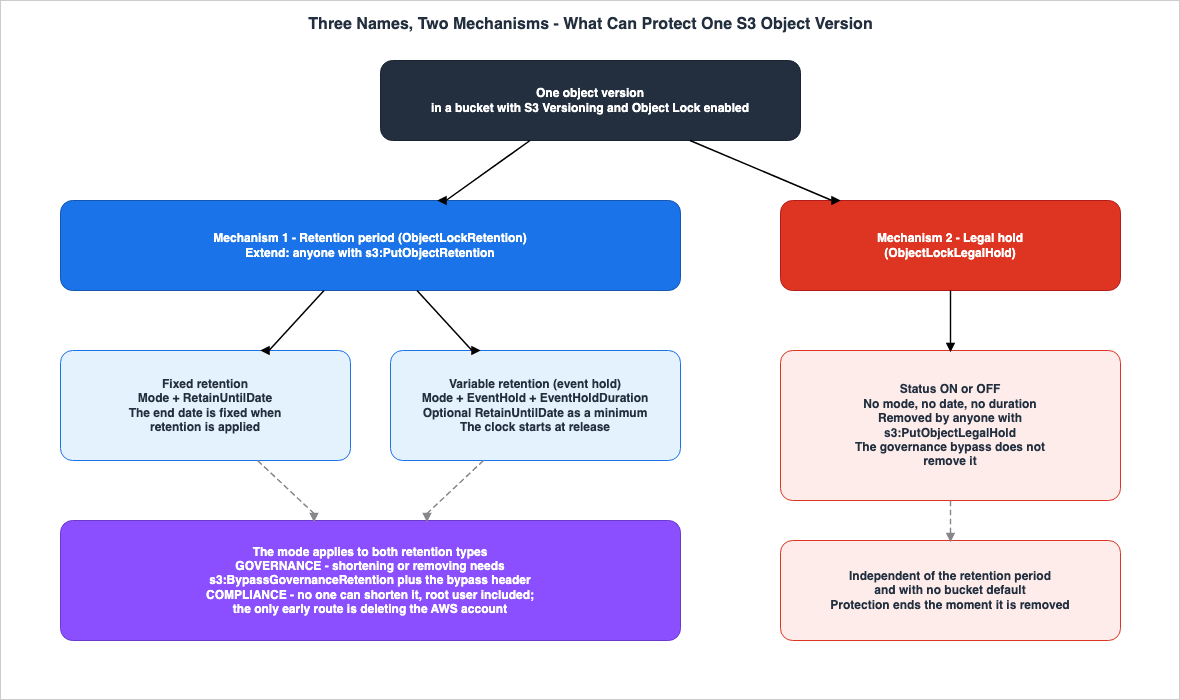
- One retention period, which can be either fixed retention or variable retention. Both types are associated with either a governance mode or a compliance mode. Variable retention can also include a retain-until-date to act as a minimum.
- One legal hold, which can be either
ONorOFF.
The three names refer to two distinct mechanisms, and the variations within one of those mechanisms. This article will compare the three side-by-side, without blurring this distinction, as the reader's goal is to differentiate between the three names.
Regarding mode, it's important to note upfront that both "governance mode" and "compliance mode" apply to both types of retention periods. Amazon S3's FAQ explicitly states this.
Both retention types can be used with Governance Mode and Compliance Mode.On the other hand, "legal hold" does not involve a mode. Permissions alone determine who can remove a "legal hold"; mode is not a factor. This difference will become relevant in Chapters 4 and 6.
1.3 What This Article Covers and What It Hands Off
This article focuses on Object Lock for Amazon S3's general-purpose buckets. Directory buckets are not supported by eitherPutObjectRetention or PutObjectLockConfiguration, and therefore are outside the scope of this article.AWS documentation, as described in How Amazon S3 Achieves Strong Consistency and Durability, clarifies that Amazon S3's durability guarantees do not protect against deletion by authorized users or processes. Object Lock is one layer of protection against such deletions. This article will address five key questions regarding each of the three protections. These questions are: where is the declaration placed? Who can modify and remove it? When is it evaluated? What enforces it? And what does it not protect against? These five questions are summarized in a table in Chapter 2, and then explored in detail for each protection in Chapters 3 through 5, and Chapter 6 covers the case where they overlap. Chapter 7 discusses the placement of the declaration, Chapter 8 outlines the limitations, and Chapter 9 details the verification methods.
The following topics are explicitly outside the scope of this article:
- Designing log archives using Object Lock. Centralized Logging and Audit Architecture on AWS Section 5.2 (S3 Object Lock (WORM)) details that it requires versioning, cannot be disabled once enabled, has two modes, and provides an example of default retention settings. Section 9.3 (Object Lock misconfiguration) of the same article addresses a misconfiguration where enabling Object Lock does not protect existing objects. This article will not reiterate these fundamentals.
- Understanding the 403 error when deleting protected versions. AWS IAM AccessDenied Reference Section 16.5 (When the Cause Is Outside of S3 Permissions) provides this information.
- AWS Backup Vault Lock and legal hold. AWS Backup Data Protection and Governance contains this information. In this article, "legal hold" always refers to Amazon S3 Object Lock's legal hold feature.
- Required checksum headers for uploads with retention periods. The user guide specifies that uploads configured with a retention period must include either the
Content-MD5header or thex-amz-sdk-checksum-algorithmheader. This requirement is also discussed in Default Checksums and Data Integrity in Amazon S3, which details the default behavior of checksums. - General principles of authorization and encryption in Amazon S3. Bucket policies, IAM, access points, Block Public Access, and encryption are covered in Amazon S3 Security and Access Control Guide. This article only addresses policies that utilize Object Lock condition keys.
- Regulatory interpretation. The user guide states that Object Lock has been assessed by Cohasset Associates for use in environments subject to SEC 17a-4, CFTC, and FINRA regulations. This article simply notes this fact and does not interpret the regulations themselves.
- Pricing. This article does not discuss storage or request pricing.
Two things with similar names, which are easy to confuse with Object Lock, are also worth separating. What Consistent Means, Service by Service on AWS cites a primary source that states Amazon S3 does not provide exclusive control between multiple entities writing simultaneously. This refers to exclusive control for concurrent writes and is not related to Object Lock. Similarly, AWS Backup's Vault Lock is a separate mechanism from Object Lock.
2. The Anatomy of a Declaration - Five Questions Asked of Three Protections
Object Lock's protection mechanism works by allowing users to declare a single condition, after which Amazon S3 enforces it at a predetermined point. While all three declaration types share a common structure, the specifics regarding where the declaration is made, who can remove it, when it is evaluated, what enforces it, and what it does not cover, vary depending on the protection type. This chapter will consolidate these five aspects into a single table. Subsequent chapters (starting with Chapter 3) will delve into each column of this table in detail. The same five questions are asked of the declarations that decide whether an Amazon EC2 instance can launch, in the article AMI Allowed Instance Types and Launch Governance on Amazon EC2, and of application status checks, in the article Amazon EC2 Application Status Checks.2.1 Five Questions to Apply to Any Declaration
The rows in the table will contain the following five questions.- Where it is declared — Where is the declaration located? Is it a bucket or an object version? Is it a default setting or a specific configuration?
- Who can change or remove it — Who can modify or remove it? With what permissions and under what conditions?
- When it is evaluated — When is it evaluated? At the time of writing, or at the time of a deletion request?
- What enforces it — What enforces it?
- What it does not cover — What does it not apply to?
The fifth question is the most important. The reason is that the answers to the other four questions do not reveal whether a version that you believe is protected is actually protected against certain threats.
2.2 The Anatomy Table
The columns represent three categories: fixed retention, variable retention (event hold), and legal hold. The first two columns are the two types of the same retention period, and both are associated with either a governance mode or a compliance mode.| Question | Fixed Retention | Variable Retention (Event Hold) | Legal Hold |
|---|---|---|---|
| Where it is declared | Object version metadata. Either through individual specification (header during upload or PutObjectRetention) or as a bucket default (DefaultRetention's Days or Years). | Within the ObjectLockRetention settings. Either through individual specification or as a bucket default (DefaultRetention's DefaultEventHold). | Object version metadata. Only through individual specification (header during upload or PutObjectLegalHold). There is no bucket default. |
| Who can change or remove it | Extension requires users with the s3:PutObjectRetention permission. Shortening or removing requires users with the s3:BypassGovernanceRetention permission and the appropriate header, in governance mode. In compliance mode, no one (including the root user) can do so, except for account deletion. | Event hold can be released through a PutObjectRetention request and can be released even in compliance mode. Users who can release it can be restricted using the condition key s3:object-lock-event-hold. Whether the date can be shortened after release depends on the mode; it cannot be shortened in compliance mode. | Anyone with the s3:PutObjectLegalHold permission can remove it. The mode (governance or compliance) is irrelevant, and it cannot be bypassed in governance mode. |
| When it is evaluated | At the time of a request to delete a protected version (deletion by version ID and S3 Lifecycle expiration). If the retain-until-date has not been reached, the deletion cannot proceed. | The same. As long as the event hold is ON, the version cannot be deleted regardless of the date. When the event hold is released, the retain-until-date is fixed. | The same. As long as it is ON, the version cannot be deleted regardless of the date. |
| What enforces it | Amazon S3. Returns a 403 Forbidden error for deletion by version ID and prevents protected versions from being expired through S3 Lifecycle. | The same. | The same. |
| What it does not cover | Delete markers, new versions with the same key, versions written before protection was applied, loss of encryption keys, account deletion. | The same. In addition, when replicating, the destination calculates the date independently. While the hold is on, the date can move past the maximum that a bucket policy sets on the remaining days. | Delete markers, new versions, versions written before protection was applied, loss of encryption keys. Protection ends the moment it is removed, and no period remains. |
The verification date is September 23, 2026. The basis for each cell in the table is provided, along with primary source materials, in the relevant sections from Chapter 3 through Chapter 9.
2.3 Understanding the Table
Reading the table vertically reveals three key points.First, the "Where" row indicates that all three columns represent metadata for the same object version. The difference lies in whether a default value can be set. Both types of "retention period" can have default values, but "legal hold" cannot.
Second, the "Who" row shows that the keys used to remove the protection differ across the three columns. Whether a "fixed retention" period can be shortened depends on the "mode." Permissions alone determine whether a "legal hold" can be removed. "Event hold" applies to both. While release is permitted by permissions, it triggers the start of a "retention period," which the "mode" then governs. It can be interpreted as a system that uses permissions to release a hold and then switches the protection to a period governed by the "mode."
Third, the "When" and "What enforces" rows are identical across all three columns, and the "What it does not cover" row is almost the same. This means that all three types of protection share common limitations, regardless of which is chosen. Additional declarations, described in Chapters 7 and 8, address these limitations and must be used in conjunction with the chosen protection. The choice of protection does not, by itself, resolve these limitations.
3. Fixed Retention - The Mode Decides Who Can Shorten It
Fixed retention is the simplest form of protection within Object Lock. It involves setting a specific date and maintaining that state until that date. Consequently, the chosen mode directly determines who can modify that date. This chapter will examine the operations of extending and shortening the retention period separately.3.1 What is the "retain-until-date"?
The retention period is defined by a "retain-until-date," which represents the date when protection expires. After this date, and unless a legal hold is in place, the version can be overwritten or deleted.The "retain-until-date" can be determined in two ways. If specified individually, you provide the date directly. If using the bucket default, you can specify a number of days or years. Amazon S3 then calculates the date by adding that period to the version's creation time. In either case, the fixed retention date is determined at the time of specification and will not move on its own thereafter. This characteristic represents the primary difference between fixed retention, discussed here, and variable retention, which will be covered in Chapter 5.
3.2 Anyone Who Can Set Retention Can Extend It
To extend the retention period, simply submit a new request specifying a later "retain-until-date." Amazon S3 will replace the existing retention period with the new, longer one. The user guide clearly states that only the permission to set the retention period is required for extension.Any user with permissions to place an object retention period can extend a retention period for an object version.Extension is also possible while in compliance mode. Compliance mode prohibits shortening the retention period; it does not restrict extending it.
Extending retention is an action that strengthens data protection, and therefore it is often given less consideration in permission design. However, any entity with the
s3:PutObjectRetention permission can keep records undeletable for longer than necessary. When performed in compliance mode, this extension is irreversible. Therefore, the s3:PutObjectRetention permission should be treated as one that allows for irreversible extensions. It should not be granted lightly simply because it is not a permission that weakens protection. The maximum retention period can be controlled through the bucket policy's condition key s3:object-lock-remaining-retention-days (see Section 7.5).3.3 Governance Mode - Shortening Takes a Permission and a Header
In governance mode, users without special permissions cannot overwrite or delete the version, or shorten or remove protection (extending protection is possible, as described in Section 3.2). The special permission needed to shorten or remove it iss3:BypassGovernanceRetention. However, simply possessing this permission is not sufficient; you must also explicitly include the x-amz-bypass-governance-retention:true header in your request.When both of these conditions are met, versions protected by governance mode are treated as unprotected. The user guide provides three examples: deleting a version, shortening the retention period, and removing the retention period by sending a
PutObjectRetention request with empty parameters.The header acts as a secondary confirmation, but this confirmation does not function within the console. The user guide states that the Amazon S3 console includes this header by default.
By default, the Amazon S3 console includes the x-amz-bypass-governance-retention:true header.Therefore, if an entity with the
s3:BypassGovernanceRetention permission attempts to delete an object through the console, the deletion will succeed, bypassing governance mode's protection. Who holds the s3:BypassGovernanceRetention permission determines the strength of governance mode's protection. The user guide also suggests using governance mode to test settings before applying them in compliance mode.3.4 Compliance Mode - Only One Remaining Path
In compliance mode, no one, including the AWS account's root user, can overwrite or delete the protected version. Furthermore, it is impossible to change the mode or shorten the retention period.However, the user guide does list one exception. The same sentence appears in both the introduction and the configuration section.
The only way to delete an object under the compliance mode before its retention date expires
is to delete the associated AWS account.
Compliance mode prevents anyone from deleting a version during the protection period or reducing the retention settings. Deleting the AWS account that holds the data is an action that exists outside of Object Lock. Terminating an AWS account is referred to as "closing" the account, and when using AWS Organizations, member accounts can be closed from the organization's management account. When describing compliance mode as protection that no one can delete, it is essential to always acknowledge that one path remains: deleting the account. Who holds that path will be discussed further in Chapter 8.
The implications of incorrectly setting the date in compliance mode, and what should be tested before deployment, are covered in Section 9.3 (Object Lock misconfiguration) of Centralized Logging and Audit Architecture on AWS.
3.5 New Versions Do Not Inherit Retention Settings from Older Versions
All Object Lock settings apply to individual object versions. Versions with the same key can have different modes and retention periods.Consider an example from the user guide. Suppose an object has a retention period of 30 days, and 15 of those days have already passed. Now, you PUT an object with the same name, specifying a 60-day retention period. This PUT operation will succeed, and Amazon S3 will create a new version with a 60-day retention period. The older version will retain its original retention period and will become eligible for deletion after 15 days.
It is the version that is protected, not the key. Even if you overwrite an existing key with a new version, the protection on older versions will not be extended. Conversely, even if an older version is protected, you can still write new versions (see Section 8.2).
4. Legal Holds - Protection With No End Date
A legal hold provides the same level of protection as a retention period, but without a specified end date. While active, versions cannot be overwritten or deleted. While this concept is straightforward, the process for removing a legal hold differs significantly from that of a retention period. This chapter will focus on these differences.4.1 What is a legal hold?
The user guide defines a legal hold as follows:A legal hold provides the same protection as a retention period, but it has no expiration
date. Instead, a legal hold remains in place until you explicitly remove it.A legal hold can be in either the
ON or OFF state. The user guide's "Best practices" section lists scenarios for using a legal hold, such as when it's unclear how long objects should be kept immutable. Examples include situations where an external audit of the data is pending and changes are undesirable until the audit is complete, or when a dataset is being used for an ongoing project and changes are not permitted until the project concludes.This use case is very similar to that of an event hold. Both are used to preserve data for an indefinite period. The difference will be discussed in Section 5.6.
4.2 Who can remove a legal hold?
According to the user guide, permissions alone decide who can remove a legal hold.Legal holds can be freely placed and removed by any user who has the s3:PutObjectLegalHold permission.The mode is irrelevant. Legal hold does not have a mode, so there is no legal hold that, like compliance mode, no one can remove. Any entity with the
s3:PutObjectLegalHold permission can remove it at any time.Conversely, bypassing governance mode does not affect legal hold. The user guide's considerations section states that even if governance mode is bypassed, the legal hold status remains unchanged, and the legal hold continues to prevent overwrites and deletions.
To restrict who can remove a legal hold, limit the
s3:PutObjectLegalHold permission using either an IAM policy or a bucket policy. The Service Authorization Reference lists the condition key s3:object-lock-legal-hold in the PutObjectLegalHold entry. The AWS Storage Blog also notes that it is possible to prevent legal hold removal using a condition key. However, the primary documentation does not provide specific examples of policies that differentiate between setting and removing a legal hold. Regarding event hold, the same blog provides an example of a policy that only prevents release (Section 7.7).In any case, the level of protection achieved through this method depends on the design of the permissions. The AWS Storage Blog explains that while legal hold can be used as an alternative to a retention period, preventing removal using a condition key provides protection that is dependent on permissions, rather than a retention period. Who can modify the
s3:PutObjectLegalHold permission and the policies that restrict it determines the strength of a legal hold.4.3 Independent of the Retention Period
A legal hold and a retention period are independent of each other. Applying a legal hold does not alter the version's mode or retention period.The user guide explains how these two functions interact in both directions. Even after the retention period for a version subject to a legal hold expires, the protection remains in place. The legal hold continues to provide protection until authorized users remove it. Conversely, even if a legal hold is removed while the retention period is still active, the version will continue to be protected until the retention period expires.
A legal hold can be used as an additional layer of protection on top of a retention period. If there's a need to preserve data beyond the end of the retention period, for example, during an ongoing investigation or litigation, a legal hold can be applied. This allows you to extend the protection without modifying the original retention period settings. The term "What a Hold Adds," mentioned in the title, refers to this supplementary function.
4.4 There Is No Bucket Default for a Legal Hold
TheDefaultRetention setting, which defines default retention settings, only includes four options: Days, DefaultEventHold, Mode, and Years. There is no option for legal hold. It is not possible to automatically apply a legal hold to new versions placed in a bucket.Legal holds can be applied either through the
x-amz-object-lock-legal-hold header during upload, or by applying it to existing versions using PutObjectLegalHold. To apply or remove legal holds from a large number of versions, use S3 Batch Operations (see Section 7.6).5. Event Holds - The Clock Starts When the Hold Is Released
Event hold is a mechanism that provides protection without initially setting an end date. While the hold is active, the protection remains in place. Once the hold is released, a clock begins counting down based on a previously defined period. The starting point of this clock is the opposite of a fixed retention. This chapter will detail how this date progression works, step by step.5.1 Positioning of Event Holds
Event holds were added on September 8, 2026. The announcement, titled "Amazon S3 Object Lock now supports variable retention with event holds," was posted on September 8, 2026. The announcement states that this feature is available in all AWS Regions, including China Regions.As seen in Chapter 1, an event hold is a type of variable retention mechanism, and is not a standalone protection measure. An event hold must always be specified with a mode. Requests without a specified mode will be rejected with a
400 Bad Request error.The event hold duration, which represents the period of protection that continues after the hold is released, must be specified in either days or years. The user guide specifies a range of 1 to 36,500 days, or 1 to 100 years. It is not possible to specify both days and years.
5.2 As Long as It's Being Held, the Date Will Continue to Advance
While the event hold is set toON, the retain-until-date is not definitively set. Instead, Amazon S3 calculates and returns a date based on the current time plus the event hold duration. The user guide describes this as follows:While the event hold is on, Amazon S3 computes the retain-until-date as the current time plus
the duration. The date moves forward as time passes.The example in the user guide shows that when retrieving the retain-until-date for an object with an event hold duration of one year, and the current date is 2027-01-01, the system returns 2028-01-01. If the current date is 2027-02-01, it returns 2028-02-01.
GetObjectRetention, HeadObject, and GetObject all return this calculated date.The retain-until-date displayed while a hold is active is not the date the protection expires. It represents the date until which the object is protected if the hold were to be released at this moment. The AWS Storage Blog describes this date as a machine-readable answer to the question of when, at the earliest, the object can be deleted. As long as the hold is
ON, the version is protected regardless of the date.5.3 Releasing Event Hold Fixes the Date
When you release an event hold, Amazon S3 sets the retain-until-date to the date calculated by adding the event hold duration to the time the hold was released. This date then becomes fixed. The AWS CloudFormation template reference describes an example that applies a default 365-day event hold to a bucket in this way.when the hold is released, AWS retains the object version for 365 days from the release time.The release is performed using a
PutObjectRetention request with the EventHold set to OFF. An example from the user guide is provided below.aws s3api put-object-retention \
--bucket amzn-s3-demo-bucket1 \
--key my-document.pdf \
--retention '{"Mode":"COMPLIANCE","EventHold":"OFF"}'The release request does not include the event hold duration. The troubleshooting section of the user guide states that specifying a duration in the release request will result in rejection. Amazon S3 calculates the final retain-until-date based on the event hold duration already configured on the version.
This example demonstrates releasing an event hold configured in compliance mode. It is possible to release an event hold even when using compliance mode. Once released, the retention period begins, and no one, including the root user, can shorten this period. The AWS Storage Blog describes releasing an event hold in compliance mode as an action that starts a retention period no one can shorten. When testing examples in compliance mode, set
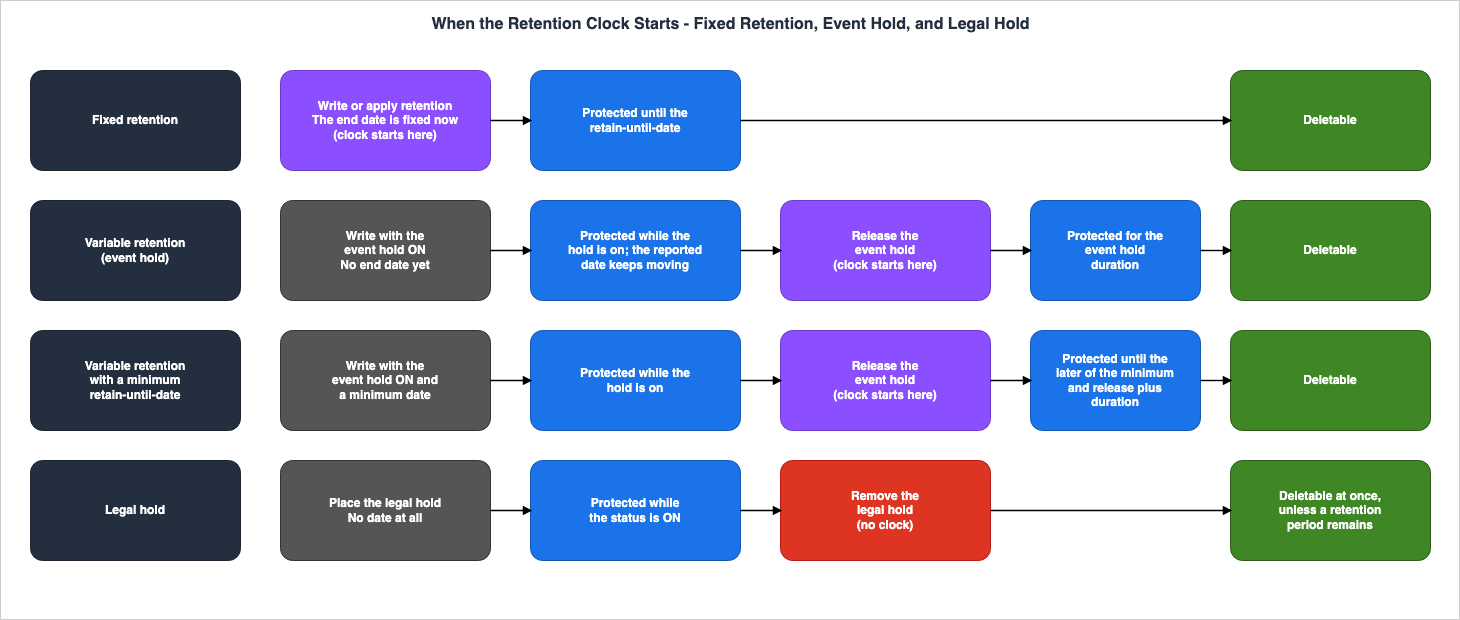
Mode to GOVERNANCE and perform the action on a test bucket.When compared to fixed retention, the difference in the starting point becomes clear. With fixed retention, either the time the object was written or the specified date determines the end date. With event hold, the end date is determined at the time the hold is released.
5.4 A Retain-Until-Date Given Alongside Is a Minimum
Variable retention allows you to specify a retain-until-date. When a date is specified, it is treated as a minimum, meaning that even if a hold is released earlier, the data will continue to be protected until at least that specified date. The user guide defines the effective date as follows:If you specified a retain-until-date, the effective date is the later of that minimum date and
the release time plus the duration.In the user guide's example, the minimum is 2029-01-01, and the event hold duration is 1 year. If the hold is released on 2028-06-01, the calculated date of 2029-06-01 is later than the minimum, so 2029-06-01 is selected. Conversely, if the hold is released on 2027-01-01, the calculated date of 2028-01-01 is earlier than the minimum, so the minimum of 2029-01-01 is selected.
This configuration allows you to express the requirement to protect data for at least a certain number of years from writing or for a specific duration after an event, whichever ends later, with a single setting. To apply this to individual objects, add the
RetainUntilDate parameter to the PutObjectRetention request. An example from the user guide is shown below:aws s3api put-object-retention \
--bucket amzn-s3-demo-bucket1 \
--key my-document.pdf \
--retention '{"Mode":"COMPLIANCE","EventHold":"ON","EventHoldDuration":{"Days":30},"RetainUntilDate":"2027-01-01T00:00:00Z"}'This example also operates in compliance mode, and the specified date cannot be moved earlier after it is set. When testing, use the governance mode and a test bucket, as described in Section 5.3. In the console, the setting "Set an explicit Retain until date in addition to the event hold" on the object settings page, and "Add extra retention protection" on the bucket default settings page, correspond to this minimum.
5.5 Changing the Duration While the Hold Is On
While the event hold isON, you can modify the event hold duration. Increasing the duration will shift the calculated date forward. However, decreasing the duration will not revert the date to a value earlier than its current setting.If you decrease it, Amazon S3 does not set the retain-until-date to an earlier date than its current value.In the user guide example, the retain-until-date was set to 2029-01-01 with a duration of two years, and then the duration was shortened to one year. The calculated date becomes 2028-01-01, but Amazon S3 does not apply that date, and the retain-until-date remains at 2029-01-01. According to the AWS Storage Blog, at this point, the date effectively pauses, and it only begins to move forward again once the shorter duration calculation surpasses that point.
Changing the duration to a shorter period will not weaken the existing protection. This also means that even if you accidentally set a longer duration and then shorten it while the hold is active, the date that has already moved forward will not come back.
5.6 Differences Between Event Hold and Legal Hold
Both event hold and legal hold initiate protection without an initial expiration date. The difference lies in what happens after they are removed. The "What's New" announcement describes this difference in a single sentence.Unlike legal holds, which end protection immediately upon removal, event holds provide WORM
compliance for the required retention period after the triggering eventHere's a comparison of the two:
| Feature | Legal Hold | Event Hold |
|---|---|---|
| System Association | Separate from the retention period | Part of the retention period (variable retention) |
| Mode | None | GOVERNANCE or COMPLIANCE is required |
| Behavior After Removal | Protection ends immediately | Protection continues for the event hold duration |
| Permissions Required for Removal | Only the s3:PutObjectLegalHold permission | Requires the s3:PutObjectRetention permission. The mode's rules govern the period after release. |
| Condition Key for Removal | s3:object-lock-legal-hold | s3:object-lock-event-hold |
| Bucket Default | None | Exists (DefaultEventHold) |
| Concurrent Setting with Retention Period | Possible (independent) | Can specify a minimum date within the same retention period. |
Event hold is not a replacement for legal hold. Legal hold is used to extend protection beyond a retention period, only for as long as an investigation continues (see Section 4.3). Event hold is designed for scenarios where protection is required for a defined period after an event. It is possible to apply both to a single version; the next chapter will explain which one prevents deletion in such cases.
6. When They Overlap, Which One Is Stopping the Delete
It's possible for a single object version to have both a retention period and a legal hold applied simultaneously. If the retention period is a variable retention, an event hold and a minimum date are also added. This chapter outlines the conditions that must be met for a permanent delete (a delete that specifies a version ID) to proceed, and examines a single version's status over time.6.1 The Conditions for a Permanent Delete to Succeed
First, the user guide does not specify the order in which multiple protections are evaluated. This article does not describe an order of evaluation. Rather, it outlines the conditions that must all be met for a permanent delete to succeed.- The legal hold must be
OFF. If the legal hold isON, deletion will be rejected regardless of the mode. This cannot be bypassed, even with governance mode bypass. - The event hold must not be
ON. If the event hold isON, the protection will continue regardless of the value set for the retain-until-date. - The retain-until-date must have passed. If you use variable retention with a minimum, the later of the minimum and the release time plus the duration must have passed.
If conditions 2 and 3 are not met – that is, if the retention period is still active – governance mode has an exception. Requests with the
s3:BypassGovernanceRetention permission, and with appropriate headers, can be treated as if the retention period is not in effect. The AWS Storage Blog states that in governance mode, entities with this permission can release event holds, shorten dates, and delete versions. This exception does not apply in compliance mode.Only the legal hold cannot be bypassed in any mode. To determine which protection is preventing deletion, you need to examine the status of the legal hold, the status of the event hold, the retain-until-date, and the mode (see Chapter 9).
6.2 Tracking a Version Over Time
A specific example makes this concrete. For simplicity, the event hold duration is 1 year.On March 1, 2029, a version of the contract is written, using the compliance mode with variable retention. The event hold is set to
ON, with an event hold duration of 1 year. The minimum retain-until-date is set to June 1, 2030. The contract ends on September 1, 2029. Subsequently, on July 1, 2030, an investigation begins regarding this contract, and a legal hold is applied. The investigation concludes on November 1, 2030.| Date | Event | Legal Hold | Event Hold | Retain-Until-Date | Permanent Deletion |
|---|---|---|---|---|---|
| 2029-03-01 | Write | OFF | ON | June 1, 2030 (Calculation results in March 1, 2030, but this is superseded by the minimum) | Not Permitted |
| 2029-09-01 | Contract End – Event Hold Released | OFF | OFF | Fixed at September 1, 2030 (The value calculated by adding one year to the release time is later than the minimum) | Not Permitted |
| 2030-07-01 | Investigation Begins – Legal Hold Applied | ON | OFF | September 1, 2030 | Not Permitted |
| 2030-09-02 | Retain-Until-Date Exceeded | ON | OFF | September 1, 2030 (Elapsed) | Not Permitted (Held by legal hold) |
| 2030-11-01 | Investigation Ends – Legal Hold Removed | OFF | OFF | September 1, 2030 (Elapsed) | Possible |
This table illustrates two key points. First, the protective measures that prevent deletion change over time. Initially, it's the event hold, then a fixed retain-until-date, and finally, the legal hold. Second, the version becomes eligible for deletion immediately after the legal hold is removed on November 1, 2030. If the retain-until-date has already passed, there is no waiting period after the legal hold is removed.
If the contract had ended early, on April 1, 2029, the date calculated by adding one year to the release time (April 1, 2030) would be earlier than the minimum of June 1, 2030, so the "retain-until-date" would be fixed to the minimum of June 1, 2030. By including a minimum, a certain period from writing stays protected even if the event occurs sooner.
6.3 Scope of Bypass for Governance Mode
Consider the same example written in governance mode. Entities with thes3:BypassGovernanceRetention permission can, through requests with headers, release event holds, shorten fixed dates, and delete versions. In other words, the conditions outlined in Section 6.1, conditions 2 and 3, do not function as protections when faced with such entities.However, a legal hold will still remain. Even for entities with the bypass permission, it is not possible to delete data between 2030-07-01 and 2030-11-01 unless they also possess the
s3:PutObjectLegalHold permission. In a governance mode environment, a legal hold can serve as the final layer of protection against entities with bypass permissions. However, who holds the s3:PutObjectLegalHold permission determines the strength of that protection, as described in Section 4.2.In compliance mode, the situation is different. As long as the retention period is active, it is impossible to delete data, even without a legal hold, with the exception of the account deletion path (Section 3.4). A legal hold becomes meaningful when you wish to continue protection even after the retention period has expired.
7. Where the Declaration Lives
The chapters so far examined the protections applied to a single object version. This chapter will address where those protections are declared. This includes bucket settings, bucket defaults, individual specifications, and policy condition keys. The location where you declare a protection determines whether or not it is enforced.7.1 Enabling Object Lock and Configuring Retention Are Separate Declarations
To use Object Lock, you must first enable both S3 Versioning and Object Lock on the bucket. Subsequently, you configure retention periods and legal holds for individual versions. The user guide clearly outlines these two steps.Before you lock any objects, you must enable S3 Versioning and Object Lock on a general
purpose bucket. Afterward, you can set a fixed or variable retention period, a legal hold, or
both.Enabling simply prepares the environment for applying protection. Enabling alone does not protect any versions. Enabling can be performed either during bucket creation or on existing buckets. Once enabled, you will no longer be able to disable Object Lock or stop versioning. Furthermore, buckets with Object Lock enabled cannot be designated as destinations for server access logs.
Confusing enabling and configuration leads to operating as if versions were protected when they are not. This configuration error is discussed in Section 9.3 (Object Lock misconfiguration) of Centralized Logging and Audit Architecture on AWS.
7.2 The Bucket Default
The default retention settings are configured usingPutObjectLockConfiguration and declared within the DefaultRetention section. Fixed retention defaults are specified using a Mode and either Days or Years. Variable retention defaults are specified using a Mode and DefaultEventHold. If both are specified, the default will apply an event hold and then enforce a minimum retention period of either Days or Years. Whether Days or Years are required for variable retention defaults is unclear due to conflicting descriptions in the primary documentation (see Section 7.8).The example in the user guide describes a default configuration with compliance mode, an event hold duration of 90 days, and a minimum retention period of 365 days.
aws s3api put-object-lock-configuration \
  --bucket amzn-s3-demo-bucket1 \
  --object-lock-configuration '{
    "ObjectLockEnabled": "Enabled",
    "Rule": {
      "DefaultRetention": {
        "Mode": "COMPLIANCE",
        "Days": 365,
        "DefaultEventHold": {"Days": 90}
      }
    }
  }'
Any new version placed in a bucket with this default configuration applied will be protected with compliance mode, and no one can shorten that protection. When testing this default, it is recommended to use a test bucket configured with
GOVERNANCE mode. With a fixed retention default, Amazon S3 calculates the retain-until-date by adding the specified period to the creation time of the object version. With a variable retention default, new versions are created with the event hold set to ON. It's important to note that this default only applies to new versions placed in the bucket after the default is configured. It does not apply to existing versions (see Section 8.3).7.3 Individual Specifications Override the Bucket Default
When an upload request explicitly specifies Object Lock settings, those settings take precedence over the bucket default. The user guide states:When you PUT an object version that has an explicit individual retention mode and period in a
bucket, the object version's individual Object Lock settings override any bucket property
retention settings.According to the
PutObject API reference, the Object Lock headers that can be specified during upload are: x-amz-object-lock-mode, x-amz-object-lock-retain-until-date, x-amz-object-lock-legal-hold, x-amz-object-lock-event-hold, x-amz-object-lock-event-hold-duration-days, and x-amz-object-lock-event-hold-duration-years.The bucket default only applies to write operations that do not explicitly define a retention setting. If the user specifies a shorter retention period or a governance mode, those settings will be used instead.
7.4 A Bucket Default Is Not an Enforcement Control
The AWS Storage Blog clearly states the implications of Section 7.3.Be aware that a bucket default is not an enforcement control, because an upload that
explicitly specifies S3 Object Lock parameters overrides it.The same article recommends using bucket policies or resource control policies (RCP) to reject requests that do not meet the requirements, specifying condition keys
s3:object-lock-event-hold and s3:object-lock-event-hold-duration-days if you want to ensure all objects are protected with the desired settings. It further states that RCPs are more robust, as bucket policies and account administrators cannot override them. The placement of RCPs within an overall evaluation is discussed in AWS Organization Guardrails.There is another potential pitfall to consider: condition keys do not apply to event holds and durations set by the bucket default. The user guide states:
They don't apply to an event hold or duration that Amazon S3 applies from a bucket's default retention configuration.The same section indicates that if you want to restrict the bucket default, you should deny the
s3:PutBucketObjectLockConfiguration action. To enforce a setting, you need both condition keys applied to requests and a denial of changes to the default itself. The former prevents users from explicitly setting weaker configurations, while the latter prevents the default from being weakened and overwritten.7.5 Condition Keys
The Service Authorization Reference lists six condition keys for Object Lock. These values are as of September 23, 2026.| Condition Key | Type | Filtering Criteria | Operations that Include this Condition Key |
|---|---|---|---|
s3:object-lock-event-hold | String | Event hold status (either ON or OFF) | PutObject, PutObjectRetention, ReplicateObject |
s3:object-lock-event-hold-duration-days | Numeric | Number of days for event hold duration | PutObject, PutObjectRetention, ReplicateObject |
s3:object-lock-legal-hold | String | Legal hold status | PutObject, PutObjectLegalHold |
s3:object-lock-mode | String | Mode (either COMPLIANCE or GOVERNANCE) | PutObject, PutObjectRetention |
s3:object-lock-remaining-retention-days | Numeric | Remaining retention days | PutObject, PutObjectRetention |
s3:object-lock-retain-until-date | Date | Retain-until-date | PutObject, PutObjectRetention |
The column on the right was built by scanning every Amazon S3 action in the Service Authorization Reference, and it lists every action whose row includes that condition key. The
s3:BypassGovernanceRetention entry does not include any Object Lock condition keys.The user guide's considerations section provides an example of a bucket policy that rejects requests for
PutObjectRetention with an event hold duration shorter than 90 days.{
"Version": "2012-10-17",
"Statement": [
{
"Sid": "RequireMinimumEventHoldDuration",
"Effect": "Deny",
"Principal": "*",
"Action": "s3:PutObjectRetention",
"Resource": "arn:aws:s3:::amzn-s3-demo-bucket1/*",
"Condition": {
"NumericLessThan": {
"s3:object-lock-event-hold-duration-days": "90"
}
}
}
]
}There are two things to keep in mind when using condition keys.
First, there are no condition keys to filter by year. When a period is specified by year, it is converted to the number of days for evaluation. The user guide states that, in this conversion, Amazon S3 counts one year as 365 days and does not account for leap years. Both the upper and lower limits of the policy should be defined in terms of days, and this conversion must be taken into consideration.
Second, the upper limit of
s3:object-lock-remaining-retention-days can be exceeded while the event hold is ON. While this condition key is evaluated at the time of the request, Amazon S3 continuously recalculates the retain-until-date while the event hold is ON. The date may exceed the upper limit defined in the policy at the time of the request. The user guide recommends restricting the entities that can place event holds using s3:object-lock-event-hold to avoid this (Section 8.7).7.6 Applying Settings to Existing Objects in Bulk
To apply retention periods or legal holds to a large number of existing versions, use S3 Batch Operations. The user guide includes sections on jobs for applying retention periods, jobs for compliance and governance modes, and jobs for removing legal holds. The "What's New" announcement states that event holds can also be applied in bulk using S3 Batch Operations.The AWS Storage Blog notes that you can transition archived data, which has been regularly extended with a "retain-until-date," to a variable retention configuration using a single job. The same article also mentions that you can release event holds across numerous versions with a single job.
7.7 Splitting Release and Deletion Between Two Entities
Releasing a hold and deleting a version are separate operations. Releasing a hold requires thePutObjectRetention permission, while deleting a version requires the DeleteObjectVersion permission. The AWS Storage Blog highlights that this separation allows organizations to implement a system where a version cannot be deleted unless two separate entities are involved.The mechanism works as follows: Applying and releasing a hold are the same operation, so the condition key
s3:object-lock-event-hold differentiates them. A policy is applied to entity A, which has deletion permissions, to deny the PutObjectRetention action when s3:object-lock-event-hold is set to OFF. Entity A can apply a hold but cannot release it. Entity B, which does not have deletion permissions, releases the hold. Neither entity can independently proceed from the start of the retention period to deletion. Furthermore, there is always a period of time, at least as long as the event hold duration, between when entity B releases the hold and when entity A can delete the version.The same article further suggests an alternative approach where neither entity is granted the
DeleteObjectVersion permission, allowing older versions to expire through S3 Lifecycle configurations once their retain-until-date is reached. In this scenario, the Lifecycle configuration becomes a critical control point, so the s3:PutLifecycleConfiguration permission should be kept separate from the entity responsible for releasing holds.This separation is predicated on a compliance mode environment. The article notes that in a governance mode, an entity with the
s3:BypassGovernanceRetention permission can release holds, shorten retention periods, and delete versions, effectively consolidating the two stages into a single entity.7.8 Discrepancies in Primary Sources
Regarding bucket defaults, there are two instances where the descriptions in the primary source documents do not align. This article will not determine which description is correct; instead, it will present the discrepancies as they exist.The first discrepancy concerns whether specifying
Days or Years is mandatory when setting the variable retention default. The API reference for DefaultRetention states the following regarding Mode:Must be used with either Days or Years.The API reference for
PutObjectLockConfiguration also includes a note stating that configuring DefaultRetention requires both a mode and a duration. Conversely, the first example in the AWS CloudFormation template reference for DefaultEventHold specifies only Mode as COMPLIANCE and DefaultEventHold as 365 days, without specifying either Days or Years. The console instructions in the user guide also describe adding extra retention protection as an optional step.The second discrepancy concerns the size constraints between the event hold duration and the minimum duration. The second example in the AWS CloudFormation template reference states the following:
The event hold duration can't exceed the default retention period, so a 1-year event hold is
valid alongside a 2-year retention period.
This article was unable to find the same constraint in the corresponding sections of the user guide and API reference. The CLI example in the user guide (event hold duration of 90 days, minimum of 365 days) does not violate this constraint.
In both cases, it is advisable to read the actual configuration settings stored by
GetObjectLockConfiguration after setting the default, and to verify the state of new versions in a test bucket. When testing the compliance mode default, it is recommended to first test with the governance mode.8. What Object Lock Does Not Cover
This chapter expands the final row of the table in Chapter 2, "What it does not cover." The areas listed here are those where Object Lock does not guarantee protection. This is not intended to identify defects in Object Lock. Each area is paired with what should be declared alongside the protection.8.1 Delete Markers
Object Lock protects versions but does not protect keys. A simple deletion request without specifying a version ID will return a200 OK response, even if a protected version exists, and will place a delete marker on the bucket. The delete marker becomes the current version with a new ID, and Amazon S3 will, in most respects, behave as if the object has been deleted. However, the delete marker itself is not protected.Delete markers are not WORM-protected, regardless of any retention period or legal hold in
place on the underlying object.Protected versions remain below the delete marker. Object Lock only guarantees that a specific version will not be deleted. It does not guarantee that applications reading that key will continue to function as before. S3 Lifecycle can also place delete markers on protected objects.
It is important to restrict the entities that can place delete markers by using the
s3:DeleteObject permission. The creation of a delete marker can be detected through S3 Event Notifications using the s3:ObjectRemoved:DeleteMarkerCreated event. It is recommended to define the procedure for which version to read from when a delete marker is placed. The reason this request returns a 200 OK instead of a 403 is explained in Section 16.5 (When the Cause Is Outside of S3 Permissions) of the AWS IAM AccessDenied Reference.8.2 New Versions with the Same Key
The user guide clearly states that the retention period and legal hold do not prevent the creation of new versions.Retention periods and legal holds don't prevent new versions of the object from being created,
or delete markers to be added on top of the object.When you write to the same key, the new version becomes the current version. The old version remains protected, but anyone reading the key will see the new version. Only the content of the old version is protected from being overwritten. The content pointed to by the key is not protected.
Furthermore, you should restrict the entities that can write to the bucket using the bucket policy. If you set a bucket default, its protection will also apply to the new version. However, as described in Section 7.3, the settings explicitly specified by the writer will take precedence.
8.3 Versions Written Before Protection Was Applied
The bucket default applies to any new versions placed in the bucket after it is configured. ThePutObjectLockConfiguration API documentation specifies that these default rules apply to all new objects placed in the bucket. Existing versions are not protected even after the bucket default is configured. In buckets where Object Lock is enabled later on, this applies to versions that were placed before Object Lock was enabled.Additionally, existing versions can have a retention period or legal hold applied through S3 Batch Operations (see Section 7.6). To determine if any unprotected versions remain, review the Object Lock fields in S3 Inventory (see Section 9.2).
8.4 Encryption Keys
The user guide explicitly states that Object Lock does not prevent the loss of encryption keys.While Object Lock can help prevent Amazon S3 objects from being deleted or overwritten, it
does not protect against losing access to the encryption keys or encryption keys being
deleted.For example, objects encrypted using keys from AWS KMS, such as those used for server-side encryption, may become inaccessible if the corresponding key is deleted. Even if the version history remains, the data within the object may not be retrievable.
Furthermore, protected versions cannot have their encryption changed later. Regarding the
UpdateObjectEncryption function, which allows modification of encryption for existing objects, the user guide states that it will fail when applied to objects with retention mode or legal hold enabled within Object Lock. For objects with a retention period in governance mode or a legal hold, you must first remove the Object Lock retention or legal hold before attempting to modify the encryption. The function cannot be used on objects with a retention period in compliance mode.It is important to note that you should determine the encryption key to be used before applying Object Lock protection. Additionally, you should restrict the entities that can disable or delete that key using the AWS KMS key policy, independent of Object Lock. Object Lock provides a layer of protection on top of key management practices.
8.5 Account Deletion
As mentioned in Section 3.4, the user guide lists deleting the AWS account that holds the data as the only way to delete versions during the compliance mode protection period. Compliance mode protection is predicated on the account remaining active.When using AWS Organizations, you can close an account not only within that account itself, but also from the management account of the organization.
It is important to verify and restrict the entities authorized to close accounts that contain data protected by Object Lock. The extent to which organizational policies (SCPs and RCPs) apply is covered in AWS Organization Guardrails.
8.6 The Replication Destination Computes Its Own Date
S3 Replication replicates Object Lock settings to the destination. This includes the event hold status and event hold duration. Object Lock must be enabled on both the source and destination. However, the replication destination itself calculates the final retain-until-date after a release.When an event hold is released on the source, Amazon S3 replicates the release to the
destination, and the destination sets its own final retain-until-date based on the configured
duration and the time of replication.According to the AWS Storage Blog, this means that the version on the destination will be protected slightly longer than the source, by the amount of time it took to complete the replication.
It is important to note that audits should not be configured assuming that the retain-until-date on the source and destination are identical. If performing an audit, read both values separately. To verify whether an event hold that was released on the source has also been released on the destination, check the status directly on the destination.
8.7 Dates Exceeding the Remaining Limit
As discussed in Section 7.5, the limit defined bys3:object-lock-remaining-retention-days is evaluated at the time of the request. While the event hold is enabled (ON), Amazon S3 continuously recalculates the retain-until-date, so the date may exceed the policy's limit.Furthermore, in buckets where the retention period limit is enforced through a condition key, also restrict who can place event holds with
s3:object-lock-event-hold. If the purpose of the limit is to keep records from staying undeletable for longer than necessary, it is also advisable to define the operational procedures for releasing the event hold.8.8 Areas Where Object Lock Is Unavailable
Object Lock is not supported in directory buckets. Both thePutObjectRetention and PutObjectLockConfiguration API references state that they do not support directory buckets. PutObjectRetention is also not supported with Amazon S3 on Outposts.Furthermore, buckets with Object Lock enabled cannot be used as a destination for server access logs (see Section 7.1).
8.9 Operations Prevented by Protection
Object Lock doesn't just prevent deletion and overwriting. In protected versions, there are other operations that become unavailable.- Annotation Modifications. The user guide states that in both governance and compliance modes, creating, updating, or deleting annotations on protected objects is not possible. The
s3:BypassGovernanceRetentionpermission also does not apply to annotation operations. If you need to add an annotation, you should create a new version. - Encryption Changes. As seen in Section 8.4, the
UpdateObjectEncryptionaction will fail when applied to protected objects. - Expiration via S3 Lifecycle. Lifecycle configurations work as expected with protected objects; however, you cannot expire and delete a protected version. The AWS Storage Blog notes that even when event hold is
ON, Lifecycle cannot delete the version.
These are side effects of the protection. They are not listed as potential vulnerabilities. Before applying protection, it's important to identify any future operations you might need to perform on that version.
9. Where to Confirm That a Version Is Protected
The previous chapters covered where to declare protection and the areas where protection does not apply. Finally, this chapter covers where to verify that protection is actually in effect. The methods for verification offer varying levels of detail and timeliness.9.1 Viewing Status by Version
The status of individual versions can be retrieved usingGetObjectRetention and GetObjectLegalHold, or using HeadObject and GetObject. To read the retention status, you need the s3:GetObjectRetention permission. To read the legal hold status, you need the s3:GetObjectLegalHold permission. To read a bucket default, you need the s3:GetBucketObjectLockConfiguration permission.When a retain-until-date is returned while event hold is
ON, it is a calculated value. As seen in Section 5.2, this value indicates how long the object will remain protected if the hold were released now. It does not represent the date when the protection expires. If a minimum is specified, the returned value will not be earlier than that minimum. When determining the status of protection, always read the retain-until-date, the event hold status, and the legal hold status together.9.2 S3 Inventory
The S3 Inventory report can include five Object Lock fields: retain-until-date, retention mode, legal hold status, event hold status, and event hold duration. Within theInventoryConfiguration API reference, these are defined as optional fields named ObjectLockRetainUntilDate, ObjectLockMode, ObjectLockLegalHoldStatus, ObjectLockEventHoldStatus, and ObjectLockEventHoldDuration, respectively. If the event hold duration field is included, a column indicating the unit (either DAYS or YEARS) will also be added to the report.The dates in the S3 Inventory report reflect the values at the time the report was generated. For versions whose event hold is
ON, S3 Inventory will display the retain-until-date calculated based on the time the report was generated. The user guide notes that it may take up to 48 hours to generate the report, so the dates reflect the generation time, not the current time. The most up-to-date values can be retrieved directly using the GetObjectRetention operation.S3 Inventory is particularly useful for scanning an entire bucket to identify unprotected versions or versions whose event hold is still
ON.Amazon S3 Metadata tables do not carry the five Object Lock fields. The S3 Metadata limitations page, checked on October 7, 2026, lists "Object Lock retention period or governance mode" among the information that isn't available in metadata tables. What the metadata tables hold, how current each one is, and which fields S3 Inventory reports carry that the tables lack are covered in Amazon S3 Metadata Tables.
9.3 S3 Event Notifications
Thes3:ObjectRetention:Put event notification is triggered when a PutObjectRetention action modifies retention settings. The user guide states that this includes changes to fixed or variable retention settings, the release of an event hold, modifications to the event hold duration, and changes to the retain-until-date.This notification is not triggered when protection is applied during the upload process. The AWS Storage Blog notes that for retention applied via
PutObject, CopyObject, or CreateMultipartUpload, and for retention applied by a bucket default, the s3:ObjectRetention:Put event is not generated. Instead, the s3:ObjectCreated:* event is triggered.The notification types specifically for legal hold are not listed in the user guide. To track legal hold additions and removals, use CloudTrail instead.
9.4 AWS CloudTrail
Object Lock operations on objects are treated as data events in CloudTrail. The list of data events includesPutObjectRetention, PutObjectLegalHold, GetObjectRetention, and GetObjectLegalHold. CloudTrail does not, by default, record requests made to objects. To enable recording, you must activate data event logging within the trail.Furthermore, there's a potential pitfall regarding searches. Calls to
PutObjectRetention are recorded in CloudTrail under a different name.When you call PutObjectRetention, the CloudTrail data event is recorded with the eventName
PutObjectLockRetention, and includes objectRetentionInfo in additionalEventData.According to the user guide, the
objectRetentionInfo field contains information such as the resulting retention mode, the retain-until-date, the status of the event hold, and the event hold duration. Searching CloudTrail logs using the eventName of PutObjectRetention will not reveal any information about setting or releasing an event hold. Instead, search using PutObjectLockRetention. The user guide does not list a similar alternative name for PutObjectLegalHold.9.5 S3 Storage Lens
S3 Storage Lens provides metrics on the number and size (in bytes) of objects protected by Object Lock. According to the AWS Storage Blog, S3 Storage Lens answers the question of what proportion of the total data is protected, while S3 Inventory answers the question of which versions have which configurations.When listing verification methods by granularity and freshness, S3 Storage Lens provides a comprehensive overview, S3 Inventory provides a list of versions (up to 48 hours old), and
GetObjectRetention provides the current value for a single version. To track changes, you can use S3 Event Notifications and CloudTrail. Among the methods mentioned in this chapter, only CloudTrail can track the addition or removal of legal holds as events.10. Failure Modes and Anti-Patterns
Here's a list of common errors, presented as specific scenarios. In each case, a safeguard that was intended to provide protection either failed to do so, or a safeguard that was meant to be unremovable could actually be bypassed.10.1 Assuming Versions Are Protected Because Object Lock Is Enabled on the Bucket
Enabling Object Lock only makes it possible to apply protection; it doesn't constitute protection itself (see Section 7.1). Versions that existed before the default is set will not be protected, even after the default is applied (see Section 8.3). Use the retention mode and legal hold fields in S3 Inventory to confirm that no unprotected versions remain.10.2 Treating a Bucket Default as an Enforcement Control
When a writer specifies Object Lock settings, those settings take precedence over the bucket default (see Section 7.3). Condition keys do not apply to the event hold set by the bucket default (see Section 7.4). Enforcement takes both condition-key denials on requests and a denial of thes3:PutBucketObjectLockConfiguration action.10.3 Reading the Retain-Until-Date During a Hold as the End of Protection
During a hold, the retain-until-date is a computed value that indicates how long the data would remain protected if the hold were released now (see Section 5.2). Even after that date, protection continues as long as the event hold remains active. When reporting on an audit, include the retain-until-date alongside the status of the event hold.10.4 Using a Legal Hold in Place of an Event Hold
Protection ends the moment a legal hold is removed (see Section 5.6). The requirement to maintain protection for a specific period after an event cannot be met using a legal hold. Implementing a system where the retention period is reset each time a legal hold is removed is unreliable; if even one step in the reset process is missed, protection will not be maintained. If the requirement is to maintain protection for a period following an event, use an event hold.10.5 Describing Compliance Mode as Protection No One Can Delete
While in compliance mode, even the root user cannot shorten the retention period. However, the user guide explicitly states one pathway: account deletion (see Section 3.4). Any explanation of compliance mode must clearly identify who has the authority to close the account.10.6 Handing Out the Extension Permission Lightly
Any entity with thes3:PutObjectRetention permission can extend the retention period (see Section 3.2). Extensions made in compliance mode cannot be reversed. Cap extensions with s3:object-lock-remaining-retention-days, and also restrict which entities can place event holds (see Section 8.7).10.7 Giving One Entity Both the Release and the Deletion
If the same entity can perform both the release and deletion actions, it can proceed with the deletion process after waiting for the event hold duration. In governance mode, entities with thes3:BypassGovernanceRetention permission do not even need to wait (see Section 7.7). Separate the entity responsible for releasing the hold from the entity responsible for deletion, and use compliance mode.10.8 Assuming Condition Keys Also Constrain the Bucket Default
Condition keys are evaluated against the values in a request and do not apply to the event hold or duration a bucket default sets (see Section 7.4). To maintain the default value, any attempt to change it should be rejected.10.9 Searching CloudTrail by API Name
PutObjectRetention calls are logged with the eventName as PutObjectLockRetention (see Section 9.4). Furthermore, these events are only recorded if data event logging is enabled. When searching audit logs, use PutObjectLockRetention as the search term, and first verify that data event logging is enabled.11. Frequently Asked Questions
This section presents key points in a question and answer format.11.1 Does "event hold" supersede "legal hold"?
No. The two have different roles, and both will continue to be used. A legal hold has no expiration date, and protection ends the moment it is removed. An event hold, however, continues to provide protection for the duration specified by the event hold duration, even after it is released. Legal holds are intended to extend protection beyond the retention period, while event holds are designed to maintain protection for a defined period following an event (see Section 5.6).11.2 Can an event hold be placed without specifying a mode?
No. Event hold is a mechanism associated with variable retention and requires eitherGOVERNANCE or COMPLIANCE mode to function. Requests without a specified mode will be rejected with a 400 Bad Request error (see Section 5.1).11.3 Can an event hold placed in compliance mode be released?
Yes. The event hold can be released by turningEventHold to OFF and making a PutObjectRetention request. This is possible even while in compliance mode. Once released, the retention period for the event hold duration begins (or until the minimum date, if one is given and it is later), and no one, including the root user, can shorten this period. The entities that can release the event hold can be restricted using the condition key s3:object-lock-event-hold (see Sections 5.3 and 7.7).11.4 Can protection be extended after the hold is released?
Yes. The AWS Storage Blog states that after an event hold is released, it is possible to extend the "retain-until-date" or apply a new event hold. The user guide's console steps also describe a way to release the hold by switching the retention type to "Fixed retention" and specifying a later "retain-until-date."11.5 If the event hold duration is shortened during the hold, is protection shortened too?
No. Amazon S3 will not revert the retain-until-date to a date earlier than its current value. The date will remain unchanged until the date calculated based on the shortened duration surpasses the current value (see Section 5.5).11.6 Can existing objects have an event hold applied to them?
Yes. It is possible to apply an event hold to existing objects usingPutObjectRetention. For a large number of versions, use S3 Batch Operations (see Section 7.6). However, Object Lock must be enabled on that bucket.11.7 What happens when you delete objects in a bucket with Object Lock enabled, without specifying a version ID?
A delete marker is placed, and the request returns a200 OK status. The protected version remains, beneath the delete marker. The delete marker itself is not protected (see Section 8.1).11.8 Will the replicated version have the same retain-until-date as the source?
No, they will not necessarily match. While the release of the event hold is replicated, the destination system calculates its own final retain-until-date based on the time of replication (see Section 8.6).11.9 Can a legal hold be automatically applied to the entire bucket?
No. TheDefaultRetention setting, which defines a bucket default, does not include an option for legal hold. To apply legal holds to multiple versions, use S3 Batch Operations (see Section 4.4).12. Summary
This article outlines three protections in Amazon S3 Object Lock, examining them through five key questions (where the declaration is located, who can remove it, when the evaluation takes place and the clock's starting point, what enforces it, and what it does not cover).The three names refer to two distinct mechanisms: retention period and legal hold. Event hold is the variable retention type within the retention period. Both types of retention period are associated with either a governance mode or a compliance mode. Legal hold does not have a mode.
How the entity that can remove a protection is decided differs among the three. The associated mode determines whether a fixed retention period can be shortened. In compliance mode, even the root user cannot shorten the retention period; the only recourse is to delete the account. The
s3:PutObjectLegalHold permission alone determines whether a legal hold can be removed. While event holds can be released using permissions, the rules of the associated mode govern the period that begins after release.The clock's starting point is reversed between fixed retention and event hold. Either the time the object was written or a specified time determines the end of a fixed retention period. The time of release determines the end of an event hold. The "retain-until-date" displayed during a hold is a calculated value and does not indicate the end of the protection. A retain-until-date given alongside the event hold functions as a minimum.
Overlapping protections prevent deletion, with each protection being superseded by the others over time. Only the legal hold cannot be bypassed, even with the governance mode bypass.
All three protections share common limitations. These include delete markers, new versions of the same key, versions written before protection was applied, loss of encryption keys, and account deletion. Bucket defaults do not function as enforced settings. Enforcing a setting requires both a condition key on the request and a rejection of default changes.
When verifying protections, it is necessary to examine the retain-until-date, the status of event hold, and the status of legal hold together. In CloudTrail,
PutObjectRetention is recorded as PutObjectLockRetention.This article presents information based on primary source data as of September 23, 2026 (the note at the end of Section 9.2 as of October 7, 2026). The "event hold" feature was recently added on September 8, 2026, and the user guide may be revised in the future, potentially including corrections to any discrepancies between primary sources, as mentioned in Chapter 7. Readers should verify that the sources cited in each section still say the same thing.
13. References
- Locking objects with Object Lock - Amazon S3 User Guide
- Object Lock considerations - Amazon S3 User Guide
- Configuring S3 Object Lock - Amazon S3 User Guide
- Managing S3 Object Lock using S3 Batch Operations - Amazon S3 User Guide
- Updating server-side encryption for existing data - Amazon S3 User Guide
- Amazon S3 CloudTrail events - Amazon S3 User Guide
- Event notification types and destinations - Amazon S3 User Guide
- Cataloging and analyzing your data with S3 Inventory - Amazon S3 User Guide
- Metadata table limitations and restrictions - Amazon S3 User Guide
- ObjectLockRetention - Amazon S3 API Reference
- ObjectLockLegalHold - Amazon S3 API Reference
- PutObjectRetention - Amazon S3 API Reference
- PutObjectLegalHold - Amazon S3 API Reference
- PutObjectLockConfiguration - Amazon S3 API Reference
- DefaultRetention - Amazon S3 API Reference
- PutObject - Amazon S3 API Reference
- InventoryConfiguration - Amazon S3 API Reference
- AWS::S3::Bucket DefaultEventHold - AWS CloudFormation Template Reference
- Actions, resources, and condition keys for Amazon S3 - Service Authorization Reference
- Closing a member account in an organization with AWS Organizations - AWS Organizations User Guide
- Amazon S3 Object Lock now supports variable retention with event holds - What's New with AWS
- Flexibly control Amazon S3 Object Lock retention based on real business events - AWS Storage Blog
- Amazon S3 FAQs
- S3 Object Lock - Amazon S3
- Centralized Logging and Audit Architecture on AWS - Multi-Account Log Aggregation, Detection, and Query with CloudTrail, Config, Security Hub, and OpenSearch
- AWS IAM AccessDenied Reference - Reading the Error and Locating the Deciding Statement
- AWS Backup Data Protection and Governance - Backup Plans, Vault Lock, and Cross-Account Copy Design
- Default Checksums and Data Integrity in Amazon S3 - What the SDK Computes, What S3 Stores, and Why the Default Algorithm Depends on Which SDK You Use
- How Amazon S3 Achieves Strong Consistency and Durability - The Architecture Behind the Guarantees
- Amazon S3 Security and Access Control Guide - Bucket Policies, IAM, Access Points, Block Public Access, and Encryption
- What Consistent Means, Service by Service on AWS - The Same Word, a Different Contract, and What You Must Not Carry Across
- AWS Organization Guardrails - Service Control Policies, Resource Control Policies, and Data Perimeter Design
- AMI Allowed Instance Types and Launch Governance on Amazon EC2 - What the Image Owner Declares, What Accounts and Organizations Add, and What a Launch-Time Check Leaves Untouched
- Amazon EC2 Application Status Checks - Where the Probe Comes From, What Marks an Instance Impaired, and Who Acts When It Fails
References:
Tech Blog with curated related content
Written by Hidekazu Konishi