AWS IAM AccessDenied Reference - Reading the Error and Locating the Deciding Statement
First Published:
Last Updated:
AccessDenied error. You believe your policy is correct, but access is still being denied. The first step in this situation is not to re-read your policy, but rather to carefully examine the error message itself.An AWS error message sometimes names the kind of policy that made the decision. Sometimes it also says whether an explicit
Deny stopped the request or whether no Allow ever matched it. Starting in 2026, the message sometimes carries the ARN (Amazon Resource Name) of the policy that denied access. And sometimes none of it is there at all.This article is a reverse-lookup reference for matching the error message in front of you to the section that covers it. It does not speculate about causes. It records only what a given phrase settles, where to look next, and when that phrase alone cannot pinpoint the layer.
Table of Contents
- 1. How to Use This Article
- 2. Message Structure
- 3. Context Clause Dichotomy
- 4. When an ARN Is Included and When It Is Not
- 5. Reverse Index
- 6. Identity-Based Policy
- 7. Service Control Policy
- 8. Resource Control Policy
- 9. Permissions Boundary
- 10. Session Policy
- 11. Resource-Based Policy and Role Trust Policy
- 12. VPC Endpoint Policy
- 13. Messages Without a Context Clause
- 14. When the Error Code Itself Is Different
- 15. Encoded Authorization Failure Message
- 16. Extended Messaging for Amazon S3
- 17. What CloudTrail Can and Cannot Show You
- 18. Cases the Message Alone Cannot Settle
- 19. Adjacent Distinctions
- 20. Frequently Asked Questions
- 21. Summary
- 22. References
1. How to Use This Article
1.1 Start from the Error Message You Have
This article is not meant to be read from beginning to end. Instead, look at the end of the error message you have, and jump directly to the relevant section.If the error message contains the phrase
with an explicit deny in a, the word immediately following that phrase indicates the policy type. If the message includes a phrase beginning with because no, the word immediately following that phrase also indicates the policy type. Once you have identified the policy type, open the section from 6 through 12 that applies. If neither of these phrases is present, proceed to Section 13. If the error message does not contain the string AccessDenied, proceed to Section 14.If the message includes the lengthy string
Encoded authorization failure message:, proceed to Section 15. If you are interacting with Amazon S3 and the wording does not match any of the above, proceed to Section 16.1.2 This Article Will Not Explain the Evaluation Order Itself
The existing IAM Policy Evaluation Logic Step-by-Step is the definitive reference for the order in which policy types are evaluated and for why an explicitDeny overrides everything else. Details on the seven evaluation stages, the Decision Diamond, the switching between OR and AND across accounts, and the twelve-case manual trace all live there.This article focuses on the reverse process. It works out which stage fired, from the single line of text the evaluation left behind. The evaluation order is therefore not repeated here. Once the wording tells you which stage fired, follow the link above for what that stage means.
1.3 Scope
This article covers: the structure of access denied messages, the full set of officially documented wording, reverse lookup from that wording, differences in error codes, decoding of encoded authorization failure messages, extended messages from Amazon S3, what is and is not retained in CloudTrail, and cases where the message alone is insufficient to identify the layer.This article does not cover:
- Evaluation order and its rationale. IAM Policy Evaluation Logic Step-by-Step provides this information.
- A catalog of policy syntax errors. IAM Anti-Patterns covers how to use wildcards, the incorrect usage of
NotAction, and the issues aroundiam:PassRole. This article focuses on reverse lookup from errors, not on a syntax catalog. - SCP and RCP design. AWS Organization Guardrails covers how to design guardrails.
- Network reachability. AWS VPC Network Troubleshooting Guide covers routing problems as opposed to authorization problems. This article briefly mentions this aspect in Section 19.
- Definitions of terms. Definitions for terms such as principal, trust policy, and boundary are available in AWS IAM Glossary.
- Attack procedures and privilege escalation techniques. These are not covered. This article is for the reader whose own permissions fall short.
- Pricing. Not covered.
1.4 Verification Date and What Has Not Been Verified
Every message and behavior in this article was checked against the official AWS documentation on August 15, 2026. One item, the Amazon S3 rollout noted in Section 4.1, was added on August 20, 2026. Sections 4.1, 4.2, 11.1, 11.5, 12.1, 15.2, 15.4, 16.2, 18.1, 19.2, 20.3, and 21 were checked against the official AWS documentation again on November 4, 2026.All quoted messages are taken directly from the official documentation; no content has been fabricated. Regarding formats not officially documented, only the fact that the format may vary depending on the environment is stated, and no examples are provided.
No practical testing was performed. No policies were applied, nor was any API call made to draw a denial. The former modifies active permissions, and the latter writes denial events into the audit logs. This article is therefore an index of error message specifications, not a report of observed results.
This article does not claim to be comprehensive. AWS states it plainly.
Some AWS services do not support this access denied error message format. The content of access denied error messages can vary depending on the service making the authorization request.The inclusion criteria are that the example must appear verbatim in either the IAM User Guide, the Amazon S3 User Guide, the AWS CloudTrail User Guide, or the AWS STS API Reference.
2. Message Structure
2.1 General Format
The IAM User Guide states that most access denied messages follow this format:User user is not authorized to perform action on resource because contextHere,
user is the ARN of the denied principal, action is the service action the policy denied, and resource is the ARN of the resource the policy acted on. The context field provides additional context regarding which type of policy denied access. In some cases this field also carries the ARN of the policy that denied the request.An actual message reads like this. This one is an explicit denial from an identity-based policy.
User: arn:aws:iam::123456789012:role/HR is not authorized to perform: codedeploy:ListDeployments
on resource: arn:aws:codedeploy:us-east-1:123456789012:deploymentgroup:*
with an explicit deny in an identity-based policy: arn:aws:iam::123456789012:policy/HRAccessPolicy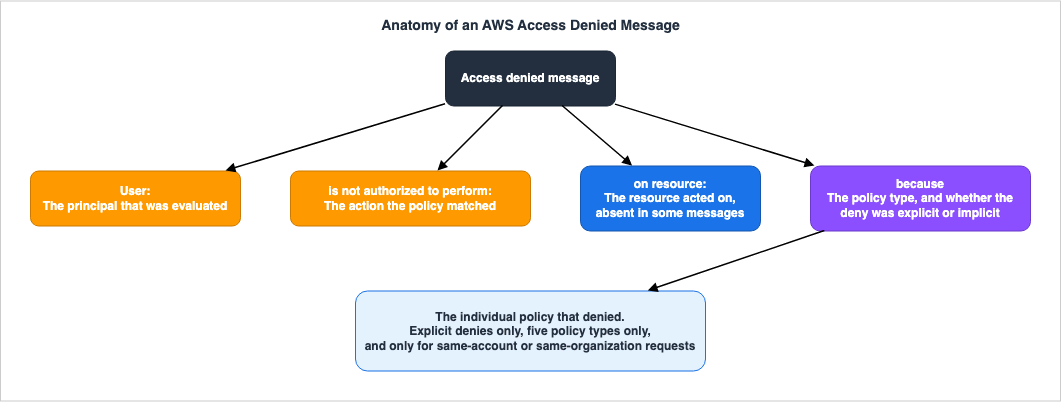
2.2 What Is Determined for Each Element
This breakdown is where reverse lookup starts. Separate what each element settles from what it does not.| Element | Confirmed | Not Confirmed |
|---|---|---|
User: <arn> | The ARN of the principal that was the subject of the authorization. If it is an assumed-role, the active entity is the role session, not the role itself. | Who assumed that role. The calling account. |
is not authorized to perform: <action> | The combination of service and action. Specifically, the value of the Action as defined in the policy. | A single console operation often calls several actions, so the one that failed is not necessarily the one shown. |
on resource: <arn> | The resource the policy acted on. Some messages omit this clause. | Whether the resource exists at all. It can carry wildcards. |
because <context> | The type of policy, and whether the denial was explicit or implicit. | Whether this was the only denial. |
: <policy ARN> | The individual policy that denied the request. | Its absence, on its own, means nothing (Section 4). |
2.3 Services That Do Not Follow This Format
AWS states this explicitly. Some AWS services do not support this access denied error message format, and the content of the messages may vary depending on the service making the authorization request.Therefore, encountering wording that the reverse lookup table in this article does not list is not in itself unusual. In such cases, go to Sections 13, 14, and 17, and read the CloudTrail record. Avoid forcing the string you have to match a known pattern.
2.4 Denial May Involve More Than One Factor
The same IAM User Guide clearly states two limitations, both of which directly impact the accuracy of reverse lookup.First, if multiple policies of the same type deny a request, the message does not indicate how many policies denied it. Even if three SCPs deny the request, the message reads the same as it would for one.
Second, when several policy types deny the request, AWS names only one of them in the message. If both an identity-based policy and an SCP carry a
Deny, the message names only one of them.These two limitations mean that even after fixing what the message named, the call may still fail. That is not necessarily a wrong fix; another denial was simply queued behind it. AWS itself states this.
When you make a request to a service or resource, multiple policies may apply to the request. Review all applicable policies in addition to the policy specified in the error message.3. Context Clause Dichotomy
3.1 Explicit Denial Wording
If AWS explicitly denies access due to a policy containing aDeny statement, the message will include the following phrase:with an explicit deny in a type policyThe clause sometimes carries the policy ARN as well.
with an explicit deny in a type policy: policy ARN3.2 Implicit Denial Wording
If a policy implicitly denies access, AWS will include the following phrase in the message:because no type policy allows the action action3.3 How These Differences Impact Troubleshooting
Explicit denials and implicit denials lead to completely opposite next steps.In the explicit denial scenario, there is an active
Deny statement in effect. The task is to identify that statement and either add a condition, exclude a target, or delete it entirely. Adding permissions will not resolve the issue, as an explicit Deny statement overrides any Allow statements.In the implicit denial scenario, no permissions are currently granted. The focus should be on finding the absence of an
Allow statement, rather than a Deny statement. In this case, you need to add an Allow statement for the relevant category.According to the IAM User Guide, an explicit denial occurs when an applicable policy contains a
Deny statement. An implicit denial occurs when there is no applicable Deny statement and no applicable Allow statement either. In IAM, principals are denied by default, so they must be explicitly permitted to perform any action.Both cases come back as the same
AccessDenied error. The only thing that tells them apart is the wording of the context clause. That is why the wording is worth reading.4. When an ARN Is Included and When It Is Not
4.1 Phased Changes Beginning in 2026
AWS announced the change that puts the ARN of the denying policy into the message in What's New on January 21, 2026, and explained it further in the AWS Security Blog on March 4, 2026. Previously, since a change implemented in 2021, the type of policy was included. This update adds the individual policy's ARN, in addition to that information.AWS describes three design principles behind the change: it is limited to the same account or the same organization, it only adds the policy's ARN, not the policy's content, and it does not alter the authorization logic. The ARN is an identifier and does not reveal the permissions or conditions of the policy. As before, appropriate permissions are required to view the contents of a policy.
The policy types affected include five types: service control policy, resource control policy, permissions boundary, session policy, and identity-based policy.
Amazon S3 picked the change up on August 13, 2026. S3 now returns the specific IAM or AWS Organizations policy ARN in its HTTP 403 access denied messages for same-account and same-organization requests, for explicit denials, across the same five policy types. Before that, an S3 message carried the policy type and the reason but not the individual policy, so multiple policies of one type still had to be inspected by hand. Section 16 covers the rest of S3's message format.
The ARN appears only when the denial is explicit. Not one of the implicit-denial examples in the official documentation carries an ARN. This is consistent by design: an implicit denial means no
Deny statement matched, so there is no denying policy to name in the first place. The announcement uses the phrase below, not the ARN of an evaluated policy.ARN of the denying policy4.2 A Missing ARN Means Nothing on Its Own
This is the point that is most often misunderstood in practical application. When a message does not include a policy ARN, it means one of the following:| Reason for Absence of ARN | Determination |
|---|---|
| The denial is implicit to begin with. | Settled if the context clause begins with because no. |
| That policy type is not among the five types that receive an ARN (resource-based policy, role trust policy, VPC endpoint policy). | Settled by the policy type named in the context clause. |
| The service or Region has not yet been reached by the phased rollout. | Cannot be determined from the message. |
| The caller is in a different account and organization. | Sometimes inferable from the caller's ARN. |
The first two are decidable. The last two are not. A missing ARN becomes a clue only after you read the
context clause and rule the first two out.AWS states:
This update is gradually rolling out across all AWS services in all AWS Regions, beginning early 2026.Therefore, a missing ARN is not grounds for concluding that the caller sits outside the organization. Conversely, if an ARN is present, the caller is definitively in the same account or the same organization.
4.3 What an ARN Saves You
Before the ARN appeared, learning that an SCP denied the request still left you reading every SCP in the organization, working out which ones reached that account, and evaluating them one by one. With an ARN, you open that one policy.Furthermore, an ARN travels from someone without permissions to someone who has them. Even a developer without the permission to read policies can pass a message containing an ARN directly to an administrator. AWS itself recommends this approach.
5. Reverse Index
The official documentation carries verbatim examples for 15 phrases across eight policy types: seven implicit denials and eight explicit denials. Only resource control policy has no implicit-denial example, and Section 8 explains why.| Policy Type | Implicit Denial Clause | Explicit Denial Clause | ARN on an Explicit Denial | Section |
|---|---|---|---|---|
| Identity-Based Policy | because no identity-based policy allows the <action> action | with an explicit deny in an identity-based policy | Yes | 6 |
| Service Control Policy | because no service control policy allows the <action> action | with an explicit deny in a service control policy | Yes | 7 |
| Resource Control Policy | No official example available | with an explicit deny in a resource control policy | Yes | 8 |
| Permissions Boundary | because no permissions boundary allows the <action> action | with an explicit deny in a permissions boundary | Yes | 9 |
| Session Policy | because no session policy allows the <action> action | with an explicit deny in a session policy | Yes | 10 |
| Resource-Based Policy | because no resource-based policy allows the <action> action | with an explicit deny in a resource-based policy | No | 11 |
| Role Trust Policy | because no role trust policy allows the sts:AssumeRole action | with an explicit deny in the role trust policy | No | 11 |
| VPC Endpoint Policy | because no VPC endpoint policy allows the <action> action | with an explicit deny in a VPC endpoint policy | No | 12 |
Mind the grammatical article, not just the policy name. Role trust policy alone reads
in the role trust policy rather than in a. Identity-based policy begins with a vowel, so it reads in an. A mechanical string search misses matches on exactly this difference.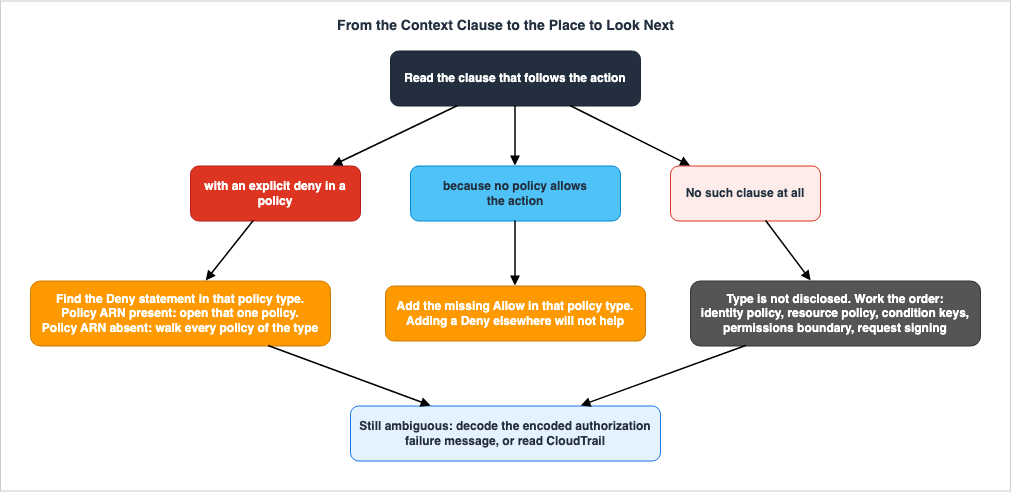
6. Identity-Based Policy
6.1 Wording
Implicit denial.User: arn:aws:iam::123456789012:role/HR is not authorized to perform: codecommit:ListRepositories
because no identity-based policy allows the codecommit:ListRepositories actionExplicit denial. Some messages carry the policy ARN and some do not.
User: arn:aws:iam::123456789012:role/HR is not authorized to perform: codedeploy:ListDeployments
on resource: arn:aws:codedeploy:us-east-1:123456789012:deploymentgroup:*
with an explicit deny in an identity-based policy: arn:aws:iam::123456789012:policy/HRAccessPolicy
User: arn:aws:iam::123456789012:role/HR is not authorized to perform: codedeploy:ListDeployments
on resource: arn:aws:codedeploy:us-east-1:123456789012:deploymentgroup:*
with an explicit deny in an identity-based policy6.2 What Is Determined
A policy attached to the principal has made the determination: a user policy, a group policy, or a role policy. For IAM users, this also includes the policies of the groups to which the user belongs.What is not determined is whether the policy is a managed policy or an inline policy. If the ARN is present, it is a managed policy. If it is absent, look at both managed and inline policies.
6.3 Next Location to Check
Start by settling who you are actually calling as. TheUser: value in the message does not always match the credentials you are actually using.aws sts get-caller-identityIf the ARN is in the format
arn:aws:sts::<account>:assumed-role/<role-name>/<session-name>, you are examining a role. List the policies attached to that role. Managed and inline policies use separate APIs.aws iam list-attached-role-policies --role-name HR
aws iam list-role-policies --role-name HRTo view the contents of a managed policy, first check the default version and then retrieve the policy document.
aws iam get-policy --policy-arn arn:aws:iam::123456789012:policy/HRAccessPolicy
aws iam get-policy-version --policy-arn arn:aws:iam::123456789012:policy/HRAccessPolicy --version-id v3
The policy documents returned by the IAM API are URL-encoded and compliant with RFC 3986. Some SDKs decode them automatically; if yours does not, decode them before reading.
In the console, navigate to Roles within IAM and view the Permissions tab for the role you are examining.
6.4 When Differentiation Is Difficult
Permissions granted through groups are not visible throughlist-attached-role-policies. For IAM users, first list the groups using aws iam list-groups-for-user, and then review the policies associated with each group.When the denial is explicit, no ARN is present, and the account holds many inline and managed policies, a string search is the fastest route. Retrieve the policy document and search for
Deny statements that name the denied action, along with wildcards that cover its service prefix.7. Service Control Policy
7.1 Wording
Implicit denial.User: arn:aws:iam::123456789012:user/John is not authorized to perform: codecommit:ListRepositories
because no service control policy allows the codecommit:ListRepositories actionExplicit denial.
User: arn:aws:iam::123456789012:user/John is not authorized to perform: codecommit:ListRepositories
with an explicit deny in a service control policy: arn:aws:organizations::777788889999:policy/o-exampleorgid/service_control_policy/p-examplepolicyid123
User: arn:aws:iam::123456789012:user/John is not authorized to perform: codecommit:ListRepositories
with an explicit deny in a service control policy7.2 What Is Determined
An AWS Organizations service control policy has made the determination. An SCP applies to the principals of the account it is attached to.An implicit denial from an SCP means the default
FullAWSAccess policy has been replaced. The DetachPolicy description for AWS Organizations states that every root, OU, and account must have at least one SCP attached. If you want to replace the default FullAWSAccess policy with an SCP that limits the permissions that can be delegated, you must attach the replacement SCP before deleting the default SCP. This is the allowlist approach. Conversely, attaching a second SCP while leaving FullAWSAccess in place and overriding it with a Deny is the denylist approach.If you encounter the message
because no service control policy allows, it means that the organization is using an allowlist approach, and the requested action is not included in that allowlist. You will not see this wording in organizations that use a denylist approach.7.3 Next Location to Check
If the message carries an ARN, one command finishes the job. The policy ID at the end of the ARN begins withp-.aws organizations describe-policy --policy-id p-examplepolicyid123Run this command from the organization's management account or from an AWS Organizations delegated administrator account.
If the message carries no ARN, you have to walk the hierarchy. There is a pitfall here.
aws organizations list-policies-for-target --filter SERVICE_CONTROL_POLICY --target-id 444444444444This command only returns policies directly attached to the target. AWS says so explicitly: it does not include policies that reach the account through inheritance in the OU hierarchy. Therefore, you need to trace the account's lineage from the account itself all the way to the root, executing the same command at each level.
aws organizations list-parents --child-id 444444444444The
describe-effective-policy command cannot be used. This API does not support the SERVICE_CONTROL_POLICY policy type. There is no way to retrieve effective SCPs with a single API call.Alternatively, in the AWS Management Console, open the target account in AWS Organizations and view the Policies tab.
7.4 When Differentiation Is Difficult
When an SCP carries aCondition on its Deny statement, reading the policy document alone does not tell you whether your request meets that condition. Determining this requires the values of the condition keys at the time of the request. If the encoded authorization failure message described in Section 15 can be decoded, it carries the values of the condition keys for that request.When assuming a role across accounts, the account ID displayed in the message's
User: field determines the organizational hierarchy to be considered. This is because the SCP applies to the principal of the account to which it is attached. AWS evaluates the sts:AssumeRole call against the principal of the calling account, and every call after that against the role session of the target account. The SCP that governs you therefore changes partway through a single piece of work.8. Resource Control Policy
8.1 Wording
Explicit denial.User: arn:aws:iam::123456789012:user/John is not authorized to perform: secretsmanager:GetSecretValue
on resource: arn:aws:secretsmanager:us-east-1:123456789012:secret:*
with an explicit deny in a resource control policy: arn:aws:organizations::777788889999:policy/o-exampleorgid/resource_control_policy/p-examplepolicyid456User: arn:aws:iam::123456789012:user/John is not authorized to perform: secretsmanager:GetSecretValue
on resource: arn:aws:secretsmanager:us-east-1:123456789012:secret:*
with an explicit deny in a resource control policy8.2 Why There Are No Examples of Implicit Denial
The IAM User Guide carries no implicit-denial example for RCPs. This is not an oversight; the conditions that would produce one cannot be created.In its explanation of the evaluation logic, AWS states that when RCP is enabled, an AWS managed policy called
RCPFullAWSAccess is automatically created and attached to the root of the organization, all OUs, and all accounts. RCPFullAWSAccess cannot be detached, so an Allow statement is always present.An SCP's
FullAWSAccess can be detached, so SCPs do produce implicit denials and the official documentation carries examples of them. An RCP's RCPFullAWSAccess cannot be detached, so a denial by an RCP is always explicit. This asymmetry is worth remembering. When you encounter the term resource control policy, always look for Deny statements.8.3 Next Location to Check
An RCP hangs off the account on the resource side. While an SCP applies to the principal, an RCP applies to the resources of member accounts in the organization. Therefore, examine the account hierarchy that the resource in the message'son resource: field belongs to.aws organizations describe-policy --policy-id p-examplepolicyid456
aws organizations list-policies-for-target --filter RESOURCE_CONTROL_POLICY --target-id 111122223333As with SCPs,
list-policies-for-target does not return inherited policies. Walk the parents all the way to the root.The RCP only applies to a subset of AWS services. The AWS Organizations User Guide lists them under Resource control policies (RCPs). If the service you are working with is not on that list, this wording never appears.
8.4 When Differentiation Is Difficult
When the account ID inUser: and the account ID in on resource: differ, it is easy to walk the wrong account's organizational hierarchy. RCP applies to the resource-side account.RCP does not apply to resources in the management account. AWS states this explicitly. RCP only applies to resources belonging to member accounts in the organization; it does not affect resources associated with the management account. It does apply to member accounts designated as delegated administrators.
RCP also does not apply to invocations from service-linked roles. AWS services use service-linked roles to act on your behalf, and an RCP cannot restrict them. An RCP does not reach a service-linked role's trust policy either.
Two more exclusions sit in the official list. RCPs do not apply to AWS managed keys in AWS Key Management Service, because AWS creates and manages those keys on your behalf and you cannot change their permissions. RCPs also do not reach the
kms:RetireGrant permission.RCPs and resource-based policies have similar names but are distinct. The wording differs too:
resource control policy versus resource-based policy. Confusing the two sends you to entirely the wrong place: the account hierarchy instead of the resource itself, or the reverse.9. Permissions Boundary
9.1 Wording
Implicit denial.User: arn:aws:iam::123456789012:user/John is not authorized to perform: codedeploy:ListDeployments
on resource: arn:aws:codedeploy:us-east-1:123456789012:deploymentgroup:*
because no permissions boundary allows the codedeploy:ListDeployments actionExplicit denial.
User: arn:aws:iam::123456789012:user/John is not authorized to perform: sagemaker:ListModels
with an explicit deny in a permissions boundary: arn:aws:iam::123456789012:policy/DeveloperPermissionBoundary
User: arn:aws:iam::123456789012:user/John is not authorized to perform: sagemaker:ListModels
with an explicit deny in a permissions boundary9.2 What Is Determined
A permissions boundary is set on that principal, and it is not allowing the request. A permissions boundary does not grant permissions on its own. Even when an identity-based policy allows the action, the request fails if the permissions boundary does not allow it too.Implicit denials are far more common. Writing a
Deny into a boundary is rare; most denials happen because the action called is not listed in the boundary.Permissions boundaries are not a common configuration. AWS itself states this. This wording appearing means the account runs boundaries, and you may well be working inside one without knowing it.
9.3 Next Location to Check
The principal itself tells you whether a boundary is attached, and its ARN.aws iam get-role --role-name Developer --query 'Role.PermissionsBoundary'
aws iam get-user --user-name John --query 'User.PermissionsBoundary'Use the returned
PermissionsBoundaryArn to read the policy document.aws iam get-policy-version --policy-arn arn:aws:iam::123456789012:policy/DeveloperPermissionBoundary --version-id v1In the console, the Permissions boundary section sits on the details page for an IAM role or user.
9.4 When Differentiation Is Difficult
Permissions boundaries do not restrict resource-based policies. AWS states this explicitly. If a resource-based policy alone should have allowed the call and it still fails, the boundary is not the cause.If both the boundary and the identity-based policy are missing the same action, only one of them appears in the message. If access is still denied even after modifying the boundary, the identity-based policy is also likely insufficient.
10. Session Policy
10.1 Wording
Implicit denial.User: arn:aws:iam::123456789012:user/John is not authorized to perform: codecommit:ListRepositories
because no session policy allows the codecommit:ListRepositories actionExplicit denial.
User: arn:aws:iam::123456789012:user/John is not authorized to perform: codedeploy:ListDeployments
on resource: arn:aws:codedeploy:us-east-1:123456789012:deploymentgroup:*
with an explicit deny in a session policy: arn:aws:iam::123456789012:policy/DeveloperSessionPolicy
User: arn:aws:iam::123456789012:user/John is not authorized to perform: codedeploy:ListDeployments
on resource: arn:aws:codedeploy:us-east-1:123456789012:deploymentgroup:*
with an explicit deny in a session policy10.2 What Is Determined
Session policies are not objects stored on AWS. They are runtime artifacts that you pass as parameters when you request temporary credentials. There is therefore no stored policy to go and read.According to the official AWS documentation, when requesting temporary security credentials programmatically using AWS STS, you can optionally pass an inline or managed session policy. If inline, you can specify a single JSON document in the
Policy parameter. If managed, you can specify up to 10 ARNs in the PolicyArns parameter. The permissions of the resulting session are the intersection of the role's identity-based policy and the session policy.When an explicit denial carries an ARN, it names a managed policy passed through the
PolicyArns parameter. Inline session policies have no ARN.10.3 Next Location to Check
The place to look next is not a policy; it is the code. Find the code that callsAssumeRole.Using CloudTrail, retrieve the
AssumeRole event for the relevant session.aws cloudtrail lookup-events --lookup-attributes AttributeKey=EventName,AttributeValue=AssumeRole --max-results 20If the message's
User: field is in the format arn:aws:sts::<account>:assumed-role/<role>/<session-name>, then <session-name> is the name assigned by the caller. The session name is usually the shortest route back to the caller. If the application assigns a meaningful name, you can trace it back to the relevant code.For AWS STS federated users, a similar approach applies. The identity broker calling
GetFederationToken is the one passing the session policy.10.4 When Differentiation Is Difficult
Session policies cannot add permissions. Even when a session policy allows an action the role's identity-based policy does not, the intersection leaves it out. Widening the identity-based policy when you see this wording will not resolve it.Sometimes you are not the one assuming the role. If your credentials are issued by AWS IAM Identity Center (see AWS IAM Identity Center Complete Setup Guide) or by an external identity broker, you are not the one passing the session policy. In that case, ask the team that runs the credential issuance path.
11. Resource-Based Policy and Role Trust Policy
11.1 Resource-Based Policy Wording
Implicit denial.User: arn:aws:iam::123456789012:user/John is not authorized to perform: secretsmanager:GetSecretValue
because no resource-based policy allows the secretsmanager:GetSecretValue actionExplicit denial. This type is not among the five policy types that receive a policy ARN (Section 4.1).
User: arn:aws:iam::123456789012:user/John is not authorized to perform: secretsmanager:GetSecretValue
on resource: arn:aws:secretsmanager:us-east-1:123456789012:secret:*
with an explicit deny in a resource-based policy
Locating the policy the message names is one problem; knowing which services have such a policy to look at is another. Resource-Based Policies by Service on AWS - Where the Second Policy Lives, What It Can Say, and When It Is Required inventories the second policy service by service, with the official name each service uses and the API that attaches it.
11.2 Role Trust Policy Wording
Implicit denial.User: arn:aws:iam::123456789012:user/John is not authorized to perform: sts:AssumeRole
because no role trust policy allows the sts:AssumeRole actionExplicit denial. The grammatical article here is
the.User: arn:aws:iam::123456789012:user/John is not authorized to perform: sts:AssumeRole
with an explicit deny in the role trust policy11.3 What Is Determined
A role trust policy is a resource-based policy attached to a role. They are the same family, yet AWS gives them separate wording. Whensts:AssumeRole fails, AWS names the role trust policy so that you know to look at the role itself.The official documentation carries one caveat that matters here: IAM role trust policies and AWS KMS key policies behave differently from other resource-based policies. For many resources, access is granted if there is an explicit
Allow statement either in an identity-based policy or a resource-based policy. However, with role trust policies and KMS key policies, explicit permission is always required.11.4 Next Location to Check
Resource-based policies have different read APIs for each service. You need to identify and select the service from the ARN in theon resource: field.aws s3api get-bucket-policy --bucket amzn-s3-demo-bucket
aws secretsmanager get-resource-policy --secret-id MySecret
aws lambda get-policy --function-name MyFunction
aws kms get-key-policy --key-id 1234abcd-12ab-34cd-56ef-1234567890ab --policy-name default
aws sqs get-queue-attributes --queue-url <url> --attribute-names PolicyThe only valid value for the
PolicyName parameter in get-key-policy is default.The role trust policy is read from the role itself.
aws iam get-role --role-name TargetRole --query 'Role.AssumeRolePolicyDocument'In the console, this is found on the Trust relationships tab of the IAM role details page.
11.5 When Differentiation Is Difficult
For cross-account access, both sides must grant permission. AWS performs two evaluations for cross-account requests: one for the account the requester lives in (the trusted account) and one for the account the resource lives in (the trusting account). The request is allowed only if both evaluations returnAllow. Fixing one side alone will not do it.When the resource lives in another account, reading its resource-based policy is usually out of reach. Hand this wording to the resource owner instead. Because this type is not among the five that receive a policy ARN, all you can hand over is the policy type and whether the denial was explicit or implicit.
12. VPC Endpoint Policy
12.1 Wording
Implicit denial.User: arn:aws:iam::123456789012:user/John is not authorized to perform: codecommit:ListRepositories
because no VPC endpoint policy allows the codecommit:ListRepositories actionExplicit denial. This type is not among the five policy types that receive a policy ARN either.
User: arn:aws:iam::123456789012:user/John is not authorized to perform: codedeploy:ListDeployments
on resource: arn:aws:codedeploy:us-east-1:123456789012:deploymentgroup:*
with an explicit deny in a VPC endpoint policy
12.2 What Is Determined
The request is passing through a VPC endpoint, and the endpoint's policy does not permit it. The moment this wording appears, it also settles that the route runs through a VPC endpoint. This represents both an authorization issue and information about the network configuration.12.3 Next Location to Check
Endpoint policies are read from the EC2 API.aws ec2 describe-vpc-endpoints --query 'VpcEndpoints[].{Id:VpcEndpointId,Service:ServiceName,Owner:OwnerId,Policy:PolicyDocument}'If a service has multiple endpoints, filter by
ServiceName. The PolicyDocument is a JSON string.12.4 When Differentiation Is Difficult
Denials originating at a VPC endpoint do not always reach CloudTrail. According to the IAM User Guide, if you are using a VPC endpoint policy and experiencing access denied errors that are not being recorded in CloudTrail, it may be because the account that owns the VPC endpoint is different from the account making the request or the account of the role in use.Extended messages for Amazon S3 are not returned when a VPC endpoint policy is the cause. Even inside the same organization, a VPC endpoint policy denial stays outside the extended message (see Section 16).
If the endpoint is owned by a different account, it may not even appear in the output of
describe-vpc-endpoints. In such cases, you will need to contact the team that owns the endpoint. As mentioned in Section 17, network activity events in CloudTrail can only be enabled by the endpoint owner.13. Messages Without a Context Clause
13.1 Forms Without a Specified Type
Sometimes a message comes back with no clause beginning withbecause at all. The IAM User Guide cites this form as an example from a console operation.User: arn:aws:iam::123456789012:user/mateojackson is not authorized to perform: widgets:GetWidget on resource: my-example-widgetYou get the principal, the action, and the resource, but not the policy type that denied the request. In this case reverse lookup starts from an order of checks rather than from the type.
13.2 Verification Order in This Case
Follow the order specified in the IAM User Guide.- Verify that the identity-based policy allows the requested action and resource. If conditions are configured, ensure that those conditions are also met at the time of the request.
- Determine if the service supports resource-based policies. If it does, verify that the policy permits the request, specifying the current entity as the principal. For requests originating from the same account, either an identity-based policy or a resource-based policy is sufficient for granting permission. However, for requests to a different account, both policies must grant permission.
- Carefully examine the key-value pairs in the conditions. Condition key names are case-insensitive. A condition that checks for the key
foowill matchfoo,Foo, orFOO. Requests that use key names that differ only in capitalization may be unexpectedly denied. - Check for the existence of a permissions boundary.
- If you are manually signing requests without using the AWS SDK, verify that the signature is correct.
13.3 When Using Temporary Credentials
Denials on temporary credentials add causes specific to those credentials. AWS documentation highlights several potential causes: whether the service accepts temporary security credentials, whether the credentials have expired, whether the credentials have the necessary permissions to assume the role, and whether the session is restricted by the session policy.The permissions of temporary credentials come from the IAM user or role behind them. They therefore go no further than what that identity holds.
14. When the Error Code Itself Is Different
14.1 Varying Error Codes for Each Service
Searching for the stringAccessDenied alone loses denial events. The error codes that indicate authorization failures vary depending on the service.| Error Code | Origin |
|---|---|
AccessDenied | IAM, Amazon S3, and many others |
AccessDeniedException | AWS Organizations API and other services that define it as an exception type |
Client.UnauthorizedOperation | Amazon EC2 Query API. Through the AWS CLI or an SDK it appears as UnauthorizedOperation |
VpceAccessDenied | CloudTrail network activity events, when there is a VPC endpoint policy violation |
According to the Amazon EC2 documentation, by default, users, groups, and roles do not have permission to create or modify Amazon EC2 resources, nor do they have permission to perform tasks using the API. You must grant permissions explicitly with IAM policies. When a user attempts to perform an action for which they do not have permission, the request will return
Client.UnauthorizedOperation.14.2 Code That Does Not Indicate Authorization Failure
AuthFailure indicates an authentication failure, not an authorization failure. According to the Amazon EC2 common client error code descriptions, it signifies that the provided credentials could not be validated. Editing policies does not fix it.DryRunOperation is a success signal. The same table defines it this way.The user has the required permissions, so the request would have succeeded, but the DryRun parameter was used.Use
DryRunOperation when you want to check permissions in EC2 and nothing more.14.3 How to Search CloudTrail Logs
Therefore, when you pull denial events in CloudWatch Logs Insights, do not narrow the search to a single code. The AWS blog gives this shape:filter (errorCode='AccessDenied' or errorCode='UnauthorizedOperation') | fields eventName, eventTime, errorCode, errorMessageThis example matches
UnauthorizedOperation, not Client.UnauthorizedOperation. The Amazon EC2 Query API returns Client.UnauthorizedOperation, while the AWS CLI and the SDKs present it as UnauthorizedOperation. The same failure appears with two different spellings depending on where you read it, so confirm which one you are looking at before you filter on an exact match.The query shapes for reading CloudTrail logs in Logs Insights live in the CloudWatch Logs Insights Query Cookbook.
15. Encoded Authorization Failure Message
15.1 When This String Appears
Messages may sometimes include a long string of characters following the textEncoded authorization failure message:. In an AWS re:Post example, it might appear as follows:You are not authorized to perform this operation. User: arn:aws:sts::999888777666:assumed-role/ReadOnly/Tom is not authorized to perform: ec2:RunInstances on resource: arn:aws:ec2:us-east-1:999888777666:instance/* with an explicit deny in a service control policy. Encoded authorization failure message: XQ_jqde5rHje6j9P-qke7-HNpHWzSWvxYobhcCPSpfOmLTkOylRBKd0eE4Xx4U_E_ldKR9tvnBpWYTze099CuiTFCVNOgC0ak83nVxE33wnOdmD-NH2GudDwuySmkEbTiBiMkyr0iRCmQqJMQLVvd0TH_Vx7kqDx1M1yKTRwOs7saSO6e_jTHFziPsTy8AkJF6kx2x0B3ywr7oX78ev9T-ga_dQ_A7m9Xw9a4ebMbzcThis string contains significantly more information than the main body of the message. AWS encodes it because the authorization detail can contain privileged information that the requesting user should not see.
15.2 What Decoding Reveals
According to the AWS STS API Reference, a decoded message contains the following information: whether the request was denied by an explicit denial, or denied due to a lack of explicit permission, the principal that made the request, the action that was requested, the resource that was requested, and the value of the condition key in the context of the user's request.The final item is particularly important. Among the paths that start from the message, this is the only one that shows the actual value of a condition key. The other source is CloudTrail Lake. When an event data store is configured to include IAM global condition keys, the selected keys that were evaluated during authorization are recorded in the
eventContext field (Section 17.4). Only the keys you selected in the event data store's configuration are recorded, however. When a Deny carrying a Condition fires on a key that path does not record, read why the condition matched in the decoded message.15.3 How to Decode
aws sts decode-authorization-message --encoded-message <encoded-message>The output takes this form.
DecodedMessage holds a JSON string.{
"DecodedMessage": "{\"allowed\":false,\"explicitDeny\":true,\"matchedStatements\":{\"items\":[{\"statementId\":\"VisualEditor0\",\"effect\":\"DENY\",\"principals\":{\"items\":[{\"value\":\"AROA123456789EXAMPLE\"}]},\"principalGroups\":{\"items\":[]},\"actions\":{\"items\":[{\"value\":\"ec2:RunInstances\"}]},\"resources\":{\"items\":[{\"value\":\"*\"}]},\"conditions\":{\"items\":[]}}]},\"failures\":{\"items\":[]},\"context\":{\"principal\":{\"id\":\"AROA123456789EXAMPLE:Ana\",\"arn\":\"arn:aws:sts::111122223333:assumed-role/Developer/Ana\"}}}"
}Note that the
explicitDeny field holds a boolean and the matchedStatements field holds the statementId of the matched statements. If the policy carries a Sid, you can name the statement that denied the request.15.4 Restrictions on This Path
Not all messages carry an encoded message. The AWS STS API Reference states:Only certain AWS operations return an encoded authorization message. The documentation for an individual operation indicates whether that operation returns an encoded message in addition to returning an HTTP code.Decoding requires permissions. To decode an authorization status message, your IAM policy must grant you the
sts:DecodeAuthorizationMessage action. Without that permission, the string cannot be read.The encoded string carries information you cannot hand to someone else as it stands. Decoding it reveals condition key values, which can be privileged information. That is why AWS encodes it.
Decoding can also be rejected. The AWS STS API Reference describes the
InvalidAuthorizationMessage error as follows:The error returned if the message passed to DecodeAuthorizationMessage was invalid. This can happen if the token contains invalid characters, such as line breaks, or if the message has expired.Copy the string without line breaks, and decode it without delay.
16. Extended Messaging for Amazon S3
16.1 Conditions for Receiving Extended Messages
Amazon S3 can include additional context in access denied errors. However, this functionality is subject to certain conditions. The Amazon S3 User Guide sets out these limits:| Condition | Behavior |
|---|---|
| Requests from the same account or in the same organization | Extended messages are returned. |
| Cross-account requests from outside the same organization | A generic Access Denied message is returned. |
| Requests in the same organization, but denied by a VPC endpoint policy | Extended messages are not returned. |
| Requests for directory buckets | A generic Access Denied message is returned. |
Extended messages are not guaranteed inside the same organization. Requests blocked by VPC endpoint policies are explicitly excluded.
Inside one organization, S3 returns the extended message when the bucket owner and the calling account belong to that same organization. Even if the bucket's S3 Object Ownership is set to "Bucket owner preferred" or "Object writer," and the bucket contains objects owned by a different account, the object owner does not affect whether an extended message is provided.
16.2 S3's Message Format Differs Slightly from the IAM Format
The S3 message format is as follows:User user-arn is not authorized to perform action on "resource-arn" because contextS3 wraps the resource ARN in double quotes. The general format in the IAM User Guide does not include quotes. If you are performing a mechanical string comparison, this difference may cause mismatches.
The AWS CLI and the SDKs also prepend call information to the message. As of November 4, 2026, the S3 User Guide shows this example with the policy ARN that Section 4.1 of this article describes.
An error occurred (AccessDenied) when calling the GetObject operation:
User: arn:aws:iam::777788889999:user/MaryMajor is not authorized to perform:
s3:GetObject on resource: "arn:aws:s3:::amzn-s3-demo-bucket1/object-name"
with an explicit deny in a resource control policy, with policy ARN:
arn:aws:organizations::777788889999:policy/o-exampleorgid/resource_control_policy/p-examplepolicyid
S3 also attaches the policy ARN differently. The IAM User Guide places the policy ARN after a colon, as in
with an explicit deny in a type policy: policy ARN. S3 inserts , with policy ARN: before the policy ARN. A mechanical string comparison written for one form misses the other.16.3 S3-Specific Messages
Some wording appears only in S3 and is absent from the table in Section 5. These messages do not appear for other services.Denial due to the
BlockPublicAcls setting in S3 Block Public Access.An error occurred (AccessDenied) when calling the CopyObject operation:
User: arn:aws:sts::123456789012:user/MaryMajor is not authorized to
perform: s3:CopyObject on resource: "arn:aws:s3:::amzn-s3-demo-bucket1/object-name"
because public ACLs are prevented by the BlockPublicAcls setting in S3 Block Public Access.Denial due to the
BlockPublicPolicy setting.An error occurred (AccessDenied) when calling the PutBucketPolicy operation:
User: arn:aws:sts::123456789012:user/MaryMajor is not authorized to
perform: s3:PutBucketPolicy on resource: "arn:aws:s3:::amzn-s3-demo-bucket1/object-name"
because public policies are prevented by the BlockPublicPolicy setting in S3 Block Public Access.Returned when a server-side encryption type is blocked. This appears when the
BlockedEncryptionTypes setting in the bucket's default encryption configuration blocks SSE-C writes. This setting is a parameter in the PutBucketEncryption API and can take two values: SSE-C to prohibit SSE-C, and NONE to allow it. This applies to requests specifying SSE-C, such as PutObject, CopyObject, PostObject, multipart uploads, and replication requests.An error occurred (AccessDenied) when calling the PutObject operation:
User: arn:aws:iam::123456789012:user/MaryMajor is not
authorized to perform: s3:PutObject on resource:
"arn:aws:s3:::amzn-s3-demo-bucket1/object-name" because this
bucket has blocked upload requests that specify
Server Side Encryption with Customer provided keys (SSE-C).
Please specify a different server-side encryption type16.4 The Remaining Two Block Public Access Settings Appear with Different Wording
IgnorePublicAcls and RestrictPublicBuckets never name themselves. This is the single most misread point in S3 reverse lookup.When
IgnorePublicAcls blocks access, the denial is implicit. If a GetObject request that only a public ACL allowed is denied, the message reads:User: arn:aws:iam::123456789012:user/MaryMajor is not authorized to perform:
s3:GetObject because no resource-based policy allows the s3:GetObject actionWhen
RestrictPublicBuckets blocks access, the denial is explicit. If a GetObject request is denied while a public bucket policy or a public access point policy is in place, the message reads:User: arn:aws:iam::123456789012:user/MaryMajor is not authorized to perform:
s3:GetObject on resource: "arn:aws:s3:::amzn-s3-demo-bucket1/object-name" with
an explicit deny in a resource-based policyIn both cases, the message carries only the phrase
resource-based policy. If you read the bucket policy again and again and still find no matching Deny, check the Block Public Access settings. They apply at the bucket, access point, and account levels, and where they differ, S3 applies the most restrictive combination.16.5 When the Cause Is Outside of S3 Permissions
Requests to buckets with Requester Pays enabled return 403 without the right parameter. Using the AWS CLI, you must specify--request-payer requester. Using an SDK, you must set the x-amz-request-payer header to requester. This is not a permissions issue.For objects encrypted with SSE-KMS, permissions are required on the KMS side. According to the Amazon S3 User Guide, for SSE-KMS using customer-managed keys,
kms:GenerateDataKey is required for object uploads, and kms:Decrypt is required for object downloads and multipart uploads. It is easy to overlook that multipart uploads, which are write operations, require kms:Decrypt. For SSE-KMS using AWS-managed keys, the requester must be in the same account that owns the aws/s3 key. No additional permissions are required for SSE-S3 and SSE-C. If the object is encrypted with a customer-managed key, also verify the KMS key policy.403 errors related to S3 Object Lock cannot be resolved by modifying policies. If Object Lock is enabled on the bucket and an object is protected by a retention period or legal hold, requests for complete deletion specifying a version ID will return a 403 error. A simple deletion request without a version ID returns
200 OK, and S3 inserts a delete marker.Object versions in compliance retention mode cannot be completely deleted by anyone. Complete deletion requests from any requester, including the root user of the AWS account, will return a 403 error. If the mode is governance retention, you can bypass this by using
s3:BypassGovernanceRetention. For legal holds, you must first remove the legal hold using s3:PutObjectLegalHold before you can perform a complete deletion.The Amazon S3 Security and Access Control Guide covers the configuration of S3 itself, including bucket policies, Object Ownership, and encryption settings. Which of the Object Lock protections is stopping a given delete, and who can shorten or remove each one, is worked through in Object Lock, Legal Holds, and Event Holds in Amazon S3. This section stays on reverse lookup from the message.
17. What CloudTrail Can and Cannot Show You
17.1 Where It Is Recorded
CloudTrail event records includeerrorCode and errorMessage fields. The definition for errorMessage explicitly states that authorization failure messages are recorded here. CloudTrail captures messages written to the logs as part of a service's exception handling.Therefore, even when the error message is gone from your side, CloudTrail often still holds it. This helps when an application swallows the error, or when the console shows only a short message.
aws cloudtrail lookup-events --lookup-attributes AttributeKey=EventName,AttributeValue=GetObject --max-results 1017.2 Four Limitations
First, content is truncated to 1 KB. BotherrorCode and errorMessage have a maximum size of 1 KB, and anything past that is cut. In event data stores configured with a maximum event size of 1 MB, truncation only occurs if the event payload exceeds 1 MB and the maximum field size is also exceeded. A long message that carries the policy ARN can lose its tail.Second, the error is not always at the top level. Some AWS services provide
errorCode and errorMessage as top-level fields in the event. Other AWS services provide error information as part of the responseElements. If you only search for top-level fields, you may miss this information.Third, data events are not enabled by default. According to AWS documentation:
By default, trails and event data stores do not log data events.Trails by default record all management events, but do not include data events, Insights events, or network activity events. S3 object-level API operations, Lambda
Invoke calls, and Amazon SNS Publish actions are all examples of data events. If you want to see these denials in CloudTrail, you must enable data events on the trail. Data events carry an additional charge, which is why AWS leaves them off by default.Fourth, network activity events are also disabled by default. To view VPC endpoint policy violations in CloudTrail, the owner of the VPC endpoint must enable network activity events for the event source. If the owner is a different team, you will not be able to enable them yourself.
17.3 VPC Endpoint Violation Visibility
With network activity events turned on, CloudTrail records a VPC endpoint policy violation like this:The
errorCode is VpceAccessDenied. And the errorMessage is always the following fixed text.The request was denied due to a VPC endpoint policyBecause the text is fixed, it does not tell you which statement fired. Only the type is known. The event does include
vpcEndpointId and vpcEndpointAccountId, so you can still name the endpoint the request traveled through.17.4 Recording Condition Key Values in Audit Logs
CloudTrail Lake's event data store includes the option to include IAM global condition keys as they are evaluated during authorization. You can add resource tag keys, principal tag keys, and IAM global condition keys during resource creation or updates. The limits are 50 for resource tag keys and 50 for IAM global condition keys.When added, a new
eventContext field appears in the event. This field contains two elements: requestContext and tagContext. The requestContext element contains information about the IAM global condition keys that were evaluated during the authorization process. It includes additional details about the principal, session, and the request itself.This feature has one property that is decisive for reverse lookup. According to AWS documentation, even when you configure CloudTrail to include condition keys and principal tags, those keys may not appear in every event. If you configure CloudTrail to include a specific global condition key, but that key does not appear in a particular event, it indicates that the key was not involved in the IAM policy evaluation for that action.
In other words, the absence of a key is itself an answer. If you expect a
Deny to have fired on aws:SourceIp and that key is absent, the evaluated policy never referenced it.However, there are limitations. The
eventContext field only exists if the event data store is configured to include resource tag keys, principal tag keys, and IAM global condition keys. It is not included in events delivered to event history, Amazon EventBridge, the AWS CLI's lookup-events command, or events delivered to a trail. It is also not included in delayed events or events that were updated after the initial API call.And this path does not reach the VPC endpoint violations of the previous section. The enriched event fields are available only for management events and data events; they are not available for network activity events. You cannot fill in the fixed text of Section 17.3 with condition keys.
17.5 When CloudTrail Shows No Results
The absence of a record is itself information. It means one of the following:- Data events are not enabled (for actions on S3 objects, Lambda
Invokeevents, etc.) - Network activity events are not enabled (due to VPC endpoint policy violations)
- The account that owns the VPC endpoint is different from the account making the call or the account associated with the role.
- Authorization is not even reached (e.g., due to signature validation failures or disconnected pathways).
Section 19 covers how to tell the last one apart.
18. Cases the Message Alone Cannot Settle
18.1 Say It Plainly
A reverse-lookup reference that leaves out the cases it cannot answer is dishonest. This section collects every situation in which the message alone cannot identify the layer, including the ones already raised in earlier sections.| Situation | Information Missing from the Message | Alternative Action |
|---|---|---|
| Multiple types are denying at the same time | Only one type is named; the others are unknown. | Fix the named type, re-run, then read the next message. |
| Multiple policies of the same type are denying the request | The number of denying policies is not given. | If an ARN is present, open that one policy. If not, check every policy of the type. |
| Multiple reasons for denial are present (S3) | Only one reason is included. | Resolve each reason one at a time and re-run. |
| The policy ARN is missing | Whether the rollout has reached this service and Region, and whether the caller sits outside the organization. | Read the context clause first. It settles the other two reasons: an implicit denial never carries an ARN, and three policy types are not among the five that receive one (Section 4.2). |
The context clause is missing entirely | The type is unknown. | Work the order in Section 13. If there is an encoded message, decode it. |
| The service does not support this message format | The format differs, so it cannot be matched. | Read the CloudTrail errorMessage and the service-specific API reference. |
| Cross-account and outside the organization (S3) | Only a generic Access Denied is returned. | Ask the resource owner to read their CloudTrail logs. |
| Directory bucket (S3) | Only a generic Access Denied is returned. | Same as above. |
| Denial due to a VPC endpoint policy (S3, same organization) | No extended message is returned. | Read the VPC endpoint policy directly. |
Denial due to IgnorePublicAcls (S3) | Only resource-based policy is named. | Check the Block Public Access settings at all three levels. |
Denial due to RestrictPublicBuckets (S3) | Same as above. | Same as above. |
| VPC endpoint policy violation (CloudTrail) | The errorMessage is fixed text, so the statement is unknown. | Identify the endpoint from vpcEndpointId and read its policy. |
Denial by a Deny that carries a Condition | Which condition key and value matched is unknown. | Decode the encoded message. Read the CloudTrail Lake eventContext. |
| Denial by an inline session policy | No ARN is present, and no stored object exists. | Identify the code that calls AssumeRole. |
| 403 from S3 Object Lock on a permanent delete | It looks like an authorization problem, but no policy edit clears it. | Check whether Object Lock is on, the retention mode, and any legal hold. |
| Message exceeds 1 KB (via CloudTrail) | The latter half of the message is truncated. | Use the raw message received by the client. |
18.2 How to Keep Going When You Cannot Tell
Whichever row of the table above you are facing, these three steps are always available. They run in order of strength.First, decode the encoded authorization failure message if you have one (Section 15). You read
explicitDeny and matchedStatements directly. Once you have that, guessing at the policy type is unnecessary.Second, add IAM global condition keys to the CloudTrail Lake event data store ahead of time (Section 17.4). This cannot be done retroactively. It has to be configured before the denial happens. For denials that recur, it is a worthwhile investment.
Third, clear the layer the message named, one at a time, and re-run. When several layers deny, the message names one layer at a time. This looks inefficient, and it is still the only reliable route. Attempting to modify multiple layers simultaneously based on guesswork can make it difficult to determine which change ultimately resolved the issue.
19. Adjacent Distinctions
19.1 When Authorization Is Not the Problem
If you are getting anAccessDenied error, the request has at least reached the authorization decision. This is not a routing problem.Conversely, if you are experiencing timeouts, connection refusals, or name resolution failures, it indicates that the request is failing before authorization. This is likely due to issues with security groups, network ACLs, route tables, or DNS. Examining the policies will not yield any results. The AWS VPC Network Troubleshooting Guide covers network troubleshooting.
VPC endpoints are the confusing case. A denial from an endpoint policy returns
AccessDenied and counts as an authorization problem. If the endpoint is missing or the route is not configured, it indicates a network issue, resulting in a different failure. If you see the wording from Section 12, the route is established.An
AuthFailure on Amazon EC2 indicates an authentication failure, and is neither an authorization nor a network issue (as described in Section 14.2). The key to troubleshooting is to keep these three categories separate.19.2 What the IAM Policy Simulator Can Reproduce
The IAM Policy Simulator reaches an authorization decision without sending a real request. Use it to reproduce a denial and see which statements fire.As of the verification date, AWS states that the simulator can test identity-based policies, permissions boundaries, service control policies, and resource-based policies that you define. The results are binary, indicating whether each action and resource is permitted or denied, and also identify which policy produced that outcome.
Regarding Service Control Policies (SCPs), the simulator evaluates them, including condition keys and resource scopes within
Deny statements. However, for security reasons, matching statements related to SCPs are not displayed in the same way as with other policy types. Resource control policies are not supported.SCP condition evaluation is narrower still in the console. The IAM console's help panel for the simulator states:
Conditions in SCPs aren't evaluated in the simulation from the console. To simulate with SCP conditions taken into account, use the policy simulator API or AWS CLI.AWS explicitly states:
The policy simulator results can differ from your live AWS environment.AWS adds that the gap is widest in advanced configurations such as VPC endpoint policies, role chaining, and multiple resource-based policies on a single resource.
This site carries a companion tool that traces the evaluation in your browser. IAM Policy Simulator (Offline) traces all seven evaluation stages without sending requests to AWS. It covers layers the AWS-hosted version does not, including RCPs and session policies. If you want to statically analyze existing policy documents, you can use IAM Policy Least Privilege Analyzer.
20. Frequently Asked Questions
20.1 Where in the Message Do Explicit and Implicit Denials Differ
It is the wording of thecontext clause. with an explicit deny in a ... is an explicit denial; because no ... policy allows the ... action is an implicit denial. Both come back as the same AccessDenied error, so the error code alone cannot tell them apart.20.2 I Fixed the Policy the Message Named and It Still Fails
This is expected behavior. As AWS states, when several policy types deny the request, only one of them appears in the message. Even when several policies of the same type deny it, the count is not shown. The right move is to fix one, re-run, and read the next message.20.3 No Policy ARN Is Returned. Does That Mean the Caller Is Outside the Organization
Not necessarily. First, implicit denials never carry an ARN, because there is no denial statement to name. Second, resource-based policies, role trust policies, and VPC endpoint policies are not among the five policy types that receive one. On top of that, the ARN rollout is still reaching services and Regions gradually, having started in early 2026. Only after ruling out those three does an out-of-organization caller remain on the table. Conversely, if an ARN is present, the caller is in the same account or the same organization.20.4 An SCP Denied the Request, but I Cannot Tell Which SCP
If the ARN is present, you can retrieve one policy usingdescribe-policy. If it is not present, you have to walk the hierarchy. list-policies-for-target only returns policies directly attached, and does not include inherited policies from Organizational Units (OUs). Walk from the account up to the root with list-parents, listing policies at each level. describe-effective-policy does not support SCPs, so it cannot be used.20.5 Where Is the Implicit Denial Message for an RCP
It does not exist. BecauseRCPFullAWSAccess cannot be detached, an RCP always carries an Allow statement, so a denial by an RCP is always explicit. When you see the words resource control policy, the only thing to look for is a Deny statement.20.6 The Message Says Resource-Based Policy but the Bucket Policy Has No Matching Deny
Look at S3 Block Public Access. A denial fromIgnorePublicAcls reads because no resource-based policy allows, and a denial from RestrictPublicBuckets reads with an explicit deny in a resource-based policy. Neither names the setting. The settings sit at three levels — bucket, access point, and account — and the most restrictive combination applies.20.7 No Denied Events in CloudTrail
Data events and network activity events are not recorded by default. S3 object operations and LambdaInvoke calls are data events. VPC endpoint policy violations are network activity events, and only the endpoint owner can enable them. If you still find nothing, the request may not be reaching authorization at all.20.8 I Want to Know Which Condition Key Value Caused the Denial
There are two paths. Decode the encoded authorization failure message and you get the condition key values in the context of the request; decoding requires thests:DecodeAuthorizationMessage permission, and only certain operations return an encoded message. Otherwise, add IAM global condition keys to the CloudTrail Lake event data store, which has to be configured before the denial happens.20.9 What Is the Difference Between a Role Trust Policy and a Resource-Based Policy
A role trust policy is a resource-based policy attached to a role. AWS still gives it separate wording. The behavior differs too. For many resources, access is granted if either an identity-based policy or a resource-based policy explicitly allows the principal. With role trust policies and AWS KMS key policies, explicit permission is always required.20.10 Wording Not Listed in This Article Appeared
This is not unusual. AWS states it plainly.Some AWS services do not support this access denied error message format. The content of access denied error messages can vary depending on the service making the authorization request.In that case, refer to the service-specific API reference and the
errorMessage in CloudTrail. You can also use the verification order outlined in Section 13.21. Summary
When you receive anAccessDenied error, the first thing to examine is the error message itself, rather than the policy. The message has a formally defined structure.Four of the facts confirmed in this article weigh most on the practice of reverse lookup.
First, the
context clause differentiates between explicit denial and implicit denial. If the message indicates with an explicit deny in a <type> policy, you should look for an active denial statement. If it states because no <type> policy allows the <action> action, you should look for the absence of an Allow statement. The two call for completely opposite work.Second, the message names only one policy type. Whether several types deny the request or several policies of one type do, only one appears. Fixing one and re-running is the only reliable way forward.
Third, a missing policy ARN means nothing on its own. Implicit denials never carry one, three of the policy types are not among the five that receive one, and the rollout has been proceeding in phases since early 2026. If a policy ARN is present, the denial is definitively explicit, and the caller is in the same account or the same organization.
Fourth, some cases are structurally beyond what the message can settle. The message alone cannot settle a service that does not support this format, a cross-account request from outside the organization, the two Block Public Access settings that never name themselves, the fixed text of a VPC endpoint policy violation, or a
Deny that carries a Condition. These are not misconfigurations; they are by design. Decoding the encoded authorization failure message and recording condition keys in CloudTrail Lake are the two routes past them.A reverse-lookup reference earns its keep only when it states both what it can answer and what it cannot. The moment you begin guessing at causes where it cannot answer, the table turns into a list of speculations. Where the message names nothing, write that it names nothing, and write where to look next instead. That is the only promise this article makes.
22. References
- Troubleshoot access denied error messages - AWS Identity and Access Management
- The difference between explicit and implicit denies - AWS Identity and Access Management
- How AWS enforcement code logic evaluates requests to allow or deny access
- IAM policy testing with the IAM policy simulator
- Policy simulator help panel - IAM console
- AWS introduces additional policy details to access denied error messages - What's New
- Enhanced access denied error messages with policy ARNs - AWS Security Blog
- AWS introduces changes to access denied errors for easier permissions troubleshooting - AWS Security Blog
- Troubleshoot access denied (403 Forbidden) errors in Amazon S3
- CloudTrail record contents for management, data, and network activity events
- Enrich CloudTrail events by adding resource tag keys and IAM global condition keys
- DecodeAuthorizationMessage - AWS Security Token Service API Reference
- decode-authorization-message - AWS CLI Command Reference
- RCP evaluation - AWS Organizations User Guide
- Detaching organization policies with AWS Organizations
- list-policies-for-target - AWS CLI Command Reference
- get-role - AWS CLI Command Reference
- get-key-policy - AWS CLI Command Reference
- Troubleshooting API request errors - Amazon EC2
- Error codes for the Amazon EC2 API
- Logging data events - AWS CloudTrail
- Resource control policies (RCPs) - AWS Organizations User Guide
- Cross-account policy evaluation logic - AWS Identity and Access Management
- DetachPolicy - AWS Organizations API Reference
- How do I troubleshoot explicit deny in a service control policy errors - AWS re:Post
- How can I get data to help troubleshoot IAM permission access denied or unauthorized errors - AWS re:Post
- Ten Ways to Improve Your AWS Operations - AWS Cloud Operations Blog
- AWS CloudTrail FAQs
- IAM Policy Evaluation Logic Step-by-Step
- IAM Anti-Patterns
- AWS Organization Guardrails
- Amazon S3 Security and Access Control Guide
- AWS VPC Network Troubleshooting Guide
- AWS IAM Glossary
- CloudWatch Logs Insights Query Cookbook
- AWS IAM Identity Center Complete Setup Guide
- IAM Policy Simulator (Offline)
- IAM Policy Least Privilege Analyzer
References:
Tech Blog with curated related content
Written by Hidekazu Konishi