Default Checksums and Data Integrity in Amazon S3 - What the SDK Computes, What S3 Stores, and Why the Default Algorithm Depends on Which SDK You Use
First Published:
Last Updated:
What decides that value is the SDK's default checksum. When the caller passes nothing, the SDK picks an algorithm on its own, computes a value, and attaches it. The change itself was announced publicly, on December 1, 2024. The problem is that the one sentence in that announcement does not settle what rides on your own request.
A commonly circulated understanding runs roughly like this. The default is
CRC64NVME. The entry page of the Amazon S3 user guide says exactly that, with no condition attached. But that sentence names the default on the storing side, and the default on the sending side differs by SDK. AWS CLI v2 and the C++ SDK alone send CRC64NVME, and most of the others send CRC32.
This article takes that gap as its subject. It is not an introduction to the feature itself, but rather an examination of what happens when the caller specifies nothing, read separately on the sending side, the storing side, and the reading side. The intended audience is those who point a destination at an S3-compatible service, those working where an intermediary device inspects the contents of a request, and those who want to confirm the checksum of an already-stored object after the fact.
To begin with, the key takeaway in this area is this. There is not one default but two. The default on the sending side belongs to the SDK, and the default on the storing side belongs to S3. The value S3 computes and attaches when nothing arrives is
CRC64NVME, and it is a different thing from the default on the sending side. Read as one default, the behavior of an SDK that sends CRC32 cannot be explained.
One more point belongs up front. Two different mechanisms are called a checksum in the Amazon S3 context. One is the verification S3 performs continuously on the data it already holds, which no user enables and no user configures. The other, the subject of this article, is the value a client computes and sends, which S3 verifies and stores. Disabling one does not affect the other.
All specifications presented in this article have been verified against official AWS documentation. The verification date is September 19, 2026. Several discrepancies turned up within AWS's own documentation during that process. Chapter 7 sets them out with citations, together with the reading that each document is correct within its own scope.
The division of labor with the earlier articles belongs up front as well. This article covers only the mechanism for confirming that values did not change in transit, and does not cover the durability of S3 itself. Self-healing for stored data belongs to How Amazon S3 Achieves Strong Consistency and Durability, and the properties of a hash function belong to Cryptography Glossary for Engineers. How the destination gets settled belongs to Endpoint Resolution in the AWS SDKs and CLI, and Chapter 6 of this article begins where that article stopped.
Table of Contents
- 1. The Bytes You Never Chose
- 2. What the SDK Does When You Pass Nothing
- 3. The Switches, and What They Do Not Reach
- 4. What the Storing Side Does
- 5. What Gets Validated on Download
- 6. When the Destination Is Not Amazon S3
- 7. Where the Primary Sources Disagree
- 8. How to Read the Failure
- 9. Failure Modes and Anti-Patterns
- 10. Frequently Asked Questions
- 11. Summary
- 12. References
1. The Bytes You Never Chose
The upload code hasn't been modified in years. It's just a few lines of code, common to almost every project, that pass the bucket name, key, and data. Even so, on the day the SDK version went up by one, the content of the requests leaving for S3 changed.1.1 The Same Code Emits a Different Request
The only change is in the headers. Thex-amz-checksum-crc32 header, previously absent, is now included. For large files, a checksum is also added to the end of the data, along with a header declaring its presence. The application code names none of it.In many environments, this change will not cause any issues. Problems primarily arise in two scenarios. The first is when the destination is not Amazon S3, which Chapter 6 covers. The second is when an intermediary device inspects the content or encoding of the request or data. That one belongs to proxy and gateway configuration and is out of scope here.
This change itself has been publicly announced. An AWS announcement from December 1, 2024, states:
The latest AWS SDKs now automatically calculate CRC-based checksums for uploads as data
is transmitted over the network. S3 independently verifies these checksums and accepts
objects after confirming that data integrity was maintained in transit over the public
internet.
The issue is that this single sentence doesn't define what will be included in your own requests. The SDK you are using decides the algorithm. The version in which the change arrived also differs by SDK. And some of the primary sources name a different algorithm altogether.
This article settles those differences one at a time. The starting point is a single fact: the caller wrote none of it.
1.2 Two Checksums in Amazon S3
One confusion has to be cleared up first. In the Amazon S3 context, the word checksum names two distinct mechanisms.The first is an ongoing integrity verification performed internally by S3 on the data it stores. That mechanism detects silent data degradation and repairs it from redundant copies. No user enables it and no user configures it. It is the subject of How Amazon S3 Achieves Strong Consistency and Durability, specifically regarding durability.
The second, and the focus of this article, is the checksum that clients calculate and send, which S3 then receives, verifies, stores as part of the object's metadata, and returns during download. Its purpose is to confirm that no bits changed in transit, and the path it covers is the network.
These two checksums serve different purposes and are located in different places. The first sits inside the storage layer, where no user can see it. The latter is present in the request and response headers and is readily visible. Disabling one does not affect the other. If this article appears to contradict an earlier one, check which of the two mechanisms is under discussion.
1.3 What This Article Covers
This article addresses what happens when the caller specifies nothing at all. It follows three points: what the SDK computes on the sending side, what S3 does on the storing side, and what is validated on the reading side.What this article leaves out comes first. S3 durability and self-healing belong to the article named above. Bucket policies and encryption belong to Amazon S3 Security and Access Control Guide. The cryptographic properties of hash functions belong to Cryptography Glossary for Engineers. Choosing a transfer service belongs to AWS Data Movement Decision Guide. Writing through a file system belongs to How Amazon S3 Files Keeps a Bucket and a File System in Sync.
How the destination gets decided is the subject of Endpoint Resolution in the AWS SDKs and CLI. Chapter 6 of this article picks up where that article stopped, at the point where the destination has been replaced. Which identity the call is made as belongs to The AWS Credential Provider Chain Across SDKs and the CLI.
2. What the SDK Does When You Pass Nothing
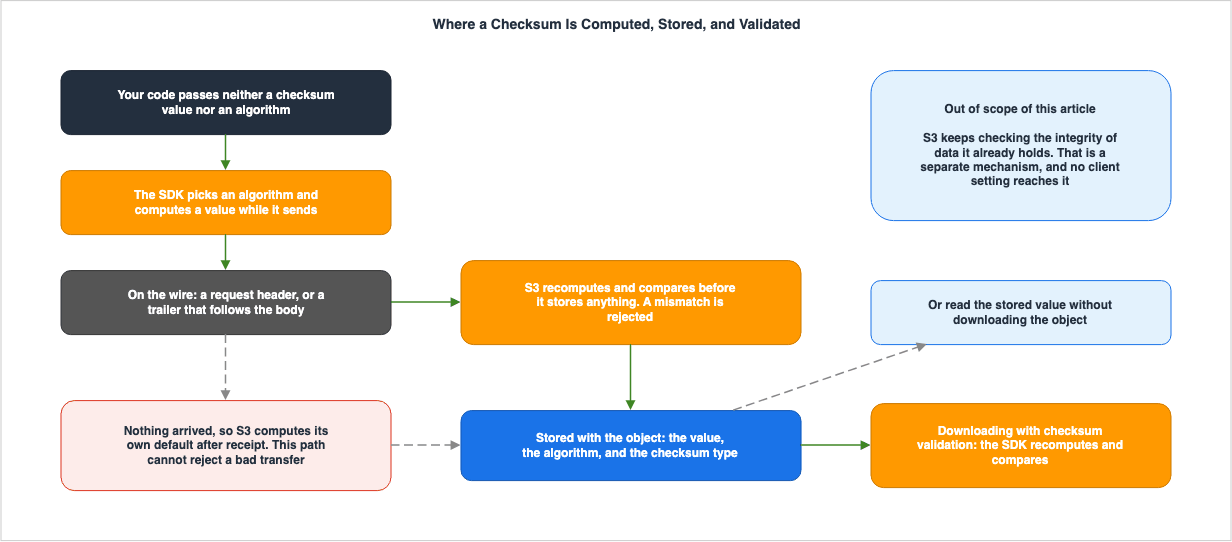
If the caller passes neither a checksum value nor an algorithm, the SDK silently computes something and attaches it. What it computes, and where on the request that value rides, is the subject of this chapter.2.1 Rules Described in the User Guide
The Amazon S3 user guide describes the rules for uploads as follows:Set the ChecksumAlgorithm parameter to the algorithm that you want Amazon S3 to use. If
you already have a precalculated checksum, you pass the checksum value to the AWS SDK,
and the SDK includes the value in the request. If you don't pass a checksum value or
don't specify a checksum algorithm, the SDK automatically calculates a checksum value
for you and includes it with the request to provide integrity protections.On the same page, it continues regarding the selection of algorithms.
If you're using an upgraded AWS SDK, the SDK chooses a checksum algorithm for you.
However, you can override this checksum algorithm.
The absence of an algorithm name here is not an oversight. The user guide does not specify a name because there isn't a single, definitive name.
The call branches three ways. If the caller passes a value, the SDK uses that value as it stands. If the caller names only an algorithm, the SDK computes with that method. If neither is provided, the SDK selects a method on its own. This article focuses on the third scenario.
2.2 The Default Algorithm Is a Property of the SDK
The name appears in the data integrity chapter of the AWS SDKs and Tools Reference Guide. That guide states up front that the default differs by SDK.Previously, these checks were opt-in. Now, we've enabled these checks by default, using
CRC-based algorithms such as CRC32 or CRC64NVME. Although each SDK or tool has a default
algorithm, you can choose a different algorithm.Furthermore, the same page presents a table outlining the default algorithms for each SDK. The following table is a snapshot as of September 19, 2026. It is a copy taken at that moment, and it does not claim to be exhaustive. The Reference Guide carries the current version.
| SDK / Tool | Default Algorithm | Notes |
|---|---|---|
| AWS CLI v2 | CRC64NVME | AWS CLI v1 is treated the same as the Python SDK. |
| SDK for C++ | CRC64NVME | |
| SDK for Go V2 | CRC32 | |
| SDK for Java 2.x | CRC32 | CRC64NVME and several other algorithms are available only through the common runtime. |
| SDK for JavaScript 3.x | CRC32 | |
| SDK for Kotlin | CRC32 | |
| SDK for .NET 3.x and 4.x | CRC32 | |
| SDK for PHP 3.x | CRC32 | |
| SDK for Python | CRC32 | CRC64NVME and several other algorithms are available only through the common runtime. |
| SDK for Ruby 3.x | CRC32 | CRC64NVME and several other algorithms are available only through the common runtime. |
| SDK for Rust | CRC32 | |
| SDK for Swift | CRC32 | A common runtime is required for all algorithms. |
| Tools for PowerShell V4 and V5 | CRC32 | |
| SDK for Go V1 | Not Applicable | Not subject to this mechanism. |
| SDK for Java 1.x | Not Applicable | Same as above. |
| SDK for JavaScript 2.x | Not Applicable | Same as above. |
Three key observations can be drawn. First,
CRC64NVME is the default only for AWS CLI v2 and the C++ SDK; every other supported entry defaults to CRC32. Second, the three older major versions are not subject to this mechanism, so the sending side attaches no default checksum. As Section 2.3 describes, S3 still computes and stores a value even in that case. Third, the availability of CRC64NVME also varies by SDK, and some SDKs require the addition of a common runtime.Therefore, it's not possible to refer to the default algorithm by a single name. To learn what rides on your own request, the only place to look is the row for the SDK you are using.
The user guide offers some background on why the defaults are CRC-based. As Section 4.3 sets out, CRC allows the value for the whole object to be derived from the values of the individual parts. Algorithms without this property cannot produce a full object checksum during a multipart upload. The user guide adds that this combining is what lets S3 parallelize the work and improve performance. None of the primary sources state that this is the reason a CRC-based algorithm was chosen as the default.
2.3 Which Version Turned the Default On
There are SDKs that document the version in which the default setting was introduced, and those that do not. The four SDKs that do are listed below:| SDK | Version in Which the Default Became Active | Behavior Prior to That Version |
|---|---|---|
| SDK for Java 2.x | 2.30.0 | Does not automatically calculate CRC-based checksums. |
| SDK for JavaScript 3.x | 3.729.0 | Same as above. |
| The Amazon S3 module of the SDK for Go V2 | v1.74.1 | Same as above. |
| SDK for Kotlin | 1.4.0 | Same as above. |
For example, the Java developer guide states:
Beginning with version 2.30.0 of the AWS SDK for Java 2.x, the SDK provides default
integrity protections by automatically calculating a CRC32 checksum for uploads. The SDK
calculates this checksum if you don't provide a precalculated checksum value or if you
don't specify an algorithm that the SDK should use to calculate a checksum.
For every other SDK, the Reference Guide gives the default algorithm but no version could be found. Stating that a version is unconfirmed is better than asserting one that cannot be pinned down. The one thing they share is that the change of default was announced on December 1, 2024.
The Reference Guide states what happens on an older version.
If your application uses a version prior to December 2024 of the SDK or tool, Amazon S3
still computes a CRC64NVME checksum on new objects and stores it in the object metadata
for future reference.
In other words, even when using an older SDK, checksums will still be attached to objects. The only difference is that the entity responsible for adding the checksum shifts from the client to S3. Section 4.2 takes up that difference.
The December 1, 2024 announcement also appears in AWS History and Timeline regarding AWS SDKs and the AWS CLI on this site, which places it among the general availability and end-of-support dates of the SDK major versions.
2.4 Directory Buckets Are Different
Up until now, this chapter has discussed general purpose buckets. With directory buckets, the default setting is fixed, as stated in thePutObject API reference.For directory buckets, when you use AWS SDKs, CRC32 is the default checksum algorithm
that's used for performance.Read together with the per-SDK table, this means only AWS CLI v2 and C++ change default with the bucket type. The other SDKs remain unchanged, as they originally used
CRC32. Furthermore, directory buckets have another distinction: they do not support the Content-MD5 header.2.5 The Value May Not Be in the Header
Assuming that the checksum rides in a request header will lose it on large objects. The SDK may calculate the value and append it to the end of the body. The user guide calls this a trailing checksum.When uploading large objects to Amazon S3, you can either provide a precalculated checksum
for the object or use an AWS SDK to automatically create trailing checksums for chunked
uploads, on your behalf. If you use a trailing checksum, Amazon S3 automatically generates
the checksum value by using your specified algorithm to validate the integrity of the
object in chunked uploads, when you upload an object.Section 2.6 takes up why the format is shaped this way. First, what changes in the request.
Requests in this format have three dedicated headers:
| Header | What it Represents |
|---|---|
x-amz-decoded-content-length | The length of the body after decoding. |
x-amz-content-sha256 | The type of chunking used. If the payload is not signed, it's STREAMING-UNSIGNED-PAYLOAD-TRAILER; if it is signed, it's STREAMING-AWS4-HMAC-SHA256-PAYLOAD-TRAILER. |
x-amz-trailer | The name of the trailing header, which begins with x-amz-checksum- and ends with the algorithm name. |
Not every supported algorithm can be used as a trailing checksum. The user guide lists five possible values for
x-amz-trailer: x-amz-checksum-crc32, x-amz-checksum-crc32c, x-amz-checksum-crc64nvme, x-amz-checksum-sha1, and x-amz-checksum-sha256. The five algorithms added in April 2026 are absent from that list.The body itself also changes format. It consists of chunks, each with its length written in hexadecimal, followed by the content, with a newline character in between. A chunk of length zero comes last, and a single trailer chunk follows it. If the name written in the trailer chunk does not match the value of
x-amz-trailer, the request will fail. The value is Base64 encoded, with the most significant byte appearing first.The user guide provides an example of sending a 17 KB object divided into three chunks, showing the unsigned format.
PUT /Key+ HTTP/1.1
Host: amzn-s3-demo-bucket
Content-Encoding: aws-chunked
x-amz-decoded-content-length: 17408
x-amz-content-sha256: STREAMING-UNSIGNED-PAYLOAD-TRAILER
x-amz-trailer: x-amz-checksum-crc32

2000\r\n                                   // Object body chunk 1 (8192 bytes)
object-bytes\r\n
2000\r\n                                   // Object body chunk 2 (8192 bytes)
object-bytes\r\n
400\r\n                                    // Object body chunk 3 (1024 bytes)
object-bytes\r\n
0\r\n                                      // Completion chunk
x-amz-checksum-crc32:YABb/g==\n\r\n\r\n    // Trailer chunk (note optional \n character)
\r\n                                         // CRLF
This example demonstrates that the checksum value is not in the request header. Instead, it appears only once, in the final chunk. Every body chunk except the last must carry at least 8,192 bytes. The response includes
x-amz-checksum-crc32.When using S3 Object Lambda, the signing process changes. The user guide notes that requests to S3 Object Lambda are signed with
s3-object-lambda instead of s3, and that this affects the signature of the trailing checksum value.2.6 Why the Value Goes at the End
There is a reason the value skips the header and goes to the end of the body instead. A header value has to be settled before the body starts going out. That means reading the whole object once to compute the checksum, then sending the body. On a large object, that second pass is not free.An article on the AWS News Blog describes this overhead in relation to the introduction of additional checksums.
Further, computing checksums for large (multi-GB or even multi-TB) objects can be
computationally intensive, and can lead to bottlenecks. In fact, some large S3 users have
built special-purpose EC2 fleets solely to compute and validate checksums.
Putting the value at the end means it can be computed while the data is going out. The same passage notes that the format uses an HTTP trailer and that it speeds up integrity checking on the sending side. The user guide also states that S3 performs validation and upload in a single operation.
This design and the default algorithms in Section 2.2 satisfy the same two conditions: the value can be computed while the data is being sent, and the values of the parts can be combined. No source was found that states the first as the reason for the second.
2.7 The Transfer Manager Is a Separate Route
When dealing with large files, some SDKs provide helper classes for transfers. This route is not necessarily the same as the route used byPutObject.The developer guides for Java and Go state that if you don't specify an algorithm using the transfer class, the SDK will calculate it using
CRC32. Both guides state that this holds for every version of the SDK. The version table in Section 2.3 describes the putObject route; the transfer class was computing checksums automatically before that.The Reference Guide also mentions that you can select a checksum type on this route. When you use the transfer class, the SDK validates the parts with its default algorithm. If you want to use a full object checksum, you can set
checksum_type to FULL_OBJECT or choose CRC64NVME, according to the Reference Guide.By default it validates part by part. The differences in types will be discussed in the next chapter.
3. The Switches, and What They Do Not Reach
The default behavior can be modified through settings. This chapter will focus on what can be changed and what cannot.3.1 Two Settings, Three Spellings
There are two settings available: whether to calculate the checksum for requests, and whether to validate the checksum for responses. The same setting has three spellings.| Location | Request Side | Response Side |
|---|---|---|
Shared config file profile | request_checksum_calculation | response_checksum_validation |
| Environment variable | AWS_REQUEST_CHECKSUM_CALCULATION | AWS_RESPONSE_CHECKSUM_VALIDATION |
| JVM system property | aws.requestChecksumCalculation | aws.responseChecksumValidation |
The three are spellings of the same setting, not three settings. They simply differ in their capitalization and the use of underscores versus dots. Checking a configuration means searching for all three spellings separately. A case-insensitive search collapses them, and which layer holds which value stops being visible.
Only the JVM system property applies to a limited scope. The Reference Guide states explicitly that only Java and Kotlin carry this spelling. For every other language, the remaining two spellings are what you have. Both settings live in the Reference Guide under data integrity protections for Amazon S3.
A fourth way is to set them in code while building the service client. The Java developer guide organizes these four options into three scopes. It groups environment variables and profiles as applying to all applications, system properties to the current application, and the client builder to a single client. That grouping is about scope, not about precedence. Precedence is the subject of Section 3.3.
3.2 WHEN_SUPPORTED and WHEN_REQUIRED
Both of these settings have two possible values.| Value | Meaning (Request Side) | Meaning (Response Side) |
|---|---|---|
WHEN_SUPPORTED | Calculate checksums for all supported API operations. | Validate responses for all supported API operations. |
WHEN_REQUIRED | Calculate a checksum only for the API operations that require one. | Validate a response only when the API operation supports it and the caller has explicitly enabled it for that operation. |
The default value for both settings is
WHEN_SUPPORTED. This means that if no value is specified, both checksum calculation and validation will be performed. The phenomenon described in Chapter 1, where the content changed despite no code modifications, was a result of introducing this default value.The two settings are independent. You can switch off the calculation on the sending side and keep validation on the reading side, or the reverse. The value names are the same, but
WHEN_REQUIRED on the response side carries an extra condition: it acts only where the caller has explicitly enabled validation for that operation.In addition to the setting, the response side also has another condition.
The Amazon S3 client attempts to validate response checksums for all Amazon S3 API
operations that support checksums. However, if the SDK has not implemented the specified
checksum algorithm then this validation is skipped.
When the stored algorithm is one the SDK does not implement, validation is skipped rather than failed. The Reference Guide table quoted in Section 2.2 also carries a column for the algorithms each SDK implements, and that set differs by SDK. Reading an object stored under
SHA512 with an SDK that does not support SHA512 validates nothing, silently.3.3 Which Layer Wins
If a value sits in more than one of the three spellings, which one is used? The order is not specific to checksums; it is the general order in which an AWS SDK looks for any setting. The AWS SDKs and Tools Reference Guide sets this out as six levels.| Level | Where to Look |
|---|---|
| 1 | Explicit specification in the code or service client |
| 2 | JVM system properties (Java and Kotlin only) |
| 3 | Environment variables |
| 4 | Shared credentials file |
| 5 | Shared config file |
| 6 | The default built into the SDK |
A higher level overrides the levels below it. Rather than searching and stopping at the first value found, a value at a higher level is the one that wins. The AWS Credential Provider Chain Across SDKs and the CLI defines that distinction once, and this article simply applies the definition to its own setting.
The same page also mentions exceptions.
Some SDKs and tools might check in a different order.This statement is significant. In fact, Endpoint Resolution in the AWS SDKs and CLI indicates that there are documents where environment variables and system properties are listed in reverse order within endpoint configurations. It has not been confirmed whether a similar discrepancy exists for checksum settings.
The practical implication is this: Of these six levels, the profile sits lowest among the layers you can write to. Even if you specify
request_checksum_calculation in a shared config file, if an environment variable contains a different value, that environment variable will take precedence.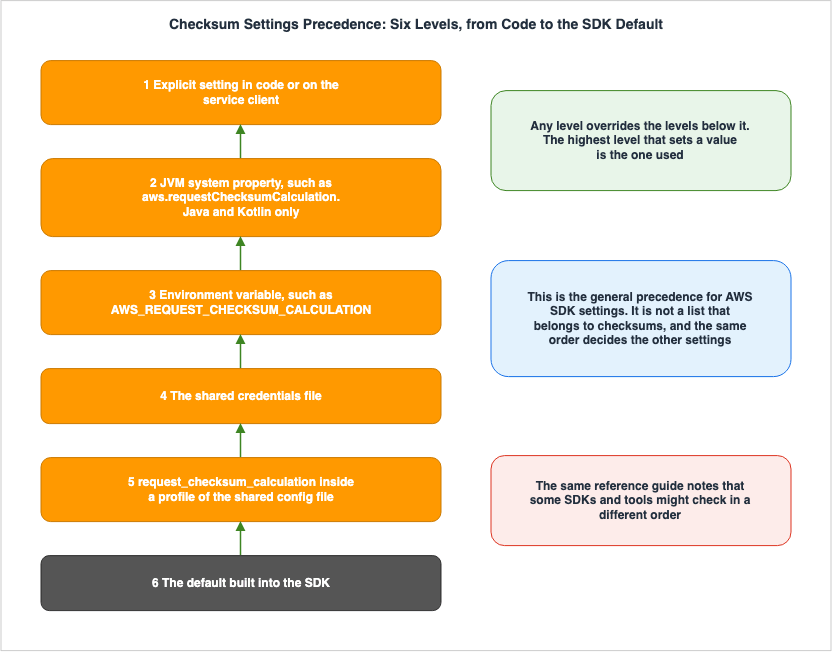
3.4 Some Operations Cannot Be Turned Off
ReadingWHEN_REQUIRED as a way to stop the calculation gets it wrong. The Java developer guide explicitly states that there are operations that cannot be stopped.You can disable automatic checksum calculation by the SDK for operations that support it,
for example PutObject and GetObject. Some S3 operations, however, require a checksum
calculation; you cannot disable checksum calculation for these operations.This article carries no list of the operations that require a checksum. No published list of them appears in the primary sources, and a self-counted table would become untrue the moment the set changes. Instead, here are the examples the primary sources name.
The first is deleting several objects at once. The
DeleteObjects API reference states the following about general purpose buckets.General purpose bucket - The Content-MD5 request header is required for all Multi-Object
Delete requests. Amazon S3 uses the header value to ensure that your request body has not
been altered in transit.The second is Object Lock. The
PutObject API reference states that uploads with a retention period require either Content-MD5 or x-amz-sdk-checksum-algorithm. What those retention periods protect, and who can shorten them, is covered in Object Lock, Legal Holds, and Event Holds in Amazon S3.One boundary is worth naming as well. Bucket-level operations whose request body is XML or JSON, such as
PutBucketPolicy, also carry a Content-MD5 field. The API reference describes it as the MD5 hash of the request body and notes that the AWS CLI and the AWS SDKs calculate it automatically, without stating that it is required. Not being stated as required, it is not counted here as an example of a required operation.That some operations require a checksum matters in Chapter 6. When the destination is not Amazon S3, the first thing to fail is one of the operations that cannot be turned off.
4. What the Storing Side Does
Everything so far has been the sending side. This chapter turns to what happens once the request arrives.4.1 Validating the Checksum That Arrived
S3 calculates its own checksum from the received data and compares it to the value included in the request. If they match, S3 stores the object and its checksum; if they do not, it stores nothing. The user guide states that objects are accepted only after S3 confirms that data integrity was maintained.The error returned when there is a mismatch is
BadDigest. Both the user guide and the API reference specify that this error occurs if the calculated value does not match the declared value, or if the declared algorithm does not match the type of value provided.What gets stored is not only the value. S3 stores the algorithm and the checksum type alongside it. The
x-amz-checksum-type response header carries the type, and it takes two values: COMPOSITE and FULL_OBJECT. That is what makes it possible to know, at download time, which method to validate with.For a multipart upload, validation happens in two stages. The Reference Guide details this structure.
When uploading files in multiple parts, the SDKs calculate checksums for each part.
Amazon S3 uses these checksums to verify the integrity of each part through the UploadPart
API. Additionally, Amazon S3 validates the entire file's size and checksum when you call
the CompleteMultipartUpload API.
The validation of each part and the validation of the whole object at completion are separate. The former occurs at the
UploadPart stage, while the latter occurs at the CompleteMultipartUpload stage. During completion, the size is also verified.The validation itself does not change with the conditions. The user guide states that it functions the same way regardless of the encryption method, object size, storage class, or whether the upload is single part or multipart. The differences in the default algorithms, as discussed in Chapter 2, belong to the sending side; the storing side treats what arrives the same way in every case.
4.2 What S3 Attaches When Nothing Arrives
What happens when no checksum rides on the request at all? The user guide states that S3 picks one itself.If you don't specify a checksum algorithm and the SDK also doesn't calculate a checksum
for you, then S3 automatically chooses the CRC-64/NVME (CRC64NVME) checksum algorithm.The same holds for multipart uploads.
Because S3 has default integrity protections, if objects are uploaded without a checksum,
S3 automatically attaches the recommended full object CRC-64/NVME (CRC64NVME) checksum
algorithm to the object.
There are two defaults, in two places, and they hold different values. The default on the sending side varies depending on the SDK, using either
CRC32 or CRC64NVME, while the default on the storing side is CRC64NVME. Read as one default, the two cannot explain the behavior of an SDK that sends CRC32. Chapter 7 takes this up.The two defaults act at different moments. The checksum on the sending side is verified before S3 accepts it. If it does not match, nothing is stored. S3 computes the checksum it attaches when nothing arrives from the data it received, so that value cannot reject a corrupted transfer on the spot.
That does not make it useless afterwards. The Reference Guide states that by comparing the stored value with a value calculated on your own side, you can verify that the network transmission was correct. The difference is whether the check happens automatically or whether you go and compare the values yourself.
4.3 Full Object Checksums and Composite Checksums
There are two types of checksums. A full object checksum is a value calculated over the whole object, from its first byte to its last. A composite checksum is a value derived by aggregating the checksums of the individual parts of a multipart upload.A single part upload always produces a full object checksum. No type needs to be specified. The type becomes a choice only in a multipart upload.
Only CRC-based algorithms can produce a full object checksum in a multipart upload. The user guide explains that this is because CRC algorithms can linearly combine the values of the individual parts into a value for the whole object. This property allows S3 to process parts in parallel while still calculating the checksum of the whole object. SHA and MD5 do not have this property.
| Algorithm | Full object | Composite |
|---|---|---|
CRC64NVME | Yes | No |
CRC32 | Yes | Yes |
CRC32C | Yes | Yes |
SHA1 | No | Yes |
SHA256 | No | Yes |
MD5 | No | Yes |
XXHASH64 | No | Yes |
XXHASH3 | No | Yes |
XXHASH128 | No | Yes |
SHA512 | No | Yes |
This table applies specifically to multipart uploads. For checksums computed over data that is already stored, a different set of algorithms applies. Section 7.3 takes it up.
Composite checksums carry one more constraint. The user guide states that the part numbers must be a sequential series starting from 1; otherwise, an HTTP 500 error will occur.
An upload started from the console has its own threshold. Objects larger than 16 MB are treated as multipart uploads. For objects smaller than 16 MB, only the full object checksum type is available. If you select
CRC64NVME and the object size exceeds 16 MB, the object is automatically designated as a full object checksum.4.4 Not Declaring the Algorithm in a Multipart Upload
Multipart uploads have a specific process for passing values. The algorithm must be declared at theCreateMultipartUpload stage. The behavior when you forget to declare the algorithm varies depending on the algorithm itself.For the five algorithms added in April 2026, the upload will fail.
When using multipart uploads with the new checksum algorithms (MD5, XXHash3, XXHash64,
XXHash128, SHA-512), you must specify the checksum algorithm in the CreateMultipartUpload
request using the x-amz-checksum-algorithm header. If you provide a checksum value in the
CompleteMultipartUpload request (for example, x-amz-checksum-sha512) without having
specified the algorithm in CreateMultipartUpload, the request will fail with an
InvalidRequest error.
For the four that the user guide lists as existing algorithms, the upload does not fail.
For existing checksum algorithms (CRC32, CRC32C, SHA-1, SHA-256), if the algorithm is not
specified in CreateMultipartUpload, any checksum header provided in
CompleteMultipartUpload is currently accepted but not validated or stored with the object.
We recommend always specifying the algorithm in CreateMultipartUpload to ensure your
checksums are validated and stored.
The latter scenario is more dangerous. The request succeeds, and no errors or warnings are returned. The checksum is neither validated nor stored, although the object itself is. You believe you handed over a value you had computed, and in fact nothing remains. That state is returned as success.
These two notes do not cover all supported algorithms. The first mentions five algorithms, while the second mentions four, for a total of nine.
CRC64NVME is not included in either list. Which of the two behaviors applies when it is not declared cannot be settled from these two notes. If you are using multipart uploads with an SDK that defaults to CRC64NVME, it is best to always explicitly declare the algorithm.The same mistake fails loudly with one algorithm and stays silent with another. The gap shows up during a migration. When switching code from
SHA256 to SHA512, previously silent declaration omissions will now appear as InvalidRequest errors.4.5 Copying Can Change the Value
Copying a stored object can change the checksum value even when the content is identical. The user guide explains the reason for this. Because S3 performs the copy as a single operation, the value on the destination is a direct checksum of the whole copied object, even when the source object carried a composite checksum.There are rules governing algorithm inheritance. Naming no algorithm on the copy carries the original algorithm forward. If the original object has neither an algorithm nor a value,
CRC64NVME will be used. That rule doubles as a way to give an existing object a checksum after the fact.4.6 How Far the Stored Value Travels
The stored checksum becomes part of the object's metadata. The same AWS News Blog article sets out how far it travels from there. That article is from 2022, when four algorithms were supported.The verified checksum, along with the specified algorithm, are stored as part of the
object's metadata. If Server-Side Encryption with KMS Keys is requested for the object,
then the checksum is stored in encrypted form. The algorithm and the checksum stick to
the object throughout its lifetime, even if it changes storage classes or is superseded
by a newer version. They are also transferred as part of S3 Replication.Four things can be read out of this. What is stored is the value paired with its algorithm. For an object set to be encrypted with KMS keys, S3 stores the checksum in encrypted form as well. Even when the storage class is changed or a new version overwrites the object, the checksum remains associated with that object. It is also carried over during replication.
Replication behaves the same way with the newer algorithms, and that much can be confirmed. An announcement from April 2026 states that the additional five algorithms are also preserved during replication, and that this information appears in S3 Inventory reports, allowing for auditing the checksum of the entire dataset over time. For storage class changes and for storage in encrypted form, no source newer than that 2022 article could be found.
Therefore, verification is not limited to an object-by-object basis. Against a large number of objects, an S3 Inventory report gives the list, and the batch operation in Section 5.5 recomputes the values where that is needed.
4.7 The ETag Is Not a Checksum
Plenty of operational practice uses the ETag as a stand-in for a checksum. The ETag is an MD5 digest only in a limited set of cases. The user guide outlines the conditions in three categories.| Object Creation Method | Is ETag an MD5 Digest? |
|---|---|
Using PutObject, PostObject, or CopyObject, or through the console, with plaintext or SSE-S3 | Yes |
| Using the same operation with SSE-C or SSE-KMS | No |
Using multipart upload or UploadPartCopy | No, regardless of the encryption method |
The guide also clarifies what is included in multipart uploads.
When an object is uploaded as a multipart upload, the entity tag (ETag) for the object is
not an MD5 digest of the entire object. Instead, Amazon S3 calculates the MD5 digest of
each individual part as it is uploaded. The MD5 digests are used to determine the ETag for
the final object.
The console handles objects larger than 16 MB using multipart upload. So the ETag of a large file uploaded through the console will not match an MD5 you compute locally. The user guide spells out the construction: Amazon S3 concatenates the MD5 digests of the individual parts, takes an MD5 digest of the concatenation, and appends a hyphen and the number of parts.
The ETag also has a use outside this article. It is the basis for optimistic concurrency control through conditional requests, which How Amazon S3 Achieves Strong Consistency and Durability covers.
5. What Gets Validated on Download
A stored checksum can be put to use when the object is read. What has to hold for it to be used is the subject of this chapter.5.1 Turning It On From the Request
Validation on download can be turned on explicitly in the request. The name differs by SDK, but in each case it means setting a validation mode field on theGetObject request. The three below are examples, and they show that the spelling of the value is not aligned across SDKs.| SDK | Syntax |
|---|---|
| SDK for Java 2.x | checksumMode(ChecksumMode.ENABLED) |
| SDK for Go V2 | ChecksumMode: types.ChecksumModeEnabled |
| SDK for Kotlin | checksumMode = ChecksumMode.Enabled |
The
response_checksum_validation setting from Section 3.2 decides what happens when that explicit field is absent. At the default WHEN_SUPPORTED, validation runs on the operations that support it. At WHEN_REQUIRED, it runs only when the caller turns it on the way the table shows.Whether a value comes back and whether it is checked are separate questions. The checksum can appear in a
GetObject response header, but the work of recomputing it and comparing runs only when validation is on.5.2 With Nothing Stored at Upload Time, Nothing Happens
Enabling validation changes nothing when there is nothing to compare against. Several SDK developer guides contain the same sentence.If the object wasn't uploaded with a checksum, no validation takes place.No error is raised. You believe validation ran, and nothing was validated. Objects that an older SDK uploaded (Section 2.3), and objects placed before the mechanism existed, sit in this state.
As Section 4.2 describes, though, there are objects that carry a
CRC64NVME that S3 attached. The API reference carries that difference in its wording. It says of headers like x-amz-checksum-crc32 that the value comes back only if it was sent with the upload. Its entry for x-amz-checksum-crc64nvme has no such condition.5.3 Nothing Is Validated Until the Body Is Read to the End
SDKs that receive data streams have an additional requirement. The Kotlin developer guide explicitly states this point.Because the SDK for Kotlin uses streaming responses when it downloads an object from
Amazon S3, the checksum will be calculated as you consume the object. Therefore, you must
consume the object so that the checksum is validated.Unless the body is read to the end, the checksum is never computed. An implementation that reads only the first bytes, or that takes the response without touching the body, never validates anything. A mismatch raises a
ChecksumMismatchException.The same guide also draws a version line for the reading side.
If you use an SDK version of 1.4.0 or later, the SDK automatically checks the integrity of
getObject requests without adding checksumMode = ChecksumMode.Enabled to the request.
This is what the Kotlin developer guide states. The same sentence could not be found in the guides for other SDKs, so whether other languages behave the same way is unconfirmed.
5.4 Reading One Part at a Time
An object uploaded as a multipart upload can be retrieved one part at a time. CallingGetObject or HeadObject with either the part number or a byte range that aligns with a single part returns the checksum for that part. For an object that carries a composite checksum, this is the route that validates a single part.For ongoing multipart uploads, you can retrieve the checksums of individual parts using
ListParts. For completed objects, you can obtain the number of parts and information about each part using GetObjectAttributes.5.5 Checking Later Without Downloading
Confirming the checksum of a stored object does not always require downloading it. There are three routes.The first is
HeadObject. It returns the value held in the object's metadata, in a response header beginning with x-amz-checksum-. The second is GetObjectAttributes, which returns the checksum and the part information together.The third is the Compute checksum operation in S3 Batch Operations. The user guide describes this operation as follows:
If you need to verify the content of datasets stored in Amazon S3, the S3 Batch Operations
Compute checksum operation calculates both full object or composite checksums for objects
at rest. The Compute checksum operation uses Batch Operations to asynchronously calculate
the checksum values for a group of objects and automatically generates a consolidated
integrity report, without creating new copies of your data, or restoring or downloading
any data.
It can give a value to objects that carry no checksum, and to objects stored under a different algorithm. Its purpose differs from the transfer-time validation this article is about, but it is the tool for objects in the state Section 5.2 describes. The user guide states that it works regardless of storage class or object size.
6. When the Destination Is Not Amazon S3
The SDK can be directed to another service that provides the same API. What becomes of the default checksum at that destination is the subject of this chapter.6.1 What the Other End Cannot Interpret
Endpoint Resolution in the AWS SDKs and CLI covers the mechanism that replaces the SDK's destination, and hands what happens at the replaced destination to this article. This chapter is where that handoff lands.The shape of the problem is simple. The SDK attaches its default checksum on the assumption that the other end is Amazon S3. If the other end does not know that algorithm, the request is not interpreted. The C++ documentation describes this situation directly.
Recently the SDKs shipped a feature in the SDK that changed default object integrity in
S3. What this more or less boils down to is that S3 supports several different wire
checksums and we now default to use CRC64-NVME to ensure object integrity. Previously we
used MD5 checksums to ensure object integrity. Some 3rd party S3 compatible services
currently do not support this and need time to catch up, or alternatively will not support
this.
The operations of Section 3.4 that cannot be turned off are the first to bite here. An operation like
PutObject, which does not require a checksum, can be stopped with WHEN_REQUIRED; an operation that does require one, such as DeleteObjects, cannot be stopped by configuration at all. So it can surface as writes going through while deletes fail.6.2 The Fallbacks the Primary Sources Provide
A remedy is provided officially. Its shape differs between Java and C++.Java has a dedicated plugin.
Along with the release of CRC32 checksum behavior with version 2.30.0, the SDK stopped
calculating MD5 checksums on required operations.
The same page then gives the alternative.
If you need legacy MD5 checksum behavior for S3 operations, you can use the
LegacyMd5Plugin, which was released with version 2.31.32 of the SDK.
The same guide also explicitly states the intended usage scenarios.
The LegacyMd5Plugin is particularly useful when you need to maintain compatibility with
applications that depend on the legacy MD5 checksum behavior, especially when working with
third-party S3-compatible storage providers like those used with S3A filesystem connectors
(Apache Spark, Iceberg).
The plugin is meant to be combined with the settings. Putting MD5 on the operations that require a checksum while attaching nothing to the operations that merely support one takes both the plugin and
WHEN_REQUIRED. The guide provides an example illustrating this combination.C++ has no dedicated plugin. The C++ documentation sets out the procedure in three cases instead.
| Case | Procedure the C++ documentation gives |
|---|---|
| An operation that does not require a checksum, and you want to send none | Set requestChecksumCalculation to WHEN_REQUIRED. |
| An operation that does not require a checksum, and you want to send MD5 | The same setting, plus a content-md5 header you add yourself. |
| An operation that does require a checksum, and you want to send MD5 | The above, plus overriding the request-side test for whether a checksum is required. |
The C++ documentation attaches a caution to the first case. Sending nothing removes the integrity check, data can be corrupted on the wire, and it is therefore not recommended.
The third case subclasses the request and overrides the test itself. The shape of that procedure shows that the setting alone does not reach this far.
6.3 Where MD5 Sits Now
MD5 has come up several times. Its position is worth stating plainly.MD5 is on the list of supported algorithms.
MD5 is one of the five added in April 2026 and sits in the current list. It did not stop being an option.However, it is no longer automatically calculated by the SDK. The user guide states:
You can provide a precalculated MD5 checksum using the x-amz-checksum-md5 header. AWS SDKs
do not automatically calculate MD5 checksums.
The
Content-MD5 header still exists. However, its usage is limited, as specified on the same page.The legacy Content-MD5 header remains available for single part uploads using SSE-S3
encryption.MD5 has three ways in. Passing it as an additional checksum through
x-amz-checksum-md5, passing it through the Content-MD5 header, and computing it over already-stored objects with S3 Batch Operations. The only change is that it is no longer calculated automatically.Cryptography Glossary for Engineers covers the properties of MD5 as a hash function. What a checksum does is detect corruption in transit or at rest, not prevent tampering. Anyone who can rewrite the content can rewrite the checksum along with it. Detecting integrity is a different matter from authenticity or confidentiality.
7. Where the Primary Sources Disagree
This article has quoted several primary sources so far. Four places where they disagree follow.7.1 Is the Default CRC64NVME or CRC32?
The entry page of the Amazon S3 user guide states the default this way.The CRC64NVME checksum algorithm is the default checksum algorithm used for checksum
calculations.That sentence carries no condition. The table in the Reference Guide copied into Section 2.2 gives
CRC64NVME as the default for AWS CLI v2 and C++ alone, and CRC32 for the rest.Both are correct. The difference lies in where you are looking. The single sentence in the user guide refers to the default on the storing side, which aligns with the description in Section 4.2. The table in the Reference Guide, on the other hand, describes the default on the sending side. However, the single sentence in the user guide does not explicitly state this distinction. A reader who sees only the entry page concludes that an object uploaded from Java carries
CRC64NVME, and what actually travels is CRC32.There is only one way to settle it. The developer guide for your SDK answers it, and so do the headers of the actual request. Not reading that one sentence on the entry page as the behavior of your own SDK is the point of this section.
7.2 The Algorithm Name Has Three Spellings
The same algorithm is written differently from one document to the next.| Notation | Document(s) |
|---|---|
CRC-64/NVME (CRC64NVME) | Amazon S3 User Guide |
CRC64NVME | AWS SDKs and Tools Reference Guide (tables, API reference header names and values) |
CRC64-NVME | AWS SDK for C++ documentation |
The value passed to the API is
CRC64NVME. This is the format listed as a valid value in the PutObject API reference, and it also corresponds to the header name x-amz-checksum-crc64nvme. The other two are prose spellings, not parameter values.It matters when you go looking. Searching for one of the three will miss the documents that use the others.
7.3 Two Chapters Disagree on Which Algorithms Can Produce a Full Object Checksum
In the table in Section 4.3,SHA256 could be used only for a composite checksum. However, the section dealing with stored data states the following:All supported checksum algorithms support both the full object and composite checksum
types, except CRC-64/NVME (CRC64NVME), which supports the full object checksum type only.The two statements have different scopes. The table in Section 4.3 refers to the process during multipart uploads, where limitations arise from whether the values can be combined across part boundaries. The latter refers to the scenario where S3 Batch Operations calculates checksums for stored objects; since the whole object can be read, the combining constraint does not apply.
Therefore, there is no contradiction. However, if you're not aware of which section you're reading, whether
SHA256 can produce a full object checksum appears to flip. It is available when calculating the checksum after the upload is complete, not during the upload process.7.4 Some SDKs Document the Version and Some Do Not
As Section 2.3 noted, only four SDKs state in their developer guide the version in which the default arrived. For the rest, the Reference Guide carries the default algorithm, but no version could be found.This is a difference of granularity rather than a disagreement. It still has practical consequences. For SDKs where the version cannot be determined, it is impossible to establish from the primary sources alone what the running environment is doing. You will need to either inspect the request headers or verify the behavior by fixing the versions of the dependencies.
7.5 How to Read This
One way of reading covers all four. Each document is correct within its own scope. The discrepancies come from each document drawing its scope differently.| Question | Relevant Document(s) |
|---|---|
| What does your SDK send by default? | AWS SDKs and Tools Reference Guide (table specific to each SDK) |
| When did the default behavior change? | Developer guides for each SDK (only four specify the version). |
| What does S3 receive and what does it do? | Amazon S3 User Guide |
| What is the exact format of the values passed to the API? | Amazon S3 API Reference |
| What fallback exists when the destination is not Amazon S3? | The documentation for each SDK. The shape differs between Java and C++. |
8. How to Read the Failure
Checksum failures come in few kinds. What to look at in order to tell them apart is what this chapter covers.8.1 Look at What the Request Actually Carries
The first thing to establish is what is actually being sent. Three kinds of header matter.| Header | Description |
|---|---|
Headers starting with x-amz-checksum- | The checksum value itself. The end of the header indicates the algorithm used. |
x-amz-sdk-checksum-algorithm | Indicates which algorithm the SDK used to calculate the checksum. |
x-amz-trailer | Declares the name used when the checksum value is appended to the end of the data body. |
A value missing from the headers does not mean no value was sent. As Section 2.5 describes, on a large object the SDK may move the value to the end of the body. If the
x-amz-trailer header specifies a name, the value is located at the end. A value of x-amz-content-sha256 that starts with STREAMING- is the same signal.x-amz-sdk-checksum-algorithm carries one caveat. The API reference states that when sending this header, you must also include the corresponding value header or the x-amz-trailer header; otherwise, you will receive an HTTP 400 error. This header alone does not transmit the value.Calling the REST API directly, without an SDK, means not using this header at all. The user guide specifies that for the REST API, instead of
x-amz-sdk-checksum-algorithm, use algorithm-specific headers such as x-amz-checksum-crc32. As the name suggests, this header is intended for the SDK to declare its calculated result.8.2 The Order to Narrow It Down
After the headers, narrow it down in this order. Each of these questions has exactly one answer, so none of them requires a guess.| Order | What to Establish | How |
|---|---|---|
| 1 | Is the destination Amazon S3? | Look at the resolved URL. The earlier article on endpoint resolution covers this. |
| 2 | Does the value appear in the request? | Check both the header and the x-amz-trailer. |
| 3 | Which algorithm was used to calculate it? | Check the x-amz-sdk-checksum-algorithm header or the end of the value's header. |
| 4 | Does that match the default for your SDK? | Compare against the table in Section 2.2. |
| 5 | Which layer is the setting coming from? | Work down the six levels in Section 3.3, from the top. |
| 6 | What was actually stored? | Call HeadObject or GetObjectAttributes. |
The fifth level is where it usually turns up. Because the setting can sit at any of the six levels, reading the application's own configuration file will not reveal a value that sits in an environment variable.
8.3 BadDigest
BadDigest means the values did not match. It takes two shapes.The first is that the content really did change in transit. The second is that the value the caller passed does not match what the declared algorithm computes. In implementations that pass pre-calculated values, the second case is more frequent. Check first that the declared algorithm and the kind of value line up, then that the value is Base64 encoded.
8.4 InvalidRequest
Two forms of InvalidRequest relate to checksums.The first is the one in Section 4.4, where the caller uses one of the algorithms added in April 2026 without declaring it in
CreateMultipartUpload. The second is a type mismatch, which the PutObject API reference gives as an example error; the message names both the expected type and the actual one.Non-sequential part numbers with a composite checksum surface differently. The user guide states that this results in an HTTP 500 error.
8.5 How to Check When Nothing Went Wrong
The hardest failure to find is the one that raises no error. The ones this article has named are collected here.| Condition | Where it Occurs | Verification Method |
|---|---|---|
| The algorithm was never declared in a multipart upload, so no value is stored | Section 4.4 | See whether HeadObject returns a value |
| No checksum was stored at upload time, so download validation quietly does nothing | Section 5.2 | Same as above |
| The SDK does not know the algorithm, so response validation is skipped | Section 3.2 | Compare the stored algorithm against what the SDK supports |
| The stream is not read to the end, so validation never runs | Section 5.3 | Check in the code that the body is fully consumed |
| A copy changed the value, so it no longer matches the value you kept | Section 4.5 | See whether x-amz-checksum-type changed |
All five return success. Watching for errors will not surface any of them, so the only way to check is to go and fetch the stored value.
9. Failure Modes and Anti-Patterns
This chapter lists the shapes of error that follow from the material so far. Each one corresponds to a fact established earlier.9.1 Memorizing the Default as a Single Name
RememberingCRC64NVME is half wrong, and so is remembering CRC32. What is worth remembering is that the default differs by SDK.9.2 Stating a Default Without Saying Which Version
A default arrives in a particular version. An account of a default that omits the version does not say which environment it describes. For an SDK whose version is not documented, say that it is not documented.9.3 Reading One Sentence on the Entry Page as Your Own SDK's Behavior
This is the shape described in Section 7.1. The default on the storing side and the default on the sending side are different.9.4 Assuming WHEN_REQUIRED Stops Everything
Some operations do not stop. As Section 3.4 sets out, the setting has no effect on the operations that require a checksum.9.5 Passing the Value Only to CompleteMultipartUpload
For the four algorithms the user guide lists as existing, this mistake raises no error. Success is returned and nothing is stored.9.6 Deciding From the Request Headers Alone That No Value Was Sent
On a large object the value moves to the end of the body. As Section 2.5 sets out,x-amz-trailer is where it is declared.9.7 Treating the ETag as the MD5 Digest of the Whole Object
The equality does not hold for a multipart object, or for an object encrypted with SSE-C or SSE-KMS. A file larger than 16 MB uploaded through the console lands on that side as well.9.8 Counting Configuration Keys Without Regard to Case
One setting has three spellings. Counting them without distinguishing the spellings hides which layer holds which value.9.9 Treating a Checksum as a Defense Against Tampering
What a checksum detects is corruption in transit or at rest. Anyone able to rewrite the content can rewrite the checksum with it.10. Frequently Asked Questions
This chapter answers the questions a reader is likely to have from the material so far. Each answer stays inside what the article has already covered.10.1 Does Disabling the Default Checksum Make Uploads Faster?
The primary sources this article cites give no numbers for it. The Java developer guide encourages keeping the default settings, and treats disabling as an option for cases that require minimal validation.10.2 Does Raising the SDK Version Require Changes to the Application?
No. As long as the other end is Amazon S3 itself, nothing has to change. A change becomes necessary only when the destination is not Amazon S3, or when an intermediary device inspects the content or the encoding of the request.10.3 Is the Default Algorithm CRC64NVME?
It depends on the SDK. In AWS CLI v2 and C++ it is CRC64NVME, and in many of the others it is CRC32. Where the Amazon S3 user guide calls CRC64NVME the default, that sentence describes the default on the storing side.10.4 Is MD5 No Longer Usable?
It is usable.MD5 is in the list of supported algorithms, and the Content-MD5 header remains available for some single part uploads. What changed is that the SDK no longer computes it automatically.10.5 Do Objects Uploaded From an Older SDK Get a Checksum?
Yes. If the client did not provide a value, S3 calculates aCRC64NVME checksum and stores it in the metadata. Because S3 computes the value from the data as it arrived, that value cannot reject a bad transfer on the spot. Comparing it later against a value you compute yourself does confirm that the transfer was correct.10.6 Does Validation Always Run on Download?
No. There are three cases where it does not run: no checksum was stored at upload time, the SDK does not support the algorithm, or the stream is not read to the end.10.7 Can the ETag Be Used as a Checksum?
Conditionally. Only for single part objects that are plaintext or encrypted with SSE-S3. For a multipart object, the ETag is not the MD5 digest of the whole object.10.8 Can a Different Checksum Be Added to an Object That Is Already Stored?
Yes. The Compute checksum operation in S3 Batch Operations computes values over objects at rest. Copying the object and naming an algorithm on the copy does the same thing.10.9 Can a Full Object Checksum Be Obtained for a Multipart Upload?
Yes. Choose a CRC-based algorithm, or specify the full object checksum type. With SHA and MD5, the value for the whole object cannot be produced during the upload itself.11. Summary
The content of the request changed without a line of code changing because the SDK's default changed. That default was announced in December 2024 and became active version by version afterwards.The SDK in use decides what rides on the wire. AWS CLI v2 and C++ send
CRC64NVME, and many of the others send CRC32. Only four SDKs document the version in which the default arrived; for the rest the version cannot be pinned down.A second default sits on the storing side. When nothing arrives from the client, S3 computes
CRC64NVME and stores it. That is the default the user guide names. Read as one default, the two make the behavior of an SDK that sends CRC32 inexplicable.Where the value sits is not fixed either. On a small object it rides in a request header; on a large one it moves to the end of the body. Deciding from the headers alone that no value was sent gets it wrong.
What can be switched off has a boundary too. There are two settings, three spellings, and both default to
WHEN_SUPPORTED. Even so, the setting has no effect on the operations that require a checksum. When the destination is not Amazon S3, the first thing to fail lies inside that boundary.Five of the failures this article names return no error. The algorithm was not declared in a multipart upload; no checksum was stored at upload time; the SDK did not know the algorithm; the stream was not read to the end; a copy changed the value. The only way to check is to go and fetch the stored value.
Finally, the checksum this article has followed exists to detect whether a transfer stayed intact. The integrity checking S3 performs continuously on its own is a separate mechanism, and an earlier article covers it as a matter of durability. Not reading the two as the same thing was where this article began.
12. References
- Checking object integrity in Amazon S3 - Amazon Simple Storage Service
- Checking object integrity for data uploads in Amazon S3 - Amazon Simple Storage Service
- Checking object integrity for data at rest in Amazon S3 - Amazon Simple Storage Service
- Data Integrity Protections for Amazon S3 - AWS SDKs and Tools
- AWS SDKs and tools settings reference - AWS SDKs and Tools
- Data integrity protection with checksums - AWS SDK for Java 2.x
- Data integrity protection with Amazon S3 checksums - AWS SDK for JavaScript
- Data integrity protection with checksums - AWS SDK for Go V2
- Data integrity protection with checksums - AWS SDK for Kotlin
- MD5 Checksum Fallback for the AWS C++ SDK - AWS SDK for C++
- PutObject - Amazon Simple Storage Service API Reference
- GetObject - Amazon Simple Storage Service API Reference
- DeleteObjects - Amazon Simple Storage Service API Reference
- Amazon S3 adds new default data integrity protections
- Amazon S3 now supports five additional checksum algorithms
- New - Additional Checksum Algorithms for Amazon S3 - AWS News Blog
References:
Tech Blog with curated related content
Written by Hidekazu Konishi