Amazon S3 Metadata Tables - Who Writes the Journal, Live Inventory, and Annotation Tables, How Current Each One Is, and What You Can Answer Without Listing a Bucket
First Published:
Last Updated:
ListObjectsV2 or waiting for S3 Inventory reports can now be answered using SQL against these tables.However, the three tables do not reflect the same thing at the same point in time. Only Amazon S3 writes to these tables. According to the Amazon S3 User Guide, "Metadata tables are managed by Amazon S3, and can't be modified by any IAM principal outside of Amazon S3 itself. You can, however, delete your metadata tables." The journal table records only changes made after the configuration was created, in near real time and eventually consistent. For the live inventory table and the annotation table, changes are typically reflected within one hour after backfilling is complete. For each of the journal table and the inventory table, S3 stores a minimum of 1 snapshot for a maximum of 24 hours. Information such as whether an object is subject to S3 Lifecycle expiration, Object Lock retention, ACLs, or object replication status is not available in these tables. There are also discrepancies between different sources. The user guide states that up to three tables can be configured, while the S3 FAQ, in its answer about the types of tables, says two.
This article will organize the three tables based on who can write to them, who can delete them, who can read from them, and the point in time the data reflects. To do this, the article defines a Writer-Reader Table. It then lists the questions that can be answered without listing the bucket, alongside those that cannot, giving equal weight to both categories. Many of the questions that cannot be answered are addressed in S3 Inventory reports or through APIs. This article is based solely on sources read on October 6, 2026, and one page read on October 7, 2026 (Section 1.3; the Region count was rechecked on October 16, 2026), and does not reflect actual configuration testing. Pricing is not discussed.
Related articles on this site:
- Apache Iceberg Materialized Views on AWS - Who Refreshes Them, Who Can Write Them, Which Engines Read Them, and How Current a Read Is
- Querying Apache Iceberg and Parquet from Amazon Aurora PostgreSQL - What DuckDB Runs, What Your Transaction Sees, How Current a Read Is, and What Reaches the Writer
- AWS History and Timeline regarding Amazon S3 - Focusing on the evolution of features, roles, and prices beyond mere storage
- Object Lock, Legal Holds, and Event Holds in Amazon S3 - Who Can Shorten a Retention Period, What a Hold Adds, and When the Retention Clock Starts
- AWS Step Functions Distributed Map - Practical Patterns and Pitfalls for Large-Scale Parallel Workloads
- AWS Data Lakehouse Architecture Guide - Building a Governed Lakehouse with S3, Lake Formation, Glue, Athena, and Apache Iceberg
- Apache Iceberg V3 on AWS - Which Engines Read Format Version 3, Where the Official Support Matrices Disagree, and What to Check Before You Upgrade
- The Iceberg Catalog Layer on AWS - Catalog Federation, the REST Catalog API, and Scoped Credential Vending
- Private Connectivity by Service on AWS Data Services - Which Endpoint Type Each Service Supports, What Private DNS Replaces, and Where the Policy Is Enforced
Table of Contents
- 1. The Scope of This Article and the Date It Was Verified
- 2. How to Read the Writer-Reader Table
- 3. Writer-Reader Table, Part 1 — Who Writes Each Table and Who Can Delete It
- 4. Writer-Reader Table, Part 2 — Who Can Read Each Table and How Current a Read Is
- 5. Questions You Can Answer Without Listing the Bucket
- 6. Questions the Metadata Tables Cannot Answer
- 7. V1 and V2 Configurations, and What Cannot Be Paused
- 8. Where the Sources Disagree, and Where No Statement Was Found
- 9. Frequently Asked Questions about Amazon S3 Metadata Tables
- 10. Summary
- 11. References
1. The Scope of This Article and the Date It Was Verified
This section first sets the questions to ask of each table. It then describes what the article covers and does not, the verification date and the sources read, and the names this article uses.1.1 Three Questions for Each Table, and One Question for the Bucket
This article addresses three questions for each of the three tables within S3 Metadata.- Who can write, and who can delete? This question will differentiate between operations that add or modify rows in a table, and those that delete. Furthermore, it will distinguish between deleting the table itself, deleting its configuration, and deleting records in the table.
- Who can read, and through what channels? This question will also address the necessary permissions required for reading.
- What is the point in time for the values being read? This question asks for the time words the sources use, and the conditions attached to those words, as they are written.
After presenting the answers to these three questions, the article poses one question specifically about buckets. This question explores which questions can be answered, and which cannot, without listing the contents of the bucket. Questions that can be answered are in Section 5, and questions that cannot are in Section 6, with equal weight given to both.
1.2 What This Article Covers and What It Does Not
This article covers the V2 metadata table configuration for general purpose buckets and the three tables associated with that configuration. The V2 configuration is created using theCreateBucketMetadataConfiguration API. For comparison, one row for S3 Inventory reports is added.The V1 configuration is created using the
CreateBucketMetadataTableConfiguration API. For V1, this article only describes the differences from V2, in Section 7. The API reference states that for V1, "We no longer recommend using the V1 CreateBucketMetadataTableConfiguration API operation."The following topics are not covered.
- The process for creating metadata table configurations and console operations are detailed in the user guide.
- General information about S3 Tables and the Lakehouse design is covered in Section 4.5 of AWS Data Lakehouse Architecture Guide.
- Apache Iceberg versions and engine compatibility are discussed in Apache Iceberg V3 on AWS. Catalog integration and the Iceberg REST catalog API are covered in The Iceberg Catalog Layer on AWS.
- Configuring and using S3 Inventory. The method for verifying Object Lock features using S3 Inventory is detailed in Section 9.2 of Object Lock, Legal Holds, and Event Holds in Amazon S3. Processing large S3 Inventory reports is covered in Section 4 of AWS Step Functions Distributed Map.
- The API for attaching annotations (S3 annotations) and the design of annotations. This article covers only the reading side of the annotation table.
- Tables for S3 Storage Lens. The Storage Lens pages say that, when Storage Lens metrics are exported to S3 Tables, they are stored in the
aws-s3AWS managed table bucket under a namespace namedlens_<configuration-id>_exp(for configuration IDs without dots or uppercase letters). This article does not discuss these tables further. - Materialized views based on annotation tables. Refer to Apache Iceberg Materialized Views on AWS for details.
- Pricing.
1.3 The Verification Date and the Sources Read
The information presented in this article is based on sources reviewed on October 6, 2026, except for one page added later, which is marked with its own date in the list below. The Region count in Sections 6.3 and 8.3 was rechecked on October 16, 2026. Since the AWS user guides and API reference pages do not display update dates, the date of review is considered the verification date.The sources reviewed consisted of the following six categories:
- The S3 Metadata chapter of the Amazon S3 User Guide. This includes the overview page (
Discovering your data with S3 Metadata tables), the limitations page, the schema pages for three tables, ten pages detailing configuration, eight pages covering queries, and one page on troubleshooting, for a total of 24 pages. - Pages of the same user guide outside the chapter. This includes the annotations page, the page describing AWS managed table buckets for S3 Tables, two pages on integration between S3 Tables and AWS analytics services, the page on Iceberg REST endpoints for S3 Tables, the page on table buckets, the page on S3 Tables quotas, the S3 Inventory page, the page on configuring S3 Inventory (read on October 7, 2026), and three pages on exporting S3 Storage Lens metrics to S3 Tables.
- The Amazon S3 API reference. This includes six operations from version 2 (
CreateBucketMetadataConfiguration,GetBucketMetadataConfiguration,DeleteBucketMetadataConfiguration,UpdateBucketMetadataJournalTableConfiguration,UpdateBucketMetadataInventoryTableConfiguration,UpdateBucketMetadataAnnotationTableConfiguration), three operations from version 1, and the pages describing the data types used by these operations. - The Amazon S3 FAQ and the S3 Metadata product page.
- Seven announcements from "What's New with AWS" (December 3, 2024; January 27, 2025; July 15, 2025; October 22, 2025; November 26, 2025; June 16, 2026; August 18, 2026). The dates listed are the publication dates of the announcements.
- Three articles from the AWS News Blog (December 3, 2024; July 15, 2025; June 16, 2026) and one article from the AWS Storage Blog (August 5, 2026).
For some points, no statement was found in the sources. Before writing that, this article searched all of the sources above for terms including
journal, inventory, annotation table, snapshot, expir, retain, backfill, hour, minute, eventually, real time, delete, write, role, quota, format version, and time travel. The fact that something cannot be found does not necessarily mean it does not exist. Where nothing was found, this article only says so (Section 8.4).1.4 Terms with the Same Spelling, and the Names This Article Uses
The sources for S3 Metadata contain several terms that share the same spelling but refer to different concepts. This article uses the following terminology to ensure clarity:- Metadata Tables: This term refers to the collection of tables created by S3 Metadata. It is distinct from the metadata tables associated with each table in Apache Iceberg. In the initial release of S3 Metadata, the journal table was referred to as "the metadata table" (as described in the user guide). When this article uses the term "metadata table", it refers collectively to the journal, live inventory, and annotation tables.
- Journal Table: This refers specifically to the table with the name
journal. - Live Inventory Table: This refers specifically to the table with the name
inventory. This article also calls it the inventory table. It is distinct from the S3 Inventory reports, which are files that S3 writes to the user's bucket daily or weekly. - Annotation Table: This refers specifically to the table with the name
annotation. It holds S3 annotations. These annotations are named data attached to object versions, created using thePutObjectAnnotationAPI. It is distinct from annotations used by other AWS services. - AWS Managed Table Bucket: This refers to the table bucket that stores the metadata tables. It is distinct from customer-managed table buckets.
- Metadata Table Configuration: This refers to the configuration settings applied to the general purpose bucket. In this article, it is sometimes simply referred to as "configuration". Deleting the configuration does not delete the tables themselves (see Section 3.5).
- Time-Related Terms: The terminology used for time-related descriptions is consistent with the sources. This includes terms such as near real time, eventually consistent, typically within one hour, and a maximum of 24 hours.
2. How to Read the Writer-Reader Table
This article arranges the three tables in the Writer-Reader Table. This section sets the table's columns, how its cells are written, and the S3 Tables terms that appear in the table.2.1 Columns
The Writer-Reader Table has the following six columns:Table: This indicates the table the row refers to. This includes three rows for journal tables, live inventory tables, and annotation tables, with one row comparing them to an S3 Inventory report.Who Writes It: The principal that the sources say writes rows to the table. If the sources say which permissions or role it uses to write, this column gives them too.Who Can Delete It: The principal that the sources say can delete the table. It specifies whether the deletion refers to the table itself, its configuration, or the records in the table.Who Can Read It: The paths to read the table and the permissions needed to read it, as the sources describe them.How Current a Read Is: This indicates the point in time to which the read data pertains. It specifies only the time and conditions documented in the source.Where the Source Says So: This references the source from which the information is derived. The formal title and URL of each page are in the References section.
To avoid an overly large table, this article divides the six columns into two tables. Both tables will share the
Table and Where the Source Says So columns. Part 1 will cover Who Writes It and Who Can Delete It (Section 3), while Part 2 will cover Who Can Read It and How Current a Read Is (Section 4). The two tables will maintain consistent row ordering.2.2 Leading Words and Cell Rules
The cells in the four columns –Who Writes It, Who Can Delete It, Who Can Read It, and How Current a Read Is – start with one of the following four leading words:States:The source explicitly refers to the table in question.Sources disagree:The sources present conflicting information on the same topic. Give the sentences from both sources, in the cell or in the section the cell points to, and name the type of each source. Do not favor one over the other.General rule only:The source describes a general rule but does not explicitly refer to the table.The source does not say.The desired information was not found during the search described in Section 1.3.
When a single cell contains multiple pieces of information, each should begin with the leading word that corresponds to that specific piece of information.
Cells should be written according to the following rules:
- Cells should only contain the source's exact wording or a summary of that wording. Any conclusions that can be drawn from the source's text should be stated explicitly in the body of the article, clearly indicating that they are inferences.
- If the source does not state the information, write
The source does not say.Before writing this, perform the search described in Section 1.3. - When sources present conflicting information, include both. Do not state that either source is incorrect, nor should you indicate which is the current behavior.
- Record only the time-related terms and conditions as stated by the source. Do not omit terms like
typically. Do not writenear real timeas real time in the sense of immediate. Do not omit conditions (e.g.,After backfilling is completed). - Always explicitly state the action being described. Clearly indicate whether the cell refers to writing, updating, deleting, or reading. Do not describe the ability to delete as a "writing" action.
- Do not expand the scope of what the source explicitly references. For example, the text regarding snapshot retention only references the journal table and the inventory table. Do not apply that text to rows in the annotation table.
2.3 S3 Tables and AWS Analytics Services Terms
Because metadata tables are built upon the functionality of S3 Tables, discussions about reading tables will inevitably involve terminology related to S3 Tables. This article will use the following terms:- AWS Managed Table Buckets. The user guide states that the metadata table configurations in the same account and Region are stored in a single AWS managed table bucket. The comparison table on the S3 Tables page about AWS managed table buckets says of them:
Only AWS services can create tables, namespaces can be neither created nor deleted, andRead-only access. The user guide's overview page lists the bucket name asaws-s3. However, a different name appears in the example output in the same user guide (Section 3.6). - Namespaces. The user guide states that metadata tables are typically placed within namespaces that follow the format
b_general-purpose-bucket-name. If the name of a general purpose bucket contains a period, it is replaced with an underscore in the namespace. General purpose buckets created before March 1, 2018, with names containing uppercase letters or underscores, or with very long names, have namespaces in a different format. This article writes the namespace asb_<bucket>. - Table Names. The journal table is named
journal, the live inventory table is namedinventory, and the annotation table is namedannotation. - Integration. This is an integration between S3 Tables and AWS analytics services. Upon integration, a catalog named
s3tablescatalogis added to the AWS Glue Data Catalog. Table buckets become sub-catalogs, namespaces become databases, and tables become tables. The integration should be performed once per Region. The integration page notes that the default process now uses IAM permissions. The integration overview page says that, depending on the Region, AWS Lake Formation is also required. The integration process is detailed on the integration page. - Names as Seen by Athena. Examples in the user guide show queries that reference tables in the format
"s3tablescatalog/aws-s3"."b_general-purpose-bucket-name"."journal". In these examples, the catalog iss3tablescatalog/aws-s3, and the database is the namespace. - Iceberg REST Endpoint. When reading metadata tables from Amazon EMR's Apache Spark or other third-party engines, the user guide recommends using S3 Tables' Iceberg REST endpoint.
3. Writer-Reader Table, Part 1 — Who Writes Each Table and Who Can Delete It
This section presents Part 1 of the table, examining the sources for each table, outlining who is responsible for writing and who has the authority to delete.3.1 Writer-Reader Table, Part 1
| Table | Who Writes It | Who Can Delete It | Where the Source Says So |
|---|---|---|---|
Journal table (journal) | States: S3. "Metadata tables are managed by Amazon S3, and can't be modified by any IAM principal outside of Amazon S3 itself." The access control page asks that the S3 service principals metadata.s3.amazonaws.com and maintenance.s3tables.amazonaws.com not be restricted from writing to the table bucket and tables. Most rows come from user requests, and some come from operations that S3 performs on behalf of users, such as S3 Lifecycle expiration and storage class transitions. | States: Users can delete the table ("You can, however, delete your metadata tables."). Deleting the configuration does not remove the table. Enabling record expiration will delete records that have become eligible for expiration. The S3 FAQ has a sentence whose object word is different (Section 3.5). | S3 User Guide (overview page, access control page, journal table schema page, configuration deletion page, record expiration page), S3 FAQ |
Live inventory table (inventory) | States: S3 (same wording). When the table is enabled, S3 scans the general purpose bucket and writes metadata for existing objects (backfill). The API reference states that an inventory table requires a journal table with an ACTIVE status ("An inventory table requires a journal table with an ACTIVE status."). | States: Users can delete the table. Disabling the inventory table does not delete it ("Disabling the inventory table doesn't delete it."). | S3 User Guide (overview page, page on enabling live inventory tables), S3 API Reference (ErrorDetails) |
Annotation table (annotation) | States: S3. Amazon S3 Metadata uses the IAM role provided by the user to read annotations from the bucket ("The annotation table requires an IAM role that grants Amazon S3 Metadata permission to read annotations from your bucket."). The principal that added the annotations determines the names and contents of the annotations in the table (PutObjectAnnotation, as well as CopyObject and replication). | States: Users can delete the table. Disabling the annotation table does not delete it ("Disabling the annotation table doesn't delete it."). | S3 User Guide (overview page, page on enabling annotation tables, configuration permissions page, annotations page), S3 FAQ |
| S3 Inventory report (comparison) | States: S3 writes the report files to the user's destination bucket ("Amazon S3 Inventory list files are written to the destination bucket."). The destination bucket requires a bucket policy that allows S3 to verify bucket ownership and write files. | States: The S3 Inventory page recommends creating a lifecycle policy to delete old reports ("We recommend that you create a lifecycle policy that deletes old inventory lists."). | S3 User Guide (S3 Inventory page) |
3.2 Only S3 Writes — The User Guide Sentence and the Service Principals That Write
The user guide's overview page begins its section explaining the metadata table mechanism with the following sentences:Metadata tables are managed by Amazon S3, and can't be modified by any IAM principal outside
of Amazon S3 itself. You can, however, delete your metadata tables. As a result, metadata
tables are read-only, which helps ensure that they correctly reflect the contents of your
general purpose bucket.These sentences distinguish between writing and deleting. Only S3 can modify the tables; IAM principals outside of S3 cannot. Conversely, users can delete tables. This article's table, Part 1, will illustrate this distinction by dividing information into two columns:
Who Writes It and Who Can Delete It.The S3 Tables page about AWS managed table buckets also explains the same concept, describing it as a characteristic of these buckets. The comparison table states that only AWS services can create tables (
Only AWS services can create tables), that namespaces cannot be created or deleted, access is read-only (Read-only access), and AWS services perform maintenance (Managed by AWS services). However, tables are created in response to user requests, and those requests require the calling principal to have permissions for S3 Tables. The configuration permissions page explains s3tables:CreateTable as "This permission allows you to create your metadata tables" (the sources disagree in how they describe who creates the tables; see Section 8.1). It also explains s3tables:PutTablePolicy as "This permission allows you to add or update your metadata table policies." Users can modify table policies (see Section 3.4).The access control page names two S3 service principals. It asks that, when you create or update table bucket policies and table policies, the S3 service principals
metadata.s3.amazonaws.com and maintenance.s3tables.amazonaws.com not be restricted from writing to table buckets or metadata tables. When encrypting tables with SSE-KMS, it is also necessary to grant these same two service principals the kms:GenerateDataKey and kms:Decrypt permissions in the KMS key policy (see the configuration permissions page).The rows in the journal table are not solely generated by user requests. The schema page for the journal table states, "Most of these events result from user actions, but some of these events result from actions taken by Amazon S3 on your behalf, such as S3 Lifecycle expirations or storage class transitions." S3 writes the table, but the principal that caused the event a row represents can be either the user or S3 itself. The
requester column shows the AWS account ID of the requester or the AWS service principal that made the request (see Section 5.3).Figure 1 illustrates the relationship between the writer and the reader. S3 writes rows about the objects in the general purpose bucket into up to three tables in the AWS managed table bucket. S3 reads the annotations after assuming the user's role. Three arrows leave the user: queries through analytics services, the deletion of tables in the table bucket, and the deletion of the configuration on the general purpose bucket.
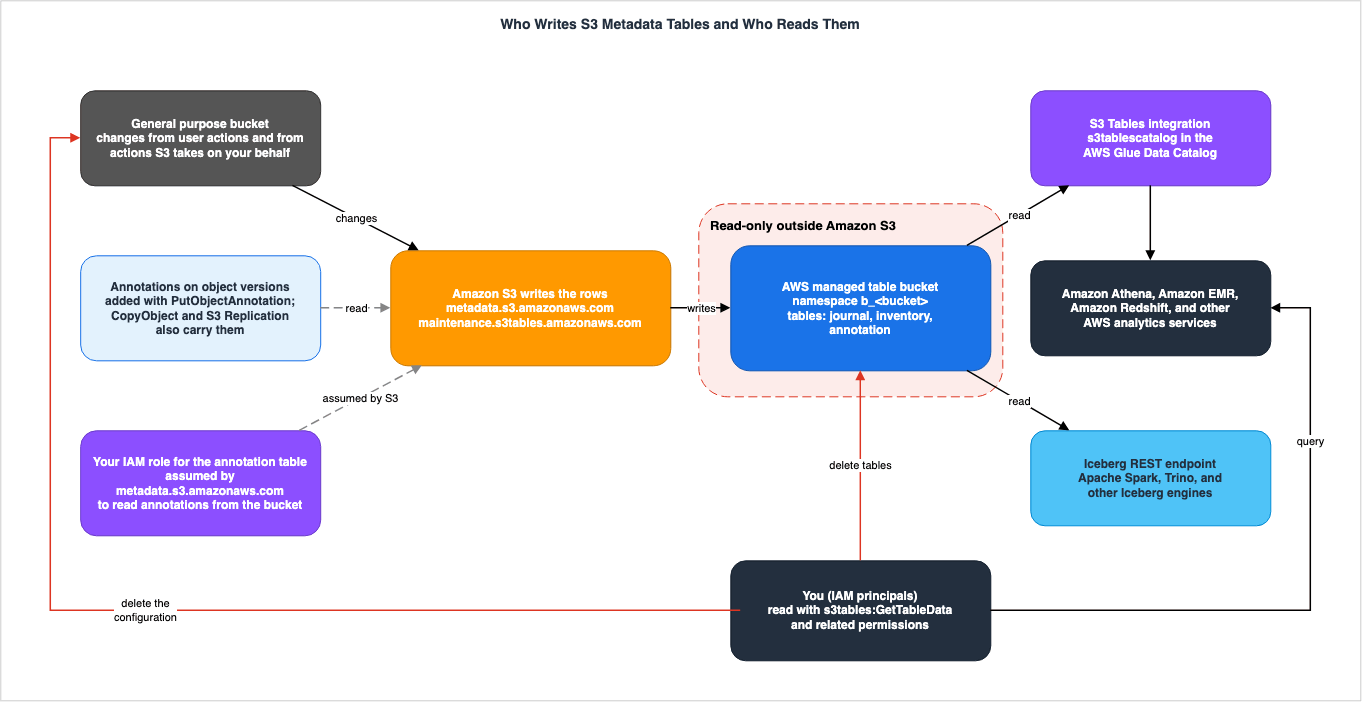
3.3 For the Annotation Table, S3 Reads Annotations Through a Role You Pass
On the writing side, the annotation table differs in one way from the journal table and the inventory table: to enable it, the user must pass an IAM role. The page on enabling annotation tables states: "The annotation table requires an IAM role that grants Amazon S3 Metadata permission to read annotations from your bucket."The trust policy for the role specified on this page allows
metadata.s3.amazonaws.com to assume the role, and narrows the account and bucket for which the role can be assumed with the aws:SourceAccount and aws:SourceArn conditions. The permissions policy grants access to the following operations: s3:GetObjectAnnotation, s3:GetObjectVersionAnnotation, s3:ListBucket, s3:ListBucketVersions, and kms:Decrypt. All of them are operations for reading annotations from the general purpose bucket. The principal creating the configuration must have the iam:PassRole permission to provide this role (the configuration permissions page provides an example using the condition key iam:PassedToService with the value metadata.s3.amazonaws.com). In the console, you can also have S3 create the role.Therefore, for the annotation table, the writer has to be read as three separate things.
- S3 writes the rows to the table. The Section 3.2 sentence about metadata tables also applies to the annotation table.
- When S3 Metadata reads annotations from a general purpose bucket, it uses the role provided by the user.
- The principal that adds the annotations determines the names and content of the annotations that populate the table. The annotations page describes
PutObjectAnnotationas "Creates or overwrites an annotation on an object." Annotations can be added or removed through other means as well.CopyObjectby default copies annotations from the source object ("Copies annotations from the source object by default."), and S3 Replication automatically replicates annotations ("Amazon S3 replicates annotations automatically."). In non-versioned buckets, deleting or overwriting an object also removes its annotations. The S3 FAQ states, "Annotations are mutable throughout the object's lifetime and automatically flow into queryable S3 Metadata annotation tables."
No statement was found on what happens to the annotation table when the provided role later loses its permissions (Section 8.4). The role can be replaced. The page for
UpdateBucketMetadataAnnotationTableConfiguration describes this operation as, "Use this operation to enable or disable the annotation table, or to update its associated IAM role." The operation pages in the API reference (for CreateBucketMetadataConfiguration and UpdateBucketMetadataAnnotationTableConfiguration) describe the role's permissions policy, as the user guide does, as granting the actions needed to read annotations from the bucket. Only the page describing the AnnotationTableConfiguration data type explains the role as, "The ARN of the IAM role used to manage the annotation table" (Section 8.1). The permissions and design for attaching annotations are outside the scope of this article.3.4 When S3 Cannot Write, the Configuration and Tables Must Be Re-Created
If only S3 can write, it also means that when S3 is unable to write, users cannot fix the tables in place of S3. The access control page is written as follows:If Amazon S3 is unable to write to your table bucket or your metadata tables, you must delete
your metadata configuration, delete your metadata tables, and then create a new configuration.The API reference for
ErrorDetails lists errors that occur even when the configuration request is successful, but S3 Metadata is unable to create the table. One of these, AccessDeniedWritingToTable, begins with "Unable to write to the metadata table because of missing resource permissions." and continues by stating that S3 needs to create a new metadata table to correct the resource policy. The TableStatus field of JournalTableConfigurationResult, which indicates the state of the journal table, defines FAILED as "Amazon S3 is unable to create the journal table, or Amazon S3 is unable to deliver records."The inventory table depends on the journal table. In the API reference, the
ErrorDetails page states for the error code JournalTableNotAvailable, "The journal table that the inventory table relies on has a FAILED status. An inventory table requires a journal table with an ACTIVE status."In other words, users cannot write to the tables, but they can prevent S3 from writing. If table bucket policies or table policies restrict writing by the two service principals, the situation that the access control page describes follows. For tables encrypted with SSE-KMS, the configuration permissions page also requires granting the same two service principals specific operations through the KMS key policy. To revert after S3 is unable to write, you will need to re-create the configuration and tables. The journal table created with the re-created configuration will only record changes made after the new configuration was created (see Section 4.3). When the inventory table is re-created, a new backfill process will run.
3.5 What You Can Delete or Expire — Tables, the Configuration, and Records
Here are three things users can act on. Users can delete tables and configurations. For records in the journal table, users can turn on record expiration, and records older than the retention period then expire. The sources describe these three as separate operations.Deleting Configurations. The page dedicated to deleting configurations states, "Deleting a metadata table configuration deletes only the configuration. The AWS managed table bucket and your metadata tables still exist, even if you delete the metadata table configuration. However, the metadata tables will no longer be updated." Deleting a configuration will leave the tables intact, but will stop updates.
Deleting Tables. The page on deleting tables states, "Deleting a table is permanent and can't be undone." It lists AWS CLI, AWS SDK, and Amazon S3 REST API as methods, with the CLI example being
aws s3tables delete-table. This page does not list the console as a method. The sources are inconsistent on whether deleting the configuration before the table is recommended or required. The page on deleting tables recommends deleting the configuration before the table ("we recommend that you first delete the associated metadata table configuration"). The troubleshooting page says the configuration must be deleted before the table ("you must first delete the associated metadata table configuration"). This article does not align with either (see Section 8.3). Before deleting the AWS managed table bucket, you must delete all tables within that bucket. The page on deleting tables recommends deleting the configurations related to the bucket first ("we recommend that you first delete all metadata table configurations"), and the troubleshooting page says it is required (Section 8.3).Record Expiration. Journal table records do not expire by default. Enabling record expiration will cause records older than a specified number of days to be deleted. The number of days can be specified as an integer between 7 and 2147483647. Deleted records cannot be recovered ("After journal table records expire, they can't be recovered."). See Section 4.5 for details on expiration timing.
S3 FAQ Text. The S3 FAQ states, "Your tables will be read-only, and only S3 will have permission to write, update, or delete metadata." This appears contradictory to the user guide, which states, "You can, however, delete your metadata tables." However, the two statements refer to different objects. The user guide refers to tables (metadata tables), while the FAQ refers to metadata. This article does not treat the two statements as a disagreement, and writes them in the tables separately by operation and object. The FAQ statement should not be interpreted to mean that users cannot delete their tables.
Encryption Settings. The encryption type of a table can only be set when the table is created ("You can set the encryption type for your tables only during table creation. After an AWS managed table is created, you can't change its encryption setting."). AWS managed table buckets do not count toward S3 Tables quotas ("AWS managed table buckets don't count toward your S3 Tables quotas.").
3.6 Where the Tables Live — aws-s3 and a Different Name in an Output Example
The user guide's overview page describes the name and ARN format of the AWS managed table bucket as follows:These AWS managed table buckets are named aws-s3 and have the following Amazon Resource Name (ARN) format:
arn:aws:s3tables:region:account_id:bucket/aws-s3The name
aws-s3 appears in several places, including the configuration creation page, the configuration permissions page, the query permissions page, the page on deleting tables (in the CLI example), the AWS managed table bucket page for S3 Tables, the S3 FAQ, and the page listing table names for S3 Storage Lens. The user guide's example queries page also names tables in the s3tablescatalog/aws-s3 catalog or tells you to select that catalog.In contrast, the example output on the configuration viewing page shows the
TableBucketArn in the response to GetBucketMetadataConfiguration as follows:"TableBucketArn": "arn:aws:s3tables:us-east-2:111122223333:bucket/aws-managed-s3-111122223333-us-east-2",Within the same user guide, the names are inconsistent. This article does not determine which name is the actual one. To check it in an actual configuration, read the
TableBucketArn in the response to GetBucketMetadataConfiguration. The API reference describes this value as "The Amazon Resource Name (ARN) of the table bucket where the metadata configuration is stored." This article has not read this value in an actual configuration.4. Writer-Reader Table, Part 2 — Who Can Read Each Table and How Current a Read Is
This section presents the Writer-Reader Table, Part 2, outlining the access paths and permissions for reading the tables, as well as the point in time that each of the three tables represents, including snapshots and record retention.4.1 Writer-Reader Table, Part 2
| Table | Who Can Read It | How Current a Read Is | Where the Source Says So |
|---|---|---|---|
Journal table (journal) | States: Through the integration, AWS analytics services such as Amazon Athena, Amazon EMR, and Amazon Redshift can read it. You can build dashboards with Amazon Quick. Engines that support Iceberg, such as Apache Spark and Trino, read it through Iceberg's REST endpoints or client catalogs. Permissions required are s3tables:GetTable, s3tables:GetTableData, and s3tables:GetTableMetadataLocation. For tables encrypted with SSE-KMS, kms:Decrypt is also required. AWS Lake Formation can control access to rows and columns. | States: Only changes made after the configuration. "near real time". "eventually consistent". For rows of objects that have already been overwritten or deleted, some columns may be NULL. The SQL comments in the example query indicate that, although this is not typical, the same event may be delivered to the table multiple times. Sources disagree: The AWS Storage Blog (2026-08-05) states "a journal table (real-time change events)"; the next sentence of the same post says "These tables update in near real time" (Section 8.2). States: "For each table, Amazon S3 stores a minimum of 1 snapshot for a maximum of 24 hours." | S3 User Guide (overview page, journal table schema page, querying page, query permissions page, access control page, example queries page), AWS Storage Blog |
Live inventory table (inventory) | States: Same pathways and permissions as the journal table. | States: After backfilling ("minutes (minimum 15 minutes) to hours"), "typically reflected in the live inventory table within one hour". Sources disagree: The API reference states "within one hour" without typically, and the S3 FAQ states "updated hourly" (Section 8.2). States: "For each table, Amazon S3 stores a minimum of 1 snapshot for a maximum of 24 hours." | S3 User Guide (overview page, page on enabling live inventory tables, live inventory table schema page), S3 API Reference, S3 FAQ |
Annotation table (annotation) | States: The example queries page states, "you can query annotation data using Athena or other analytics services that support Apache Iceberg tables", and provides an example table name format: "s3tablescatalog/aws-s3"."b_bucket-name"."annotation". General rule only: the permissions to read (the query permissions page names only the journal and live inventory tables). | States: After backfilling ("minutes to hours"), "typically reflected in the annotation table within one hour". Sources disagree: The AWS News Blog (2026-06-16) states "within approximately one hour" (Section 8.2). The source does not say. Snapshot retention (the user guide's sentence names only the journal table and the inventory table). | S3 User Guide (page on enabling annotation tables, example queries page), AWS News Blog |
| S3 Inventory report (comparison) | States: Users who can read objects in the destination bucket ("A user with read access to objects in the destination bucket can access all object metadata fields that are available in the inventory list."). Can be queried using Athena or Amazon Redshift Spectrum with SQL. | States: Daily or weekly ("on a daily or weekly basis"). After the initial report, weekly reports are generated on Sundays (UTC). The first report may take up to 48 hours to be delivered: "It might take up to 48 hours for Amazon S3 to deliver the first inventory report." Each report is a snapshot of the bucket, and "These lists are eventually consistent (that is, a list might not include recently added or deleted objects)." | S3 User Guide (S3 Inventory page) |
4.2 Read Paths and the Permissions to Read
The querying page lists two paths for reading metadata tables. The first path utilizes integration with S3 Tables and AWS analytics services. Following integration, tables can be directly read from AWS analytics services such as Amazon Athena, Amazon EMR, and Amazon Redshift, allowing users to create dashboards using Amazon Quick. The second path involves using AWS Glue's Iceberg REST endpoint, S3 Tables' Iceberg REST endpoint, and the Iceberg client catalog (Amazon S3 Tables Catalog for Apache Iceberg), accessed through applications that support the Iceberg format, such as Apache Spark and Trino.For each engine, the user guide provides specific instructions.
- Athena: Specify the catalog as
s3tablescatalog/aws-s3and the namespace (typicallyb_<bucket>). The namespace name must be enclosed in either double quotes or backticks. If you do not, the query might not work ("otherwise the query might not work"). - Amazon Redshift: Create a resource link to the namespace before attempting to read data. As with Athena, the namespace name must be enclosed in double quotes or backticks.
- Apache Spark on Amazon EMR and other third-party engines: The user guide recommends the S3 Tables Iceberg REST endpoint. Without it, a query might not run successfully ("Your query might not run successfully if you don't use this endpoint."). For connecting to the Iceberg REST API from a VPC, see Section 5.3 of Private Connectivity by Service on AWS Data Services.
The IAM permissions required for reading data are outlined in the query permissions page, specifically
s3tables:GetTable, s3tables:GetTableData, and s3tables:GetTableMetadataLocation. If the tables are encrypted using SSE-KMS, the kms:Decrypt permission is also necessary. The resources involved are the AWS managed table buckets and the tables within them. The access control page explains that resource-based policies can be applied to both the table buckets and the tables to control access, while access to rows and columns in the tables is managed through AWS Lake Formation.The method for granting permissions for integration needs to be verified on the integration page. This page states, "The AWS analytics services integration process has been updated to use IAM permissions by default", and the integration overview page notes that Lake Formation is also required in some Regions. Conversely, the page on querying metadata tables with AWS analytics services indicates that Lake Formation permissions can resolve two specific errors encountered with Athena. This article simply states that the page to consult depends on the integration method used. The specifics of the integration method itself are detailed in Section 4.5 of the AWS Data Lakehouse Architecture Guide and on the integration page.
The configuration creation page says that if a table bucket has already been integrated in the same Region, the AWS managed table bucket will also be automatically integrated.
4.3 The Journal Table — Changes After the Configuration, in Near Real Time, Eventually Consistent
The journal table records only changes made after the metadata table configuration is created. The user guide states, "The journal table captures metadata only for change events (such as uploads, updates, and deletes) that happen after you create your metadata table configuration." Objects that existed in the bucket before the configuration are not reflected in the journal table until they are subsequently modified.Regarding recording speed, the user guide states, "The journal table records changes made to your data in near real time". The S3 FAQ indicates that new objects are added to the journal table "within minutes". This article does not write either as real time in the sense of immediate.
The journal table provides eventual consistency for changes to the bucket. The schema page states:
S3 Metadata journal tables are eventually consistent with the changes that have occurred in
your general purpose bucket. In some cases, by the time S3 Metadata is notified that an object
is created or updated, that object might already have been overwritten or deleted in the
bucket. In such cases, the objects can no longer be retrieved and some columns might show a
NULL value to indicate missing metadata schema.
Furthermore, among the example queries in the user guide, the SQL comment for the query that retrieves the current state of an object states, "This isn't typical, but some events can be delivered more than once to the table". This query eliminates duplicates by selecting only the row with the highest
sequence_number for each combination of bucket, key, and version_id. This is a statement in the SQL comment, not in the main text. The method for eliminating duplicates when counting records in the journal table is demonstrated in this example query.The
record_type column categorizes the rows in the journal table. The possible values are CREATE, UPDATE_METADATA, DELETE, CREATE_ANNOTATION, DELETE_ANNOTATION, and UPDATE_ANNOTATION_METADATA, representing six different types of events. The last three represent changes related to annotations. For rows associated with the same bucket and key, the lexicographical order of sequence_number determines the order. All columns (29 in total) in the journal table are detailed on the journal table schema page. This article only uses the columns required for the questions in Section 5.4.4 The Live Inventory Table and the Annotation Table — Typically Within One Hour After Backfilling
When you enable the live inventory table, S3 scans the general purpose bucket and populates the table with metadata for all existing objects. This process is referred to as backfilling. The user guide states that this process can take "minutes (minimum 15 minutes) to hours", and notes that the table status changes fromBackfilling to Active upon completion. It further states, "After backfilling is completed, updates to your objects are typically reflected in the live inventory table within one hour."This statement contains both a condition (after backfilling is complete) and a qualifier:
typically. This article does not state that the inventory table will definitively catch up with changes within one hour. The API reference, the S3 FAQ, and the product page describe the same concept with varying degrees of certainty, as detailed in Section 8.2.The annotation table is described in a similar manner. The page for enabling the annotation table states that backfilling can take "minutes to hours" and includes the statement, "After backfilling is completed, updates to your objects are typically reflected in the annotation table within one hour." Unlike the live inventory table, the annotation table's backfilling process does not specify a "minimum 15 minutes" timeframe.
The inventory table contains the current state of an object in each row. The schema page states, "Each row represents the current state of an object in your general purpose bucket." The annotation table has one row for each annotation on a specific object version ("Each row represents one annotation on a specific object version."). The inventory table has 17 columns, while the annotation table has 12. Both tables lack columns equivalent to the
record_type, requester, and source_ip_address columns found in the journal table. Regarding the inventory table, the schema page's note about is_delete_marker mentions the record_type and requester fields for delete marker rows, but these two columns are not listed in the inventory table's column list. This is the same note found on the schema page for the journal table.4.5 Snapshots and Record Expiration — How Far Back You Can Go
Metadata tables are Iceberg tables and therefore have snapshots. However, users cannot control how long the snapshots of the journal table and the inventory table are retained. The user guide states:You can't control the expiration of journal table or inventory table snapshots. For each
table, Amazon S3 stores a minimum of 1 snapshot for a maximum of 24 hours.This statement specifically refers to the journal table and the inventory table. No statement was found on the retention of snapshots for the annotation table (Section 8.4).
Record expiration for the journal table is a separate mechanism from snapshots. The page describing record expiration states:
- By default, records are not expired.
- When expiration is enabled, you can specify the number of days to retain records, as an integer between 7 and 2147483647 ("Journal table records must be retained for a minimum of 7 days." in the API reference for
RecordExpiration). - "Records are expired within 24 to 48 hours after they become eligible for expiration." Expired records are removed from the latest snapshot and the associated data and storage space are removed as part of the table maintenance process.
- Expired records cannot be recovered. You can disable expiration at any time.
This information determines how far back you can go. The means to trace past changes are the rows in the journal table. These rows remain unless expiration is enabled. Conversely, the sources do not describe a method for reading the state of a table at a specific point in time using Iceberg snapshots (
time travel is not mentioned). As a general rule, the S3 FAQ says that data in a table bucket can be used with "analytics capabilities such as row-level transactions, queryable table snapshots, and more", but it does not name the metadata tables. It can be inferred that if the snapshots for the journal table and inventory table are only retained for a maximum of 24 hours, then it is not possible to read the state of the table from snapshots older than that. This is an inference from the retention statement.The page on enabling live inventory tables mentions one use of the inventory table: comparing the table at two different points in time to understand the growth in objects with specific tags ("Compare your inventory table at two different points in time to understand the growth in objects with specific tags."). The sources do not specify how far apart these two points in time can be. If you want to compare points in time that are more than 24 hours apart, it is likely that you will need to write the results of a query to your own table bucket and store them. This is also an inference. Examples of queries to write and store results can be found in Section 5.5.
Figure 2 illustrates the points in time reflected by the three tables, along with the retention mechanisms. It has no time scale, because the user guide, whose wording the figure follows, gives time words, bounds, and conditions rather than fixed intervals.
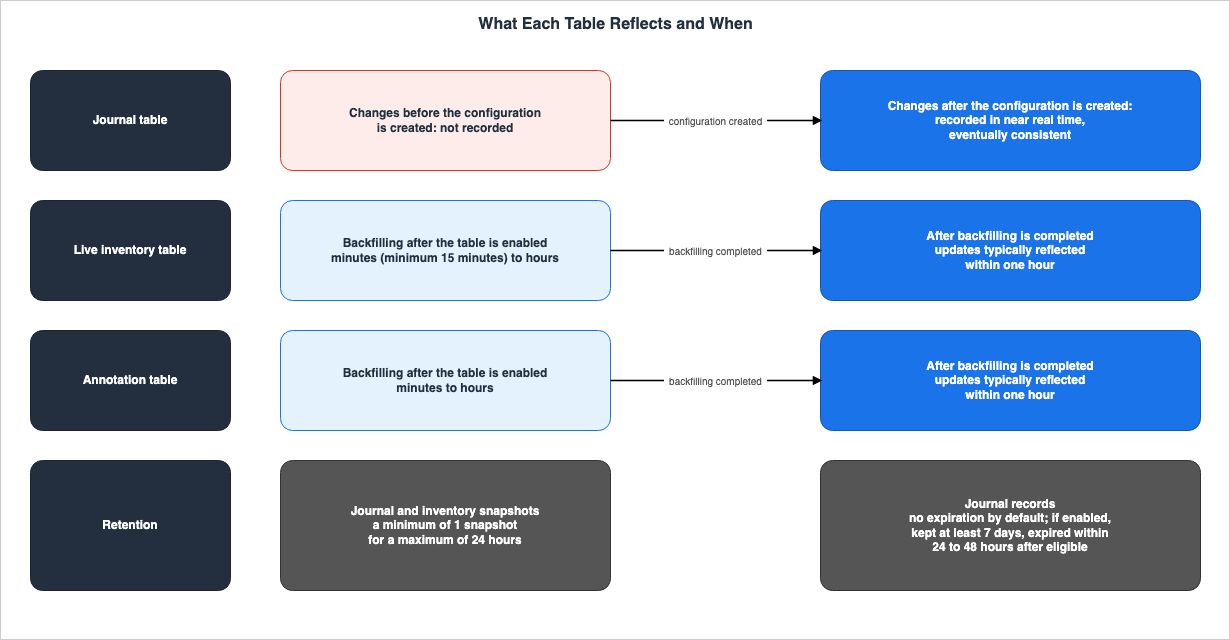
5. Questions You Can Answer Without Listing the Bucket
This section lists questions that can be answered using SQL against the metadata tables, organized by table and column and by the conditions the sources attach. The AWS News Blog (July 15, 2025) states that, since the launch of S3 Metadata at re:Invent 2024, it has been possible to query metadata for new and updated objects using metadata tables, without relying on S3 Inventory or on object-level APIs such asListObjects, HeadObject, and GetObject. The same article introduces the live inventory table as including existing objects through backfilling ("including existing objects, thanks to backfill support"). This article cites this as AWS's description. The following table details which questions can be answered under which conditions.5.1 Questions the Tables Answer
| Question | Table and Columns | Condition the Source Attaches | Where the Source Says So |
|---|---|---|---|
| Objects currently in the bucket and their most recent state. | Overlay the most recent snapshot of the inventory table with the most recent rows from the journal table (as shown in the example query in the user guide). | For the most accurate results, both tables must be in the Active state. Recommended for buckets containing fewer than one billion (10^9) objects. In rare cases, it can temporarily return objects that are no longer in the bucket. | Example queries page |
| Objects with specific storage classes, tags, and encryption statuses. | Inventory table: storage_class, object_tags, encryption_status. | After backfilling, changes are typically reflected within one hour. | Inventory table schema page, example queries page |
| Recently created objects and deleted objects. | Journal table: record_type, record_timestamp. | Only changes made after the configuration was created. Eventually consistent. | Journal table schema page, example queries page |
| Objects deleted by S3 Lifecycle. | Journal table: requester (s3.amazonaws.com) and record_type (DELETE). | Same as above. Delete-marker rows created by S3 Lifecycle expiration also have a requester of s3.amazonaws.com. | Journal table schema page, example queries page |
| Which account or service made the change, and from where. | Journal table: requester, source_ip_address, request_id. | The requester field represents either an AWS account ID or an AWS service principal. For operations performed by S3 or other AWS services on behalf of a user, the source_ip_address is NULL. | Journal table schema page |
| Which KMS key was used to encrypt the object. | Journal table and inventory table: kms_key_arn. | NULL for rows whose version no longer existed when the delete or overwrite was processed. | Schema pages for both tables |
| Objects with a specific annotation name and the contents of that annotation. | Annotation table: name, text_value. | After backfilling, changes are typically reflected within one hour. | Annotation table schema page, page on enabling annotation tables, example queries page |
| View annotations and the latest state of objects together. | Join the annotation table and the inventory table using the object_join_key. | The user guide tells you to use object_join_key when joining these tables. | Example queries page |
| Determine the current version of each object. | Derive is_latest from the sequence_number in the inventory table. | Applies to buckets with versioning enabled or suspended. If writing the results to a new table, a customer-managed table bucket and namespace are required. | Example queries page |
5.2 Overlaying the Latest Journal Events on the Latest Inventory
If changes typically reach the inventory table within one hour, the most recent changes may not be in the inventory table yet. One of the example queries in the user guide addresses this discrepancy. The example queries page explains that "the resulting list combines the latest snapshot of the inventory table with the latest events in the journal table."This query includes three specific conditions:
- Table Status: "For this query to produce the most accurate results, both the journal and inventory tables must be in Active status."
- Bucket Size: "We recommend using this query for general purpose buckets containing fewer than a billion (10^9) objects." This is a recommendation, not a strict limit. The user guide does not say that the query fails on buckets with a billion objects or more.
- Rare, Temporary Discrepancies: "The query could, in rare cases, temporarily report objects that are no longer in the bucket. Those discrepancies are eliminated as soon as the next snapshot of the inventory table becomes available." The user guide describes this as a trade-off between performance and accuracy.
The query reads the value of
aws.s3metadata.oldest-uncoalesced-record-timestamp from the "journal$properties" in the journal table, and then overlays the journal entries that occurred after 15 minutes prior to that timestamp with the corresponding entries in the inventory table. For entries with the same key and version, the entry with the highest sequence_number is retained, and objects that were permanently deleted are dropped. The full query is detailed on the example queries page; the complete query is not included in this article.5.3 What S3 Lifecycle Deleted, and Who Wrote From Where
Therequester column in the journal table indicates either the AWS account ID that made the request, or the AWS service principal that initiated the request. The schema page states, "For example, if the requester is S3 Lifecycle, this value is s3.amazonaws.com." The example queries page shows a query that lists objects deleted by S3 Lifecycle in the past 24 hours, using the conditions requester = 's3.amazonaws.com' and record_type = 'DELETE'. Rows representing delete markers created as a result of S3 Lifecycle expiration also have a record_type of DELETE and a requester of s3.amazonaws.com. However, the schema page describes the actions S3 takes on behalf of users by giving S3 Lifecycle expirations and storage class transitions as examples ("such as S3 Lifecycle expirations or storage class transitions"). The sources do not explicitly state that all rows with a requester of s3.amazonaws.com represent actions performed by S3 Lifecycle.The time between an object's expiry and its deletion by S3 Lifecycle, and the other places where that deletion is recorded, are mapped in When Expired Data Is Actually Deleted on AWS on this site.
The columns that indicate who wrote the data and from where are only present in the journal table. These columns are
requester, source_ip_address, and request_id. The requester column indicates either the AWS account ID that made the request, or an AWS service principal. There are no columns in the journal table schema that identify IAM users or roles. Regarding source_ip_address, the schema page states, "For actions taken by Amazon S3 or another AWS service on behalf of the user, this column contains a null value." The inventory and annotation tables do not include these columns (see Section 4.4).Therefore, the question of who wrote the data can only be answered in the scope of the journal table. This scope includes changes that were made after the configuration and that have not yet been deleted due to record expiration.
5.4 Searching by Annotation — The Annotation Table and object_join_key
The annotation table has one row per annotation on an object version. It has 12 columns: bucket, object_key, object_version_id, object_join_key, name, sequence_number, last_modified_date, size, e_tag, checksum_algorithm, replication_status, and text_value. Note that the column name for the object's key is object_key, which differs from the key column in both the journal table and the inventory table. replication_status is the replication status of the annotation, not of the object (Section 6.2).To view both the annotation and object status together, you need to join the annotation table with the inventory table. The example queries page shows how to join using
bucket, the key (both key and object_key), and object_join_key, and advises, "Use the object_join_key column when joining annotation and inventory tables to ensure consistency." The object_join_key is a unique identifier for the object, assigned with each new version or when the null version is created or overwritten.The page describing how to enable the annotation table lists one use case as "Find all objects that have annotations applied by a specific principal." However, the annotation table schema does not include a column indicating the principal who applied the annotation. The sources do give the column that joins the journal table and the annotation table. The journal table schema page describes
object_join_key as "Use this column to join with the annotation table." and the annotation table schema page states "Use this column to join with the inventory or journal tables." Since the journal table includes rows related to annotations (such as CREATE_ANNOTATION) and these rows have a requester column, it can be inferred that the query to find annotations applied by a specific principal can be answered by joining with the journal table. This is an inference, as there is no example query for this use case in the user guide. Furthermore, the requester field represents either the AWS account ID that made the request or an AWS service principal; there is no column in the journal table schema that indicates IAM users or roles. Therefore, if the query requires identifying annotations based on IAM users or roles, this inference will not provide an answer. An AWS News Blog post (June 16, 2026) demonstrates a query that extracts annotation creation and deletion events using only the journal table.5.5 Results Go to Your Own Table Bucket
AWS managed table buckets are read-only, so you cannot write results made from the metadata tables into the same bucket. One of the user guide's example queries, which finds the current version of each object, can write its results to a new table. For writing them, the page says, "You must have an existing customer-managed table bucket with an existing namespace as a place to output the new table." If you do not write them out, this preparation is not needed ("If you choose not to output the results to a new table, you can skip these steps."). The table where you output the data will include a column namedis_latest, which corresponds to the IsLatest field in the S3 Inventory report.You can also join the metadata tables with custom metadata tables you create yourself. The page describing custom metadata joins provides an example that connects using
bucket, key, and version_id.The AWS Storage Blog (August 5, 2026) shows how to create a materialized view in AWS Glue based on an annotation table and place it in your customer-managed table bucket. The writers and readers of materialized views are left to Apache Iceberg Materialized Views on AWS.
6. Questions the Metadata Tables Cannot Answer
This section lists the questions that metadata tables cannot answer, and the alternatives the sources give. The user guide's limitations page states, "Metadata tables don't contain all the same metadata as is available through S3 Inventory or through the Amazon S3 REST API." A sentence in the S3 FAQ says that the live inventory table holds all the information S3 knows, and the two disagree (Section 8.1). This article follows the explicit list on the limitations page. Questions that cannot be answered get the same weight here as those that can.6.1 Questions the Tables Cannot Answer
| Question | What the Source Says About Metadata Tables | Where It Is Instead | Where the Source Says So |
|---|---|---|---|
| S3 Lifecycle expiration eligibility or transition status | "S3 Lifecycle expiration eligibility or transition status" is not in the tables (one of the four items the limitations page gives as examples). | The Lifecycle Expiration Date field in the S3 Inventory report. No corresponding field for transition status was found in the list of fields on the S3 Inventory page. | Limitations page, S3 Inventory page |
| Object Lock retention | "Object Lock retention period or governance mode" is not in the tables (same as above). | The S3 Inventory report includes five fields related to Object Lock. | Limitations page, S3 Inventory page |
| ACL (Access Control List) | "Object access control list (ACL) information" is not in the tables (same as above). | The S3 Inventory report includes the Object access control list field. | Limitations page, S3 Inventory page |
| Object replication status | "Replication status" is not in the tables (same as above). | The S3 Inventory report includes the Replication status field. | Limitations page, S3 Inventory page |
| S3 Intelligent-Tiering tier | "For the S3 Intelligent-Tiering storage class, the specific tier isn't shown in the metadata table." (a separate item from the four) | The S3 Inventory report includes the S3 Intelligent-Tiering access tier field. | Limitations page, S3 Inventory page |
| Changes that occurred before configuration | The journal table only records changes made after the configuration is created. | The source does not say. The S3 Metadata chapter does not mention any alternative methods. | Overview page, limitations page |
| Objects within directory buckets, table buckets, and vector buckets | "S3 Metadata isn't supported for directory buckets, table buckets, or vector buckets." | For directory buckets, the S3 Inventory configuration page (read on October 7, 2026) states, "S3 Inventory is supported for directory buckets." For table buckets and vector buckets, the source does not say. The S3 Metadata chapter does not mention any alternative methods. | Limitations page, S3 Inventory configuration page |
6.2 The Four Items the Limitations Page Gives as Examples, and Intelligent-Tiering in a Separate Item
The limitations page lists what is not in the tables in the following form.Metadata tables don't contain all the same metadata as is available through S3 Inventory or
through the Amazon S3 REST API. For example, the following information isn't available in
metadata tables:
S3 Lifecycle expiration eligibility or transition status
Object Lock retention period or governance mode
Object access control list (ACL) information
Replication statusFour items are listed under this lead-in. These four items are examples that follow
For example; they are not everything that is missing from the tables. When determining the full list of limitations, it is necessary to check the schemas of the three tables and verify if the desired columns exist.The S3 Intelligent-Tiering tier is in an item separate from the four. The limitations page states that S3 Metadata supports all storage classes supported by general purpose buckets, but adds, "For the S3 Intelligent-Tiering storage class, the specific tier isn't shown in the metadata table." While the
storage_class column indicates INTELLIGENT_TIERING, it does not specify the tier.There is another distinction regarding S3 Lifecycle. The limitations page notes that Lifecycle transition statuses are not listed in the table. In contrast, the journal table records S3 Lifecycle's storage class transitions as rows. The schema page for the journal table indicates that
UPDATE_METADATA rows record changes to metadata, such as storage class, and lists monitoring lifecycle transitions ("monitor lifecycle transitions") as a use of the journal table. This article reads it this way: events after a transition has happened are in the journal table, and the transition status is not.Regarding replication, a similar point requires attention. The annotation table has a
replication_status column, and the journal table has an annotation.replication_status column. Both are the replication status of annotations. The Replication status that the limitations page says is not in the tables is the replication status of objects.The S3 Inventory report includes these items (although no item related to Lifecycle transition status was found in the list on the S3 Inventory page). The list of items on the S3 Inventory page includes:
Lifecycle Expiration Date, five Object Lock items (retain-until date, retention mode, legal hold status, event hold status, and event hold duration), Object access control list, Replication status, and S3 Intelligent-Tiering access tier. The method for verifying Object Lock items using S3 Inventory, and the fact that the report's dates reflect the values at the time the report was generated, are discussed in Section 9.2 of Object Lock, Legal Holds, and Event Holds in Amazon S3.6.3 Before the Configuration, Unsupported Buckets, and Prefixes
Beyond the items missing from the tables, there are three questions that the metadata tables cannot answer.Changes Prior to Configuration. The journal table only records changes made after the configuration is created (see Section 4.3). The inventory table backfills the current state of existing objects, but does not store a history of past changes. The What's New post of July 15, 2025 states that S3 Metadata, previously only applicable to new and updated objects, now supports existing objects. The metadata for existing objects is populated through the inventory table's backfill process. That update did not make the history of changes from before the configuration available in the journal table.
Excluded Buckets. The limitations page states, "S3 Metadata isn't supported for directory buckets, table buckets, or vector buckets. You can create metadata table configurations only for general purpose buckets."
Prefixes. Configurations can only be applied at the bucket level ("You can't apply a metadata table configuration at the prefix level."). However, when querying the table, it is possible to filter by key prefixes. The user guide examples include comments demonstrating how to use a
WHERE clause to filter by prefix. The limitation is regarding the scope of table creation, not the scope of querying.The limitations page also notes that the configuration cannot be stored in a customer-managed table bucket ("You can't store your configuration in a customer-managed table bucket."), and that S3 Metadata is only available in certain Regions. As of October 6, 2026, the Region table on the limitations page listed 32 Regions. A What's New post of October 15, 2026 (Amazon S3 Metadata now available in six additional AWS Regions) added six Regions, and on October 16, 2026, the table lists 38 Regions. This article does not list Regions, instead deferring to the table on the limitations page.
6.4 Placing S3 Inventory Reports Alongside
The S3 Inventory page describes S3 Inventory as an alternative run on a schedule ("provides a scheduled alternative to the Amazon S3 synchronous List API operations"). The reports are generated daily or weekly, covering either the entire bucket or objects with a common prefix, and are output as CSV, ORC, or Parquet files. It may take up to 48 hours for the first report to become available.Side by side, the two suit different questions. Metadata tables provide SQL-readable tables containing both a historical record of changes after the configuration (a journal table) and the current state (an inventory table, typically updated within one hour after backfilling). S3 Inventory reports, on the other hand, provide a snapshot of the data at the time the report was generated, presented as files. Neither set of fields contains the other. S3 Inventory reports have fields that the metadata tables lack, including the five Object Lock fields,
Object access control list, Replication status, Lifecycle Expiration Date, and S3 Intelligent-Tiering access tier. Conversely, the list of attributes included in the S3 Inventory page does not include object tags, user-defined metadata, KMS key ARNs, the requester, or the source IP address – all of which are columns in the metadata tables. The annotations page lists S3 Inventory reports among the features that do not support annotations ("Annotations are not supported by the following features: S3 Inventory Reports"). The user guide does not state that either option replaces the other. The limitations page says that the metadata tables do not contain all the same metadata as S3 Inventory.Methods for using S3 Inventory reports to process large numbers of objects are discussed in Section 4 of AWS Step Functions Distributed Map.
7. V1 and V2 Configurations, and What Cannot Be Paused
This section covers the differences between V1 and V2 configurations, how configurations created before July 15, 2025 are handled, and the operations that stop table updates.7.1 V1 Configurations Were Stored in Customer-Managed Table Buckets
The preview for S3 Metadata was announced on December 3, 2024, and the general availability was announced on January 27, 2025. Annotations were added on June 16, 2026. These three dates correspond to entries in the AWS History and Timeline regarding Amazon S3 timeline.The AWS News Blog post from the preview period (December 3, 2024) describes a process where users specify both the table bucket and the table name as locations for the metadata. The What's New post for general availability (January 27, 2025) states that S3 Metadata makes metadata queryable in "a read-only table". The user guide notes that in the initial release, the journal table was referred to as "the metadata table."
The API reference for
DestinationResult describes the difference in location between V1 and V2 as follows:The aws value indicates an AWS managed table bucket, and the customer value indicates a
customer-managed table bucket. V2 metadata configurations are stored in AWS managed table
buckets, and V1 metadata configurations are stored in customer-managed table buckets.As discussed in Section 3, the characteristics of AWS managed table buckets (read-only, only AWS services can create tables) apply to the V2 configuration. However, with the V1 configuration as well, S3 is responsible for creating tables and delivering records. The API reference for V1's
GetBucketMetadataTableConfigurationResult describes the table status as follows: ACTIVE is described as "The metadata table has been created successfully, and records are being delivered to the table", while FAILED is described as "Amazon S3 is unable to create the metadata table, or Amazon S3 is unable to deliver records." On the other hand, the What's New posts for the preview (December 3, 2024) and for general availability say "a read-only table". As a general rule, the comparison table on the page describing AWS managed table buckets gives customer-managed table buckets "Full access", but it does not name V1 tables. No statement was found on whether principals other than S3 can write to a V1 table in the customer-managed table bucket where it is stored.Regarding the operation for V1, the page for the API reference
CreateBucketMetadataTableConfiguration begins with the following statement:We recommend that you create your S3 Metadata configurations by using the V2
CreateBucketMetadataConfiguration API operation. We no longer recommend using the V1
CreateBucketMetadataTableConfiguration API operation.It is possible to use
GetBucketMetadataConfiguration and DeleteBucketMetadataConfiguration from V2 with V1 configurations. However, using V1's GetBucketMetadataTableConfiguration and DeleteBucketMetadataTableConfiguration with V2 configurations will result in an HTTP 405 Method Not Allowed error. You can determine whether the configuration is for V1 or V2 by checking the TableBucketType field in the response from GetBucketMetadataConfiguration. aws indicates V2, while customer indicates V1. The names of the actions in the IAM policies are the same for both V1 and V2 (e.g., s3:CreateBucketMetadataTableConfiguration).7.2 Configurations Created Before 2025-07-15
The What's New post of July 15, 2025 says that S3 Metadata creates and maintains two Apache Iceberg tables: a journal table and a new live inventory table. Configurations created before this date cannot have records expired, nor can inventory or annotation tables be added (see the troubleshooting page).The V1 page of the API Reference recommends re-creating the configuration as follows:
If you created your S3 Metadata configuration before July 15, 2025, we recommend that you
delete and re-create your configuration by using CreateBucketMetadataConfiguration so that you
can expire journal table records and create a live inventory table.
The user guide's configuration creation page writes the same recommendation with creating an annotation table added, and then says this about changes during the re-creation:
Any changes to your general purpose bucket that occur between deleting the old configuration
and creating the new one aren't recorded in either of your journal tables.
After re-creating the configuration, two journal tables remain, the old one and the new one ("After you create your new metadata configuration, you will have two journal tables."). The table associated with the old configuration resides in a customer-managed table bucket, while the table associated with the new configuration is located in the AWS managed table bucket (see Section 7.1,
DestinationResult). If you no longer need the old table, you can delete it; otherwise, you can join it with the new table and read them together.7.3 No Pause — Disabling, Deleting, and Re-Creating
Updates to metadata tables cannot be paused and resumed. The limitations page states, "You can't pause and resume updates to metadata tables." The ways to stop them are deleting the configuration and disabling the inventory table or the annotation table.- Deleting the configuration. The tables remain, but updates no longer occur (see Section 3.5). To re-create a configuration for the same bucket, you must first delete the existing journal, inventory, and annotation tables. If you do not, creating the new configuration fails, because the tables already exist.
- Disabling the inventory table or the annotation table. The table remains after it is disabled. To enable it again, you must first delete the old table from the AWS managed table bucket. When it is enabled again, S3 creates a new table, and a new backfill process will run.
- Record expiration. This is not an operation that stops updates. You can disable expiration at any time (see Section 4.5).
The journal table of a re-created configuration only records changes made after the new configuration is created. The user guide clearly states that when re-creating from V1 to V2, changes made during that period will not be recorded (see Section 7.2).
8. Where the Sources Disagree, and Where No Statement Was Found
This section lists, in tables, 16 places where the sources say different things. The tables are split into three: counts and names (Section 8.1), timing (Section 8.2), and procedures and availability (Section 8.3). For each instance, rather than stating that one side is incorrect, the final column will describe how this article presents the information. It then lists the points where no statement was found (Section 8.4).8.1 Counts and Names
| Topic | One Source | Another Source | How This Article Writes It |
|---|---|---|---|
| Number of Tables | The user guide's overview page and configuration creation page state "up to three". The product page states "S3 Metadata provides three table types". The S3 FAQ also names "S3 Metadata annotation tables" in its answer about annotations. | In its answer about the types of tables, the S3 FAQ states, "S3 Metadata stores metadata in two managed tables in your account: journal tables and live inventory tables." The user guide's query permissions page also only mentions journal and live inventory tables. | The prose says up to three, with the FAQ's two listed alongside. On the two S3 Tables pages (on AWS managed table buckets and on table buckets), the mentions of two tables begin with "such as"; they are examples, so this article does not treat them as evidence of a disagreement. |
| Scope of Information in Tables | The limitations page states, "Metadata tables don't contain all the same metadata as is available through S3 Inventory or through the Amazon S3 REST API", and provides examples of what is not included. | The S3 FAQ states, "Live inventory tables are updated hourly and contain all the information that S3 knows about your objects." | This article follows the explicit list on the limitations page (Section 6.2), with the FAQ sentence listed alongside. |
| Name of AWS Managed Table Bucket | The user guide's overview page and many other pages use aws-s3. | The user guide's output example on the configuration viewing page shows aws-managed-s3-111122223333-us-east-2. | This article does not decide which. It tells you to verify using TableBucketArn in GetBucketMetadataConfiguration (Section 3.6). |
| Principal That Creates Tables | The comparison table on the S3 Tables page about AWS managed table buckets states, "Only AWS services can create tables". | The configuration permissions page explains s3tables:CreateTable as, "This permission allows you to create your metadata tables." | This article presents both. It states that tables are created in response to user requests, which require specific permissions (Section 3.2). |
| Table Status Values | The API reference lists CREATING, BACKFILLING, ACTIVE, and FAILED as inventory table statuses. | The user guide's output example on the configuration viewing page shows the inventory table status as BACKFILL_COMPLETE. | This article uses the values from the API reference. It also lists the value from the output example. Where it follows the user guide's text, it keeps the user guide's spelling (Backfilling, Active). |
| Description of Annotation Tables | The user guide describes annotation tables as "tracks the latest annotations". The API's documentation for the UpdateBucketMetadataAnnotationTableConfiguration operation states, "An annotation table is a queryable Iceberg table that contains records of all annotations attached to objects in the bucket." | The API's documentation for the AnnotationTableConfiguration data type states, "The annotation table is an Iceberg table that records annotation events for objects in the bucket." | This article uses the description from the user guide. It notes that annotation events are found in the journal table (Section 4.3). |
| Role Description for Annotation Tables | The API's documentation for the CreateBucketMetadataConfiguration and UpdateBucketMetadataAnnotationTableConfiguration operations describes the role's permissions policy as "a permissions policy that grants the actions needed to read annotations from your bucket." The user guide says that the policy "grants the IAM role the minimum permissions required to read annotations." | The API's documentation for the AnnotationTableConfiguration data type states, "The ARN of the IAM role used to manage the annotation table." | This article uses the user guide's description, focusing on permissions for reading operations (Section 3.3). |
8.2 Timing
| Topic | One Source | Another Source | How This Article Writes It |
|---|---|---|---|
| Speed of Journal Table Records | The user guide states "near real time". The S3 FAQ states "within minutes". What's New (2024-12-03, 2025-01-27) states "S3 Metadata updates the table within minutes to reflect the latest changes." | The AWS Storage Blog (2026-08-05) states "a journal table (real-time change events)". The next sentence of the same post says "These tables update in near real time". | This article uses the phrasing "near real time" as found in the user guide. It does not state "real time" (instantaneous). |
| Updates to Inventory Tables | The user guide states that after backfilling, updates are "typically reflected in the live inventory table within one hour." The AWS News Blog (2025-07-15) states that, after existing objects are backfilled, updates "typically appear within an hour in your live inventory tables." | The API reference for InventoryTableConfigurationResult states "After backfilling is completed, updates to your objects are reflected in the inventory table within one hour", without the word typically. The S3 FAQ states "Live inventory tables are updated hourly". The product page states "We update the metadata on an hourly basis" and also "Live inventory tables provide a continuously updated view of all objects and their current metadata across your bucket." The same AWS News Blog, in a different paragraph, states "refreshed automatically within an hour of changes". | This article uses the phrasing from the user guide, including typically and the condition of backfilling. It lists the other ways this is described. |
| Backfill Time | The user guide gives the inventory table's backfill as "minutes (minimum 15 minutes) to hours" and the annotation table's as "minutes to hours." | The API reference states, for the inventory table, "this process can take several hours." The S3 FAQ states "typically finishes in minutes but can take several hours if your existing datasets contain millions or billions of S3 objects." The AWS News Blog (2026-06-16) states that the annotation table's backfill can take "several hours to days". | This article uses the terminology found in the user guide and lists the other ways this is described. |
| Updates to Annotation Tables | The user guide states that after backfilling, updates are "typically reflected in the annotation table within one hour." | The AWS News Blog (2026-06-16) states "Journal tables update in near real time, while annotation tables refresh within an hour" and has no typically. In the same article, the phrase "within approximately one hour" is used in conjunction with "Once applied" (after configuration is applied), without mentioning backfilling. The AWS Storage Blog (2026-08-05) groups all three tables together, stating "These tables update in near real time". | This article uses the phrasing from the user guide. It does not use the phrasing from the Storage Blog as justification for the timing of inventory and annotation table updates. |
8.3 Procedures and Availability
| Topic | One Source | Another Source | How This Article Writes It |
|---|---|---|---|
| Deleting Configurations and Tables: Order of Operations | The page on deleting tables states, "we recommend that you first delete the associated metadata table configuration". | The troubleshooting page states, "you must first delete the associated metadata table configuration". | This article states that you should delete the configurations first, without specifying whether it is a recommendation or a requirement. |
| Deleting an AWS Managed Table Bucket: Deleting Configurations First | The page on deleting tables states, "we recommend that you first delete all metadata table configurations that are associated with this bucket. You must also first delete all metadata tables in the bucket." | The troubleshooting page states, "Before you can delete your AWS managed table bucket, you must delete all metadata table configurations that are associated with this bucket and all metadata tables in the bucket." | This article does not side with either. Both pages say that the tables must be deleted first. |
| Region Availability: Annotations | What's New (2026-06-16) states, "Annotations are available in all AWS Regions, including the AWS China Regions." What's New (2026-08-18) states, "Annotations are available in all AWS Regions and AWS GovCloud (US) Regions." | The annotations page states, "Annotations are not available in the Middle East (UAE) and Middle East (Bahrain) Regions." | This article lists both. The sentence on the Regions for annotation tables (all Regions where S3 Metadata is available) is the same in What's New (2026-06-16) and the annotations page. |
| Region Availability: Table Buckets | The Region table on the limitations page lists 38 Regions (October 16, 2026; 32 on October 6, 2026). | The console steps on the configuration creation page state, "Table buckets are available only in the US East (N. Virginia), US East (Ohio), and US West (Oregon) Regions." | This article relies on the information presented in the Region table on the limitations page. It lists the note in the console steps alongside. |
| Default Encryption for AWS Managed Table Buckets | The user guide's overview page states that after creating the initial configuration, you can set the bucket's default encryption to SSE-KMS. The Encryption section on the S3 Tables page also states, "After your AWS managed table bucket is created, you can use PutTableBucketEncryption to set the bucket's default encryption setting to use server-side encryption with AWS Key Management Service (AWS KMS) keys (SSE-KMS)." | The same S3 Tables page, in its comparison table, states, "You can change the default encryption (SSE-S3) settings only if you encrypted the initial table with a customer managed AWS Key Management Service (AWS KMS) key". | This article presents both pieces of information. Every page says the same thing about each table's encryption being fixed at creation. |
8.4 Two Statements About Different Objects, and Where No Statement Was Found
One pair of sentences looks like a disagreement, but this article does not treat it as one. These are from the user guide, "You can, however, delete your metadata tables", and from the S3 FAQ, "only S3 will have permission to write, update, or delete metadata." The target terminology differs between the two, using "metadata tables" and "metadata" (see Section 3.5).The points where no statement was found are as follows. All of these were searched for using the terminology from Section 1.3, and, for each point, no statement that answers it was found. Not finding a statement does not mean that none exists.
- Iceberg format version for metadata tables. The terms
format versionandformat-versionappear zero times. The sources do not state which version of Iceberg the metadata tables use. Engine compatibility for each version is discussed in Apache Iceberg V3 on AWS. - Iceberg time travel. The term
time travelappears zero times. The sources mention snapshots in relation to retention (Section 4.5), and in pages with example queries and pages describing record expiration, which refer to the latest snapshot. However, they do not describe how to read older snapshots. As a general rule, the S3 FAQ says that data in a table bucket can be used with "analytics capabilities such as row-level transactions, queryable table snapshots, and more", but it does not name the metadata tables. - Retention of snapshots for annotation tables. The retention information specifically mentions only the journal table and the inventory table.
- Quotas, expressed as numbers, indicating the number of configurations that can be applied to a single bucket. The overview page and the configuration creation page state that a metadata table configuration can be created for each general purpose bucket, but no numerical limit was found. The term
quotaappears in the S3 Metadata chapter, but only in the context of AWS managed table buckets not being counted against S3 Tables quotas. - Behavior when the role passed to the annotation table loses permissions. Even in the API reference's error list (
ErrorDetails), no error for failing to read annotations was found. - The maximum time interval when comparing two points in time for an inventory table.
- Whether principals other than S3 can write to V1 configuration tables in the customer-managed table bucket. The V1 API reference states that S3 is responsible for creating tables and delivering records (Section 7.1). The What's New posts for the preview and for general availability say "a read-only table" but do not say who can write to tables in a customer-managed table bucket. As a general rule, the comparison table on the page describing AWS managed table buckets gives customer-managed table buckets "Full access", but it does not name V1 tables.
9. Frequently Asked Questions about Amazon S3 Metadata Tables
This section summarizes the information presented in the main text in the form of frequently asked questions. The basis for each answer is detailed in the sections enclosed in parentheses.Q1. Can I write rows into the metadata tables myself?
No, you cannot. The user guide states, "Metadata tables are managed by Amazon S3, and can't be modified by any IAM principal outside of Amazon S3 itself." The S3 Tables page about AWS managed table buckets describes them as read-only and says that only AWS services can create tables. Tables are created in response to user requests, which require permissions such ass3tables:CreateTable (see Section 3.2). If you want to persist results from the metadata tables, write them to your own table bucket (see Section 5.5).Q2. Can I delete the metadata tables?
Yes, it is possible to delete the metadata tables. The user guide states, "You can, however, delete your metadata tables." Once a table is deleted, the deletion cannot be undone. The page on deleting tables recommends deleting the configuration before the table, while the troubleshooting page says it is required (Section 8.3). Deleting the configuration does not remove the tables. The S3 FAQ states, "only S3 will have permission to write, update, or delete metadata", but this refers to metadata itself, not the tables (Section 3.5).Q3. Does the journal table include changes made before the configuration was created?
No. The user guide states that the journal table only records changes made after a configuration is created. While the inventory table uses backfilling to reflect the current state of existing objects, it does not include a history of past changes (see Section 6.3).Q4. How soon are changes reflected in the live inventory table?
The user guide states that after backfilling is complete, changes are typically reflected in the live inventory table within one hour. The API reference does not use the wordtypically, and the S3 FAQ mentions hourly updates (Section 8.2). If you need a list that includes the most recent changes, you can overlay the most recent rows of the journal table on the inventory table, as the user guide's example query does; the user guide attaches conditions to that query (Section 5.2).Q5. How many days of journal table records are kept?
By default, the records do not expire. If you enable record expiration, you can specify a retention period of 7 days or more. Records are then expired within 24 to 48 hours after they become eligible for expiration. Once a record is deleted, it cannot be recovered. Record retention is a separate mechanism from table snapshot retention (up to 24 hours for the journal table and inventory table, as described in Section 4.5).Q6. Can I check Object Lock retention or replication status in the metadata tables?
No, you cannot. The limitations page lists examples that are not included in the table, such as the duration of Object Lock retention, the governance mode, and the status of object replication. S3 Inventory reports include these items (see Section 6.2). Thereplication_status field in the annotation table refers to the replication status of annotations, and not of objects.Q7. Is the AWS managed table bucket named aws-s3?
Many pages, including the user guide's overview page, refer to the name aws-s3. However, the example output on the user guide's configuration viewing page shows the name aws-managed-s3-111122223333-us-east-2. This article does not decide which name is correct. To confirm the actual name, check the TableBucketArn in the response from GetBucketMetadataConfiguration (Section 3.6).Q8. Can I add a live inventory table to a configuration created before 2025-07-15?
No, you cannot. The troubleshooting page states that configurations created before July 15, 2025 cannot have inventory tables, annotation tables, or record expiration added. It recommends deleting and re-creating the configuration. Changes made during the re-creation process will not be recorded in either journal table (see Section 7.2).Q9. What do I need to enable the annotation table?
To enable the annotation table, you need an IAM role of your own.metadata.s3.amazonaws.com must be able to assume this role, and the role must have permission to read annotations from the bucket. The principal creating the configuration must also have the iam:PassRole permission to pass the role. When the table is enabled, a backfill runs that puts the annotations of existing objects into the table (see Sections 3.3 and 4.4).10. Summary
The three tables for Amazon S3 Metadata are all written by S3. The user guide describes the metadata tables as tables that no IAM principal outside of S3 can modify, and says that users can delete the tables. S3's service principals do the writing; users cannot write to the tables directly, although they can use policies to prevent S3 from writing. In that case, the configuration and the tables have to be re-created. For the annotation table, S3 Metadata reads annotations from the bucket using the IAM role the user passes, and the principal that added the annotations determines the content in the table (e.g., the caller ofPutObjectAnnotation).The three tables reflect different points in time. The journal table records changes made after configuration, with near real time, eventually consistent updates, and, although this is not typical, may receive the same event multiple times. The live inventory table and the annotation table are typically updated within one hour after backfill is complete, and the strength of this wording differs among the sources. For the inventory table, the API reference does not specify
typically, while the FAQ mentions hourly updates. For each of the journal and inventory tables, S3 stores a minimum of 1 snapshot for a maximum of 24 hours. The journal table rows, which remain unless record expiration is enabled, provide a means to trace past changes.Many questions can be answered without listing the buckets. These include a list combining the latest inventory with changes from the journal, filtering by storage class, tags, and encryption status, identifying objects removed by S3 Lifecycle, determining which account or service wrote the data and from where, and searching based on annotations. Each of these has specific conditions outlined in the sources. Conversely, S3 Lifecycle expiration eligibility, Object Lock retention, ACLs, object replication status, and Intelligent-Tiering tiers are not in the tables; this information remains in S3 Inventory reports or the API. The status of S3 Lifecycle transitions is also not present in the tables, nor is it found in the list of items on the S3 Inventory page. The list of limitations is provided as examples and is not exhaustive. Furthermore, changes made before configuration are not included in the tables, and the S3 Metadata chapter does not mention alternative methods.
The sources split on the number of tables, the bucket name, how strongly updates are worded, backfill duration, and whether deleting the configuration first is recommended or required, among other points (Section 8). If you move questions about your own bucket to the metadata tables, refer to Section 1.1 and apply the three questions to each table individually, verifying which source statements and conditions support the answers. This article is based on the sources as of October 6, 2026, and one page read on October 7, 2026 (Section 1.3; the Region count was rechecked on October 16, 2026).
11. References
- Discovering your data with S3 Metadata tables - Amazon Simple Storage Service
- Metadata table limitations and restrictions - Amazon Simple Storage Service
- S3 Metadata journal tables schema - Amazon Simple Storage Service
- S3 Metadata live inventory tables schema - Amazon Simple Storage Service
- S3 Metadata annotation table schema - Amazon Simple Storage Service
- Configuring metadata tables - Amazon Simple Storage Service
- Setting up permissions for configuring metadata tables - Amazon Simple Storage Service
- Creating metadata table configurations - Amazon Simple Storage Service
- Controlling access to metadata tables - Amazon Simple Storage Service
- Expiring journal table records - Amazon Simple Storage Service
- Enabling or disabling live inventory tables - Amazon Simple Storage Service
- Enabling or disabling annotation tables - Amazon Simple Storage Service
- Viewing metadata table configurations - Amazon Simple Storage Service
- Deleting metadata table configurations - Amazon Simple Storage Service
- Deleting metadata tables - Amazon Simple Storage Service
- Querying metadata tables - Amazon Simple Storage Service
- Permissions for querying metadata tables - Amazon Simple Storage Service
- Querying metadata tables with AWS analytics services - Amazon Simple Storage Service
- Querying metadata tables with open-source query engines - Amazon Simple Storage Service
- Optimizing metadata table query performance - Amazon Simple Storage Service
- Example metadata table queries - Amazon Simple Storage Service
- Joining custom metadata with S3 metadata tables - Amazon Simple Storage Service
- Visualizing metadata table data with Amazon Quick - Amazon Simple Storage Service
- Troubleshooting S3 Metadata - Amazon Simple Storage Service
- Annotating your objects - Amazon Simple Storage Service
- Working with AWS managed table buckets - Amazon Simple Storage Service
- Amazon S3 Tables integration with AWS analytics services overview - Amazon Simple Storage Service
- Integrating Amazon S3 Tables with AWS analytics services - Amazon Simple Storage Service
- Accessing tables using the Amazon S3 Tables Iceberg REST endpoint - Amazon Simple Storage Service
- Table buckets - Amazon Simple Storage Service
- S3 Tables AWS Regions, endpoints, and service quotas - Amazon Simple Storage Service
- Cataloging and analyzing your data with S3 Inventory - Amazon Simple Storage Service
- Configuring Amazon S3 Inventory - Amazon Simple Storage Service
- Working with S3 Storage Lens data in S3 Tables - Amazon Simple Storage Service
- Exporting S3 Storage Lens metrics to S3 Tables - Amazon Simple Storage Service
- Table naming for S3 Storage Lens export to S3 Tables - Amazon Simple Storage Service
- CreateBucketMetadataConfiguration - Amazon S3
- GetBucketMetadataConfiguration - Amazon S3
- DeleteBucketMetadataConfiguration - Amazon S3
- UpdateBucketMetadataJournalTableConfiguration - Amazon S3
- UpdateBucketMetadataInventoryTableConfiguration - Amazon S3
- UpdateBucketMetadataAnnotationTableConfiguration - Amazon S3
- CreateBucketMetadataTableConfiguration - Amazon S3
- GetBucketMetadataTableConfiguration - Amazon S3
- DeleteBucketMetadataTableConfiguration - Amazon S3
- GetBucketMetadataTableConfigurationResult - Amazon S3
- DestinationResult - Amazon S3
- InventoryTableConfigurationResult - Amazon S3
- JournalTableConfigurationResult - Amazon S3
- AnnotationTableConfiguration - Amazon S3
- AnnotationTableConfigurationResult - Amazon S3
- ErrorDetails - Amazon S3
- RecordExpiration - Amazon S3
- Amazon S3 FAQs
- Amazon S3 Metadata (product page)
- Announcing Amazon S3 Metadata (Preview) - What's New with AWS (2024-12-03)
- Amazon S3 Metadata is now generally available - What's New with AWS (2025-01-27)
- What's New with AWS (2025-07-15): Amazon S3 Metadata support for existing objects
- Amazon S3 Metadata is now available in three additional AWS Regions - What's New with AWS (2025-10-22)
- Amazon S3 Metadata expands to 22 additional AWS Regions - What's New with AWS (2025-11-26)
- Amazon S3 adds annotations to provide AI agents and analytics tools with context for data discovery - What's New with AWS (2026-06-16)
- Amazon S3 Metadata and annotations are now available in AWS GovCloud (US) Regions - What's New with AWS (2026-08-18)
- Introducing queryable object metadata for Amazon S3 buckets (preview) - AWS News Blog
- Amazon S3 Metadata now supports metadata for all your S3 objects - AWS News Blog
- Amazon S3 annotations: attach rich, queryable context directly to your objects - AWS News Blog
- Analyze Amazon S3 annotations at scale with materialized views - AWS Storage Blog
References:
Tech Blog with curated related content
Written by Hidekazu Konishi