Private Connectivity by Service on AWS Data Services - Which Endpoint Type Each Service Supports, What Private DNS Replaces, and Where the Policy Is Enforced
First Published:
Last Updated:
On the same day, a DynamoDB interface endpoint was also created. When attempting to enable private DNS, progress stalled. The DynamoDB developer guide states that interface endpoints do not support private DNS. Unless the application's code is modified to update the endpoint URL, requests will continue to follow the previous route.
The issue isn't a configuration error. The term "VPC endpoint" has different meanings depending on the service. What traffic does each endpoint handle? To what extent does private DNS replace names? Where should policies be defined to take effect? Answers to these three questions vary significantly from service to service.
This article provides a reference table, specific to each data service, detailing these three aspects. It does not delve into the underlying mechanics of gateway endpoints, interface endpoints, and resource endpoints themselves. That information is available in the AWS PrivateLink and VPC Endpoints Complete Guide. This article only provides answers specific to each service.
First, a crucial point to note: AWS officially publishes a list of services that support AWS PrivateLink and their corresponding service names on AWS services that integrate with AWS PrivateLink. The table in this article will inevitably lag behind this official list. When checking for the addition of new services, refer to the official list first.
Table of Contents
- The Questions This Article Answers, and Those It Does Not
- Three Endpoint Types in One Paragraph, and Two Phrases That Are Easily Confused
- The Tables - Split by What the Endpoint Carries
- What Private DNS Replaces
- Where the Policy Is Enforced
- What Changes When You Use It From On-Premises
- Cross-Region, FIPS, and Dual-Stack
- The Limits of This Table - The Official List Is Newer
- Failure Modes
- Frequently Asked Questions
- Summary
- References
1. The Questions This Article Answers, and Those It Does Not
When readers encounter this topic, their questions typically fall into one of three categories. First, what type of endpoint should be created for this service, and what traffic will it allow? Second, will enabling private DNS disrupt existing functionality? Third, should policies be written on the endpoint itself, or on the resource it connects to?This article addresses these three questions, but only in the context of data services. What this article will not cover comes first.
It does not cover the mechanics of each endpoint type. It doesn't explain how gateway endpoints add routes to route tables, how network interfaces are created for interface endpoints, or how resource endpoints are assembled. It also doesn't cover the default content and formatting of endpoint policies, or the path that DNS resolution takes. This information can be found in Chapters 2 through 7 of AWS PrivateLink and VPC Endpoints Complete Guide. This article will provide a brief overview of these concepts, then direct readers to that resource.
It does not cover general models of routing and name resolution. The general models of how names are resolved and how packets flow, for each endpoint type, are detailed in Chapter 7 of The Boundaries of the AWS Global Network. The meaning of the condition keys that turn the network path into an IAM condition, and how context is lost when a service calls another service, are covered in Chapter 8 of the same article. This article provides answers specific to individual services, outside of these general models.
It does not cover how to choose a connection method. The decision on whether to use VPC Peering, Transit Gateway, PrivateLink, VPC Lattice, or Cloud WAN is detailed in AWS VPC Connectivity Decision Guide.
It does not cover the interpretation of policies. What can be written in resource-based policies, and when they are required, is explained in Resource-Based Policies by Service on AWS. How errors appear when access is denied is detailed in AWS IAM AccessDenied Reference. This article only addresses where policies can be written.
This article does not cover records of communication passing through endpoints. API calls passing through endpoints are treated as network activity events in CloudTrail, as described in Where the Logs Come From on AWS - Identity and the Control Plane. Chapter 6 of Where the Logs Come From on AWS - The Network explains what VPC Flow Logs do not record regarding endpoints.
This article does not cover hybrid DNS design. Information on where to place Route 53 Resolver endpoints and how traffic is routed is available in Amazon Route 53 DNS Architecture Guide.
This article does not redefine terminology. Definitions for VPC, Transit Gateway, PrivateLink, and VPC Lattice can be found in AWS Networking Glossary. It also does not include a timeline of when features were added; that information is available in AWS History and Timeline regarding Amazon VPC.
This article does not discuss pricing. It will not detail the billing mechanisms or costs associated with endpoints.
This article focuses exclusively on data services. AI-related services, as well as management services such as AWS STS, AWS Systems Manager, and AWS KMS, are not included in the tables presented here.
All official documentation referenced in this article was verified on September 23, 2026. Specifications are subject to change, so always review the relevant pages directly before making any decisions based on this information.
2. Three Endpoint Types in One Paragraph, and Two Phrases That Are Easily Confused
Before the tables, three foundational points come first to ensure clarity: a summary of the three types, two commonly confused expressions, and the terminology used in this article.2.1 Three Endpoint Types in One Paragraph
VPC endpoint types are categorized into five in the EC2 API'sVpcEndpointType: Interface, Gateway, GatewayLoadBalancer, Resource, and ServiceNetwork. This article focuses on three of these: gateway endpoints, interface endpoints, and resource endpoints. Gateway endpoints add a route whose destination is a prefix list to your route tables. The services specifically mentioned in the gateway endpoint section of the PrivateLink guide are Amazon S3 and DynamoDB. Interface endpoints create network interfaces within subnets, assigning them private IP addresses and operating on top of AWS PrivateLink. Resource endpoints interact with VPC Lattice resource configurations, enabling private routing to resources located in other VPCs. A detailed comparison of these three mechanisms and their differences can be found from the comparison table in Chapter 2 through Chapter 5 of the AWS PrivateLink and VPC Endpoints Complete Guide.2.2 Supporting PrivateLink and Being Able to Create Interface Endpoints Are Two Separate Matters
Of the three types, only the gateway endpoint does not use PrivateLink. The PrivateLink guide says so at the start of its gateway endpoint section.Gateway endpoints do not use AWS PrivateLink, unlike other types of VPC endpoints.Overlooking this sentence breaks how the table is read. S3 and DynamoDB each have both gateway endpoints and interface endpoints. In these cases, only the interface endpoint is considered to support PrivateLink. Requests passing through the gateway endpoint do not utilize PrivateLink.
There is also a reverse discrepancy. In the official list, the row for Amazon OpenSearch Service puts the following in the service name column instead of a service name.
These endpoints are service-managedOpenSearch Service does utilize PrivateLink. However, users do not create interface endpoints within their Amazon VPC console. Instead, OpenSearch Service creates and manages the endpoints. It's important to note that whether a service is listed as supporting PrivateLink and whether users can create their own interface endpoints are two distinct considerations.
⚠ There is one page in the primary documentation that incorrectly conflates this distinction. The chapter on S3 Tables describes both gateway endpoints and interface endpoints as utilizing PrivateLink.
To access S3 Tables, Amazon S3 supports two types of VPC endpoints by using AWS PrivateLink: gateway endpoints and
interface endpoints.
This article will consider the sentence from the gateway endpoint section as the correct statement. The approach to take when primary documentation sources disagree is addressed in Where the AWS Primary Sources Disagree About Launch Dates. This article will simply document the discrepancy.
2.3 Terminology Used in This Article
Six terms are fixed here so that the tables read the same way throughout.| Term | Meaning in This Article |
|---|---|
| Configuration | A row in the table. Even if referring to the same service, a different row is used if the endpoint type, the service name, or what passes through differs. |
| Service Name | The name specified when creating an endpoint. It typically takes the form com.amazonaws.region.s3, where region represents the Region code. |
| What Passes Through | The type of request that is sent through that endpoint. |
| Management API | APIs used to create, modify, retrieve, or delete resources. This does not include connections to databases or brokers. |
| Data Path | The path that data travels through as it is read and written by the application. |
| Private DNS | A mechanism that resolves the default name of a service to the IP address of the endpoint's network interface. |
⚠ Service names are presented exactly as they appear on the official list and the service pages. Use them as is, without modification. Even a single character difference in an identifier can refer to a different entity.
3. The Tables - Split by What the Endpoint Carries
This is the core of the article. It is split into two tables. The reason for the split is the single most important point of this article.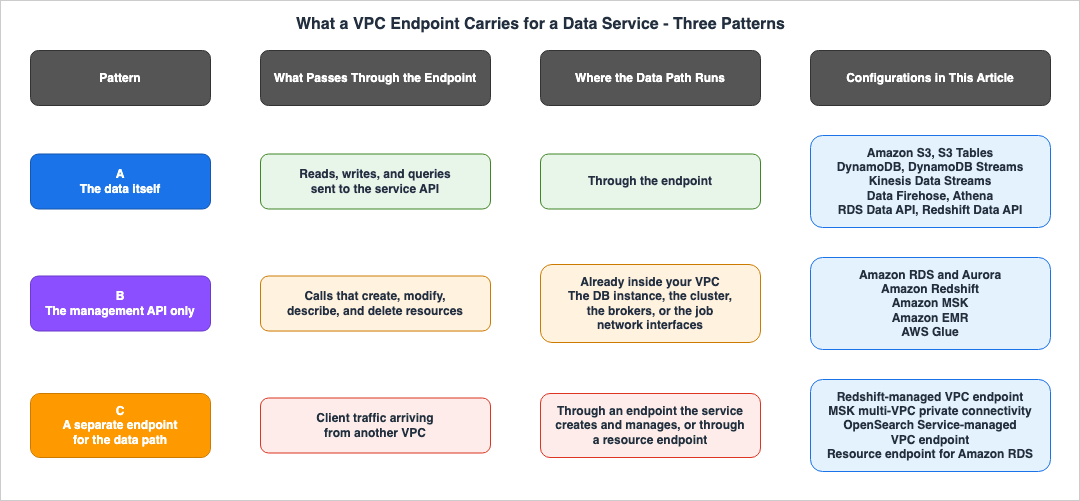
3.1 How to Read These Tables
When listing services vertically in a single table, it's easy to misinterpret the information. Amazon RDS and Amazon S3 appear as rows of the same interface endpoint type, and both look like something that carries data over a private path. However, in reality, only the management API passes through the RDS endpoint. This is stated in the RDS user guide.You don't need an interface VPC endpoint to connect to a DB instance.The tables are therefore split in two. Table A illustrates configurations where the data itself passes through the endpoint. Table B shows configurations where only the management API passes through the endpoint, with a separate data path. Table B has an extra column that details the location of that data path and how it's accessed from other VPCs.
Each row represents a specific configuration. Even for the same service, a separate row is used if the type, the service name, or what passes through differs. The final column in each row indicates the page in the primary source document that supports the information presented in that row. If a cell's information is derived from a different page, that page is also referenced in the final column.
⚠ These tables are not exhaustive. They only include rows for the data services selected for this article. The absence of a service does not necessarily mean that it does not support PrivateLink.
3.2 Table A - Configurations Where the Data Itself Passes Through the Endpoint
| Configuration | Type | Service Name | What Passes Through | Primary Source |
|---|---|---|---|---|
| Amazon S3 Gateway Endpoint | Gateway | com.amazonaws.region.s3 | Requests originating from subnets associated with a route table, destined for Amazon S3 in the same Region. The name is not replaced; the route decides where the traffic goes. | Gateway endpoints for Amazon S3 |
| Amazon S3 Interface Endpoint | Interface | com.amazonaws.region.s3 / com.amazonaws.region.s3-fips | Operations related to buckets, access points, and the Amazon S3 Control API. | AWS PrivateLink for Amazon S3 |
| Amazon S3 Tables | Interface | com.amazonaws.region.s3tables | Operations related to table buckets, namespaces, and tables. Data files and metadata files are read and written using the standard S3 endpoints, not this endpoint. | VPC connectivity for S3 Tables |
| Amazon DynamoDB Gateway Endpoint | Gateway | com.amazonaws.region.dynamodb | Requests originating from subnets associated with a route table, destined for DynamoDB in the same Region. The name is not replaced; the route decides where the traffic goes. | Gateway endpoints for Amazon DynamoDB |
| Amazon DynamoDB Interface Endpoint | Interface | com.amazonaws.region.dynamodb. The official list also includes com.amazonaws.region.dynamodb-fips. | Operations related to tables and the control API. | AWS PrivateLink for DynamoDB |
| Amazon DynamoDB Streams | Interface Only | com.amazonaws.region.dynamodb-streams | Operations related to the DynamoDB Streams API. | AWS PrivateLink for DynamoDB Streams |
| Amazon Kinesis Data Streams | Interface | com.amazonaws.region.kinesis-streams. The official list also includes com.amazonaws.region.kinesis-streams-fips. | Traffic between the VPC and Kinesis Data Streams. The page states that you do not need to change the settings for your streams, producers, or consumers. | Use Amazon Kinesis Data Streams with interface VPC endpoints |
| Amazon Data Firehose | Interface | com.amazonaws.region.kinesis-firehose | Traffic originating from resources in the VPC, destined for Firehose. | Using Amazon Data Firehose with AWS PrivateLink |
| Amazon Athena | Interface | com.amazonaws.region.athena | Operations related to the Athena API. The JDBC and ODBC drivers receive query results on port 444. | Connect to Amazon Athena using an interface VPC endpoint. Port 444 is documented in Athena JDBC 3.x driver |
| Amazon RDS Data API | Interface | com.amazonaws.region.rds-data | Calls to the Data API, regardless of type. | Creating an Amazon VPC endpoint for the Amazon RDS Data API (AWS PrivateLink) |
| Amazon Redshift Data API | Interface | com.amazonaws.region.redshift-data. The official list also includes com.amazonaws.region.redshift-data-fips. | Calls to the Data API. | Creating an Amazon VPC endpoint (AWS PrivateLink) for the Data API |
The confirmation date is September 23, 2026.
⚠ For S3 directory buckets, the gateway endpoint uses a different service name. The creation procedure in the PrivateLink guide says so.
If your Amazon S3 data is stored in directory buckets, select com.amazonaws.region.s3express.The table in this article only includes rows related to general purpose buckets.
3.3 Table B - Configurations Where Only the Management API Passes Through the Endpoint
| Configuration | Management API Endpoint | What Passes Through | Where the Data Path Is, and How Another VPC Reaches It | Primary Source |
|---|---|---|---|---|
| Amazon RDS and Aurora | Interface. com.amazonaws.region.rds. The official list also includes com.amazonaws.region.rds-fips. | Operations for managing RDS resources. | Databases are located within a VPC. Interface endpoints are not required to connect to the database. From another VPC, the RDS user guide lists VPC peering. On the PrivateLink side, there is a resource endpoint. A resource configuration that identifies its resource by ARN supports only Amazon RDS databases, and cannot be created for a publicly accessible cluster. | Amazon RDS API and interface VPC endpoints (AWS PrivateLink). For another VPC, see Scenarios for accessing a DB instance in a VPC and Resource configuration for VPC resources |
| Amazon Redshift (Provisioned and Serverless) | Interface. com.amazonaws.region.redshift and com.amazonaws.region.redshift-serverless. The official list also includes -fips for both. | Operations for the Amazon Redshift API and Redshift Serverless API. This does not include JDBC and ODBC connections to clusters or workgroups. | Clusters and workgroups are located within a VPC. From another VPC, they can be reached via Redshift-managed VPC endpoints. These endpoints cannot be managed in the Amazon VPC console. | Infrastructure security in Amazon Redshift. For another VPC, see Redshift-managed VPC endpoints |
| Amazon MSK (Provisioned) | Interface. aws.api.region.kafka-api and aws.api.region.kafka-api-fips. com.amazonaws.region.kafka and com.amazonaws.region.kafka-fips cannot be used for new connections. | Operations for the MSK Provisioned API. Kafka clients can obtain connection strings here. | Brokers are located within a VPC. From another VPC and account, they can be reached via multi-VPC private connectivity. This is only available in the same Region. | Use Amazon MSK APIs with Interface VPC Endpoints. For another VPC, see Amazon MSK multi-VPC private connectivity in a single Region |
| Amazon EMR (Clusters on EC2) | Interface. com.amazonaws.region.elasticmapreduce. The official list also includes -fips. | Operations for the Amazon EMR API. | Clusters are located within a VPC. When launched in a private subnet, at least a path to S3 is required. For private subnets with EMR 8.0.0 and later, the cluster requires a VPC endpoint aws.api.region.emr-service-cell01 for communication with Amazon EMR services, which is either created by EMR or by the user before launch. | Connect to Amazon EMR using an interface VPC endpoint. Subnets are described in Amazon VPC options when you launch a cluster |
| AWS Glue | Interface. com.amazonaws.region.glue and com.amazonaws.region.glue.sessions. | glue is for operations with the AWS Glue API. The one exception in this table: glue.sessions is for Spark Connect gRPC traffic directed to interactive session workers. | When connecting to JDBC datastores within a VPC, Glue creates network interfaces that begin with Glue_ and assigns a private IP address from the specified subnet. | Configuring interface VPC endpoints (AWS PrivateLink) for AWS Glue (AWS PrivateLink). Network interfaces are described in Connecting to a JDBC data store in a VPC |
| Amazon OpenSearch Service (VPC Domains) | The row in the official list puts These endpoints are service-managed in place of a service name. | Not measured in this article. | Domains are located within a VPC. From another VPC and account, they can be reached via OpenSearch Service-managed VPC endpoints. These endpoints can only be created through the OpenSearch Service console or API, only allow HTTPS traffic, and only connect to domains in the same Region. | Access Amazon OpenSearch Service using an OpenSearch Service-managed VPC endpoint (AWS PrivateLink) |
The confirmation date is September 23, 2026.
3.4 Three Things These Tables Show
When reviewing both tables together, three key points emerge.First, the term "VPC endpoint" refers to three distinct entities. In Table A, the data itself traverses the endpoint. In Table B, only the management API passes through the endpoint, while the data path remains in the VPC. Furthermore, in four of its rows, the second column from the right in Table B lists another type of endpoint used to access the data path from a different VPC. The figure at the start of this chapter illustrates these three patterns. The entry in the first row of Table B explains the initial symptom described – that creating an RDS endpoint didn't change the database connection.
Second, there are VPC endpoints that cannot be created through the Amazon VPC console. The Redshift page states that Redshift-managed VPC endpoints cannot be managed through the Amazon VPC console. OpenSearch Service-managed VPC endpoints can only be created through the OpenSearch Service console or API. However, creating either type requires EC2 permissions. Both the Redshift and OpenSearch Service pages list EC2 permissions, including
ec2:CreateVpcEndpoint and ec2:ModifyVpcEndpoint for Redshift, and ec2:CreateVpcEndpoint for OpenSearch Service. Organizations that limit endpoint creation through EC2 permissions will find these two limited in the same way.Third, a single service may have multiple service names. S3 Tables uses separate endpoints for table operations and file read/write. Glue uses two endpoints – one for its API and one for Spark Connect. Redshift uses three – one for its API, one for its Serverless API, and one for its Data API – each with a different service name. If you assume that a single service requires only one endpoint, some communication paths will be left unrouted through an endpoint.
4. What Private DNS Replaces
Even if you create an interface endpoint, the path is determined by where the application resolves the default name it uses to call the service. This chapter will discuss what happens during name resolution.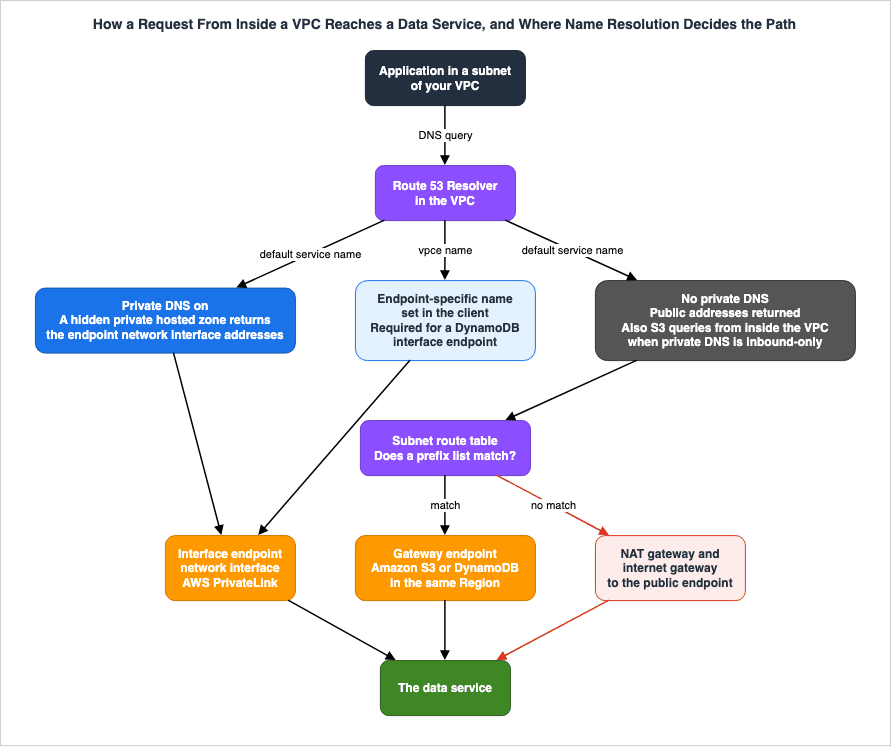
4.1 The General Rule, and a Default That Flips With the Tool
When you enable private DNS, AWS creates a hidden private hosted zone, resolving the default name of the service to the IP address of the endpoint's network interface. As described in the Private DNS section of the PrivateLink guide, this mechanism allows existing applications that call the service using its default name to continue functioning without modification, routing traffic through the endpoint. It is a prerequisite that both VPC DNS hostnames and DNS resolution are enabled. A general overview of how names are resolved for each type can be found in Chapter 7 of The Boundaries of the AWS Global Network, while the details of the mechanism are described in Chapter 7 of AWS PrivateLink and VPC Endpoints Complete Guide.⚠ The default is the opposite depending on the tool you create the endpoint with. When creating endpoints through the console, for services other than S3, the "Enable DNS name" option is selected by default. This is outlined in the creation procedures described in the PrivateLink guide.
If, in Step 5, you selected the service name for any service other than Amazon S3,
Additional settings, Enable DNS name is already selected.
Conversely, with CloudFormation's
AWS::EC2::VPCEndpoint, the default value for PrivateDnsEnabled is false. Interface endpoints created without specifying this property will not have private DNS. In such cases, applications that call the service using its default name will continue to use the same routing path they used before the endpoint was created.Independent of whether or not private DNS is enabled, a DNS name specific to the endpoint is created. This DNS record is publicly accessible, allowing you to resolve the name from outside the VPC. However, the resolution will return a private IP address.
The DNS records that we create for your interface VPC endpoint are public. Therefore,
these DNS names are publicly resolvable. However, DNS requests from outside the VPC still
return the private IP addresses of the endpoint network interfaces, so these IP addresses
can't be used to access the endpoint service unless you have access to the VPC.
4.2 What Is Replaced, Service by Service
| Configuration | Name Replaced When Private DNS Is Enabled | Notes | Primary Source |
|---|---|---|---|
| Amazon S3 Gateway Endpoint | Not replaced. Gateway endpoints do not have private DNS settings. The name resolves to a public IP address, and the routing changes based on the route table. | Use the name as is. | Gateway endpoints. For the missing setting, see PrivateDnsEnabled in CreateVpcEndpoint. |
| Amazon S3 Interface Endpoint | Regional bucket endpoints (e.g., s3.us-east-1.amazonaws.com), control endpoints (e.g., s3-control.us-east-1.amazonaws.com), access point endpoints (e.g., s3-accesspoint.us-east-1.amazonaws.com), and their respective FIPS versions. | Private DNS only for inbound endpoints is selected by default (4.3). | AWS PrivateLink for Amazon S3 |
| Amazon S3 Tables | s3tables.region.amazonaws.com | File reads and writes use the standard S3 name. | VPC connectivity for S3 Tables |
| Amazon DynamoDB Gateway Endpoint | Not replaced. Gateway endpoints do not have private DNS settings. The name resolves to a public IP address, and the routing changes based on the route table. | Use the name as is. | Gateway endpoints. For the missing setting, see PrivateDnsEnabled in CreateVpcEndpoint. |
| Amazon DynamoDB Interface Endpoint and DynamoDB Streams | Not replaced. Does not support private DNS. | Clients should directly specify the endpoint-specific URL (4.4). | AWS PrivateLink for DynamoDB |
| Amazon Athena | athena.Region.amazonaws.com | For JDBC and ODBC, ensure port 444 is open in the endpoint's security group. | Connect to Amazon Athena using an interface VPC endpoint |
| Amazon RDS API | Regional default names, such as rds.us-east-1.amazonaws.com (except for Regions in China). | This name is unrelated to the name used to connect to the database. | Amazon RDS API and interface VPC endpoints (AWS PrivateLink) |
| Amazon RDS Data API | rds-data.region.amazonaws.com | Can be used without changing code or configuration. | Creating an Amazon VPC endpoint for the Amazon RDS Data API (AWS PrivateLink) |
| Amazon Redshift API | redshift.Region.amazonaws.com and redshift-serverless.Region.amazonaws.com | Unrelated to the names used for JDBC and ODBC connections. | Infrastructure security in Amazon Redshift |
| Amazon Redshift Data API | redshift-data.region.amazonaws.com | Can be used without changing code or configuration. | Creating an Amazon VPC endpoint (AWS PrivateLink) for the Data API |
| Amazon EMR | elasticmapreduce.Region.amazonaws.com | — | Connect to Amazon EMR using an interface VPC endpoint |
| AWS Glue | Regional default names, such as glue.us-east-1.amazonaws.com. For glue.sessions, communication for Spark Connect sessions automatically passes through the endpoint. | — | Configuring interface VPC endpoints (AWS PrivateLink) for AWS Glue (AWS PrivateLink) |
| Resource endpoint for RDS | For resource configurations specified by ARN, the private DNS flag is always true and cannot be changed. | — | Resource configuration for VPC resources |
The confirmation date is September 23, 2026.
Regarding Kinesis Data Streams, Data Firehose, MSK APIs, and OpenSearch Service-managed VPC endpoints, this article did not find any descriptions of names that are replaced with private DNS on the pages it referenced. The Kinesis Data Streams page simply states that it is not necessary to change the settings for streams, producers, and consumers. Leaving these four out of the table does not mean that their names are not replaced. It means only that this article could not confirm them within its scope.
4.3 S3 - Private DNS Only for Inbound Endpoints Is the Default
When you enable private DNS for S3 interface endpoints, the option "Enable private DNS only for inbound endpoints" is automatically selected by default, according to the S3 user guide.When you enable private DNS names on an existing or new VPC interface endpoint for Amazon S3,
the Enable private DNS only for inbound endpoints option is selected by default.With this option selected, queries originating from on-premises environments that pass through the Route 53 Resolver inbound endpoint will be resolved to the interface endpoint's private IP address. Queries originating from inside the VPC will be resolved to the public IP address and routed through the gateway endpoint. Therefore, you must have an S3 gateway endpoint in the same VPC. Attempting to configure this using the CLI without a gateway endpoint will result in the following error.
To set PrivateDnsOnlyForInboundResolverEndpoint to true, the VPC vpce_id must have a gateway endpoint for the service.This can be confusing. Although you're configuring private DNS for the interface endpoint, it may appear that communication in the VPC is not being routed through the interface endpoint. This is the default behavior and is not a defect. If you want all communication in the VPC to be routed through the interface endpoint, you need to disable this option. Conversely, while this option is enabled, you cannot delete the gateway endpoint; you must first disable this option.
Private DNS only for inbound endpoints can be configured only on S3 interface endpoints, as the creation procedure in the PrivateLink guide states.
You can configure private DNS with an inbound Resolver endpoint only for interface endpoints for Amazon S3.Detailed information on how gateway endpoints and interface endpoints work together with this configuration can be found in Chapter 7 of the AWS PrivateLink and VPC Endpoints Complete Guide.
4.4 DynamoDB - Names Cannot Be Replaced, and Should Not Be
DynamoDB's interface endpoints do not support private DNS. The DynamoDB developer guide lists this as a limitation in its corresponding section.AWS PrivateLink for Amazon DynamoDB does not support the following:
* Transport Layer Security (TLS) 1.1
* Private and Hybrid Domain Name System (DNS) servicesThe page then tells you not to create your own private hosted zones to override the names.
Do not create private hosted zones to override DynamoDB endpoint DNS names (such as
dynamodb.region.amazonaws.com or *.region.amazonaws.com) to route traffic to your
interface endpoints. DynamoDB DNS configurations might change over time.

Custom DNS overrides are not compatible with these changes and can cause requests to
unexpectedly route over public IP addresses instead of your interface endpoints.
What covers it is pointing your clients directly at the endpoint-specific URL. The CLI and SDK examples provided for accessing tables all explicitly use endpoint-specific names. In other words, whether requests pass through DynamoDB's interface endpoint is determined not by DNS, but by the application's code and configuration. The same restriction applies to DynamoDB Streams, as noted on the same page.
⚠ There is one exception. Only the "AWS Management Console Private Access" section on the same page provides instructions for creating a private hosted zone specifically for DynamoDB and DynamoDB Streams. This procedure is limited to using the DynamoDB console through Console Private Access. This article reads it as an exception outside the scope of the restriction, not as a contradiction of it.
⚠ If a DynamoDB gateway endpoint exists in the same VPC, requests from within that VPC using the default name will route through it. The DynamoDB developer guide illustrates a configuration where gateway endpoints are used for communication in the VPC, while interface endpoints are used for on-premises communication.
4.5 What Breaks Outside Name Resolution
Gateway endpoints don't replace names, but creating one changes the traffic the moment it exists. The S3 gateway endpoint section states the following.The source IPv4 or IPv6 addresses from instances in your affected subnets as received by
Amazon S3 change from public addresses to the private addresses in your VPC. An endpoint
switches network routes, and disconnects open TCP connections.Open TCP connections are cut, and the source IP address changes to a private address. If you create or modify a gateway endpoint while a long-running process is underway, that process may be interrupted. The chapter on DynamoDB gateway endpoints also discusses a similar concept. What this change of source IP address means for policies is taken up in the next chapter.
5. Where the Policy Is Enforced
There are three places where you can define policies for requests passing through a VPC endpoint: the endpoint itself (endpoint policy), the resource being accessed (resource-based policy), and the IAM policy of the caller. This article will focus on where you can define policies for each service. Information on what the path condition keys compare, and when they are included in the request context, can be found in Chapter 8 of The Boundaries of the AWS Global Network. Details on how to interpret policies, by service, are available in Resource-Based Policies by Service on AWS and Chapter 6 of AWS PrivateLink and VPC Endpoints Complete Guide.5.1 Where the Policy Can Be Written, Service by Service
| Configuration | Endpoint Policy | Examples of Conditions on the Resource Side or the Calling Side | Primary Source |
|---|---|---|---|
| Amazon S3 (gateway and interface) | Supported | In bucket policies, use aws:SourceVpce. You cannot use aws:SourceIp for requests passing through the endpoint; instead, use aws:VpcSourceIp (the S3 gateway endpoint page). | AWS PrivateLink for Amazon S3. aws:SourceIp is described in Gateway endpoints for Amazon S3. |
| Amazon S3 Tables | Supported | In table bucket policies, use aws:SourceVpce, aws:SourceVpc, and aws:VpcSourceIp. When using the Iceberg REST API, you also need aws:CalledVia (5.3). | VPC connectivity for S3 Tables |
| Amazon DynamoDB gateway endpoint | Supported. In the console, choose "Full access" or "Custom." | In IAM policies, use aws:sourceVpce. | Gateway endpoints for Amazon DynamoDB |
| Amazon DynamoDB interface endpoint and DynamoDB Streams | Supported | Not measured in this article. | AWS PrivateLink for DynamoDB |
| Amazon Kinesis Data Streams | Supported. However, endpoints with policies are supported only in the Regions the page lists. Asia Pacific (Tokyo) is included, and US West (Oregon) is included except for usw2-az4. | In IAM policies, use aws:sourceVpce. | Use Amazon Kinesis Data Streams with interface VPC endpoints |
| Amazon Data Firehose | Supported. The interface endpoint itself is supported only in the Regions the page lists. | Not measured in this article. | Using Amazon Data Firehose with AWS PrivateLink |
| Amazon Athena | Supported | Examples of endpoint policies include combining aws:PrincipalOrgID, aws:ResourceOrgID, and aws:PrincipalIsAWSService. | Connect to Amazon Athena using an interface VPC endpoint |
| Amazon RDS API | Supported. If no policy is applied, all RDS API operations will be allowed. | Not measured in this article. | Amazon RDS API and interface VPC endpoints (AWS PrivateLink) |
| Amazon RDS Data API | Supported. In the console, choose "Full Access" or "Custom." | Not measured in this article. | Creating an Amazon VPC endpoint for the Amazon RDS Data API (AWS PrivateLink) |
| Amazon Redshift API (provisioned and serverless) | Supported | Not measured in this article. | Infrastructure security in Amazon Redshift |
| Amazon MSK API | Supported. If no policy is applied, a default policy that allows full access to the service will be applied. | Not measured in this article. | Use Amazon MSK APIs with Interface VPC Endpoints |
| Amazon EMR API | Supported | Not measured in this article. | Connect to Amazon EMR using an interface VPC endpoint |
| AWS Glue API | Supported | Not measured in this article. | Configuring interface VPC endpoints (AWS PrivateLink) for AWS Glue (AWS PrivateLink) |
| OpenSearch Service-managed VPC endpoint | Not supported. | Use security groups attached to the endpoint's network interface to restrict traffic. | Access Amazon OpenSearch Service using an OpenSearch Service-managed VPC endpoint (AWS PrivateLink) |
The confirmation date is September 23, 2026.
⚠ Cells marked as "not measured" in this article do not necessarily mean that the conditions are unavailable. The table contains examples taken from the pages of each service. The cells marked as not measured are where no example was available. To confirm which actions in each service support which condition keys, refer to the authorization documentation for each individual service.
5.2 Verify in Your Region
Whether an endpoint policy is supported depends on the combination of services and Regions. The official list page shows how to check it: look at theVpcEndpointPolicySupported field in the output of the describe-vpc-endpoint-services command.aws ec2 describe-vpc-endpoint-services \
--service-name "com.amazonaws.us-east-1.s3" \
--region us-east-1 \
--query ServiceDetails[*].VpcEndpointPolicySupported \
--output textThe same output also includes
PrivateDnsNames, which indicates the private DNS names, and SupportedIpAddressTypes, which specifies the supported IP address types. After reviewing the table, it's recommended to verify these three elements in your own Region before beginning your design.5.3 S3 Tables - The Source VPC Is Not Preserved Through the Iceberg REST API
S3 Tables has one pitfall when a table bucket policy restricts access with VPC conditions. When the Iceberg REST API is used, S3 Tables makes metadata read and write requests to S3 on behalf of the user. However, the VPC of the initial request's origin is not propagated to subsequent requests sent to S3.When an Iceberg REST API request is made through a VPC
endpoint, the source VPC of the initial request is not preserved in the table metadata
requests to Amazon S3. If your table bucket policy restricts access using these condition keys,
you must also add a condition for aws:CalledVia to allow these table metadata
requests from S3 Tables.What covers it is adding a condition on
aws:CalledVia so that the requests S3 Tables sends on your behalf are allowed. The example on the page combines aws:SourceVpce and aws:CalledViaLast in the same condition. This pattern, where the context of the request path is lost when a service calls another service on behalf of a user, is discussed in Chapter 8 of The Boundaries of the AWS Global Network. S3 Tables represents one example of this pattern occurring within a data service.5.4 What to Narrow It With Where No Endpoint Policy Can Be Attached
Within the table, the only instances where endpoint policies cannot be applied are OpenSearch Service-managed VPC endpoints. Here each negative statement is written as a pair with what covers it.VPC endpoint policies are not supported for OpenSearch Service. You can associate a security
group with the endpoint network interfaces to control traffic to OpenSearch Service through the
interface VPC endpoint.What covers it is in the second half of that quote: by using security groups attached to the endpoint's network interface, you can define which traffic is allowed. If you need to connect from a VPC in a different account, the owner of the domain must first approve that account.
For two of the remaining data path mechanisms in the second column from the right in Table B, who may connect is also decided outside endpoint policies. With Redshift-managed VPC endpoints, when connecting to a cluster or workgroup in a different account, the owner's account must first grant access to the connecting account. In MSK multi-VPC private connectivity, cluster policies determine which accounts are permitted to establish private connections.
5.5 When No Endpoint Policy Is Attached
When creating interface endpoints and gateway endpoints without specifying an endpoint policy, a default policy is applied that grants full access to the service. This is documented in the EC2 API reference under thePolicyDocument description of CreateVpcEndpoint, and similar information is provided on the RDS and MSK pages. The MSK page further clarifies that endpoint policies do not override or replace IAM identity-based policies or service-specific policies. Even with the default policy applied, the IAM policies of the caller and the policies associated with the target resource continue to be evaluated. Details about the default policy and how it is interpreted can be found in Chapter 6 of the AWS PrivateLink and VPC Endpoints Complete Guide.6. What Changes When You Use It From On-Premises
Using an endpoint from inside the VPC and using it from on-premises over Direct Connect or Site-to-Site VPN differ in which endpoint types work and in how names are resolved. This chapter pairs each negative statement with what covers it.6.1 Gateway Endpoints Cannot Be Used From On-Premises
The sections regarding S3 and DynamoDB gateway endpoints both state this in the same words.However, gateway endpoints do not allow access from
on-premises networks, from peered VPCs in other AWS Regions, or through a transit gateway.The "Considerations" section in the same chapter explains the reasoning from the path's perspective.
Endpoint connections cannot be extended out of a VPC. Resources on the other side of a
VPN connection, VPC peering connection, transit gateway, or Direct Connect connection in your
VPC cannot use a gateway endpoint to communicate with Amazon S3.
What covers it is placing an interface endpoint in the same VPC. According to the S3 user guide, both endpoint types can coexist in the same VPC.
Interface endpoints are compatible with gateway endpoints. If you have an existing gateway
endpoint in the VPC, you can use both types of endpoints in the same VPC.
With S3, using private DNS only for inbound endpoints (Section 4.3) allows traffic in the VPC to be automatically routed to the gateway endpoint, while on-premises traffic is automatically routed to the interface endpoint. Since DynamoDB does not support private DNS, applications on-premises will use endpoint-specific names. The DynamoDB developer guide describes this configuration in that way.
6.2 How to Resolve Interface Endpoint Names From On-Premises
If you call the endpoint by its endpoint-specific name, you don't need to modify your on-premises DNS. As described in Section 4.1, that name can be resolved through the public DNS, returning a private IP address. Both the S3 user guide and the DynamoDB developer guide state that you don't need to change your on-premises DNS settings.However, if you want to use the default name, the situation is different. The private DNS hosted zone is only visible from the Route 53 Resolver within your VPC.
Amazon provides a DNS server for your VPC, called the Route 53 Resolver. The Route 53 Resolver automatically
resolves local VPC domain names and record in private hosted zones. However, you can't use the
Route 53 Resolver from outside your VPC.
What covers it is Route 53 Resolver inbound endpoints and Resolver rules. The PrivateLink guide, in the section on private DNS, lists these as options for accessing the endpoint from on-premises. The Amazon Route 53 DNS Architecture Guide details the design considerations, including where to place it and how to route traffic.
6.3 Services with Data Paths Within the VPC
The services listed in Table B have data paths that reside in the VPC. When accessed from an on-premises environment, users can reach the VPC using a privately established route. The RDS user guide lists three options for accessing databases that do not have public access from a private network: Site-to-Site VPN, Direct Connect, and Client VPN.Regarding the endpoints listed in the second column from the right in Table B, which allow access from other VPCs, the documentation provides limited information. Both Redshift-managed VPC endpoints and OpenSearch Service-managed VPC endpoints are described as being inaccessible from the internet, and only reachable from the VPC where the endpoint is created and from any VPC that is peered with it. The documentation consulted for this article did not specify whether access is possible directly from an on-premises environment.
6.4 Negative Statements, and What Covers Them
| Negative Statement | Where the Sentence Is | What Covers It |
|---|---|---|
| Gateway endpoints cannot be accessed from on-premises environments, from peering connections in other Regions, or from Transit Gateways. | Section 6.1, regarding S3 and DynamoDB gateway endpoints. | Deploy interface endpoints in the same VPC. |
| Interface endpoints for DynamoDB do not support private DNS. | Section 4.4, regarding DynamoDB PrivateLink. | Configure clients to directly specify endpoint-specific URLs. |
| Private DNS names cannot be resolved from outside the VPC using Route 53 Resolver. | Section 6.2, regarding Private DNS in the PrivateLink guide. | Utilize Route 53 Resolver inbound endpoints and Resolver rules. For S3, private DNS only for inbound endpoints. |
| Endpoint policies cannot be applied to OpenSearch Service-managed VPC endpoints. | Section 5.4, regarding OpenSearch Service. | Configure security groups for the endpoint's network interface. |
7. Cross-Region, FIPS, and Dual-Stack
Finally, three situations where a service name takes a different form are taken up here. These are instances that can easily be overlooked if you only examine the service name columns in Table A and Table B.7.1 The Term Cross-Region Is Used in Two Senses
In the first sense, the term refers to connecting to a service located in a different Region than the one where the endpoint is deployed, using an interface endpoint. The PrivateLink guide lists services that support this functionality as "Cross-region enabled AWS services" in a separate listing.In the second sense, the term refers to using an interface endpoint within a particular Region, but accessing it from a VPC in a different Region, using VPC peering or Transit Gateway. The S3 user guide and the DynamoDB developer guide cite this as a characteristic of interface endpoints.
It's important to note that these two scenarios are distinct. In the first, the endpoint points at a service in another Region. In the second, both the endpoint and the service reside in the same Region, but the client accessing them originates from a different Region. In either scenario, gateway endpoints cannot be used. The section on gateway endpoints specifies that they can only be used in the Region where they were created.
A gateway endpoint is available only in the Region where you created it.7.2 Data Services on the Official List for the First Meaning
As of September 23, 2026, the following data services are listed in the Cross-region enabled AWS services documentation:| Service | Service Name in the List |
|---|---|
| Amazon S3 | com.amazonaws.region.s3. s3-fips and s3tables are not listed. |
| Amazon Data Firehose | com.amazonaws.region.kinesis-firehose |
| Amazon Managed Service for Apache Flink | com.amazonaws.region.kinesisanalytics and com.amazonaws.region.kinesisanalytics-fips |
⚠ Do not assume that services not listed are unsupported. This list is also subject to updates. Before using a service, verify its availability by checking the list page or the output of
describe-vpc-endpoint-services with the --service-region parameter.The list page also contains several conditions for using these services. To connect to a different Region, you must allow the permission-only IAM action
vpce:AllowMultiRegion in both identity-based policies and SCPs. Only Regional DNS names can be used.You must use regional DNS. Zonal DNS is not supported when accessing AWS services in another Region.⚠ This connection is not available in several Availability Zones. The list page identifies
use1-az3, usw1-az2, apne1-az3, apne2-az2, and apne2-az4 as unavailable. The list includes apne1-az3 in the Tokyo Region. Detailed information about the underlying mechanisms can be found in Chapters 4 and 8 of the AWS PrivateLink and VPC Endpoints Complete Guide.Two of the data paths described in Table B are limited to the same Region. OpenSearch Service-managed VPC endpoints can only connect to domains in the same Region, and MSK multi-VPC private connectivity cannot be used across Regions.
7.3 FIPS Service Names
The S3 user guide states that to connect to S3 using cryptographic modules validated under FIPS 140-3, you should create an interface endpoint using a service name that includes the-fips suffix. Of the services in Tables A and B, the following have a -fips name on the official list.| Configuration | FIPS Service Name on the Official List | Note on the Service Page | Primary Source |
|---|---|---|---|
| Amazon S3 | com.amazonaws.region.s3-fips | Supports operations through buckets, access points, and the Amazon S3 Control API. Can be configured for IPv4, IPv6, or dual-stack. | AWS PrivateLink for Amazon S3 |
| Amazon DynamoDB | com.amazonaws.region.dynamodb-fips | Not measured in this article. | AWS services that integrate with AWS PrivateLink |
| Amazon Kinesis Data Streams | com.amazonaws.region.kinesis-streams-fips | FIPS interface endpoints are available in US Regions. | Use Amazon Kinesis Data Streams with interface VPC endpoints |
| Amazon RDS and Aurora | com.amazonaws.region.rds-fips | Not measured in this article. | AWS services that integrate with AWS PrivateLink |
| Amazon Redshift | com.amazonaws.region.redshift-fips, com.amazonaws.region.redshift-serverless-fips, com.amazonaws.region.redshift-data-fips | Not measured in this article. | AWS services that integrate with AWS PrivateLink |
| Amazon EMR | com.amazonaws.region.elasticmapreduce-fips | Not measured in this article. | AWS services that integrate with AWS PrivateLink |
| Amazon MSK | The official list shows com.amazonaws.region.kafka-fips. The MSK page states that this name cannot be used for new connections and instead lists aws.api.region.kafka-api-fips. | FIPS interface endpoints are available in US commercial Regions and Canada Regions. | Use Amazon MSK APIs with Interface VPC Endpoints |
The confirmation date is September 23, 2026.
Athena, Data Firehose, Glue, S3 Tables, and RDS Data API are not listed with the
-fips designation in the official list. Do not interpret the absence of these services in the list as proof that FIPS endpoints do not exist. This article documents exactly what was included in the list.7.4 Dual-Stack Service Names
Use over IPv6 also differs from service to service. The S3 interface endpoint can be configured with either IPv4, IPv6, or dual-stack. The dual-stack name for S3 Tables follows the formats3tables.<region>.api.aws. The MSK page lists aws.api.region.kafka-api as a dual-stack service name that supports both IPv4 and IPv6. In contrast, the section on DynamoDB gateway endpoints states that these endpoints only support IPv4 traffic.Gateway endpoints support only IPv4 traffic.While the design of a VPC primarily focused on IPv6 is detailed in IPv6-First VPC Design on AWS, this article only goes as far as showing that separate service names exist.
8. The Limits of This Table - The Official List Is Newer
The table in this article is an inventory built from the pages viewed on a particular day. This chapter explains how far the table can be relied on.8.1 This Table Lags Behind the Official List
This table was created based on the information available as of September 23, 2026. AWS's official list is updated as new services are added. Read this table on the assumption that it does not keep up with those updates. Nor does this article give the number of supported services, because such a number starts to become untrue the moment it is written.8.2 The Official List and the Service Pages Also Drift Apart
During the verification process, it was discovered that the official list itself can sometimes lag behind the service pages.MSK is one such example. As of September 23, 2026, the entry for Amazon MSK on the official list mentions these two service names.
com.amazonaws.region.kafka
com.amazonaws.region.kafka-fips
The MSK page, however, says this about the same two names.
The following service name endpoints are no longer supported for new connections:Furthermore, the MSK page lists
aws.api.region.kafka-api and aws.api.region.kafka-api-fips as new service names. If you rely solely on the official list, you end up choosing service names that cannot be used for new connections.There are also discrepancies where the information is reversed. The entry for AWS Glue on the official list mentions
com.amazonaws.region.glue and com.amazonaws.region.glue.dashboard, while the Glue page lists com.amazonaws.region.glue and com.amazonaws.region.glue.sessions. If you only consult one of these resources, you risk overlooking names that are only available on the other.What covers it is looking up the actual service names in the Region you use. The official list page provides a command to do so.
aws ec2 describe-vpc-endpoint-services \
  --filters Name=service-type,Values=Interface Name=owner,Values=amazon \
  --region us-east-1 \
  --query ServiceNames
Use the table as a guide, but always confirm the names with the output from your specific Region. That is how this inventory is meant to be used.
8.3 Where the Primary Sources Disagree
During verification, two places where the primary sources disagree came to light. One involved the service name for MSK, as mentioned in Section 8.2. The other is the passage covered in Section 2.2, where the S3 Tables chapter describes the gateway endpoint as using PrivateLink. This article simply notes that both instances present discrepancies.It's important to note that some instances that initially appear to be discrepancies are not. For example, a DynamoDB page instructs the user not to create a private hosted zone, but then provides instructions on how to do so. However, this latter procedure applies only to the AWS Management Console Private Access exception (Section 4.4). When encountering a potential discrepancy, first review the scope of both descriptions. The specific approach for handling discrepancies is documented in Where the AWS Primary Sources Disagree About Launch Dates.
8.4 Items Not Measured
| Excluded Items | Reason |
|---|---|
| Data services not included in the table (Amazon ElastiCache, Amazon DocumentDB, Amazon Neptune, Amazon Keyspaces, Amazon Timestream, Amazon MemoryDB, AWS Lake Formation, Amazon EMR Serverless, Amazon EMR on EKS, Amazon OpenSearch Serverless, Amazon OpenSearch Ingestion, DynamoDB Accelerator) | These services fall outside the scope of this article. Verify with the official list and the individual service pages. |
| S3 directory buckets, S3 on Outposts, S3 Multi-Region Access Points | This article measured only general purpose buckets for S3. |
| Management API endpoints for OpenSearch Service | The official list uses "service-managed" instead of the service name in this row. |
| Records of communication passing through endpoints | These are covered in Where the Logs Come From on AWS - Identity and the Control Plane and Where the Logs Come From on AWS - The Network. |
| Pricing | Not covered in this article. |
8.5 When This Was Measured
The information presented in this table is current as of September 23, 2026. The primary source listed for each row refers to the specific page accessed on that date.⚠ When verifying whether a service has been added or if a service name has changed, first consult the official list AWS services that integrate with AWS PrivateLink. Afterward, compare the service pages with the output for your specific Region, as described in Section 8.2.
9. Failure Modes
Here are ten ways the material above breaks in practice. In each case, the failure occurs after the endpoint has been successfully created.| # | Failure | Cause | Mitigation |
|---|---|---|---|
| 1 | Created an interface endpoint for Aurora and assumed that connections to the database now use a private path too. | The endpoint appears to be the same as the S3 endpoint because they are displayed on the same creation screen. | Refer to Table B. The database is within a VPC. Use VPC peering or a resource endpoint from a different VPC. |
| 2 | Created a DynamoDB interface endpoint, but requests continue to use the previous route. | The DynamoDB interface endpoint does not support private DNS. | Specify an endpoint-specific URL for the client. Do not override the name in a private hosted zone. |
| 3 | The application is not using the interface endpoint created with CloudFormation. | The default value for PrivateDnsEnabled is false. | Explicitly specify PrivateDnsEnabled in the template. |
| 4 | Configured private DNS for the S3 interface endpoint, but communication in the VPC is using the gateway endpoint. | Private DNS only for inbound endpoints is selected by default. | Verify the intended behavior. If you want communication in the VPC to use the interface endpoint, disable this option. |
| 5 | Attempting to route traffic from on-premises or Transit Gateway through a gateway endpoint. | Gateway endpoints cannot be extended outside of a VPC. | Create an interface endpoint in the same VPC. |
| 6 | Immediately after creating a gateway endpoint, a long-running process to S3 fails, and the bucket policy aws:SourceIp no longer matches. | Creating the endpoint cuts the TCP connections that were open, and the source IP address changes to a private address. | Perform creation and modification during periods when critical processes are not running, or first confirm that automatic reconnection is possible. Specify the condition using aws:VpcSourceIp. |
| 7 | Attempting to write an endpoint policy for an OpenSearch Service-managed VPC endpoint. | This endpoint does not support endpoint policies. | Restrict access using the security groups associated with the endpoint's network interface. |
| 8 | Using Athena's JDBC or ODBC drivers through an endpoint, but the endpoint's security group only allows HTTPS. | Athena uses port 444 for streaming query results. | Allow inbound traffic on port 444 in the endpoint's security group. |
| 9 | Attempting to create a new API endpoint for MSK using the official service name listed. | The official list contains names that cannot be used for new connections. | Use aws.api.region.kafka-api. |
| 10 | Only created an endpoint for S3 Tables, and the table data cannot be read through a private path. | Reading and writing data files and metadata files still uses the S3 endpoint. | Also create an S3 gateway endpoint or an S3 interface endpoint. |
Failures 2, 3, and 4 occur during name resolution. In each case, no errors are reported, and communication continues without passing through the interface endpoint. The first step is to verify which branch in the figure in Chapter 4 the communication is following.
10. Frequently Asked Questions
Here are eight common questions regarding the topics covered in this article, presented in a question and answer format. The basis for each answer can be found in the corresponding chapter of this article.Does creating an Aurora VPC endpoint mean that database connections will also pass through that endpoint?
No. Thecom.amazonaws.region.rds endpoint only allows operations related to managing RDS resources. The RDS user guide states that an interface endpoint is not required to connect to the database. The database already sits inside the VPC.Can private DNS be enabled for DynamoDB interface endpoints?
No. The DynamoDB developer guide states that the interface endpoint does not support private DNS. It also tells you not to override the names with private hosted zones. Instead, clients should be directly provided with endpoint-specific URLs.Can the S3 gateway endpoint and interface endpoint be placed in the same VPC?
Yes. Both types can coexist in the same VPC. If you select private DNS only for inbound endpoints on the interface endpoint, traffic in the VPC will flow through the gateway endpoint, while traffic from on-premises will use the interface endpoint.Is the gateway endpoint an AWS PrivateLink feature?
No. The PrivateLink guide states that gateway endpoints do not use PrivateLink. For S3 and DynamoDB, saying that the service supports PrivateLink is true only of the interface endpoint.How can you check whether a service's endpoint supports endpoint policies?
Check theVpcEndpointPolicySupported field in the output of the describe-vpc-endpoint-services command. This value is determined by the combination of the service and Region, so verify it for the Region you are using. Some services, such as Kinesis Data Streams, have a limited number of Regions where endpoints with policies are supported.Can you connect privately to S3 in another Region through a VPC endpoint?
Yes, you can connect using an interface endpoint. Amazon S3 is on the Cross-region enabled AWS services list. You will need IAM permission forvpce:AllowMultiRegion, and only Regional DNS names can be used. Gateway endpoints, on the other hand, can only be used in the Region where they are created.Can endpoint policies be applied to the endpoints of a domain in OpenSearch Service?
No. The OpenSearch Service documentation states that OpenSearch Service does not support VPC endpoint policies. Instead, you should use security groups applied to the endpoint's network interface to restrict traffic.If a service is not in this table, does that mean it does not support PrivateLink?
No. This table only lists data services featured in this article. To determine if a service supports PrivateLink, refer to the official AWS list and the output of thedescribe-vpc-endpoint-services command in your specific AWS Region.11. Summary
This article laid out the private paths to data services so that each service can be looked up by three questions. There are five main points to consider.First, what a VPC endpoint carries comes in three kinds. These are the data itself, management APIs only, and another endpoint that lets traffic reach the data path from a different VPC. Creating endpoints for the management APIs of RDS, Aurora, Redshift, MSK, EMR, and Glue does not change the data path. The data path is already inside the VPC.
Second, the names that private DNS replaces vary depending on the service. For S3, private DNS only for inbound endpoints is selected by default. For DynamoDB, no name is replaced at all. Furthermore, the default behavior for private DNS is enabled in the console for services other than S3, but is disabled in CloudFormation.
Third, gateway endpoints do not utilize PrivateLink. They cannot be used from on-premises environments, from behind a Transit Gateway, or from different Regions. What covers it is an interface endpoint placed in the same VPC.
Fourth, the location where you restrict access is not always an endpoint policy. OpenSearch Service-managed VPC endpoints do not support endpoint policies and instead rely on security groups. When connecting from another account with Redshift, permission is required on the owner's side. With MSK, the cluster policy is used to determine access.
Fifth, this table lags behind the official list. And the official list itself can lag behind the service pages. To verify service names, run
describe-vpc-endpoint-services in your Region.The underlying mechanisms of the three endpoint types are detailed in AWS PrivateLink and VPC Endpoints Complete Guide, while AWS VPC Connectivity Decision Guide explains how to choose the appropriate connection method. Information on logging traffic that passes through endpoints can be found in Where the Logs Come From on AWS - The Network.
12. References
- AWS services that integrate with AWS PrivateLink - AWS PrivateLink
- Access AWS services through AWS PrivateLink - AWS PrivateLink
- Access an AWS service using an interface VPC endpoint - AWS PrivateLink
- Gateway endpoints - AWS PrivateLink
- Gateway endpoints for Amazon S3 - AWS PrivateLink
- Gateway endpoints for Amazon DynamoDB - AWS PrivateLink
- Cross-region enabled AWS services - AWS PrivateLink
- Resource configuration for VPC resources - AWS PrivateLink
- AWS PrivateLink for Amazon S3 - Amazon S3 User Guide
- VPC connectivity for S3 Tables - Amazon S3 User Guide
- AWS PrivateLink for DynamoDB - Amazon DynamoDB Developer Guide
- AWS PrivateLink for DynamoDB Streams - Amazon DynamoDB Developer Guide
- Use Amazon Kinesis Data Streams with interface VPC endpoints - Amazon Kinesis Data Streams Developer Guide
- Using Amazon Data Firehose with AWS PrivateLink - Amazon Data Firehose Developer Guide
- Connect to Amazon Athena using an interface VPC endpoint - Amazon Athena User Guide
- Athena JDBC 3.x driver - Amazon Athena User Guide
- Amazon RDS API and interface VPC endpoints (AWS PrivateLink) - Amazon RDS User Guide
- Scenarios for accessing a DB instance in a VPC - Amazon RDS User Guide
- Creating an Amazon VPC endpoint for the Amazon RDS Data API (AWS PrivateLink) - Amazon Aurora User Guide
- Infrastructure security in Amazon Redshift - Amazon Redshift Management Guide
- Redshift-managed VPC endpoints - Amazon Redshift Management Guide
- Creating an Amazon VPC endpoint (AWS PrivateLink) for the Data API - Amazon Redshift Management Guide
- Use Amazon MSK APIs with Interface VPC Endpoints - Amazon MSK Developer Guide
- Amazon MSK multi-VPC private connectivity in a single Region - Amazon MSK Developer Guide
- Connect to Amazon EMR using an interface VPC endpoint - Amazon EMR Management Guide
- Amazon VPC options when you launch a cluster - Amazon EMR Management Guide
- Configuring interface VPC endpoints (AWS PrivateLink) for AWS Glue (AWS PrivateLink) - AWS Glue User Guide
- Connecting to a JDBC data store in a VPC - AWS Glue User Guide
- Access Amazon OpenSearch Service using an OpenSearch Service-managed VPC endpoint (AWS PrivateLink) - Amazon OpenSearch Service Developer Guide
- CreateVpcEndpoint - Amazon EC2 API Reference
- AWS::EC2::VPCEndpoint - AWS CloudFormation Template Reference
- AWS PrivateLink and VPC Endpoints Complete Guide - Interface, Gateway, and Resource Endpoint
- AWS VPC Connectivity Decision Guide - VPC Peering, Transit Gateway, PrivateLink, VPC Lattice, and Cloud WAN
- Resource-Based Policies by Service on AWS - Where the Second Policy Lives, What It Can Say, and When It Is Required
- AWS IAM AccessDenied Reference - Reading the Error and Locating the Deciding Statement
- Where the Logs Come From on AWS - Identity and the Control Plane, What Is On by Default, and What Is Not Recorded at All
- Where the Logs Come From on AWS - The Network, What Each Source Actually Records, and Which Traffic Never Appears in Any of Them
- Amazon Route 53 DNS Architecture Guide - Routing Policies, Resolver, Private Hosted Zones, and Hybrid DNS
- AWS Networking Glossary - VPC, Transit Gateway, PrivateLink, and VPC Lattice Explained
- AWS History and Timeline regarding Amazon VPC - Overview, Functions, Features, Summary of Updates, and Introduction
- The Boundaries of the AWS Global Network - Autonomous Systems, Partitions, and What a Private Path Does Not Guarantee
- IPv6-First VPC Design on AWS - IPv6-Only Subnets, DNS64 and NAT64, and Dual-Stack Migration
- Where the AWS Primary Sources Disagree About Launch Dates - Which Document Systems Carry a Date, What Shapes the Disagreements Take, and Which Date to Record
References:
Tech Blog with curated related content
Written by Hidekazu Konishi