Where the Logs Come From on AWS - Identity and the Control Plane, What Is On by Default, and What Is Not Recorded at All
First Published:
Last Updated:
Two scenarios typically explain this. First, the source might be generating logs, but you are not receiving them. Second, the source might not be generating logs at all. Addressing these two situations requires entirely different approaches. The first can often be resolved through configuration adjustments. The second cannot be fixed, so you either arrange another means or accept that the question has no answer.
Despite this, resources for differentiating between these two scenarios are often lacking. Explanations of logging architectures typically focus on how to collect logs, while the question of what is actually generated is often taken as a given. This article aims to address that underlying assumption. It is an inventory of activity in identity and the control plane: which source emits what, how far each one goes by default, and what it does not emit at all.
Related articles on this site:
- Centralized Logging and Audit Architecture on AWS - Multi-Account Log Aggregation, Detection, and Query with CloudTrail, Config, Security Hub, and OpenSearch
- AWS IAM AccessDenied Reference - Reading the Error and Locating the Deciding Statement
- AWS History and Timeline regarding AWS CloudTrail - Overview, Functions, Features, Summary of Updates, and Introduction
- Detection Engineering on AWS - What a Custom Source Must Satisfy Before a Detection Can Be Written, and What the Detection Still Does Not See
- Threat Detection for AI Workloads on AWS - What GuardDuty AI Protection Detects, What It Does Not, and How to Read a Finding
- Identity-Aware Data Access on AWS - Propagating Workforce Identity from IAM Identity Center to Lake Formation and S3 Access Grants
- AWS IAM Identity Center Complete Setup Guide - Multi-Account SSO Design Patterns from Organization Structure to ABAC
- AWS Config Rules and Conformance Packs - Compliance Detection, Automated Remediation, and Organizations Deployment
- What Can Be Made Public on AWS - Storage and Data, the Block Public Access Family, and What Each Switch Does Not Promise
- Resource-Based Policies by Service on AWS - Where the Second Policy Lives, What It Can Say, and When It Is Required
- AWS Service Lifecycle States - Maintenance, Sunset, Full Shutdown, and What Each One Takes Away
Table of Contents
- 1. The Questions This Article Answers, and Those It Does Not
- 2. The Source and the Destination Are Separate Questions
- 3. The Default Is Not Symmetrical
- 4. Sources Other Than API Calls
- 5. Which Region Holds the Sign-In Record
- 6. With IAM Identity Center, One Sign-In Splits into Two Layers
- 7. The Inventory — Sources in Identity and the Control Plane
- 8. How the Other Lineage Differs from a Log
- 9. The Same Activity Has a Second Exit
- 10. What Remains After Calls Cross Account Boundaries
- 11. What Is Not Recorded
- 12. Failure Modes and Anti-Patterns
- 13. Frequently Asked Questions About the Sources of AWS Logs
- 14. Summary
- 15. References
1. The Questions This Article Answers, and Those It Does Not
When readers come across this topic, their questions typically fall into one of three categories. First, they may need to determine whether a record an investigation needs is missing because the source never emitted it or because they never enabled it. Second, they might be unable to locate console sign-in records and need to know where to look. Finally, they may have heard that there are records related to identity and permissions beyond CloudTrail and want to confirm whether those records can be used in the same way.This article addresses these three questions. Conversely, let us first outline what it does not cover.
It does not cover data aggregation, storage, or query design. The design of the aggregation layer, including organizational trails, log archive accounts, and searching with Athena or OpenSearch, is the focus of this site's Centralized Logging and Audit Architecture on AWS. This article focuses solely on the source.
It does not address reverse lookup related to error messages. This site's AWS IAM AccessDenied Reference covers, in its Section 17, how to check whether an
AccessDenied error was recorded. That reference also mentions the fact that data events are not recorded by default, providing a direct quote from the original documentation. This article addresses the same fact, but as a characteristic of the source, rather than as an entry point for investigation.It does not cover what was added and when. The historical timeline for CloudTrail is available on this site's AWS History and Timeline regarding AWS CloudTrail. This article only describes what is currently available.
It does not cover how to write detection rules. Detection Engineering on AWS covers how to build a detection from a collected source, and Threat Detection for AI Workloads on AWS covers what a detector reads. The term "data event" is used in those resources as an input for a detector, while in this article, it refers to the output of the source. Be mindful of this difference in roles to avoid confusion.
It does not cover the network sources either. Where packets, requests, and DNS queries turn into log records, and which traffic no network source records at all, is held by this site's Where the Logs Come From on AWS - The Network.
All references to official documentation mentioned in this article were verified on September 16, 2026. Specifications are subject to change, so please always re-check the relevant pages before using this information for decision-making.
2. The Source and the Destination Are Separate Questions
Let us fix one term initially. In this article, we will use the term source to refer to the entity that generates activity logs. We will use the term destination to refer to the location where those logs are received and accumulated. For example, with CloudTrail, CloudTrail itself is the source that transforms activity into logs, while an S3 bucket is simply the destination.This distinction is important because the same symptom – "no logs" – can arise from issues on either the source side or the destination side. Issues on the destination side can often be resolved through configuration changes. This might involve modifying bucket policies, adding Regions, or switching to an organization-level trail. While these changes will not recover past logs, they will ensure that logs are received going forward.
However, if the source is not generating logs, no amount of configuration on the destination will bring them to light. In this article, the reasons a source is not emitting fall into two: have you simply not enabled it, or is there no mechanism to emit it at all? Sections 3 through 7 answer the former. Section 11 answers the latter.
This article does not address CloudTrail's destination itself, but it does include a section on differences in how logs are received. This is because the information visible through Event history and trails can vary, and the same activity can appear in a different Region. This is not a matter of destination design, but rather a question of what the source is sending, and is therefore located in Section 7.3.
3. The Default Is Not Symmetrical
3.1 The Four Categories and What Each One Does by Default
CloudTrail records four categories of event. The concepts chapter of the user guide lists them and states the default like this.CloudTrail logs four types of events:
Management events
Data events
Network activity events
Insights eventsAnd these four categories do not behave the same way by default.
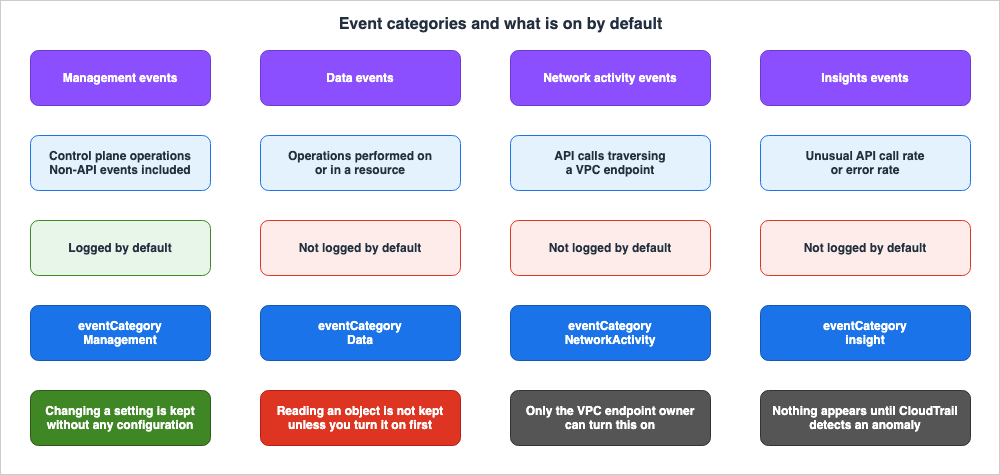
Data events are not recorded by default. These events involve operations performed on or within resources, specifically data plane operations. Examples include reading and writing S3 objects, invoking Lambda functions, and publishing to Amazon SNS.
Network activity events are also not recorded by default. These let the owner of a VPC endpoint record API calls that travel from a private VPC through that endpoint to an AWS service.
Insights events are not recorded by default. These events analyze the call rate and error rate of management events, and are only recorded when significant deviations from normal behavior are detected.
What emerges from this is an asymmetry that will be relevant throughout this article: Changing a setting is kept by default. Reading something is not. We will examine how this asymmetry manifests in Section 10.
3.2 No Official Page States All Four Defaults in One Place
The issue is that the four lines mentioned earlier are not consolidated on a single page. The default sentence in the concepts chapter reads:By default, trails and event data stores log management events, but not data or
Insights events.The statement regarding network activity events is not included in this line. Further down on the same page, there are separate sections for each type, using different wording.
Network activity events are not logged by default when you create a trail or event
data store. To record CloudTrail network activity events, you must explicitly set the
event source for which you want to collect activity.
Open the chapter that introduces the feature itself and yet another sentence appears. The chapter on logging management events says this.
By default, trails and event data stores log management events and don't include data
or Insights events.
The chapters on "Data Events" and "Network Activity Events" each only define the default settings specific to their respective types.
By default, trails and event data stores do not log data events.By default, trails and event data stores do not log network activity events.Regarding "Insights Events," there is no statement explicitly stating that they are "disabled by default." Instead, it actively states that enabling them is required.
To log CloudTrail Insights events, you must explicitly enable Insights events on a
new or existing trail or event data store.
Therefore, to confirm the default for all four categories, you need to cross-reference the concepts chapter with the individual feature chapters. If you only read the default statement in the "Concepts" chapter and assume that "Data and Insights" are disabled by default, you risk overlooking network activity events. This is a type that is particularly easy to miss, because a call denied by a VPC endpoint policy is recorded in this category and no other.
4. Sources Other Than API Calls
4.1 The Non-API Events Chapter Lists Two
CloudTrail does not just record API calls. The user guide includes a section on non-API events, listing two specific types.AWS service events - CloudTrail supports logging non-API service events. These events
are created by AWS services but are not directly triggered by a request to a public
AWS API. For these events, the eventType field is AwsServiceEvent.
AWS Management Console sign-in events - CloudTrail logs attempts to sign in to the
AWS Management Console, the AWS Discussion Forums, and the AWS Support Center. All IAM
user and root user sign-in events, as well as all federated user sign-in events,
generate records in CloudTrail. For sign-in events, the eventType field is
AwsConsoleSignIn.CloudTrail treats both as management events. The concepts chapter also states that management events include non-API events, and provides an example: the
ConsoleLogin event is recorded when a user signs in. In other words, once a trail exists, sign-in attempts are recorded without any further configuration.4.2 There Are Five eventType Values, and Three of Them Are Not API Calls
Open the record contents reference, however, and the account does not line up. The eventType field is defined with these values.AwsApiCall - An API was called.
AwsServiceEvent - The service generated an event related to your trail. For example,
this can occur when another account made a call with a resource that you own.
AwsConsoleAction - An action was taken in the console that was not an API call.
AwsConsoleSignIn - A user in your account (root, IAM, federated, SAML, or SwitchRole)
signed in to the AWS Management Console.
AwsVpceEvents - CloudTrail network activity events enable VPC endpoint owners to
record AWS API calls made using their VPC endpoints from a private VPC to the AWS
service.AwsConsoleAction is not listed under the section for non-API events. Furthermore, the definition reads as an action taken in the console that was not an API call, which is precisely the definition of a non-API event. The description for the managementEvent field on the same page also lists this value as one of four possible eventType values that could be a management event.Moreover, this list of five values does not include the value for Insights events. Insights events have a different structure and are documented on a separate page, where the
eventType is AwsCloudTrailInsight. To get a complete picture of all possible eventType values, you need to combine information from two different pages.The
eventCategory field follows a similar pattern. The pages for management, data, and network activity list three values.For management events, the value is Management.
For data events, the value is Data.
For network activity events, the value is NetworkActivity.A fourth value is listed on the Insights events page. And it is written entirely in lowercase.
eventCategory - The event category used in LookupEvents calls. In CloudTrail Insights
events, the value is insight.
The difference shows up when you write a search or a filter, so do not normalize these values to an initial capital.
4.3 The Same Value Is Described Differently on Different Pages
The descriptions of the same two values differ between the non-API events chapter and the record contents reference.The non-API events chapter defines
AwsServiceEvent broadly, as an event created by an AWS service but not triggered directly by a request to a public AWS API. The record contents reference describes it far more narrowly, as an event the service generated in relation to your trail, the example being another account making a call with a resource that you own. The understanding one gains from reading either description is not the same.Similarly, the descriptions for
AwsConsoleSignIn are inconsistent. The non-API events chapter lists the management console, AWS Discussion Forums, and AWS Support Center as targets, and identifies IAM users, root users, and federated users as actors. The record contents reference limits the target to only the management console and adds SAML and SwitchRole to the list of actors. The former definition has a broader scope in terms of targets, while the latter has a broader range of actor types.In practice, there is only one correct way to handle this. When using these values to make a determination, always refer to the specific page you are using and base your judgment solely on the description provided on that page. Do not rely on a combined "definition" created by merging the descriptions from both pages, as such a combined definition does not exist in either document.
Regarding
AwsServiceEvent, which definition matches reality can be settled from the official examples, as Section 6 shows.5. Which Region Holds the Sign-In Record
5.1 The Region That Records ConsoleLogin Depends on How You Sign In
When someone reports that a sign-in record cannot be found, the Region they are searching is usually the wrong one. The management console's sign-in event reference notes the following:The Region recorded in a ConsoleLogin event varies based on the user type and whether
you use a global or regional endpoint to sign in.The conditions are divided into three categories.
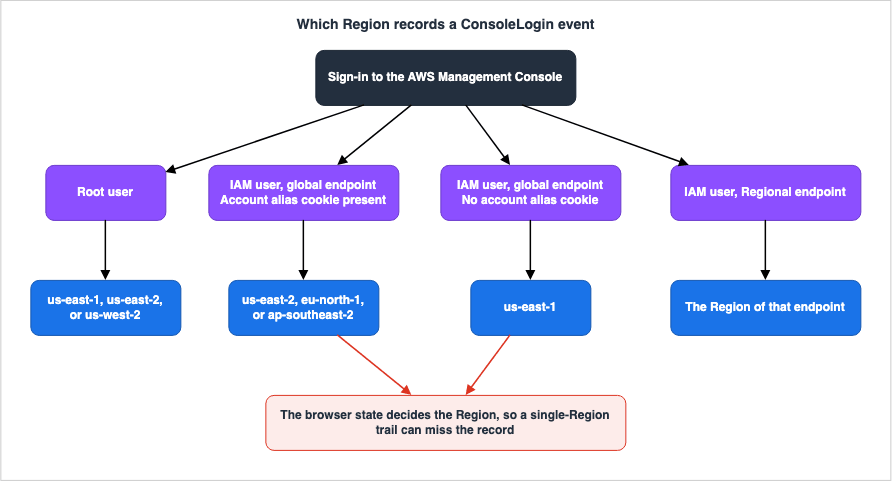
If you sign in as the root user, CloudTrail records the event in one of the following
Regions: us-east-1, us-east-2, or us-west-2.
When an IAM user utilizes a global endpoint, the logging Region depends on whether the browser has an account alias cookie.
If an account alias cookie is present in the browser, CloudTrail records the
ConsoleLogin event in one of the following regions: us-east-2, eu-north-1, or
ap-southeast-2. This is because the console proxy redirects the user based on the
latency from the user sign-in location.

If an account alias cookie is not present in the browser, CloudTrail records the
ConsoleLogin event in us-east-1. This is because the console proxy redirects back to
the global sign-in.
When an IAM user utilizes a Regional endpoint, logs are recorded in the Region associated with that endpoint.
This highlights two key points: first, to reliably collect all sign-in records, a single Region's logs are insufficient. Second, the Region to which logs are written is influenced by the user's browser state. Even when the same user logs in with the same account, the logging Region may differ based on the presence or absence of a cookie. This is not a factor that operations can definitively control.
5.2 Global Service Events Land in One Region in a Trail and Another in Event History
Another mechanism can lead to regional discrepancies. IAM, AWS STS, and Amazon CloudFront are global services, and the end of the concepts chapter summarizes how CloudTrail handles their events.Now, events created by Amazon CloudFront, AWS Identity and Access Management, and
AWS STS are recorded in the Region in which they were created, the US East
(N. Virginia) Region, us-east-1.In a trail, then, IAM operations are recorded in
us-east-1 no matter where they were performed. However, the same page then states the opposite.In contrast, the Event history in the CloudTrail console and the aws cloudtrail
lookup-events command will show these events in the AWS Region where they occurred.The same operation is recorded in
us-east-1 in a trail, and in the Region where it occurred in Event history. This is not a contradiction; it is the specification: the two receiving ends treat these events differently. However, from the user's perspective, it means that information that is missing in one system might be found in the other. An event visible in the console's Event history can be absent from the trail's logs for that same Region.It is important to note that the same section also states that most global service events are recorded in
us-east-1, but some are recorded in US East (Ohio) or US West (Oregon). Do not assume that all global service events are recorded in us-east-1.6. With IAM Identity Center, One Sign-In Splits into Two Layers
TheConsoleLogin records, as described previously, represent AWS Sign-In's logging of sign-in attempts to the console. However, for organizations using IAM Identity Center, additional layers of records are generated during a single sign-in process. Viewing only one layer provides an incomplete picture.First, confirm that the
ConsoleLogin records do not go away. The AWS Sign-In User Guide states:CloudTrail logs attempts to sign in to the AWS Management Console. All IAM user, root
user, and federated user sign-in events generate records in CloudTrail log files.Sign-ins for federated users also generate
ConsoleLogin records. Because accessing an account's console through Identity Center involves federation, this record is generated.What the
ConsoleLogin record does not carry is what was verified before the sign-in. This includes which credentials were requested, which factors passed, and where the process failed. This information is only available in the Identity Center's records. The sign-in events section of the User Guide begins by stating:AWS CloudTrail records successful and unsuccessful sign-in events for all IAM Identity
Center identity sources.It then lists three event names:
| Event name | What it represents | Identity source |
|---|---|---|
CredentialChallenge | Identity Center requesting a specific credential. The type of credential requested is specified in the CredentialType field. | Identity Center users, AD Connector, and AWS Managed Microsoft AD |
CredentialVerification | An attempt to provide the requested credential, indicating whether the attempt was successful or unsuccessful. | Identity Center users, AD Connector, and AWS Managed Microsoft AD |
UserAuthentication | Completion of verification for all requested credentials, indicating a successful sign-in. | All identity sources |
The key point is the note on the third row.
Users failing to successfully complete the required credential challenges will result
in no UserAuthentication event being logged.
If authentication fails, a
UserAuthentication event is not generated. If you want to count failures, you should examine the CredentialVerification events. Depending on whether you want to audit only successful sign-ins or detect failures, you will need to examine different event names.Identity Center supplies an identifier that ties the events of one sign-in together.
AuthWorkflowID - Used to correlate all events emitted across an entire sign-in
sequence. For each user sign-in, multiple events may be emitted by IAM Identity
Center.
Furthermore, the same User Guide explicitly states that it is not possible to link post-sign-in actions to the initial sign-in using a different identifier.
You can't use credentialId to correlate sign-in events to the subsequent events, such
as the use of the AWS access portal.
The records in this layer do not have an
eventType of AwsApiCall. Examining the actual event examples provided in the user guide, all three share the same combination: eventSource is signin.amazonaws.com, eventType is AwsServiceEvent, eventCategory is Management, and the type within userIdentity is IdentityCenterUser. serviceEventDetails carries the success or failure.These examples settle the discrepancy raised in Section 4.3. Of the two definitions for
AwsServiceEvent, the narrower example in the record contents reference, where another account made a call with a resource that you own, does not describe these three events. Instead, these events align with the broader definition found in the section on non-API events. If you are unsure which definition to use, prioritize the one that best matches the provided examples.The design and configuration of Identity Center are the subject of AWS IAM Identity Center Complete Setup Guide, which covers the management API event sources from the operational side. How to read
onBehalfOf inside userIdentity belongs to Identity-Aware Data Access on AWS. This article keeps to the rows of the inventory.7. The Inventory — Sources in Identity and the Control Plane
7.1 How to Read the Tables
This section is the inventory. Read four things for each source.What it emits. What does that source produce as a record?
Default. What is present without any manual intervention?
Category or form. If it is a CloudTrail event, which
eventCategory does it fall under? If it is not, what form does the record take?What it does not record. What does that source structurally fail to produce? If configuration can add it, it does not belong in this column.
The tables are split by lineage. The rows are few not because the list was narrowed, but because a row spanning two lineages would change what the fourth column means.
7.2 The Four CloudTrail Event Categories
| Source | What it emits | Default | eventCategory | What it does not record |
|---|---|---|---|---|
| Management events | Operations on the control plane. Also includes non-API events. | Logged | Management | Operations on the data plane. |
| Data events | Operations performed on or within resources. | Not logged | Data | Resources not officially listed as supported resource types. |
| Network activity events | API calls passing through a VPC endpoint. The owner of the endpoint is the one who records them. | Not logged | NetworkActivity | The enriched eventContext field. |
| Insights events | Anomalies in the call rate and error rate of management events. One event at the start and another at the end. | Not logged | insight | Normal activity. |
Management events include read-only operations. The user guide provides examples of read-only operations such as
DescribeSecurityGroups and DescribeSubnets, and write operations such as RunInstances and TerminateInstances. The claim that reads are not recorded applies to the data plane only. Read operations on the control plane are logged by default.Data events only log operations related to resources officially listed as supported resource types. This list is constantly expanding, so it is not included in this article. To determine if an event will be logged, check if the resource type is on this list. If it is not, operations on that resource will not be logged as data events, regardless of any configuration settings.
Network activity events also have a separate list of supported event sources. This list is not included here. However, one important point is that the official documentation specifies that this event type is intended to allow the owner of a VPC endpoint to log these events. The entity enabling the logging is the owner of the endpoint, not the entity making the call. If the endpoint owner is in a different account, you will not be able to enable this feature.
Insights events do not begin generating logs immediately after being enabled. The official documentation states that after initial enablement, you may need to wait up to 36 hours before seeing the first Insights event, which will only appear after abnormal activity is detected. If there is no abnormal activity, it is normal that no events are generated, no matter how long you wait.
7.3 CloudTrail's Receiving Ends
The information you see can vary depending on where you receive the CloudTrail data.| Receiving end | What it emits | Default | Form | What it does not record |
|---|---|---|---|---|
| Event history | Management events from the past 90 days | Available from account creation | Searchable through the console and LookupEvents | Data events, Insights events, network activity events |
| Trail | Delivers the selected event types to an S3 bucket | Nothing arrives unless you create a trail | JSON log files | Event types that have not been selected |
| Event data store | Stores selected event types and allows searching with SQL | Nothing is delivered unless an event data store is created | Events converted to a columnar format | Event types that have not been selected |
AWS lists the limitations of Event history. These two matter most.
The Event history page on the CloudTrail console only shows management events. It
does not show data events, Insights events, or network activity events.

An event history search is limited to a single AWS account, only returns events from
a single AWS Region, and cannot query multiple attributes. You can only apply one
attribute filter and a time range filter.
Event history is the mechanism that shows a minimum without creating a trail; it is not a substitute for one. It also does not offer cross-organization aggregation.
AWS CloudTrail Lake, the management foundation for the event data store, is currently in the Maintenance phase. The availability change page states the date on which it stops accepting new customers.
AWS CloudTrail Lake will no longer be open to new customers starting on May 31, 2026.
For capabilities similar to CloudTrail Lake, explore CloudWatch.
The same page also explicitly states that the core CloudTrail service is not affected.
AWS CloudTrail continues to be fully supported. Only AWS CloudTrail Lake is no longer
open to new customers. Your AWS CloudTrail Trails, Insights and Aggregated Events are
not affected.
If you are designing a source now, this receiving end is not an option. This site's AWS Service Lifecycle States sets out what each stage takes away.
7.4 Sign-In and Authentication Sources
| Source | What it emits | Default | Category or form | What it does not record |
|---|---|---|---|---|
| Console sign-in | Success and failure of ConsoleLogin | Logged | Management event. eventType is AwsConsoleSignIn. | — |
| MFA requirement check | CheckMfa, and which MFA type was required. | Logged | Same as above. | — |
| Policy evaluation during sign-in | The policy statements evaluated, and whether the result was allow or deny. | Logged, but only once console authorization is enabled | ConsoleLogin carries errorCode and errorMessage. | — |
| IAM Identity Center | CredentialChallenge, CredentialVerification, UserAuthentication | Logged | Management event. eventType is AwsServiceEvent. | UserAuthentication for an attempt that failed, and the contents of a mistyped user name. |
| AWS STS | API calls such as role assumption. | Logged | Management event. Treated as a global service event. | — |
CheckMfa records the determination of whether MFA is required prior to sign-in. In the official examples, additionalEventData includes MfaType values such as Virtual MFA or Multiple MFA Devices. It is possible for this record to remain even if the sign-in attempt fails.The third row represents a source that is often overlooked. AWS Sign-In supports console access restrictions based on resource-based policies and resource control policies, and it logs the results of their evaluation.
AWS Sign-In logs policy evaluation events to CloudTrail. When a resource-based policy
or resource control policy (RCP) denies access during sign-in, CloudTrail records the
evaluation result, including the policy statements that were evaluated and the final
decision (allow or deny).
In other words, attempts that are blocked before reaching authentication are also recorded. The example provided by the official documentation shows events with
eventName as ConsoleLogin and errorCode as AccessDenied. However, these restrictions are not enabled by default. The same user guide explicitly states that simply defining a policy is not sufficient to enforce it.Console sign-in access is enabled by default. AWS Sign-In allows unrestricted console
access initially. To add restrictions, enable console authorization configuration for
your account or organization. The resource permission statements that you create have
no effect until you enable console authorization.Configuration and enablement are separate operations. Designing the policies themselves belongs to Resource-Based Policies by Service on AWS on this site. Reading the message that lands in the record belongs to AWS IAM AccessDenied Reference. This article keeps to the fact that the source emits this.
Regarding the root user, in addition to signing in, there are also official examples available for changing MFA and changing passwords. This means that when monitoring the root user's activity, you should look beyond just
ConsoleLogin.7.5 Sources in the Other Lineage
There are records other than CloudTrail that answer questions about identity and permissions. However, these records do not take the typical "log" format. They are generated differently and have different freshness characteristics. Section 8 sets out the differences.| Source | What it emits | Default | Form | What it does not record |
|---|---|---|---|---|
| IAM credential report | Every user in the account and the state of their credentials. | Produced only when requested. | CSV file | Service-specific credentials, and the third and any later access key. |
| IAM last accessed information | The date and time an identity or a policy last reached a service or an action. | Shown only when requested. | Aggregate view | Data plane events, iam:PassRole, and activity in Regions not listed in the reference table. |
| AWS Config configuration items | A resource's configuration as it stood at one point in time. | Nothing is produced unless the recorder has been started. | JSON configuration items | The global IAM resource types, when the customer managed recorder is left at its default. |
The fourth column of the third row is what matters if you are tracking identities. The default configuration for customer managed configuration recorders is as follows:
The default for a customer managed configuration recorder is to record all supported
resource types, excluding the following global IAM resource types: AWS::IAM::Group,
AWS::IAM::Policy, AWS::IAM::Role, and AWS::IAM::User
Even if AWS Config is enabled, if left at its default settings, it will not record the configuration of IAM groups, policies, roles, and users. To record this information, you must explicitly include the relevant resource types. This site's AWS Config Rules and Conformance Packs covers Config rules and automated remediation.
8. How the Other Lineage Differs from a Log
The three sources listed in Section 7.5 should not be placed alongside CloudTrail events. There are three key differences.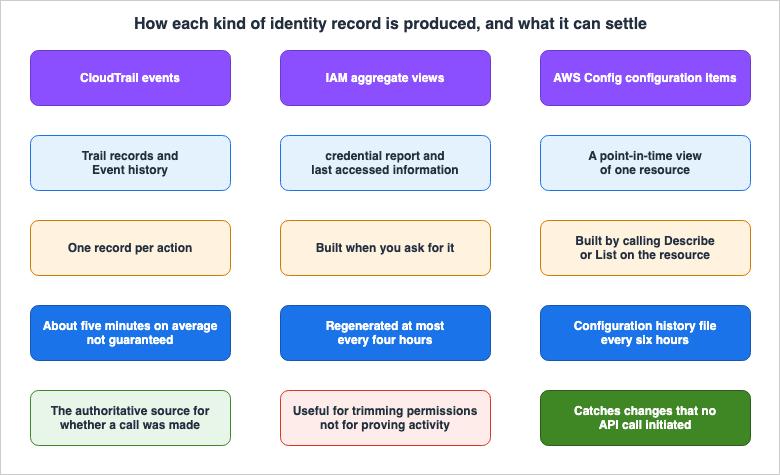
AWS Config keeps track of all changes to your resources by invoking the Describe or
the List API call for each resource in your account.
The freshness of the data varies. Regarding CloudTrail delivery, the official documentation states:
CloudTrail typically delivers logs within an average of about 5 minutes of an API
call. This time is not guaranteed.
Credential reports can only be regenerated once every four hours. When requested, IAM returns a report generated in the last four hours, and otherwise builds a new one. Last accessed information is documented as showing recent activity in the IAM console within four hours. Config sends configuration history files every six hours, but if there are no changes within that six-hour period, the file itself is not sent. Even when obtaining data from all three sources at the same time, the information will not be consistent.
The level of authority differs. The page describing last accessed information says this about itself.
Refer to your CloudTrail logs as the authoritative source for information about all
API calls and whether they were successful or denied access.
AWS points at CloudTrail, not at the aggregate view, as the authoritative source for whether a call was made and whether it succeeded. You can use the aggregate view to review permissions, but it cannot answer whether an operation actually occurred.
However, Config has one characteristic that CloudTrail lacks:
AWS Config also tracks the configuration changes that were not initiated by the API.
AWS Config examines the resource configurations periodically and generates
configuration items for the configurations that have changed.
It captures changes that do not originate from API calls. CloudTrail is a system that records calls; if there are no calls, nothing is recorded. This difference becomes significant when you know that a configuration has changed, but you cannot find the API call that triggered it.
9. The Same Activity Has a Second Exit
CloudTrail events, in addition to being delivered to S3 buckets, also flow to EventBridge's default event bus. EventBridge draws the categories differently. The EventBridge user guide lists sixdetail-type values.detail-type | What is transmitted |
|---|---|
AWS API Call via CloudTrail | Events representing requests to public APIs |
AWS Console Signin via CloudTrail | Attempts to sign in to the AWS Management Console, the AWS Discussion Forums, and the AWS Support Center |
AWS Console Action via CloudTrail | Actions performed in the console that are not API calls |
AWS Service Event via CloudTrail | Events generated by AWS services that are not directly related to requests to public APIs |
AWS Insight via CloudTrail | Events generated by CloudTrail when Insights features are enabled |
AWS Network Activity Event via CloudTrail | API calls originating from private VPCs that pass through VPC endpoints |
The values of
eventType and detail-type are distinct. The former is a camel-cased identifier, while the latter is a string that may contain spaces. While there is a relationship between them, the strings themselves do not match. If you write rules assuming one value corresponds to the other, you may find that they simply do not match.And this list has a counterpart. The CloudTrail user guide, on the same topic, only lists three. Furthermore, the spelling differs.
Choose the AWS Console Sign In via CloudTrail detail-type to deliver AWS Management
Console sign-in events.
The EventBridge user guide uses the term
AWS Console Signin via CloudTrail, while the CloudTrail user guide uses AWS Console Sign In via CloudTrail. The number of spaces differs. Because rule patterns rely on string matching, this difference directly impacts behavior. Before you implement a rule, confirm which value the EventBridge console or API actually accepts in your own environment. Either page may contain outdated information, and this article does not currently determine which is correct as of the date of writing.One more thing. The
AWS Console Action via CloudTrail entry in the EventBridge user guide points at the sign-in events page in the management console. However, that page does not describe actions that are not sign-ins. Therefore, it is not the correct reference.That case included, this second exit has one prerequisite in common.
To record events with one of the CloudTrail detail-type values, you must enable a
CloudTrail trail with logging.
If you have not created a trail, nothing flows to EventBridge either. Having Event history is not enough.
10. What Remains After Calls Cross Account Boundaries
This article is a companion piece to two others in the same series. One is an inventory of the switches that open something without naming the other party; the other is an inventory of the policies that name the other party and invite them in. This article focuses on what remains after these access decisions are made.First, the asymmetry described in Section 3 becomes relevant here. Changing a setting that makes something public is a management event, so it is recorded even though you configured nothing. Conversely, when something publicly accessible is read, that is a data event, and it is not recorded unless explicitly enabled. Therefore, regarding the switches discussed in What Can Be Made Public on AWS, while you can determine "who opened it and when," you cannot determine "who read what while it was open" unless that feature is specifically enabled beforehand.
Next, let us consider the policies that explicitly name recipients, as discussed in Resource-Based Policies by Service on AWS. When the principal you named actually calls, the record is not one entry.
sharedEventID - GUID generated by CloudTrail to uniquely identify CloudTrail events
from the same AWS action that is sent to different AWS accounts.
The sharedEventID field is present only when CloudTrail events are delivered to
multiple accounts. If the caller and owner are the same AWS account, CloudTrail sends
only one event, and the sharedEventID field is not present.CloudTrail delivers an event to the account that made the call and another to the account that owns the resource. While these events have separate
eventID and recipientAccountId values, they share the same sharedEventID. The official example highlights a scenario where an account uses a KMS key from a different account to call Encrypt.Pay close attention to the meaning of
recipientAccountId in this context.Represents the account ID that received this event. The recipientAccountID may be
different from the CloudTrail userIdentity element accountId.In the event received by the resource owner, the account ID in
userIdentity and the recipientAccountId are different. If you are reviewing your own account's logs and see an unfamiliar account ID appearing in the userIdentity field, it need not indicate a breach; it may be the record of a party you named and invited in. Determining which scenario applies depends on the details outlined in the resource-side policy.The name
sharedEventID means something else in Insights events. There, it serves as an identifier that links the start and end of a single Insights event. While the field name is the same, it connects different entities.11. What Is Not Recorded
Up until this point, this article has covered things that do not appear by default but do appear once you turn them on. This section covers information that will not appear, even when activated. Every item here rests on official documentation.| What is not recorded | Which source this concerns |
|---|---|
| The contents of a mistyped user name | Identity Center sign-in events |
UserAuthentication for an attempt that did not authenticate | Identity Center sign-in events |
| The second and later uses of a password within a five-minute span | IAM credential report |
| Service-specific credentials, and the third and any later access key | IAM credential report |
Data plane events, the iam:PassRole action, and activity in a Region that is not in the tracking table | IAM last accessed information |
| Network flow and data flow dependencies between resources | AWS Config configuration items |
| Activity in a service that is in preview, not yet generally available, or without a public API | CloudTrail as a whole |
The user name that was typed. When someone mistypes a user name at the console, the
UserName field holds a fixed string rather than what was entered.The UserName field contains the string HIDDEN_DUE_TO_SECURITY_REASONS when the
recorded event is a console sign-in failure caused by incorrect user name input.
CloudTrail doesn't record the contents in this case because the text could contain
sensitive information, as described in the following examples:The official documentation provides further examples, including instances where users enter their passwords in the username field, or when they enter private IDs such as personal email addresses or bank sign-in identifiers. In cases of failure due to typos, it is impossible to identify "who" experienced the failure from the logs.
When a password was last used. The
password_last_used field in the credential report holds the last time a password was used to sign in. However, the granularity of this information is limited.When a password is used more than once in a 5-minute span, only the first use is
recorded in this field.The documentation further clarifies that only the AWS Management Console, the AWS Discussion Forums, and AWS Marketplace feed this field.
What the credential report leaves out. Its scope is stated explicitly.
The IAM credential report only includes the following IAM-managed credentials:
passwords, the first two access keys per user, MFA devices, and X.509 signing
certificates. The report does not include service-specific credentials (such as
CodeCommit passwords, Amazon Bedrock long-term API keys, or Amazon CloudWatch Logs
long-term API keys) or any other user access keys beyond the first two.
The third and any later access key does not appear in the credential report. If you rely on this report alone when taking stock of credentials, there will be gaps. The official documentation recommends using
ListServiceSpecificCredentials and ListAccessKeys in conjunction.What last accessed information leaves out. Two things are named.
Action last accessed information is not available for any data plane event.The iam:PassRole action is not tracked and is not included in IAM action last accessed
information.You cannot decide that a role has been passed to no one, and so can be deleted, from last accessed information alone.
iam:PassRole is not tracked.There are conditions regarding the scope as well. The same page says AWS collects last accessed information for the standard Regions, and that the date tracking began varies by Region. For Regions not listed in the correspondence table, it explicitly states this.
If a Region is not listed in the previous table, then that Region does not yet
provide last accessed information.
What a configuration item leaves out. A configuration item carries relationships between resources, but the kinds of relationship are limited.
A configuration item relationship does not include network flow or data flow
dependencies.
The same note also states that the
relatedEvents field is empty for versions 1.3 and later. You cannot directly trace an item back to the event that triggered it.What CloudTrail does not support. The scope of support itself carries a condition.
Services that are still in preview, or not yet released for general availability
(GA), or which don't have public APIs, are not considered supported.
This is a range AWS does not treat as supported, so you cannot assume a record exists. While you are evaluating a new service, check separately whether a record exists for it.
Finally, here are two items that, if read without context, could lead to misinterpretations, even though they are recorded.
First, if the
serviceEventDetails field exceeds 100 KB, its contents are omitted. The field is there, but empty. A condition follows, though. In an event data store configured with a maximum event size of 1 MB, the contents are omitted only when the whole event exceeds 1 MB and the maximum field size is exceeded as well. The receiving end's configuration changes the condition under which content is dropped.The second is that some records arrive late. The
addendum field contains information about the reason for the delayed delivery, or content that was subsequently added. Three reasons are defined: a delay in delivery, a correction for a field that was missing or wrong, and an outage in a service that logs to CloudTrail. The absence of something at a particular time cannot be definitively confirmed based solely on checking at that time.12. Failure Modes and Anti-Patterns
Walking into an investigation with the defaults still in place. This is the most common scenario. Because management events are often present, one might assume that logs exist as long as a trail has been created. The gap shows up only when someone asks whether an object was read, or whether a VPC endpoint denied a call. Before starting an investigation, check which event types your own trail has selected. Reading the trail's settings is enough.Confusing detector inputs with source outputs. Both statements – "GuardDuty is observing data events" and "data events are not recorded by default" – are correct. This is because the path a detector uses to read data and the path that delivers events to your own trail are separate. Just because a detector is observing something does not mean that information is present in your logs. What a detector reads belongs to Threat Detection for AI Workloads on AWS.
Treating an aggregate view as a trail. Relying on "last accessed" information to report that "this permission is not being used" is misleading. AWS points at CloudTrail as the authoritative source for whether a call was made, so an aggregate view does not carry a report on its own. Use aggregate views to help narrow down permissions, but avoid using them to definitively determine whether activity has occurred.
Tracking sign-ins with a single-Region trail. As Section 5 showed, where a
ConsoleLogin record lands varies with the conditions. With a single-Region trail, some combinations of those conditions drop the record entirely.Counting the sources yourself and reporting the number. As Section 4 showed, the number of non-API event kinds is two or three depending on which page you treat as canonical. When reporting counts, always specify which documentation and which specific statements within that documentation your count is based on.
Concluding that a lack of entries in Event history means there are no records. Event history only includes management events, and it is limited to a 90-day window, a single Region, and a single account. The absence of entries in Event history does not mean there are none in your trail. Conversely, global service events are recorded in a different Region in a trail than in Event history.
Treating "this is a shared role, so we do not know who performed the action" as a source problem. This is not a source problem; it is an issue with the identity used to make the call. How to handle it belongs to Identity-Aware Data Access on AWS, which covers it in Section 8.
13. Frequently Asked Questions About the Sources of AWS Logs
Q1. Event history already exists, so is a trail still necessary?
Yes. Event history is limited to management events from the past 90 days, and it only supports a single account, a single Region, and only one applied attribute filter. It does not display data events, Insights events, or network activity events. It also lacks cross-organizational aggregation. A trail is not an upgraded Event history; it is a different receiving end.Q2. Are all actions performed in the console logged as ConsoleLogin?
No. ConsoleLogin represents the login attempt itself. The majority of actions performed in the console trigger API calls, so CloudTrail records them as AwsApiCall management events. There is a separate value, AwsConsoleAction, for console actions that do not involve API calls.Q3. I cannot find any sign-in records. Where should I look?
Check three things in order. First, verify the Region you are searching for. Where the record lands depends on whether the user was the root user or an IAM user, whether the endpoint was global or Regional, and whether the browser held a cookie. Second, determine whether the trail is multi-Region. Third, clarify whether you are looking for a record of "whether the user signed in" or "what checks were performed before the user signed in." If you use IAM Identity Center, the latter is not on theConsoleLogin side.Q4. When using IAM Identity Center, does ConsoleLogin stop appearing?
No. The ConsoleLogin event does not disappear. According to the official documentation, federated user sign-ins also generate CloudTrail logs – in fact, the number of logs increases. Identity Center emits its own records for the authentication itself. To count successful sign-ins, look at UserAuthentication. To count failures, look at CredentialVerification, because no UserAuthentication event is logged for an attempt that did not authenticate. Multiple events generated during a single sign-in are grouped together using the AuthWorkflowID.Q5. Can you find out later who read an object?
No, not unless you turned it on first. Object reads are data events, and those are not recorded by default. Nothing before you turned it on can be recovered. This is the practical consequence of the asymmetry described in Section 3.Q6. Can credential reports and last accessed information serve as a replacement for CloudTrail?
No, they cannot. The way they are generated, their freshness, and their authority are all different. In particular, the last accessed information page points at CloudTrail logs as the authoritative source for whether an API call was made and whether it succeeded. It informs a decision to narrow permissions. It does not stand as a record that something happened.Q7. If AWS Config is enabled, are identity changes being recorded?
By default, changes are not recorded. The default for a customer managed configuration recorder excludes the global IAM resource types, specifically groups, policies, roles, and users. If you want to track these changes, you must explicitly include them as tracked resources.Q8. Are non-API events two types or three?
The answer depends on which documentation you consider authoritative. The non-API events chapter lists two:AwsServiceEvent and AwsConsoleSignIn. The record contents reference defines AwsConsoleAction, which stands for an operation that is not an API call. If you count this, there are three. If you put a number in a report, name the page your count rests on.14. Summary
When you cannot answer the question "Where are the logs for that operation?", the cause is not always in the aggregation layer. Sometimes, the issue is at the source – the data may not even be generated in the first place.Here are four key takeaways from this article:
The default is not symmetrical. Changing a setting is kept by default. Reading something is not. This asymmetry manifests as follows: a record of the change that opened something survives, while a record of what was read while it stood open does not.
The inventory of sources is not on a single page. The defaults for the four event categories are scattered across the concepts chapter and the individual feature chapters. The
eventType values are split across two pages, and the descriptions for the same value differ between those pages. Similarly, the spelling of detail-type varies across two user guides. If you count the number of sources yourself, name the page it rests on.Something that is not an API call can still be a source. Sign-in attempts, non-API operations performed in the console, and service events triggered by AWS itself – all of these are treated as management events, and once you create a trail, CloudTrail keeps them by default.
Records from sources other than CloudTrail cannot be used in the same way as logs. Credential reports, last accessed information, and AWS Config configuration items all have different generation methods and freshness levels. The page describing last accessed information points at CloudTrail logs as the authoritative source for API call activity and its success or failure. However, AWS Config has a unique capability: it can capture changes that do not originate from API calls, a feature not found in CloudTrail.
Finally, here is a useful approach you can use: If you are told that logs are missing, systematically check these four points. Does the activity have a source? Does that source persist data by default? If so, where is that data delivered? Is the destination where you are looking? Knowing which of the four you stopped at settles whether configuration can fix it.
15. References
- What Is AWS CloudTrail? - AWS CloudTrail User Guide
- CloudTrail concepts - AWS CloudTrail User Guide
- Non-API events captured by CloudTrail - AWS CloudTrail User Guide
- AWS Management Console sign-in events - AWS CloudTrail User Guide
- CloudTrail record contents for management, data, and network activity events - AWS CloudTrail User Guide
- CloudTrail record contents for Insights events for trails - AWS CloudTrail User Guide
- Logging management events - AWS CloudTrail User Guide
- Logging data events - AWS CloudTrail User Guide
- Logging network activity events - AWS CloudTrail User Guide
- Working with CloudTrail event history - AWS CloudTrail User Guide
- Viewing Insights events for trails with the AWS CLI - AWS CloudTrail User Guide
- Getting and viewing your CloudTrail log files - AWS CloudTrail User Guide
- CloudTrail supported services and integrations - AWS CloudTrail User Guide
- CloudTrail Lake availability change - AWS CloudTrail User Guide
- AWS service events delivered via AWS CloudTrail - Amazon EventBridge User Guide
- Generate credential reports for your AWS account - AWS Identity and Access Management User Guide
- Refine permissions in AWS using last accessed information - AWS Identity and Access Management User Guide
- Understanding IAM Identity Center sign-in events - AWS IAM Identity Center User Guide
- Example events for IAM Identity Center sign-in scenarios - AWS IAM Identity Center User Guide
- Username in sign-in CloudTrail events - AWS IAM Identity Center User Guide
- CloudTrail use cases for IAM Identity Center - AWS IAM Identity Center User Guide
- Sign in for AWS - AWS Sign-In User Guide
- Controlling console access with resource-based policies and resource control policies - AWS Sign-In User Guide
- How AWS Config Works - AWS Config Developer Guide
- Components of a Configuration Item - AWS Config Developer Guide
- Working with the configuration recorder - AWS Config Developer Guide
- AWS Service Availability Updates - What's New with AWS
References:
Tech Blog with curated related content
Written by Hidekazu Konishi