Identity-Aware Data Access on AWS - Propagating Workforce Identity from IAM Identity Center to Lake Formation and S3 Access Grants
First Published:
Last Updated:
AssumedRole event type, along with an ARN like arn:aws:sts::111122223333:assumed-role/DataAnalystRole/..., a timestamp, and the API name. The principal that performed the access is right there in the record. It is a shared role, not a person.There is a reason that permission design for the analytics platform has historically taken this form. Authorization in the data layer is normally written to target IAM principals, and corporate directory users are not IAM principals. The definition of the term principal itself is held by AWS IAM Glossary. Consequently, organizations have built their own layers to map corporate identities to various roles. Analysts are mapped to the
DataAnalystRole, while data engineers are mapped to the DataEngineerRole. This mapping occurs at the entry point, and from that point onward, no one knows the original identity. An audit cannot answer, and the cause is not a missing record. The value worth recording is thrown away at the entry point.AWS IAM Identity Center's trusted identity propagation is a mechanism designed to bypass this mapping. However, common summaries of this feature are often inaccurate. This mechanism doesn't eliminate the need for IAM roles. AWS documentation states that the identity context is added to an IAM role. The roles remain, and a user identifier is layered on top. Whether the receiving service uses that identifier as part of its authorization process is up to that service.
And this is the core point of this article: If the receiving service doesn't use that identifier, AWS doesn't throw an exception. The documentation states that AWS services that don't support user-based authorization will simply ignore the passed identity context. Once the context is disregarded, the role decides. The chain is quietly broken, and beyond that point, you're back to the traditional world of shared roles. It is so seamless that no one notices. The issue is only discovered during an audit.
This article treats the chain not as a feature tour but as a question of which link, once broken, loses whose identity. The intended audience is operations personnel responsible for managing enterprise-wide SSO within IAM Identity Center and who have established an analytics platform built on top of Amazon S3 or AWS Lake Formation. This article is not for those seeking activation procedures; it is for the reader who wants to tell apart a chain that is working from one that only looks like it is, because authorization has quietly fallen back to an intermediate role.
All specifications presented in this article have been verified against official AWS documentation, as of August 20, 2026. That process surfaced five discrepancies inside AWS's own documentation. Two of these discrepancies would prevent users from achieving their intended outcome if they followed the documented procedures. Chapter 9 collects them, names which side holds, and gives the reasoning.
The division of labor with previously published articles is also worth stating up front: this article covers only authorization in the data layer and does not cover the activation of IAM Identity Center, the selection of ID sources, or the configuration of SCIM. That information is available in AWS IAM Identity Center Complete Setup Guide. That article also details trusted token issuers and the token exchange procedure, so this article does not re-explain the exchange itself. Fine-Grained Access Control for AI Data with AWS Lake Formation holds the design of LF-Tags and column-level permissions, and Amazon S3 Security and Access Control Guide holds bucket policies, access points, Block Public Access, and encryption.
One more limit on scope. Principals on AWS fall into three kinds: human identities, workload identities, and agent identities. This article covers human identities only. AWS IAM Inbound Workload Federation takes the paths through which external workload identities enter AWS. Identity Lifecycle for AI Agents takes the lifecycle of an AI agent identity, from registration through retirement. The reverse pathway — where AWS workloads present short-lived tokens to external services — is covered in AWS IAM Outbound Identity Federation. The chronology of the services this chain crosses is delegated to the timeline articles: AWS History and Timeline regarding AWS Glue for the AWS Glue Data Catalog, and AWS History and Timeline regarding Amazon Athena for the query engine that reads through it.
Table of Contents
- 1. Where the Shared Role Is All the Log Has
- 2. The Chain from Sign-In to Object
- 3. What Trusted Identity Propagation Brings, What It Leaves Behind
- 4. Which Side Carries the Context and Which Side Decides
- 5. S3 Access Grants — What Disappears When the Grantee Is a Directory Identity
- 6. Lake Formation and the AWS Glue Data Catalog — The Conditions That Make It Work
- 7. Where the Chain Breaks Without Raising an Error
- 8. What the Logs Actually Record
- 9. Where the Primary Sources Disagree with Each Other
- 10. Rollout Order, and How to Prove the Chain Is Intact
- 11. What This Design Still Cannot Answer
- 12. Frequently Asked Questions
- 13. Summary
- 14. References
1. Where the Shared Role Is All the Log Has
1.1 Where the Mapping Happens
Trace the path a corporate directory user takes to read tables in Amazon Athena, within a traditional configuration. The user authenticates with an identity provider (IdP) and, through IAM Identity Center, assumes an IAM role attached to a permission set. All subsequent calls are then made as that role's session. Permissions within Lake Formation are also granted to that role. The S3 bucket policies also name that same role.In this configuration, the user's identifier is lost at the moment the role is assumed. Strictly speaking, a record of the assumption itself remains. If the design of the role session name includes a specific value, it is possible to trace the user back from that session name. However, this value is one that the organization defines and maintains itself; it is not an identifier verified by AWS. The IAM Identity Center documentation explicitly highlights this distinction in the description of the condition key
identitystore:UserId.Unlike SourceId, however, the value for UserId represents a specific, verified user
from the identity store. This value is present in the token that the application obtains
and then passes to AWS STS. It is not a general purpose string that can contain
arbitrary values.That caveat, that the field does not take arbitrary strings, names exactly what the value is. It is also the whole difference between an identifier an auditor can use and one they cannot.
1.2 The Limit of Adding More Roles
By refining the mapping, it is possible to bring the system closer to individual users. You can define roles for each department or project, and separate permission sets accordingly. Many organizations have already implemented this approach.However, this approach has two limitations. First, the number of roles ultimately determines the granularity of permissions. If you need to return different results for each user at the row or column level, the required number of roles can quickly become unmanageable. Second, roles represent a static structure. When group memberships change on the IdP side, you need a separate mechanism to carry that change into the role assignments.
The AWS Security Blog describes this structure as follows:
IAM roles are useful when granting permissions to users whose workloads are static.
However, for users whose access patterns are more dynamic, relying on roles can add
complexity for administrators who are faced with provisioning roles and making sure
the right people have the right access to the right roles.
Trusted identity propagation is designed as a mechanism to replace this static mapping with dynamic queries. Authorization shifts from roles to individuals, and the authorizing service asks IAM Identity Center for the user's attributes and group memberships.
1.3 What This Article Calls the Chain
In this article, the chain has at least six links: the identity provider, the identity store inside AWS IAM Identity Center, the client-facing application, the role session that carries the identity context, the service that decides, and the data in Amazon S3.If any one link is missing its precondition, the identity of the user goes no further. This failure may or may not be presented as an error. This article focuses on the latter scenario. In the first case the error message leads to the cause. The interpretation of these errors is documented in AWS IAM AccessDenied Reference, so this article sends readers there. In the latter scenario, the process returns a successful response, making it difficult to detect during normal operations.
2. The Chain from Sign-In to Object
2.1 The Chain, End to End
Start with the whole structure on one diagram. Beside each link sits what the chain degrades to when that link breaks. Drawing it this way is what shows that a break is a downgrade rather than an exception.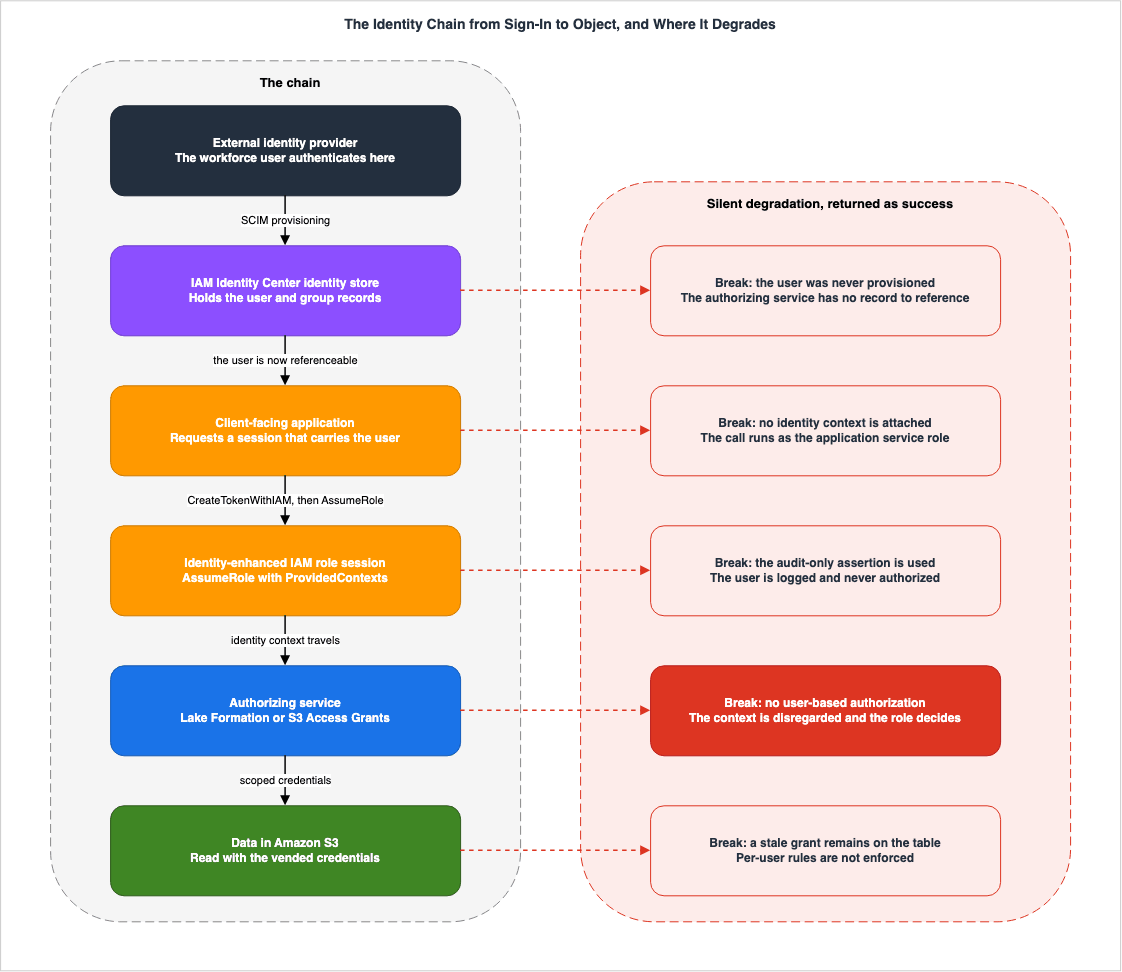
The lower half of that left column is the subject of this article. A service that receives an identity context either carries it to the next link or uses it to decide. Some services do both. A service that only carries hands the context on. If the next link cannot decide, authorization falls to the role.
The right column is what each link degrades to once its precondition is gone. All five of those entries return a successful request. Because none of them raises an error, there is no way to know you have landed in the right-hand column until you read the logs.
2.2 The Chain of Preconditions
The preconditions for each link are below. Every one of them appears as a conditional clause in AWS's own documentation.| Link | Precondition | What happens when it is missing |
|---|---|---|
| From the identity provider to IAM Identity Center | Provisioning of users and groups, usually through SCIM | There is no user record for the authorizing service to reference. |
| Where IAM Identity Center is enabled | Must be enabled in the same AWS Region as the services being used. | The identity context issuer and recipient cannot be linked. |
| The IAM Identity Center instance type | Organizational instance is recommended. If using an account instance, all services have to sit in the same account. | Services in other accounts cannot participate. |
| From customer managed application to AWS | Authentication via OAuth 2.0. SAML 2.0 integration is not supported. | There is no path to deliver the identity context. |
| Readiness on the authorizing side | For Lake Formation, integrate with Identity Center. For S3 Access Grants, associate the instance and register its location. | The role decides. |
The fourth row is particularly easy to overlook. The IAM Identity Center User Guide states the following regarding customer managed applications:
Your application must use OAuth 2.0 framework for authentication. Trusted identity
propagation does not support SAML 2.0 integrations.
That sentence sits in the section on customer managed applications. It applies to both internally developed applications and third-party applications. In a configuration that uses only AWS managed applications, the constraint never reaches the work your team does.
Furthermore, even organizations that have implemented enterprise-wide Single Sign-On (SSO) using SAML 2.0 can continue to use SAML for authentication with IAM Identity Center. The restriction applies to the authentication method of the application that carries the identity context and calls AWS services. These are distinct layers, and it is easy to confuse them.
2.3 Permission Sets Are Not Required
When discussing prerequisites, it is important to address a potential misunderstanding. There is a common belief that implementing IAM Identity Center requires designing multi-account permission sets.The IAM Identity Center User Guide states the following about trusted identity propagation:
Trusted identity propagation doesn't require you to set up multi-account permissions
(permission sets). You can enable IAM Identity Center and use it for trusted identity
propagation only.
This confirms that it is possible to maintain existing IAM federation and use IAM Identity Center solely as an identity synchronization destination. For those who have held back from implementation due to concerns about being unable to migrate their existing federation, this statement changes the underlying assumptions. The design of permission sets belongs to the AWS IAM Identity Center Complete Setup Guide.
3. What Trusted Identity Propagation Brings, What It Leaves Behind
3.1 What Is Inside the Identity Context
The IAM Identity Center User Guide defines an identity context as follows:Identity context comprises information that AWS services use to make authorization
decisions when they receive access requests. This information includes metadata that
identifies the requester (for example, an IAM Identity Center user), the AWS service to
which access is requested (for example, Amazon Redshift), and the scope of access
(for example, read only access).It consists of three elements: the requesting entity, the service being requested, and the scope of the request. It is worth remembering that the second and third elements are present. An identity context is not a person's identification; rather, it is an assertion of a specific scope of access for a particular service. That is why a condition key, described later, can check which application issued it.
3.2 The Vehicle Is an IAM Role Session
The identity context does not travel on its own. It rides on an AWS STS role session, and the IAM Identity Center User Guide calls that session an identity-enhanced IAM role session.The AWS Security Token Service (STS) enables an application to obtain an
identity-enhanced IAM role session. Identity-enhanced role sessions have an added
identity context that carries a user identifier to the AWS service that it calls.
AWS services can look up the group memberships and attributes of the user in
IAM Identity Center and use them to authorize the user's access to resources.The creation process is also clearly documented. Applications call
AssumeRole and pass a context assertion, containing the user's identifier, to the ProvidedContexts parameter. This assertion is obtained from the idToken claim included in the response from IAM Identity Center's CreateTokenWithIAM. The ProviderArn should be set to arn:aws:iam::aws:contextProvider/IdentityCenter.The key takeaway from this description is the continued presence of
AssumeRole. Trusted identity propagation is not a mechanism that eliminates the need to assume IAM roles. Instead, it is a mechanism that adds a verified user's identifier to the assumed role session. The permissions of the role are still evaluated, and the permissions of the user are also evaluated. Only when both are satisfied can data be accessed.3.3 There Are Two Context Assertions, and One Is There for Backward Compatibility
There are two context assertions you can pass toAssumeRole.| Assertion | Positioning | Behavior |
|---|---|---|
sts:identity_context | Recommended | The receiving service decides whether to authorize against the role or against the user. The user is also recorded in the logs. |
sts:audit_context | Maintained for backward compatibility | Previously, it was only used for logging and not for authorization. |
The IAM Identity Center User Guide states that a single session can hold only one of these context assertions; it cannot have both simultaneously. It recommends using
sts:identity_context for new configurations.In the past, sts:audit_context was used to enable AWS services to log the user identity
without using it to make an authorization decision. AWS services are now able to use a
single context - sts:identity_context - to achieve this as well as to make authorization
decisions. We recommend using sts:identity_context in all new deployments of trusted
identity propagation.It is worth checking whether previously configured paths are still using
sts:audit_context. While it functions correctly for auditing purposes, it can make it less obvious that permissions are being granted to the role.3.4 Attaching an Identity Context Narrows What the Session Can Call
This is the specification this article finds most often overlooked. When you assume a role with an identity context attached, the set of APIs that session can call becomes narrower than what the role's own policy permits.The AWS IAM Identity Center User Guide describes the AWS managed policy
AWSIAMIdentityCenterAllowListForIdentityContext as follows:When assuming a role with the IAM Identity Center identity context, AWS Security Token
Service (AWS STS) automatically attaches the AWSIAMIdentityCenterAllowListForIdentityContext
policy to the role.
This policy provides the list of actions that are allowed when you use trusted identity
propagation with roles that are assumed with the IAM Identity Center identity context.
All other actions that are called with this context are blocked.The key point here is that this policy is automatically applied. There is no option for users to disable it. The policy itself is a single
Deny statement that lists the permitted actions in a NotAction element. Any API not listed is denied.As of August 20, 2026, this policy is version v12, and the service prefixes included in the
NotAction list are aoss, athena, elasticmapreduce, es, glue, lakeformation, s3, q, qapps, qbusiness, and sts. For a complete and accurate list of individual actions, the AWS managed policy reference page is authoritative. This article does not reproduce it, because the list is revised.However, one design aspect is particularly important to note: this policy only permits three actions related to S3, and none of them involve directly reading the data itself. These actions are
s3:GetAccessGrantsInstanceForPrefix, s3:GetDataAccess, and s3:ListCallerAccessGrants. The s3:GetObject action is not included.Therefore, a session with an identity context can request credentials for S3 Access Grants, but it cannot use those credentials to read objects. The session that reads the object is the separate one that
GetDataAccess returns. This two-step process has implications for both Chapter 5 and Chapter 8.3.5 Condition Keys You Can Use in an Authorization Decision
A session that carries an identity context gains five condition keys you can use in theCondition element of an IAM policy.| Condition Key | Description | Use Case |
|---|---|---|
identitystore:UserId | The identifier of the IAM Identity Center user who is the subject of the context assertion. | Can be used for user-specific condition checks. |
identitystore:IdentityStoreArn | The ARN of the identity store associated with the instance that issued the assertion. | Used to determine if the identitystore:UserId originates from the expected identity store. |
identitycenter:ApplicationArn | The ARN of the application to which the assertion was issued. | Helps prevent roles from being used by applications other than the intended one. |
identitycenter:CredentialId | A random identifier for the credential with an identity context. | For logging purposes only. |
identitycenter:InstanceArn | The ARN of the IAM Identity Center instance that issued the assertion. | Used to determine if the assertion originates from the expected instance. |
The fourth condition key carries an explicit caveat. The IAM Identity Center User Guide recommends against using this value for context assertions in policies, because it is unpredictable. It should only be used for correlation in logs.
The third condition key can be directly applied to security design. Because IAM Identity Center issues an identity context for a specific application, you can pin the issuer in the trust policy and the permissions policy of the role. That stops an unexpected application from reaching a data role. IAM Policy Evaluation Logic Step-by-Step holds the evaluation order itself, so this article shows only the connection point.
3.6 What Stays and What Goes
Chapter 3 divides into what stays and what goes.| Item | Under Trusted Identity Propagation |
|---|---|
| Mapping from corporate identities to intermediate IAM roles | No longer needed, provided the authorizing service supports it. |
AssumeRole itself | Stays. The identity context rides on the assumed session. |
| The permissions policy of the role | Stays. It is evaluated. |
| The trust policy of the role | Stays. It may need an additional allow for sts:SetContext. |
| Range of APIs the session can call | Narrows. It is confined to an AWS managed allow list. |
| Authority over the authorization decision | Moves to the service that receives the context. |
| The identifier left for auditing | A verified user identifier is added, though this varies by service. |
The qualifier in the first row governs the rest of this article. The next chapter takes up what happens when the authorizing service does not support it.
4. Which Side Carries the Context and Which Side Decides
4.1 Three Roles
Services participating in trusted identity propagation fall into three roles. There is the service that issues the identity context and passes it downstream, the service that receives it and decides, and the service that receives it and only passes it on. A single service may fulfill multiple roles depending on the situation.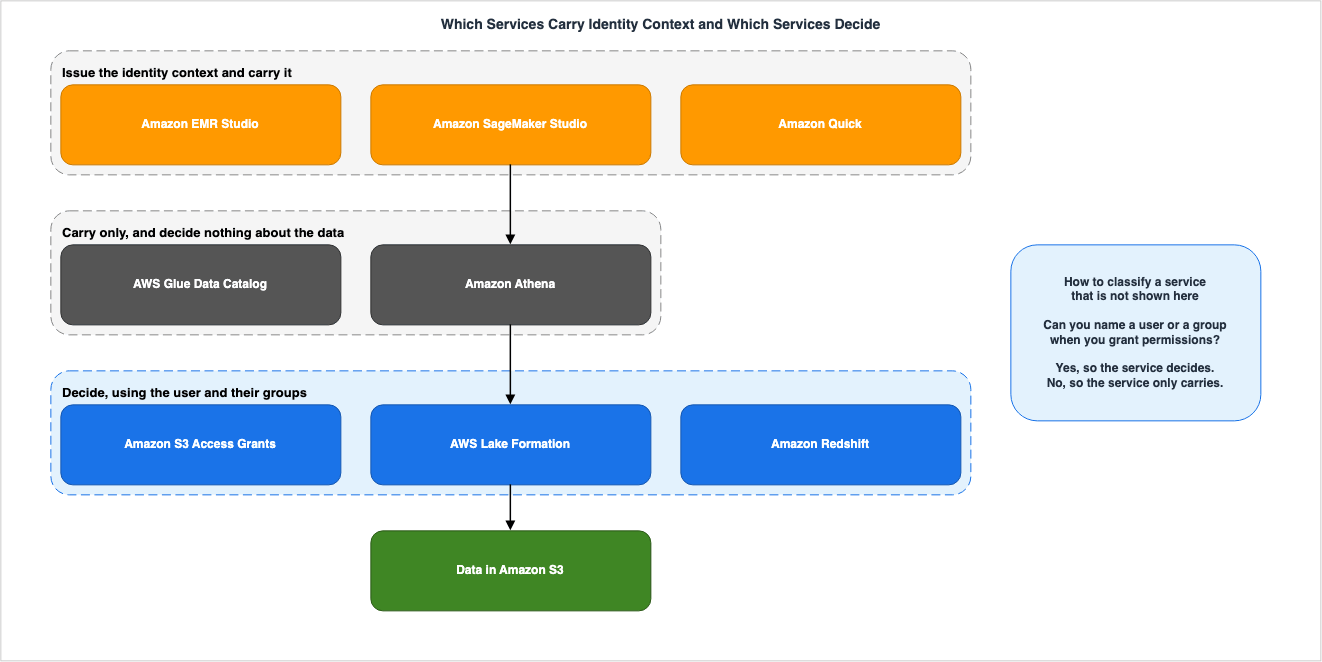
4.2 Representative Examples, Not a Catalog
This article does not build a comprehensive list. The set of supported services changes, so a self-made table with a verification date is guaranteed to go stale once it is published. The AWS IAM Identity Center User Guide provides an official table with columns indicating whether trusted identity propagation is supported for each AWS managed application. It is best to consult that table for the most up-to-date information. What follows is a handful of representative examples that show how to tell the roles apart.| Service | Role | Justification |
|---|---|---|
| Amazon Quick | Issues and carries | Issues identity context as a user-facing application. |
| Amazon SageMaker Studio | Issues and carries | The SageMaker AI Developer Guide states that inside Studio, roles carry the identity context rather than make access control decisions. |
| Amazon EMR Studio | Issues and carries | As a user-facing application, it passes identity context to downstream services like Athena and EMR. |
| Amazon Athena | Carries only | Passes identity context to Lake Formation during query execution. |
| AWS Glue Data Catalog | Carries only | Lake Formation determines metadata access permissions. |
| AWS Lake Formation | Decides | Evaluates the permissions granted to the user carried in the identity context, and vends credentials. |
| Amazon S3 Access Grants | Decides | Evaluates the permissions granted to the grantee, and vends credentials. |
| Amazon Redshift | Decides | Evaluates database permissions for IAM Identity Center users and groups. |
The justification provided in the second row is taken verbatim from the Amazon SageMaker AI Developer Guide.
Within Studio itself, IAM roles are used as carriers of the identity context rather than
for making access control decisions. The identity context is propagated to connected
AWS services where it can be used for both access control and audit purposes.
The word carrier appears in very few places in the official documentation. This sentence meets one misunderstanding head on: that narrowing the permissions of the Studio execution role gives you per-user control. Per-user control belongs to the services downstream.
4.3 The Test — Who Holds the List of Permissions
The test is straightforward. Does the management interface of the service let you name a user or a group when you grant permissions? If it does, the service decides. If it does not, the service only carries.Lake Formation provides a screen where you can select users and groups from IAM Identity Center and assign them permissions for databases and tables. S3 Access Grants allows you to select users and groups as grantees. Athena does not. Athena only controls assignments to workgroups, not permissions related to the data within tables.
The test holds for services that gain support later. An announcement of support alone does not tell you whether a service decides or merely carries; the screen for naming the recipient of a permission does.
4.4 A Service Without User-Based Authorization Simply Disregards the Context
The third behavior described is central to this article. If a service receives an identity context but does not support user-based authorization, that service disregards the identity context. The IAM Identity Center User Guide states:AWS services that do not support user-based authorization disregard the
sts:identity_context. CloudTrail logs the userId of the IAM Identity Center user with all
actions taken by the role.AWS itself uses the word disregard. No error appears. The call succeeds. The role decides. The second sentence makes the situation confusing. Because the logs record the user's identifier, it may appear that per-user identity is being enforced when reviewing CloudTrail. What is logged and what is used to decide are two separate things. Reading an
onBehalfOf value as proof that per-user control is in force is where this goes wrong.This behavior is a reasonable design choice. Had the service rejected the identity context instead of disregarding it, turning on trusted identity propagation even once would break every existing call to a service that does not support it. Compatibility was given priority, and a silent downgrade is the consequence. While the design is reasonable, whether operations teams can detect this behavior is a separate issue.
5. S3 Access Grants — What Disappears When the Grantee Is a Directory Identity
5.1 Three Kinds of Entity Can Be Named as the Grantee
Amazon S3 Access Grants is a layer that registers permissions for individual entities against S3 prefixes, buckets, and objects, and issues time-bound credentials upon request. Section 5.4 of the Amazon S3 Security and Access Control Guide places it in the architecture. This article covers only what leaves the path when the grantee type changes.The S3 Control API Reference defines three possible values for the
GranteeType parameter.| Value | Entity | Format of GranteeIdentifier |
|---|---|---|
IAM | IAM user or role | IAM ARN |
DIRECTORY_USER | Corporate directory user | 128-bit UUID |
DIRECTORY_GROUP | Corporate directory group | 128-bit UUID |
The latter two carry conditions of their own. The S3 Control API Reference states:
DIRECTORY_USER - Your corporate directory user. You can use this option if you have added
your corporate identity directory to IAM Identity Center and associated the IAM Identity
Center instance with your S3 Access Grants instance.
Two things have to be true: the corporate directory is in IAM Identity Center, and that IAM Identity Center instance is associated with the S3 Access Grants instance. The Amazon S3 User Guide adds that in every configuration, the IAM Identity Center instance has to be in the same AWS Region as the S3 Access Grants instance. You make the association with
AssociateAccessGrantsIdentityCenter. This operation requires s3:AssociateAccessGrantsIdentityCenter in addition to sso:CreateApplication, sso:PutApplicationGrant, and sso:PutApplicationAuthenticationMethod. The actual process of association involves creating an application within IAM Identity Center.5.2 What Disappears Is the Mapping to an Intermediate IAM Role
What becomes unnecessary when you designate the grantee as eitherDIRECTORY_USER or DIRECTORY_GROUP? The Amazon S3 User Guide explicitly states this point.With S3 Access Grants, you no longer need to map your corporate identities to
intermediate IAM principals in order to access your S3 data through your corporate
applications.What disappears is the mapping to the intermediate IAM principal. The role itself doesn't vanish from the path. As Chapter 3 showed,
AssumeRole remains. What disappears is the organization's responsibility to maintain its own internal table that maps corporate identities to roles.The key difference lies in scale. In the previous configuration, the granularity of permissions was constrained by the number of roles. When you designate the grantee as a directory user or group, the granularity shifts to the number of grants. The limit for S3 Access Grants is 100,000 grants per S3 Access Grants instance. There is one S3 Access Grants instance per AWS Region and account, and you can register up to 1,000 locations per instance. The User Guide advises that for use cases exceeding these limits, you should request an increase through AWS Support.
5.3 The Trust Policy of the Location Role Carries a Condition
S3 Access Grants assumes the IAM role attached to a registered location and vends the credential. The trust policy for this role includes a condition that varies the required actions based on the grantee type.The documentation for the
GetDataAccess API states the following:The IAM role that S3 Access Grants assumes must have the following permissions specified
in the trust policy when registering the location: sts:AssumeRole, for directory users or
groups sts:SetContext, and for IAM users or roles sts:SetSourceIdentity.Three actions are listed, with the latter two specifying different targets. For directory users and groups, the corresponding action is
sts:SetContext, while for IAM users and roles, it is sts:SetSourceIdentity. The service principal is access-grants.s3.amazonaws.com.This is the line that gets dropped when an environment built on IAM grantees moves to directory identities. The trust policy already exists, and it already carries
sts:AssumeRole and sts:SetSourceIdentity. There seems to be no reason to touch something that was working. However, without sts:SetContext, directory ID grantees will not be able to obtain credentials.Furthermore, examples that include this line are not found on the dedicated page that describes the location registration process. Follow the documented procedure and the result fails. Chapter 9 pins down where that happens.
5.4 The Vended Credential Belongs to a Different Session
GetDataAccess does not enhance the caller's own credentials and hand them back. It vends a new credential. The response carries AWS STS credentials built from the role attached to the location and narrowed to the requested scope.| Parameter | Value |
|---|---|
Permission | One of: READ, WRITE, READWRITE |
Privilege | Default returns credentials with the scope of the grant closest to the target. Minimal returns credentials with the exact requested scope, provided the requested scope is the same as or a subset of the grant scope. |
DurationSeconds | The default is 1 hour. You can specify a value between 900 and 43200 seconds. Requests exceeding this limit will fail. |
As Chapter 3 established, a session carrying an identity context cannot call
s3:GetObject. The furthest they reach is s3:GetDataAccess. Therefore, accessing objects always requires using the second set of credentials returned by GetDataAccess. That two-step structure shapes the logs, which Chapter 8 takes up.The two values of
Privilege are easy to mix up. When you specify Default, the returned credentials do not have the exact requested scope; it is the scope of the grant closest to the target. For example, if you request s3://bucket/project/red/tomatoes/, and the grant is for s3://bucket/project/red/*, the returned credentials will cover the latter scope. The application ends up holding a credential broader than what it asked for.Furthermore, AWS has not explicitly stated which value is applied when this parameter is omitted. The S3 Control API Reference explains what the two values mean and never names a default. If you want to strictly adhere to the principle of least privilege, it is best to explicitly specify
Minimal.5.5 A Grant Can Be Bound to One Application
CreateAccessGrant takes an optional parameter named ApplicationArn. The S3 Control API Reference describes it as follows:The Amazon Resource Name (ARN) of an Amazon Web Services IAM Identity Center application
associated with your Identity Center instance. If an application ARN is included in the
request to create an access grant, the grantee can only access the S3 data through this
application.Set it, and the grantee reaches the data only through that application. Leave it out, and the grant applies whatever the application. The default behavior is application-independent.
This capability overlaps in purpose with the
identitycenter:ApplicationArn condition key from Section 3.5. The key difference lies in where the control is implemented: the condition key sits in the IAM policy, while ApplicationArn sits on the grant. If the data owner wants to control access, using ApplicationArn is the more natural approach.5.6 Why SCIM Is Needed
To use directory IDs with S3 Access Grants, the users and groups have to exist in the IAM Identity Center identity store. The AWS Storage Blog clarifies the prerequisites as follows:You must provision the users and groups who will use S3 Access Grants, into IAM Identity
Center. If you use an external identity provider, this is best accomplished using the
System for Cross-domain Identity Management (SCIM) protocol.The requirement for existence is a specification, and SCIM is the recommended method for achieving this. While manual creation is technically possible, it is not recommended from an operational perspective. Deactivate someone on the IdP and they can still sit in IAM Identity Center, which is how the two drift apart.
Without SCIM synchronization, you will be unable to create grants. The grantee identifier is the UUID from IAM Identity Center, so if the user doesn't exist there, the value cannot be specified. That failure surfaces when you create the grant, so it does not break quietly. Conversely, failures can occur silently. Change a user's group membership on the IdP, access the data before SCIM finishes syncing, and the old membership decides.
5.7 A Resource-Based Policy Opens the Account Boundary
An S3 Access Grants instance can carry a resource-based policy. By granting an IAM principal in another account thes3:GetDataAccess permission, you can request credentials from that account. If you need to retrieve lists, you should also grant the s3:ListAccessGrants and s3:ListAccessGrantsLocations permissions. You set this with PutAccessGrantsInstanceResourcePolicy.From a design perspective, you rarely need to narrow down individual principals in the resource-based policy itself. Expressing who reaches what on the grant side is easier to manage. It is best to use resource-based policies solely to enable access across account boundaries.
6. Lake Formation and the AWS Glue Data Catalog — The Conditions That Make It Work
6.1 The Integration Is One Time, per Account and per Region
When connecting AWS Lake Formation to IAM Identity Center, Lake Formation is registered as an application on the IAM Identity Center side. You register it with theCreateLakeFormationIdentityCenterConfiguration action, and the ApplicationArn in the response becomes the propagation target from then on. The ARN format is as follows:arn:aws:sso::111122223333:application/<idc-instance-id>/<lf-application-id>The Amazon Quick documentation describes the nature of this action as follows:
This is a one-time, account-level and Region-level step. If you already use Athena
trusted identity propagation, this step is already complete.
It is a one-time operation, at the level of an account and a Region. If you have already configured it in Athena, that configuration is sufficient. Conversely, it does not carry to another Region in the same account.
6.2 The AWS Glue Data Catalog Condition Is Exclusive
This section contains the most critical condition. The sentence comes from the same User Guide.Trusted identity propagation with AWS Glue Data Catalog requires AWS IAM Identity Center.
It is not supported for other authentication methods.It states the requirement, then restates it in the negative for every other authentication method. Because of this second sentence, the condition is not a requirement, but rather an exclusive limitation. Keeping IAM federation and using only the identity propagation of the AWS Glue Data Catalog is not a configuration that works.
The same page also outlines regional restrictions in parallel.
Your AWS IAM Identity Center instance, Lake Formation, AWS Glue Data Catalog, and Amazon S3
Access Grants must all be deployed in the same AWS Region.
All four components have to sit in the same Region. On a multi-Region data platform, you build the same configuration in each Region. While the AWS Data Lakehouse Architecture Guide covers the overall architecture of a data lakehouse, including the data catalog and table formats, this article focuses solely on the ID propagation path.
6.3 While IAMAllowedPrincipals Remains, Per-User Permissions Do Not Apply
In environments where Lake Formation was implemented after the fact, a pseudo-principal calledIAMAllowedPrincipals may sometimes have the Super attribute assigned to it, to maintain compatibility with existing AWS Glue behavior. The implications of this state are discussed in the published work, Fine-Grained Access Control for AI Data with AWS Lake Formation, specifically in Section 2.2, which addresses this potential pitfall.This article adds to that understanding by examining its relationship to trusted identity propagation. The Amazon Quick User Guide lists AWS Glue Data Catalog being under Lake Formation management as one of the prerequisites, explaining this condition as follows:
Lake Formation must enforce permissions on your databases and tables. If a database or
table still grants Super to IAMAllowedPrincipals, Lake Formation does not enforce
per-user permissions.
It explicitly states that granular, per-user permissions will not be enforced. The propagation side can be correct, and the grants to IAM Identity Center users can be in place. While
Super remains on the table, Lake Formation makes no per-user decision.This failure is subtle. A user reads columns and rows beyond their own permissions. No error appears, and no console screen warns about it. Of every break this article covers, this one is the hardest to detect. The solution is straightforward: simply verify that no tables have lingering
IAMAllowedPrincipals permissions. While the process is simple, it requires checking each table individually.6.4 Do Not Register the Location with a Service-Linked Role
When registering an S3 location in Lake Formation, you must specify a role that Lake Formation assumes. By default, you can choose a service-linked role. The IAM Identity Center User Guide provides explicit instructions for use cases involving trusted identity propagation.In the IAM role section, do not select the service linked role if you want to use it with
trusted identity propagation. Create a separate role with the following permissions.The instruction is clear: do not choose a service-linked role; instead, create your own role. That small detail matters later. Recording the user context in CloudTrail, the subject of Chapter 8, works only for a location registered with a user-defined role. It is highly valuable to choose the correct option initially, as re-registering can have significant consequences.
6.5 The Limits of the Integration
The Lake Formation Developer Guide lists the limitations of integration with IAM Identity Center in a bulleted format. Take them one point at a time.First, it is not possible to assign users and groups from IAM Identity Center as Lake Formation data lake administrators or read-only administrators. Administrators remain IAM principals. From an operational design perspective, this means that management operations and analytical operations will reside within separate identity systems.
Second, for users and groups from IAM Identity Center to query resources within an encrypted data catalog, AWS Glue must assume an IAM role that is used for encryption and decryption. The guide states:
AWS managed keys don't support trusted identity propagation.An environment that encrypts the Data Catalog with an AWS managed key has no path here. It has to move to a customer managed key and a role.
Third, the APIs that users and groups from IAM Identity Center can invoke are limited to those listed in Section 3.4,
AWSIAMIdentityCenterAllowListForIdentityContext. The Lake Formation guide also mentions this same policy name, reiterating this limitation. Given that both services' documentation independently describe this same constraint, it is highly likely to be accurate.Fourth, cross-account granting is not supported. The guide states:
Lake Formation permits IAM roles from external accounts to act as carrier roles on behalf
of IAM Identity Center users and groups for accessing Data Catalog resources, but
permissions can only be granted on Data Catalog resources within the owning account.
A role in an external account is allowed to act as a carrier role. However, permissions can be granted only inside the account that owns the data catalog resources. If you attempt to grant permissions to users from IAM Identity Center for resources in an external account, Lake Formation will return the following error:
Cross-account grants are not supported for the principal.However, there are viable paths if the direction of sharing is altered. The IAM Identity Center User Guide lists three conditions under which table sharing using AWS Resource Access Manager can be used in conjunction with trusted identity propagation. These conditions are that the granting and receiving accounts have to be in the same AWS Region, in the same AWS Organizations, and must share the same organizational instance of IAM Identity Center. The design of cross-account sharing is held by a previously published article, so this article only records that the conditions exist.
6.6 The Application Assignment Configuration Is False by Default
The final item in this list concerns the default setting.When using Lake Formation with IAM Identity Center, the application assignment
configuration is set to false by default. If you modify this configuration directly
through the IAM Identity Center API, you must then manage all application assignments
manually using the API.The IAM Identity Center application that Lake Formation creates disables the assignment requirement by default. A user therefore reaches Lake Formation resources on Lake Formation permissions alone, without an explicit assignment to the application. Change that setting directly through the IAM Identity Center API and every later assignment becomes a manual step. Lake Formation will not synchronize any external changes.
This setting is one that, if altered with the intention of tightening security, can easily disrupt operations. Making assignment mandatory looks like a tightening, but it stops Lake Formation's automatic synchronization. Every new user then needs a manual assignment, and everyone who leaves the group loses access without a sound. If you wish to enforce assignment, using the
identitycenter:ApplicationArn condition key (as described in Section 3.5) or the ApplicationArn on the grant side (as described in Section 5.5) will result in fewer unintended consequences.6.7 A Full-Table Grant Overrides the Data Filter
Finally, a brief note regarding the fine-grained control itself. The Amazon Quick User Guide states the following as a consideration:A data filter has no effect if a full-table SELECT is also granted to the same user.If the same user also has full
SELECT permissions on a table, the data filter does nothing. You can design row-level and column-level filters, and a broader permission surviving on another route makes them moot. When transitioning to individual user permissions, it is necessary to verify both the previous group-level permissions and the new individual permissions, as remnants of the group permissions may still exist.Fine-Grained Access Control for AI Data with AWS Lake Formation holds the design of filters and how to write them. This article shows only that the condition which disables a filter sits on the permissions side.
7. Where the Chain Breaks Without Raising an Error
7.1 There Are Two Ways for the Chain to Break
The preconditions so far divide by how they fail.| Failure Scenario | Operational Characteristics |
|---|---|
| Request fails | It is possible to trace the cause from the error message. Detection is relatively easy. |
| The request succeeds, and the role decides | No error occurs. The data comes back. Nothing surfaces until the day of the audit. |
The first type shows up the day you configure it. The second type, however, goes unnoticed. This chapter will focus exclusively on the second type of failure. Diagnosing the first type falls under the responsibility of AWS IAM AccessDenied Reference, so this article sends readers there.
7.2 The Authorizing Service Does Not Support It
This is the pattern from Section 4.4. If a service receives an identity context but does not support user-based authorization, it will disregard the context.This pattern is the least likely to be immediately apparent, particularly when a supported service sits partway along the path. For example, a path from Athena to Lake Formation might be controlled per user, while another path, used by the same user, directly reads the same S3 location from a different engine, bypassing this control. In the latter case, the identity context may not be provided, or if it is, the engine will ignore it.
A previously published article pointed at this same structure from the Lake Formation side.
A principal that can obtain the raw S3 objects directly — bypassing the query engine —
is outside Lake Formation's reach entirely.
This relates to the description in Section 2.4 of Fine-Grained Access Control for AI Data with AWS Lake Formation. That article's central argument is that enforcing filters is the responsibility of the query engine. This article addresses the upstream considerations for that principle. The identity context determines who the engine is enforcing restrictions for; if the context is not received, the engine will apply those restrictions based on the user's role. Both articles examine the same underlying structure, but from different perspectives.
7.3 A Stale Permission Remains on the Data Catalog
This is theIAMAllowedPrincipals case from Section 6.3. Even though the propagation settings are correct and the authorizing side is properly configured, a Super permission left on the table stops the per-user decision from happening.The reason this is being reiterated is because the root cause lies outside of the propagation settings. You can review the trusted identity propagation configuration as many times as you like and find nothing wrong with it. Look at the data catalog resources instead.
7.4 Some Processes Inside Studio Do Not Carry the Identity Context
Amazon SageMaker Studio is one of the few services that explicitly lists processes where an identity context may not be propagated, even within environments that support trusted identity propagation. The SageMaker AI Developer Guide states:When Studio launches with trusted identity propagation enabled, it uses your identity
context in addition to your execution role permissions. However, the following processes
during instance setup will only use the execution role permissions, without the identity
context: Lifecycle Configuration, Bring-Your-Own-Image, CloudWatch agent for user log
forwarding.Three specific processes are listed. They are Lifecycle Configuration, Bring-Your-Own-Image, and the CloudWatch agent for user log forwarding. All of these processes run during instance startup and are not directly initiated by the user.
The same page also outlines two further limitations.
Remote access is not currently supported with trusted identity propagation.When you use assume role operations within Studio notebooks, the assumed roles don't
propagate trusted identity propagation context. Only the original execution role
maintains the identity context.The second limitation is particularly significant in practical applications. If you write code within a notebook that assumes a cross-account role, the identity context will not be passed to the target account. This practice is common in multi-account data infrastructure. The code will continue to function as expected, and its behavior will not change before or after assuming the role. The one difference is that the role decides, not the identity context of the user.
Few services provide this level of explicit listing. For services that do not provide such a list, users must attempt to determine potential failure points themselves. An absent list is not evidence that nothing drops.
7.5 An Athena Workgroup Cannot Change Its Authentication Method After Creation
When selecting IAM Identity Center as the authentication method in Amazon Athena, this configuration can only be set during workgroup creation. The Athena User Guide states:You cannot change the authentication method for the workgroup after the workgroup is
created.Two directions of irreversibility follow from it.
Existing Athena SQL workgroups cannot be modified to support IAM Identity Center enabled
workgroups. Existing Athena SQL workgroups can propagate identity to downstream services.
IAM Identity Center enabled workgroups cannot be modified to support resource-level IAM
permissions or identity based IAM policies.The second statement is particularly important: Existing workgroups cannot be converted to use IAM Identity Center, but existing workgroups can still propagate identity downstream. This means the choice isn't a binary one. An IAM Identity Center enabled workgroup is the form in which assignment to the workgroup is itself managed through IAM Identity Center, and if your goal is simply to propagate identity, existing workgroups remain a viable option.
The third statement is relevant to migration planning. In workgroups enabled with IAM Identity Center, you cannot use resource-level IAM permissions or identity-based IAM policies. If you currently have operations that rely on IAM conditions applied at the workgroup level, those operations cannot be migrated.
The remaining limitations are worth listing as well. In workgroups enabled with IAM Identity Center, the default query timeout is 30 minutes, and even with a request, the maximum timeout is one hour. It can take up to one hour for user and group permission changes to be reflected. You also cannot run queries straight from the Athena console. The limitations list names the Athena interface in an IAM Identity Center enabled EMR Studio, while the opening of the same page states that Athena SQL support for trusted identity propagation is available in both EMR Studio and SageMaker Unified Studio. Available Regions are limited as well. The User Guide holds the list, so check it before you commit to a design.
7.6 The JDBC and ODBC Driver Path Is a Different Mechanism
The Athena User Guide mentions different connection paths from BI tools to Athena in two separate locations. Chapter 9 sorts out the discrepancy. The operational conclusion comes first.The list of limitations for IAM Identity Center enabled workgroups identifies four items that are incompatible with trusted identity propagation. These are: the
aws:CalledVia condition key, Athena for Spark workgroups, federated access to the Athena API, and federated access using JDBC and ODBC drivers with Lake Formation and Athena.However, on a different page in the same User Guide, it states that single sign-on via IAM Identity Center is available when using JDBC and ODBC drivers. The scope of this functionality is clearly defined.
The JDBC and ODBC drivers support trusted identity propagation with IAM-enabled
workgroups.
The scope is limited to IAM-enabled workgroups. The driver path therefore pairs with the traditional workgroup type, not with the IAM Identity Center enabled type. This path requires two roles, an application role and an access role, together with a customer managed application.
Because the terminology is the same but the mechanisms are different, it is possible to waste time designing an invalid configuration if there is a misunderstanding during the design phase. If your requirement is to connect from a BI tool, it is crucial to determine which path to use early on.
7.7 The Lag Sits in Several Layers at Once
There are several points in the process where changes to permissions do not take effect immediately.| Layer | Delay |
|---|---|
| From IdP to IAM Identity Center | Dependent on the SCIM synchronization interval. |
| S3 Access Grants | Eventually consistent. A newly added grant can take minutes to take effect. |
| An Athena IAM Identity Center enabled workgroup | A change to user or group permissions can take up to one hour to take effect. |
A credential vended by GetDataAccess | Valid for one hour by default, and for up to twelve hours. |
The final row is relevant to the design for decommissioning. Revoke the permission and any credential already vended stays valid until its expiry. A longer expiration period increases the time it takes for the revocation to take effect. If a twelve-hour expiration period is specified, anticipating long-running queries for analysis purposes, the reflection of the revocation may also be delayed by up to twelve hours.
Regarding the eventual consistency of S3 Access Grants, this is explicitly stated in the Amazon Quick User Guide.
S3 Access Grants are eventually consistent. Newly added grants may take minutes to
propagate.
If you attempt to verify permissions immediately after granting them, the verification may fail. That failure invites suspicion of the configuration and a change somewhere unrelated. Wait a few minutes before you verify.
7.8 A Checklist of the Places That Break
The items below are listed in the order you should check them.| # | Item to Verify | Behavior When Failure Occurs |
|---|---|---|
| 1 | Does the authorizing service support per-user authorization? | The service disregards the identity context, and the role decides. |
| 2 | Are there any remaining IAMAllowedPrincipals with the Super value in the data catalog tables? | Per-user permissions are not enforced. |
| 3 | Does the trust policy of the location role allow sts:SetContext? | A grant to a directory identity never reaches credential vending. |
| 4 | Is the Lake Formation location registered using a service-linked role? | User context recording in CloudTrail cannot be enabled. |
| 5 | Are roles being assumed within notebooks or jobs? | The assumed role does not propagate the identity context. |
| 6 | Do the startup processes run on the execution role alone? | Actions performed during the startup process are not associated with a user. |
| 7 | Is the context assertion still set to sts:audit_context? | Records are retained, but the context is not used for authorization. |
| 8 | Does the same user still hold a full-table SELECT through another route? | The data filter has no effect. |
The first three items relate to configuration issues, while items four and beyond are related to design and implementation. The former can be resolved once corrected. The latter tend to reappear whenever the code or configuration changes.
8. What the Logs Actually Record
8.1 What CloudTrail Gains Is an Element Named onBehalfOf
CloudTrail records a request from a session that carries an identity context inuserIdentity, with an added onBehalfOf element. An example, as shown in the IAM Identity Center User Guide, is as follows:"userIdentity": {
"type": "AssumedRole",
"principalId": "AROAEXAMPLE:MyRole",
"arn": "arn:aws:sts::111111111111:assumed-role/MyRole/MySession",
"accountId": "111111111111",
"accessKeyId": "ASIAEXAMPLE",
"sessionContext": {
"sessionIssuer": {
"type": "Role",
"principalId": "AROAEXAMPLE",
"arn": "arn:aws:iam::111111111111:role/MyRole",
"accountId": "111111111111",
"userName": "MyRole"
},
"attributes": {
"creationDate": "2023-12-12T13:55:22Z",
"mfaAuthenticated": "false"
}
},
"onBehalfOf": {
"userId": "11111111-1111-1111-1111-1111111111",
"identityStoreArn": "arn:aws:identitystore::111111111111:identitystore/d-111111111"
}
}Examining the structure reveals that the content of Chapter 3 is directly reflected. The
type remains AssumedRole, and CloudTrail still records the ARN of the role and the session issuer as before. The only additions are the two onBehalfOf fields. The recording has not been replaced; rather, it has been augmented.The
userId is a UUID that identifies the user in the IAM Identity Center identity store. It is neither a name nor an email address. The identityStoreArn refers to the identity store that can resolve that UUID.8.2 AWS States Plainly That What Is Recorded Varies by Service
On the same page, there is a crucial disclaimer.The way in which events are logged in CloudTrail varies based on the AWS service.
Not all AWS services log the onBehalfOf element.AWS states that not all services record information using
onBehalfOf. The overview page for trusted identity propagation also states the same thing, albeit in less precise language.AWS services may log the user identifier in AWS CloudTrail and in their service logs.
Check the service documentation for details.The word is
may, and the sentence then sends you to each service's own documentation. The very existence of this disclaimer is significant from a design perspective. If you are planning to meet audit requirements using trusted identity propagation, you will need to individually verify what each relevant service records. Plans based on the assumption that all services retain this information will have gaps proportional to the number of services you haven't verified.While many secondary resources state that all services retain this information, the primary documentation's disclaimer is more accurate.
8.3 Lake Formation Requires an Explicit Opt-In Before It Records the User
Lake Formation states its logging conditions more explicitly than any other service here. The Lake Formation Developer Guide says:By default, when an IAM Identity Center user submits a query to an integrated analytics
service, the CloudTrail logs only include the IAM role assumed by the service to provide
short term access. If you use a user-defined role to register the Amazon S3 data location
with Lake Formation, you can opt in to include the IAM Identity Center user's context in
the CloudTrail events, and then track the users that access your resources.Three conditions come out of that sentence. By default, user information is not retained. Enabling logging requires an explicit action, and that action is available only where the location was registered with a user-defined role. Section 6.4 said not to pick the service-linked role for exactly this reason.
Enabling logging in the console is found under Data Catalog settings, in the Enhanced auditing section, under Propagate provided context. Through the API, you set the
SET_CONTEXT parameter in the Parameters attribute of PutDataLakeSettings.The same page contradicts itself about the default value of this setting. The passage mentioned above states that, by default, user information is not retained. However, the bottom of the same page states that the default value for
SET_CONTEXT is true. Chapter 9 takes up the discrepancy. The practical conclusion is not to state the default as a claim of this article. Measure it in your own environment instead.8.4 What a Single Read Leaves, and Where
Everything so far fits on one diagram. Where nothing is recorded, the cell says so instead of sitting blank.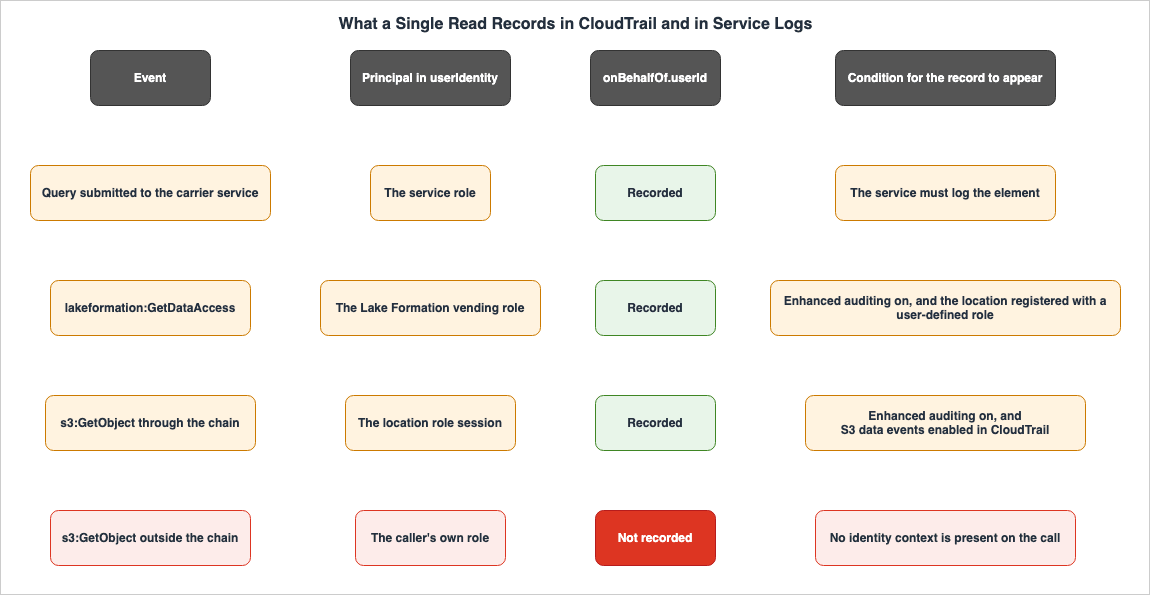
8.5 S3 Object-Level Events Have to Be Enabled Separately
The Lake Formation Developer Guide continues its discussion of logging with an important note.To include object-level Amazon S3 API requests in the CloudTrail, you need to enable
CloudTrail event logging for Amazon S3 bucket and objects.S3 object-level API requests are data events in CloudTrail. By default, these data events are not recorded. This means that even if you enable trusted identity propagation and enable user context logging within Lake Formation, CloudTrail does not record the
GetObject calls themselves unless you enable data events.The distinction between management events and data events is a design feature of CloudTrail and is independent of trusted identity propagation. However, if your audit requirements necessitate tracking which objects are being read, failing to enable this setting will prevent you from meeting those requirements. A separate article holds the design of log aggregation. This one only records that the dependency exists.
The same distinction runs through every source that records identity activity, not just this one. Where the Logs Come From on AWS - Identity and the Control Plane, What Is On by Default, and What Is Not Recorded at All reads each source for what it emits, whether it emits by default, and what it structurally does not record.
8.6 Turning the UUID Back into a Person Is Still Your Work
TheonBehalfOf.userId is a UUID. Simply listing UUIDs in audit reports is not helpful. To convert them back to names or email addresses, it is necessary to query the identity store.aws identitystore describe-user \
--identity-store-id d-xxxxxxxxxx \
--user-id <user-id-from-the-event>This resolution process has two key characteristics. First, the identity store resolves against its state at the time of the query. A UUID belonging to someone who has left and been removed from the identity store no longer resolves. Second, the entity performing the resolution requires read access to the identity store. In environments where the logging infrastructure and the identity store reside in separate accounts, a separate authorization pathway will need to be designed.
If the audit requirements include long-term data retention, a design is required to periodically retrieve and store a mapping table between UUIDs and user identifiers. Storing only logs will not allow for later conversion back to user information. This mapping table itself contains personal data, so its retention period and protection level must adhere to the organization's policies.
8.7 A Lifecycle Note on Where You Query the Logs
Many resources introduce AWS CloudTrail Lake as a means of querying events recorded by CloudTrail using SQL. The AWS Big Data Blog, which covers the subject matter of this article, also provides an example query that selectsonBehalfOf.userId within CloudTrail Lake.However, the availability of this option is subject to change. The CloudTrail User Guide states the following:
AWS CloudTrail Lake will no longer be open to new customers starting on May 31, 2026.
For capabilities similar to CloudTrail Lake, explore CloudWatch.
New users will no longer be able to sign up starting May 31, 2026. Existing users will continue to have access. This change does not affect the core CloudTrail service, and does not apply to trails, Insights, or aggregated events. Therefore, when building a query infrastructure, CloudTrail Lake is not a viable option. AWS recommends Amazon CloudWatch as an alternative.
9. Where the Primary Sources Disagree with Each Other
9.1 Why This Article Records the Disagreements
All claims made in this article have been verified against official AWS documentation. That process surfaced five discrepancies inside AWS's own materials. Two of these discrepancies, if followed by users, would prevent them from achieving their intended goals.When encountering such discrepancies, there are two possible approaches. One is to only document the correct information, and the other is to explicitly acknowledge the discrepancies. This article takes the latter approach. This is because when a reader consults a different page on a different day and finds information that contradicts this article, it is natural for them to question this article's accuracy. By clearly stating what is written on each page and explaining why one might be considered more accurate, readers can make their own informed judgments.
One general rule is worth stating first. Statements that define constraints are the most accurate, while statements describing procedures are often the least precise. Of the five discrepancies below, this rule explains the first and the second. The remaining three discrepancies fall into a different category.
9.2 First — No Example Containing sts:SetContext Appears on the Dedicated Page for Registering a Location
As Section 5.3 showed, the trust policy for the role associated with S3 Access Grants locations includes a condition that requires different actions depending on the grantee type. For a directory user or group,sts:SetContext is required.However, there are no examples on the dedicated page explaining how to register locations that include this action. The Register a location page in the Amazon S3 User Guide carries three examples of a policy that trusts
access-grants.s3.amazonaws.com. These examples cover prerequisites for the console procedure, prerequisites for the AWS CLI procedure, and an example of the create-role response. All three examples only list two actions."Action": [
"sts:AssumeRole",
"sts:SetSourceIdentity"
]The main body of the same page also explicitly mentions only these two actions.
Specifically, make sure that this role grants S3 Access Grants the permissions
sts:AssumeRole and sts:SetSourceIdentity.
Furthermore, this page mentions a separate option for IAM Identity Center but does not provide the details for that option. Immediately following the first example is the following sentence.
Alternatively, for an IAM Identity Center use case, use the following policy which
includes a second statement:
What follows this sentence is not a policy example. Instead, it begins a bulleted list describing IAM permission policies. The second option mentioned is not found anywhere on the page. As of August 20, 2026, two independent retrievals of the page returned the same result.
The documents that do name
sts:SetContext sit outside that dedicated page.| Document | Actions Listed |
|---|---|
| Amazon S3 User Guide, Register a location | sts:AssumeRole, sts:SetSourceIdentity |
GetDataAccess API Reference | sts:AssumeRole, sts:SetContext (for directories), sts:SetSourceIdentity (for IAM) |
| AWS Transfer Family web app tutorial | All three actions in a single statement |
| AWS Storage Blog | All three actions, along with their respective conditions |
| Amazon EMR Management Guide (prerequisites for trusted identity propagation) | sts:AssumeRole, sts:SetSourceIdentity |
The S3 Control API Reference holds. There are three reasons. First, the call that fails when
sts:SetContext is missing is that API, and the responsibility for stating its constraints belongs to its reference page. Second, the allow list in AWSIAMIdentityCenterAllowListForIdentityContext, examined in Section 3.4, contains sts:SetContext, so a separate document confirms that the action belongs to the identity context path. Third, AWS Transfer Family web apps are built on IAM Identity Center, and that tutorial uses all three actions.The impact is clear. A reader configuring a setup that uses a directory ID as a grantee will initially follow the registration process. If they copy the example as it stands, the one action that configuration needs is the action they leave out. The general principle that dedicated page examples are the most accurate does not apply in this case, due to the absence of the anticipated alternative solution.
Similarly, the prerequisites page in the Amazon EMR Management Guide also mentions these two actions by name, using nearly identical wording. Since the purpose of configuring trusted identity propagation in EMR is to propagate corporate identities downstream, the grantee will typically be a directory user or group. The same wording appears in the documentation for both services, placed in a location where the stated purpose and the provided example directly contradict each other.
9.3 Second — The EMR Tutorial Tells You to Turn Enhanced auditing Off
The same page outlining EMR prerequisites also includes initial setup steps for Lake Formation. Within the data catalog configuration section, it states:Clear both check boxes under Default permissions for newly created databases and table and
proceed with the default for Cross account version setting, uncheck Enhanced auditing and
click on Save.The instruction is to clear the Enhanced auditing checkbox.
As Section 8.3 showed, the Lake Formation Developer Guide describes how to include IAM Identity Center user context in CloudTrail, stating a different procedure.
Under Enhanced auditing, choose Propagate provided context.Regarding the same setting, one section instructs users to disable it, while another suggests enabling it.
This discrepancy likely stems from differing objectives. The EMR page is a tutorial, designed to get users up and running with a minimal configuration. The Lake Formation page aims to explain auditing settings. However, the user's motivation for following these steps is often to track who is accessing the data. This difference in purpose is not an excuse. Configuring according to the EMR tutorial will enable trusted identity propagation, and no user context reaches the S3 access logs tied to Lake Formation credential vending.
Both instances, appearing on the same Amazon EMR page, subtly undermine what users are most likely trying to achieve: authorization by directory ID and tracking who is accessing the data. When referring to this page, it is safest to override these two sections with your own understanding.
9.4 Third — One Lake Formation Page Contradicts Itself About a Default Value
This issue, mentioned in Section 8.3, concerns a discrepancy on the CloudTrail page in the Lake Formation Developer Guide. At the beginning of the page, it states:By default, when an IAM Identity Center user submits a query to an integrated analytics
service, the CloudTrail logs only include the IAM role assumed by the service to provide
short term access.And further down on the same page, in the section describing how to configure settings via the API, it states:
By default, the "SET_CONTEXT" parameter value is set to "true".The first sentence says the default records only the role. The second states that the default value for the relevant parameter is active. There is a reading that makes them compatible: a default of
true takes effect only where the location was registered with a user-defined role. The page assumes a user-defined role throughout, so that reading has some ground.However, the fact that a compatible interpretation exists does not mean that the page accurately reflects this. The second quote does not include any condition regarding the use of a user-defined role. Furthermore, the closing quotation mark in that second sentence sits in the wrong place, which suggests the line has not been maintained with much care.
In practical terms, it is best to avoid stating definitively what the default value is. Instead, test this by calling
GetDataLakeSettings in your own environment. Avoid designs that rely on default values, and instead, explicitly configure the settings. If settings are explicitly configured, the discussion about default values will not impact operations.9.5 Fourth — Two Athena Pages Say the Opposite About JDBC and ODBC
This issue was addressed in Section 7.6. One page in Athena's User Guide lists federated access using Lake Formation and Athena's JDBC and ODBC drivers as being incompatible with trusted identity propagation. Another page states that JDBC and ODBC drivers support single sign-on through IAM Identity Center.Upon reviewing the scope of each section, this isn't a contradiction. As mentioned in Section 7.6, the latter page specifically targets IAM-enabled workgroups. Therefore, the former describes limitations related to IAM Identity Center-enabled workgroups, while the latter describes functionality available for IAM-enabled workgroups. The two pages refer to different types of workgroups.
The discrepancy remains because the former listing doesn't specify the workgroup type limitation. While it can be inferred from the overall context, as the entire page describes IAM Identity Center-enabled workgroups, readers do read a list of limitations on its own. If someone initially only reviewed the limitations list, they might incorrectly conclude that connections from BI tools are impossible, potentially leading them to abandon viable configurations.
This issue differs in nature from the first three issues. It isn't an error, but rather an omission. The recommended approach for users is to first review the overall scope of the page before examining the limitations list.
9.6 Fifth — The Feature Page and the Official Table Disagree on How Many Services Qualify
The feature introduction page for AWS IAM Identity Center lists services available to analysts, specifically in relation to trusted identity propagation.Data analysts can seamlessly access their assigned data across AWS Analytics services
(Amazon Redshift, Amazon Quicksight, Amazon S3, Amazon EMR, and AWS LakeFormation) using
a familiar single sign-on experience.There are five listed. In contrast, the AWS Management Applications list in the IAM Identity Center User Guide includes a column indicating whether or not trusted identity propagation is supported, listing over 20 services. These include Amazon Athena SQL, Amazon DataZone, Amazon EKS Capabilities, Amazon OpenSearch Service, Amazon Q Business, Amazon SageMaker Studio, AWS Glue, and AWS Transfer Family web apps, among others.
The spelling
Amazon Quicksight in that quotation also no longer matches the current official name. The Amazon Quick User Guide states that Amazon Quick evolved from Amazon QuickSight, and that QuickSight continues as Amazon Quick Sight, a feature within Quick. The feature introduction page still uses the previous name.The official list is the correct source of information. The reason is simple: the feature introduction page only provides a few representative examples and does not claim to be comprehensive. However, users typically reach the feature introduction page first, which can lead to an underestimation of the supported services.
This is also why this article does not include a self-created list of supported services. Maintaining an independently created list with verification dates would render it outdated as soon as it is published. Instead, the article outlines the criteria for determining compatibility and provides representative examples, directing users to the official list for the most up-to-date information. Section 4.3 holds the test.
10. Rollout Order, and How to Prove the Chain Is Intact
10.1 Build from the Authorizing Side
There is a fundamental principle regarding the order of implementation. Build from the authorizing side and connect the carrying side last. If you reverse this order, the identity context will begin flowing as soon as the carrying side is enabled, and the receiving side is not ready, so it is disregarded. That disregard returns as a success, which leaves you looking at something that appears to work.By following the correct order, failures become explicit at each stage. If you attempt to connect the carrying side before the authorizing side is fully configured, the connection attempt itself will fail, or an error will indicate insufficient permissions.
10.2 The Stages, in Order
| Stage | Task | Verification of Completion |
|---|---|---|
| 1 | Provisioning from IdP to IAM Identity Center | Verify that the target users and groups exist in the identity store and that UUIDs can be obtained. |
| 2 | Integration of Lake Formation and IAM Identity Center | The DescribeLakeFormationIdentityCenterConfiguration command returns an ApplicationArn. |
| 3 | Cleanup of permissions on the data catalog side | Ensure that the target tables no longer have permissions associated with IAMAllowedPrincipals. |
| 4 | Registration of the S3 location | The location is registered using a user-defined role, not a service-linked role. |
| 5 | Creation of the S3 Access Grants instance and association with IAM Identity Center | Verify that the association is complete and that the grantee can be specified with a directory ID. |
| 6 | Review of the trust policy for the role used to register the location | The policy includes sts:AssumeRole and sts:SetContext. |
| 7 | Granting permissions to users and groups | Ensure that the necessary grants exist in both Lake Formation and S3 Access Grants. |
| 8 | Turn on the auditing configuration | Enhanced auditing is on, and CloudTrail is recording S3 data events. |
| 9 | Connect the carrying service | Each user sees only what their own permissions allow. |
You can leave stages 3 and 8 until later, and doing them earlier is better. Leave stage 3 until later and stage 9 can no longer tell you whether permissions work, because everyone can read everything. Leave stage 8 until later and stage 9 produces no evidence.
10.3 How to Confirm the Chain Has Not Broken
Completion of activation does not prove that the system is functioning correctly. As discussed in Chapter 7, it is possible for the system to operate even when it is experiencing issues. Therefore, verification should focus on identifying discrepancies rather than simply confirming that the system is operational.At least two users are required for verification. Two users with different permissions should execute the same query, and confirm that the results differ. If both users see the same result, the role is deciding. Verification by a single user will not reveal these discrepancies.
| Verification | Method | Expected Result |
|---|---|---|
| Is authorization being applied to individuals? | Two users with different permissions execute the same query against the same table. | Different rows or columns are returned. |
| Is a user without a grant shut out? | A user who holds no grant runs the same query. | The query is rejected. |
| Is the user ID being logged? | Review CloudTrail logs after the execution. | The UUID of the user who executed the query appears in the onBehalfOf.userId field. |
| Is the logged UUID correct? | Query the identity store. | The query resolves to the user who executed the query. |
| Are alternative access paths blocked? | The same user attempts to read the same S3 location using a different path. | The user is unable to read the data using paths other than the intended one. |
The third and fourth rows are separated because recording the UUID and confirming it belongs to the right person are two different things. When verifying with multiple users concurrently, there is a risk of misidentification.
The fifth row is the break most often missed. It is the failure type from Section 7.2. The ETL pipelines and batch jobs already running on an analytics platform hold no human identity. Whether these pathways can access the same data is determined independently of the trusted identity propagation configuration.
10.4 Building a Per-User View from the Logs
After validation, prepare data to respond to audits. Aggregate data based on theonBehalfOf.userId recorded in CloudTrail.SELECT eventTime,
userIdentity.onBehalfOf.userId AS idcUserId,
eventName,
requestParameters
FROM <event-data-store-or-table>
WHERE userIdentity.onBehalfOf.userId IS NOT NULL
ORDER BY eventTime DESCWhen creating the aggregation, there are two key decisions to make. First, how to handle events that do not have an
onBehalfOf value. Excluding these events would remove access records that don't include a user ID from the aggregation. From an audit perspective, these are precisely the records that should be investigated. Keep them, and count them as their own category.Second, when to resolve the UUIDs. As Section 8.6 showed, resolution runs against the identity store as it stands at query time. Resolve during aggregation and the rows for people who have left the organization stop resolving. To avoid this issue, regularly obtain and store the mapping table, and then combine the aggregation with that table.
10.5 The Interim State During a Staged Migration
Few organizations can switch over completely at once. It is more practical to design the transition process with the understanding that an interim state may persist for a considerable period.During the interim state, two pathways will coexist for the same data: the traditional pathway and the pathway that carries user IDs. This state itself is not problematic. The issue arises when there is no established criteria for determining when the transition is complete.
The logs give you that criterion. Measure the percentage of access events for a given dataset that include the
onBehalfOf attribute. Once it stops climbing, shut down the traditional path. Measuring first is what tells you which users and which jobs have not moved yet.The shutdown process involves revoking the Lake Formation and S3 permissions previously granted to the roles used by the traditional pathway. The delay before a revocation takes effect is the one set out in the table in Section 7.7.
11. What This Design Still Cannot Answer
11.1 The Cross-Service List Is Something You Assemble Yourself
As Section 8.2 showed, AWS explicitly states thatonBehalfOf logging varies between services and directs users to consult the documentation for each individual service. However, a cross-service list detailing which services record this information is not available in the official documentation.While a list of AWS management applications includes a column indicating whether trusted identity propagation is supported, this only signifies participation in propagation and does not necessarily mean that the service writes
onBehalfOf information to CloudTrail. These are distinct concepts, and the list does not include a column for the latter.Therefore, users must individually verify this information for each service relevant to their audit requirements. This is a process that this article cannot eliminate.
11.2 A Disregarded Context Can Only Be Detected Indirectly
When an identity is ignored, there are currently no direct signals to indicate this. CloudTrail events do not have fields that distinguish whether authorization was granted to a role or to a user. TheonBehalfOf field shows that something was recorded. It does not show that anything used it to decide.Detection must therefore rely on indirect methods. Section 10.3 describes the method: observe the difference in results resulting from users with different permissions. While this can serve as a periodic validation check, it is too resource-intensive for continuous monitoring.
None of this changes whether you should adopt trusted identity propagation. If trusted identity propagation is not implemented, user identities will not flow through the system in the first place. Instead, it affects the operational design after implementation. Do not treat activation as completion, and keep a step that checks for the difference on a schedule.
11.3 Amazon Redshift Is Absent from the Allow List, and the Documentation Does Not Say Why
Section 3.4 examinedAWSIAMIdentityCenterAllowListForIdentityContext, which lists the actions that sessions with an identity context can invoke. As of August 20, 2026, the NotAction list in version v12 of that policy contains no Amazon Redshift actions.The table of AWS managed applications, meanwhile, marks Amazon Redshift as supporting trusted identity propagation. However, there is no explanation of this discrepancy in the official documentation.
One can guess at the reason. The Amazon Redshift path does not appear to call APIs from an STS session. Redshift holds its own connection to IAM Identity Center and resolves users and groups through it. This would explain why it is not subject to the permissions listed in the STS session's allow list. However, this is a conjecture, and it is not described in the official documentation. If you are designing a system that includes Redshift as part of the access path, you will need to consult Redshift's documentation as a primary source of information.
11.4 A Vended Credential Expires on Its Own Clock
As Section 7.7 showed, a credential vended byGetDataAccess stays valid for up to 12 hours. Even if a grant is deleted during this period, the credentials that have already been issued remain active.This behavior is common to temporary credentials in AWS STS and is not specific to trusted identity propagation. The recommended mitigation strategies are the same: shorten the validity period and, in emergency situations, block access at the role level. That last option works at the level of the role, so it cannot shut out one person.
If the decommissioning requirements include a guarantee of blocking access within a specific timeframe, the validity period setting will determine that timeframe. Extending the default one-hour validity period is a trade-off between convenience and the time it takes to block access.
11.5 The Chain Answers Only the Question of Who
The starting point of this article was the question of who read this table. If the chain holds, the chain answers it.However, there are questions that cannot be answered. The content that was read is not recorded. CloudTrail only records which tables were accessed and which APIs were called, but not the contents of the rows returned. If a row-level filter was in play, the log does not even say how many rows came back.
Furthermore, the reason for the access is not recorded. There is no way to distinguish between legitimate business-related access and other forms of access based on the logs alone. A requirement that needs this distinction is met by a record of approvals rather than a record of accesses, and that is a different design.
The chain answers only the question of who. What was read, how much of it, and why are questions that need a different mechanism. It is important to define this boundary upfront, otherwise, after implementation, there will likely be arguments that the requirements have not been met.
12. Frequently Asked Questions
Does enabling trusted identity propagation eliminate the need for IAM roles?
No. IAM roles stay on the path. The IAM Identity Center User Guide states that the identity context is added to an IAM role. The application calls the AWS STSAssumeRole action and passes a context assertion in the ProvidedContexts parameter. What becomes unnecessary is the layer that maps corporate identities to intermediate IAM principals. The role's permission and trust policies will continue to be evaluated.Does enabling IAM Identity Center require you to also migrate sign-ins to your AWS account?
No. The IAM Identity Center User Guide states that trusted identity propagation does not require you to set up multi-account permissions, that is, permission sets. A configuration in which IAM Identity Center is enabled and used for trusted identity propagation alone is valid. Existing account sign-in through your existing IAM federation can stay exactly as it is.Can you directly assign permissions to corporate directory groups using S3 Access Grants?
Yes. You can setGranteeType to DIRECTORY_GROUP. Three conditions apply. The corporate directory must be added to IAM Identity Center, that IAM Identity Center instance must be associated with the S3 Access Grants instance, and the two instances must be in the same AWS Region. Additionally, the role used to register the location must include the sts:SetContext permission in its trust policy.Can the AWS Glue Data Catalog's ID propagation still be used while maintaining IAM federation?
No. The Amazon Quick User Guide states that trusted identity propagation for AWS Glue Data Catalog requires AWS IAM Identity Center and does not support other authentication methods. This requirement is exclusive. A configuration that maintains IAM federation is not possible.Does CloudTrail always show you who accessed the data?
No. The IAM Identity Center User Guide states that the way events are logged in CloudTrail varies by AWS service, and not all AWS services record theonBehalfOf element. On the Lake Formation path there is a further condition: the location has to be registered with a user-defined role before Enhanced auditing can be turned on. To retain object-level requests in S3, you must also separately enable data event logging in CloudTrail.Does passing an identity context to a service that does not support it raise an error?
No. The IAM Identity Center User Guide states that AWS services that do not support user-based authorization disregard thests:identity_context. The request succeeds, and the role decides. While the user identifier is logged in CloudTrail, it may appear as if the individual's ID is being enforced in the logs. However, logging something and using it for authorization are two separate things.Can you convert existing Athena workgroups to use IAM Identity Center?
No. The Athena User Guide states that you cannot change the authentication method after a workgroup is created, nor can you convert existing Athena SQL workgroups to use IAM Identity Center. However, the same page also indicates that existing workgroups can still propagate identity to downstream services. If your only goal is identity propagation, you may be able to avoid creating a new workgroup.Can you use trusted identity propagation when your identity provider speaks SAML 2.0?
Yes. The authentication method used to sign in to IAM Identity Center and the authentication method used by the application that carries the identity context into AWS are separate layers. The restriction applies only to the second layer. The User Guide states that a customer managed application must use the OAuth 2.0 framework and that trusted identity propagation does not support SAML 2.0 integrations. When you use AWS managed applications, this restriction never reaches the work your team does.What happens if a Lake Formation location is registered with a service-linked role?
You end up unable to turn on user context recording in CloudTrail. The Lake Formation Developer Guide states that when registering S3 data locations with a user-defined role, you can choose to include IAM Identity Center user context in CloudTrail events. The IAM Identity Center User Guide, however, instructs you to create a separate role instead of using a service-linked role when using trusted identity propagation. Authorization itself will continue to function, so you may not notice the issue until you check the logs.Does adding an identity context expand session permissions?
No. In fact, it narrows the scope. When a role is assumed with an identity context from AWS IAM Identity Center, AWS STS automatically applies an AWS managed policy namedAWSIAMIdentityCenterAllowListForIdentityContext to that role. This policy consists of a single Deny statement that lists permitted actions using the NotAction condition. Any actions not listed are denied. As of August 20, 2026, version v12 of this policy permits only three Amazon S3 actions, and does not include s3:GetObject.What does the configuration look like on a multi-Region data platform?
You end up building the same configuration in each Region. The Amazon Quick User Guide states that the IAM Identity Center instance, Lake Formation, the AWS Glue Data Catalog, and Amazon S3 Access Grants must all be deployed in the same AWS Region. The integration between Lake Formation and IAM Identity Center also operates on a per-account and per-region basis. There is one S3 Access Grants instance per combination of AWS Region and account.Will access stop immediately once permissions are revoked?
No. There are delays across multiple layers. S3 Access Grants is eventually consistent, and a newly added grant can take minutes to take effect. In an IAM Identity Center enabled Athena workgroup, it can take up to one hour for changes to user or group permissions to be reflected. Additionally, the credentials issued byGetDataAccess have a default validity period of one hour, and a maximum validity period of twelve hours. If there is a requirement to block access definitively within a specific timeframe, this validity period will determine that timeframe.Does any of this apply to workload identities or agent identities?
No. This article covers human identities only. IAM Identity Center is a system for managing workforce identities, and all the pathways discussed in this article are predicated on those user IDs. The pathways for external workload IDs entering AWS, as well as the lifecycle management of AI agent IDs, are handled by separate mechanisms and have different designs.13. Summary
Trusted identity propagation is a mechanism that removes the layer that maps corporate identities to intermediate IAM roles from the path. The roles themselves remain in the path. Identity-enhanced IAM role sessions, created by passingProvidedContexts to AWS STS's AssumeRole, carry the verified user identifiers downstream.Services fall into three groups: those that issue the identity context and carry it, those that only carry it, and those that receive it and decide. Amazon Quick, Amazon SageMaker Studio, and Amazon EMR Studio issue and carry. Amazon Athena and the AWS Glue Data Catalog only carry. AWS Lake Formation, Amazon S3 Access Grants, and Amazon Redshift decide. The test is simple: does the service let you name a user or a group when you grant permissions.
To reiterate a point that has been emphasized throughout this article: The chain breaks without throwing an exception. A service that does not support user-based authorization disregards the identity context, and the role decides. If a table in the data catalog still has
IAMAllowedPrincipals with the Super value, Lake Formation will not enforce permissions at the individual user level. When a role is assumed within a notebook, the identity context will not be passed to the assumed role. In all cases, the request succeeds, and data is returned.The preconditions have to be held as conditions. Using a directory identity as a grantee in S3 Access Grants requires the directory in IAM Identity Center, the association between that instance and the S3 Access Grants instance, and
sts:SetContext in the trust policy of the location role. Trusted identity propagation with the AWS Glue Data Catalog requires IAM Identity Center and supports no other authentication method. The IAM Identity Center instance, Lake Formation, the AWS Glue Data Catalog, and Amazon S3 Access Grants all go in the same AWS Region.On what the logs record, AWS places its own caveat. Not all AWS services log the
onBehalfOf element. The very existence of this disclaimer is a crucial piece of information for design. You will need to individually verify this for each service that is relevant to your audit requirements.During the verification process, five discrepancies were identified within AWS documentation. Two of these issues prevent users from achieving their intended goals when following the documented procedures. The first is that no example on the dedicated page for registering a location includes
sts:SetContext in the trust policy of the role. That page announces a separate policy for the IAM Identity Center case and then never shows it. The second issue is that the Amazon EMR tutorial instructs users to disable Enhanced auditing. Both quietly damage the two things a reader most wants: authorization by directory identity, and a record of who read the data.Build from the authorizing side and connect the carrying side last. Do not treat a completed activation as proof that nothing is broken. Verification requires two users with different permissions. Only once the same query returns different results can you say that authorization is running against people.
One boundary is worth stating at the end. This design answers the question of who read the data. What they read is not recorded. How many rows came back is not recorded. Why they read it is not recorded. Requirements that need any of those need a different mechanism. Sharing that boundary in advance is what keeps the argument from arriving after the rollout.
14. References
- Trusted identity propagation overview - AWS IAM Identity Center
- Prerequisites and considerations - AWS IAM Identity Center
- Trusted identity propagation use cases - AWS IAM Identity Center
- Identity-enhanced IAM role sessions - AWS IAM Identity Center
- AWS STS condition context keys for IAM Identity Center - AWS IAM Identity Center
- AWS managed policies for IAM Identity Center - AWS IAM Identity Center
- AWSIAMIdentityCenterAllowListForIdentityContext - AWS Managed Policy Reference
- AWS managed applications that you can use with IAM Identity Center - AWS IAM Identity Center
- Setting up AWS Lake Formation with IAM Identity Center - AWS IAM Identity Center
- Trusted identity propagation with Amazon Redshift - AWS IAM Identity Center
- S3 Access Grants and corporate directory identities - Amazon Simple Storage Service
- Working with S3 Access Grants locations - Amazon Simple Storage Service
- Register a location - Amazon Simple Storage Service
- S3 Access Grants limitations - Amazon Simple Storage Service
- Create an S3 Access Grants instance - Amazon Simple Storage Service
- GetDataAccess - Amazon Simple Storage Service API Reference
- CreateAccessGrant - Amazon Simple Storage Service API Reference
- AssociateAccessGrantsIdentityCenter - Amazon Simple Storage Service API Reference
- Integrating IAM Identity Center - AWS Lake Formation
- IAM Identity Center integration limitations - AWS Lake Formation
- Including IAM Identity Center user context in CloudTrail logs - AWS Lake Formation
- Connecting Lake Formation with IAM Identity Center - AWS Lake Formation
- Prerequisites for IAM Identity Center integration with Lake Formation - AWS Lake Formation
- Setting up trusted identity propagation for AWS Glue Data Catalog - Amazon Quick
- What is Amazon Quick? - Amazon Quick
- Use IAM Identity Center enabled Athena workgroups - Amazon Athena
- Use Trusted identity propagation with Amazon Athena drivers - Amazon Athena
- Trusted identity propagation architecture and compatibility - Amazon SageMaker AI
- Monitoring and auditing with CloudTrail - Amazon SageMaker AI
- Prerequisites to configure Trusted Identity Propagation with EMR on EC2 - Amazon EMR
- Working with S3 Access Grants on an IAM Identity Center enabled EMR cluster - Amazon EMR
- Trusted Identity Propagation with AWS Glue ETL - AWS Glue
- Tutorial: Setting up AWS Transfer Family web app with selective multi-bucket access - AWS Transfer Family
- CloudTrail Lake availability change - AWS CloudTrail
- AWS IAM Identity Center Features
- Amazon S3 Access Grants integrate with identity providers to simplify data lake permissions
- Amazon Athena now supports user identities for data access and audit
- Amazon SageMaker Studio now supports trusted identity propagation
- Simplify workforce identity management using IAM Identity Center and trusted token issuers - AWS Security Blog
- Scaling data access with Amazon S3 Access Grants - AWS Storage Blog
- Simplify data lake access control for your enterprise users with trusted identity propagation in AWS IAM Identity Center, AWS Lake Formation, and Amazon S3 Access Grants - AWS Big Data Blog
Related Articles on This Site
- AWS IAM Identity Center Complete Setup Guide - Multi-Account SSO Design Patterns from Organization Structure to ABAC
- Amazon S3 Security and Access Control Guide - Bucket Policies, IAM, Access Points, Block Public Access, and Encryption
- Fine-Grained Access Control for AI Data with AWS Lake Formation - LF-Tags, Column-Level Permissions, and Cross-Account Sharing
- AWS Data Lakehouse Architecture Guide - Building a Governed Lakehouse with S3, Lake Formation, Glue, Athena, and Apache Iceberg
- IAM Policy Evaluation Logic Step-by-Step - Explicit Deny, RCP, SCP, Resource Policy, Identity Policy, Permission Boundary, and Session Policy
- AWS IAM AccessDenied Reference - Reading the Error and Locating the Deciding Statement
- AWS IAM Glossary - Principal, Permission Boundary, SCP, RCP, ABAC, and Cedar Explained
- AWS IAM Outbound Identity Federation - Issuing Short-Lived Tokens from AWS to External Services
- AWS IAM Inbound Workload Federation - IAM Roles Anywhere, OIDC, and SPIFFE Converging on One Trust Policy Condition
- Identity Lifecycle for AI Agents - Registration, Delegated Authorization, Access Review, and What Retirement Leaves Behind
- Zero-ETL Integrations on AWS - The Source and Target Matrix Across Amazon Redshift, AWS Glue, and Amazon OpenSearch Service
References:
Tech Blog with curated related content
Written by Hidekazu Konishi