Fine-Grained Access Control for AI Data with AWS Lake Formation - LF-Tags, Column-Level Permissions, and Cross-Account Sharing
First Published:
Last Updated:
social_security_number column, a date_of_birth, a raw email — these are personally identifiable information (PII) that the feature pipeline and the retrieval layer are almost never entitled to see, even when the rest of the table is fair game.The instinct is to reach for an Amazon S3 bucket policy or an AWS Identity and Access Management (IAM) policy. But S3 and IAM operate on objects and prefixes, not on columns and rows. A Parquet file either grants
s3:GetObject or it does not; there is no s3:GetObject that returns every column except ssn. Column-level, row-level, and cell-level control over tabular data is a different authorization problem, and on AWS the managed answer is AWS Lake Formation.This article is an implementation reference for using Lake Formation to build the fine-grained access layer that AI data pipelines depend on. It covers the Lake Formation permission model and why it exists alongside IAM, how to design an LF-Tag ontology, how tag-based grants and column-level permissions exclude PII from an authorized subset, how row- and cell-level data filters work, how cross-account sharing scales the pattern across an organization, and — critically and honestly — where Lake Formation enforcement stops when the consumer is an AI service that reads S3 directly.
This is a Level 300 component guide. It stays inside the access-control layer and delegates adjacent concerns: the IAM evaluation mechanics belong to the IAM policy evaluation logic guide, the S3 bucket and object security layer belongs to the Amazon S3 security and access control guide, and the RAG-side detection and redaction of PII belongs to the PII detection and redaction patterns guide. Organization-wide Amazon Bedrock policy enforcement is covered in the Amazon Bedrock security and governance guide, and terms such as RAG, features, and embeddings are defined in the AWS AI and ML glossary. The chronology of the AWS Glue Data Catalog itself — when it widened from a place for job metadata into a shared metastore that other engines read through — is in AWS History and Timeline regarding AWS Glue.
Note: This article does not include pricing. For cost characteristics of Lake Formation, Amazon Athena, AWS Glue, and cross-account data transfer, consult the official AWS pricing pages linked in the References section. It also avoids presenting any configuration as a guarantee of safety — fine-grained permissions are one layer in a defense-in-depth design, not a complete control by themselves.
1. Introduction: Why Column-Level Control Cannot Be Built with S3 Policies
Consider acustomers table in a data lake. The underlying data is a set of Parquet files in an S3 prefix, and the schema is registered as a table in the AWS Glue Data Catalog. A feature-engineering job for a churn model needs customer_id, signup_date, plan_tier, region, and monthly_spend. It must not receive email, phone, date_of_birth, or national_id.With S3 alone, you have two bad options. You can grant
s3:GetObject on the prefix — which hands the job every byte, PII included, because Parquet files are columnar but not column-permissioned. Or you can pre-split the table into a PII file set and a non-PII file set and grant only the latter — which means maintaining a parallel physical copy, a second schema, a second ingestion path, and a drift problem the day someone adds a column.IAM has the same ceiling. IAM identity-based and resource-based policies authorize API actions on resources;
glue:GetTable returns a table definition, and s3:GetObject returns bytes. Neither can express "return this table but project away three columns" or "return only the rows where region = 'EU'."Lake Formation solves this by inserting a permissions layer between the query engine and the data. When an integrated engine — Amazon Athena, Amazon Redshift Spectrum, Amazon EMR, or AWS Glue — reads a Lake Formation-registered table, it does not use the caller's raw S3 credentials. Instead it asks Lake Formation for temporary, scoped credentials and for the set of columns and rows the caller is permitted to see, then filters the result before returning it. That indirection — called credential vending — is what makes column, row, and cell filtering possible at all.
Everything in this article builds on that one mechanism. The rest of the guide is about how to configure it correctly, how to scale it with tags instead of naming every table, how to share it across accounts, and how to reason honestly about the cases where the AI consumer sidesteps the query engine entirely.
2. The Lake Formation Permission Model
2.1 The Two-Layer Structure: IAM AND Lake Formation
The single most important mental model is that, for a Lake Formation-managed resource, two independent permission layers must both allow the action:- The IAM layer — the principal's IAM identity policy must permit the API calls the workflow makes (for example
glue:GetTable,athena:StartQueryExecution,lakeformation:GetDataAccess). - The Lake Formation layer — the principal must hold a Lake Formation grant (such as
SELECTorDESCRIBE) on the specific database, table, or columns.
These are evaluated with AND semantics: a principal with
SELECT in Lake Formation but no IAM permission to call the query API cannot run the query, and a principal with broad IAM Glue permissions but no Lake Formation grant sees no data from registered locations. IAM authenticates and coarsely authorizes; Lake Formation performs the fine-grained data authorization and vends the credentials that actually reach S3.This split is deliberate. Lake Formation uses a familiar database-style grant and revoke model — you
GRANT SELECT on a table to a role and REVOKE it later — which is easier to reason about at the row and column level than sprawling IAM and S3 policy JSON.2.2 The IAMAllowedPrincipals Trap
Lake Formation did not start from a blank slate; it was layered on top of the pre-existing AWS Glue Data Catalog, where access was governed by IAM alone. To preserve backward compatibility, Lake Formation ships with a special grantee called theIAMAllowedPrincipals group.When a table (or a newly created table under the default Use only IAM access control setting) has a
Super (also shown as All) permission granted to IAMAllowedPrincipals, Lake Formation effectively steps aside: access to that table is controlled solely by IAM and S3 policies, exactly as it was before Lake Formation existed. IAMAllowedPrincipals is not a real IAM group; it is a stand-in that means "any principal your IAM policies already allow."This is the trap that surprises most first-time implementers. You can build a careful LF-Tag ontology, tag your PII columns, and grant a scoped
SELECT that excludes them — and the analyst still sees every column, because the table still carries the legacy IAMAllowedPrincipals Super grant, and that grant wins by making Lake Formation enforcement a no-op for that table. Fine-grained permissions do not take effect on a table until you revoke IAMAllowedPrincipals from it (and register its S3 location with Lake Formation). Diagnosing this is covered in Section 9.Note that you cannot grant
IAMAllowedPrincipals on All tables within a database from the console; you select each table individually. And the Use only IAM access control for new tables in new databases Data Catalog setting silently re-attaches the Super grant to every newly created table — so leaving it enabled quietly re-opens the hole for future tables.2.3 Hybrid Access Mode
Moving an active data lake from "IAM-only" to "Lake Formation-enforced" in one step is risky: any ETL job, notebook, or dashboard that depended on IAM-only access breaks the moment you revokeIAMAllowedPrincipals. Hybrid access mode exists to make that migration incremental.Hybrid access mode supports two permission pathways to the same Glue Data Catalog objects at once:
- Opted-in principals are enforced through Lake Formation permissions (fine-grained grants apply).
- All other principals continue to reach the resource through their existing IAM policies for S3 and Glue actions.
You enable it when registering the S3 location, by setting
HybridAccessEnabled: true on the RegisterResource call (the default is false). You then opt in specific principals for specific databases and tables. The nuance to remember: in hybrid mode Lake Formation by default enforces only CREATE_TABLE, CREATE_PARTITION, and UPDATE_TABLE permissions — it does not silently start filtering reads. Opted-in principals require both Lake Formation permissions and IAM permissions to read the data.The alternative is Lake Formation-only mode, where the
IAMAllowedPrincipals grant is removed and only Lake Formation permissions are evaluated. This is the strongest posture and the end-state you want for governed AI data, but it will immediately break any principal that was relying on IAM-only access. The safe sequence is: enable hybrid mode, opt in and grant your governed principals, verify, then remove IAMAllowedPrincipals to reach Lake Formation-only.Note: Credential vending — the temporary scoped credentials that make filtering work — is not available for a table, even for opted-in principals, unless the underlying S3 location is registered with Lake Formation. Registration and permission grants are two separate steps; both are required.
2.4 Enforcement Is the Query Engine's Responsibility
A subtle but decisive property: Lake Formation computes and vends the permitted column and row set, but the integrated query engine performs the actual filtering of the result. The official documentation is explicit — Lake Formation clients that support column-level filtering (Amazon Athena, Amazon Redshift Spectrum, Amazon EMR, and others) filter the data based on the column permissions registered with Lake Formation; Lake Formation makes the metadata available, but the engine enforces it.Two consequences follow, both of which matter for AI pipelines and both of which appear again in Sections 7 and 9:
- If the consumer is not one of the engines that implements Lake Formation filtering, the fine-grained controls are simply not in the request path.
- A principal that can obtain the raw S3 objects directly — bypassing the query engine — is outside Lake Formation's reach entirely.
The following figure shows the two-layer model, the
IAMAllowedPrincipals bypass, hybrid mode, and where each engine sits relative to credential vending.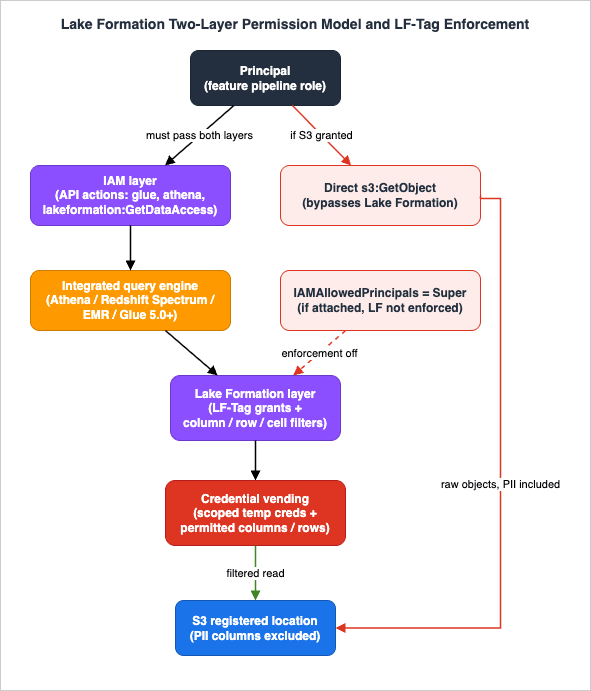
3. Designing an LF-Tag Ontology
3.1 What LF-Tags Are
Lake Formation tag-based access control (LF-TBAC) is an attribute-based authorization strategy. The attributes are called LF-Tags — a key with one or more allowed values — that you attach to Data Catalog resources (databases, tables, and columns). You then grant principals permission on LF-Tag expressions rather than on named resources, and Lake Formation allows an operation when the principal's granted tag values match the resource's tag values.LF-TBAC is the method AWS recommends when the number of Data Catalog objects is large, because it decouples permission management from the physical catalog: you tag once and grant on tags, instead of writing an ever-growing list of per-table grants. Lake Formation supports LF-TBAC not only for standard Glue tables but also for federated catalogs of Amazon S3 Tables, Amazon Redshift, and federated sources such as Amazon DynamoDB, SQL Server, and Snowflake.
Note: LF-Tags are not IAM tags. They live in Lake Formation, are used only to grant Lake Formation permissions, and are not interchangeable with the IAM tags that appear in IAM policy conditions.
3.2 An Ontology for AI Data: Sensitivity, Domain, and Purpose
A tag ontology is a small, deliberate set of keys that together classify every table and column. For governing AI data, three axes cover most needs:- Sensitivity — for example
sensitivity = public | internal | confidential | pii. This is the axis that gates PII. Tagging the PII columns (not just the table) withsensitivity = piiis what makes column-level exclusion possible. - Domain — for example
domain = customer | billing | product | telemetry. This scopes which business area a principal may touch. - Purpose — for example
purpose = analytics | ml_features | rag_source. This lets you grant a feature pipeline access to exactly the data provisioned for machine learning, and nothing labeled analytics-only.
A feature-engineering role is then granted an expression like
purpose = ml_features AND domain = customer, combined (as Section 4 shows) with a column-level grant that excludes anything tagged sensitivity = pii.3.3 Assignment Rules and Quotas
Several concrete rules shape how you build the ontology, all verified against the current documentation:- Predefine before assigning. A data lake administrator must create every LF-Tag key and its allowed values before the tag can be attached to any resource. Tag management can be delegated to LF-Tag creators — principals given the required permissions to create and maintain tags — so that data engineers, not only the central admin, can curate the ontology.
- You can attach multiple LF-Tags to one resource, but only one value per key. A table can carry
domain = customer,sensitivity = confidential, andpurpose = analyticssimultaneously, but it cannot carrydomain = customer,billing— a key resolves to a single value on a given resource. - Tags attach to existing resources only. You cannot set LF-Tags at table-creation time; you add them to resources that already exist.
- Granularity is database, table, or column. A tag on a database can be inherited as a default by its tables and columns, and a more specific tag on a table or column overrides the inherited one — which is exactly the mechanism used to carve PII columns out of an otherwise-permitted table.
The relevant service quotas (all adjustable, from the official Lake Formation endpoints-and-quotas page) are:
* You can sort the table by clicking on the column name.
| Quota | Default (per Region) |
|---|---|
| Number of LF-Tags per account | 1,000 |
| Number of tag values per LF-Tag | 1,000 |
| Number of LF-Tag policies per principal per resource type | 50 |
| Number of data lake administrators | 30 |
Keep the ontology small and stable. A handful of keys with a controlled vocabulary of values is far more maintainable — and far easier to audit — than dozens of overlapping keys, even though the quota headroom is large.
4. Tag-Based Grants and Column-Level Permissions
4.1 Granting on LF-Tag Expressions
You grant Lake Formation permissions to a principal on an LF-Tag expression. An expression combines tags, and the semantics are specific:- Within a single expression, conditions are combined with AND, and multiple values of one key are combined with OR. For example
module = sales AND division = (consumer OR commercial)grants access only to resources taggedmodule = salesand tagged with eitherdivision = consumerordivision = commercial. - To express OR across different keys — "
module = salesORdivision = commercial" — you do not put both in one grant. You make two separate grants, one per condition. This is a frequent source of "the grant is too broad or too narrow" confusion.
Here is a tag-based grant that gives a feature-engineering role
SELECT on customer-domain tables provisioned for ML, expressed with the AWS CLI:aws lakeformation grant-permissions \
--principal DataLakePrincipalIdentifier="arn:aws:iam::111122223333:role/feature-pipeline-role" \
--permissions "SELECT" "DESCRIBE" \
--resource '{
"LFTagPolicy": {
"ResourceType": "TABLE",
"Expression": [
{ "TagKey": "domain", "TagValues": ["customer"] },
{ "TagKey": "purpose", "TagValues": ["ml_features"] }
]
}
}'4.2 Excluding PII Columns with Column-Level Tags
The grant above still returns every column of the matched tables. To exclude PII, you tag the PII columns and grant on their absence. Lake Formation lets you attach LF-Tags to columns by using the column inclusion list on thetableWithColumns resource; a tagged column is represented by the ColumnLFTag structure (name plus attached tags).First, tag the PII columns:
aws lakeformation add-lf-tags-to-resource \
  --resource '{
    "TableWithColumns": {
      "DatabaseName": "customer_lake",
      "Name": "customers",
      "ColumnNames": ["email", "phone", "date_of_birth", "national_id"]
    }
  }' \
--lf-tags TagKey=sensitivity,TagValues=piiSELECT on the table's non-PII columns by matching the expression that the PII columns fail. The canonical shape of this pattern — which the Lake Formation API documentation itself uses as its example of an LF-Tag grant — is "grant a role access to all columns that do not have the LF-Tag PII, in tables that have the LF-Tag Prod." Concretely, you keep the PII columns tagged sensitivity = pii and grant the pipeline only on sensitivity = internal (or public), so the PII columns fall outside the granted expression and are projected away from every result.The effect: the feature job runs
SELECT * FROM customers, and the engine returns customer_id, signup_date, plan_tier, region, monthly_spend — the PII columns are absent from the result set, not merely null. The pipeline code does not need to know which columns are sensitive; the catalog and the grant decide.4.3 Simple Column Filtering and the Grant-Option Rule
Tags are one of three ways to specify column filtering. The others are data filters (Section 5) and simple column filtering — an explicit include or exclude list of columns supplied on the grant itself, supported by the console, the API, and the CLI. Simple column filtering is convenient for one-off grants; tags scale better across many tables.Several restrictions apply to column filtering and are worth committing to memory because they surface as puzzling failures:
- To grant
SELECTwith the grant option and column filtering, you must use an include list, not an exclude list. (Without the grant option, either include or exclude lists work.) - To grant column filtering at all, the grantor must already hold
SELECTon the table with the grant option and with access to all rows — you cannot sub-delegate more than you were given. - You cannot apply column filtering on partition keys.
- A principal that holds
SELECTon only a subset of columns cannot also be grantedALTER,DROP,DELETE, orINSERTon that table; conversely, if a principal already has those write permissions, adding a column-filteredSELECThas no effect. - Nested columns can be filtered up to five levels deep.
5. Row- and Cell-Level Data Filters
Column exclusion answers "which fields," but AI data governance often also needs "which rows" — an EU-only feature store that must not ingest non-EU records, or a tenant-scoped RAG source. Lake Formation expresses row and cell control through data filters.A data filter is a named object attached to a table that combines two independent specifications:
- Column-level access — one of access to all columns, include columns, or exclude columns.
- A row filter expression — a predicate that selects which rows are visible.
Setting only the column part gives column security; setting only the row part gives row-level security; setting both gives cell-level security — the ability to restrict different columns depending on the row. The classic example: allow the
street_address column when country = 'US' but hide it when country = 'UK'.The row filter expression uses a predicate grammar that is a subset of the PartiQL
WHERE clause. The supported operators are:- Comparison:
=,>,<,>=,<=,<>,!=,BETWEEN,IN,LIKE,IS [NOT] NULL(not available on partition columns) - Logical:
AND,OR,NOT
Two grammar constraints to plan around: the whole expression is capped at 2,048 characters, and a predicate cannot compare one column against another column — only against literals.
You create the filter, then reference it when granting
SELECT. With the CLI, a filter that exposes only EU rows and hides the two PII columns looks like this:aws lakeformation create-data-cells-filter \
--table-data '{
"TableCatalogId": "111122223333",
"DatabaseName": "customer_lake",
"TableName": "customers",
"Name": "eu_non_pii",
"RowFilter": { "FilterExpression": "region = '\''EU'\''" },
"ColumnWildcard": { "ExcludedColumnNames": ["email", "phone", "date_of_birth", "national_id"] }
}'
aws lakeformation grant-permissions \
--principal DataLakePrincipalIdentifier="arn:aws:iam::111122223333:role/eu-feature-pipeline-role" \
--permissions "SELECT" \
--resource '{
"DataCellsFilter": {
"TableCatalogId": "111122223333",
"DatabaseName": "customer_lake",
"TableName": "customers",
"Name": "eu_non_pii"
}
}'ml_features estate, plus a per-table data filter to enforce residency or tenancy on the rows. The same nested-column and partition-key rules from Section 4.3 apply — you can define filters on nested columns (up to five levels), and row filtering is where residency and tenant predicates naturally live.6. Cross-Account Sharing
AI data rarely lives in the account that consumes it. A central data-governance account owns the lake; feature pipelines, RAG ingestion, and analytics run in separate workload accounts. Lake Formation shares Data Catalog resources across accounts without copying the data.6.1 Two Sharing Methods
There are two ways to share databases and tables — within an account, to another account, to an entire AWS Organization or organizational unit, or directly to specific IAM principals in another account:- Named-resource method — you select specific databases and tables by name and grant permissions on them.
- LF-TBAC method — you grant on LF-Tag expressions, and every resource matching the tags is shared. This is the method that scales, and it is the recommended one for multi-account estates.
Both methods use AWS Resource Access Manager (AWS RAM) underneath. When you share across accounts that are not in the same AWS Organization, AWS RAM sends the recipient an invitation that a data lake administrator must accept; when the accounts are in the same Organization, no invitation is required. Accepting the share also enables storage-level enforcement so the shared data is actually queryable. The AWS RAM User Guide ties the no-invitation case to sharing with AWS Organizations being enabled in AWS RAM; when it is not enabled, accounts in the same organization are treated as standalone accounts and receive invitations. Cross-Account Sharing by Service on AWS covers when AWS RAM sends invitations and how long each one stays open.
Cross-account sharing behavior is governed by a version setting on the Data Catalog, and the version you select matters. Version 3 (November 2022) is the minimum for LF-TBAC at scale: it added sharing with LF-Tags at the AWS Organizations level, sharing directly to specific IAM principals in another account, and it removed the need to hand-maintain Data Catalog resource policies by driving everything through AWS RAM invitations with LF-Tag-based policies. Version 4 is required for cross-account sharing with hybrid access mode. Version 5 (February 2026) is the current generation: it removes the per-resource-type AWS RAM association limits by sharing through wildcard patterns, so a single RAM resource share can carry an effectively unlimited number of tables — the setting to choose for large multi-account estates unless a legacy consumer pins you lower.
6.2 Resource Links Are Required to Query
A shared resource is visible in the recipient account, but a principal there cannot query it through Athena or Redshift Spectrum without a resource link. A resource link is a Data Catalog object that points at the shared resource — conceptually a symbolic link. The recipient's data lake administrator creates the resource link, grantsDESCRIBE on the link plus the appropriate permissions on the underlying shared resource, and only then can analysts query the shared table by name in their own account.6.3 Two Sharp Edges
Two behaviors reliably trip up cross-account designs:- LF-Tags do not cross accounts. The tags you created in the producer account are not available for granting in the consumer account. To apply LF-TBAC to the resource links in the consumer account, you create a separate set of LF-Tags there and tag the links locally.
- Iceberg tables require hybrid access mode to be disabled for cross-account access. If your governed tables use the Apache Iceberg format, plan the cross-account path around this constraint.
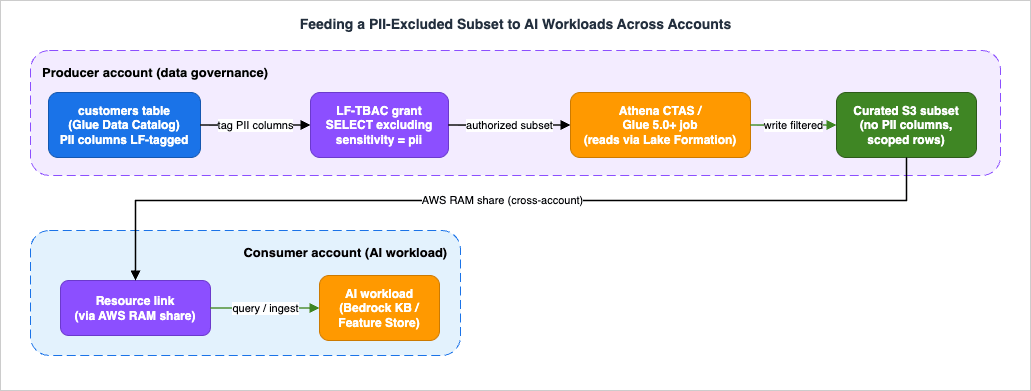
The following figure ties Sections 4–7 together: it shows PII columns being tagged and excluded in the producer account, a curated non-PII subset being produced by a Lake Formation-integrated engine, that subset being shared cross-account through AWS RAM and a resource link, and the AI workload consuming it.
7. Feeding AI Workloads Safely
This is the section that matters most for AI teams, and the one where honesty about scope is essential. Lake Formation governs access through integrated query engines. Whether your control actually applies depends entirely on how the AI workload reads the data.7.1 Which Engines Enforce Fine-Grained Permissions
Lake Formation permissions are honored by a specific set of AWS analytics services that act as trusted callers and receive vended credentials: AWS Glue, Amazon Athena, Amazon Redshift Spectrum, Amazon EMR, Amazon Quick (the analytics service formerly named Amazon QuickSight) Enterprise Edition, and Amazon SageMaker integrations. But which levels of filtering each engine supports differs, and the gaps are exactly where PII can leak:* You can sort the table by clicking on the column name.
| Engine | Table-level | Column-level | Row / cell-level |
|---|---|---|---|
| Athena SQL | Read/write | Read | Read |
| Redshift Spectrum | Read/write | Read | Read |
| Apache Spark on EMR (EC2) | Read/write | Read | Read |
| Apache Spark on EMR Serverless | Read/write | Read | Read |
| Apache Hive on EMR (EC2) | Read/write | Read | Not supported |
| Apache Hive on EMR Serverless | Not supported | Not supported | Not supported |
| AWS Glue ETL | Read/write | Glue 5.0+ (read) | Glue 5.0+ (read) |
| Athena Spark | Not supported | Not supported | Not supported |
| Amazon EMR on EKS | Not supported* | Not supported* | Not supported* |
* The matrix above is Lake Formation's support table for standard Glue tables and views. Amazon EMR on EKS additionally has a dedicated Lake Formation integration (Amazon EMR release 7.7 and higher) that enforces table-, row-, column-, and cell-level controls for read and write queries in Spark jobs on Data Catalog tables backed by Amazon S3, including Apache Iceberg tables. If your pipeline enables that integration, treat EMR on EKS as an enforcing engine and verify the supported levels against the EMR on EKS Lake Formation documentation.
Two rows deserve emphasis for AI pipelines. AWS Glue ETL supports column and row filtering only on Glue 5.0 or later, and only for Apache Hive and Apache Iceberg tables — earlier Glue versions do not enforce column filtering, so a feature job on Glue 4.0 will read every column even though the grant excludes PII. And Athena Spark does not support querying Lake Formation-protected tables with fine-grained control at all, while EMR on EKS enforces it only through its dedicated Lake Formation integration on EMR release 7.7 or higher — if your feature engineering runs on Athena Spark, or on EMR on EKS without that integration enabled, Lake Formation column and cell filtering is not in the path. What else changes when the same Spark job moves between AWS Glue, Amazon EMR Serverless, and Amazon EMR on EKS is covered in Running Apache Spark on AWS - Where the Billed Clock Starts, What Gets Measured, and What You Rewrite When You Move a Job Between EMR Serverless, EMR on EKS, and AWS Glue.
7.2 The Correct Pattern: Extract a Governed Subset
The reliable way to feed an AI workload is to let a Lake Formation-integrated engine do the filtering and materialize a curated, PII-excluded subset, then point the AI service at that subset:- Grant the extraction role a tag-based
SELECTthat excludessensitivity = piicolumns (Section 4) plus any residency or tenant data filter (Section 5). - Run an Athena
CREATE TABLE AS SELECTor a Glue 5.0+ job that reads through Lake Formation and writes the filtered result to a separate curated S3 location. - Point the feature store, the RAG ingestion job, or the analytics consumer at the curated location.
Because the extraction happened through an enforcing engine, the curated dataset physically contains no PII columns and no out-of-scope rows. This is also the clean hand-off point to the PII detection and redaction patterns guide: Lake Formation removes structured PII columns you already know about; free-text redaction of PII that hides inside a
notes or description column is a RAG-side concern handled with Amazon Comprehend, Amazon Bedrock Guardrails, and Amazon Macie.7.3 Amazon Bedrock Knowledge Bases: Two Very Different Cases
Amazon Bedrock Knowledge Bases is a common AI consumer, and it behaves differently depending on the data source type:- Structured data source (Amazon Redshift query engine over a Glue Data Catalog): here Bedrock queries through Redshift, which is a Lake Formation-integrated engine, so Lake Formation permissions do apply. Setup explicitly includes granting the Knowledge Base service role the necessary Lake Formation permissions on the Glue database and tables. The essential caveat is that the Knowledge Base operates with the permissions of a single service (or project) role — it can reach whatever that role is granted, and column and row filtering is applied to that role's grants, not per end user. So you scope the Knowledge Base's role to a non-PII, purpose-tagged grant, and you do not rely on it to distinguish one human user from another.
- Unstructured data source (documents in S3 → embeddings in a vector store): here Bedrock reads the S3 objects directly through its service role during ingestion. It does not go through Athena, Glue ETL, or Redshift Spectrum, so Lake Formation's column and cell filtering is not in that path at all. For unstructured RAG, do not assume Lake Formation is protecting the source; instead, ingest only from a curated S3 location produced as in Section 7.2, and apply the S3-layer controls described in the Amazon S3 security and access control guide.
7.4 The Direct-S3 Bypass and Third-Party Engines
The enforcement boundary has two more edges that a security review must account for:- Direct S3 access bypasses Lake Formation. Even after you enable Lake Formation on a table, any principal that holds direct
s3:GetObjecton the underlying objects can read them raw, PII columns included, without ever touching the query engine. Closing this gap is an S3-layer job: apply a bucket policy that denies direct access to the data prefix for all principals except the Lake Formation service role and the sanctioned execution roles. (Some engines offer a narrow, governed exception — the Lake Formation credential-vending plugin available in EMR 7.13+ lets Spark read S3 directly under Lake Formation permissions — but that path still requires full-table access, meaningSELECTon all columns and rows.) - Third-party query engines vary in what they enforce — verify the mode per engine. Lake Formation's application integration supports two distinct modes. In the filtering mode, an external engine (Starburst and Dremio integrate this way) reads the column-, row-, and cell-filter definitions through APIs such as
ListPermissionsandListDataCellsFilterand is trusted to enforce them itself as a distributed enforcer — fine-grained rules apply, but the enforcement point is the engine, not Lake Formation. In the full-table-access mode (AllowFullTableExternalDataAccess, used for example by EMR on EC2 full-table access), credential vending succeeds only when the principal hasSELECTon all rows and columns, and no filtering applies at all. For a PII boundary this distinction is load-bearing: an engine running in full-table mode cannot be relied on to project away PII columns — you must give it a subset that is already clean — and even in filtering mode you are extending trust to the engine's own enforcement.
There is also a metadata leak to be aware of: certain table properties (for example the Avro SerDe's
avro.schema.literal) are returned unmodified to any principal with SELECT on any column, exposing the full schema — including the names of columns you filtered out. Avoid storing sensitive information in table properties, and be aware that column names are not themselves secret under this model. (Lake Formation does strip spark.sql.sources.schema properties from GetTable responses when the caller lacks SELECT on all columns.)The honest summary: Lake Formation is a strong control for data accessed through its integrated engines, and it is not a control at all for data accessed around them. A defensible AI data design combines Lake Formation fine-grained permissions, S3 bucket policies that deny direct object access, and a curated-subset extraction step — no single one of these is sufficient alone.
8. Auditing with Amazon CloudTrail
Fine-grained permissions are only trustworthy if you can prove who changed them and who read the data. Lake Formation integrates with AWS CloudTrail, which records Lake Formation API calls as events — from the console, the CLI, and the SDKs alike.Two categories of events matter:
- Administrative changes. Calls such as
GrantPermissions,RevokePermissions, andPutDataLakeSettingsare logged, giving you an audit trail of every change to the permission model — including the moment someone revokesIAMAllowedPrincipalsor grants a new tag policy. - Data-access events via credential vending. The
GetDataAccessaction is logged whenever a principal or an integrated service requests temporary credentials to access data in a Lake Formation-registered location. Principals do not callGetDataAccessdirectly — it is emitted by the vending mechanism — so it is your record of actual data access across engines.
A
GetDataAccess event carries useful context in additionalEventData: requesterService (for example GLUE_JOB), the lakeFormationPrincipal that was granted the access, and a lakeFormationRoleSessionName. That session name encodes the engine in a fixed format:AWSLF-<version>-<query-engine-code>-<account-id>-<suffix><query-engine-code> identifies the accessing engine — GL for an AWS Glue ETL job in the documented example, with other integrated engines such as Amazon Athena and Amazon Redshift Spectrum carrying their own codes — which lets you attribute each read to the engine that performed it. Route these events to your central logging and query them with Athena or CloudWatch Logs Insights to answer "which role read the customers table, through which engine, and when." Answering which person instead of which role requires the workforce identity to reach this layer in the first place; that path, and what it does and does not add to these events, is covered in Identity-Aware Data Access on AWS - Propagating Workforce Identity from IAM Identity Center to Lake Formation and S3 Access Grants. For broader observability of the AI stack around this, see the Amazon Bedrock security and governance guide.9. Diagnostics
Fine-grained permissions fail in two symmetric ways: a column that should be visible is missing, or a column that should not be visible appears. Here is the triage order for each.9.1 A Column or Row That Should Be Visible Is Missing
- Grant scope. Confirm the principal actually holds
SELECTon the column (or via a tag expression that matches the column's tags). A tag typo —sensitivity = internalon the grant butsensetivityon the column — silently narrows the result. LF-Tag keys and values must match exactly. - Expression logic. Remember AND semantics within an expression. If you intended "sales OR commercial" but wrote both conditions in one grant, the principal gets the AND intersection and may see nothing.
- Data filter row predicate. If a data filter is in play, an over-restrictive
WHEREpredicate (or a mismatched literal such as'eu'vs'EU') removes rows you expected. - Engine capability. If reads run on Apache Hive on EMR, row and cell filters are not supported and the query may error or behave unexpectedly; on Glue below 5.0, column filtering is not enforced. Confirm the engine and version from Section 7.1.
- Partition keys. Column filtering cannot be applied to partition keys — a filter that tries to will not behave as a hidden column.
9.2 A Column or Row That Should NOT Be Visible Appears
IAMAllowedPrincipalsstill attached. This is the overwhelmingly common cause. If the table still carries theSupergrant toIAMAllowedPrincipals, Lake Formation is not enforcing anything on it — revoke it (Section 2.2) and confirm the Use only IAM access control for new tables setting is off.- S3 location not registered. If the underlying S3 location was never registered with Lake Formation, no credential vending occurs and the engine falls back to IAM and S3 access. Register it.
- Direct S3 access. Check whether the principal has direct
s3:GetObjecton the bucket or prefix. If so, it can read raw objects around Lake Formation — add the S3 deny bucket policy (Section 7.4). - Non-enforcing engine. If the workload runs on Athena Spark, on EMR on EKS without its EMR 7.7+ Lake Formation integration enabled, or on a third-party engine without full-table-access scoping, fine-grained filtering is not applied. Move the read to an enforcing engine (or enable the EMR on EKS integration) or feed it a pre-filtered subset.
- Hybrid mode opt-in. In hybrid access mode, a principal that was never opted in reaches the resource through IAM, not Lake Formation. Opt the principal in (or move to Lake Formation-only mode).
- Metadata leak, not data leak. If it is a column name leaking (not its values), check for schema-bearing table properties like
avro.schema.literal(Section 7.4). The values are still filtered; the schema is not.
Underlying all of this is the same two-layer model from Section 2 and the same IAM evaluation logic covered in the IAM policy evaluation logic guide: if either layer is misconfigured, the effective access is wrong. When a result looks off, establish first which layer produced it before changing grants.
10. Frequently Asked Questions
Does Lake Formation replace IAM and S3 policies for my data lake?No. It layers on top of them. For a Lake Formation-managed resource, the principal needs both the IAM permission to call the query API and the Lake Formation grant on the data; and S3 bucket policies are still what stop principals from reading the underlying objects directly. Lake Formation adds column, row, and cell granularity that IAM and S3 cannot express — it does not remove the need for either.
We already tag our S3 objects and Glue tables with resource tags. Can we reuse those as LF-Tags?
No. LF-Tags are a distinct construct that lives in Lake Formation and is used only for Lake Formation grants. IAM tags and LF-Tags are not interchangeable, so the classification you use for LF-TBAC has to be defined as LF-Tags even if a parallel IAM-tag scheme exists.
If I grant
SELECT excluding the PII columns, does the query return them as null?No — the excluded columns are absent from the result set entirely, not nulled. The engine projects them away based on the vended column permissions. The consuming code sees a narrower schema.
Will Amazon Bedrock Knowledge Bases automatically honor my column-level permissions?
Only for structured data sources that query through a Lake Formation-integrated engine such as Amazon Redshift, and only at the granularity of the Knowledge Base's single service role. For unstructured sources, Bedrock reads S3 directly and Lake Formation column filtering is not in that path — ingest from a curated, PII-excluded location instead.
Can a data analyst bypass Lake Formation by reading the Parquet files in S3?
Yes, if they hold direct
s3:GetObject on the data. That is why a complete design pairs Lake Formation with an S3 bucket policy that denies direct access to the data prefix for everyone except the Lake Formation service role and sanctioned execution roles.Do LF-Tags created in my producer account work when I share to another account?
No. LF-Tags do not cross account boundaries. In the consumer account you create a separate set of LF-Tags and apply them to the resource links locally.
Is passing these controls the same as being compliant or safe?
No. Fine-grained permissions are one layer. Direct-S3 paths, non-enforcing engines, third-party engines that require full-table access, and schema-bearing table properties are all ways data can move outside the control. Treat Lake Formation as part of a defense-in-depth design and verify each path, rather than assuming a passing grant means the data is fully contained.
11. Summary
Column-level, row-level, and cell-level control over the data you feed to AI workloads is a problem S3 and IAM cannot solve on their own, because they authorize objects and API actions, not columns and rows. AWS Lake Formation supplies the missing layer by vending scoped credentials and a permitted column and row set to integrated query engines, which then filter results before returning them.Building it correctly comes down to a handful of decisions:
- Understand the two-layer model (IAM AND Lake Formation), and neutralize the
IAMAllowedPrincipalstrap before expecting any fine-grained grant to take effect; use hybrid access mode to migrate incrementally toward Lake Formation-only enforcement. - Design a small LF-Tag ontology (sensitivity, domain, purpose), tag PII at the column level, and grant on tag expressions so PII columns fall outside the authorized subset — supplemented by data filters for row and cell rules like residency and tenancy.
- Scale across accounts with LF-TBAC cross-account sharing over AWS RAM, remembering that queries need resource links and that LF-Tags do not cross accounts.
- Feed AI workloads through enforcing engines and a curated-subset extraction, and be honest about where enforcement stops: direct S3 access, non-enforcing engines (Athena Spark, EMR on EKS), third-party engines that require full-table access, and unstructured Bedrock ingestion that reads S3 directly are all outside Lake Formation's column filtering.
- Prove it with CloudTrail — administrative
GrantPermissionsandRevokePermissionsevents and the credential-vendingGetDataAccessevents that record actual reads by engine.
Combine Lake Formation fine-grained permissions with S3 deny policies and a governed extraction step, and column-level PII exclusion becomes a maintainable, auditable property of the data platform rather than a fragile pile of per-file copies.
12. References
- What is AWS Lake Formation?
- Lake Formation tag-based access control
- Lake Formation tag-based access control best practices and considerations
- Data filtering and cell-level security in Lake Formation
- PartiQL support in row filter expressions
- Data filtering limitations
- Hybrid access mode
- How hybrid access mode works
- Upgrading AWS Glue data permissions to the AWS Lake Formation model
- Cross-account data sharing in Lake Formation
- Updating cross-account data sharing version settings
- Application integration with Lake Formation (credential vending for external engines)
- AWS service integrations with Lake Formation
- Working with other AWS services (supported permission types)
- Using Amazon EMR on EKS with AWS Lake Formation for fine-grained access control
- Known issues for AWS Lake Formation (metadata filtering limitations)
- Logging AWS Lake Formation API calls using AWS CloudTrail
- AWS Lake Formation endpoints and quotas
- Set up query engine and permissions for a knowledge base with a structured data store
- AWS Lake Formation API Reference
Related Articles on This Site
- AWS IAM Policy Evaluation Logic Step by Step
The identity, resource, SCP, and permission-boundary evaluation order that underlies the IAM half of the two-layer model. - Amazon S3 Security and Access Control Guide
The S3 bucket-policy layer that closes the direct-object-access bypass around Lake Formation. - PII Detection and Redaction Patterns for Generative AI on AWS
Free-text PII detection and redaction with Amazon Comprehend, Amazon Bedrock Guardrails, and Amazon Macie for the RAG side. - Amazon Bedrock Security and Governance
Organization-wide IAM condition keys, SCP design, and guardrail enforcement for the Bedrock layer. - AWS Data Lakehouse Architecture Guide
The upstream lakehouse architecture in which Lake Formation governs the catalog. - Zero-ETL Integrations on AWS
How operational database rows arrive on the analytics side in the first place, before Lake Formation decides who may read them. - AWS AI and ML Glossary
Definitions of RAG, features, embeddings, and related terms used throughout this guide.
References:
Tech Blog with curated related content
Written by Hidekazu Konishi