Cross-Account Sharing by Service on AWS - AWS RAM Resource Shares, Service-Native Sharing, and What Each Route Leaves the Owner Able to Stop
First Published:
Last Updated:
Even experienced individuals may struggle to answer the following questions: Which route should this resource be shared through? What actions must the recipient take, and by when? Does the recipient have read-only access, the ability to copy, or the ability to launch? What will happen if the recipient's account leaves the organization? What happens to resources the recipient has already created if the owner terminates the sharing arrangement?
The answers are scattered across several sources: the AWS RAM User Guide, the RAM API Reference, individual service user guides, and the "What's New" section. This article compares the three routes by the recipient's required actions, the scope of what reaches the recipient, and what the owner can stop later. The invitation expiration time for RAM sharing is not uniform; depending on the resource type, it is either 7 days or 12 hours. When sharing is enabled within an organization, no invitations are sent to principals in that organization (except for resource shares that retain sharing after an account leaves the organization). By default, if the recipient's account leaves the organization, the recipient loses access to the shared resources. Furthermore, for the five RAM resources this article checked, stopping a share stops only new use, and what the recipient has already created remains (for EBS volumes, ongoing copy operations are not canceled).
Related articles on this site:
- Resource-Based Policies by Service on AWS - Where the Second Policy Lives, What It Can Say, and When It Is Required
- What Can Be Made Public on AWS - Storage and Data, the Block Public Access Family, and What Each Switch Does Not Promise
- Amazon EventBridge Custom Event Bus and the Classic Bus - What Maps From Rules to Subscribers, Which Defaults Change, and What Stays on the Classic Bus
- AWS Private CA Hierarchy Design - Root and Subordinate CAs, Revocation, Short-Lived Mode, and mTLS on ALB
- AWS VPC Lattice Complete Guide - Service-to-Service Networking Across VPCs and Accounts
- AWS Multi-Account Operational Patterns - Control Tower, Organizations, SCPs
- AWS Organization Guardrails - Service Control Policies, Resource Control Policies, and Data Perimeter Design
- Falsehoods AWS Architects Believe About Regions and Availability Zones - What the Names Do Not Tell You, What Opting In Changes, and Which Zones Are Not Availability Zones
- AWS PrivateLink Tunnel Endpoints - Sharing a Network Segment Instead of Individual Resources, What GENEVE Requires of the Consumer, and Which Side Can Open a Connection
- AWS Clean Rooms Analysis Rules and Differential Privacy - What a Collaborator Can Learn From Your Table, What the Output Removes Without Saying So, and Where Each Budget Runs Out
Table of Contents
- 1. The Scope of This Article and the Date It Was Verified
- 2. Three Routes — Where Each Route Names the Other Side
- 3. Understanding the RAM Table
- 4. Recipient Procedures — Invitations and Their Expiration Dates
- 5. When the Recipient Account Leaves the Organization
- 6. How Much Reaches the Recipient
- 7. What the Owner Can Stop Later
- 8. Axes for Choosing a Route, and Where the Sources Differ
- 9. Frequently Asked Questions about Cross-Account Sharing on AWS
- 10. Summary
- 11. References
1. The Scope of This Article and the Date It Was Verified
This section defines the three routes and the terms used in this article, and confirms when the features it covers were added. It also lists up front what this article does not cover.1.1 The Three Routes and the Terms Used in This Article
This article categorizes methods for granting resources to specific accounts into three routes, based on where the other side is named.- ① AWS RAM Resource Shares. This involves using the AWS RAM resource sharing mechanism (resource share), which includes the resource being granted, the recipient (principal), and a managed permission for each resource type.
- ② Resource-Based Policies. This involves specifying the recipient in the
Principalelement of the policy attached to the resource. - ③ Service-Native Sharing. This includes methods where the recipient is specified in the resource's attributes (such as AMI launch permissions, EBS snapshot
createVolumePermission, and RDS manual DB snapshotrestoreattributes), as well as services that have their own invitation mechanisms (such as AWS Managed Microsoft AD directory sharing and AWS Clean Rooms collaboration membership).
The word "sharing" is used for all three of these routes. To avoid confusion, this article uses the following terminology: AWS RAM resource shares, resource-based policies, AMI launch permissions, snapshot sharing, directory sharing, and collaboration membership. The account providing the resource is referred to as the "owner," and the account receiving the resource is referred to as the "recipient." The AWS RAM User Guide (hereinafter referred to as the "RAM Guide") uses the terms "sharing account" for the owner and "consuming account" for the recipient.
The inventory for ② is in Resource-Based Policies by Service on AWS. This article presents ② as one of the three routes in section 2.2, and covers how ① and ③ work and how to choose among the three.
1.2 The Date of Verification and the Date of Feature Addition
The information presented in this article was verified using primary sources on September 30, 2026. Check the primary sources before using this information, as the types of resources that can be shared via RAM, the values within each column, and the lists of resource types for each invitation period are all subject to change.The dates for the features discussed in this article are as follows. The "What's New" column indicates the date the announcement was published, while the "Document History" column in the RAM Guide indicates the date of each revision entry.
| Feature | What's New | RAM Guide Document History |
|---|---|---|
| Customer managed permissions | 2023-04-25 | 2023-04-19 (Entry related to support in the RAM console) |
| Sharing of VPC Lattice Resource Configurations | 2024-12-01 | 2024-12-01 |
Setting to Maintain Sharing Even After Leaving the Organization (RetainSharingOnAccountLeaveOrganization) | 2026-02-27 | No corresponding entry |
| EBS Volume Sharing | 2026-09-09 (Announcement regarding cross-account copying of Amazon EBS Volume Clones) | 2026-08-20 |
| Sharing of New EventBridge Custom Event Buses | 2026-09-24 | 2026-09-24 |
The dates for EBS volume sharing differ between the two sources. The RAM Guide's Document History indicates support for sharing was added on August 20, 2026, while the "What's New" section announces, on September 9, 2026, the ability for the other account to copy a volume shared through RAM. This article presents both sources without favoring either.
1.3 Topics Not Covered
This article compares the three routes by the recipient's procedure, the scope of what reaches the recipient, and what the owner can stop later. The following are either not covered here or left to earlier articles on this site.- The service-by-service inventory of resource-based policies is covered in Resource-Based Policies by Service on AWS.
- Sharing (publicly) with all AWS accounts and blocking public access are discussed in What Can Be Made Public on AWS. This article focuses on sharing with specific recipients (accounts, organizations, OUs, etc.), rather than public sharing.
- The sharing of the new EventBridge custom event bus and its four AWS managed permissions are covered in section 4.7 of Amazon EventBridge Custom Event Bus and the Classic Bus. This article draws on it only as far as needed to compare the routes.
- CIDR-type resource configurations and PrivateLink tunnel endpoints are covered in AWS PrivateLink Tunnel Endpoints. Sharing resource configurations for VPC Lattice is covered in section 7.3 of AWS VPC Lattice Complete Guide.
- Analysis rules for AWS Clean Rooms are covered in AWS Clean Rooms Analysis Rules and Differential Privacy. This article lists collaboration membership as one example of service-native sharing.
- Sharing of AWS Private CA CAs and ELB trust stores is covered in section 8 of AWS Private CA Hierarchy Design. Sharing of Route 53 Resolver rules is covered in section 6.4 of Amazon Route 53 DNS Architecture Guide. Sharing within Lake Formation is covered in section 6 of Fine-Grained Access Control for AI Data with AWS Lake Formation.
- The design of Organizations and the design of Service Control Policies (SCPs) are covered in AWS Multi-Account Operational Patterns and AWS Organization Guardrails. This article only includes examples of SCPs from the RAM Guide in section 5.3. The policy evaluation process is covered in IAM Policy Evaluation Logic Step-by-Step.
- This article does not list all the types of resources that can be shared with RAM. Section 3.3 describes how to view the full list.
- This article does not cover the history of RAM.
- This article does not cover pricing.
- This article does not describe the steps for obtaining permissions using sharing.
2. Three Routes — Where Each Route Names the Other Side
The three routes differ in where the other side is named. This section examines what each route uses as a container and how the routes relate to one another. The following diagram shows the three routes from the owner's account to the recipient's account, and where each route names the other side.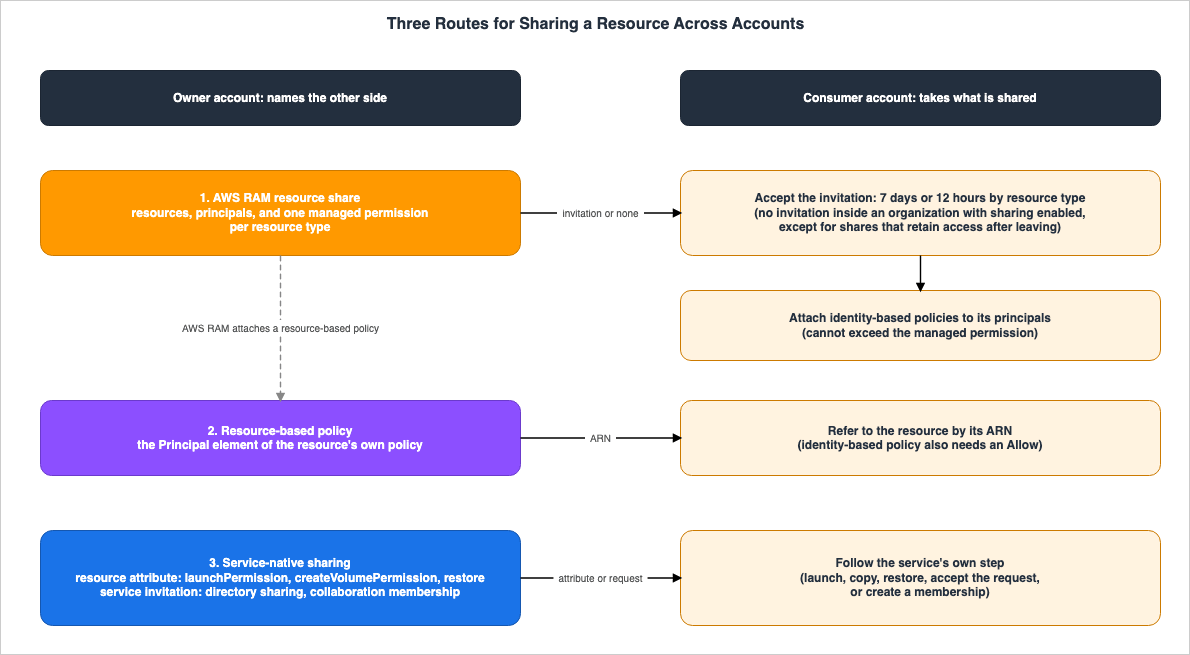
2.1 AWS RAM Resource Shares
According to the "Terms and concepts for AWS RAM" page in the RAM Guide, an AWS RAM resource share consists of three elements: one or more resources to be shared, one or more principals to grant access, and one managed permission for each resource type included in the resource share.The principals that can be specified include AWS accounts, organizations, organizational units (OUs), IAM roles and users for supported resource types, and service principals. There are limitations when using organizations and OUs. The "Sharing your AWS resources" page in the RAM Guide states:
You can add only the organization your account is a member of, and OUs from that organization to your resource shares. You can't add OUs or organizations from outside your own organization to a resource share as principals. However, you can add individual AWS accounts or, for supported services, IAM roles and users from outside your organization as principals to a resource share.The same page also clarifies that only resources you own can be shared.
You can share a resource only if you own it. You can't share a resource that's shared with you.RAM is a regional service. When sharing regional resources, the recipient can only access those resources from the same region in which they were created. Global resources that can be shared through RAM are accessible from any region supported by the service. However, resource shares that include global resources are visible in the RAM console and tools only in the designated home Region, US East (N. Virginia),
us-east-1.2.2 Resource-Based Policies and the Relationship with RAM
A resource-based policy names the other account or IAM role in thePrincipal element of the policy attached to the resource. The inventory in Resource-Based Policies by Service on AWS provides a list of services that support resource-based policies and details what can be specified within them. Section 8 of that same article addresses the requirement for permissions in identity-based policies on the recipient's side when granting access across accounts.① and ② are not independent mechanisms. The "Terms and concepts for AWS RAM" page of the RAM Guide states that RAM operates by attaching resource-based policies behind the scenes.
Because AWS RAM works by attaching a resource-based policy to the resources in a resource share, the AWS RAM administrator also must have permissions to call the PutResourcePolicy operation in the AWS service for each resource type included in a resource share.According to that same page, for resource types that support resource-based policies, RAM aggregates information from all resource shares that include a single resource and constructs a single resource-based policy. This policy can be viewed using the
GetResourcePolicy action. Even for resource types that do not yet directly support resource-based policies, RAM allows them to be shared.By using AWS RAM, you can even share some resource types that don’t support resource-based policies yet. For such resource types, AWS RAM automatically generates a resource-based policy as a representation of the actual permissions.Conversely, there is also a reciprocal relationship. The API reference page for
PromoteResourceShareCreatedFromPolicy describes what RAM does when a resource-based policy is directly attached to a resource.When you attach a resource-based policy to a resource, AWS RAM automatically creates a resource share of featureSet = CREATED_FROM_POLICY with a managed permission that has the same IAM permissions as the original resource-based policy. However, this type of managed permission is visible to only the resource share owner, and the associated resource share can't be modified by using AWS RAM.The API reference page for
ResourceShare states that resource shares of this type are only visible to the account that created them (for how the same page describes this type, see section 8.2). Neither page explicitly lists the resource types that are eligible. When the PromoteResourceShareCreatedFromPolicy action is invoked, such a share is converted to a STANDARD resource share, which RAM can then manage and which becomes visible to the intended recipients. The PromoteResourceShareCreatedFromPolicy page recommends first calling PromotePermissionCreatedFromPolicy to prepare the customer managed permission to use after the promotion. If no managed permission exactly matches the original one, the promotion fails.So, what is the difference between granting access using ② versus using ①? The "What is AWS Resource Access Manager?" page of the RAM Guide lists four features that RAM provides in the section "What about cross-account access with resource-based policies?". First, it allows you to share resources with an organization or OU without listing individual account IDs. Second, the recipient can view the shared resources as if they were resources within their own account, through the service's console and API. Third, the owner can see which principals have access to each resource. Fourth, when sharing with accounts outside the organization, RAM initiates an invitation process. Regarding the second point, the same section describes the perspective of ② as follows:
Resources shared by attaching a resource-based policy aren't visible this way; instead, you have to discover and explicitly refer to the resource by its Amazon Resource Name (ARN).The new EventBridge custom event bus has two named resource policies: one written by the owner, labeled
default, and another written only by RAM, labeled AWS_RAM. According to the EventBridge User Guide's page on "Sharing a Custom Event Bus with other accounts," EventBridge evaluates both policies when authorizing calls from other accounts, and an explicit Deny in either policy overrides an Allow in the other. These two policies are discussed in section 4.2 of Resource-Based Policies by Service on AWS.2.3 Resource Attributes and Service Invitations
③ Service-native sharing does not go through an AWS RAM resource share. AMIs are not listed in the Amazon EC2 section of the "Shareable AWS resources" page in the RAM Guide. As of September 30, 2026, the resource types listed in that section areec2:CapacityReservation, ec2:DedicatedHost, ec2:PlacementGroup, and ec2:Volume.Three kinds of sharing name the other side in a resource attribute:
- AMI Launch Permissions: Use
ModifyImageAttributeto add account IDs, organization ARNs, or OU ARNs to the AMI'slaunchPermissionattribute. - EBS Snapshot Sharing: Use
ModifySnapshotAttributeto add account IDs to the snapshot'screateVolumePermissionattribute. - RDS Manual DB Snapshot Sharing: Use
ModifyDBSnapshotAttributeto add account IDs to therestoreattribute.
The following two services have their own invitation mechanisms:
- AWS Managed Microsoft AD Directory Sharing: The Directory Service API's
ShareDirectoryaction acceptsORGANIZATIONSorHANDSHAKEfor theShareMethodparameter. - AWS Clean Rooms Collaboration Membership: The collaboration creator specifies the account IDs of members, and the invited account creates a "membership" resource to join.
AMIs and snapshots can also be made public, meaning they are shared with all AWS accounts. Sections 4.2 and 4.3 of What Can Be Made Public on AWS cover the public side.
When EC2 Image Builder distributes an AMI, it can either add AMI launch permissions through
ModifyImageAttribute or copy the AMI into each target account, which then owns its copy. Section 4.1 of EC2 Image Builder - Recipes, Workflows, Distribution, and Lifecycle Policies, and What the Image Resource Records About How an AMI Was Built sets out the two methods.2.4 Cross-Boundary Table — What Crosses, How It Is Taken, and What the Owner Can Still Limit
When transferring something across account boundaries, there are four key things to verify. What is being transferred? Through what mechanism is it being offered? What action does the receiving account take? And what limitations can the owner still impose afterward? This article presents a table that organizes these four points, along with supporting documentation, and calls it the Cross-Boundary Table. This same five-column table is also used in other articles on this site that deal with what crosses account boundaries. The table for transferring network segments can be found in section 2.3 of AWS PrivateLink Tunnel Endpoints, while the table for transferring analysis results can be found in section 2.4 of AWS Clean Rooms Analysis Rules and Differential Privacy.What crosses: This refers to what crosses the account boundary. Even if something is not transferred, it is included as a row if explicitly stated in AWS documentation.Offered through: This describes the mechanism used by the transferring account to offer it.How the receiving account takes it: This outlines the actions the receiving account must take.What the owner can still limit: This specifies what limitations the owner can continue to impose after the transfer.Where AWS says so: This indicates the AWS documentation that supports the information in that row.
For any cell where AWS documentation does not provide information, the cell reads
The source does not say. Before writing that, this article searched the full text of the relevant documentation, as well as the links it contains, using the words only, can't, cannot, not supported, outside, initiate, and must, along with the subject of that row. If the documentation only provides general principles and does not specifically address the subject of that row, the cell says so.This article splits the Cross-Boundary Table into two tables: one for what crosses through AWS RAM resource shares, and one for what crosses through the other routes.
Items Transferred Through RAM Resource Sharing
| What crosses | Offered through | How the receiving account takes it | What the owner can still limit | Where AWS says so |
|---|---|---|---|---|
| Using the resources in the share within the scope of the managed permission (the general rule for RAM). | An AWS RAM resource share, which holds the resources, the principals, and one managed permission for each resource type. | When the recipient is outside the owner's organization, or in the organization but organizational sharing is not enabled, the recipient must accept the invitation (with a time limit of 7 days or 12 hours, depending on the resource type). If sharing is enabled in the organization, no invitation is sent to principals in the organization (except for resource shares that retain sharing after the account leaves the organization). Then the recipient's administrator must grant its principals access to the resource ARNs through identity-based policies. | The owner can remove a principal or resource from the resource share. The owner can delete the resource share (the resources themselves are not deleted). Managed permissions define the upper limit of permissions granted to the recipient. The owner can choose whether to allow sharing outside the organization (allowExternalPrincipals). | RAM Guide (Terms and concepts for AWS RAM, Sharing your AWS resources, Accepting and rejecting resource share invitations, Update a resource share in AWS RAM, Deleting a resource share in AWS RAM) |
| The ability for the recipient to create their own resources on a shared subnet. | RAM resource sharing for the ec2:Subnet resource. Sharing is only possible with accounts or OUs in the same organization. Default VPC subnets cannot be shared. | As a prerequisite, enable organizational sharing within RAM in the management account of the organization. The recipient (participant) can then create their own resources on the shared subnet. Changes to the subnet or VPC are not permitted. | Revoking sharing prevents the participant from creating new resources. However, existing resources created by the participant will continue to function. As long as the participant's resources remain, the owner cannot delete the subnet or VPC. | VPC User Guide (Share your VPC subnets with other accounts, Shared subnet prerequisites, Working with shared subnets, Responsibilities and permissions for owners and participants) |
| The ability for the recipient to establish connections to destinations within a network segment represented by a CIDR range. | A CIDR-type resource configuration and an AWS RAM resource share. | If an invitation arrives, the recipient accepts the RAM resource share. The recipient then creates a tunnel endpoint (see details at AWS PrivateLink Tunnel Endpoints). | The VPC Lattice User Guide states that, for VPC Lattice entities in general, existing associations remain after sharing stops and new associations cannot be created. It does not name tunnel endpoints. | VPC Lattice User Guide (Share your VPC Lattice entities), PrivateLink User Guide (Access a network segment through a tunnel VPC endpoint) |
| The ability for the recipient to view EBS volume information, and potentially create copies in the same Availability Zone, depending on the permissions granted. | RAM resource sharing for the ec2:Volume resource. The default managed permission is AWSRAMDefaultPermissionEBSVolume (view-only). To allow copying, explicitly grant the CopyVolumes permission in the managed permission (the AWS managed one is AWSRAMPermissionEBSVolumeCopyAccess). To share encrypted volumes using customer managed keys, also share the KMS key with the recipient. | The recipient can view shared volumes and, if permitted, create copies. They cannot attach, modify, delete, or create snapshots. For encrypted volumes, the recipient must have the necessary KMS permissions. | Even after revoking sharing or deleting the original volume, ongoing copies will not be canceled. The RAM Guide states that DescribeVolumes does not perform resource-based authorization, and resource policy conditions do not apply. | RAM Guide (Shareable AWS resources section for Amazon EC2), EBS User Guide (Share a volume) |
| The ability for the recipient to publish events to, and create subscribers on, the new EventBridge custom event bus. | RAM resource sharing for events:event-busv2, and one of the four AWS managed permissions (a customer managed permission can also be written). | Accounts outside the organization must accept the invitation before using the bus. The recipient must also have the same action permitted in their own identity-based policies. | Even after revoking sharing, subscribers created by the recipient during the sharing period keep delivering. To stop them, use RevokeResource. | EventBridge User Guide (Sharing a Custom Event Bus with other accounts) |
| The recipient sharing the shared resource onward to another account. This does not cross. | Not applicable. | Not applicable. | Not applicable. The RAM Guide states that shared resources cannot be further shared. The EventBridge User Guide also states that the recipient cannot reshare the bus. | RAM Guide (Sharing your AWS resources), EventBridge User Guide (Sharing a Custom Event Bus with other accounts) |
| The recipient's account continuing to use the shared resources after it leaves the organization. By default, with sharing within the organization, this does not cross. | This only applies to resource shares created with RetainSharingOnAccountLeaveOrganization set to True. | For these shares, an invitation is sent to accounts in the organization, and the recipient must accept the invitation. | This setting has four constraints (section 5.2). Service Control Policies (SCPs) can be used to prevent the creation of shares with this setting (section 5.3). | RAM Guide (Sharing your AWS resources, Example service control policies for AWS Organizations and AWS RAM), What's New (2026-02-27) |
Items Transferred Through Routes Other Than RAM
| What crosses | Offered through | How the receiving account takes it | What the owner can still limit | Where AWS says so |
|---|---|---|---|---|
| Launching an instance from an AMI | AMI launch permissions (launchPermission). Accounts, organizations, and OUs can be specified, and it is possible to specify organizations or OUs that the owner does not belong to. | The recipient can launch instances from the shared AMI. If the AMI is backed by encrypted snapshots, the owner must allow the recipient to use the KMS key. | Remove accounts from the launch permissions. However, an account inside an organization or OU that the AMI is shared with cannot be removed on its own. The recipient cannot delete, share, or modify the AMI, but they can create their own AMI from launched instances. | EC2 User Guide (Share an AMI with specific AWS accounts, Share an AMI with organizations and organizational units, Manage AMI sharing with an organization or OU) |
| All data from an EBS snapshot | The snapshot's createVolumePermission attribute, where account IDs are added. | The recipient can search for the snapshot by ID or description and then create volumes from it or copy the snapshot. If it is encrypted, they create a copy encrypted with their own KMS key and use that copy. | Remove accounts from the attribute using ModifySnapshotAttribute with the remove operation type. The recipient starting a copy or creating a volume will be visible in CloudTrail events. | EBS User Guide (Share an Amazon EBS snapshot with other AWS accounts, Use Amazon EBS snapshots that are shared with you), EC2 API Reference (ModifySnapshotAttribute) |
| Restoring a DB instance or copying a snapshot from an RDS manual DB snapshot | The restore attribute, where up to 20 account IDs can be added. Snapshots encrypted with the default KMS key cannot be shared. | If not encrypted, the recipient can directly restore the snapshot. If encrypted, they must first create a copy and then restore from that copy. | Remove accounts from the attribute using ValuesToRemove. | RDS User Guide (Sharing a DB snapshot for Amazon RDS, Sharing encrypted snapshots for Amazon RDS, Stopping snapshot sharing for Amazon RDS) |
| Joining a recipient's EC2 instance to a domain using an AWS Managed Microsoft AD directory | Directory sharing. This can be done using the Organizations method (enabling all features at the organization level, enabling Directory Service trusted access, and placing the directory in the organization's management account) or using the handshake method. | In the handshake method, the recipient's administrator must accept the sharing request. In the Organizations method, no acceptance is required. A shared directory becomes available in the recipient's account. Cross-account network connectivity is a prerequisite. | Unshare the directory. | AWS Directory Service Administration Guide (Share your AWS Managed Microsoft AD, Step 2: Share your directory, Step 3: Accept shared directory invite - Optional, Unsharing your directory) |
| Participating in an AWS Clean Rooms collaboration | The collaboration creator specifies the account IDs and abilities of the members. Members added after creation are added through a change request. | The invited account creates a membership and joins the collaboration. | The creator can remove members, which also removes their datasets from the collaboration. A member that leaves by deleting its membership cannot rejoin. | AWS Clean Rooms User Guide (Creating a membership and joining a collaboration, Adding members to a collaboration, Removing members from a collaboration, Leaving a collaboration) |
| Access from a resource-based policy specifying a particular account | The Principal element in the resource's policy (see Resource-Based Policies by Service on AWS). | The recipient can use the resource by specifying its ARN. Permission is also required in the recipient's identity-based policies. | Modify the policy. The RAM API Reference states that when a resource-based policy is attached to a resource, RAM creates a CREATED_FROM_POLICY resource share that is only visible to the account that created it (the API Reference does not name the eligible resource types; see sections 2.2 and 8.2). | IAM User Guide (Cross account resource access in IAM), RAM Guide (What is AWS Resource Access Manager?), RAM API Reference (PromoteResourceShareCreatedFromPolicy, ResourceShare) |
The two tables do not contain any cells with
The source does not say. In the first table, the cell in row 3, column 4, only lists general rules for VPC Lattice entities. Those rules do not name tunnel endpoints, and section 7.4 of AWS PrivateLink Tunnel Endpoints treats them the same way.3. Understanding the RAM Table
The "Shareable AWS resources" page of the RAM Guide presents a table listing the resource types that can be shared with RAM, organized by service. This section explains what each of the table's four columns represents, provides examples of values for common resource types, and indicates where to find a complete listing.3.1 What the Four Columns Represent
The table, for each type, has the following four columns:- Can share with IAM users and roles: If "Yes," it can be shared not only with accounts, but also with individual IAM roles and users. If "No," it can only be shared with accounts.
- Can share with accounts outside its organization: If "No," it can only be shared with accounts in the same organization.
- Can use customer managed permissions: All types that can be shared via RAM support AWS managed permissions. If "Yes," it also supports customer managed permissions.
- Can share with service principals: If "Yes," it can be shared with AWS services.
Regarding "Yes" in the second column, the same page states:
you may only share resources of this type with individual accounts, inside or outside of its organization.This sentence can be read as saying that principals outside the organization are specified as individual accounts. As quoted in section 2.1, among organizations and OUs, only your own organization and the OUs in it can be principals, and from outside your organization, individual accounts and, for supported types, IAM roles and users can be principals.
Regarding service principals in the fourth column, these can access shared resources without an invitation. According to the "Sharing your AWS resources" page in the RAM Guide, other principals cannot be added to resource shares that are shared with service principals.
3.2 Typical Resource Types and Their Values
The values for the types that appear in this article and in earlier articles on this site are as follows (September 30, 2026).| Type | IAM users and roles | Accounts outside the organization | Customer managed permissions | Service principals |
|---|---|---|---|---|
ec2:Subnet | No | No | No | No |
ec2:SecurityGroup | Yes | No | Yes | No |
ec2:TransitGateway | No | Yes | No | No |
route53resolver:ResolverRule | No | Yes | No | No |
vpc-lattice:ResourceConfiguration | No | Yes | Yes | No |
ec2:Volume | Yes | Yes | Yes | No |
events:event-busv2 | Yes | Yes | Yes | No |
acm-pca:CertificateAuthority | Yes | Yes | Yes | Yes |
ec2:CapacityReservation | No | Yes for Capacity Reservations, No for Capacity Blocks | No | No |
As shown in the last row, some resource types have values that are further differentiated. When reading the table, you need to read the full text in each cell, not just whether it indicates "Yes" or "No."
3.3 How Many Entries the Table Has, and Where to See All of Them
As of September 30, 2026, this page has 42 service sections, 86 table rows, and 87 type codes. The count was determined by examining the number of HTML headings on the page and the number of rows in the table. There are 14 rows indicating no sharing with external accounts, and 5 rows indicating sharing with service principals. The count of 14 rows does not include one row where the value is split: it pertains toec2:CapacityReservation (Capacity Reservation is Yes, Capacity Blocks is No).The table is dynamic. The RAM Guide's Document History includes three rows that were added in 2026, listing types that can be shared. They are EBS volumes (August 20), Oracle Database@AWS Exascale storage vaults (September 23), and EventBridge custom event buses (September 24). This article does not list all entries. Refer to the "Shareable AWS resources" page in the RAM Guide to view all entries and their corresponding values.
The RAM API's
ListResourceTypes also returns a list of resource types that can be shared through RAM. It returns the type code, service name, and regional scope (either REGIONAL or GLOBAL). The API does not return values for the table's four columns.The presence of a service listed in the table does not necessarily mean that the service is currently available. The "What's New" section includes an announcement called "AWS Service Availability Updates," which lists services undergoing maintenance and other related information. As of September 30, 2026, the latest version of this announcement is dated September 29, 2026. When you find a type in the table, also check the service's user guide and this announcement.
4. Recipient Procedures — Invitations and Their Expiration Dates
In RAM resource sharing, whether the recipient needs to accept an invitation depends on whom the resource is shared with. When acceptance is required, the deadline varies depending on the type of resource. This section outlines the scenarios involving invitations, including when they are sent, the associated deadlines, and the recipient's responsibilities after accepting an invitation, and compares them with the recipients of service-native sharing.4.1 When Invitations Arrive, and When They Do Not
The "Sharing your AWS resources" page in the RAM Guide states the following regarding sharing within an organization.When you share resources in your organization, AWS RAM doesn't send invitations to principals. Principals in your organization gain access to shared resources without exchanging invitations.Summarizing the information across multiple pages in the RAM Guide, invitations are sent as follows:
| Recipient | Invitation Received | Source |
|---|---|---|
| Accounts in the organization, where sharing in the organization is enabled | No | Sharing your AWS resources, Accepting and rejecting resource share invitations |
| Accounts in the organization, where sharing in the organization is not enabled | Yes | Accepting and rejecting resource share invitations, The other account in my organization never receives an invitation |
| Accounts outside the organization | Yes | Accepting and rejecting resource share invitations |
| Service principals | No | Accepting and rejecting resource share invitations |
| The account that owns the resource | No | Using shared AWS resources |
Accounts in the organization, sharing with the RetainSharingOnAccountLeaveOrganization setting set to True | Yes | Sharing your AWS resources |
Enabling sharing within an organization has a pitfall. According to the same page, this process must be performed while signed in as a principal in the organization's management account, and all features in the organization must be enabled. When enabling, you must use either the RAM console or the
enable-sharing-with-aws-organization AWS CLI command. This will create a service-linked role named AWSServiceRoleForResourceAccessManager. However, if you enable trusted access using the Organizations console or the enable-aws-service-access AWS CLI command, this role will not be created, and sharing in the organization will not be possible.4.2 The Seven-Day Types and the 12-Hour Types
Invitations have expiration dates. The RAM Guide's "Accepting and rejecting resource share invitations" page states the following, and the same wording appears on the "Sharing your AWS resources" page.For the following resource types you have seven days to accept the invitation to join the share for the following resource types. If you don't accept the invitation before it expires, the invitation is automatically declined.For shared resource types not on the following list, you have 12 hours to accept the invitation to join the resource share. After 12 hours, the invitation expires and the end user principal in the resource share is disassociated. The invitation can no longer be accepted by end users.As of September 30, 2026, the following resource types are listed under the seven-day list. The names of the resource types are kept as they appear in the RAM Guide.
| Service | Resource Type |
|---|---|
| Amazon Aurora | DB clusters |
| Amazon EC2 | capacity reservations and dedicated hosts |
| AWS License Manager | License configurations |
| AWS Outposts | Local gateway route tables, outposts, and sites |
| Amazon Route 53 | Forwarding rules |
| Amazon VPC | Customer-owned IPv4 addresses, prefix lists, subnets, traffic mirror targets, transit gateways, transit gateway multicast domains |
Invitations for resource types not on this list expire after 12 hours. Among the resource types covered in this article, EBS volumes (
ec2:Volume), new EventBridge custom event buses (events:event-busv2), VPC Lattice resource configurations (vpc-lattice:ResourceConfiguration), and AWS Private CA certificate authorities (acm-pca:CertificateAuthority) are not included in the seven-day list. If you are sharing these resources via an invitation, the recipient must accept the invitation within 12 hours.The wording regarding what happens when the expiration date is reached also differs between the two. For seven-day resource types, the invitation is automatically declined. For 12-hour resource types, the invitation expires, the end user principal in the resource share is disassociated, and the invitation can no longer be accepted. The RAM API Reference lists one of the invitation status values as
EXPIRED. Attempting to accept an expired invitation will result in the AcceptResourceShareInvitation operation returning a ResourceShareInvitationExpiredException.4.3 What the Recipient Needs After Accepting
Even after accepting an invitation, the recipient's account roles and users cannot immediately utilize resources. The RAM Guide's "Sharing your AWS resources" page states:Principals in the other consuming accounts don't immediately get access to the share's resources. The other accounts' administrators must first attach identity-based permission policies to the appropriate principals. Those policies must grant Allow access to the ARNs of individual resources in the resource share. The permissions in those policies can't exceed those specified in the managed permission associated with the resource share.The RAM Guide's "Terms and concepts for AWS RAM" page also clarifies that the recipient's principals can perform only actions permitted by both the managed permissions attached to the resource share and the identity-based IAM policies on the recipient's side. The managed permissions represent the upper limit of what the recipient is allowed to do. Similarly, the EventBridge User Guide's "Sharing a Custom Event Bus with other accounts" page notes that the recipient's account must also have the same actions defined in its own identity-based policies.
The owner account has a different set of rules. When sharing with an organization or OU, and the owner account is included within that scope, all principals in the owner account can automatically access the resources, within the scope of the managed permissions. According to the RAM Guide, this is because RAM applies resource-based policies that use
"Principal": "*" for the resources.The recipient can access the resources through the console and API of the service in the region where the resources reside. For resources associated with Availability Zones, use the AZ ID to specify the location, because the same Availability Zone name can refer to a different physical location in each account. This point is addressed in section 2 of Falsehoods AWS Architects Believe About Regions and Availability Zones.
4.4 Recipients of Service-Native Sharing
③ For service-native sharing, the recipient's procedure differs by service.| Route | Recipient's procedure | Source |
|---|---|---|
| AMI Launch Permissions | Locate the shared AMI and launch an instance. | EC2 User Guide (Find shared AMIs to use for Amazon EC2 instances, Share an AMI with specific AWS accounts) |
| EBS Snapshot Sharing | Search for and use the snapshot by its ID or description. If encrypted, create a copy encrypted with your own KMS key before using it. | EBS User Guide (Use Amazon EBS snapshots that are shared with you) |
| RDS DB Snapshot Sharing | Select from the "Shared with me" tab in the console. When restoring using the AWS CLI or RDS API, specify the ARN of the shared snapshot. | RDS User Guide (Sharing a DB snapshot for Amazon RDS, Sharing encrypted snapshots for Amazon RDS) |
| Directory Sharing | Using the handshake method, the recipient's administrator opens and accepts the shared directory, which has a status of "Pending acceptance." With the Organizations method, this step is not required. | AWS Directory Service Administration Guide (Step 3: Accept shared directory invite - Optional) |
| Collaboration Membership | The invited account creates a membership and joins the collaboration. | AWS Clean Rooms User Guide (Creating a membership and joining a collaboration) |
The status of a shared directory can indicate that an acceptance is pending. In the AWS Directory Service API Reference, on the
SharedDirectory page, the ShareStatus values are Shared, PendingAcceptance, Rejected, Rejecting, RejectFailed, Sharing, ShareFailed, Deleted, and Deleting. No value that corresponds to the EXPIRED status of RAM invitations appears in this list.5. When the Recipient Account Leaves the Organization
Sharing within an organization is available without requiring an invitation. However, by default, when a recipient account leaves the organization, the recipient loses access to the shared resources. This section examines the default behavior, the constraints on the setting that retains sharing, and how organizations can enforce this setting. The following diagram shows two paths, the default sharing in the organization and the setting that retains sharing, and the four constraints.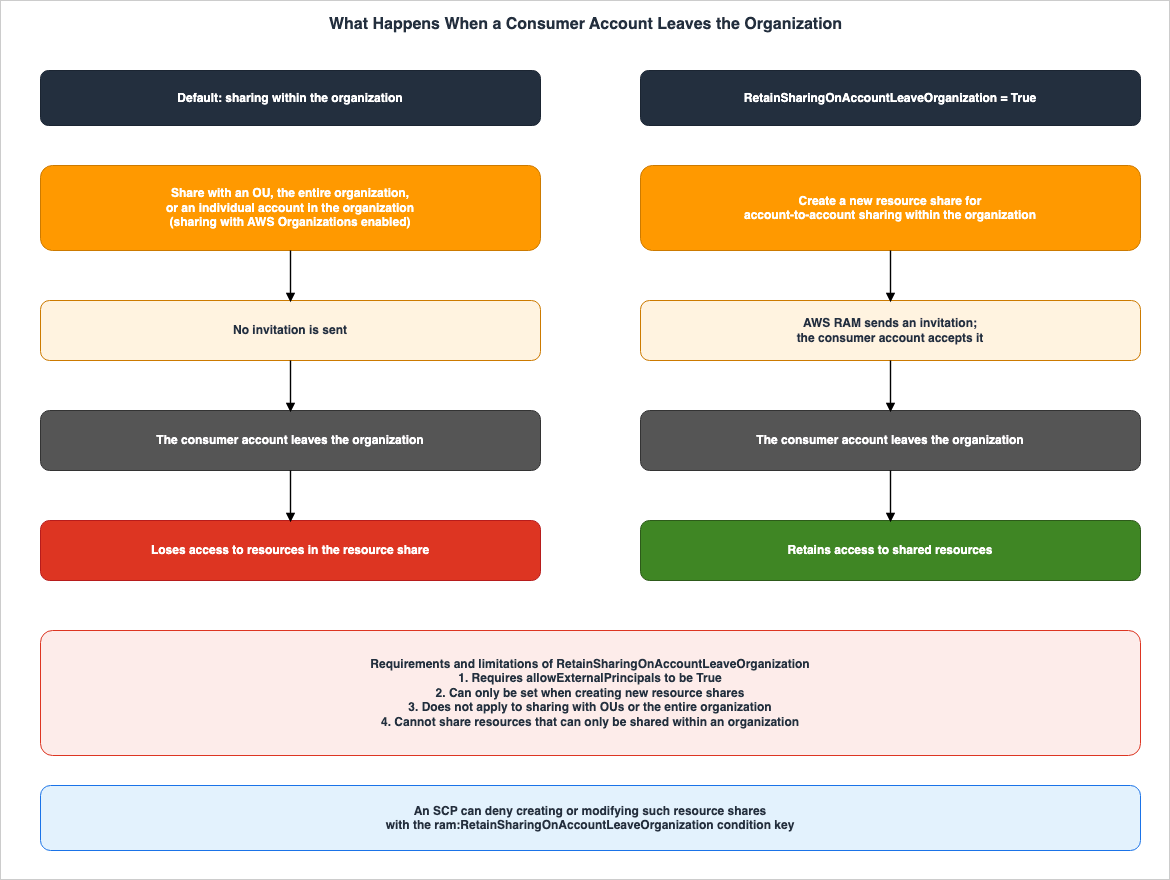
5.1 By Default, the Recipient Loses Access
The "Sharing your AWS resources" page in the RAM Guide states:By default, when you enable sharing with AWS Organizations, resource sharing within your organization restricts access to consumers within the same organization. If a consumer account leaves the organization, that account loses access to resources in the resource share. This restriction applies whether you share resources with an OU, the entire organization, or an individual account in the organization.As stated in the final sentence, whether you share with an OU, with the entire organization, or with individual accounts in the organization, recipients will lose access when they leave the organization. The same page also notes that within an organization, changes to membership directly impact sharing permissions. When an account is added to an organization or OU, it automatically gains access to the shared resources. Conversely, when an account is removed, the principals in that account automatically lose access.
5.2 RetainSharingOnAccountLeaveOrganization and Its Four Constraints
To ensure sharing continues even when the recipient leaves the organization, setRetainSharingOnAccountLeaveOrganization to True when creating the resource share. The same page states:For account-to-account sharing within your organization, you can retain sharing access when accounts leave by setting RetainSharingOnAccountLeaveOrganization to True when you create a new resource share. With this setting enabled, AWS RAM sends an invitation to the consuming account (similar to sharing with external accounts). The account retains access to shared resources even if it leaves the organization.This setting has four constraints. The same page lists them as follows:
Requires allowExternalPrincipals to be True
Can only be set when creating new resource shares
Does not apply to sharing with OUs or the entire organization
When RetainSharingOnAccountLeaveOrganization is set to True, you cannot use resource shares to share resources that can only be shared within an organization.
For the reader, each constraint means the following:
- This setting can only be used with shares that permit sharing outside the organization (where
allowExternalPrincipalsisTrue). The default value forCreateResourceShare'sallowExternalPrincipalsistrue. - This setting cannot be applied to existing resource shares. As indicated in the RAM API Reference, this setting is located as
retainSharingOnAccountLeaveOrganizationwithin theresourceShareConfigurationof theCreateResourceSharerequest and is not available in theUpdateResourceSharerequest. - It does not apply to shares with Organizational Units (OUs) or the entire organization. It only applies to shares with individual accounts in the organization.
- Resource types that can only be shared in the organization cannot be included in shares with this setting enabled. In the table in section 3.2,
ec2:Subnet,ec2:SecurityGroup, and the Capacity Blocks in theec2:CapacityReservationrow are of this kind. As of September 30, 2026, there are 14 rows in the RAM table indicating "No" for sharing outside the organization, in addition to one row whose value is split, where "No" applies to Capacity Blocks.
The "What's New" announcement (February 27, 2026) describes the behavior when this setting is enabled, stating:
When enabled, RAM treats organization accounts as external accounts, requiring explicit invitation acceptance and preserving resource access during account transitions between organizations.Shares in the organization are accessible without invitation, but by default, access is lost when the recipient leaves the organization. The setting to retain sharing is only available within the four constraints mentioned above, and is provided in exchange for an invitation.
5.3 Enforcing Settings with Service Control Policies (SCPs)
The "What's New" announcement mentions that by using the condition keyram:RetainSharingOnAccountLeaveOrganization within an SCP, you can ensure consistent settings across the entire organization. The RAM Guide's page, "Example service control policies for AWS Organizations and AWS RAM," provides an example that prevents creating or modifying resource shares with this setting enabled (Example 6).{
"Version": "2012-10-17",
"Statement": [
{
"Effect": "Deny",
"Action": [
"ram:CreateResourceShare",
"ram:AssociateResourceShare",
"ram:DisassociateResourceShare"
],
"Resource": "*",
"Condition": {
"Bool": {
"ram:RetainSharingOnAccountLeaveOrganization": "true"
}
}
}
]
}The same page also includes an example preventing sharing with principals outside the organization (Example 1, condition key
ram:RequestedAllowsExternalPrincipals) and an example preventing the acceptance of invitations from accounts outside the organization (Example 2). Regarding Example 2, the page notes that sharing with accounts in the organization does not generate invitations and therefore is not affected by this SCP. According to the same page, to use SCPs, you must enable all features in the organization and ensure that the SCP policy type is enabled. The design of SCPs is covered in AWS Organization Guardrails.5.4 When Resource Sharing with Organizations Is Disabled
The organization's management account may disable resource sharing with AWS Organizations. The "Disabling resource sharing with AWS Organizations" page in the RAM Guide states:When you disable sharing with AWS Organizations, all organizations or OUs are removed from the resource shares that you have created and they lose access to the shared resources. External accounts (accounts added to the resource share via invitation) will not be impacted, and will continue to be associated with the resource share.The "Important" section on the same page notes that disabling trusted access with AWS Organizations will cause principals in the organization to be removed from all resource shares and lose access. The quoted passage distinguishes between principals that are removed (those associated with the organization and OUs) and those that remain (external accounts invited to join). The "Important" section refers to principals in the organization being removed. The quoted passage does not mention individual accounts in the organization that were added without an invitation, but they can be read as principals in the organization under the "Important" section. The two statements, read literally, conflict for accounts in the organization that were added to a resource share through an invitation (for example, in shares made when sharing in the organization is not enabled, or in shares with
RetainSharingOnAccountLeaveOrganization set to True). The quoted passage says that external accounts, which its parenthetical defines as accounts added via invitation, are not affected, while the "Important" section says that principals in the organization are removed. This article does not side with either (see section 8.2).6. How Much Reaches the Recipient
Even under the same word "sharing," what reaches the recipient differs. There are things that can only be viewed, things that can be copied, and things that can be launched. This section outlines what recipients can and cannot do, route by route, and compares cases where the same data can be shared through two routes.6.1 View Only, Copy, or Launch
| Resource and route | Actions Recipient Can Perform | Actions Recipient Cannot Perform, or Conditions | Source |
|---|---|---|---|
EBS Volume (RAM, AWSRAMDefaultPermissionEBSVolume) | View volume information | Create copies, attach, modify, delete, create snapshots | EBS User Guide (Share a volume) |
EBS Volume (RAM, AWSRAMPermissionEBSVolumeCopyAccess) | View volume information and create copies in the same Availability Zone | Attach, modify, delete, create snapshots | EBS User Guide (Share a volume) |
| Subnet (RAM) | Create, modify, and delete their own resources | Modifying the subnet and VPC. Modifying or deleting resources owned by other participants or the owner (whether they can view them is written differently on two pages of the same user guide; see section 8.2) | VPC User Guide (Share your VPC subnets with other accounts, Responsibilities and permissions for owners and participants) |
| New EventBridge Custom Event Bus (RAM) | Publish, and create their own subscribers and event sources, within the scope of managed permissions | Updating and deleting the bus, modifying resource policies, resharing, and managing subscribers of other accounts | EventBridge User Guide (Sharing a Custom Event Bus with other accounts) |
| AMI (Launch Permission) | Launch instances. Create their own AMI from launched instances | Deleting, sharing, or modifying the AMI. Creating a copy of the AMI requires the owner to grant read access to the underlying storage. | EC2 User Guide (Share an AMI with specific AWS accounts) |
| EBS Snapshot (Attributes) | Create volumes from all data in the snapshot. Copy to a different region | If encrypted, the owner must also share the customer managed key. The recipient must create a copy encrypted with their own KMS key before using it. | EBS User Guide (Share an Amazon EBS snapshot with other AWS accounts, Use Amazon EBS snapshots that are shared with you) |
| RDS Manual DB Snapshot (Attributes) | Copy. Restore directly if not encrypted | Restoring directly from a shared, encrypted snapshot | RDS User Guide (Sharing a DB snapshot for Amazon RDS) |
For the AMI row, the EC2 User Guide states:
When you share an AMI, users can only launch instances from the AMI. They can’t delete, share, or modify it. However, after they have launched an instance using your AMI, they can then create an AMI from their instance.For the EBS snapshot row, the EBS User Guide states:
When you share a snapshot, you are giving others access to all of the data on the snapshot. Share snapshots only with people that you trust with all of your snapshot data.6.2 Authorization for DescribeVolumes
When using RAM to share EBS volumes, there are considerations regarding authorization for displaying volume information. The RAM Guide, on the "Shareable AWS resources" page, states the following in theec2:Volume row:DescribeVolumes does not perform resource-based authorization. Any conditions or restrictions in the resource policy have no effect. To access volume data, you must explicitly grant CopyVolumes through a managed permission.The same row states that if the recipient accepts the shared resource,
DescribeVolumes will function across their entire account by default. It continues by stating the following regarding permissions for copying:This is not the default permission, so you must select it explicitly.In other words, any conditions specified in the resource policy will not apply to the recipient's use of
DescribeVolumes to view the volumes. Whether a managed permission that includes CopyVolumes has been attached determines whether the recipient can access the volume data.6.3 The Recipient Cannot Reshare
With AWS RAM resource shares (route ①), the recipient cannot further share the shared resources with another account. As stated in section 2.1, the RAM Guide explicitly states that shared resources cannot be reshared. The EventBridge User Guide also indicates that the recipient account cannot reshare the bus.Similarly, with AMI launch permissions (route ③), the recipient cannot share the AMI. However, as outlined in section 6.1, the recipient can create their own AMI from the launched instance.
6.4 When the Same Data Can Be Shared Through Two Routes
EBS data can be passed either by sharing the volume through RAM or by sharing a snapshot through its attribute. The two routes differ in the following ways:| Comparison Point | EBS Volume (RAM) | EBS Snapshot (Attributes) |
|---|---|---|
| Recipient Specification | AWS RAM principals (accounts, organizations, OUs, IAM roles and users) | Account ID (which can also be made public) |
| Recipient Action | When invited to share, the recipient must accept within 12 hours (not on the seven-day list) | The recipient searches for and uses the snapshot using its ID or description. |
| Data Shared by Default | Only volume information is shared. To allow copying, grant CopyVolumes explicitly through a managed permission (the AWS managed one is AWSRAMPermissionEBSVolumeCopyAccess). | All data in the snapshot. |
| Replication Location | Same Availability Zone. Only one copy can be in progress at a time across all accounts the volume is shared with. | Sharing is limited to the region where the snapshot was created. The recipient can copy the shared snapshot to a different region. |
| Usage Logging | Calls to CopyVolumes are logged in both the account initiating the copy and the account owning the volume in CloudTrail. Upon completion, both accounts receive an EventBridge event (sharedVolumeCopy). | CloudTrail logs SharedSnapshotCopyInitiated and SharedSnapshotVolumeCreated. |
| Encryption | EBS volumes encrypted with the default AWS managed key cannot be shared. Copying an encrypted volume across accounts will, by default, encrypt the copy using the recipient account's default EBS encryption key. | Snapshots encrypted with the default AWS managed key cannot be shared. |
The new EventBridge custom event bus can also be shared through two routes: an AWS RAM resource share and the
default resource policy the owner writes. The EventBridge User Guide recommends using RAM over creating your own resource policies, but advises writing a resource policy when you need an explicit Deny, condition keys, or permissions that no managed permission expresses. The same page also notes that policies you create yourself are not visible to RAM, so tracking will need to be managed independently. Details on both policy types can be found in section 4.2 of Resource-Based Policies by Service on AWS and section 4.7 of Amazon EventBridge Custom Event Bus and the Classic Bus.7. What the Owner Can Stop Later
After sharing has begun, what can the owner stop? This section first confirms the general principles regarding RAM, and then outlines what is stopped and what remains when sharing is discontinued, across different services.7.1 General Principles Regarding RAM — Removing and Deleting
According to the "Update a resource share in AWS RAM" page of the RAM Guide, the resource owner can remove a principal or resource from a resource share, thereby revoking access. When access is revoked, the principal will no longer be able to access the shared resource. As stated on the "Deleting a resource share in AWS RAM" page, deleting a resource share will cause all principals associated with it to lose access to the shared resource. However, deleting a resource share does not delete the shared resource itself.The EventBridge User Guide lists one reason to use RAM as the ability to view and revoke shared resources from a single location.
7.2 For the Five RAM Resources Checked, Stopping a Share Stops Only New Use
For the five RAM resources this article checked (subnets, VPC Lattice entities, ELB trust stores, new EventBridge custom event buses, and EBS volumes), stopping a share stops only new use, and what the recipient has already created remains (for EBS volumes, ongoing copy operations are not canceled). Each service's user guide describes what remains after sharing stops, as follows. AMI launch permissions are placed in the last row for comparison.| Resource | What Stops When Sharing is Stopped | What Remains | Methods to Stop What Remains | Source |
|---|---|---|---|---|
| Subnet | Participants can no longer create new resources. | Existing resources of participants continue to function. Participants can modify, view, and delete their own resources. | The documentation does not specify. The owner can delete the subnet and VPC only after all participants have deleted all of their resources. | VPC User Guide (Working with shared subnets) |
| VPC Lattice Entities | New associations | Existing associations | When either the entity owner or the association owner deletes an association, it is removed from both accounts. | VPC Lattice User Guide (Share your VPC Lattice entities) |
| ELB Trust Store | New associations | Existing associations | The owner can delete existing associations using the DeleteTrustStoreAssociation action. Deletion will prevent listeners using that trust store from validating client certificates, causing TLS handshake failures. | Application Load Balancer User Guide (Share your Elastic Load Balancing trust store for Application Load Balancers) |
| New EventBridge Custom Event Bus | Publishing by the recipient and creating new subscribers | Subscribers created while sharing continue to deliver. The documentation states that subscribers and event sources are authorized when they are created. | The owner can revoke subscribers and event sources using the RevokeResource action. Revoked resources are permanently stopped, and the recipient can only delete them. | EventBridge User Guide (Sharing a Custom Event Bus with other accounts) |
| EBS Volume | According to the general principles of RAM, the recipient loses access to the volume. | Ongoing copies are not canceled. Even if the original volume is deleted, the copies are not canceled. | The documentation does not specify. | EBS User Guide (Share a volume, Copy an Amazon EBS volume), EC2 API Reference (CopyVolumes) |
| AMI (Revocation of Launch Permissions, Deregistration) | New launches by recipients who have had launch permissions revoked. | The documentation does not specify what happens to the recipient's instances after launch permissions are revoked. As a general rule, the EC2 User Guide states that deregistering an AMI does not affect instances launched from that AMI (the documentation does not name recipient instances). | The documentation does not specify. | EC2 User Guide (Share an AMI with specific AWS accounts, Deregister an Amazon EC2 AMI) |
For the subnet row, the VPC User Guide states the following.
Existing participant resources continue to run in the unshared subnet. AWS managed services (for example, Elastic Load Balancing) that have automated/managed workflows (such as auto scaling or node replacement) may require continuous access to the shared subnet for some resources.For the EventBridge row, the EventBridge User Guide states the following.
EventBridge authorizes a subscriber or event source when it is created, so a subscriber the consumer created while the share was active keeps delivering after you unshare.For the EBS volume row, the EBS User Guide states the following.
Removing a volume from a resource share doesn't cancel in-progress copy operations.For the general rule in the AMI row, the "Deregister an Amazon EC2 AMI" page in the EC2 User Guide states the following.
Deregistering an AMI has no effect on any instances that were launched from the AMI. You can continue to use these instances.The EventBridge row is covered in detail in section 4.7 of Amazon EventBridge Custom Event Bus and the Classic Bus, and the ELB trust store row in section 8.4 of AWS Private CA Hierarchy Design.
For the five RAM resources listed in this table, ending sharing does not revoke any associations, resources, or subscribers created by the recipient during the sharing period, nor does it cancel any ongoing copies. Not every resource type that can be shared through RAM behaves this way. For Route 53 Resolver forwarding rules, the Route 53 Developer Guide states that if you stop sharing a rule that was associated with VPCs, Resolver processes DNS queries for those VPCs based on the remaining rules, the same as if the rule were disassociated from those VPCs. If something you want to stop remains, you need to use a separate means specific to the service or ask the recipient to delete it. Service-native sharing also behaves differently in some cases. In Clean Rooms, when a creator removes a member, the member's dataset is also removed from the collaboration (section 7.5). The fourth column of the subnet, EBS volume, and AMI rows says that the documentation does not specify a means, because a search of the pages in the Source column for
cancel, remove, stop, revoke, only, can't, and must found no description of a way to stop what remains.7.3 Only Some Types Let the Recipient Leave
Whether a recipient can leave a resource share also depends on the resource type. The "Leaving a resource share" page of the RAM Guide states that a recipient can leave only when the resource share was shared with it as an individual AWS account, not in the context of an organization. If sharing in the organization is enabled and the share came from an account in that organization, the recipient cannot leave. In addition, the resource share must be empty or contain only resource types that support leaving.The following are the only resource types that support leaving a resource share.The following 14 resource types are listed:
rds:Cluster, ec2:CapacityReservation, ec2:DedicatedHost, license-manager:LicenseConfiguration, ec2:LocalGatewayRouteTable, outposts:Outpost, outposts:Site, route53resolver:ResolverRule, ec2:CoipPool, ec2:PrefixList, ec2:Subnet, ec2:TrafficMirrorTarget, ec2:TransitGateway, and ec2:TransitGatewayMulticastDomain (as of September 30, 2026).For shares that include other resource types, the recipient must contact the owner to request removal. The RAM Guide's "Update a resource share in AWS RAM" page notes that a message will appear prompting the recipient to contact the owner. Similarly, the VPC Lattice User Guide and the Application Load Balancer User Guide both state that the recipient must request that the owner remove the account from the share.
Service-native sharing also gives the recipient means of its own. For example, a recipient of an AMI can use the
cancel-image-launch-permission AWS CLI command to remove their account from launch permissions. According to the EC2 User Guide, this applies only to AMIs shared with their own account, and cannot be used for AMIs shared with an organization or OU. Once removed, the action is irreversible, and the owner can reshare the AMI. Clean Rooms members can leave the collaboration by deleting their membership, but once they leave, they cannot rejoin.7.4 Three Lists Name the Same Types
Apart from the table on the "Shareable AWS resources" page, the RAM Guide has lists that name only some resource types. This section sets the following three side by side.| List | Page | Arrangement |
|---|---|---|
| Types with a seven-day invitation expiration | Accepting and rejecting resource share invitations (also found on the "Sharing your AWS resources" page) | Service name and type name |
| Types that do not yet support resource-based policies, but for which RAM generates policy representations | Terms and concepts for AWS RAM | Service name and type name |
| Types where the recipient can leave the resource share on its own | Leaving a resource share | Service name and type code |
As of September 30, 2026, when comparing these three lists on a service-by-service basis, the listed types match. They are 14 types across Amazon Aurora, Amazon EC2, AWS License Manager, AWS Outposts, Amazon Route 53, and Amazon VPC. The way the type names are written varies between lists. For example, the Amazon Route 53 type is listed as Forwarding rules in the lists of names, and as
route53resolver:ResolverRule in the list of type codes.AWS does not explicitly explain the relationship between these three lists. This article only documents the fact that the types match, without speculating on the reasons why. The use for the reader is that, before looking up the three questions for one type separately (the invitation period, the policy representation, and whether the recipient can leave), they can look at the three lists side by side.
7.5 How to Stop Service-Native Sharing
③ In service-native sharing, the owner stops sharing by removing the recipient from the attributes and sharing settings.| Route | How to stop it | Source |
|---|---|---|
| AMI Launch Permissions | Use modify-image-attribute to remove launch permissions for accounts, organizations, or OUs. Use reset-image-attribute to remove all public and explicit launch permissions. The AMI owner always has launch permissions. | EC2 User Guide (Share an AMI with specific AWS accounts, Manage AMI sharing with an organization or OU) |
| EBS Snapshot Sharing | Use ModifySnapshotAttribute and specify remove for the OperationType to remove accounts from createVolumePermission. | EC2 API Reference (ModifySnapshotAttribute) |
| RDS DB Snapshot Sharing | Use ModifyDBSnapshotAttribute, set AttributeName to restore, and remove accounts using the ValuesToRemove parameter. To stop public sharing, remove the value all. | RDS User Guide (Stopping snapshot sharing for Amazon RDS) |
| Directory Sharing | In the Directory Service console, select the shared directory on the Scale & share tab and choose Unshare. | AWS Directory Service Administration Guide (Unsharing your directory) |
| Collaboration Membership | The collaboration creator can remove members. When a member is removed, their datasets are also removed from the collaboration. The creator cannot remove their own account. | AWS Clean Rooms User Guide (Removing members from a collaboration) |
For EBS snapshot sharing, the owner can verify whether the shared snapshot has been copied or used to create volumes by checking the
SharedSnapshotCopyInitiated and SharedSnapshotVolumeCreated events in CloudTrail.Sharing an AMI may not always be successfully stopped. According to the EC2 User Guide's "Manage AMI sharing with an organization or OU" page:
You can't stop sharing an AMI with a specific account if it's in an organization or OU with which an AMI is shared. If you try to stop sharing the AMI by removing launch permissions for the account, Amazon EC2 returns a success message. However, the AMI continues to be shared with the account.When sharing an AMI with an organization or OU, removing the launch permission of an account in that organization or OU returns a success message, but the AMI remains shared with that account. The success message does not indicate that sharing has been stopped.
8. Axes for Choosing a Route, and Where the Sources Differ
This section summarizes the results from the previous sections to help decide which route to use. It then lists where the sources differ in what they say.8.1 Axes for Choosing
The route is first narrowed by which routes the resource's service supports. Subsequently, select based on the following five questions:| Question | Determined by | Section in this Article |
|---|---|---|
| Is the recipient within or outside the organization? | The column for accounts outside the organization in the RAM table. Types with No cannot be shared outside the organization. AMI launch permissions can specify organizations or OUs that the owner does not belong to. | Sections 3.1, 3.2, and 2.4 |
| Can the recipient accept the invitation within the specified timeframe? | If the recipient is outside the organization, if sharing in the organization is not enabled, or if the resource share retains sharing after the account leaves the organization, an invitation will be sent. The timeframe varies depending on the type, either 7 days or 12 hours. | Sections 4.1 and 4.2 |
| Is the intention to grant the recipient the ability to use or replicate the resource? | The permissions for EBS volumes, launching and copying AMIs, and all the data in a snapshot. | Sections 6.1 and 6.4 |
| Do you want the resource to appear on the recipient's screen? | If using RAM resource sharing, the resource will appear in the recipient's console and API. If using only resource-based policies, the recipient must specify the ARN. | Section 2.2 |
| What do you want to be able to stop later? | For the five RAM resources this article checked, stopping a share stops only new use. Consider the recipient's status if they leave the organization. Consider the types that let the recipient leave on its own. | Sections 7.2, 5, and 7.3 |
8.2 Where the Sources Differ
Within what this article checked, the sources differ in the following places. This article does not merge any of them into a single conclusion.| Where | One source | The other source |
|---|---|---|
| How will the recipient use the VPC Lattice resource configuration? | The RAM Guide's table, under the vpc-lattice:ResourceConfiguration row, states only that the recipient accesses it through a resource VPC endpoint. | The PrivateLink User Guide states that CIDR-type resource configurations are used with tunnel endpoints (AWS PrivateLink Tunnel Endpoints). |
| Date when EBS volume sharing was added. | The RAM Guide's Document history indicates August 20, 2026. | The "What's New" section, regarding cross-account volume copying through RAM, states September 9, 2026. |
| When an EBS volume is shared, will an invitation be sent? | The EBS User Guide's "Share a volume" page states that creating a resource share sends an invitation to the specified account, and accounts outside the organization must accept it. | The RAM Guide states that if sharing is enabled in the organization, no invitations are sent to principals in the organization. |
| Subnet invitations. | The RAM Guide lists subnets among the seven-day types. | The VPC User Guide lists enabling RAM sharing in the organization as a prerequisite for subnet sharing. According to the RAM Guide, if enabled, no invitations are sent to accounts in the organization. |
| Can participants view the owner's or other participants' resources? | The VPC User Guide's "Share your VPC subnets with other accounts" page states Participants cannot view, modify, or delete resources that belong to other participants or the VPC owner. | The same user guide's "Responsibilities and permissions for owners and participants" page states that participants can describe shared subnets, VPCs, route tables, and network ACLs created by the owner, among other resources. |
The key for which the kms:DescribeKey permission is required when sharing EBS volumes. | The EBS User Guide's "Share a volume" page states that the owner's account requires kms:DescribeKey permission for the EBS default encryption key, even for unencrypted volumes. | The RAM Guide's table, under the ec2:Volume row, states that to verify the KMS key used to encrypt the volume, the IAM principal requires kms:DescribeKey permission. |
| Impact of SCPs that prevent invitation acceptance. | The RAM Guide's "Example service control policies for AWS Organizations and AWS RAM" page, in Example 2, denies ram:AcceptResourceShareInvitation without condition, and notes that this does not affect sharing with accounts in the organization, as that does not generate invitations. | The same guide's "Sharing your AWS resources" page states that if RetainSharingOnAccountLeaveOrganization is set to True, invitations are sent to accounts in the organization too. When sharing in the organization is not enabled, accounts in the organization also receive invitations (Accepting and rejecting resource share invitations). |
| What happens, when sharing with the organization is disabled, to accounts in the organization that were added to a resource share through an invitation? | The RAM Guide's "Disabling resource sharing with AWS Organizations" page states that the organization and OUs are removed, and that external accounts (which the page's parenthetical defines as accounts added to the resource share via invitation) are not affected. | The same page's "Important" section states that principals in the organization are removed from all resource shares. |
How the RAM API Reference describes CREATED_FROM_POLICY when a resource-based policy is attached directly. | The RAM API Reference's PromoteResourceShareCreatedFromPolicy page states that when a resource-based policy is attached to a resource, RAM automatically creates a resource share with featureSet = CREATED_FROM_POLICY, and states no condition. | The same API Reference's ResourceShare data type describes CREATED_FROM_POLICY as That policy did not match any existing managed permissions, so AWS RAM created this customer managed permission automatically. |
| Does the recipient need to accept when an AWS Private CA certificate authority is shared through an organization? | The AWS Private CA User Guide's "Attach a policy for cross-account access" page states After RAM shares a resource through AWS Organizations, the recipient principal must accept the resource for it to take effect. The page adds The recipient can configure AWS Organizations to accept offered shares automatically. | The RAM Guide states that if sharing is enabled in the organization, no invitations are sent to principals in the organization, and they get access without an invitation. |
9. Frequently Asked Questions about Cross-Account Sharing on AWS
This section answers, within the scope of this article, questions that often come up when designing how to share resources across AWS accounts.Q1. What is the deadline for accepting the invitation from RAM?
It depends on the resource type: either 7 days or 12 hours. The RAM Guide lists resource types such as Aurora DB clusters, EC2 capacity reservations and dedicated hosts, License Manager license configurations, certain Outposts types, Route 53 forwarding rules, VPC subnets, and Transit Gateways as having a seven-day acceptance period. Resource types not on the list have a 12-hour acceptance period. EBS volumes, new EventBridge custom event buses, and VPC Lattice resource configurations are not listed, so they have a 12-hour acceptance period (section 4.2).Q2. Why does no invitation arrive when you share with an account in your organization?
If sharing within your organization is enabled, RAM will not send an invitation (except for resource shares that retain sharing after an account leaves the organization), and the recipient gets access without accepting anything. Sharing within an organization is enabled using the organization's management account, either through the RAM console or by using theenable-sharing-with-aws-organization command. Simply enabling trusted access within Organizations is not sufficient to enable sharing within an organization (see section 4.1).Q3. Why can the recipient's role not use the resource after the invitation was accepted?
The administrator of the receiving account may not have granted the role, through an identity-based policy, permission to access the ARN (Amazon Resource Name) of the resource. The RAM Guide states that the receiving principal does not immediately gain access and that the receiving account administrator needs to apply a policy. The permissions granted cannot exceed the managed permission of the resource share (section 4.3).Q4. What happens to shared resources when the recipient's account leaves the organization?
When the recipient account leaves the organization, shared resources are, by default, no longer accessible. This applies whether the resource is shared with an organizational unit (OU), with the entire organization, or with an individual account in the organization. To maintain access, set theRetainSharingOnAccountLeaveOrganization property to True when creating the resource share. However, this setting is subject to four constraints: it must be used with allowExternalPrincipals set to True, it can only be configured during initial creation, it does not apply to shares with OUs or the entire organization, and resource types that can only be shared within an organization cannot be included (sections 5.1 and 5.2).Q5. If you stop sharing, does what the recipient created during the share also stop?
For the five RAM resources this article checked, no. Only new usage is stopped. Within subnets, existing resources of participants continue to operate. In VPC Lattice entities and ELB trust stores, existing associations remain. In new EventBridge custom event buses, existing subscribers keep delivering. For EBS volumes, ongoing copy operations are not canceled. Not every RAM resource type behaves this way: for Route 53 Resolver forwarding rules, stopping the share has the same effect as disassociating the rule from the recipient's VPCs. To stop what remains, you need to use a separate means specific to the service or ask the recipient to delete it. The documentation does not specify what happens to recipient instances after the launch permissions for an AMI are revoked. In Clean Rooms, which uses service-native sharing, if the creator removes a member, that member's datasets are also removed from the collaboration (see sections 7.2 and 7.5).Q6. Can the recipient further share the shared resource with another account?
In RAM resource sharing, this is not possible. The RAM Guide states that shared resources cannot be further shared. Even with AMI launch permissions, the recipient is unable to share the AMI. However, the recipient can create their own AMI from the launched instance (see section 6.3).Q7. To pass EBS data to another account, should you share the volume through RAM or share a snapshot?
The choice depends on how much you want to pass and how the other side is named. Sharing the volume through RAM passes, by default, only viewing of the volume information. To allow copying, you must explicitly grant the recipientCopyVolumes through a managed permission (the AWS managed one is AWSRAMPermissionEBSVolumeCopyAccess). Copies will be created in the same Availability Zone. Sharing snapshots, on the other hand, transfers all of the snapshot's data. For volumes, the other side is named as AWS RAM principals; for snapshots, by account ID (see section 6.4).Q8. Can resources shared through a resource-based policy be managed using RAM?
According to the RAM API Reference, when resources are assigned a resource-based policy, RAM creates resource shares with afeatureSet of CREATED_FROM_POLICY. These shares are visible only to the account that created them and cannot be modified in RAM until they are promoted. The API Reference does not specify which types of resources are eligible. However, if you promote a resource share created from a policy to a STANDARD share using PromoteResourceShareCreatedFromPolicy, RAM can then manage it, and the share becomes visible to the principals it is shared with (see sections 2.2 and 8.2).10. Summary
There are three routes for passing resources on AWS to another account: AWS RAM resource shares, resource-based policies, and service-native sharing. This article lays out these three routes, comparing them by the recipient's procedure, the scope of what reaches the recipient, and what the owner can stop later.The three routes differ in where the other side is named, and they are not independent of one another. RAM works by attaching resource-based policies to the resources in a resource share. The RAM API Reference states that directly applying a resource-based policy to a resource creates a resource share visible only to the owner. AMIs, EBS snapshots, and RDS DB snapshots specify the recipient in the resource's attributes. Directory sharing and Clean Rooms, on the other hand, utilize the service's own invitation mechanisms.
The invitation expiration time for RAM sharing varies depending on the resource type, lasting either 7 days or 12 hours. Resource types with a 12-hour expiration period (not listed in the seven-day list) include EBS volumes, new EventBridge custom event buses, and VPC Lattice resource configurations. If organizational sharing is enabled, no invitations are sent to principals in the organization (except for resource shares that retain sharing after the account leaves the organization). Even after accepting an invitation, the recipient's administrator must grant permissions using identity-based policies.
Sharing within an organization can be used without an invitation, but by default, when the recipient's account leaves the organization, the recipient loses access. The
RetainSharingOnAccountLeaveOrganization setting allows sharing to persist, but it can only be used in conjunction with invitations and is subject to four constraints.The scope of what reaches the recipient differs by route and by permission. EBS volume sharing via RAM, by default, only provides view-only access. AMI launch permissions only allow launching instances, but the recipient can then create their own AMIs from the launched instances. EBS snapshot sharing transfers all data.
For the five RAM resources this article checked, stopping a share stops only new use. For subnets, VPC Lattice entities, ELB trust stores, and new EventBridge custom event buses, resources created by the recipient during the sharing period will remain. For EBS volumes, ongoing copy operations will not be canceled. Only some resource types let the recipient leave the resource share on its own.
Finally, here are five things to verify before transferring resources across accounts:
- Does the RAM table show that the type can be shared outside the organization?
- Will the recipient be able to accept the invitation within the specified timeframe (7 days or 12 hours)?
- Is the recipient's administrator prepared to apply appropriate policies on their side?
- Is the recipient's account scheduled to leave the organization?
- If sharing is stopped, is there a way to prevent the recipient from continuing to use what they created?
11. References
- Cross account resource access in IAM - AWS Identity and Access Management
- What is AWS Resource Access Manager? - AWS Resource Access Manager
- Terms and concepts for AWS RAM - AWS Resource Access Manager
- Sharing your AWS resources - AWS Resource Access Manager
- Using shared AWS resources - AWS Resource Access Manager
- Accepting and rejecting resource share invitations - AWS Resource Access Manager
- Update a resource share in AWS RAM - AWS Resource Access Manager
- Deleting a resource share in AWS RAM - AWS Resource Access Manager
- Leaving a resource share - AWS Resource Access Manager
- Shareable AWS resources - AWS Resource Access Manager
- Availability Zone IDs for your AWS resources - AWS Resource Access Manager
- Example service control policies for AWS Organizations and AWS RAM - AWS Resource Access Manager
- Disabling resource sharing with AWS Organizations - AWS Resource Access Manager
- The other account in my organization never receives an invitation - AWS Resource Access Manager
- Document history for the AWS RAM User Guide - AWS Resource Access Manager
- CreateResourceShare - AWS Resource Access Manager
- UpdateResourceShare - AWS Resource Access Manager
- AcceptResourceShareInvitation - AWS Resource Access Manager
- ResourceShareInvitation - AWS Resource Access Manager
- ListResourceTypes - AWS Resource Access Manager
- PromoteResourceShareCreatedFromPolicy - AWS Resource Access Manager
- ResourceShare - AWS Resource Access Manager
- Share a volume - Amazon EBS
- Copy an Amazon EBS volume - Amazon EBS
- Share an Amazon EBS snapshot with other AWS accounts - Amazon EBS
- Use Amazon EBS snapshots that are shared with you - Amazon EBS
- Share an AMI with specific AWS accounts - Amazon Elastic Compute Cloud
- Share an AMI with organizations and organizational units - Amazon Elastic Compute Cloud
- Manage AMI sharing with an organization or OU - Amazon Elastic Compute Cloud
- Cancel having an AMI shared with your AWS account - Amazon Elastic Compute Cloud
- Deregister an Amazon EC2 AMI - Amazon Elastic Compute Cloud
- Find shared AMIs to use for Amazon EC2 instances - Amazon Elastic Compute Cloud
- ModifySnapshotAttribute - Amazon Elastic Compute Cloud
- ModifyImageAttribute - Amazon Elastic Compute Cloud
- CopyVolumes - Amazon Elastic Compute Cloud
- Sharing a DB snapshot for Amazon RDS - Amazon Relational Database Service
- Sharing encrypted snapshots for Amazon RDS - Amazon Relational Database Service
- Stopping snapshot sharing for Amazon RDS - Amazon Relational Database Service
- Share your AWS Managed Microsoft AD - AWS Directory Service
- Step 2: Share your directory - AWS Directory Service
- Step 3: Accept shared directory invite - Optional - AWS Directory Service
- Unsharing your directory - AWS Directory Service
- ShareDirectory - AWS Directory Service
- SharedDirectory - AWS Directory Service
- Sharing a Custom Event Bus with other accounts - Amazon EventBridge
- Share your VPC subnets with other accounts - Amazon Virtual Private Cloud
- Shared subnet prerequisites - Amazon Virtual Private Cloud
- Working with shared subnets - Amazon Virtual Private Cloud
- Responsibilities and permissions for owners and participants - Amazon Virtual Private Cloud
- Share your VPC Lattice entities - Amazon VPC Lattice
- Access a network segment through a tunnel VPC endpoint - Amazon Virtual Private Cloud
- Managing forwarding rules - Amazon Route 53
- Share your Elastic Load Balancing trust store for Application Load Balancers - Elastic Load Balancing
- Attach a policy for cross-account access - AWS Private Certificate Authority
- Creating a membership and joining a collaboration - AWS Clean Rooms
- Adding members to a collaboration - AWS Clean Rooms
- Removing members from a collaboration - AWS Clean Rooms
- Leaving a collaboration - AWS Clean Rooms
- AWS Service Availability Updates - What's New with AWS
- AWS Resource Access Manager now supports maintaining shares when accounts change organizations - What's New with AWS
- Amazon EBS Volume Clones now supports copying volumes across accounts - What's New with AWS
- Amazon EventBridge relaunches event buses for enterprise scale - What's New with AWS
- AWS announces access to VPC resources over AWS PrivateLink - What's New with AWS
- AWS Resource Access Manager supports fine-grained customer managed permissions - What's New with AWS
References:
Tech Blog with curated related content
Written by Hidekazu Konishi