Amazon EventBridge Custom Event Bus and the Classic Bus - What Maps From Rules to Subscribers, Which Defaults Change, and What Stays on the Classic Bus
First Published:
Last Updated:
Designers and operations teams currently running rules and targets in production will eventually need to choose one of three options: migrate to the Custom Event Bus, run both buses in parallel, or take no action. Regardless of the option chosen, there are several key points to understand. What happens to your existing rules, dead-letter queues, retry settings, and archives when you move to the Custom Event Bus? What changes silently when you assume your settings will remain the same? And what elements will remain with the Classic bus?
AWS has created a migration page in the EventBridge user guide and published a mapping table to address these questions. This article answers those questions by following the rows in that table, separating what the table says, what changes inside its rows, and what stays outside the table.
Related articles on this site:
- AWS Messaging and Event Routing Decision Guide - Choosing Between SQS, SNS, EventBridge, and Kinesis
- AWS History and Timeline regarding Amazon EventBridge - Overview, Functions, Features, Summary of Updates, and Introduction
- Resource-Based Policies by Service on AWS - Where the Second Policy Lives, What It Can Say, and When It Is Required
- Event-Driven Serverless Architecture on AWS - Building Resilient Workflows with API Gateway, Lambda, EventBridge, Step Functions, and DynamoDB
- EventBridge Pipes Event-Driven Architecture Implementation Patterns
- AWS Service Lifecycle States - Maintenance, Sunset, Full Shutdown, and What Each One Takes Away
Table of Contents
- 1. The Scope of This Article and the Date It Was Verified
- 2. What Does Not Change
- 3. The Carry-Over Table — The Rows of the AWS Mapping Table
- 4. What Changes Inside the Rows
- 5. Classic Targets Without a Bespoke Target
- 6. Running Two Buses in Parallel — Migration Order
- 7. What Stays on Custom Event Bus - Classic
- 8. Common Pitfalls During Migration
- 9. Frequently Asked Questions about the Custom Event Bus and the Classic Bus
- 10. Summary
- 11. References
1. The Scope of This Article and the Date It Was Verified
This section covers how the same name came to refer to two products and how existing buses are handled. It then lists what this article does not cover.1.1 Two Products Share the Same Name
The EventBridge user guide refers to the new bus as Custom Event Bus and to the traditional buses that use rules and targets as Custom Event Bus - Classic. Both products share the IAMevents: namespace and the events.amazonaws.com service principal, and both remain available.The What's New post of September 24, 2026, describes the same event in different words: it says the existing bus was renamed.
we have renamed the existing bus to Custom event bus - classic.The AWS News Blog refers to the new bus as an
enhanced custom event bus and the traditional bus as Custom event bus – classic. This means that, depending on the documentation, at least three different notations are used to refer to the same two products. This article uses the user guide's names, Custom Event Bus and Custom Event Bus - Classic, and uses the other names only when citing their source. When this article says Classic alone, it means Custom Event Bus - Classic.1.2 Existing Buses Will Continue to Operate
The first sentence on the migration page states that Classic will continue to be offered, and that both products can operate alongside each other.Custom Event Bus - Classic remains available, and you can run both products side by side.The AWS News Blog also states that existing custom buses continue to work as they do today with no changes required, and introduces Custom Event Bus as a new resource to adopt at your own pace. The migration process outlined in AWS documentation only describes creating a new bus and adding subscribers to it. The documents this article read contain no procedure that switches an existing bus's settings to make it a Custom Event Bus.
The recommendation has moved. The opening paragraph of the Classic chapter of the user guide includes this sentence:
For new applications, start with the Custom Event Bus.However, this is a recommendation for new applications, not an announcement that changes the status of Classic. EventBridge does not appear in any of the AWS Service Availability Updates released in October 2025, March 2026, or June 2026. Definitions of service status can be found on this site's AWS Service Lifecycle States.
What's New states that the Custom Event Bus is available in 14 Regions at launch: United States (Northern Virginia, Ohio, Oregon), Europe (Ireland, Frankfurt, Stockholm, Spain), Asia Pacific (Tokyo, Singapore, Sydney, Malaysia, Thailand, Mumbai, Hong Kong).
1.3 Items Not Covered
This article does not cover the full picture of the Custom Event Bus. The subscriber functionality, retention periods (1 to 365 days), FIFO delivery within event groups, deduplication within a 5-minute window, the two publishing APIs, and sharing via AWS RAM are all summarized in the AWS Messaging and Event Routing Decision Guide, specifically in Section 6.6. This article covers only what that summary does not: what moves from Classic and where, what does not move, and which defaults change.This article also does not cover the history. Details regarding the placement of the September 24, 2026 change in the lineage of EventBridge can be found in the AWS History and Timeline regarding Amazon EventBridge.
Furthermore, this article does not provide a general overview of ordering, idempotency, or service selection. These topics are also covered in the AWS Messaging and Event Routing Decision Guide, specifically in Sections 3 and 9. This article only mentions FIFO in the context of scenarios where retry settings impact ordering.
This article also does not provide an inventory of resource-based policies. The differences between the policies for Classic buses and those for the Custom Event Bus are detailed in Section 4.2 of the Resource-Based Policies by Service on AWS. This article will only address one point related to migration, detailed in Section 4.7.
All official descriptions referenced in this article have been verified against the EventBridge user guide, the EventBridge API reference, What's New, and the AWS News Blog as of September 27, 2026. The Custom Event Bus had been available for three days, and its pages will keep changing. When making decisions based on this information, open the same pages again.
2. What Does Not Change
Separately from the mapping table, the migration page lists what does not change in its own table. The six rows in this table indicate what existing resources can be used as is during the migration process. Below is a listing of those six items, expressed in the language used in this article:| What does not change | What it means for the move |
|---|---|
IAM action namespace events: and service principal events.amazonaws.com | Identity-based policies, bus resource policies, and delivery role trust policies can be reused. |
| Target services (Amazon SQS, Lambda, Amazon SNS, Kinesis, Firehose, Step Functions, API Gateway, API destinations, event buses) | Delivery roles maintain the same target actions. Parameter blocks for each target service use the same fields as their Classic counterparts. |
| Event pattern syntax (excluding wildcards) | For events published using PutEvents, rule patterns can be used as is for DATA filtering. |
| AWS service events and SaaS partner events | The same events are delivered to the Custom Event Bus via the event source. |
PutEvents API and event envelope | Producers only need to change the endpoint and client; the request itself does not need modification. |
| JSONata-based input transformation | Expressions are migrated to the Transformer, and events are placed under the $events variable. |
The sixth row has an open question. The Classic input transformation page that this article read describes a mechanism for extracting variables using JSONPath and embedding them into templates. This article was unable to definitively identify which Classic feature the sixth row refers to, based on available primary documentation. The process of migrating input transformations is covered in Section 4.5.
2.1 Names That Change
As indicated on the fifth row of the table, the producer changes both the endpoint and the client. While the IAM namespace and service principal are shared, all other names are specific to the Custom Event Bus. The following lists the names mentioned on the user guide's names page and its observability page.| Where it is used | Name on the Custom Event Bus | Example |
|---|---|---|
| AWS CLI commands | eventsv2 | aws eventsv2 put-events |
| SDK client | EventBridgeV2 | EventBridgeV2Client in the AWS SDK for Java |
| Endpoint | eventsv2 | eventsv2.us-east-1.amazonaws.com |
| VPC endpoint service | eventsv2 | com.amazonaws.us-east-1.eventsv2 |
| IAM actions | events: (shared with Classic) | events:PutRawEvents, events:CreateSubscriber |
| Service principal | events.amazonaws.com (shared with Classic) | Principal in the trust policy of the delivery role |
| Resource ARN | event-busv2 | arn:aws:events:us-east-1:111122223333:event-busv2/orders/EXAMPLE1234567890abcdef |
| CloudFormation resource type | AWS::EventsV2 | AWS::EventsV2::Subscriber |
| CloudWatch metric namespace | AWS/EventsV2 | Metrics per subscriber |
There is one potential pitfall. In IAM policies, you must always prefix actions with
events:. eventsv2 is the name used for the CLI, SDK, and endpoint, but it is not a prefix for IAM actions. According to the user guide, IAM accepts policies written with eventsv2:PutEvents, but such an action does not exist, so the policy will not permit any actions.the policy grants nothing and the caller receives AccessDeniedException.ARNs need attention as well. The ARNs for the Custom Event Bus and its subscribers all end with identifiers generated by EventBridge. You cannot construct these ARNs from the names; if you recreate a bus with the same name, the identifier will change. The user guide recommends storing the entire ARN, rather than just the name. A policy whose Resource names the ARN of a Classic bus refers to that Classic bus. A Custom Event Bus is a separate resource with a different ARN.
The same applies to CloudFormation templates. The user guide states:
The AWS::Events types belong to Custom Event Bus - Classic and cannot configure a Custom Event Bus.To create a Custom Event Bus, you use four resource types:
AWS::EventsV2::EventBus, AWS::EventsV2::Subscriber, AWS::EventsV2::EventSource, and AWS::EventsV2::ResourcePolicy.Producers that send events from within a VPC also need a separate connection point. The user guide's interface VPC endpoint page states that the Custom Event Bus has its own endpoint service names (
com.amazonaws.<region>.eventsv2 and com.amazonaws.<region>.eventsv2-fips) and says to create a separate interface endpoint for them. The events endpoint on the same page serves Custom Event Bus - Classic only.3. The Carry-Over Table — The Rows of the AWS Mapping Table
The core of the migration page is a table with nine rows, outlining how Classic components map to the Custom Event Bus. This table details, row by row, what each Classic component becomes on the Custom Event Bus. This article uses the table as a frame for laying out what stays in the hands of an older product's users when a successor product arrives.3.1 How to Read the Table
The carry-over table has four columns.In the older productrefers to the component on the Classic side, in the words of the left column of the migration page's table.In the newer productrefers to the corresponding component on the Custom Event Bus side, in the words of the right column of the migration page's table.What happens to the older onedescribes what happens to that component on the Classic side during the move. It is filled in only where an AWS document says so.Where AWS says soindicates the AWS documentation that provides the basis for that row.
Where no AWS document says anything, the cell reads
The source does not say. Before writing that, this article searched the full text of the cited document, and of the pages it links to, for carry over, unchanged, remain, continue, migrat, replace, and archive, and confirmed that none of them says it. The rows are only the rows of the table on the migration page. This article does not add a correspondence because two names look alike. Differences inside the rows are covered in Section 4.This website uses the same four-column table in other articles as well, to explain what remains from the older product when a newer product is released. These include AWS Network Security Manager and AWS Firewall Manager, as well as Amazon CloudWatch Omni and CloudWatch.
3.2 What Each Classic Component Becomes on the Custom Event Bus
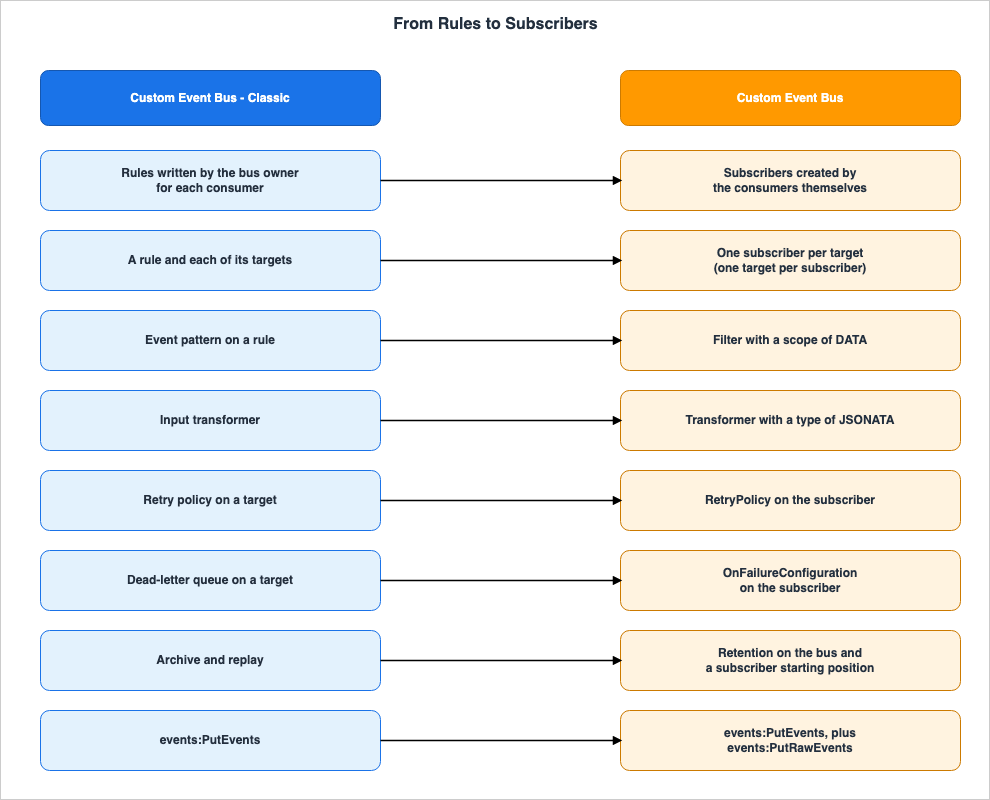
| In the older product | In the newer product | What happens to the older one | Where AWS says so |
|---|---|---|---|
| A rule and one of its targets | One subscriber | The rule is disabled in step 5 and deleted after the retry period and your validation period have passed. | Migrating from Custom Event Bus - Classic to the Custom Event Bus |
| A rule with five targets | Five subscribers on the same bus | The rule is disabled in step 5 and then deleted. | Migrating from Custom Event Bus - Classic to the Custom Event Bus |
| Event pattern on a rule | A filter with a scope of DATA (This pattern can be used without modification for events published with PutEvents). | The pattern remains part of the rule and will continue to be evaluated on the Classic side until the rule is disabled in step 5. | Migrating from Custom Event Bus - Classic to the Custom Event Bus |
| Input transformer | A transformer with a type of JSONATA. | It remains associated with the rule's target and continues to be used until the rule is disabled in step 5. | Migrating from Custom Event Bus - Classic to the Custom Event Bus |
| Dead-letter queue on a target | OnFailureConfiguration on the subscriber. | It remains associated with the rule's target and continues to be used until the rule is disabled in step 5. | Migrating from Custom Event Bus - Classic to the Custom Event Bus |
| Retry policy on a target | RetryPolicy on the subscriber. | It remains associated with the rule's target and continues to be used until the rule is disabled in step 5. | Migrating from Custom Event Bus - Classic to the Custom Event Bus |
| Archive and replay | Retention on the bus and a subscriber starting position. | The source does not say. | Migrating from Custom Event Bus - Classic to the Custom Event Bus |
| Rules written by the bus owner for each consumer | Subscribers created by the consumers themselves. | The rule is disabled in step 5 and then deleted. | Migrating from Custom Event Bus - Classic to the Custom Event Bus |
events:PutEvents | events:PutEvents, plus events:PutRawEvents for non-JSON payloads. | Existing APIs do not change. What's New states All existing APIs remain unchanged. | Migrating from Custom Event Bus - Classic to the Custom Event Bus, What's New (2026-09-24) |
The first and second rows represent the most significant changes within this table. A Classic rule can have up to five targets, but a subscriber delivers to exactly one target. A rule with five targets becomes five subscribers on the same bus.
Row eight indicates a change in who creates the subscribers. In Classic, the bus owner writes a rule for each consumer. On the Custom Event Bus, the consumers create their own subscribers. This difference is discussed in Section 4.7.
The value in the third column of row seven,
The source does not say., is due to the fact that the migration page only references the archive within this specific row of the table. While the five-step process describes how to disable and delete rules, it does not specify what to do with the archive.3.3 Four Capabilities With No Equivalent in Classic
Separately from the mapping table, the migration page lists four capabilities that have no equivalent in Classic. A migrated design can use these four without a workaround.| In the older product | In the newer product | What happens to the older one | Where AWS says so |
|---|---|---|---|
| No equivalent | Retention on the bus itself (StorageConfiguration.RetentionPeriodInDays, 1 to 365 days) | Nothing needs to be migrated. The migration page lists these as features that migrated designs can use without workarounds. | Migrating from Custom Event Bus - Classic to the Custom Event Bus, Creating a bus |
| No equivalent | A subscriber starting position (StartingPosition - either LATEST or POINT_IN_TIME) | Nothing needs to be migrated. The migration page lists these as features that migrated designs can use without workarounds. | Migrating from Custom Event Bus - Classic to the Custom Event Bus, Replaying retained events to a subscriber |
| No equivalent | Pause and resume with a backlog (State - either STOPPED or RUNNING, and ResumePosition) | Nothing needs to be migrated. The migration page lists these as features that migrated designs can use without workarounds. | Migrating from Custom Event Bus - Classic to the Custom Event Bus, Updating, pausing, and resuming a subscriber |
| No equivalent | A second publish API for non-JSON payloads (PutRawEvents) | Nothing needs to be migrated. The migration page lists these as features that migrated designs can use without workarounds. | Migrating from Custom Event Bus - Classic to the Custom Event Bus |
The user guide has one more comparison table. It is a seven-row table on the overview page of the Custom Event Bus, covering cross-account use, retention, ordering, replay, publish APIs, deduplication, and targets per routing resource. This table is intended to highlight the differences between the two products and does not indicate what functionality is being migrated. For the correspondence, this article uses only the table on the migration page. The ordering and deduplication rows are summarized in Section 6.6 of the AWS Messaging and Event Routing Decision Guide.
4. What Changes Inside the Rows
The mapping table indicates where components move. However, on the left and right sides of the same row, the components do not necessarily behave the same way. The migration page itself lists three defaults that differ: retries, batch delivery, and retention.In addition to those three, this section covers differences that appear only when the Classic pages and the Custom Event Bus pages are read side by side. These are not in the migration page's list of differences. So each item says which side and which page it comes from.
4.1 Retries — From 24 Hours/185 Attempts to 300 Seconds/5 Attempts
The migration page puts retries first among the defaults that differ, inside an Important box.A subscriber retries a failed delivery for 300 seconds and 5 attempts by default.The default for a Classic target is 24 hours and 185 attempts. This is stated on both the migration page and the Classic retry page. If you create subscribers assuming the settings stay the same, the way failures are handled will change. If a target remains unavailable for longer than 5 minutes, events that would have been delivered late with Classic go to the dead-letter queue instead.
If you rely on a day of retries, the migration page instructs you to configure the following for each subscriber, also specifying a dead-letter queue. Set
RetryPolicy.MaxEventAgeInSeconds to 86,400 and MaxRetryAttempts to 185. The retry page of the user guide and the API reference give the same ranges and defaults for the two limits.| Limit | Range | Default |
|---|---|---|
MaxRetryAttempts | 0 to 185 | 5 |
MaxEventAgeInSeconds | 60 to 86,400 | 300 |
Retries will stop when either of these limits is reached, so it is necessary to configure both. The retry page of the user guide states that a design that relied on a day of retries must set
MaxEventAgeInSeconds to 86,400, but that sentence does not mention MaxRetryAttempts. Even if you extend only MaxEventAgeInSeconds, the default limit of 5 attempts for MaxRetryAttempts will still apply.The types of failures that are retried also differ. According to the Classic dead-letter queue page, failures such as insufficient permissions to the target, or the target no longer existing, are not retried and are sent directly to the dead-letter queue if one is specified. The Custom Event Bus retry page states the opposite.
there is no delivery failure that skips RetryPolicy.Therefore, if you extend the limits to 86,400 seconds and 185 attempts to match Classic, failures such as incorrect delivery role permissions, which would not resolve even after waiting, will be retried up to the limit before being sent to the dead-letter queue. With Classic, those types of failures would have been sent directly to the dead-letter queue if one was configured.
Defaults also hide in how an update works. According to the update page in the user guide,
UpdateSubscriber replaces the stored RetryPolicy in full with the one you provide; any omitted items will revert to their default values. For example, if you only send MaxEventAgeInSeconds set to 86,400, MaxRetryAttempts will revert to 5. When making changes, always send both upper limits and verify by reading them back with DescribeSubscriber.There are discrepancies between the documentation regarding whether changes are possible. The update page in the user guide lists
RetryPolicy as an item that can be updated. The CloudFormation page states that retry policies are updated without replacement. Conversely, the Retry policy entry in the console's help panel states Cannot be changed after creation, right after its dead-letter queue paragraph. However, both the retry page and the subscriber page in the user guide recommend setting both the retry policy and dead-letter queue during subscriber creation. If you configure these during creation, you are not affected by these inconsistencies.FIFO subscribers have another aspect to consider. According to the retry page, a failing event holds up the later events in its group for as long as it is retried. A long retry period keeps the order and accepts more latency in exchange. The handling of order itself is covered in Section 9 of the AWS Messaging and Event Routing Decision Guide.
The design of retries and dead-letter queues for Classic is discussed in Sections 4.1, 9.2, and 9.6 of Event-Driven Serverless Architecture on AWS on this site.
4.2 Dead-Letter Queues — What Arrives Is Different
Row 5 of the mapping table indicates that a target's dead-letter queue becomes the subscriber'sOnFailureConfiguration. The destination is an Amazon SQS queue in both cases, but the content received is different.| Item | Custom Event Bus - Classic | Custom Event Bus |
|---|---|---|
| What the queue receives | Events that failed to be delivered. These include attributes such as RULE_ARN, TARGET_ARN, ERROR_CODE, ERROR_MESSAGE, EXHAUSTED_RETRY_CONDITION, and RETRY_ATTEMPTS. | Not events, but JSON records. The failedMessages array contains information about failed events, including the eventId. Attributes include ERROR_CODE, SUBSCRIBER_ARN, TARGET_ARN, and BUS_ARN. |
| Queue Type | Only standard queues are supported. | Use a FIFO queue for a FIFO subscriber. |
| Write Permissions | Grant sqs:SendMessage permission to events.amazonaws.com in the queue's resource policy. | Assign sqs:SendMessage permission to the delivery role (RoleArn) for that queue. |
| Redrive | Read the messages in the queue and process the events again. | The queue holds no events, so replay the events that the bus retains. |
The Classic column is taken from the Classic dead-letter queue page, while the Custom Event Bus column is taken from the retry page and the subscriber page. The Custom Event Bus retry page states:
The record is a JSON document, not the event.If you have a mechanism that reprocesses messages from a Classic dead-letter queue as events, its input changes. The Custom Event Bus queue receives records detailing which event failed and why.
The redrive steps are on the retry page of the user guide. From the records, collect the
failedMessages[].eventId, along with the earliest and latest timestamps. Address the root cause indicated by the errorCode. Create a subscriber on the same bus, with the same target and role. Configure this subscriber's starting position to POINT_IN_TIME, setting the start point to the earliest timestamp and the end point to the latest timestamp. Add a SYSTEM_METADATA filter on the event identifiers. Once delivery is complete, delete that subscriber and the records in the queue. Replayed events will have an aws:DeliveryType of REPLAY, allowing consumers to distinguish them from normal deliveries.This procedure only works if the event remains within the bus's retention period. As described in Section 4.6, the bus's retention period is one day by default if not explicitly specified. The retention period also represents the maximum time window within which events can be redriven from the dead-letter queue.
According to the retry page, for subscribers without a dead-letter queue, events that have exhausted their retry attempts are discarded, and the only trace is the
EventsDropped metric. However, the observability page states that if subscriber logging is enabled, a log record whose terminal_kind is EVENTS_DROPPED records how the event ended (log delivery is best effort). If the delivery role lacks sqs:SendMessage permission for the queue, records that could not be written are counted in the OnFailureDestinationFailed metric, and those events are lost.4.3 Batching and the Shape a Function Receives
The second default value difference highlighted on the migration page concerns batch delivery. Subscribers send batches of events as JSON arrays to Lambda functions or Step Functions state machines. Previously, rules delivered one event per invocation. The migration page notes that to maintain this behavior, you should setBatchConfiguration.MaxBatchSize to 1.However, this does not bring the received data format back to the Classic model. The Lambda function target page of the user guide describes what a function receives as follows:
The function receives a JSON array holding the events in the batch, one element per event, even when the batch holds one event.Even with
MaxBatchSize set to 1, the function still receives an array containing a single element. Handlers written assuming a single event per invocation from the Classic rules will need to be adjusted to accommodate this new format. The Transformer type determines the content of the array element, as described in Section 4.5.Step Functions state machines also receive data in the same format. According to the user guide, EventBridge initiates one execution per batch, and the input for that execution is a JSON array of the batch's events. Therefore, if you construct the execution's
Name using an expression, that expression should not rely on fields from a single event.The documentation regarding the default batch size is inconsistent. The batching page of the user guide states that when
BatchConfiguration is omitted for a bespoke target, EventBridge batches up to the largest size the target accepts, with a wait time of 0 seconds. The CloudFormation reference lists the default for both Lambda and Step Functions targets as 10. The API reference states that the default is either 10, or the maximum batch size supported by the target's API, and that the actual value applied is returned upon reading. Instead of relying on the default value, after creating a subscriber, retrieve the BatchConfiguration using DescribeSubscriber.A batch is closed when any of the following conditions are met: the number of events specified by
MaxBatchSize, the wait time specified by MaxBatchWindowInSeconds, or the target's own payload limit. The valid ranges are MaxBatchSize from 1 to 500, and MaxBatchWindowInSeconds from 0 to 300.4.4 Patterns — When the Same Pattern Matches Nothing
The third row of the mapping table states that a rule's event pattern becomes a filter with a scope ofDATA, and adds that the pattern works unchanged for events published with PutEvents. Outside the conditions of that note, the same pattern matches nothing.The first condition is related to the publishing API. The migration page includes an additional note box before the steps.
The same pattern matches nothing on events published with PutRawEventsThe reason lies in the structure of the events. According to the event structure page in the user guide, when an event is published using
PutEvents, the Data field contains an envelope with source and detail-type, and the event's payload becomes the value of detail. Conversely, when an event is published using PutRawEvents, the Data field is the payload itself. Patterns that look for values under detail will not match events published with PutRawEvents.Furthermore, a pattern written for the wrong shape will not fail; it will simply match nothing, making it indistinguishable from a subscriber that is not working. The user guide recommends that if producers publish to the same bus with both APIs, each kind of event gets its own subscribers.
The second condition concerns wildcards. The table of what does not change notes that while the pattern syntax remains the same, wildcards are excluded. According to the filtering page, the
wildcard operator and anything-but with a wildcard are rejected during creation.Filter pattern must not contain wildcard matchers (wildcard, anything-but wildcard)The third point is not a condition, but rather a method of verifying the source. If, in Classic rules, you selected AWS service events based on the
source value, simply transferring that pattern to a DATA filter will not provide source verification in a Custom Event Bus. The filtering page in the user guide states that to select events from AWS services or SaaS partners, you should use the SYSTEM_METADATA scope, specifically the aws:Source and aws:DetailType fields. These are fields that EventBridge populates, and publishing calls cannot set values that begin with aws.. Conversely, the source and detail-type fields in the event data can be set by any producer.Do not use the source and detail-type fields in the event data for this purpose; any publisher can write those.Filters also have other limitations. They are scoped to
DATA, METADATA, and SYSTEM_METADATA, with a maximum of one filter allowed for each scope. These filters are combined using an AND operator. The total size of all three scopes' filters combined is limited to 4,096 bytes. A filter whose $or usage produces more than 1,000 combinations is rejected. Changes to filters are limited to 24 per subscriber in any rolling 24 hours. According to the update page, this limit is not subject to Service Quotas and cannot be increased.4.5 Input Transformation — Rewriting Expressions
Row 4 of the mapping table states that an input transformer becomes a transformer with a type ofJSONATA. Step 2 of the migration sequence also says to use a rule's input transformer as a JSONATA transformer. However, the two are written differently.According to the Classic input transformation page of the user guide, Classic input transformation involves extracting values from events using JSON paths, assigning them to variables, and then embedding those variables within a template. Up to 100 variables can be defined. In contrast, the
JSONATA transformation for the Custom Event Bus uses a single JSONata expression enclosed in {% and %} delimiters, where events are accessible as $events. The migration page does not show how to convert JSON paths and templates into JSONata expressions. You will need to rewrite these expressions yourself.The transformation page of the user guide highlights key considerations when rewriting expressions. Each expression is evaluated once per event before being batched. If an expression throws an exception or returns
null or undefined, the event delivery will fail, and the event is retried according to the RetryPolicy. The errorCode in the dead-letter queue record is INPUT_TRANSFORMATION_FAILURE. The maximum length of an expression is 8,192 characters. EventBridge only validates the syntax when you create or update a subscriber, so the user guide recommends testing the expressions with actual events before relying on them.There are three types of
Transformer: RAW, the default, which passes only the published data; WITH_METADATA, which encapsulates the data and metadata; and JSONATA, which passes the result of the expression. Two cases limit the Transformer. One is universal targets, which do not use the Transformer; you construct the request content directly within UniversalTargetParameters.Input (Section 5). The other is when targeting Classic buses, where only RAW is supported (Section 6.2).The open question on row 6 of the table in Section 2 connects here. While the table lists input transformation with JSONata as something that does not change, the Classic input transformation page that this article read describes a mechanism involving JSON paths and templates. This article has not been able to definitively determine which Classic feature this row 6 refers to.
4.6 Archive and Replay — Retention Defaults to One Day
Row 7 of the mapping table states that archive and replay become retention on the bus and a subscriber starting position. The migration page lists this as the third default that differs: the bus retains events, so even subscribers created after an incident can read events that were previously missed. A rule created later saw none of the earlier events.However, a Classic archive and the retention on a bus do not behave the same way.
| Item | Archive on Custom Event Bus - Classic | Retention on Custom Event Bus |
|---|---|---|
| What is retained | Events selected by event pattern. Multiple archives can be created for a single bus. | All events received by the bus. |
| How long is it retained | A number of days can be specified. The default is indefinite. | 1 to 365 days. If no value is specified, the default is 1 day. |
| How to replay | Replay from the archive. Replayed events are tagged with replay-name. | Create a subscriber with a past starting point. Replayed events will have aws:DeliveryType set to REPLAY. |
The Classic column was taken from the archive page, and the Custom Event Bus column from the bus creation page and the replay page. The Classic archive page states the default retention period as follows:
By default, EventBridge stores events in an archive indefinitely.What's New states that the retention for Custom Event Bus is
24 hours of built-in retention that can be extended for up to one year. The user guide describes it as 1 to 365 days, with a default of 1 day if no value is specified. Both describe the same retention; this article uses the numerical format used in the user guide.This difference highlights three things to verify during migration.
The first is to explicitly set the retention period. Step 1 of the migration sequence instructs you to create the bus with your desired retention period. If no value is specified, the default is 1 day, and this 1 day applies to subscribers starting from the past, resuming stopped subscribers, and redrive from the dead-letter queue (as described in Section 4.2). The retention period can be changed later using
UpdateEventBus.The second point concerns events that occurred before the migration. According to the replay page of the user guide,
RetentionWindowStartTime in DescribeEventBus gives the earliest point a subscriber can begin receiving events. For new buses, this time is the bus's creation time. Custom Event Buses do not have events from before their creation. If you need to replay events from before the migration, what holds them inside EventBridge is a Classic archive, if you created one.The third point addresses the destination of the archive itself. As shown in the table in Section 3.2, the migration page does not say what to do with the archive.
The Custom Event Bus has no separate API for replay. The replay page states that a subscriber whose starting position is in the past can deliver the events within the retention period again. However, according to the update page, a subscriber's starting position cannot be changed after it is created. Each replay takes a new subscriber.
4.7 Who Writes the Routing — From the Bus Owner to the Consumers
Row 8 of the mapping table states that the rules the bus owner writes for each consumer become subscribers that the consumers create themselves. The console's help panel describes the Classic side this way: consumers set up nothing themselves, so each new consumer means one more rule for the owner to manage.each new consumer means another rule for you to manage.In the Custom Event Bus, the bus owner shares the bus, and consumer accounts create their own subscribers on it. Sharing can be achieved using four managed permissions from AWS RAM (
AWSRAMEventBridgeEventBusV2PublishOnly, AWSRAMEventBridgeEventBusV2SubscribeOnly, AWSRAMEventBridgeEventBusV2EventSourceAccess, AWSRAMEventBridgeEventBusV2FullAccess), or, when an explicit Deny or a condition key is needed, by writing the bus's default resource policy. Permissions for Classic buses are applied through a resource policy attached to the bus, using PutPermission. A list of these policies can be found on Resource-Based Policies by Service on AWS.Three points matter for the move:
- The
RoleArnof a subscriber must be a role in the same account as the subscriber. According to the CloudFormation page, shared buses cannot be contained within a single stack. Therefore, the bus itself is located in the owner's account, while the target, delivery role, and subscriber are placed in each consumer's account. - Even after sharing stops, existing subscribers keep running. According to the sharing page, EventBridge authorizes a subscriber when it is created; therefore, subscribers created while the bus was shared keep delivering after sharing stops. To stop them, the owner must revoke the resource using
RevokeResource. Revocations cannot be undone. For the other AWS RAM resource types it checked, Cross-Account Sharing by Service on AWS finds the same pattern: stopping a share stops only new use. - Each side sees a different set. Consumers see only their own subscribers, while the owner sees all of them.
5. Classic Targets Without a Bespoke Target
The Custom Event Bus has bespoke targets for specific target types. The subscriber page lists seven: Amazon SQS queues, Lambda functions, Kinesis streams, Step Functions state machines, Amazon SNS topics, HTTP endpoints or API destinations, and Firehose streams. In addition, both the Custom Event Bus and Classic buses can also be used as targets.Classic targets that have no bespoke target are reached through a universal target, which calls an action of the service's API. The migration page presents this correspondence in a table with 12 rows.
| Classic Target | Universal Target Action |
|---|---|
| Amazon ECS Task | arn:aws:events:::aws-sdk:ecs:runTask |
| AWS Batch Job | arn:aws:events:::aws-sdk:batch:submitJob |
| CodeBuild Project | arn:aws:events:::aws-sdk:codebuild:startBuild |
| CodePipeline Pipeline | arn:aws:events:::aws-sdk:codepipeline:startPipelineExecution |
| Systems Manager Run Command | arn:aws:events:::aws-sdk:ssm:sendCommand |
| Systems Manager Automation | arn:aws:events:::aws-sdk:ssm:startAutomationExecution |
| AWS Glue Workflow | arn:aws:events:::aws-sdk:glue:startWorkflowRun |
| SageMaker Pipeline | arn:aws:events:::aws-sdk:sagemaker:startPipelineExecution |
| Redshift Data API Statement | arn:aws:events:::aws-sdk:redshiftdata:executeStatement |
| CloudWatch Logs Log Group | arn:aws:events:::aws-sdk:cloudwatchlogs:putLogEvents |
| Amazon EC2 Operations (Stop, Reboot, Terminate, Create Snapshot) | arn:aws:events:::aws-sdk:ec2:stopInstances, rebootInstances, terminateInstances, createSnapshot |
| Inspector Assessment | arn:aws:events:::aws-sdk:inspector:startAssessmentRun |
5.1 ARN Format and Rejections
TheTargetArn for a universal target has a fixed format that does not include the Region or account. It follows the pattern arn:aws:events:::aws-sdk:<service>:<apiAction>. The universal target page specifies a format consisting of two parts.<service>is the AWS SDK service identifier, which may not correspond to a commonly known name. For example, Step Functions usessfninstead ofstates.<apiAction>is the API action name, written in lowercase camel case. It should be written asputItem, notPutItem. UsingPutItemwill causeCreateSubscriberto reject the request.
The migration page states that
CreateSubscriber rejects unrecognized names, so it recommends verifying each name individually when creating a subscriber.There are two types of actions that are not accepted. The first is read-only actions that do not modify state, such as those that begin with the names
get, list, or describe. According to the universal target page, EventBridge keeps a list of blocked actions and can add to it. There is no guarantee that an action once accepted will continue to be accepted, and the page says to treat the message at creation time as the authority. The second type is EventBridge's own publish actions; to send events to another bus, set the bus ARN itself as the TargetArn.EventBridge Scheduler also has a feature with the same name, universal target, but its ARN format is
arn:aws:scheduler:::aws-sdk:<service>:<apiAction>, and it is a feature of a different product.5.2 Assembling the Request and Batching
A universal-target subscriber must always includeInvokeConfiguration.UniversalTargetParameters. The Input within this parameter can be either a fixed JSON structure or a JSONata expression used to construct the request. The Input can contain up to 262,144 characters. InvocationTimeoutSeconds specifies the time to wait for a single invocation, ranging from 1 to 30 seconds, with a default value of 30 seconds. The delivery role requires the IAM actions for the API being invoked (for example, dynamodb:PutItem) and sqs:SendMessage for the dead-letter queue.There are certain validations that can be performed when creating a subscriber, and others that cannot. If the
Input is a fixed JSON structure, EventBridge can check at creation time if any required fields are missing, and reject the creation if they are. If the Input is a JSONata expression, only the syntax can be validated, as the resulting output depends on the event data. Whether the resources referenced in the request exist, and whether the delivery role has permission to invoke those actions, is not determined until the delivery process itself. If a failure occurs, EventBridge retries the invocation according to the RetryPolicy (default: 300 seconds, 5 attempts), and a record is left in the dead-letter queue.Batches have a potential pitfall. A universal target invokes the API once per batch, rather than once per event. According to the batching page of the user guide, you must always configure two items within
BatchConfiguration for a universal target. The universal target page states that if the Input is a fixed JSON structure, you should set MaxBatchSize to 1 and MaxBatchWindowInSeconds to 0. This is because a fixed request is the same for any event in the batch, resulting in a single invocation for the entire batch. This configuration is necessary to maintain the same behavior as Classic rules, which invoked targets for each event.There is conflicting information regarding the batch size limits for universal targets. The universal target page states that
MaxBatchSize can be set between 1 and 500, while the CloudFormation reference states that the universal target limit is 1.6. Running Two Buses in Parallel — Migration Order
The migration page states that it is not necessary to migrate everything at once. It is possible to run two buses in parallel, allowing Classic rules to target the Custom Event Bus, while subscribers can target the Classic bus. Therefore, you can migrate consumers one by one, and producers one by one. This section outlines the steps involved in this parallel migration process and highlights important considerations to keep in mind while running both buses concurrently.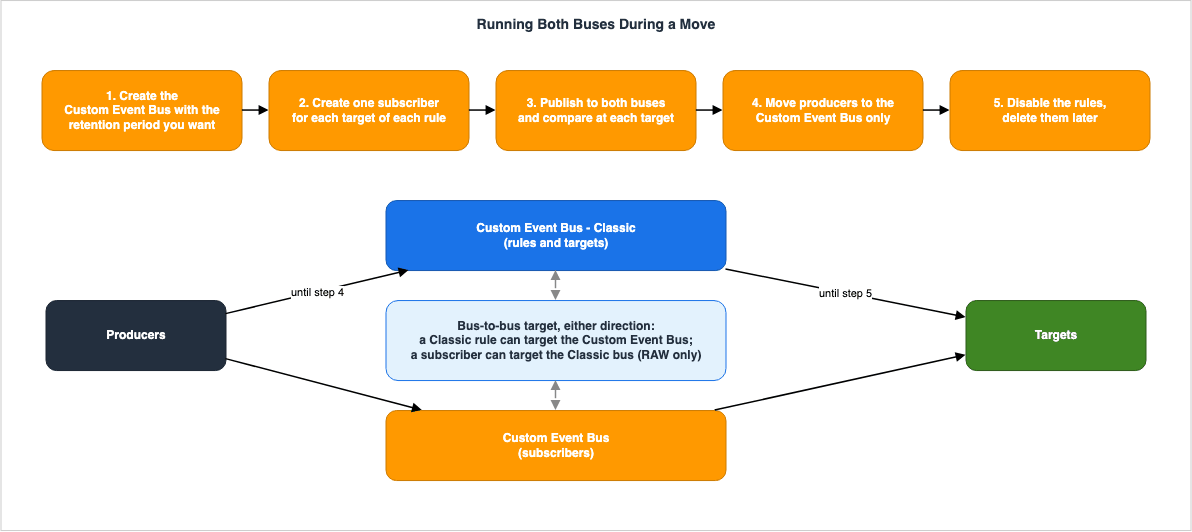
6.1 Five-Step Process
The migration page says to move one bus at a time, in five steps. The Classic rules should continue to operate until the final step. Until you delete the rules, you can revert any step.- Create a Custom Event Bus with your desired retention period and wait for its status to become
ACTIVE. - For each rule, create a subscriber for each target. Use the rule's event pattern in the
DATAfilter, the input transformation as aJSONATAtransformation, and the target's role as theRoleArn. Before sending traffic, attach a dead-letter queue and enable logging. - Publish from the producer to both buses. For each target, verify that two paths deliver the same event.
- Move the producer to the Custom Event Bus only.
- Disable the Classic rules. Delete them after your retry period and your own validation period have passed.
For each step, note the connection to previous sections.
- Step 1: Explicitly specify the retention period. If not specified, it defaults to one day (Section 4.6). According to the quotas page, an account can have up to five Custom Event Buses per Region by default (this limit can be increased), and this count is separate from the quota of 100 for Custom Event Bus - Classic. Buses shared with the account are not counted. If you need to move more than five buses from a single account and Region, first request an increase to the
[EventsV2] Event Busesquota. - Step 2: Define the retry policy and dead-letter queue during subscriber creation (Sections 4.1 and 4.2). For function and state machine targets, fix the handlers beforehand so that they accept an array (Section 4.3). Logging is disabled by default. According to the observability page, subscriber logs will not appear until you configure
LogConfiguration.Level. Also, on a single bus, only one subscriber can be created or deleted at a time. Calling these operations concurrently can result in aConcurrentModificationException, so scripts that move rules in bulk should incorporate retry mechanisms. - During Step 3, each target receives the same event from two different paths. This step verifies that both paths deliver the same event. The metrics used for verification have different namespaces:
AWS/Eventsfor the rules andAWS/EventsV2for the subscribers. The troubleshooting section on the subscriber page recommends reviewingFilterEvaluated,FilterMatched,EventsDelivered,EventsDropped,OnFailureDestinationDelivered, andOnFailureDestinationFailed. - Regarding the retry period to wait before deleting the rules in Step 5, the migration page does not specify a length. The retry attempts for Classic targets can continue for up to 24 hours by default.
6.2 Moving One at a Time — Bus to Bus
According to the bus-to-bus target page, by setting a bus ARN as a subscriber'sTargetArn, you can route events to another Custom Event Bus or to a Classic bus, even across different accounts and Regions. Classic bus rules can also target a Custom Event Bus, allowing events to flow in either direction during the migration process.These two directions correspond to two different approaches to moving resources. If you choose to move consumers while keeping existing producers sending events to the Classic bus, you configure Classic bus rules to route events to the Custom Event Bus, and the consumers then create their subscribers on it. Conversely, if you move producers, you create subscribers on the Custom Event Bus and route events from there to the Classic bus, while keeping the existing rules active.
The bus-to-bus target page describes the behavior when subscribers route events to a different bus, outlining key considerations for the migration process.
- Events become new upon arrival. On the destination bus, events will have new identifiers and ingestion timestamps.
- The delivery role can need two actions. The destination bus authorizes each arriving event with either
events:PutEventsorevents:PutRawEvents. EventBridge selects which action to use for each event, and users cannot choose. According to the sharing page, this applies even when routing events through rules. Different pages describe how to determine which action is used for different event types. The bus-to-bus page differentiates based on the publish API (events withPutEventsenvelopes versus those issued withPutRawEvents), while the sharing page and the event source page differentiate based on the origin (genuine events from AWS services and partners versus events published by your own applications). All three pages say to grant both actions if both kinds of events can flow. - A subscriber whose target is a Classic bus can use only the
RAWtransformer. The transformation page says so. - EventBridge detects loops through a Custom Event Bus, using a best-effort approach. Classic rules continue to behave as they have previously. The user guide advises against designing solutions that rely on events passing through the same bus multiple times, and cautions against assuming that EventBridge will automatically stop loops.
6.3 Recreating a Subscriber — What Cannot Change
According to the update page, theName, EventBusArn, Type, StartingPosition, PointInTimeConfiguration, and TargetArn of a subscriber are immutable after creation. The target of a subscriber cannot be changed. To modify the target, you must recreate the subscriber.When recreating a subscriber, there is a potential gap where events might be missed. According to the CloudFormation page, modifying these properties in a template will replace the subscriber. This replacement process deletes the old subscriber and creates a new one. No subscriber exists in between. If the new subscriber's
StartingPosition is set to LATEST, any events published during this gap will not be received.The CloudFormation page lists two methods to avoid this gap. One is to deploy in two stages: first, add the new subscriber with a different logical ID and wait for it to reach the
RUNNING state. Then, in the next deployment, remove the old subscriber. During this overlap, the target will receive the same event twice. The other option is to set the new subscriber's StartingPosition to POINT_IN_TIME and configure it to read from a time prior to the deployment. This method only works if the events you want to capture are still within the bus's retention period.7. What Stays on Custom Event Bus - Classic
Even after the migration is complete, some elements remain associated with Classic. This section collects them, including what you decide not to move.Default Buses. The Classic chapter of the user guide addresses both the default bus present in every account and the Classic buses created by users. Both operate by sending events based on the rules and targets defined by the bus owner.
How AWS Services Deliver Events. As indicated in row 4 of the table in Section 2, events from AWS services and SaaS partners are delivered to the Custom Event Bus via an event source. The user guide's page on event sources describes this process as follows:
EventBridge creates a managed rule and a target in your account, on your Custom Event Bus - ClassicThis managed rule and target have
ManagedBy set to events.amazonaws.com, and you do not manage them. Deleting or revoking the event source removes them with it. Events also appear in the metrics for Classic buses, and the managed rules output standard rule metrics under AWS/Events. When you create a partner event source, a managed partner event bus is created to enable the partner's source. This, too, is a Classic bus. Even with a design that moves all subscribers to the Custom Event Bus, if you need to receive events from AWS services or partners, resources associated with Classic will continue to operate.Archives. The migration page does not specify how to handle archives (row 7 in the table in Section 3.2). Furthermore, as described in Section 4.6, the Custom Event Bus does not hold events from before it was created. What holds the events from before the migration inside EventBridge is a Classic archive, if you created one.
PutPermission Bus Policies. Permissions for other accounts to access Classic buses remain in the Classic bus's resource policy. This is separate from sharing the Custom Event Bus (Section 4.7).Existing APIs. According to What's New, all existing APIs remain unchanged.
Rules You Choose to Keep. As the migration page states, it is not necessary to migrate everything. Rules that you choose to keep will continue to function on the Classic bus and can be connected to the Custom Event Bus using targets from one bus to another (Section 6.2).
8. Common Pitfalls During Migration
The differences outlined in Sections 4 through 6 show up as symptoms after the move. To help identify the root causes, the following table summarizes potential symptoms and their corresponding causes.| Symptom | Cause | Section |
|---|---|---|
| When a target is down for more than 5 minutes, events that would have arrived late go to the dead-letter queue. | The default retry settings for subscribers are 300 seconds and 5 attempts. | 4.1 |
| Despite extending the retry period, the subscriber still stops retrying after 5 attempts. | The RetryPolicy update sent only one of the two limits, so the other reverted to its default. | 4.1 |
| Incorrect permissions lead to a significant delay before events are placed in the dead-letter queue. | Subscribers retry every failure under the RetryPolicy before recording it. | 4.1 |
| The consumer reading the dead-letter queue is unable to process the contents. | The queue receives records of failures, not the original events. | 4.2 |
| Attempts to redrive events from the dead-letter queue fail because the original events are no longer available. | Redrive is only possible within the bus's retention period, which defaults to one day if not explicitly configured. | 4.2, 4.6 |
| Functions fail because they rely on a single event. | Subscribers pass events as an array, even if only one event is provided. | 4.3 |
| Filters do not match any events. | The pattern used with PutEvents is being applied to events published with PutRawEvents. | 4.4 |
CreateSubscriber rejects the filter. | Subscriber filters do not support wildcard matching. | 4.4 |
| A universal target makes fewer API calls than there are events. | When using a fixed Input, the entire batch is sent in a single API call. | 5.2 |
API calls to aws eventsv2 result in an AccessDeniedException. | The policy action is defined using eventsv2:. | 2.1 |
| Producers within a VPC cannot reach the Custom Event Bus. | The existing events interface endpoint serves Custom Event Bus - Classic only. | 2.1 |
| Events from before the migration cannot be replayed from the Custom Event Bus. | The retention window for the new bus starts from the time the bus was created. | 4.6 |
| A sixth Custom Event Bus cannot be created in the same account and Region. | An account is limited to five Custom Event Buses by default (this limit can be increased, and it is counted separately from the Classic limit of 100). | 6.1 |
| After changing the target of a subscriber in CloudFormation, events from the interim period are not received. | Modifying properties that cannot be changed after creation results in the subscriber being replaced. | 6.3 |
9. Frequently Asked Questions about the Custom Event Bus and the Classic Bus
This section answers, within the scope of this article, common questions that come up when planning a move.Q1. Will Custom Event Bus - Classic stop being available?
The user guide states that Classic remains available, and that both products can run side by side. While it recommends starting new applications with the Custom Event Bus, this is a suggestion, and not an announcement that Classic will stop being offered. None of the Service Availability Updates released in October 2025, March 2026, or June 2026 mention EventBridge (as confirmed on September 27, 2026).Q2. Can existing Classic buses be directly converted to a Custom Event Bus?
The migration process outlined in AWS documentation only describes creating a new bus and then adding subscribers. Step 1 of the migration page begins with creating a Custom Event Bus, and the AWS News Blog introduces the Custom Event Bus as a new resource. There are no instructions in the documents this article read that describe switching an existing bus's settings to make it a Custom Event Bus.Q3. Will a rule's retry settings carry over?
They have a counterpart. The retry policy for the target will become the subscriber'sRetryPolicy. However, the default values are different. The subscriber's default is 300 seconds and 5 attempts, which is shorter than the Classic target's 24 hours and 185 attempts. If you rely on a day of retries, you should explicitly specify 86,400 seconds and 185 attempts for each subscriber, and include a dead-letter queue. When updating, be sure to send both limits.Q4. Does the Lambda function need to be rewritten?
If the function was written on the assumption that it receives one event at a time from a Classic rule, then yes, it needs to be modified. Subscribers will pass a JSON array to the function, even if it contains only one event. Even if you setMaxBatchSize to 1, the data will still be passed as an array. The handler needs to be adjusted to accept an array.Q5. Can the Classic archive be moved?
The migration page's mapping table states that archive and replay become retention on the bus and a subscriber starting position. However, it does not describe the process for migrating the archive content itself, nor does it explain what to do with the archive. Since a new bus begins retention from its creation time, what holds the events from before the migration inside EventBridge is a Classic archive, if you created one.Q6. Can the two buses run side by side?
Yes. The migration page states that it is not necessary to move everything at once, and that events can be sent in either direction, from a Classic rule to a Custom Event Bus or from a subscriber to a Classic bus. When sending events from a subscriber to a different bus, the event will have a new identifier at the receiving end. Subscribers sending events to the Classic bus are only able to use theRAW transformation.Q7. Does the IAM policy need to be revised?
Because the action namespaceevents: and the service principal events.amazonaws.com are shared, those elements can remain unchanged. There are three scenarios where the policy does need to be rewritten. First, if actions are defined with the eventsv2: prefix, the resulting policy will not grant any permissions. Second, if the Resource section includes the ARN of a Classic bus, the Custom Event Bus will have a different ARN, including event-busv2. The third concerns the permission to write to the dead-letter queue. With Classic, the queue's resource policy allowed events.amazonaws.com to perform sqs:SendMessage. For a subscriber, the delivery role's policy must include permission to perform sqs:SendMessage on that queue (Section 4.2).Q8. Can CloudFormation templates be reused?
Not the parts that define the bus and its rules. The user guide states that theAWS::Events resource types belong to Classic and cannot configure a Custom Event Bus. The AWS::EventsV2 resource type is used for Custom Event Buses. Changing a property that cannot change after a subscriber is created replaces the subscriber and can drop the events in between (Section 6.3).10. Summary
As of September 24, 2026, the name custom event bus refers to two products. Classic remains available, and AWS has published a mapping table outlining the migration process. This article details what is carried over, what changes silently, and what remains within Classic, following the rows in that table.The mapping table shows where each component goes, but it does not carry the behavior over. The dead-letter queue on a rule's target becomes the subscriber's
OnFailureConfiguration, while what reaches the queue changes from events to records. The retry policy becomes a RetryPolicy, and even failures due to permission errors will now be retried.At least four default settings change silently when you move. The retry settings go from 24 hours/185 attempts to 300 seconds/5 attempts. Delivery to functions and state machines goes from a single event to an array of events. The retention period goes from the Classic archive's default indefinite retention, if you used an archive, to the bus's default of one day. Furthermore, when updating the
RetryPolicy, any omitted items revert to their default values.Even with the same pattern, if the publish API is different, nothing matches. A pattern written for events published with
PutEvents does not match events published with PutRawEvents. Moreover, a pattern written for the wrong shape does not result in an error; it simply matches nothing.There are certain elements that remain within Classic, even after migration. These include the default bus, managed rules that carry events from AWS services and partners, and the archive containing events from before the migration, if you created one.
Lastly, here are four things to verify each time you migrate a rule. Have you explicitly configured the subscriber's retry and dead-letter queue settings? Can the target function or state machine accept an array? Which API are the bus's producers using to publish events? Does the bus's retention period provide sufficient time for replay and redrive? If you can answer these four, you avoid moving with what you believe is the same configuration, only to find that the handling of failures has changed.
11. References
- Migrating from Custom Event Bus - Classic to the Custom Event Bus - Amazon EventBridge User Guide
- Amazon EventBridge event bus (Custom) - Amazon EventBridge User Guide
- What is the EventBridge Custom Event Bus? - Amazon EventBridge User Guide
- Amazon EventBridge event bus (default and Classic) - Amazon EventBridge User Guide
- Creating a bus - Amazon EventBridge User Guide
- Subscribing to events on a Custom Event Bus - Amazon EventBridge User Guide
- Updating, pausing, and resuming a subscriber - Amazon EventBridge User Guide
- Filtering events for a subscriber - Amazon EventBridge User Guide
- Event structure: data, metadata, and system metadata - Amazon EventBridge User Guide
- Transforming events with JSONata - Amazon EventBridge User Guide
- Batching deliveries to a target - Amazon EventBridge User Guide
- Targets for a Custom Event Bus subscriber - Amazon EventBridge User Guide
- Lambda function target - Amazon EventBridge User Guide
- Step Functions state machine target - Amazon EventBridge User Guide
- Universal targets for a Custom Event Bus - Amazon EventBridge User Guide
- Event bus target: bus to bus - Amazon EventBridge User Guide
- Retry policies and dead-letter queues - Amazon EventBridge User Guide
- Replaying retained events to a subscriber - Amazon EventBridge User Guide
- Event sources for a Custom Event Bus - Amazon EventBridge User Guide
- Sharing a Custom Event Bus with other accounts - Amazon EventBridge User Guide
- Names, endpoints, and IAM permissions for the Custom Event Bus - Amazon EventBridge User Guide
- Using Amazon EventBridge with Interface VPC endpoints - Amazon EventBridge User Guide
- Creating Custom Event Bus resources with CloudFormation - Amazon EventBridge User Guide
- Observability for the Custom Event Bus: metrics, logs, and CloudTrail - Amazon EventBridge User Guide
- Amazon EventBridge quotas - Amazon EventBridge User Guide
- How EventBridge retries delivering events - Amazon EventBridge User Guide
- Using dead-letter queues to process undelivered events in EventBridge - Amazon EventBridge User Guide
- Archiving and replaying events in Amazon EventBridge - Amazon EventBridge User Guide
- Amazon EventBridge input transformation - Amazon EventBridge User Guide
- Custom Event Bus - Classic - Amazon EventBridge console help panel
- Retry policy - Amazon EventBridge console help panel
- UpdateSubscriber - Amazon EventBridge Custom Event Bus API Reference
- RetryPolicy - Amazon EventBridge Custom Event Bus API Reference
- AWS::EventsV2::Subscriber BatchConfiguration - AWS CloudFormation Template Reference
- Using universal targets in EventBridge Scheduler - EventBridge Scheduler User Guide
- Amazon EventBridge relaunches event buses for enterprise scale - What's New with AWS
- Introducing enhanced custom event buses in Amazon EventBridge for enterprise-scale event-driven applications - AWS News Blog
- AWS Service Availability Updates (June 2026) - What's New with AWS
References:
Tech Blog with curated related content
Written by Hidekazu Konishi