AWS Network Security Manager and AWS Firewall Manager - The Policy Model, What Happens to Existing Web ACLs, and Which Policy Wins When Both Apply
First Published:
Last Updated:
Security and platform engineers who currently use Firewall Manager to distribute AWS WAF policies across their organizations should understand three things before trying Network Security Manager: What components are used to build Network Security Manager policies, and how is policy precedence determined when multiple policies apply? What happens to existing web ACLs when a Network Security Manager policy applies to the same resources as a Firewall Manager policy? And what stays with you if you continue to use Firewall Manager for the time being?
AWS has not publicly documented which Firewall Manager settings correspond to which settings in Network Security Manager. Migration is planned, but it was not yet available as of the date this article was verified. This article will only compare the two services based on information explicitly provided by AWS. Even if settings have similar names, this article does not write any correspondence that AWS has not stated.
Related articles on this site:
- AWS Network and Application Protection Decision Guide - Where AWS WAF, AWS Shield, AWS Network Firewall, and AWS Firewall Manager Sit on the Request Path and What Each One Does Not Stop
- AWS History and Timeline regarding AWS Shield and AWS Firewall Manager - Overview, Functions, Features, Summary of Updates, and Introduction
- AWS History and Timeline regarding AWS WAF - Overview, Functions, Features, Summary of Updates, and Introduction
- Amazon EventBridge Custom Event Bus and the Classic Bus - What Maps From Rules to Subscribers, Which Defaults Change, and What Stays on the Classic Bus
- AWS Service Lifecycle States - Maintenance, Sunset, Full Shutdown, and What Each One Takes Away
- Where the AWS Primary Sources Disagree About Launch Dates - Which Document Systems Carry a Date, What Shapes the Disagreements Take, and Which Date to Record
Table of Contents
- 1. The Scope of This Article and the Date It Was Verified
- 2. The Shape of a Network Security Manager Policy — Five Resources
- 3. Which Policy Wins — Inside Network Security Manager
- 4. Which One Wins — When a Firewall Manager Policy Applies to the Same Resources
- 5. Synchronization and Remediation — Nothing Gets Fixed by Default
- 6. The Carry-Over Table — Components AWS Names and Firewall Manager Policy Categories
- 7. What Stays on the Firewall Manager Side
- 8. What Is Easy to Misread When Running the Two Services Side by Side
- 9. Frequently Asked Questions about Network Security Manager and Firewall Manager
- 10. Summary
- 11. References
1. The Scope of This Article and the Date It Was Verified
This section shows the date of verification and the two dates attached to the same event. It then sets out the division of labor with the summaries in published articles and the topics that this article does not cover.1.1 The Verification Date and Two Dates
This article verified its information against primary sources on September 27, 2026. Network Security Manager had only been generally available for three days. The supported firewall types, the available Regions, and migration status are likely to change. Before making any design decisions, review the primary sources again.The What's New announcement for the general availability, dated September 24, 2026, lists the available Regions as follows:
AWS Network Security Manager is generally available in US East (N. Virginia).In contrast, the Document history of the Network Security Manager Developer Guide contains only one entry. The type of change in that entry is
Initial release, and its date is August 1, 2026. The initial release date for the Developer Guide precedes the general availability date.This article treats these two dates separately, without rounding, referring to the initial release date of the Developer Guide and the general availability date. Where the AWS Primary Sources Disagree About Launch Dates addresses the issue of discrepancies in dates across different AWS primary sources.
1.2 What Published Articles Summarize and What This Article Covers
Two articles already published on this site summarize the following five points: the replacement of Firewall Manager by Network Security Manager; the operation of the two services alongside each other; the fact that Firewall Manager users do not need to take any action; the prioritization of Network Security Manager during remediation when the same resources are targeted; and the fact that migration is not yet available. These summaries can be found in Section 9.6 of AWS Network and Application Protection Decision Guide and in the entry dated September 24, 2026, within AWS History and Timeline regarding AWS Shield and AWS Firewall Manager. The latter article leaves the evolution of Network Security Manager's features outside its scope. This article covers that side, the features.This article will cover the following five points:
- The five resources used to build Network Security Manager policies, and their lifecycle (Section 2).
- How to determine which policy takes precedence when multiple policies overlap (Section 3).
- What happens when a Network Security Manager policy applies to the same resources as a Firewall Manager policy, and how existing web ACLs are handled (Section 4).
- Default settings for synchronization and remediation (Section 5).
- What AWS has documented regarding Firewall Manager components and categories, and what stays on the Firewall Manager side (Sections 6 and 7).
AWS Network and Application Protection Decision Guide discusses the placement of AWS WAF, AWS Shield, AWS Network Firewall, and Firewall Manager on the request path, and what each service does not block.
1.3 Topics Not Covered
- Pricing. This article does not cover pricing for any of Network Security Manager, Firewall Manager, AWS WAF, or Shield Advanced.
- History of Firewall Manager, AWS WAF, and AWS Shield. Refer to the individual timeline articles for this information.
- How to write AWS WAF rules, and attack techniques.
- Hands-on verification. This article is written only from what the primary sources say. The behavior of Shield Advanced is also described only from the primary sources.
- Design of AWS Config rules and service control policies. Refer to AWS Config Rules and Conformance Packs and AWS Organization Guardrails for this information.
2. The Shape of a Network Security Manager Policy — Five Resources
Network Security Manager policies are created by combining five types of resources. The "How AWS Network Security Manager works" chapter of the Developer Guide describes these five as a composition hierarchy. This section will examine the role of each of these five resources and their lifecycle after creation.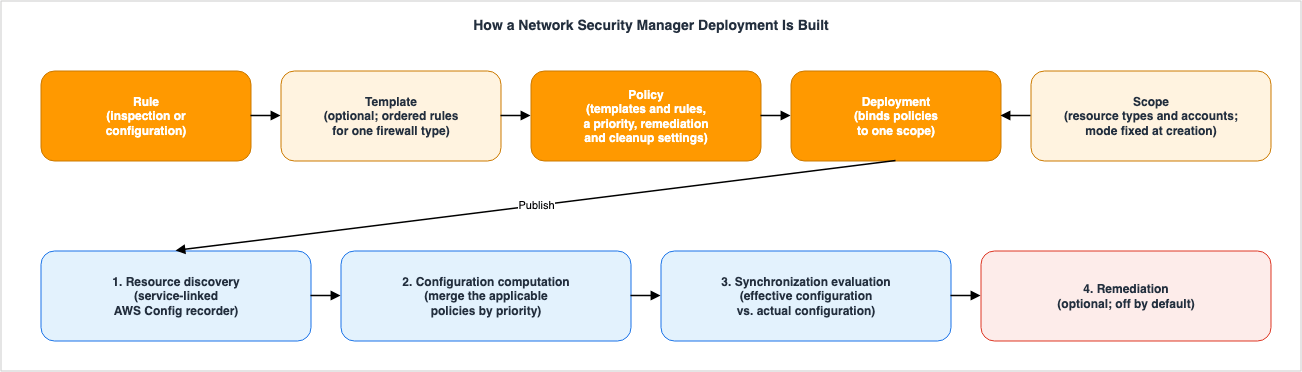
2.1 Rules — The Smallest Unit
Rules are the smallest unit of network security settings. There are two types: traffic inspection rules and firewall configuration rules. Inspection rules determine how the security service handles traffic. Configuration rules specify the behavior of systems outside of traffic inspection. The structure of a rule varies depending on the type of firewall.In AWS WAF, these two kinds become the
INSPECTION and CONFIGURATION types. An INSPECTION rule has a rule group definition. This definition can include rule groups that execute before the user-defined rules (PreProcessFirewallManagerRuleGroups) or rule groups that execute after (PostProcessFirewallManagerRuleGroups). A CONFIGURATION rule has only one web ACL setting. The configuration JSON must contain exactly one top-level key that matches one of the supported settings. The Developer Guide provides examples of these keys, such as DefaultAction, VisibilityConfig, LoggingConfiguration, and TokenDomains.The Developer Guide's tutorial begins by creating one configuration rule for
DefaultAction and one for VisibilityConfig, both of which are required elements of a web ACL.The logging destination that a
LoggingConfiguration rule specifies has restrictions based on whether Network Security Manager is used within a single account or across multiple accounts. When using Network Security Manager across multiple accounts, the logging destination cannot be an Amazon CloudWatch Logs log group; instead, it must be an Amazon S3 bucket or an Amazon Data Firehose delivery stream. The name of the destination must begin with aws-waf-logs-.From an API perspective, only firewalls of type
WAF can have rules created for them. Firewall types for policies are WAF and SHIELD_ADVANCED. Shield Advanced policies do not have rules or templates (see Sections 2.2 and 4.5).2.2 Templates, Policies, Scope, and Deployment
Templates are collections of rules for a single type of firewall, organized in a specific order. They can be reused across multiple policies, but are not required.Policies arrange templates and rules in a specific order and combine them with the enforcement settings for a firewall type. A policy has a single priority level, which Section 3 discusses. Remediation and resource cleanup settings are also configured at the policy level (Section 5).
Scope defines where protection is applied. It specifies the type of resource to be protected, and can optionally filter by tags or configuration attributes. In multi-account mode, you can specify which accounts and Organizational Units (OUs) to include and exclude. In single-account mode, the scope applies to that account itself. The scope mode is determined at creation and cannot be changed later. A multi-account scope cannot become a single-account scope, and vice versa.
AWS WAF scope also has one fixed limitation. You cannot select both the global resource type, CloudFront distributions, and the regional resource types, Application Load Balancers and Amazon API Gateway REST APIs, in the same scope. You also cannot switch between global and regional selections after making a choice. To protect a CloudFront distribution, use the US East (N. Virginia) Region (
us-east-1).Deployment links policies to a scope. When a deployment is published, enforcement begins.
The ways the five resources can be combined have the following limits:
| Combination | Limit |
|---|---|
| Rules per template | 1 to 50 |
| Templates per AWS WAF policy | 1 to 2 |
| Total of rules and templates per AWS WAF policy | 1 to 100 |
| Templates or rules per Shield Advanced policy | 0 (must be empty) |
| Policies per deployment | 1 to 2 |
| Scope per deployment | 1 (exactly one) |
The quotas page indicates that these values are fixed and cannot currently be increased.
2.3 Draft and Active, and Versions
Each of the five resources can be in either a Draft or Active state. Active is the default state and means the resource is published and usable. A Draft is a saved but inactive state; it is not enforced, and other resources cannot reference it. To create a resource as a Draft via the API, setisPublished to false during the creation or update operation.When an Active resource is saved as a Draft, a Draft is layered on top of the existing Active resource. The
hasPublishedVersion field in the list and get responses indicates whether a published Active resource exists beneath the Draft. An Active resource that other Active resources reference cannot be deleted.A version is a snapshot that you create manually from an Active resource. It is not automatically created with each update. Each version is assigned a sequential number and a version-qualified ARN. Versions are immutable and cannot be updated. A maximum of 10 versions can be created for a single resource. To roll back, read the version and use its settings to update the current resource.
2.4 Differences in Structure Compared to Firewall Manager Policies
The API represents a Firewall Manager policy as a single object. ThePolicy data type encompasses the target resource type (ResourceType), included and excluded accounts (IncludeMap and ExcludeMap), tag conditions, the content of the protection (SecurityServicePolicyData), and RemediationEnabled, all in one object. In Network Security Manager, the method of selecting targets is defined in the scope, while the content of the protection is divided into rules, templates, and policies, and remediation settings are configured in the policy itself.AWS does not describe this difference as a correspondence. On the planned migration, the Firewall Manager chapter of the Network Security Manager Developer Guide only states that the process involves copying the selected policy from Firewall Manager, transferring it to Network Security Manager, and then translating it into the new policy structure (Section 7.3). It does not say which item of a Firewall Manager policy becomes which item of which resource.
3. Which Policy Wins — Inside Network Security Manager
When multiple policies protect the same resource, Network Security Manager combines (merges) those configurations into a single result. This section examines how this merging process works from three perspectives: priority numbering, tiered prioritization, and how configurations are merged based on their type. Finally, it looks at how the merged result shows up in the synchronization status.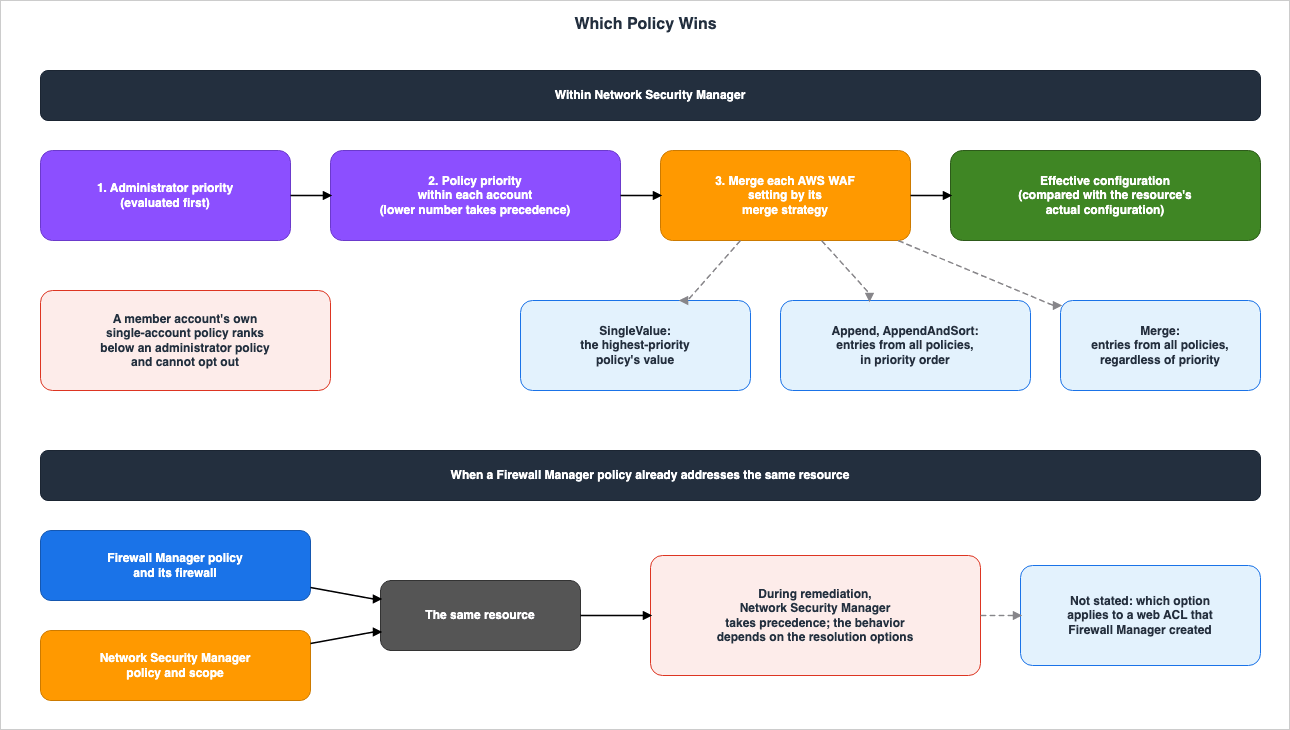
3.1 Policies With Lower Numbers Have Higher Priority
The Developer Guide states the following regarding policy priority:A lower priority number indicates a higher priority (priority 1 takes precedence over priority 2).Policies with a priority of 1 are prioritized over those with a priority of 2. As the number increases, the priority level decreases. The descriptions of policy definitions, the
priority field in the API Reference, and the console procedure all state the same direction. Policy priority must be an integer starting from 1, and must be unique within an account. Two policies in the same account cannot have the same priority.3.2 Two Levels of Priority — Administrator Priority First, Policy Priority Second
Network Security Manager evaluates priorities in two tiers, in the following order:- Administrator Priority: Each administrator account in the organization is assigned a priority level.
- Policy Priority: Within each account, any remaining conflicts are resolved using policy priority.
The required
priority field in PutAdminAccount sets administrator priority. The value must be an integer between 1 and 10. This value is unique, ensuring that no two administrator accounts have the same priority, and therefore no tie-breaking rules are necessary. Only the organization's management account can create administrator accounts. For each administrator account, it is also possible to define the scope of accounts, OUs, and firewall types it can manage (using adminScope). Administrator account registration is per Region; to use Network Security Manager in another Region, repeat the registration in each Region.The Developer Guide's What is page also describes this order. When administrators' policies overlap, Network Security Manager resolves conflicts by administrator priority first, then by policy priority within each account.
The direction of priority numbers for administrator accounts is not explicitly stated. The sentence quoted in Section 3.1 appears at the start of the guide's section on merging policies, and the two-tier explanation follows it. However, the sections describing administrator accounts, the
PutAdminAccount operation, and the quota table all refer only to the range of 1 to 10, without explicitly stating which direction of priority takes precedence. This article treats the direction of policy priority as established and holds the direction of administrator priority open. When you set up multiple administrator accounts, confirm the direction in the primary sources before you register them.The outcome when an administrator policy conflicts with a single-account policy that a member account created itself is stated explicitly.
If an administrator policy and a member account's single-account policy both apply to a resource and conflict, the administrator policy's configuration wins. A member account cannot opt out of, override, or exempt itself from an administrator policy.The administrator's policy takes precedence. Member accounts cannot opt out of, override, or exempt themselves from administrator policies. The Network Security Manager product page describes a scenario where a central security team sets a non-negotiable baseline, application teams add rules within those boundaries for their workloads, and Network Security Manager combines both sets of rules into a single configuration for each resource.
3.3 How a Policy Wins Depends on the Type of Setting
When conflicts arise, Network Security Manager compares attributes and uses the value from the higher-priority policy. If the higher-priority policy does not define a value for that attribute, the value from the lower-priority policy is used. The higher-priority policy does not always take precedence for every attribute.AWS WAF policies have a defined merge strategy for each configuration type.
| Merge Strategy | Configuration | Priority Behavior |
|---|---|---|
SingleValue | DefaultAction, VisibilityConfig, CaptchaConfig, ChallengeConfig, OnSourceDDoSProtectionConfig, LoggingConfiguration, MonetizationConfig, Description | Only the value from the highest-priority policy is used. |
Append | TokenDomains, DataProtectionConfig.DataProtections | Combines all items from all policies, in order of priority. |
AppendAndSort | PreProcessFirewallManagerRuleGroups, PostProcessFirewallManagerRuleGroups | Combines all rule groups from all policies and sorts them by priority. |
Merge | CustomResponseBodies, AssociationConfig.RequestBody | Combines all items from all policies into a single set, regardless of priority. |
The
Append, AppendAndSort, and Merge strategies remove duplicate items. If two policies have the same item, only the item from the higher-priority policy is retained.AWS WAF evaluates rule groups in sequence, so the order of the rule groups directly determines the order in which they are inspected. Even rule groups from lower-priority policies are included in the effective configuration. Priority determines the order in which the rule groups line up.
The API Reference requires the
conflictResolution field in the wafConfig object of AWS WAF policies, and only allows the value MERGE_WHERE_APPLICABLE. The CLI example in the Developer Guide's tutorial does not include this field. However, an AWS CloudTrail log example in the same guide does include MERGE_WHERE_APPLICABLE. When creating policies using the CLI, avoid directly copying the tutorial examples; instead, ensure you include the required field as specified in the API Reference.3.4 OUT_OF_SYNC on a Lower-Priority Deployment Is Not a Failure
The Developer Guide refers to the combined result of multiple policies as the "effective firewall configuration." This article calls it the effective configuration. Network Security Manager compares the effective configuration with the actual settings of the resources and reports any differences as a synchronization status. Resources that match the effective configuration are marked asIN_SYNC.When multiple deployments protect the same resource, a lower-priority deployment may report a status of
OUT_OF_SYNC. This is because a higher-priority policy has overridden the settings of that deployment's policy. The Developer Guide states that this is the expected behavior.A resource protected by a lower-priority policy whose settings were overridden by a higher-priority policy reports as OUT_OF_SYNC for the lower-priority deployment. This is expected behavior, not a failure.There are two APIs for reading the status.
ListResourceSynchronizationStatuses returns the status for each resource for a single deployment. ListAggregateResourceSynchronizationStatuses returns the aggregate status for each resource across all of your deployments. The monitoring chapter states that this operation reflects the combined result of all policies applied to a resource. The monitoring chapter also notes that a deployment's status can be OUT_OF_SYNC while the aggregate status is IN_SYNC, and that this is expected. When determining whether a resource matches the effective configuration, read the aggregate status. Do not assume an error simply because a deployment shows an OUT_OF_SYNC status.When multiple administrator accounts protect the same resource, what each administrator can see changes. Whether other accounts can see the details of the aggregate status depends on the
enableCrossAccountVisibility setting for each deployment. The API Reference specifies that this setting is required and defaults to false. If even one of the deployments protecting a resource has this setting disabled, other administrators see a NOT_VISIBLE indicator instead of detailed information. This indicator signifies that another administrator is also protecting the same resource, but has not shared visibility.4. Which One Wins — When a Firewall Manager Policy Applies to the Same Resources
Network Security Manager and Firewall Manager operate independently and in parallel. This section looks at what AWS writes about the case where both services apply to the same resources. It then looks at how existing web ACLs are handled, first by Network Security Manager and then by Firewall Manager. Finally, it places settings with similar names side by side.4.1 Network Security Manager Takes Precedence During Remediation
The Firewall Manager chapter of the Network Security Manager Developer Guide first states that Network Security Manager does not affect firewalls that you created with Firewall Manager unless you initiate an action to change them. It further states the following regarding scenarios involving the same resources:If that scope includes resources that an AWS Firewall Manager policy already addresses, AWS Network Security Manager takes precedence during remediation. In that case, the AWS Network Security Manager policy and scope override the existing AWS Firewall Manager firewall and policy. The specific behavior depends on the resolution options that you select.When the scope of a Network Security Manager policy includes resources already targeted by a Firewall Manager policy, Network Security Manager takes precedence during remediation. In such cases, the Network Security Manager policy and scope override the existing Firewall Manager firewall and policy. The resolution options that you select determine the specific behavior.
Three points matter when reading this paragraph:
- The prioritization described applies during remediation. Remediation is a policy setting and is disabled by default (Section 5.1).
- The phrase resolution options carries no link. Within the Developer Guide, the settings that determine how to resolve conflicts with what is already deployed are two: AWS WAF's Existing customer web ACL resolution and Shield Advanced's Existing customer DDoS resolution (see Sections 4.2 and 4.5).
- It is not specified which value of these settings applies to web ACLs created by Firewall Manager. The settings apply to web ACLs managed by the user (customer-managed web ACLs) as described in the help panel and Developer Guide, or web ACLs created by the user (customer-created web ACLs) as described in the API Reference. On the other hand, the console procedure states that
No remediationskips remediation for all resources that already have a web ACL. Firewall Manager creates web ACLs with names that begin withFMManagedWebACLV2. The documents this article read do not contain any statements clarifying which of these descriptions applies to this particular web ACL. This article holds this point open.
4.2 Three Ways to Handle Existing Web ACLs — Network Security Manager
AWS WAF policies include a setting that determines how to handle resources already associated with a customer's web ACL. In the API, theexistingCustomerWebACLResolution setting in wafConfig controls this, and it accepts three possible values: RETROFIT, OVERRIDE_ASSOCIATION, and NO_REMEDIATION. The API Reference specifies that this field is required within an AWS WAF policy and does not provide a default value. The Developer Guide's tutorial selects the No remediation setting for this option.The descriptions of these three values vary across different documentation. The console's help panel states:
RETROFIT – Update the existing web ACL to align with the effective configuration.
OVERRIDE_ASSOCIATION – Replace the existing web ACL with a web ACL managed by AWS Network Security Manager.
NO_REMEDIATION – Do not remediate resources that have an existing customer web ACL.
The Developer Guide's Managing web ACLs for AWS WAF page states:
RETROFIT – Update your existing web ACL to align with the effective configuration.
OVERRIDE_ASSOCIATION – Associate a web ACL managed by AWS Network Security Manager with the resource instead.
NO_REMEDIATION – Do not remediate if your web ACL exists.
The console procedure page for creating a policy describes these three options as follows:
No remediation skips remediation on any resources that already have a web ACL.
Override association replaces the existing web ACL with the AWS Network Security Manager created web ACL.
Retrofit retrofits its rules onto each existing web ACL and keeps the web ACL associated with the resource.
All three documentation sources indicate that
OVERRIDE_ASSOCIATION means associating the Network Security Manager's web ACL with the resource, effectively replacing the existing web ACL. Similarly, all three sources indicate that RETROFIT means updating the existing web ACL without replacing it. The help panel and the Managing web ACLs for AWS WAF page give the basis for this update as the effective configuration, while the console procedure gives it as the policy's rules. In Network Security Manager terminology, configuration settings are also rules (CONFIGURATION rules). The sources vary most clearly for NO_REMEDIATION in how they describe the resources it covers. The help panel describes it as applying to resources that already have a customer's web ACL, while the console procedure describes it as applying to all resources that have a web ACL. This difference bears on the open point in Section 4.1.4.3 Handling Existing Web ACLs — Firewall Manager
Firewall Manager's AWS WAF policies determine how existing web ACLs are handled through two settings.The first is the web ACL source, represented by
webACLSource in the SecurityServicePolicyData of the API. By default, Firewall Manager creates new web ACLs for all targeted resources. Setting this value to RETROFIT_EXISTING makes Firewall Manager use the web ACLs that are already in use, creating new web ACLs only for resources that do not already have one.The second setting concerns whether to remove existing associations. The page detailing the process of creating an AWS WAF policy within Firewall Manager lists this setting as an option you can add when you choose automatic remediation:
When you choose Auto remediate any noncompliant resources, you can also choose to remove existing web ACL associations from in-scope resources, for the web ACLs that aren't managed by another active Firewall Manager policy. If you choose this option, Firewall Manager first associates the policy's web ACL with the resources, and then removes the prior associations.The Web ACL management for AWS WAF policies page describes what Firewall Manager's retrofit does to an existing web ACL, and it sets explicit limits. It inserts the policy's first rule groups in front of the existing rules and appends the last rule groups at the end. Logging configurations are only added if the web ACL does not already have logging enabled. Firewall Manager does not touch any other properties.
Firewall Manager doesn't verify or configure any other web ACL properties. For example, Firewall Manager doesn't modify the web ACL's default action, custom request headers, CAPTCHA or Challenge configurations, or token domain lists.For web ACLs that Firewall Manager retrofits, two conditions must be met: a customer account must own the web ACL, and the web ACL must be associated only with in-scope resources. The AWS WAF API's
WebACL data type identifies web ACLs created by Firewall Manager and those retrofitted by Firewall Manager using the ManagedByFirewallManager and RetrofittedByFirewallManager fields, respectively.4.4 Settings With Similar Names Side by Side — Not a Correspondence Table
Firewall Manager and Network Security Manager both have settings with similar names. The following table simply lists these settings; AWS does not state that these settings correspond to each other. The rows are arranged by name similarity and do not show which one becomes which in a migration.| Firewall Manager Setting | Default Value (as described in documentation) | Network Security Manager Setting | Default Value (as described in documentation) |
|---|---|---|---|
Policy's RemediationEnabled | Not specified (required field) | policyConfiguration's remediationEnabled | false |
Policy's DeleteUnusedFMManagedResources | Does not remove protections and does not delete Firewall Manager managed resources. | policyConfiguration's resourcesCleanUp | false |
webACLSource's RETROFIT_EXISTING | Creates all new web ACLs. | existingCustomerWebACLResolution's RETROFIT | Not specified (required field) |
| Option to remove existing web ACL associations during automatic remediation (console procedure) | Can be added when you choose automatic remediation (no default documented). | existingCustomerWebACLResolution's OVERRIDE_ASSOCIATION | Not specified (required field) |
Even though the names are similar, the documents do not describe them the same way. The first row is a clear example. The Firewall Manager API Reference describes
RemediationEnabled as follows:Indicates if the policy should be automatically applied to new resources.The Network Security Manager API Reference describes
remediationEnabled as follows:Specifies whether AWS Network Security Manager automatically remediates noncompliant resources. Default: false.The former describes the automatic application to new resources. The latter describes the automatic remediation of noncompliant resources.
The second row also differs. The Firewall Manager API Reference states that the
DeleteUnusedFMManagedResources option is not available for Shield Advanced policies. The Network Security Manager console procedure includes Resource cleanup in Shield Advanced policies as well, and states that it deletes the DDoS protection that Network Security Manager created.Rows 3 and 4 are built differently. Firewall Manager presents configuration options as two separate settings: whether to use an existing web ACL, and whether to remove any existing associations. The former defaults to creating new web ACLs, while the latter only takes effect when explicitly selected. Network Security Manager, on the other hand, uses a single required setting, with no documented default, in which you choose one of three values. AWS does not specify how the combination of Firewall Manager's two settings corresponds to any of these three values.
The scope of retrofit is also described differently. The Firewall Manager retrofit documentation explicitly states that it does not modify the default action, custom request headers, CAPTCHA and challenge settings, or the list of token domains (Section 4.3). The Network Security Manager description of
RETROFIT states that it updates existing web ACLs to align with the effective configuration, without listing any settings that are excluded. Furthermore, Network Security Manager ignores, during synchronization evaluation, any setting that does not appear in any rule (Section 5.4). Combining these two descriptions suggests that the default action of an existing web ACL may change when using RETROFIT only if a contributing rule defines a DefaultAction. AWS does not explicitly state this combination in a single sentence.4.5 For Shield Advanced Policies
Shield Advanced policies do not have any rules or templates. When a policy is applied, Network Security Manager creates Shield Advanced DDoS protection for each targeted account. The types of resources that can be selected in the scope are limited to four: Application Load Balancer, CloudFront distributions, Classic Load Balancer, and Elastic IP addresses.Shield Advanced policies also include a setting that determines how to resolve conflicts with what is already deployed. The console procedure calls it Existing customer DDoS resolution and lists three options:
No remediation skips remediation on any resources that already have a DDoS protection.
Override association replaces the existing DDoS protection with the AWS Network Security Manager created DDoS protection.
Retrofit retrofits its rules onto each existing DDoS protection and keeps the DDoS protection associated with the resource.
The
PolicyConfiguration section in the API Reference includes three items: remediationEnabled, resourcesCleanUp, and wafConfig. The wafConfig item is used exclusively with AWS WAF policies. Where this console setting is specified in the API could not be confirmed in the API Reference that this article read. This article holds this point open.Care should also be taken regarding subscriptions. The Developer Guide states the following:
When an active deployment includes an account in its scope, AWS Network Security Manager subscribes that account to AWS Shield Advanced. AWS Network Security Manager does not cancel the subscription when the account leaves the scope or when you remove the deployment.Even if an account is removed from the scope or deployments are deleted, the subscription is not canceled. The procedure for canceling a subscription can be found on the Shield Advanced subscriptions page in the AWS WAF Developer Guide. Furthermore, Firewall Manager can subscribe all member accounts within an organization to Shield Advanced and automatically subscribe any new accounts that fall in scope.
The AWS Network and Application Protection Decision Guide, Section 9.1, discusses how Shield Advanced's automated application-layer mitigation is moving to the AWS WAF Anti-DDoS managed rule group.
5. Synchronization and Remediation — Nothing Gets Fixed by Default
When a deployment is published, Network Security Manager identifies the targeted resources, calculates the desired configuration, and compares it to the actual configuration. This section will examine the default behavior for remediation and cleanup, its exceptions, the process flow, and how to interpret the synchronization status.5.1 Remediation and Cleanup Are Both Off by Default
Remediation and cleanup are policy-level settings, placed inpolicyConfiguration.remediationEnabled: Determines whether Network Security Manager automatically remediates noncompliant resources. When enabled, it aligns out-of-sync resources with the effective configuration.resourcesCleanUp: Determines whether Network Security Manager automatically removes resources it created when they are no longer needed. It deletes a firewall it created when you remove the deployment, or when the account or resource goes out of scope.
The remediationEnabled and resourcesCleanUp settings both default to false. AWS Network Security Manager does not remediate or clean up resources until you enable these settings.The API Reference states that both items are required and default to
false.Different documents describe the behavior when remediation is disabled in different ways. The help panel states that when disabled, it only reports compliance status without making any changes.
When disabled, AWS Network Security Manager reports compliance status without making changes.The product FAQ answers the question of whether you can create a policy that does not remediate automatically by saying that there are two modes, and it describes manual remediation as follows:
Manual remediation deploys the desired policy with the associated rules and protections in each account. After the policy is created, you can choose to take manual action for each local account.The help panel indicates that no changes are made, while the FAQ states that the policy is deployed to each account. This article does not determine which is correct. Before you point a policy with remediation disabled at resources that a Firewall Manager policy covers, verify its behavior first in a scope that does not overlap with the Firewall Manager policy.
5.2 An Exception to the Cleanup Default — When the Administrative Setup Is Removed
Separately from theresourcesCleanUp default, there are cases where Network Security Manager cleans up protections. The setup chapter states the following:If you turn off trusted access for AWS Network Security Manager in AWS Organizations, or you deregister a delegated administrator account, AWS Network Security Manager sets the multi-account scope and deployment to a DISABLED state and cleans up the protections it manages.The same is written for removing an administrator account. These statements are not conditional on the value of
resourcesCleanUp. According to the API Reference, DISABLED means deactivated, and changes cannot be published until the resource is re-enabled.5.3 Asynchronous and Eventually Consistent
Enforcement is asynchronous and eventually consistent. When a deployment is published or a resource changes, the following four steps occur sequentially:- Resource Discovery — The service-linked AWS Config recorder identifies resources in the scope.
- Configuration Computation — For each discovered resource, all applicable policies are combined based on priority, and the effective configuration is calculated.
- Synchronization Evaluation — The effective configuration is compared to the actual configuration, and the synchronization status is recorded.
- Remediation (Optional) — If the policy has
remediationEnabledenabled, out-of-sync resources are brought into alignment with the effective configuration.
Each step is asynchronous, so there are delays. There is a delay between when a deployment is published and when resources are protected, and there is a delay between when a new resource is created in the scope and when it is protected. The How AWS Network Security Manager works chapter states that the
Last Checked timestamp for the synchronization status indicates the last time an evaluation was performed. The monitoring chapter states that the synchronization status includes two timestamps: evaluatedAt and updatedAt. If evaluatedAt is older, it means that an evaluation of recent changes has not yet run.5.4 Reasons for OUT_OF_SYNC and Settings Not Evaluated
When resources are out of sync, the synchronization status includes a reason. These reasons fall into two categories:missingFirewall: The resource is not associated with any firewall protection.invalidFirewall: A firewall is present, but its configuration differs from the effective configuration. The specific details are:incorrectSingleValueConfigurations,missingAppendableConfigurationValues,unexpectedAppendableConfigurationValues,incorrectAppendableConfigurationOrder,missingMergeableConfigurationValues, andunexpectedMergeableConfigurationValues.
The names of these details contain the names of the merge strategies in Section 3.3.
If remediation is enabled but Network Security Manager cannot correct the resource, it returns a
remediationIssues object, which includes the issueType, a message describing the problem, and a correctiveAction indicating how to resolve it.Network Security Manager does not evaluate settings that it does not manage.
AWS Network Security Manager does not evaluate settings that it does not manage. If a field does not appear in any contributing rule, AWS Network Security Manager ignores it during synchronization evaluation.Any item that does not appear in any rule is ignored during synchronization evaluation.
The explanation for
NOT_APPLICABLE differs between two pages. The tutorial states that the resource is in the scope but is in a state that cannot be evaluated within this deployment. The monitoring chapter states that while the account and resource type are in the scope, the resource itself does not match the scope's filtering criteria (e.g., tag conditions), and no action is required. The monitoring chapter further clarifies that if the resource does not appear in the results at all, the account or resource type is not in the deployment's scope.5.5 No AWS Config Setup Is Required
Network Security Manager uses a service-linked AWS Config recorder to discover resources. The recorder is namedAWSConfigurationRecorderForNetworkSecurityManager and is created automatically in an account when that account enters the scope of a deployment. It is separate from any recorders managed by the user and only records the resource types relevant to active scopes and deployments. While it is in use, it cannot be modified or deleted. The Developer Guide notes, differentiating it from Firewall Manager, as follows:Unlike AWS Firewall Manager, you do not need to perform any additional setup.Section 6.5 of the AWS Network and Application Protection Decision Guide discusses the reliance of Firewall Manager on AWS Config.
6. The Carry-Over Table — Components AWS Names and Firewall Manager Policy Categories
This section presents, as tables, what AWS writes about what becomes of Firewall Manager's components and categories on the Network Security Manager side. The tables use the same four columns as the carry-over table in Amazon EventBridge Custom Event Bus and the Classic Bus.6.1 Reading the Tables and Where the Rows Come From
The table has four columns:In the older product: The component or category on the Firewall Manager side, in the source's own words.In the newer product: What it becomes on the Network Security Manager side. Filled in only when an AWS document says so.What happens to the older one: What happens to that component or category on the Firewall Manager side. Filled in only when an AWS document says so.Where AWS says so: This indicates the source document that supports the information in that row.
Where no AWS document says anything, the cell reads
The source does not say. Before writing that, this article searched the full text of the cited documents, and of the pages they link to, for carry over, unchanged, remain, continue, migrat, translate, equivalent, replace, retrofit, and precedence, along with the name of the category in that row, and confirmed that none of them says it.The source of the rows differs from the EventBridge article. For EventBridge, AWS published a mapping table on a migration page, and only the rows from that table were used. AWS does not publish a mapping table from Firewall Manager to Network Security Manager. Therefore, this article limits the rows to two sources. Table A lists components specifically mentioned in the Firewall Manager chapter of the Network Security Manager Developer Guide. Table B lists the seven categories of Firewall Manager policies mentioned in the AWS WAF Developer Guide. No rows are added based solely on similar names. The table in Section 4.4 is not a correspondence, so it is not included here.
This website also uses the same four-column table in Amazon CloudWatch Omni and CloudWatch.
6.2 Table A — Components Named in the Firewall Manager Chapter of the Network Security Manager Developer Guide
| In the older product | In the newer product | What happens to the older one | Where AWS says so |
|---|---|---|---|
| AWS Firewall Manager | AWS Network Security Manager (the service that is replacing AWS Firewall Manager) | At some point, AWS Firewall Manager will stop being sold and then stop operating. (No date is given) | AWS Network Security Manager and AWS Firewall Manager |
| AWS Firewall Manager policies | the new policy structure (where the planned migration translates the copied policy; not yet available as of September 27, 2026) | Continue to operate unless you terminate them, and the same holds after Firewall Manager is retired. The planned migration does not affect the original policy. | AWS Network Security Manager and AWS Firewall Manager |
| firewalls that you created with AWS Firewall Manager | The source does not say. | Continue to operate unless you terminate them, and the same holds after Firewall Manager is retired. When a Network Security Manager scope includes the same resources, the Network Security Manager policy and scope override them during remediation. | AWS Network Security Manager and AWS Firewall Manager |
The first row describes the service itself. The third column lacks any dates. Firewall Manager is not listed in any of the Service Availability Updates released in October 2025, March 2026, or June 2026 (as confirmed on September 27, 2026). This article does not assign any status terms to Firewall Manager. AWS Service Lifecycle States covers the definitions of status terms.
The second column of the second row describes a plan. As Section 2.4 notes, it does not say what becomes of each item.
The second column of the third row reads
The source does not say. because the chapter does not say that Network Security Manager takes over Firewall Manager's firewalls as anything of its own. The chapter says two things: that Network Security Manager does not affect them unless you initiate an action to change them, and that when the same resources are in scope, it overrides them during remediation.6.3 Table B — Seven Categories of Firewall Manager Policies
The AWS WAF Developer Guide, on the page titled "Using AWS Firewall Manager policies," lists Firewall Manager policies across seven categories. TheType field in the SecurityServicePolicyData of the Firewall Manager API has 11 possible values, and the number of categories does not match the number of values. Section 6.2 of the AWS Network and Application Protection Decision Guide addresses this discrepancy in counting. The table in this article presents these seven categories as rows.| In the older product | In the newer product | What happens to the older one | Where AWS says so |
|---|---|---|---|
| AWS WAF policy | Firewall type: WAF (Network Security Manager supports AWS WAF and AWS Shield Advanced) | continue to operate unless you terminate them (the same after Firewall Manager is retired) | Using AWS Firewall Manager policies, What's New (2026-09-24), Firewall Manager product page, AWS Network Security Manager and AWS Firewall Manager, CreatePolicy |
| Shield Advanced policy | Firewall type: SHIELD_ADVANCED (Network Security Manager supports AWS WAF and AWS Shield Advanced) | continue to operate unless you terminate them (the same after Firewall Manager is retired) | Using AWS Firewall Manager policies, What's New (2026-09-24), Firewall Manager product page, AWS Network Security Manager and AWS Firewall Manager, CreatePolicy |
| Amazon VPC security group policy | The source does not say. | continue to operate unless you terminate them (the same after Firewall Manager is retired) | Using AWS Firewall Manager policies, AWS Network Security Manager and AWS Firewall Manager |
| Amazon VPC network access control list (ACL) policy | The source does not say. | continue to operate unless you terminate them (the same after Firewall Manager is retired) | Using AWS Firewall Manager policies, AWS Network Security Manager and AWS Firewall Manager |
| Network Firewall policy | support for AWS Network Firewall soon to follow (an announcement; as of September 27, 2026, it is not among the API's firewall types) | continue to operate unless you terminate them (the same after Firewall Manager is retired) | Using AWS Firewall Manager policies, What's New (2026-09-24), AWS Network Security Manager and AWS Firewall Manager, CreatePolicy |
| Amazon Route 53 Resolver DNS Firewall policy | The source does not say. | continue to operate unless you terminate them (the same after Firewall Manager is retired) | Using AWS Firewall Manager policies, AWS Network Security Manager and AWS Firewall Manager |
| Third-party firewall policy | The source does not say. (The API Reference writes except for third-party firewall types in the description of the administrator scope.) | continue to operate unless you terminate them (the same after Firewall Manager is retired) | Using AWS Firewall Manager policies, AdminFirewallTypeScope, AWS Network Security Manager and AWS Firewall Manager |
Rows 1 and 2 have a destination only at the level of the firewall type. What's New and the Developer Guide's What is page name these two, and the API's firewall type values for policies are also these two,
WAF and SHIELD_ADVANCED. The Firewall Manager product page also states that if you need to manage AWS WAF and Shield Advanced on a large scale, you should consider Network Security Manager. How the settings inside each type carry over lies outside this table. As stated in Section 4.4, AWS does not explicitly document this.The three categories in rows 3, 4, and 6 do not appear by name anywhere in the Network Security Manager documents that this article read (the full Developer Guide, the full API Reference, What's New, the product page, the FAQ, and the help panel). The third-party firewall in row 7 appears in only one place in those documents, in the API Reference. The description of
allFirewallTypesEnabled in the administrator scope says it specifies whether the administrator can manage all firewall types, and it excludes third-party firewall types from that. firewallTypes in the same data type accepts only WAF and SHIELD_ADVANCED. No document says whether Network Security Manager will or will not handle these four categories in the future.Of the five categories in rows 3 to 7, What's New announces only Network Firewall (row 5). It is an announcement, and as of September 27, 2026, Network Security Manager cannot handle Network Firewall.
The third column is the same in all seven rows. This is because the Firewall Manager chapter of the Network Security Manager Developer Guide describes firewalls and policies created within Firewall Manager without differentiating by category.
7. What Stays on the Firewall Manager Side
Even after you adopt Network Security Manager, some things stay on the Firewall Manager side. This section gathers them, including both what Firewall Manager already has and what Network Security Manager does not yet have as of the verification date.7.1 Policy Categories That Network Security Manager Does Not List
Five of the categories in Table B are not among the firewall types that Network Security Manager documentation lists as of September 27, 2026. These include Amazon VPC security groups, network ACLs, Network Firewall, Route 53 Resolver DNS Firewall, and third-party firewalls. For organizations distributing these policies through Firewall Manager, that distribution stays on the Firewall Manager side. What's New announces Network Firewall, but it only statessoon to follow, without providing a specific date. AWS History and Timeline regarding AWS Network Firewall covers the history of Network Firewall.7.2 Existing Firewalls and Policies
Firewalls and policies created within Firewall Manager continue to operate unless you terminate them. This remains true even after Firewall Manager is retired.Firewalls and policies that you created with AWS Firewall Manager continue to operate unless you terminate them. This is true even after AWS Firewall Manager is retired.7.3 Planned Migration
Regarding migration, the Firewall Manager chapter of the Network Security Manager Developer Guide states:Migrating is planned but is not yet available. When migration becomes available, you will be able to move your AWS Firewall Manager policies to AWS Network Security Manager. Migrating will require new actions in both services that are not yet in place.The planned process will copy a selected policy from AWS Firewall Manager, transfer it to AWS Network Security Manager, and translate it into the new policy structure. This process doesn't affect your original policy or its associated firewalls in AWS Firewall Manager.The migration is currently planned, but is not yet available as of September 27, 2026. Once it is available, it will allow Firewall Manager policies to be migrated to Network Security Manager. To do so, both services will require new operations that are not currently available. The planned process involves copying the selected policy, transferring it to Network Security Manager, and then translating it into the new policy structure. This process will not affect the original policy or its associated firewalls.
The planned process is described as a copy-and-transfer procedure. Once the migration is available, it will be necessary to verify how the copied policy and the original policy are handled while they both apply to the same resource, based on the documentation available at that time.
7.4 Identifiers That Keep the Firewall Manager Name
The name "Firewall Manager" also remains as an identifier within AWS WAF. Network Security Manager's AWS WAF inspection rules define rule groups under the namesPreProcessFirewallManagerRuleGroups and PostProcessFirewallManagerRuleGroups (see Section 2.1). The AWS WAF API Reference, as verified on September 27, 2026, describes the first of the items with the same names in the WebACL data type as follows:The first set of rules for AWS WAF to process in the web ACL. This is defined in an AWS Firewall Manager AWS WAF policy and contains only rule group references.The description of service-linked role permissions for Network Security Manager also mentions AWS WAF, specifically listing the creation, reading, updating, and deletion of web ACLs and Firewall Manager rule groups. When you review audit logs or IaC (Infrastructure as Code) diffs, do not use the presence of items with "Firewall Manager" in their name alone to determine which service is involved.
7.5 Different Prerequisites
The two services have different requirements to get started.| Prerequisite | Firewall Manager | Network Security Manager |
|---|---|---|
| AWS Organizations | Required | Not required in single-account mode. Required in multi-account mode, including all features, trusted access, and registration of delegated administrators. |
| Administrator Account | A default administrator account must be created. | Required only in multi-account mode. Only the organization's management account can create one. |
| AWS Config | Must be enabled. | No configuration is required. A service-linked recorder is created automatically. |
The Firewall Manager column refers to the "AWS Firewall Manager prerequisites" page in the AWS WAF Developer Guide. That same page also notes that third-party policies require a subscription from the AWS Marketplace, while Network Firewall and DNS Firewall policies require AWS Resource Access Manager. In Network Security Manager's single-account mode, you can begin using the service with an IAM identity that has the necessary Network Security Manager permissions, and a service-linked role is created automatically in the account. Network Security Manager is a regional service, creating resources and deployments on a Region-by-Region basis, and does not have cross-Region dependencies. As of September 27, 2026, it is only generally available in the US East (N. Virginia) Region.
8. What Is Easy to Misread When Running the Two Services Side by Side
The information presented in this article, if misinterpreted, can directly lead to operational errors. The following table lists points that are easily confused, along with the relevant information from the documentation and the corresponding section number.| Misreading | What the documentation says | Section |
|---|---|---|
| A higher policy priority number means a stronger policy. | Policies with a lower number have a higher priority. Priority 1 takes precedence over priority 2. | 3.1 |
| Increasing the priority of member account policies can override administrator policies. | The administrator policy's configuration wins, and member accounts cannot opt out. | 3.2 |
| The documentation states that administrator priorities are also stronger with lower numbers. | Only the range 1 to 10 is written; the direction is not named explicitly. | 3.2 |
| Only rule groups associated with the highest-priority policy remain. | Rule groups from all policies line up, and priority sets their order. | 3.3 |
An OUT_OF_SYNC deployment always indicates a failure. | A lower-priority deployment can show OUT_OF_SYNC as expected when its settings are overridden. Read the aggregate status. | 3.4 |
| Publishing a policy fixes out-of-sync resources. | Remediation is disabled by default. | 5.1 |
| Deleting a deployment will also delete any firewalls created. | Cleanup is disabled by default. | 5.1 |
| Deleting a deployment will terminate a Shield Advanced subscription. | Subscriptions are not canceled. | 4.5 |
| Disabling trusted access does not remove the existing protection. | Network Security Manager sets the multi-account scope and deployment to DISABLED and cleans up the protections it manages. | 5.2 |
The settings for Firewall Manager's retrofit will directly become RETROFIT. | No correspondence is written, and the scope is described differently. | 4.4 |
| Firewall Manager policies can now be migrated to Network Security Manager. | Migration is planned, but is not currently available as of September 27, 2026. | 7.3 |
| A single AWS WAF scope can protect both CloudFront and Application Load Balancer. | For AWS WAF, global and regional resource types cannot be selected in the same scope. | 2.2 |
| Available in Regions other than US East (N. Virginia). | General availability is currently limited to US East (N. Virginia) as of September 27, 2026. | 1.1 |
9. Frequently Asked Questions about Network Security Manager and Firewall Manager
This section answers, in the scope of this article, common questions that Firewall Manager users have when considering Network Security Manager.Q1. Is it necessary to migrate Firewall Manager policies to Network Security Manager right now?
No. The Firewall Manager chapter of the Network Security Manager Developer Guide states that Firewall Manager users do not need to take any action, and that existing firewalls and policies continue to operate. AWS states that it will eventually stop selling Firewall Manager and then stop operating it, but gives no date. As of September 27, 2026, Firewall Manager is not listed in any of the Service Availability Updates for October 2025, March 2026, or June 2026.Q2. Can Firewall Manager policies be migrated to Network Security Manager?
No. As of September 27, 2026, it is not possible. Migration is planned, and its implementation will require new operations for both services. The planned process involves copying a selected policy and translating it into the new policy structure, without affecting the original policy. What becomes of each setting is not yet written.Q3. If the two services apply to the same resource, which one takes effect?
During remediation, Network Security Manager takes precedence. The Network Security Manager policy and scope override the existing Firewall Manager firewall and policy, and the specific behavior depends on the resolution options chosen. However, which of Network Security Manager's existing web ACL resolutions applies to a web ACL that Firewall Manager created is not written.Q4. Is Network Security Manager's RETROFIT the same as Firewall Manager's retrofit?
AWS does not say that they are the same, or that they correspond. The identifiers are different; Firewall Manager useswebACLSource with the option RETROFIT_EXISTING, while Network Security Manager uses existingCustomerWebACLResolution with the option RETROFIT. The Firewall Manager retrofit is described as having a limited scope, specifically stating that it does not modify default actions. Network Security Manager's RETROFIT option is described as updating existing web ACLs to align with the effective configuration.Q5. Do policies with higher numbers have a higher priority?
No. Policies with lower numbers have higher priority, and priority 1 takes precedence over priority 2. However, conflicts are resolved based on the administrator's priority first, and policy priority is then compared within each account. The direction of administrator priority numbers is not stated explicitly.Q6. Can a member account opt out of administrator policies?
No. The Developer Guide states that a member account cannot opt out of, override, or exempt itself from an administrator policy. If an administrator policy and a member account's single-account policy conflict, the administrator policy's configuration wins.Q7. Are AWS Organizations and AWS Config required to use Network Security Manager?
If you are using the single-account mode, AWS Organizations is not required. To protect multiple accounts, it is required, and you enable all features, enable trusted access, and register a delegated administrator. AWS Config needs no setup in either mode; Network Security Manager creates a service-linked recorder automatically.Q8. Can Network Security Manager distribute policies for security groups or Network Firewall?
No. As of September 27, 2026, it cannot. When creating policies via the API, the available firewall types are limited toWAF and SHIELD_ADVANCED. What's New announces support for Network Firewall, but it gives no specific date. Security groups, network ACLs, and DNS Firewall are not mentioned in the Network Security Manager documentation.10. Summary
AWS Network Security Manager, the service replacing AWS Firewall Manager, became generally available on September 24, 2026. This article answered, within what AWS states explicitly, the three questions that lie beyond the replacement and coexistence that published articles have summarized.Policies are divided into five resource types: rules, templates, policies, scopes, and deployments. The scope mode is fixed at creation, and only one scope can be associated with a deployment. What Firewall Manager held in a single object is split among them, and AWS has not written where each item goes.
Policy precedence is determined in two tiers and can vary based on the type of configuration. Administrator priority is applied first, and in the same account, policy priority is determined by numerical order (lower numbers indicate higher priority). Administrator policies override conflicting single-account policies created by member accounts, and member accounts cannot opt out. For configurations with a single value, the value from the highest-priority policy is used. Rule groups from all policies line up in priority order. A lower-priority deployment that shows
OUT_OF_SYNC because its settings were overridden is behaving as expected.By default, Network Security Manager fixes nothing and, except in the case in Section 5.2, cleans up nothing. Both remediation and cleanup are disabled by default. Handling existing web ACLs requires mandatory configuration within AWS WAF policies, and no default value is documented. Subscriptions to Shield Advanced are not canceled even if deployments are deleted.
When applied to the same resources as Firewall Manager, Network Security Manager takes precedence during remediation. The resolution options determine the behavior. AWS has not specified which resolution options apply to web ACLs created by Firewall Manager. Settings with similar names are not described the same way in the documents.
Some things stay on the Firewall Manager side. These include five categories of policies that are not among the firewall types the Network Security Manager documentation lists, existing firewalls and policies that continue to operate unless you terminate them, and the AWS WAF identifiers that still carry the Firewall Manager name. Migration is planned, but as of September 27, 2026, it is not yet available.
Before trying Network Security Manager while keeping your Firewall Manager policies active, verify four things. First, does the scope of Network Security Manager include any resources already covered by your Firewall Manager policies? If so, what value will you select for handling existing web ACLs, and will you enable remediation? If you have multiple administrator accounts, have you confirmed the direction of administrator priority in the primary sources? Finally, are you reading the resource status as the aggregate status? Once you have answered these four questions, you can proceed, ensuring you understand what the documentation describes and what it does not.
11. References
- AWS Network Security Manager and AWS Firewall Manager - AWS Network Security Manager Developer Guide
- What is AWS Network Security Manager? - AWS Network Security Manager Developer Guide
- How AWS Network Security Manager works - AWS Network Security Manager Developer Guide
- Setting up AWS Network Security Manager - AWS Network Security Manager Developer Guide
- Deploy your first network security protection - AWS Network Security Manager Developer Guide
- Managing web ACLs for AWS WAF - AWS Network Security Manager Developer Guide
- Standard creation process for AWS WAF - AWS Network Security Manager Developer Guide
- Managing DDoS protections for AWS Shield Advanced - AWS Network Security Manager Developer Guide
- Standard creation process for AWS Shield Advanced - AWS Network Security Manager Developer Guide
- Monitoring AWS Network Security Manager - AWS Network Security Manager Developer Guide
- Using service-linked roles for AWS Network Security Manager - AWS Network Security Manager Developer Guide
- AWS Network Security Manager quotas - AWS Network Security Manager Developer Guide
- Document history for the AWS Network Security Manager Developer Guide
- Policy details - AWS Network Security Manager console help panel
- Overview - AWS Network Security Manager console help panel
- CreatePolicy - AWS Network Security Manager API Reference
- PolicyConfiguration - AWS Network Security Manager API Reference
- WafConfig - AWS Network Security Manager API Reference
- PutAdminAccount - AWS Network Security Manager API Reference
- AdminFirewallTypeScope - AWS Network Security Manager API Reference
- DeploymentConfiguration - AWS Network Security Manager API Reference
- AWS Network Security Manager is now generally available in US East (N. Virginia) Region - What's New
- AWS Network Security Manager
- AWS Network Security Manager FAQs
- AWS Firewall Manager
- AWS Firewall Manager - AWS WAF, AWS Firewall Manager, AWS Shield Advanced, and AWS Shield network security director Developer Guide
- AWS Firewall Manager prerequisites - AWS WAF, AWS Firewall Manager, AWS Shield Advanced, and AWS Shield network security director Developer Guide
- Using AWS Firewall Manager policies - AWS WAF, AWS Firewall Manager, AWS Shield Advanced, and AWS Shield network security director Developer Guide
- Using AWS WAF policies with Firewall Manager - AWS WAF, AWS Firewall Manager, AWS Shield Advanced, and AWS Shield network security director Developer Guide
- Creating an AWS Firewall Manager policy - AWS WAF, AWS Firewall Manager, AWS Shield Advanced, and AWS Shield network security director Developer Guide
- Web ACL management for AWS WAF policies - AWS WAF, AWS Firewall Manager, AWS Shield Advanced, and AWS Shield network security director Developer Guide
- Policy - AWS Firewall Manager API Reference
- SecurityServicePolicyData - AWS Firewall Manager API Reference
- WebACL - AWS WAF API Reference
- AWS Firewall Manager retrofitting: Harmonizing central security with application team flexibility - AWS Security Blog
References:
Tech Blog with curated related content
Written by Hidekazu Konishi