Falsehoods AWS Architects Believe About Regions and Availability Zones - What the Names Do Not Tell You, What Opting In Changes, and Which Zones Are Not Availability Zones
First Published:
Last Updated:
us-east-1a specified as the placement location. The configuration appeared to be correct. However, communication was occurring across Availability Zones.The error was not in the configuration itself. The mistake lay in the assumption that an Availability Zone name, across accounts, always refers to the same physical location. This misconception was not born from a failure to understand the terminology. Designers who have read the glossary and learned the definitions correctly are the ones most likely to hold it. The terminology defines what a name identifies. A different page describes how that name behaves across accounts.
This article lists five propositions that AWS designers often believe about Regions and Availability Zones, and then refutes them using the primary documentation. They are: the place a name stands for, the kind of zone, the Regions you have not enabled, what
us-east-1 is, and the independence of Regions.Furthermore, this subject matter changed in November 2025. The initial assumption was false. However, the inverse of that assumption also turned out to be false. An Availability Zone name pointing at a different location in a different account is now confined to certain Regions and certain accounts. There are exceptions on both sides, and there is only one identifier that holds true in all cases.
This change has not yet been fully reflected in all primary documentation. As of 2026-09-21, four pages describe the per-account mapping without any qualifier, and one page carries it. This does not mean any of them are incorrect. It simply means that reading any single document will not definitively tell you which side your account currently resides on.
This article is not an introduction to AWS Global Infrastructure. AWS History and Timeline regarding AWS Global Infrastructure holds the history and timeline of how Regions and Availability Zones have grown. This article does not include a timeline. Numbers such as the count of Regions or of Availability Zones are not written here either, because those values move. Instead, the official list and the API responses for your own account are the definitive sources.
This document does not cover the definition of terms. Information on what constitutes a Local Zone or Wavelength Zone can be found in AWS Networking Glossary. This article focuses solely on statements that are still prone to error, even when the definitions are understood.
It does not delve into how to design fault boundaries. Cell-Based Architecture and Shuffle Sharding on AWS, AWS Disaster Recovery Strategies Guide, and AWS Multi-Region Active-Active Architecture Guide hold how to bound the scope of impact for failures, taking zones and Regions as the units. Details on network reachability and structural boundaries can be found in The Boundaries of the AWS Global Network. This article does not present design principles; instead, it poses questions that should be verified through review.
Which features, API operations, and CloudFormation resource types are offered in which Region is also outside this article. Where AWS Publishes Which Features Exist in Which Region on this site maps the sources AWS publishes on that.
All technical descriptions in this document have been cross-referenced with official AWS documentation. The verification date is 2026-09-21. Direct quotes appear in their original form. No claim of completeness is made. This document addresses five specific statements, but does not cover all potential misunderstandings related to Regions and Availability Zones.
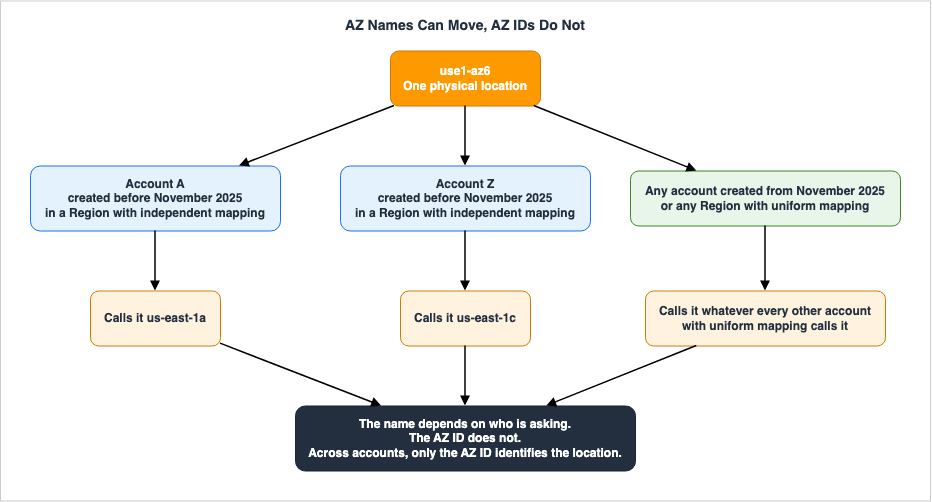
Table of Contents
- Knowing the Definitions Does Not Prevent the Mistake
- The Belief That us-east-1a Is the Same Place for Everyone
- The Belief That Everything DescribeAvailabilityZones Returns Is an Availability Zone
- The Belief That a Region You Have Not Enabled Is Simply Absent
- The Belief That us-east-1 Is a Special Region
- The Belief That Regions Are Independent, and That Settles It
- Where the Primary Sources Disagree
- Failure Modes
- Frequently Asked Questions
- Summary
- References
1. Knowing the Definitions Does Not Prevent the Mistake
This chapter fixes the shape of the problem. The subject is not the definitions of the terms, but the assumptions that designers who have learned those definitions correctly still hold.1.1 Where the Five Beliefs Surface
The following five points are rarely explicitly stated during review meetings. They are not raised because they are not doubted.- When sharing a subnet with another account, the target Availability Zone is specified by name. The assumption is that using the same name on both ends will refer to the same location.
- The system counts the responses from
DescribeAvailabilityZonesand determines that this Region has three Availability Zones. The assumption is that everything included in the response represents an Availability Zone. - When designing organizational controls, Regions that are not actively enabled are excluded from consideration. The assumption is that if a Region is not being used, it offers nothing.
- When documenting recovery procedures, only failures within
us-east-1are treated as exceptional events. The assumption is that all operations dependent on a single Region are located there. - Two Regions are configured identically, and the assumption is that this constitutes independence.
All five of these are fundamentally flawed, to the point where someone would likely correct them if they were explicitly stated. They persist because few occasions call for saying them out loud. The assumptions sit inside the design, while reviews read only the configuration.
1.2 Why Reading the Definition Makes the Belief More Likely
The definitions of terms describe what those terms identify. The definition of an Availability Zone states that it is an isolated location within a Region. The definition itself is complete and accurate.What is lacking is information about whose perspective that identifier is from. A name is unique within an account, and the definition is correct within that scope. The definition does not address what happens when that scope is exceeded.
The same applies to all five propositions.
| What the definition states | What the definition does not state |
|---|---|
| The name of an Availability Zone is formed by adding characters to a Region code. | Whether those characters refer to the same location across different accounts. |
| A Local Zone is an extension of a Region. | Whether the listing API returns Local Zones as well. |
| An opt-in Region cannot be used until it is enabled. | Whether anything happens in a Region that has not been enabled. |
| Some services have endpoints that span Regions. | Which Region handles those operations. |
| Regions are designed to be isolated from each other. | How far that isolation reaches. |
The pages that answer the questions in the right-hand column are separate from the pages that answer the questions in the left-hand column. The more someone reads the definitions and feels they have a complete understanding, the less likely they are to look for answers on those separate pages.
1.3 What This Article Does Not Cover
The boundaries come first. The subject has wide neighbors, and it is easy to stray into ground that previously published articles already hold.| Covers | Does Not Cover |
|---|---|
| The relationship between Availability Zone names and AZ IDs | The history of expanding Regions and Availability Zones |
| The actual values of fields that differentiate zone types | The definitions of Local Zones and Wavelength Zones |
| What enabling a Region changes | How to design fault boundaries |
What is special about us-east-1 | Network reachability and structural boundaries |
| How far the sources take the word independent | Values that move, such as the number of Regions and Availability Zones |
| Questions to verify in reviews | Pricing |
The history of expansions is outside the scope of this article. AWS History and Timeline regarding AWS Global Infrastructure holds when each Region opened and how far Availability Zones have expanded. This article will not include any timelines.
Designing fault boundaries is also outside the scope of this article. Cell-Based Architecture and Shuffle Sharding on AWS holds, as a chapter, how to bound impact using zones and Regions and what a recovery path may depend on. This article will not touch upon the same terminology.
Network reachability and structural boundaries are also outside the scope of this article. The Boundaries of the AWS Global Network holds the distinction between a path running inside the AWS network and what that path guarantees. That article also presents failure modes in the form of examples, so including network-related examples in this article would result in overlap.
Strategies for handling Spot instance interruptions are also outside the scope of this article. Designing for Spot Interruptions on AWS holds how to design an allocation that spans Availability Zones.
1.4 How Each Chapter Is Built
Chapters 2 through 6 follow the same three-part structure.- Present a widely accepted belief in the form of a proposition.
- Challenge that belief through descriptions from primary sources. Quotations appear in their original form.
- Show what breaks when a design rests on that assumption.
All headings are structured to explicitly indicate that they represent assumptions. This is to prevent readers who only skim the headings from mistakenly accepting these propositions as factual.
The form itself is borrowed. IAM Anti-Patterns on this site already uses it, for IAM policy and permission design. This article borrows the form and says nothing about IAM.
1.5 How This Relates to What Has Already Been Written
One of the topics covered in this article has been addressed in previously published material. Chaos Engineering on AWS with AWS Fault Injection Service includes a chapter on designing experiments that span multiple accounts, and it references the AWS Fault Injection Service's recommendation to specify Availability Zones using their AZ IDs rather than their names.This article will not repeat that quotation. The quotation here is taken from the AWS Resource Access Manager User Guide instead, and the application of this recommendation to experiment design will be left to the previously published material. Furthermore, as discussed later, the proposition this recommendation rests on became one-sided in November 2025.
2. The Belief That us-east-1a Is the Same Place for Everyone
This chapter is the foundation of the article. Get it wrong and the four chapters after it have nothing to stand on.2.1 What the Name of an Availability Zone Identifies
Availability Zones have two identifiers: their name and the AZ ID.According to the AWS Regions and Availability Zones User Guide, the naming convention is as follows:
The code for an Availability Zone is its Region code followed by a letter identifier.The same page gives the form of the AZ ID.
An AZ ID consists of a Region-specific prefix, followed by -az, followed by a number.What you can see is only this:
us-east-1a and use1-az1. Both are strings that refer to a single Availability Zone, and one might be considered an abbreviated version. However, it is impossible to determine their distinct roles simply by looking at their format.The difference shows only when the identifier leaves your own account. Those moments sit in inconspicuous places in the design. For example, in template parameters, in descriptions of shared subnets, or in an incident report that names the Availability Zone. In every one of these, the identifier is written without a thought for which account will interpret it.
2.2 What Three Primary Sources Write
Three documents describe the difference between these roles. The first is the AWS Resource Access Manager User Guide, which begins with the following statement:AWS maps the physical Availability Zones randomly to the Availability Zone names for each AWS account.The same page also describes the resulting implications.
As a result, the Availability Zone us-east-1a for your AWS account might not represent the same physical location as us-east-1a for a different AWS account.Regarding AZ IDs, it states:
An AZ ID is a unique and consistent identifier for an Availability Zone across all AWS accounts. For example, use1-az1 is an AZ ID for an Availability Zone in the us-east-1 Region and it represents the same physical location in every AWS account.Names are only valid within an account. AZ IDs are valid across accounts. The same page also explains the reason for this mapping: if it were not the case, resources would tend to concentrate in Availability Zones with the letter "a" in any Region.
The same point appears in a different family of documents. The Amazon VPC User Guide states this in its section on subnet sharing:
To coordinate Availability Zones across accounts for VPC sharing, you must use an AZ ID, which is a unique and consistent identifier for an Availability Zone.That phrasing is an obligation. The AWS Resource Access Manager page offers the AZ ID as a means. The Amazon VPC page requires it.
The Amazon EC2 User Guide also contains a similarly structured description regarding sharing dedicated hosts.
To specify the location of your Dedicated Hosts relative to your accounts, you must use the Availability Zone ID (AZ ID).2.3 The Opposite Belief Is False Too
This covers the widely known information regarding this topic. And if you stop here, you will only move on to the next error.The AWS Regions and Availability Zones User Guide states the same point in these words:
For accounts created before November 2025, in our oldest Regions, we independently map Availability Zones to codes for each AWS account.The following sentence contains a limitation not present in the above description.
Accounts created starting November 2025, get the same Availability Zones mapped to codes.Furthermore, a section listing specific Regions includes this statement:
In the following Regions, for accounts created before November 2025, we independently map Availability Zones to codes for each AWS account. Accounts created starting November 2025, get the same Availability Zones mapped to codes. All other Regions use a uniform mapping.Regions that are independently mapped are listed by name in this section. This article does not reproduce that list. The list is subject to change, and the definitive source is the official AWS documentation. As of 2026-09-21, nine Regions are listed.
The beginning of the same page explains why the list stops at nine. There is another limitation: it is determined by the time when the Region was introduced.
As AWS learned more about customer usage patterns, and as AWS evolved, we determined that it was not necessary to continue to independently map Availability Zones to codes. All Regions introduced after November 2012 use a uniform mapping of Availability Zones to codes.The independent mapping functionality only applies to Regions from the oldest generation. In other words, the date a Region was introduced sets the limitation on the Region's side. The same page also provides a single sentence that applies in all cases.
To coordinate Availability Zones across accounts in all Regions, even those that independently map Availability Zones, use the AZ IDs, which are unique and consistent identifiers for Availability Zones.This single sentence is not affected by either of the two limitations.
In other words, the premise is subject to a double limitation.
| Condition | Mapping |
|---|---|
| Accounts created before November 2025, and the Regions listed in the section above | Independently mapped |
| Accounts created on or after November 2025 | Uniform |
| Regions not listed in the section above | Uniform |
AWS Prescriptive Guidance gives a concrete example from one of those Regions.
the use1-az6 AZ ID is named us-east-1a in AWS account A and us-east-1c in AWS account ZIn one account, a particular physical location is referred to as
us-east-1a, while in another account, it is called us-east-1c. The final letter of the name can differ by as much as two positions.The consequence of the two limits is large. One organization can hold both accounts whose Availability Zone names line up and accounts whose names do not. Organizations that operate both older and newer accounts may find that a naming convention works successfully in only one type of account. And that success is not necessarily proof that the design is correct.
These discrepancies are difficult to detect. Naming conventions work as intended in accounts where the mapping is uniform. As long as everything is functioning correctly, that configuration is rarely reviewed. Problems arise when an older account is added. At that point, nothing appears to happen; only the communication paths and behavior during outages change.
2.4 Only One Identifier Survives All Three Cases
There is only one statement that holds true across all three scenarios:The AZ ID always refers to the same physical location for all accounts.
Names are mapped uniformly in some cases and independently in others. Determining which applies is dependent on the Region and account creation time, and avoiding names altogether is faster than checking both in a design review.
The AZ ID comes back in the
DescribeAvailabilityZones response, and the AWS Resource Access Manager console also shows it. In the response it sits in the ZoneId field.aws ec2 describe-availability-zones --region us-west-2A single response looks like this:
{
    "State": "available",
    "OptInStatus": "opt-in-not-required",
    "Messages": [],
    "RegionName": "us-west-2",
    "ZoneName": "us-west-2a",
    "ZoneId": "usw2-az2",
    "GroupName": "us-west-2",
    "NetworkBorderGroup": "us-west-2",
    "ZoneType": "availability-zone"
}
Within this response,
ZoneName represents the name used within this account, while ZoneId represents the physical location. In the examples provided in the User Guide, the ZoneId for us-west-2a is usw2-az2. The letter at the end of the name does not correspond to the number at the end of the AZ ID. In the same example, the ZoneId for us-west-2b is usw2-az1.These two correspondences represent the entirety of the claims made in this chapter. The order of names and AZ IDs are independent, and it is not possible to derive one from the other.
2.5 What Breaks
Designing on that assumption breaks the following.- Placement that does not line up across accounts. Even when sharing a subnet and using the same name on both the source and destination, the resulting placement may not be the same. Consequently, communication intended to remain within a single location may span Availability Zones. The Amazon VPC User Guide specifies the need for AZ IDs in these situations.
- Sharing Dedicated Hosts and placement groups. The Amazon EC2 User Guide states that when specifying the location of a dedicated host across accounts, AZ IDs must be used. Using names instead can result in different placements when viewed from the receiving account.
- Experiments that name an Availability Zone. When targeting resources by name in fault injection experiments that span multiple accounts, each account may experience failures in different locations. Chaos Engineering on AWS with AWS Fault Injection Service holds how such an experiment is designed and applied.
- Misreading the correlation between failures. Matching events by name across two accounts can lead to the incorrect assumption that events occurring in the same location are actually happening in different locations. The opposite can also occur.
- Carrying a template to another account. When moving templates containing hardcoded names to a different account, the resulting placement may change. Because the template application succeeds, this change may go unnoticed.
All five of these scenarios result in failures that do not manifest as exceptions or warnings. Configurations are applied, resources are created, and communication flows. The only observable changes are in the communication paths and the behavior during failures.
2.6 The Belief That Every Account Sees the Same Zones
There is another side to the subject of names. The number of Availability Zones visible within a Region can vary depending on the account.The AWS Regions and Availability Zones User Guide includes a section describing a
constrained state.As Availability Zones grow over time, our ability to expand them can become constrained. If this happens, we might restrict you from creating zonal resources in a constrained Availability Zone, unless you already have resources in that Availability Zone.The following two sentences describe the consequences of this state.
Eventually, we might also remove the constrained Availability Zone from the list of Availability Zones for new accounts. Therefore, your account might have a different number of available Availability Zones in a Region than another account does.In the list of Availability Zones on the same page, a footnote marks the Regions in that state. It reads:
Newer accounts can access two Availability Zones in US West (N. California).In other words, while the list displays three AZ IDs, only two are accessible to new accounts. The values you count from the list may differ from the Availability Zones your account can actually use.
The API response carries the same state. The set of values the state field can take includes
constrained. What you count is the response for your own account, not the table in the documentation.Note the direction here: this situation is the opposite of the limitation described in Section 2.3. Section 2.3 stated that newer accounts are the ones with the uniform mapping. This one states that newer accounts may see fewer Availability Zones. The age of an account is not an indicator that points one way.
2.7 What an AZ ID Does Not Tell You
Having arrived at the conclusion of using AZ IDs instead of names, there is one more distinction to make. AZ IDs are identifiers that guarantee identity; they are not strings that describe a location.A separate field carries the physical location. The AWS Regions and Availability Zones User Guide states:
The geography for an Availability Zone is the specific physical location of its infrastructure. This information can help you meet your regulatory, compliance, and operational requirements.The Amazon EC2 API reference carries the matching field.
The geography information for the Availability Zone or Local Zone. The geography is returned as a list.In other words, geographical information is not derived from the AZ ID; it is read from a different field in the response. An AZ ID contains only a prefix and number associated with a Region, and it holds no further geographical information.
This distinction is important when dealing with requirements related to location. Two resources that carry the same AZ ID are in the same physical location. What you cannot do is read the geography out of the identifier. The former is a property of the identifier, while the latter is a value found in a different field.
3. The Belief That Everything DescribeAvailabilityZones Returns Is an Availability Zone
This chapter covers the moment a count of the response becomes a premise of the design. Before you count, you need to know what is being counted.3.1 One Data Type Describes Three Kinds of Zone
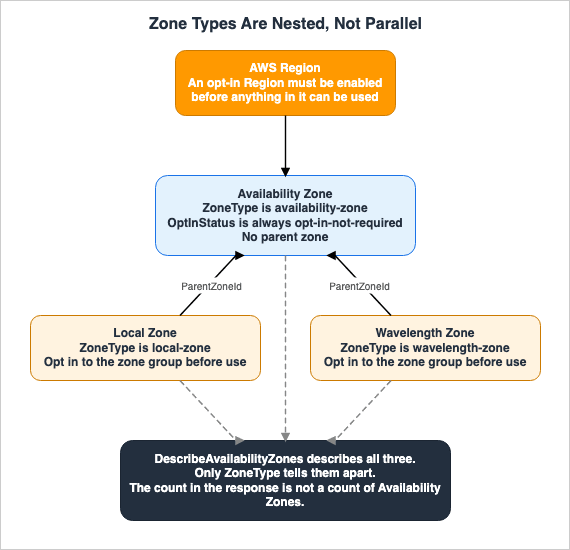
When you open theAvailabilityZone data type in the Amazon EC2 API reference, the first line states:Describes Availability Zones, Local Zones, and Wavelength Zones.The data type is named for Availability Zones, but it describes three kinds of zone. The name of the field that returns a list is also
AvailabilityZones. The AWS CLI command reference includes the same note for that field.Information about the Availability Zones, Local Zones, and Wavelength Zones.The name is narrower than its contents. This discrepancy is where the belief in this chapter comes from. It is embedded in both the API name and the response field name, so the caller has no opportunity to correct it.
3.2 The Three Values ZoneType Takes
The field that distinguishes between three different types isZoneType. The values listed in the API reference are as follows:Valid values: availability-zone | local-zone | wavelength-zoneAny other values are not listed. Furthermore, this field is the only one in the response that settles the type.
Attempting to determine the type based on the name will not be reliable. Local Zone names begin with a Region code, such as
us-west-2-lax-1a, and Wavelength Zone names also begin with a Region code, such as us-east-1-wl1-bos-wlz-1. Checking for a Region code as a prefix will match all three types.The
GroupName field, which represents a zone group, also has different formats depending on the type. An example listed in the API reference is:Availability Zones - us-east-1-zg-1
Local Zones - us-west-2-lax-1
Wavelength Zones - us-east-1-wl1-bos-wlz-1Although the formats differ, all three begin with a Region code. Rather than attempting to define rules based on the format, it is more reliable to read the
ZoneType field.3.3 What ParentZoneId Points At
Responses from Local Zones and Wavelength Zones include two fields that are not present in responses from Availability Zones:ParentZoneName and ParentZoneId.A sample response, as shown in the AWS Local Zones User Guide, looks like this:
{
    "State": "available",
    "OptInStatus": "opted-in",
    "Messages": [],
    "RegionName": "us-west-2",
    "ZoneName": "us-west-2-lax-1a",
    "ZoneId": "usw2-lax1-az1",
    "GroupName": "us-west-2-lax-1",
    "NetworkBorderGroup": "us-west-2-lax-1",
    "ZoneType": "local-zone",
    "ParentZoneName": "us-west-2a",
    "ParentZoneId": "usw2-az2",
    "GroupLongName": "US West (Los Angeles)"
}
The value of
ParentZoneId, usw2-az2, is the AZ ID of us-west-2a, the Availability Zone seen in Chapter 2. This Local Zone is associated with a specific Availability Zone within that Region. Another Local Zone listed on the same page is associated with usw2-az4, indicating that these two are associated with different parent zones.The table on the same page lists all of these associations. One of the columns is labeled
Parent Zone ID, and each row contains a value. This association is not an exceptional attribute; it is a part of the definition of a Local Zone.Regarding Wavelength Zones, the Amazon EC2 User Guide also describes their positioning.
A Wavelength Zone is an isolated zone in the carrier location where the Wavelength infrastructure is deployed. Wavelength Zones are tied to a Region.That binding is not an interpretation. It exists as a field in the response.
3.4 For an Availability Zone, OptInStatus Always Holds the Same Value
One more field differs by the kind of zone. The API reference describesoptInStatus as follows:For Availability Zones, this parameter always has the value of opt-in-not-required.The subsequent sentence describes the two remaining behaviors.
For Local Zones and Wavelength Zones, this parameter is the opt-in status. The possible values are opted-in and not-opted-in.The possible values are three, and one of them is specific to Availability Zones. Therefore, any response where
OptInStatus is anything other than opt-in-not-required indicates that it is not an Availability Zone.This field provides a second clue for implementations that do not read the
ZoneType. However, the reverse is not true. While opt-in-not-required signifies an Availability Zone, if a Local Zone is not opted-in, it will not appear in the default response in the first place.3.5 NetworkBorderGroup Also Changes With the Kind of Zone
The response also includes another field,NetworkBorderGroup, whose format varies depending on the type.The Amazon EC2 User Guide describes it as follows:
A network border group is a unique set of Availability Zones, Local Zones, or Wavelength Zones from which AWS advertises IP addresses, for example, us-west-2-lax-1a.The AWS Local Zones User Guide provides the following explanation:
Network Border Group - A unique group from which AWS advertises public IP addresses.Comparing the two responses presented in Sections 2.4 and 3.3 reveals differences in their values. In the Availability Zone response,
NetworkBorderGroup is us-west-2, which matches the Region name. In the Local Zone response, it is us-west-2-lax-1, corresponding to the name of that Local Zone group.The unit from which addresses are advertised differs. Local Zones in the same Region belong to a different group. This difference becomes apparent when obtaining a public IP address. The Amazon EC2 User Guide states that when launching an instance in a Local Zone, the address is allocated from that zone group.
Three fields separate the types:
ZoneType, OptInStatus, and NetworkBorderGroup. Of these three, only ZoneType explicitly states the type. The remaining two fields represent values that differ as a result. Use ZoneType for identification.3.6 What the Unfiltered Response Contains
The question is what a response contains when no filter is specified. The AWS Regions and Availability Zones User Guide attaches this note where it describes how to list them.To include any Local Zones and Wavelength Zones that are opted in for your account, omit the --filters option.In simpler terms: If you do not specify a filter, the response will include both opted-in Local Zones and Wavelength Zones. The example provided in the AWS CLI User Guide also demonstrates that a response without a filter may include elements with an
OptInStatus of opted-in.To retrieve only Availability Zones, state the filter explicitly.
aws ec2 describe-availability-zones \
  --filters Name=zone-type,Values=availability-zone \
  --region us-east-2 \
  --query "AvailabilityZones[].{ZoneName:ZoneName,ZoneId:ZoneId}"
A separate option covers the zones that are not opted in.
aws ec2 describe-availability-zones \
  --region us-west-2 \
  --filters Name=zone-type,Values=local-zone \
  --all-availability-zones
These two commands will return different sets of results for the same Region. Both are valid responses. Before counting, you need to decide which set you want to use.
The opt-in process itself is performed on a zone group.
aws ec2 modify-availability-zone-group \
  --region us-west-2 \
  --group-name us-west-2-lax-1 \
  --opt-in-status opted-in
The unit of operation is not individual zones, but rather the
GroupName. As Section 3.2 showed, this value takes a different form for each type.3.7 The List a Template Receives Is Narrower Still
AWS CloudFormation includes an intrinsic function that returns a list of Availability Zones. It exists so that a template does not hard-code the list.The template reference description states:
The intrinsic function Fn::GetAZs returns an array that lists Availability Zones for a specified Region in alphabetical order. Because customers have access to different Availability Zones, the intrinsic function Fn::GetAZs enables template authors to write templates that adapt to the calling user's access. That way you don't have to hard-code a full list of Availability Zones for a specified Region.The second half of that passage supports Section 2.6 from the other side. It explains that the Availability Zones available to an account can vary, which is the reason for this function's existence.
Further down on the same page, a note adds two limitations.
The Fn::GetAZs function returns only Availability Zones that have a default subnet unless none of the Availability Zones has a default subnet; in that case, all Availability Zones are returned.Similarly to the response from the describe-availability-zones AWS CLI command, the order of the results from the Fn::GetAZs function isn't guaranteed and can change when new Availability Zones are added.The first limitation is significant. The function only returns Availability Zones that have a default subnet. However, if none of the Availability Zones have a default subnet, it returns all of them. Therefore, the number of items returned by this function is determined not by the total number of Availability Zones, but by the configuration of default subnets. This provides two reasons why different accounts receive a different count for the same Region.
The second limitation contradicts the main text on the same page. The main text states that the list is in alphabetical order, while the note indicates that no order is guaranteed. This discrepancy will be addressed again in Chapter 7.
The practical implication is clear: Any approach that takes the first n entries of the list in a template depends on the environment for three reasons: the number of available Availability Zones, the presence of default subnets, and the order of the items.
3.8 What Breaks
Designing on that assumption breaks the following.- Counting the spread. Resources were split across three entries, so the conclusion that they are spread over three Availability Zones does not hold. If one of those entries is a Local Zone, the resources actually sit in two Availability Zones and in a location tied to one of them.
- Estimating independence. Two entries whose
ParentZoneIdholds the same value share a parent. Counting these as separate locations overestimates the degree of distribution. - Carrying automation between environments. A process that extracts the first n entries of the response may return different results depending on the opt-in status. Since opt-in status varies by account, the same code can produce different deployments across environments.
- Reproducing a template. The list returned by an intrinsic function varies in size depending on whether a default subnet is present, and the order of items is not guaranteed. Consequently, the same template can create different deployments in different accounts.
- Reproducing the list. A list without filters can change simply by enabling a single Local Zone. Nothing changed on the side of the zones themselves.
The first point is the most critical. A note that resources were split three ways reads past a reviewer, because the count is right.
4. The Belief That a Region You Have Not Enabled Is Simply Absent
This chapter covers the control and audit side. It looks at where one assumption breaks: that a Region you cannot use needs no thought.4.1 The Line Between Default Regions and Opt-In Regions
The AWS Account Management Reference Guide divides Regions into two categories.Default Regions – Regions launched before March 20, 2019 are enabled by default. You can create and manage resources in these default Regions immediately after your account activation. Default Regions cannot be enabled or disabled.The other category is as follows:
Opt-in Regions – Regions launched after March 20, 2019 are disabled by default and referred to as opt-in Regions. Disabled opt-in Regions are not shown in the Console Navigation bar, and you cannot use these Regions to create workloads until they are enabled.The key boundary is a single date: March 20, 2019. Default Regions also cannot be disabled. The policy often assumed in control design, of closing every Region that is not in use, does not apply to Default Regions.
The same page provides a table listing which Regions belong to each category. This article does not reproduce that table. The list of Regions is subject to change, as new Regions are added.
4.2 Some Accounts Cannot Open an Opt-In Region at All
The page quoted in the previous section carries a scope note at the top. Generalizing the previous section without reading this note leaves accounts it does not apply to.This information is about enabling or disabling AWS Regions in your AWS account if you signed up for AWS using Sign up for AWS (advanced) or if you activated advanced features for your account.In other words, that page is written about accounts that signed up one particular way. Information on what happens with accounts registered using a different process can be found on another page that compares the sign-up options. The comparison table on that page categorizes opt-in Regions as follows:
| Feature | Sign up for AWS (new) | Sign up for AWS (advanced) |
|---|---|---|
| Access an opt-in Region | No | Yes |
Accounts registered using the new method cannot access opt-in Regions. Enabling one and using it is not on offer. The same table also uses a similar categorization when it comes to selecting a Region and creating resources.
This note applies to all remaining sections of Chapter 4. The procedures for enabling and disabling, the state transitions, and the behavior of resources—all of these descriptions pertain specifically to accounts that can access opt-in Regions.
The opt-in category itself, however, appears outside this note as well. The AWS Regions and Availability Zones User Guide states, without referencing specific registration methods, that Regions introduced after March 20, 2019 must be enabled. The category is general. Which accounts can open one is not.
4.3 What Does Not Happen Until You Enable It
The same page also explains what is missing while a Region is not enabled.AWS opt-in Regions are disabled by default, and IAM data and credentials are not initially available in these Regions, which prevents access to AWS services in that Region.It also describes what happens when it is enabled.
When you choose to enable an opt-in Region, AWS propagates your IAM data and credentials to that Region.What a Region you have not enabled is missing is the credential and identity data. The Region itself is not absent. This distinction will become important in the next two sections.
Enabling can be done for a standalone account and for an account inside an organization. The same page outlines two separate procedures for these two scenarios. Permissions also control who may perform the enabling. The page also states that there are permissions for enabling, disabling, getting, and listing Regions, and that access to a Region can be controlled with a condition key.
4.4 One Path Uses Regions You Have Not Enabled
The same page lists the following first among the things to consider before deciding whether to enable a Region.You can use all destination Regions in a cross-Region inference geography regardless of Region-opt statusThe subsequent explanation specifically mentions Amazon Bedrock and Amazon Q Developer, stating:
If you use those services, they automatically select the optimal AWS Region–including Regions that you have not enabled for resources and IAM data–within your chosen geography.Processing may occur in Regions that have not been enabled. Furthermore, this selection is automatic. This is a crucial fact for control design. One area does not obey that assumption: listing the Regions you use and disabling the rest does not fix where processing happens.
This passage does not state that this behavior is incorrect. Rather, the focus is on a defined geographical scope, and the documentation describes methods for selecting within that scope. The point being made is that enabling a Region does not control this scope.
What matters is where this passage sits. It is on the page about enabling and disabling Regions, not on a page about generative AI services. Anyone designing controls who reads only that page lands on this paragraph.
4.5 ENABLED Does Not Mean Usable
Enabling does not complete instantly. The same page describes four possible states.ENABLING
DISABLING
ENABLED
DISABLEDA caveat qualifies what the completed state means.
A completed (Enabled/Disabled) region-opt request is dependent on the provisioning of key underlying AWS services. There might be some AWS services that will not be immediately usable despite the status being ENABLED.The page also describes the time required.
Enabling a Region takes a few minutes to several hours in some casesDisabling has the same property.
Disabling a Region isn't always immediately visible – Services and consoles might be temporarily visible after disabling a region.A Region reaching the
ENABLED state does not mean that every service in it is usable. Automation that reads only the state before moving to the next step runs into this gap. On the disabling side, the fact that a Region is still visible in the console is not evidence that disabling failed.The same page also puts a limit on how many requests can be in flight. These limits vary depending on whether the changes are being made at the account level or the organization level, and switching many Regions at once runs into those limits.
4.6 Disabling Does Not Delete Resources
It is also easy for expectations and documentation to diverge regarding reverse operations.When you disable an opt-in Region, your IAM credentials are deactivated and you lose IAM access to the resources in that opt-in Region. Disabling an opt-in Region does not delete the resources in that Region and charges for resources (if any) in that disabled opt-in Region continue to accrue at the standard rate.The note on the same page reiterates this point.
Disabling a Region disables IAM access to resources in the Region. This does not delete the resources in question, which continue to incur charges. Remove any remaining resources prior to disabling a Region.Disabling is an operation that makes resources invisible; it does not delete them. Resources that have become invisible remain subject to charges. The documentation states the order: delete the resources first, then disable the Region.
4.7 Opting In to a Local Zone Pulls In the Region
Opt-in for a Region and opt-in for a zone are separate processes, but they are not independent.The AWS Local Zones User Guide writes the steps for starting with a Local Zone as console operations. One stage sits in the middle of them.
You will be asked to enable the parent Region of the Local Zone. Choose Enable Region.Opting in to a Local Zone can require enabling the parent Region. Where the parent Region is an opt-in Region, the decision to use a single zone contains the decision to open a Region.
From a governance perspective, this relationship works in reverse. Where an organization manages which Regions are open and a team opts in to a zone on its own, the list of Regions can change outside that control.
4.8 What Breaks
Designing on that assumption breaks the following.- Coverage of the control. A policy that puts Regions you have not enabled out of scope does not cover the path that is selected automatically.
- What the audit can see. Resources within disabled Regions are not actually removed. They are only unreachable with your credentials. If inventory procedures treat disabling as deletion, the remaining resources will disappear from the list.
- Automating the enabling. An implementation that moves to the next step the moment the state reads
ENABLEDlands on services that are not usable yet. Failures will appear in the subsequent steps, rather than on the Region's side. - Confirming the disabling. A Region still visible in the console is not evidence that disabling has not taken effect. The documentation states that entries may temporarily appear.
- Reach of the closing policy. Default Regions cannot be disabled. A design that opens and closes every Region explicitly does not apply to half of them.
- Managing the list of Regions. Where opting in to a zone includes enabling its parent Region, the list of Regions can change without passing through the control procedure.
The second one breaks most quietly. The disabling succeeds, the Region disappears from the console, and the inventory list gets shorter. A shorter list reads as evidence that the work is done.
5. The Belief That us-east-1 Is a Special Region
This chapter addresses where to look for operations that rely on a single Region.5.1 What Is Global Is the Service, Not the Region
The AWS General Reference lists services that have endpoints spanning Regions.The following services each have a global endpoint that spans AWS Regions:
AWS Cloud WAN
Amazon CloudFront
AWS Global Accelerator
AWS Identity and Access Management (IAM)
AWS Organizations
Amazon Route 53
AWS Shield Advanced
AWS WAF ClassicThe list includes services, not Regions. There is a specific reason why
us-east-1 does not appear on this list. What is special is what has been placed there.This distinction is reflected in the language used. The word global is attached to the endpoint, not to the Region. Whether an endpoint spans Regions, and where the operations behind that endpoint are handled, are separate considerations.
5.2 The Operations Served From a Single Region Are Not All in us-east-1
The AWS Fault Isolation Boundaries whitepaper details the Regions responsible for create, update, and delete operations for services that span multiple Regions. The correspondence for the commercial Regions is this:| Service | Responsible Region |
|---|---|
| AWS IAM | us-east-1 |
| AWS Organizations | us-east-1 |
| AWS Account Management | us-east-1 |
| Route 53 Application Recovery Controller | us-west-2 |
| AWS Network Manager | us-west-2 |
| Route 53 Private DNS | us-east-1 |
| Route 53 Public DNS | us-east-1 |
| Amazon CloudFront | us-east-1 |
| AWS WAF Classic for CloudFront | us-east-1 |
| AWS WAF for CloudFront | us-east-1 |
| AWS Certificate Manager for CloudFront | us-east-1 |
| AWS Global Accelerator | us-west-2 |
| AWS Shield Advanced | us-east-1 |
As of 2026-09-21, the whitepaper lists thirteen entries. Three of them are served from
us-west-2 and ten from us-east-1.The three served from
us-west-2 are the ones that matter here. The design, which treats single-Region dependencies solely in the context of us-east-1 failures, does not account for these three. One of the three is, as its name says, a service for recovery.The whitepaper does not claim that this list is complete. No statement of completeness is attached to these entries, and Section 5.3 covers a second path that the whitepaper itself marks as not exhaustive. Therefore, the absence of a service on this list cannot be used as evidence of a lack of dependencies.
5.3 The Dependency Arrives Even When You Do Not Call the Service
The previous section discussed cases where services that span Regions are directly invoked. The same whitepaper describes another path.When a resource is created, DNS names may be generated as part of that process. This can occur when creating load balancers, for example. The whitepaper states that such an operation depends on the Route 53 operations served from
us-east-1, and gives the following examples:- Amazon API Gateway REST APIs and HTTP APIs
- Elastic Load Balancing load balancers
- AWS PrivateLink VPC endpoints
- AWS Lambda function URLs
- Amazon ElastiCache
- Amazon OpenSearch Service
- Amazon CloudFront
- Amazon MemoryDB
- Amazon Neptune
- Amazon DynamoDB Accelerator
- AWS Global Accelerator
- Amazon ECS using DNS-based discovery
- Amazon EKS clusters
Most of these are taken to be services that complete inside one Region. The caller never invokes Route 53. Nevertheless, the process of creating these resources still depends on a single Region.
The whitepaper explicitly states that this list is not exhaustive.
This list is not exhaustive; it is meant to highlight some of the most commonly-used servicesThe conclusion is clear: Even if you remove services that span Regions from your list of used services, it does not eliminate single-Region dependencies. The dependency sits in the operation that creates the resource.
The whitepaper also suggests a way to avoid this type of dependency: If you create the resources in advance, you can exclude the creation process from your recovery procedures. This is a design guideline, and this article will not delve further. The AWS Disaster Recovery Strategies Guide holds the design of recovery procedures itself.
5.4 Which Regions a Temporary Credential Is Valid In
One more behavior is bound up with enabling a Region. The AWS Account Management Reference Guide states:Session tokens from regional AWS STS endpoints are valid in all AWS Regions.Regarding global endpoints, the same paragraph states something different.
However, session tokens from the global AWS STS endpoint (https://sts.amazonaws.com) are valid only in AWS Regions that you enable, or that are enabled by default.The AWS SDK Reference documents where these endpoints are processed.
In opt-in Regions, requests to the AWS STS global endpoint are served by a single AWS Region, US East (N. Virginia).The scope of validity for a token depends on where that token was obtained. Furthermore, when a new Region is enabled, the side that breaks is the token taken from the global endpoint.
This behavior connects directly to the opt-in covered in Chapter 4. When calls into a newly enabled Region fail authentication, the cause is not the enabling but where the token came from. The symptom shows on the Region's side. The cause sits with the credentials.
5.5 What Breaks
Designing on that assumption breaks the following.- Identification of single-Region dependencies. Investigations focused solely on
us-east-1may miss the three entries served fromus-west-2. - Recovery paths. If recovery procedures involve operations within a single Region, the status of that Region will directly impact the success of the recovery. The specific Region varies depending on the service.
- Indirect dependencies. An operation that creates a resource may internally call operations within a single Region of another service. These dependencies are not apparent simply by examining the calling procedure.
- The reach of a credential. A token that an existing code path obtained may not be accepted in a newly enabled Region. Failures may appear some time after the Region is enabled.
6. The Belief That Regions Are Independent, and That Settles It
This chapter examines how far the word independent reaches in the sources.6.1 How Far the Sources Take the Word Independent
Several sources touch on independence. The Amazon EC2 User Guide states:Each Region is designed to be isolated from the other Regions. This achieves the greatest possible fault tolerance and stability.The AWS Account Management Reference Guide states:
This means that each AWS Region is physically isolated and independent of the other Regions.The AWS Fault Isolation Boundaries whitepaper states:
Regions themselves are isolated and independent from other Regions with a few exceptions noted later in this document (refer to Global single-Region operations).These three descriptions do not all say the same thing. The first describes the design intent. The second describes the physical arrangement. The third mentions isolation, and declares the exceptions in the same sentence.
The verb in the first quotation carries weight. Designed to be isolated does not say that it is isolated. It says that isolation is what the design aims at. It is written as a design goal, not as an achieved characteristic. The following sentence on the same page, also, simply describes the purpose of that goal, without specifying the scope of its achievement.
6.2 The Source Itself Declares That Exceptions Exist
The second half of that third quotation sits where it is easy to skip. However, that passage refers to Chapter 5 of this article.The same chapter that states independence also covers replication.
Additionally, the resources and data that you create in one Region do not exist in any other Region unless you explicitly use a replication or copy feature offered by an AWS service or replicate the resource yourself.Unless you perform an explicit operation, resources and data do not exist in any other Region. This statement is definitive. Furthermore, this statement makes no mention of the Region responsible for performing those operations.
The Amazon EC2 User Guide also states the same thing, but from the user's perspective.
When you view your resources, you see only the resources that are tied to the Region that you specified. This is because Regions are isolated from each other, and we don't automatically replicate resources across Regions.Both statements agree that replication does not happen. Neither statement addresses where those operations are handled.
Placing the claim of independence beside the exception covered in Chapter 5 gives this: Nothing moves across Regions on its own. However, the Region responsible for a particular operation is determined separately from where the resource is located. The former is the claim of independence, and the latter is its exception.
Furthermore, the same chapter also places limitations on the propagation of failures.
This separation between Regions limits service failures, when they occur, to a single Region. Other Regions' normal operations are unaffected in this case.The closing clause bounds the range. Other Regions' normal operations are not affected, as described in that specific case. However, it does not address all possible cases.
6.3 Writing Down What the Sources Do Not Say
This article does not make definitive statements regarding areas not covered in the provided documentation.- The scope of the claims regarding independence is not specified in the documentation. The listed exceptions pertain only to operations performed within a single Region.
- The documentation does not claim that the list of exceptions is exhaustive. Regarding the list presented in Chapter 5, the whitepaper itself does not claim to be complete.
- The whitepaper was published on 2022-11-16. The configuration of Regions and services has continued to evolve since then.
Closing the subject of independence without writing these three down would make this article claim more than its sources do.
6.4 What Breaks
- A configuration that only looks redundant. Even if you duplicate a configuration across two Regions, if both paths rely on operations performed within a single Region, that part is not redundant.
- Overlooking replication. Resources are not automatically transferred. Reading the absence of movement as evidence of independence hides the replication you forgot to configure explicitly.
- Relying on the list of exceptions. Absence from that list cannot be treated as evidence that no dependency exists.
- Confusing the design intent with what is achieved. Designed to be isolated does not mean isolation holds for every event.
7. Where the Primary Sources Disagree
This chapter lists the discrepancies identified during the verification process. The classification system used here was not created by this article.7.1 Why This Article Borrows the Classification
Where the AWS Primary Sources Disagree About Launch Dates holds, as its subject, how the forms of disagreement divide. It sets out four shapes, and this article borrows those names as they stand. Establishing a new classification here would give the same thing two names.The following is not an assertion that AWS documentation is contradictory. Each document serves its own purpose. The discrepancy lies in whether a conclusion can be drawn based on reading only one document.
7.2 The First Shape - Only One Page Carries the Qualifier
The statements quoted in Chapter 2 are set out again here from the angle of this chapter. This is how they sit as of 2026-09-21.| Document | Limitation |
|---|---|
| AWS Resource Access Manager User Guide | None |
| Amazon VPC User Guide, Subnet Sharing Section | None |
| Amazon EC2 User Guide, Placement Group Sharing Section | None |
| AWS Fault Injection Service User Guide, Multiple Account Section | None |
| AWS Regions and Availability Zones User Guide | Account creation date and Region |
Four pages state it without a qualifier, and one page carries two. The statements are these:
AWS maps the physical Availability Zones randomly to the Availability Zone names for each AWS account.For accounts created before November 2025, in our oldest Regions, we independently map Availability Zones to codes for each AWS account.This article does not claim that any of these four pages are incorrect. Each page steers the reader to the same conclusion: use AZ IDs. This conclusion is correct, regardless of whether limitations are specified. The omission of limitations is simply a way for those pages to avoid unnecessary information.
However, this configuration has practical implications.
Misinterpreting the information in a conservative way will not lead to an incident. A designer who only reads one of the four pages will understand that name mappings are always different for each account. The conclusion will be to use AZ IDs, which is correct in either scenario.
Misinterpreting the information in the opposite way can lead to an incident. A designer who confirms that names match in a newly created account and then generalizes that the mapping is uniform across all accounts may experience failures in older accounts. Furthermore, only one out of the five pages contains a description that can prevent this generalization. If the verification process begins with actual measurements, the designer will not encounter that specific page.
7.3 The Fourth Shape - One Page Disagrees With Itself
Two instances follow. In both, two descriptions on one page say different things.The first instance concerns the AWS CloudFormation template reference. The main text states:
The intrinsic function Fn::GetAZs returns an array that lists Availability Zones for a specified Region in alphabetical order.The note on the same page states:
Similarly to the response from the describe-availability-zones AWS CLI command, the order of the results from the Fn::GetAZs function isn't guaranteed and can change when new Availability Zones are added.The main text describes a specific order, while the note states that the order is not guaranteed. If a template is implemented by taking items sequentially from the beginning of the list, it appears safe based solely on the main text, but dangerous when considering the note. The implementation will change depending on which description is read.
The second instance is found in the Amazon EC2 API reference. For the
AvailabilityZone data type, the field that carries the status has its description in two parts. The prose description states:The state of the Availability Zone, Local Zone, or Wavelength Zone. The possible values are available, unavailable, and constrained.The row listing the valid values for the same field states:
Valid Values: available | information | impaired | unavailable | constrainedThe prose description lists three statuses, while the valid values row lists five. The discrepancy lies in two values:
information and impaired.This discrepancy can impact implementation. A branch that handles only three statuses will lack a path for the remaining two values. Both descriptions sit on the same page, under the same item. An implementation can be written from either one alone.
7.4 What Remains Unresolved
This article will leave certain items unresolved, acknowledging that they could not be definitively confirmed.- It is unclear how the list of Regions that map independently will change in the future. This article will only state that, as of 2026-09-21, there are nine such Regions.
- The API reference lists three values for
ZoneType. This article has not verified that no other values exist; rather, it has confirmed that the documentation lists these three values. - It is unknown how four pages without specific limitations will be updated in the future. This article only describes the configuration as it existed on 2026-09-21.
8. Failure Modes
This chapter is intended for design reviews. It does not address how a design should be, but only presents questions to be verified.8.1 Matching Availability Zones by Name
In configurations spanning multiple accounts, the deployment target is specified by name. The question is this: Are all of the accounts included in this configuration created on or after November 2025? If even one account falls outside of that timeframe, the design of aligning by name lacks justification.8.2 Treating a Matching Name as Verification of the Design
The names matched in the environment that was tried. The question is: Did that match happen in a Region with a uniform mapping, or was it coincidence? A match does not necessarily indicate the correctness of the design.8.3 Reading the Size of a Response as a Degree of Spread
The entries in the response have been counted and read as a spread across three. The question is this: IsZoneType equal to availability-zone for all three entries? And, is the list free of elements that carry a ParentZoneId?8.4 Taking the Number of Availability Zones From a Published Table
The number of Availability Zones in a Region is taken by counting the rows of the table on the official page. The question is: Does this number match the count for your own account? Availability Zones that are in aconstrained state may sometimes be excluded from the list for new accounts.8.5 Taking the First Entries From What the Intrinsic Function Returns
A template takes the first n Availability Zones from the list. There are three questions. Does the target account have the same number of usable Availability Zones? Is the layout of default subnets the same? Is it independent of the order?8.6 Treating a Disabled Region as Cleaned Up
Regions that are not used have been disabled and taken out of the inventory. The question is: Were the resources in that Region deleted before it was disabled? Disabling is not deletion.8.7 Assuming a List of Regions Fixes Where Processing Happens
The control policy fixes where processing happens by listing the Regions that are enabled. The question is: Does that policy cover the selected path, regardless of whether those Regions are enabled?8.8 Moving On Before Enablement Has Finished
Automation enables a Region and moves to the next step as soon as the status readsENABLED. The question is: Are the services used by those subsequent steps available at that point? The documentation states that even when the status is ENABLED, there may be services that are not immediately usable.8.9 Closing a Single-Region Dependency Review at us-east-1
The recovery procedure has been reviewed and its dependencies onus-east-1 identified. The key question is: Are you using operations that are served from us-west-2? The Regions responsible for specific operations vary by service.8.10 Treating Two Regions as Grounds for Independence
The same configuration was placed in two separate Regions. The question is: Do the two paths call the same operation that depends on a single Region? If they do, that portion is not redundant.9. Frequently Asked Questions
This chapter answers the questions most likely to remain after the main text. Every answer rests on the chapter that covers it.9.1 Does us-east-1a point to the same place in your account and in another account?
It depends. Accounts created from November 2025 onward receive a uniform mapping. For accounts created before that date, the documentation indicates that they may map to different locations within certain Regions. However, the AZ ID always refers to the same physical location.9.2 Where can you check an AZ ID?
In theZoneId field of the describe-availability-zones response, and in the AWS Resource Access Manager console. The console displays a list of names and corresponding AZ IDs for the selected Region.9.3 Is a Local Zone a kind of Availability Zone?
No. ItsZoneType is local-zone, which is a different value from availability-zone. Furthermore, responses from a Local Zone include a ParentZoneId. Its value is the AZ ID of an Availability Zone in the same Region.9.4 Does describe-availability-zones return only Availability Zones?
No. If no filters are specified, the response will include Local Zones and Wavelength Zones, in addition to Availability Zones. To retrieve only Availability Zones, you must specify thezone-type filter.9.5 Does Fn::GetAZs return every Availability Zone in the Region?
No. The template reference states that only the Availability Zones that have a default subnet are returned. If none of them has a default subnet, all are returned.9.6 If you disable a Region, are the resources in it deleted?
No. Disabling the Region will only prevent access via credentials; the resources will remain. The documentation states that you should delete resources before disabling the Region.9.7 Can every account enable an opt-in Region?
No. The page that compares the sign-up options indicates that accounts that signed up with the new method have no access to opt-in Regions. The page that describes how to enable and disable Regions also limits itself, at the top, to accounts that signed up the other way.9.8 Can processing happen in a Region you have not enabled?
Yes. The AWS Account Management Reference Guide states that for certain generative AI services, a Region is selected automatically within the geography you choose, regardless of whether that Region is enabled.9.9 Are the operations that depend on a single Region in us-east-1?
Some are. However, not all. Of the thirteen entries listed in the AWS Fault Isolation Boundaries whitepaper, three are served fromus-west-2.9.10 Can you find the number of Regions or Availability Zones in this article?
No. This article does not provide specific numbers. The figures are dynamic and can vary depending on your account. The official documentation and the response you receive from thedescribe-availability-zones command for your account are the definitive sources.10. Summary
The name of an Availability Zone is an identifier that is only valid within a specific account. AZ IDs, on the other hand, identify the same physical location across different accounts.In November 2025 the subject became two-sided. Some accounts and Regions map names uniformly. Others map them independently. The only identifier that holds true across both scenarios is the AZ ID. A name-based configuration works when the conditions happen to line up. That it works does not prove the design has grounds.
Only one page carries the qualifier. Four pages state the mapping without it. None of the five is wrong. However, relying on a single document makes it impossible to definitively determine which side a particular account currently belongs to.
DescribeAvailabilityZones returns three different types of zones within a single data type. The differentiating field is ZoneType. Local Zones and Wavelength Zones have a ParentZoneId, whose value is the AZ ID of an Availability Zone in the same Region. The number of responses does not reflect the total number of independent locations.The list returned by the template's built-in functions is even more restricted. It returns only the Availability Zones that have a default subnet, and the order is not guaranteed. Three reasons make the same template produce a different placement in a different account.
A Region you have not enabled is not absent. What is absent is the credential and identity data. Disabling is not deletion. Furthermore, the documentation explicitly states that enabling a Region does not determine where processing happens.
The page that describes that procedure has a range of its own. Depending on how the account signed up, opening an opt-in Region may not be an option at all. Enabling and disabling is a subject for the accounts that can open them.
us-east-1 is not special as a Region. It is special as the place that serves the operations of the services put there. And those services are not exclusively located in us-east-1.The word independent is used in three ways across the sources: as a design intention, as a physical configuration, and as a declaration that may involve exceptions. The third declares the exceptions in the same sentence. Closing the subject of independence without reading that clause means making a stronger claim than the sources do.
The first thing to verify during a review is this: Does this design refer to Availability Zones by name, or by AZ ID? If it refers to them by name, the next question is: when was that account created?
11. References
- AWS RAM User Guide - Availability Zone IDs for your AWS resources
- AWS Regions and Availability Zones User Guide - AWS Availability Zones
- AWS Regions and Availability Zones User Guide - AZ IDs
- AWS Prescriptive Guidance - Use consistent Availability Zones in VPCs across different AWS accounts
- AWS Regions and Availability Zones User Guide - AWS Regions
- Amazon EC2 User Guide - Regions and Zones
- Amazon EC2 User Guide - Shared placement groups
- Amazon EC2 API Reference - AvailabilityZone
- Amazon VPC User Guide - Working with shared subnets
- AWS CLI Command Reference - describe-availability-zones
- AWS CloudFormation Template Reference - Fn::GetAZs
- AWS Local Zones User Guide - Available Local Zones
- AWS Local Zones User Guide - Getting started with AWS Local Zones
- AWS Wavelength Developer Guide - What is AWS Wavelength?
- AWS Account Management Reference Guide - Enable or disable AWS Regions in your account
- AWS Account Management Reference Guide - Compare sign-up options
- AWS General Reference - AWS service endpoints
- AWS SDKs and Tools Reference Guide - AWS STS Regional endpoints
- AWS Fault Isolation Boundaries - Regions
- AWS Fault Isolation Boundaries - Global services
- AWS FIS User Guide - Working with multi-account experiments for AWS FIS
References:
Tech Blog with curated related content
Written by Hidekazu Konishi