Chaos Engineering on AWS with AWS Fault Injection Service - Experiment Design, Stop Conditions, and Safety Rails
First Published:
Last Updated:
Chaos engineering is the discipline of turning that hypothesis into a tested claim. AWS documents it in the Well-Architected Reliability pillar as REL12-BP04 Test resiliency using chaos engineering, and quotes the field's own definition: "Chaos engineering is the discipline of experimenting on a system in order to build confidence in the system's capability to withstand turbulent conditions in production." AWS Fault Injection Service (AWS FIS) is the managed service that performs the injection, and its documentation is blunt about what that means: "AWS FIS carries out real actions on real AWS resources in your system."
That sentence is why this article is about safety rails rather than about breaking things. The interesting engineering in a chaos program is not the fault; injecting a fault is one API call. The interesting engineering is everything you build before the fault so that the experiment cannot become the incident: the stop condition that ends it, the target selection that bounds it, the rollback that undoes it, the permission model that decides who is allowed to start it, and the observability without which none of the above tells you anything.
This article is about experiment design, not about experiment results. It contains no measurements taken in my own environment, and I did not run any of the experiments described here — running a FIS experiment is a destructive operation on live resources, and the templates and JSON fragments below are grounded in the AWS reference documentation rather than in execution. Every number is an AWS-published value, attributed as such. Service behavior, quotas, action names, and feature status were checked against AWS documentation on 2026-08-04.
1. Introduction: You Designed for Failure. Have You Verified It?
There is a specific failure mode that chaos engineering exists to catch, and it is worth naming precisely because it determines whether the investment pays back. It is not "the system is not redundant." It is "the system is redundant, and the redundancy does not engage."Every mechanism in a resilient design is a piece of automation that is dormant almost all of the time and has to work correctly the first time it is invoked, under load, during an event nobody planned. Health checks that never fail in normal operation. Failover paths never exercised. Retry logic whose backoff was tuned against an imaginary latency distribution. Alarms whose thresholds were guesses. Cross-Region replication whose lag nobody has watched under stress. Auto Scaling policies that have only ever scaled up. Each of these is a code path with essentially zero production coverage, sitting on the critical path of your recovery.
Chaos engineering gives those code paths coverage. Not by simulation — by running them.
1.1 What this article covers
The design of an experiment program on AWS: how to state a hypothesis that can fail, what has to exist before the first injection, what an FIS experiment template is made of, how to bound the blast radius, how to express a stop condition, how to split the permission to author an experiment from the permission to run one, what to experiment on first, how to run a game day, how to feed results back into the design, and how to keep the whole thing running as a program rather than as a one-off exercise. The anti-patterns section at the end is the part I would read first.1.2 What it deliberately does not cover
Each of the following already has a home, and duplicating it here would make both worse:- Choosing a disaster recovery strategy — backup and restore, pilot light, warm standby, active-active, and the RTO/RPO arithmetic that selects among them are in my AWS Disaster Recovery Strategies Guide. This article assumes you have chosen one and want to verify it.
- Designing cell-based architecture — partition keys, cell sizing, routers, and shuffle sharding are in my Cell-Based Architecture and Shuffle Sharding on AWS. Cells appear here only as a blast-radius boundary that makes experiments safer to run.
- Analyzing real incidents — reading published root cause analyses and extracting design lessons from them is in my AWS Postmortem Case Studies and Design Lessons. Section 10 explains how to turn a postmortem into an experiment, but the case studies themselves live there.
- Multi-Region implementation — the topology, routing, and data-consistency work is in my AWS Multi-Region Active-Active Architecture Guide.
- Fault injection into container workloads. FIS has substantial ECS and EKS action coverage, and it is named in the action inventory in Section 8.1, but the pod-level and task-level design questions are out of scope here.
- Load testing. The two are a pair and they are not the same test: an experiment breaks something and asks whether the system still holds, while a load test puts weight on something and asks how much it holds before it stops holding. Which AWS policy governs such a run, why the load generator is usually the first thing to reach a ceiling, and what a one-minute metric hides while it happens are in my Load Testing on AWS.
- Pricing. I keep to this site's policy of not quoting prices. The real cost of a chaos program is not on an invoice anyway: it is the engineering time to build the observability the experiments depend on, and the organizational time to get agreement that production experiments are allowed at all. Section 3 treats that cost honestly.
1.3 The loop this article walks through
An experiment is a cycle, not an event. AWS describes it as a flywheel in REL12-BP04: define steady state, form a hypothesis, run the experiment, verify the hypothesis, improve the design, repeat. Mapped onto the FIS constructs and the prerequisites that gate each step, the loop looks like this.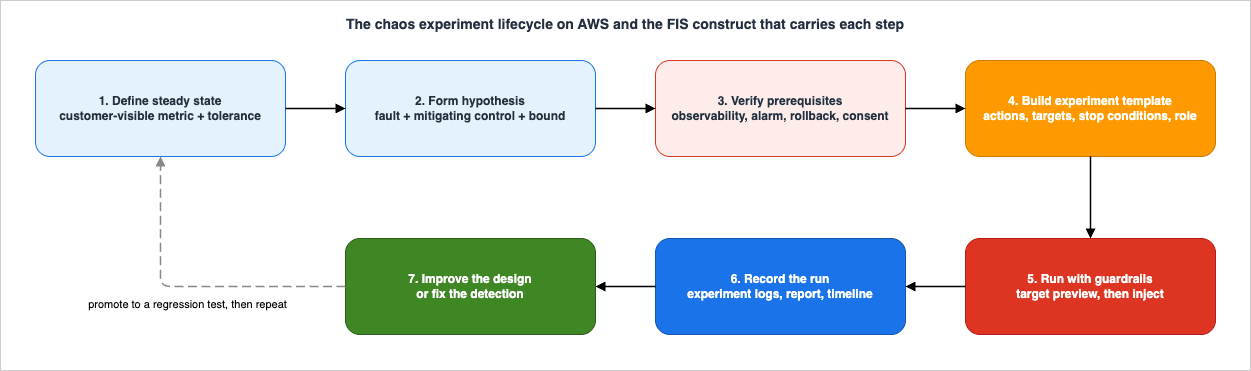
2. From Hypothesis to Experiment
2.1 Steady state comes first
You cannot detect a deviation from normal until you have written down what normal is. AWS puts this before everything else in both the FIS planning guidance and REL12-BP04: "Define steady state as some measurable output of a workload that indicates normal behavior."Two properties make a steady-state definition usable:
- It is an output, not an internal. The Principles of Chaos Engineering guidance AWS quotes says to "focus on the measurable output of a system, rather than internal attributes of the system." CPU utilization is an internal. Successful checkout rate is an output. If your steady state is expressed in internals, a passing experiment tells you the internals held, not that customers were unaffected.
- It admits a tolerance. AWS is explicit that "steady state does not necessarily mean no impact to the workload when a fault occurs, as a certain percentage in faults could be within acceptable limits." A steady state of "zero errors" is not a steady state, it is a wish. The AWS example is concrete: "a steady state of a payments system can be defined as the processing of 300 TPS with a success rate of 99% and round-trip time of 500 ms."
In practice, define steady state as a small set — three to five — of metrics that a customer would notice changing, each with a numeric band. That set becomes three things at once: the baseline you observe during the experiment, the source of your stop conditions (Section 6), and the pass/fail criterion for the hypothesis.
2.2 The hypothesis format
AWS publishes two templates for a hypothesis, one in the FIS User Guide and one in the Well-Architected Reliability pillar. They differ in emphasis and it is worth having both.The FIS planning guide states it as a bound:
Iffault injection actionis performed, thebusiness or technical metric impactshould not exceedvalue.
The Reliability pillar states it as a mechanism plus a bound:
Ifspecific faultoccurs, theworkload nameworkload willdescribe mitigating controlsto maintainbusiness or technical metric impact.
The second form is the more demanding one, and it is the one to use. Naming the mitigating control is what makes the hypothesis falsifiable in an interesting way. "If we stop one instance, error rate stays under 0.01%" can pass for the wrong reason — perhaps the instance was carrying no traffic. "If we stop one instance, the load balancer health check removes it from rotation and Auto Scaling replaces it, keeping the increase in 5xx below 0.01%" fails if the error rate held but the health check took four minutes, and that failure is the one you wanted to find.
The AWS-published examples in REL12-BP04 are worth reading in full because they show the level of specificity to aim for. One of them: "If a single Amazon EC2 instance failure occurs, the order system's Elastic Load Balancing health check will cause the Elastic Load Balancing to only send requests to the remaining healthy instances while the Amazon EC2 Auto Scaling replaces the failed instance, maintaining a less than 0.01% increase in server-side (5xx) errors (steady state)." Another states recovery times explicitly: nodes recover within five minutes, pods are scheduled and processing traffic within eight minutes, alerts fire within three minutes.
Note what that last clause does. "Alerts will fire within three minutes" makes the alerting itself part of the hypothesis. Most teams treat detection as infrastructure for the experiment rather than as a subject of it. It is a subject of it, and it is frequently the thing that fails.
2.3 What not to experiment on
The strongest single piece of guidance in REL12-BP04 is a prohibition: "An experiment should by default be fail-safe and tolerated by the workload. If you know that the workload will fail, do not run the experiment."This is counterintuitive to people who arrive at chaos engineering expecting to find bugs by breaking things. The reasoning AWS gives is that chaos engineering exists to find known-unknowns (things you are aware of but do not fully understand) and unknown-unknowns (things you are neither aware of nor understand). "Experimenting against a workload that you know is broken won't provide you with new insights."
There is a second, harder-nosed reason. An experiment you expect to fail is not an experiment, it is an outage you scheduled. It burns the organizational credit that lets you run experiments at all. If a design review already tells you the single-AZ database will not survive an AZ event, fix it; do not prove it in production.
The practical filter, applied before every experiment:
- Do you have a stated hypothesis with a mitigating control named in it?
- Do you believe the hypothesis will hold?
- If it does not hold, do you know what the impact is bounded by?
If the answer to any is no, the work to do is design work, not experiment work.
3. Prerequisites Before Any Injection
FIS makes injecting a fault easy. That is precisely the risk: the easy part is available before the hard parts are done. This section is the gate.3.1 The checklist
Nothing on this list is optional, and each entry has a specific consequence when it is missing.| Prerequisite | Why it gates the experiment | What happens without it |
|---|---|---|
| Steady state defined numerically | It is the hypothesis and the stop condition | The experiment cannot fail, so it proves nothing |
| Metrics visible at the granularity you are injecting at | You inject into one AZ, one cell, one function | A fleet-wide average hides a dead subset; you record "no impact" while a subset was down |
| At least one CloudWatch alarm on a customer-visible signal | It becomes the stop condition (Section 6) | The experiment runs to full duration regardless of harm |
| A synthetic monitor on the user-facing path | AWS calls this "a user proxy" and recommends including it | You measure your own components, not the user's experience |
| A rollback path, automated or manual | Some faults do not self-heal | You end the experiment with the system in an unexpected failed state |
| A named person who can stop it | Automation is not the only abort mechanism | Nobody feels authorized to intervene while the graph goes bad |
| Agreement from operations, support, and service owners | AWS says to "verify that all responsible parties are well-informed" | Your experiment is indistinguishable from an incident, and gets escalated as one |
| A pre-production run of the same template | AWS: verify "that thresholds for stop conditions activate as expected" | You discover the stop condition does not work by needing it |
The FIS planning guide compresses the whole list into one sentence that is worth quoting because it is unusually direct for AWS documentation: "We strongly recommend that you have an excellent monitoring and alerting program in place before you begin. Without it, you won't be able to understand or measure the impact of your experiments, which is critical to sustainable fault injection practices."
If instrumentation is the gap, that is its own project — my AWS Observability Architecture Guide covers the instrumentation layer, and the alarm layer that stop conditions are built from is the subject of my companion guide, Amazon CloudWatch Alarm Design and Alert Fatigue.
3.2 Observability at the grain of the injection
This is the prerequisite most often declared satisfied when it is not. The test is not "do we have dashboards." The test is: can the dashboard distinguish the subset you are about to break from the subset you are not?If you inject into one Availability Zone, you need per-AZ metrics; a Regional aggregate will average a completely dead zone into a mild dip. If you inject into 25% of instances, you need per-instance or per-target-group visibility. If you inject into one cell of a cell-based architecture, you need the cell dimension on your metrics, which is exactly the argument made in my cell-based architecture guide for a different reason. The chaos program inherits that requirement.
A useful pre-flight: before running the experiment, open the dashboard you intend to watch and ask a colleague to point at the graph that would move if the target subset went to zero. If nobody can point at one, the observability prerequisite is not met.
3.3 Reversibility: know what you cannot undo
Faults divide into three classes by how they end, and the class determines how much else you need in place.| Class | Examples | How it ends |
|---|---|---|
| Self-terminating | Latency injection, packet loss, API error injection, CPU or memory stress, paused replication | The action's duration elapses and the fault is removed |
| Reversed by a post action | aws:ec2:stop-instances with startInstancesAfterDuration restarts the instances FIS stopped | FIS performs the reversal as part of the action |
| Not reversible | aws:ec2:terminate-instances | Nothing brings the instance back; recovery depends entirely on your automation |
The FIS documentation names the second class: "Where possible, you can input a rollback configuration (also referred to as a post action) within the action parameters. A post action returns the target to the state that it was in before the action was run." It also states the limit plainly: "Not all actions can support post actions. For example, if the action terminates an Amazon EC2 instance, you cannot recover the instance after it has been terminated."
Two operational details follow from the post action being part of the action rather than a separate step. First, the post action runs after the action duration elapses, and "the time it takes to complete the post action might cause a delay between the specified action duration and the beginning of the next action." A five-minute action is not necessarily a five-minute slot. Second, the post action restores the resource, not the system. Restarting a stopped instance does not re-register it with a service discovery mechanism, refill its cache, or reverse whatever your own automation did in response — Auto Scaling may already have replaced it.
aws:ec2:stop-instances has a completeIfInstancesTerminated parameter precisely for the case where "Auto Scaling groups may terminate stopped EC2 instances under their control before this action completes."The rule to apply: for every experiment, write down the manual recovery procedure even when a post action exists. REL12-BP04 says the same thing — "Whether automated (such as using AWS FIS) or manual, these post actions should be part of a playbook that describes how to detect and handle failures."
3.4 Consent, and the difference between a drill and an incident
The technical prerequisites are the easy half. The other half is that a fault injection in production is operationally indistinguishable from an incident unless people have been told. REL12-BP04 spells out the communication requirement: "Communicate with appropriate teams such as the operations teams, service reliability teams, and customer support to let them know when experiments will be run and what to expect. Give these teams communication tools to inform those running the experiment if they see any adverse effects."That last clause is the one to build for. The communication channel has to run from the observers to the experimenters, not only outward. An experiment with a broadcast announcement and no return path has told everyone what is happening and given nobody a way to say "stop."
Multi-account experiments get part of this from the platform: when a multi-account experiment runs, "target accounts with affected resources will be notified via their AWS Health dashboards, providing awareness to users in the target accounts." That is useful, and it is not a substitute for telling people in advance.
4. Experiment Templates
4.1 The six components
An FIS experiment template is the blueprint; an experiment is one execution of it. The User Guide lists six components:| Component | What it is |
|---|---|
| Actions | The faults to run. Can run in a specified order or simultaneously |
| Targets | The AWS resources a given action is carried out on |
| Stop conditions | "The CloudWatch alarms that define a threshold at which your application performance is not acceptable" |
| Experiment role | The IAM role that grants FIS permission to act on your behalf |
| Experiment report configuration | Optional. Enables a PDF report of the experiment |
| Experiment options | Account targeting, empty-target behavior, and (at start time) actions mode |
In JSON, a template is this shape:
{
  "description": "string",
  "targets": {},
  "actions": {},
  "stopConditions": [],
  "roleArn": "arn:aws:iam::123456789012:role/AllowFISActions",
  "experimentReportConfiguration": {},
  "experimentOptions": {},
  "tags": {}
}
Two of those six are safety rails by construction (
stopConditions, and the parts of targets that bound scope), one is the permission boundary (roleArn), and one — tags — turns out to be a safety rail too, because it is what IAM conditions key off when you decide who may run this template in production (Section 7.3).4.2 Actions
An action has this shape:{
"actions": {
"stopOneInstance": {
"actionId": "aws:ec2:stop-instances",
"description": "Stop a single instance and restart it after two minutes",
"parameters": {
"startInstancesAfterDuration": "PT2M"
},
"startAfter": ["establishBaseline"],
"targets": {
"Instances": "oneAppInstance"
}
}
}
}The identifier format is
aws:service-name:action-type. Parameters are action-specific; durations are ISO 8601 strings in the API (PT1M is one minute) and entered as seconds, minutes, or hours in the console.Four behaviors of the action set are worth internalizing because they shape experiment design:
startAfteris the whole sequencing model. An action with nostartAfterruns at the start of the experiment; an action withstartAfterwaits for the named actions to complete. There is no scheduler beyond this, and it is enough to build the common shapes: a baselineaws:fis:waitbefore injection, staggered faults, anaws:cloudwatch:assert-alarm-statecheck placed after the fault to verify that detection worked.- An action can appear only once per experiment. "You can run an action only once during an experiment. To run the same AWS FIS action more than once in the same experiment, add it to the template multiple times using different names." Escalating stress is therefore several named actions chained with
startAfter, which is exactly how the scenario library's staged EBS latency scenarios are built. - Duration means "the action is considered complete after this elapses," not necessarily "the fault lasts this long." For near-instantaneous actions such as terminating an instance, AWS notes the duration is the window during which "stop conditions are monitored." That distinction matters: a terminate action with a five-minute duration is five minutes of guarded observation, not five minutes of terminating.
- Post actions extend the slot. As covered in Section 3.3, the post action runs after the duration and can delay the next action.
Two actions in the catalog are not faults at all and belong in most well-built templates:
aws:fis:wait— does nothing for a duration. Used to establish a clean pre-injection baseline inside the experiment's own timeline, and to space stages apart.aws:cloudwatch:assert-alarm-state— "Verifies that the specified alarms are in one of the specified alarm states." It takes up to five alarm ARNs and a list of expected states (OK,ALARM,INSUFFICIENT_DATA). Placed before the fault with expected stateOK, it refuses to proceed from an unhealthy baseline. Placed after the fault with expected stateALARM, it turns "did detection work?" into a pass/fail step of the experiment rather than something a human has to remember to check.
That second use is the cheapest upgrade available to most experiment templates and almost nobody applies it.
4.3 Targets
A target definition is where the blast radius is actually set:{
"targets": {
"oneAppInstance": {
"resourceType": "aws:ec2:instance",
"resourceTags": { "ChaosReady": "true", "Env": "staging" },
"filters": [
{ "path": "State.Name", "values": ["running"] },
{ "path": "Placement.AvailabilityZone", "values": ["us-east-1a"] }
],
"selectionMode": "COUNT(1)"
}
}
}Resources can be identified four ways — resource IDs (ARNs), resource tags, resource filters, and resource parameters — and then narrowed by the selection mode.
Selection modes, per the User Guide:
| Mode | Behavior |
|---|---|
ALL | Run the action on all identified targets. This is the default |
COUNT(n) | Run on n targets, "chosen from the identified targets at random" |
PERCENT(n) | Run on n percent of targets, chosen at random |
Filters are queries against the canonical
Describe output for the resource type — DescribeInstances for aws:ec2:instance, DescribeDBClusters for aws:rds:cluster, and so on. Each filter is a path and a list of values. The logic is worth memorizing because getting it backwards silently changes your scope: multiple filters are ANDed ("all filters have to be matched for a resource to be selected"), multiple values within one filter are ORed, and multiple tags are ANDed ("all specified tags have to be present on the target resource for it to be selected"). Paths must be written in Pascal case — AvailabilityZone, not availabilityZone — "even if the output of the Describe action for a resource is in camel case."Resource parameters are the cleanest way to scope to an Availability Zone for the resource types that support them:
availabilityZoneIdentifier on aws:ec2:ebs-volume, aws:ec2:subnet, aws:eks:pod, and aws:elasticache:replicationgroup; availabilityZoneIdentifiers on aws:rds:db; writerAvailabilityZoneIdentifiers on aws:rds:cluster; cluster and service on aws:ecs:task; functionQualifier on aws:lambda:function.FIS currently supports 24 target resource types, from
aws:arc:zonal-shift-managed-resource through aws:s3:bucket. Each action declares exactly one supported resource type, and a target definition must specify exactly one.4.4 Where target selection surprises people
Five documented behaviors account for most of the "the experiment did not do what I expected" reports.Targets are resolved once, at the start. "AWS FIS identifies all targets at the start of the experiment, before starting any of the actions in the actions set. AWS FIS uses the target resources that it selects for the entire experiment." An instance launched mid-experiment is not in scope; an instance that disappears mid-experiment was still counted.
Zero resolved targets fails the whole experiment by default. "If no targets are found, the experiment fails." This default (
emptyTargetResolutionMode: fail) is usually what you want, because it turns a typo in a tag key into a loud failure rather than a silent no-op that you record as a successful experiment. Setting it to skip makes actions with no resolved targets complete immediately with status skipped and the experiment continue — appropriate for broad scenario templates that span resource types you may not all have, and a hazard for narrow experiments, where it converts a targeting mistake into a green result.PERCENT(n) rounds down, and can round to nothing. "If you have an odd number of resources and specify 50%, AWS FIS rounds down. For example, if you add five Amazon EC2 instances as targets and scope to 50%, AWS FIS rounds down to two instances. You can't specify a percentage that is less than one resource. For example, if you add four Amazon EC2 instances and scope to 5%, AWS FIS can't select an instance." Percent-based selection in a small fleet is therefore unreliable in both directions: it can quietly under-inject, or resolve to zero and (with the default mode) fail the experiment.ARNs and tags cannot be mixed, and ARNs are capped at five. "You can't specify both a resource ID and a resource tag for the same target," nor both a resource ID and a filter, and
resourceArns accepts a maximum of five entries. Tag-based targeting is the only approach that scales, which is why the whole scenario library is built on tags — and why tag hygiene becomes a safety control (Section 12.4).The same resource can be selected twice. "If you define multiple targets using the same target resource type, AWS FIS can select the same resource multiple times." Two independently defined
COUNT(1) targets over the same tag set can land on the same instance, which means a template intended to hit two instances may hit one twice.5. Blast Radius Control
Everything in an FIS experiment that keeps you safe is one of three layers, and each layer can only act at one point in the experiment's life. Confusing them is the most common design error in chaos programs: teams put all their engineering into one layer and assume it covers the others.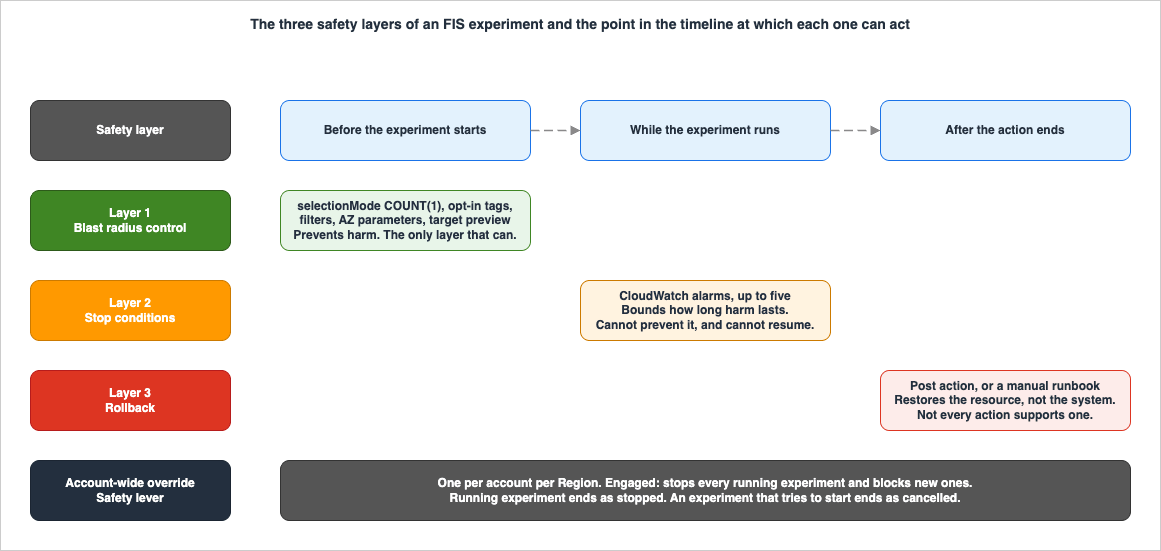
5.1 The dials that bound scope
| Dial | Mechanism | Notes |
|---|---|---|
| How many | selectionMode — COUNT(n) before PERCENT(n) before ALL | COUNT(1) is the right first experiment for almost every fault type |
| Which ones | resourceTags plus filters | Requires an opt-in tag on the resources, so untagged production is out of scope by construction |
| Where | Resource parameters — availabilityZoneIdentifier and friends; subnet-scoped network actions | Aligns the experiment to a real fault isolation boundary |
| For how long | Action duration | Bounded above by the 12-hour per-action quota |
| How much of the traffic | Action-level percentages — percentage on the API-error actions, invocationPercentage on the Lambda actions, readIOPercentage / writeIOPercentage on aws:ebs:volume-io-latency, drainagePercentage on aws:ecs:drain-container-instances | Injects into a fraction of requests rather than a fraction of resources — a finer dial than PERCENT(n) |
| Which account | accountTargeting, defaulting to single-account | Multi-account is opt-in, not accidental |
The last-listed dial is the underused one. Selecting 25% of your instances and selecting 100% of your instances at 25% of invocations are very different experiments: the first tests whether the fleet can lose capacity, the second tests whether the request path can tolerate errors. The
aws:fis:inject-api-* actions and the Lambda invocation actions let you turn the second dial finely, and both of them are gentler starting points than stopping anything.5.2 Use the opt-in tag as the boundary
The pattern that makes tag targeting a genuine control rather than a convention: target on a tag that exists only to mark experiment eligibility, not on a tag that already exists for another purpose.Targeting
Env: production means every production resource is in scope forever, and the scope of your experiments changes whenever someone deploys. Targeting ChaosReady: true means the scope is exactly the set someone deliberately opted in, and expanding scope is a reviewable change to infrastructure code rather than an edit to an experiment template. The AWS scenario library follows this pattern — the AZ Availability: Power Interruption scenario ships with a dedicated AzImpairmentPower tag whose value selects which action applies to the resource (StopInstances, IceAsg, ApiPauseVolume, DisruptSubnet, and so on), and the documentation notes you "can add this tag to your instances or replace the default tag with your own tag in the experiment template."Combine the opt-in tag with an environment filter and an AZ parameter and the scope statement becomes readable in one line: running instances, tagged chaos-eligible, in staging, in one AZ, one of them chosen at random.
5.3 Preview the targets before you inject
FIS has a first-class dry run and it is underused. Setting the actions mode toskip-all starts a real experiment that resolves targets and skips every action:aws fis start-experiment \
--experiment-options actionsMode=skip-all \
--experiment-template-id EXTxxxxxxxxxThe documentation says this lets you verify three things: that the template targets the resources you expect, that your logging configuration is set up correctly, and — for multi-account experiments — that an IAM role is correctly configured for each target account configuration.
It also states two limits, both of which matter:
- It does not verify permissions. "The
skip-allmode does not allow you to verify that you have the necessary permissions to run the AWS FIS experiment and take actions on your resources." A clean preview followed by a failed experiment onAccessDeniedis the expected behavior, not a bug. - The preview is not a promise. "The actual resources that are targeted when you start this experiment may be different from the preview because resources may be removed, updated, or sampled randomly." With
COUNT(n)orPERCENT(n), the selection is random each run — the preview tells you the pool, not the draw.
Preview is also where the empty-target failure mode surfaces cheaply. If the preview resolves zero resources, you have a tagging or filter bug, and you found it without injecting anything.
5.4 Boundaries you already have
The most effective blast radius reduction is architectural rather than configurational, and it was done long before the experiment. An experiment scoped to one Availability Zone is bounded by the AZ's fault isolation properties. An experiment scoped to one cell is bounded by the cell's independence — which is why a cell-based architecture is unusually pleasant to run experiments against: the containment you rely on during the experiment is the same containment the design exists to provide, so the experiment tests the boundary and is protected by it. The same logic applies to tenant boundaries in a multi-tenant system, covered in my AWS SaaS Multi-Tenant Architecture Guide.The corollary is uncomfortable and worth saying: if you cannot bound an experiment to a subset, that is a finding about your architecture, not a reason to run the experiment against everything. A workload with no isolation boundary is a workload where every fault is a total fault, and the appropriate response is to build a boundary, not to inject at full scope and hope.
5.5 Staged expansion
AWS's staging guidance is unambiguous: "Always start experimenting with AWS FIS in a test environment. Never start with a production environment," and separately, "faults should be simulated first on a non-production environment before being run in production." REL12-BP04 adds that when production is used, "running experiments during off-peak times is a good practice to mitigate potential impact when first experimenting in production," and that synthetic traffic against production infrastructure is an option "if using actual customer traffic poses too much risk."The progression, with the exit criteria that let you move to the next stage:
| Stage | Scope | Exit criteria before advancing |
|---|---|---|
| 1. Pre-production | Full scope permitted | The fault produces the expected symptom; the stop condition alarm actually enters ALARM; the rollback works; the dashboard shows the effect |
| 2. Production, minimum scope, off-peak | COUNT(1), or a single-digit request percentage | Hypothesis holds; no stop condition triggered; nothing needed manual intervention; the runbook matched reality |
| 3. Production, representative scope | One AZ, one cell, or a meaningful percentage | Hypothesis holds under repeated runs; detection consistently fires within the stated time |
| 4. Production, scheduled and recurring | Same scope, unattended | Experiment is automated, alarms are stable, results are recorded automatically |
Stage 1's exit criteria are the ones teams shortcut. "The stop condition alarm actually enters
ALARM" is a claim you can only make by driving the metric past the threshold and watching, and it is much cheaper to establish in pre-production than to discover missing in production.6. Stop Conditions
6.1 What a stop condition is, exactly
A stop condition is a CloudWatch alarm ARN attached to the experiment template. FIS watches the named alarms for the duration of the experiment; if one enters the alarm state, FIS stops the experiment.{
"stopConditions": [
{
"source": "aws:cloudwatch:alarm",
"value": "arn:aws:cloudwatch:region:123456789012:alarm:alarm-name"
}
]
}The only other legal value is a declaration that there is none:
{ "stopConditions": [ { "source": "none" } ] }Three properties follow from this design and they are all load-bearing.
A stop condition is exactly as good as the alarm behind it. FIS contributes the wiring; everything about whether the guardrail works — the metric, the threshold, the period, the number of datapoints, the treatment of missing data — is CloudWatch alarm design. The FIS documentation makes the dependency explicit: define steady state first, then "use the steady state to create a CloudWatch alarm that you can use to stop an experiment if your application or service reaches a state where its performance is not acceptable." Composite alarms, anomaly detection, missing-data treatment, and the alert-fatigue problem that determines whether anyone acts on the alarm afterwards are a discipline of their own, and I treat them separately in Amazon CloudWatch Alarm Design and Alert Fatigue.
Stopping is terminal. "If a stop condition is reached during an experiment, you can't resume the experiment." There is no pause. The experiment ends and you start a new one from the template.
There is a latency floor you cannot remove. The alarm has to accumulate enough datapoints to change state before FIS can react. A one-minute-period alarm requiring two datapoints cannot fire in under two minutes no matter how severe the impact. This is not a criticism of the mechanism, it is a design constraint: a stop condition bounds the duration of harm, it does not prevent harm. If two minutes of impact is unacceptable, the answer is a smaller blast radius (Section 5), not a more sensitive alarm.
6.2 Choosing the five
The quota is five stop conditions per experiment template, and it is not adjustable. Five is enough if you spend them deliberately and not enough if you attach every alarm you own. A allocation that works:| Slot | Alarm on | Why it earns a slot |
|---|---|---|
| 1 | The customer-visible success rate or error rate for the affected service | This is the steady state. If only one slot existed, it would be this |
| 2 | A synthetic monitor (canary) on the user-facing path | AWS recommends including "a synthetic monitor (also known as a user canary)… as a user proxy." It is the only signal that does not depend on your own instrumentation being correct |
| 3 | The component you are injecting into | REL12-BP04 asks for "the metric against the components into which you're injecting the fault." Distinguishes "the fault did not take effect" from "the fault took effect and was absorbed" |
| 4 | The blast radius boundary — the neighbouring AZ, cell, or tenant | Detects escape. If the unaffected subset degrades, your isolation is not real and the experiment must end immediately |
| 5 | A downstream dependency that could be damaged by your recovery | Retry storms and failover surges hit dependencies that were never in the target set |
Slot 4 is the one almost nobody configures, and it guards the most consequential failure mode: an experiment that is contained by design but not in fact. The other slots detect that the experiment is working too well; slot 4 detects that the containment you built the whole program on does not hold.
A composite alarm can pack more logic into a single slot when the quota binds, at the cost of making the reason for a stop harder to read afterwards.
6.3 When the stop condition does not fire
Plan for this, because it happens for mundane reasons: the metric goes to no-data instead of bad (a completely dead subset reports nothing at all, and an alarm treating missing data asnotBreaching will sit in OK through a total outage); the alarm's evaluation window is longer than the experiment's duration; the injected fault degrades something the alarm does not measure; or the alarm itself is misconfigured, which is precisely what stage 1 of the progression in Section 5.5 exists to catch.Three independent backstops, in increasing order of scope:
- A human with the authority to stop. Section 9.2 makes this a named role for the duration of the game day.
StopExperimentis one API call. - Duration as an implicit bound. The action duration is itself a guardrail — a two-minute fault whose stop condition never fires still ends in two minutes. Keep durations short until you have evidence the alarms work.
- The safety lever, below.
6.4 The safety lever: the account-wide off switch
The safety lever is a distinct construct from stop conditions and it is scoped much more broadly: "Safety levers are used to stop all running experiments and prevent new experiments from starting… Every AWS account has a safety lever per AWS Region."| Property | Behavior |
|---|---|
| Default state | Disengaged. "If disengaged, FIS experiments are allowed" |
| When engaged | "In-progress experiments are stopped and no new experiments are allowed to start" |
| States | disengaged, engaging (transitional; "the safety lever cannot be changed while in this state"), engaged |
| Effect on a running experiment | Ends in state stopped |
| Effect on an experiment that tries to start | Ends in state cancelled |
| Recovery | "You cannot resume or rerun an experiment that has been stopped or cancelled. However, you can start a new experiment using the same experiment template once the safety lever is disengaged" |
It is operated by ID
default, per account per Region, and requires a reason string:aws fis get-safety-lever --id "default"
aws fis update-safety-lever-state --id "default" \
--state "status=engaged,reason=production-incident-in-progress"The documented use cases are the two that matter: "to prevent FIS experiments during certain time periods or in response to application health alarms."
The second one is the design worth building. Engaging the safety lever automatically when a major incident alarm fires means an unrelated production incident cannot be compounded by a scheduled experiment that starts while responders are already busy. Wire it to a change freeze window and you also get "no experiments during the deployment freeze" for free. The
reason field is not decoration — it is what an operator sees in the console banner and what explains, three weeks later, why a scheduled experiment was cancelled.Note the asymmetry in the resulting states, because it is diagnostically useful. A
stopped experiment was running when the lever was engaged. A cancelled experiment tried to start into an already-engaged lever. If you see cancelled experiments accumulating in a report, someone engaged the lever and did not disengage it, and your regression suite has been silently not running.7. Permissions and Separation of Duties
7.1 The experiment role
FIS acts on your resources by assuming an IAM role that you specify on the template. The trust policy names the service principal:{
"Version": "2012-10-17",
"Statement": [
{
"Effect": "Allow",
"Principal": { "Service": ["fis.amazonaws.com"] },
"Action": "sts:AssumeRole"
}
]
}AWS recommends adding confused-deputy protection, and gives the exact condition block:
aws:SourceAccount set to the experiment owner's account, and aws:SourceArn matching arn:aws:fis:region:account_id:experiment/*.{
"Condition": {
"StringEquals": { "aws:SourceAccount": "account_id" },
"ArnLike": { "aws:SourceArn": "arn:aws:fis:region:account_id:experiment/*" }
}
}There are six AWS managed policies for getting started —
AWSFaultInjectionSimulatorEC2Access, …ECSAccess, …EKSAccess, …NetworkAccess, …RDSAccess, …SSMAccess. They are a starting point and AWS says so: "We recommend that you follow the standard security practice of granting least privilege. You can do so by specifying specific resource ARNs or tags in your policies."Take that seriously, because the experiment role is a role whose entire purpose is to break production, and a managed policy grants the action across every matching resource in the account. Scope the destructive permissions by tag or by ARN so that the role's blast radius is bounded by IAM even when the template's targeting is wrong. This is the layer that survives a typo in a tag filter.
There is also a per-action detail worth knowing:
aws:ec2:stop-instances with startInstancesAfterDuration needs kms:CreateGrant if the instances have encrypted EBS volumes — otherwise the stop succeeds and the restart does not, and your "reversible" experiment is not.7.2 Author, approver, runner
The interesting property of the FIS IAM surface is that the permission to define an experiment and the permission to run one are separate actions on separate resources, which means separation of duties is expressible without any process tooling on top.| Role | Key permissions | Resource scoping available |
|---|---|---|
| Author | fis:CreateExperimentTemplate, fis:UpdateExperimentTemplate + iam:PassRole | The action ARN (arn:aws:fis:*:*:action/aws:ec2:stop-instances), the template ARN, and the specific role that may be passed |
| Reviewer | fis:Get*, fis:List* | Read-only across templates and experiments |
| Runner | fis:StartExperiment, fis:StopExperiment | The specific template ARN, or a tag condition |
The author-side scoping is the part people miss. AWS's own example grants template creation for one action only:
{
  "Effect": "Allow",
  "Action": ["fis:CreateExperimentTemplate"],
  "Resource": [
    "arn:aws:fis:*:*:action/aws:ec2:stop-instances",
    "arn:aws:fis:*:*:experiment-template/*"
  ]
}
That is a meaningful control: a team can be permitted to author instance-stop experiments and not permitted to author network-disruption or Region-isolation experiments. Note that
iam:PassRole is separately required — which means the set of experiment roles an author may attach is itself a control point, and the cleanest structure is one experiment role per blast-radius tier (a staging role, a production-limited role, a production-wide role) with iam:PassRole granted accordingly.7.3 Tags as the production gate
fis:StartExperiment supports aws:ResourceTag conditions on the template, and AWS gives the example directly:{
"Effect": "Allow",
"Action": "fis:StartExperiment",
"Resource": "arn:aws:fis:*:*:experiment-template/*",
"Condition": {
"StringEquals": { "aws:ResourceTag/Purpose": "Test" }
}
}This turns a template tag into an authorization boundary. Tag templates by blast-radius tier, grant the broad group
StartExperiment only on the low tier, and reserve the higher tiers for a smaller group. Retagging a template to raise its tier is then an auditable change to a resource rather than an informal decision, and — because CreateExperimentTemplate and UpdateExperimentTemplate support aws:RequestTag and aws:TagKeys conditions — you can prevent authors from tagging their own templates into the higher tier.The result is a workable approval model with no workflow engine: authors write templates and tag them at the tier they believe is correct; a reviewer with tagging permission promotes them; a runner group can start only what has been promoted. Every step is a CloudTrail event.
7.4 Multi-account experiments
For workloads that span accounts within a Region, FIS supports multi-account experiments with three concepts:- Orchestrator account — "acts as a central account to configure and manage the experiment in the AWS FIS Console, as well as to centralize logging. The orchestrator account owns the AWS FIS experiment template and experiment."
- Target accounts — accounts holding resources that the experiment can affect.
- Target account configurations — one per target account, each specifying
accountId,roleArn, and an optionaldescription.
{
  "accountId": "123456789012",
  "roleArn": "arn:aws:iam::123456789012:role/AllowFISActions",
  "description": "fis-ec2-test"
}
Permissions work by IAM role chaining: each target account has a role holding the permissions for the actions, trusting the orchestrator account; the orchestrator's experiment role is permitted to assume those target roles and trusts FIS.
Three operational points from the AWS best practices:
- Use AZ IDs, not AZ names. "When you target resources in one or more availability zones using parameters or filters, you should specify an AZ ID, not an AZ name. The AZ ID is a unique and consistent identifier for an Availability Zone across accounts." AZ names are per-account mappings;
us-east-1ais a different physical zone in different accounts, and an AZ experiment built on names will hit different zones in different accounts and produce nonsense. - Use consistent tags across target accounts, since resolution runs per account.
- Action quotas apply per account, so the per-experiment target caps are evaluated per target account rather than globally.
And the awareness property from Section 3.4: target accounts are notified through their AWS Health dashboards. Set expectations for those account owners before the first run, or the notification arrives as a surprise during someone else's business hours.
8. Experiment Catalog: What to Start With
8.1 The action surface
The following counts are from the AWS FIS Actions reference as published on 2026-08-04. The inclusion criterion is "listed in the AWS FIS Actions reference in the User Guide" — this is not a claim of completeness, and the authoritative list for your account and Region is the console or theaws fis list-actions command, which is what AWS itself points to. Actions are added frequently; the FIS Document History page lags the Actions reference, so do not use the history page to conclude that an action does not exist.* You can sort the table by clicking on the column name.
| Group | Actions | What it lets you exercise |
|---|---|---|
| Fault injection (API errors) | 3 | Internal, throttling, and unavailable errors injected into calls made by a target IAM role, at a chosen percentage, for ec2 and kinesis namespaces |
| Recovery | 1 | aws:arc:start-zonal-autoshift — exercise ARC zonal autoshift as a recovery mechanism through FIS |
| Wait | 1 | aws:fis:wait — baselines and spacing |
| Amazon CloudWatch | 1 | aws:cloudwatch:assert-alarm-state — assert detection worked |
| Amazon DynamoDB | 1 | Pause global table replication |
| Amazon Aurora DSQL | 1 | Controlled connection failures at a chosen percentage |
| Amazon EBS | 2 | Pause volume I/O; inject read and write I/O latency at chosen percentages |
| Amazon EC2 | 6 | Reboot, stop (with optional restart), terminate, Spot interruption, and insufficient-capacity errors on both the EC2 API and Auto Scaling paths. aws:ec2:send-spot-instance-interruptions is the verification mechanism for the interruption-tolerance design I cover in Designing for Spot Interruptions on AWS |
| Amazon ECS | 8 | Container instance drain, task stop, and in-task CPU, I/O, process, and network faults |
| Amazon EKS | 9 | Pod delete, in-pod CPU, memory, I/O and network faults, node group termination, and Chaos Mesh / Litmus integration |
| Amazon ElastiCache | 1 | Interrupt AZ power for a replication group |
| Amazon Kinesis Data Streams | 2 | Provisioned throughput exceeded; expired iterator |
| AWS Lambda | 3 | Startup delay, invocation error, and modified HTTP integration response |
| Amazon MemoryDB | 1 | Pause multi-Region cluster replication |
| Network | 4 | Subnet connectivity denial by scope, cross-Region route-table and transit gateway disruption, and VPC endpoint disruption |
| Amazon RDS | 2 | Cluster failover; DB instance reboot with optional forced failover |
| Amazon S3 | 1 | Pause bucket replication |
| AWS Systems Manager | 2 | Run an SSM document on instances; start an Automation runbook |
| AWS Direct Connect | 1 | Disrupt BGP sessions on target virtual interfaces |
| Total | 50 | 19 groups |
Two entries deserve a note because they are the extension points.
aws:ssm:send-command runs a Systems Manager document on target instances, which is how you inject faults AWS does not model natively — AWS ships pre-configured documents such as AWSFIS-Run-CPU-Stress, AWSFIS-Run-Memory-Stress, and AWSFIS-Run-Disk-Fill, and you can author your own. aws:ssm:start-automation-execution runs an Automation runbook, which is how you invoke a recovery procedure as a step of the experiment rather than as a manual follow-up. REL12-BP04 warns about the alternative: "We discourage the use of custom scripts for chaos experiments, unless the scripts have the capabilities to understand the current state of the workload, are able to emit logs, and provide mechanisms for rollbacks and stop conditions where possible."The
aws:network:disrupt-connectivity action has a scope parameter that is worth reading as a catalog in itself: all, availability-zone, vpc, dynamodb, s3, s3express, and prefix-list. The service-endpoint scopes let you answer "what does this application do when it cannot reach S3?" without touching the application. Note the documented mechanism, which has an operational implication: FIS clones the subnet's network ACL, adds deny rules to the clone (tagged managedbyFIS=true), associates it for the duration, then deletes the clone and restores the original association. When the scope is not all, the maximum number of entries in network ACLs is 20, and for availability-zone scope the maximum number of subnets targetable in a VPC is 30.8.2 A progression
Order matters more than coverage when starting. Each rung below teaches you something needed for the next, and the first rungs are chosen to be almost boring.| # | Experiment | Verifies | Why here |
|---|---|---|---|
| 1 | aws:cloudwatch:assert-alarm-state on your steady-state alarms, expected OK | That your baseline is healthy and your alarms are readable by FIS | Injects nothing. Proves the plumbing and the role work |
| 2 | aws:ec2:reboot-instances, COUNT(1), staging | Health check removal and reinstatement | Smallest real fault. AWS's own suggestion: start with "small, simple experiments, such as running the aws:ec2:stop-instances action on one target" |
| 3 | API throttling injection at a low percentage into a role | Retry, backoff, and jitter in your client code | Tests the code path that turns a transient error into an outage. No resource is harmed |
| 4 | aws:lambda:invocation-add-delay or aws:lambda:invocation-error at a low invocationPercentage | Timeout handling, dead-letter behavior, downstream tolerance | Request-level granularity; the documentation notes that setting a latency above the function timeout "will also provide access to a high fidelity timeout event" |
| 5 | aws:network:disrupt-connectivity scoped to s3 or dynamodb | Behavior when a dependency is unreachable | Isolates the dependency question from the compute question |
| 6 | aws:rds:failover-db-cluster or aws:rds:reboot-db-instances with forceFailover | Connection pool recovery, DNS re-resolution, application reconnect | The classic finding: the database recovers in seconds and the application does not. Design context in my Amazon RDS and Aurora High Availability Guide |
| 7 | aws:ebs:volume-io-latency at a modest percentage | Gray failure — slow rather than absent storage | The first experiment that produces degradation rather than failure, which is much harder to detect. Which volume characteristics make the symptom plausible is covered in my Amazon EBS Performance Engineering guide |
| 8 | AZ-scoped composite: stop instances plus deny subnet connectivity plus insufficient-capacity errors, one AZ | Whether the multi-AZ design actually works end to end | The scenario library builds this for you (Section 8.3) |
| 9 | aws:network:route-table-disrupt-cross-region-connectivity or the transit gateway equivalent | Multi-Region isolation and failover | Only meaningful once the AZ story holds |
Rung 6 is where most first-time programs find their first real defect. Rung 7 is where they find their worst one, because gray failures are the failures that alarms miss and that my Route 53 Health Check and Failover Pitfalls covers from the detection side.
8.3 The scenario library
The scenario library is a set of AWS-authored, pre-populated experiment definitions: "Scenarios are created and owned by AWS, and minimize undifferentiated heavy lifting by providing you with a group of pre-defined targets and fault actions (e.g., stopping 30% of instances in an autoscaling group) for common application impairments."Its structural property matters for automation planning: the library is console-only. "Scenarios are provided through a console-only scenario library and run using an AWS FIS experiment template… scenarios are not complete experiment templates and can not be directly imported into AWS FIS." To use one in a pipeline, you create a template from the scenario in the console and export that template.
As of 2026-08-04 the reference lists:
| Family | Scenarios |
|---|---|
| Amazon EC2 | EC2 stress: instance failure, Disk, CPU, Memory, Network Latency |
| Amazon EKS | EKS stress: Pod Delete, CPU, Disk, Memory, Network latency |
| AZ and Region | AZ Availability: Power Interruption, AZ: Application Slowdown, Cross-AZ: Traffic Slowdown, Cross-Region: Connectivity |
| Amazon EBS | EBS: Sustained Latency, Increasing Latency, Intermittent Latency, Decreasing Latency |
The four AZ-and-Region scenarios are the ones you cannot practically build yourself in an afternoon, and AZ Availability: Power Interruption is the flagship. It composes ten actions to "induce the expected symptoms of a complete interruption of power in an Availability Zone," including loss of zonal compute, no re-scaling of compute in the AZ, subnet connectivity loss, RDS failover, ElastiCache failover, impaired access to S3 Express One Zone directory buckets, and unresponsive EBS volumes. Its shape is instructive:
- It runs in two phases: "By default, the scenario injects power interruption symptoms for 30 minutes and then, for an additional 30 minutes, injects symptoms that may occur during recovery." Modeling the recovery period as part of the fault is something hand-built experiments almost never do, and recovery is where capacity-shortage effects appear.
- Network connectivity is disrupted for only 2 minutes, deliberately: long enough to "force timeouts and DNS refreshes for most applications," then released so that "subsequent recovery of regional service DNS" can occur while the AZ remains unavailable. That is a fidelity decision you would not think to make.
- It pauses new capacity in the AZ via both
aws:ec2:api-insufficient-instance-capacity-errorandaws:ec2:asg-insufficient-instance-capacity-error, reproducing the part of a real AZ event that hurts most — you cannot simply replace what you lost. - "By default, actions for which no targets are found will be skipped," i.e. it ships with
emptyTargetResolutionMode: skip, which is correct for a broad scenario and is the opposite of what you want for a narrow one.
The two gray-failure scenarios added on 2025-11-12, AZ: Application Slowdown and Cross-AZ: Traffic Slowdown, target the class of impairment that is hardest to detect: degradation rather than outage. If your alarms are all binary — up or down — these are the scenarios that will expose it.
For each scenario, the console's Details tab is the part to read: AWS documents "how individual aspects of the scenario are approximated" and, "where applicable… what metrics to use as stop conditions and to provide observability to learn from the experiment." That is guidance you would otherwise have to derive yourself.
9. Running a Game Day
A game day is the organizational counterpart to the technical machinery above, and Well-Architected treats it as a distinct best practice: REL12-BP05 Conduct game days regularly. Its stated purpose is not to find bugs in the system — that is REL12-BP04's job — but "to perform the same actions the team would perform as if the event actually occurred," and thereby to test "systems, processes, and team responses."The desired outcome AWS describes is cultural: "You run resilience game days on a consistent, scheduled basis. These game days are seen as a normal and expected part of doing business."
9.1 Preparation
REL12-BP05's implementation steps begin before the day: identify the business-critical services in scope, "catalog and map the people, processes, and technologies that support those services," set the agenda, and prepare the automation.A concrete pre-flight for the technical side:
- The experiment template exists, is version-controlled, and has run successfully in pre-production.
- A target preview (
actionsMode=skip-all) has been run against the production template and resolved the expected resources. - Stop conditions are attached and each alarm has been observed to transition to
ALARMat least once. - Experiment logging is enabled to CloudWatch Logs or S3.
- If evidence is needed, the experiment report configuration is set with the dashboard that will be watched.
- Rollback is either configured as a post action or written as a runbook step with a named owner.
- Announcements have gone to operations, support, and dependent service owners, with a stated window and a return channel.
- The safety lever state has been checked — a lever left engaged from a previous incident will cancel the experiment and waste the window.
Item 8 sounds trivial and is the single most common way a game day starts twenty minutes late.
9.2 Roles on the day
Assign these explicitly, by name, before starting. Rotating them across game days is how the practice spreads beyond the person who built the templates.| Role | Responsibility |
|---|---|
| Facilitator | Owns the timeline, calls each phase, keeps the room on the agenda |
| Operator | The only person who starts and stops experiments. One pair of hands on the API |
| Observers | Watch dashboards and alarms. Explicitly not the same people as the responders |
| Responders | The on-call rotation, responding through the normal runbooks as if this were real |
| Scribe | Timestamps everything: injection start, first alarm, first human notice, first action, recovery, end |
| Abort authority | One named person who can call a halt without discussion. Often but not necessarily the facilitator |
The separation of observers from responders is what makes the exercise measure detection. If the people watching the graphs are the people who would be paged, you have removed the detection step from the drill and are only testing the remediation.
The scribe's timestamps are the most valuable artifact the day produces. Time-to-detect (injection → first alarm), time-to-notice (injection → a human is aware), and time-to-mitigate (injection → the corrective action started) are the three numbers that tell you whether the resilience investment reached the operational layer, and none of them appear in any AWS-generated output. Only the scribe captures them.
9.3 The abort decision
Decide the abort criteria before injecting and write them down. Under pressure, "should we stop?" becomes a debate, and the debate consumes the time you were trying to save. Pre-committed criteria — a stop condition fired; a customer-visible metric moved beyond an agreed bound that no alarm covers; the responders lost situational awareness; a dependency outside the target set degraded; anything unexpected that nobody can explain — turn it into a check.The last one deserves emphasis. Not understanding what is happening is itself sufficient grounds to abort. An experiment producing effects you cannot explain has already delivered its finding; continuing it adds risk and no information.
Note the mechanics:
StopExperiment ends the experiment, and it cannot be resumed. Post actions that are configured still need to complete, and manual rollback steps still need to be executed — stopping the experiment is not the same as restoring the system, and the runbook has to say who does what after the stop.9.4 What gets recorded
REL12-BP04 is specific that results must be persisted: "Results for fault injection experiments must be captured and persisted. Include all necessary data (such as time, workload, and conditions) to be able to later analyze experiment results and trends."Four sources, each with a different job:
- Experiment logs. Enabled per template, delivered to CloudWatch Logs or S3, on schema version 2. The log types are
experiment-start,target-resolution-start,target-resolution-detail,target-resolution-end,action-start,action-end,action-error, andexperiment-end. The target-resolution records are the ones you will want most often, because they record exactly which resources were selected — the answer to "what did it actually hit?" that a randomCOUNT(n)selection otherwise leaves ambiguous. CloudWatch Logs delivery is "in less than one minute"; S3 delivery "can take several minutes." - The experiment report. A PDF summarizing the actions, optionally including snapshot graphs of every
metricwidget on one specified CloudWatch dashboard, annotated with the experiment start and end times. Configuration isoutputs.s3Configuration(bucket and prefix),dataSources.cloudWatchDashboards(limited to one dashboard), and the windowspreExperimentDuration(up to 30 minutes) andpostExperimentDuration(up to 2 hours), both defaulting to 20 minutes. AWS positions it as evidence — it makes it "easier to produce evidence of resilience testing" — and states two limits worth respecting: reports are not generated for experiments that arecancelledor run as a target preview, and "the report should not be used for troubleshooting failed experiments. Instead, use experiment logs to troubleshoot experiment errors." AWS also recommends S3 Object Lock on the destination so that reports cannot be deleted or overwritten for a fixed period or indefinitely, which is what makes them usable as compliance evidence. - The scribe's timeline. As above: the human-side numbers no automated source captures.
- The written verdict on the hypothesis. One paragraph: did it hold, and what changed as a result. Section 10.
An experiment report needs
cloudwatch:GetDashboard, cloudwatch:GetMetricWidgetImage, s3:GetObject, and s3:PutObject on the experiment role, plus kms:GenerateDataKey and kms:Decrypt if the destination bucket uses a customer managed key.10. Turning Results into Design Changes
10.1 Verifying the hypothesis
The verification step is where the experiment stops being an activity and becomes engineering. The guidance AWS quotes from the Principles of Chaos Engineering is a warning against the natural instinct to investigate internals: "Focus on the measurable output of a system, rather than internal attributes of the system… By focusing on systemic behavior patterns during experiments, chaos engineering verifies that the system does work, rather than trying to validate how it works."Four outcomes, and each has a different follow-up:
| Outcome | Meaning | Follow-up |
|---|---|---|
| Steady state held; the named mitigating control engaged as described | The hypothesis is confirmed | Automate the experiment as a regression test (10.3) |
| Steady state held; the control did not engage, or engaged late | Confirmed for the wrong reason | Investigate. Often the fault did not reach what you thought, or redundancy elsewhere masked it. The target-resolution-detail log records tell you what was hit |
| Steady state violated | The hypothesis is refuted | This is the valuable result. REL12-BP04: "If steady state was not maintained, then investigate how the workload design can be improved to mitigate the fault" |
| Detection did not fire within the stated time | The system may be fine; the operation is not | Fix the alarm, then re-run. This finding is as important as a design defect and is much cheaper to fix |
The last row is the one to watch for over a program's first year. Detection defects outnumber design defects, they are cheaper to remediate, and they are invisible to every form of review that does not involve actually breaking something.
10.2 From postmortem to experiment
The most efficient source of experiment ideas is the incident history you already have. REL12-BP04 names its absence as an anti-pattern: "Neglecting to use past post-incident analyses when determining which faults to experiment with."The mechanism to build is a standing rule: every incident retrospective produces at least one candidate experiment, and the corrective action is not closed until that experiment exists and passes. This changes what a corrective action means. "Added an alarm on replica lag" is a claim. "Added an alarm on replica lag, and experiment
EXT-replica-lag-alarm injects lag and asserts the alarm enters ALARM within two minutes" is a verified control that will keep being verified after everyone has forgotten the incident.Public postmortems work as a source too, and are the only way to get experiment ideas for failure modes you have not yet suffered. That is the practical use of the case studies in my AWS Postmortem Case Studies and Design Lessons: each published root cause suggests a fault you can inject in your own system, and the FIS action catalog covers a surprising fraction of them — dependency unavailability, control-plane impairment during recovery, capacity shortage during failover, replication pause. For the triage side of the same loop, my Incident Triage Flowcharts for Network, Database, and Application Failures is what the responders in Section 9.2 should be exercising.
AWS also points to two structured methods for generating the fault list from the design rather than from history: the Operational Readiness Review whitepaper, and Failure Modes and Effects Analysis (FMEA), which "provides you with a framework for performing a component-level analysis of failures and how they impact your workload." Use design-derived faults to find unknown-unknowns and history-derived faults to prevent recurrence; you need both.
10.3 The experiment as a regression test
The single sentence in REL12-BP04 that changes how a program is run: "If a system is able to withstand these disruptions, the chaos experiment should be maintained as an automated regression test."A passing experiment is not finished, it is promoted. The finding decays otherwise — the design that survived the fault last quarter has since been refactored, the alarm threshold was adjusted during an unrelated incident, the retry policy changed in a library upgrade. Nothing about a one-time pass survives contact with a year of change.
AWS is also specific that this should happen in two places, not one: "Not running chaos experiments both as part of your CI/CD pipeline, as well as outside of deployments" is listed as an anti-pattern. Pipeline experiments catch regressions introduced by a change; scheduled experiments catch regressions introduced by everything that is not a change — dependency drift, data growth, traffic-shape shifts, quota consumption.
11. Operating a Program, Not a One-Off
11.1 Prioritizing
With 50 actions and an unbounded set of components, the binding constraint is attention. REL12-BP04's prioritization method is two steps: enumerate the faults each element of your resilient design is meant to mitigate, then "assign a priority to each fault," starting with a coarse high/medium/low based on the frequency of the fault and the impact of the failure.For frequency, "analyze past data for this workload when available. If not available, use data from other workloads running in a similar environment." For impact, "the larger the scope of the fault, generally the larger the impact," modulated by what the workload does. Post-incident analyses inform both.
A practical addition: prioritize by how recently the mechanism was exercised. A failover path that has genuinely fired in production last month is better covered than one that has never fired, regardless of how the frequency-times-impact arithmetic comes out. Rank by untested-mechanism age and you get a queue that automatically surfaces the dormant automation that has silently rotted.
11.2 Scheduling and CI/CD
FIS integrates with EventBridge Scheduler for one-time and recurring schedules, created from the FIS console: "FIS now integrates with EventBridge Scheduler and creates rules on your behalf." One documented limitation to plan around: "Experiment Scheduler with AWS Fault Injection Service is not available in AWS GovCloud (US-East) and AWS GovCloud (US-West)."The pipeline integration has no special machinery —
StartExperiment is an API call, and the design questions are about gating: which stage runs the experiment, whether a failure blocks promotion, and how you avoid running experiments during a deploy window. That last one is the safety lever's second use case (Section 6.4).For scheduled unattended experiments, three conditions should hold before you let one run without a human watching:
- The same template has run attended, repeatedly, without a stop condition firing.
- The stop conditions have been observed to fire when driven past threshold.
- There is an alert on experiment failure — which is the next section.
11.3 Events and evidence
FIS emits an EventBridge event on every experiment state change:detail-type of "FIS Experiment State Change", source of aws.fis, carrying the experiment ID, the template ID, and both the old and new state. AWS notes these are emitted "on a best effort basis" and delivered "in near real time," which is fine for notification and not a basis for a control loop that must not miss an event.The eight experiment states are
pending, initiating, running, completed, stopping, stopped, failed, and cancelled. Three of them should page someone:stopped— a stop condition fired or a human intervened. Something went further than expected. This is the highest-value signal the program produces.failed— "due to an error, such as insufficient permissions or incorrect syntax." Usually an experiment that never ran, which means your regression coverage silently dropped.cancelled— the safety lever was engaged. Somebody's freeze is silently disabling your program.
Routing
completed to a low-noise channel and the other three to an actual alert is the minimum viable program observability, and it is a handful of lines of EventBridge rule.11.4 Where Resilience Hub fits
AWS Resilience Hub sits above FIS: it assesses a workload and recommends the experiments, rather than executing faults itself. The next generation of Resilience Hub reached general availability in May 2026, adding an application model of systems, user journeys, and services; dependency discovery; generative-AI-powered failure mode assessment; and AWS Organizations integration.The part relevant here is very recent. On August 3, 2026, AWS announced recommended resilience tests in Resilience Hub: pre-configured tests "based on your service's architecture, configuration, and resilience policy," which use FIS to inject the faults, then evaluate "whether your service recovers within your defined recovery objectives." The announcement states the tests cover Availability Zone impairment, Regional impairment, and dependency failure; that each test "automatically targets resources in the service, injects the required faults, produces a pass or fail outcome based on alarm evaluation and recovery objectives, then generates a detailed test report"; and that the capability is available in 15 Regions — US East (N. Virginia), US East (Ohio), US West (Oregon), Canada (Central), Europe (Ireland), Europe (London), Europe (Frankfurt), Europe (Paris), Europe (Stockholm), Asia Pacific (Mumbai), Asia Pacific (Singapore), Asia Pacific (Sydney), Asia Pacific (Tokyo), Asia Pacific (Seoul), and South America (São Paulo).
Note what that changes and what it does not. It removes the work of deciding which experiments a service needs and of wiring pass/fail criteria to recovery objectives — genuinely the tedious part. It does not remove any of the prerequisites in Section 3, and it does not decide that experiments are permitted in your production environment. The pass/fail evaluation is driven by alarms, so the alarm design remains the load-bearing element. And the recommended set is a floor rather than a ceiling: it is derived from the service's architecture and policy, so the faults specific to your own dependencies, your own past incidents, and your own operational assumptions still have to be added by hand.
Use it as an on-ramp and a coverage check, not as a replacement for a hypothesis.
11.5 Quotas that shape the program
Every FIS quota below is documented as not adjustable, which makes them design inputs rather than support cases. Values are per account per Region, checked 2026-08-04.* You can sort the table by clicking on the column name.
| Quota | Default | Consequence for program design |
|---|---|---|
| Stop conditions per experiment template | 5 | Forces deliberate allocation (Section 6.2). Composite alarms are the pressure valve |
| Actions per experiment template | 20 | Caps how elaborate one scenario can be; large drills become several templates |
| Parallel actions per experiment | 10 | Composite AZ scenarios are near this; sequence with startAfter beyond it |
| Active experiments | 5 | Concurrency ceiling for pipeline-triggered experiments across all teams in the account |
| Experiment templates | 500 | Generous, but template sprawl is a real failure mode; tag and prune |
| Experiment duration | 12 hours | Long-running soak experiments must be chained |
| Action duration | 12 hours | Same |
| Completed experiment data retention | 120 days | Anything you need beyond four months must be exported. Experiment reports in S3 and experiment logs are the durable copies |
The retention quota is the one that catches programs out. FIS is not your system of record; after 120 days the experiment data is gone from FIS, and only what you delivered to S3 or CloudWatch Logs survives. If experiments are part of a compliance story, the S3 destination — with Object Lock, per AWS's recommendation — is the artifact that matters, not the FIS console.
12. Failure Modes and Anti-Patterns
REL12-BP04 lists five anti-patterns outright:- Designing for resiliency, but not verifying how the workload functions as a whole when faults occur.
- Never experimenting under real-world conditions and expected load.
- Not treating your experiments as code or maintaining them through the development cycle.
- Not running chaos experiments both as part of your CI/CD pipeline, as well as outside of deployments.
- Neglecting to use past post-incident analyses when determining which faults to experiment with.
REL12-BP05 adds the organizational ones, including "You run a game day, but you don't inform all relevant stakeholders," "You don't incorporate lessons learned from game days into your recovery processes," and — the one that ends programs — "You blame teams for failures or bugs."
Below are the ones I would add, with the mechanism spelled out.
12.1 The experiment with "source": "none"
Running without a stop condition is a supported configuration and there is exactly one legitimate use for it: a pre-production environment where the entire environment is the blast radius and nothing outside it can be harmed. Anywhere else, "source": "none" means the only thing that ends the experiment is the clock or a human, and the human is watching a dashboard they built themselves.The tell is that it is easy to reach accidentally. The console does not require a stop condition, and the scenario library's own guidance is a recommendation rather than a requirement — "We recommend defining one or more optional Stop conditions." An experiment template that reaches production with
none will not announce itself.The control: make it structural rather than cultural. Templates are infrastructure as code; a policy check in the pipeline that rejects a production-tagged template with
stopConditions[0].source == "none" costs an afternoon and never forgets.12.2 Injecting before you can see
Covered in Section 3 as a prerequisite; it belongs here as a failure mode because of how it manifests. The experiment does not blow up. It produces a clean result, gets recorded as a pass, and the team gains confidence that is not backed by anything. A fleet-wide average with one dead AZ in it looks like a small dip. A dashboard without a per-cell dimension shows a healthy aggregate over a completely failed cell.This is worse than not experimenting, because it converts an unknown into a false known.
The control: the pre-flight from Section 3.2 — before injecting, someone must point at the specific graph that will move.
12.3 Full scope on the first production run
The pattern is usually not recklessness, it is that the pre-production run went well andALL is the default selection mode. The staging environment absorbed the fault because it has no real traffic, no cache to lose, no connection pools under pressure, and no downstream consumers.The control:
COUNT(1) in production, always, on the first run of any template — regardless of how well it went in staging. Widen only after evidence. Section 5.5's staged progression exists for this.12.4 Tag drift silently widening the blast radius
The subtle one, and the reason it is subtle is that nothing in the experiment changes. The template still saysChaosReady: true and COUNT(1). But the tag has spread: someone added it to a module that was copied into another service, an automation propagated it, a resource that was staging-only got promoted. The pool that COUNT(1) samples from has grown to include something you never intended, and a random selection will eventually pick it.The failure is invisible until the draw goes badly, and then it looks like an incident with no change behind it.
The controls, in order of strength: scope the experiment role's destructive permissions by tag or ARN so IAM bounds the damage even when targeting is wrong (Section 7.1); require the AZ or environment filter in addition to the tag so a stray tag alone cannot qualify a resource; alert on the resolved-target count from the
target-resolution-detail log records, since a pool that grew is visible there before it is visible anywhere else; and run a target preview before each production experiment.12.5 Trusting emptyTargetResolutionMode: skip on a narrow experiment
The skip mode is correct for broad scenario templates spanning resource types you may not have, and the AZ Availability: Power Interruption scenario ships with it for exactly that reason. Applied to a narrow, purpose-built experiment, it converts a typo into a green result: the tag key is misspelled, zero resources resolve, the action is skipped, the experiment completes, and the report says the experiment ran.The control: default to
fail for any template with a single purpose, and treat skip as a property of scenario-derived templates only. If you must use skip, alert on resolved_targets_count being zero in the logs.12.6 Assuming a post action restores the system
Section 3.3's mechanics, restated as the failure:startInstancesAfterDuration restarts the instance, and the team writes "reversible" in the design review. What it does not do is re-warm the cache, re-establish the connection pool, undo the Auto Scaling replacement that already happened, or reverse whatever your own automation did while the instance was down. And for actions without post action support — aws:ec2:terminate-instances most obviously — there is nothing to restore at all.The control: classify every action in every template into the three classes in Section 3.3, and write the manual recovery procedure for classes two and three regardless of whether a post action exists.
12.7 A stop condition that measures your components instead of your users
An alarm on backend error rate is an alarm on the thing you injected into. If the fault causes the load balancer to shed requests before they reach the backend, backend error rate can improve during the experiment while users see failures. The signal moves the wrong way.The control: slot 1 and slot 2 in Section 6.2 — the customer-visible success rate and the synthetic canary — are non-negotiable. Component metrics are diagnostic, not protective.
12.8 Experiments that leave no durable trace
The experiment ran, someone screenshotted a dashboard into a chat channel, and the thread scrolled away. Four months later the FIS retention quota expires and even the record that it ran is gone. Nobody can answer "when did we last verify the failover?" and the honest answer becomes "we don't know," which is operationally identical to never having tested it.The control: experiment logging to S3 or CloudWatch Logs on every template; experiment reports to a dedicated S3 prefix with Object Lock; and the scribe's timeline stored with them. Section 9.4.
12.9 A program with no results and no consequences
The last one is the terminal condition. Experiments run on schedule, reports accumulate, and nothing in the architecture ever changes as a result. This happens when experiments are owned by a platform team with no authority over the services they test, when findings are filed as low-priority tickets, or when the program's success metric is the number of experiments run.The control: measure the program by findings remediated, not by experiments executed. A quarter with three experiments and three design changes is a healthy program. A quarter with three hundred experiments and no changes is theatre — and the honest reading of it is that either the experiments are too weak to find anything, or the findings are not reaching anyone who can act.
And REL12-BP05's blameless clause is the precondition for all of it. A game day whose findings can be used against the team that owns the service will produce experiments carefully designed not to find anything.
13. Frequently Asked Questions
Do I need FIS, or can I write scripts?
You can write scripts, and REL12-BP04 explains what they have to do before they are equivalent: understand the current state of the workload, emit logs, and provide rollback and stop-condition mechanisms. AWS discourages custom scripts that lack these and recommends starting with "an established service like AWS FIS that allows you to perform experiments with a clearly defined scope and safety mechanisms." The practical asymmetry is that the fault is trivial to script and the safety rails are not — a script has no stop condition unless you build one, no target preview, no account-wide off switch, no IAM-expressible separation between authoring and running, and no CloudTrail record of who broke what. Those are the parts FIS supplies. Some faults are also simply not reachable from outside the platform: anInsufficientInstanceCapacity response, a paused S3 or DynamoDB replication, or a BGP session drop on a Direct Connect virtual interface cannot be scripted from your side at all.Can I run experiments in production?
Yes, and AWS's guidance is that you should eventually — REL12-BP04 asks for experiments "in environments that are in or as close to production as possible," and REL12-BP05 treats production game days as the goal. But the same documentation is equally firm about the order: "Always start experimenting with AWS FIS in a test environment. Never start with a production environment." Production experiments are the destination, not the starting point, and the prerequisites in Section 3 plus the staged progression in Section 5.5 are what earn the right to run them. If any prerequisite is missing, the correct answer today is no.How do I choose stop condition thresholds?
Derive them from the steady state, not from the fault. The threshold should sit at the edge of the band you declared acceptable in Section 2.1 — if steady state is "99% success," the stop condition fires below 99%, not at some level chosen because it feels dramatic. Then validate it the only way it can be validated: in pre-production, drive the metric past the threshold and confirm the alarm entersALARM and that FIS stops the experiment. An unvalidated stop condition is not a guardrail, it is a hope. Also check the alarm's missing-data treatment, because a subset that dies completely stops reporting rather than reporting badly.What is the difference between a stop condition and the safety lever?
Scope and granularity. A stop condition is attached to one experiment template and stops that experiment when a specific CloudWatch alarm fires. The safety lever is per account per Region, stops all running experiments, and prevents new ones from starting until it is disengaged. Stop conditions are the automated guardrail for one experiment's blast radius; the safety lever is the organization's off switch — engage it during a production incident, during a change freeze, or whenever someone needs to be sure nothing is injecting faults. Experiments stopped by the lever end asstopped; experiments that try to start while it is engaged end as cancelled.How many stop conditions should I attach?
At least one, and the quota is five per template. Section 6.2 gives an allocation that works: the customer-visible steady-state metric, a synthetic canary, the injected component, the blast radius boundary, and a downstream dependency. If you can only build one, build the customer-visible one. If you need more logic than five slots allow, a composite alarm consolidates several conditions into one slot, at the cost of making the reason for a stop harder to read after the fact.Can FIS target resources in another account?
Yes, within a Region. Set theaccountTargeting experiment option to multi-account and add a target account configuration — account ID, IAM role ARN, optional description — for each target account. Permissions work by IAM role chaining: the orchestrator account's experiment role assumes a role in each target account. Two things to get right: use AZ IDs rather than AZ names when scoping to Availability Zones, because AZ names map to different physical zones in different accounts; and expect target accounts to be notified through their AWS Health dashboards when the experiment runs, so tell those account owners in advance.How do I know which resources an experiment actually hit?
The experiment logs. Thetarget-resolution-detail and target-resolution-end records capture the resolved targets and the resolved-target count for each target definition. This is not a nicety — with COUNT(n) or PERCENT(n) the selection is random per run, so without the logs you cannot state afterwards which resources were affected. Enable experiment logging on every template. If the resolved set is large, note that total_pages greater than one means the resolved targets span multiple records.Can I put the scenario library in my pipeline?
Not directly. The scenario library is a console-only experience, and AWS states that scenarios "are not complete experiment templates and can not be directly imported into AWS FIS." The supported path is to create an experiment template from the scenario in the console, fill in the missing parameters, and then export that template for use in your automation. Practically, this means the library is best treated as a source of well-designed starting templates rather than as a runtime component — and the AZ and Cross-Region scenarios are worth exporting precisely because reproducing their fidelity by hand is a substantial piece of work.Does an experiment report replace a postmortem?
No, and AWS narrows its purpose explicitly: the report exists to make it "easier to produce evidence of resilience testing," and "should not be used for troubleshooting failed experiments. Instead, use experiment logs to troubleshoot experiment errors." The report captures what FIS did and what the metrics on one dashboard looked like around it. It does not capture time-to-detect, time-to-notice, whether the runbook matched reality, or what the responders found confusing — the findings that make a game day worth running. Those come from the scribe (Section 9.2) and belong in a written retrospective.How often should experiments run?
Two cadences, because they catch different regressions. Automated experiments that have already passed should run continuously — in the CI/CD pipeline against changes, and on a schedule outside deployments; AWS lists running them in only one of those two places as an anti-pattern. Game days involving people are a separate rhythm, and REL12-BP05's desired outcome is that they run "on a consistent, scheduled basis" and are "seen as a normal and expected part of doing business." Quarterly per critical service, with the roles rotating, is a defensible starting cadence. The frequency that matters more than either number is the one in Section 11.1: no critical recovery mechanism should go a long time without being exercised.What if my workload is not on the FIS action list?
Two extension points cover most of the gap.aws:ssm:send-command runs a Systems Manager document on target instances — AWS ships pre-configured ones for CPU, memory, disk, and network faults, and you can author your own — and aws:ssm:start-automation-execution runs an Automation runbook, which is also how you invoke a recovery procedure as a step of the experiment. Beyond that, aws:eks:inject-kubernetes-custom-resource coordinates Chaos Mesh or Litmus experiments, and REL12-BP04 notes AWS FIS "integrates with Chaos Mesh and Litmus Chaos, allowing you to coordinate fault injection workflows among multiple tools." If none of those fit, an application-level fault injected by a feature flag, with the FIS stop conditions and permission model wrapped around it via an SSM document, is usually a better structure than a standalone script.14. Summary
Chaos engineering on AWS is a safety-engineering problem wearing a destruction-engineering costume. FIS makes the fault trivial; everything that makes the practice sustainable is what you build around it.- The hypothesis is the deliverable, not the fault. Define steady state as customer-visible output with a numeric tolerance, then state the hypothesis in the form that names the mitigating control — because that is the form that fails for interesting reasons. And do not run experiments you expect to fail: if you know it is broken, fix it (Section 2).
- The prerequisites are the program. Observability at the grain of the injection, an alarm that can serve as a stop condition, a rollback path, a named abort authority, and informed stakeholders with a return channel. Injecting before these exist produces false confidence, which is worse than no confidence (Section 3).
- Three safety layers, and each acts at a different moment. Blast radius control acts before the experiment and is the only one that prevents harm. Stop conditions act during and only bound its duration. Rollback acts after and only restores what it can. A design that relies on any single layer has left the other two moments unguarded (Sections 5 and 6).
- Stop conditions are CloudWatch alarms, so their quality is your alarm design. Five per template, not adjustable. Spend them on the customer-visible metric, a synthetic canary, the injected component, the blast radius boundary, and a downstream dependency. Validate every one in pre-production by driving it past the threshold — an unvalidated guardrail is a hope (Section 6).
- The safety lever is the organization's off switch, not a bigger stop condition. One per account per Region, engaged during incidents and freezes, ideally automatically. Watch for accumulating
cancelledexperiments: that means someone engaged it and your regression coverage has quietly stopped (Section 6.4). - Separation of duties is expressible in IAM, with no workflow tooling.
CreateExperimentTemplatecan be scoped to individual action ARNs,iam:PassRolecontrols which blast-radius tier of experiment role can be attached, andStartExperimentaccepts tag conditions on the template. Author, promote, run — three permissions, three groups, all of it in CloudTrail (Section 7). - Targeting is where the blast radius is really set, and it has sharp edges. Targets resolve once at start; zero targets fails by default and that default is your friend;
PERCENTrounds down and can round to nothing; ARNs cap at five and cannot mix with tags. Use an opt-in tag that exists only to mark experiment eligibility, and preview withactionsMode=skip-allbefore every production run — remembering that preview does not verify permissions (Sections 4 and 5). - Start smaller than feels useful. Assert alarms, then reboot one instance, then inject API errors at a low percentage, then Lambda faults, then a dependency, then a database failover, then latency, then an AZ.
COUNT(1)on the first production run of every template, without exception (Sections 5.5 and 8.2). - A passing experiment is promoted, not finished. Automate it as a regression test in the pipeline and on a schedule outside deployments. Every incident retrospective should produce a candidate experiment, and the corrective action is not closed until that experiment exists and passes (Section 10).
- Records outlive the platform's memory. FIS retains completed experiment data for 120 days and the quota is not adjustable. Experiment logs to S3 or CloudWatch Logs, reports to a dedicated S3 prefix with Object Lock, and the scribe's timeline — time-to-detect, time-to-notice, time-to-mitigate — are the durable artifacts, and the last of those exists in no automated output (Sections 9.4 and 11.5).
- Measure the program by findings remediated. Experiments executed is a vanity metric. A quarter with three experiments and three design changes beats a quarter with three hundred and none — and the blameless posture REL12-BP05 asks for is the precondition, because a program that punishes findings will stop producing them (Section 12.9).
The place to start is smaller than most plans assume. Pick one recovery mechanism you depend on and have never seen fire. Write down what "working" means as a number. Build the alarm. Run it in staging with
COUNT(1) and watch whether the alarm fires. That single loop is the whole discipline, and everything in this article is scaffolding for repeating it safely at increasing scope.For the adjacent decisions this article delegates: choose a recovery strategy in my AWS Disaster Recovery Strategies Guide, build the containment boundary that makes experiments safe to run in my Cell-Based Architecture and Shuffle Sharding on AWS, implement the most demanding topology in my AWS Multi-Region Active-Active Architecture Guide, audit the workload against the pillars with my AWS Well-Architected Practical Self-Audit Checklist, source experiment ideas from real incidents in my AWS Postmortem Case Studies and Design Lessons, and — for the workloads where these questions arrive with their own failure modes — see my LLM Inference Resilience Patterns on AWS and Agent Reliability Engineering Design Guide.
15. References
- AWS Fault Injection Service User Guide - What is AWS Fault Injection Service?
- AWS Fault Injection Service User Guide - Planning your AWS FIS experiments
- AWS Fault Injection Service User Guide - AWS FIS experiment template components
- AWS Fault Injection Service User Guide - Actions for AWS FIS
- AWS Fault Injection Service User Guide - AWS FIS Actions reference
- AWS Fault Injection Service User Guide - Targets for AWS FIS
- AWS Fault Injection Service User Guide - Stop conditions for AWS FIS
- AWS Fault Injection Service User Guide - Safety Levers for AWS FIS
- AWS Fault Injection Service User Guide - Experiment options for AWS FIS
- AWS Fault Injection Service User Guide - Generate a target preview from an experiment template
- AWS Fault Injection Service User Guide - IAM roles for AWS FIS experiments
- AWS Fault Injection Service User Guide - AWS Fault Injection Service policy examples
- AWS Fault Injection Service User Guide - Working with multi-account experiments for AWS FIS
- AWS Fault Injection Service User Guide - Prerequisites for multi-account experiments
- AWS Fault Injection Service User Guide - Experiment report configurations for AWS FIS
- AWS Fault Injection Service User Guide - Experiment logging for AWS FIS
- AWS Fault Injection Service User Guide - Monitor AWS FIS experiments using Amazon EventBridge
- AWS Fault Injection Service User Guide - View your experiments
- AWS Fault Injection Service User Guide - Scheduling experiments
- AWS Fault Injection Service User Guide - Working with the AWS FIS scenario library
- AWS Fault Injection Service User Guide - Scenarios reference
- AWS Fault Injection Service User Guide - AZ Availability: Power Interruption
- AWS Fault Injection Service User Guide - Quotas and limitations for AWS Fault Injection Service
- AWS Fault Injection Service User Guide - Document history
- AWS Fault Injection Service API Reference - CreateExperimentTemplate
- AWS Fault Injection Service API Reference - ExperimentOptions
- AWS Fault Injection Service API Reference - ExperimentState
- Service Authorization Reference - Actions, resources, and condition keys for AWS Fault Injection Service
- AWS Well-Architected Reliability Pillar - REL12-BP04 Test resiliency using chaos engineering
- AWS Well-Architected Reliability Pillar - REL12-BP05 Conduct game days regularly
- AWS Resilience Hub User Guide - Resilience testing
- AWS What's New - AWS Resilience Hub now provides recommended resilience tests
- AWS What's New - AWS announces general availability of the next generation of AWS Resilience Hub
- AWS What's New - AWS Fault Injection Service (FIS) launches new test scenarios for partial failures
- AWS Prescriptive Guidance - Resilience lifecycle framework: Stage 4, Operate
- AWS Architecture Blog - Build Your Own Game Day to Support Operational Resilience
- Amazon Builders' Library - Avoiding fallback in distributed systems
- Amazon Builders' Library - Minimizing correlated failures in distributed systems
- Amazon Builders' Library - Implementing health checks
- Amazon Builders' Library - Automating safe, hands-off deployments
- Amazon Builders' Library - Ensuring rollback safety during deployments
- Amazon Builders' Library - Instrumenting distributed systems for operational visibility
- Amazon Builders' Library - Building dashboards for operational visibility
- Amazon Builders' Library - Static stability using Availability Zones
- Amazon CloudWatch User Guide - Using Amazon CloudWatch alarms
- Amazon S3 User Guide - Locking objects with Object Lock
References:
Tech Blog with curated related content
Written by Hidekazu Konishi