Load Testing on AWS - Which Policy Actually Applies, Why the Load Generator Runs Out First, and What a One-Minute Metric Hides
First Published:
Last Updated:
The first thing suspected is the system under test. Perhaps it lacked capacity, was not warmed up enough, or had a setting wrong. But there are three ways a load test can lie to you, and all three sit ahead of the system under test. The load did not arrive. The shape of the load was wrong. The number being read was not the system under test's. All of them are recorded as a success in the test result.
This article is not a guide to running load tests on AWS. AWS itself provides two official documents outlining that process. What this article covers is what takes effect ahead of the system under test, both before the procedure and during it. There are three such things. Which AWS document governs your test. Where the ceilings on the load generator itself sit. And what the number in front of you actually measured. §3, §4, and §6 take them in that order.
Those three overlap with the three ways above. A load that does not arrive has its cause in a ceiling on the load generator. A load of the wrong shape has its cause in a misread test type, and in what a load generator is. A number read wrongly has its cause in the granularity of the measurement. §2 holds the test types.
One more thing belongs up front. A load testing environment is a second production system, built in a hurry, run once, and never itself load tested. It has quotas, it has network ceilings, and it has a policy agreement with AWS. While you may have investigated the system under test, no one has investigated this environment.
The technical information in this article has been reviewed in relation to the following AWS resources, as of August 27, 2026: AWS Customer Support Policy for Penetration Testing, Amazon EC2 Testing Policy, DDoS Simulation Testing Policy, Amazon CloudFront Developer Guide, Amazon VPC User Guide, Amazon CloudWatch User Guide, Amazon ECS Developer Guide, Distributed Load Testing on AWS Implementation Guide, Performance Testing Journey Guide, and the AWS Well-Architected Framework. The wording of these policies gets revised. Pull them up again at the time you read this. This article does not discuss pricing.
Table of Contents
- 1. When a Load Test That Passed Proves Nothing
- 2. Which of the Eight Test Types You Are Actually Running
- 3. More Than One Document Governs a Load Test
- 4. The Load Generator Reaches a Ceiling First
- 5. Warming the Target Belongs to Other Articles
- 6. The Number You Read Is Not Always the Target's
- 7. Two AWS Documents With Similar Names
- 8. Applying Load and Fault at the Same Time
- 9. What Goes Wrong
- 10. Frequently Asked Questions
- 11. Summary
- 12. References
1. When a Load Test That Passed Proves Nothing
1.1 The Situation This Article Assumes
This article assumes the perspective of someone who has been assigned to conduct load testing prior to the official release. It is the stage after the decision to test has been made, not the stage where that decision is made.The first difficulty in that position is not a shortage of general material on load testing. That material is in AWS's Performance Testing Journey Guide and in each of the Well-Architected pillars. The real challenge is that no one can answer these two specific questions: At what scale does it become necessary to involve AWS? And, can your load generator actually produce the load required for that scale?
The first question has no answer because the answer is not in one place. More than one AWS document states whether a load test is permitted. The starting point is also outside
docs.aws.amazon.com. Furthermore, two of these documents contradict each other. §3 exists to draw that map.The second has no answer because the load generator is not treated as a production system. The capacity of the system under test is estimated in advance, and quota increases are requested for it. Few teams have done the same for the load generator. §4 addresses this issue.
1.2 The Boundary With the Existing Articles
This article does not cover the following. Each of them is owned as a subject by an existing article.| Existing article | What it covers |
|---|---|
| How Elastic Load Balancing Scales - Scaling Rate, Capacity, and Load Balancer Capacity Unit Reservation | Preparation on the load balancer side. It covers capacity unit reservation, the split between scaling rate and total capacity, DNS propagation and node turnover, and the sharding thresholds. This article does not cover warming a load balancer. |
| AWS Lambda Concurrency and Scaling Guide - Reserved and Provisioned Concurrency, Throttling, and Event Source Scaling | How concurrency scales, reserved and provisioned concurrency, throttling, and scaling per event source. This article does not cover how Lambda keeps up with the load. |
| Amazon DynamoDB Capacity and Global Tables Guide - Capacity Modes, Auto Scaling, Warm Throughput, and Multi-Region Design | Capacity modes, Auto Scaling, warm throughput, and multi-Region design. This article does not cover how DynamoDB capacity keeps up with the load. |
| Chaos Engineering on AWS with AWS Fault Injection Service - Experiment Design, Stop Conditions, and Safety Rails | Designing the test that breaks things. Defining steady state, forming the hypothesis, setting stop conditions, and building the safety rails. This article covers the test that imposes load, and places only the point where the two are combined, in §8. |
| Amazon CloudWatch Alarm Design and Alert Fatigue - Composite Alarms, Anomaly Detection, Metric Math, and Metric Cardinality | Designing alarms and statistics. Selecting appropriate percentile statistics, handling cases with low sample sizes, and implementing composite alarms. This article covers only how a test result gets misread, not the design of the alarm. |
| AWS Service Quotas - A Practical Cheat Sheet for Major AWS Services | How to check quotas and the default values for major services. This article names only the quotas that bind on the load generator side. |
| Cell-Based Architecture and Shuffle Sharding on AWS - Blast Radius Reduction Patterns for Large-Scale Workloads | How to derive the maximum size of a cell from quotas, and whether a measured test result or a quota decides it. This article does not cover cell design. |
| Web Performance Checklist for Core Web Vitals - LCP, INP, and CLS | Measuring perceived performance from the browser's perspective. This article focuses on the server-side and is distinct from measuring performance for actual users. |
| VPC Design Review Checklist - CIDR, Subnets, Transit Gateway | Designing CIDR and subnets. This article covers only the conditions under which ports run out on the load generator's path. |
| AI-Assisted Security Testing on AWS - What You Approve, What You Can Only Stop, and What the Findings List Hides by Default | Acceptance and approval of the security assessment itself. This article covers where load testing sits under the policy, not the security assessment process. |
| What AWS Transform Automates and What Stays Human - Agentic and Self-Directed Paths, the Handoff Points That Are Designed In, and What Functional Equivalence Testing Actually Covers | What was moved. The point where the agent finishes the conversion and the point where people pick it up. |
| Transaction Isolation on AWS Databases - Same Level Name, Different Anomalies, and the Statement That Changes Nothing | What quietly breaks after the migration. The anomalies that article covers appear in proportion to the level of concurrency, so they cannot be observed without the load this article is about. |
| Synthetic Monitoring and Real User Monitoring on AWS - What a Canary Run Proves, What a Real Session Proves, and What Neither One Can Tell You | Measuring without generating load — a canary probing on a schedule, and the sessions real users actually had. This article generates the load; that article names why a canary must not be repurposed as a load generator. |
| Continuous Profiling on AWS - Which Clock the Flame Graph Is Showing You, What Runtime Metrics Cannot Replace, and What Sampling Never Sees | Where the time goes inside the process while the load is applied. This article stops at the numbers the generator and CloudWatch report; that article opens the process. |
1.3 Three Questions This Article Answers
The first is whether your load test needs prior notice to AWS. The answer, in most cases, is no. The range in which that holds is narrow. Outside it there are tests that require a submission, and tests that are not permitted even with one. AWS's own documents also disagree on this point. §3 holds the answer.The second is whether the load you aimed for actually reached the system under test. There are four reasons it might not, and every one of them sits on the load generator side. Three of the four are recorded in the test results as symptoms of the system under test, either as connection errors or as degraded response times. The test results alone cannot separate a slow system from a congested load generator. §4 holds the answer.
The third is what the number in front of you actually measured. The numbers the load generator reports and the numbers CloudWatch reports do not agree, even for the same window of the same run. The aggregation granularity differs, the way the statistic is built differs, and the retention differs. §6 holds the answer.
2. Which of the Eight Test Types You Are Actually Running
2.1 The Eight Types AWS Lists
Load testing is used as a catch-all term. AWS breaks it down in the third stage of the Performance Testing Journey Guide, and the count there is eight.The term "load test" is often used as a catch-all, but there are eight
distinct test types, each answering a different question about your
system. Running the wrong type wastes time and produces misleading
confidence.The eight names, the question each one answers, the duration, and the occasion for running it follow. The durations and the occasions are all as the same guide states them.
| Test type | Question it answers | Rough duration | When the guide says to run it |
|---|---|---|---|
Smoke Test | Does the system fundamentally work? | 1 to 2 minutes | With each deployment; before running more extensive tests. |
Load Test | Can the system handle peak expected traffic? | 15 to 60 minutes | With each release. |
Baseline Test | What is the system's performance under normal conditions? | 15 to 30 minutes | After infrastructure changes; to establish a baseline for detecting deviations. |
Stress Test | Where does the system break? | Until failure | Quarterly, or after architectural changes. |
Endurance (Soak) Test | Does the system degrade over time? | 4 to 24 hours | Monthly; after memory leak fixes. |
Scalability Test | Does the system scale linearly? | 30 minutes per step | After changes to Auto Scaling configurations. |
Spike Test | Can the system handle sudden spikes in traffic? | 5 to 15 minutes | Before flash sales or campaigns. |
Volume Test | What happens as the volume of data increases? | 30 to 60 minutes | Before data migrations or bulk processing operations. |
This classification is presented in this article not for the sake of being exhaustive, but because a different type changes both how AWS's policy treats it and what the load generator has to be. It is relevant in three places.
Stress Test ramps the load until something breaks. It therefore comes closest to the policy line in §3. Endurance (Soak) Test runs for 4 to 24 hours. The wear on the load generator side described in §4 therefore shows up most readily there. Spike Test finishes in 5 to 15 minutes. Against the one-minute metrics of §6, the peak is therefore reduced to a handful of points.2.2 Three Ways the Choice Goes Wrong
The guide names the errors people make when selecting a type. Three of them bear directly on the subject of this article.Only performing
Load Test. Handling the expected peak is established. What happens past that peak is not. In the guide's words, a team without a Stress Test learns its breaking point from its customers.Confusing
Spike Test and Stress Test. A Spike Test jumps to a high value and comes back. A Stress Test, on the other hand, gradually increases the load to find the system's limits. The questions being asked are different. What arrives after a flash sale or an email blast has the shape of the former. It does not have the shape of the latter.Skipping
Endurance (Soak) Test. Issues such as memory leaks, connection pool exhaustion, thread starvation, and log bloat are all time-dependent and do not surface in a 15-minute test.2.3 A Test Too Short to Trigger Anything
The same guide is explicit about duration as well.A 2 minute load test does not exercise Auto Scaling, connection pool
recycling, or JIT compilation warm-up. Most load tests need a minimum of
15 minutes at steady state (after ramp-up) to produce meaningful results.
Soak tests need a minimum of 4 hours to catch time-dependent degradation.This sentence overlaps with the subject of this article for two reasons. First, Auto Scaling does not run in a short test, which means the system under test is evaluated without ever having the opportunity to scale. This does not mean the system failed to scale; it means it was never given the chance. Second, a short test takes the full force of the measurement granularity in §6. Since CloudWatch delivers service metrics in one-minute increments, a two-minute test will only yield two data points.
3. More Than One Document Governs a Load Test
3.1 Where AWS Files a Load Test
The starting point isaws.amazon.com/security/penetration-testing/. Note that this is not docs.aws.amazon.com.The first thing readers will see on this page is a list of
Permitted Services. They will likely check to see if their service is included in that list. This is the first potential pitfall. The beginning of the page explicitly states what that list represents.AWS customers are welcome to carry out security assessments or
penetration tests of their AWS infrastructure without prior approval for
the services listed in the next section under "Permitted Services."The
Permitted Services list answers the question of whether security assessments and penetration testing can be performed without prior approval. It does not mention load testing. Load testing sits in another section of the same page, under Other Simulated Events, in Volumetric Testing.Network Stress Testing or Load testing is a performance test that sends
a large volume of legitimate or test traffic to a specific intended
target application to ensure efficient operational capacity. Customers
wishing to perform a Network Stress Test should review our Stress Test
policy.Here, two key points become clear. First, AWS does not differentiate between
Network Stress Testing and Load testing; they are listed under the same category. Second, this paragraph sends the reader to another document. The destination is the Stress Test policy, and the page behind that link is https://aws.amazon.com/ec2/testing/.Read this paragraph next to the other items in the same section and its weakness shows. In the same
Volumetric Testing section, this is what the page says about iPerf:iPerf is a tool for network performance measurement and tuning.
Customers seeking to perform iPerf testing must submit a Simulated
Events form for review.iPerf is
must submit. Load testing is should review. AWS requires form submissions for network performance measurement tools, but only asks for a policy review for load testing. This distinction is not a matter of chance. In the same section, both Simulated Phishing and Malware Testing are also must submit. For Red/Blue/Purple Team Testing, must submit is imposed only on covert adversarial simulations and on hosting C2. The only two activities in this section that are not asked for a form are load testing and DDoS simulation. In the second case that is not leniency. The route itself is stricter, and §3.4 takes it up.3.2 What the Stress Test Policy Actually Is
Open the destination of that delegation and the page is titledAmazon EC2 Testing Policy. The body is three paragraphs under a single heading, Network Stress Test. Notably, there is no mention of forms or approval procedures anywhere on this page.The first paragraph states the scope and the definition.
These guidelines concern customers who are planning on running high
volume network tests directly from their Amazon EC2 instances to other
locations such as other Amazon EC2 instances, AWS properties/services,
or external endpoints outside of the AWS network infrastructure. These
tests are sometimes called stress tests, load tests, or gameday tests.
In these guidelines we consider a "network stress test" to be when a
test sends a large volume of legitimate or test traffic to a specific
intended target application. The endpoint and infrastructure are
expected to be able to handle this traffic, and this traffic meets
their network stress testing policy.
That paragraph carries a limitation in scope that is easy to read past. What the guidelines cover is a test run directly from Amazon EC2 instances. AWS's own load testing solution, however, runs its load generators as containers on AWS Fargate rather than on EC2 instances. AWS does not say which guidelines apply in that case, and it publishes no separate stress test policy for Fargate.
The third paragraph contains the concrete figures.
When performing a network stress test from EC2, you should ensure that
your endpoints are in the local AWS Region if they are hosted within
AWS. AWS may employ traffic engineering or traffic shaping operations in
some cases where traffic surges exceed 25Gbps or over 100Gbps depending
on the network paths and AWS Regions involved. AWS reserves the right to
limit your network traffic if it violates the AWS Acceptable Use Policy
as well.
Two practical implications follow.
If the system under test sits inside AWS, the load generator belongs in the same Region. This is a recommendation in the policy, and it also lines up with the measurement reason taken up in §4.4.
Above 25Gbps, AWS may step in and shape the traffic. The figure comes with a conditional
may employ, and it is not an upper limit. What AWS says is that at this scale, traffic engineering or traffic shaping may be applied depending on the network paths and Regions involved. It does not say that traffic is stopped once the figure is exceeded. Read the strength of the claim exactly as it stands.3.3 The Line Where a Load Test Becomes a DDoS Test
The second paragraph on the same page contains the most crucial sentence in this article.Tests that purposefully attempt to overwhelm the target and/or
infrastructure with packet or connection flooding attacks,
reflection/amplification attacks or other large volumes of traffic are
not considered network stress tests but are considered distributed
denial of service (DDoS) tests. Volumetric network-based DDoS
simulations are explicitly prohibited from the Amazon EC2 platform and
are not covered by these guidelines.What draws the line is not the volume of the traffic. It is the intent and the means. The first paragraph described the network stress test side with
The endpoint and infrastructure are expected to be able to handle this traffic. The second paragraph takes tests whose purpose is to overwhelm the target and files them separately, as DDoS tests.The penetration testing page draws the same line from a different angle. Under
Prohibited Activities, it lists Denial of Service (DoS), Distributed Denial of Service (DDoS), Simulated DoS, Simulated DDoS, and alongside them Port flooding, Protocol flooding, and Request flooding (login request flooding, API request flooding). Furthermore, the AWS Policy Regarding the Use of Security Assessment Tools and Services at the end of the same page reinforces this point from the tool's perspective.You are NOT limited in your selection of tools or services to perform a
security assessment of your AWS assets. However, you ARE prohibited from
utilizing any tools or services in a manner that perform
Denial-of-Service (DoS) attacks or simulations of such against ANY AWS
asset, yours or otherwise.The same section goes further and puts a requirement on the tool itself.
Any security tool or service that has such a DoS capability, must have
the explicit ability to DISABLE, DISARM, or otherwise render HARMLESS,
that DoS capability. Otherwise, that tool or service may NOT be employed
for ANY facet of the security assessment.
A tool whose DoS capability cannot be disabled must not be used at all. Testing against your own assets is no exception. The policy says
yours or otherwise in as many words.⚠ A real tension sits between the primary sources here. AWS's own Journey Guide defines
Stress Test as a test that ramps the load until something breaks. The guide's wording is It deliberately pushes the system beyond expected peak until something fails. In contrast, the Amazon EC2 Testing Policy explicitly excludes tests designed to overwhelm the target and classifies them as DDoS tests. It appears that these two documents use the same terminology but draw different lines.A careful reading of the clause reveals that the conditions for exclusion are focused on the methods used. It specifically mentions
packet or connection flooding attacks, reflection/amplification attacks, followed by or other large volumes of traffic. A test that raises legitimate application-layer requests against your own endpoint until the application runs out of capacity, and a test that floods the network layer with packets, both ramp until something breaks. The means differ. What AWS names is the second. AWS does not define the reach of or other large volumes of traffic, so that ambiguity stays.3.4 What Actually Requires the Form
TheSimulated Events form is required for the following. Load testing is not among them. All of them are written as must submit on the penetration testing page.| Item | Requirement |
|---|---|
| Covert adversarial simulations for Red/Blue/Purple Team Testing, and C2 hosting | Form submission required |
| Testing using iPerf | Form submission required |
| Simulated Phishing | Form submission required |
| Malware Testing | Form submission required |
Alongside these, the top of the page carries a separate statement about C2.
All security testing that includes Command and Control (C2) requires
prior approval.
Two numbers decide the procedure for submitting the form.
All Simulated Event requests must be submitted to AWS at least two (2)
weeks in advance of the start date.
You should expect to receive a non-automated response to your initial
contact within 2 business days confirming receipt of your request.Submissions must be made at least two weeks prior to the desired test date. A confirmation of receipt will be provided within two business days, and will not be an automated response. These two numbers are located in the same section of the same page and can be easily confused. The first number indicates the submission deadline, while the second indicates the time to receive confirmation.
Only DDoS simulations follow a different process. The DDoS Simulation Testing Policy specifically limits the entities authorized to conduct such testing.
DDoS simulation testing must be performed by an AWS Partner Network
(APN) Partner that has been pre-approved by AWS to conduct DDoS
simulation tests (AWS DDoS Test Partner).
On top of that, AWS does not ask approved partners for individual approval.
AWS DDoS Test Partners are authorized to conduct DDoS simulation tests
on behalf of AWS customers without prior approval from AWS.
Therefore, DDoS simulations are not something that can be conducted simply by submitting a form. You must either engage an approved partner or submit an exception request. The deadline for exception requests is 14 days prior to the planned test date.
The policy further limits both the scope and scale of testing. The scope is limited to protected resources within AWS accounts that subscribe to AWS Shield Advanced, or to Amazon API Gateway edge-optimized endpoints within accounts that also subscribe. What Shield Advanced does and does not protect once you subscribe - and the resource types it cannot be attached to at all - is set out in the AWS Network and Application Protection Decision Guide. The following limits are stated for scale:
| Volume of what | Limit |
|---|---|
| Bit volume | 20 gigabits per second |
| Packet volume, against an Amazon CloudFront distribution | 5 million packets per second |
| Packet volume, against any other type of AWS resource | 50,000 packets per second |
| Request volume | 50,000 requests per second |
These are the limits imposed on approved tests. They are not instructions for launching attacks. For readers planning standard load tests, the value lies in calibration. If your test is approaching 50,000 requests per second, it is at the same level as the ceiling AWS puts on an approved DDoS simulation. It becomes hard to say the test is still on the load testing side.
One further clause bears directly on load test planning.
The DDoS simulation test may not originate from an AWS resource and may
not use an AWS resource in an attempt to simulate an amplification
attack.
It must not originate from an AWS resource. Put that next to the sentence from the Amazon EC2 Testing Policy quoted in §3.3, the one stating that volumetric network-based DDoS simulations are explicitly prohibited from the Amazon EC2 platform, and the line becomes clear. Large volumes of traffic sent from inside AWS must not take the form of a DDoS simulation.
3.5 CloudFront Alone Carries Separate Rules
When the system under test is an Amazon CloudFront distribution, additional rules apply that are not described in any of the previous documents. These rules originate from the Amazon CloudFront Developer Guide's section onLoad testing CloudFront.Traditional load testing methods don't work well with CloudFront because
CloudFront uses DNS to balance loads across geographically dispersed
edge locations and within each edge location. When a client requests
content from CloudFront, the client receives a DNS response that
includes a set of IP addresses. If you test by sending requests to just
one of the IP addresses that DNS returns, you're testing only a small
subset of the resources in one CloudFront edge location, which doesn't
accurately represent actual traffic patterns. Depending on the volume of
data requested, testing in this way may overload and degrade the
performance of that small subset of CloudFront servers.This paragraph states the subject of this article in AWS's own words. A load test built the naive way measures only part of the target. And the part that gets overloaded is the part it is measuring, not the part it is missing. The guide gives three remedies: send client requests from multiple geographic regions, have each client make an independent DNS request, and spread requests across the set of IP addresses DNS returns.
The same page carries two lines that amount to policy, placed as a note.
Load testing isn't allowed on cache behaviors that have Lambda@Edge
viewer request or viewer response triggers.
Load testing isn't allowed on origins that have Origin Shield enabled.
Neither of these two appears in the penetration testing policy, nor in the Amazon EC2 Testing Policy. While the language is direct,
isn't allowed, it appears at the very end of a page in the CloudFront Developer Guide. A cache behavior with a viewer request or viewer response Lambda@Edge trigger, and an origin with Origin Shield enabled, cannot be the target of a load test. The design of Origin Shield and origins themselves is covered in Amazon CloudFront Origin Architecture Guide - Origin Access Control, Origin Shield, Failover, and VPC Origins.CloudFront also has a separate figure for scale. The source is the Distributed Load Testing on AWS implementation guide.
For load tests sending more than 500,000 requests per second or
demanding more than 300 Gbps data, we recommend first obtaining a
pre-approval for sending the traffic. CloudFront may throttle unapproved
load test traffic that impacts CloudFront service availability.
The same paragraph also recommends allowing at least 30 minutes of ramp-up.
3.6 AWS Documents Disagree With Each Other
Reading the documents this far, it appears that no form has to be submitted in advance for a load test. The penetration testing policy only states that load testing isshould review, while the delegated Amazon EC2 Testing Policy and the AWS Prescriptive Guidance on load testing similarly do not mention forms.Running load tests on Amazon Web Services (AWS) can initiate security
mechanisms. For more information, see the Amazon Elastic Compute Cloud
(Amazon EC2) testing policy. Penetration testing can be run only on
permitted AWS services. Distributed Denial of Service (DDoS) testing
must be performed by a pre-approved AWS Partner.The Distributed Load Testing on AWS implementation guide also phrases it with a condition on volume.
You are responsible for running load tests in accordance with the Amazon
EC2 Testing Policy. Review the policy for current guidance on what
qualifies as a network stress test, permitted traffic volumes, and when
to contact AWS before running high-volume tests.
However, the Performance Efficiency pillar of the AWS Well-Architected Framework contradicts this. Specifically, it is the fourth item under
Common anti-patterns in PERF05-BP04.You perform load testing without consulting the Amazon EC2 Testing
Policy and submitting a Simulated Event Submissions Form. This results
in your test failing to run, as it looks like a denial-of-service event.PERF05-BP04 lists running a load test without submitting the form as an anti-pattern. It even gives the consequence: because the test looks like a denial-of-service event, it fails to run.
This discrepancy exists on three levels.
First, the direction of the norm is reversed. The policy side asks nothing more than that you read the policy on load testing. The Well-Architected side lists not submitting the form as an anti-pattern.
Second, the Well-Architected Framework does not agree with itself. REL07-BP04, in the Reliability pillar, is also a best practice about load testing, and it lists four anti-patterns: testing on a configuration that differs from production, testing only pieces of the workload, testing with a set of requests that is not representative, and testing only to a small safety factor above the expected load. Notably, it does not mention forms or AWS Support.
Third, even the names of the documents are inconsistent. The policy page calls it a
Simulated Events form, while PERF05-BP04 calls it a Simulated Event Submissions Form.All of these were live on August 27, 2026. This article does not declare one of them correct. What can be said, as a position a reader can take, comes to three points.
The binding side is the policy documents. The Terms and Conditions on the penetration testing page state that all security testing is subject to the terms of the AWS Customer Agreement. The Well-Architected Framework is a body of best practices, not terms of use. The documents that define what is permitted and prohibited are the penetration testing policy and the Amazon EC2 Testing Policy.
Regardless, the Well-Architected documentation carries a practical implication that cannot be ignored. What the policy permits and what AWS's defensive machinery will not stop are two different things. The same concern applies to the Prescriptive Guidance, which writes
can initiate security mechanisms.When the scale is large, consulting AWS Support is the only consistent answer. This is not speculation. The penetration testing page itself writes
Customers seeking to test non approved services will need to work directly with AWS Support or your account representative, and the implementation guide points in the same direction with when to contact AWS before running high-volume tests.3.7 The Order of the Decision
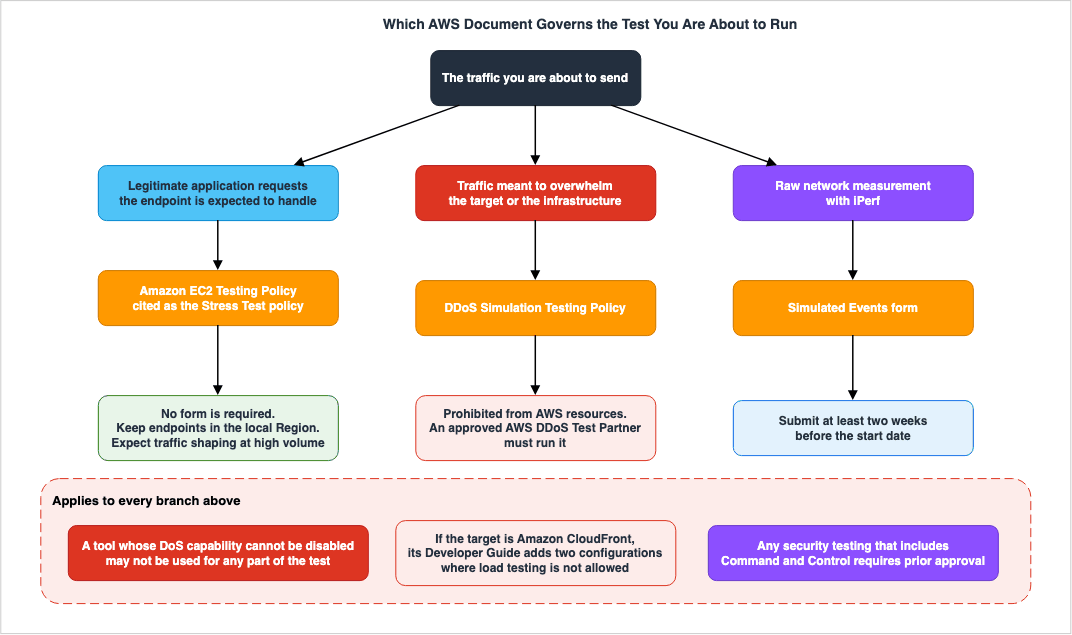
If what you are about to do has overwhelming the target as its purpose, it is not a load test. It belongs to the DDoS Simulation Testing Policy, which means engaging an approved partner or filing an exception request. It cannot originate from an AWS resource.
If the goal is not to overwhelm the target, but rather to send a volume of traffic the application is expected to be able to handle, it is Network Stress Testing. Read the Amazon EC2 Testing Policy. No form is required. If the system under test is inside AWS, put the load generator in the same Region. At a scale above 25Gbps, allow for AWS applying traffic engineering or traffic shaping of its own.
If the target is CloudFront, the rules outlined in the CloudFront Developer Guide also apply. Cache behaviors with Lambda@Edge triggers on the viewer side, and origins with Origin Shield enabled, are not eligible targets.
If the tool is iPerf, a form submission is required. The policy attaches no condition on scale here. If C2 is involved, prior approval is required.
And a tool whose DoS capability cannot be disabled must not be used on any branch.
4. The Load Generator Reaches a Ceiling First
4.1 The Ceiling Attaches per Address and per Destination
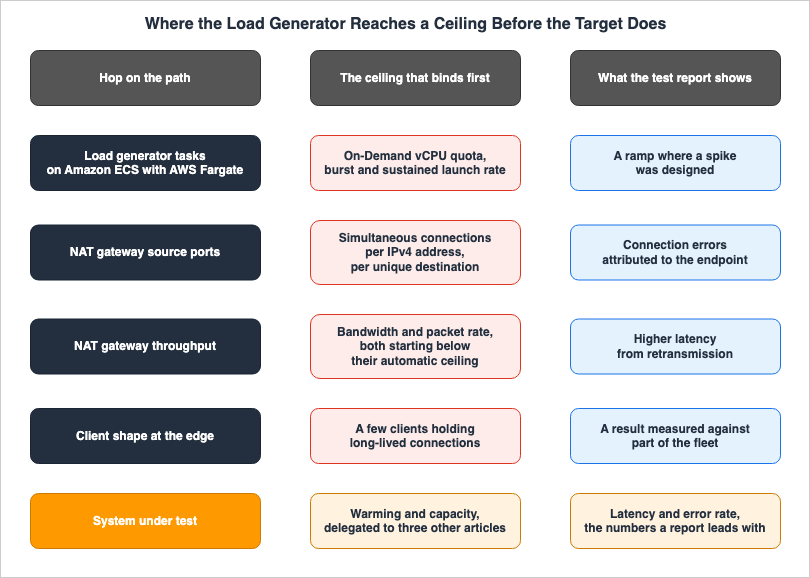
Placing load generators in a private subnet and routing them out through a NAT gateway is a common configuration. That configuration has a published and unambiguous ceiling, stated in NAT gateway basics in the Amazon VPC User Guide.Each IPv4 address can support up to 55,000 simultaneous connections to
each unique destination. A unique destination is identified by a unique
combination of destination IP address, the destination port, and
protocol (TCP/UDP/ICMP).The reason a load test reaches this ceiling so readily lies in how a destination is defined. A destination counts as unique on the combination of destination IP address, destination port, and protocol. Normal business traffic is distributed across numerous external services, resulting in a large number of unique combinations. However, load tests tend to concentrate traffic on a single endpoint. The destination port is fixed at 443, the protocol is fixed at TCP, and the only variable left is the destination IP address. How many usable combinations there are depends on how many IP addresses the load balancer's DNS resolution returns.
The way to raise that ceiling is in the same paragraph.
You can increase this limit by associating up to 8 IPv4 addresses to
your NAT gateways (1 primary IPv4 address and 7 secondary IPv4
addresses). You are limited to associating 2 Elastic IP addresses to
your public NAT gateway by default. You can increase this limit by
requesting a quota adjustment.
The ceiling attaches to the IPv4 address, not to the NAT gateway. Adding addresses raises the ceiling. That said, a public NAT gateway can have at most two Elastic IP addresses associated by default. Going as far as eight comes after a quota increase request. It is not the default value, and it is not the kind of work that fits into the day before a load test.
Dedicated metrics tell you when this ceiling is reached.
| Metric | Description from the Amazon VPC User Guide |
|---|---|
ErrorPortAllocation | The number of times a source port could not be allocated. A value greater than zero indicates that too many connections are open simultaneously. |
ActiveConnectionCount | The total number of active TCP connections passing through the NAT gateway. The Max value is the most useful statistic. |
IdleTimeoutCount | The number of connections that transitioned from the active state to the idle state. A connection transitions if it was not closed gracefully and there was no activity for 350 seconds. |
When
ErrorPortAllocation goes non-zero during a load test, the symptom appears as a connection failure at the endpoint. The test report records it as a connection error, which reads as the system under test refusing connections.IdleTimeoutCount matters here because it bears on the conditions under which a port comes back. 55,000 represents the maximum number of concurrent connections per address, not the maximum number of new connections per second. According to the same guide, a connection that remains inactive for 350 seconds without being properly closed transitions to an idle state. The AWS Knowledge Center names the remedy for a rise in this metric. Configure the application or the instance to close idle connections, and the NAT gateway can allocate the source port to a new connection. The article also suggests limiting the number of connections a client establishes to a single destination. A load test steps on both of these in the wrong direction. Holding as many connections as possible to a single destination for as long as possible is the purpose of the test itself.The design of the NAT gateway's CIDR and subnets is covered in VPC Design Review Checklist - CIDR, Subnets, Transit Gateway. This article covers only the conditions under which ports run out on the load generator's path.
4.2 Bandwidth and Packets Have Separate Ceilings
The same page also provides numerical values for bandwidth and packets.A NAT gateway supports 5 Gbps of bandwidth and automatically scales up
to 100 Gbps.A NAT gateway can process one million packets per second and
automatically scales up to 10 million packets per second. Beyond this
limit, a NAT gateway will drop packets.The figure to notice is the starting one. A NAT gateway scales automatically to 100 Gbps, but it starts at 5 Gbps. A
Spike Test jumps instantly to a high value, so it can be judged on the figure that applies before the scaling catches up. The packet side starts at one million packets per second in the same way.⚠ An outdated figure is in circulation. A post on the AWS Networking blog states that a single NAT gateway supports 10 Gbps of bandwidth and automatically scales up to 45 Gbps. The post qualifies that figure with
As of this post, and the User Guide now carries different values. This article uses the User Guide values. Read figures from the User Guide, and treat a figure in a blog post as bound to the date of that post.What happens on exceeding the ceiling also differs between bandwidth and packets. On the packet side the User Guide says
will drop packets in as many words. When packets are dropped, TCP retransmits them. The retransmission surfaces as response time. In the test result it looks as though the system under test got slower.4.3 A Quota Decides How Large the Generator Can Be
The assumption that you can just add more load generators does not hold on AWS. A quota decides how much you can add.AWS's own load testing solution, Distributed Load Testing on AWS, runs load generators as AWS Fargate tasks within Amazon ECS. The Quotas page of the implementation guide names which quota binds.
The maximum number of tasks that can be running in Amazon ECS using the
AWS Fargate launch type is based on the vCPU size of the tasks. The
default task size in Distributed Load Testing on AWS is 2 vCPU.
The quota that binds is the vCPU count. It is not the task count. The place to check is Fargate On-Demand vCPU resource count. The default task size is 2 vCPU, so the number of tasks you can run at once is half that quota.
The same page also details how many users each task can generate.
The Amazon Linux 2023 container image (with Taurus installed) does not
limit concurrent connections per task, but that does not mean it can
support an unlimited number of users.
The recommended limit for concurrent users based on default settings is
200 users.Put those two figures together and the required scale falls out. Ten thousand concurrent users needs 50 tasks at the default settings. Fifty tasks at 2 vCPU each is 100 vCPU.
The issue is how far 100 vCPU is from the default value. The AWS General Reference quota table puts the default for Fargate On-Demand vCPU resource count at 6 in each supported Region. At that default, and at the 2 vCPU task size, three tasks run. With the recommended 200 users per task, that yields 600 users. Against a target of 10,000, it is an order of magnitude short.
⚠ Do not read that 6 as the ceiling on your own account. The same page explains that new AWS accounts often have lower initial quotas, and that Fargate continuously monitors account usage in each Region and raises the quota automatically as usage rises. Your past usage therefore decides what your account has now. A load test is the first occasion on which you ask for far more than that usage. Read the current value in the Service Quotas console.
Tasks also do not come up instantly. The Amazon ECS Developer Guide describes the launch rate as a token bucket. The token bucket is scoped to your AWS account and Region. Amazon ECS tasks and Amazon EKS pods share the same bucket.
For example, the tasks and pods token bucket size for a Fargate customer
account is 100 tokens, and the refill rate is 20 tokens per second.
Therefore, you can immediately launch up to 100 Amazon ECS tasks and
Amazon EKS pods per customer account, with a sustained launch rate of 20
Amazon ECS tasks and Amazon EKS pods per second.
The launch rate defaults also differ by Region. In the same quota table, the burst rate is 100 in the individually listed Regions and 25 in each of the other supported Regions. The sustained rate is 20 per second in the same listed Regions and 5 per second in the others. Both rows carry a note that for Regions introduced after May 20, 2025, the lower figure is the maximum. A load test spread across Regions comes up at a different speed in each one.
What the burst rate and the sustained rate do to a
Spike Test is concrete. Even when designing a test to generate a high value instantaneously, the load generator itself may not be able to deliver that value immediately. The first 100 tasks arrive at once, and after that the count rises by 20 per second. A test that needs 500 tasks brings the last 400 up over 20 seconds. What the system under test sees is a ramp with a slope, not the rectangle you designed.How to look quotas up, and the defaults for the major services, are addressed in AWS Service Quotas - A Practical Cheat Sheet for Major AWS Services. That article gives the age of the account as the reason a test that passed in development is refused in the production account. The same situation can occur in the account hosting the load generator.
4.4 A Generator Is a Small Number of Clients
Production traffic arrives from many clients, across many source IP addresses, carrying many different DNS resolution results. A load generator does not. A few dozen to a few hundred tasks arrive from a small number of NAT gateway addresses, carrying a small number of resolution results. That difference lets the traffic pass straight through the distribution mechanisms on the path.Elastic Load Balancing's routing decisions vary by type. According to the User Guide's section on Routing algorithm, an Application Load Balancer selects a target using the routing algorithm configured on the target group, and the default is round robin. Selection happens per request. A small number of source IP addresses therefore does not by itself unbalance the targets. Imbalances arise at the layer responsible for selecting the load balancer's nodes.
Network Load Balancers operate differently.
Selects a target from the target group for the default rule using a flow
hash algorithm. It bases the algorithm on:
The protocol
The source IP address and source port
The destination IP address and destination port
The TCP sequence number
The same page also states that the selected target stays fixed for the life of the connection. A load generator that opens a small number of long-lived connections is pinned to a small number of targets. An
Endurance (Soak) Test runs for 4 to 24 hours, so that pinning lasts longest there.For CloudFront, as §3.5 quoted, AWS states the problem itself. Testing by sending traffic to a single IP address only measures a portion of the edge locations, and that portion can become overloaded. The recommended solutions are to send traffic from multiple geographic regions, to allow each client to independently resolve DNS, and to distribute traffic across the returned set of addresses.
The boundary of this article belongs here. The DNS mechanism on the load balancer side, meaning how many resolution results come back, what the TTL is, and what happens when nodes turn over, is the subject of How Elastic Load Balancing Scales - Scaling Rate, Capacity, and Load Balancer Capacity Unit Reservation. That article frames it as the question of whether clients actually use the added capacity on the day of the event. This article asks something else: Does the load generator measure the entire scope of the system under test, or only a portion of it? The mechanism is the same; the question is different.
DNS failover and result caching are addressed in Route 53 Health Check and Failover - Common Pitfalls and Designs. The article discusses how language runtimes and connection pools, separate from the operating system, can maintain their own resolution results, and load generators often fall into both of these categories.
5. Warming the Target Belongs to Other Articles
The most frequently searched topic in load testing is how to warm the system under test in advance. This article does not cover it. For two reasons. First, three existing articles each own it as their subject. Second, warming resolves none of the problems in §4. If the load is not arriving, the result does not change however warm the target is.The table below adds two more rows beyond those three. Quotas and the maximum size of a cell are not warming, but they are the two ceilings you meet while preparing a target, and each belongs to an article of its own.
| What you want to prepare | The article to read |
|---|---|
| Application Load Balancer and Network Load Balancer | How Elastic Load Balancing Scales - Scaling Rate, Capacity, and Load Balancer Capacity Unit Reservation. That article begins by splitting the term pre-warming into the three distinct problems it covers, then works out which of the three a capacity unit reservation resolves. |
| AWS Lambda Concurrency | AWS Lambda Concurrency and Scaling Guide - Reserved and Provisioned Concurrency, Throttling, and Event Source Scaling |
| Amazon DynamoDB Throughput | Amazon DynamoDB Capacity and Global Tables Guide - Capacity Modes, Auto Scaling, Warm Throughput, and Multi-Region Design |
| Account and Region Quotas (General) | AWS Service Quotas - A Practical Cheat Sheet for Major AWS Services |
| Maximum Cell Size | Cell-Based Architecture and Shuffle Sharding on AWS - Blast Radius Reduction Patterns for Large-Scale Workloads. That article sets the order: the lowest non-adjustable quota on the critical path decides the maximum size of a cell. A value measured in a test does not. |
This article makes only one point about warming. A measurement taken without warming is a measurement taken without warming. It is not wrong. It becomes wrong when it is treated as the production number. The 15-minute minimum specified in §2.3 is directly related to this point. Unless steady state is held for 15 minutes after ramp-up, what is being measured is the target warming up. It is not the performance of the target.
6. The Number You Read Is Not Always the Target's
6.1 Two Clocks
The results of a load test come from two sources: the load generator and the AWS service metrics. The two do not produce the same number, even for the same window of the same run. The aggregation granularity differs.The Distributed Load Testing on AWS implementation guide states this about its own aggregation:
The solution aggregates each metric by the second and updates the
dashboard every minute.
The solution aggregates every second and refreshes the display every minute. The Amazon CloudWatch User Guide, by contrast, writes this about the metrics AWS services emit:
Metrics produced by AWS services are standard resolution by default.And the definition of standard resolution is as follows:
Standard resolution, with data having a one-minute granularityHigh-resolution data is aggregated at a one-second granularity, but the same page explains that this option is only available for custom metrics that you generate yourself. The retrieval period is constrained too.
Only custom metrics that you define with a storage resolution of 1
second support sub-minute periods.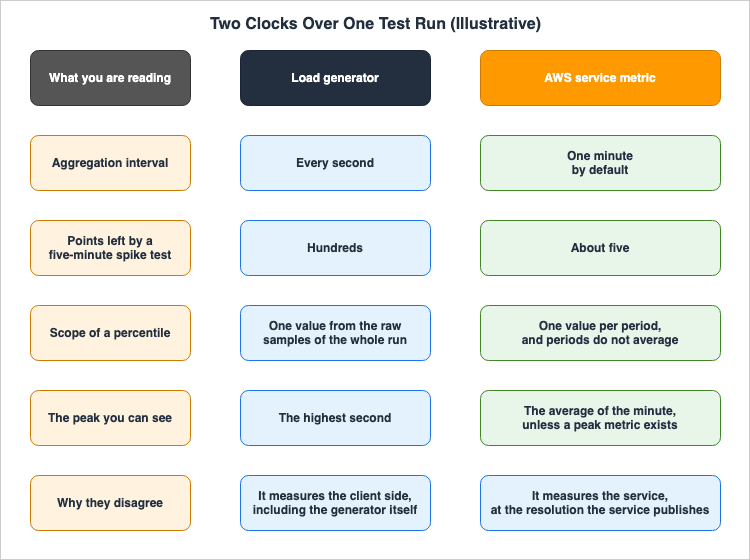
Spike Test finishes in 5 to 15 minutes. The metrics on the system under test side come to no more than 5 to 15 data points. Meanwhile, the load generator collects data every second. Pointing at the gap between the two is pointing at two records taken at different granularities.The metrics for NAT gateways are similar. The Amazon VPC User Guide states that NAT gateway metrics are sent to CloudWatch at one-minute intervals. Reading whether the
ErrorPortAllocation of §4.1 went non-zero also happens on a one-minute grid.6.2 What an Average Hides Shows Up in the Metric Definitions
The granularity problem shows up as not knowing what happened within a single minute. AWS acknowledges the point in the design of the metrics themselves. The NAT gateway metric list carries dedicated metrics that report the peak inside a minute, separate from the values derived from averages.PeakBytesPerSecond
This metric reports the highest 10-second bytes per second average in a
given minute.PeakPacketsPerSecond
This metric calculates the average packet rate (packets processed per
second) every 10 seconds for 60 seconds and then reports the maximum of
the six rates (the highest average packet rate).For the same minute, AWS provides two different figures: one is the average obtained by dividing the transferred volume, and the other is the maximum of six values taken every ten seconds. If you only look at the average, a test that utilized its full bandwidth for only ten seconds out of that minute might appear to have ample capacity. The very fact that these two figures are defined separately implies that they are not expected to always align.
This shape is not confined to NAT gateways. The basis for the claim that interpreting test results using averages can lead to overlooking peaks is found within AWS's own metric definitions. And because the basis sits there, this is a fact you can confirm in the primary sources. It is not a rule of thumb.
⚠ Designing the statistics themselves is past the boundary of this article. Which statistic to choose, when to use a percentile and when a trimmed mean, and how to handle a period with few samples are addressed in Amazon CloudWatch Alarm Design and Alert Fatigue - Composite Alarms, Anomaly Detection, Metric Math, and Metric Cardinality. That article covers how an average hides the tail a user experienced, and goes as far as the forms
ExtendedStatistic can take and the handling of low sample counts. This article covers one point only: reading the result of a test.6.3 Percentiles Need Raw Data Points
Load testing reports often list p50, p90, p95, and p99 values. Distributed Load Testing on AWS also provides these four metrics. The same values are not always available from CloudWatch. The Amazon CloudWatch User Guide clearly states the conditions.CloudWatch needs raw data points to calculate percentiles.The same page further lists services that have metrics supporting percentile statistics. These are seven services: API Gateway, Application Load Balancer, Amazon EC2, Elastic Load Balancing, Kinesis, Lambda, and Amazon RDS.
⚠ Read that list carefully. The sentence on that page is
The following AWS services include metrics that support percentile statistics. It says that the listed services have metrics that support percentiles. It does not state that no other service does. Nevertheless, this has practical implications. If the system under test is not on that list, check for yourself whether a p99 is available from that service's metrics.One more constraint bears on how a report is built. The same guide defines a statistic as an aggregation of metric data over a specified period of time. CloudWatch percentiles are therefore computed per period. If you obtain the p99 value for a 1-minute interval, you will get the p99 value for that specific 1-minute period. Averaging 60 individual 1-minute p99 values will not yield the p99 value for a full hour. Percentiles are statistical measures that do not involve averaging. The load generator, on the other hand, holds the raw samples for the whole run and can produce a p99 for the whole run. Two numbers end up side by side under the same name, p99, computed two different ways.
6.4 The Record Coarsens Over Time
When reviewing results after a test, the granularity of the records may not be the same as it was at the time. The Amazon CloudWatch User Guide states metrics retention by period. Data points for 60-second intervals are retained for 15 days, data points for 300-second intervals are retained for 63 days, and data points for 3600-second intervals are retained for 455 days. Data points for intervals shorter than 60 seconds are retained for 3 hours, which corresponds to high-resolution custom metrics.If you run
Stress Test on a quarterly basis, the records from the previous test, with their 1-minute granularity, will no longer be available. This is not hypothetical, since the table in §2.1 puts the frequency of a Stress Test at quarterly. If a comparison with the previous run is the intent, export the record at the granularity you need right after the test. It coarsens from there.7. Two AWS Documents With Similar Names
AWS has two documents related to load testing. They have similar names but contain different content. Confuse them and the information you want does not turn up.| Document | What it is | What to read it for |
|---|---|---|
| Distributed Load Testing on AWS | A solution implementation guide. It deploys real resources through CloudFormation, and carries the architecture, the quotas, and the deployment steps. | When you are building the load generator itself on AWS. The quota figures in §4.3 come from here. |
| Performance Testing | A 9-stage Journey Guide. It deploys no resources and is structured around stages of maturity. | Test types, deciding the metrics, wiring it into CI/CD, combining it with fault injection. The eight test types in §2 come from here. |
A brief account of how Distributed Load Testing on AWS is put together follows. The load generator runs as an Amazon ECS task on AWS Fargate, and launches in each selected Region. The container is Amazon Linux 2023 with Taurus on it, and Taurus executes a JMeter, k6, Locust, or Single HTTP Endpoint test. Taurus runs whichever test the user supplies. The design does not push you toward one testing tool. This article does not compare individual tools.
The Performance Testing Journey Guide is structured in 9 stages: 2 for Explorer, 4 for Practitioner, and 3 for Expert. The only overlap with this article is the test types in stage 3. The rest does not overlap. Deciding the metrics, designing a realistic scenario, and wiring the test into CI/CD all belong to that guide.
8. Applying Load and Fault at the Same Time
The eighth stage of the Performance Testing Journey Guide layers load testing and fault injection.Load testing tells you how the system performs under expected
conditions. Chaos engineering tells you how it performs when things go
wrong. Combining both reveals whether your system degrades gracefully or
catastrophically when failures occur under load.These two mesh because one of them builds the premise the other needs. Fault injection experiments begin with a definition of steady state, written down as a measurable output that indicates normal behavior. A steady state written down without production-scale load on the system is not the steady state at production scale. A load test is the means by which that definition gets filled in with measurement.
The guide outlines a five-step process. First, formulate a hypothesis about the steady state. Second, measure the baseline without introducing any faults. Third, inject faults while the steady state is being maintained. Fourth, verify recovery. Fifth, record the results. What matters in that order is the second step. Without a baseline measured under the same load, there is no basis for claiming anything changed.
The design of the experiments themselves is beyond the scope of this article. Topics such as how to define the steady state, what form the hypothesis should take to produce meaningful failures, and what to assign as stop conditions, as well as the order in which to layer experiments, are addressed in Chaos Engineering on AWS with AWS Fault Injection Service - Experiment Design, Stop Conditions, and Safety Rails. That article emphasizes that defining the steady state numerically is a prerequisite for the experiments. This article focuses on how to obtain those numbers.
⚠ One point about policy is worth adding. When fault injection and load testing are layered, what decides the policy treatment is the load side. Fault injection is an operation on your own resources. It is not an act of sending large volumes of traffic onto the network. The judgment in §3 can be made on the load side alone.
9. What Goes Wrong
| Failure | What happens | What to do |
|---|---|---|
Determining whether load testing is permitted by reviewing the list of Permitted Services. | The list addresses pre-approval exemptions for security assessments and penetration testing, but does not address load testing. You may need to abandon load testing for services not on the list, or conversely, assume that anything listed is permissible. | §3.1. Load testing is described on the same page under Other Simulated Events. |
| Planning a test that ramps until the target is overwhelmed, and calling it a load test. | It enters the territory the Amazon EC2 Testing Policy separates off as a DDoS test. It must not originate from an AWS resource. | §3.3. Limit requests to legitimate application-layer requests and set the upper limit based on the application's capacity. |
| Targeting CloudFront without checking the Origin Shield or Lambda@Edge configuration. | It lands on a configuration where load testing is not allowed. This rule is not documented on the penetration testing policy page. | §3.5. Refer to the CloudFront Developer Guide's section on Load testing CloudFront. |
| Placing the load generator in a private subnet and leaving the public NAT gateway address at its default setting. | Against one destination, it tops out at 55,000 simultaneous connections per IPv4 address. The symptom appears as connection errors on the system under test. | §4.1. Monitor ErrorPortAllocation during testing. Additional addresses may require a quota increase request. |
| Failing to calculate the required number of vCPUs based on the necessary number of tasks. | The Fargate On-Demand vCPU quota tops it out. The default is 6 per Region, which is three tasks at the 2 vCPU default size. You find out on the day of the test. | §4.3. Work backward from the default task size and the recommended users per task, then read the current value in the Service Quotas console. |
Designing a Spike Test with a rectangular waveform. | The load generator's launch rate blunts the waveform. What the system under test sees is a ramp, not a sharp spike. | §4.3. Account for burst and sustained rates, and start tasks just before the spike. |
| Evaluating results based on a 2- to 5-minute test. | Neither Auto Scaling nor connection pool recycling happens. The metrics on the system under test side come to only a handful of points. | §2.3 and §6.1. Allow at least 15 minutes for the system to reach a steady state after the ramp-up period. |
| Comparing numbers from the load generator with numbers from CloudWatch as if they are the same. | The granularity of aggregation is different. You are comparing data aggregated per second with data aggregated per minute. | §6.1 |
| Averaging percentiles across different time periods to determine an overall test percentile. | Percentiles cannot be averaged. The resulting number does not correspond to any observable phenomenon. | §6.3. Obtain the overall value from the raw samples. |
Attempting to compare results with a previous Stress Test using a 1-minute granularity. | Only 15 days of data points for a 60-second period are retained. | §6.4. Export data at the required granularity immediately after the test. |
| Defining the steady state for fault injection in a state without any load. | It is not the steady state at production scale. The experiment succeeds and proves nothing. | §8 |
10. Frequently Asked Questions
Do I need prior approval to run a load test on AWS?
In most cases, no. The penetration testing policy designates load testing asVolumetric Testing under the Other Simulated Events category, and simply asks users to review the Stress Test policy without requiring a form submission. The Amazon EC2 Testing Policy it delegates to describes no form and no approval step either. The Performance Efficiency pillar of the AWS Well-Architected Framework, however, says something different. §3.6 carries both originals.Is measuring with iPerf treated the same as a load test?
No. iPerf is one of the few items explicitly marked as requiring the submission of aSimulated Events form. Load testing is should review, while iPerf is must submit. They sit in the same Volumetric Testing section, and the requirement is different.Is a Stress Test that ramps until something breaks prohibited?
No, it is not prohibited. AWS itself defines Stress Test as one of the eight types and recommends running it quarterly. The line is drawn on the side of the method. It is not drawn on the side of the volume. What the Amazon EC2 Testing Policy separates off as a DDoS test is a test that uses packet or connection flooding, or reflection and amplification. This is different from testing that seeks to determine the capacity limits of your endpoint using legitimate application-layer requests. However, AWS does not define the scope of the clause or other large volumes of traffic.Is 25Gbps an upper limit?
No, it is not a limit. The Amazon EC2 Testing Policy states thatAWS may employ traffic engineering or traffic shaping operations in some cases where traffic surges exceed 25Gbps or over 100Gbps. It is a conditional statement: at this scale, traffic engineering or traffic shaping may be applied depending on the network paths and Regions involved. It is neither a prohibition nor an upper limit.Where should the load generator run?
In the same Region as the system under test, when that system is inside AWS. The Amazon EC2 Testing Policy asks you to ensure your endpoints are in the local AWS Region, and the test it describes runs from Amazon EC2. For CloudFront the guidance runs the other way: the CloudFront Developer Guide asks you to send client requests from multiple geographic regions. The answer reverses depending on whether the target is a Regional service or an edge service.The error rate rose during a load test. Is that the target's problem?
There is no way to tell. At least three of the four ceilings in §4 will manifest as symptoms on the system under test. The report records NAT gateway port exhaustion as connection errors, dropped packets as degraded response times from retransmission, and a saturated load generator as the same degraded response times. The metrics to read first are on the load generator side. They areErrorPortAllocation, PacketsDropCount, and the CPU utilization of the load generator itself.Why do the load generator's numbers and CloudWatch's numbers disagree?
The level of aggregation is different. Distributed Load Testing on AWS aggregates data on a per-second basis, while AWS services, by default, use a 1-minute aggregation interval. Furthermore, the calculation range for percentiles also differs. The load generator calculates a single p99 value based on all raw samples from the entire test, while CloudWatch calculates p99 values for each time period. Even though the names are the same, the calculations are different.How large does the load generator need to be?
Divide the number of concurrent users you need by the recommended users per task, then multiply by the default task size. With Distributed Load Testing on AWS, the default is 200 users per task and 2 vCPU per task. For 10,000 concurrent users, you would need 50 tasks, totaling 100 vCPU. First, you should check the current value of the Fargate On-Demand vCPU resource count. The default value listed in the AWS General Reference is 6 per Region, which equates to three tasks, each using 2 vCPU. The actual value rises automatically with usage, so read your own account's value in the Service Quotas console.Does averaging per-period p99 values give the p99 for the whole run?
No. Percentiles cannot be averaged. There is no phenomenon that corresponds to the number you would obtain by averaging them. If you need the value for the whole run, take it from the side that holds the raw samples.Is it acceptable to run load testing and fault injection at the same time?
Yes. AWS's Performance Testing Journey Guide addresses this combination in stage 8. The order is: form a steady-state hypothesis, measure the baseline with no fault, then inject the fault while the load is at steady state. The policy judgment can be made on the load side alone. Fault injection is an operation on your own resources, not an act of sending large volumes of traffic onto the network.What should I read about warming the target beforehand?
The article to read depends on the target. For load balancers, How Elastic Load Balancing Scales - Scaling Rate, Capacity, and Load Balancer Capacity Unit Reservation. For Lambda concurrency, AWS Lambda Concurrency and Scaling Guide - Reserved and Provisioned Concurrency, Throttling, and Event Source Scaling. For DynamoDB throughput, Amazon DynamoDB Capacity and Global Tables Guide - Capacity Modes, Auto Scaling, Warm Throughput, and Multi-Region Design. This article does not cover warming.Can I run a DDoS simulation myself?
No. The DDoS Simulation Testing Policy restricts testing to AWS partners who have received prior approval from AWS. Approved partners do not require individual approvals, but if you are not an approved partner, you will need to submit an exception request, which must be submitted at least 14 days before the planned test date. Furthermore, it is explicitly stated that the simulations must not originate from AWS resources.11. Summary
A load test that passed does not mean the load test was correct. Three things take effect ahead of the system under test.More than one document governs the policy side. The starting point is the penetration testing policy, but the substance for load testing sits in the Amazon EC2 Testing Policy that it delegates to. If the target is CloudFront, additional rules apply, including two prohibitions not found in the penetration testing policy. And AWS's own documents do not agree on whether the form is required.
The one that reaches a ceiling first is the load generator. NAT gateway source ports run to 55,000 per IPv4 address, per destination. A load test has few destinations, so it arrives there fastest. Bandwidth begins at 5 Gbps and scales from there. A Fargate vCPU quota decides how large the generator can be, and the launch rate decides how fast it comes up. And because the generator is a small number of clients, it passes straight through the distribution mechanisms on the path.
The number you read is not necessarily the system under test's. The load generator aggregates every second, and AWS service metrics are standard resolution by default, at one-minute granularity. For that same minute AWS defines two separate figures: one derived from an average, and one that is the highest of six ten-second values. Percentiles need raw data points, and averaging the per-period values does not give the value for the whole run.
One structure runs through all three. A load testing environment is a second production system, built in a hurry, run once, and never itself load tested. What you did as a matter of course for the system under test, checking quotas, looking up ceilings, reading the policy, and putting metrics in place, do for the load generator as well. That is the whole of this article.
12. References
- AWS Customer Support Policy for Penetration Testing
- Amazon EC2 Testing Policy
- DDoS Simulation Testing Policy
- Load testing CloudFront - Amazon CloudFront Developer Guide
- Distributed Load Testing on AWS - Implementation Guide
- Distributed Load Testing on AWS - Architecture overview
- Distributed Load Testing on AWS - Quotas
- Performance Testing - Overview
- Performance Testing - Understanding Test Types
- Performance Testing - Chaos Engineering Meets Load Testing
- NAT gateway basics - Amazon VPC User Guide
- NAT gateway metrics and dimensions - Amazon VPC User Guide
- View NAT gateway CloudWatch metrics - Amazon VPC User Guide
- How do I resolve the "ErrorPortAllocation" error on my NAT gateway in Amazon VPC? - AWS Knowledge Center
- AWS Fargate throttling quotas - Amazon ECS Developer Guide
- Amazon ECS endpoints and quotas - AWS General Reference
- How Elastic Load Balancing works - Elastic Load Balancing User Guide
- Metrics concepts - Amazon CloudWatch User Guide
- PERF05-BP04 Load test your workload - AWS Well-Architected Framework
- REL07-BP04 Load test your workload - AWS Well-Architected Framework
- Load testing applications - AWS Prescriptive Guidance
References:
Tech Blog with curated related content
Written by Hidekazu Konishi