Amazon CloudFront Origin Architecture Guide - Origin Access Control, Origin Shield, Failover, and VPC Origins
First Published:
Last Updated:
This guide is a single, consolidated reference for the origin side of an Amazon CloudFront distribution. It answers three questions that recur in almost every CloudFront design review:
1. How do you hide an origin so that it can only be reached through CloudFront, never directly?
2. How do you prepare an origin for load and for failure so a spike or a regional outage does not take the site down?
3. What do you choose for each origin type — an S3 bucket behaves nothing like an Application Load Balancer, which behaves nothing like an on-premises HTTP server?
The viewer side — CloudFront Functions, Lambda@Edge, CloudFront KeyValueStore, and the request-time patterns built on them — is deliberately out of scope here. That ground is covered in the companion article, the CloudFront KeyValueStore and Edge Functions Cookbook, and this guide does not repeat the CloudFront Functions versus Lambda@Edge decision. The focus stays on origins: Origin Access Control, VPC origins, custom-origin protection, Origin Shield, origin groups and failover, and the origin connection settings that quietly govern availability.
Every specification in this article was confirmed against the Amazon CloudFront Developer Guide and the AWS What's New announcements at the time of writing (2026-06). CloudFront origin features have changed meaningfully in the last two years — VPC origins did not exist before late 2024 — so before you depend on any specific value, limit, or Region list, re-confirm it against the official AWS documentation linked in the references. Pricing is intentionally described only qualitatively; consult the official CloudFront pricing page for current numbers.
Table of Contents:
- Introduction: Why the Origin Side Decides Security and Availability
- Origin Types at a Glance
- Locking Down S3 Origins: Origin Access Control
- Hiding Application Origins: VPC Origins
- Protecting Custom Origins the Classic Way
- Origin Shield: The Extra Caching Layer
- Origin Groups and Failover
- Origin Settings That Matter
- Reference Architectures
- Common Pitfalls
- Frequently Asked Questions
- Summary
- References
1. Introduction: Why the Origin Side Decides Security and Availability
A CloudFront distribution is a reverse proxy with a global cache. Viewers connect to the nearest edge location, and on a cache miss CloudFront connects to your origin. Everything a security reviewer or a reliability engineer worries about happens on that second connection: Is the origin reachable by anyone other than CloudFront? What credential does CloudFront present? What does CloudFront do when the origin is slow, returns an error, or stops answering entirely?These are not edge concerns. No cache policy, response-headers policy, or CloudFront Function changes whether your S3 bucket is world-readable or whether your Application Load Balancer answers requests that never went through CloudFront. Those are properties of the origin and of the origin configuration on the distribution.
The origin side breaks down into two themes that this guide alternates between:
- Concealment — making CloudFront the only path to the origin. For S3 this is Origin Access Control (OAC). For applications behind a load balancer, this is either VPC origins (the modern, private-subnet approach) or the classic secret-custom-header technique for an internet-facing load balancer.
- Resilience — keeping the origin available under load and during failure. Origin Shield consolidates and absorbs origin traffic; origin groups and origin failover route around a failed origin; and the origin connection settings (timeouts, attempts, keep-alive) tune how quickly and how persistently CloudFront talks to the origin.
The guide is organized so you can read the concealment sections (§3–§5) and the resilience sections (§6–§8) independently, then combine them in the reference architectures of §9. If you are migrating an older configuration, §10 catalogs the pitfalls that show up most often in production — chief among them is leaving a legacy origin access identity in place long after OAC became the recommended approach.
2. Origin Types at a Glance
CloudFront treats every origin as one of two broad categories: an Amazon S3 origin (a regular S3 bucket accessed through the S3 REST API) or a custom origin (anything that speaks HTTP/HTTPS — a load balancer, an EC2 instance, an API, an on-premises server, or even an S3 bucket configured as a static website endpoint). On top of that, the way CloudFront reaches the origin can be either over the public internet or, for resources in your own VPC, over a private connection using a VPC origin.The distinction matters because the concealment mechanism is different for each, and a surprising number of misconfigurations come from applying an S3 technique to a custom origin or vice versa. The table below summarizes the landscape; the rest of the guide expands each row.
* You can sort the table by clicking on the column name.
| Origin type | What it is | How CloudFront authenticates / is concealed | Notes |
|---|---|---|---|
| S3 bucket (REST endpoint) | A regular S3 bucket, reached via the S3 REST API | Origin Access Control (OAC) — CloudFront signs requests with SigV4; bucket policy allows only the CloudFront service principal | The recommended setup for private S3 content (§3) |
| S3 static website endpoint | An S3 bucket configured for website hosting | Treated as a custom origin; OAC/OAI cannot be used | Loses OAC protection; use only when website-hosting features are required |
| Application Load Balancer (ALB) | Layer-7 load balancer in front of your app | VPC origins (private subnet) or secret custom header (internet-facing) | The most common application origin (§4, §5) |
| Network Load Balancer (NLB) | Layer-4 load balancer | VPC origins (private subnet), with restrictions | No dual-stack, no TLS-listener NLB as a VPC origin; SG required (§4) |
| EC2 instance | A server running your application directly | VPC origins (private subnet) or custom header | Treated as a custom origin |
| API Gateway / custom HTTP origin | A managed API or any HTTP endpoint | Secret custom header; or restrict by other means | Custom origin; VPC origins do not apply to API Gateway |
| Other AWS origins (Elemental, Lambda function URL, S3) | Origins that support OAC beyond S3 | OAC (for the origin types AWS supports) | OAC began with S3 and has expanded to additional AWS origins |
Two practical takeaways before the detail sections. First, an S3 website endpoint is not an S3 origin as far as concealment goes — it is a custom origin, and it cannot use OAC or the legacy origin access identity. If you need a private bucket, use the REST endpoint with OAC and rebuild any website-hosting behavior (such as index-document resolution) with a CloudFront Function or default root object. Second, VPC origins changed the default answer for application origins: where the old advice was "put the ALB on the public internet and lock it down with a secret header," the modern advice for an origin you control is "put it in a private subnet and use a VPC origin." Both are covered, because the classic technique is still the right answer for origins you cannot move into a private subnet.
The decision map below summarizes which concealment mechanism applies to each origin, and is expanded in the next three sections.
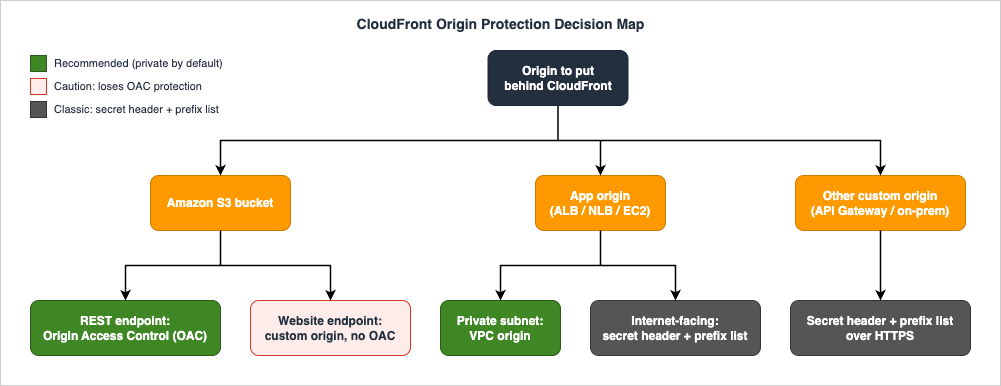
3. Locking Down S3 Origins: Origin Access Control
The canonical CloudFront origin-security task is serving private content from an S3 bucket so that viewers can only reach objects through the distribution, never by guessing the bucket URL. CloudFront provides two mechanisms for sending authenticated requests to an S3 origin: origin access control (OAC) and the older origin access identity (OAI). AWS recommends OAC, and new designs should use it exclusively.3.1 Why OAC Replaced OAI
OAC is the successor to OAI, and the difference is not cosmetic. According to the CloudFront Developer Guide, OAC supports several things that OAI does not:- All Amazon S3 buckets in all AWS Regions, including opt-in Regions launched after December 2022. OAI does not support newer opt-in Regions.
- Server-side encryption with AWS KMS (SSE-KMS). OAI cannot natively authenticate to a bucket whose objects are encrypted with a customer-managed KMS key.
- Dynamic requests —
PUTandDELETE— to Amazon S3. OAI is read-oriented and does not supportPUT,POST, orDELETE.
OAC works by having CloudFront sign every origin request to S3 with AWS Signature Version 4 (SigV4), using a CloudFront service principal rather than a synthetic IAM user. The bucket policy then grants access to that service principal, scoped to the specific distribution. Because the signature is computed per request, OAC also extends cleanly to encrypted objects and to write operations.
3.2 The S3 Bucket Policy
Setting up OAC is a three-part operation: create the OAC, attach it to the S3 origin in the distribution, and grant the CloudFront service principal access in the bucket policy. The bucket policy is the part people get wrong, so it is worth showing exactly.For a read-only distribution (the common case — serving static assets), the bucket policy grants
s3:GetObject to the CloudFront service principal, conditioned on the request originating from your specific distribution:{
"Version": "2012-10-17",
"Statement": [
{
"Sid": "AllowCloudFrontServicePrincipalReadOnly",
"Effect": "Allow",
"Principal": {
"Service": "cloudfront.amazonaws.com"
},
"Action": "s3:GetObject",
"Resource": "arn:aws:s3:::amzn-s3-demo-bucket/*",
"Condition": {
"StringEquals": {
"AWS:SourceArn": "arn:aws:cloudfront::111122223333:distribution/EXAMPLE_DISTRIBUTION_ID"
}
}
}
]
}
The
AWS:SourceArn condition is the load-bearing part. Without it, any CloudFront distribution in any account could read your bucket, because the cloudfront.amazonaws.com service principal is shared. With it, only the distribution whose ARN you specify is authorized. Always include the condition.If the distribution also needs to write objects back to S3 — for example, an upload flow that goes through CloudFront — add
s3:PutObject (and any other actions you need) to the same statement:{
"Version": "2012-10-17",
"Statement": [
{
"Sid": "AllowCloudFrontServicePrincipalReadWrite",
"Effect": "Allow",
"Principal": {
"Service": "cloudfront.amazonaws.com"
},
"Action": [
"s3:GetObject",
"s3:PutObject"
],
"Resource": "arn:aws:s3:::amzn-s3-demo-bucket/*",
"Condition": {
"StringEquals": {
"AWS:SourceArn": "arn:aws:cloudfront::111122223333:distribution/EXAMPLE_DISTRIBUTION_ID"
}
}
}
]
}
3.3 Object Ownership and the Bucket-Owner-Enforced Requirement
There is a bucket-level setting that OAC depends on. When you use OAC with an S3 origin, S3 Object Ownership must be set to Bucket owner enforced — which is the default for new S3 buckets and which disables object ACLs entirely. If your workflow genuinely requires ACLs (for example, objects uploaded by other accounts that you want to control), use the Bucket owner preferred setting instead so the bucket owner retains control over objects uploaded through CloudFront. For most static-content buckets, the default Bucket-owner-enforced setting is correct and you do not need to change anything.3.4 Encrypted Objects: The KMS Key Policy
If the objects in the bucket are encrypted with SSE-KMS using a customer-managed key, the bucket policy alone is not enough — CloudFront also needs permission to use the KMS key. Add a statement to the KMS key policy that allows the CloudFront service principal to decrypt (and, if CloudFront writes encrypted objects, to generate data keys), scoped again to your distribution ARN:{
"Sid": "AllowCloudFrontServicePrincipalSSE-KMS",
"Effect": "Allow",
"Principal": {
"Service": "cloudfront.amazonaws.com"
},
"Action": [
"kms:Decrypt",
"kms:Encrypt",
"kms:GenerateDataKey*"
],
"Resource": "*",
"Condition": {
"StringEquals": {
"AWS:SourceArn": "arn:aws:cloudfront::111122223333:distribution/EXAMPLE_DISTRIBUTION_ID"
}
}
}
This is one of the most common "OAC is configured but I get 403s" causes: the bucket policy is correct, but the KMS key policy was never updated, so CloudFront can be authorized to read the object yet unable to decrypt it.
3.5 The Signing Behavior Setting
OAC has an advanced setting called Signing behavior (SigningBehavior in the API, CLI, and CloudFormation) with three options. Use the recommended one unless you have a specific reason not to:always— "Sign requests (recommended)" in the console. CloudFront signs every request to the S3 origin. This is also the setting that guarantees HTTPS between CloudFront and S3. Use this.never— "Do not sign requests." This turns OAC off for every origin that uses this OAC, which is useful as a quick global disable, but it requires the bucket to be publicly accessible. Rarely what you want for private content.no-override— "Do not override authorization header." CloudFront signs the origin request only when the viewer request did not already include anAuthorizationheader; if the viewer sent one, CloudFront forwards it untouched. To use this, you must add theAuthorizationheader to the cache policy for the relevant behaviors.
For a private S3 origin, choose
always. The other two exist for niche cases (a public bucket, or an origin that does its own bearer-token authentication).3.6 Migrating from OAI to OAC Without Downtime
If you have an existing distribution still using a legacy origin access identity, the migration to OAC is a careful, no-downtime sequence. The key idea is to let both principals access the bucket during the transition so CloudFront never loses access:1. Update the bucket policy to allow both the legacy OAI and the OAC-enabled distribution. Add a second statement for the OAI principal alongside the OAC service-principal statement:
{
  "Version": "2012-10-17",
  "Statement": [
    {
      "Sid": "AllowCloudFrontServicePrincipalReadOnly",
      "Effect": "Allow",
      "Principal": { "Service": "cloudfront.amazonaws.com" },
      "Action": "s3:GetObject",
      "Resource": "arn:aws:s3:::amzn-s3-demo-bucket/*",
      "Condition": {
        "StringEquals": {
          "AWS:SourceArn": "arn:aws:cloudfront::111122223333:distribution/EXAMPLE_DISTRIBUTION_ID"
        }
      }
    },
    {
      "Sid": "AllowLegacyOAIReadOnly",
      "Effect": "Allow",
      "Principal": {
        "AWS": "arn:aws:iam::cloudfront:user/CloudFront Origin Access Identity EXAMPLE_OAI_ID"
      },
      "Action": "s3:GetObject",
      "Resource": "arn:aws:s3:::amzn-s3-demo-bucket/*"
    }
  ]
}
2. Switch the distribution's S3 origin to use the OAC instead of the OAI, and wait for the distribution to deploy fully.
3. Remove the OAI statement from the bucket policy once the distribution is deployed and verified.
Because both principals are authorized in step 1, there is no window where CloudFront is locked out. Do not skip straight to swapping the origin configuration before updating the policy — that is the sequence that causes a brief 403 storm.
3.7 The Website-Endpoint Caveat
One hard limit shapes a lot of designs: if your origin is an S3 bucket configured as a website endpoint, you cannot use OAC (or OAI). A website-endpoint bucket must be set up in CloudFront as a custom origin, and custom origins do not support OAC. OAC also does not support origin redirects via Lambda@Edge. If you are using a website endpoint purely for features like index-document resolution or routing rules, consider whether you can move to the REST endpoint with OAC and replicate those behaviors with a default root object and a small CloudFront Function — that gets you back the private-bucket guarantee. If you genuinely need website-hosting semantics, accept that the bucket is reached as a custom origin and protect it the way you would any custom origin (§5). For the historical CloudFront + ACM + WAF + Lambda@Edge stack and how its older OAI-era guidance maps to today's OAC recommendation, see Add CloudFront WAF, Edge, ACM to a Custom Origin Like AWS Amplify Hosting.4. Hiding Application Origins: VPC Origins
For years, putting an application behind CloudFront meant exposing the application's load balancer on the public internet and then trying to ensure nobody bypassed CloudFront to reach it directly. VPC origins, which CloudFront announced on 2024-11-20, removed that compromise: you can now place your Application Load Balancer, Network Load Balancer, or EC2 instance in a private subnet and have CloudFront reach it over a private, service-managed connection. CloudFront becomes the single front door, and there is no public path to the origin at all.This is the modern default for an origin you control. The classic secret-header technique (§5) remains valid, but it is now the fallback for origins you cannot move into a private subnet, not the first choice.
4.1 The Model
With a VPC origin, CloudFront creates a service-managed elastic network interface (ENI) inside your private subnet and routes requests to your origin through it. User requests travel from the edge to the VPC origin over a private connection rather than across the public internet. The origin resource has no public IP and no internet-facing listener; it is discoverable only through your CloudFront distribution. The chief benefits AWS cites are a reduced attack surface, the elimination of bespoke access-control mechanisms (no more secret headers or IP allow-lists to maintain), and CloudFront's built-in DDoS protection sitting in front of an origin that the internet cannot address.4.2 Supported Resources and Prerequisites
VPC origins support three resource types in private subnets: Application Load Balancers, Network Load Balancers, and EC2 instances. The resource must be fully deployed and in an active state before you can use it as a VPC origin.The VPC itself must meet two prerequisites that surprise people:
- An internet gateway must be attached to the VPC. This is counterintuitive for a "private" feature, but the internet gateway is used only as a marker that the VPC is permitted to receive traffic from the internet via CloudFront — it is not used to route traffic to your origin, and you do not modify any route tables to point at it. Your subnet stays private.
- The private subnet must have at least one available IPv4 address, because the service-managed ENI needs one. The address can be private, and there is no extra charge for it. IPv6-only subnets are not supported.
4.3 Origin and Security-Group Restrictions
Several restrictions are easy to trip over, so commit them to memory before you design around VPC origins:- Gateway Load Balancers cannot be used as VPC origins.
- Dual-stack Network Load Balancers cannot be used as VPC origins.
- Network Load Balancers with TLS listeners cannot be used as VPC origins.
- A Network Load Balancer used as a VPC origin must have a security group attached.
On the security-group side, when you create a VPC origin, CloudFront automatically creates a service-managed security group named with the pattern
CloudFront-VPCOrigins-Service-SG. This group is fully managed by AWS — do not edit it, and do not create your own security group whose name starts with that prefix, because the prefix is reserved. To actually allow CloudFront's traffic to reach your origin, update the security group attached to your origin resource (the ALB, NLB, or EC2 instance) to allow inbound traffic using one of two methods:- Option 1 — Allow the CloudFront managed prefix list. Reference the AWS-managed prefix list for CloudFront in your inbound rule. This can be done before the VPC origin is created.
- Option 2 — Allow the service-managed security group (
CloudFront-VPCOrigins-Service-SG). This is more restrictive because it limits inbound traffic to your CloudFront distributions specifically, but it can only be done after the VPC origin (and therefore the service-managed SG) has been created.
Option 2 is the tighter of the two and is preferable when you can tolerate the two-step ordering.
4.4 Feature Restrictions
VPC origins do not support every CloudFront feature. As of the current documentation, a VPC origin does not support:- gRPC traffic.
- Origin-facing Lambda@Edge triggers (origin request and origin response). Viewer-facing triggers are unaffected.
- Network ACLs are not evaluated for VPC-origin traffic — subnet-level allow/deny rules do not apply to it, so do not rely on a NACL to further restrict the path between CloudFront and the origin.
4.5 Setting Up a VPC Origin
For a brand-new distribution, the flow is straightforward: create the VPC origin (selecting the ARN of your ALB, NLB, or EC2 instance), wait for its status to become Deployed (which can take up to 15 minutes), then create the distribution and select the VPC-origins resource as the origin domain. For an EC2-instance origin you paste the instance's private IP DNS name as the origin domain.For an existing, live distribution, AWS recommends going through CloudFront continuous deployment so you can validate the change without risking production:
- Create the VPC origin and wait for it to reach Deployed.
- From the distribution, create a staging distribution under Continuous deployment.
- In the staging distribution, add an origin pointing at the VPC-origins resource and test it.
- Promote the staging configuration to the primary distribution.
- Finally, remove public access to the origin by making its subnet private (disassociate it from a route table that has an internet path). After this, the origin is no longer discoverable over the internet, but CloudFront still reaches it privately.
You can also add a VPC origin to an existing distribution directly, without a staging distribution, if you are comfortable changing the live configuration in place — but the staging path is the safer default for production.
4.6 Supported Regions
VPC origins are available in AWS commercial Regions only, and the list has grown to roughly three dozen Regions (with a few specific Availability Zones excluded in some Regions). Rather than memorize the list — it changes as Regions are added — check the current set in the CloudFront Developer Guide's "Supported AWS Regions for VPC origins" section before you commit to a Region. If your origin is in a Region or AZ not yet supported, the classic technique in §5 is your path.4.7 Recent Enhancements
VPC origins have been extended several times since GA, and the additions are worth knowing because they remove earlier limitations:- Origin modification with CloudFront Functions became compatible with VPC origins and origin groups (announced 2025-04). This lets a CloudFront Function route individual requests to different origins — including VPC origins — and even construct origin groups dynamically, enabling percentage-based traffic splitting and custom failover logic without changing the distribution configuration. (The authoring of those Functions is viewer-side material covered in the Edge Functions Cookbook.)
- Cross-account VPC origins (announced 2025-11) let a distribution reach a VPC origin in a different AWS account, shared via AWS Resource Access Manager (RAM), within or outside your AWS Organization. This means you can keep a multi-account architecture for isolation while still using CloudFront as the single front door.
- WebSocket support for VPC origins (announced 2026-05) allows real-time applications served over WebSockets to live entirely in private subnets behind CloudFront, where previously WebSocket servers had to sit in public subnets.
4.8 VPC Origins Versus the Classic Public-ALB Approach
If you already run an internet-facing ALB protected by a secret custom header, is it worth migrating to a VPC origin? The trade-off is concrete. The classic approach keeps the ALB publicly addressable and relies on the secrecy of a header to keep direct traffic out — which works, but it means the ALB's public endpoint is always one leaked header away from being reachable, and you carry the operational burden of rotating that secret. VPC origins remove the public endpoint entirely: there is nothing to bypass because there is no public path. For an origin you control and can place in a private subnet, that is a strictly stronger security posture. The migration is a good fit for the continuous-deployment flow in §4.5. For the broader question of how VPC origins relate to other private-connectivity options like PrivateLink and Transit Gateway, see the AWS VPC Connectivity Decision Guide.5. Protecting Custom Origins the Classic Way
VPC origins are the right answer when you can move the origin into a private subnet. But plenty of origins cannot move there: an internet-facing ALB that must also serve traffic directly for some clients, an API Gateway endpoint, a SaaS or partner HTTP origin, or an origin in a Region where VPC origins are not yet available. For these, the established technique is the secret custom header, and it remains fully supported.5.1 The Secret-Header Pattern
The idea is simple: configure CloudFront to add a secret HTTP header to every request it sends to the origin, and configure the origin to reject any request that does not carry that header. Because only CloudFront knows the header name and value, only CloudFront-originated requests are honored; a client hitting the load balancer directly is missing the header and gets refused.You set the header in the origin's Origin Custom Headers setting. In CloudFormation it is the
OriginCustomHeaders property on the origin:AWSTemplateFormatVersion: '2010-09-09'
Resources:
TestDistribution:
Type: 'AWS::CloudFront::Distribution'
Properties:
DistributionConfig:
Origins:
- DomainName: app-load-balancer.example.com
Id: Example-ALB
CustomOriginConfig:
OriginProtocolPolicy: https-only
OriginSSLProtocols:
- TLSv1.2
OriginCustomHeaders:
- HeaderName: X-Origin-Verify
HeaderValue: REPLACE_WITH_A_LONG_RANDOM_SECRET
Enabled: 'true'
DefaultCacheBehavior:
TargetOriginId: Example-ALB
ViewerProtocolPolicy: redirect-to-https
CachePolicyId: 658327ea-f89d-4fab-a63d-7e88639e58f6
ViewerCertificate:
CloudFrontDefaultCertificate: 'true'
On the Application Load Balancer side, add a listener rule that forwards to your target group only when the request contains the matching
X-Origin-Verify header (with the secret value), and otherwise returns a fixed 403 response.5.2 Treat the Header as a Credential
The entire security of this approach rests on the header staying secret. The CloudFront Developer Guide is explicit: if the header name and value are not secret, any HTTP client can include them in a request sent directly to the load balancer and impersonate CloudFront. Therefore:- Use a long, randomly generated value — treat it like a password, not like a flag.
- Require HTTPS end to end (
OriginProtocolPolicy: https-only) so the header is never sent in clear text where it could be observed. - Rotate the secret periodically, and have a rotation procedure ready before you ship.
5.3 Defense in Depth with the Managed Prefix List
The secret header authenticates the request; the AWS-managed prefix list for CloudFront narrows who can even connect. Add an inbound rule to the load balancer's security group that allows traffic only from the CloudFront managed prefix list, so that arbitrary internet hosts cannot reach the load balancer at all — only CloudFront's address ranges can. The prefix list and the secret header are complementary: the prefix list keeps random scanners off the listener, and the header ensures that even a request from a CloudFront IP range is honored only if it carries the secret. Use both.5.4 When You Need Both Direct and CloudFront Access
A common real-world wrinkle: some APIs must be reachable directly (for example, a partner integration), while others must go only through CloudFront. The cleanest resolution is to split the application across two load balancers — a private ALB used as a VPC origin (or an internet-facing ALB behind the secret header) for the CloudFront-only APIs, and a separate ALB for the APIs that require direct access. Trying to make one load balancer serve both roles with conditional rules tends to produce brittle configurations and accidental bypasses.6. Origin Shield: The Extra Caching Layer
Concealment is about who can reach the origin; the rest of the guide is about keeping the origin healthy under load and failure. Origin Shield is the first resilience tool: an additional caching layer inside CloudFront, positioned between the regional edge caches and your origin, that consolidates requests so your origin sees as few of them as possible.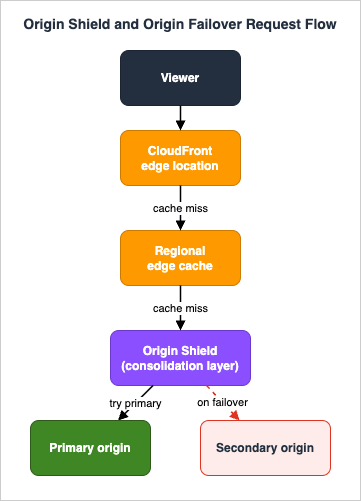
6.1 What Origin Shield Does
Normally, CloudFront's edge locations fall back to regional edge caches, and on a miss those regional edge caches each fetch from your origin. When viewers are spread across the globe, multiple regional edge caches can independently request the same object from your origin. Origin Shield inserts one more layer that all of those requests funnel through. The benefits, per the Developer Guide, are threefold:- Better cache hit ratio. Because every layer of the CloudFront cache retrieves an object through Origin Shield, an object only has to be fetched from your origin once; all other cache layers can then get it from Origin Shield.
- Reduced origin load. Simultaneous requests for the same object are consolidated, so as few as one request reaches your origin. This is what preserves origin availability during traffic spikes, and it reduces the cost of expensive origin operations like just-in-time packaging and image transformation.
- Better network performance. When Origin Shield is in the Region with the lowest latency to your origin, traffic stays on the high-throughput CloudFront network all the way to the origin (or to Origin Shield, for non-AWS origins).
6.2 It Is a Property of the Origin
A crucial mental-model point: Origin Shield is enabled per origin, not per distribution. You turn it on for a specific origin, and it has an associated AWS Region. This matters when an origin participates in an origin group (§7), because each origin keeps its own Origin Shield.6.3 Choosing the Region
When you enable Origin Shield you choose an AWS Region, and the rule is simple: pick the Region with the lowest latency to your origin. CloudFront offers Origin Shield only in Regions that have a regional edge cache — a list of roughly a dozen Regions at the time of writing. The guidance:- If your origin is in a Region that offers Origin Shield, enable Origin Shield in that same Region.
- If your origin is in a Region that does not offer Origin Shield, the Developer Guide provides a mapping table to the nearest Origin-Shield Region (for example, an origin in
us-west-1maps tous-west-2; an origin ineu-west-3maps toeu-west-2). - If your origin is on-premises or outside AWS, choose the Origin-Shield Region with the lowest latency to it — the mapping table gives an approximation, or you can measure with
pingfrom EC2 instances in candidate Regions.
6.4 When Origin Shield Helps and When It Does Not
Origin Shield is not a universal win, and the documentation is candid about the fit. It helps most when:- Viewers are spread across different geographical regions (more regional edge caches means more duplicate origin requests to consolidate).
- The origin does just-in-time packaging for live streaming or on-the-fly image processing (expensive per-request work worth consolidating).
- The origin is on-premises or bandwidth-constrained.
- You run a multi-CDN architecture with CloudFront as the origin shield in front of a shared origin.
It is a poor fit for dynamic content that is proxied straight to the origin, content with low cacheability, or content that is infrequently requested — in those cases the extra hop adds latency without consolidating much. Origin Shield incurs additional charges (see the official CloudFront pricing page), so enable it where the consolidation pays for itself, not reflexively. Note also that Origin Shield is not supported for gRPC requests — gRPC requests on a distribution that has Origin Shield enabled are proxied directly to the origin, bypassing the shield.
6.5 How Origin Shield Interacts with Other Features
- Origin groups (§7). Origin Shield is compatible with origin groups. Because Origin Shield is a property of each origin, requests travel through each origin's own Origin Shield: a request goes to the primary origin via the primary's Origin Shield, and on failover to the secondary via the secondary's Origin Shield.
- Logging. Origin Shield cache hits appear as
OriginShieldHitin thex-edge-detailed-result-typefield of CloudFront logs. (A hit from the regional edge cache that happens to be acting as Origin Shield is reported as a plainHit.) You must enable standard logs or real-time logs to see this. - Lambda@Edge. Origin Shield does not change what Lambda@Edge functions do, but origin-facing triggers (origin request, origin response) run in the Region where Origin Shield is enabled. Viewer-facing triggers are unaffected.
7. Origin Groups and Failover
Origin Shield protects against load; origin groups protect against an origin failing. An origin group pairs a primary and a secondary origin, and CloudFront automatically switches to the secondary when the primary is unavailable or returns a status code you have designated as a failure.7.1 How Failover Works
After you assign an origin group to a cache behavior, CloudFront's logic on a viewer request is:- On a cache hit, serve the cached object — no origin involved.
- On a cache miss, route the request to the primary origin.
- If the primary returns a status code not configured for failover (e.g., a
2xxor3xx), serve that response to the viewer. - If the primary returns a status code configured for failover, fails to connect (when
503is in your failover list), or times out (when504is in your list), route the request to the secondary origin.
Two behaviors are important to internalize. First, CloudFront always tries the primary first for every new request, even immediately after a previous request failed over. There is no "sticky" failover state that keeps sending traffic to the secondary; the secondary is used only after a given request to the primary fails. Second, failover is not instantaneous by default — it is governed by the origin connection settings (§8), which by default give the primary up to about 30 seconds before CloudFront gives up.
7.2 The Failover Status Codes
When you create the origin group you choose which HTTP status codes trigger failover. You can pick any combination of: 400, 403, 404, 416, 429, 500, 502, 503, and 504. When CloudFront receives one of these from the primary, it fails over to the secondary. Choose deliberately — including404 in the failover list, for instance, means a legitimately missing object on the primary will trigger a (probably futile) request to the secondary, so most designs reserve failover for the 5xx codes plus connection failures.7.3 The HTTP-Method Constraint
This is the constraint most people miss: CloudFront fails over only forGET, HEAD, and OPTIONS requests. A POST, PUT, PATCH, or DELETE to a failing primary is not retried against the secondary. Origin failover is fundamentally a read-availability feature; it does not make write traffic highly available. If your application's writes must survive an origin failure, you need a different mechanism (for example, an application-level retry, a load balancer with healthy targets in multiple AZs, or DNS-level failover via Route 53). There is also a configuration prerequisite: CloudFront will not fail over unless OPTIONS is set as a cached HTTP method in your cache behavior.7.4 Building the Origin Group
The setup, at a high level:- Ensure the distribution has at least two origins.
- In the distribution's Origin groups section, create a group, add the two origins, and use the priority arrows to designate primary and secondary.
- Choose the failover status codes.
- Set the origin selection criteria — usually Default (use the priority you set). The Media quality score option, which lets CloudFront pick the first origin based on a tracked media-quality score, is available only for AWS Elemental MediaPackage v2 origins.
- Assign the origin group as the origin for the relevant cache behavior.
7.5 Common Failover Topologies
- Static site with cross-Region S3. Primary and secondary are S3 buckets in two Regions (with the content replicated between them, e.g., via S3 Replication). If the primary bucket's Region has an issue, reads fail over to the secondary bucket. Combine with OAC on both buckets (§3).
- Application across two ALBs / AZ groups. Primary and secondary are load balancers fronting independent application stacks. Note the method constraint — this gives you read failover; write availability still depends on each stack's own multi-AZ design.
- Failover plus Origin Shield. Each origin can have its own Origin Shield (§6.5), so the consolidation benefit applies to both the primary and secondary paths.
7.6 Lambda@Edge and Custom Error Pages with Origin Groups
If you use a Lambda@Edge origin-request or origin-response trigger with an origin group, be aware the function can fire twice for a single viewer request — once when CloudFront calls the primary, and again when it fails over and calls the secondary. Write the function to be idempotent across that double invocation. Custom error pages also work with origin groups: you can return a custom error page for the primary (when it returns a non-failover error) and for the secondary (when it too returns a failure status code).8. Origin Settings That Matter
Several per-origin connection settings quietly govern both availability and how fast failover happens. They are easy to leave at defaults, but tuning them is often the difference between a 30-second stall and a 3-second failover.8.1 The Timeout and Attempt Settings
| Setting | Default | Range | What it controls |
|---|---|---|---|
| Origin connection timeout | 10 seconds | 1–10 seconds | How long CloudFront waits to establish a TCP connection to the origin |
| Origin connection attempts | 3 | 1–3 | How many times CloudFront tries to connect before giving up (and, for custom origins, how many times it tries to get a response after a response timeout) |
| Origin response timeout (origin read timeout) | 30 seconds | 1–120 seconds | How long CloudFront waits for a response (or the complete response) from the origin. Applies to custom origins, including S3 website-endpoint origins |
| Origin keep-alive timeout | 5 seconds | 1–300 seconds | How long CloudFront keeps a persistent connection to a custom or VPC origin open for reuse |
By default, CloudFront will try the primary origin for as long as about 30 seconds — three connection attempts of ten seconds each — before failing over. For latency-sensitive workloads (live video is the classic example), that is far too slow. To fail over faster, reduce the connection timeout, reduce the number of connection attempts, or both. For an origin that is not part of an origin group, these same settings instead govern how quickly CloudFront returns an HTTP
504 to the viewer.8.2 Response Timeout and Keep-Alive
The origin response timeout matters for slow backends: if your origin legitimately needs more than 30 seconds to produce a response (a heavy report, a slow third-party call), raise it toward the 120-second maximum — but understand that a longer response timeout also slows failover for a hanging origin. The keep-alive timeout governs connection reuse; keeping it at a few seconds lets CloudFront reuse warm connections to a busy origin and avoid the cost of re-establishing TLS on every request, while not holding idle connections open indefinitely.8.3 Tuning for Fast Failover
If your design depends on quick failover, a representative aggressive configuration for the primary origin is a connection timeout of 2–3 seconds and a single connection attempt, so that an unreachable primary is abandoned in a few seconds rather than thirty. Pair that with a failover status-code list that includes502, 503, and 504 so that connection failures and timeouts trigger the switch. Validate the numbers against your origin's normal latency so you do not fail over on a transient slow response that the origin would have served a moment later.9. Reference Architectures
The pieces combine into a handful of recurring patterns. Each of the following is assembled entirely from the mechanisms above.9.1 Private Static Site: S3 + OAC + Cross-Region Failover
A globally available static site or single-page app:- Two S3 buckets in two Regions, content kept in sync with S3 Replication.
- OAC on each bucket, with bucket policies scoped to the distribution ARN (§3). Object Ownership set to Bucket owner enforced.
- An origin group with the two buckets as primary and secondary, failing over on
500/502/503/504(§7). - Optionally, Origin Shield on the primary in the Region nearest the primary bucket, to absorb spikes.
This delivers a private origin (no public bucket access), regional fault tolerance for reads, and spike protection — with no servers to manage.
9.2 Private Application: VPC Origin + Origin Shield
A web application you control:- An internal ALB (or NLB/EC2) in a private subnet, used as a VPC origin (§4). No public endpoint exists.
- The origin's security group allows inbound only from the service-managed security group (
CloudFront-VPCOrigins-Service-SG). - Origin Shield enabled on the origin in the Region nearest the ALB, to consolidate origin requests and protect the backend during traffic surges (§6).
- Connection settings tuned for the application's latency profile (§8).
This is the modern private-application default: CloudFront is the only way in, the application servers have no internet exposure, and the backend is shielded from duplicate and spike traffic.
9.3 Internet-Facing Application That Cannot Move: Custom Header + Prefix List
When the origin must stay internet-facing (a Region without VPC origins, or an origin you do not fully control):- An internet-facing ALB protected by a secret custom header that the ALB validates (§5).
- The ALB's security group restricted to the CloudFront managed prefix list.
- HTTPS-only origin protocol so the secret header is never exposed in transit.
- Optionally an origin group with a secondary ALB for read failover.
This is the classic pattern, still correct for origins that cannot be made private.
9.4 Hybrid: On-Premises Origin Behind CloudFront
For an on-premises or non-AWS origin:- The origin reached as a custom origin over HTTPS, protected with a secret header and (if reachable) IP allow-listing of CloudFront ranges.
- Origin Shield enabled in the AWS Region with the lowest latency to the on-premises origin (§6.3), which is especially valuable for bandwidth-constrained origins because it consolidates origin fetches.
- Tuned response timeouts to accommodate higher origin latency (§8).
10. Common Pitfalls
The same handful of mistakes appear in CloudFront origin reviews again and again. Each has a clear symptom and a clear fix.- Leaving a legacy OAI in place. Symptom: the distribution works, but it is using OAI and silently missing OAC's capabilities (SSE-KMS, opt-in Regions, write support), and the bucket policy references a
CloudFront Origin Access Identityprincipal. Fix: migrate to OAC using the dual-principal sequence in §3.6. Do not leave OAI configurations to "rot" — they are the most common stale origin-security finding. - Confusing the S3 website endpoint with the REST endpoint. Symptom: OAC "won't attach," or a bucket that should be private is reachable because it is configured as a website endpoint (a custom origin that cannot use OAC). Fix: use the REST endpoint with OAC for private content; reserve the website endpoint for cases that truly need website-hosting semantics, and protect it as a custom origin (§3.7).
- Forgetting the KMS key policy for SSE-KMS buckets. Symptom: OAC is configured correctly and the bucket policy is right, but CloudFront still returns
403for encrypted objects. Fix: add the CloudFront service principal to the KMS key policy (§3.4). - Expecting failover to cover writes. Symptom: a
POST-heavy API is assumed to be highly available through an origin group, but writes to a failing primary simply error. Fix: understand that failover covers onlyGET/HEAD/OPTIONS(§7.3); make writes resilient at the application or load-balancer layer instead. - Misreading the failover status codes. Symptom: failover never triggers because
503/504were not added to the list, or it triggers spuriously because404was. Fix: configure the failover code list to match the failures you actually want to route around (§7.2), and remember that connection failures map to503and timeouts to504. - Enabling Origin Shield where it does not help. Symptom: Origin Shield is turned on for dynamic, low-cacheability, or rarely-requested content and adds a hop (and cost) without reducing origin load. Fix: reserve Origin Shield for dispersed viewers, JIT/transform origins, bandwidth-constrained origins, and multi-CDN setups (§6.4).
- Treating the secret origin header as non-secret. Symptom: the custom-header value is short, predictable, or committed to a repository, so an attacker can replay it directly against the ALB. Fix: use a long random value, require HTTPS, rotate it, and pair it with the CloudFront managed prefix list (§5.2–§5.3).
- Misjudging the VPC-origin prerequisites. Symptom: the VPC origin won't deploy because the VPC lacks an internet gateway, the subnet is IPv6-only, or the NLB has a TLS listener / is dual-stack. Fix: satisfy the prerequisites and respect the resource restrictions in §4.2–§4.3.
11. Frequently Asked Questions
Should I use OAC or OAI for a new S3 origin?
Use OAC. It is the recommended mechanism and supports things OAI cannot: all Regions including opt-in Regions, SSE-KMS-encrypted objects, and dynamicPUT/DELETE requests. OAI is legacy and should be migrated away from (§3.1, §3.6).Do I actually need Origin Shield?
Only if it reduces origin load enough to justify the extra hop and cost. It shines when viewers are geographically dispersed, when the origin does expensive per-request work (just-in-time packaging, image transforms), when the origin is bandwidth-constrained or on-premises, or in multi-CDN setups. It is a poor fit for dynamic, low-cacheability, or infrequently requested content (§6.4).Can CloudFront reach an ALB in a private subnet?
Yes — that is exactly what VPC origins are for. Put the ALB, NLB, or EC2 instance in a private subnet and configure it as a VPC origin; CloudFront reaches it over a private, service-managed connection with no public endpoint (§4). Remember the prerequisites: the VPC needs an internet gateway (used only as a marker), the subnet needs an available IPv4 address, and NLBs have specific restrictions.Will CloudFront fail over for a POST request?
No. Origin failover applies only toGET, HEAD, and OPTIONS requests. Write methods are not retried against the secondary origin; make writes resilient at the application or load-balancer layer (§7.3).Is a VPC origin cheaper than a public ALB plus the secret-header technique?
This guide does not quote prices — check the official CloudFront pricing page. The decision should be driven primarily by security posture: VPC origins eliminate the public origin endpoint entirely, which is a stronger position than relying on a secret header to protect a publicly addressable load balancer (§4.8).How do I make failover faster than 30 seconds?
Reduce the origin connection timeout and the number of connection attempts on the primary origin, and ensure your failover status-code list includes502/503/504. The default of three 10-second attempts is what produces the ~30-second delay (§8.1, §8.3).Does Origin Shield work with origin groups?
Yes. Origin Shield is a property of each origin, so a request travels through the primary origin's Origin Shield, and on failover through the secondary origin's Origin Shield (§6.5).Can I use OAC with an S3 website endpoint?
No. A website-endpoint bucket is treated as a custom origin, and custom origins cannot use OAC or OAI. Use the REST endpoint with OAC for private content (§3.7).12. Summary
CloudFront's origin side is where the security and availability of a distribution are actually decided. The mechanisms divide cleanly into concealment and resilience:- Concealment. Use Origin Access Control for S3 origins — it is the recommended successor to OAI, supports encrypted objects and writes, and is configured through a bucket policy scoped to the distribution ARN. For application origins you control, use VPC origins to place the ALB/NLB/EC2 in a private subnet so CloudFront is the only path in. For origins that must stay internet-facing, use the secret custom header plus the CloudFront managed prefix list.
- Resilience. Use Origin Shield to consolidate requests and protect the origin from spikes where the workload fits. Use origin groups and failover for read availability across a failed origin — remembering that failover covers only
GET/HEAD/OPTIONS. And tune the origin connection settings to control how quickly CloudFront gives up on a failing origin.
Combine these into the reference architectures of §9, watch for the pitfalls in §10 — especially stale OAI configurations and the assumption that failover covers writes — and you have a CloudFront origin layer that is private by default and resilient under load and failure.
For the viewer side of CloudFront — CloudFront Functions, Lambda@Edge, KeyValueStore, and the request-time patterns built on them — see the companion CloudFront KeyValueStore and Edge Functions Cookbook. For how CloudFront and these origin features arrived over time, see the Amazon CloudFront history and timeline, and for the S3 side, the Amazon S3 history and timeline.
13. References
- Restrict access to an Amazon S3 origin (Origin Access Control) - Amazon CloudFront Developer Guide
- Restrict access with VPC origins - Amazon CloudFront Developer Guide
- Restrict access to Application Load Balancers - Amazon CloudFront Developer Guide
- Use Amazon CloudFront Origin Shield - Amazon CloudFront Developer Guide
- Optimize high availability with CloudFront origin failover - Amazon CloudFront Developer Guide
- Origin settings - Amazon CloudFront Developer Guide
- Amazon CloudFront announces VPC origins (AWS What's New, 2024-11-20)
- Amazon CloudFront supports VPC Origin modification with CloudFront Functions (AWS What's New, 2025-04)
- Amazon CloudFront announces cross-account support for VPC origins (AWS What's New, 2025-11)
- Amazon CloudFront announces WebSocket support for VPC origins (AWS What's New, 2026-05)
- Amazon CloudFront introduces Origin Access Control (AWS Networking and Content Delivery Blog)
- Amazon CloudFront pricing
Related Articles
- CloudFront KeyValueStore and Edge Functions Cookbook: A/B Testing, Geo Routing, Feature Flags, and Token Validation
The viewer/edge-function companion to this origin-side guide. - AWS History and Timeline of Amazon CloudFront
- Add CloudFront WAF, Edge, ACM to a Custom Origin Like AWS Amplify Hosting
- AWS History and Timeline of Amazon S3
- AWS VPC Connectivity Decision Guide - VPC Peering, Transit Gateway, PrivateLink, VPC Lattice, and Cloud WAN
References:
Tech Blog with curated related content
Written by Hidekazu Konishi