What AWS Transform Automates and What Stays Human - Agentic and Self-Directed Paths, the Handoff Points That Are Designed In, and What Functional Equivalence Testing Actually Covers
First Published:
Last Updated:
AWS Transform are primarily concerned with determining where to draw this line, rather than simply reviewing a list of features.This article is not an introduction to the features of
AWS Transform. Instead, it focuses on where the automated process stops, what comes back to human hands at that point, and who is responsible for receiving it. In migration planning terms, this is about designing the handoff point.AWS Transform is not fully automated. That is not a limitation of the implementation; it is the design. The official terminology includes the term collaborator request, which defines tasks where AWS Transform requests input or action from a human. The points where human judgment is required are not afterthoughts or safety nets; they are intentionally integrated into the data model from the outset.The technical details presented in this article have been verified against the AWS Transform User Guide, the AWS Transform MGN User Guide, the AWS Transform change log, AWS What's New, the Migration and Modernization blog, and the AWS Transform FAQ, as of August 27, 2026. Availability status, supported Regions, and default quotas all move. Check them again at the time you read this. This article does not discuss pricing.
Table of Contents
- 1. Why the Receiving Side Needs a Plan of Its Own
- 2. What Changed First for MGN Users
- 3. What Is Called What Now, and What Is Still Preview
- 4. The Reach, and How to Decide Where a Workload Lands
- 5. The Vocabulary That Defines the Handoff
- 6. Where the Agent Stops and Who Picks It Up
- 7. Standard and Critical — The Two Tiers of Human Approval
- 8. What Functional Equivalence Testing Covers
- 9. The Artifacts You Receive, and Who Can Act on Them
- 10. Handing the Rest to Another Agent
- 11. Region Means at Least Five Different Things Here
- 12. Where the Primary Sources Disagree
- 13. What Goes Wrong on the Receiving Side
- 14. An Acceptance Checklist for the Handoff
- 15. Frequently Asked Questions
- 16. Summary
- 17. References
1. Why the Receiving Side Needs a Plan of Its Own
1.1 The Position This Article Assumes
This article assumes a scenario where the decision to migrate has already been made, rather than the stage of deciding whether or not to migrate. It targets individuals responsible for outlining the migration process and determining who will approve each step, specifically those dealing with assets currently running on VMware, mainframe systems, or Windows environments, and who are now committed to migrating them to AWS.The primary challenge in this scenario is not a lack of documented procedures. AWS provides official documentation outlining those steps. The real difficulty lies in determining where each agent's responsibilities end, and how many person-months the stages beyond that point take, and neither is visible before the work begins.
Proceeding with the migration plan without this clarity can create a stretch where finished artifacts arrive and no one holds the authority to approve them, effectively halting progress despite the ongoing migration. This article provides resources to help avoid such delays.
1.2 The Word Agent Means Three Different Things
One word needs separating before going any further. In the context of migration, the term agent refers to three different things.| Term | Description |
|---|---|
| AI agent | A component within AWS Transform responsible for performing transformations and migration tasks. The user guide defines this as a task-specific service that executes particular transformation types. |
| replication agent | Software installed on the source server for the purpose of server migration. This is the product known as AWS Replication Agent. |
| agent IDE | An agent-driven development environment a developer uses locally. AWS specifically mentions Kiro, Claude, Cursor, and Codex. |
These three types of agents can appear together in the same process. For example, a sentence might state that the
AWS Transform AI agent distributes the AWS Replication Agent to each server, and then passes the remaining forward engineering to the agent IDE. Where the distinction matters, the names in this table are the ones used below.1.3 The Boundary With the Existing Articles
The boundary with the existing articles was measured before this one was written. What each of them holds is below.| Existing Content | What That Article Holds |
|---|---|
| Summary of AWS Application Migration Service (AWS MGN) Architecture and Lifecycle Relationships, Usage Notes | The internal processes of server migration itself, including block-level replication, the replication, launch, and post-launch action templates, and the build process from source server to application to wave. This article will not detail these internal aspects. |
| Heterogeneous Database Migration on AWS - Schema Conversion, Full Load with CDC, Data Validation, and a Cutover You Can Reverse | Database migration between different database engines. This includes schema conversion, full load with Change Data Capture (CDC), data validation, and a reversible cutover. This article will not describe the steps involved in database migration. |
| AI-Assisted Security Testing on AWS - What You Approve, What You Can Only Stop, and What the Findings List Hides by Default | This addresses the same questions as those related to accepting agent-based services, but applied to security testing. The questions are essentially the same, despite the different subject matter. |
| AWS DevOps Agent - What It Investigates by Default, What Needs Approval, and What It Refuses Even When the Role Allows It | The same shape of question applied to production operations rather than migration: what the agent does on its own, what an operator has to approve, and what it refuses even when the role allows it. There the boundary is written as IAM — a read-only default, a ceiling the customer does not own, per-action approval, and refusals no approval overrides. This article is the migration-side sibling of that one. |
| CLI Coding Agents Comparison - Claude Code, Codex CLI, Gemini CLI, and More | This article only mentions the names of these agent IDEs as potential destinations; it does not provide a comparison. |
| Transaction Isolation on AWS Databases - Same Level Name, Different Anomalies, and the Statement That Changes Nothing | This concerns situations where the same SQL commands behave differently in the new environment. It covers engine-specific isolation levels, and the types of anomalies that can and cannot be prevented. |
| Load Testing on AWS - Which Policy Actually Applies, Why the Load Generator Runs Out First, and What a One-Minute Metric Hides | This involves proving that the new environment can handle the expected load. It discusses why the load generator fails first, and where the line falls between the testing you may run and the testing you may not. |
The last two take effect in turn once the move is finished. This article is the stage before them.
2. What Changed First for MGN Users
2.1 The Rename Was Not Only a Name Change
On June 8, 2026,AWS Application Migration Service was renamed AWS Transform MGN. For operations teams already using MGN to perform rehosting, this rename means more than a new label.What remains unchanged is worth pinning down first. The replication and cutover engines remain the same. The What's New announcement regarding the name change states that
AWS Transform MGN will continue to maintain all existing compliance certifications and is available in all commercial Regions, as well as two AWS GovCloud (US) Regions. Existing migration waves can continue uninterrupted.What has changed is the addition of two distinct migration paths built upon that engine. The product page for
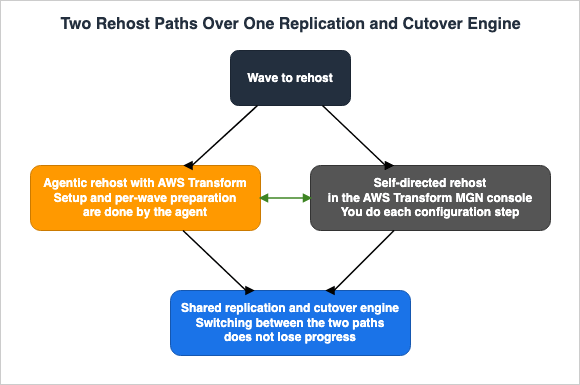
AWS Transform MGN displays these two rehosting paths side-by-side.Agentic rehost with AWS Transform: AI-driven automation handles the full setup and per-wave
preparation, including initializing MGN, configuring IAM permissions, generating launch
templates, setting up post-launch actions, installing replication agents, generating
inventory, configuring replication settings, and enriching network mappings, all without
manual intervention. Ideal for migrations spanning multiple accounts or requiring precise
configuration where manual errors introduce delays.Self-directed rehost through the MGN console: You manage each configuration step directly
for full control over your rehost workflow. Ideal for teams that prefer granular,
step-by-step management of their migration.The page also clarifies the relationship between these two paths.
Both paths use the same underlying replication and cutover engine. You can switch between
them at any point during your migration without losing progress.
2.2 What You Choose Is the Path, Not the Engine
Reading these two paths as one with more features and one with fewer is a mistake. Both utilize the same core engine. The difference lies in who performs the preparatory steps before the engine is invoked.The agentic path handles preparations such as those listed in the previous quote: MGN initialization, IAM permission configuration, launch template generation, post-launch action setup, replication agent deployment, inventory creation, replication configuration, and network mapping completion. In a self-directed path, a person manually performs each of these steps.
So this is not a choice about the quality of the migration. It's a choice about who bears the workload of these preparations. The agentic path is better suited for migrations spanning multiple accounts, or in scenarios where manual configuration errors can directly lead to delays. If another tool already produced the wave plan and all that remains is to execute it, the self-directed path fits better.
Whichever path you pick, you can switch partway through. This flexibility changes how the migration plan is structured, as it eliminates the need to definitively determine the path at the outset.
2.3 What the Note in the Existing Article Already Says
The existing article on server migration carries a note dated August 20, 2026, about the rename. This note details the date of the name change, the coexistence of two rehosting paths, the maintenance of compliance certifications, and availability across all commercial Regions, as well as two AWS GovCloud (US) Regions.This article will continue that discussion, specifically what the two paths share, what carries over when you move between them, and what lands in human hands when the agentic path is chosen.
3. What Is Called What Now, and What Is Still Preview
3.1 Three Names Worth Checking Before You Start
Since the general availability launch in May 2025, the name ofAWS Transform has been updated several times. If outdated names remain in migration planning documentation, readers may be directed to incorrect pages when searching AWS's official documentation. There are three key areas to verify.| Common Name | Current Status | Source |
|---|---|---|
AWS Application Migration Service / AWS MGN | Renamed to AWS Transform MGN | What's New, June 8, 2026. However, the old names are still present in official documentation. |
| AWS Transform for VMware | The name for web application workflows has changed to Migrations (including VMware), and the scope is no longer limited to VMware. | Change log, July 29, 2026. |
| .NET modernization / full-stack Windows modernization | These are not renamings, but rather two distinct names that coexist. The former refers to the conversion of .NET applications, while the latter refers to the conversion that includes migrating from Microsoft SQL Server to Amazon Aurora PostgreSQL. | The former appears on the .NET page; the latter appears in the What's New announcements of December 1, 2025, and August 3, 2026. |
Regarding the first entry, the old names are not entirely incorrect.
AWS Application Migration Service is still referenced as formerly in the AWS Transform MGN user guide, and the abbreviation AWS MGN remains in that guide's main body. The error occurs when presenting an old name as the current official name.The second entry is not just about the name itself. The change log from July 29, 2026, explicitly states that the scope is no longer limited to VMware.
AWS Transform for migrations now supports migrating virtual and bare metal server
environments from virtually any source, including VMware, Hyper-V, and other platforms.
This same section also addresses the change in the name for web application workflows.
The web application workflow has been renamed from 'VMware Migrations' to 'Migrations
(including VMware)'.
If your internal documentation describes it as a VMware-only service, the departments running Hyper-V or bare metal will read themselves as out of scope. This is an area that warrants review.
The third line does not represent a name change, so it requires a different approach. Both names are currently in use. The Custom page of the user guide refers to the capability as AWS Transform for Windows, while the .NET page calls the same capability .NET modernization. Unless internal documents settle on one of them, understanding of the scope will drift.
3.2 What Is Still Preview
General availability and public preview features are displayed on the same screen. Separate them before they go into the migration plan. The following is a list of items confirmed as of August 27, 2026.| Item | Status |
|---|---|
| Conversion of WinForms desktop projects, WPF desktop projects, Xamarin mobile projects, and projects written in VB.NET | Preview feature. The .NET page states that these may not transform as completely as the supported project types. |
| Migrating block storage destinations to Amazon FSx for NetApp ONTAP | Public preview. Change log, June 16, 2026. |
The different preview types for .NET are listed on the same page as the supported versions. When they sit in the same table, they blur into the generally available ones. So give these four preview types a column of their own when you put the internal asset inventory together.
3.3 The Mainframe Runtime Sits Under Another Service's Notices
There is no indication of end-of-life or closed-to-new-customers status forAWS Transform itself. Features were still being added as recently as August 16, 2026.The documentation for the runtime that hosts the Java applications produced by mainframe refactoring, however, lives inside the AWS Mainframe Modernization user guide. Every page of that user guide carries two notices at the top.
After careful consideration, we have made the decision to close new customer access to
AWS Mainframe Modernization self-managed experience, effective June 30, 2026. Existing
customers can continue to use the service as normal. AWS continues to invest in security
and availability improvements for AWS Mainframe Modernization self-managed experience, but
we do not plan to introduce new features.
AWS Mainframe Modernization Service (Managed Runtime Environment experience) is no longer
open to new customers.Neither notice is aimed at AWS Transform for mainframe Runtime itself. The runtime documentation simply shares a user guide with the service those notices describe. This is easy to misread.
The same user guide describes the route to obtain it separately. AWS Transform for mainframe Runtime is obtained from the AWS Transform for mainframe refactor Toolbox, and an AWS Transform for mainframe project engagement carries access to that Toolbox. You deploy it into your own AWS account, onto Amazon EC2, Amazon ECS on Amazon EC2, Amazon EKS on Amazon EC2, or Amazon ECS managed by AWS Fargate.
Even so, it is worth confirming the route with AWS before you start. The list of what the closure affects does not include refactoring with
AWS Transform, yet the FAQ on the same page states that the self-managed version supplies the runtime for exactly that. §12.4 covers the discrepancy.4. The Reach, and How to Decide Where a Workload Lands
4.1 Do Not Keep a Support List of Your Own
It is better not to keep your own internal list of the supported languages, frameworks, and Regions forAWS Transform. Even looking at the change log for 2026 alone, there were four changes related to Regions, one expansion of supported source environments, and multiple additions of new transformation types. Any such list goes stale the moment you write it.What repays keeping instead is a set of criteria for deciding which entry point a given workload goes to. The Custom page of the user guide carries a note, written by AWS itself, on where to send what.
For COBOL/mainframe languages, use AWS Transform for Mainframe. For .NET Framework upgrades
to .NET Core, consider AWS Transform for Windows. For VMware migrations to AWS, consider
AWS Transform for VMware.
This note can be used as a guideline, but the names mentioned are outdated. You will need to cross-reference the second and third items with the table in §3.1. One criterion sits upstream of all five entry points: whether the workload is converted at all. Running VMware Workloads on AWS with Amazon EVS covers the path that carries VMware Cloud Foundation over instead of rebuilding it on EC2, and what the surrounding VPC still forces you to rebuild. VMware History and Timeline covers how that product line reached its current shape, and who has owned the company at each step.
4.2 Five Entry Points
There is no official, definitive list of entry points. While the user guide's overview page describes whatAWS Transform can do in a four-item bulleted list, it does not represent a list of named agents. The following is a categorization of five entry points, identified within this article, that have dedicated documentation and independent general availability announcements. Lists that count differently coexist inside the official documentation, and that is worth taking at face value.| Entry Point | Primary Target | General Availability |
|---|---|---|
| Migrations (including VMware) | Migration of virtual servers and bare metal servers to Amazon EC2. Includes discovery, migration planning, landing zone creation, network migration, server rehosting, and containerization of source code. | May 15, 2025 (for general availability targeting VMware). Expanded to sources other than VMware on July 29, 2026. |
| Mainframe | Analysis, business logic extraction, decomposition, refactoring, and testing of IBM z/OS and Fujitsu GS21 systems. | May 15, 2025 |
| Full-stack Windows modernization | Modernization of .NET applications to a cross-platform .NET environment, and conversion of Microsoft SQL Server to Amazon Aurora PostgreSQL. | December 1, 2025. Offline schema transformation, which needs no live database connection, became available on August 3, 2026, in the US East (Northern Virginia) Region only. |
| Custom | Applying large-scale transformations, defined in natural language, for language version upgrades, API and service migrations, framework updates and replacements, and architecture migrations. | December 1, 2025 |
| Continuous modernization | Analysis and remediation of technical debt across source code repositories, performed either on-demand or on a scheduled basis. | August 3, 2026 |
The fifth entry point is not a migration in itself; rather, it is a process that runs continuously after the migration is complete. While it falls outside the primary focus of this article, it is included here because its handoff is the most clearly defined of the five. §9.3 covers it.
4.3 The Handoff Granularity Differs by Entry Point
Within one service, the unit that comes back to the team varies by entry point. This difference sets the granularity of the schedule.| Entry Point | Unit Delivered to Team |
|---|---|
| Migrations (including VMware) | Wave. Each wave can accommodate up to 150 servers, and this limit cannot be increased. |
| Mainframe | Intermediate deliverables. These are artifacts that serve as prerequisites for the next stage, such as domain decomposition or wave planning. |
| Full-stack Windows modernization | Repository. The .NET page states that the web console transforms up to 500 repositories at a time. |
| Custom | The transformation definition itself, along with its application results. |
| Continuous modernization | Pull request or merge request. |
The 150-server ceiling on a wave cannot be raised, and that fact lands directly on the granularity of the schedule. For an environment with 3,000 servers, at least 20 waves are needed, and each wave needs a human approval. The number of business days allocated per approval directly determines the lower bound on the migration schedule.
5. The Vocabulary That Defines the Handoff
5.1 The Glossary Is Itself a Design for the Receiving Side
The user guide places its glossary on the opening page. The glossary does not define individual words; it defines how to describe the division of labor between people and agents. Reading it before writing a migration plan pays off.| Term | Key Definition |
|---|---|
| objective | The desired end state, as defined by the user. AWS Transform converts this into a series of tasks. |
| plan | A list of tasks that AWS Transform executes to achieve the objective. |
| job | A long-running process that continues to operate in order to fulfill the objective. The user guide states this can range from weeks to months or longer. |
| task | An individual unit of work that comprises a job. |
| collaborator request | A task in which AWS Transform asks a person to do something. |
| artifact | A deliverable produced by AWS Transform. |
| connector | A pathway for connecting to resources owned by the user, external to AWS Transform. |
| worklog | A record of actions performed by both the user and AWS Transform within a job. |
| workspace | A resource within AWS Transform that includes connectors and jobs. It also represents a boundary for permissions. |
The definition of collaborator request is central to this article. The original text reads:
Collaborator request
A task in which AWS Transform is asking a human to do something.
A request is itself a task. In other words, a person's work is not treated as an exception outside of the process, but rather is considered from the beginning as an integral component of the job. It also means that the service has already enumerated what belongs on the schedule.
5.2 A Job Is Assumed to Run for Weeks or Months
The user guide defines a job as a process that can take weeks or even months, and this understanding is crucial for operational design. Even if a person steps away, the job continues to progress. Conversely, if no one notices a collaborator request, the job may remain stalled for weeks.Therefore, the first decision to be made on the receiving side is to establish a schedule for the approvers. Without a plan that clearly defines who will review collaborator requests and how often, the transition will not proceed as planned.
5.3 A Workspace Is a Permissions Boundary
A workspace serves as both a container for jobs and a boundary for permissions. Within a workspace, different users can have different roles. The user guide explicitly states that role-based permissions are not tied to a specific workspace. For example, user A, who is an administrator in workspace A, will have the same permissions as user B, who is an administrator in workspace B.This design provides a means to restrict the individuals who can approve deployments to a production environment. §7 covers this in more detail.
6. Where the Agent Stops and Who Picks It Up
6.1 The Stopping Points Are Written Down
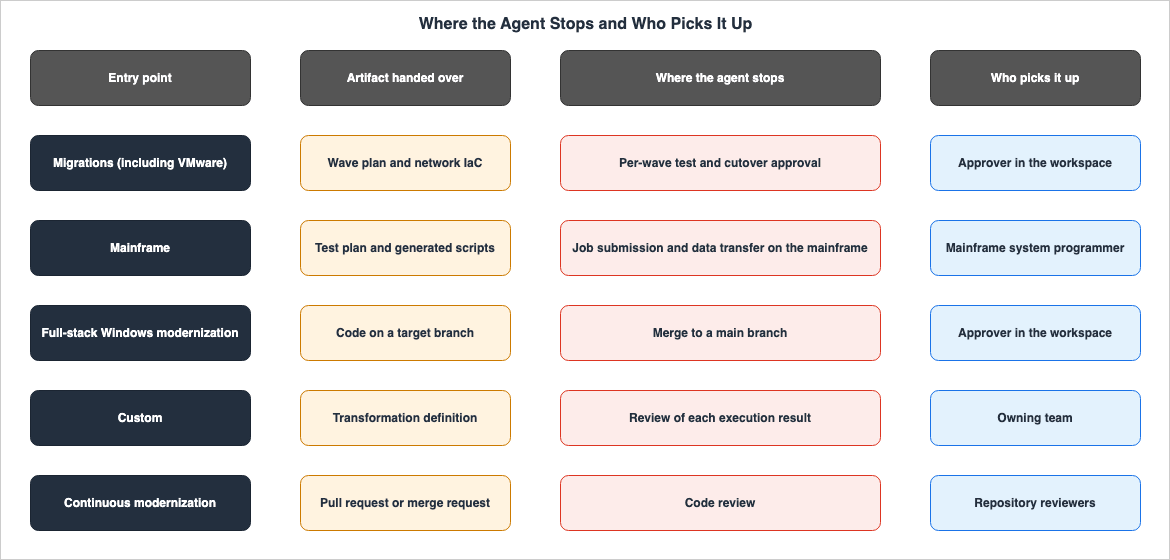
The documentation for each entry point details whereAWS Transform will stop. There is no need for guesswork. Copy what is listed there onto the approval points in the schedule.The mainframe page identifies three scenarios where additional information may be required.
AWS Transform will gather additional information from you in the following scenarios:
- When additional information is needed to execute tasks.
- When approval is required for intermediate artifacts (for example, domains decomposition
  or wave planning).
- When issues arise that AWS Transform cannot automatically resolve.
The .NET page lists four scenarios where input or approval is needed.
- Set up a connector to your source code and permissions
- Validate the proposed modernization plan
- Upload missing package dependencies as NuGets
- Review and accept the transformed code
Comparing these two lists reveals that the stopping points fall into three kinds.
| Type | Example | What the Receiving Side Has to Supply |
|---|---|---|
| Information Provision | Providing missing NuGet packages, configuring access permissions for the target | The individual responsible for the asset and the path to reach them |
| Intermediate Deliverable Approval | Domain decomposition, wave plan, modernization plan | Approval criteria and the process for reverting if the criteria are not met |
| Issues That Cannot Be Automatically Resolved | Sections that could not be transformed | The resources and effort required to manually fill in the missing information |
The third type is the most difficult to estimate. This is because the number of such issues is unknown in advance. If you don't allocate resources to address this, you will run short of hands toward the end of the migration.
6.2 The .NET Transformation Does Not Touch the Original Branches
The .NET page states whereAWS Transform writes the generated artifacts.AWS Transform will not modify the original repo branches, and can only write to a separate
target branch specified in your transformation plan.The original branch remains untouched. While this is a safety-focused design, it also means one additional task for the receiving side. A person decides whether the code in that target branch moves into main. Furthermore, as described later, this decision-making process is also separated from other permissions.
6.3 What Is Not Transformed Is Enumerated
The .NET page also carries a list of what it does not convert.AWS Transform does not transform the following:
- Blazor UI components
- Win32 DLLs that don't have core compatible libraries
- Repositories that do not contain any solutions.This type of list is intended for use during the inventory assessment phase of the migration. If you don't separate the relevant assets beforehand, you will find out that they are out of scope only after the transformation starts. Repositories with no solution file are common enough among older internal repositories.
7. Standard and Critical — The Two Tiers of Human Approval
7.1 Approval Comes in Two Tiers
The human-in-the-loop process inAWS Transform is not a single kind. The user guide categorizes approvals into two tiers: standard and critical.Standard HITL actions
These are routine actions that can be performed by users with Contributor, Approver, or
Administrator roles.Critical HITL actions
These are actions with significant impact, and thus require higher permission levels.
Examples include:
- Merging code to main branches
- Performing graph decomposition
- Deploying code to production environmentsAnd the set of people who may perform the critical ones is narrow.
Critical HITL actions can only be performed by users with Approver or Administrator roles.7.2 The Separation Reaches Down to the API Level
This two-tier separation is not a difference in what the screen shows. The user guide explicitly states that the APIs are distinct.To ensure there's a differentiation between Standard HITL and Critical HITL actions in
AuthZ policies, AWS Transform provides two separate HITL APIs, one for completing a standard
HITL action, and one for completing a critical HITL action.Two separate APIs means an authorization policy can treat them differently. For organizations with auditing requirements, this distinction may be a deciding factor in their adoption decision. The service's own mechanism narrows the set of principals who may approve a production deployment.
7.3 What Each Role Can Do Differs
Pulling only the human-in-the-loop rows out of the permission table in the user guide gives this:| Operation | Admin | Approver | Contributor | ReadOnly |
|---|---|---|---|---|
| View critical tasks | Allowed | Allowed | Allowed | Allowed |
| Update and delete critical tasks | Allowed | Allowed | Not allowed | Not allowed |
| View standard tasks | Allowed | Allowed | Allowed | Allowed |
| Update and delete standard tasks | Allowed | Allowed | Allowed | Not allowed |
| Update and delete workspace | Allowed | Not allowed | Not allowed | Not allowed |
| Create, update, and delete role assignments | Allowed | Not allowed | Not allowed | Not allowed |
There are two key points to note. First, the Contributor can view critical tasks, but cannot execute any actions on them. The people who can notice that an approval is pending and the people who can grant it are separate. Second, the Approver cannot change role assignments, and so cannot hand out approval rights.
7.4 What the Receiving Side Has to Decide
To align with this system, the receiving side needs to determine three key aspects.The first is who the Approver is. This person authorizes the production deployment and the merge to main, and their availability governs the pace of the migration.
The second is how many Approvers there are. One person means the process halts during their time off. Too many dilutes what the approval means.
The third is how the workspaces are cut. Roles are assigned per workspace, so the unit at which you can change the Approver is the workspace. Whether to put production and test in separate workspaces is decided on this basis.
7.5 What the Documentation Does Not Say
As shown above, the official documentation lists the scenarios where human-in-the-loop intervention occurs. However, it does not list the opposite side. Specifically, the following two points were not confirmed in the course of this investigation:The first is whether there are places where an approval cannot be inserted. The documentation describes where requests are routed, but it does not state that users can add approval steps at any point. If you have a requirement to add approval points, you should confirm this with AWS before proceeding.
The second is whether the standard human-in-the-loop step can be skipped so that a job runs entirely unattended. While the documentation explicitly states that Approver or Administrator intervention is required for critical operations, it does not mention any configuration options to run standard operations without human oversight. An unconfirmed point is not the same as an impossible one. Conversely, drawing up a schedule on the assumption that it can be skipped is just as risky.
8. What Functional Equivalence Testing Covers
8.1 What Is Generated and What Is Compared
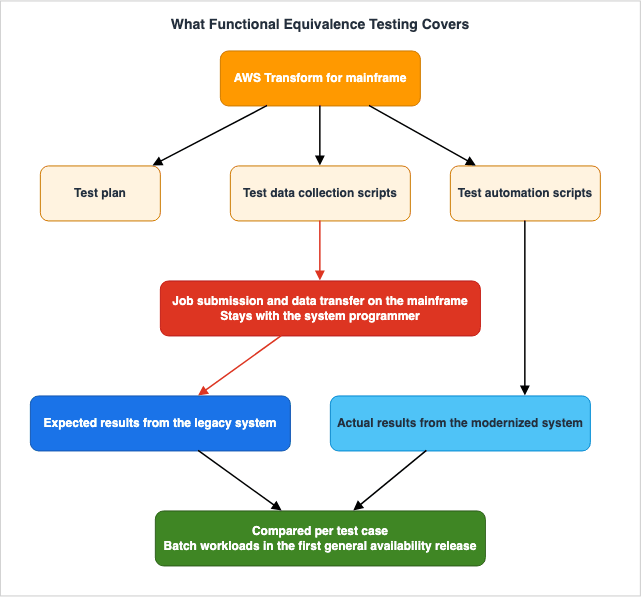
In mainframe modernization,AWS Transform supports functional equivalence testing. Misreading is easy here, so it matters exactly who does what.AWS Transform does not compare the two systems itself; it generates what the comparison needs. The Migration and Modernization blog lists three items that are generated.| Generated Item | Description |
|---|---|
| Test Plan | Automatically generates a functional test plan based on the dependencies of programs, data, jobs, and schedulers. The result is a sequence of batch test cases, organized by business function and domain. |
| Test Data Collection Scripts | Generates JCL scripts to collect input and output data from mainframe data stores, including sequential files, VSAM, and Db2. |
| Test Automation Scripts | Generates functional test scripts based on the test plan. Each script initializes conditions with test inputs, executes the logic of the test case, and compares the results with expected values. |
The third script performs the actual comparison in the modernized AWS environment. The comparison focuses on the execution results of each test case and their corresponding expected values.
These three items don't need to be used in a specific order. The same blog states:
These testing capabilities are designed to be used independently or in a sequence.For organizations that already run a testing process, this changes how they adopt it. They can select and incorporate only the items they need.
8.2 The Boundary Is Stated Explicitly
For the second of the three, the test data collection scripts, the same blog states what falls outside the scope. The boundary is written down here, and this is the most important quotation in this article.While the feature generates collection scripts, it does not manage actual mainframe job
submission or data transfer processes. These activities remain under mainframe system
programmer control for security and governance purposes.The scripts are generated. A person submits them on the mainframe. Similarly, the process of transferring the collected data to AWS remains with a person. The blog gives the reason: security and governance.
This single sentence establishes a concrete requirement for the migration plan. It necessitates allocating the time and effort of mainframe system programmers to the testing phase. And these resources are often the most scarce within many organizations. Draw the schedule on the assumption that the effort drops by exactly what the agent took on, and it breaks here.
8.3 The First General Availability Release Focuses on Batch Workloads
The same blog also states the scope of the first general availability release.For their first general availability release, these AWS Transform testing agentic features
focus on batch workloads where the majority of testing troubleshooting time is typically
spent.The focus is on batch processing. The blog does not mention how to handle functional testing for online processing. For systems with many CICS transactions, confirm this point; otherwise the testing estimate has no basis.
8.4 The Meaning of Equivalence Changes With the Modernization Pattern
One more distinction is easy to miss: whether functional equivalence is required at all depends on the modernization pattern.Functional testing is required for Refactor, , and Replatform projects. Refactor and
Replatform projects require functional equivalence testing. Reimagine projects can blend a
combination of functionally equivalent and non-functionally equivalent testing. When
non-functionally equivalent, tests can be derived from application new specifications as
opposed to the legacy application behavior.The first sentence of the source appears to contain a dropped word. It is quoted here exactly as printed.
The key takeaway is from the subsequent sentences. Both Refactor and Replatform require functional equivalence testing. However, with the Reimagine pattern, added in December 2025, it's possible to combine equivalence and non-equivalence testing. In the latter case, the tests come from the new specifications rather than from the behavior of the legacy application.
In other words, choosing Reimagine moves the work of establishing the test baseline onto people. It requires individuals who can write new specifications, because the legacy application's behavior no longer serves as the answer key. While it's an attractive option, this pattern places the greatest burden on the receiving side.
9. The Artifacts You Receive, and Who Can Act on Them
9.1 You Can Own Where the Artifacts Are Stored
There are default settings for the storage locations of migration artifacts. AWS's published implementation guidance states that by default they are stored in service-managed buckets, and that you can instead configure your own Amazon S3 bucket. The change log records that on May 14, 2026, configuring your own Amazon S3 bucket, and optionally encrypting artifacts with your own AWS KMS key, became available.In regulated industries, this capability may be a prerequisite for adoption. It allows users to maintain control over the storage location of artifacts, as well as their encryption and access policies.
The Migration and Modernization blog also describes a discovery tool that runs entirely on premises. It collects the data on a virtual appliance and keeps it there. Nothing reaches AWS unless you export the data and upload it yourself. The tool also supports anonymization during the export process.
9.2 Both Code and Infrastructure Come Back
The artifacts are not limited to code. The mainframe page of the user guide states thatAWS Transform supplies ready-to-use Infrastructure as Code templates for standing up the cloud environment that modernized applications run in.The same holds on the migration side. The change log states that network migration auto-generates network YAML files compatible with Landing Zone Accelerator on AWS. When creating a landing zone, the options are clearer: you can choose between a fully automated deployment or an output as Infrastructure as Code. The formats named for the latter are AWS CloudFormation, AWS Cloud Development Kit, and Landing Zone Accelerator on AWS.
The very existence of these options signifies the ability to choose the handoff point. While automated deployment reduces effort, it bypasses existing control processes. Receiving the output as a template lets it run through those control processes, but then a person has to apply it. The organization's change management practice decides which one you take.
9.3 In Continuous Modernization the Handoff Is a Pull Request
Continuous modernization, generally available since August 3, 2026, has the most clearly defined handoff of the five. The What's New documentation states:For findings with an associated remediation, continuous modernization creates branches and
opens pull requests or merge requests containing validated code changes for review.
Analysis and remediation run in your AWS account using your credentials, while your source
code remains under your control.The handoff point is a pull request. Humans review and merge the changes. Analysis and remediation run in the user's AWS account using the user's credentials, and the source code stays under the user's control.
This approach is easily manageable for the receiving side. An existing code review step doubles as the acceptance step. Conversely, in an organization without a working pull request review, findings pile up at exactly the rate they are produced.
10. Handing the Rest to Another Agent
10.1 Forward Engineering Does Not End Inside the Web Application
AWS Transform is designed to pass the later stages of the transformation to the development environment. The change log dated May 14, 2026, states:AWS Transform agents are now accessible through a Kiro power, agent plugins, and the AWS
Transform MCP server, letting developers consume transformation capabilities directly from
their preferred development environment.The heading of this entry in the change log lists the target development environments as Kiro, Claude, Cursor, and Codex. The .NET page also states that you transform from Kiro using the AWS Transform for Kiro power, and from other AI code companions using AWS Transform MCP agents.
On the Windows side, this handoff is built into a specific step. Regarding the offline schema transformation, which became generally available on August 3, 2026, What's New states that developers can choose between two options.
directly in the web console or hand off to their preferred IDE using the AWS Transform MCP
server
10.2 Job State Carries Between the Web Console and the IDE
The .NET page states that you can shift freely between the web console and the Visual Studio integrated development environment (IDE). For custom, the change log of April 14, 2026, states that job state is shared across the IDE, the command-line interface (CLI), and the web console.This design facilitates a division of labor, allowing the receiving side to effectively manage tasks. Administrators can monitor overall progress in the web console, while developers can handle individual code modifications within their own environments.
By its own definition, the
AWS Transform worklog does not reach into a developer's environment. The worklog records actions performed within AWS Transform and by the user during a job, but it does not track modifications made by developers in their own environments. If you need an audit trail, keep a separate record on the development environment side.The choice of which agent IDE to use is outside the scope of this article. The existing CLI Coding Agents Comparison - Claude Code, Codex CLI, Gemini CLI, and More covers that.
10.3 Custom Transformation Definitions Are Published per Account
Each account's registry holds its custom transformation definitions. The user guide clearly defines the scope of this registry.Transformation definitions are account-specific. If you want to use a transformation in a
different AWS account, you must publish it separately in that account.These definitions are not designed for sharing a single definition across the entire organization. In an organization running multiple accounts, distribution and version management for these definitions is yours to design. Since definitions consist of SKILL.md, along with any associated references and scripts folders, distribution rides on the asset management you already have.
A definition also has a total size limit. All files together, document references included, must not exceed 10 MB. This limit cannot be increased. Therefore, it is not possible to include large migration guides directly as reference materials.
11. Region Means at Least Five Different Things Here
11.1 There Are Five Separate Lists
When encountering the word region in theAWS Transform documentation, always check which one is meant. At least five separate lists exist, and the Regions included in each do not align.| Meaning | Scope (as of August 27, 2026) |
|---|---|
| Regions where you can create workspaces | 9: US East (Northern Virginia), Europe (Frankfurt), Asia Pacific (Mumbai), Asia Pacific (Sydney), Asia Pacific (Tokyo), Europe (London), Asia Pacific (Seoul), Canada (Central), South America (São Paulo). Note that South America (São Paulo) is only available for agents used in mainframe modernization. |
| Regions where the data is processed | The workspace Region determines the destination. Refer to the cross-region processing page in the user guide for a corresponding table. |
| Target Regions | All AWS commercial Regions, excluding Middle East (Bahrain) and Middle East (United Arab Emirates). |
| Regions where you can use custom | 8: the 9 workspace Regions, excluding South America (São Paulo). |
Regions where AWSServiceRoleForAWSTransform works | 2: US East (Northern Virginia) and Europe (Frankfurt). |
Separately from these five,
AWS Transform MGN carries a supported Regions list of its own, which covers all commercial Regions and both AWS GovCloud (US) Regions.Furthermore, the list of workspace Regions carries a condition at the end. The user guide notes that if a request requires information from an opt-in Region not listed there,
AWS Transform can make calls to that Region. To narrow which Regions can be called, use the controls described in the security section of the user guide.11.2 The Easiest Mistake Is the Workspace and Target Relationship
The user guide clearly outlines the relationship between workspaces and jobs.The workspace in which you create a job determines the AWS Region of the job. To create a
job in a different Region, you must use a different workspace that is in your desired
Region.It then adds that migration is a separate case. In VMware projects, discovery uses the workspace Region, while you can name a different Region as the target.
In other words, it is possible to migrate from a workspace in Tokyo to a different Region. However, jobs created within a Tokyo workspace cannot be treated as jobs within a Frankfurt workspace. Confusing these two will result in creating unnecessary workspaces during the planning phase.
11.3 There Are Two Service-Linked Roles, and Their Regions Differ
Of the five senses of the word, the service-linked role has the narrowest scope. There is a pitfall here: there are actually two service-linked roles, and the Regions they support do not match.| Role | Supported Regions |
|---|---|
AWSServiceRoleForAWSTransform | Two: US East (Northern Virginia) and Europe (Frankfurt). |
AWSServiceRoleForAWSTransformCustom | All Regions where custom is available, which is eight. |
In the same section of the user guide, these two Supported Regions subsections are presented separately. The first explicitly states that
AWS Transform does not support the service-linked role in every Region where the service is available. The second states that it is supported in every Region where custom is available.While nine Regions are available for creating workspaces, the first role only supports two. This discrepancy could have implications for your control design. Before selecting a configuration to operate workspaces in Tokyo, check with AWS whether your configuration needs what the first role does.
12. Where the Primary Sources Disagree
Four discrepancies stand in the primary documentation forAWS Transform as things are. All were confirmed on August 27, 2026. They are recorded here so that readers are not confused when they read the official documentation themselves.12.1 Quota Values Differ Between Two Official Pages
The quota values for the same items differ between the quota page in the user guide and the quota page in the AWS General Reference.| Item | User Guide | AWS General Reference |
|---|---|---|
| .NET Monthly Code Lines (Web and Integrated Development Environment) | 1,000,000 | 2,000,000 |
| Mainframe Analysis Monthly Code Lines | 100,000,000 | 500,000,000 |
| Mainframe Business Document Generation Monthly Code Lines | 50,000,000 | 250,000,000 |
| Mainframe Technical Document Generation Monthly Code Lines | 50,000,000 | 250,000,000 |
| Mainframe Decomposition Monthly Code Lines | 50,000,000 | 250,000,000 |
| Mainframe Conversion Monthly Code Lines | 10,000,000 | 250,000,000 |
The last row differs by a factor of 25. However, both pages agree on the maximum number of code lines per job (3,000,000 lines) and the monthly code lines for Reforge (50,000,000 lines). So the explanation that one page is simply out of date does not hold.
When these numbers go into capacity planning, check your account's actual values in the Service Quotas console. Both pages direct users to check the values in the Service Quotas console.
Regarding workspace quotas, both pages list the value as 100, but the units of measurement are described differently. The user guide specifies the value per Region for accounts with AWS Transform enabled, while the AWS General Reference specifies the value per AWS IAM Identity Center.
12.2 The Role Count Does Not Match Within a Single Page
The permissions page states that each workspace supports five user roles. However, the permissions table on the same page lists only four roles: Admin, Approver, Contributor, and ReadOnly. Furthermore, the glossary at the beginning of the user guide also defines only four roles: Administrator, Approver, Contributor, and Reader.It is impossible to determine what the fifth role is from either page. If the number of roles is being used in the permission design, verify it in the console itself.
12.3 The Custom Region List Is Frozen at Announcement Time
The What's New post of December 1, 2025, states that custom is available in US East (Northern Virginia). However, this was later updated; on January 14, 2026, Europe (Frankfurt) was added, and on April 21, 2026, six additional Regions were added, bringing the total to eight. The user guide lists those eight Regions.This is less an error than a consequence of What's New recording the state of things at announcement time. If users consult What's New to determine regional availability, they may encounter this type of outdated information. Take the user guide as the authoritative source for the current list of supported Regions.
12.4 One Page Contradicts Itself About the Mainframe Runtime
The AWS Mainframe Modernization availability change page has two sections: one for the self-managed experience, and one for the Managed Runtime Environment experience.The self-managed section states that this experience is no longer open to new customers, and lists five things the change affects: Replatform with Rocket, Data Replication with Precisely, Replatform with NTT DATA, Assembler Conversion with mLogica, and SPARC Virtualization with Stromasys. Refactoring with
AWS Transform is not on that list.The FAQ in the Managed Runtime Environment section of the same page, meanwhile, names the self-managed version as the alternative.
The self-managed version of AWS Mainframe Modernization Service provides runtime
functionality for both Rocket Software (replatform) and AWS Transform for mainframe
(refactor) capabilities.
The same section also calls the self-managed version the recommended solution.
AWS Mainframe Modernization Service (Self-Managed Experience) is our recommended solution
that provides the same core functionality for mainframe modernization.
The section above it on the same page states that the self-managed version is no longer open to new customers. The notice at the top of every page, for its part, directs readers to
AWS Transform as the source of capabilities similar to the self-managed experience.All three statements sit on one page and do not line up. When a mainframe refactor goes into the plan, confirm the current relationship among them with AWS.
13. What Goes Wrong on the Receiving Side
13.1 Starting Without Naming an Approver
This is the most common cause of failure. A job can run for weeks or even months, and during that time, collaborator requests may arise. Without a designated Approver, the job stalls. And often, no one realizes it has stopped until someone checks the screen.§7.4 sets out the response: name the Approvers first, make sure there is more than one, and cut the workspaces along the same lines as the approvals.
13.2 Assigning the Testing Effort to the Agent Side
This happens in mainframe modernization. Because test automation scripts are generated, teams push the testing effort onto the agent side of the estimate and assume it drops sharply.However, as described in §8.2, managing job submissions and data transfers on the mainframe remains the responsibility of system programmers. Every generated script is one more thing for the mainframe side to run. What drops is the effort of writing the scripts, not the effort of running them.
13.3 Choosing Reimagine and Still Treating Legacy Behavior as the Answer Key
As described in §8.4, Reimagine patterns can include tests that are not equivalent. The expected results for these non-equivalent tests cannot come from the behavior of the legacy application; they need new specifications.If you choose Reimagine without ensuring that you have people who can write these new specifications, the testing phase arrives with no way to fix the expected results, and nothing moves past it.
13.4 Citing What's New for Regional Availability
As stated in §12.3, What's New records the state of things at announcement time, so the supported Regions it lists go stale. Cite the corresponding page in the user guide instead.13.5 Drawing the Schedule Without the Wave Limit
A single wave holds 150 servers, and that ceiling cannot be raised. The server count fixes the number of approvals. Multiply that by the number of business days one approval takes, and you have the lower bound on the migration period. Without doing that arithmetic first, the schedule will not match reality.13.6 Including Repositories Without Checking the Prerequisites
As stated in §6.3, a repository with no solution file falls outside the scope of .NET transformation. The same goes for Blazor UI components and for Win32 DLLs that have no core compatible libraries. Separate them out during the inventory.13.7 Assuming One Account's Transformation Definition Reaches the Whole Organization
As discussed in §10.3, custom transformation definitions are account-specific. To use them in a different account, they must be separately published within that account. Multi-account environments need a distribution design.13.8 Confusing This With the CloudFormation Transform Section
The termAWS Transform is a different thing from the Transform section in an AWS CloudFormation template, and from the built-in function Fn::Transform. In-house searches conflate the three. Search for AWS Transform in full.14. An Acceptance Checklist for the Handoff
BeforeAWS Transform goes into the migration plan, check the following.14.1 People
- Someone holds the Approver role.
- There is more than one Approver.
- A cadence and a rota for checking collaborator requests exist.
- The team has decided whether production and test get separate workspaces.
- The team has decided who goes in as a Contributor.
14.2 If Mainframe Is in Scope
- The testing phase carries enough mainframe system programmer time.
- The scope separates batch workloads from online workloads.
- The team has picked one of Refactor, Replatform, and Reimagine.
- If Reimagine is the choice, someone on the team can write the new specifications.
- The team has confirmed with AWS the route to the Toolbox runtime that will run the generated code in production.
14.3 If Windows Assets Are in Scope
- Project types still in preview sit in a column of their own.
- The inventory already separates out the assets that will not transform.
- Someone owns the decision to merge from the target branch into main.
14.4 If Server Migration Is in Scope
- The team has picked the starting path, agentic or self-directed.
- The server count yields a wave count, and the approval schedule reflects it.
- The target Region and the workspace Region are not mixed up.
14.5 Artifacts
- The team has decided whether the artifacts land in an Amazon S3 bucket of its own.
- The team has decided how Infrastructure as Code gets applied: automatically, or as a template that runs through a control process.
- The team knows where the record of work handed to an agent IDE goes.
14.6 How to Handle Sources
- The user guide is the source for regional availability.
- The Service Quotas console supplied the quota values.
- Internal documents carry the date on which availability status was checked.
15. Frequently Asked Questions
Does AWS Transform make the migration fully automatic?
No. The places where human judgment enters are part of the design ofAWS Transform. The user guide defines a collaborator request as a task in which AWS Transform asks a person to do something. Human work is not an exception; it is a component of the job.If you already use MGN, do you have to move to AWS Transform?
No. The existing route through the classic console is still there; it is the self-directed path. The replication and cutover processes are the same regardless of the path you choose.Can you switch from the agentic path to the self-directed path partway through a migration?
Yes. The AWS Transform MGN product page states that it is possible to switch from an agentic to a self-directed migration path at any point during the migration process, without losing progress.Does functional equivalence testing compare the legacy and modernized environments automatically?
No.AWS Transform generates test plans, test data collection scripts, and test automation scripts. The test automation scripts perform the comparison in the modernized AWS environment. Job submission and data transfer on the mainframe side remain under the management of system programmers.Is functional equivalence testing required for every modernization pattern?
No. It is required for both Refactor and Replatform. With Reimagine, it's possible to combine equivalent and non-equivalent tests. Where tests are non-equivalent, the expected results come from the new specifications.Can human-in-the-loop approval be separated by permissions?
Yes.AWS Transform splits them into standard and critical, and only Approvers and Administrators may perform the critical ones. The user guide states that two separate HITL APIs exist so that authorization policies can tell the two apart.Does the transformed code land on the original branch?
No. The .NET page states thatAWS Transform writes only to a separate target branch named in the transformation plan, and does not modify the branches of the original repository.Can AWS Transform be used in the Asia Pacific (Tokyo) Region?
Yes. The Asia Pacific (Tokyo) Region is one of the nine Regions where you can create workspaces, and it is also one of the eight Regions where you can use custom. However, only the US East (Northern Virginia) and Europe (Frankfurt) Regions support theAWSServiceRoleForAWSTransform role, so you will need to verify whether that role is required for your specific configuration.Does the target Region have to be the same as the workspace Region?
No. The target Region does not have to match the workspace Region. In VMware projects, discovery uses the workspace Region, but you can name a different Region as the target. The target can be any AWS commercial Region except Middle East (Bahrain) and Middle East (United Arab Emirates).Should you keep a list of supported languages and frameworks in internal documents?
No. Based on the change log for 2026 alone, there have been four changes related to Regions and one expansion of the target source environments. Instead of creating a list, it would be more maintainable to establish clear criteria for making such decisions, provide representative examples, and point to the official user guide for the list itself.Is AWS Transform related to the CloudFormation Transform section?
No. They are separate. TheTransform section of an AWS CloudFormation template specifies one or more macros that process the entire template. Fn::Transform is a built-in function used to reference a macro when you want to process only a portion of the template. Even AWS::Serverless, which you write when using the AWS Serverless Application Model, is one of the macros provided by CloudFormation. None of them is related to AWS Transform.What happens to the runtime for code produced by mainframe refactoring?
The AWS Transform for mainframe refactor Toolbox is where you obtain it. The AWS Mainframe Modernization user guide states that access to the Toolbox comes as part of an AWS Transform for mainframe project engagement, and that you deploy the runtime into your own AWS account. The catch is that the AWS Mainframe Modernization closure notices carried by that same user guide do not line up with this description. §12.4 sets out the discrepancy.16. Summary
AWS Transform is not a service that takes the migration away from people. It is a service that defines, in advance, the points at which people take over. The term collaborator request states that design in one line.Three decisions have to be settled before this goes into a migration plan. First, name the Approvers. Jobs run for weeks or months and ask for human judgment along the way, and if no one holds the Approver role the job stops there. Second, decide where the effort sits. Mainframe testing cuts the effort of writing the scripts; the effort of running them on the mainframe stays. Third, decide how you receive the artifacts. Applying Infrastructure as Code automatically and receiving it as a template for an existing control process need different people behind them.
Having two rehost paths means these three decisions can be deferred, because both sit on the same engine and moving between them costs no progress. You don't need to finalize the path selection before starting. The decisions that do need settling are the Approvers, where the effort sits, and how you receive the artifacts.
Furthermore, availability status, supported Regions, and quotas all move. The figures mentioned in this article may already be different by the time you read this. Instead of relying on What's New, it's best to consult the user guide, measure quotas in the Service Quotas console, and document the verification date in internal documentation.
17. References
- What is AWS Transform? - AWS Transform User Guide
- Supported Regions for AWS Transform - AWS Transform User Guide
- Cross-region processing in AWS Transform - AWS Transform User Guide
- Understanding collaborator permissions - AWS Transform User Guide
- Migrations (including VMware) - AWS Transform User Guide
- Migrate servers - AWS Transform User Guide
- Modernization of mainframe applications - AWS Transform User Guide
- Modernizing .NET with AWS Transform - AWS Transform User Guide
- Custom - AWS Transform User Guide
- Getting Started - AWS Transform User Guide
- Using service-linked roles for AWS Transform - AWS Transform User Guide
- Quotas for AWS Transform - AWS Transform User Guide
- Change log - AWS Transform User Guide
- AWS Transform endpoints and quotas - AWS General Reference
- Guidance for Automated Setup for AWS Transform - AWS Solutions Library
- What Is AWS Transform MGN? - AWS Transform MGN User Guide
- Source Servers in AWS Transform MGN - AWS Transform MGN User Guide
- AWS Mainframe Modernization availability change - AWS Mainframe Modernization User Guide
- AWS Transform for mainframe Runtime - AWS Mainframe Modernization User Guide
- Onboarding AWS Transform for mainframe Runtime - AWS Mainframe Modernization User Guide
- AWS Transform for mainframe FAQ - AWS Mainframe Modernization User Guide
- CloudFormation template Transform section - AWS CloudFormation User Guide
- Overview of CloudFormation macros - AWS CloudFormation User Guide
- Rehost applications to AWS - AWS Transform MGN
- When to Choose AWS Transform MGN - AWS Transform MGN
- Frequently Asked Questions - AWS Transform
- AWS Transform for VMware is now generally available - AWS What's New
- AWS Transform for mainframe is now generally available - AWS What's New
- AWS launches AWS Transform custom to accelerate organization-wide application modernization - AWS What's New
- AWS Application Migration Service is now AWS Transform MGN - AWS What's New
- AWS Transform continuous modernization is now generally available - AWS What's New
- AWS Transform for full-stack Windows modernization now supports offline schema transformation to Aurora PostgreSQL - AWS What's New
- Accelerating mainframe modernization testing with AWS Transform - AWS Migration and Modernization Blog
- Accelerate mainframe modernization with AWS Transform: A comprehensive refactor approach - AWS Migration and Modernization Blog
- How AWS Is Using Agentic AI To Reinvent Infrastructure Modernization - AWS Migration and Modernization Blog
References:
Tech Blog with curated related content
Written by Hidekazu Konishi