Heterogeneous Database Migration on AWS - Schema Conversion, Full Load with CDC, Data Validation, and a Cutover You Can Reverse
First Published:
Last Updated:
When heterogeneous database migrations fail, the root cause is rarely a problem with the tools themselves. Typically it comes from something else: objects that the conversion could not handle and nobody picked up, differences that validation never looked at, or a fallback path that was never built. These are all examples of design shortcomings, not operational errors.
The technical statements in this article were checked against the AWS Database Migration Service User Guide, AWS Prescriptive Guidance, the AWS Database Blog, and AWS re:Post as of August 21, 2026. Supported conversion paths, default engine versions, and default settings all move, so confirm them again at the time you read this. This article does not cover pricing.
Table of Contents
- 1. The Decisions This Article Supports
- 2. The Official Framework, and the Frame This Article Puts on Top of It
- 3. Schema Conversion, and What It Leaves Behind
- 4. The Seam Between Full Load and CDC
- 5. What Data Validation Does Not Compare
- 6. The Cutover
- 7. Designing a Fallback You Can Test
- 8. Can zero-ETL be used for a migration?
- 9. What Breaks Quietly
- 10. The Assessment Phase After Fleet Advisor
- 11. Version Thresholds to Confirm Before You Plan
- 12. Where the Primary Sources Disagree
- 13. Checklists
- 14. Frequently Asked Questions
- 15. Summary
1. The Decisions This Article Supports
1.1 The Situation This Article Assumes
This article addresses the phase after a decision has been made to migrate, not the stage of deciding whether to migrate. It assumes the perspective of someone responsible for negotiating downtime and justifying potential fallbacks, following a decision to replace commercial databases such as Oracle Database, Microsoft SQL Server, and IBM Db2 with PostgreSQL-based or MySQL-based engines on AWS.The first difficulty in that role is not getting hold of a list of steps. Those steps are documented in AWS's own documentation. The hard part is that you cannot estimate, before the work starts, which of those steps stops the business and for how many hours. Nor can you say how far back you get to go if that estimate turns out wrong.
This article is not an operational guide for AWS DMS. The detailed steps for using AWS Database Migration Service are outlined in the AWS Database Migration Service user guide. Instead, this article focuses on the design decisions that underpin those procedures.
1.2 The Boundary With the Existing Articles
Before this article was written, the scope of the existing articles was measured. The following is the result of a full scan of the 335 entries in theentry/ directory as of August 21, 2026.| Existing Content | Scope in Relation to This Article |
|---|---|
| Zero-Downtime Database Change on RDS and Aurora | Covers schema changes, version upgrades, and Blue/Green deployments inside a single database engine. If the engine itself is changing, that content is the more appropriate starting point. |
| Summary of AWS Application Migration Service (AWS MGN) Architecture and Lifecycle Relationships, Usage Notes | Covers the migration of the servers themselves. The service has been renamed from AWS Application Migration Service to AWS Transform MGN, and the title of the existing article still carries the previous name. This article does not cover the procedures for server migration. |
| AWS Database Glossary | Contains definitions for terms related to AWS DMS and schema conversion. This article does not include a dedicated section for definitions; instead, it briefly explains terms and refers readers to other resources. |
| Zero-ETL Integrations on AWS | Covers continuous replication for analytics purposes. This article only addresses the question of whether zero-ETL can be used for migration, specifically in Section 8. |
The existing article Zero-Downtime Database Change on RDS and Aurora carries a section listing what it does not cover:
Database migration. Moving between engines or from outside AWS, and the AWS Database
Migration Service workflow that supports it. That is a separate subject with its own
cutover design, and it is not covered here.
This article serves as a reference for that section. It addresses migrations that span different database engines and the cutover design associated with those migrations.
The measured boundary is recorded here as well. As of August 21, 2026, the term
cutover appears in 32 out of the 335 existing entries. The highest frequency is in the AWS Transform MGN article (37 instances), followed by the Zero-Downtime Database Change on RDS and Aurora article (25 instances). While the term itself is used in both, the subject matter differs. A server cutover refers to the point at which a machine image is launched, while a cutover inside one engine means swapping endpoints. The cutover discussed in this article refers to the period from when writes to the source are stopped to when the first write occurs to the target.One boundary has moved since that scan. AWS Transform puts an agentic workflow on top of the same replication and cutover engine, and the question of which stretches it runs and which stretches stay with people is covered in What AWS Transform Automates and What Stays Human. This article stays with the database.
A second boundary has been drawn since that scan, and it runs through change data capture itself. Here, CDC is one phase of a migration: it starts where the full load ends, it exists to close a gap, and it is finished at cutover. The same mechanism can instead be operated as a permanent layer, where nothing is ever cut over and the question becomes where the capture point sits, what a replication slot obliges the source database to keep, and what guarantee each capture point gives. That side is covered in Change Data Capture on AWS Beyond Zero-ETL - Logical Decoding, Streaming Connectors, and the Guarantees Each Capture Point Gives You. This article keeps the phase that ends.
1.3 Three Questions This Article Addresses
Framing the three gaps named at the start as questions that need answers before the work begins gives the following. This article will address them in the following order.First, who will take responsibility for what was not converted? Second, what does a state in which validation has passed guarantee, and what does it not guarantee? Third, can the fallback process be tested in advance?
The third question is often the one that receives the least attention. Migration documentation often ends with a description of the forward process, while the fallback is only briefly mentioned in the final paragraph. But a fallback is a capability that does not exist unless somebody designs it. Nobody thinks it up on the day of the cutover.
1.4 Two Constraints That Shape What Follows
Before you begin designing the architecture, there are two constraints you should be aware of. Both will limit your options in later sections.First is the placement constraint. The AWS DMS user guide states:
The only requirement to use AWS DMS is that one of your endpoints
must be on an AWS service. You can't use AWS DMS to migrate from an on-premises
database to another on-premises database.
One endpoint must reside within AWS. This constraint becomes relevant when considering the fallback design (discussed in Section 7). When you decide where to put the fallback destination, make sure that the two ends of that path are not both outside AWS.
Second is which route you are on. AWS DMS handles a migration between different engines and a migration inside one engine alike, but a migration inside one engine has a route of its own. AWS DMS's homogeneous data migrations utilize native tools on both the source and target systems to move data and do not involve replication instances. If you are migrating between the same engine type, the majority of the content in this article will not be necessary.
This article specifically addresses scenarios where the database engine changes. When the engine changes, schema conversions become necessary, potentially leaving untranslatable elements, creating items that cannot be validated, and making it more difficult to test the fallback path. A migration of this kind is a project that ends. The pipelines that keep loading data afterwards are recurring work with a different shape, and Data Pipeline Orchestration on AWS covers what that work asks for.
2. The Official Framework, and the Frame This Article Puts on Top of It
2.1 The Five Steps AWS Lists
The AWS DMS User Guide's high-level overview of AWS DMS outlines this process in five steps: identifying candidate databases within your network, automatically converting the majority of the source database's schema and database code objects to a target-compatible format, creating a replication server, creating endpoints with connection information for both the source and target, and finally, creating one or more tasks to migrate the data.These five steps represent a set of tools, not a sequence of events. What a reader wants to know is which of the five is where the business has to stop.
The first of the five, discovery, is covered in Section 10. The feature that used to automate it is gone, and the work now splits across more than one tool.
2.2 The Three Phases of a Task
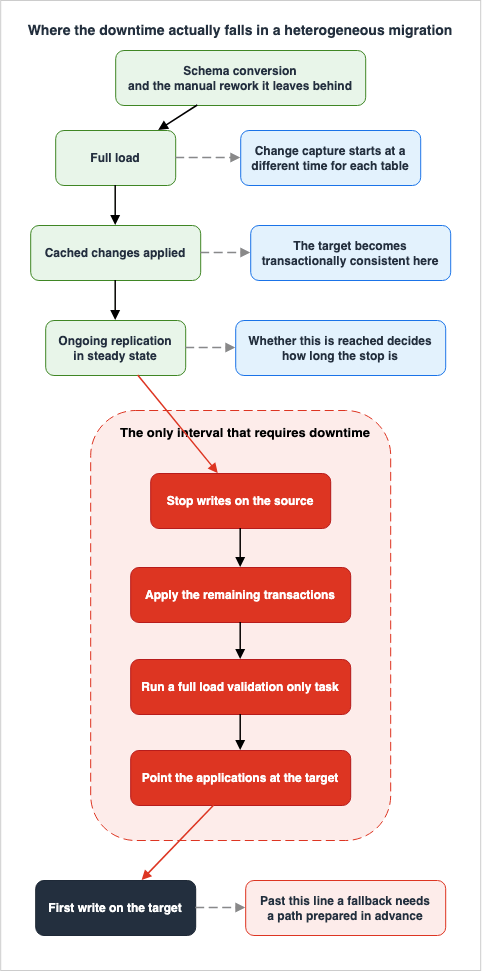
The timeline is also described elsewhere on the same page. AWS DMS states that a task can consist of three phases: initial data migration (full load), application of cached changes, and ongoing replication (Change Data Capture).These three phases represent the actual units of time to consider when assessing potential downtime. Even the five-step process will take time. In particular, the second step involves manual intervention, as seen in Section 3. However, you can carry all of them out without interrupting the business. The question of whether to halt operations arises in relation to these three phases of the task.
AWS also clarifies the relationship between these phases. While the full load is in progress, any changes made to tables being read are cached on the replication server. Once the full load for a particular table is complete, the cached changes for that table are immediately applied. Once cached changes have been applied to all tables, the tables are transactionally consistent. From that point onward, the task enters the phase of ongoing replication.
2.3 Where does the downtime actually go?
Arranged along a timeline, the sequence shows that this work requires the business to stop in exactly one place. This is the interval between stopping writes to the source and the point where all remaining transactions have been applied to the target, and the application has been successfully redirected.AWS itself defines this process. Immediately after the ongoing replication phase begins, a backlog of transactions generally causes some lag between the source and the target. Once that backlog is worked through, the migration reaches a steady state. At that point you can shut down the applications, let the remaining transactions be applied to the target, and bring the applications back up pointing at the target.
So the length of the downtime is not set by the total volume of data being migrated. Instead, it depends on whether the system has reached a steady state. Even with a massive amount of data, if CDC sits in a steady state, the cutover is short. Conversely, if the cutover time arrives before the system reaches a steady state, the downtime will directly correspond to the time required to resolve the remaining latency.
3. Schema Conversion, and What It Leaves Behind
3.1 Two Tools and One Engine
In a migration between different database engines, the schema and the code have to be converted before the data moves. AWS provides two options for this purpose: DMS Schema Conversion, which runs in the AWS DMS console, and AWS Schema Conversion Tool (AWS SCT), which you install and run locally.These two are not competing products. The user guide states the following about DMS Schema Conversion:
DMS Schema Conversion is a fully managed, web-based feature that builds on the AWS Schema Conversion Tool
(AWS SCT) conversion engine.
Essentially, they share a common conversion engine but differ in how they are packaged. DMS Schema Conversion is a managed service that requires no installation, while AWS SCT runs locally and requires client-side management.
So, which one should you choose? The user guide clearly outlines the criteria for making that decision:
The AWS Schema Conversion Tool (AWS SCT) supports more source and target databases than DMS Schema Conversion.If the source and target combination you need sits inside the range DMS Schema Conversion supports, DMS Schema Conversion, which needs no installation, is enough. If not, you should use AWS SCT. This is not a matter of preference. It is a matter of looking up the supported conversion paths.
Confusing the two sends a reader off to look for the procedure for a different tool. From here on, this article calls the console-based option DMS Schema Conversion and the locally installed one AWS SCT, and does not mix them.
3.2 Do Not Read a Majority as Everything
AWS consistently uses expressions that indicate a degree when describing the scope of transformations. The wording in the user guide states:DMS Schema Conversion converts your existing database schemas and a majority of the database code
objects to a format compatible with the target database.a majority of means a large portion, but not everything. On the same page, it immediately follows with a list of actions to take for objects that cannot be directly converted.This is not merely a matter of wording. The effort estimate for the migration plan can change depending on how this single phrase is interpreted. Read as everything, the work after conversion is review and nothing more. Read as a majority, the plan needs a stage in which people rewrite what is left.
3.3 The Supported Conversion Paths
As of August 21, 2026, DMS Schema Conversion supports the following conversion paths. This table also indicates whether generative AI conversion is available.| Source | Target | Generative AI Conversion |
|---|---|---|
| Oracle | Aurora PostgreSQL or RDS for PostgreSQL | Supported |
| Oracle | Aurora MySQL or RDS for MySQL | Not Supported |
| Oracle | Amazon Redshift | Not Supported |
| SQL Server | Aurora PostgreSQL or RDS for PostgreSQL | Supported |
| SQL Server | Aurora MySQL or RDS for MySQL | Not Supported |
| PostgreSQL | Aurora MySQL or RDS for MySQL | Not Supported |
| MySQL | Aurora PostgreSQL or RDS for PostgreSQL | Not Supported |
| IBM Db2 for LUW | Aurora PostgreSQL or RDS for PostgreSQL | Supported |
| IBM Db2 for z/OS | Aurora PostgreSQL or RDS for PostgreSQL | Supported |
| IBM Db2 for z/OS | Amazon RDS for Db2 | Not Supported |
| SAP ASE | Aurora PostgreSQL or RDS for PostgreSQL | Supported |
The table is a copy taken on the confirmation date given above. Conversion paths get added. When planning your migration, refer to the official documentation for the most up-to-date information.
The table carries two design implications. First, generative AI conversion is primarily available for paths targeting PostgreSQL-based databases. When selecting a MySQL-based target, objects that cannot be converted using rule-based methods will require manual intervention. Second, migration paths originating from IBM Db2 are not displayed in the console. The user guide explicitly instructs users to utilize the AWS DMS API or AWS CLI for converting from IBM Db2 for LUW and IBM Db2 for z/OS, because these paths do not appear in the console.
For background on choosing Aurora as a target, see AWS History and Timeline regarding Amazon Aurora.
3.4 Action Items Are a Work Queue With No Owner
The most important thing conversion produces is not the converted code. It is the list of objects it could not convert. AWS calls this a conversion assessment report, and describes it as showing what can be converted automatically and what needs manual work.This list serves as the basis for estimating the workload. The user guide suggests that before initiating the migration, users should use this report to estimate the effort required.
The trouble is that the list is nobody's work queue. Migration projects typically involve separate teams responsible for the database and the application. However, the action items listed often include objects that span this boundary – stored procedures, functions, triggers, and user-defined types. The database team may not understand the application's intent, while the application team cannot read the original dialect.
This article recommends assigning an owner to every row of the list before the work starts. If any items remain unassigned, they may linger as tasks without a clear owner until just before the cutover.
Regarding functionality present in the source engine but not available in the target engine, AWS provides a mechanism called an extension pack. The user guide explains that DMS Schema Conversion adds an extension pack that emulates some of those features. The word some is a limit worth reading carefully. The existence of an extension pack does not make the action items go away.
3.5 What Gets Created If You Skip the Conversion
It is also possible to migrate data using only AWS DMS, without performing schema conversions. AWS specifically details what is created on the target side in such cases.AWS DMS creates the target schema objects necessary to perform a data migration. You can
use AWS DMS to take a minimalist approach and create only those objects required to
efficiently migrate the data. Using this approach, AWS DMS creates tables, primary keys,
and in some cases unique indexes, but it won't create any other objects that are not
required to efficiently migrate the data from the source.Only tables, primary keys, and, in some cases, unique indexes are created.
AWS further specifies these details. When the task creates tables on the target, it also migrates primary key constraints and indexes. If a primary key is not present in the source table, and the source table has a unique key, DMS creates that unique key on the target. If the source table includes NOT NULL constraints, those are also replicated on the target; however, LOB (Large Object) columns are excluded. When AWS DMS creates the target table, LOB columns will default to allowing NULL values.
The following items are not migrated. Even if the source table contains auto-incrementing columns, the auto-increment attributes are not replicated. Foreign key constraints, check constraints, default values, and comments – all properties specific to the table – are also not duplicated. Database objects such as secondary indexes, views, procedures, functions, packages, and triggers are also outside the scope of migration and must be migrated separately.
This description is directly related to Section 5. Data validation requires either a primary key or a unique index, so even with a minimal configuration, the fundamental requirements for validation can still be met. However, a target without foreign keys, triggers, or default values is a different database from the application's point of view. It is important to understand that having the same data does not mean the databases are the same.
Furthermore, the fact that LOB columns default to allowing NULL values has implications after the migration. If a LOB column was defined as NOT NULL in the source, it will accept NULL values on the target. If the application relies on that constraint, input that used to be rejected as a constraint violation now goes through.
4. The Seam Between Full Load and CDC
4.1 Change Capture Starts at a Different Time for Each Table
One fact belongs at the front of this section because it is the easiest to miss. AWS DMS does not begin capturing changes for a table until the full load of that table has started. As the user guide states:It's important to note that AWS DMS doesn't capture changes for a given table until the
full load for that table is started. In other words, the point when change capture
starts is different for each individual table.So a task has one start time, but change capture has as many start times as the migration has tables. Depending on the parallelism you configure, a table can begin loading hours after the task itself started.
This fact has implications in two key scenarios. First, it affects recovery from failures. If a single table experiences an error, the moment at which that table started losing changes differs from the moment for the other tables. Second, it shows up as referential integrity drift on the source. Because change capture begins at different times for each table, referential integrity across multiple tables cannot be guaranteed during the full load process.
4.2 Cached Changes and the Moment of Consistency
AWS DMS caches the changes that happen on the source during a full load on the replication instance, and calls them cached changes. When a table finishes its full load, DMS applies that table's cached changes. Where a transaction touches tables that have not finished loading, DMS holds the changes on the replication instance.When all tables have had their cached changes applied, the tables become transactionally consistent. This is the moment when the target first reaches a meaningful state.
Do not judge the target by looking at it before this moment. Row counts that do not add up, foreign keys that look broken, totals that do not match: at this stage all of these are normal.
4.3 The Two Stop Points AWS Provides
AWS DMS provides two stop points at this seam:StopTaskCachedChangesNotApplied and StopTaskCachedChangesApplied, both in the full load task settings. The former stops the task before applying cached changes, while the latter stops it after the changes have been applied.These two are not simply conveniences. They are design tools that decide where you cut the migration into stages.
What a stop point is for becomes clear when you read this alongside Section 4.4. There is a correct time for creating secondary objects on the target, and that time sits inside the interval these two stop points mark out. Without them the task runs at its own pace while the human work has no way to get into that interval.
The AWS guidance on when to add secondary objects states that you use task settings to stop the task part way through the migration. To stop the task before applying cached changes, use
StopTaskCachedChangesNotApplied; to stop it after applying the changes, use StopTaskCachedChangesApplied.4.4 Secondary Objects Have a Required Order
The reason a stop point is needed is that there is a correct time for creating secondary objects on the target. AWS organizes this process in stages as follows:| Object | Creation Time |
|---|---|
| Secondary Index | After full load completion, before applying cached changes. |
| Referential integrity constraints (e.g., foreign keys) | After applying cached changes. |
| Triggers | After migration completion, before the application cutover. |
The order has reasons. Create an index before the data goes in and the inserts run slower. Let a trigger fire on the rows replication writes and it produces a side effect on the target that never happened on the source.
The reason for foreign keys is more direct. AWS recommends dropping all secondary objects before starting the migration when dealing with full load and CDC tasks. The reason for dropping them is explained in the section dealing with full load tasks only. If foreign keys remain on the target, the task may fail because the task reads sets of tables, and the order in which it reads them is not fixed. If the referencing table loads before the referenced one, the foreign key breaks. The table mapping does let you specify the load order, but creating the constraints afterward is simpler.
Regarding full load tasks only, AWS also recommends dropping primary keys before migration. That is not the case for a full load and CDC task. This is because CDC uses keys to identify rows. If you mix these up, it can result in tables without keys when CDC begins.
The trigger row carries the most weight. Create a trigger too early and something that happened once on the source happens twice on the target. Validation sometimes surfaces that as a difference. But if the trigger only writes its side effect to another table, no difference shows up on the table under validation.
4.5 Resume and Restart Are Two Different Things
There are two ways to resume operation from a state where a task has stopped or failed, and the outcomes are entirely different.Resuming (resume) means continuing processing from the point where the task was interrupted. If a task stops during a CDC phase, AWS DMS stores checkpoint information, allowing it to resume from that point.
Restarting (restart) means starting from the beginning. For both full load and CDC tasks, this involves re-reading all tables and capturing changes from the point of the restart. The handling of the target tables follows the target table preparation mode selected during task creation. If you chose
DO_NOTHING, someone has to empty the target tables by hand before the restart.Choosing the wrong option can result in duplicate rows remaining on the target. If both the source and target have primary keys, AWS DMS will log the duplicates and continue processing. However, if neither the source nor the target has primary keys, AWS DMS will insert the duplicate data as is. Furthermore, as described in Section 5.2, these tables will not be subject to validation, so any extraneous rows will need to be identified and removed manually.
Note that the AWS CLI command
start-replication-task requires start-replication for the first run of a task. It explicitly states that specifying resume-processing or reload-target during the initial launch can lead to data errors.4.6 DMS Serverless Cannot Set a Custom CDC Start Point
AWS DMS Serverless eliminates the need for capacity planning and version management for replication instances, and can be used for ongoing replication. However, it has limitations that directly impact migration planning.AWS DMS Serverless does not support setting custom CDC start points.Not being able to set a custom CDC start point means one of the recovery options in Section 4.5 is gone. You cannot rebuild a CDC only task from a particular log position or timestamp.
The same page also explicitly states that views are not supported. When considering the options available during the cutover, it is important to confirm these two points in advance.
4.7 CDC Replicates Eight Kinds of DDL
While it is possible to make schema changes on the source side even during ongoing replication, the DDL that can be replicated is restricted. According to the AWS DMS user guide, the eight are: table creation, deletion, renaming, truncation, column addition, column deletion, column renaming, and column data type modification.The same page also notes that not all source engine types support replication of all eight DDL types, and that how they are applied differs depending on the target engine. Therefore, these eight types represent an upper limit, and are not a guarantee.
Furthermore, the document states that if DDL changes occur in rapid succession, it can lead to parsing errors, potentially resulting in data loss or unexpected behavior. This supports the operational decision to freeze schema changes on the source side during the migration period.
4.8 Settings Decide How Long the Full Load Takes
When you estimate the downtime, the duration of the full load does not count directly. As Section 2.3 said, the cutover window is the only part where the business stops. It counts indirectly, though. A longer full load caches more changes, which makes applying those cached changes take longer, which pushes back the point where the migration reaches a steady state.The primary settings that influence the duration are:
| Setting | Default Value | Meaning |
|---|---|---|
MaxFullLoadSubTasks | 8 | The number of tables or table fragments that can be loaded in parallel. The maximum value is 49. |
ParallelLoadThreads | 0 | The number of concurrent threads used to push records to the target. |
CommitRate | 10,000 | The maximum number of records that can be transferred in a batch. The maximum value is 50,000. |
TransactionConsistencyTimeout | 600 | The number of seconds that AWS DMS will wait for open transactions to close before starting the full load. |
The relationship between
MaxFullLoadSubTasks and ParallelLoadThreads needs care. The user guide explicitly states that these two settings have a multiplicative effect, and the approximate number of threads used during the full load is the product of these two values. The same page also warns that increasing either setting too much can result in the task failing due to excessive memory usage. Increasing parallelism does not always guarantee faster performance.The default value of
TransactionConsistencyTimeout (600 seconds) has a specific condition. If there are open transactions at the start of the task, AWS DMS will wait for this number of seconds, and if the transactions are still open, it will begin the full load. However, if the task involves only a full load, it will start immediately without waiting. If the task is started during a period when a long-running batch process is running on the source, this wait time will occur.4.9 Batch Apply Is Disabled by Default
There are two ways to apply changes to the target during the CDC phase: applying changes individually (transaction by transaction) and applying them in batches. TheBatchApplyEnabled setting controls this behavior, and its default value is false.Enabling this setting introduces additional conditions. When enabled, the following conditions, as outlined in the user guide, must be met:
| Condition | Description |
|---|---|
| Source-Side Key | The source table must have a primary key or unique key. If it does not, only batch inserts are applied; updates and deletions will not. |
| Target-Side Constraints | The target table cannot have a configuration that includes both unique constraints and a primary key. |
| Error Handling | If a data error occurs on any table during the default error handling process, the system will switch from batch apply to individual transaction application for all remaining tables. |
| LOB Usage | When replicating columns containing Large Objects (LOBs), batch apply is only supported in Limited LOB mode. |
The first row directly impacts migration design. If the source table lacks a primary key, enabling batch apply will prevent updates and deletions from being applied to that table. As mentioned in Section 5.2, such tables are also excluded from validation. Therefore, tables without a primary key represent a potential vulnerability in both replication and validation.
Note that the bidirectional replication of Section 7.4 requires this setting to be
false. If you are configuring a fallback scenario using bidirectional replication, you will not be able to leverage the performance benefits of batch apply.4.10 Run the Premigration Assessment Before the Task
AWS DMS has a mechanism to identify potential issues before a task is executed. This is the premigration assessment. The user guide describes this feature as a way to proactively identify factors that could prevent a task from functioning as expected.There are two entry points: a traditional report that examines data types only, and a premigration assessment run, which executes multiple individual assessments. The user guide recommends the latter, explicitly stating that if you choose this option, you do not need to select the former separately.
The specific aspects evaluated by each individual assessment vary depending on the source and target database engines, the type of migration, and the table mappings. For example, one assessment evaluates which source data types and primary key formats can be migrated.
If you skip this step, you may discover issues related to the key conditions listed in Section 5.2 or data type incompatibilities mentioned in Section 9.2, only after the task has already begun. The later you discover these issues, the greater the impact on your schedule. The user guide also notes that the types of individual assessments available may increase over time. Therefore, it is advisable not to simply reuse the list of assessments used in a previous migration project for this one.
5. What Data Validation Does Not Compare
This is the core of this article. It answers the question of what was compared in order to say that the migration succeeded.5.1 Validation Is Off by Default
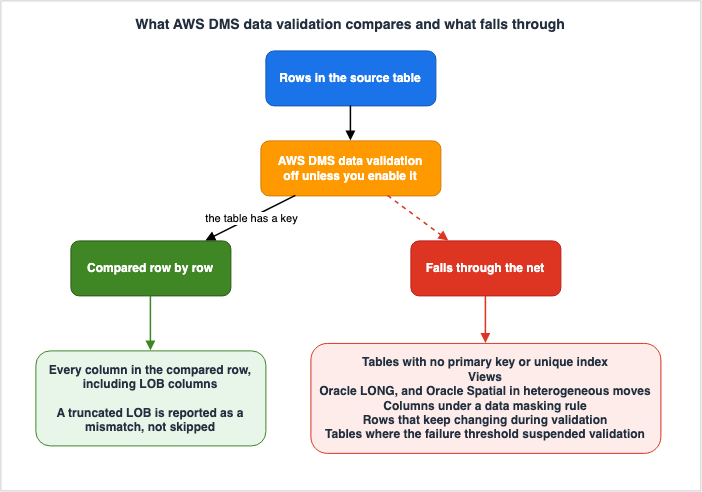
The first thing to establish is that AWS DMS data validation is not enabled by default. TheEnableValidation task setting defaults to false.You might create and run a migration task, then check the table statistics, only to find that the validation state is Not enabled. This is a common scenario. Validation is an explicitly enabled feature, not one that is automatically included.
Once you enable it, the comparison starts the moment a table finishes its full load. On a task with CDC, validation compares the incremental changes as they occur. On a CDC only task, validation works through every pre-existing row before it starts on the new changes.
One more thing to check before enabling validation is that not every database engine is supported. The user guide lists the following engines as compatible for source databases: Oracle, PostgreSQL-compatible, MySQL-compatible, Microsoft SQL Server, and IBM Db2 LUW. For target databases, it adds Amazon Redshift and Amazon S3. If you are migrating from a commercial database to either a PostgreSQL-based or MySQL-based system, as this article discusses, your chosen engines fall within this supported range. If you select engines outside of this range, validation will not be an available option.
5.2 Validation Compares Rows, and That Needs a Key
AWS DMS validation compares each row in the source with its corresponding row in the target, verifies that they contain the same data, and reports any mismatches. Because rows need to be matched, keys are required.Data validation requires that the table has a primary key or unique index.Numerous specific conditions, often encountered in practical scenarios, surround this fundamental principle. All of these conditions are listed in the user guide's Limitations section.
The column used for the primary key cannot contain the data types
CLOB, BLOB, BINARY, or BYTE. If a primary key column is of type VARCHAR or CHAR, its length must be less than 1024, and the data type definition must state that length. Data types without a defined length limit cannot be used as primary keys for validation. Keys created in Oracle with the NOVALIDATE clause are not recognized as either primary keys or unique indexes. In Oracle tables that only have unique keys and lack a primary key, the columns associated with those unique constraints must also have a NOT NULL constraint. Furthermore, validation cannot be performed on primary key or unique key values that contain NULL values.These conditions frequently arise when migrating data from commercial databases. Keys that have been added over long periods and that include the
NOVALIDATE clause, as well as columns that are logically unique but not formally declared as constraints, are commonly found in production databases.5.3 What Falls Through the Net
Even when a table meets the key conditions, some things still fall through the net. The Limitations section of the user guide lists them.| What falls through the net | What the primary source says |
|---|---|
| Views | AWS DMS does not support data validation for views. |
Oracle LONG data type | Not supported for validation. |
| Oracle Spatial data type | Not supported for validation during migrations between different database engines. |
| Columns subject to data masking | Validation ignores a column that carries a masking transformation in the table mapping. |
| Tables with primary keys that are subject to data masking | Validation skips the whole table, and the state is shown as No primary key. |
| When using tasks with character replacement settings | Not supported for validation. |
| Tables in Aurora PostgreSQL Limitless | Validation does not run, and the state is shown as No primary key. |
| Rows that are continuously updated | Rows that are continuously being updated cannot be compared. |
Pay particular attention to the third and fifth rows in this table.
Oracle Spatial data types are only excluded from validation during migrations between different database engines. A migration inside one engine still covers them. Therefore, this limitation only applies to the migration process described in this article.
A table whose primary key is under a data masking rule shows a validation state of No primary key. Read on its own, that display suggests a problem with the table design. The actual cause is on the table mapping side. The cause and the display do not correspond.
The Aurora PostgreSQL Limitless row is different in kind from the rest of the table: it is a property of the migration target, not of one table or of the mapping. What that target is, and what it asks of a schema before you migrate onto it — the shard key that every primary key has to contain, and the table types you have to choose between — is covered in Sharding Aurora PostgreSQL with Limitless Database.
5.4 LOB Columns Are Not Excluded, and What Breaks Is Truncation
You might want to add LOB columns to the list in Section 5.3, but the primary documentation does not indicate this. By default, LOB columns are also compared.| Setting | Default Value | Meaning |
|---|---|---|
SkipLobColumns | false | Do not exclude LOB columns from validation. |
ValidationPartialLobSize | 0 | A value of 0 means AWS DMS validates all of the LOB column data. |
So what actually happens with a LOB? What happens is a mismatch that comes from truncation. It is not an exclusion.
AWS DMS has three modes for handling LOBs. Full LOB mode moves every LOB regardless of size, and it is slow because it moves them piece by piece. Limited LOB mode sets a limit and loads data in batches, making it faster. AWS recommends using this mode whenever possible. Inline LOB mode transfers LOBs smaller than a specified size inline, while larger LOBs are replicated using full LOB mode.
Limited LOB mode has the following characteristics:
LOBs that exceed the maximum LOB size are truncated, and a warning is issued
to the log file.
AWS DMS truncates a LOB that exceeds the limit and writes a warning to the log. The row count still matches. The primary key still matches. Validation is the only thing that reports a difference in the value.
When you use limited LOB mode, one setting has to be aligned so that validation handles that mismatch correctly. The user guide explicitly states:
To validate limited LOB size, you must set
ValidationPartialLobSize to the same value as LobMaxSize (K).
If you do not align the two settings, you cannot use the validation result to decide anything. Truncation and validation are looking at different ranges of the same column.
Furthermore, tables with LOB columns have specific requirements related to Change Data Capture (CDC).
A primary key is mandatory for tables containing LOB columns during Change Data Capture (CDC)
operations. DMS uses this key to look up LOB values in the source table.
This requirement only applies to CDC tasks - full-load tasks can read and
copy entire LOB columns directly from source to target without
restrictions.
A full load on its own does not need a primary key, but CDC does. The shape of migration this article deals with combines a full load with CDC, so the second condition is the one that applies.
5.5 Collation Differences Are Ignored by Default
In a migration between different database engines, collation causes trouble in two layers: the validation layer and the application layer.First, considering the constraints. The user guide, when targeting PostgreSQL, states:
If the collation of the primary key column in the target PostgreSQL
instance isn't set to "C", the sort order of the primary key is different
compared to the sort order in Oracle. If the sort order is different between
PostgreSQL and Oracle, data validation fails to validate the records.
If the collation of the primary key column differs, the sort order differs with it, and validation can no longer line the rows up.
Next, considering the configuration. A setting exists that makes validation account for a difference in collation. It is not enabled by default.
| Setting | Default Value | Behavior when Enabled |
|---|---|---|
HandleCollationDiff | false | Validation accounts for a difference in collation between the source and target columns, which prevents false positives. |
Left at the default, nothing runs to resolve a difference in collation. The user guide states that setting this to
true resolves those collation differences automatically and prevents false positives in data validation. Read the other way around, at the default a collation difference can produce false positives.So when the target has a different collation, validation misleads you in two ways. The first is the primary key sort order quoted above, where validation fails outright. The second is the false positive, where rows that do in fact match are reported as mismatches. Both are visible in advance if you check the collation.
Collation is not only a validation matter. In the application layer, the result of a sort and the boundary of a range search can both change. Not one byte goes missing, and the result the application sees still differs. Section 9 takes up that layer.
5.6 The Thresholds That Stop Validation
Validation includes a mechanism to stop itself when encountering frequent failures. The user guide's Limitations section states:If AWS DMS detects more than 10,000 failed or suspended records, it
stops the validation. Before you proceed further, resolve any underlying problems
with the data.Reading this sentence alone, it might appear that 10,000 is an upper limit. However, it is actually the default value for task settings.
| Setting | Default Value | Meaning |
|---|---|---|
FailureMaxCount | 10,000 | The number of records that can fail validation, across the task as a whole, before validation is suspended. |
TableFailureMaxCount | 1,000 | The number of rows in one table that can fail validation before validation is suspended for that table. |
ThreadCount | 5 | The number of execution threads used for validation. |
PartitionSize | 10,000 | The size of the batches read from the source and target for comparison. |
The user guide explains that for
FailureMaxCount, if you want to continue validation despite a high number of failures, you can set a value greater than the number of records in the source. In other words, you can change the number.What matters here is what reaching a threshold means. Cross
FailureMaxCount and validation stops for the whole task. Cross TableFailureMaxCount and it stops for that table. A table where validation stopped stays unvalidated. Nobody confirmed that it holds no differences. The count stops growing, so the situation looks settled, but reading that state as no differences reverses the conclusion.5.7 What Validated Means, and What It Does Not
TheValidationState of a table can take on 11 possible values: Not enabled, Pending records, Mismatched records, Suspended records, No primary key, Table error, Validated, Error, Pending validation, Preparing table, and Pending revalidation.Of these, Not enabled indicates that validation is not active for that table. This represents the default state, as described in Section 5.1. The value says nothing about whether differences exist, and it sits in the list at the same visual weight as every other value, which makes it easy to miss.
Validated means that every row in the table has been validated, and AWS applies specific conditions to this state.
Validated—All rows in the table are validated. If the
table is updated, the status can change from Validated.
The table's state can change from Validated if the table is updated. Therefore, Validated represents a state as of a particular point in time.
Consequently, if you are using validation to make a cutover decision, you should not rely on a single, instantaneous display. Instead, you should stop writing to the source, apply any remaining changes, and then check if validation reaches the Validated state. The Validated state during ongoing writes does not provide any information about subsequent changes.
Lay Section 5.3 and Section 5.6 on top of that and the scope narrows further. Validated means that, among the columns validation covered, the rows it managed to compare matched. It says nothing about the columns it did not cover, the rows it could not compare, or the tables where it stopped.
5.8 Validation Only Tasks, and the Constraint on Direction
In addition to migration tasks, it is also possible to create validation only tasks that validate without moving or replicating any data. To do this, set bothEnableValidation and ValidationOnly to true.AWS highlights scenarios where this configuration is beneficial. Validation queries can place a load on both the source and target systems, so separating migration and validation tasks allows for more controlled execution timing. You can run validation on a separate instance and split the load that way. Furthermore, just before the cutover, you can quickly determine how many rows are currently inconsistent.
This final use case is directly related to the subject of this article. A full load validation only task compares all rows in a single pass, immediately reporting any failures and then terminating. This contrasts with the behavior of CDC, which can take longer when a large number of failures occur.
There are two constraints here that are easy to get wrong in the design.
The first is direction.
A validation only task must be set up in the same direction as the replication task,
especially for CDC.
CDC validation only tasks examine the change logs on the source side to determine which rows need to be re-validated. Reverse the direction and it sees only the changes that reached the target, with no guarantee of catching a replication error.
The second is that it is immutable. You cannot modify
ValidationOnly once the task exists, and you cannot turn the task into an ordinary migration task later. You rebuild it instead.Furthermore, validation only tasks have two prerequisites at creation time: the target table preparation mode must be set to
DO_NOTHING, and the migration type must be either a full load or CDC. The former is the default for validation only tasks, but if you create it by copying an existing task configuration, it may deviate from the default.5.9 Telling a Real Mismatch From a False Positive
When validation reports a mismatch, the first step is not to correct anything. It is to work out whether the mismatch is real. AWS provides a list of common causes of false positives, along with recommended solutions for each.| Cause of the false positive | What AWS names as the remedy |
|---|---|
| CDC latency is large, so the comparison catches rows that have not reached the target yet. | Increase RecordFailureDelayLimitInMinutes to provide more time for changes to be applied before comparison. Alternatively, increase ValidationQueryCdcDelaySeconds to introduce a delay between queries on the source and target. |
| The source and target use different collations, so a string comparison does not match. | Set HandleCollationDiff to true. |
| Partial value differences due to LOB truncation. | Check that the LOB settings for the task match the maximum length supported by the source. |
| Value differences due to data type or character set differences. | Write a validation rule in the table mapping so that a function is applied before the comparison. |
Regarding the first point, the validation process includes default mitigation measures. The validation system incorporates a mechanism to delay failure reports, taking CDC latency into account. If the task's CDC latency exceeds the value configured in
RecordFailureDelayInMinutes, the delay takes precedence. Therefore, a certain amount of waiting time is built in by default. However, in environments with consistently high delays, this may still be insufficient, which is why RecordFailureDelayLimitInMinutes is provided. This setting allows you to override the actual delay and CDC latency values, allowing you to specify a longer waiting period; the default value is 0.The same consideration is built into the validation only task. Because a CDC validation only task does not move data, it experiences no delay, and without adjustments, the number of false positives would increase. Therefore,
ValidationQueryCdcDelaySeconds is automatically set to 180 seconds. You can raise it.Counting mismatches without separating the false positives from the real ones leads to a wrong decision. Even when a mismatch count comes back shortly before the cutover, if you cannot tell the false positives from the real ones, you cannot decide whether to go on or stop. Put a step for judging what the mismatches are into the plan for the day, not just a step for counting them.
5.10 How to Read the Failure Details
The validation process records failures in a control table created on the target side. Since table statistics only provide counts, you need to examine this table to understand the details.The table columns are as follows:
| Column | Description |
|---|---|
TASK_NAME | An identifier for the task. This is the value at the end of the task's ARN. |
TABLE_OWNER | The schema of the table. |
TABLE_NAME | The name of the table. |
FAILURE_TIME | The time the failure occurred. |
KEY_TYPE | Reserved for future use, and the value is always Row. |
KEY | The primary key for that row. |
FAILURE_TYPE | The type of validation error. |
DETAILS | A JSON string representing the values of the columns that did not match between the source and target sides. |
The possible values for
FAILURE_TYPE are RECORD_DIFF, MISSING_SOURCE, MISSING_TARGET, and TABLE_WARNING. These four categories represent different root causes.RECORD_DIFF means a row exists on both sides and the values differ. Nearly all of the false positives in Section 5.9 show up here. MISSING_TARGET means the row is not on the target, which points to replication that never arrived or that failed part way. MISSING_SOURCE means the row is not on the source, which includes the case where something other than AWS DMS wrote to the target. The remaining one, TABLE_WARNING, is listed as a value in the user guide without a definition of what it means.When
MISSING_SOURCE shows up, the first thing worth checking is who else writes to the target. The user guide states that if something other than AWS DMS updates the target during validation, DMS might not report the mismatches accurately. Touching the target during the migration period is what makes the validation result untrustworthy.The schema that holds the control table changes with the target engine. AWS gives
awsdms_control for MySQL and MariaDB, public for PostgreSQL, the target schema for Oracle, and dbo for SQL Server. On top of that, the task settings let you change the schema DMS creates it in. Do not conclude that the table does not exist just because it is not in the default place.5.11 Data Resync, Which Repairs What Validation Finds
There is also a feature that automates the work that follows once validation has found a difference. Data resync reads validation failures from the control table on the target, retrieves the current values from the source using primary keys, and applies them to the target.However, its scope is limited.
| Condition | Description |
|---|---|
| Engine version | AWS DMS 3.6.1 or later |
| Source | Oracle and SQL Server only |
| Target | PostgreSQL and Aurora PostgreSQL only |
| Key | All tables in both the source and target must have a primary key. |
| CDC Task | Configuration of the execution time window and maximum execution time is required. |
AWS explicitly states that while this feature is running, replication and validation are temporarily suspended. AWS also states that if the source is updated during the resync window, resync reads the latest value and applies it, which can make CDC apply events fail and introduce temporary inconsistencies on the target. It is recommended to schedule the execution during periods when source changes are minimal or nonexistent.
Data resync is not a tool for clearing differences on the day of the cutover. It is a mechanism for keeping differences from piling up during the migration period. The tool for the day itself is the full load validation only task described in Section 5.8.
6. The Cutover
6.1 What a Cutover Consists Of, According to AWS
AWS Prescriptive Guidance organizes a cutover, in general, into the following phases: an ingestion freeze, the final backup, the final data sync, the routing change, and the testing that comes before you declare the work complete.Of these, the third and the fifth are the ones that run long in a database migration. The third runs long when the migration has not reached a steady state, as Section 2.3 described. The fifth runs long when nobody decided in advance what would count as complete.
On the second phase, the final backup, the same page states that you can use it for the rollback in an emergency. This is a last resort, separate from any of the four strategies in Section 7. If nobody has measured how long the restore takes, a last resort cannot be counted as an option.
6.2 Cutting Over in Phases Does Not Suit a Database
AWS Prescriptive Guidance splits the way you switch into two: cutting over all at once, and cutting over in phases across a defined period.The advantages of a phased approach are highlighted as follows: it allows for gradual workload transfer, limits the impact of any issues encountered, and allows for fallbacks through changes to load balancers and DNS settings. It is the method most commonly adopted for business-critical workloads.
However, the same page also lists the conditions under which a phased approach is feasible. It requires the application to be divided into multiple tiers, composed of multiple servers that can be separated. It also requires that the application be accessed via a load balancer, which routes traffic to both AWS and on-premises environments. Finally, the application servers migrated to AWS must be able to tolerate latency between them and the databases, as well as other dependencies.
This final condition becomes particularly relevant when migrating databases. As long as the data sits in one production database, you cannot cut over half of that database. The same page states that if an application cannot tolerate increased latency between its data source and application servers, this is a clear indication that it should be migrated all at once.
So the application tier can move in phases while the database tier tends to move all at once. If you want the database side to move in phases, the application has to be changed to write to both. That is the dual write of Section 7.1. The same change to the application is demanded of you twice over: once as a fallback strategy, and once as a way of switching.
6.3 Where does the stop actually have to happen?
If you want to shorten the downtime window, the only way is to take work out of it. You can review the sequence outlined in Section 4.4 from that perspective.You create secondary indexes before the cached changes go in. You create foreign keys after. You create triggers once the migration finishes, before the cutover. All three therefore sit outside the window in which writes are stopped.
What has to stay inside the window is stopping writes to the source, waiting for any remaining transactions to be applied to the target, doing the final check, and pointing the applications at the target.
Of these, the wait is the only part you can shorten in advance. Measure whether ongoing replication has reached a steady state before you fix the cutover date. Fix the date without measuring and you learn the wait on the day itself.
6.4 The Point of No Return Is the First Write on the Target
The most important line in a cutover plan is not a technical line. It is a line of state. From the moment the target receives its first operational transaction, the source system begins to become obsolete.Before that line, falling back is a matter of pointing the applications back. The source was only stopped, and nothing has been lost from it.
After that line, the decision splits in two. If you can throw away the transactions the target took, pointing the applications back is again all it takes. If you cannot throw them away, you need a path that carries those transactions back to the source side. You cannot build that path on the day.
So designing a fallback means preparing, before that line, the moves you will be able to choose from after it. The next section is what those moves are.
7. Designing a Fallback You Can Test
7.1 The Four Strategies AWS Names
The AWS Database Blog post "Rolling back from a migration with AWS DMS" sorts the strategies for rolling back into four.At a high level, there are four basic strategies for rolling back from a migration:
basic fallback, fall forward, dual write, and bidirectional replication.Here are the key points of each:
| Strategy | Description | Conditions for Success |
|---|---|---|
| basic fallback | Point the applications back at the original source. | Transactions ingested by the target can be discarded. |
| dual write | Change the application so that it writes to both. | The application can be modified. |
| fall forward | Make one more copy of the source, and keep replicating from the target into that copy. | A place for the copy can be provided. |
| bidirectional replication | Replicate in both directions between the source and the target. | None of the other three holds. |
The post also gives the principle for choosing among them: within the range that keeps the database consistent, take the strategy, or the combination of strategies, that costs the least effort.
The post lists five situations where a basic fallback might be applicable. Two of the five, though, state the same condition in different words, which leaves three in practice: when the system is read-only and the target has not yet received any transactions; when the system is batch-oriented and transactions have not yet been applied to the target; and when transactions processed by the target can be regenerated or copied back to the original system. The remaining two say the same thing another way, namely that the transactions the target processed are not needed once you have fallen back.
The post itself notes that these situations may be uncommon. When planning around basic fallback, confirm the choice by naming which of these situations applies.
7.2 Why Not Point a Reverse Task Straight Back at the Source
When considering a fallback, the initial thought is often to create a replication task that runs from the target back to the source. However, AWS does not recommend this approach.This method is not advisable because you can't test the replication stream from database B
back to database A. Additionally, you would need some mechanism to prevent what is called
the "loop back" effect, where a transaction that originates on A is replicated to B and is
then looped back and again applied to A as part of the change stream from B to A.There are two primary reasons for this. First, it is impossible to test this path. Business transactions only flow to the target after the cutover, so there is no way to run the reverse flow and test it beforehand. Second, there is the risk of a loopback. Changes originating in the source could be replicated to the target, and then those changes could be sent back to the source via the reverse flow.
The first reason carries the most weight. The same post notes that getting logical replication to run smoothly takes a significant amount of work, and that this is especially true between different database engines. Making an untested path your only means of falling back is calling a thing possible that you have not shown to be possible.
7.3 Fall Forward, a Three-Point Configuration
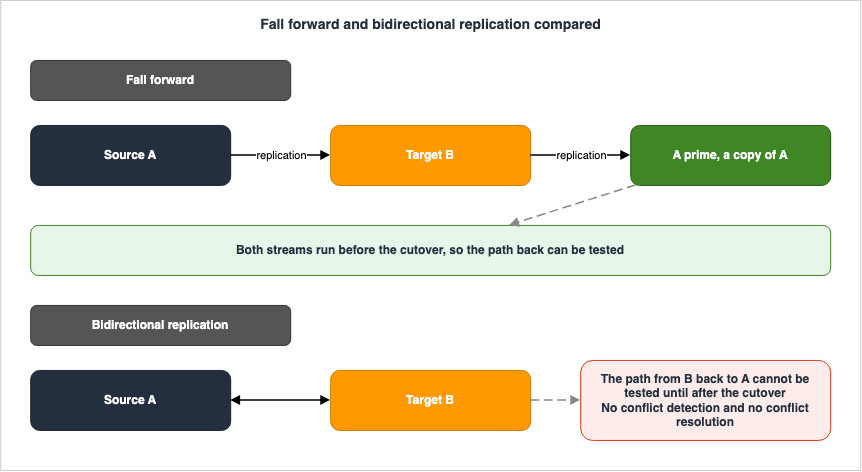
What AWS puts at the center instead is fall forward. The configuration has three points: the original source A, the target B, and a copy of A that this article calls A prime.The process establishes two flows: one from A to B, and another from B to A'.
During the cutover, the application stops writing to A and begins writing to B. The flow from B to A' continues, allowing A' to remain synchronized with B. If the migration needs to be rolled back, the application stops writing to B and is redirected to A'. A' has already incorporated all transactions that occurred on B.
The value of this configuration is that it can be tested. It is not there for redundancy. The flow from B to A' is active even before the cutover. The post states that this approach is particularly valuable when dealing with migrations between different engine types.
The post names the situations that suit fall forward: when the fallback destination is consistently synchronized with the target, allowing for a faster fallback; when the migration crosses engine types and basic fallback is not available; and in migrations between similar engine types using logical replication tools like AWS DMS, where special considerations for fallback are not required.
7.4 Bidirectional Replication, and Its Four Constraints
Bidirectional replication is the last resort for the case where a fall forward configuration cannot be built. AWS DMS includes mechanisms to prevent loops.However, there are four constraints that directly impact the design.
| Constraint | Description |
|---|---|
| DDL is Excluded | The loop prevention mechanism only tracks DML (Data Manipulation Language). It cannot prevent DDL from looping back, so one task of the pair has to be configured to filter DDL out. |
| Batch Apply Not Supported | Tasks using loop prevention do not support batch apply of changes. You must set BatchApplyEnabled to false. |
| No Conflict Detection or Resolution | AWS DMS bidirectional replication does not include conflict detection or conflict resolution. To identify inconsistencies, you must use data validation in both tasks. |
| SQL Server Prerequisite | If using SQL Server as the source, you must set setUpMsCdcForTables to true. |
The third constraint is the most critical. When writing to both sides while replicating bidirectionally, there is no mechanism to determine which write is correct. This configuration only works under the assumption that writes primarily flow to one side.
Furthermore, the issue mentioned in Section 7.2 remains relevant here. The path from the target to the source cannot be tested before the cutover. As a mitigation, the post suggests creating a replica of the target on the source engine and pre-validating a task that streams data to it. It is crucial to ensure that the network configuration is identical to the production environment.
7.5 What decides which one you choose?
The four strategies line up by the assumptions they make. They are not ranked by quality. The decision runs in this order.The first question is whether it is acceptable to discard the transactions that land on the target after the cutover. If it is acceptable, the basic fallback approach may be sufficient. This is a business decision rather than a technical one, and database administrators cannot make it on their own.
If they cannot be discarded, the next question is whether you can change the application. If you can, and the plan is to move in phases, dual write becomes a candidate. The post states plainly that dual write is one of the most time-consuming and labor-intensive methods.
If modification is not possible, the default option is fall forward. This provides a tested fallback path in exchange for the overhead of maintaining an additional replica.
Use bidirectional replication only when a fall forward configuration cannot be built. The example the post gives is carving out one part of a node that participates in a multi-master configuration.
AWS Prescriptive Guidance also identifies three elements that should be included in any fallback plan: a checkpoint defining the criteria that trigger a fallback, a fallback procedure that includes data handling, and a designated individual responsible for deciding whether to fix or roll back. If the third element is missing, discussions are likely to begin on the day of the event.
8. Can zero-ETL be used for a migration?
AWS DMS is not the only mechanism that continuously replicates data from a source to a target. A zero-ETL integration looks like it is doing the same thing. This section answers whether it can be used to move a production database onto a different engine.The answer is no. While the details are outlined in Section 12.4 of Zero-ETL Integrations on AWS, here are three key reasons:
First, the target of a zero-ETL integration is read-only. It accepts no writes, so an application cannot be pointed at it. Second, it performs no transformation. It has none of the schema conversion a move between different engines requires. Third, it has no concept corresponding to a fallback. There is no replication in the reverse direction.
These three are design choices. They are not defects. A zero-ETL integration exists to make an analytical copy while the source keeps running as the system of record. It does not assume that you will ever stop the source.
Conversely, the choice between using AWS DMS and zero-ETL integration hinges on whether the source database can be taken offline. If it cannot, consider the applicability of zero-ETL integration first. If it can, then this article's content becomes relevant. Section 12.1 of Zero-ETL Integrations on AWS holds the same branch conditions in the form of a table.
As Section 12.3 of that same article points out, a zero-ETL integration with a self-managed database as its source sits on top of AWS DMS. Therefore, if you encounter limitations with zero-ETL integration, the fallback option is to remove it and use AWS DMS directly. This article also addresses scenarios that begin in that state.
9. What Breaks Quietly
Some differences surface only after the data has moved, validation has finished, and the application starts running. This section lays out the map of them.9.1 Isolation Levels
Among the items discussed in this section, the transaction isolation level is the most difficult to observe during the migration process.The reason is structural. Every means of confirmation this article has covered so far compares data at rest. The validation task compares a row in the source with a row in the target. The premigration assessment examines data types and key formats. None of these methods provide any insight into how concurrently running transactions interact with each other.
Differences in isolation levels only become apparent as a result of the behavior of business logic when concurrent execution is occurring. Therefore, issues related to isolation levels may only manifest after the migration, even if the row counts match and validation passes.
This article does not provide a cross-comparison of isolation levels. Instead, confirm the default isolation level and the actual behavior of levels that share a name for both the source and target engines, using the official documentation for each engine. As one example within AWS, Amazon Aurora DSQL Design Decision Guide addresses Aurora DSQL's handling of isolation levels as a design decision. That cross-comparison is now available separately, in Transaction Isolation on AWS Databases, which sets the levels of Aurora MySQL, Aurora PostgreSQL, Aurora DSQL, Amazon DynamoDB, and Amazon Redshift against the anomalies each one leaves open.
In practice, there are two key points to consider. First, ensure that your acceptance testing includes scenarios that simulate concurrent execution. Second, write down the isolation level the application assumes, before the migration. Undocumented assumptions can lead to undetected changes in behavior after the migration, even if everything appears to be functioning correctly.
9.2 Collation, Data Types, and Implicit Conversion
The collation of Section 5.5 is a validation setting and an application matter at the same time. If the result of a sort changes, the order on the screen changes. If the boundary of a range search changes, the number of rows returned changes.Data type compatibility shares a similar characteristic. AWS DMS offers the premigration assessment as a check before the migration, and it includes an assessment of whether the source data types can be migrated correctly to the target. The user guide explains that this assessment will report data types that are not supported and those that are only partially supported.
Regarding implicit type conversions, validation provides a workaround. By writing a validation rule in the table mapping, you can apply a function to the source side or the target side before the comparison. The user guide provides an example of validating NULL bytes as blank spaces. However, a note on the same page cautions that this override will not apply if the column is part of a primary key.
9.3 Auto-Increment and Triggers
As Section 3.5 quoted, an AWS DMS task does not carry over the auto-increment attribute even when the source table has an auto-increment column. Default values are also not replicated. Therefore, it is necessary to establish an auto-increment mechanism on the target side and advance its current value to align with the data that has already been migrated. Failure to do so will result in the target generating values that conflict with existing values.The collision is certain to happen, so in that sense it does not belong to the quiet category. What is quiet is everything before it. The full load, CDC, and validation all report nothing about this attribute. What is not migrated is not compared either.
As Section 4.4 described, a trigger created at the wrong time produces the side effect twice. If that side effect writes to a different table, the table under validation shows no difference at all. Some time after the migration it surfaces as rows whose origin nobody can explain.
10. The Assessment Phase After Fleet Advisor
AWS DMS Fleet Advisor once handled the work of building a database inventory during the planning stage of a migration. AWS has discontinued it.After careful consideration, we decided to end support for AWS DMS Fleet Advisor, effective
May 20, 2026. AWS DMS Fleet Advisor will no longer accept new customers beginning May 20,
2025. As an existing customer with an account signed up for AWS DMS before May 20,
2025 you can continue to use AWS DMS Fleet Advisor and its features. After May 20, 2026, you
will no longer be able to use AWS DMS Fleet Advisor.The end date for Fleet Advisor, May 20, 2026, has already passed as of August 21, 2026. Therefore, it is not possible to incorporate Fleet Advisor into the current plan.
AWS names AWS Migration Evaluator as the successor. The same page gives its reasoning, stating that in database migration assessment projects, customers typically choose Migration Evaluator, and that it gives both business and technical stakeholders a picture of what running their on-premises workloads on AWS would look like.
The difference in scope is worth pinning down here. The same page notes that for technical audiences, the data collected from on-premises environments includes server hardware configurations, SQL Server settings, and resource utilization. The page describing Migration Evaluator's functionality also explains that it requires read-only access to various platforms, including VMware, Hyper-V, Windows, Linux, Active Directory, and SQL Server.
All of these focus on the server layer. The process of reading database schemas and determining whether those objects are compatible with the target engine is outside of this scope. AWS naming Migration Evaluator as the successor is a fact. That the two are equivalent in function is not stated anywhere.
What was lost with the discontinuation of Fleet Advisor was not the inventory creation process itself, but rather the ability to combine inventory creation with schema assessment within a single tool.
The schema assessment is now handled by the conversion assessment report, as described in Section 3.4 of this article. So the assessment phase is not filled by one feature. It splits into the assessment on the server side and the assessment of whether the schema converts.
AWS Retired Services History and Timeline carries the history that led to the retirement of Fleet Advisor. Furthermore, the terminology surrounding service retirement is defined in AWS Service Lifecycle States. This article focuses solely on the current outcome and does not create a timeline.
11. Version Thresholds to Confirm Before You Plan
The lifetime of a service and the lifetime of a version are two different things. AWS DMS itself is current, but individual replication engine versions carry their own end-of-life dates.What matters in planning is not the dates themselves. It is the version threshold at which a feature you need becomes available. Three of those thresholds fall inside the range this article covers.
| Feature | Required Version |
|---|---|
| Enhanced data validation | AWS DMS 3.5.4 or later |
| Data resync | AWS DMS 3.6.1 or later |
awsdms_validation_failures_v2 control table | AWS DMS 3.6.1 or later, and PostgreSQL target |
There is a trap here. As of August 21, 2026, the default engine version for AWS DMS is 3.5.4. Therefore, replication instances created with the default settings will not be able to utilize Data resync. If you plan based on the assumption that the latest version is the default, you may be counting features that are unavailable on the day you launch.
Because the end-of-life dates for each version change, this article does not include a table of dates. Instead, refer to the AWS DMS release notes, which provide a table detailing the release dates, the date when new instances can no longer be created, and the date when automatic updates are applied for each version. You should review this information for each planning cycle.
The same check is needed for AWS DMS Serverless. The user guide gives the current engine version for AWS DMS Serverless as 3.5.4. Because this deployment form hands version management to AWS, the version AWS provides decides whether you clear the version thresholds in the table above, and you cannot raise it yourself.
12. Where the Primary Sources Disagree
12.1 Why This Section Exists
Reading through the official AWS documentation for this article turned up several places where the same subject is described in more than one way. A reader is likely to stop at the same places, so the findings are recorded here.Everything below reflects what was confirmed on August 21, 2026. The point is not to catch AWS out. The point is to leave behind the material for deciding which description to take.
12.2 Three Different Scopes for the Schema Conversion Target
DMS Schema Conversion can target different database platforms, and the supported range is described differently across three pages.| Page | The range it states |
|---|---|
| Using DMS Schema Conversion | RDS for MySQL or RDS for PostgreSQL (for OLTP schemas) |
| Converting database schemas using DMS Schema Conversion | Aurora, Amazon RDS, or Amazon Redshift |
| AWS Database Migration Service Documentation | Oracle to RDS for PostgreSQL, SQL Server to RDS for MySQL, SQL Server to Aurora PostgreSQL, Oracle to Aurora MySQL |
The second page states the widest range and carries a table to go with it. The table in Section 3.3 comes from that page. The first page does not mention Aurora or Redshift at all, and the third gives representative examples without claiming to be exhaustive.
The approach taken in this article prioritizes pages that describe the supported range. Pages that focus on introducing the functionality may narrow the scope to provide representative examples.
12.3 Two Dates Disagree Inside the End-of-Support Page
The page announcing the end of support for AWS DMS Fleet Advisor states that support for the service ends on May 20, 2026. However, the FAQ section on the same page notes that if you have already downloaded the data collection tools, you can continue to use them, but support and updates for those tools will no longer be provided after May 20, 2025.Read as the service end date and the tool update end date, the two do not contradict each other. They sit close together on one page, which makes them easy to misread. The relevant date for planning purposes is May 20, 2026.
12.4 The Reference for the GROUP_LEVEL Paths Is Narrower Than the Feature Itself
TheValidationMode setting for tasks is described as being automatically set to GROUP_LEVEL for corresponding migration paths in AWS DMS 3.5.4 and later, and the paths in question are said to be the ones listed on the data resync page.The data resync page, however, lists only the combinations where the source is Oracle or SQL Server and the target is PostgreSQL or Aurora PostgreSQL. In contrast, the section describing enhanced data validation itself lists additional combinations, including Oracle to Oracle, SQL Server to SQL Server, as well as Oracle to PostgreSQL and SQL Server to PostgreSQL.
The scope of the referenced paths is narrower. The two paths between the same engine do not appear on the data resync page. While this discrepancy may not cause immediate issues in migrations between different engine types, following the reference to check the scope does not line up.
12.5 There Are Two Control Tables for Validation Failures
The user guide mentions two control tables for recording validation failures.The troubleshooting section states that the system creates a table named
awsdms_control.awsdms_validation_failures_v1 and instructs users to query this table when investigating failures. The section immediately after it states that, in AWS DMS 3.6.1 and above, DMS creates a table named awsdms_validation_failures_v2 at a PostgreSQL target. The latter table includes columns for data resync and features an automatically incrementing primary key.Therefore, the table to be queried depends on the engine version and the target database. Look at only one of them, conclude that the table does not exist, and the failure details stay out of reach.
12.6 10,000 Is Not a Ceiling
This repeats what Section 5.6 covered, but it belongs in this section too, so it is recorded here. The Limitations section states that validation stops once AWS DMS detects more than 10,000 failed or suspended records, which reads as a restriction. The task settings page of the same user guide states that this is the default value ofFailureMaxCount. If you set a value higher than the number of records in the source, the validation will continue regardless of the number of failures.It is not unusual for something written as a limit to be a default value. When you read a list of limitations, it is worth checking whether a matching setting exists.
12.7 What the Named Successor Actually Covers
This relates to the points mentioned in Section 10. The AWS DMS user guide names AWS Migration Evaluator as the successor. However, the pages describing the functionality of Migration Evaluator explain that its data collection focuses on read-only access to servers and their underlying infrastructure.The first names a successor. The second describes a scope. Both are correct, and laid on top of each other they read as though the two are equivalent in function. Nowhere is that equivalence stated. The part that assesses a database schema is not picked up by the successor that was named.
12.8 Two Pages Disagree on the Range of Generative AI Conversion
The list of conversion paths for DMS Schema Conversion states that conversions from IBM Db2 for LUW and IBM Db2 for z/OS to Aurora PostgreSQL support generative AI conversion. That is the page Section 12.2 named as stating the widest range, and the table in Section 3.3 comes from it.The page that describes generative AI conversion itself limits the supported combinations to three: Oracle to PostgreSQL-based engines, SQL Server to PostgreSQL-based engines, and SAP ASE to PostgreSQL-based engines. IBM Db2 is not among the three.
The rule in Section 12.9 does not decide this one. The wider statement sits on the list page and the narrower one on the page that describes the feature. If you are migrating from IBM Db2 and intend to rely on generative AI conversion, confirm in the console or through the API that the option is actually available before you put it in the plan.
12.9 The General Rule This Section Yields
Six of the seven entries above share a shape. In every one of those six a passage written to state a constraint and a passage written to convey a feature sit side by side in the same user guide, and the coarser of the two is the one placed where you see it first. The exception is Section 12.8, where the wider statement sits on a list page and the narrower one on the feature page.Based on this observation, the following practical guidelines are recommended: When specifying limits, ranges, or default values, consult both the page that introduces the feature and the page that lists limitations, as well as the task configuration reference. That is why Section 5 of this article carries both the Limitations page and the task settings page together, and it is only because of that pairing that the 10,000 in Section 5.6 turned out to be a default.
13. Checklists
13.1 What to Confirm Before You Start
| Item | What to confirm |
|---|---|
| Supported conversion path | Is the source and target combination in the DMS Schema Conversion list of supported conversion paths? If not, use AWS SCT. |
| Action item owners | Are owners assigned to each row in the conversion assessment report? |
| Primary keys and unique indexes | Do all tables you want to validate have a primary key or unique index? Do not count keys with the NOVALIDATE attribute in Oracle. |
| Primary key data types and lengths | Are you using CLOB, BLOB, BINARY, or BYTE as primary keys? For VARCHAR and CHAR primary keys, is the length less than 1024? |
| LOB maximum length | Have you measured the real maximum length of the LOB columns on the source, and aligned the limited LOB mode ceiling with ValidationPartialLobSize? |
| Collation | Have you checked the collation of the target primary key columns and decided the HandleCollationDiff setting? |
| Validation enabled | Have you explicitly set EnableValidation to true? |
| What falls through the net | Have you identified the tables and columns listed in Section 5.3 that should be excluded from validation, and have you decided how else to confirm them? |
| Engine Version | Does the version meet the requirements for the necessary features? The default version may not be the latest. |
| Premigration assessment | Have you run the premigration assessment and resolved any issues reported? |
| Fallback strategy | Have you selected a fallback strategy according to the order in Section 7.5 and tested the process? |
| Fallback decision maker | Have you named the person who decides whether to fix forward or roll back? |
13.2 What to Check on Cutover Day
| Item | What to look at |
|---|---|
| CDC latency | Has ongoing replication reached a steady state? Is any backlog left? |
| Writes stopped | Have writes to the source really stopped? Confirm this, including batch jobs and external integrations. |
| Final apply | Have the remaining transactions finished being applied to the target? |
| Final validation | Have you run the full load validation only task and obtained the number of mismatches at that moment? |
| Validation state | Have you counted the tables showing Not enabled, No primary key, Suspended records, and Table error? Every one of them is in an unvalidated state. |
| Auto-increment | Have you implemented the auto-increment mechanism on the target system and advanced the current value to a position that aligns with the migrated data? |
| Secondary indexes | Were they created before the cached changes were applied? |
| Foreign keys | Were they created after the cached changes were applied? |
| Triggers | Did you leave the triggers uncreated until this point, and create them before the cutover? |
| Fallback path | Did you confirm, immediately before the cutover, that the task the fallback depends on is running? |
13.3 When You Decide Whether to Fall Back
The decision process involves three steps.First, confirm whether a business transaction has reached the target. If none has, pointing the applications back is all it takes.
Second, if one has, confirm with the business side whether it can be discarded. The database side cannot make that call alone.
Third, if it cannot be discarded, use the path prepared in advance. With a fall forward configuration, point the applications at the copy. With bidirectional replication, point them back at the original source. With neither, there is nothing left to choose from at this moment. That is why this decision has to be settled before the work starts, not on the day itself.
14. Frequently Asked Questions
How much slower does the migration get when validation is enabled?
The user guide states that validation requires additional time beyond the migration itself, and the amount of time needed depends on the volume of data being migrated. Specific ratios are not provided. Validation issues additional queries to both the source and target databases, which can place a load on both. If you want to distribute this load, use the validation only task described in Section 5.8.Can a table without a primary key be migrated?
Yes. The migration itself works. What does not work is the validation. A table with no primary key and no unique index takes the validation state No primary key and is never compared. The migration still happens, so you need another way to confirm the data in those tables.If every table reaches Validated, is it safe to cut over?
No. That alone is not sufficient. The Validated state means that all rows in that table are validated. The user guide adds a condition, though: if the table is updated, the status can change from Validated. Therefore, the Validated state is not a reliable indicator while writes are still in progress. Stop writes to the source and confirm that the table reaches the Validated state after all remaining changes have been applied. Keep in mind as well that the Validated state says nothing about the columns and tables that fall outside the scope of Section 5.3.Is it true that LOB columns are not validated?
No. Validation covers them by default.SkipLobColumns defaults to false, and the 0 that ValidationPartialLobSize defaults to means AWS DMS validates all of the LOB column data. What goes wrong with a LOB is not exclusion. It is the mismatch that follows when limited LOB mode truncates a value that exceeds the limit. To make validation handle that truncation correctly, set ValidationPartialLobSize to the same value as LobMaxSize.Is it enough to set up a reverse task from the target back to the source for the fallback?
No. AWS does not recommend this approach. The reason is that this method cannot be tested before the cutover, and a separate mechanism is required to prevent loops. To make it testable, prepare a second copy of the source and build the fall forward configuration that streams from the target into that copy.Does using DMS Serverless make operations easier?
In part, yes. It removes capacity estimation, provisioning, engine version management, and patching. However, there are limitations. The two that bear on the migration design are the inability to set a custom CDC start point and the lack of support for views. Because these limits cut down the recovery moves available on the day of the cutover, decide first whether you can live with the two of them.Can the source schema be changed during the migration?
Better not to. DDL does get replicated during ongoing replication. But only eight kinds of DDL are replicated, and not every source engine captures all eight. The user guide also states that DDL in rapid succession can cause the log to be parsed incorrectly, which can lead to data loss. Freezing schema changes on the source for the duration of the migration is the safe course.Which tool should you use for schema conversion: DMS Schema Conversion or AWS SCT?
Use DMS Schema Conversion if the source and target combination sits inside the range it supports. It needs no installation and runs straight from the console. If the combination is not supported, use AWS SCT. The AWS DMS user guide states that AWS SCT supports more source and target databases than DMS Schema Conversion does. Both tools share the same conversion engine.Can AWS DMS Fleet Advisor be used to evaluate migration?
No. Support for AWS DMS Fleet Advisor ended on May 20, 2026. AWS names AWS Migration Evaluator as the successor. However, Migration Evaluator only collects server configuration and utilization data; the conversion assessment report handles the assessment of schema conversion feasibility. The assessment phase splits into two.15. Summary
Seen as a single design, a migration between different engines divides its use of time roughly like this.Schema conversion runs without stopping the business. The work of having people rewrite what the conversion did not cover also runs without stopping it. The full load runs without stopping it. Changes made during the full load are cached and applied table by table. Ongoing replication runs without stopping it either. Secondary indexes, foreign keys, and triggers can all be created without stopping the business, as long as you respect the timing.
The business has to stop in exactly one place. That window runs from the moment you stop writes on the source, through applying the remaining transactions and doing the final check, until the applications point at the target. The length of that window is not set by the volume of data. It is set by whether ongoing replication has reached a steady state by the time the cutover starts.
For validation, you need to hold the meaning of the Validated state precisely. It states that, among the columns validation covered, the rows it compared matched. It says nothing about views, the Oracle
LONG type, Oracle Spatial in a heterogeneous migration, masked columns, or the rest of the list in Section 5.3. It says nothing about tables with no primary key, and nothing about tables where validation stopped at a threshold. Validation is off unless you turn it on, and a difference in collation goes unaccounted for unless you set it to be accounted for.Every means of confirmation described so far compares data at rest. A difference in isolation level that shows up only under concurrency, and an auto-increment attribute that never gets migrated at all, both fall outside that net. Acceptance testing that only counts rows is not enough.
For the fallback, the dividing line is whether the path can be tested. A configuration that points a task from the target straight back at the source cannot be tested before the cutover. That is where AWS's reason for not recommending it comes from. A fall forward configuration, which prepares a second copy of the source, lets you run the reverse path and check it from before the cutover.
All three of these settle before the work starts: who picks up the objects the conversion did not cover, how you cover the range validation cannot see, and which fallback path you build. None of them can be built on the day of the cutover. Designing a migration is the work of preparing, ahead of the day, the moves you will be able to choose from on it.
References
- AWS Database Migration Service User Guide - AWS DMS Terminology and concepts
- AWS Database Migration Service User Guide - High-level view of AWS DMS
- AWS Database Migration Service User Guide - AWS DMS data validation
- AWS Database Migration Service User Guide - Data validation task settings
- AWS Database Migration Service User Guide - AWS DMS data resync
- AWS Database Migration Service User Guide - Full-load task settings
- AWS Database Migration Service User Guide - Target metadata task settings
- AWS Database Migration Service User Guide - Setting LOB support for source databases in an AWS DMS task
- AWS Database Migration Service User Guide - Creating tasks for ongoing replication using AWS DMS
- AWS Database Migration Service User Guide - DDL statements supported by AWS DMS
- AWS Database Migration Service User Guide - Enabling and working with premigration assessments for a task
- AWS Database Migration Service User Guide - Converting database schemas using DMS Schema Conversion
- AWS Database Migration Service User Guide - Using DMS Schema Conversion
- AWS Database Migration Service User Guide - Sources for AWS DMS
- AWS Database Migration Service User Guide - Targets for AWS DMS
- AWS Database Migration Service User Guide - Working with AWS DMS Serverless
- AWS Database Migration Service User Guide - AWS DMS Serverless limitations
- AWS Database Migration Service User Guide - AWS DMS Fleet Advisor end of support
- AWS Database Migration Service User Guide - AWS DMS release notes
- AWS Database Migration Service Step-by-Step Migration Guide - Rolling Back the Migration
- AWS Prescriptive Guidance - Cutover stage
- AWS Database Blog - Rolling back from a migration with AWS DMS
- Migration Evaluator Features
- AWS re:Post - When can I add secondary objects to a target database during AWS DMS migration?
- AWS re:Post - How do I troubleshoot an AWS DMS task that isn't migrating objects?
- AWS re:Post - Why did my AWS DMS task validation fail, or why isn't the validation progressing?
- AWS re:Post - When do I resume or restart my AWS DMS task that's in the Stopped or Failed status?
- Zero-ETL Integrations on AWS - The Source and Target Matrix Across Amazon Redshift, AWS Glue, and Amazon OpenSearch Service
- Zero-Downtime Database Change on RDS and Aurora - Blue/Green Deployments, Upgrades, and Rollback Design
- Summary of AWS Application Migration Service (AWS MGN) Architecture and Lifecycle Relationships, Usage Notes - Including Differences from AWS Server Migration Service (AWS SMS)
- AWS Database Glossary - RDS, Aurora, DynamoDB, DocumentDB, and Neptune Explained
- AWS Retired Services History and Timeline - Discontinued, Sunset, and Closed-to-New-Customer Services
- AWS Service Lifecycle States - Maintenance, Sunset, Full Shutdown, and What Each One Takes Away
- Amazon Aurora DSQL Design Decision Guide - Distributed SQL Between Amazon DynamoDB and Aurora PostgreSQL
- AWS History and Timeline regarding Amazon Aurora - Overview, Engines, Features, Summary of Updates, and Introduction
References:
Tech Blog with curated related content
Written by Hidekazu Konishi