Zero-Downtime Database Change on RDS and Aurora - Blue/Green Deployments, Upgrades, and Rollback Design
First Published:
Last Updated:
That asymmetry is what this article is about. Amazon RDS Blue/Green Deployments make the cutover itself close to a solved problem, and in doing so they move the entire risk of a database change into the hours before it and the minutes after it. The interesting questions are no longer how to swap the endpoints. They are which changes can ride on the mechanism at all, what condition green has to be in before you are allowed to press the button, what the write-stop window actually looks like from the application's point of view, and — the question this article treats as the most important one — whether the operation you are about to perform is one you can undo.
A note on the title. Zero-downtime is a goal here, not a guarantee, and AWS does not describe it as one. The documented switchover sequence explicitly stops new write operations on both environments and drops existing connections before it renames anything. AWS uses the phrase "zero-downtime patching" for a distinct, best-effort Aurora feature that has its own conditions and falls back to ordinary patching when those conditions are not met. Throughout this article the objective is stated as minimizing the write-stop window, and every duration is attributed to AWS rather than presented as a measurement.
Every AWS behavior below was verified against AWS official documentation on 2026-08-09, with the specific page linked at the point of use. On 2026-10-25 the article was checked again against the current documentation, and section 3.1, the version and limitation tables in sections 3.3 and 3.4, the event table in section 12.1, and the matching FAQ answer and summary were updated as a result. This article reports no measurements of its own: no blue/green deployment was created, no switchover was performed, no failover was induced, and no parameter was changed. Where AWS publishes a duration or a rate, it appears as an AWS claim with the source and the date attached. No pricing figures appear anywhere in this article, including in the sections where the parallel existence of two environments is the whole point.
Table of Contents
- 1. Introduction: The Decision This Article Supports
- 2. What Kinds of Change Need What Method
- 3. How Blue/Green Deployments Work
- 4. Keeping Green in Sync
- 5. The Switchover Window
- 6. Can You Go Back?
- 7. Application-Side Readiness
- 8. Failover Pitfalls During a Planned Change
- 9. Major Version Upgrade Pitfalls
- 10. Schema Change Patterns
- 11. A Rehearsal Plan
- 12. Observability During the Change
- 13. Failure Modes
- 14. Frequently Asked Questions
- 15. Summary
- 16. References
1. Introduction: The Decision This Article Supports
The decision is narrow and it recurs on every production database: you have a change to apply, and you have to choose the method that applies it, state the size of the interruption it causes, and say in advance what you will do if the change turns out to be wrong. Three separate commitments, usually collapsed into one sentence in a change ticket, and the collapse is where the trouble starts.Collapsing them produces two recognizable failure shapes. The first is a team that picks blue/green because it is the recommended path, discovers three days before the window that the cluster has a configuration that rules it out, and falls back to an in-place upgrade with no rehearsal. The second is a team that executes a flawless switchover, finds a query regression twenty minutes later, and then learns that the old environment has been read-only since the moment of cutover and holds none of the writes that have landed since.
1.1 What "zero-downtime" can and cannot mean here
It is worth being precise about the claim, because the vocabulary in this area is loose.AWS states in the Amazon Aurora Blue/Green Deployments overview that the switchover "typically takes under a minute with no data loss and no need for application changes," and in the same page that "the switchover results in downtime." Both sentences are true simultaneously, and the second one is the one that belongs in your change ticket. The documented switchover actions include stopping new write operations on both environments and dropping connections to the DB instances in both environments before any renaming occurs. There is a window. The engineering question is how short you can make it and how gracefully the application crosses it, not how to make it vanish.
Separately, AWS uses "zero-downtime patching" (ZDP) as the name of a specific Aurora capability that attempts, on a best-effort basis, to preserve client connections through an engine patch. That feature is described in section 2, and its conditions matter, because when they are not met AWS states that patching reverts to the standard behavior with a full restart.
1.2 Scope, and what this article delegates
In scope: choosing a method by the kind of change; how blue/green deployments create and synchronize the green environment; the engine and version conditions and the configurations that rule the mechanism out; how to judge whether green has caught up; the guardrails, the timeout, and the shape of the write-stop window; reversibility before and after switchover; what the application must be able to do; the failover behavior specific to a change you scheduled yourself; the recurring traps in major version upgrades; schema changes that survive replication; rehearsal; observability during the change; and the failure modes that follow from getting any of these wrong.Out of scope, with delegation:
- High-availability topology itself. Multi-AZ instance deployments versus Multi-AZ DB clusters, read replicas, Aurora reader design and failover tiers, RDS Proxy sizing and pinning, Aurora Global Database topology, and the general client-side discipline for surviving an unplanned failover — DNS cache settings, retry and backoff, test-on-borrow, connection lifetime — all belong to Amazon RDS and Aurora High Availability Guide. This article does not restate them. Section 8 deals only with failovers that you scheduled, and with the specific ways a planned change differs from an unplanned one.
- Aurora DSQL. A different engine with a different consistency and change model. See Amazon Aurora DSQL Design Decision Guide.
- Database migration. Moving between engines or from outside AWS, and the AWS Database Migration Service workflow that supports it. That is a separate subject with its own cutover design, and it is not covered here. See Heterogeneous Database Migration on AWS. What an isolation level called by the same name actually promises once the engine underneath it has changed is compared in Transaction Isolation on AWS Databases.
- Changes that are forced on you — retirements, mandatory maintenance actions, and health-driven operations, where the schedule is not yours to choose. This article is about changes you initiate. See Surviving Forced Maintenance on AWS.
- What degrades inside the tables rather than around them. A switchover can complete cleanly and the database can still keep getting slower, because dead tuples, table and index bloat, and stale planner statistics accumulate inside the tables no matter which environment is serving traffic. Tuning autovacuum for that, and reading the ladder of transaction age it protects against, is covered by PostgreSQL Autovacuum, Bloat, and Planner Statistics on Aurora and RDS - Why the Defaults Stop Being Enough, and What to Tune First. This article stops at the change itself.
- Cost. The green environment is a full copy of the production topology and it exists in parallel until you delete it. That structural fact matters for capacity and quota planning and it appears where relevant. No figures appear anywhere.
1.3 How the facts were established
Every behavior stated below comes from an AWS primary source: the Amazon RDS User Guide, the Amazon Aurora User Guide, the Amazon RDS API Reference, and AWS What's New announcements. Where a claim is drawn from the AWS Database Blog or from AWS re:Post rather than from a user guide, it is attributed in the text, because those sources describe practice rather than defining behavior. Where a value can change — the supported engine versions, the announced switchover duration, the set of unsupported configurations — the confirmation date accompanies it so a later reader can judge how stale it has become.Nothing here was tested against a live database. The commands shown are the documented interfaces; the ones that mutate a production environment carry an explicit warning and a precondition list, and they were not executed in the course of writing this article.
2. What Kinds of Change Need What Method
The method follows from the kind of change, and the mapping is not obvious enough to leave implicit. Put the branch first, before any discussion of how blue/green works, because a substantial fraction of database changes should not use blue/green at all and the ones that must use it are the ones with the longest lead time.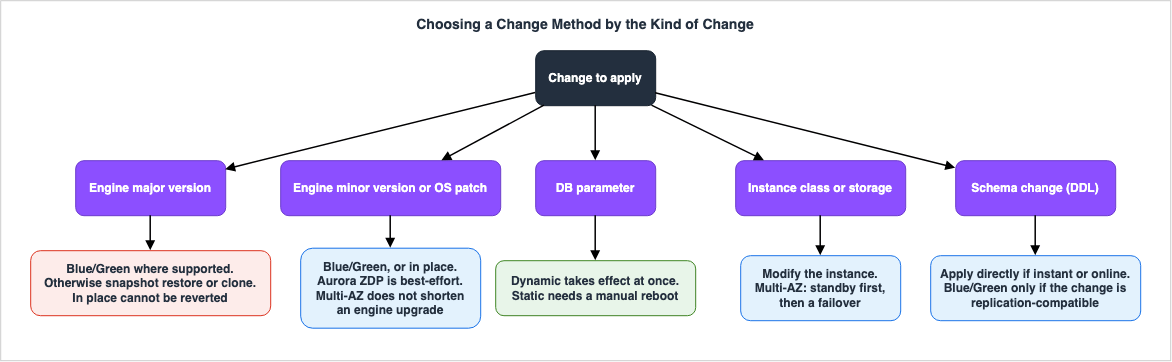
2.1 The five kinds of change
Almost every change to a managed relational database on AWS falls into one of five buckets, and the buckets differ in what they touch, not in how important they are.| Kind of change | What it actually modifies | Typical interruption without blue/green |
|---|---|---|
| Engine major version | On-disk catalog, planner, syntax acceptance, extension compatibility | The longest of the five, and irreversible once complete |
| Engine minor version, OS patch | Binaries only; data format unchanged | A restart, or a failover on Multi-AZ for OS patches |
| DB parameter | Engine configuration | None for dynamic parameters, a reboot for static ones |
| DB instance class, storage configuration | The host the engine runs on, or the volume underneath it | A failover on Multi-AZ, a full stop on Single-AZ |
| Schema, that is DDL | Table definitions and indexes | Depends entirely on the statement and the engine |
The five differ on a dimension that matters more than duration: reversibility. A parameter change can be put back. An instance class change can be put back. A major version upgrade applied in place cannot, and AWS says so directly — the Upgrades of the RDS for PostgreSQL DB engine page states that after an upgrade completes you cannot revert to the previous version of the DB engine, and that returning to it means restoring the snapshot taken before the upgrade into a new database. That single sentence is why major version upgrades deserve a mechanism the other four do not need.
2.2 The method that fits each
Engine major version. Use a blue/green deployment where the engine and version support it, because it is the only documented mechanism that lets you run the upgraded engine, test it against a synchronized copy of production data, and then cut over — while keeping the pre-upgrade environment intact and reachable. Where blue/green is unavailable, the alternatives are an in-place upgrade, a snapshot restore into the target version, or, for Aurora, a clone upgraded separately. The last two produce a new cluster with new endpoints, so the application has to be repointed; the AWS Database Blog post Upgrade to Amazon Aurora MySQL version 3 makes that trade-off explicit and notes that both approaches require stopping writes before the snapshot or clone is taken.Engine minor version and OS patches. These can ride on a blue/green deployment, and doing so buys you the ability to test first. They can also be applied in place, and for Aurora there is a middle path: zero-downtime patching attempts on a best-effort basis to preserve client connections through the engine restart. AWS is precise about the boundaries. ZDP does not apply to operating system patches or to major version upgrades. It may fail to complete when long-running queries or transactions are in progress, when temporary tables or user or table locks are in use, or when pending parameter changes exist — and when no suitable window appears, AWS states that patching reverts to the standard behavior. Even on success, AWS lists what is not preserved across the restart: global variables, status variables including uptime, the value of
LAST_INSERT_ID, the in-memory auto-increment state for tables, and the diagnostic contents of the information schema and performance schema tables. ZDP is a downtime reducer, not a guarantee, and application code that reads global state after a patch has to tolerate it being reset.DB parameters. The branch here is not blue/green versus in place; it is static versus dynamic. The Overview of parameter groups page states that a static parameter change takes effect only after you manually reboot the associated DB instances, and that the console always uses
pending-reboot as the apply method for static parameters. A dynamic parameter change takes effect immediately by default. There is a trap in the middle of that: the same page notes that a DB parameter group showing pending-reboot status does not cause an automatic reboot during the next maintenance window. A cluster can sit for months with a parameter that the console reports as changed and the engine has never loaded.Instance class and storage configuration. These are modifications, not deployments. On a Multi-AZ DB instance deployment, AWS re:Post's What factors affect my downtime or database performance in Amazon RDS? describes the sequence: the standby is modified first, a failover switches the roles, DNS is propagated to the new host, and then the former primary is modified as the new standby. AWS states there that failovers typically complete within 60 to 120 seconds and that large transactions or a lengthy recovery can extend that. On a Single-AZ instance, the same page describes the database being shut down, storage detached and reattached to a new host, and the engine performing recovery — an outage proportional to that recovery. A blue/green deployment can also carry an instance class change, and that is worth considering when the class change is being made for performance reasons and you want to observe the new class under replicated production write volume before committing.
Schema changes. Section 10 covers these in detail. The short version of the branch: statements that the engine can apply instantly or online do not need any deployment mechanism, and statements that would lock a large table for a long time are candidates for a blue/green deployment — but only if they are replication-compatible, which is a much narrower set than "any DDL."
2.3 Two corrections worth making early
Two beliefs about this area are common, load-bearing in change plans, and wrong.Multi-AZ does not shorten an engine upgrade. It shortens OS maintenance. The distinction is stated plainly in Maintaining a DB instance: for operating system updates, Amazon RDS performs maintenance on the standby, promotes the standby to primary, and then performs maintenance on the old primary, so the impact is a failover that AWS says typically lasts less than a minute. But if you upgrade the database engine on a Multi-AZ deployment, "Amazon RDS modifies both primary and secondary DB instances at the same time," and both are unavailable for the duration. The redundancy you are paying for does not help with the operation you were counting on it for. The same page then points at blue/green deployments as the way to minimize that downtime for RDS for MySQL, RDS for PostgreSQL, and RDS for MariaDB — which is the clearest official statement of when the mechanism is the right answer.
Apply-immediately applies more than the change in front of you. The Using the schedule modifications setting page warns that when you choose to apply a change immediately, any pending modifications already in the queue are applied immediately as well, instead of during the next maintenance window. A team that deferred a static parameter change three weeks ago and then makes an unrelated urgent change with apply-immediately gets both, and the reboot that comes with the first one. Before any modification with
--apply-immediately, read PendingModifiedValues and know what is in the queue.# Read-only. Shows what is already queued for the next maintenance window,
# so that --apply-immediately does not deliver a surprise alongside your change.
aws rds describe-db-instances \
--db-instance-identifier mydb \
--query 'DBInstances[0].PendingModifiedValues'3. How Blue/Green Deployments Work
A blue/green deployment is not a generic deployment pattern that AWS happens to implement for databases. It is a specific managed resource with its own API, its own lifecycle states, and its own list of things it refuses to do. Treating it as "the database version of a blue/green rollout" is the source of most of the surprises.3.1 What gets created, and how
Creating the deployment copies the topology. The Overview of Amazon RDS Blue/Green Deployments states that RDS copies the complete topology and configuration of the primary DB instance to create the green environment, with the copied names suffixed by-green- and random characters, and that the green environment includes the features the source uses: read replicas, storage configuration, DB snapshots, automated backups, Performance Insights, and Enhanced Monitoring. If the blue instance is a Multi-AZ DB instance deployment, so is the green one. The Aurora equivalent copies the DB cluster and all of its DB instances.The mechanism underneath differs by engine, and the difference has consequences that surface in section 4.
For Aurora, the limitations and considerations page states that Aurora creates the green environment by cloning the underlying Aurora storage volume, with the green cluster volume storing only incremental changes. That is the same copy-on-write mechanism described in Cloning a volume for an Amazon Aurora DB cluster, and it is why green creation is fast regardless of data size.
For the RDS engines, the green primary is not a clone. Lazy loading and storage initialization for blue/green deployments states that RDS creates the primary DB instance in the green environment by restoring from a DB snapshot, and that the green DB instance and its read replicas then continue to load data in the background through lazy loading. To bring the volumes to full performance, RDS runs storage initialization, which reads all blocks in the green environment volume. The same section states that it is available only with the
gp2, gp3, io1, and io2 volume types and for all instance classes except the t3 and t4 families, and that while it runs the instance status is storage-initialization: the instance stays available, but storage might not reach full performance until initialization completes. AWS announced this managed initialization for RDS for PostgreSQL, RDS for MySQL, and RDS for MariaDB on 2024-11-21, and the RDS switchover page lists "Make sure data loading is complete before switching over" among its best practices; the Aurora switchover page has no such item. Which other RDS operations load data lazily, and how StorageOperationStatus shows the progress, are covered in Storage Initialization on Amazon RDS - Which Operations Lazy-Load, What StorageOperationStatus Shows, and Who Warms the Volumes.For RDS for PostgreSQL, the replication method is chosen for you and it depends on what you asked for. PostgreSQL replication methods for blue/green deployments states that RDS for PostgreSQL primarily uses physical replication, but switches to logical replication when you request a major version upgrade at deployment creation time and the source runs one of the listed versions. This is the single most consequential implementation detail in the whole feature, because logical replication carries restrictions that physical replication does not, and those restrictions decide what you are allowed to do to the blue environment while the deployment exists.
At creation time you can specify a higher DB engine version and a different parameter group for the green environment. RDS then configures replication from the blue primary to the green primary.
3.2 Green is read-only, and should stay that way
After creation, the green environment is read-only by default. AWS documents how to lift that per engine, and immediately advises against doing so: the guidance in both overviews is to keep green read-only during testing, because writes on green can cause replication conflicts and can leave unintended data in the production databases after switchover.There is an Aurora MySQL version 3 caveat worth knowing before someone trips over it. AWS notes that the green cluster does not allow write operations by default, but that this does not apply to users holding the
CONNECTION_ADMIN privilege, which includes the Aurora master user. Testing as the master user therefore does not exercise the read-only protection, and a script that works because it is running as master will write to green without complaint.For Aurora PostgreSQL there is a related hazard on the other side of the switchover, documented in the switchover best practices: during switchover,
default_transaction_read_only is set to on for the green writer to prevent writes until promotion completes, and AWS explicitly recommends auditing application queries to confirm none of them override that setting at session level. If an application does override it and writes during the switchover, and the switchover then has to roll back, AWS states that those writes are not available in the blue environment and you have to resolve the inconsistency by hand.3.3 Supported engines and versions
Confirmed 2026-10-25. Inclusion criterion: only what the AWS User Guide "Supported Regions and DB engines" pages enumerate, which is the authoritative source for this feature. Service FAQ pages carry older version floors and are not used here. This table is a dated snapshot, not a claim of completeness — re-derive it at planning time.| Engine | Supported versions for blue/green deployments | Source page |
|---|---|---|
| RDS for MariaDB | 12.3 all available versions, 11.8 all available versions, 11.4 all available versions, 10.2 and higher 10 versions | Supported Regions and DB engines for Amazon RDS Blue/Green Deployments |
| RDS for MySQL | 8.4, 8.0, and 5.7, all available versions | Same |
| RDS for PostgreSQL | 11.1 and all higher major and minor versions | Same |
| RDS for Db2, SQL Server, Oracle | Not supported | Same |
| Aurora MySQL | All versions, including clusters configured as Aurora Global Database | Supported Regions and Aurora DB engines for Blue/Green Deployments |
| Aurora PostgreSQL | 17.4 and higher, 16.1 and higher, 15.4 and higher, 14.9 and higher, 13.12 and higher, 12.16 and higher, 11.21 and higher | Same |
Regional availability is broad enough that it is rarely the constraint: AWS states blue/green deployments are supported in all AWS Regions for RDS, and for Aurora MySQL in all AWS Regions.
One qualifier that the version table alone will not tell you: for RDS for PostgreSQL, major version upgrades through blue/green are not supported from source versions 15.3 and lower, 14.8 and lower, 13.11 and lower, 12.15 and lower, or 11.20 and lower. A cluster can be inside the supported version range for the feature and outside the supported range for the specific operation you want to perform. Check the operation, not just the feature.
3.4 Configurations that rule blue/green out
This list is the reason to check feasibility weeks before the window rather than days. Drawn from the RDS and Aurora limitations pages, confirmed 2026-10-25.| Category | Constraint |
|---|---|
| Unsupported features, both | Cross-Region read replicas, AWS CloudFormation |
| Unsupported features, RDS | Cascading read replicas and Multi-AZ DB cluster deployments. Multi-AZ DB instance deployments are supported |
| Unsupported features, Aurora | Aurora Serverless v1 DB clusters. You also cannot stop and start a cluster that is part of a blue/green deployment |
| Encryption | You cannot change an encrypted database into an unencrypted one. In the other direction, the considerations pages state that you can encrypt an unencrypted source, or change the KMS key, by specifying TargetKmsKeyId in TargetResourceConfigurations when you create the deployment; this is not supported for Aurora Global Database |
| Version direction | You cannot change the blue database to a higher engine version than its corresponding green database |
| Account boundary | Blue and green resources must be in the same AWS account |
| Credentials | Managing master user passwords with AWS Secrets Manager is not supported |
| RDS Proxy | The blue cluster must be registered with the proxy before the deployment is created. Once a deployment exists, registering that blue cluster to a proxy is blocked. Proxy with blue/green is not supported for Aurora Global Database |
| Zero-ETL | During switchover, neither environment can have a zero-ETL integration with Amazon Redshift. Delete the integration, switch over, then recreate it |
| Event Scheduler | The event_scheduler parameter must be disabled on green at creation, to keep events from firing there and creating inconsistencies |
| Dedicated log volume | If DLV is enabled on the blue database, it must be enabled on all DB instances including read replicas |
| Aurora MySQL backtrack | If the source cluster has backtrack enabled, the green cluster is created without backtracking, because backtrack does not work with the binlog replication the deployment requires. Forcing a backtrack on blue breaks the deployment and blocks switchover |
| Aurora MySQL naming | The source cluster cannot contain a database named tmp; such a database is not copied to green |
| Drivers | The AWS JDBC Driver for MySQL is not supported |
Aurora Global Database, supported since the 2025-11-14 announcement, adds its own conditions: all operations must be initiated from the Region holding the writer cluster; performing a global switchover or global failover invalidates an active blue/green deployment, which must then be deleted and recreated from the new primary Region; modifying the global topology after creation has the same effect; and DB cluster and DB parameter groups for the green environment must exist in every secondary Region with identical names, failing which the Region's default parameter group is used. AWS also advises avoiding RDS Proxy on global database members during a blue/green switchover.
Two of these deserve to be lifted out of the table because they are the ones that most often turn up late. CloudFormation is unsupported, which means an estate that manages databases entirely as infrastructure as code has to reconcile a resource created outside the stack, or accept that this class of change is performed out of band and the template reconciled afterward. And the RDS Proxy ordering constraint is directional: register the proxy first, then create the deployment. Doing it the other way around is blocked outright, and discovering that at the start of the window means the deployment has to be torn down and recreated.
4. Keeping Green in Sync
Between creation and switchover there is a period — hours for a small database, days or weeks for a large one being properly tested — during which green has to track blue. Most of the operational failures in blue/green deployments happen in this period, and they are not subtle: replication either degrades to a state that requires tearing the whole thing down and starting over, or it falls behind far enough that the switchover guardrails refuse to proceed.4.1 What breaks replication outright
For Aurora PostgreSQL, and for RDS for PostgreSQL when the deployment uses logical replication, the logical replication limitations are a list of things that will end the deployment if they happen on blue. Confirmed 2026-08-09.| Operation on blue | Documented consequence |
|---|---|
Any DDL statement, such as CREATE TABLE or CREATE SCHEMA | Not replicated. Green databases enter a state of Replication degraded. You must delete the blue/green deployment and all green databases, then recreate it |
| Creating a new partition on a partitioned table | Same, because it is a DDL operation. Existing partitioned tables and their data do replicate |
Creating or modifying large objects stored in pg_largeobject | Not replicated. Green enters Replication degraded and the deployment must be recreated |
| Refreshing a materialized view, Aurora PostgreSQL | AWS states this breaks replication to green. Refresh manually after switchover instead |
DCL statements such as GRANT and REVOKE | Not replicated. A warning is emitted. AWS states there is no configuration or API to change this |
UPDATE or DELETE on a table without a primary key | Not permitted. Ensure every table has a primary key, or use REPLICA IDENTITY FULL only where no primary or unique key exists, since it affects replication performance |
The operational consequence is a change freeze on blue that is stricter than most teams expect. "No schema changes during the deployment window" is not a nice-to-have; for the PostgreSQL logical replication path it is a hard prerequisite, and it applies to anything in your estate that emits DDL. Extensions that run DDL on a schedule are the usual culprits, which is why the same page requires
pg_partman to be disabled on blue at creation time, requires pg_cron to remain disabled on all green databases because its background workers run as superuser and bypass the read-only setting, and requires pglogical and pgactive to be disabled on blue. AWS re:Post's How do I prevent DDL operations during blue/green deployments? recommends configuring event triggers on the blue database before starting, so that stray DDL announces itself rather than being discovered when switchover is blocked — while noting that commands targeting shared objects such as databases, roles, or tablespaces, commands targeting event triggers, and large object modifications cannot be caught this way.4.2 What merely slows replication down
Degradation is loud. Lag is quiet, and it is what actually determines whether the switchover completes inside your timeout.AWS documents two structural sources of lag for the PostgreSQL logical replication path. First, each database requires its own logical replication slot, so resource overhead grows with the number of databases on the instance and can produce lag if the instance is not sized for it. Second, and more important for write-heavy systems: the logical replication apply process in the green environment is single-threaded. AWS states that if blue generates a high volume of write traffic, green might not keep up, which can lead to replication lag or outright failure, and that for major version upgrades combined with high-volume write workloads you should consider alternative approaches such as AWS Database Migration Service or self-managed logical replication. That is an unusually direct admission that the feature has a throughput ceiling, and it belongs in the feasibility assessment rather than being discovered when green never catches up.
Sequences are a third source, and they cost time at the switchover itself rather than before it. AWS states that
NEXTVAL operations on sequence objects are not synchronized between environments, and that during switchover the service increments sequence values in green to match blue. A high volume of sequences generally still allows switchover to proceed, but AWS warns that an exceptionally large number — "several hundred thousand" is the figure in the documentation — might cause the process to time out, and directs you to raise the switchover timeout accordingly. There are dedicated events for this phase, covered in section 12.4.3 Measuring the lag
The metric to watch depends on the engine, and using the wrong one produces a confident reading of the wrong thing. From Monitoring replica lag prior to switchover, confirmed 2026-08-09.| Engine | Signal | Where to read it |
|---|---|---|
| Aurora MySQL, RDS for MySQL | AuroraBinlogReplicaLag | The green environment |
| Aurora PostgreSQL, RDS for PostgreSQL | OldestReplicationSlotLag | The blue environment |
For PostgreSQL, AWS also publishes a query that gives a more direct reading than the metric, by comparing the last log sequence number flushed to the replica against the current write-ahead log position.
SELECT slot_name,
       confirmed_flush_lsn as flushed,
       pg_current_wal_lsn(),
       (pg_current_wal_lsn() - confirmed_flush_lsn) AS lsn_distance
FROM pg_catalog.pg_replication_slots
WHERE slot_type = 'logical';
An
lsn_distance of zero means the replica has caught up. AWS's guidance before switchover is that replica lag should be close to zero in order to reduce downtime — not merely within some tolerance, because lag is time the write-stop window has to absorb.Note the difference in meaning from the lag metrics used for high-availability monitoring.
AuroraReplicaLag measures how far a reader in the same cluster trails the writer over shared storage, and it belongs to the availability discussion covered in Amazon RDS and Aurora High Availability Guide. The metrics above measure a different thing: how far an entirely separate environment trails production over a replication channel that exists only for the duration of the deployment.4.4 The condition for declaring green ready
Green is ready when four statements are all true, and each of them maps onto something the service will check for you at switchover time.- Replication status is healthy and has not entered Replication degraded at any point since creation.
- Replica lag is at or near zero, measured with the engine-appropriate signal above.
- There are no active writes on green, and there have been none that could have produced a conflict.
- Testing on green is complete, including the tests that only make sense on green — query plans against the upgraded planner, extension behavior, and anything whose result depends on statistics.
The fourth is the one that gets compressed when the window is tight, and it is the one blue/green exists to make possible. A deployment that is created, synchronized, and switched over the same evening has bought you a shorter cutover and none of the testing value, which is most of the value.
5. The Switchover Window
This is the part everyone rehearses, and it is worth understanding precisely because it is the only part where the service takes control away from you for a bounded period and then hands it back in a different configuration.5.1 A note on the word switchover
The term is overloaded inside AWS's own database documentation, and confusing the two meanings leads to genuinely wrong runbooks.Blue/green switchover transitions the green environment to be production, within one Region, by renaming resources. That is the subject of this section.
Aurora Global Database switchover is a planned reversal of the primary and secondary Regions in a global cluster. That is a topology operation across Regions, and it belongs to the cross-Region resilience discussion in Amazon RDS and Aurora High Availability Guide and AWS Multi-Region Active-Active Architecture Guide.
The two interact, and the interaction is documented: AWS states that a global failover is supported during a blue/green switchover, but a global switchover is not, and that performing a global switchover or global failover invalidates an active blue/green deployment. If your estate uses both, that sentence belongs in both runbooks.
A third term to keep distinct: promoting the green cluster from the Actions menu is not switching over. AWS states that manual promotion breaks replication between the environments and puts the deployment into an Invalid configuration state. It is a different button with a similar name and no path back.
5.2 The guardrails
Before doing anything irreversible, RDS runs a set of checks it calls switchover guardrails. AWS describes their purpose as preventing a switchover when the environments are not ready, thereby avoiding longer-than-expected downtime and the data loss that could result. Confirmed 2026-08-09.| Environment checked | Guardrail | What it is protecting against |
|---|---|---|
| Green | Replication health | Switching to an environment whose replication has stopped or errored |
| Green | Replication lag within allowable limits, where the limits are derived from the specified timeout | A catch-up phase that outlasts the window you budgeted |
| Green | No active writes | Conflicts and unintended data in the new production environment |
| Blue | External replication. For Aurora PostgreSQL, blue must not be a self-managed logical publisher or subscriber. For Aurora MySQL, blue must not be an actively replicating external binlog replica | A replication topology that will be silently orphaned by the rename |
| Blue | No long-running active writes | Lag growth during the window |
| Blue | No long-running DDL statements | Lag growth during the window |
| Blue | For PostgreSQL, no unsupported changes: no DDL and no large object additions or modifications | Switching over an environment that is not actually in sync |
The last one has a distinctive failure mode. If unsupported PostgreSQL changes are detected, AWS states that the replication state changes to Replication degraded and switchover becomes unavailable for that deployment; the documented remedy is to delete and recreate the deployment and all green databases. There is no repair path. If this happens the night before your window, the window is gone.
For the external replication guardrail on Aurora PostgreSQL, AWS's recommendation is to drop the self-managed replication slots and subscriptions across all databases in blue, switch over, and then recreate them.
5.3 What happens, in order
The documented switchover actions are seven steps, and reading them in order is the fastest way to understand both why there is a window and why no application change is needed afterward.- Run the guardrail checks on both environments.
- Stop new write operations on both environments.
- Drop connections to the DB instances in both environments, and refuse new connections.
- Wait for replication to catch up so that green is in sync with blue.
- Rename. Green resources take the corresponding blue names, so
mydb-green-abc123becomesmydb. Blue resources get-oldnappended, somydbbecomesmydb-old1. Endpoints in green are also renamed to match the corresponding blue endpoints, which is the mechanism by which no application change is required. - Allow connections to databases in both environments again.
- Allow write operations on the new production environment.
Two observations about this sequence. First, the write stop in step 2 applies to both environments, not just blue — production is not the only thing that goes quiet. Second, and this is the design insight worth carrying away: the endpoint does not fail over, it is reassigned. The name that your connection string contains is detached from one set of resources and attached to another. That is a fundamentally different mechanism from the DNS record update that drives a failover, and section 8 works through what follows from the difference.
There is also a side effect in step 5 that is easy to miss and annoying to discover later: during switchover, tags from blue replace all tags on green resources, overwriting anything applied directly to green. If tags drive access control or cost allocation in your estate, apply them to blue before creating the deployment, or reapply them to the new production environment afterward.
5.4 The timeout, and what it protects
You specify a switchover timeout between 30 seconds and 3,600 seconds. The default is 300 seconds. AWS states that if the switchover takes longer than the specified duration, any changes are rolled back and no changes are made to either environment — and, more broadly, that if the switchover starts and then stops before finishing for any reason, changes are rolled back and neither environment is modified.That sentence is the most valuable single fact about this feature, and it deserves to be read carefully. The timeout is not a deadline after which you are left in a half-switched state. It is a bounded commitment: either the whole thing completes, or nothing happened. The value you choose is therefore a statement about your tolerance, not a risk you are taking — a 30-second timeout means you would rather abort than accept 45 seconds of write stop.
The interaction with the guardrails is what makes this work: the replication-lag guardrail derives its allowable limit from the timeout you specified, so a tight timeout also tightens the entry condition. AWS's FAQ pages phrase this from the user's side, stating that you can specify your maximum tolerable downtime as low as 30 seconds and that an ongoing transaction exceeding it causes the switchover to time out.
# DESTRUCTIVE. This begins the switchover and, if it completes, production
# moves to the green environment and the operation is not reversed by the service.
# Do not run this outside a change window. Confirm all of the following first:
#   - deployment status is AVAILABLE, and has never been INVALID_CONFIGURATION
#   - replica lag is at or near zero (section 4.3)
#   - no long-running transactions or DDL on blue (section 5.2)
#   - testing on green is complete, including ANALYZE for PostgreSQL (section 9.5)
#   - your rollback plan is written and its preconditions are already in place (section 6)
aws rds switchover-blue-green-deployment \
  --blue-green-deployment-identifier bgd-1234567890abcdef \
  --switchover-timeout 600
The corresponding API operation is
SwitchoverBlueGreenDeployment, taking BlueGreenDeploymentIdentifier and SwitchoverTimeout, with the same 300-second default. AWS also notes that during a switchover you cannot modify any DB cluster included in it.5.5 How long the window actually is
Here the sources have to be read together, with dates attached, because they say different things and both are current.The user guides state that the switchover typically takes under a minute, depending on your workload. The AWS What's New announcement of 2026-01-20 is more specific and more recent: AWS states that for single-Region configurations, applications connecting directly to the database endpoint experience typically five seconds or lower of writer downtime, while those using the AWS Advanced JDBC Driver typically see two seconds or lower, because DNS propagation delays are eliminated.
Both figures are AWS's, not measurements taken for this article. The way to use them is as an upper bound on expectations rather than a number to put in an SLA: the same announcement, and the user guide, both qualify the duration as workload-dependent, and every source of lag discussed in section 4 lands inside this window. A cluster with hundreds of thousands of sequences, or with a long-running transaction that the guardrails did not quite catch, will not see five seconds.
Set the timeout from your tolerance, not from AWS's typical figure.
5.6 What the application sees
Between steps 2 and 6 above, connections are dropped and new ones are refused. What the application observes depends on whether a proxy is in the path.Connecting directly, the application sees connection failures and then, once connections are allowed again, a database that accepts writes. The reconnection is on the client.
Connecting through Amazon RDS Proxy — supported for blue/green since the 2026-04-09 announcement — the sequence is documented in detail and is more interesting. AWS states that during switchover the blue database enters read-only mode before green is promoted, and that RDS Proxy continues routing connections to the blue database during this transitional period. Write operations in that interval return engine-level read-only errors: on Aurora MySQL,
1290 (HY000): The MySQL server is running with the --read-only option so it cannot execute this statement, and on Aurora PostgreSQL, AdminShutdown: terminating connection due to administrator command. Once the switchover is detected, the proxy routes traffic to the newly promoted green environment, and AWS notes that existing connections to the proxy are dropped at promotion, so applications must re-establish them.This matters for error handling design. Through a proxy, the failure mode during the window is not "cannot connect" but "connected, and writes are rejected as read-only." An application whose retry logic treats connection errors as retriable and SQL errors as fatal will convert a five-second window into a page.
6. Can You Go Back?
Every other section in this article is preparation for this one. The question that determines whether a database change is safe is not how long the cutover takes; it is what you do at minute twenty when the new environment is up, healthy, and producing query plans that have made a critical endpoint four times slower.
6.1 Before switchover: the service reverses it for you
While the deployment exists and has not been switched over, production is untouched. Blue is the production environment, serving reads and writes under its original names and endpoints, and green is a separate synchronized copy. Abandoning the change means deleting the deployment.The deletion behavior before switchover gives you a choice. Deleting with
--delete-target removes the green database, which must have deletion protection turned off. Deleting with --no-delete-target retains the green database but removes it from the deployment — for Aurora MySQL replication continues between the environments, and for Aurora PostgreSQL green is promoted to standalone and replication stops.And if the switchover itself fails or is canceled partway, AWS's statement is unambiguous: changes are rolled back and no changes are made to either environment.
This is the zone in which the change costs you nothing but the effort of setting it up. Everything you can move into this zone — testing, ANALYZE, index rebuilds, plan verification, application smoke tests against green — is work you get to do without risk. Teams that treat green as "the thing we switch to" rather than "the thing we test on" have paid for the mechanism and used a third of it.
6.2 After switchover: the service does not
After a successful switchover the situation changes in a way that has to be stated carefully, because it is neither "you can roll back" nor "the old data is gone."What is true, per After switchover, confirmed 2026-08-09:
- The DB cluster and DB instances in the previous blue environment are retained. They are not deleted. AWS's stated reason is that you can use the previous production environment for regression testing.
- They are renamed with
-oldnappended. Green resources hold the original names and endpoints. - Replication and binary logging between the environments stops.
- The blue cluster is forced into a read-only state.
Put those together and the honest characterization is this. The old environment survives as a frozen copy of production as it existed at the instant of switchover. It is not a rollback target that stays current, and every write your application has accepted since the cutover exists only in the new environment. Reverting to it is therefore not an undo; it is a decision to discard a period of production writes, and the length of that period is exactly how long you took to notice the problem.
There is no service operation that reverses a completed switchover. Nothing in the API does it. What exists instead is a set of operations you can compose yourself, and section 6.5 covers them.
6.3 The engine difference in how blue is unlocked
The read-only state on the old environment is lifted differently depending on the engine, and both mechanisms have a step people miss.Aurora. AWS states that after switchover the previous production DB cluster only allows read operations, and that even if you enable writes on the DB cluster, it remains read-only until you delete the blue/green deployment. Setting the parameter is not sufficient. The deletion page states the other half: after you delete the deployment, RDS removes the read-only protections from the previous production DB cluster, and if
read_only is disabled for that cluster it begins to allow write operations again. So the Aurora unlock is a two-step sequence — delete the deployment, then confirm the parameter — and the first step is one that a runbook written before switchover may not have anticipated needing.RDS. The RDS switchover page describes a different path: the previous production primary allows only read operations until you set
read_only for RDS for MySQL or default_transaction_read_only for RDS for PostgreSQL to 0 and reboot the DB instance. The reboot is the part that surprises people under time pressure.One more constraint that shapes the sequence: when deleting a blue/green deployment through the AWS CLI, you cannot specify
--delete-target if the deployment status is SWITCHOVER_COMPLETED, and the option to delete the green databases is not offered in the console after switchover. Deleting a post-switchover deployment removes the deployment resource; AWS states the -oldn and -newn resources are retained.6.4 What in-place upgrades cost you in reversibility
If blue/green is unavailable and you upgrade in place, reversibility is not reduced — it is removed, and AWS says so.For RDS for PostgreSQL: after an upgrade completes you cannot revert to the previous version of the DB engine, and returning to it means restoring the DB snapshot taken before the upgrade to create a new database. AWS notes that if your backup retention period is greater than zero, RDS takes two snapshots during the upgrade process, the first before any upgrade changes are made, and that this first snapshot is the one you restore if the upgrade goes wrong. If your retention period is zero, that snapshot is not taken and your rollback material does not exist.
For Aurora global databases, AWS re:Post states plainly that after you upgrade the global database, you cannot reverse the upgrade.
The common structure across engines is that the rollback artifact for an in-place upgrade is a restore into a new resource with a new endpoint, which means the application has to be repointed, which means the rollback is not transparent and has to be rehearsed like any other cutover.
6.5 Designing a rollback you can actually execute
Given that no service operation reverses a completed switchover, a rollback plan has to be built out of things that do exist. Three shapes are available, and the choice should be made before the window, not during it.Accept the loss. For a workload where a bounded period of writes can be replayed from an upstream source — an event stream, a queue with retention, an idempotent import job — reverting to the
-oldn environment and replaying is viable. The prerequisite is that the upstream retention exceeds your worst-case detection time, and that is a property of your architecture, not of the database. Note that going back means renaming again or repointing the application, because the names now belong to the new environment.Replicate backward. Establish replication from the new production environment to the old one after switchover, so that the rollback target stays current rather than frozen. The AWS Database Blog post Implement a rollback strategy after an Amazon Aurora MySQL blue/green deployment switchover sets out this approach: prepare green for rollback before switching, switch over, delete the blue/green deployment, configure logical replication from the new production environment back to the old one, and switch to it if a problem appears. This is AWS-published practice rather than a service feature, and it carries the obvious constraint that replicating from a newer engine version back to an older one is only possible where the engines permit it. Treat it as a pattern to evaluate against your version pair, not as a universal answer.
Do not roll back; roll forward. For many changes this is the honest plan, and writing it down as the plan is better than pretending otherwise. It requires that the failure modes you fear are ones you can fix in place — a missing index, stale statistics, a parameter that needs adjusting — which is exactly the class of problem that section 9 says to eliminate before switchover rather than after.
Whichever you pick, the rollback plan has a testable precondition. Write it as a checklist and verify it during the rehearsal in section 11.
6.6 The quiet breakages that outlive the switchover
Reversibility is not the only thing the rename touches. RDS tracks resources byDbiResourceId and DbClusterResourceId, which the considerations page describes as Region-unique immutable identifiers that do not change during switchover — while the names do. The result is that everything keyed on a name now points at the wrong resource, and everything keyed on a resource ID now points at a resource that is no longer production. Confirmed 2026-08-09.| What breaks | Why | What to do |
|---|---|---|
| Point-in-time restore and automated backup lookups by name | The name changed during switchover, so DescribeDBInstanceAutomatedBackups and RestoreDBInstanceToPointInTime cannot be called with the previous name | Use the resource ID for these operations |
| IAM roles attached to the database | Attached roles are not copied to green | Reassociate them after switchover |
| IAM database authentication | The policy must list both blue and green databases under Resource to allow connecting to green after switchover | Update the policy before switching over |
| IAM policies scoped by resource ID | The new production resources have different resource IDs | Add the new resource IDs |
| AWS CloudTrail consumers filtering on resource ID | Same reason | Adjust the consumers to track the new IDs |
| Performance Insights API calls | Same reason. AWS notes you can monitor a database with the same name after switchover, but it does not contain the data from before the switchover | Adjust the resource IDs in API calls |
| AWS Backup managed automated backups | Keyed on resource ID | Adjust the resource IDs used by AWS Backup |
| Database Activity Streams, Aurora | The stream belongs to the old resource | Point monitoring at the new stream |
| AWS DMS replication tasks | AWS states the checkpoint from the blue environment is invalid in the green environment, so tasks cannot resume | Recreate the task with a new checkpoint |
| Snapshot selection | Snapshots exist for resources on both sides of the rename | Choose by the time the snapshot was taken, not by name |
| Auto Scaling policies, Aurora | AWS states policies configured on the blue cluster are not copied to green | Reconfigure after switchover |
| Aurora MySQL external replicas and binlog consumers | Their parent node is gone | Section 6.7 |
The Aurora storage note is worth adding because it is structural rather than administrative: since Aurora creates green by cloning the blue volume, the green cluster volume initially stores only incremental changes. AWS states that if you delete the blue DB cluster, the size of the underlying Aurora storage volume in the green environment grows to the full size. That is not a reason to keep blue forever; it is a reason to know that deleting it is a storage event and not a no-op.
6.7 Reattaching downstream consumers, Aurora MySQL
If the blue cluster had external replicas or binary log consumers before switchover, they must be repointed or replication stops there. AWS documents a precise mechanism for this: after switchover, the writer DB instance that was previously in green emits an event containing the master log file name and position, with a message of the formBinary log coordinates in green environment after switchover: file mysql-bin-changelog.000003 and position 40134574. Find that event in the RDS console filtered by the old green writer's name, confirm the consumer has applied all binary logs from the old blue environment, and resume from those coordinates.-- MySQL 8.0.23 and higher, on the downstream consumer.
-- Use the coordinates from the post-switchover RDS event, not from memory.
CHANGE REPLICATION SOURCE TO
SOURCE_HOST='{new-writer-endpoint}',
SOURCE_LOG_FILE='mysql-bin-changelog.000003',
SOURCE_LOG_POS=40134574;The reason this step exists at all is the guardrail from section 5.2 that checks blue is not an actively replicating external binlog replica. The service protects itself against inbound external replication and leaves outbound consumers to you.
The way back this section describes is the one blue/green hands you, and it ends when the old environment is gone. A replica held deliberately behind its source is a different way back: the window is measured in seconds that you set, and on Aurora MySQL the inbound channels carrying it are objects you create rather than cluster members. That layer is covered by Replication Topologies on Amazon Aurora MySQL - Multi-Source Channels, Delayed Replicas, and the Window You Build Yourself.
7. Application-Side Readiness
The database side of a switchover is bounded and documented. Whether users notice it is decided almost entirely on the client. This section covers only what is specific to a planned change; the general discipline for surviving connection loss — retry with backoff and jitter, idempotent writes, connection validation on borrow, bounded connection lifetime, short acquisition timeouts — is set out in Amazon RDS and Aurora High Availability Guide and is not restated here.7.1 Endpoints are part of the contract
The general best practices for blue/green deployments contain a requirement that is easy to read as advice and is closer to a precondition: use the cluster endpoint, reader endpoint, or custom endpoint for all connections in both environments, and do not use instance endpoints, or custom endpoints with static or exclusion lists.The reason follows directly from the mechanism in section 5.3. What the service renames is the cluster and instance identifiers and the endpoints derived from them. An application holding a cluster or reader endpoint is holding a name that will be reattached to the new environment. An application holding an instance endpoint, or a custom endpoint pinned to a static membership list, is holding a reference to a specific resource — and after switchover that resource is the
-old1 one, which is read-only. The application will connect successfully and fail on the first write, which is a considerably worse failure than not connecting at all.The Aurora endpoint types worth auditing before a deployment are the cluster endpoint for writes, the reader endpoint for balanced read connections, custom endpoints for subsets of instances, and instance endpoints, which AWS positions for diagnosis and tuning rather than for application traffic.
Two dependencies that are easy to forget because they are not application code: for PostgreSQL foreign data wrappers, AWS requires that the blue database be configured as the foreign server using the cluster or instance endpoint name rather than an IP address, so the configuration keeps working after switchover. And for Aurora PostgreSQL query plan management, AWS states you must pass the blue cluster endpoint when calling
apg_plan_mgmt.create_replica_plan_capture so that plan capture survives the rename.7.2 DNS is a five-second promise
The switchover best practices state it directly: make sure your network and client configurations do not increase the DNS cache time-to-live beyond five seconds, which is the default for Aurora DNS zones. AWS gives the consequence in the same sentence — applications will continue to send write traffic to the blue environment after switchover.That is the endpoint rename arriving late. The application is not wrong about the name; it is holding a stale resolution of it. The environments this bites are the ones where a caching layer sits between the application and Route 53 without anyone treating it as part of the database architecture: a JVM with a long negative or positive cache, a container runtime resolver, a corporate forwarder, a sidecar. Auditing this before the window means checking every hop, not just the application's own setting.
7.3 Drivers and proxies that do not wait for DNS
There is a category of client that avoids the problem entirely by not depending on DNS to learn about the change, and AWS has been steadily extending it to blue/green specifically.The AWS suite of drivers — the AWS JDBC Driver, AWS Python Driver, AWS ODBC Driver for MySQL, and AWS Advanced NodeJS Wrapper — monitor DB cluster status and cluster topology to determine the new writer. AWS states this approach reduces switchover and failover times to single-digit seconds compared with tens of seconds for open-source drivers, and lists the driver suite under Best practices with Amazon Aurora as the recommendation for application connectivity.
Both blue/green overview pages state that the feature supports Amazon RDS Proxy and smart drivers, and describe the benefit in the same terms: these solutions reduce writer node upgrade downtime during switchover by detecting the topology change and redirecting connections to the new production environment without waiting for DNS propagation. The 2026-01-20 announcement quantifies AWS's claim for the driver path at typically two seconds or lower against typically five seconds or lower for direct endpoint connections.
The trade-off is not free. A smart driver is a dependency in your application's data path with its own version lifecycle, and one specific driver is excluded: AWS states that blue/green deployments do not support the AWS JDBC Driver for MySQL. Confirm which driver the exclusion names before assuming your stack is covered.
7.4 What the application must still own
Even with a proxy and a smart driver, three things stay on the application side.Tolerating a write rejection that is not a connection failure. Section 5.6 covered this: through a proxy, the visible symptom during the window is a read-only error on an open connection. Retry classification has to treat that as transient.
Bounded retry with backoff. The AWS re:Post guidance for Aurora MySQL blue/green upgrade errors puts it as a preparation step: assess the ability of your application to handle brief interruptions during cutover, and implement connection retry logic in your application code.
Not depending on session or global state surviving. This applies to the ZDP path from section 2.2, where AWS enumerates what is reinitialized, and to the switchover path, where connections are dropped outright. Anything cached in a session — temporary tables, session variables, prepared statement handles — is gone.
8. Failover Pitfalls During a Planned Change
A planned change induces failovers. An instance class modification on Multi-AZ triggers one. An OS patch triggers one. A blue/green switchover does something adjacent to one. The behavior of the database during these events is well documented and is the subject of the high-availability guide; what is different, and what this section is about, is that you know when it is going to happen, which changes both the failure modes and the mitigations available to you.To be explicit about the boundary: the general client-side hazards of failover — DNS caching, stale pooled connections, retry design, replica lag as a determinant of failover duration — belong to Amazon RDS and Aurora High Availability Guide, which treats them as steady-state design problems. What follows assumes those are handled.
8.1 Rename is not failover, and the difference is load-bearing
The two mechanisms look similar from a distance and behave differently in ways that matter.| Aspect | Failover | Blue/green switchover |
|---|---|---|
| What changes | The DNS record for an endpoint is updated to point at a newly promoted instance | Resource identifiers and endpoint names are reassigned from one environment to another |
| What the resource is | The same cluster, a different instance within it | A different cluster or instance entirely, with a different resource ID |
| What a stale client reaches | The demoted instance, until it re-resolves | The -old1 environment, which is read-only until you take deliberate action |
| Data continuity | Shared storage, or a replica that was current | Replication stopped at the moment of cutover |
| Reversal | A subsequent failover restores the previous role assignment | No service operation reverses it |
The practical consequence is in the third row. After a failover, a client with a stale DNS entry eventually recovers on its own, because the old target is a member of the same cluster that will simply reject writes or become reachable again. After a switchover, a client with a stale entry reaches a resource that has been renamed out of production and will stay read-only indefinitely. It does not self-heal, and the symptom is a persistent, partial outage affecting only the clients that cached.
8.2 Connections you should drop on purpose
This is the clearest example of what planning buys you. The switchover best practices recommend that if there is a large number of connections on your DB cluster and DB instances, you consider manually reducing them to the minimum necessary for your application before switching over — and AWS suggests a specific way to do it: a script that monitors the deployment status and starts cleaning up connections when it detects the status has changed toSWITCHOVER_IN_PROGRESS.That is not advice you can act on during an unplanned failover, and it is a genuinely different operational posture. The change is announced by the service, in a machine-readable status, before the disruptive part begins.
# Read-only poll. Emits the deployment status so a runbook step or a helper
# script can react when it becomes SWITCHOVER_IN_PROGRESS.
aws rds describe-blue-green-deployments \
  --blue-green-deployment-identifier bgd-1234567890abcdef \
  --query 'BlueGreenDeployments[0].[Status,StatusDetails]' \
  --output text
The same reasoning applies to picking the moment. AWS's guidance is to identify the best time for switchover because writes are cut off from databases in both environments, and to choose when traffic is lowest, noting that long-running transactions such as active DDL can increase switchover time and therefore downtime.
8.3 Read-only errors are the expected shape of the window
Section 5.6 established that through RDS Proxy, the transitional period produces engine read-only errors rather than connection errors. It is worth stating the design implication separately, because it inverts a common assumption.Most failover-hardening work assumes the database becomes unreachable and then reachable again. During a proxied switchover, the database stays reachable and stops accepting writes. Code paths that were never exercised by connection-loss testing get exercised here: a transaction that begins, performs reads successfully, and fails on its first write; an ORM that treats a SQL error as a bug rather than a transient; a health check that queries a table and reports green while writes are failing.
The mitigation is not more retries. It is making the retry classifier aware of the specific errors AWS documents for this window, and making the health check write something.
8.4 The reader endpoint immediately after the change
After switchover, the reader endpoint name belongs to the new environment, and it resolves to readers in the new cluster. Those readers are the ones that were provisioned in green, and the topology of green mirrors the topology of blue at the time the deployment was created — which is not necessarily the topology of blue at the time of switchover.Two consequences follow from the documented behavior. AWS states that when you add a DB instance to the green cluster, the new instance does not replace an instance in blue at switchover, but is retained in the new production environment. And when you delete an instance from green, you cannot create a new one to replace it in the deployment, because a recreated instance with the same name and ARN has a different
DbiResourceId and is therefore not part of the green environment — with the documented result that the corresponding blue instance is not switched over, is not renamed, and any application pointing at it continues to use it after switchover.That last case is the one to watch: it produces a post-switchover estate where most of the topology moved and one instance did not, and applications pinned to that instance are silently still on the old side. It is another reason for the endpoint discipline in section 7.1.
Aurora Auto Scaling policies are a related gap. AWS states they are not copied from blue to green and must be reconfigured after switchover regardless of which side they were originally set up on. A cluster that scales its reader fleet on load will, immediately after switchover, have whatever readers green was created with and no policy to add more.
8.5 When a proxy is in the path
Beyond the read-only error behavior, AWS documents three proxy-specific facts for the switchover window that affect runbooks.First, additional guardrail checks run to validate that the proxy can reach both environments and is ready for switchover. Second, when green is promoted, existing connections to the proxy are dropped and applications must re-establish them — so the proxy shortens the window but does not eliminate the reconnect. Third, and most likely to mislead during verification: proxy APIs such as
describe-db-proxy-targets reflect the updated targets only after the switchover is fully complete, even though traffic routing occurs earlier. A verification step that polls the proxy target API and concludes the switchover has not happened yet will be wrong, and AWS points to the RDS Proxy CloudWatch logs as the place to see when the transitional behavior occurred.9. Major Version Upgrade Pitfalls
Major version upgrades are where the largest share of database change incidents originate, and the reason is structural: a major version changes the planner, the catalog, the accepted syntax, and the compatibility surface for everything installed on top of the engine. Blue/green deployments give you a place to discover those problems before they are production problems. This section is the checklist of what to look for while you are in that place.9.1 Prechecks, and where to read them
All three engine families run compatibility checks before an upgrade, and each writes its findings to a differently named log. Knowing which one to fetch is half the battle during an incident.| Engine | Precheck artifact | Notes |
|---|---|---|
| Aurora MySQL | upgrade-prechecks.log | For in-place upgrades the prechecks run on the writer while it is online, so they cost no downtime; if errors are found the upgrade is canceled |
| RDS for MySQL | PrePatchCompatibility log file | AWS re:Post directs you to Logs and events in the console |
| RDS for PostgreSQL, Aurora PostgreSQL | pg_upgrade_precheck.log | Surfaced alongside an event stating that the instance is in a state that cannot be upgraded and that one or more databases have incompatible settings or usages |
For Aurora MySQL, AWS documents the three precheck events you can subscribe to: the start message, a failure message directing you to
upgrade-prechecks.log, and a success message that still advises reviewing the log for warnings and notices. That last point matters — a successful precheck is not a clean bill of health, it is an absence of errors, and the warnings are where the performance regressions hide.The AWS Database Blog's Aurora MySQL version 2 to version 3 upgrade checklist describes how to read the file: entries with a level of
Error block the upgrade, and each carries the database object and remediation guidance.# Summarize blocking findings from a downloaded precheck log.
# Each match is followed by the object name and the remediation guidance.
grep -A 2 '"level": "Error"' upgrade-prechecks.logThe same post makes a point that belongs in every blue/green plan: when a blue/green deployment's upgrade to Aurora MySQL version 3 fails, the problem is detected while creating and upgrading the green writer, and Aurora keeps the original writer intact. The failure is contained on the green side, which is the entire argument for doing it this way.
For newer targets, AWS lists Aurora MySQL 8.4 prechecks by name in its general availability announcement, including
columnDefinition for FLOAT or DOUBLE columns with AUTO_INCREMENT, partitionsWithPrefixKeys, authMethodUsage for deprecated authentication methods, auroraUnsupportedPluginsCheck, and foreignKeyReferences. Treat that list as a preview of what your own log will contain.For PostgreSQL, AWS re:Post points to the Major Version Upgrade precheck tool published under awslabs on GitHub, in shell, SQL, and PL/pgSQL variants, which detects configuration issues, incompatible extensions, unsupported data types, and replication requirements. Running it well before the window turns a set of unknowns into a work list.
9.2 Extensions do not ride along
This is the most reliably surprising item in the entire subject, and AWS states it without hedging: a PostgreSQL engine upgrade doesn't upgrade most PostgreSQL extensions. They have to be updated separately, after the engine upgrade, withALTER EXTENSION.-- After the engine upgrade. Inventory first, then update each extension
-- to a version the new engine supports.
SELECT * FROM pg_extension;
SELECT * FROM pg_available_extension_versions;
ALTER EXTENSION extension_name UPDATE TO 'new_version';Two exceptions to the general pattern are documented. PostGIS has its own upgrade procedure, and
pg_repack must be dropped and recreated in the upgraded database rather than updated in place. The Aurora version of this page adds a wrinkle that inverts the usual order: for most extensions you upgrade after the engine, but in some cases you upgrade the extension before the engine, and it points to the list in the testing guidance. It also notes that installing extensions requires rds_superuser privileges and that in practice those are delegated to different roles per extension, so an automated upgrade script may need several identities.Extension incompatibility is also a documented precheck failure. AWS re:Post's PostGIS upgrade troubleshooting shows the exact precheck log text produced when PostGIS and its dependent extensions are at versions incompatible with the target engine, listing
address_standardizer, address_standardizer_data_us, postgis_tiger_geocoder, postgis_topology, and postgis_raster as the dependents that travel with it.9.3 Parameter groups are version-bound
AWS's recommended process for a PostgreSQL major version upgrade opens with it: have a version-compatible parameter group ready. If you use a custom parameter group, either specify a default group for the new engine version or create your own custom group for it.Inside a blue/green deployment this is not an afterthought, because the deployment creation API is where you attach it. Both overviews state that when you create the deployment you can specify a higher engine version and a different parameter group for green — which means the parameter group is part of what you are testing, and getting it wrong shows up during green testing rather than during production cutover. For Aurora Global Database deployments, AWS adds that the green parameter groups must exist in every secondary Region with identical names, and that if a Region's group is missing the default is used, which is a quiet way to end up with an unintended configuration in one Region.
One RDS for MySQL constraint interacts with this: if the source database is associated with a custom option group, you cannot specify a major version upgrade when you create the blue/green deployment. AWS's documented workaround is to create the deployment without the upgrade and then upgrade the database in the green environment.
9.4 Syntax, reserved words, and behavior changes
The category that no automated check fully covers is application SQL that the new engine parses differently. AWS's own framing in the Aurora MySQL 3 upgrade post is that MySQL versions can differ in how they work and interact with applications, which may lead to changes in application behavior, and it gives concrete examples: keywords such asRANGE becoming reserved in MySQL 8.0 when they were not before, and features such as the query cache being removed.The prechecks catch the schema-level instances of this. They do not catch a query embedded in application code that uses a newly reserved word as an identifier, because they do not see your application. The green environment does, if you point a test suite at it — which is the argument for treating green as a test target rather than a staging area.
For PostgreSQL, the choosing a major version page makes the same point at the level of policy: major version upgrades can contain changes that are not backward compatible, which is why RDS does not apply them automatically and why the upgrade is a manual modification.
9.5 Statistics, and the performance cliff after cutover
This is the failure mode that produces the incident described at the top of section 6 — a switchover that succeeds, followed by a system that is inexplicably slow.For RDS for PostgreSQL and Aurora PostgreSQL, the upgrade uses the
pg_upgrade utility. The AWS Database Blog's post on blue/green for RDS for PostgreSQL maintenance states the consequence directly: pg_upgrade does not transfer optimizer statistics from the prior version, which can hamper query performance after the upgrade, so ANALYZE must be run to regenerate them. It then makes the point that matters for this article — during a blue/green deployment for a major version upgrade, the optimizer statistics are not available in the green environment, and ANALYZE is not logically replicated, so it must be run manually on green.That converts a post-cutover emergency into a pre-cutover task. Run
ANALYZE on green while blue is still serving production, verify with pg_stats that the statistics landed, and switch over into an environment that already knows the shape of its data. AWS's switchover best practices list this as a pre-switchover step for Aurora PostgreSQL in exactly these terms: run ANALYZE to refresh pg_statistics, which reduces the risk of performance issues after switchover.-- On the green environment, before switchover.
-- Verify first: an empty result means statistics are missing.
SELECT avg_width, n_distinct, correlation
FROM pg_stats
WHERE tablename = 'your_table' AND attname = 'your_column';
ANALYZE VERBOSE your_table;There is a version-dependent improvement worth checking against your target. AWS's blog post on PostgreSQL 18 on Amazon Aurora and Amazon RDS states that with PostgreSQL 18 as the upgrade target, optimizer statistics are preserved automatically, while recommending that you still verify their presence and re-analyze tables carrying extended statistics. Confirm which behavior applies to your source and target pair rather than assuming either.
9.6 The prerequisites people forget
The remainder of AWS's recommended PostgreSQL process is a short list that costs nothing to check and blocks the upgrade if skipped.- Confirm the instance class is supported by the target version.
- Commit or roll back all open prepared transactions. AWS gives the check as a count from
pg_catalog.pg_prepared_xacts. - Remove all uses of the
regdata types exceptregtypeandregclass, becausepg_upgradecannot persist them. - Remove replication slots before a major version upgrade. AWS's Systems Manager automation post describes generating a pre-upgrade report of slot status precisely because these must be cleared.
- Know that in-Region read replicas are upgraded automatically alongside the primary, and that for a Multi-AZ DB cluster the replication state of its read replicas changes to terminated during a major version upgrade.
- Confirm the backup retention period is greater than zero, so that RDS takes the pre-upgrade snapshot that is your only rollback material for an in-place upgrade.
Item 6 is the one that connects back to section 6.4. The rollback plan for an in-place major version upgrade is a snapshot that the service takes automatically — but only if you have configured it to.
10. Schema Change Patterns
Schema changes are the kind of change with the widest spread between best and worst case. The sameALTER TABLE can be a metadata-only operation that completes in milliseconds or a full table rebuild that holds a lock for hours, depending on the engine version and the exact clause. And a blue/green deployment, which looks like the obvious answer for the expensive case, is subject to a constraint that rules out a large fraction of the schema changes people want to make with it.10.1 Replication-compatible is the real constraint
The general best practices state the rule and give the canonical example on both sides of it: if you use a blue/green deployment to implement schema changes, make only replication-compatible changes. You can add new columns at the end of a table without disrupting replication from blue to green. Schema changes such as renaming columns or renaming tables break replication to green.That is the constraint that decides feasibility, and it is worth restating as a question you can answer before planning anything: can the blue environment, running the old schema, continue to produce a replication stream that the green environment, running the new schema, can apply? If the answer is no, blue/green cannot carry that change, no matter how much downtime it would otherwise save.
AWS points at the upstream definitions rather than restating them — Replication with Differing Table Definitions on Source and Replica in the MySQL documentation, and the logical replication restrictions in the PostgreSQL documentation — which is the correct place to check the specific statement you have in hand.
For PostgreSQL specifically, the constraint is stronger than "avoid renames." As covered in section 4.1, DDL is not replicated at all on the logical replication path, and executing it on blue puts green into Replication degraded. This produces a distinction that catches people out: applying a schema change on green is a supported use of the mechanism; applying one on blue during the deployment is what breaks it. The RDS for PostgreSQL physical replication path removes even the first half — AWS states that blue/green deployments using physical replication do not support schema changes on the green environment, because it is strictly read-only.
10.2 The asymmetry of adding and removing
Additive changes replicate; subtractive and renaming changes do not. That asymmetry is not an AWS peculiarity, it is a property of how replication interprets a stream against a target schema, and it produces a well-known ordering discipline that is worth spelling out because it is what makes the constraint workable.An additive change to green is safe because the blue stream does not reference the new object. A column added at the end of a table on green receives no values from blue and takes its default. A new index on green is invisible to the stream entirely. A widened column accepts everything the narrower one produced.
A subtractive change is unsafe in the other direction: blue continues to emit values for a column green no longer has. A rename is subtractive and additive at once, which is why it appears in AWS's list of things that break replication.
The workable pattern therefore has the removal happening after the cutover, not during the deployment:
- Add the new structure on green. It is inert while blue owns production.
- Switch over. The new structure is now in production and empty or defaulted.
- Backfill and start writing to the new structure, with the application writing to both old and new.
- Move readers to the new structure.
- Remove the old structure in a later change, once nothing reads it.
Steps 3 through 5 are ordinary application-level migration work and they do not need another blue/green deployment. Step 5 is the one to resist compressing into the same window as step 2.
10.3 Two-phase deployment with the application
The database half of the sequence above only works if the application half is arranged to match, and the arrangement is the same one that makes any online schema change safe: the application must be able to run correctly against both the old and the new schema, simultaneously, for the whole period between them.That has a specific implication for the switchover window. Because the write stop is short and the endpoint is reassigned rather than changed, the application does not get a natural boundary at which to change behavior — the same processes, holding the same configuration, reconnect to a different database with a different schema. If the application's schema expectations are pinned to a deployment artifact, then the database change and the application change have to be coordinated across a window measured in seconds, which is not a coordination problem anyone should accept. Making the application tolerant of both schemas removes the coordination requirement entirely, and the two deployments become independent.
10.4 When you do not need blue/green at all
A substantial share of schema changes on modern engines do not lock anything meaningfully, and reaching for a deployment mechanism for them is wasted effort and wasted risk.Aurora MySQL version 3 and version 8.4 support instant DDL through the
ALGORITHM=INSTANT clause of ALTER TABLE, compatible with community MySQL 8.0. AWS describes the supported operations as including adding a column, setting or dropping column default values, and renaming a table, and states that because instant DDL operations only modify metadata in the data dictionary without taking metadata locks on the table, the operations are nearly instantaneous. The AWS documentation examples cover regular and virtual columns and both regular and partitioned tables.The decision rule that follows is simple. Determine what the engine will do with your statement before choosing a mechanism. If it is instant or genuinely online, apply it directly and skip the deployment. If it will rebuild a large table under a lock, and it is replication-compatible, a blue/green deployment lets you pay that cost on green while blue serves production. If it will rebuild a large table and it is not replication-compatible, you are looking at an application-level migration in additive steps, not a database mechanism.
There is a fourth case that blue/green handles unusually well and that is easy to overlook: maintenance operations that are not schema changes at all but are too expensive to run on production. AWS's post on rebuilding large indexes on Aurora PostgreSQL with blue/green deployments uses exactly this shape, and the Aurora Global Database blue/green announcement post lists rebuilding or adding indexes, expanding table column sizes,
VACUUM FULL, and materialized view refreshes as things to do on green. Note the last one in particular: refreshing a materialized view on blue breaks replication, while refreshing it on green is a supported use.11. A Rehearsal Plan
A rehearsal answers a question that no amount of documentation reading can: how long does this take, on my data, with my extensions, under my write volume. It is also where the rollback plan from section 6.5 stops being a paragraph in a document and becomes a sequence someone has executed.Safety note. Everything in this section is performed in a non-production environment. Creating a blue/green deployment, performing a switchover, deleting a deployment, inducing a failover, and modifying parameters are all operations with production impact, and several of them are not reversible by the service. Nothing in this article was executed against a live database, and the commands shown that mutate state carry their own warnings at the point of use.
11.1 What a rehearsal is for
Three things, in descending order of value.Discovering blockers. The precheck failures, the extension incompatibilities, the DDL emitted by a scheduler you forgot about, the option group that blocks a major version upgrade at deployment creation. These are all cheap to fix with weeks of notice and expensive to fix at 02:00.
Measuring durations on your data. How long green takes to create, how long the initial sync takes, how long
ANALYZE takes, how long an index rebuild takes. These are the numbers that determine whether your window is long enough, and they are properties of your database rather than of the service.Executing the rollback. If your plan says you will fall back to the
-old1 environment, then the rehearsal is where someone does that, times it, and discovers the step nobody wrote down.11.2 Building the rehearsal environment
For Aurora, cloning is the natural fit and AWS positions it for exactly this: it describes cloning as especially useful for quickly setting up test environments using your production data without risking data corruption, and lists experimenting with potential changes such as schema changes and parameter group changes as a use case. The copy-on-write protocol means the clone starts as pointers into the source volume and allocates storage only as either side diverges, so a clone of a large production cluster is fast to create. AWS notes that a clone created with a different deployment configuration from the source is created using the latest minor version of the source's engine, which is worth knowing if you intend the rehearsal to start from an exact version match.For RDS, and for Aurora when you want a fully independent copy, a snapshot restore produces the equivalent at the cost of restore time.
There is a lighter-weight rehearsal available for one specific question. AWS's Aurora MySQL 8.4 announcement notes that customers wanting only to validate upgrade readiness can take a snapshot of their production database and run a test major version upgrade to initiate the prechecks. That gives you the precheck log — the single highest-value artifact in the whole exercise — without building a full environment.
11.3 What to measure
Write these down before you start, because a rehearsal without recorded numbers is just a dry run.| Measurement | Why it matters | Where it feeds back |
|---|---|---|
| Time to create the green environment | Determines how far ahead of the window you must start | Change plan lead time |
| Time for initial sync to reach near-zero lag | The gate on when testing can begin | Change plan lead time |
| Lag behavior under representative write volume | Detects the single-threaded apply ceiling for PostgreSQL logical replication before it matters | Feasibility, section 4.2 |
| Precheck error and warning counts, and remediation effort | The actual work list | Go or no-go |
ANALYZE duration on green | This runs before switchover and has to fit the schedule | Pre-switchover checklist, section 9.5 |
| Duration of any index rebuild or maintenance done on green | Same | Pre-switchover checklist |
| Observed switchover duration | Sets your timeout value with margin | Section 5.4 |
| Application behavior across the window | Confirms retry classification handles read-only errors, not just connection errors | Section 8.3 |
| Rollback execution time and steps | Turns section 6.5 into something you can commit to | Runbook |
The last one deserves the most attention because it is the one most often skipped. If the plan is to fall back to
-old1, the rehearsal has to include deleting the deployment, lifting the read-only state through the engine-appropriate path from section 6.3, repointing the application, and confirming writes succeed. If that sequence has never been run, the plan is a hypothesis.11.4 What a rehearsal cannot tell you
It cannot tell you how the production write volume will behave, because a clone does not carry live traffic. It cannot fully predict the switchover duration, because sequence synchronization and long-running transactions are properties of the moment. And it cannot validate query plans against production data distributions unless the clone is recent, which is an argument for rehearsing close to the window rather than a month before it.12. Observability During the Change
The decision you make during a change is binary and time-boxed: continue or stop. The signals below are the ones AWS emits, ordered by how directly they support that decision.12.1 Events are the primary signal
A blue/green deployment is an event source type in its own right, which means you can subscribe to it the same way you subscribe to instance events. The RDS event catalog and its Aurora counterpart list them; the ones that belong in a runbook are these, confirmed 2026-10-25.| Event ID | Category | Meaning for the runbook |
|---|---|---|
| RDS-EVENT-0244 | creation | Deployment tasks completed. Green is ready to modify or switch over |
| RDS-EVENT-0245 | failure | Creation of the deployment failed, with a reason |
| RDS-EVENT-0405, RDS-EVENT-0406 | notification | RDS only (the Aurora table does not list them): the green storage volumes are being initialized, and have been initialized. See section 3.1 |
| RDS-EVENT-0247 | notification | Switchover started |
| RDS-EVENT-0248 | notification | Switchover completed |
| RDS-EVENT-0249 | failure | Switchover canceled. Under the rollback guarantee in section 5.4, neither environment changed |
| RDS-EVENT-0251, RDS-EVENT-0260 | notification | The rename completed, naming the old and new resources explicitly. RDS-EVENT-0251 covers primary and read replica, RDS-EVENT-0260 covers DB cluster |
| RDS-EVENT-0307, RDS-EVENT-0311 | notification | Sequence sync initiated, with an explicit warning that switching over when using sequences may lead to extended downtime |
| RDS-EVENT-0308, RDS-EVENT-0312 | notification | Sequence sync completed |
| RDS-EVENT-0310, RDS-EVENT-0314 | failure | Sequence sync cancelled because sequences failed to sync |
| RDS-EVENT-0246 | deletion | Deployment deleted |
The sequence-sync events are the most operationally useful of the set, because they make visible the phase that section 4.2 identified as a hidden contributor to switchover duration. If your window is drifting and you do not know why, these tell you.
To receive them, create an event subscription with a source type of blue/green deployment, as described in AWS's post on upgrading legacy RDS file systems. AWS also states that switchover status can be monitored through Amazon EventBridge.
12.2 Status values and what they mean for your runbook
TheBlueGreenDeployment resource carries a status with seven documented values. Two of them are decision points rather than progress indicators.| Status | Runbook meaning |
|---|---|
PROVISIONING | Green is being created. Nothing to do |
AVAILABLE | Green exists and can be modified or switched over. This is where testing happens |
SWITCHOVER_IN_PROGRESS | The window is open. This is the trigger for the connection-reduction script in section 8.2 |
SWITCHOVER_COMPLETED | Production has moved. The reversibility boundary in section 6 has been crossed |
INVALID_CONFIGURATION | Green resources are invalid, so switchover is not possible. Stop. Determine whether the cause is recoverable or requires recreating the deployment |
SWITCHOVER_FAILED | The attempt failed. Under the rollback guarantee, neither environment changed. Diagnose before retrying |
DELETING | The deployment resource is being removed |
INVALID_CONFIGURATION is the one to alarm on during the days between creation and switchover, because it is how the manual-promotion mistake and several replication failures surface. It is also the status that will not fix itself.12.3 What to check before you press the button
AWS names three metrics in Verifying CloudWatch metrics before switchover, and they map onto the guardrails rather than duplicating them.DatabaseConnections— used to estimate the level of activity on the deployment, and to confirm it is at an acceptable level before switching. AWS notes thatDBLoadis a more accurate metric where Performance Insights is turned on.ActiveTransactions— whereinnodb_monitor_enableis set toallin the parameter group, this shows whether a high number of active transactions might block switchover.- The engine-appropriate replication lag signal from section 4.3.
The reason to check these yourself rather than relying on the guardrails is that the guardrails give you a binary answer at the moment you press the button, whereas these give you a trend beforehand. A cluster whose connection count is climbing and whose lag is drifting upward is one you should not attempt to switch over, even if the guardrails would currently pass.
12.4 A go or no-go table
| Signal | Go | No-go |
|---|---|---|
| Deployment status | AVAILABLE, and has never been INVALID_CONFIGURATION | Anything else |
| Replication lag | At or near zero on the engine-appropriate signal | Non-zero and not trending down |
| Long-running transactions and DDL on blue | None | Any, since these both trip a guardrail and extend the window |
| Connections | Reduced to what the application needs | Peak levels, especially with a short timeout |
| PostgreSQL statistics on green | ANALYZE complete and verified through pg_stats | Not run, or unverified |
| Application retry classification | Handles read-only errors on open connections | Only handles connection loss |
| Rollback plan | Written, its preconditions in place, rehearsed | Any of those missing |
13. Failure Modes
Each of these has been observed in the documentation as an explicitly warned-about condition, an error message AWS publishes, or a remediation AWS describes. Symptom, then cause, then what to do instead.Switching over without checking lag. Symptom: the switchover times out and rolls back, or it completes but the window is many times longer than expected. Cause: replica lag was non-zero, and the catch-up in step 4 of the switchover sequence had to absorb it — or, for PostgreSQL, hundreds of thousands of sequences had to be synchronized. Fix: measure with the engine-appropriate signal from section 4.3 before starting, watch the sequence-sync events, and raise the timeout when sequence volume is high.
Assuming the switchover can be undone. Symptom: a problem is found twenty minutes after cutover and there is no plan. Cause: the belief that because the blue environment still exists, reverting to it is an available operation. It is a frozen copy from the instant of cutover, replication has stopped, it is read-only until you take deliberate engine-specific action, and its names no longer belong to production. Fix: choose one of the three shapes in section 6.5 before the window, and rehearse it.
Executing DDL on blue during a PostgreSQL deployment. Symptom: green enters Replication degraded and switchover is blocked, with an error stating that DDL or large object changes cannot be replicated and that the deployment must be deleted and recreated. Cause: any DDL on blue on the logical replication path, including a scheduled job or an extension such as
pg_partman performing CREATE TABLE. Fix: freeze DDL on blue for the life of the deployment, disable the extensions AWS names, and install event triggers to detect stray DDL early.Writing to green during testing. Symptom: replication conflicts, or unexpected rows in production after switchover. Cause: green is read-only by default, but that protection does not apply to
CONNECTION_ADMIN holders on Aurora MySQL version 3, including the master user, and PostgreSQL sessions can override default_transaction_read_only. Fix: test as a non-privileged role, and for Aurora PostgreSQL audit the application for session-level overrides as AWS recommends.Endpoint configuration that does not follow the rename. Symptom: after switchover, some part of the estate is connected and every write fails as read-only. Cause: an instance endpoint, a custom endpoint with a static membership list, a hardcoded IP in a foreign data wrapper, or a DNS cache TTL longer than five seconds. Fix: audit all connection configuration for managed endpoints only, verify the DNS TTL along every hop, and consider RDS Proxy or an AWS driver so the change does not depend on DNS at all.
No statistics after a major version upgrade. Symptom: the switchover is clean and query latency degrades sharply. Cause:
pg_upgrade does not carry over optimizer statistics, and ANALYZE is not replicated to green. Fix: run and verify ANALYZE on green before switching over, per section 9.5.Not verifying extension compatibility before the window. Symptom: the precheck fails and the upgrade is canceled, consuming the window. Cause: extensions such as PostGIS and its dependents at versions incompatible with the target engine, or extensions that AWS requires to be disabled for a blue/green deployment. Fix: run the precheck tool or a snapshot-restore test upgrade well ahead, and treat the extension inventory as a first-class part of the plan.
Discovering a blocking configuration late. Symptom: the deployment cannot be created, or can be created but not upgraded. Cause: something on the list in section 3.4 — a Multi-AZ DB cluster, a cross-Region read replica, a custom option group on RDS for MySQL, an RDS Proxy registered in the wrong order, a source PostgreSQL version below the major-upgrade floor. Fix: walk section 3.4 as a checklist at planning time, not at execution time.
14. Frequently Asked Questions
Is a blue/green switchover really zero-downtime?
No, and AWS does not claim it is. The documented switchover sequence stops new write operations on both environments and drops existing connections before renaming anything. AWS's user guides describe the switchover as typically taking under a minute depending on your workload, and its 2026-01-20 announcement states that single-Region configurations typically see five seconds or lower of writer downtime, or two seconds or lower with the AWS Advanced JDBC Driver. Those are AWS's figures. The correct framing for a change ticket is a minimized write-stop window with a timeout you chose, not an absence of downtime.Can I roll back after the switchover completes?
Not through the service. The previous environment is retained and renamed with an-oldn suffix, but replication between the environments stops at switchover, it is read-only, and its names no longer belong to production. Reverting to it means accepting the loss of everything written since the cutover, unless you have set up replication back to it yourself. Decide which of the three approaches in section 6.5 applies to your workload before the window opens.What happens if the switchover fails partway through?
Nothing changes. AWS states that if the switchover takes longer than the specified timeout, or starts and stops before finishing for any reason, changes are rolled back and no changes are made to either environment. This is the strongest property the feature has, and it is why the timeout is a tolerance setting rather than a risk.Which engines can use blue/green deployments?
For Amazon RDS: MariaDB, MySQL, and PostgreSQL, with the version floors in section 3.3. RDS for Db2, RDS for SQL Server, and RDS for Oracle are not supported. For Aurora: all Aurora MySQL versions, and Aurora PostgreSQL from the listed floors per major version. Confirmed 2026-10-25 against the AWS User Guide supported-Regions pages; re-derive before planning, because these floors move.Can I use blue/green with CloudFormation?
No. AWS lists CloudFormation among the features blue/green deployments do not support. An estate that manages databases as infrastructure as code has to perform this class of change out of band and reconcile the template afterward.Why did my green environment enter Replication degraded?
Almost certainly a DDL statement, a large object modification, or a materialized view refresh executed on the blue environment while the deployment was using PostgreSQL logical replication. AWS states that the remedy is to delete the blue/green deployment and all green databases and recreate them; there is no repair path. Freeze DDL on blue for the life of the deployment and install event triggers so you find out immediately rather than at switchover time.Do I need to change my application's connection string?
No, provided it uses managed endpoints. The switchover renames the green endpoints to match the blue ones, which is the mechanism by which no application change is required. It also means an application pinned to an instance endpoint, or to a custom endpoint with a static membership list, is left pointing at the old read-only environment — so the audit to perform is not of connection strings but of endpoint types.Should I run ANALYZE before or after the switchover?
Before, on the green environment.pg_upgrade does not carry optimizer statistics across a major version upgrade, and ANALYZE is not logically replicated from blue, so green starts without them. Running it before switchover moves the cost out of production and removes the most common cause of post-cutover latency regressions. Verify with pg_stats rather than assuming it worked. Check whether your target version changes this, as AWS states statistics are preserved automatically with PostgreSQL 18 as the target.My database is Multi-AZ. Doesn't that make upgrades faster?
For operating system maintenance, yes: RDS patches the standby, promotes it, and then patches the old primary, so the impact is a failover. For a database engine upgrade, no: AWS states that RDS modifies both the primary and secondary DB instances at the same time and both are unavailable for the duration. This is the most commonly held wrong belief in the whole subject area, and it is why the same AWS page recommends blue/green deployments for minimizing engine upgrade downtime.What is the single most useful habit here?
Decide the rollback plan before the change plan. Everything else — which method, how long the window is, what the guardrails will check — follows from an honest answer to what you will do if the change is wrong, and that answer is different for a parameter change, an instance class change, and a major version upgrade. A change plan whose rollback section says "restore from snapshot" without a rehearsed sequence and a measured duration is a change plan with no rollback section.15. Summary
The idea worth carrying away is that the switchover is the part of a database change that AWS has made safe, and everything that determines the outcome happens on either side of it.On method selection, the five kinds of change map onto different mechanisms, and two widely held beliefs are wrong: Multi-AZ shortens operating system maintenance but not engine upgrades, where AWS modifies primary and secondary simultaneously; and applying a change immediately also flushes whatever was already sitting in the pending-modifications queue.
On the mechanism, a blue/green deployment is a specific managed resource with a specific refusal list. Cross-Region read replicas, cascading read replicas, CloudFormation, Multi-AZ DB clusters, Aurora Serverless v1, and removing encryption all rule it out, and RDS Proxy must be registered before the deployment exists rather than after. Check that list weeks ahead, because several of these cannot be resolved inside a maintenance window.
On synchronization, the PostgreSQL logical replication path is the one to understand, because it imposes a real DDL freeze on the production environment for the life of the deployment, and its apply process is single-threaded — a limit AWS names explicitly and directs high-write workloads away from.
On the switchover, the guardrails, the 30-to-3600-second timeout with its 300-second default, and the seven-step sequence together produce the property that makes the feature trustworthy: it either completes or nothing happened. The endpoint does not fail over, it is reassigned, and that difference is what makes an instance-endpoint dependency a persistent partial outage rather than a transient one.
On reversibility, which is the question this article treats as central: before switchover the service reverses everything for you, and after switchover it reverses nothing. The old environment survives as a frozen copy from the instant of cutover, read-only until you delete the deployment on Aurora or set the parameter and reboot on RDS. An in-place major version upgrade is worse — AWS states plainly that you cannot revert, and that returning to the previous version means restoring the pre-upgrade snapshot into a new database with a new endpoint. Which means the rollback plan is a cutover of its own and has to be rehearsed like one.
And on the two integrated pitfalls: a planned failover differs from an unplanned one mainly in that the service announces it in a machine-readable status before the disruptive part begins, which lets you shed connections deliberately — and the reason major version upgrades go wrong after a clean cutover is almost always statistics, extensions, or a reserved word, all three of which are discoverable on green while blue is still serving production. That discovery window is what you are actually buying.
16. References
- Overview of Amazon RDS Blue/Green Deployments - Amazon RDS User Guide
- Overview of Amazon Aurora Blue/Green Deployments - Amazon Aurora User Guide
- Switching a blue/green deployment in Amazon Aurora - Amazon Aurora User Guide
- Switching a blue/green deployment in Amazon RDS - Amazon RDS User Guide
- Limitations and considerations for Amazon RDS blue/green deployments - Amazon RDS User Guide
- Limitations and considerations for Amazon Aurora blue/green deployments - Amazon Aurora User Guide
- Best practices for Amazon Aurora blue/green deployments - Amazon Aurora User Guide
- Deleting a blue/green deployment in Amazon Aurora - Amazon Aurora User Guide
- PostgreSQL replication methods for blue/green deployments - Amazon RDS User Guide
- Supported Regions and DB engines for Amazon RDS Blue/Green Deployments - Amazon RDS User Guide
- Supported Regions and Aurora DB engines for Blue/Green Deployments - Amazon Aurora User Guide
- BlueGreenDeployment - Amazon RDS API Reference
- SwitchoverBlueGreenDeployment - Amazon RDS API Reference
- DeleteBlueGreenDeployment - Amazon RDS API Reference
- Amazon RDS event categories and event messages - Amazon RDS User Guide
- Amazon RDS event categories and event messages for Aurora - Amazon Aurora User Guide
- Maintaining a DB instance - Amazon RDS User Guide
- Using the schedule modifications setting - Amazon RDS User Guide
- Overview of parameter groups - Amazon RDS User Guide
- Upgrades of the RDS for PostgreSQL DB engine - Amazon RDS User Guide
- How to perform a major version upgrade for RDS for PostgreSQL - Amazon RDS User Guide
- Choosing a major version for an RDS for PostgreSQL upgrade - Amazon RDS User Guide
- Upgrading PostgreSQL extensions in RDS for PostgreSQL databases - Amazon RDS User Guide
- Upgrading PostgreSQL extensions - Amazon Aurora User Guide
- Major version upgrade prechecks for Aurora MySQL - Amazon Aurora User Guide
- Finding the reasons for Aurora MySQL major version upgrade failures - Amazon Aurora User Guide
- Using zero-downtime patching - Amazon Aurora User Guide
- Altering tables in Amazon Aurora using Fast DDL - Amazon Aurora User Guide
- Amazon Aurora endpoint connections - Amazon Aurora User Guide
- Connecting to an Amazon Aurora DB cluster - Amazon Aurora User Guide
- Best practices with Amazon Aurora - Amazon Aurora User Guide
- Cloning a volume for an Amazon Aurora DB cluster - Amazon Aurora User Guide
- Amazon RDS Blue/Green Deployments reduces downtime to under five seconds
- Amazon RDS Blue/Green Deployments now supports Amazon RDS Proxy
- Amazon RDS Blue/Green deployments now supports Aurora Global Database
- Implement a rollback strategy after an Amazon Aurora MySQL blue/green deployment switchover - AWS Database Blog
- Perform maintenance tasks and schema modifications in Amazon RDS for PostgreSQL with minimal downtime - AWS Database Blog
- Rebuild large indexes on Aurora PostgreSQL with Blue/Green Deployments - AWS Database Blog
- Introducing fully managed Blue/Green deployments for Amazon Aurora Global Database - AWS Database Blog
- Upgrade to Amazon Aurora MySQL version 3 with MySQL 8.0 compatibility - AWS Database Blog
- Amazon Aurora MySQL version 2 to version 3 upgrade checklist, Part 1 - AWS Database Blog
- Amazon Aurora MySQL 8.4 is now generally available - AWS Database Blog
- PostgreSQL 18 on Amazon Aurora and Amazon RDS - AWS Database Blog
- Upgrade legacy Amazon RDS file systems with minimal downtime - AWS Database Blog
- Automate Amazon RDS for PostgreSQL major or minor version upgrade using AWS Systems Manager and Amazon EC2 - AWS Database Blog
- How do I validate prerequisites before a major version upgrade on my Amazon RDS for PostgreSQL or Aurora PostgreSQL-Compatible database? - AWS re:Post
- How do I prevent DDL operations in my Amazon RDS for PostgreSQL or Aurora PostgreSQL-Compatible DB instances during blue/green deployments? - AWS re:Post
- How do I resolve Aurora MySQL-Compatible blue/green deployment upgrade errors? - AWS re:Post
- How do I troubleshoot issues that are related to the PostGIS extension when I upgrade my RDS for PostgreSQL instance? - AWS re:Post
- What factors affect my downtime or database performance in Amazon RDS? - AWS re:Post
- Amazon RDS and Aurora High Availability Guide
- Amazon Aurora DSQL Design Decision Guide
- AWS Database Glossary
- AWS History and Timeline of Amazon RDS
- AWS History and Timeline of Amazon Aurora
- AWS Disaster Recovery Strategies Guide
- AWS Multi-Region Active-Active Architecture Guide
- AWS Postmortem Case Studies and Design Lessons
- Chaos Engineering on AWS with AWS Fault Injection Service
- AWS Observability Architecture Guide
- Amazon CloudWatch Alarm Design Guide
- Architecture Decision Records Templates and Operations
- AWS Well-Architected Practical Checklist
- Cell-Based Architecture and Shuffle Sharding on AWS
References:
Tech Blog with curated related content
Written by Hidekazu Konishi