Architecture Decision Records: Templates and Operational Patterns for Teams That Actually Maintain Them
First Published:
Last Updated:
This article is the reference I assemble after watching that pattern play out across several engineering organizations. It covers the three formats worth knowing — the original Michael Nygard template, MADR (Markdown Any Decision Records), and Olaf Zimmermann's Y-Statement — and shows the same decision written in all three so the differences are visible in concrete terms rather than as a feature matrix. After the formats, the rest of the article is operational: how to choose a format for your team profile, where to store ADRs so they remain discoverable, how to link them to code and tickets and diagrams, what a healthy review cadence looks like, and the seven failure patterns that show up most often. The last section is copy-paste-ready templates you can drop into a repository today.
I assume you have heard of ADRs and may have written one or two. The article is aimed at the moment when a tech lead or staff engineer has to operationalize ADRs across a team, not the moment of first discovery. Where I cite primary sources — Nygard's 2011 essay, the MADR specification, Zimmermann's Y-Statement paper, AWS Prescriptive Guidance, and ThoughtWorks Tech Radar — I link them directly so the reader can follow up. The point of this article is not to replace those sources; it is to give you a single working reference you can keep open while you set the practice up properly the first time.
1. Why Architecture Decision Records (And Why Most Teams Fail at Them)
Before getting into formats, it helps to be precise about what an ADR is for, because much of the failure mode I see comes from teams agreeing to "do ADRs" without agreeing on which problem they are trying to solve.1.1 The Real Goals
Michael Nygard's original 2011 essay framed the problem in a sentence that has not aged: "A new person coming on to a project may be perplexed, baffled, delighted, or infuriated by some past decision. Without understanding the rationale or consequences, this person has only two choices: blindly accept the decision or blindly change it." That captures the central goal — preserving the rationale of past architectural choices in a form a future engineer can act on — but in practice, ADRs serve four distinct purposes that teams tend to conflate.Preserve rationale, not just choice. A pull request title tells you what changed. An ADR tells you why the change was the right answer at the time, which constraints applied, and what was rejected. Six months later, when the constraints have shifted, the rationale is the only artifact that lets the next engineer reason about whether the decision still holds.
Force a decision to actually be made. AWS Prescriptive Guidance lists "no decision is made at all, out of fear of making the wrong choice" as a primary anti-pattern that ADRs exist to disrupt. Having a template with a Status field that must be either "Proposed" or "Accepted" turns drift into commitment. The act of writing the ADR is often more valuable than the ADR itself.
Distribute knowledge across the team. Architecture decisions tend to live in the heads of two or three senior engineers. When those engineers leave, the team enters a period where the codebase is full of choices nobody can explain. ADRs are the cheapest insurance policy against that. They cost ten or twenty minutes to write and pay back for years.
Reduce the same argument being had repeatedly. Without a written record, teams re-litigate the same design questions every time a new engineer joins or a new system is built. An ADR collection lets you say "we already decided this, here is why, link" instead of holding the meeting again.
1.2 Why Most Teams Fail
Given those goals are real and the cost is low, why do so many teams stop maintaining ADRs after the first quarter? Three patterns recur.The format gets chosen but the operating model does not. A team picks Nygard or MADR, writes five ADRs in the first month, and then stops. The reason is almost always that nobody decided when an ADR is required, who reviews it, or where it lives in the daily workflow. Without those answers, ADRs become a thing you might write if you remember, which translates in practice to "you don't write them."
ADRs are stored where engineers do not look. If the records live in a Confluence space that nobody opens, in a SharePoint folder, or in a Notion workspace separate from the codebase, the records will not be read at decision time. ThoughtWorks made this point clearly in their 2016 Tech Radar: store ADRs in source control, in the same repository as the code they describe, "so that there is a record that remains in sync with the code itself." Discoverability is not a polish feature; it is the operational backbone.
The records describe trivial decisions, or cosmic ones, but not the load-bearing ones. Teams write ADRs for "we picked Tailwind over Bootstrap" and for "we will be cloud-native," but skip ADRs for the actual high-leverage choices — "we put session state in the database instead of memory," "we picked eventual consistency for the order system," "we chose to keep the monolith rather than split this service." When the trivial and cosmic ADRs accumulate without the load-bearing ones, the collection becomes noise and the team stops trusting it.
The remainder of this article is about avoiding all three. Section 5 onward is operational, and is where most of the leverage is. But choosing a format intentionally still matters, so we start there.
2. Format 1: Nygard Style (Status / Context / Decision / Consequences)
The Nygard template is the original and remains the most widely used. Michael Nygard described it in a November 2011 essay called "Documenting Architecture Decisions" while working at Cognitect, and the structure has barely changed since.2.1 The Sections
The Nygard template has five sections. Each is short by design.Title — A short noun phrase prefixed with a sequential number. Numbers are assigned monotonically and never reused, even when an ADR is deprecated. Example:
ADR 0007: Use Postgres as the Primary Datastore for the Order Service.Status — One of
Proposed, Accepted, Deprecated, or Superseded by ADR-NNNN. The lifecycle is intentionally minimal. Once accepted, a decision is not edited; if the conclusion changes, a new ADR is written that supersedes the old one and updates the old one's status field.Context — The forces at play, written in neutral language. Nygard's exact phrasing is "the forces at play, including technological, political, social, and project local. These forces are probably in tension, and should be called out as such." The context is descriptive, not prescriptive. It does not advocate for the decision yet; it sets the stage.
Decision — The response to those forces, written in active voice as full sentences. Nygard recommends the form "We will..." to make the decision unambiguous. This is one or two paragraphs at most.
Consequences — The downstream effects of the decision, all of them, including positive, negative, and neutral. The point of including negative consequences in the same section as positive ones is to discourage the kind of advocacy writing that hides trade-offs. If the decision will make a future migration harder, that goes in Consequences, not in a footnote.
2.2 What Nygard Gets Right
Three things make the Nygard template hard to displace even fifteen years on.First, it is small. Nygard wrote: "Large documents are never kept up to date. Small, modular documents have at least a chance at being updated." A Nygard ADR is typically one to two pages. It is short enough to read in a single sitting and short enough that an engineer will actually write it.
Second, it is immutable after acceptance. The fact that you do not edit accepted ADRs is what makes the collection trustworthy. Six months later, you can read ADR-0007 and know exactly what was true when it was written. If the conclusion is now wrong, ADR-0023 will say so, and ADR-0007's Status will say "Superseded by ADR-0023." The truth of the architecture is the full chain of ADRs, not the latest one.
Third, the Consequences section forces honesty. Many decision documents either omit trade-offs or hide them under "Risks." Nygard puts negative consequences in the same section as positive ones, which makes it harder to write a decision document that pretends a choice has no costs.
2.3 What It Doesn't Do Well
The Nygard template does not require listing the alternatives that were rejected. The Decision section says what we will do; the Context section says why; but the rejected options are typically only implicit. For decisions where the alternatives matter as much as the choice — "we picked Postgres over DynamoDB" — the Nygard format leaves the loser unnamed unless the author chooses to add it. MADR fixes this.The Nygard template also does not have explicit fields for who made the decision or who was consulted. For small teams this is fine. For larger organizations where decisions need to show consultation with security, legal, or platform teams, the absence of those fields is a real gap.
3. Format 2: MADR (Markdown Any Decision Records)
MADR is what Nygard's template grew up into when the larger ADR community accumulated a decade of operational experience with it. The current version at the time of writing is MADR 4.0.0, released September 2024 and maintained atadr.github.io/madr.3.1 The Sections
MADR is a superset of Nygard. Every Nygard ADR is a valid MADR; the MADR template adds explicit fields for the things Nygard left implicit.YAML front matter — Status, date, decision-makers, consulted, informed. The four-role split (decision-makers, consulted, informed) borrows from RACI and is the single most useful addition over Nygard for teams larger than five engineers.
Title — Phrased as a problem-solution statement, not just a topic. MADR recommends "Use X for Y" rather than "Decision about Y."
Context and Problem Statement — What is the situation, what problem are we solving, what tensions exist. Equivalent to Nygard's Context.
Decision Drivers (optional) — The criteria that any solution must satisfy. This makes the rest of the document evaluable: a reader can check whether the chosen option actually meets the drivers.
Considered Options — A flat list of the options that were on the table. Crucially, this is required, not optional. The reader sees what was rejected, not just what was chosen.
Decision Outcome — The chosen option and a short justification, with a reference to the consequences section.
Consequences — Positive, negative, and neutral, the same as Nygard.
Confirmation (optional) — How will the team know the decision was actually implemented and is working? This is the section most teams skip and most ADRs would benefit from.
Pros and Cons of the Options — A detailed analysis of each considered option, not just the chosen one. This is the section that distinguishes MADR most clearly from Nygard.
More Information (optional) — Additional context, links, follow-up actions, team agreement details.
3.2 What MADR Gets Right
MADR's biggest contribution is making rejected alternatives a first-class part of the record. Most architecture decisions are interesting precisely because there were two or three viable options; recording only the winner discards the analysis. When a future engineer asks "why didn't we just use Redis here?" the MADR Pros and Cons section answers, where a Nygard ADR would have to be reconstructed by interrogating the people who were in the room.The four-role front matter (decision-makers, consulted, informed) gives teams in larger organizations an honest way to record that security was consulted but did not have decision authority, or that the platform team was informed after the fact. Having those fields named, rather than buried in the Context, prevents the common failure where a decision document looks unilateral after the fact even though six teams were involved.
3.3 What It Doesn't Do Well
MADR documents are typically two to four pages, which is on the boundary of what engineers will actually read. The Pros and Cons section, in particular, expands quickly and can drift toward feature-matrix theater — lists of bullet points that are technically true but not load-bearing on the decision. Teams that adopt MADR sometimes find themselves writing Nygard-style ADRs in MADR's clothing — using the front matter and skipping the Pros and Cons section — which is fine, but worth being honest about.MADR also does not enforce immutability. The specification explicitly allows updating an ADR with a new "last updated" date. This is more flexible than Nygard but loses some of Nygard's audit-trail property; if you adopt MADR, you should still treat accepted ADRs as immutable by team convention even though the spec does not require it.
4. Format 3: Y-Statement (Compact Decision Log)
The Y-Statement format was popularized by Olaf Zimmermann. It is the format you reach for when you have a lot of small decisions to record and the overhead of a Nygard or MADR document would prevent any of them from being written down.4.1 The Template
A Y-Statement is a single, structured sentence in six parts:In the context of <use case / user story / system component>,
facing <concern / problem / requirement>,
we decided for <option / chosen alternative>
and against <other options / rejected alternatives>,
to achieve <benefits / quality goals>,
accepting that <downsides / consequences / trade-offs>.4.2 When to Use Y-Statements
Y-Statements work best as a decision log, not as primary architecture documentation. Reasonable use cases:- Recording the dozens of small choices made during a single project — library selection, naming conventions, encoding choices — that individually do not justify a full ADR but collectively define the system's character.
- Capturing a decision in the moment, in a chat thread or stand-up, without breaking flow. A Y-Statement can be written in ninety seconds.
- Bridging design conversations and ADRs. A long architecture discussion can be summarized as three or four Y-Statements at the end, and one of them may later be promoted to a full ADR if it turns out to be load-bearing.
4.3 Where Y-Statements Fall Short
A Y-Statement compresses a decision into a single sentence, which means it works only when the rationale is genuinely simple. Decisions that depend on a long chain of constraints, or that need diagrams, or that involve significant rejected alternatives with their own trade-offs, do not fit. Forcing a complex decision into a Y-Statement produces a sentence that is technically complete but reads as if the author oversimplified, because they did.A Y-Statement is also harder to evolve than a Nygard ADR. There is no Status field, so superseding a Y-Statement typically means writing a new one and adding a note to the old one out-of-band. For decisions you expect to revisit, MADR or Nygard is a better fit.
5. Same Decision in All Three Formats — A Worked Comparison
Format choice is a lot easier to think about with a concrete example. The decision below is one I have seen variations of on multiple teams: a service needs to store user session state, and the team has to choose between server-local memory, a dedicated session cache (Redis), or the existing primary database (Postgres). Below is the same decision written in all three formats.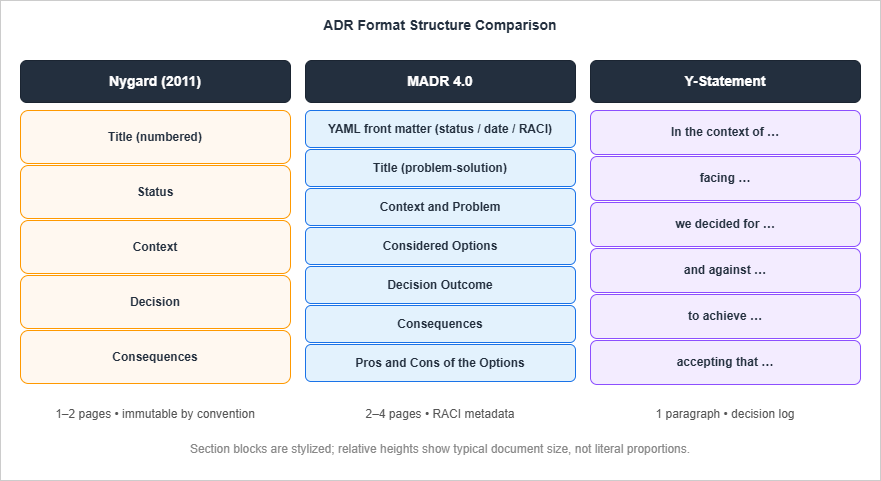
5.1 Nygard Version
# ADR 0014: Store User Session State in Postgres

## Status
Accepted

## Context
The order service needs to maintain user session state across requests. Sessions
include cart contents, address selections, and payment intent identifiers. Two
forces are in tension. We need session reads to be fast (single-digit
milliseconds) because every authenticated request fetches the session. We also
need sessions to survive node failure, because losing a cart in mid-checkout is
a directly customer-visible failure that drives abandonment. Operating a
separate session datastore is operationally expensive for a small team; we
already operate Postgres for the primary order data, and adding Redis would
add a second high-availability cluster to oncall.

## Decision
We will store session state in the existing Postgres cluster, in a `sessions`
table with `user_id` as the primary key and a `payload jsonb` column. We will
add a TTL column and a daily expiry job rather than relying on Redis-style
TTLs. Session reads will use the primary key index.

## Consequences
- (+) No new datastore added to the operational footprint.
- (+) Sessions survive node failure for free, since Postgres replication
      already handles that for order data.
- (+) Cross-region failover is solved by the same mechanism as order data.
- (-) Session reads add load to the primary database. We will need to monitor
      the read QPS and revisit this if it exceeds 30% of total Postgres load.
- (-) JSON payloads cannot be queried efficiently. If we later need analytics
      on session contents, we will need a different approach.
- (~) Latency for session reads will be ~3ms instead of ~0.5ms with Redis.
      Acceptable for current load patterns.
5.2 MADR Version
---
status: accepted
date: 2026-04-12
deciders: order-service-tech-lead, platform-tech-lead
consulted: dba-team, sre-team
informed: order-service-team, mobile-team
---

# Use Postgres for User Session State

## Context and Problem Statement

The order service needs to store user session state - cart contents,
address selections, payment intent identifiers - with low-millisecond read
latency and durability across node failure. Operating a second high-availability
datastore is non-trivial for a five-engineer team. Where should sessions live?

## Decision Drivers

- p99 session read latency under 10ms
- Sessions survive single-node failure
- Operational footprint should not grow by a new HA cluster
- Cross-region failover behavior should match the rest of the order data

## Considered Options

1. In-memory on the application node (no persistence)
2. Redis cluster, replicated, separate from order data
3. Postgres, in the existing order cluster, with a `sessions` table

## Decision Outcome

Chosen option: **3. Postgres in the existing order cluster**, because it
satisfies all four decision drivers without introducing a new HA cluster, and
because we already pay the operational cost of running Postgres at the
required reliability tier.

## Consequences

- (+) No new datastore on the oncall surface.
- (+) Cross-region failover handled by existing Postgres replication.
- (-) Session reads consume primary-database capacity; will require
      monitoring at 30% of total QPS.
- (-) JSON payloads not efficiently queryable.

## Confirmation

We will know this decision is working when:
- p99 session read latency stays under 10ms for 90 days post-cutover.
- Postgres CPU stays under 70% during peak hours.
- No session-loss incidents during the rollback runbook test.

## Pros and Cons of the Options

### In-memory on the application node
- (+) Lowest possible latency.
- (-) Sessions lost on node failure; violates a hard requirement.

### Redis cluster
- (+) Fastest persistent option (~0.5ms reads).
- (+) Native TTL support; no expiry job needed.
- (-) Adds a new HA cluster and a new oncall surface.
- (-) Cross-region failover semantics differ from Postgres; would need
      separate documentation and runbooks.

### Postgres (chosen)
- (+) No new HA cluster.
- (+) Cross-region failover already solved.
- (-) Session reads add load to the primary database.
- (-) Latency ~3ms instead of ~0.5ms.
5.3 Y-Statement Version
In the context of the order service's user session storage,
facing low-latency reads, durability, and a small ops team,
we decided for storing sessions in the existing Postgres cluster
and against in-memory storage and a dedicated Redis cluster,
to achieve durability and cross-region failover without adding a new HA surface,
accepting that session reads will be ~3ms (vs ~0.5ms with Redis) and will
consume primary-database capacity that we will need to monitor.
5.4 What This Comparison Shows
The Y-Statement is the densest. A reader gets the answer in ten seconds: where do sessions live, why, what was rejected, what is the cost. For someone scanning a decision log, this is enough.The Nygard ADR fills in the forces — what tension produced the decision, why a small team's operational footprint matters here. A reader who is trying to understand whether the decision still applies under different circumstances gets the necessary context, in roughly two pages.
The MADR adds two things that matter for larger organizations: explicit decision drivers (so the reader can check whether the chosen option actually meets the criteria) and a Confirmation section that turns the ADR into a testable claim about the system rather than an essay. The Pros and Cons per option are also where the rejected alternatives become first-class citizens of the document.
For most decisions on most teams, MADR is too much and Y-Statement is too little. Nygard hits the right balance for the load-bearing decisions on a typical product team. The next section makes that recommendation more precise.
6. Choosing a Format by Team Profile
Format choice should be driven by how the team works, not by which format the loudest engineer encountered first. The following matrix is the heuristic I use.| Team profile | Decision volume | Recommended primary | Lightweight log |
|---|---|---|---|
| 2–5 engineers, single product | Few large decisions | Nygard | Y-Statement |
| 5–15 engineers, one or two products | Mixed sizes | Nygard | Y-Statement |
| 15–50 engineers, platform + product | Frequent, with stakeholder reach | MADR | Y-Statement |
| Multi-team, regulated industry | Decisions with audit requirements | MADR with extended front matter | None |
| Open-source project, distributed contributors | Async, with public review | MADR | None |
| Solo / two-person prototype | Few, often informal | Y-Statement only | (same) |
The pattern is simple: as the team grows, the cost of not recording who was consulted goes up faster than the cost of writing it down. MADR's front matter is what pays off in larger organizations. Below the fifteen-engineer threshold, Nygard is almost always sufficient and is faster to adopt because there is less template to argue about.
The "lightweight log" column matters because every team has a long tail of small decisions that do not justify a full ADR but should still be visible to the next engineer. A Y-Statement file in the same directory, appended chronologically, captures these without slowing anyone down. Treating it as a separate artifact — not as an attempt to write smaller ADRs — keeps the formats from contaminating each other.
A pragmatic note: do not introduce more than one format at a time. A team that adopts both Nygard and Y-Statement in the same week will pick one and forget the other within a quarter. Land Nygard (or MADR) first, get four or five real ADRs into the repository, then introduce Y-Statements as a way to capture the smaller decisions you have noticed are slipping through. The reverse order also works, but the simultaneous order does not.
7. Storage and Discoverability (Repo / Wiki / Backstage)
Where the records live is the single biggest determinant of whether the practice survives. Of all the operational choices in this article, this is the one most teams get wrong.7.1 Source Control Is the Default
Store ADRs in the same repository as the code they describe, in a stable directory likedocs/adr/ or docs/decisions/. ThoughtWorks made this point in their 2016 Tech Radar entry on Lightweight ADRs and it has held up: source control gives you immutability through Git history, free authentication and authorization (whoever has commit rights has ADR rights), discoverability through grep and code search, and review through the same pull request flow you already use for code. None of those properties hold for a wiki.The directory layout I recommend, after watching teams iterate:
repo-root/
  docs/
    adr/
      0000-record-architecture-decisions.md   (the meta-ADR)
      0001-use-postgres-as-primary-datastore.md
      0002-adopt-rest-not-graphql-for-public-api.md
      ...
      decision-log.md                         (Y-Statement chronological log)
      template-nygard.md
      template-madr.md
The first ADR (0000) is the one that records the decision to use ADRs in the first place. This is the convention adr-tools sets up automatically with adr init, and it is worth keeping even if you are not using adr-tools, because it makes the practice's existence discoverable to a new engineer reading the repo.7.2 When a Wiki or Confluence Is the Right Choice
The repository-default rule has exceptions. Cross-cutting decisions that span multiple repositories — "we standardize on OpenTelemetry across the platform," "all services use mTLS for east-west traffic" — do not have a natural single repository to live in. For those, a separatearchitecture-decisions repository or a dedicated Confluence space can be the right answer, with cross-references from the affected service repositories.Two operational rules apply when ADRs live outside the code repository: (1) the canonical URL of each ADR must be stable, because you will be linking to it from code comments and commit messages, and (2) someone has to own keeping the index up to date. Without an owner, a separate ADR space drifts within a quarter.
7.3 Backstage and TechDocs
For organizations using Backstage, TechDocs is a reasonable middle path. TechDocs is Spotify's docs-as-code system built into Backstage; it renders Markdown files from a service repository as a documentation site, indexed by service in the Backstage software catalog. Documentation lives in the repo (so source control is still the source of truth), but is also browsable through the catalog UI alongside the service it describes.The integration model is straightforward. A service's
catalog-info.yaml declares a techdocs-ref pointing at the location of the docs (typically dir:. plus an mkdocs.yml at the repo root). MkDocs renders the contents of docs/ — including docs/adr/ — as a navigable site. The result is that an engineer browsing the order service in Backstage can land on the service's docs and find the ADR collection in two clicks, while the records still version with the code.What Backstage adds over plain GitHub is search, browsability, and a single starting point for engineers who do not already know which repository to look in. What it does not add is any change to what you write or where it is stored; the records are still Markdown files in the repository, and that is the right primitive.
This section uses Backstage only as a place to read documentation from. Its other half — the software catalog and the software templates that let an engineer create something rather than read about it, and the authentication default that surrounds them — is covered in Internal Developer Platforms on AWS.
7.4 The Index File
Whatever storage choice you make, maintain an index file (docs/adr/index.md or README.md) that lists every ADR by number, title, and status. The index is what an engineer scans to see whether a decision they care about already exists. Without it, the directory is a wall of 0023-some-title.md filenames that nobody can navigate. The index is also where deprecated and superseded entries become visible at a glance, which is the property that makes the collection trustworthy over time.adr-tools generates and maintains this index automatically (adr generate toc). If you are not using adr-tools, a small CI job that regenerates the index from front matter is enough.8. Linking ADRs to Code, Tickets, and Diagrams
ADRs are most useful when they are referenced from the artifacts that surround them: the code they govern, the tickets that produced them, and the diagrams that illustrate them. The link discipline costs almost nothing per ADR and pays back significantly when an engineer encounters a piece of code six months later and asks "why is it like this?"8.1 Code → ADR
When a code change implements an architectural decision, link to the ADR from the code itself. A short comment is enough:# Session storage uses Postgres rather than Redis. See ADR 0014:
# https://github.com/example/order-service/blob/main/docs/adr/0014-store-sessions-in-postgres.md
def get_session(user_id: str) -> Session:
...A useful test: if you grep the codebase for
ADR- or adr/, can you find every place a decision is implemented? If you can, the linkage is healthy. If you find ten implementations and zero links, the ADRs are not being referenced where they matter.8.2 Ticket → ADR and ADR → Ticket
The ticket that produced the decision (the design ticket, the spike, the architecture issue) should link to the ADR; the ADR's More Information section should link back to the ticket. The bidirectional link gives a future reader the full provenance: the original problem statement, the discussion, the conclusion. Jira's ADF, GitHub Issues, and Linear all render Markdown links, so this is essentially free.For decisions that originate from RFCs, design docs, or architecture review meetings, link those too. The ADR is the output; the design doc is the workings. Both are worth keeping. A common failure mode is to write a long design doc, hold a review meeting, and never produce an ADR — the design doc is then a lossy artifact, because it does not have a Status field and no one can tell whether the conclusion still holds.
8.3 ADR → Diagrams (C4, PlantUML, Mermaid)
Architectural diagrams are not a substitute for ADRs and ADRs are not a substitute for diagrams. They serve different purposes: a diagram shows what the system looks like; an ADR shows why it looks that way. Each should reference the other.If you use the C4 model, ADRs are most naturally referenced from the Container or Component levels — the level where the architectural choice is visible. If you use Mermaid or PlantUML diagrams checked into the repo (which is the recommended path for diagrams-as-code), the ADR can embed or link to the diagram source file directly. When the diagram changes, the ADR can be reviewed for whether the rationale still applies; when the ADR is superseded, the diagram should be updated alongside.
A practical link pattern: in each ADR's More Information section, add a "Diagrams" subsection with relative links to the diagram files. In each diagram file, add a header comment
<!-- See ADR 0014 for rationale -->. This survives renames and refactors better than embedded URLs.9. Review Cadence and Lifecycle (Proposed / Accepted / Deprecated / Superseded)
ADRs without a review process degrade into a write-only diary. The process can be lightweight, but it has to exist.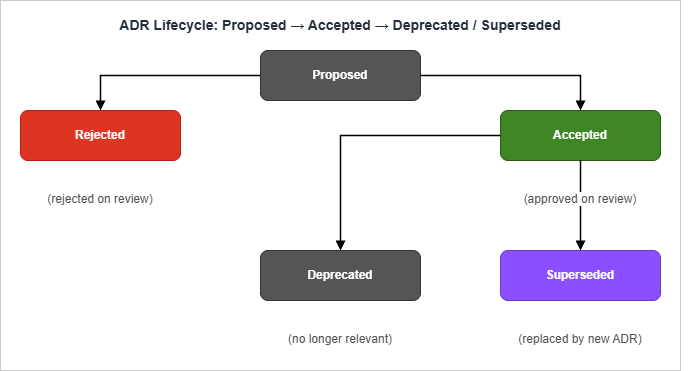
9.1 The States
Four states cover the full lifecycle. Some teams addRejected as a fifth, which is fine but not necessary — a rejected proposal can simply be deleted before merge in most workflows.Proposed — The ADR has been written and opened for review. The decision is not yet in force; code merged in this state should not assume the ADR will be accepted. This is the only state in which an ADR is freely edited.
Accepted — The decision is in force. The ADR is now considered immutable: corrections to typos and link rot are fine, but conclusions and consequences are not edited. If the conclusion needs to change, write a new ADR that supersedes this one.
Deprecated — The decision no longer applies, and there is no replacement. This is the state for decisions that were once correct but have become moot — for example, "we will use API Gateway v1" once the team has migrated everything off API Gateway entirely. The ADR is kept for historical reference but does not govern current code.
Superseded by ADR-NNNN — The decision has been replaced by a newer ADR. The status field includes the number of the replacement so the chain is traversable forward. The replacement's Context section should reference the original.
9.2 PR-Based Review (The Default)
For most teams, the right review process is the same one used for code:1. The proposer opens a pull request adding
0014-store-sessions-in-postgres.md with Status: Proposed.2. The PR description summarizes the decision and tags the relevant reviewers (typically tech leads and any team named in the MADR
consulted field).3. Reviewers comment on the PR. Discussion happens inline, exactly as it would for code.
4. When consensus is reached, the proposer updates the Status to
Accepted in the same PR (or a follow-up commit) and merges.5. If the proposal is rejected, the PR is closed without merge.
This process works because it uses tools the team already operates — pull requests, branch protection, code review — and produces a Git history that records who reviewed and when. It also keeps the ADR tied to a discoverable conversation.
A useful refinement: for decisions that span multiple teams, require approvals from named reviewer roles (the platform tech lead, the security partner, etc.) using GitHub CODEOWNERS or the equivalent. This forces the consultation step to be visible in the audit trail rather than buried in chat.
9.3 Architecture Review Meetings (When PRs Are Not Enough)
Some decisions are too large for async PR review. A re-platform decision, a major datastore change, a security-critical authorization redesign — these benefit from a synchronous architecture review meeting before the ADR is opened as a PR.The meeting structure that works:
1. The proposer pre-writes the ADR as a draft (Status: Proposed).
2. The draft is circulated 24 to 48 hours ahead of the meeting.
3. In the meeting, the proposer summarizes (5 minutes), the group discusses (20 to 40 minutes), and the proposer captures changes.
4. After the meeting, the ADR is updated to reflect the discussion and opened as a PR for final approval and merge.
The meeting does not replace the PR; it accelerates the discussion that would otherwise happen in PR comments. The PR is still the canonical record. Without the PR, the meeting is just a conversation.
9.4 Cadence: When to Revisit
Accepted ADRs are immutable, but the collection benefits from periodic review. A quarterly architecture review — one hour, the team's tech leads — is enough. The questions to answer:- Are any Accepted ADRs no longer relevant? Mark them Deprecated.
- Are any decisions being made repeatedly that should have an ADR but do not? Write them.
- Are any ADRs being referenced from code that has since been deleted? The ADR may be Deprecated or the code may have drifted; either way, investigate.
10. Common Pitfalls — Decision Documentation Theater
The seven failure patterns below are what I see most often when an ADR practice is technically in place but not delivering value. Most of them have the same root cause: the team adopted the artifact without adopting the operating model.10.1 The First Five Are the Only Five
A team writes five ADRs in the first month, the practice loses momentum, and no ADRs are added in months two through twelve. The repository contains five real records and an unwritten consensus that ADRs were a phase. Detection is trivial: look at the date distribution ofgit log docs/adr/. The fix is also operational, not motivational: add a checkbox to the team's PR template ("This change introduces or modifies an architectural decision — ADR linked or N/A?") and revisit once a quarter.10.2 ADRs Written for Trivial Decisions, Skipping the Load-Bearing Ones
The repository contains ADRs for "use Prettier for formatting" and "ESLint config" but nothing for the three load-bearing decisions in the system. This is a sign that ADRs are being treated as a writing exercise rather than as an architecture practice. The fix is to set a height bar: ADRs are for decisions that are hard to reverse, that span multiple components, or that materially affect operability or security. A formatter choice is not an ADR. A datastore choice is.10.3 ADRs as Advocacy Documents
The Consequences section lists three positive consequences and zero negatives. The Decision section reads like a sales pitch. The author has used the ADR to make their preferred choice look unassailable. The fix is review discipline: a reviewer should reject any ADR with no negative consequences listed, on the grounds that all real architectural decisions have trade-offs and an ADR that hides them is worse than no ADR at all.10.4 ADRs That Get Edited After Acceptance
An accepted ADR is silently edited to "fix" a conclusion that turned out to be wrong. The Git history shows the change but the team treats the ADR as authoritative under its current text. This breaks the audit trail; six months later, the ADR no longer reflects what was actually decided. The fix is convention plus enforcement: accepted ADRs are immutable; if the conclusion changes, write a new ADR that supersedes the old one. A pre-merge check that disallows changes to the body ofStatus: Accepted files (with an explicit override flag for typo fixes) is enough.10.5 ADRs Stored Where Engineers Don't Look
The records live in a Confluence space, a SharePoint folder, or a Notion workspace separate from the codebase. Engineers do not check them at decision time, and write new code that contradicts existing ADRs without realizing the ADR exists. The fix is to move them into the source repository (Section 7). This is the single highest-leverage change for most failing ADR practices.10.6 Decision Drift Without ADR Updates
The team makes a decision in a meeting, writes the code, and never opens the ADR. Six months later, two ADRs in the repository contradict each other and the codebase, and no one is sure which is current. The fix is to make ADR creation a checkpoint in the change process: a PR that introduces or modifies an architectural seam should reference an ADR, either an existing one or a newly added one. Branch protection can enforce this for designated paths.10.7 The Single Owner
One engineer writes all the ADRs. When that engineer leaves, the practice ends. This is more common than it should be because writing the first ADR is the hardest one; subsequent authors imitate the format established by the first. The fix is to pair-write the first three or four ADRs across different authors, and then keep the rotation visible (the ADR'sdecision-makers field, or an Author: line, plus quarterly cadence on who is writing). A practice owned by one person is not a practice; it is a habit waiting to lapse.11. Templates (Copy-Paste Ready)
The templates below are the ones I drop into a repository on day one. Each is in the format the section names. Adapt the front matter fields to your team's naming conventions, but keep the body sections intact — the value of the format comes from being recognizable to anyone who has seen the format before.11.1 Nygard Template
# ADR NNNN: <Short Noun Phrase>

## Status

Proposed | Accepted | Deprecated | Superseded by ADR-NNNN

## Context

<The forces at play. Technological, political, social, and project-local
constraints that produced the need for this decision. Use neutral language.
The forces should be presented as tensions; do not advocate for the decision
yet.>

## Decision

<The response, in active voice. "We will ..." Single conclusion, two or
three sentences at most for simple decisions, one paragraph for complex ones.>

## Consequences

<All resulting effects, positive and negative and neutral. Use a list format:
- (+) Positive consequence
- (-) Negative consequence
- (~) Neutral consequence>
11.2 MADR Template (4.0)
---
status: proposed
date: YYYY-MM-DD
deciders: <names or roles>
consulted: <names or roles>
informed: <names or roles>
---

# <Short Title in the form "Use X for Y">

## Context and Problem Statement

<Two or three sentences describing the situation and the question to be
decided. End with the explicit question: "Which X should we use for Y?">

## Decision Drivers

- <Driver 1 (e.g., "p99 latency under 10ms")>
- <Driver 2>
- <Driver 3>

## Considered Options

1. <Option A>
2. <Option B>
3. <Option C>

## Decision Outcome

Chosen option: **<Option N>**, because <one-sentence justification referring
to the decision drivers and the consequences below>.

## Consequences

- (+) <Positive consequence>
- (-) <Negative consequence>
- (~) <Neutral consequence>

## Confirmation

<How will we verify the decision was implemented and is delivering the
expected benefits? List concrete, observable signals.>

## Pros and Cons of the Options

### <Option A>

- (+) <Pro>
- (-) <Con>

### <Option B>

- (+) <Pro>
- (-) <Con>

### <Option C> (chosen)

- (+) <Pro>
- (-) <Con>

## More Information

<Links to design docs, tickets, diagrams, or follow-up ADRs.>
11.3 Y-Statement Template
In the context of <use case / component>,
facing <concern / problem>,
we decided for <chosen option>
and against <rejected options>,
to achieve <quality goal / benefit>,
accepting that <downside / trade-off>.
11.4 The Meta-ADR (ADR 0000)
The first ADR in the repository should be the one recording the decision to use ADRs. This is the convention adr-tools generates withadr init, and it is worth keeping by hand even without the tool.# ADR 0000: Record Architecture Decisions
## Status
Accepted
## Context
We need a lightweight way to record significant architectural decisions
made on this project, including the context, options considered, and
consequences. Without such a record, future contributors have to
reconstruct the rationale behind decisions from code archaeology.
## Decision
We will record significant architecture decisions as Architecture
Decision Records (ADRs) in `docs/adr/`. We will use the Nygard template
for full ADRs and Y-Statements for the lightweight decision log. ADRs
follow the lifecycle Proposed -> Accepted -> Deprecated /
Superseded. Accepted ADRs are immutable; conclusions that change are
captured in new, superseding ADRs.
## Consequences
- (+) Architecture rationale is preserved over time.
- (+) New engineers have a single starting point for understanding why
the system looks the way it does.
- (-) Adds a small documentation overhead to architectural changes.
- (~) Requires a quarterly review cadence to keep the collection trusted.11.5 GitHub Action: Index Generation
Many teams find it useful to auto-regenerate the ADR index on every push. A minimal GitHub Action:name: Update ADR Index
on:
push:
paths:
- 'docs/adr/*.md'
jobs:
update-index:
runs-on: ubuntu-latest
steps:
- uses: actions/checkout@v4
- name: Regenerate index
run: |
{
echo "# Architecture Decision Records"
echo
for f in docs/adr/[0-9]*.md; do
num=$(basename "$f" .md | cut -d- -f1)
title=$(grep -m1 '^# ' "$f" | sed 's/^# //')
status=$(grep -A1 '^## Status' "$f" | tail -1 | xargs)
echo "- [ADR ${num}](${f##*/}) -- ${title} (${status:-Proposed})"
done
} > docs/adr/index.md
- name: Commit if changed
run: |
if ! git diff --quiet docs/adr/index.md; then
git config user.name "adr-index-bot"
git config user.email "adr-index@example.com"
git add docs/adr/index.md
git commit -m "chore: regenerate ADR index"
git push
fistatus instead of grepping the body. The point of the action is not the script; it is making the index a build artifact rather than a manual responsibility.12. Summary
Four practical takeaways from this article, in the order I think they matter:Storage matters more than format. ThoughtWorks's 2016 recommendation to keep ADRs in source control is the single highest-leverage operational choice. If your records live in a wiki the team does not read, the format is irrelevant. Move them into
docs/adr/ and link the format choices second.Choose Nygard by default. For teams under fifteen engineers, Nygard is small enough to actually be written and structured enough to actually be useful. MADR is the right answer above that scale, particularly when consultation patterns matter for audit. Y-Statements are a complement, not a replacement, and work best as a chronological log next to the longer ADRs.
The lifecycle has to be enforced. Proposed → Accepted → Deprecated / Superseded is the four-state minimum, and Accepted has to be immutable in practice for the collection to be trustworthy. Without a PR-based review process and a quarterly cadence, the practice degrades into write-only and the team eventually stops trusting it.
Link from code. ADRs that are not referenced from the code they govern are invisible at the moment they are most useful. A short comment at each architectural seam, pointing at the ADR, costs nothing per ADR and pays back permanently. If
grep -r 'docs/adr/' src/ returns zero results, the practice is failing silently.The goal is not to write more documents. It is to make sure that, when an engineer six months from now asks why the system looks the way it does, the answer is one repository search away.
13. References
- Michael Nygard, "Documenting Architecture Decisions" (Cognitect, 2011) — the original ADR essay
- MADR: Markdown Any Decision Records — current MADR specification (4.0)
- Olaf Zimmermann, "Y-Statements: A Lightweight Format for Architectural Decisions" — original Y-Statement description
- Joel Parker Henderson, "Architecture Decision Record (ADR) Examples" — comprehensive template collection
- adr-tools (Nat Pryce) — CLI for managing Nygard-style ADRs
- AWS Prescriptive Guidance: Architectural Decision Records — AWS-published process guide
- ThoughtWorks Tech Radar: Lightweight Architecture Decision Records (Adopt)
- Backstage TechDocs documentation — docs-as-code in the Backstage software catalog
Related Articles
- Code Review Checklist and Anti-Pattern Catalog: A Reviewer's Reference for Modern and AI-Augmented Codebases — the PR-based review discipline that ADR review reuses
- The Paradigm Shift for Software Engineers in the AI Era — why preserving the why behind decisions matters more, not less, when AI agents draft increasing fractions of the code
References:
Tech Blog with curated related content
Written by Hidekazu Konishi