Surviving Forced Maintenance on AWS - Retirements, Grace Periods, and Health-Driven Operations
First Published:
Last Updated:
An instance is scheduled to stop. A database has a pending maintenance action that cannot be deferred indefinitely. A platform version revision is being retired and the tasks running on it will be stopped. None of these are incidents, none of them are your fault, and none of them can be declined. They are the visible surface of the fact that AWS operates the substrate your workload runs on, and that substrate is replaced continuously.
This article is about that class of event. Not about which engine versions reach end of support and when, and not about which services AWS has retired over the years, but about the operational event that lands on a resource that is running right now.
The argument starts one level above any single service. AWS does not have one forced-maintenance mechanism. It has several independent ones, built by different service teams at different times, that happen to converge on a similar shape: you are notified, you get some amount of time, and then the change is applied. The useful work is in seeing that shape clearly, seeing exactly where it does not hold, and turning both into a written rule for what your team automates and what it looks at.
Scope, and what is deliberately left to other articles:
- Runtime and engine end of support, meaning which versions of Lambda runtimes, Kubernetes, database engines, and search engines are supported until when, belongs to the AWS End of Support and EOL Reference.
- The history of AWS discontinuing services belongs to the AWS Retired Services History and Timeline.
- The vocabulary AWS uses for the state of a service offering, such as maintenance mode or closed to new customers, belongs to the companion article AWS Service Lifecycle States.
- Maintenance that you schedule for yourself, meaning Systems Manager Maintenance Windows and Patch Manager, belongs to the AWS Systems Manager Fleet Operations Guide. The phrase maintenance window means two different things depending on who owns the schedule, and this article is about the window AWS owns.
- Planned database changes that you initiate, including blue/green deployments and version upgrades, belong to the companion article Zero-Downtime Database Change on RDS and Aurora.
- Spot capacity reclamation is adjacent but different: it is a capacity decision, not a maintenance one, and it is covered in Designing for Spot Interruptions on AWS.
Every service-specific fact below was checked against that service's own AWS documentation on 2026-08-09. The values do not transfer between services, and the article is structured so that you never have to assume they do.
Table of Contents
- 1. Introduction
- 2. Maintenance You Cannot Decline
- 3. The Common Shape - Notify, Grace, Enforce
- 4. A Cross-Service Matrix
- 5. Managed and Unmanaged Resources Are Treated Differently
- 6. Receiving Events Programmatically
- 7. Designing Workloads That Survive Replacement
- 8. Protecting Non-Idempotent Work
- 9. Criteria for Delegating to Automatic Application
- 10. When Frequency Changes the Design
- 11. Failure Modes
- 12. Frequently Asked Questions
- 13. Summary
- 14. References
1. Introduction
The decision this article exists to support is narrow and concrete. A notification arrives that says a resource you own will be changed on a date you did not choose. What do you delegate to the platform, and what do you put in front of a person?Most teams answer this by reflex rather than by rule. The notification becomes a ticket, an engineer reads it, an engineer decides that this particular resource is fine to let AWS handle, and the ticket closes. That works until the volume of notifications exceeds the attention available to read them, at which point the reflex silently becomes "let it happen" for everything, including the resources where letting it happen is the wrong answer.
The alternative is to decide once, in writing, which properties of a workload make automatic application safe, and then let a rule route each notification. That is not a tooling problem first. It is a design problem: it requires knowing what the platform will actually do at the deadline, and knowing whether your workload can absorb it.
So the article moves in that order. Sections 2 through 5 establish what the platform actually does, including the places where the different services genuinely disagree. Section 6 covers getting the events into a system rather than an inbox. Sections 7 and 8 translate "be prepared for maintenance" into concrete requirements on the workload. Section 9 is the rule itself, and is the part worth writing down.
1.1 Who this is for
An engineer who operates production workloads on AWS, receives these notices, and currently handles each one by hand. The article assumes familiarity with the services involved but not with the specific maintenance semantics of each, because those semantics are exactly what is inconsistent between them.1.2 The dividing line, stated once
There are four adjacent topics that are easy to blur together, and blurring them is the reason teams miss events. They are separated as follows.| Topic | The question it answers | Where it is covered |
|---|---|---|
| End of support for a runtime or engine version | Which versions are supported, and until when | AWS End of Support and EOL Reference |
| Service retirement history | Which AWS services have been discontinued, and how AWS did it | AWS Retired Services History and Timeline |
| Service lifecycle state vocabulary | What the defined states Maintenance, Sunset, and Full Shutdown remove, and which widely used labels are not defined states at all | AWS Service Lifecycle States |
| Forced events on running resources | What happens to the instance, task, or cluster that is serving traffic today | This article |
The first three are about the catalog. This one is about the fleet.
2. Maintenance You Cannot Decline
2.1 There is no single mechanism
The first thing to internalize is that AWS does not have a unified forced-maintenance system that all services participate in. AWS Health is a common notification surface, and a great many of these events flow through it, but the underlying mechanisms were built independently and behave differently. Treating them as one thing is the root cause of most operational surprises in this area.There are at least five distinguishable families, and a workload of any size is exposed to several of them at once.
2.2 Host and hardware lifecycle
Amazon EC2 creates scheduled events for instances when the underlying host needs attention. AWS documents five event types, each with an event code and a defined action.| Event type | Event code | What happens at the scheduled time |
|---|---|---|
| Instance stop | instance-stop | The instance is stopped. When you start it again it is migrated to a new host. Applies only to instances with an Amazon EBS root volume. |
| Instance retirement | instance-retirement | The instance is stopped if it has an EBS root volume, or terminated if it has an instance store root volume. |
| Instance reboot | instance-reboot | The instance is rebooted in place. It stays on the host, and the host undergoes maintenance during the reboot. |
| System reboot | system-reboot | The instance is rebooted and migrated to a new host, which AWS calls a reboot migration. |
| System maintenance | system-maintenance | The instance might be temporarily affected by network maintenance or power maintenance. |
AWS states plainly that these events are managed by AWS and that you cannot schedule events for your instances. What you can do is view them, customize the notification, reschedule certain events, define custom event windows, and take pre-emptive action.
2.3 Managed service software
Amazon RDS, Amazon ElastiCache, Amazon OpenSearch Service, and Amazon Redshift all maintain software beneath a managed endpoint, and all four have a mechanism for landing that software on your resource. They do not share a mechanism, a vocabulary, or a grace period.RDS models it as a list of pending maintenance actions attached to a resource. The RDS User Guide lists the actions that apply to DB instances as
server-certificate-rotation, db-upgrade, hardware-maintenance, and system-update, while ApplyPendingMaintenanceAction accepts ca-certificate-rotation, db-upgrade, hardware-maintenance, os-upgrade, and system-update as values of ApplyAction. ElastiCache models it as a fleet of service updates with a severity and an apply-by date. OpenSearch Service models it as service software updates that are either optional or required. Redshift models it as a weekly maintenance window that can be deferred as a whole.The distinction that matters operationally is whether the mechanism has a hard backstop. In RDS, a pending action can carry both an
AutoAppliedAfterDate and a ForcedApplyDate, and the console reports the action as required when it will be applied and cannot be deferred indefinitely. That is a backstop. An ElastiCache service update whose Auto-Update after Due Date attribute is no has no backstop at all, which turns out to be its own kind of trap.OpenSearch Service has the hardest backstop of the four, and it is on a different clock from the one the notifications describe. The deadline in the matrix in section 4 is the point at which AWS installs a required update for you. Behind it sits a compliance requirement: AWS states that required service software updates must be applied within 30 days of availability, that reminders then arrive every 15 days for 30 days, and that after that period without compliance the domain is isolated, meaning all network access to it is removed and its status changes to
isolated. Reminders continue every 15 days for a further 60 days, and if the updates are still not applied, AWS documents that the domain and all associated data are permanently deleted. Nothing else in the matrix ends in the destruction of the resource, which is worth knowing before deciding that a required OpenSearch update can wait.2.4 Platform revision retirement
AWS Fargate periodically introduces a new revision of a supported platform version, containing updates to the Fargate runtime software and underlying dependencies such as the operating system and container runtime. When a newer revision is available, the older revision is retired, and AWS documents the consequence directly: when a revision is retired, all tasks running on that revision are stopped.This family is different from the previous two in an important way. Nothing is being patched in place. The unit of maintenance is the task, and the remedy is replacement. Whether a replacement appears is a property of how you launched the task, which is the subject of section 5.
Containers are otherwise out of scope here, and Fargate appears in this article as one row of the matrix rather than as a topic. It is included because it is the clearest example of the replacement-rather-than-patching model.
2.5 Credential and certificate lifecycle
Certificates expire, and a managed service that terminates TLS on your behalf therefore has to rotate them on a schedule that is not yours. RDS handles this in two distinct ways depending on the engine.If the DB engine supports rotation without restart, RDS rotates the server certificate automatically, attempting the rotation in your preferred maintenance window at the certificate half life, and the new certificate is valid for 12 months. If the engine does not support rotation without restart, RDS surfaces a
server-certificate-rotation pending maintenance action at the certificate half life or at least three months before expiry, and the new certificate is valid for 36 months. Which behavior applies is discoverable: describe-db-engine-versions exposes a SupportsCertificateRotationWithoutRestart flag.RDS for Oracle is documented as a specific exception. The flag reads
FALSE, but the instance does not require a restart. Only the database listener is restarted, so existing connections are unaffected while new connections encounter errors for a brief period.2.6 Continuous replacement with no event at all
Elastic Load Balancing belongs in this list precisely because it does not fit. Load balancer nodes are added and removed as part of normal operation, the DNS record is updated to contain the addresses of healthy and appropriately scaled resources, and no notification is sent because there is nothing scheduled to notify you about.This is still forced maintenance in the sense that matters: infrastructure you depend on is being replaced underneath you, on someone else's schedule, and a workload that has not planned for it will break. The difference is that the enforcement is continuous rather than dated, so there is no grace period in which to react. AWS states the client-side requirement instead: honor the DNS TTL, which is one minute for all ELBs, retry failed requests with exponential backoff and jitter, and refresh DNS after a connection failure.
2.7 What "cannot decline" actually means
The phrase covers a range, and it is worth being precise about the range because the design response differs.- You cannot prevent the change, but you can choose when within a bounded period. EC2 scheduled events with a deadline date, and RDS pending actions before their forced apply date, are here.
- You cannot prevent the change and you cannot move it, but you can pre-empt it by doing the equivalent thing yourself first. Stopping and starting an EC2 instance clears the event because the instance lands on a new host. Forcing a new ECS deployment replaces tasks before AWS does.
- You can decline, but declining has a cost that is not visible in the console. An ElastiCache optional update that you never apply is simply marked Complete when it expires, and the fix it carried is not on your cluster.
- You cannot decline and there is no window at all. Load balancer node replacement, and the case where AWS overrides a configured wait period for a critical security update, are here.
3. The Common Shape - Notify, Grace, Enforce
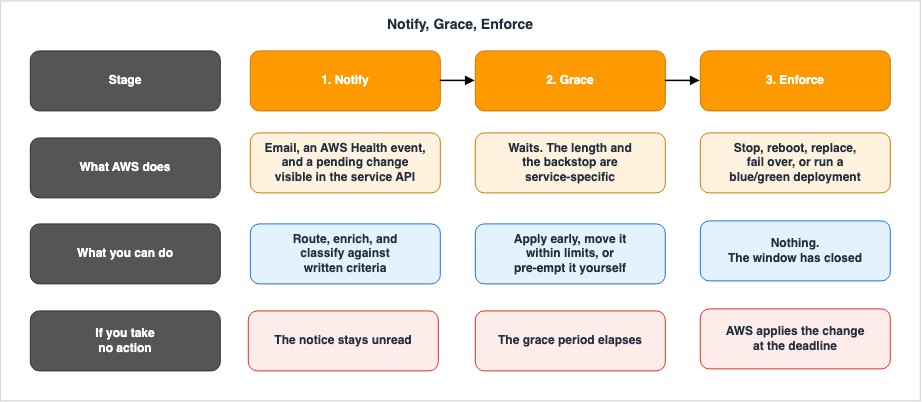
3.1 The three stages
Across the families above, the mechanisms that do announce themselves converge on the same three stages, and it is worth naming them because the naming is what makes a cross-service runbook possible.Notify is the moment the platform tells you something will change, and it usually happens through more than one channel at once: an email to the address associated with the AWS account, an AWS Health event, and a service-specific API that will report the same pending change.
Grace is the interval between the notification and the point at which the platform acts on its own. During this interval you have some combination of three powers: apply the change early, move the change within limits, or do the equivalent work yourself so that the change becomes unnecessary.
Enforce is the platform acting. What "acting" means is entirely service-specific: a stop, a reboot, a blue/green deployment, a failover, or a task being killed and possibly replaced.
The value of the shape is not that it is universal. It is that it gives you three questions to ask of any new service you adopt, and the answers to those three questions are exactly what a runbook needs.
3.2 Where the shape breaks
A model you cannot break is a model you cannot trust. Five documented cases do not fit, and each one has produced real outages for someone.Enforcement without notification. Load balancer node replacement has no notify stage and no grace stage. The design response is entirely on the client side, and no amount of event automation will help.
Enforcement that never touches the running resource. AWS Lambda runtime deprecation has a notify stage, at least 180 days before deprecation, and a long staged grace period: creation of new functions is blocked at least 30 days after deprecation and updating existing functions at least 60 days after. But the enforcement lands on the control plane, not on the data plane. AWS documents that you can continue to invoke your functions indefinitely. A runbook built on the assumption that the deadline means the resource stops working will misprioritize this badly in both directions. Which runtimes reach that point and when is catalog information, and it lives in the AWS End of Support and EOL Reference.
Grace that expires without enforcement. If an ElastiCache service update has its
Auto-Update after Due Date attribute set to no and you do not apply it before the expiration date, ElastiCache marks the update as Complete. The word Complete here means the update window closed, not that your cluster received the fix. AWS notes that clusters in compliance programs must apply all service updates, and that nodes launched after a service update's release date automatically receive previous updates, which means an unapplied update can also produce a fleet where new nodes and old nodes differ.Grace that is not guaranteed. The Fargate task retirement wait period can be set to 0, 7, or 14 calendar days. AWS documents that in the rare scenario of a critical security update, Fargate may override this wait period, sending a retirement notification and immediately retiring the affected tasks, mirroring the effect of setting the value to 0. A design that depends on always having seven days is a design that depends on there never being a critical security patch.
Controls that do not cover every event of the same type. EC2 event windows let you constrain when stop, reboot, and terminate events occur, but AWS states explicitly that event windows are not applicable for expedited scheduled events and network maintenance events, nor for unscheduled maintenance such as automatic instance recovery and unplanned reboots. Configuring an event window and believing all EC2 maintenance now lands on Sunday night is a specific and common mistake.
4. A Cross-Service Matrix
4.1 What is in this table, and what is not
Inclusion criterion: an AWS service is listed below when AWS itself initiates a change to a resource that is already running, on a schedule that AWS publishes to you. Each row was checked against that service's own AWS documentation on 2026-08-09.This is not a catalog of every AWS service, and it is not intended to become one. It is a sample chosen to cover the five families in section 2 with services that a general-purpose production account is likely to run. Deliberately excluded are runtime and engine end of support, which is version-catalog information covered elsewhere, service retirement, and Spot capacity reclamation.
The two tables below split the same eight rows across six attributes, because six columns is not readable on a phone.
4.2 Notification and grace
* You can sort the table by clicking on the column name.| Service and event family | How you learn about it | Grace before enforcement | Can you apply it early? |
|---|---|---|---|
| Amazon EC2 scheduled events | Email to the account contact, an AWS Health event, and describe-instance-status | The interval between NotBefore and NotAfter. Only events that carry a NotBeforeDeadline can be moved, and only up to that deadline | Yes. Stop and start the instance to migrate it to a new host, which clears the event |
| Amazon RDS and Aurora pending maintenance actions | The Maintenance column in the console, an AWS Health event, and describe-pending-maintenance-actions | Until AutoAppliedAfterDate, with ForcedApplyDate as the backstop for actions reported as required | Yes. apply-pending-maintenance-action with OptInType set to immediate |
| Amazon RDS and Aurora server certificate rotation | A server-certificate-rotation pending action, raised at the certificate half life or at least three months before expiry, for engines that need it | Engines that rotate without restart are handled automatically in the maintenance window at the certificate half life. Others wait for you until the certificate nears expiry | Yes, through the same apply-pending-maintenance-action call |
| AWS Fargate on Amazon ECS task retirement | An AWS Health event with type code AWS_ECS_TASK_PATCHING_RETIREMENT, and email | The account setting fargateTaskRetirementWaitPeriod, which accepts 0, 7, or 14 calendar days and defaults to 7 | Yes. Force a new deployment for service tasks, or stop and relaunch standalone tasks yourself |
| Amazon ElastiCache service updates | The Service Updates page in the console, email, and the service update APIs | Guidance by severity: Critical within 14 days or less, Important within 30, Medium within 60, Low within 90. Mandatory updates are scheduled after the apply-by date, with notification one week before | Yes. batch-apply-update-action, at any point from when the update reaches available status |
| Amazon OpenSearch Service software updates | A console notification and email | Required updates are installed automatically if you take no action before the deadline, typically two weeks from availability, with a notification seven days before the scheduled update | Yes. Start the update manually, or trigger a blue/green deployment that carries it |
| Amazon Redshift cluster maintenance | The console, and Pending category event notifications through Amazon SNS | The next weekly maintenance window. Standard maintenance can be deferred by up to 60 days | Yes, by allowing the window to proceed or by initiating the equivalent change |
| Elastic Load Balancing node replacement | Not announced as an event | None. Replacement is continuous rather than scheduled | Not applicable |
4.3 Control and impact
* You can sort the table by clicking on the column name.| Service and event family | Can you opt out? | What the interruption does | What in-flight work must tolerate |
|---|---|---|---|
| Amazon EC2 scheduled events | No. You can move the event within the deadline or steer it into an event window, but event windows do not cover expedited or network maintenance events | A stop, a termination for instance store root volumes, an in-place reboot, a reboot with migration to a new host, or brief network or power impact | Loss of instance store data on stop, loss of memory state on reboot, and reset connections |
| Amazon RDS and Aurora pending maintenance actions | Not for actions reported as required, which cannot be deferred indefinitely. Actions reported as available are never applied automatically | Required OS and engine patching takes the instance offline. Multi-AZ applies OS updates to the standby first, then fails over, typically in less than a minute | Dropped connections and a failover. Clients must reconnect by DNS name rather than a cached address |
| Amazon RDS and Aurora server certificate rotation | No in effect. A certificate that is never rotated eventually expires | No restart for engines that support rotation without restart. RDS for Oracle restarts only the listener, so existing connections survive while new connections fail briefly | Clients that verify the server certificate need the correct CA bundle in place before the rotation |
| AWS Fargate on Amazon ECS task retirement | No. A retired platform version revision is always retired, the wait period only moves the date, and AWS may override it for a critical security update | Tasks are stopped. Service tasks are replaced by the scheduler honoring maximumPercent, which defaults to 200 percent for the REPLICA scheduler. Standalone tasks are not replaced | A stop, and anything the task held only in its own ephemeral storage |
| Amazon ElastiCache service updates | Only when Auto-Update after Due Date is no. An update you decline and never apply is marked Complete at expiration, without being installed | Applied during a maintenance window | Node replacement and whatever failover behavior the engine provides |
| Amazon OpenSearch Service software updates | No for required updates, and a domain left non-compliant past 30 days is isolated and eventually deleted. Optional updates have no hard deadline | A blue/green deployment of the domain | A new set of nodes and the associated shard movement |
| Amazon Redshift cluster maintenance | No for hardware updates and mandatory security updates, which proceed regardless of a deferment. The window immediately following a deferment cannot itself be deferred | The cluster is unavailable during the update | Query cancellation and session loss |
| Elastic Load Balancing node replacement | Not applicable | Node addresses change and the DNS record is updated. Connections to a removed node end | Clients must honor the one-minute TTL, retry with exponential backoff and jitter, and re-resolve DNS after a connection failure |
4.4 The numbers do not transfer
Read the two tables side by side and the point of the exercise becomes obvious. Every service in the list has a grace period, and no two of them define it the same way.One is a count of calendar days set by an account setting. One is a pair of timestamps on an API object. One is a severity-driven recommendation with a separate hard deadline behind it. One is a deadline of roughly two weeks with a seven-day warning, sitting in front of a separate thirty-day compliance clock that ends in deletion. One is a deferment budget measured in weeks. One is a weekly recurring window. One does not exist.
There is no safe way to reason from one of these to another, and the most common failure in this area is exactly that: a team learns the semantics of the first service that sent them a notice, and applies those semantics to the next service that does. The matrix exists to make that impossible, which is also why every row is sourced individually rather than summarized into a single rule.
5. Managed and Unmanaged Resources Are Treated Differently
5.1 The asymmetry, stated generally
For the same underlying event, on the same day, two resources in the same account can have completely different outcomes based on one property: whether something in AWS is responsible for maintaining a desired count of that resource.If a controller owns the desired state, the forced event becomes a replacement, and often you have nothing to do. If nothing owns the desired state, the forced event becomes a deletion, and the capacity simply disappears.
This is the single highest-yield thing to check in an inventory, because the resources that fail this test tend to be the ones nobody is looking at.
5.2 Container tasks
AWS documents the split explicitly. For service tasks, you do not need to take any action in response to task retirement, because the Amazon ECS scheduler automatically replaces the tasks, usingmaximumPercent to start a replacement before stopping the old task where the setting allows it.For standalone tasks, meaning tasks started by
RunTask directly or by an external scheduler, AWS stops the task on or after the retirement date and does not launch a replacement. AWS recommends monitoring the state of standalone tasks and implementing logic to replace stopped ones. When a task is stopped this way, describe-tasks reports a stoppedReason of ECS is performing maintenance on the underlying infrastructure hosting the task, which is a usable signal for exactly that automation.5.3 EC2 instances
The same split appears one layer down. AWS notes that when an instance affected by a scheduled event is part of an Auto Scaling group, Amazon EC2 Auto Scaling eventually replaces it as part of its health checks, with no further action necessary on your part.A standalone instance has no such controller. An
instance-stop event stops it and it stays stopped until someone starts it. That is a capacity outage that begins at a moment you were told about in advance and then did not act on.5.4 Database deployments
Multi-AZ is not only a failure-tolerance feature, it changes what a maintenance event costs. AWS documents that operating system updates on a Multi-AZ deployment are applied to the standby first, the standby is promoted to primary, and then maintenance runs on the old primary, which becomes the new standby. The failover required to apply OS patches to the primary typically lasts less than a minute.A single-AZ deployment has no standby to hide behind, so the same maintenance is a straight outage for its duration. The event is identical, the design decision made months earlier is what differs.
Engine version upgrades are a partial exception worth knowing: for a Multi-AZ deployment, RDS modifies both the primary and the secondary at the same time, so both are unavailable during the upgrade, with the duration varying by instance size. Multi-AZ reduces the cost of patching more than it reduces the cost of upgrading.
5.5 A property of the resource, not of the event
There is a second asymmetry hidden inside EC2 that follows the same pattern but keys off storage rather than a controller. Aninstance-retirement event stops an instance with an EBS root volume and terminates an instance with an instance store root volume. And an instance-stop event, which is the milder of the two, still discards everything on instance store volumes, because that data does not survive a stop.So for the same event code, the outcome ranges from "the instance is stopped and can be started again" to "the instance and its data are gone", based on a choice made at launch time. Inventory the resources whose root volume type puts them in the second category before you decide anything else about automation.
6. Receiving Events Programmatically
6.1 What an AWS Health event carries
AWS Health is the notification surface that most of these mechanisms share, and reading its data model carefully is what turns notifications into routing.Every Health event has an event type category, and there are three:
issue, accountNotification, and scheduledChange. Scheduled change is the category this article is about, and AWS describes it as events providing information about upcoming changes to your services and resources, noting that your resource might be temporarily unavailable during the scheduled change activity, and that all events in this category are account-specific.Every event also has an event type code, formatted as
AWS_SERVICE_DESCRIPTION, such as AWS_EC2_SYSTEM_MAINTENANCE_EVENT or AWS_RDS_PLANNED_LIFECYCLE_EVENT. These codes are stable strings, which makes them the right thing to build routing rules on, and DescribeEventTypes will enumerate them.Two fields exist specifically to help you triage, and they are underused. Actionability takes the values
ACTION_REQUIRED, ACTION_MAY_BE_REQUIRED, and INFORMATIONAL. AWS defines the middle value as changes that require action based on your specific implementation, dependencies, and workflows, which is precisely the set that needs a human. Personas takes the values OPERATIONS, SECURITY, and BILLING, and an event can carry more than one, so a single event can be routed to two teams without you maintaining the mapping yourself.Affected entities are the resources the event applies to, and this is what lets you join a notification to your own inventory. The event carries the identifiers; whether that becomes a useful ticket depends on whether you can resolve those identifiers to an owner, which in practice means a tagging discipline that predates the event.
6.2 The EventBridge rule, and three things that trip people up
The integration itself is ordinary: create an EventBridge rule, match on AWS Health, and send the event to Lambda, SNS, SQS, Kinesis Data Streams, or a built-in target. Three details in the documentation cause more trouble than the setup does.The source must match exactly. AWS states that to receive both account-specific and public events your rule must use the value
"source": [ "aws.health" ], and that wildcards such as "source": [ "aws.health*" ] will not match the pattern.The Region matters, and not in the way you expect. EventBridge rules are Regional and must live in the Region where the event occurs. AWS documents that in some cases the Region for an AWS Health event cannot be determined, and that when that happens the event appears in the US East (N. Virginia) Region by default, so a rule there is needed to catch them. A rule deployed only into the Regions where your workloads run will therefore have a hole in it.
Delivery has two properties you have to design around. AWS Health delivers events on a durable basis and attempts to deliver at least once, which means your handler will occasionally see the same event twice and must be safe to run twice. And public health events might take up to one hour to start sending after you create an EventBridge rule, which is long enough that a newly deployed rule can look broken when it is merely warming up.
6.3 Organizational view
In an AWS Organizations environment, per-account rules leave you assembling a picture from fragments. AWS Health can aggregate events for all accounts in the organization into a single view, which you reach from the management account or through the API.Enabling it is a deliberate call:
EnableHealthServiceAccessForOrganization, run from the organization's management account. After that, DescribeEventsForOrganization and DescribeAffectedEntitiesForOrganization return events and affected resources across accounts, with at least one event ARN and account ID required for the entity call.One constraint is worth knowing before you design around it: AWS documents that the organizational entity operation does not support resource-level permissions, so you cannot use it to allow or deny access to specific Health events. Whatever filtering you need by team or by account has to happen in your own code after the call, not in an IAM policy on the call.
6.4 The support plan gate, and what to do without it
This is the constraint that quietly invalidates a lot of otherwise good designs, and it is stated directly in the AWS Health documentation: you must have an AWS Business Support+, AWS Enterprise Support, or AWS Unified Operations plan from AWS Support to use the AWS Health API. Calling it from an account without one returns aSubscriptionRequiredException. Which plan names AWS sources have written for this requirement since the AWS Health API launched in 2016 is traced in AWS History and Timeline regarding AWS Health, and the history of the plan names themselves in AWS History and Timeline regarding AWS Support Plans.Note what this does and does not gate. EventBridge delivery of Health events is not the API, and neither is the AWS Health Dashboard. What is gated is the pull side: enumerating events, filtering them by service or category, and reconciling state on a schedule rather than reacting to a push.
If you are not on a qualifying plan, the pull side is still available, just not centralized. Every service in the matrix exposes its own pending-change API, and none of those are gated by a support plan:
aws ec2 describe-instance-statusreturns the scheduled events for your instances, including the event ID,NotBefore,NotAfter, andNotBeforeDeadline.aws rds describe-pending-maintenance-actionsreturns pending actions withAutoAppliedAfterDate,ForcedApplyDate,CurrentApplyDate, andOptInStatus.aws elasticache describe-service-updatesreturns service updates with a severity ofcritical,important,medium, orlow, aServiceUpdateRecommendedApplyByDate, and theAutoUpdateAfterRecommendedApplyByDateflag that tells you whether the update has a backstop at all.aws ecs list-account-settings --name fargateTaskRetirementWaitPeriod --effective-settingsreturns the wait period actually in effect.
Building the reconciliation loop out of per-service calls is more work than one Health API call, and it is also more robust in one respect: it reports the current state of the resource rather than the history of notifications about it. A team that has both should probably use Health for routing and the service APIs for reconciliation.
6.5 Ninety days is not an archive
AWS documents that you can view Health events in the dashboard or the API for up to 90 days. If you want to answer questions like how many forced replacements a given service absorbed over the last year, or whether a particular workload is disproportionately affected, you have to store the events yourself as they arrive. EventBridge to a durable target is the natural place to do that, and it costs almost nothing compared to reconstructing the history later, which is not possible at all once the window has passed.6.6 From event to decision
Putting the pieces together, the pipeline has four stages and one branch.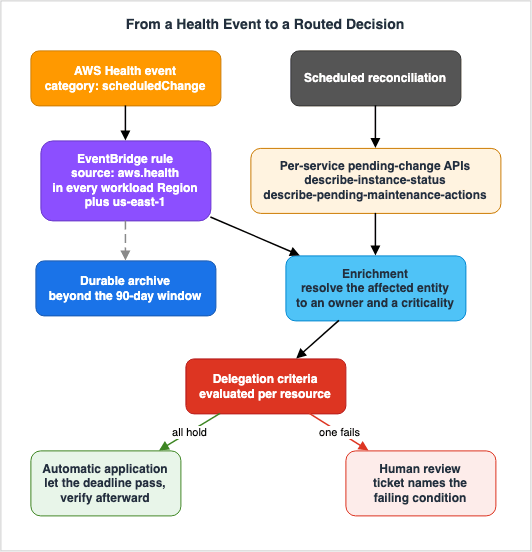
7. Designing Workloads That Survive Replacement
7.1 Translating the requirement
"Be prepared for maintenance" is not a requirement because it cannot be tested. The following five statements are requirements, and each maps to a specific mechanism.- Losing any single instance, task, node, or Availability Zone at an arbitrary moment must not take the service below its capacity target.
- A component being removed from rotation must stop receiving new work before it stops existing.
- A component must be able to finish or safely abandon its in-flight work within a bounded shutdown period.
- A newly started replacement must not be considered healthy before it can actually serve.
- Clients must recover from a connection to a component that has gone away, without operator intervention.
Each of these has a knob, and the defaults are frequently wrong for the workload.
| Requirement | Mechanism | Default worth knowing |
|---|---|---|
| Capacity survives one loss | Multiple Availability Zones and N+1 sizing | None; this is a design choice, not a setting |
| Stop new work before removal | Target group deregistration delay | 300 seconds by default for both Application Load Balancer and Network Load Balancer target groups. On Network Load Balancer target groups, AWS recommends at least 120 seconds, and the value for QUIC traffic is always 300 seconds and cannot be adjusted |
| Bounded shutdown | Auto Scaling lifecycle hooks | An instance stays in Terminating:Wait for 3600 seconds by default. The maximum is 48 hours or 100 times the heartbeat timeout, whichever is smaller |
| Replacements are not healthy too early | Auto Scaling health check grace period | 300 seconds when the group is created in the console, and 0 seconds when created through the CLI or an SDK |
| Clients recover | DNS TTL and client retry behavior | ELB publishes a one-minute TTL; whether the client honors it is not under your control |
7.2 Draining, and the two things it does not do
Deregistration delay is the mechanism that makes a planned removal graceful. When a target is deregistered, the load balancer stops creating new connections to it and uses connection draining so that in-flight traffic completes on existing connections. The target starts in thedraining state and moves to unused after the configured delay.Two documented behaviors limit what this buys you. First, AWS notes that a target may still receive connections during draining due to configuration propagation delay, so draining is not an instantaneous cutoff. Second, and more consequentially, if the deregistered target stays healthy and an existing connection is not idle, the load balancer can continue to send traffic to that target. Long-lived connections do not drain on their own. The documented remedies are to enable the connection termination attribute on the target group, to make the instance fail health checks before deregistering it, or to have the application periodically close client connections.
This matters for forced maintenance specifically because the event will not wait for your connections to become idle. If your architecture depends on persistent connections and you have not set connection termination, the drain period is decoration.
7.3 Graceful shutdown is an application property
The platform will send a signal and then stop the resource. Everything between those two moments is your code. The design question is not whether you handle the signal, but whether the work your process is holding can be completed or abandoned within the time you actually have, which is bounded by the platform, not by you.The practical form of this is to make the unit of work small enough that abandoning one is cheap. A process that holds a 40-minute batch in memory has no graceful shutdown available to it, no matter how carefully it traps signals. A process that checkpoints every few seconds has a graceful shutdown that is nearly free. Section 8 goes into what that checkpoint has to guarantee.
7.4 Health check grace periods, and the trap in the default
The health check grace period exists to stop Auto Scaling from terminating a replacement instance that is still initializing. AWS is explicit that in the console the default is 300 seconds, and that when a group is created through the CLI or an SDK the default is 0 seconds, which turns the grace period off.That difference matters exactly when a forced event triggers a wave of replacements. A group created by infrastructure as code, with no explicit grace period, will mark slow-starting replacements unhealthy and terminate them, and the group can end up churning at the worst possible moment. AWS also warns in the other direction: setting the value too high reduces the effectiveness of health checks, and if you use lifecycle hooks for instance launch you can set it to 0 because the hook already guarantees initialization before the instance enters service.
One more documented behavior worth internalizing: during the grace period, if Auto Scaling detects that an instance is no longer in the EC2
running state, it immediately marks the instance unhealthy and replaces it. The grace period protects against failing health checks, not against a stopped instance.Application status checks add a second grace period, set on the check itself and counted from instance launch rather than from the moment the instance enters service, so lengthening only one of the two can still let the group replace instances that are not ready. Amazon EC2 Application Status Checks covers how the two interact.
7.5 The client side is part of the design
For load balancer node replacement, the entire mitigation is client behavior, and it is worth restating because it is the one case where nothing in your account can be configured to fix it.AWS recommends resolving the ELB DNS name and honoring DNS TTLs, retrying failed requests with exponential backoff and jitter, and refreshing DNS after a connection failure. AWS also warns against referencing load balancer IP addresses directly in application configuration or infrastructure as code, because connectivity fails when those addresses change. Some HTTP clients, connection pools, and frameworks cache DNS responses independently of the operating system, and some resolvers override TTLs, so the check here is on the client library rather than on the AWS configuration.
If you take one thing from this section into a code review, it is that a hardcoded load balancer IP address is a scheduled outage with no notification attached.
8. Protecting Non-Idempotent Work
8.1 A forced stop is not a graceful drain
The hardest workloads to protect are the ones where doing the work twice is worse than not doing it at all. Sending a payment, incrementing a counter, appending to a ledger, sending a customer-facing message.Forced maintenance interacts badly with this class of work for a specific reason: the enforcement stage does not know what your process is in the middle of. It stops a task, reboots an instance, or fails a database over, and whatever was between two non-atomic steps stays between them.
The remedy is not to try to get more warning. It is to arrange that being interrupted at any point is recoverable.
8.2 Checkpoint at a boundary you can name
A checkpoint is only useful if you can state, precisely, what is true after it and what is true before it. In practice this means the work has to be decomposed into steps where each step's completion is recorded durably before the next begins, and where re-running any step from its recorded state produces the same result.The size of the step is the design variable. Smaller steps mean more durable writes and lower recovery cost. Larger steps mean less overhead and a bigger loss when the interruption lands mid-step. Forced maintenance events are the reason to bias toward smaller: you do not control when the interruption arrives, so the expected loss is proportional to the step size.
8.3 Make the retry safe rather than making the retry rare
Once work is decomposed, the second requirement is that replaying a step is harmless. The standard mechanisms are well known and worth naming because they are what a code review should look for.Give each unit of work an identity that is derived from its content or assigned by the producer, and record that identity durably at the point of effect, so that a replay can detect that the effect already happened. Prefer conditional writes over read-modify-write, so that a duplicate attempt fails rather than double-applies. Where the effect is external and cannot be made conditional, record the intent before the call and the outcome after it, so that recovery can query rather than guess.
Amazon SQS makes the necessity concrete: standard queues provide at-least-once delivery, and because of the highly distributed architecture more than one copy of a message might be delivered and messages may occasionally arrive out of order. FIFO queues provide exactly-once processing and content-based deduplication. Choosing standard queues is choosing to write idempotent consumers, and forced maintenance is one of the events that will exercise that choice.
8.4 Your automation must be idempotent too
This is the part that gets missed, because the automation feels like infrastructure rather than like work.AWS Health delivers events to EventBridge at least once. So a Lambda function that receives a scheduled change event and responds by forcing a new deployment, opening a ticket, or applying a pending maintenance action can and will receive the same event more than once. Without a deduplication key, that becomes duplicate tickets at best and a duplicate remediation at worst.
The event carries what you need. The event ARN identifies the event, and combining it with the affected entity identifier gives a natural deduplication key for a per-resource action. Record it before acting, and check it on entry.
There is a second reason to be careful here. Some remediation calls are themselves not reversible. AWS documents that an
ApplyPendingMaintenanceAction opt-in request of type immediate cannot be undone. Automation that fires that call twice is not merely noisy; automation that fires it once by mistake is already irreversible. Anything that applies a change immediately belongs behind the same review as a manual application, which is the subject of the next section.9. Criteria for Delegating to Automatic Application
9.1 The four conditions
This is the section worth extracting into your own runbook. A forced event can be delegated to automatic application, meaning you let the deadline pass and let the platform act, when all four of the following are true of the workload in question.The workload is redundant across the failure unit being replaced. If the event replaces one instance, one task, or one node at a time, there has to be more than one, spread across more than one Availability Zone, and the remaining capacity has to be sufficient. Redundancy that exists but is sized so that losing one member causes overload is not redundancy for this purpose.
The work is idempotent, or interruption is bounded by a checkpoint. Either replaying a unit of work is harmless, or the loss from abandoning the current unit is small and recoverable. Section 8 is the test.
Disconnection is absorbed by retries. Clients, both external and internal, recover from a dropped connection without operator action: they honor TTLs, retry with backoff and jitter, and re-resolve names. If a component of the system requires a manual restart after its dependency moves, the event is not delegable.
There is headroom in the reliability objective. A brief degradation during the replacement fits within the error budget you are willing to spend. If the service is already consuming its budget, or the event falls inside a business-critical period, the calculus changes even when the first three conditions hold.
9.2 When to keep a person in the loop
The mirror image is the more useful list in practice, because these are the cases where the default behavior is wrong.| Property of the workload | Why automatic application is unsafe | What to do instead |
|---|---|---|
| Singleton resource with no controller maintaining its desired count | The event becomes a deletion rather than a replacement, and the capacity does not come back | Replace it yourself during the grace period, and treat the singleton as a finding |
| Long-lived or stateful connections that do not drain | Draining is ineffective while connections stay busy, so the replacement is an abrupt cut | Enable connection termination, or schedule the replacement and coordinate the disconnect |
| Non-idempotent work with no checkpoint | An interruption mid-step leaves an inconsistent state that no retry can resolve | Fix the workload, and apply manually until it is fixed |
| Capacity is at the limit, or a quota constrains replacement | A replacement may not launch, turning a maintenance event into a capacity incident | Verify headroom first. Quotas are covered in the AWS Service Quotas Practical Cheat Sheet |
| The event falls inside a freeze or a peak period | The technical risk may be acceptable while the business risk is not | Use the platform's scheduling controls to move it, within the documented limits |
| The remediation itself is irreversible | An immediate opt-in cannot be undone, and an unattended mistake has no rollback | Require the same review you would require for a manual change |
9.3 Encode the decision, not the outcome
The useful artifact is not a list of resources that are safe to delegate. That list goes stale the moment someone launches something.The useful artifact is a rule that maps the properties above onto a tag or an attribute your inventory already carries, evaluated at the moment the event arrives. Then the enrichment stage in section 6.6 does the classification, the delegable events flow to a log, and the ones that fail a condition become tickets with the failing condition named in the ticket. Naming the condition is what makes the ticket actionable rather than a repeat of the same manual judgment.
9.4 Write it down before the notification arrives
The reason to do this in advance is that the grace period is not thinking time. By the time a notice arrives, the question "is this workload redundant, idempotent, and retry-tolerant" is an engineering investigation, and the deadline is running. Answered in advance, it is a lookup.The AWS Well-Architected Practical Checklist is a reasonable place to attach these criteria, and Chaos Engineering on AWS with AWS Fault Injection Service is how you find out whether the answers you wrote down are true, by causing the interruption deliberately instead of waiting for AWS to schedule one.
10. When Frequency Changes the Design
There is a general rule underneath all of this that is easy to state and easy to get wrong.The decision to automate an operational flow is usually justified by the weight of the work. This task takes an hour, automating it takes a day, so automate it when it happens often enough to pay back. That framing is wrong for forced maintenance, because the weight of an individual event is not the cost that matters.
The cost that matters is the cost of the flow: noticing the notification, finding the owner of the affected resource, deciding whether it is safe to delegate, scheduling if it is not, verifying afterward, and closing the loop. Each of those steps is small. Their sum, multiplied by the number of events, is what actually consumes the team, and it grows with the number of resources rather than with the difficulty of any one change.
The consequence is a threshold that has nothing to do with how hard the maintenance is. Below some rate of events, manual handling is genuinely fine, and building a pipeline is over-engineering. Above it, manual handling does not degrade gracefully; it fails in a specific way, where notifications continue to arrive, are no longer read carefully, and the effective policy becomes "let everything happen" without anyone having decided that.
The signal to watch for is not a count. It is the moment when the classification step stops being performed. When engineers begin closing these tickets without checking whether the resource is redundant, the flow has already exceeded its capacity, and the fix is to move the classification into code so the remaining human attention goes to the exceptions.
That is also the practical answer to why the criteria in section 9 have to be written down. They are what the pipeline evaluates when nobody is reading.
11. Failure Modes
The following are the recurring ways teams get hurt by this class of event, each traceable to something documented above.| Failure mode | What it looks like | What to change |
|---|---|---|
| Notifications land only in a human inbox | The notice goes to the account contact address, which is a distribution list nobody reads, and the deadline passes unseen | Route AWS Health events through EventBridge to a system, and keep the email as a backup rather than the primary channel |
| The grace period is treated as planning time | The event is acknowledged on arrival, worked on the day before the deadline, and any complication turns into an emergency | Classify on arrival and act early. Applying a change during your own working hours is strictly better than having it applied at the deadline |
| Unmanaged resources are missed | Standalone tasks and instances outside an Auto Scaling group disappear and do not come back | Inventory resources with no controller maintaining desired count, and treat that inventory as a standing finding |
| One service's semantics are assumed to be another's | A team that learned a seven-day wait period assumes a comparable window elsewhere and is surprised by a two-week automatic install or a same-day override | Keep the per-service matrix, with sources, and check it rather than recalling it |
| Automatic application is delegated without idempotency | The replacement itself is fine, but the interrupted unit of work leaves an inconsistent state | Apply the section 9 conditions before delegating, not after the first incident |
| Draining is configured but ineffective | Deregistration delay is set, yet clients see resets, because long-lived connections stayed busy and never drained | Enable connection termination on the target group or close connections periodically in the application |
| Replacements are terminated while starting | A wave of replacements churns because the health check grace period is 0 in a group created through the CLI or an SDK | Set the grace period explicitly, or use a launch lifecycle hook and keep it at 0 deliberately |
| Event windows are assumed to cover everything | Maintenance still lands during business hours despite a configured window | Remember that expedited events, network maintenance events, and unscheduled maintenance are outside event windows |
| An optional update is silently never applied | The console shows the update as Complete and the fleet is inconsistent, with newly launched nodes carrying fixes the older ones lack | Track optional updates as work items with your own deadline, since the platform's deadline does not enforce anything |
| The worst outcome is assumed to be an unplanned restart | A required OpenSearch Service update is left unapplied on the assumption that AWS will eventually install it, and the domain is isolated and then deleted with its data | Separate the install deadline from the compliance clock behind it, and treat required updates on a service that can delete the resource as a different class of work |
| History is lost | A question about how often a workload is being replaced cannot be answered because the events are older than the retention window | Archive Health events to your own store as they arrive, because 90 days is the limit for the dashboard and API |
12. Frequently Asked Questions
Can I opt out of forced maintenance on AWS entirely?
No. For the mechanisms in this article, the platform-side change happens regardless of your preference. What varies is how much control you have over timing. Some events can be rescheduled up to a deadline date, some can be steered into a recurring window, some can be deferred for a bounded period, and some can be pre-empted by performing the equivalent action yourself. The only genuine opt-out in the matrix is an ElastiCache service update whoseAuto-Update after Due Date attribute is no, and opting out of that means the fix it carried is never installed.What is the difference between an AWS maintenance window and a Systems Manager maintenance window?
They share a name and nothing else. An RDS or ElastiCache maintenance window is a recurring interval during which AWS applies its own changes to your resource, and you choose the interval but not the content. A Systems Manager Maintenance Window is a schedule you define for tasks you define, such as patching operating systems with Patch Manager. The first is the schedule AWS acts on, the second is the schedule you act on. The second is covered in the AWS Systems Manager Fleet Operations Guide.Do I need a paid support plan to automate on AWS Health events?
Not for the push path. Receiving Health events through Amazon EventBridge and acting on them does not require a support plan. The AWS Health API does: AWS documents that a Business Support+, Enterprise Support, or Unified Operations plan is required, and calls from accounts without one returnSubscriptionRequiredException. If you need a pull-based reconciliation loop without the API, build it from the per-service pending-change calls listed in section 6.4, none of which are gated.Why did my task or instance disappear without being replaced?
Almost always because nothing was maintaining its desired count. A Fargate standalone task is stopped at retirement and is not relaunched by Amazon ECS. An EC2 instance outside an Auto Scaling group is stopped by aninstance-stop event and stays stopped. And an instance with an instance store root volume is terminated rather than stopped by an instance-retirement event. All three are documented behaviors rather than faults.Is a grace period a guarantee?
No, and this is the assumption most worth discarding. AWS documents that Fargate may override the configured task retirement wait period for a critical security update and retire tasks immediately. Design for the case where the window you configured does not exist on the day it matters, and treat the configured value as a scheduling convenience rather than as a contract.How is this different from a Spot interruption?
A Spot interruption is a capacity decision: the capacity is being reclaimed, and the notice period is short by design. Forced maintenance is a maintenance decision: the substrate is being updated, and the notice period is typically much longer and often adjustable. The workload requirements overlap heavily, because both demand that losing an instance at an arbitrary moment is survivable, but the operational flow is different. Spot handling is covered in Designing for Spot Interruptions on AWS.Which Region should my EventBridge rule for AWS Health live in?
In every Region where you run workloads, plus US East (N. Virginia). EventBridge rules are Regional and must be in the same Region as the event source, and AWS documents that when the Region for a Health event cannot be determined, the event appears in US East (N. Virginia) by default. A deployment that covers only your workload Regions will miss those.How long can I keep AWS Health events?
In AWS Health itself, 90 days for both the dashboard and the API. Anything longer is your responsibility, and the practical approach is to forward events from EventBridge to durable storage as they arrive. This is worth doing before you need it, because the window cannot be recovered retroactively.Should I set the Fargate task retirement wait period to the maximum?
Not automatically. AWS recommends biasing toward a shorter wait period where possible, so that workloads pick up new platform version revisions sooner. A longer wait is the right answer when you genuinely need to control the timing of restarts, and the trade you are making is running on an older revision for longer. Since 2025-12-18, Amazon ECS also allows Amazon EC2 event windows to be configured for Fargate tasks, which takes precedence over the wait time setting and does not affect retirements that are already scheduled.13. Summary
AWS runs several independent mechanisms that change resources you are running, on dates you do not choose. They converge on a shape, notify then grace then enforce, but they do not share semantics, and the values are not transferable between services. That non-transferability is the practical core of the topic: the most common failure is generalizing one service's grace period into a mental model for all of them.Five documented cases break the shape and are worth carrying separately. Load balancer nodes are replaced with no notification at all. Lambda runtime deprecation enforces against the control plane while invocations continue indefinitely. An ElastiCache optional update expires without being applied and is marked Complete. A Fargate wait period can be overridden entirely for a critical security update. EC2 event windows do not cover expedited or network maintenance events.
For a given event, the outcome depends less on the event than on the resource. Something that maintains desired count turns a forced stop into a replacement; nothing maintaining it turns the same event into a deletion. Multi-AZ turns database patching into a sub-minute failover, and single-AZ turns it into an outage. The root volume type decides whether retirement means stopped or gone.
The operational move is to get the events out of an inbox and into a pipeline, using AWS Health through EventBridge with the exact
aws.health source, a rule in US East (N. Virginia) as well as your workload Regions, an idempotent handler because delivery is at least once, and your own archive because the retention is 90 days. Where the Health API is not available, per-service pending-change calls give you the same reconciliation without a support plan.And the artifact worth producing is not a runbook per service. It is a written rule for delegation: redundant across the unit being replaced, idempotent or checkpointed, disconnection absorbed by retries, and headroom in the reliability objective. When all four hold, let the deadline pass. When one does not, name which one in the ticket. That rule is what keeps working when the volume of notifications exceeds the attention available to read them, which is the point at which every unwritten policy quietly becomes "let it happen."
14. References
- Scheduled events for Amazon EC2 instances - Amazon EC2 User Guide
- View scheduled events that affect your Amazon EC2 instances - Amazon EC2 User Guide
- Manage Amazon EC2 instances scheduled to stop or retire - Amazon EC2 User Guide
- Manage Amazon EC2 instances scheduled for reboot - Amazon EC2 User Guide
- Manage Amazon EC2 instances scheduled for maintenance - Amazon EC2 User Guide
- Reschedule a scheduled event for an EC2 instance - Amazon EC2 User Guide
- Create custom event windows for scheduled events - Amazon EC2 User Guide
- Concepts for AWS Health - AWS Health User Guide
- Monitoring events in AWS Health with Amazon EventBridge - AWS Health User Guide
- Monitoring account-specific and public events for AWS Health - AWS Health User Guide
- Security best practices for AWS Health - AWS Health User Guide
- Aggregating AWS Health events across accounts - AWS Health User Guide
- DescribeEvents - AWS Health API Reference
- DescribeEventTypes - AWS Health API Reference
- DescribeAffectedEntitiesForOrganization - AWS Health API Reference
- EnableHealthServiceAccessForOrganization - AWS Health API Reference
- Maintaining a DB instance - Amazon RDS User Guide
- Rotating your SSL/TLS certificate - Amazon RDS User Guide
- Configuring and managing a Multi-AZ deployment for Amazon RDS
- Task retirement and maintenance for AWS Fargate on Amazon ECS
- Prepare for AWS Fargate task retirement on Amazon ECS
- Access Amazon ECS features with account settings - Amazon ECS Developer Guide
- Service updates in ElastiCache - Amazon ElastiCache User Guide
- Amazon ElastiCache Managed Maintenance and Service Updates Help Page
- Service software updates in Amazon OpenSearch Service
- Defining off-peak windows for Amazon OpenSearch Service
- Lambda runtimes - AWS Lambda Developer Guide
- Considerations for using Amazon Redshift provisioned clusters
- Edit target group attributes for your Network Load Balancer
- Edit target group attributes for your Application Load Balancer
- Application Load Balancers - Elastic Load Balancing User Guide
- Scaling strategies for Elastic Load Balancing - AWS Networking and Content Delivery Blog
- Set the health check grace period for an Auto Scaling group
- Amazon EC2 Auto Scaling lifecycle hooks
- Health checks for instances in an Auto Scaling group
- Amazon SQS standard queues - Amazon SQS Developer Guide
- AWS End of Support and EOL Reference
- AWS Retired Services History and Timeline
- AWS Systems Manager Fleet Operations Guide
- Designing for Spot Interruptions on AWS
- Chaos Engineering on AWS with AWS Fault Injection Service
- Amazon RDS and Aurora High Availability Guide
- AWS Postmortem Case Studies and Design Lessons
- AWS Observability Architecture Guide
- Amazon CloudWatch Alarm Design Guide
- AWS Service Quotas Practical Cheat Sheet
- AWS Well-Architected Practical Checklist
- AWS Disaster Recovery Strategies Guide
- AWS Multi-Region Active-Active Architecture Guide
- Cell-Based Architecture and Shuffle Sharding on AWS
- AWS Lambda Concurrency and Scaling Guide
- AWS Elastic Load Balancing Decision Guide
References:
Tech Blog with curated related content
Written by Hidekazu Konishi