Replication Topologies on Amazon Aurora MySQL - Multi-Source Channels, Delayed Replicas, and the Window You Build Yourself
First Published:
Last Updated:
UPDATE command makes its way to production, the only number that truly matters is how long it took to detect it. Neither restoring from a snapshot nor point-in-time recovery puts a bound on that number. Both guarantee that you can go back; neither takes on how long the trip takes, or the fact that the thing you go back to keeps getting older.Amazon Aurora MySQL 8.4.8 introduces a feature that directly addresses this concern: delayed replicas. By deploying replicas that lag behind the source by a specific number of seconds, you can ensure that if an error is detected and stopped within that timeframe, the incorrect update has not yet reached the replica. Furthermore, this same version includes multi-source replication, allowing a single Aurora MySQL cluster to receive binary logs from multiple sources simultaneously.
Reading these two features as standalone introductions misses the crucial point. It is not simply about the addition of new settings; the fundamental shift is that you, not AWS, now determine the characteristics of the rollback target. You decide how much delay to implement. You decide how many channels to configure. And regarding binary log replication, the Aurora user guide states:
When you use MySQL binary log replication, Amazon RDS doesn't manage the replication process.This article will explore what that single sentence truly offers to the operations team. It brings in twelve stored procedures, a ceiling of fifteen, two units of time, and three places where the primary sources contradict one another. Two smaller contradictions sit in Section 5.
Regarding Scope. This article discusses the structure and limitations of replication channels built upon binary logs. Changes made through blue/green deployments, and whether those changes can be reversed, are owned by the previously published Zero-Downtime Database Change on RDS and Aurora. The replication Aurora runs for itself over shared storage, read replicas, and cross-Region resilience through Aurora Global Database are detailed in Amazon RDS and Aurora High Availability Guide. The use of binary logs as a mechanism for extracting changed data and distributing it downstream is described in Change Data Capture on AWS Beyond Zero-ETL. The design of data replication across Regions is covered in AWS Multi-Region Active-Active Architecture Guide. The historical timeline for the introduction of Aurora and RDS features can be found in AWS History and Timeline regarding Amazon Aurora and AWS History and Timeline regarding Amazon RDS. Terminology definitions are provided in AWS Database Glossary. The line against the other two articles in this series is worth drawing here as well. When a container service deployment is declared successful, and what gets decoupled from the cleanup that follows, belongs to Amazon ECS Deployment Lifecycle. The conditions under which a cluster's Kubernetes version can be rolled back, and what blocks that, belong to Rolling Back an Amazon EKS Cluster Version. The word window appears in both that article and this one, and it points at different things. The window here is the number of seconds of delay you configured. The window there is a rollback period the service sets. You can widen the first one. You cannot widen the second.
This article does not address pricing. The costs associated with increasing the number of replicas or extending retention periods are outside the scope of this article. Nor is it an incident runbook. This article sets out how the boundary on how far back you can go is decided.
Regarding Terminology. This article uses the word channel in exactly one sense: the MySQL replication channel, the unit carrying the stream of binary log events received from a single source. The previously published Zero-Downtime Database Change on RDS and Aurora uses the same word in places for the synchronization path between the two environments of a blue/green deployment, and the channel in this article is not that. The upstream side is called the source. The spelling
master survives in parts of the AWS and MySQL documentation, and verbatim quotations here keep it. A delayed replica means a replica that follows through binary log replication and whose apply stage is deliberately held back.Regarding the Verification Date. All information presented in this article concerning availability, the minimum engine version, ceilings, default values, argument order, and the spelling of identifiers was verified against primary sources on September 15, 2026. Values move. Ceilings and defaults get revised. Whenever this article cites specific numerical values, it will include a reference indicating the document and specific passage from which the value was taken.
Table of Contents
- 1. Who Decides How Far Back You Can Go
- 2. Aurora MySQL Replication Has Two Layers
- 3. The Unit of Channels
- 4. Delay as a Setting
- 5. Building Channels
- 6. Where the Primary Sources Contradict Each Other
- 7. What You Actually Do When You Go Back
- 8. What This Window Does Not Cover
- 9. Failure Modes
- 10. Frequently Asked Questions
- 11. Summary
- 12. References
1. Who Decides How Far Back You Can Go
1.1 The Question This Article Answers
Aurora MySQL operators typically have two primary concerns regarding recovery from accidental operations.First, within what timeframe, starting from the moment an error is detected, can recovery be effectively initiated? Snapshot restoration and point-in-time recovery do not directly answer this question. While both methods can potentially restore data, the time required to complete the process depends on the volume of data, and the restored data will reside in a different cluster.
Second, when migrating multiple MySQL instances into a single Aurora cluster, how should the data streams from each instance be managed? Can they be combined into a single stream, or is it necessary to configure separate processes for each source? If combining is not possible, what is the maximum number of sources that can be handled?
Aurora MySQL 8.4.8 addresses these two questions with separate mechanisms: delayed replication for the first, and multi-source replication for the second. However, both of these mechanisms are built upon the same foundation: binary log replication, within which the fundamental unit is a channel. Delay is simply an attribute configured within a channel, and not an independent feature.
Therefore, this article focuses on a crucial point: the specified delay time does not represent the time required for recovery; rather, it defines the maximum allowable time to detect and respond to an issue. Furthermore, the parameters you configure set that maximum, not the service.
1.2 More Than One Way to Rewind
Aurora MySQL offers several ways of getting back to an earlier state. Each behaves differently, so it is worth pinning down where the delayed replica sits before going further.| Method | Reverts to | Characteristics |
|---|---|---|
| Snapshot Restore | A new cluster | Only reverts to a state captured at the time of the snapshot. |
| Point-in-Time Recovery | A new cluster | Reverts to any point inside the retention period. |
| Backtrack | The same cluster | Rolls back the cluster in place. Exclusive to Aurora MySQL. |
| Delayed replica | A separate cluster that is already running | Holds a state that is exactly as old as the configured delay, continuously. |
The first three share one property: once you start the operation, time passes before the result is usable. The delayed replica is different. It is always running, and it always holds a state that is exactly as old as the configured delay. Stop it before the wrong statement arrives, and that state simply stays.
The Aurora user guide's delayed replication page frames this difference as a comparison with point-in-time recovery.
This approach provides a faster recovery path than point-in-time recovery, which requires crash recovery and
binary log replay.
Backtrack and the delayed replica look alike, but they act on different things. Backtrack rewinds the cluster itself. A delayed replica is a separate cluster you keep on hand. The entry for Backtrack is in AWS Database Glossary. This article does not cover Backtrack itself.
However, one point is directly relevant to the subject of this article: they can be configured together, but using one breaks the other. The list of Backtrack limitations states it this way.
You can't create cross-Region read replicas from a backtrack-enabled cluster, but you can still enable binary log
(binlog) replication on the cluster. If you try to backtrack a DB cluster for which binary logging is enabled, an
error typically occurs unless you choose to force the backtrack. Any attempts to force a backtrack will break
downstream read replicas and interfere with other operations such as blue/green deployments.
Coexistence is not what is prohibited. What is prohibited is creating cross-Region read replicas; binary log replication itself can be enabled. The trouble comes afterward. Running Backtrack on a cluster with binary logging enabled raises an error, and forcing it breaks the downstream read replicas.
The page describing how to execute Backtrack also explains the same concept, but from the perspective of the operation itself.
Also, if you try to backtrack a DB cluster for which binary logging is enabled, an error typically occurs unless
you've chosen to force the backtrack to occur. Forcing a backtrack to occur can interfere with other operations
that use binary logging.
The same page also states what forcing it costs.
Backtracking doesn't generate binlog entries for the changes that it makes. If you have binary logging enabled for
the DB cluster, backtracking might not be compatible with your binlog implementation.
Placing a delayed replica means enabling binary logging on the source cluster (Section 5). A configuration that holds both a delayed replica and Backtrack is therefore a configuration in which using one of them costs you the other. Section 8 returns to it.
1.3 Boundaries of This Article
Aurora has several things that go by the name replication, and this article covers exactly one of them. The boundaries are worth drawing first.This article will not cover blue/green deployments. The question of whether changes can be reversed before or after implementation is thoroughly addressed in the existing publication Zero-Downtime Database Change on RDS and Aurora, specifically in Section 6. That publication details the reversibility before the switch, the preservation of the previous environment as a frozen copy, and the AWS-published pattern for re-establishing logical replication from the new production environment back to the previous environment. This article will not rewrite that section.
This article will also not cover replication using shared storage, nor will it cover Aurora Global Database. How readers inside a cluster work and how cross-Region resilience is designed are covered in Amazon RDS and Aurora High Availability Guide.
Binary log usage as a change data capture mechanism is also outside the scope of this article. The process of reading binary logs and streaming them to downstream systems is described in Change Data Capture on AWS Beyond Zero-ETL. In this article, binary logs will only appear as a means of creating replicas.
This article will not include any timelines. The historical record of when specific features were introduced is already provided in the two previously mentioned publications. This article will only include dates for verification purposes and the publication dates of the announcements referenced.
The scope of this article is limited to Aurora MySQL.
1.4 Verifying the Facts
This article cross-references three distinct sources: the Aurora user guide's replication chapter and the stored procedure reference, the AWS What's New announcements and the Aurora MySQL release notes, and the MySQL 8.4 reference manual.There is a reason for using these three sources. The specifications for stored procedures are found in the user guide, not in the API reference. Since Aurora's stored procedures are not part of the RDS API, they do not appear in API references like
DescribeDBClusters. The user guide is the only place that documents argument order and ceilings.That cross-referencing turned up several places where the same user guide contradicts itself. Section 6 sets out the three that matter most: the ceiling on the delay, a statement about whether the feature exists at all, and the default binary log retention on the source. All three bear on the subject of this article, which is how far you can extend the window you can go back to. The ones that bear on configuration detail are in Section 5 instead. This article does not settle which side is correct, because the means to settle it are not at hand.
2. Aurora MySQL Replication Has Two Layers
2.1 Replication Above Shared Storage
A reader instance inside an Aurora cluster is not fed data by the writer. It reads the same cluster volume. Because the storage layer handles replication, the upper-level database engine does not participate in the replication process.This layer is owned by the published Amazon RDS and Aurora High Availability Guide. One point is worth pinning down here: no binary log is involved in this layer.
2.2 Binary Log Replication
Another layer exists: binary log replication, a feature inherent to MySQL. Since Aurora MySQL is compatible with MySQL, this mechanism can be used directly. The Aurora user guide describes this layer as follows:You can set up replication where your Aurora MySQL DB cluster is the replication source or the replica. You can
replicate with an Amazon RDS MySQL DB instance, a MySQL database external to Amazon RDS, or another Aurora MySQL
DB cluster.This layer connects to systems outside the cluster, rather than within it. The peer can be an RDS for MySQL DB instance, a MySQL database running outside Amazon RDS, or another Aurora MySQL cluster.
These two layers are not mutually exclusive. It is perfectly normal for a single Aurora MySQL cluster to simultaneously maintain a storage layer replica internally while also acting as a binary log replica for external systems.
2.3 Which Layer the Delay Applies To
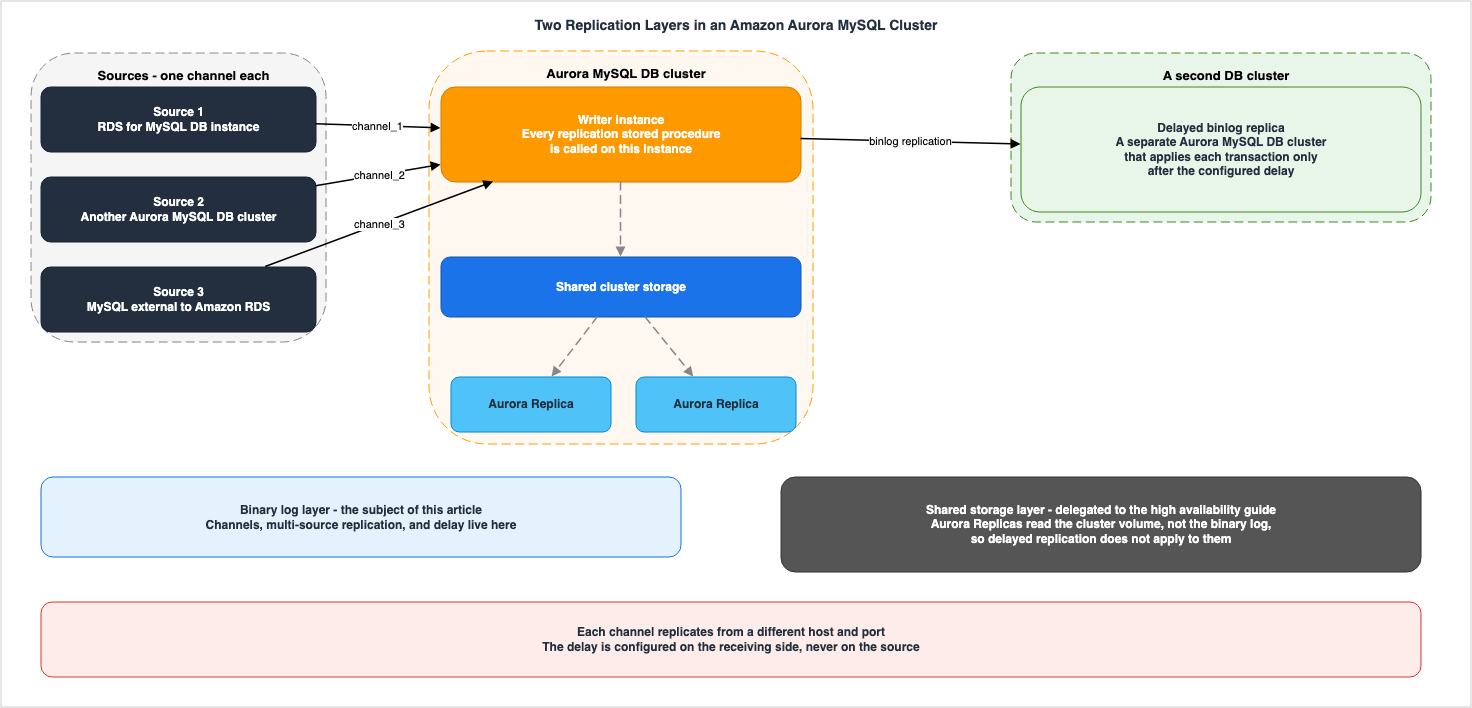
Delayed replication on Aurora MySQL applies to binary log based replication. This includes replication from an
Aurora MySQL writer DB cluster to a binlog replica, from an external MySQL source into an Aurora MySQL DB cluster,
or across multi-source replication channels. It does not apply to Aurora Replicas within a single DB cluster,
because those read from shared cluster storage rather than from the binary log.
The reason clause is the important part. A reader inside the cluster reads shared storage, so there is no apply stage there to delay in the first place. If you want delayed replicas, you will need to provision another cluster and connect it using binary logs.
This has a direct impact on the design. Even if a cluster already has three readers, none of the three can be turned into a delayed replica. Delayed replicas are not selected from an existing cluster; they must be deployed as a new, separate entity.
2.4 The Guide Says the Service Does Not Manage This
On the page detailing the steps for configuring binary log replication, there is a single sentence that perfectly encapsulates the subject of this article.When you use MySQL binary log replication, Amazon RDS doesn't manage the replication process. As a result, you
need to ensure that the binlog files on your replication source are retained until after the changes have been
applied to the replica.While this sentence appears as an introduction to the discussion of retention periods, its scope is broader. In binary log replication, it is the operations team that monitors and determines whether the replication is running, how far it has progressed, and how many seconds it lags. Nothing announces that replication has broken the way a managed read replica's console status would.
The concept of defining your own recovery window stems from this. If the service does not manage something, it does not guarantee it either. Instead, the width of the window is yours to decide.
3. The Unit of Channels
3.1 One Channel = One Host:Port
Multi-source replication is a configuration where a single replica receives binary logs simultaneously from multiple sources. The unit in that configuration is the channel. The MySQL reference manual states that a replica creates a channel for each source. The Aurora user guide's stored procedure reference also repeatedly defines the concept of a channel.Each replication channel receives the binary log events from a single source RDS for MySQL DB instance running on
a specific host and port.And on the page listing limitations for delayed replication, there is the following line:
Each channel must replicate from a different source (host:port combination).One channel corresponds to exactly one source, and two channels cannot point to the same source. You can choose the name for each channel. The user guide examples use names like
channel_1 and channel_2.The wording in the references repays attention. The definition of a channel mentioned above refers to the source as an
RDS for MySQL DB instance. The stored procedure reference pages repeat this phrasing throughout, and it appears in procedure descriptions such as Configures a replication channel on an RDS for MySQL DB instance. However, the pages describing the multi-source replication feature itself list three different types of sources.Each source can be an RDS for MySQL DB instance, another Aurora MySQL DB cluster, or a MySQL database running
external to Amazon RDS.It is the feature page that defines the scope. If you only read the phrasing in the procedure reference, it might seem that the source is limited to RDS for MySQL, but that is not the case.
That constraint has two consequences. First, the number of sources directly determines the number of channels. Second, you cannot configure a single source to be read in two different ways. For example, you cannot create both a channel with no delay and a channel with a three-hour delay from the same source. If you want to do that, you will need to split the replica-side cluster into two.
3.2 The Ceiling Is 15
The maximum number of channels appears in two places in the Aurora user guide. The section on limitations for multi-source replication states:Aurora MySQL supports configuring a maximum of 15 channels for a multi-source replica.The section on delayed replication also lists the same number.
Aurora MySQL supports multi-source replication with up to 15 channels. Use the _for_channel procedure variants to
configure delayed replication on specific channels.
Both pages specify the same value. (The discrepancies discussed in Section 6 do not pertain to this value.)
This limit of 15 directly impacts the consolidation design. A configuration that aggregates 20 shards into a single Aurora cluster is not feasible in its current form. You will need to either segment the shards, split the cluster, or aggregate the source data first.
3.3 The Default Channel Is a Channel with an Empty Name
Configurations that utilize a channel and those that do not are not fundamentally different. There is a description clarifying this relationship in the reference documentation for stored procedures. The usage notes ofmysql.rds_set_source_delay state:This is a wrapper that calls mysql.rds_set_source_delay_for_channel with an empty channel name (default channel).When a channel name is not specified in the traditional method, it is equivalent to specifying a channel with an empty name. Read that way, the channel is not a unit introduced for multi-source replication. It is the default channel that already existed, now able to carry a name.
This interpretation is useful because it clarifies the relationship between the procedures. Versions with
_for_channel appended and those without perform the same operation, but on different targets. The version without the suffix operates on the default channel, while the version with the suffix operates on a channel with a specified name.However, there is one instance where this correspondence is broken. This will be discussed in Section 6.
3.4 The Channel Lives on the Writer
The multi-source replication page carries a note on where replication lands.Multi-source replication on Aurora MySQL uses the writer (primary) instance of the Aurora DB cluster as the
replication target. All replication stored procedures must be called while connected to the writer instance of the
cluster.The same point is emphasized again in the middle of the steps.
All multi-source replication stored procedures must be called while connected to the writer instance of the
Aurora MySQL DB cluster. If a failover occurs, you must reconnect to the new writer instance.
In practice the connection target must not be pinned. Since the cluster endpoint always refers to the current writer, you will need to use that.
How the replication itself is handled during failover is described elsewhere.
If the Aurora MySQL writer instance fails over to a reader, replication channel configurations are preserved on
the cluster's shared storage. After failover completes, the replication threads are automatically restarted on the
new writer instance.
The channel configuration stays on the shared storage, and the threads restart on the new writer by themselves. This is where the two-layer architecture, as discussed in Section 2, proves beneficial. The storage layer's redundancy protects the binary log replication configuration itself.
3.5 Filters Have Two Levels
Replication filters, which restrict which databases and tables are replicated, can be configured at two levels in multi-source replication. The two levels are a global filter set in the cluster's parameter group and a filter configured on an individual channel. The user guide documents the priority order.If a filter is applied both globally and at the channel level, only the channel-level filter is applied for that
channel.In other words, the channel-level filter takes precedence. The global filter and the channel filter are not combined. If you configure even a single filter on a channel, the global settings will no longer apply to that channel.
Another condition that is frequently encountered in practical operation is also described.
You must restart replication after changing channel-level filters.3.6 Adding Channels Adds Threads
The multi-source replication page, in the resource planning section, provides an estimate of the number of threads required.When running multiple replication channels, the total number of replication threads allocated on the replica is:
(replica_parallel_workers + 1 coordinator thread) × number of channels. For example, with the default
replica_parallel_workers value of 4 and 10 channels, Aurora MySQL allocates 50 replication threads.Furthermore, it is not possible to adjust the degree of parallelism for each channel individually.
Each channel receives the same number of parallel workers. MySQL does not support setting different parallel
worker counts per channel.
Channels have aspects that can be configured independently, and aspects that cannot. While delays, filters, and positioning methods can be adjusted on a per-channel basis, the degree of parallelism cannot be changed. When combining high-volume and low-volume sources into the same replica, the degree of parallelism will be allocated equally to both.
4. Delay as a Setting
4.1 What the Seconds Represent
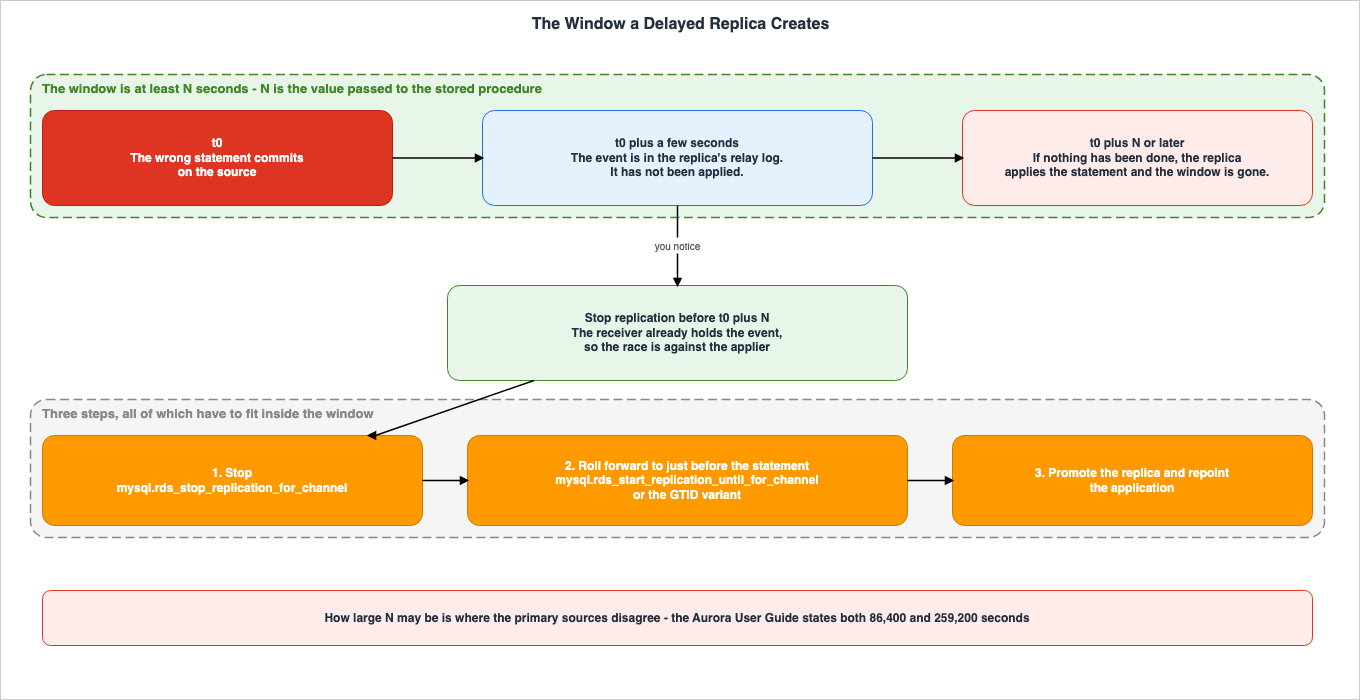
A transaction received from the source is not executed until at least N seconds later than its commit on the
immediate source.
Until N seconds have passed since a transaction was committed in the source, that transaction will not be executed on the replica. So if t is the moment the wrong statement is committed on the source, the replica will not apply it before t plus N. The interval from t to t plus N is the grace period you have to notice and act.
The length of that period is determined solely by the value of N. It does not depend on the nature of the error, the size of the tables, or the volume of traffic. The configured number of seconds is the ceiling itself.
Conversely, this also holds true. If you notice later than N seconds, the delayed replica does nothing for you. The incorrect statement has already been applied, and the replica will be in the same corrupted state as the source. A delayed replica is not a mechanism that repairs what broke. It is a mechanism that holds the pre-break state for N seconds and no longer.
4.2 Implications of the Specified Minimum Value
Both AWS and MySQL documentation describe this time interval as a minimum value. The Aurora user guide, in its description of procedure arguments, states:The minimum number of seconds to delay replication from the source DB instance.The MySQL definition also reads
at least N seconds later. What that guarantees is a lower bound, not an upper bound. While the change will not be applied earlier than N seconds, it may not necessarily be applied exactly at N seconds. If the volume of data being processed is high and the system cannot keep up, the actual delay may exceed N seconds.The asymmetry works in your favor when the delayed replica is there for recovery. The grace period is never shorter than you assumed. However, when using a delayed replica as a reference to read data from N seconds in the past, it is not guaranteed that the data will accurately reflect that exact point in time.
4.3 The Delay Falls on the Applier
There is one place here where the documentation is easy to read the wrong way.In MySQL's architecture, replication operates in two stages. There is the receiver, which takes events from the source and writes them into the relay log, and the applier, which reads the relay log and executes them. Only the applier is delayed. The receiver keeps reading regardless of the delay. As the MySQL reference manual puts it, a transaction is
not executed until the delay has elapsed, so what is deferred is execution, not reception.In contrast, the Aurora user guide's page on delayed replication begins the recovery procedure with the following statement:
Stop replication to the read replica before the source sends the change that caused the disaster.The phrase
before the source sends can be read as implying that the delay relates to what the source has not yet sent. But what a delayed replica actually races is not the transmission. By the time you notice, the event carrying the wrong statement has already reached the replica's relay log. What has to be stopped is the applier, and mysql.rds_stop_replication serves that purpose by halting replication.This distinction becomes critical in practical scenarios. Even if you interrupt the path between the source and the replica after detecting an error, you will not gain any additional time. This is because the events have already reached the replica. The only way to gain time is by adjusting the delay setting, which, as described later, requires stopping replication.
The MySQL reference manual also states explicitly that stop and start operations ignore any existing delay.
START REPLICA and STOP REPLICA take effect immediately and ignore any delay. RESET REPLICA resets the delay to 0.Finally, in the context of this article, the last sentence should be read as a warning: Resetting replication will set the delay to zero. If you do not reconfigure it, that replica will no longer function as a delayed replica.
4.4 How to Read the Lag of a Delayed Replica
The first difficulty in monitoring a delayed replica is that the delay you configured shows up as lag. MySQL reports the state in three fields.| Field | Description |
|---|---|
SQL_Delay | The configured delay in seconds. |
SQL_Remaining_Delay | The number of seconds remaining to wait while in the waiting state. NULL when not in the waiting state. |
Replica_SQL_Running_State | While waiting, Waiting until SOURCE_DELAY seconds after master executed event |
In other words, when a delayed replica is working correctly, its applier is sitting in a wait state. If your monitoring system is configured to trigger an alert based on this state, the delayed replica will continuously generate alerts.
Aurora also provides observation tools. The multi-source replication page states that you can collect delay information for each channel as a CloudWatch metric.
Monitor the ReplicationChannelLag CloudWatch metric for each replication channel. This metric provides per-channel
replication lag data with a 60-second period and is available for 15 days.
The dimensions are the cluster instance identifier and the channel name. Each channel is displayed separately, allowing you to differentiate which source is contributing to the delay in configurations that aggregate data from multiple sources.
To view the status of each channel using SQL, you will need to use a syntax that specifies the channel name.
SHOW REPLICA STATUS FOR CHANNEL 'channel_1'\GThe user guide lists the fields to watch: whether the I/O thread and the SQL thread for the channel are running, the lag in seconds, the most recent error, and how far the channel has read and applied.
4.5 To Change It, You Have to Stop It
To change the delay time after creating a replica, you must stop the replication process. The user guide outlines the procedure in four steps: connect to the replica as an administrator, stop the replication, set the delay, and then start the replication. Setting the delay while replication is running fails, and the user guide documents the error text.You can't set replication delay because replication is running. First call mysql.rds_stop_replication.When specifying a channel, use the
_for_channel version for both stopping and starting.CALL mysql.rds_stop_replication_for_channel('channel_1');
CALL mysql.rds_set_source_delay_for_channel(3600, 'channel_1');
CALL mysql.rds_start_replication_for_channel('channel_1');The requirement to stop the replication when changing a channel setting is not limited to delay settings. The list of constraints on the delayed replication page also includes a similar statement.
Stop replication before modifying the channel configuration.This limitation may impact operations in emergency situations. Even if you realize an error and want to increase the delay, you must first stop the replication to make the change. Stopping the replication will eventually allow you to achieve your goal, but extending the delay does not extend the grace period. Events that already reached the relay log will not be erased, even if you increase the delay.
5. Building Channels
5.1 Twelve Procedures
There are twelve stored procedures that handle multi-source replication channels. The reference page states the version floor at the top.These stored procedures are available with Aurora MySQL version 8.4.8 and higher.The roles of these twelve procedures are as follows:
| Procedure | Number of Arguments | Role |
|---|---|---|
mysql.rds_set_external_source_for_channel | 8 | Configures the channel with specified binary log coordinates. |
mysql.rds_set_external_source_with_auto_position_for_channel | 7 | Configures the channel using GTID auto-positioning. |
mysql.rds_set_external_source_with_delay_for_channel | 9 | Configures the channel with specified coordinates and a delay. |
mysql.rds_reset_external_source_for_channel | 1 | Deletes the channel. |
mysql.rds_set_source_auto_position_for_channel | 2 | Switches the positioning method. |
mysql.rds_set_source_delay_for_channel | 2 | Modifies the delay of an existing channel. |
mysql.rds_start_replication_for_channel | 1 | Starts replication. |
mysql.rds_start_replication_until_for_channel | 3 | Starts replication and stops at the specified coordinates. |
mysql.rds_start_replication_until_gtid_for_channel | 2 | Starts replication and stops at the specified GTID. |
mysql.rds_stop_replication_for_channel | 1 | Stops replication. |
mysql.rds_next_source_log_for_channel | 2 | Advances to the next binary log. |
mysql.rds_skip_repl_error_for_channel | 1 | Skips one replication error. |
The procedures become distinct only when considering the suffixes.
mysql.rds_set_source_delay and mysql.rds_set_source_delay_for_channel are separate, and so are mysql.rds_set_external_source_with_delay and mysql.rds_set_external_source_with_delay_for_channel.Among the versions that take no channel name, only two carry Aurora MySQL 8.4.8 as their floor. The list of stored procedure references includes version notes as they are.
mysql.rds_set_external_source_with_delay (Aurora MySQL version 8.4.8 and higher)
mysql.rds_set_source_delay (Aurora MySQL version 8.4.8 and higher)
The remaining replication-related procedures have existed since earlier versions. It appears that only two were added in version 8.4.8 - those related to delay.
5.2 Argument Order
The procedures in that table accept positional arguments. There is no option to specify arguments by name. The three that configure a channel take between seven and nine arguments, and because the arrangements are so similar, there are combinations in which the wrong order still parses. Here's a listing of the arguments:CALL mysql.rds_set_external_source_for_channel (
host_name
, host_port
, replication_user_name
, replication_user_password
, mysql_binary_log_file_name
, mysql_binary_log_file_location
, ssl_encryption
, channel_name
);CALL mysql.rds_set_external_source_with_delay_for_channel (
host_name
, host_port
, replication_user_name
, replication_user_password
, mysql_binary_log_file_name
, mysql_binary_log_file_location
, ssl_encryption
, delay
, channel_name
);CALL mysql.rds_set_external_source_with_auto_position_for_channel (
host_name
, host_port
, replication_user_name
, replication_user_password
, ssl_encryption
, delay
, channel_name
);When these three are listed together, the structure becomes clearer. For versions that incorporate a delay, the
delay argument appears immediately after ssl_encryption, rather than after the coordinate arguments. Furthermore, in versions with GTID auto-positioning, the entire argument list shifts two positions forward due to the absence of the two coordinate arguments.The third of the three needs particular attention. Anyone used to the coordinate version will want to pass a file name as the fifth argument, but that position holds
ssl_encryption. Even if you pass a numerical value, it will be accepted as a valid type and interpreted as an encryption specification.5.3 Authentication and TLS
The reference page for multi-source replication includes a note about authentication at the beginning. This configuration is prone to failure if left at its default settings, making it the most likely point of issue.When using stored procedures to manage replication with a replication user configured with
caching_sha2_password, you must configure TLS by specifying ssl_encryption=1. caching_sha2_password is the default
authentication plugin for MySQL 8.4.On the other hand, the default value for the
ssl_encryption parameter is described as follows:A value that specifies whether Secure Socket Layer (SSL) encryption is used on the replication connection. 1
specifies to use SSL encryption, 0 specifies to not use encryption. The default is 0.When combined, this creates a situation where users replicating using the default authentication plugin from version 8.4 will be unable to connect if the parameter remains at its default value.
In one place, copying an example straight out of the documentation leads to trouble. The delayed replication example found in the multi-source replication procedure reference passes
ssl_encryption a value of 1, while the example on the delayed replication feature page passes a value of 0. These are examples using the same parameter for a similar purpose. If the replicating user is using the default authentication plugin from version 8.4, simply copying the latter example will not allow a connection. It is safer to refer to the examples in the procedure reference rather than those on the feature page.There is another instance where a parameter with the same name has a different meaning. In the GTID auto-positioning procedures that take no channel name,
ssl_encryption is not implemented.This option isn't currently implemented. The default is 0.The same page notes the alternative.
Use mysql.rds_set_binlog_source_ssl (Aurora MySQL version 3) to enable SSL for binary log replication.The
ssl_encryption argument takes effect in some procedures and not in others. Do not assume behavior based solely on the parameter name.Regarding certificate validation, it is explicitly stated that this functionality is not available.
The SOURCE_SSL_VERIFY_SERVER_CERT option isn't supported. This option is set to 0, which means that the connection
is encrypted, but the certificates aren't verified.
While encryption is performed, server certificate validation is not. Any guarantees against man-in-the-middle attacks rely on the trustworthiness of the path itself. The design of the path - whether it stays inside one VPC, crosses VPC peering or a transit gateway, or runs inside a VPN - directly determines the basis for trust.
The necessary permissions for the replicating user are also described. On the source side, grant the user
REPLICATION CLIENT and REPLICATION SLAVE privileges. The user guide recommends using a dedicated account for replication.5.4 Coordinates or GTID
There are two methods for specifying the starting position when configuring a channel: using binary log coordinates or using GTID-based auto-positioning.When using coordinates, you read the current position on the source and pass it in. The method for obtaining this position varies depending on the MySQL version.
SHOW BINARY LOG STATUS;The user guide notes that this syntax is for MySQL 8.4, and that earlier versions used a different syntax.
Previous versions of MySQL used SHOW MASTER STATUS instead of SHOW BINARY LOG STATUS. If you are using a MySQL
version before 8.4, then use SHOW MASTER STATUS.
If the source is running an older version than 8.4, it will use the older syntax. In multi-source replication, where multiple sources exist, if each source has a different version, you will need to use a different syntax for each source.
The documentation is not lined up here either. The documentation for the procedure
mysql.rds_set_external_source_with_delay, introduced in 8.4.8, which does not accept a channel name, only mentions SHOW MASTER STATUS as a method for obtaining coordinates, and does not address the syntax differences across versions. Consequently, the documentation for a procedure that is only available in 8.4.8 refers to an older syntax.When using GTID-based auto-positioning, the two arguments related to coordinates are no longer required. Instead, you need to ensure that the parameters are consistent between the source and replica.
When using GTID auto-positioning, ensure that the gtid_mode and enforce_gtid_consistency parameters are configured
consistently across all source instances and the Aurora MySQL cluster.
The phrase
across all source instances is a condition specific to multi-source configurations. It is not permissible to have only one source enabled with GTID.The positioning method can be switched later. Passing
0 to mysql.rds_set_source_auto_position_for_channel will use coordinates, while passing 1 will use GTID. The default is 0. However, this switch has side effects.This procedure restarts replication on the specified channel to apply the specified auto position mode.Switching the method requires restarting replication.
The choice between these methods also affects subsequent recovery procedures. The operation of advancing to a specific position and stopping, which is discussed in Section 7, uses different procedures depending on whether you are using the coordinate-based or GTID-based method.
5.5 Other Prerequisites
Here are some prerequisites that must be met before configuring channels.Enable
autocommit. Many of the multi-source replication procedures list this as a critical requirement. Set autocommit to 1 in the cluster's parameter group.Enable binary logging. This is disabled by default in Aurora MySQL. You can enable it by setting the
binlog_format parameter in the source cluster.Set the binlog_format DB cluster parameter to ROW, STATEMENT, or MIXED. MIXED is recommended unless you have a
need for a specific binlog format. (The default value is OFF.)Since the default parameter group cannot be modified, create a custom parameter group and associate it with the cluster. A restart is required if you are changing from disabled to enabled.
Use InnoDB. The Aurora user guide explicitly states this as a requirement.
When you replicate between Aurora MySQL and MySQL, make sure that you use only InnoDB tables.Certain cluster types are not supported. The documentation also notes that some Aurora clusters do not support binary log replication.
You can't use binlog replication to or from certain types of Aurora DB clusters. In particular, binlog replication
isn't available for Aurora Serverless v1 clusters.
The phrase
certain types leaves open the possibility that clusters other than the named Aurora Serverless v1 are also affected. The user guide shows how to check: if SHOW REPLICA STATUS returns no results, confirm whether the cluster supports binary log replication.Ensure network connectivity. In multi-source replication, the replica's writer must be able to connect to all sources. The user guide highlights a consideration related to having multiple sources.
Because multi-source replication involves multiple sources, you must verify connectivity to each source
independently. Ensure that security groups and routing accommodate all source endpoints simultaneously.
6. Where the Primary Sources Contradict Each Other
6.1 Maximum Delay - 86,400 and 259,200
Up to here the argument has been that the delay in seconds sets the ceiling on the window you can go back to. So what is the ceiling on that number of seconds?The Aurora user guide lists two different values.
The delayed replication page states 72 hours, in its list of constraints.
The delay must be between 0 and 259,200 seconds (72 hours).On the same page, the description for the
delay argument of mysql.rds_set_external_source_with_delay also specifies the same range.The minimum delay in seconds (0-259,200).The same page also reiterates this range in the instructions for modifying the delay of existing replicas.
The delay value must be between 0 and 259,200 seconds (72 hours).The reference documentation for the binary log replication stored procedure also lists the same value regarding
mysql.rds_set_source_delay.The limit for this parameter is 259,200 seconds (72 hours).Four other places state the value as one day. The wording is nearly the same in all four, except that one of them writes 86,400 with a comma.
The limit for this parameter is one day (86400 seconds).Three of them appear in the multi-source replication procedure reference. The fourth appears in the binary log replication procedure reference, against
mysql.rds_set_external_source_with_delay.The final instance is particularly relevant. This procedure appears on the same page as
mysql.rds_set_source_delay, which is listed as 259,200 seconds immediately above. Therefore, these two values are not presented on separate pages; instead, they coexist on a single page.To summarize, all of the information presented is based on the Aurora user guide as of September 15, 2026.
| Page | Feature | Maximum Value |
|---|---|---|
| Delayed Replication | List of Constraints | 259,200 seconds (72 hours) |
| Delayed Replication | mysql.rds_set_external_source_with_delay's delay argument | 0 to 259,200 |
| Delayed Replication | Modifying the delay of an existing replica | 259,200 seconds (72 hours) |
| binlog Replication Procedure | mysql.rds_set_source_delay | 259,200 seconds (72 hours) |
| binlog Replication Procedure | mysql.rds_set_external_source_with_delay | 86,400 seconds (1 day) |
| Multi-Source Procedure | mysql.rds_set_source_delay_for_channel | 86,400 seconds (1 day) |
| Multi-Source Procedure | mysql.rds_set_external_source_with_delay_for_channel | 86,400 seconds (1 day) |
| Multi-Source Procedure | mysql.rds_set_external_source_with_auto_position_for_channel | 86,400 seconds (1 day) |
The difference is a factor of three. And what differs is the ceiling on the recovery window itself.
Rows 2 and 5 in the table refer to the same procedure. The feature page states a range from 0 to 259,200, while the procedure reference states 1 day. This is not due to whether a channel is used, nor is it because they are different procedures. One argument of one procedure carries two different ceilings.
MySQL itself imposes no such limit. The reference manual's description of
SOURCE_DELAY states:interval must be a nonnegative integer in the range from 0 to 2^31-1. The default is 0.Both 86,400 and 259,200 are values set by AWS.
6.2 The Wrapper and the Procedure It Wraps
If this discrepancy could be read as a limit that differs according to whether a channel is used, the matter would be simple. One more sentence resists that reading. The line quoted back in Section 3 does the work here.This is a wrapper that calls mysql.rds_set_source_delay_for_channel with an empty channel name (default channel).mysql.rds_set_source_delay is specified as 259,200, while mysql.rds_set_source_delay_for_channel, which it calls, is specified as 86,400. The same page states that the caller and callee share the same arguments, making it difficult to construct a consistent interpretation that accommodates both limits.There is no discernible pattern to the differences. It seems plausible to suggest that a procedure that only sets the delay is 259,200, while a procedure that sets both the source and the delay is 86,400. However,
mysql.rds_set_source_delay_for_channel is described as a procedure that only sets the delay, and it is specified as 86,400. Neither the presence nor absence of a channel, nor the function of the procedure, can explain the difference in values.As a point of reference, the value 86,400 also appears in the RDS for MySQL user guide. It refers to the
source delay configuration parameter for mysql.rds_set_configuration, where the limit is set to one day. That is only the fact that the same value appears elsewhere, and it settles nothing about which value is correct. This article does not identify the root cause.6.3 The Same Page Also Says the Feature Does Not Exist
Aside from the discussion of limits, there is another issue. The reference documentation for the binary log replication procedure contains a statement, appearing in two places, that Aurora MySQL does not support delayed replication.This procedure doesn't configure delayed replication, because Aurora MySQL doesn't support delayed replication.The scope comes first. This statement sits in the usage notes of
mysql.rds_set_external_master_with_auto_position (Aurora MySQL version 2) and mysql.rds_set_external_source_with_auto_position (Aurora MySQL version 3). Both of these procedures belong to a different series than version 8.4.8. Therefore, it is inaccurate to interpret this statement as describing the behavior of version 8.4.8. It simply states that these two procedures do not configure delayed replication.The trouble is in the reason clause. The reason given is that Aurora MySQL does not support delayed replication, and it carries no qualifier. And on the same page,
mysql.rds_set_source_delay (Aurora MySQL version 8.4.8 and higher) and mysql.rds_set_external_source_with_delay (Aurora MySQL version 8.4.8 and higher) are listed in both the table of contents and the main text.So one page lists two procedures that configure delayed replication, while simultaneously stating in two places that the feature does not exist. This description is current as of September 15, 2026.
This is a more serious issue than a simple value discrepancy. A user attempting to verify the availability of this feature through a search could potentially encounter this statement first. The basis for determining whether delayed replication is available in Aurora MySQL should be located on the dedicated page for delayed replication functionality and the announcement from September 3, 2026, rather than on this page.
6.4 The Default Binary Log Retention on the Source - 24 and NULL
One more, and this one sits on the source side.Binary log replication lets you configure how long the source retains its binary logs. You set this by passing
binlog retention hours to mysql.rds_set_configuration. Two pages of the Aurora user guide say different things about the default.The page describing the configuration process states that when you specify no value, the default is 24 hours.
If this setting isn't specified, the default for Aurora MySQL is 24 (1 day).The stored procedure reference, on the other hand, states that the default is
NULL and explains the meaning of NULL in this context.The default value of binlog retention hours is NULL. For Aurora MySQL, NULL means binary logs are cleaned up
lazily. Aurora MySQL binary logs might remain in the system for a certain period, which is usually not longer than
a day.A default of 24 hours, and a default of unset with binary logs cleaned up lazily and usually not longer than a day, are two different claims. The former specifies a retention period. The latter does not guarantee a retention period. This distinction is significant for those planning recovery strategies.
Both pages state that the maximum value is 2160 hours, or 90 days.
The maximum value for Aurora MySQL version 2.11.0 and higher and version 3 is 2160 (90 days).The versions named are 2.11.0 and higher and version 3, not the 8.4 line. The text is reproduced here as it stands, with no interpretation added.
6.5 How to Work With This
This article does not definitively state which approach is correct. This is because the means to make such a determination are not currently available. However, it will outline the impact of these three factors on recovery planning.Regarding Delay Limits: Plans based on delays exceeding 24 hours lack supporting evidence in the available documentation. If you intend to set a delay longer than 24 hours, you should verify whether your cluster's version can actually handle that value before incorporating it into your plan. A simple way to verify this is to pass the value and attempt the operation. You can then determine whether values exceeding the limit are rejected or rounded down using the same process.
Regarding Descriptions of Functionality: When explaining whether delayed replication is available, point at the delayed replication feature page or at the announcement dated September 3, 2026. A single sentence in the procedure reference states the opposite, and referencing only that sentence will lead to misunderstandings.
Regarding Default Retention Periods: It is safer to set these explicitly. Regardless of which documentation you consult, the default retention period, when left to its default, remains only around one day.
The first and the last of those measure different quantities. The delay in seconds is how long the replica holds back its apply; the retention period is how long the source keeps its binary logs. As Section 4 showed, only the applier is delayed; the receiver keeps reading regardless. Therefore, in a steady state, events subject to delay are recorded in the replica's relay log. The source's retention period only comes into play when the receiver stops. This occurs when a channel experiences an error, when the source fails over, when the replica cluster is shut down, or during the initial replication process.
The user guide does not describe this interaction. It describes two separate facts; the arrangement above follows from the MySQL definitions.
7. What You Actually Do When You Go Back
7.1 Three Steps
What do you actually do when you use a delayed replica to roll back? The Aurora user guide's delayed replication page sets it out in three steps at the top.1. Stop replication to the read replica before the source sends the change that caused the disaster. Use the
mysql.rds_stop_replication stored procedure to stop replication.
2. Start replication and specify that replication stops automatically at a log file location. You specify a
location just before the disaster using the mysql.rds_start_replication_until stored procedure.
3. Promote the read replica to be the new source DB cluster by using the instructions in Promoting a read replica
to a DB cluster for Aurora MySQL.The three steps are stop, roll forward, and promote. They are worth taking in order.
7.2 Stop
The first step is to stop replication. If you are using channels, pass the channel name to themysql.rds_stop_replication_for_channel command.There is one thing to hold on to at this stage. Stopping is a race against time, and the opponent is the applier. As Section 4 showed, the event carrying the wrong statement has already reached the replica's relay log by this point. You need to stop the process that is executing those events.
Once replication is stopped, the replica sits somewhere before the wrong statement. How far it got is not knowable. The configured delay is a lower bound, so the actual lag may be larger. That is why the next step is necessary.
7.3 Roll Forward
Starting from a stopped state, proceed until just before the incorrect statement. This utilizes a procedure that automatically stops at the specified location.When specifying using coordinates, the format is as follows:
CALL mysql.rds_start_replication_until_for_channel(
  'mysql-bin-changelog.000777',
  120,
  'channel_1'
  );
With GTID it is a different procedure, and the user guide says so.
If you are using GTID-based replication, use the mysql.rds_start_replication_until_gtid stored procedure instead.Furthermore, the GTID version has a prerequisite that the coordinate version does not. This is a condition that, if encountered during the recovery process, can unexpectedly halt progress, so it is worth putting down in advance.
Before you run this procedure, you must disable multi-threaded replication by setting the value of
replica_parallel_workers or slave_parallel_workers to 0.
The operation of proceeding with GTID is only available after parallel application has been stopped.
replica_parallel_workers is a parameter that appeared during the thread estimation discussed in Section 3, and it lives in the cluster's parameter group. The decision made in Section 5 to select GTID for positioning increases the number of parameter adjustments required during the recovery process. This prerequisite is not documented for the coordinate-based version.The GTID version also separately documents the behavior when the specified location refers to a point in the past.
When the gtid parameter specifies a transaction that has already been run by the replica, replication is stopped
immediately.
When the stop point is reached, Aurora emits an event. Its wording is documented as well.
Replication has been stopped since the replica reached the stop point specified by the
rds_start_replication_until stored procedure
The reference notes two things about how this operation behaves. The first is that the applier is not the only thing that stops.
This procedure stops both the SQL_THREAD and IO_THREAD.The second point concerns the behavior when the specified location has already been passed.
When the replication_stop_point parameter specifies a stop location that's in the past, replication is stopped
immediately.
It is not possible to overshoot, nor is it possible to revert. If you inadvertently proceed too far, this procedure cannot be used to go back.
Here, the choice of positioning method, which was discussed in Section 5, becomes relevant. Whether you name the point immediately before the incorrect statement in coordinates or in GTIDs is already settled before you get here. The process of identifying the location of the incorrect statement involves reading the binary log on the source side. The method you chose when configuring the channel fixes the unit in which you identify that location.
7.4 Promote
The final section discusses promotion. The user guide points to a page describing how to promote a read replica to a new source DB cluster.This is an area that requires careful attention. Where the Aurora user guide sets out a promotion procedure, the subject is a replica relationship that RDS itself manages: an Aurora read replica created from an RDS for MySQL DB instance, or a cross-Region Aurora replica. However, the channels configured using the stored procedures described in this article are not recognized as replication relationships from the RDS perspective. The replica cluster is an independent cluster that operates its own replication threads.
It was not possible to definitively determine from the original documentation whether the operation equivalent to promotion involves using the console or API, or whether it requires stopping replication and changing the application's connection target. This remains unverified. If you intend to build a delayed replica into your recovery path, this is the one step to rehearse on your own configuration first. Of all the steps you could end up discovering in the middle of a recovery, this is the most dangerous one.
Regarding stopping replication, the process is clear. The page describes stopping binary log replication by calling
mysql.rds_stop_replication on the replica. To delete the channel, use mysql.rds_reset_external_source_for_channel, which has potential side effects.This procedure deletes all relay logs that belong to the channel being removed.The relay logs will also be deleted. It is not possible to disconnect while leaving the possibility of resuming the process later.
7.5 The Delay Is Per Channel, the Promotion Is Per Cluster
Delays are configured on a channel-by-channel basis. As with the_for_channel version, you can configure a setup where Channel 1 has no delay, while Channel 2 has a 3-hour delay.In contrast, promotion operates at the cluster level. Performing an operation that utilizes the replica cluster as a new source applies to the entire cluster. There is no mechanism to apply promotion to data originating from a specific channel only.
Therefore, when aggregating multiple sources into a single cluster while also using that cluster as the rollback target for operator error, it becomes unclear which channel's delay determines the recovery timeframe. This is because if you want to recover from an error originating from Source A, data from Source B's channel might be progressing without any delay.
This is not a constraint explicitly stated in the documentation, but rather a consequence derived from two facts. That the delay is per channel and that promotion is per cluster are each documented in the primary sources. The documentation does not describe what happens when these two are combined.
In practice it is cleaner to keep the multi-source configuration used for consolidation and the delayed replica used for recovery on separate clusters. As Section 3 showed, two channels cannot point at the same source. Therefore, the cluster used for consolidation and the cluster used for the delayed replica each connect to the sources on their own.
8. What This Window Does Not Cover
8.1 A Snapshot Does Not Carry the Channel Configuration
The following text appears in the troubleshooting section for multi-source replication pages:DB cluster snapshots don't include multi-source channel configurations.Cluster restorations from snapshots do not retain channel settings. The user guide outlines the necessary steps after restoration. These include reconfiguring each channel, noting that GTID-based replication can automatically resume from where it left off, and, if using coordinates, comparing the source's binary logs with the final applied transaction on the restored cluster to determine the current position.
This section again references the method of positioning, as discussed in Section 5. The choice of whether to use GTID significantly impacts the effort required to recover after a restoration.
8.2 Nothing Detects Conflicts
In a multi-source replication scenario, where writes from multiple sources arrive for the same table, what happens? The user guide is clear.MySQL multi-source replication does not provide conflict detection or resolution. You must ensure that changes
from different sources are non-conflicting.The MySQL reference manual states the same thing.
Multi-source replication does not implement any conflict detection or resolution when applying transactions, and
those tasks are left to the application if required.
It is the responsibility of the application design to prevent conflicts. The user guide suggests several approaches, including separating databases or tables for each source, using replication filters to limit the scope of responsibility for each channel, and, if necessary, changing schema names.
Furthermore, it also outlines methods to prevent applications connected directly to the replica from writing data.
CALL mysql.rds_set_read_only(1);If anyone can write to the cluster you set aside as a rollback target, it is not a rollback target. This single sentence is practically essential for any configuration that keeps a delayed replica for recovery.
8.3 The Operation That Deletes the Configuration Cannot Be Undone
The MySQL note quoted in Section 4 is worth putting down again here.RESET REPLICA resets the delay to 0.On the Aurora side, the corresponding action not only sets the delay to zero, but also deletes the channel entirely.
Stops the replication process on the specified channel, and removes the channel and associated configurations
from the multi-source replica.
Relay logs are also deleted. The delayed replica configuration is lost with a single action. Furthermore, this loss may go unnoticed until the next accidental modification.
SQL_Delay shows whether a delay is set, so the configuration itself belongs under monitoring.8.4 What Enabling Binary Logging Takes From You
Binary log replication cannot begin unless binary logging is enabled on the source database. In Aurora MySQL, it is disabled by default and enabling it requires a restart.The process for disabling binary logging is also documented. To disable it, set the retention period to
NULL, set binlog_format to OFF, and then restart. Note that 0 is not a usable value for binlog retention hours.So the decision to place one delayed replica is both a decision to add a cluster on the replica side and a decision to change a setting on the source cluster and restart it. Building your own rollback target means touching production as well.
8.5 Building Your Own Window Costs You the Built-In One
The restriction touched on in Section 1 is worth counting here. These two can be configured together. What breaks is using them.The list of Backtrack limitations states plainly that binary log replication itself can be enabled. What it prohibits is creating cross-Region read replicas. The same list then states that running Backtrack on a cluster with binary logging enabled raises an error, and that forcing it breaks the downstream read replicas.
The page on performing a backtrack carries the consequence one step further. The changes a forced backtrack makes are not written to the binary log. Not written means the result of the rewind never reaches the downstream replica. The replica keeps applying the old history it already holds, and ends up in a state that differs from the source.
So rolling production back with Backtrack makes the delayed replica unusable as a rollback target at that moment. The reverse holds as well: if the delayed replica is the rollback target you rely on, Backtrack is off the table. Both serve the same end, but one rewinds the cluster itself and the other stands up a second one. You cannot rely on both at once.
Furthermore, Backtrack has limitations regarding when it can be enabled.
Backtracking is only available for DB clusters that were created with the Backtrack feature enabled. You can't
modify a DB cluster to enable the Backtrack feature. You can enable the Backtrack feature when you create a new DB
cluster or restore a snapshot of a DB cluster.
It cannot be added later. Turning Backtrack on for a cluster that does not already have it means building a new cluster from a snapshot. Backtrack itself is available on the 8.4 line.
Backtracking is supported in Aurora MySQL version 2, version 3, and version 8.4.Which window you rely on is a decision made in advance. Of the four methods in the table in Section 1, these two are the pair whose premises break each other.
One caution about which document you are reading. An AWS migration playbook and a re:Post article still carry a stronger wording, stating flatly that Backtrack cannot be used together with binary log replication. For how Aurora behaves, the user guide is the authority. If a search lands you on the stronger version first, read it again against the limitation list in the user guide.
9. Failure Modes
Here's a summary of potential issues that may arise during actual operation.The delay is too short. If the time taken to detect an issue exceeds the configured delay, the delayed replica has already applied the corrupted state. A delayed replica helps only with the mistakes noticed inside the configured delay. For slowly progressing logical corruption, the clock that matters runs from the first bad transaction, not from the point at which the damage became visible.
Assuming that extending the delay extends the grace period. It does not. Events already in the relay log do not disappear when you change the delay setting, and changing that setting requires stopping replication first.
Trying to run two channels off the same source. This is not possible. Each channel must use a different
host:port combination. If you want to have both delayed and non-delayed replication from the same source, you need to separate the replica's cluster.Calling with
ssl_encryption left at its default. The default value for ssl_encryption will prevent connection when using the default authentication plugin in MySQL 8.4. The default value is 0, and the required value is 1.Copying a user guide example verbatim. The examples in the user guide have varying values for
ssl_encryption depending on the page. The argument positions also differ between examples that use delay and those that do not, and between those that use coordinates and those that use GTID. When copying, be sure to verify the order of the arguments.Operating on several channels at once. The user guide explicitly instructs users to perform operations one at a time. It states that you should avoid making changes to multiple channels simultaneously from separate connections.
Stopping on error 1236. The user guide describes this error as
log file not found and gives a recovery method using mysql.rds_next_source_log_for_channel to proceed to the next binary log. The error text the same page shows as an example is Client requested master to start replication from impossible position. What the cases share is that the requested position is not present on the source, but the cause is not a single one. There are cases where the log is missing due to an insufficient retention period, and cases where the position itself is invalid. The retention period setting is a solution for the former, but it will not resolve the latter.Stopping when you try to roll forward by GTID. Procedures that specify GTID require you to set
replica_parallel_workers or slave_parallel_workers to 0 before execution. This requirement does not apply to versions that use coordinates. If you are documenting recovery procedures using GTID, be sure to include this parameter change in your steps.A channel stopping because the source failed over. According to the user guide, you should resume the channel using
mysql.rds_start_replication_for_channel after the source becomes available. If you encounter error 1236, follow the steps for that error above.The delayed replica alerts continuously. A delayed replica is healthy when its applier is waiting and the reported lag sits around the configured number of seconds. Applying an ordinary lag threshold to it makes it alert forever.
Writes landing on the rollback target. A replica that has not been set to read-only is not necessarily usable as a rollback target.
Restoring from a snapshot and finding the channels gone. A snapshot does not carry the channel configuration.
Running Backtrack and destroying the delayed replica. Forcing a backtrack on a cluster with binary logging enabled breaks the downstream read replicas. If a delayed replica is the rollback target you rely on, Backtrack has become a method you cannot use.
Never having rehearsed the promotion step. This is the step this article leaves unverified. Avoid attempting this procedure for the first time during a recovery process.
10. Frequently Asked Questions
Should a delayed replica or point-in-time recovery be chosen?
These options are not mutually exclusive. A delayed replica holds a copy of the data as it stood a specific number of seconds in the past. Point-in-time recovery, on the other hand, lets you pick any point inside the retention period. The Aurora user guide states that delayed replication offers a faster recovery path, but that comparison assumes the conditions under which each one applies are different.Can a reader inside the cluster be made a delayed replica?
No. Delayed replication applies only to binary log replication, and readers in the same cluster read shared storage. To implement a delayed replica, you need to set up a separate cluster and connect it using binary log replication.What is the ceiling on the delay?
The Aurora user guide lists two different values. There are four instances where it states 259,200 seconds, and four instances where it states 86,400 seconds. For one procedure, both values appear. The information is current as of September 15, 2026. This article does not determine which value is correct. If a plan depends on a delay longer than 24 hours, confirm the value against your own cluster's version before building it in.How many channels can be configured?
Fifteen. The multi-source replication page and the delayed replication page carry the same value.Can the delay be set per channel?
Yes. The_for_channel variants set the delay in seconds on an individual channel. Since promotion acts on a cluster, however, you cannot pick a rollback target per channel.Can the delay be configured from the console or the CLI?
No. The user guide explicitly states that delays must be configured using stored procedures, and that they cannot be set using the management console, the AWS CLI, or the Amazon RDS API.Can a delayed replica be used without multi-source replication?
Yes. There are procedures that take no channel name. However, the user guide itself states that calling this procedure is equivalent to specifying a channel with an empty name.Can a delayed replica roll back a blue/green switchover?
In part. The Aurora user guide lists blue/green deployments, as well as upgrades, as use cases for delayed replication. Rolling back the switchover itself, however, belongs to Section 6 of the published Zero-Downtime Database Change on RDS and Aurora. That section states that the previous environment survives as a frozen copy, that no service operation reverses a completed switchover, and that keeping the rollback target current means re-establishing replication from the new production environment back to the old one, which is an AWS-published pattern rather than a service feature.In which Regions is this available?
The AWS announcement states that it is available in all AWS Regions where Aurora MySQL is available. It was posted on September 3, 2026.Can Backtrack and a delayed replica both be held?
As configurations, yes. The list of Backtrack limitations states plainly that binary log replication itself can be enabled. What does not work is not coexistence but concurrent use. Running Backtrack on a cluster with binary log replication active raises an error, and forcing it breaks the downstream read replicas. A forced backtrack also writes nothing to the binary log, so the result of the rewind never reaches the replica. Which of the two you rely on as the rollback target is decided in advance.Why does a page say the feature is not supported when delayed replication is supported?
That sentence sits in the documentation for the GTID auto-positioning procedures of Aurora MySQL version 2 and version 3, and it was still there on September 15, 2026. What the sentence is scoped to is that those two procedures do not configure a replication delay. The reason clause attached to it carries no qualifier, though, so read on its own it makes the feature look absent. For whether the feature exists, use the delayed replication feature page and the announcement of September 3, 2026.11. Summary
Aurora MySQL replication has two layers: replication on shared storage and replication based on the binary log. Delayed replication applies only to the latter, and the user guide gives the reason: a reader inside the cluster reads from shared cluster storage rather than from the binary log. If you require a delayed replica, you will need to provision an additional cluster.Inside that layer, the unit is a channel. Each channel corresponds to a single source, with a maximum of 15, and the default channel is one with an empty name. The delay, the filters, and the positioning method can all be set per channel; the degree of parallelism is shared, and the target of a promotion is the cluster.
The delay in seconds is not the time a recovery takes. It is the interval between the commit on the source and the apply on the replica, which is the length of the grace period you have to notice and act. What is guaranteed is a lower bound, not an upper one. What lags is the apply, not the receive, so the event carrying the wrong statement is already on the replica by the time you notice. The race is against the applier.
Regarding how far you can extend this window, the primary documentation is inconsistent. The ceiling on the delay is written as 86,400 seconds in some places and 259,200 seconds in others, and for one procedure both values appear. The longer of the two is attached to the procedure the same page explicitly describes as a wrapper around the other. The default binary log retention period on the source is also described as either 24 hours or undefined. And the same user guide still carries a sentence saying that Aurora MySQL does not support delayed replication. All of these details are current as of September 15, 2026, and this article does not attempt to determine which, if any, of these statements are correct.
This situation highlights one key point: the limits are not defined by guarantees provided by the service. Regarding binary log replication, the user guide itself states,
Amazon RDS doesn't manage the replication process. What is not managed cannot be guaranteed. Instead, you define the limits. You determine the delay in seconds, the number of channels you provision, the retention period in hours, and whether to make it read-only, all from the values you pass.However, this decision comes with a trade-off. Forcing a backtrack on a cluster with binary log replication enabled breaks the downstream read replicas. The moment you use the built-in window, the window you built yourself is gone. They can be configured together; only one of them can be relied on.
A rollback target is not something you are given. It is something you place. And whether what you placed really works as one is settled not when you go back, but right after you put it there.
12. References
- Configure multi-source replication for Amazon Aurora MySQL - Amazon Aurora User Guide
- Configure delayed replication with Amazon Aurora MySQL - Amazon Aurora User Guide
- Managing multi-source replication - Amazon Aurora User Guide
- Configuring, starting, and stopping binary log (binlog) replication - Amazon Aurora User Guide
- Setting and showing binary log configuration - Amazon Aurora User Guide
- Replication between Aurora and MySQL or between Aurora and another Aurora DB cluster (binary log replication) - Amazon Aurora User Guide
- Setting up binary log replication for Aurora MySQL - Amazon Aurora User Guide
- Stopping binary log replication for Aurora MySQL - Amazon Aurora User Guide
- Backtracking an Aurora DB cluster - Amazon Aurora User Guide
- Performing a backtrack for an Aurora MySQL DB cluster - Amazon Aurora User Guide
- Database engine updates for Amazon Aurora MySQL version 8.4 - Amazon Aurora MySQL Release Notes
- Amazon Aurora MySQL now supports multi-source replication and delayed replication - AWS What's New
- Amazon Aurora MySQL 8.4.8 (compatible with MySQL 8.4.8) is now generally available - AWS What's New
- Delayed Replication - MySQL 8.4 Reference Manual
- Multi-Source Replication - MySQL 8.4 Reference Manual
- CHANGE REPLICATION SOURCE TO Statement - MySQL 8.4 Reference Manual
References:
Tech Blog with curated related content
Written by Hidekazu Konishi